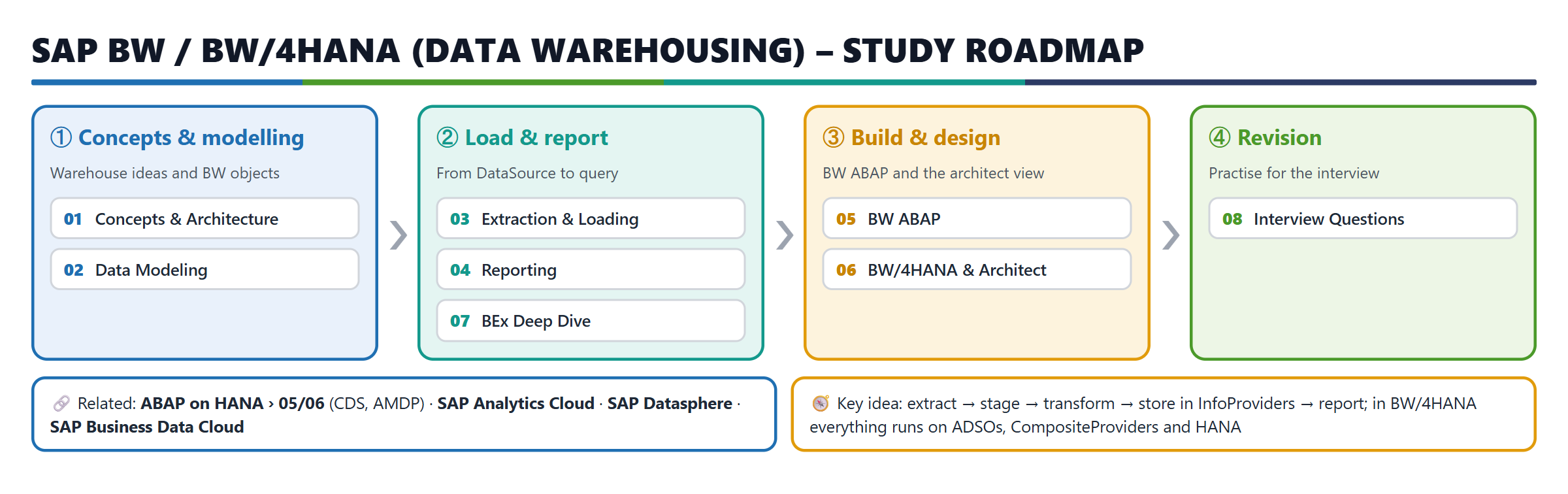
Your SAP BW / BW/4HANA (Data Warehousing) notes at architect and technical-consultant depth, organised into 7 topic pages in study order. Start here, follow the roadmap, and use the links to jump to a page.
Pages in this section
Page | What you learn |
|---|---|
DWH concepts, data marts, BW layers, LSA++, BW vs BW/4HANA vs Datasphere, metadata | |
InfoObjects, master data, InfoCubes / DSOs (classic), ADSO, CompositeProvider, Open ODS views, HANA views | |
DataSources, business content, ODP and CDS extraction, delta, transformations, DTP, process chains | |
BEx / BW queries, variables, Analysis for Office, SAC on BW, authorizations, performance | |
Generic extractors, DataSource enhancement, routines, AMDP transformations, variable exits, BAdIs | |
Embedded BW, BW/4HANA conversion, Datasphere and Business Data Cloud, design decisions | |
BEx Query Designer and BW Modeling Tools, restricted / calculated key figures, structures and cells, BEx Analyzer, WAD, broadcasting, RRI | |
Every page's interview questions in one place for revision |
Related: ABAP on HANA › 05 CDS Views and 06 AMDP; SAP Analytics Cloud (reporting on BW); SAP Datasphere and SAP Business Data Cloud (BW bridge, BW private cloud edition, successors); BTP Development › 04.
How to study with these notes
- Order: 01 → 02 explain the warehouse concepts and modelling; 03 → 04 loading and reporting; 05 is the BW ABAP page; 06 BW/4HANA, Datasphere and the architect view.
- Hands-on: test a DataSource in RSA3, look at its definition in RSA6, then follow a load from DataSource → transformation → DTP → ADSO in RSA1 / BW Modeling Tools.
- Revision: use page 08 – cover the answer, answer aloud, then check the page for depth.