Where an ABAP developer works in SAP BW: generic extractors written as function modules, DataSource enhancements (customer exit RSAP0001 or BAdI RSU5_SAPI_BADI), transformation routines (start, field, end and expert routines in ABAP or AMDP), variable exits for queries (customer exit RSR00001 or the BAdI RSROA_VARIABLES_EXIT_BADI), DTP and InfoPackage routines and the legacy APD. DataSources, ODP, transformations and DTPs as concepts are on page 03, queries and variables on page 04. General enhancement techniques (SMOD / CMOD, SE18 / SE19): CORE ABAP › 10 Enhancements; AMDP and SQLScript: ABAP on HANA › 06 AMDP & SQLScript.
Part 1 – Where ABAP plugs into BW: t-codes and tables
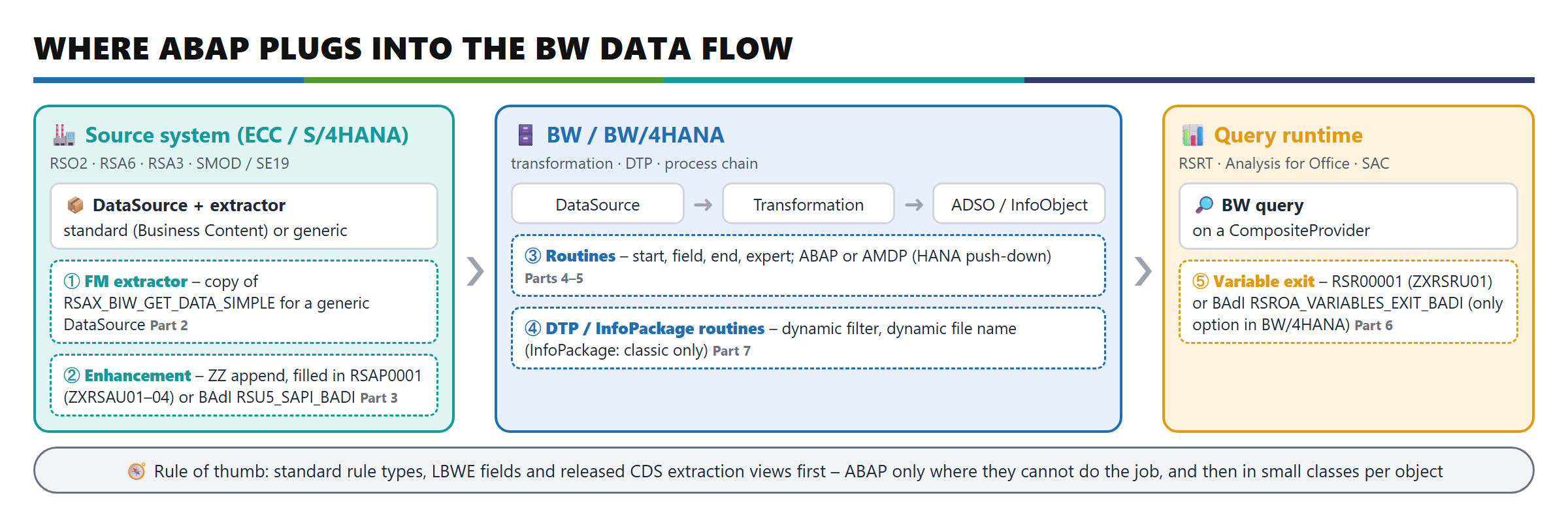
Where | ABAP object | Typical requirement | Part |
|---|---|---|---|
Source system (ECC / S/4HANA) | Function module extractor (generic DataSource) | Data that no standard DataSource and no table / view delivers, logic during extraction | 2 |
Source system | Customer exit RSAP0001 or BAdI RSU5_SAPI_BADI | Fill ZZ fields appended to a standard DataSource | 3 |
BW – transformation | Start, field, end, expert routine (ABAP or AMDP) | Complex filters, derivations, lookups, record splitting | 4, 5 |
BW – DTP / InfoPackage | Filter routine / file name routine | Dynamic selections (last 30 days), dynamic file path | 7 |
BW – query runtime | Variable exit RSR00001 or BAdI RSROA_VARIABLES_EXIT_BADI | Default values, derived values, validations, authorization values | 6 |
1.1 Transactions
T-code | System | What it does |
|---|---|---|
RSA1 | BW | Data Warehousing Workbench (formerly Administrator Workbench): modelling, source systems, DataSources, Business Content, transport connection |
RSA2 | Source | DataSource Repository: displays a DataSource's metadata – extractor, extract structure, fields, delta process |
RSO2 | Source | Create, change and display generic DataSources (table / view, InfoSet query or function module), including the generic delta settings |
RSA3 | Source | Extractor checker: test extraction without BW (full, delta simulation, debug mode, number of records and packages) |
RSA5 | Source | Install (activate) SAP-delivered Business Content DataSources – copies the delivered D version to the active A version |
RSA6 | Source | Post-process (maintain) active DataSources: selection fields, hide / unhide fields, enhance the extract structure (append), field only known in exit |
RSDS | BW | Maintain a DataSource in the BW system (BW 7.x DataSource): create, change, display, activate after replication |
RSA7 / ODQMON | Source | Classic BW delta queue / monitor of the ODP delta queues (ODQ) |
LBWE | Source | Logistics extraction (LO) cockpit for the |
SMOD / CMOD, SE18 / SE19 | Both | Customer exits (RSAP0001, RSR00001) / BAdIs (RSU5_SAPI_BADI, RSROA_VARIABLES_EXIT_BADI) |
RSRT | BW | Query monitor: run and debug a query, also the variable exit (page 04) |
1.2 Tables
Table | Content |
|---|---|
ROOSOURCE | Header table of the source system DataSources (SAP BW OLTP sources): DataSource name, extraction method (e.g. V view, F1 / F2 function module, Q InfoSet query), extractor, extract structure, delta process |
ROOSFIELD | Fields of each DataSource with their selection and hide flags |
Useful trick: when you do not know which program fills a DataSource, read its ROOSOURCE entry (or RSA2) – the EXTRACTOR field names the function module or view.
Part 2 – Generic DataSource with a function module
A generic DataSource is created by the customer in RSO2 when no Business Content DataSource fits. It can be based on a table or database view, on an InfoSet query, or on a function module. Choose the function module when the data needs logic: several tables that a view cannot join, calculations, authorisation-free reads of cluster data, or a delta that a single timestamp cannot express.
Template FM (function group RSAX) | Interface | Delta |
|---|---|---|
RSAX_BIW_GET_DATA_SIMPLE | Simple interface (extraction method F2) – the template you copy for an RSO2 DataSource | The template itself reads everything (full load). Delta works through the RSO2 generic delta: the API passes the delta range of the delta field in I_T_SELECT and your code must use it in the SELECT |
RSAX_BIW_GET_DATA | Complete interface (extraction method F1) with more parameters, e.g. the update mode | Template for delta-capable extractors that handle the update mode themselves |
2.1 Development steps
- 1. Gather the requirement: fields, source tables, selections, full or delta, volume.
- 2. Create the extract structure in SE11, e.g.
ZST_NA_DS_SALES. For a delta, include the delta field (here ZZ_CHDATE). - 3. Create a function group for the DataSource, e.g.
ZFG_NA_SALES(global data in its TOP include). - 4. Copy RSAX_BIW_GET_DATA_SIMPLE to your function module, e.g.
Z_NA_BW_GET_SALES, in that function group. - 5. Adapt the code:
- Tables tab: set the associated type of E_T_DATA to your extract structure.
- Replace the template's table declaration (SFLIGHT) with your own tables.
- Replace the template's ranges (CARRID, CONNID) with ranges for your selection fields.
- Fill those ranges from the selection table (I_T_SELECT, stored at the first call).
- Replace the SELECT under the OPEN CURSOR statement with your own SELECT.
- 6. Create the DataSource in RSO2: transaction data / master data attributes / texts, application component, Extraction by function module with the FM name and the extract structure; then mark selection fields and hide fields.
- 7. Enter the DataSource name in the FM in the CASE statement of the initialization call (below
CASE i_dsource). - 8. Delta (optional): RSO2 → Generic Delta → delta-specific field (calendar day, timestamp or numeric pointer), safety interval, and whether a changed record is a new status (overwrite in the ADSO) or additive.
- 9. Test in RSA3, then replicate the DataSource in BW and build the data flow (page 03).
2.2 The function module
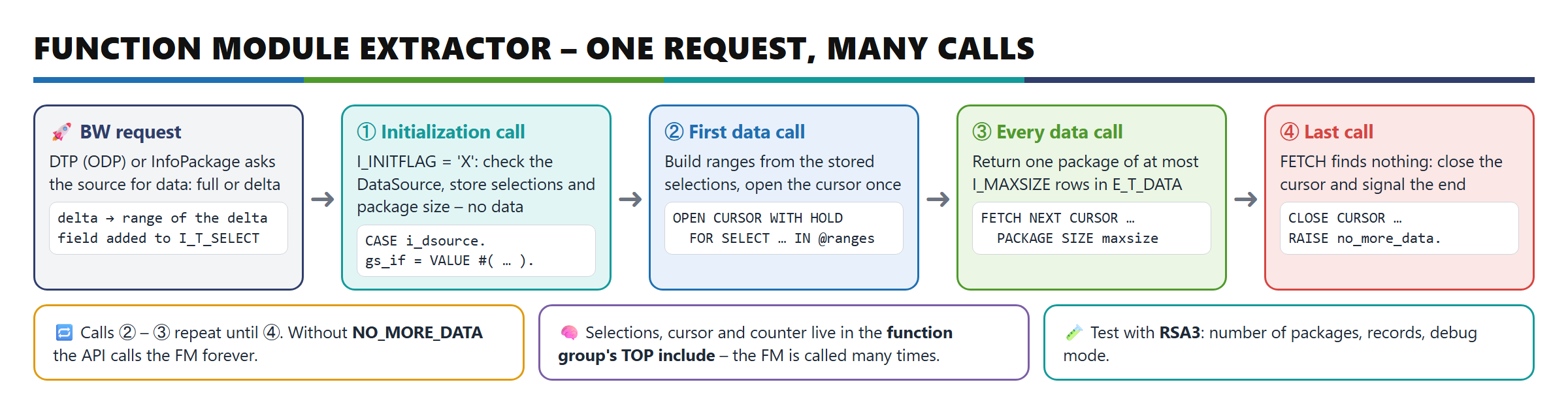
The extraction API calls the FM several times: once with I_INITFLAG = 'X' (store the selections, no data) and then repeatedly for data. Everything that must survive between calls (selections, cursor, package counter) lives in the TOP include of the function group.
|
|
- NO_MORE_DATA must be raised when the cursor is empty – without it the API calls the FM forever.
- WITH HOLD keeps the cursor open across the database commits that happen between two calls.
- I_MAXSIZE is the package size the API asks for; the FETCH returns at most that many rows.
- ERROR_PASSED_TO_MESS_HANDLER is raised after writing an error message; it ends the request with that message in the monitor.
- Empty ranges select everything, so the same code serves full loads (no ZZ_CHDATE selection) and delta loads (the API fills the ZZ_CHDATE range from the last delta pointer).
Part 3 – DataSource enhancement: append, RSA6, RSA3, exit or BAdI
A standard DataSource lacks a field the business needs. You add it to the extract structure and fill it with ABAP. When a load starts (InfoPackage in classic BW, DTP via ODP in BW/4HANA), BW calls the extraction API in the source system; the API calls the standard extractor and then the enhancement – customer exit and / or BAdI – once per data package, before the package is sent to BW.
First check whether you need code at all: for LO DataSources (2LIS_*) many fields of the communication structures can be added in LBWE without ABAP.
3.1 Development steps
- 1. Append structure: in RSA6 (Enhance extraction structure) or SE11, create an append on the extract structure (e.g. MC11VA0ITM of 2LIS_11_VAITM) with fields starting ZZ.
- 2. Unhide the new fields in RSA6: new append fields are hidden; clear Hide field (and set Field only known in exit where appropriate) and save – this regenerates the DataSource.
- 3. Write the code that fills the fields: customer exit RSAP0001 (3.2) or BAdI RSU5_SAPI_BADI (3.3).
- 4. Test in RSA3: the enhanced fields appear as new columns and must be filled.
- 5. Replicate the DataSource in BW, add the fields to the transformation and target.
3.2 Customer exit RSAP0001 (classic)
Function exit (SMOD RSAP0001) | Include (CMOD) | Called for | Data table |
|---|---|---|---|
EXIT_SAPLRSAP_001 | ZXRSAU01 | Transaction data | C_T_DATA |
EXIT_SAPLRSAP_002 | ZXRSAU02 | Master data attributes | I_T_DATA |
EXIT_SAPLRSAP_003 | ZXRSAU03 | Texts | I_T_DATA |
EXIT_SAPLRSAP_004 | ZXRSAU04 | Hierarchies | Hierarchy tables (nodes, texts, intervals) |
All DataSources of a type share one include, so a big CASE i_datasource grows into an unreadable, risky include where one syntax error stops every extraction. The common pattern: the include only dispatches to one program per DataSource, named ZBW_<DataSource>, and each program has a FORM execute_user_exit. A DataSource without a program is simply skipped (IF FOUND).
|
|
- For master data (ZXRSAU02) and texts (ZXRSAU03) the dispatcher passes
i_t_datainstead ofc_t_data, and the FORM's data parameter uses that DataSource's extract structure, e.g.i_t_data STRUCTURE biw_t001wsfor a plant attribute DataSource. - Activate the CMOD project that contains RSAP0001 – without an active project no exit runs.
3.3 BAdI RSU5_SAPI_BADI (recommended)
The classic BAdI RSU5_SAPI_BADI (SE18 / SE19) does the same job in ABAP Objects and is SAP's recommended replacement for RSAP0001. Method DATA_TRANSFORM is called for transaction data, master data attributes and texts; HIER_TRANSFORM for hierarchies. It is multiple-use, so several teams can have their own implementations.
|
|
Customer exit RSAP0001 | BAdI RSU5_SAPI_BADI | |
|---|---|---|
Technique | Function exits + includes ZXRSAU01–04 (CMOD project) | Classic BAdI, class implementation (SE19) |
Implementations | One include per data type for all DataSources | Several implementations possible (multiple use) |
Data types | Four exits: transaction, attributes, texts, hierarchies | Two methods: DATA_TRANSFORM, HIER_TRANSFORM |
Risk | One syntax error stops all extractions of that type | Separate classes, easier to test and transport |
Status | Legacy – still works in ECC and S/4HANA on-premise | Recommended for new SAPI enhancements |
S/4HANA: for new extraction prefer released CDS extraction views (page 03, page 06) – custom fields reach them through key-user extensibility or CDS view extensions instead of an append plus ABAP exit.
Part 4 – Transformation routines in ABAP
A transformation maps a source (DataSource or InfoProvider) to a target with rules; routines add ABAP where the rule types (direct assignment, formula, constant, read master data / read from ADSO) are not enough. The DTP executes the transformation package by package.
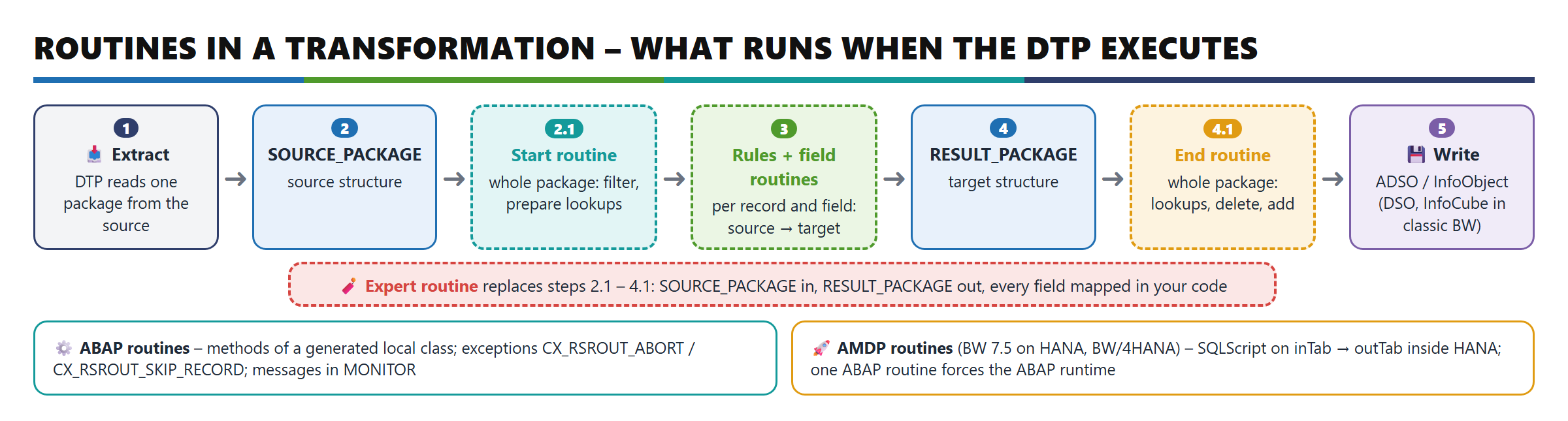
4.1 What happens when a DTP runs
- 1. The DTP extracts a package of data from the source.
- 2. The data is placed in SOURCE_PACKAGE (source structure).
- 2.1 The start routine runs on the whole SOURCE_PACKAGE.
- 3. Each record is transformed from the source structure into the target structure; field (characteristic / key figure) routines run per record and field.
- 4. The transformed records are saved in RESULT_PACKAGE (target structure).
- 4.1 The end routine runs on the whole RESULT_PACKAGE.
- 5. The data is written to the target (ADSO, InfoObject; DSO / InfoCube in classic BW).
Routine | Works on | Use it for |
|---|---|---|
Start routine | SOURCE_PACKAGE, once per package | Filters the DTP filter cannot express (DTP selections are only ANDed, no OR across fields), deleting records on conditions that need other data, filling internal tables with lookup data for later use |
Field routine | One field of one record (SOURCE_FIELDS → RESULT) | A target field that does not exist in the source and needs logic; skip a record |
End routine | RESULT_PACKAGE, once per package | Lookups and derivations on target fields, deleting or adding result records, final checks |
Expert routine | Whole package: SOURCE_PACKAGE → RESULT_PACKAGE | Replaces all rules – full control, e.g. splitting one record into many; you must map every field yourself |
4.2 Examples
BW generates a local class with the routine methods; you write only between the begin / end of routine comments. Global declarations go into the global section and are shared by all routines of the transformation.
|
|
|
- Simple master data lookups do not need code: use the rule type Read master data (or Read from DataStore object in BW/4HANA).
- Fields filled only in the end routine must be enabled for update: in the end routine settings choose that all target fields are updated, not only those with active rules.
- Exceptions:
CX_RSROUT_ABORTstops the whole request,CX_RSROUT_SKIP_RECORDskips one record, messages in MONITOR appear in the DTP monitor; with error handling switched on, wrong records go to the error stack (error DTP). - Move bigger logic into a global class (e.g.
ZCL_BW_SALES_RULES) and call it from the routine – reusable across transformations and unit-testable.
Part 5 – AMDP routines on BW/4HANA (HANA push-down)
On BW 7.5 on HANA and BW/4HANA a transformation can run in the HANA runtime: the whole transformation is executed in the database instead of moving every package to the ABAP server. Rules without routines are pushed down automatically; routines must then be written as AMDP script (SQLScript) instead of ABAP. The routine is an AMDP method of a generated class that you edit in ADT (BW Modeling Tools).
ABAP routine | AMDP routine | |
|---|---|---|
Runs in | ABAP application server, record / package loop | SAP HANA, set-based SQLScript |
Runtime of the transformation | ABAP runtime | HANA runtime – only if every routine and rule of the transformation can run in HANA |
Mixing | – | BW 7.5: one runtime per transformation – ABAP and AMDP routines cannot be mixed · BW/4HANA: an ABAP end routine is possible (partial HANA runtime); ABAP start / field / expert routines force the ABAP runtime |
Input / output | SOURCE_PACKAGE, RESULT_PACKAGE, RESULT, MONITOR | inTab → outTab; errorTab for error handling |
Strengths | Calling function modules, BAPIs, complex procedural logic | Large volumes, joins and aggregations, lookups as joins |
Where | BW 7.x and BW/4HANA | BW 7.5 on HANA and BW/4HANA |
- outTab must be returned with the columns in the order of its definition, including the technical columns RECORD and SQL__PROCEDURE__SOURCE__RECORD that link each row to its source record.
- errorTab has the columns ERROR_TEXT and SQL__PROCEDURE__SOURCE__RECORD; it is used only when error handling for HANA routines is switched on in the transformation, otherwise return it empty.
- Every table the method reads must be listed in the USING clause.
|
The generated method names follow the routine type (e.g. GLOBAL_START, GLOBAL_END, PROCEDURE for the expert routine) – keep the generated signature and write only inside the markers. AMDP syntax and debugging: ABAP on HANA › 06 AMDP & SQLScript.
Part 6 – Variable exits: customer exit and BAdI
A query variable with processing type customer exit gets its values from ABAP (variable types and processing types: page 04). Typical uses: default the current month before the variable screen, derive a range from another variable after it, check the entries, and return a user's authorized values for an authorization variable.
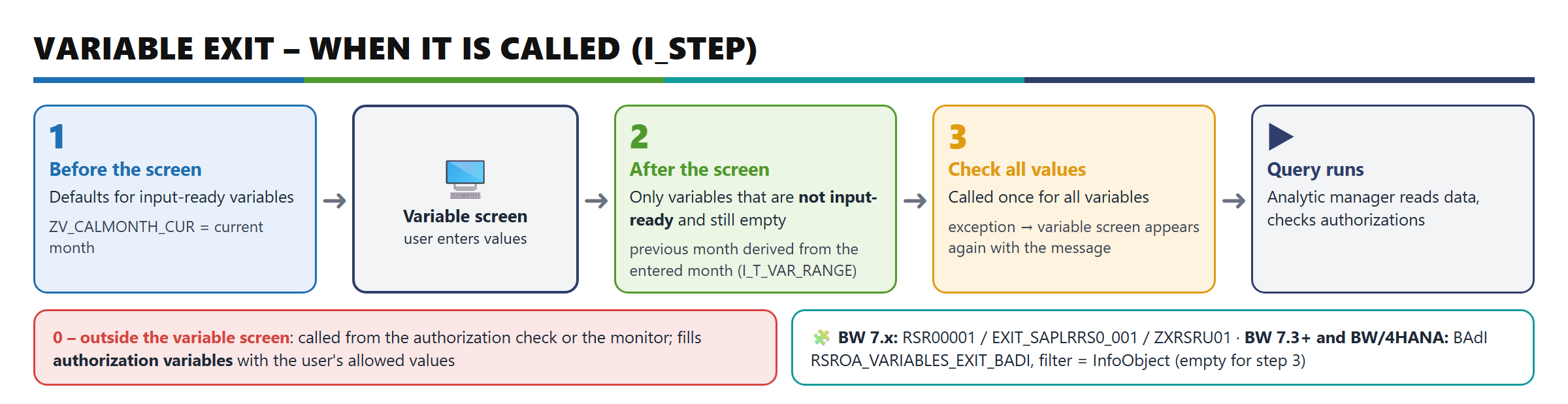
I_STEP | When | Typical use |
|---|---|---|
1 | Directly before the variable screen | Default values for input-ready variables |
2 | Directly after the variable screen – only for variables that are not input-ready and were not filled in step 1 | Derive values from the entered variables (read I_T_VAR_RANGE) |
3 | After step 2, once for all variables | Validate the combination of entries; an exception shows the variable screen again |
0 | Not called from the variable screen: the call comes from the authorization check or the monitor | Authorization variables: return the values the user is authorized for |
6.1 Customer exit RSR00001 (BW 3.x – 7.5, also BW on HANA)
Enhancement RSR00001 (SMOD) with function exit EXIT_SAPLRRS0_001, code in include ZXRSRU01 of a CMOD project. Main parameters: I_VNAM (variable name), I_STEP, I_T_VAR_RANGE (values of the other variables, type RRS0_T_VAR_RANGE), E_T_RANGE (result, type RSR_T_RANGESID). As with the DataSource exit, the include usually only dispatches to one program per variable, ZBW_<variable>.
|
|
6.2 BAdI RSROA_VARIABLES_EXIT_BADI (BW 7.3 and later; the only option in BW/4HANA)
Enhancement spot RSROA_VARIABLES_EXIT contains the BAdI RSROA_VARIABLES_EXIT_BADI (implement in SE19 or ADT). The method IF_RSROA_VARIABLES_EXIT_BADI~PROCESS receives the same input as EXIT_SAPLRRS0_001 (I_VNAM, I_IOBJNM, I_STEP, I_T_VAR_RANGE …) but returns the values in the changing table C_T_RANGE (type RSR_T_RANGESID) and signals errors with exception CX_RS_ERROR. It is multiple-use and filter-dependent: the filter is the InfoObject of the variable (IOBJNM), so each implementation handles only its own InfoObject; step 3 is called with an empty InfoObject filter. The default implementation (SMOD_EXIT_CALL) still calls ZXRSRU01, so the old exit keeps working in BW 7.x. BW/4HANA does not support the CMOD exit: existing code must move into BAdI implementations.
|
|
- Authorization variable (I_STEP = 0): return, for example, the company codes of the user (
sy-uname) read from a Z mapping table as ranges in C_T_RANGE (E_T_RANGE in the customer exit). Query-specific attributes are not filled in this step. - Test: run the query in RSRT with a breakpoint in the BAdI method or in ZXRSRU01.
Part 7 – DTP routines, InfoPackage routines and APD
7.1 DTP filter routine
A routine on a field of the DTP filter computes the selection dynamically at runtime – e.g. always the last 30 days or the current fiscal period. BW generates a FORM routine with the selection table l_t_range (structure RSSDLRANGE: FIELDNAME, SIGN, OPTION, LOW, HIGH) and the return code p_subrc; you write only the body. An OLAP variable (e.g. a customer exit variable) can be used in the filter instead.
|
7.2 InfoPackage routine (classic BW – legacy)
InfoPackages load data from the source into the PSA in classic BW (in BW/4HANA there are no InfoPackages and no PSA – the DTP reads directly from the DataSource). Routines in the InfoPackage compute selections or, for flat files, the file name and path on the application server dynamically (routine form compute_flat_file_filename). Background loads need the file on the application server, not on the PC.
|
- A logical file name (transaction FILE) keeps the physical path out of the code, so the same routine works in DEV, QAS and PRD; the placeholder
<DATE>in the physical file name is replaced by today's date.
7.3 APD – Analysis Process Designer (legacy)
APD (transaction RSANWB) built graphical analysis processes in classic BW: read from queries or InfoProviders, transform (join, filter, ABAP routine, data mining), write to a DSO or file. It is not available in BW/4HANA; the transfer tool RSB4HAPD converts supported APDs into data flows with DTPs and transformations. Details and successors: page 04 Part 9.
Part 8 – BW ABAP best practices
Topic | Do | Avoid |
|---|---|---|
Lookups | Read once per package (FOR ALL ENTRIES with a non-empty check, or a join), store in HASHED / SORTED tables | SELECT SINGLE inside the LOOP over the package |
Loops | Field symbols or references, binary / hashed reads | Copying work areas and MODIFY inside large loops |
Rule types | Standard rules (read master data / ADSO, formulas) before code | Routines for what a rule type can do |
Structure | Dispatcher include + one program / class per object; logic in global classes | One huge CASE in ZXRSAU01 or ZXRSRU01 |
Push-down | AMDP routines and HANA runtime for large volumes on BW/4HANA | ABAP routines that force the whole transformation into the ABAP runtime without need |
Errors | MONITOR messages, error handling with error stack and semantic groups, CX_RSROUT_ABORT for fatal cases | Silent skips, COMMIT WORK or screen messages in routines |
Configuration | Z control tables, logical file names, TVARVC entries | Hard-coded company codes, dates and paths |
Testing | RSA3 (extractors, debug mode), DTP in debugging / simulation mode, RSRT for variables | Testing only with full production loads |
S/4HANA source | Released CDS extraction views via ODP; RSU5_SAPI_BADI if you must enhance SAPI DataSources | New Z function module extractors on application tables |
Part 9 – Interview questions
Q1. When do you build a generic DataSource with a function module instead of a table or view?
When the data needs logic: tables a view cannot join, calculations, reading data through function modules, or a delta that one field of one table cannot express. Table / view DataSources are simpler and should be the first choice.
Q2. What is the difference between RSAX_BIW_GET_DATA_SIMPLE and RSAX_BIW_GET_DATA?
Both are templates in function group RSAX. RSAX_BIW_GET_DATA_SIMPLE has the simple interface (F2) and is the template copied for RSO2 DataSources; it reads everything, delta comes from the RSO2 generic delta whose range your code must evaluate in I_T_SELECT. RSAX_BIW_GET_DATA has the complete interface (F1) including the update mode, for extractors that handle delta themselves.
Q3. Walk me through the code of a function module extractor.
The first call (I_INITFLAG = X) checks the DataSource name and stores the selections and package size in global data. The first data call builds ranges from the selections and opens a cursor WITH HOLD; every data call FETCHes one package of I_MAXSIZE rows into E_T_DATA; when FETCH finds nothing the cursor is closed and NO_MORE_DATA is raised.
Q4. How do you enhance a standard DataSource?
Append ZZ fields to the extract structure, unhide them in RSA6, fill them in customer exit RSAP0001 (EXIT_SAPLRSAP_001 – 004, includes ZXRSAU01 – 04) or in BAdI RSU5_SAPI_BADI, test in RSA3, replicate and map the fields in BW. For LO DataSources check LBWE first.
Q5. Why use ZBW_<DataSource> programs or one class per DataSource?
All DataSources share one exit include. A dispatcher that calls a separate program or class per DataSource keeps the include tiny, isolates errors and transports, and lets several developers work in parallel.
Q6. Customer exit RSAP0001 or BAdI RSU5_SAPI_BADI?
Same purpose. The BAdI is object-oriented, multiple-use (several implementations) and SAP's recommended replacement; the exit is legacy but still runs. In S/4HANA prefer released CDS extraction views over enhancing SAPI DataSources.
Q7. Explain start, field, end and expert routines and their order.
Start routine on SOURCE_PACKAGE before the rules (filters, lookup preparation); field routines per record and field; end routine on RESULT_PACKAGE after the rules (lookups on target fields, deletions); the expert routine replaces all rules and maps the whole package itself.
Q8. ABAP or AMDP routine – and when does a transformation run in HANA?
AMDP routines are SQLScript methods working set-based on inTab / outTab inside HANA. A transformation runs in the HANA runtime only if all its rules and routines are HANA-capable; in BW 7.5 one ABAP routine forces the ABAP runtime and the two kinds cannot be mixed; in BW/4HANA an ABAP start, field or expert routine forces the ABAP runtime, while an ABAP end routine gives a partial HANA runtime.
Q9. What are the I_STEP values of the variable exit?
1 before the variable screen (defaults), 2 after it for non-input-ready variables (derivations), 3 check of all entries (exception shows the screen again), 0 called outside the variable screen – from the authorization check or the monitor, used for authorization variables.
Q10. How do you implement variable exits on BW/4HANA?
With BAdI RSROA_VARIABLES_EXIT_BADI in enhancement spot RSROA_VARIABLES_EXIT, method IF_RSROA_VARIABLES_EXIT_BADI~PROCESS, filtered by InfoObject. The CMOD exit RSR00001 / ZXRSRU01 is not supported in BW/4HANA.
Q11. What are DTP and InfoPackage routines used for?
A DTP filter routine sets the selection dynamically (last 30 days, current period). An InfoPackage routine (classic BW only) sets selections or the flat-file name and path on the application server dynamically, e.g. one file per day.
Q12. Your end routine is slow. What do you check?
SELECTs inside the loop (replace with one read per package into a hashed table), missing field symbols, linear reads on standard tables, package size, and whether standard rule types or an AMDP routine with HANA push-down could replace the ABAP.
🏠 Start Here · ◀ 04 · Reporting · 06 · BW/4HANA & Architect ▶ · Sections: CORE ABAP | OOPS ABAP | ABAP on HANA | Clean Core | RAP | ABAP Points | SAP Fiori | SAPUI5 | Mobile Development (MDK) | BTP Foundations | BTP Development | CAP | SAP Build | ABAP on BTP | Integration Suite | SAP Business AI | SAP BASIS | Security | SAP SDLC
Functional: FICO ABAP | TRM ABAP | VIM | SAP BIS | SD ABAP | MM ABAP | PP ABAP | QM ABAP | PM ABAP | PS ABAP | EWM | TM ABAP | GTM ABAP | EHS ABAP | HR ABAP | BW | SAP Datasphere | SAP Business Data Cloud | SAP MDG | SAP Analytics Cloud | SAP Ariba | SAP CX | SAP IBP