ETL brings data from the source systems into the BW data targets: extraction (DataSources, Business Content, the ODP framework and CDS views), delta handling so that only changes travel, staging (PSA in classic BW, inbound table in BW/4HANA), transformation (rules and routines), loading with the data transfer process (DTP), and automation with process chains. The layers behind this flow are on page 01 Part 6, the target objects on page 02, the ABAP side (generic extractors, DataSource enhancements, routine code) on page 05.
Part 1 – Source systems and DataSources
A source system is every system BW reads data from; it is defined once in BW (RSA1 → Source Systems, or in the BW Modeling Tools for BW/4HANA). A DataSource describes one extraction: its fields (extract structure), the selection fields and whether it can deliver a delta.
Source system type | Release | Connects to | Notes |
|---|---|---|---|
ODP (contexts SAPI, ABAP_CDS, BW, SLT, HANA) | BW 7.3+ / BW/4HANA | S/4HANA, ECC, CRM, BW, SLT | The standard way to read SAP systems (Part 3) |
SAP source system (Service API) | Classic BW (legacy) | ECC, CRM, SRM | RFC + ALE / IDoc based; data into the PSA via InfoPackage |
BW / Myself system | Classic (BW/4HANA: ODP context BW) | Another BW, or BW itself | Data mart interface (page 01 Part 3) |
SAP HANA source system | BW on HANA / BW/4HANA | Local HANA schema, other tenant, remote sources via smart data access / smart data integration | Replaces DB Connect and UD Connect |
DB Connect / UD Connect | Classic (legacy) | External databases (DB Connect), JDBC sources (UD Connect) | |
File source system | All | CSV files from the local PC or the application server | Manual uploads, external data |
Web service / push | Classic web service source; BW/4HANA: write interface of an ADSO | External programs, SAP Cloud Integration | Data is pushed, not pulled (Part 9) |
Big Data source system | BW/4HANA | Hadoop / Spark via HANA smart data access |
DataSource basics
- Four DataSource types per business object: transaction data, master data attributes, texts and hierarchies. Naming in Business Content: 2LIS_11_VAITM (logistics: sales order item), 0MATERIAL_ATTR / 0MATERIAL_TEXT, 0FI_GL_14 (G/L line items; in S/4HANA it still works, and 0FI_ACDOCA_10 additionally extracts the complete universal journal ACDOCA – ECC has no ACDOCA).
- DataSources are grouped by application component (SD, MM, FI …) – the folder tree in RSA6 and in BW.
- Source side: DataSource header table ROOSOURCE (extractor, delta process, extract structure). BW side: after replication of the metadata, the DataSource exists in BW (RSDS; BW/4HANA: BW Modeling Tools) and is the source of transformations.
Part 2 – Business Content and generic DataSources
2.1 Business Content DataSources
SAP delivers ready-made DataSources for nearly every application (in the D version). You activate them in the source system, then activate the matching BW content (InfoObjects, ADSOs, transformations, queries) in BW.
T-code | System | What you do |
|---|---|---|
RSA5 | Source | Install (activate) Business Content DataSources delivered by SAP |
RSA6 | Source | Maintain / post-process active DataSources: hide or unhide fields, set selection fields, enhance the extract structure (append ZZ fields – page 05) |
RSA3 | Source | Extractor checker: test-run a DataSource, see the records and the delta it would deliver |
RSA2 | Source | DataSource repository: display the definition (extractor, delta type, fields) |
LBWE | Source | Logistics extraction cockpit: activate LO DataSources (2LIS_…), set the update mode; setup tables are filled with OLI…BW (e.g. OLI7BW sales orders) and deleted with LBWG |
RSA7 / ODQMON | Source | Delta queues: RSA7 for classic Service API, ODQMON for ODP (Part 4) |
RSORBCT (RSA1 → BI Content) | BW | Activate BW Business Content objects with their data flow |
RSDS / BW Modeling Tools | BW | Display and maintain the DataSource in BW |
- LO extraction in short: an init fills the setup tables (users locked out of the documents, or early delta init), then new changes flow through the update mode (direct delta, queued delta via extraction queue LBWQ, or unserialized V3 update) into the delta queue.
- S/4HANA: many classic extractors still work, others are not supported because the tables changed; SAP Note 2500202 lists the status. For new S/4HANA extraction SAP recommends CDS-based extraction (Part 3).
2.2 Generic DataSources (RSO2)
When no Business Content DataSource fits, you create a generic DataSource in RSO2 on a table, a database view, an SAP Query / InfoSet or a function module, with an optional generic delta on a timestamp, calendar day or numeric pointer (with safety intervals). Step-by-step development, the function module templates and DataSource enhancements with customer exit RSAP0001 / BAdI: page 05.
Part 3 – The ODP framework and CDS-based extraction
Operational Data Provisioning (ODP) is SAP's common extraction framework. A provider exposes data through ODP, the operational delta queue (ODQ) stores full and delta packages per subscriber, and each subscriber reads its own data. The same DataSource can feed BW, SAP Datasphere and SAP Data Services at the same time without interfering.
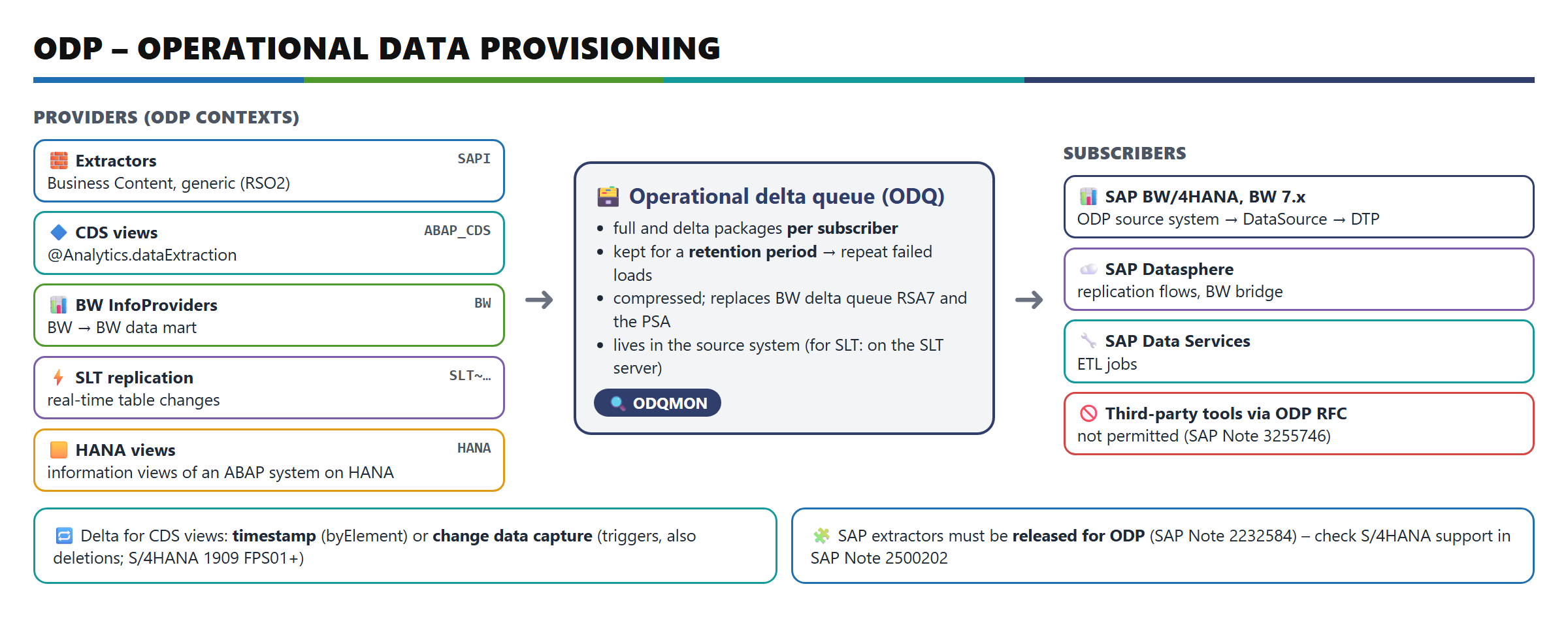
ODP context | Provider | Where the delta queue lives |
|---|---|---|
SAPI (ODP_SAP) | Classic Service API extractors (Business Content, generic); must be released for ODP (SAP Note 2232584 for SAP extractors) | Source system |
ABAP_CDS (ODP_CDS) | CDS views with extraction annotations – the S/4HANA way | Source system |
BW (ODP_BW) | BW InfoProviders of another BW system (data mart scenario) | Source BW |
SLT~<queue alias> (ODP_SLT) | Tables replicated in real time by SAP Landscape Transformation | SLT server |
HANA (ODP_HANA) | SAP HANA information views of an ABAP system on SAP HANA | Source system |
- Why ODP: no PSA needed (the ODQ keeps the data for a retention period, so loads can be repeated), one framework for all sources, compression of the queue, several subscribers, and data can be read directly by the DTP.
- ODQMON (source system): monitor queues, subscriptions, requests and units; set retention; reset a delta. ODQ data is cleaned up by a periodic reorganisation job.
- Licensing note: SAP does not permit customers or third-party tools to use the ODP RFC APIs directly (SAP Note 3255746); SAP's own subscribers (BW, Datasphere, Data Services) and released OData-based access are the supported paths.
3.1 CDS views as DataSources (ODP CDS)
In S/4HANA a CDS view becomes a DataSource when it carries @Analytics.dataExtraction.enabled: true. BW (context ABAP_CDS) or Datasphere then reads it like an extractor – full or delta. Many released SAP CDS views are extraction-enabled; custom views follow the same rules (CDS basics: ABAP on HANA › 05 CDS Views).
Delta method | Annotation | How it works |
|---|---|---|
Generic timestamp delta |
| Selects records whose timestamp field is newer than the last load (default delay 1800 s); deletions only with @Analytics.dataExtraction.delta.byElement.detectDeletions (small volumes) |
Change data capture (CDC) |
| Database triggers record every insert, update and delete on the underlying tables; available from SAP S/4HANA 1909 FPS01 (cloud 1905) |
|
- Automatic CDC works for views whose key maps clearly to the key of the underlying table (simple projections like this one); for joins you map the tables and keys yourself.
- The example is a CDS view entity, the current form. Older S/4HANA releases put the same annotations on a DDIC-based CDS view (
define viewwith@AbapCatalog.sqlViewName) – still found in many existing extraction views. - In BW/4HANA: create an ODP source system of context ABAP_CDS, create the DataSource from the view (the ODP name is the entity name of a view entity, the SQL view name of a DDIC-based view), then a DTP with extraction mode delta reads it.
Part 4 – Delta: types, queues and initialisation
A delta delivers only new and changed records since the last load. The delta process of a DataSource (ROOSOURCE-DELTA) tells BW which record images it sends – and therefore which target may receive them directly.
Delta process | Records sent | Target rule |
|---|---|---|
ABR – after, before, reverse images (LO extractors via delta queue) | A change sends the old record negated (before image) and the new record (after image); a deletion sends a reverse image | Can go to additive and overwriting targets |
AIE / AIM – after images only | Only the new state of a changed record | Must go to an overwriting target first (standard DSO / ADSO), never straight into an InfoCube |
ADD / ADDD – additive images | Only the difference (+5 pieces) | Can be summed directly |
CDC (ODP CDS) | Inserts, updates and deletions recorded by triggers | Overwriting target |
0RECORDMODE – the image type of each record
Value | Meaning |
|---|---|
blank | After image – the record as it is now |
X | Before image – the old record with negated key figures |
N | New image – a record that did not exist before |
A | Additive image – only the difference |
R | Reverse image – the record is cancelled / deleted (key figures negated) |
D | Delete – the record must be deleted in an overwriting target |
Initialisation and queues
- Delta init first: an initial full load that also opens the delta (classic InfoPackage: "initialize delta process", with or without data transfer; ODP / DTP: the first delta request is the init). Then every delta request brings the changes.
- Repair full request: a full load into a delta target without disturbing the delta (to fix gaps).
- Delta queues: classic Service API DataSources write into the BW delta queue (RSA7 – legacy); ODP DataSources write into the ODQ (ODQMON). The last delta is kept until the next request confirms it, so a failed delta can be repeated.
- Generic delta (RSO2, CDS byElement): BW stores the last timestamp / pointer; the safety interval (lower / upper limit) re-reads a few seconds or records to catch late commits – the target must then overwrite.
Part 5 – Staging: PSA (classic) vs inbound table
PSA – classic BW 7.x | BW/4HANA | |
|---|---|---|
What | One transparent table per DataSource, created at activation ( | No PSA. First persistence is either the ODQ in the source or the inbound table of a staging ADSO ( |
Filled by | InfoPackage | DTP (from DataSource into ADSO) or the write interface |
Format | Source format, unchanged, with request ID | Source format (staging ADSO with fields), request TSN |
Purpose | Reload targets without extracting again, analyse wrong data, error correction | Same; for ODP sources the ODQ already offers the reload, so a staging ADSO is optional (corporate memory, non-ODP sources, files) |
Housekeeping | Delete old PSA requests (process type) | Clean up ADSO requests / ODQ retention |
In BW 7.4+ on HANA, ODP DataSources can already be read by the DTP directly without the PSA – the first step towards the BW/4HANA model.
Part 6 – Transformations: rules and routines
A transformation converts the fields of a source (DataSource or InfoProvider) into the fields of a target (ADSO, InfoObject, InfoSource). It consolidates, cleans and integrates the data technically and semantically. It replaced the BW 3.x transfer rules and update rules in BI 7.0. An InfoSource can sit between two transformations when several sources share common logic.
Rule type | What it does |
|---|---|
Direct assignment | Source field → target field (the default mapping) |
Constant | Fixed value, e.g. source system ID or version '000' |
Formula | Formula builder expressions: IF, CONCATENATE, date functions – no ABAP needed |
Read master data | Look up an attribute of a characteristic (material → material group), optionally for a key date |
Read from DataStore object | Look up fields of a DSO / ADSO by its key |
Routine (field routine) | ABAP (or AMDP) code for one target field |
Time conversion / currency translation / unit conversion | Derive 0CALMONTH from 0CALDAY, translate amounts with translation types, convert units |
Initial / no transformation | Leave the field initial or not updated |
6.1 Routines and their order
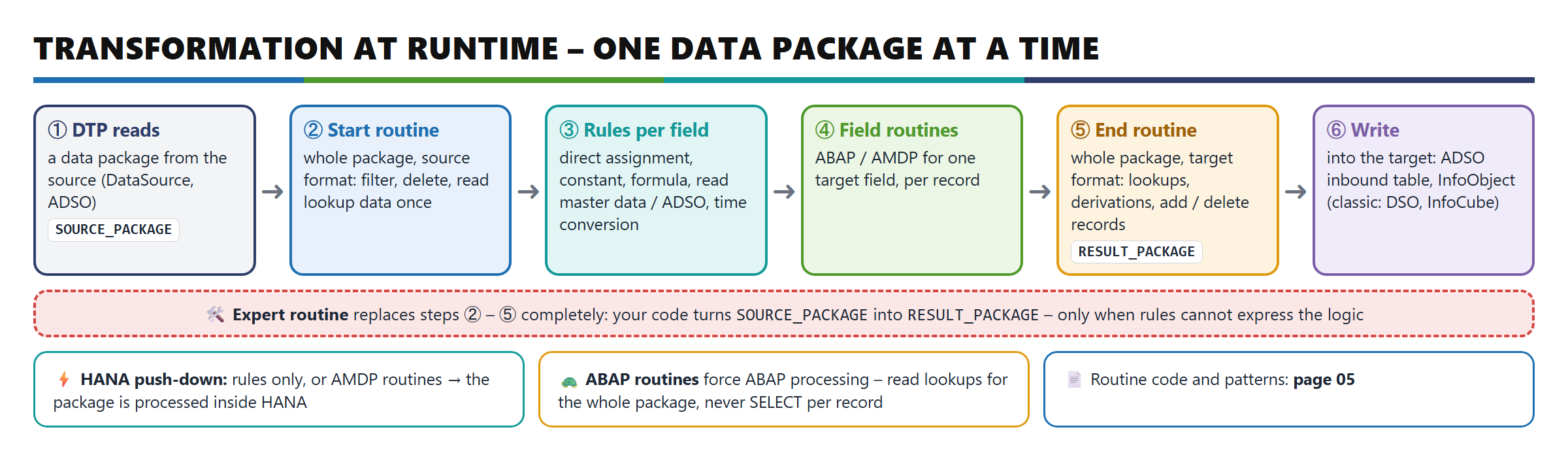
Routine | Works on | Typical use |
|---|---|---|
Start routine |
| Filters the DTP filter cannot express, delete unwanted records, read lookup data for the whole package into an internal table |
Field routine | One target field per record | Derive a value that does not exist in the source |
End routine |
| Lookups and derivations for all records at once, delete or add records, fill several fields together |
Expert routine | Source package → result package, all in your code | Replaces all rules and other routines – only when the logic cannot be expressed otherwise |
- HANA push-down: in BW 7.4 / 7.5 on HANA and BW/4HANA a transformation runs inside HANA when all rules can be pushed down. An ABAP routine forces ABAP processing for the package; AMDP routines (SQLScript) keep the processing in HANA.
- Code for start, end, expert and AMDP routines, the lookup pattern and performance rules: page 05.
Part 7 – Data transfer process (DTP)
The DTP moves data from one object to the next inside BW: DataSource → ADSO, ADSO → ADSO, ADSO → InfoObject, through exactly one transformation path. In BW/4HANA it also extracts from the source system directly. It defines the parameters between source and target:
Setting | Options and meaning |
|---|---|
Extraction mode | Full – all data matching the filter; Delta – only requests not yet transferred by this DTP (BW tracks this per DTP); options such as "only get delta once" (snapshot sources) or "get all new data request by request" |
Filter | Selections on source fields, fixed values, variables or a filter routine (dynamic filter, e.g. current fiscal year – page 05) |
Package size / semantic groups | Number of records per data package; semantic groups put all records with the same key (e.g. document number) into the same package – needed for end routines that compare records and for error handling |
Error handling | Cancel the whole request, or update the valid records and write the erroneous ones (and later records with the same semantic key) to the error stack; after correction an error DTP posts them. BW/4HANA keeps such records in the data transfer intermediate storage (DTIS) |
Processing mode | Serial or parallel packages; SAP HANA execution when the transformation can be pushed down |
- A DTP request can be monitored, deleted from the target (if the target allows request deletion) and repeated.
- Classic BW 7.x: InfoPackage loads source → PSA, DTP loads PSA → targets. BW/4HANA: the DTP does everything.
Part 8 – InfoPackage (classic) and process chains
8.1 InfoPackage – legacy
In BW 3.x and 7.x the InfoPackage requests data from the source system and writes it into the PSA. Settings: selections, update mode (full, init delta, delta, repair full), scheduling, and for files the file name and path (an InfoPackage routine can determine the path on the application server dynamically – page 05). BW/4HANA has no InfoPackages; ODP and file DataSources are read by the DTP.
8.2 Process chains (RSPC)
A process chain is a sequence of BW processes that runs automatically: a start process with a schedule or event, then processes connected by success / failure / always links. Every production load runs in process chains, usually nested in a meta chain for the night.
Process type | Purpose |
|---|---|
Start process | Direct scheduling (time, periodic), start by event (SM62 / SM64 or a program), or as part of a meta chain |
Data transfer process | Run a DTP (classic: also Execute InfoPackage) |
Activate data in DataStore object | Activate requests of a standard DSO / ADSO |
Master data activation / attribute change run | Activate new attributes and hierarchies |
Delete / build index, compress, roll up | Classic InfoCube maintenance – legacy, not needed for ADSOs |
Clean-up | Delete old PSA / ADSO requests, change log entries, DTIS |
ABAP program, OS command | Custom steps (e.g. send a file, set a status) |
AND / OR / XOR, decision, interrupt | Wait for parallel branches, branch on a formula, wait for an event or time |
Local process chain | Call another chain (meta chain) |
- Monitoring: RSPC log view, RSPCM (monitor of selected chains), BW/4HANA Cockpit apps; alerts by e-mail on failure.
- Real-time options: real-time data acquisition (RDA) – legacy; BW/4HANA uses streaming process chains for near-real-time ODP and SLT sources.
Part 9 – Loading options and the end-to-end setup
9.1 Data loading options
Option | How | Example |
|---|---|---|
Manual | Start a DTP (classic: InfoPackage) by hand in RSA1 / the BW Modeling Tools | One-off upload of a plan file, test loads |
Automatic | Process chains with schedules or events | Nightly delta loads from S/4HANA |
From a flat file | File source system: CSV from the PC (manual) or the application server (schedulable) | Budget figures from Excel, external market data |
From a database | SAP HANA source system (classic: DB Connect) | Tables of a non-SAP application replicated into HANA |
From an ERP / SAP system | ODP (extractors, CDS views); classic Service API | Sales, finance, logistics data from S/4HANA or ECC |
Web services / push | Write interface of an ADSO via RFC or HTTP (classic: web service source system) | An external portal or SAP Cloud Integration sends records |
9.2 Setting up a data flow step by step
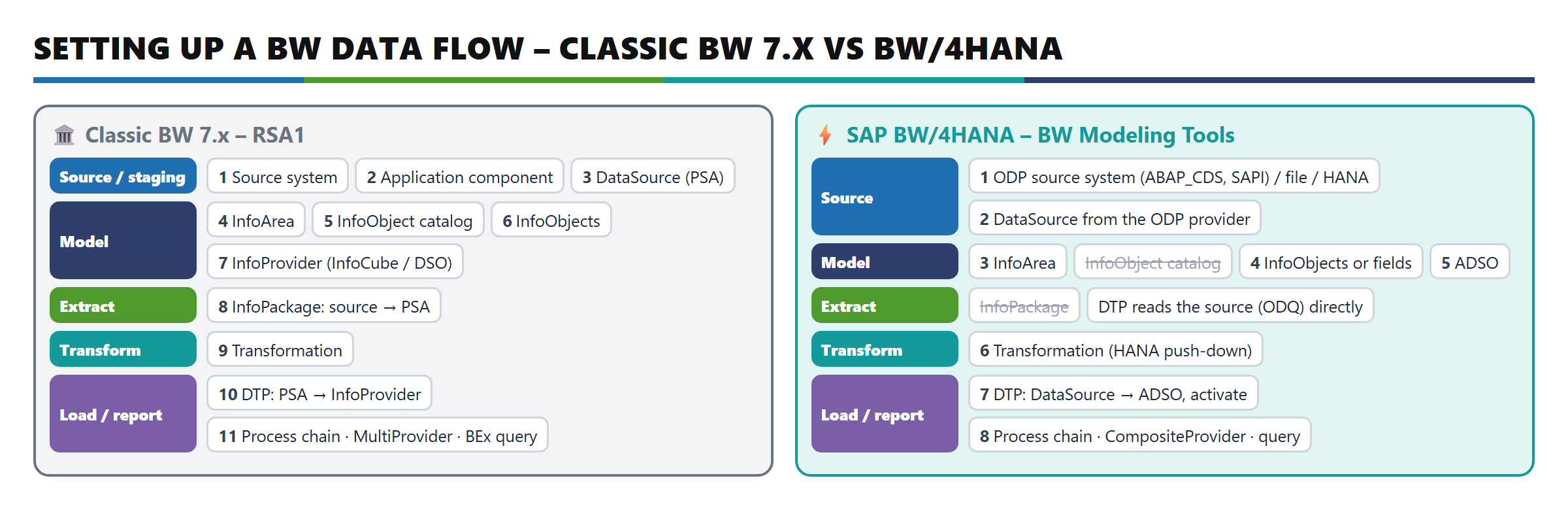
Step | Classic BW 7.x (RSA1) | BW/4HANA (BW Modeling Tools) |
|---|---|---|
1 | Create the source system | Create the source system (ODP context ABAP_CDS / SAPI, file, HANA) |
2 | Create the application component | – (DataSources keep their application component) |
3 | Create / replicate the DataSource | Create the DataSource from the ODP provider or file |
4 | Create the InfoArea | Create the InfoArea |
5 | Create the InfoObject catalog | – (no catalogs) |
6 | Create the InfoObjects | Create InfoObjects – or use fields |
7 | Create the InfoProvider (InfoCube / DSO) | Create the ADSO |
8 | Create and run the InfoPackage (source → PSA) | – (no InfoPackage) |
9 | Create the transformation | Create the transformation |
10 | Create and run the DTP (PSA → target) | Create and run the DTP (source → ADSO); activate |
11 | Process chain, MultiProvider, query | Process chain, CompositeProvider, query (page 04) |
Part 10 – Interview questions
Q1. Which transactions do you use to activate and test a Business Content DataSource?
RSA5 to install it in the source system, RSA6 to maintain it (hide or unhide fields, selections, enhancement), RSA3 to test the extraction. In BW: replicate the metadata and activate the content with RSORBCT; for LO DataSources also LBWE and the setup tables.
Q2. What is ODP and why is it preferred?
Operational Data Provisioning: one extraction framework for extractors, CDS views, BW, SLT and HANA views. Data goes into the operational delta queue per subscriber, so several consumers can read it, loads can be repeated within the retention period, and BW needs no PSA. Monitor with ODQMON.
Q3. How do you extract data from S/4HANA into BW/4HANA?
Preferably with CDS views annotated @Analytics.dataExtraction.enabled (released SAP views or custom ones) through the ODP source system context ABAP_CDS, with change data capture or a timestamp delta. Classic extractors via ODP SAPI where they are still supported (SAP Note 2500202).
Q4. What is change data capture for CDS extraction?
A delta method where database triggers record inserts, updates and deletions on the tables behind the view; enabled with @Analytics.dataExtraction.delta.changeDataCapture.automatic or mapping. Unlike a timestamp delta it also delivers deletions. Available from S/4HANA 1909 FPS01.
Q5. Explain the delta processes ABR and AIE.
ABR sends before, after and reverse images, so changes can be added into any target. AIE sends after images only, so the data must first go to an overwriting target (standard DSO / ADSO) that computes the real delta in its change log.
Q6. What are the values of 0RECORDMODE?
Blank after image, X before image, N new image, A additive image, R reverse image, D delete.
Q7. What replaced the PSA in BW/4HANA?
There is no PSA. For ODP sources the operational delta queue in the source keeps the data; when BW needs its own first persistence, a staging DataStore object with its inbound table plays that role.
Q8. Start routine, end routine, expert routine – when do you use which?
Start routine on the source package before the rules: filters and package-wide lookups. End routine on the result package after the rules: derivations and lookups for all records in target format. Expert routine replaces all rules and routines and is used only for logic the rules cannot express. Field routines handle one field.
Q9. What does a DTP do and which settings matter?
It moves data from a source object through a transformation to a target. Key settings: full or delta extraction, filters (also filter routines), package size and semantic groups, error handling with error stack and error DTP, and the processing mode (HANA execution).
Q10. InfoPackage vs DTP?
In BW 7.x the InfoPackage loads from the source system into the PSA and the DTP loads from the PSA into targets inside BW. In BW/4HANA there are no InfoPackages: the DTP extracts from the source directly.
Q11. What is a process chain and which process types do you use most?
An automated sequence of BW processes maintained in RSPC: start process, DTPs, activation of ADSO data, master data activation, clean-up, ABAP programs and AND / OR / decision steps. Production loads run in nested chains and are monitored in RSPCM or the BW/4HANA Cockpit.
Q12. Which data loading options does BW offer?
Manual or automatic (process chains); from flat files, databases (SAP HANA source system), SAP systems via ODP, and pushed data through the write interface of an ADSO (classic: web service source system). Near-real-time via streaming process chains (classic: RDA).
🏠 Start Here · ◀ 02 · Data Modeling · 04 · Reporting ▶ · Sections: CORE ABAP | OOPS ABAP | ABAP on HANA | Clean Core | RAP | ABAP Points | SAP Fiori | SAPUI5 | Mobile Development (MDK) | BTP Foundations | BTP Development | CAP | SAP Build | ABAP on BTP | Integration Suite | SAP Business AI | SAP BASIS | Security | SAP SDLC
Functional: FICO ABAP | TRM ABAP | VIM | SAP BIS | SD ABAP | MM ABAP | PP ABAP | QM ABAP | PM ABAP | PS ABAP | EWM | TM ABAP | GTM ABAP | EHS ABAP | HR ABAP | BW | SAP Datasphere | SAP Business Data Cloud | SAP MDG | SAP Analytics Cloud | SAP Ariba | SAP CX | SAP IBP