SAP BW (Business Warehouse) is SAP's data warehouse: it collects data from SAP and non-SAP systems, cleans and integrates it, keeps its history and makes it available for reporting and analysis. This page gives you the concepts every BW conversation starts with – data warehouse, OLTP vs OLAP, data marts, star schema, metadata – and the BW architecture: the layers of the data flow, the layered architecture LSA / LSA++, the product line from BW 3.x to BW/4HANA and SAP Datasphere, the system landscape and the tools. Data modelling objects: page 02; extraction and loading: page 03; queries and reporting: page 04; BW ABAP: page 05; BW/4HANA conversion and the architect view: page 06.
Part 1 – Data, information and the data warehouse
1.1 Data, information, information technology
Term | Meaning | Example |
|---|---|---|
Data | All the real raw facts and figures, as they are recorded | Order 4711: material FG-100, 10 pieces, 500 EUR, 17.11.2026 |
Information | Data that has been processed – selected, combined, aggregated, put into context – so that someone can understand it and act on it | "Sales of FG-100 in Germany fell 12 % against last November" |
Information technology (IT) | The technology (hardware, software, networks) used to store and process data into information | ERP system, database, data warehouse, reporting tools |
A data warehouse is the place where this processing is done for decision making: operational systems record the data, the warehouse turns it into information.
1.2 What a data warehouse (DWH) is
The classic definition by Bill Inmon: a data warehouse is a subject-oriented, integrated, non-volatile and time-variant collection of data in support of management's decision making.
Property | What it means | How SAP BW does it |
|---|---|---|
Subject-oriented | Data is organised by business subject (sales, purchasing, finance, HR), not by the application or transaction that created it | Data is analysed at subject level; each subject gets its own InfoProviders, grouped in InfoAreas (e.g. SD sales, FI line items) |
Integrated | Data from different sources is brought to one consistent format: same keys, codes, units, currencies and meaning | Data from different places / sources is extracted, harmonised and summarised; data from different subjects can be combined (shared InfoObjects such as customer or material, CompositeProviders) |
Non-volatile | Data is loaded and read, but not changed by day-to-day transactions. Once a record is in the warehouse it stays; corrections arrive as new loads (delta, reversal records) instead of being typed over | Loads are requests that can be traced and deleted as a whole; users only read the data |
Time-variant | The warehouse keeps history: every record belongs to a point or period in time, so you can compare periods and see trends. Every DWH works with historical data | Time characteristics (0CALDAY, 0CALMONTH, 0FISCPER) in every data model, time-dependent master data, years of history |
In one sentence: the DWH is the place where subject-oriented, integrated, historical data that is not changed afterwards is kept to help people take decisions.
1.3 The three functions of every DWH
Every data warehouse, including SAP BW, has three main functions:
Function | What it covers | In SAP BW | Page |
|---|---|---|---|
Data modelling | Designing the structures that hold the data | InfoObjects, DataStore objects, CompositeProviders (classic: InfoCubes, DSOs, MultiProviders) | 02 |
Data extraction (ETL / staging) | Getting data from the sources, transforming and loading it | DataSources, ODP, transformations, DTPs, process chains | 03 |
Reporting / information presentation | Presenting the data to users for analysis | BW queries, Analysis for Office, SAP Analytics Cloud | 04 |
Around these three, BW also needs administration: scheduling and monitoring loads, housekeeping, authorizations and transports (Part 9).
Part 2 – OLTP vs OLAP
Operational systems such as S/4HANA are OLTP (online transaction processing) systems: they run the business, one document at a time. A data warehouse is an OLAP (online analytical processing) system: it answers questions over millions of records. This difference is why a separate warehouse exists at all.
Aspect | OLTP – operational system (ERP) | OLAP – data warehouse (BW) |
|---|---|---|
Purpose | Run the daily business: create orders, post invoices | Analyse the business: trends, comparisons, KPIs |
Typical access | Read and write a few records by key | Read and aggregate many records |
Data | Current, detailed, changes all the time | Historical, integrated, summarised and detailed, not changed (non-volatile) |
Sources | One application | Many systems, SAP and non-SAP |
Data model | Normalised (ERM, 3rd normal form) to avoid redundancy | Denormalised for reading: star schema, extended star schema, wide flat tables on HANA |
Users | Clerks, many concurrent short transactions | Analysts and managers, fewer but heavy queries |
Example | VA01 creates sales order 4711 | "Revenue per region and month for the last 3 years" |
With SAP HANA the border moved: S/4HANA can run analytical queries directly on its own tables (embedded analytics with CDS views, ABAP on HANA › 05 CDS Views). A warehouse is still needed for history, data from many systems, harmonisation and heavy enterprise-wide reporting.
Part 3 – Data marts, data marting and data mining
3.1 Data mart
A data mart is a simple, smaller form of a data warehouse focused on one subject or line of business, such as sales, finance or marketing. It holds just the data one department needs, shaped for its reports.
Type | Fed from | Pros / cons |
|---|---|---|
Dependent data mart | The central (corporate) DWH – the mart is a subset of already integrated data | One version of the truth; needs the central DWH first |
Independent data mart | Directly from the source systems, without a central DWH | Quick to build for one department; marts drift apart (different numbers for the same KPI) |
Hybrid data mart | Central DWH plus additional sources | Flexible; needs governance |
In SAP BW the data marts are the objects of the reporting layer. In classic BW an InfoCube per subject was the typical data mart (which is why an InfoCube is often called a data mart). In BW/4HANA the data mart is a DataStore object (advanced) of type data mart, or – preferred in LSA++ – a virtual data mart: a CompositeProvider on top of the core layer (Part 7, page 02).
3.2 Data marting
Data marting is the process of preparing, managing (administering) and securing data marts: defining them, loading and refreshing them, and controlling who may see what.
- In SAP BW the data mart interface lets one BW InfoProvider act as the source for another (inside the same BW – the "Myself" system – or in another BW system). Classic BW generates an export DataSource for the InfoProvider (name 8 + InfoProvider); BW/4HANA uses the ODP context BW (page 03).
3.3 Data mining
Data mining is the discovery of hidden patterns, correlations and trends in large data sets with statistical and machine-learning methods: customer segmentation (clustering), which products are bought together (association analysis), which customers are likely to leave (classification), forecasts (regression). It is not about retrieving data quickly – fast retrieval is the job of the database, indexes and in-memory processing.
- Classic BW offered the Data Mining Workbench and the Analysis Process Designer (APD, RSANWB) – legacy. On HANA the algorithms run in the database (SAP HANA Predictive Analysis Library, PAL), called from BW, from SQLScript / AMDP or used through SAP Analytics Cloud's predictive features.
Part 4 – ERM, star schema and the table basics
4.1 Entity relationship modelling (ERM)
ERM describes the real world as entities and the relationships between them. It is the modelling method of OLTP systems.
- All real-life objects such as customers, vendors, materials and plants are entities.
- Every entity has its own attributes (customer: name, city, country).
- Entities and their attributes are mapped to database tables: one table per entity, one column per attribute; relationships become foreign keys (sales order → customer).
- The model is normalised: every fact is stored once, which is ideal for writing but needs many joins for analysis.
4.2 Table basics and metadata
Term | Meaning |
|---|---|
Table | A structure consisting of a set of rows and columns |
Row (record) | One occurrence of the entity, e.g. one customer |
Column (field) | One attribute of the entity, e.g. the city. The intersection of a row and a column is a cell; the value in a cell is the field value of that record |
Header / record structure | The sequence of fields that makes up the table – the structure of every record |
Metadata | Data about data: for every field its name, data type, length and decimal places – the technical description of the table (Part 5) |
4.3 Star schema vs ERM
A warehouse models for reading. The star schema puts the measurable facts (quantities, amounts) into one central fact table and the descriptive data into dimension tables around it, joined by keys. Few joins, easy to understand, fast aggregation.
ERM (OLTP) | Star schema (OLAP) | SAP extended star schema (classic BW) | |
|---|---|---|---|
Goal | No redundancy, fast writes | Fast reads and aggregation | Fast reads plus master data shared by all cubes |
Structure | Many normalised tables | Fact table + denormalised dimension tables | Fact table → dimension tables → SID tables → master data tables outside the cube |
Master data | In entity tables | Copied into each dimension | Stored once per InfoObject (attributes, texts, hierarchies), reused by every InfoCube |
History / languages | Through extra tables | Hard to handle | Time-dependent attributes, texts in several languages, hierarchies |
The extended star schema and how it became flat on HANA (HANA-optimized InfoCube, ADSO) are explained with a diagram on page 02 Part 3.
Part 5 – Metadata
Metadata is data about data. In a warehouse it answers: what does this field mean, where does it come from, how was it calculated, when was it loaded? Without metadata nobody trusts the numbers.
Metadata type | Describes | Examples in SAP BW |
|---|---|---|
Technical metadata | Structures and processing: tables, fields, data types, lengths, keys, transformation rules, data flows | InfoObject definition (type CHAR 10, compounding), DataSource fields, transformation rules, generated tables /BIC/… |
Business metadata | The business meaning: definitions, descriptions, owners, calculation rules in business terms | InfoObject descriptions, documents attached to objects, query and key figure definitions ("net revenue = gross revenue – discounts") |
Operational metadata | What happened when data was processed: load times, row counts, status, errors, lineage of each load | Load requests and their status, DTP and process chain logs, request IDs in the data (0REQUID / request TSN) |
- BW keeps its metadata in the Metadata Repository (RSA1 → Metadata Repository in classic BW): every object with its definition and its where-used and data flow relations. In BW/4HANA you navigate it in the BW Modeling Tools (data flow, where-used list).
- Every BW object exists in versions: D (delivered, SAP Business Content), M (modified, being edited) and A (active, used at runtime).
Part 6 – The layers of the SAP BW data flow
ETL (extraction, transformation, loading) is the process that brings data into the BW data targets. Business data is loaded into different targets depending on its nature – master data or transaction data – and its usage (page 02 Part 8). Seen from bottom to top, the data flow passes five layers:
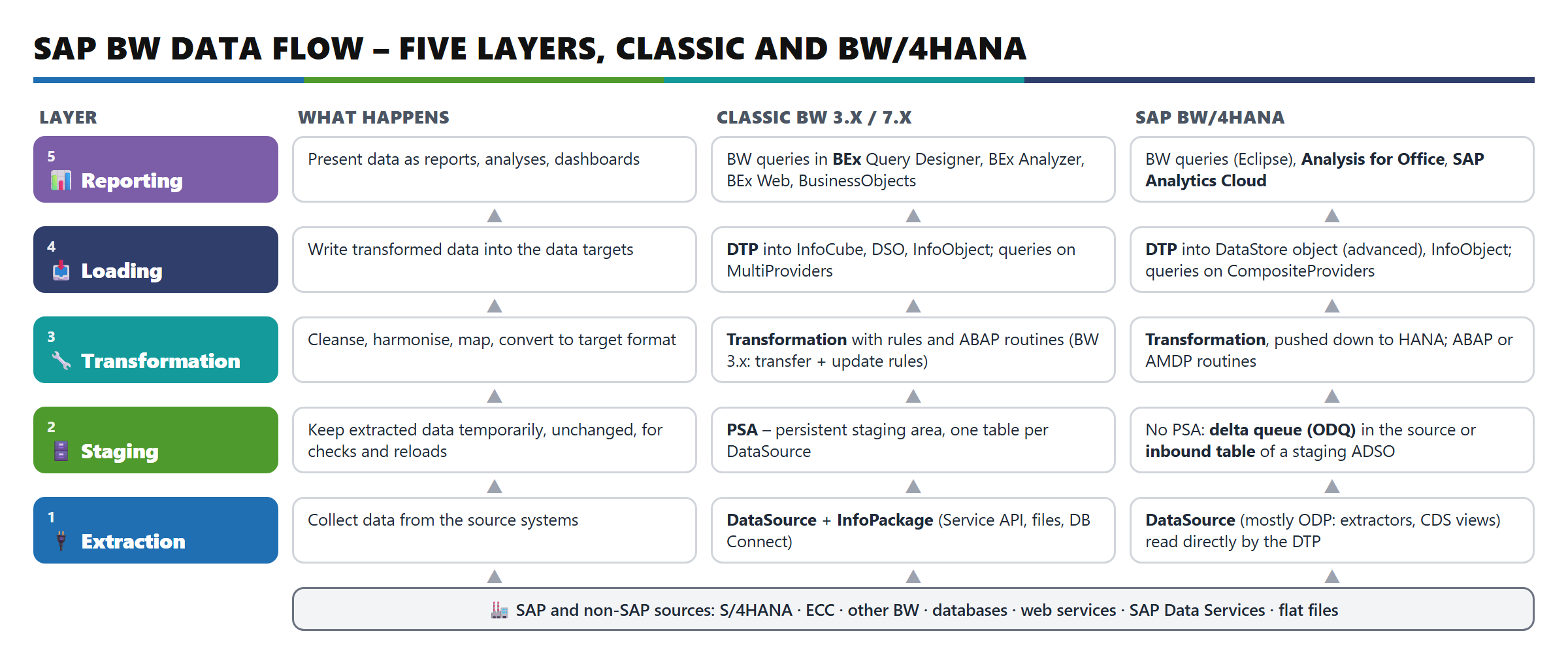
Layer | Task | Classic BW (3.x / 7.x) | BW/4HANA |
|---|---|---|---|
1 Extraction | Collect data from the source systems | DataSource + InfoPackage | DataSource (mostly ODP) read directly by the DTP |
2 Staging | Store the extracted data temporarily, unchanged | PSA (persistent staging area) | No PSA: the ODP delta queue in the source, or the inbound table of a staging DataStore object |
3 Transformation | Cleanse, harmonise, convert to the target format | Transformation (BW 3.x: transfer and update rules) | Transformation, executed in HANA where possible |
4 Loading | Write the transformed data into the data targets | DTP into InfoCube, DSO, InfoObject | DTP into DataStore object (advanced), InfoObject |
5 Reporting | Present the data | BEx Query Designer, BEx Analyzer, BEx Web, BusinessObjects | BW queries (BW Modeling Tools), Analysis for Office, SAP Analytics Cloud, BusinessObjects |
6.1 Extraction layer
- Covers the extraction process: collecting data from the source systems.
- BW can acquire data from SAP systems (S/4HANA, ECC, CRM, another BW), databases, web services, SAP Data Services and other ETL tools, and flat files (CSV, Excel).
- The object that describes what is extracted is the DataSource (fields, delta capability). Source system types and ODP: page 03 Part 1–3.
6.2 Staging layer
- The extracted data is stored temporarily and unchanged, in the source format: the data of the different operational sources lands here first.
- From here the data is pre-processed – checked and cleansed – before the calculations and aggregations the business needs; a failed load can be repeated from the staging data without touching the source again.
- Classic BW: this storage is the persistent staging area (PSA) – one PSA table per DataSource, where data is stored in BW right after extraction.
- BW/4HANA: there is no PSA. ODP sources keep the data in the operational delta queue (ODQ) of the source system, which offers the same safety; when BW itself needs a first persistence, a staging DataStore object (its inbound table) plays the PSA role (page 03 Part 4).
6.3 Transformation layer
- Consolidates, cleans and integrates data so that it fits together technically (formats, lengths, units) and semantically (same meaning, same codes).
- Converts data from the source format into the format the target needs.
- Means: field mapping (rules), formulas, lookups of master data, and custom transformation programs (start, end, expert and field routines in ABAP or AMDP – page 03 Part 5, page 05).
6.4 Loading layer
- Loading is the process of adding the transformed data to the data targets.
- The data transfer process (DTP) moves the data from a source object (DataSource, InfoProvider) through the transformation into the target, with the parameters you define between the two: full or delta, filters, package size, error handling (page 03 Part 6).
6.5 Reporting layer
- The data is presented in different forms: reports, analyses, dashboards, planning screens.
- Reports are defined as BW queries on InfoProviders. Front ends: the BEx suite (Query Designer, BEx Analyzer, BEx Web – legacy), SAP BusinessObjects tools (Analysis for Office, Web Intelligence, Crystal Reports) and SAP Analytics Cloud. Analysis is carried out in these tools (page 04).
The classic step list for building such a flow in BW 7.x: create the source system, the application component and the DataSource; create the InfoArea, InfoObject catalog, InfoObjects and InfoProvider; create and run the InfoPackage; create the transformation; create and run the DTP. In BW/4HANA the InfoObject catalog and the InfoPackage are gone (InfoObjects sit directly in InfoAreas, the DTP extracts itself) – the full sequence is on page 03 Part 9.
Part 7 – Layered architecture: LSA and LSA++
The five layers describe the technical flow. For a large enterprise warehouse SAP published a reference design for how to organise the InfoProviders themselves: the Layered Scalable Architecture (LSA) for classic BW, and LSA++ for BW on HANA and BW/4HANA.
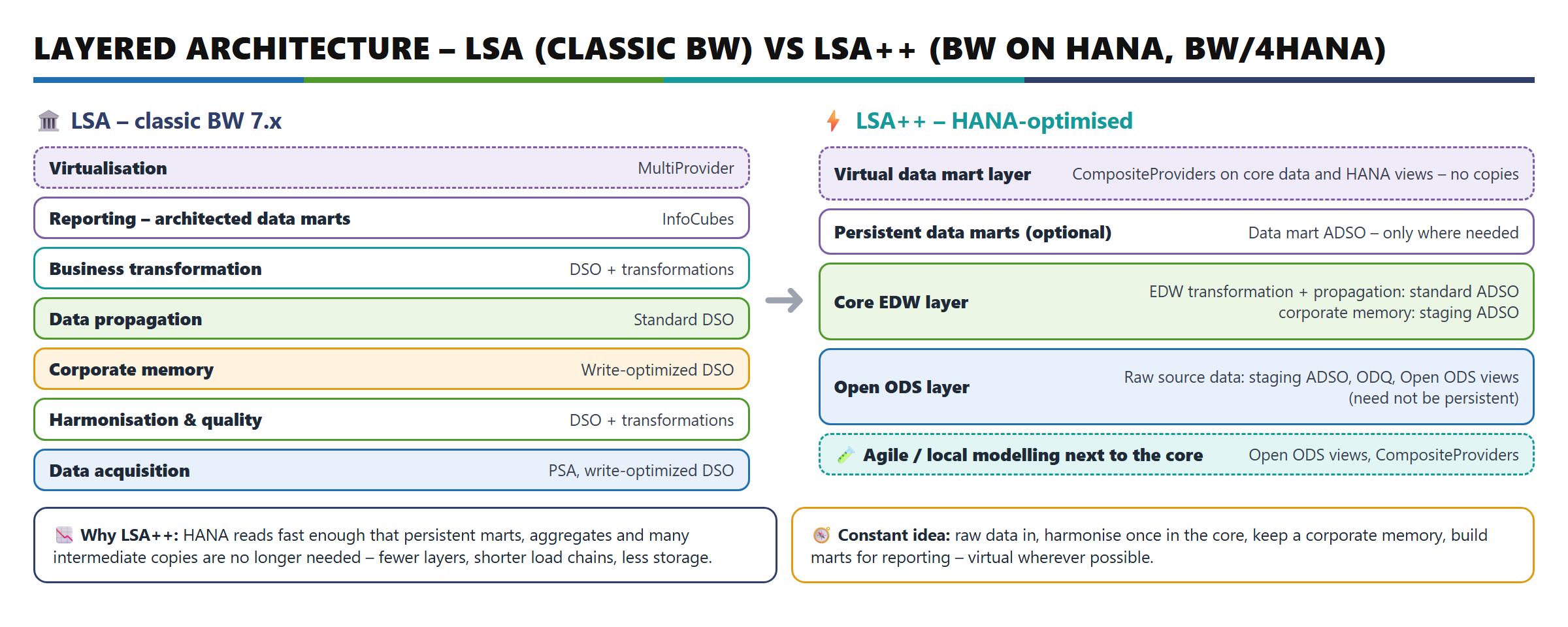
LSA layer (classic BW) | Purpose | Typical object |
|---|---|---|
Data acquisition | Inbound layer: data 1:1 as delivered by the source | PSA / write-optimized DSO |
Harmonisation and quality | Unify codes and formats, check quality | Transformations, DSO |
Corporate memory | Complete history of everything ever loaded, for reloads and new requirements | Write-optimized DSO, not used for reporting |
Data propagation | Harmonised, reusable data – the single source for all data marts | Standard DSO |
Business transformation | Application-specific logic for one data mart | Transformations, DSO |
Reporting (architected data marts) | Data shaped for queries | InfoCubes |
Virtualisation | One query layer over several marts | MultiProviders |
LSA++ – what HANA changed
- Open operational data store (Open ODS) layer: the inbound layer for raw source data, in source format, loaded in batch or replicated in real time. It need not be persistent when loading into the core layer is reliable and fast; external tables can be used virtually through Open ODS views.
- Core EDW layer: harmonised, integrated data (EDW transformation and propagation) plus the corporate memory – the persistent heart of the warehouse.
- Virtual data mart layer: data marts are no longer copies; CompositeProviders combine core data (and HANA views) at query time. Persistent data marts are optional, only where performance or complex logic needs them.
- Fewer layers and fewer copies mean less storage, shorter load chains and faster delivery of new reports. Agile, local modelling (a department's own data) sits next to the governed core.
Part 8 – BW releases: BW 3.x to BW/4HANA, embedded BW and SAP Datasphere
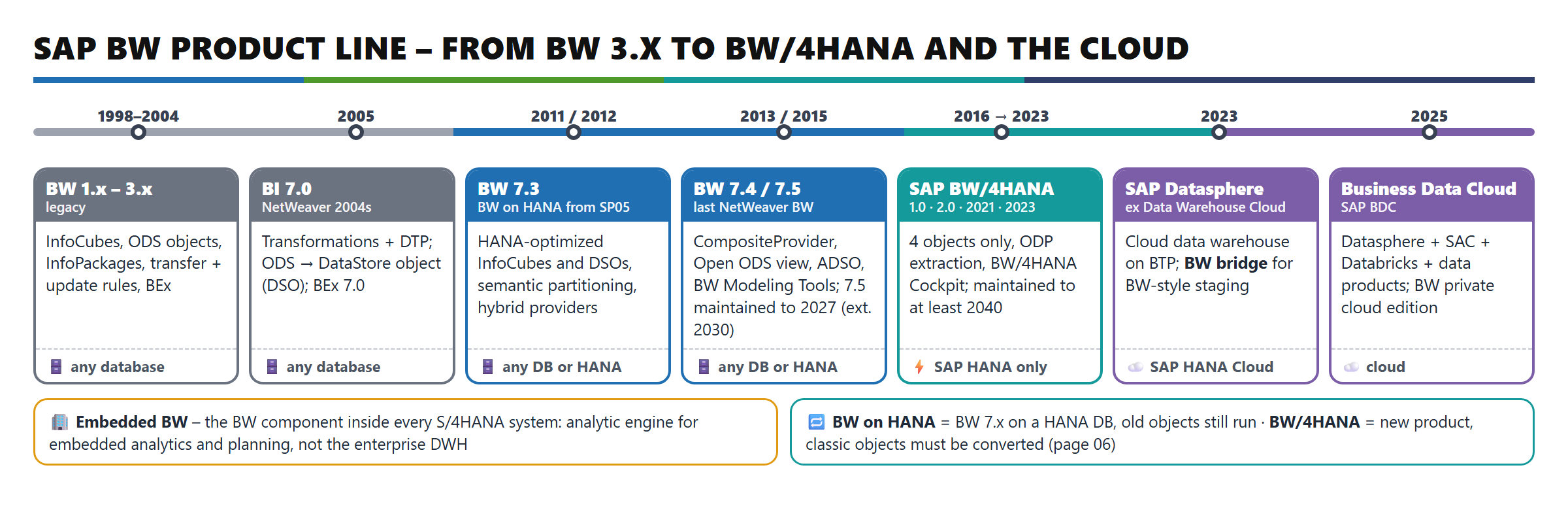
Release | Database | What it brought / what matters today |
|---|---|---|
BW 1.x – 3.x (from 1998, 3.x 2002–2004) | Any database | InfoCubes, ODS objects, InfoPackages, transfer and update rules, BEx. Legacy. |
BI 7.0 (SAP NetWeaver 2004s, 2005) | Any database | Transformations and DTP replace transfer / update rules; ODS objects renamed DataStore objects (DSO); new BEx 7.0 tools |
BW 7.3 (2011) | Any database; SAP HANA from SP05 (2012) – BW on HANA | HANA-optimized InfoCubes and DSOs, semantically partitioned objects, hybrid providers |
BW 7.4 / 7.5 (2013 / 2015) | Any database or HANA | On HANA: new CompositeProvider, Open ODS view, advanced DSO (ADSO), BW Modeling Tools in Eclipse, AMDP transformations. 7.5 is the last NetWeaver-based BW: mainstream maintenance until end of 2027, optional extended maintenance until 2030 |
SAP BW/4HANA 1.0 (2016), 2.0 (2019), 2021, 2023 | SAP HANA only | Own code line without the classic objects: four modelling objects (ADSO, CompositeProvider, Open ODS view, InfoObject), ODP as the main extraction channel, BW/4HANA Cockpit. Maintained until at least 2040 |
Embedded BW in S/4HANA | S/4HANA's HANA | The BW component inside every S/4HANA system: analytic engine for embedded analytics (CDS analytical queries), embedded planning. Not meant as the enterprise data warehouse |
SAP Datasphere (SAP Data Warehouse Cloud, renamed 2023) | SAP HANA Cloud | SAP's cloud data warehouse (SaaS on BTP): spaces, graphical / SQL views, analytic models, replication flows. SAP BW bridge runs BW-style staging (ADSO, transformations, process chains) inside it |
SAP Business Data Cloud (2025) | Cloud | Packages Datasphere, SAP Analytics Cloud, SAP Databricks and SAP-managed data products; existing BW systems can run as SAP BW private cloud edition and be modernised step by step |
- BW on HANA = classic BW 7.3 – 7.5 running on a HANA database: old objects still work, new HANA objects are available. BW/4HANA = a separate product; classic objects must be converted first (conversion paths and architecture choices: page 06).
- Remember the four BW/4HANA objects as the answer to "what replaced the ten-plus classic InfoProvider types": ADSO replaces InfoCube, DSO and PSA; CompositeProvider replaces MultiProvider and InfoSet; Open ODS view replaces VirtualProviders for external data; InfoObjects stay (page 02).
Part 9 – System landscape, source systems and tools
9.1 Landscape
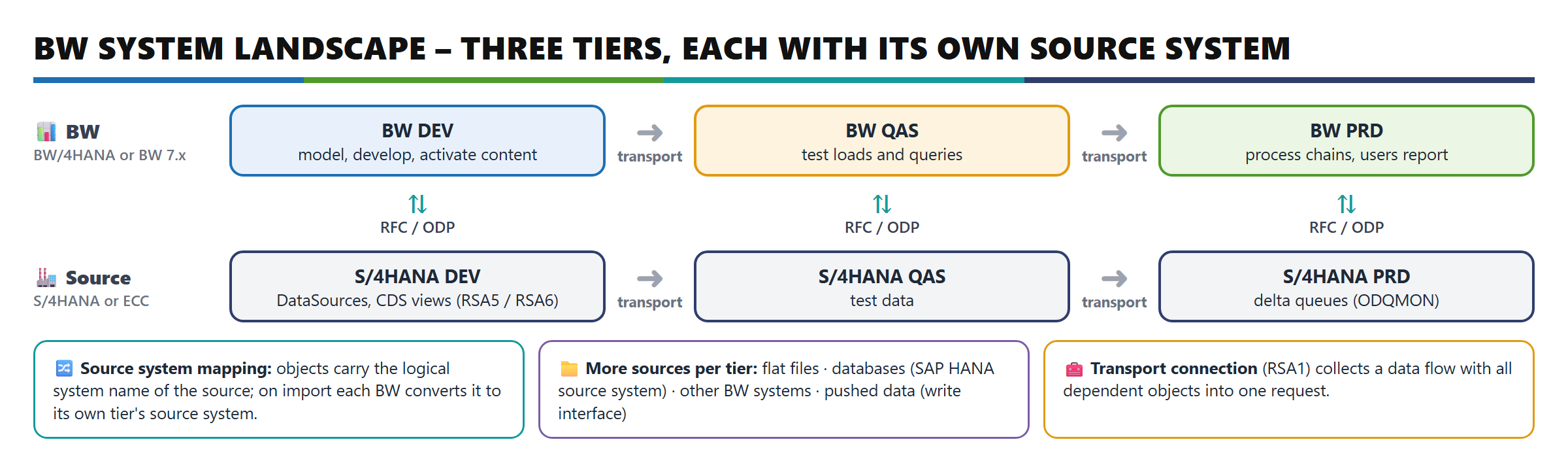
- Like any ABAP system, BW runs in a DEV → QAS → PRD landscape. Objects are developed in DEV and transported (CTS, STMS; in RSA1 the transport connection collects a data flow with all dependent objects).
- Each BW system is connected to the source system of the same tier: BW DEV ↔ S/4HANA DEV, BW QAS ↔ S/4HANA QAS, BW PRD ↔ S/4HANA PRD. Source-dependent objects (DataSources, transformations) contain the logical system name of the source; on import BW converts it to the target tier's source system through the mapping of logical system names maintained in each target BW.
- The connection to an SAP source uses RFC destinations in both directions; BW can also be its own source (the "Myself" system, data mart interface).
- SAP Business Content is activated in DEV (DataSources in the source system, BW objects in BW) and transported like own developments (page 03 Part 2).
9.2 Source systems
Classic BW 7.x source system | BW/4HANA source system | Used for |
|---|---|---|
SAP source system (Service API) | ODP source system – contexts SAPI (extractors), ABAP CDS views, BW, SLT, HANA | SAP ERP / S/4HANA / BW data |
BW system / Myself (data mart interface) | ODP – BW context | BW to BW |
DB Connect, UD Connect | SAP HANA source system (local schema, smart data access / smart data integration remote sources) | External databases and tables |
File source system | File source system | Flat files (CSV) from the PC or application server |
Web service source system | No source system: data is pushed into a write-interface-enabled DataStore object (RFC or HTTP) | Data pushed by external programs, SAP Cloud Integration |
Third-party source system (staging BAPIs, e.g. SAP Data Services) | SAP HANA source system (smart data integration adapters) or the write interface | Non-SAP ETL tools |
– | Big Data source system | Hadoop / Spark through HANA smart data access |
Details of each type, DataSources and ODP: page 03 Part 1–3.
9.3 Tools
Tool | What you do there | Release |
|---|---|---|
RSA1 – Data Warehousing Workbench (formerly Administrator Workbench) | Classic central tool: modelling (InfoAreas, InfoObjects, InfoProviders, DataSources, source systems), administration of requests, transport connection, Business Content, Metadata Repository | BW 3.x – 7.5; reduced role in BW/4HANA (e.g. source systems, transport connection, Business Content) |
BW Modeling Tools (BWMT) in Eclipse | Modelling of all BW/4HANA objects: InfoObjects, ADSOs, CompositeProviders, Open ODS views, DataSources, transformations, DTPs, queries; data flow editor | Required for BW/4HANA; also used with BW 7.4 / 7.5 |
SAP BW/4HANA Cockpit (Fiori launchpad) | Administration and monitoring: process chains, load requests, ADSO data management, data tiering | BW/4HANA |
RSPC / RSPCM | Process chain maintenance / monitor | All releases (page 03 Part 8) |
RSA3, RSA5, RSA6, RSO2, LBWE, ODQMON (source system) | Test, activate, maintain, create DataSources; logistics extraction; delta queue monitor | Page 03, page 05 |
Query Designer (BEx – legacy; Eclipse in BWMT), RSRT | Define and test queries | Page 04 |
Part 10 – Interview questions
Q1. What is a data warehouse? Explain Inmon's four properties.
A subject-oriented, integrated, non-volatile and time-variant collection of data for decision making. Subject-oriented: organised by business subject; integrated: one format and meaning across sources; non-volatile: loaded and read, not changed by transactions; time-variant: keeps history so periods can be compared.
Q2. Why do we need a data warehouse if S/4HANA has embedded analytics?
Embedded analytics reports on current data of one S/4HANA system. A warehouse integrates many SAP and non-SAP sources, keeps long history even after archiving, harmonises master data and takes heavy enterprise-wide reporting load off the operational system.
Q3. What is the difference between OLTP and OLAP?
OLTP runs the business: many short read/write transactions on current, normalised data. OLAP analyses the business: few heavy read queries that aggregate historical, integrated data in denormalised structures such as the star schema.
Q4. What is a data mart and which types exist?
A small warehouse focused on one subject or department. Dependent marts are fed from the central DWH, independent marts directly from the sources, hybrid marts from both. In BW/4HANA a data mart is a data mart ADSO or, preferably, a virtual CompositeProvider.
Q5. What is data mining? Is it the same as fast data retrieval?
No. Data mining discovers patterns, correlations and trends with statistical and machine-learning methods (clustering, association, classification, regression). On HANA it runs in the Predictive Analysis Library; the classic APD / Data Mining Workbench are legacy.
Q6. ERM vs star schema – why does a warehouse use a star schema?
ERM is normalised to avoid redundancy and suits writing. The star schema puts facts in one fact table and descriptive data in dimension tables, so queries need few joins and aggregate fast. SAP's extended star schema keeps master data outside the cube, shared through SID tables.
Q7. Which types of metadata exist?
Technical (tables, fields, data types, transformations), business (definitions, descriptions, calculation rules) and operational (load requests, times, status, logs). BW keeps them in the Metadata Repository; objects exist in D, M and A versions.
Q8. Name the layers of the SAP BW data flow.
Extraction (DataSource), staging (PSA in classic BW; delta queue or inbound table of a staging ADSO in BW/4HANA), transformation, loading (DTP into InfoProviders) and reporting (queries, Analysis for Office, SAP Analytics Cloud).
Q9. What is LSA++ and how does it differ from LSA?
LSA++ is SAP's layered architecture for BW on HANA and BW/4HANA: an Open ODS inbound layer, a core EDW layer with corporate memory and propagation, and virtual data marts built with CompositeProviders. Classic LSA had more persistent layers and physical InfoCube data marts; HANA makes many of those copies unnecessary.
Q10. What is the difference between BW on HANA and BW/4HANA?
BW on HANA is BW 7.3–7.5 on a HANA database: classic objects still run, HANA objects are added. BW/4HANA is a separate HANA-only product with only ADSO, CompositeProvider, Open ODS view and InfoObject, ODP-based extraction and the BW/4HANA Cockpit; classic objects must be converted.
Q11. What is embedded BW, and should it be the enterprise data warehouse?
The BW component inside every S/4HANA system, used as the analytic engine for embedded analytics and for embedded planning. It reports on that system's own data; for cross-system, historical warehousing SAP positions BW/4HANA or SAP Datasphere – today as part of SAP Business Data Cloud, where existing BW can also run as SAP BW private cloud edition.
Q12. Which tools do you use in BW/4HANA compared with BW 7.x?
BW 7.x: RSA1 Data Warehousing Workbench and BEx Query Designer. BW/4HANA: BW Modeling Tools in Eclipse for all modelling and queries, the BW/4HANA Cockpit for administration and monitoring; RSA1 remains for a few tasks like source systems and the transport connection.
🏠 Start Here · 02 · Data Modeling ▶ · Sections: CORE ABAP | OOPS ABAP | ABAP on HANA | Clean Core | RAP | ABAP Points | SAP Fiori | SAPUI5 | Mobile Development (MDK) | BTP Foundations | BTP Development | CAP | SAP Build | ABAP on BTP | Integration Suite | SAP Business AI | SAP BASIS | Security | SAP SDLC
Functional: FICO ABAP | TRM ABAP | VIM | SAP BIS | SD ABAP | MM ABAP | PP ABAP | QM ABAP | PM ABAP | PS ABAP | EWM | TM ABAP | GTM ABAP | EHS ABAP | HR ABAP | BW | SAP MDG | SAP Analytics Cloud | SAP Ariba | SAP CX | SAP IBP