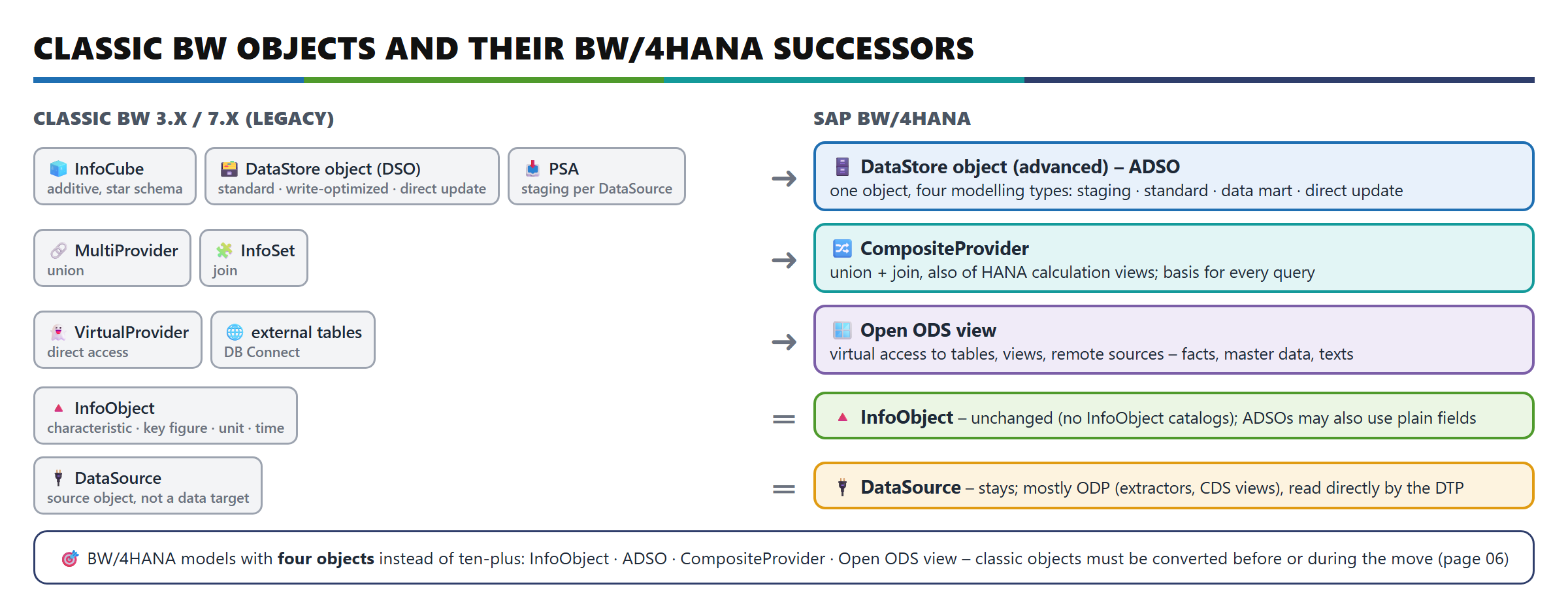
Data modelling decides where BW stores data and how it can be reported. The building blocks are InfoObjects (characteristics, key figures, units, time) with their master data, combined into InfoProviders. Classic BW (3.x – 7.5) had many InfoProvider types – InfoCube, DSO, MultiProvider, InfoSet, VirtualProvider; BW/4HANA keeps only four objects: InfoObject, DataStore object (advanced), CompositeProvider and Open ODS view. You need both worlds: most interview questions and many running systems are classic, every new design is BW/4HANA. Architecture and layers: page 01; how data gets into these objects: page 03; queries on them: page 04.
Part 1 – InfoObjects: the building blocks
InfoObjects are the smallest units of BW – the building blocks of every InfoProvider (in classic BW: of every InfoCube). Each InfoObject is defined once and reused everywhere, which is how BW integrates subjects: sales and billing data share the same 0CUSTOMER with the same master data. If you know other BI tools: characteristics roughly correspond to attributes / dimensions and key figures to facts / measures (e.g. attributes and facts in a MicroStrategy project).
InfoObject type | What it is | Examples |
|---|---|---|
Characteristic | Descriptive, used to group and filter ("by what"); can carry master data: attributes, texts, hierarchies | 0CUSTOMER, 0MATERIAL, 0COMP_CODE, 0SALESORG |
Key figure | Measurable value that is aggregated ("how much") | 0AMOUNT, 0QUANTITY, 0NETVAL_INV |
Unit | Currency or unit of measure that belongs to an amount or quantity key figure | 0CURRENCY, 0UNIT, 0DOC_CURRCY |
Time characteristic | SAP-delivered characteristics for time, with fixed derivation between them | 0CALDAY, 0CALMONTH, 0CALYEAR, 0FISCPER, 0FISCYEAR, 0FISCVARNT |
Technical characteristic | Used by BW itself | 0RECORDMODE (delta image type), request IDs: 0REQUID (classic), 0REQTSN (BW/4HANA) |
- Naming: SAP Business Content InfoObjects start with 0 (0MATERIAL); customer InfoObjects start with a letter A–Z (ZCOLOR). Their generated tables use the namespace /BI0/ (SAP) or /BIC/ (customer).
- Organisation: InfoObjects are grouped in InfoAreas (the folder tree of BW). Classic BW adds InfoObject catalogs (one for characteristics, one for key figures) inside the InfoArea – legacy; BW/4HANA assigns InfoObjects directly to InfoAreas.
- Business Content (BI Content): SAP delivers thousands of InfoObjects, DataSources, InfoProviders and queries in the D version; you activate what you need (page 03 Part 2).
Part 2 – Characteristics and master data
2.1 Properties of a characteristic
Property | Meaning |
|---|---|
Data type and length | CHAR, NUMC, DATS, TIMS with a length (classic BW: up to 60 characters); conversion routine such as ALPHA (leading zeros) like in the DDIC |
Master data / texts | Whether the characteristic has its own attributes, texts (short, medium, long; language-dependent or not; time-dependent or not) and hierarchies |
Display attribute | Attribute shown next to the characteristic in a query, cannot be used for navigation or filtering |
Navigation attribute | Attribute that behaves like a characteristic in the query (drill down, filter) without being stored in the InfoProvider, e.g. 0MATERIAL__0MATL_GROUP. Always shows the current (or key-date) value |
Time-dependent attributes | Values valid for a period (DATEFROM / DATETO), e.g. the cost center's profit center; queries read them for a key date |
Compounding | The key only makes sense together with another characteristic: cost center 0COSTCENTER is compounded to controlling area 0CO_AREA, storage location to plant |
Reference characteristic | Uses the master data of another one: 0SOLD_TO and 0SHIP_TO reference 0CUSTOMER |
Authorization relevant | The characteristic can be restricted in analysis authorizations (page 04) |
2.2 Master data tables
When you activate a characteristic with master data, BW generates a set of tables. Pattern: /BI0/ or /BIC/ + one letter + the InfoObject name without the leading 0 for SAP objects (0MATERIAL → /BI0/PMATERIAL, ZCOLOR → /BIC/PZCOLOR).
Letter | Table | Content |
|---|---|---|
S | SID table | Characteristic value → SID (surrogate ID, a 4-byte integer). Every value used anywhere in BW gets a SID; InfoCubes, aggregates and navigation work with SIDs |
P | Time-independent attributes | Key, OBJVERS (A active / M modified), CHANGED, attribute values |
Q | Time-dependent attributes | Like P plus DATETO / DATEFROM |
M | Master data view | View over P and Q – what you read for "all attributes" |
X / Y | Attribute SID tables | SIDs of the navigation attributes (X time-independent, Y time-dependent), used by queries |
T | Texts | Key, language (if language-dependent), DATETO (if time-dependent), TXTSH / TXTMD / TXTLG |
H / K / I / J | Hierarchies | H hierarchy nodes, K hierarchy SIDs, I SID hierarchy structure, J hierarchy intervals |
- New or changed attribute values are loaded as version M and become A (active) through master data activation – in classic BW the attribute change run, which also realigns aggregates. Until then queries see the old values.
- Table fields are named after the InfoObject without the leading 0 (0MATL_GROUP → MATL_GROUP); customer InfoObjects as fields carry the namespace (
/BIC/ZCOLOR). - Hierarchies (e.g. a cost center or product group hierarchy) can be time-dependent or version-dependent and are used in queries for drill down by tree (page 04).
Example – reading active master data in a BW routine or report
|
In transformations prefer the rule type Read master data (or a lookup in an end routine that reads all keys of the package at once – page 05) over single SELECTs per record.
Part 3 – Key figures and units
Key figure type | Unit | Example |
|---|---|---|
Amount | Fixed currency or a currency InfoObject (0CURRENCY) | Net value, revenue |
Quantity | Fixed unit or a unit InfoObject (0UNIT) | Order quantity, stock |
Number / integer | None | Number of documents, percentages |
Date / time | None | Last goods receipt date (aggregation MIN / MAX) |
- Standard aggregation: summation, minimum or maximum – how values are combined when the query drops a characteristic.
- Exception aggregation: a different rule for one reference characteristic, e.g. headcount: sum over employees but last value over 0CALMONTH; average, count, first / last value, standard deviation.
- Non-cumulative key figures: stock values that cannot be summed over time. BW stores a reference point plus inflows and outflows and calculates the stock for any date (e.g. 0TOTALSTCK with inflow 0RECTOTSTCK and outflow 0ISSTOTSTCK in inventory management).
- Currency translation and unit conversion happen in transformations or at query runtime (page 04).
Part 4 – Classic InfoProviders: InfoCube and extended star schema
InfoProviders are all BW objects that can be used for reporting and analysis. Some store data (data targets: InfoCube, DSO, InfoObject with master data); others only combine data at query time (MultiProvider, InfoSet, VirtualProvider). Everything in Parts 4 and 5 is classic BW – legacy in BW/4HANA, but still running in many BW 7.x systems and asked in interviews.
4.1 InfoCube
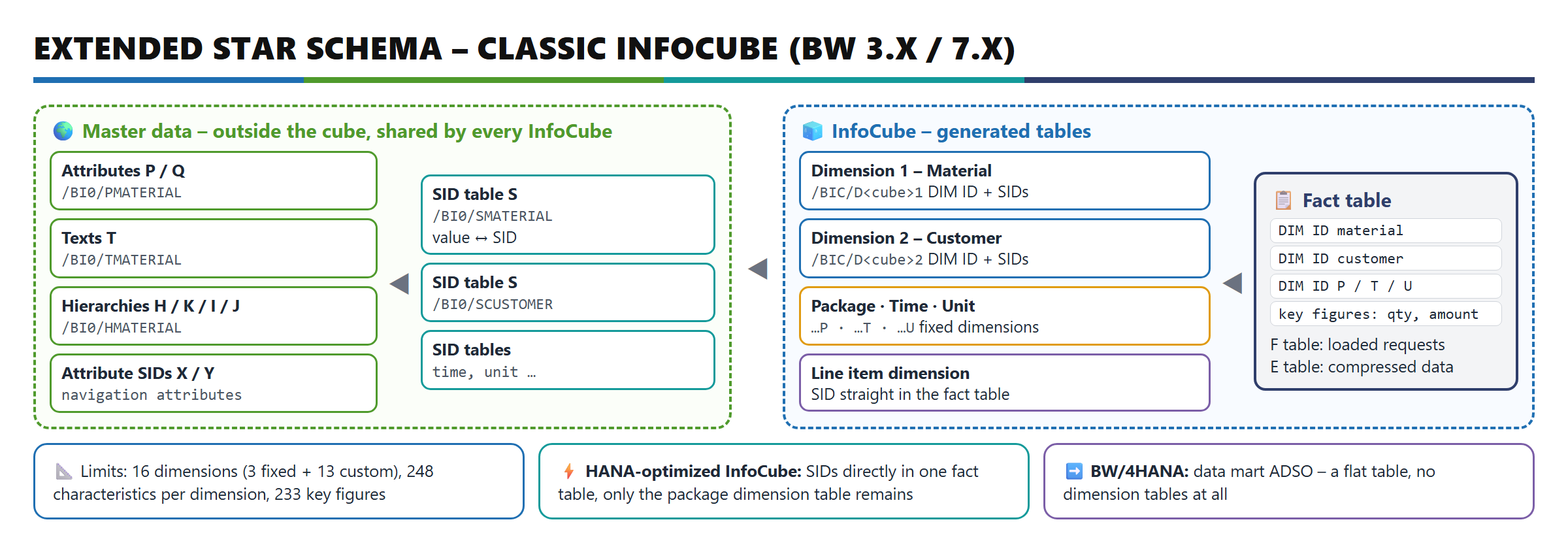
The InfoCube is a multidimensional cube and was the primary object classic BW used to store data for analysis. An InfoCube covers one domain of analysis – finance, sales, inventory – and is optimised for queries, not for overwriting: records with the same characteristics are added (key figures summed).
4.2 Extended star schema
- Fact table: key figures plus one DIM ID per dimension. Two fact tables: F (
/BIC/F<cube>, loaded requests) and E (/BIC/E<cube>, compressed data). - Dimension tables (
/BIC/D<cube>1… ): group characteristics; they store SIDs, not the values. Up to 16 dimensions: 3 fixed (P data package, T time, U unit) and 13 custom; up to 248 characteristics and 233 key figures per InfoCube. - Master data stays outside the cube in the SID, attribute, text and hierarchy tables of each InfoObject (Part 2) – shared by all InfoCubes, so a changed attribute is visible everywhere without reloading the cubes. This is the "extended" part compared with a simple star schema.
- Line item dimension: a dimension with one high-cardinality characteristic (document number); the fact table holds the SID directly, no dimension table – saves a join.
- Compression moves requests from F to E and drops the request ID (summing records); afterwards the request can no longer be deleted on its own. Aggregates and the BW Accelerator were classic speed-ups – legacy, not needed on HANA.
- HANA-optimized InfoCube (BW 7.3 on HANA): the SIDs are written directly into the fact table, there are no dimension tables apart from the package dimension and only one fact table – fewer joins. The ADSO takes this flat idea further.
Part 5 – Classic DataStore objects, MultiProvider and InfoSet
5.1 DataStore object (DSO, formerly ODS object)
ODS objects (operational data store objects, BW 3.x) were renamed DataStore objects in BI 7.0. A DSO stores consolidated, cleansed data at document level in flat relational tables (no star schema) – comparable to a fact table in other BI tools such as MicroStrategy. Unlike an InfoCube it has a semantic key and overwrites: a changed sales order replaces the old record and the change log records the delta.
DSO type | Tables | Use |
|---|---|---|
Standard DSO | Activation queue ( | Harmonisation and propagation layer; delta for the next targets from the change log |
Write-optimized DSO | Only the active table, with a technical key (request, data package, record); no activation | Fast inbound or corporate memory layer, keeps every record |
DSO for direct update | Only the active table, written by APIs or the Analysis Process Designer, not by DTPs | Results of analysis processes, planning |
5.2 MultiProvider and InfoSet
Object | Combines with | Stores data? | Example |
|---|---|---|---|
MultiProvider | Union of two or more InfoProviders (InfoCubes, DSOs, InfoObjects, InfoSets, VirtualProviders) | No | Plan cube + actual cube; sales data of several years in separate cubes; three InfoCubes or two DSOs of different subject areas |
InfoSet | Join (inner, left outer, temporal) of DSOs, InfoObjects, InfoCubes | No | Orders joined with customer attributes valid on the order date |
VirtualProvider | Reads data at query time from a source (DTP, BAPI, function module) | No | Small, real-time data from the source system |
- Queries were normally built on MultiProviders, never directly on the cubes, so cubes could be split or replaced without touching the queries – the same idea as the CompositeProvider today.
Part 6 – BW/4HANA: the DataStore object (advanced)
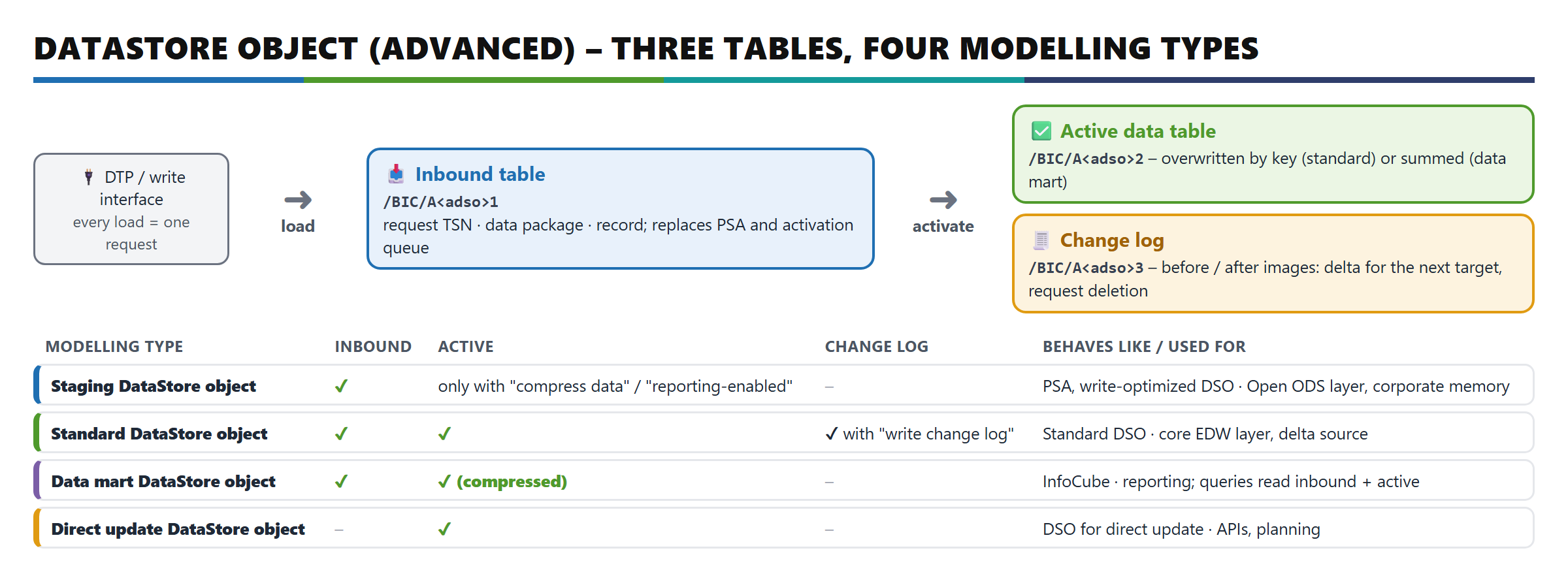
The DataStore object (advanced) – ADSO – is the single persistent object of BW/4HANA (also available in BW on HANA from BW 7.4 SP08 and in BW 7.5). Depending on its settings it behaves like a PSA, a write-optimized DSO, a standard DSO or an InfoCube. It is modelled in the BW Modeling Tools and can use InfoObjects or plain fields.
6.1 The three tables
Table | Name | Content |
|---|---|---|
Inbound table | /BIC/A<adso>1 | Every load lands here first, as a request with a technical key (request TSN, data package, record). Replaces the PSA / activation queue |
Active data table | /BIC/A<adso>2 | Data after activation: overwritten by semantic key (standard) or aggregated (data mart) |
Change log | /BIC/A<adso>3 | Before and after images of every activated change: delta source for the next targets and basis for request-based deletion / rollback |
6.2 Modelling types
Type | Tables used | Behaves like / used for |
|---|---|---|
Staging DataStore object | Inbound only (option "inbound queue only"); or inbound + active ("compress data", "reporting-enabled") | PSA / write-optimized DSO: Open ODS and corporate memory layer |
Standard DataStore object | Inbound, active and (option "write change log") change log | Standard DSO: overwrite by key, delta via change log; options snapshot support and unique data records |
Data mart DataStore object | Inbound + active; no change log; activation = compression | InfoCube: key figures are summed; queries read inbound and active table together |
Direct update DataStore object | Active only, written by APIs or planning | DSO for direct update |
- Activation of a standard ADSO removes the request from the inbound table, updates the active table and writes the change log. Without a change log only selective deletion is possible.
- Special properties: planning enabled (BW-IP / BPC embedded), write-interface enabled (data pushed by RFC or HTTP – page 03), external SAP HANA view (generates a calculation view for native HANA consumers, Part 7).
- Fields vs InfoObjects: an ADSO (and Open ODS view) may use simple fields with a data type instead of InfoObjects – fast to build for inbound layers; associate a field with an InfoObject when you need master data, navigation attributes or authorizations. Field-based data needs no SIDs, which speeds up loading.
- Data tiering: ADSO partitions can be moved to warm storage (HANA extension node, native storage extension) or cold storage (archiving / NLS) – managed in the BW/4HANA Cockpit (page 06).
Part 7 – CompositeProvider, Open ODS view and HANA mixed scenarios
7.1 CompositeProvider
The CompositeProvider is the virtual reporting layer of BW/4HANA: it combines InfoProviders with union and join (inner and left outer) and is executed in HANA at query time. It replaces the MultiProvider and the InfoSet, and every query should be built on one (page 04).
- Part providers: ADSOs, InfoObjects, Open ODS views, other CompositeProviders and SAP HANA calculation views.
- Typical uses: plan + actual, current + archived years, virtual data marts in LSA++ (page 01 Part 7).
7.2 Open ODS view
An Open ODS view gives BW a virtual view of data that lives outside BW-managed tables – a table or view in a HANA schema, a remote source via smart data access, or a BW DataSource – without loading it. You define its semantics: facts, master data or texts, and associate fields with InfoObjects to reuse their master data.
- Use it to report on external data quickly (agile, Open ODS layer). When the data must be persisted later, BW can generate a data flow: an ADSO plus transformation and DTP from the Open ODS view.
7.3 HANA calculation views and mixed scenarios
A mixed scenario combines BW-managed objects with native SAP HANA modelling (calculation views, SQL) in the same HANA database. Both directions work:
Direction | How | Typical case |
|---|---|---|
HANA → BW | A calculation view is consumed in a CompositeProvider or an Open ODS view | Non-SAP data replicated into a HANA schema (SLT, smart data integration) reported together with BW data |
BW → HANA | Flag external SAP HANA view on an ADSO, InfoObject, CompositeProvider or query: BW generates a calculation view | Native HANA applications, SQL clients or other tools read BW data with BW semantics |
- Design rule: keep the governed, harmonised data in BW objects (lifecycle, requests, delta, authorizations); use calculation views for logic that HANA does better or data that never needs staging. Authorizations differ: BW analysis authorizations vs HANA privileges – plan both when you mix.
- Calculation views themselves (graphical views, SQLScript) are taught in ABAP on HANA › 06 AMDP & SQLScript; CDS views in S/4HANA as sources: page 03 Part 3.
Need | Classic BW 7.x | BW/4HANA |
|---|---|---|
Persist inbound data 1:1 | PSA, write-optimized DSO | Staging ADSO |
Persist harmonised data with delta | Standard DSO | Standard ADSO with change log |
Persist data for reporting, summed | InfoCube | Data mart ADSO (or report on standard ADSO) |
Combine providers (union) | MultiProvider | CompositeProvider (union) |
Join providers | InfoSet | CompositeProvider (join) |
Report on external data without loading | VirtualProvider | Open ODS view, HANA view in CompositeProvider |
Master data | InfoObject | InfoObject (unchanged) |
Part 8 – Master data vs transaction data targets
Business data is loaded into different data targets depending on its nature:
Type of data | What it is | Classic BW target | BW/4HANA target |
|---|---|---|---|
Master data | Long-lived descriptive data: customer, material, cost center – attributes, texts, hierarchies | InfoObject (characteristic with master data) | InfoObject (characteristic); optionally an Open ODS view of type master data |
Transaction data | Business events with key figures: orders, deliveries, invoices, postings | InfoCube / DSO | DataStore object (advanced) |
- Master data is loaded before transaction data: SIDs must exist for every characteristic value (or are created during the load), and attribute changes must be activated before queries see them.
- In the classic Data Warehousing Workbench the typical objects in the data flow are: DataSource (source object, not a data target), InfoObject and InfoCube / DataStore object (data targets), MultiProvider and InfoSet (InfoProviders without own data).
Part 9 – Interview questions
Q1. What is an InfoObject and which types exist?
The smallest building block of BW, defined once and reused. Types: characteristics (descriptive, with master data), key figures (measures), units (currency, unit of measure), time characteristics and technical characteristics. SAP objects start with 0, customer objects with a letter.
Q2. Display attribute vs navigation attribute?
A display attribute is only shown next to its characteristic. A navigation attribute can be used like a characteristic for drill down and filtering, without being stored in the InfoProvider; it costs an extra join at query time.
Q3. Which tables does BW generate for a characteristic with master data?
S (SIDs), P (time-independent attributes), Q (time-dependent attributes), M (view over P and Q), X / Y (attribute SIDs), T (texts) and H / K / I / J (hierarchies), in namespace /BI0/ for SAP and /BIC/ for customer InfoObjects – e.g. /BI0/PMATERIAL.
Q4. What is a SID and why does BW use it?
A surrogate ID: an integer assigned to every characteristic value in the S table. Classic InfoCubes and queries work with SIDs, which are smaller and faster to join than long keys and link transaction data to shared master data.
Q5. Explain the extended star schema.
Fact table with key figures and DIM IDs, dimension tables holding SIDs, and master data outside the cube in SID, attribute, text and hierarchy tables shared by all InfoCubes. Up to 16 dimensions (package, time, unit plus 13 custom). On HANA the HANA-optimized InfoCube put SIDs directly into the fact table.
Q6. InfoCube vs DSO?
An InfoCube is multidimensional and additive – records with the same characteristics are summed – and built for reporting. A DSO is a flat table with a semantic key that overwrites and produces a delta in its change log, used for document-level data and harmonisation.
Q7. Name the classic DSO types and their tables.
Standard DSO: activation queue, active data, change log. Write-optimized DSO: only the active table with a technical key, no activation. DSO for direct update: only the active table, filled by APIs or the APD.
Q8. MultiProvider vs InfoSet?
A MultiProvider unions InfoProviders; an InfoSet joins them (inner, left outer, temporal). Neither stores data. In BW/4HANA both are replaced by the CompositeProvider.
Q9. What is an ADSO and which tables does it have?
The DataStore object (advanced), the only persistent object of BW/4HANA. Inbound table /BIC/A<name>1, active data /BIC/A<name>2 and change log /BIC/A<name>3. Modelling types: staging, standard, data mart and direct update – together they replace PSA, DSO types and InfoCube.
Q10. How do you model an InfoCube-like object in BW/4HANA?
A data mart DataStore object: inbound and active table, no change log, activation compresses and sums the key figures, queries read inbound and active data together.
Q11. What is an Open ODS view?
A virtual BW object on data outside BW tables (HANA tables or views, remote sources, DataSources) with semantics facts, master data or texts. It allows reporting without loading; a data flow with an ADSO can be generated later.
Q12. How do BW and native HANA modelling work together?
Mixed scenarios: HANA calculation views are consumed in CompositeProviders or Open ODS views, and BW objects can generate external SAP HANA views for native consumers. Authorizations must be planned on both sides.
🏠 Start Here · ◀ 01 · Concepts & Architecture · 03 · Extraction & Loading ▶ · Sections: CORE ABAP | OOPS ABAP | ABAP on HANA | Clean Core | RAP | ABAP Points | SAP Fiori | SAPUI5 | Mobile Development (MDK) | BTP Foundations | BTP Development | CAP | SAP Build | ABAP on BTP | Integration Suite | SAP Business AI | SAP BASIS | Security | SAP SDLC
Functional: FICO ABAP | TRM ABAP | VIM | SAP BIS | SD ABAP | MM ABAP | PP ABAP | QM ABAP | PM ABAP | PS ABAP | EWM | TM ABAP | GTM ABAP | EHS ABAP | HR ABAP | BW | SAP Datasphere | SAP Business Data Cloud | SAP MDG | SAP Analytics Cloud | SAP Ariba | SAP CX | SAP IBP