Everything a user sees from BW runs through a BW query: a definition on top of an InfoProvider that the analytic manager (OLAP engine) executes and that front ends such as Analysis for Office and SAP Analytics Cloud display. This page covers how queries are built (structures, restricted and calculated key figures, variables, hierarchies), the front ends from BEx to SAC, analysis authorizations, query performance and the legacy APD. InfoProviders are on page 02, the ABAP for variable exits on page 05, CDS-based embedded analytics on page 06.
Part 1 – BW queries and the query designer
A query is metadata, not data: it selects an InfoProvider, places characteristics and key figures in rows, columns and free characteristics, restricts data with filters and variables and adds calculations. At runtime the analytic manager reads the InfoProvider (on HANA most operations are pushed down to the database), applies authorizations and returns the result set to the front end.
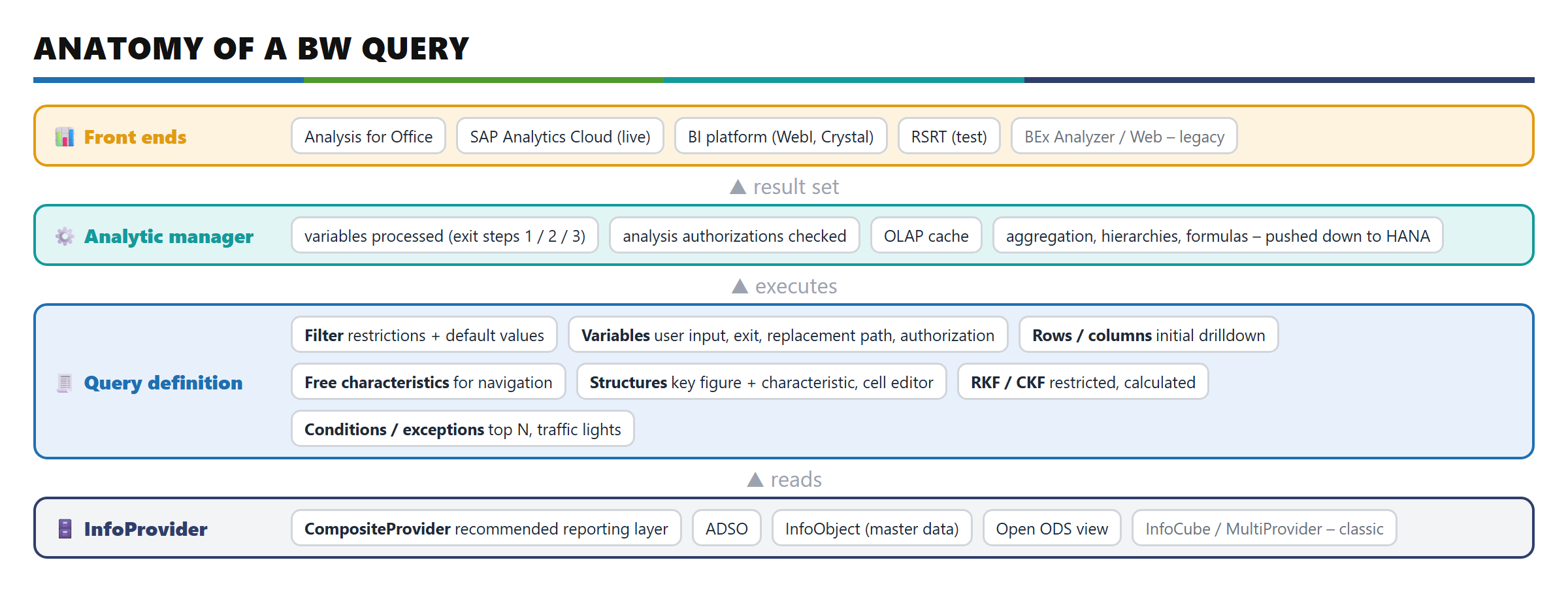
Query area | What goes there | Example |
|---|---|---|
Filter – characteristic restrictions | Fixed restrictions the user cannot remove | Version = actual, company code = variable |
Filter – default values | Initial selection the user can change while navigating | Calendar year = 2026 |
Rows / columns | Initial drilldown and the key figure structure | Rows: sales org; columns: revenue, quantity |
Free characteristics | Available for drilldown and filtering, not shown at start | Customer, material, distribution channel |
Query properties | Read mode, cache usage, variable order, zero suppression, result rows | Set in the designer or RSRT |
Tool | Release | Status |
|---|---|---|
BEx Query Designer (Windows desktop tool, part of the BEx suite) | BW 3.x – 7.5 | Legacy – not supported with BW/4HANA |
Query designer in BW Modeling Tools (Eclipse / ADT) | BW 7.5, BW/4HANA | Current – same concepts, plus the data flow and modelling objects in one tool |
- Queries are built on any InfoProvider; in BW/4HANA the recommended layer is the CompositeProvider, so that reporting does not depend on the physical ADSOs below it (page 02).
- RSRT runs a query without a front end – for testing, debugging and performance analysis (Part 8).
Part 2 – Key figures and structures
2.1 Restricted and calculated key figures
Object | What it is | Example |
|---|---|---|
Restricted key figure (RKF) | A key figure filtered by one or more characteristic values (fixed or variable) | Revenue for calendar year = variable; revenue for sales org 1000 |
Calculated key figure (CKF) | A formula over key figures, RKFs, constants and formula variables | Margin = revenue − cost; margin % = margin / revenue × 100 |
Global (reusable) | Defined on the InfoProvider, used by many queries; changing it changes all queries | Company-wide definition of net revenue |
Local | Defined inside one query only | One-off variance column |
- Exception aggregation defines how a key figure is aggregated over one characteristic, independent of the drilldown: e.g. count of customers with revenue, average revenue per month, last value of a stock key figure. On HANA most exception aggregations are calculated in the database.
- Use global RKFs / CKFs for agreed company definitions (single source of truth) and local ones for experiments.
2.2 Structures
A structure is a fixed list of elements on one axis, each with its own selection or formula. Every query with several key figures has a key figure structure; a characteristic structure has rows such as Actual, Plan and Variance, each restricted by characteristic values.
- Reusable structures are saved on the InfoProvider and used in several queries (e.g. the rows of a profit and loss statement).
- With two structures (one in rows, one in columns) every cell is an intersection; the cell editor lets you overwrite single cells with their own formula or selection – used for financial statements and fixed-layout reports.
Part 3 – Variables
A variable is a placeholder whose value is set when the query runs, so one query serves many users and periods. Variables are defined on an InfoObject and are reusable across all queries.
Variable type | Replaces | Example |
|---|---|---|
Characteristic value | Characteristic values in filters, RKFs, structures | Calendar month, company code |
Hierarchy | The hierarchy used for display | Choose a cost center hierarchy |
Hierarchy node | A node as a selection | All cost centers under node SALES |
Text | Texts in column headers or descriptions | Header "Revenue 2026" from the year variable |
Formula | Numbers in formulas | Number of working days, exchange factor |
Processing type | Where the value comes from | Example |
|---|---|---|
Manual input / default value | The user enters it on the variable screen (optionally with a default) | Fiscal year, default current year |
Replacement path | Another variable, the result of another query, or a characteristic value / attribute | Text variable shows the selected month; formula variable takes a value from an attribute |
Customer exit (BAdI in BW/4HANA) | Your ABAP: RSR00001 / EXIT_SAPLRRS0_001 or BAdI RSROA_VARIABLES_EXIT_BADI | Current month, last 12 months, derived range (page 05 Part 6) |
SAP exit | SAP-delivered logic from Business Content | Current calendar month or year |
Authorization | Filled automatically with the user's authorized values (Part 7) | Company codes the user may see |
- Selection options: single value, multiple single values, interval, selection option (any range); mandatory, optional or mandatory, initial value not allowed; input-ready or not (non-input-ready variables are filled by exits or replacement path).
- Order of processing: defaults and exit step 1 before the variable screen, user input, exit step 2 for non-input-ready variables, step 3 for checks; authorization variables are filled from the user's authorizations (details: page 05 Part 6).
Part 4 – Hierarchies
A characteristic hierarchy arranges the values of one InfoObject in a tree: cost centers in groups, G/L accounts in a financial statement version, customers in a sales hierarchy. It is master data of the InfoObject (hierarchy tables), loaded from the source with a hierarchy DataSource or maintained in BW.
Feature | Meaning |
|---|---|
Nodes and leaves | Text nodes (e.g. EUROPE), nodes of other characteristics, and leaves = values of the hierarchy's InfoObject |
Intervals | A leaf can be a value range (accounts 400000 – 499999) |
Versions | Several versions of the same hierarchy (e.g. plan vs actual organisation) |
Time dependency | The whole hierarchy or only its structure is valid for a period – reporting "as was" or "as is" by key date |
In the query | Activate a display hierarchy on a characteristic, select a hierarchy node (fixed or node variable), choose the expand level; a structure or drilldown can also be shown as a display hierarchy |
- Hierarchies are an important reason to report through BW instead of flat CDS views: the analytic manager aggregates correctly over nodes and intervals, also for time-dependent structures.
Part 5 – Conditions and exceptions
- Conditions filter the result by key figure values: top 10 customers by revenue, all materials with margin below 5 %. They act on the displayed drilldown.
- Exceptions highlight cells by thresholds (traffic lights): red if the variance exceeds 10 %. They do not change which rows appear.
Part 6 – Front ends: from BEx to SAP Analytics Cloud
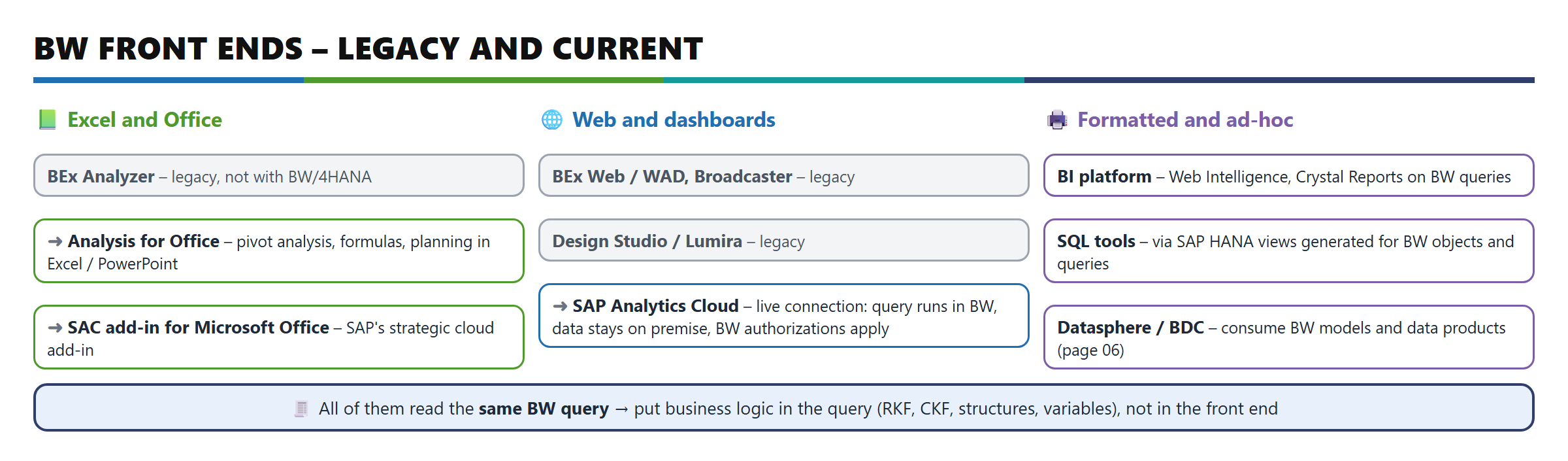
Front end | Type | Status / notes |
|---|---|---|
BEx Analyzer | Excel add-in for BW queries | Legacy – replaced by Analysis for Office; not supported with BW/4HANA; with BW 7.5 out of mainstream maintenance since 15 Oct 2025 (customer-specific maintenance, SAP Note 3665993) |
BEx Web Application Designer / BEx Web, BEx Broadcaster | Web templates, scheduled distribution | Legacy – not available in BW/4HANA |
SAP Analysis for Microsoft Office | Excel / PowerPoint add-in: pivot-style analysis of BW queries, formulas, planning | Current for BW 7.x and BW/4HANA; SAP's strategic Office add-in for the cloud is the SAP Analytics Cloud add-in for Microsoft Office |
SAP Analytics Cloud (SAC) | SaaS for dashboards, stories, planning, predictive | Live connection to BW: the query runs in BW, no data copied to the cloud, BW authorizations apply. Import connections copy data into SAC models |
SAP Lumira Designer / Discovery (earlier Design Studio) | Dashboards and applications | Legacy – successor SAC |
SAP BusinessObjects BI platform (Web Intelligence, Crystal Reports) | Formatted and ad-hoc reporting on BW queries | Used where the BI platform is in place |
- All of these consume the same BW query, so the query is the place for business logic – not the front end.
- SAC itself – stories, models, planning and its connections to BW and S/4HANA – is taught in SAP Analytics Cloud › 01 Overview & Architecture and 03 Integration with SAP S/4HANA & Other Systems.
- BW queries can also be exposed as SAP HANA views for SQL-based tools, and BW/4HANA data can be exposed to SAP Datasphere (page 06).
Part 7 – Analysis authorizations
BW separates two questions: may the user run this query? (standard ABAP authorization objects) and which data may the user see? (analysis authorizations, the BW 7.x concept that replaced the reporting authorization objects of BW 3.x).
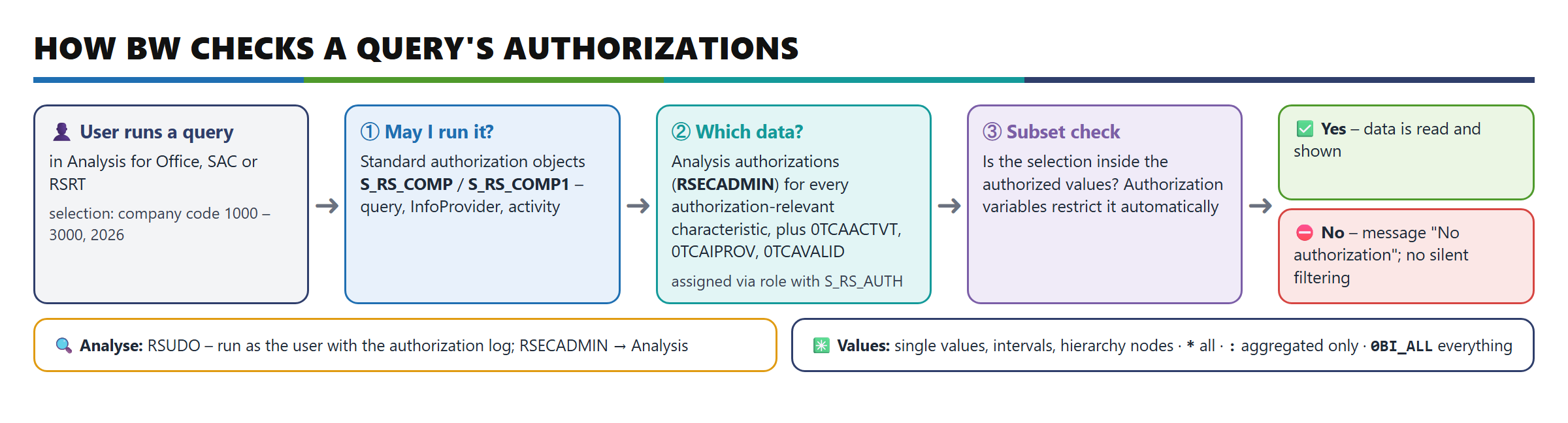
Element | Meaning |
|---|---|
Authorization-relevant characteristic | Flag in the InfoObject (e.g. 0COMP_CODE, 0COSTCENTER); only these are checked |
Analysis authorization (RSECADMIN) | Named object with values or hierarchy nodes per characteristic, e.g. 0COMP_CODE = 1000 – 1999 |
Special characteristics | 0TCAACTVT (activity, e.g. 03 display), 0TCAIPROV (InfoProvider), 0TCAVALID (validity) – must be granted in the user's authorizations; 0TCAKYFNM restricts key figures when flagged |
Assignment | Through a PFCG role with object S_RS_AUTH (field BIAUTH = authorization name) – preferred – or directly to the user in RSECADMIN |
Query authorizations | S_RS_COMP / S_RS_COMP1 – which queries and components a user may display or change |
Special values |
|
- Not a filter: if the query selection is wider than the authorization, the user gets No authorization. An authorization variable on the characteristic restricts the query to the authorized values automatically.
- Analysis: RSECADMIN → Analysis: RSUDO runs a query as another user with the authorization log; the error log shows which characteristic failed.
- Large user bases: authorizations can be generated from data loaded into a DataStore object (for example from HR or an organisational source) instead of maintaining them manually.
- SAC live connections and Analysis for Office use the same BW analysis authorizations.
Part 8 – Query performance
Lever | Classic BW (any DB) | BW on HANA / BW/4HANA |
|---|---|---|
Pre-aggregation | Aggregates on InfoCubes (legacy) | Not needed – HANA aggregates in memory |
In-memory engine | BW Accelerator (BWA), a separate in-memory index for InfoCubes (legacy) | Replaced by HANA itself |
Calculation push-down | Calculations in the OLAP engine on the application server | Most OLAP operations (aggregation, exception aggregation, hierarchies) run in HANA |
Caching | OLAP cache (cache monitor RSRCACHE, cache mode per query / InfoProvider) | OLAP cache still available; less important because HANA is fast |
Analysis | RSRT (execute and debug, technical information, performance info), BW statistics / technical content ( | Same tools, BW/4HANA Cockpit statistics |
Checklist for a slow query
- Measure first: RSRT with statistics or the BW statistics – is the time in the database, in the OLAP engine or in the front end (too many cells)?
- Restrict: mandatory variables, sensible default filters; free characteristics instead of large initial drilldowns.
- Design: avoid huge cell-based structures and exception aggregations on very fine granularity; use CompositeProvider unions with pruning instead of one giant join.
- Model: data tiering for old data, partitioning of large ADSOs, navigation attributes only where needed (page 02).
- Cache: check the query's cache mode and read mode in RSRT for frequently used queries.
Part 9 – APD (legacy) and its successors
The Analysis Process Designer (APD), transaction RSANWB, let you model analysis processes graphically in classic BW: read data (query, InfoProvider, database table, file), transform it (filter, join, aggregate, ABAP routine, data mining models such as clustering, decision trees, ABC classification) and write it (DataStore object for direct update, InfoObject attributes, file). Typical uses: writing query results back into a DSO, customer segmentation, deriving master data attributes.
APD is not available in SAP BW/4HANA. The APD transfer tool RSB4HAPD analyses existing APDs during the conversion and transfers supported ones into standard data flows; the rest is redesigned.
APD use case | Successor in BW/4HANA and beyond |
|---|---|
Move / combine data between InfoProviders | Transformation (ABAP or AMDP routines) + DTP into an ADSO, scheduled in a process chain |
Write query-like results to a table or file | Data flows into an ADSO or an Open Hub destination; SAP HANA calculation views or SQLScript for set-based logic |
Data mining and predictive | SAP HANA predictive libraries (PAL / APL) called from AMDP, SAP Analytics Cloud predictive scenarios, Datasphere / Business Data Cloud (page 06) |
Part 10 – Interview questions
Q1. What is the difference between a restricted and a calculated key figure?
An RKF filters one key figure by characteristic values (revenue for 2026); a CKF computes a formula over key figures (margin %). Both can be global (on the InfoProvider, reusable) or local to one query.
Q2. What is a structure and when do you need the cell editor?
A structure is a fixed set of elements on one axis, each with its own selection or formula (key figure structure, or rows Actual / Plan / Variance). With two structures every cell is an intersection, and the cell editor overrides individual cells – typical for financial statements.
Q3. Which variable types and processing types exist?
Types: characteristic value, hierarchy, hierarchy node, text, formula. Processing types: manual input / default value, replacement path, customer exit (BAdI in BW/4HANA), SAP exit, authorization.
Q4. Give an example of a replacement path variable.
A text variable that shows the selected month in a column header, or a formula variable that takes a number from a characteristic attribute (e.g. working days of a month) to use in a CKF.
Q5. Characteristic restriction or default value in the filter – what is the difference?
A characteristic restriction is fixed: the user cannot navigate outside it. A default value is only the starting selection and can be changed during navigation.
Q6. How do hierarchies work in BW reporting?
Hierarchies are master data of an InfoObject (nodes, leaves, intervals, versions, time dependency). In the query you activate a display hierarchy, choose a node (fixed or via node variable) and the expand level; the analytic manager aggregates over the nodes.
Q7. Which front ends do you use with BW today, and what replaced BEx?
Analysis for Office replaced BEx Analyzer; SAP Analytics Cloud replaced BEx Web and Lumira for dashboards. BEx tools are not supported with BW/4HANA; the query designer moved to the BW Modeling Tools in Eclipse.
Q8. SAC live connection or import connection to BW?
Live: the query runs in BW, data stays on premise, BW authorizations and logic apply, always current. Import: data is copied into an SAC model – needed for blending or SAC features that require acquired data, but it duplicates data and authorizations.
Q9. How do you set up analysis authorizations?
Flag the characteristics as authorization-relevant, create authorizations in RSECADMIN with values or hierarchy nodes plus 0TCAACTVT, 0TCAIPROV and 0TCAVALID, assign them through roles with S_RS_AUTH, and add authorization variables to the queries. Query access itself is controlled with S_RS_COMP.
Q10. A user gets "No authorization" in a query. How do you analyse it?
Run the query with RSUDO as that user and read the authorization log: it shows which characteristic or special characteristic failed. Usually the selection is wider than the authorized values – fix the role or use an authorization variable.
Q11. A query is slow. What do you do?
Measure with RSRT and the BW statistics to find where the time goes; then restrict with variables and filters, simplify cell-heavy structures and exception aggregations, check cache and read mode, and on classic BW check aggregates. On HANA aggregates and BWA are obsolete; push-down does the work.
Q12. What was APD, and what do you use instead on BW/4HANA?
APD (RSANWB) modelled read-transform-write analysis processes, including data mining. It does not exist in BW/4HANA; RSB4HAPD transfers supported APDs, otherwise use transformations with ABAP / AMDP, DTPs, ADSOs and Open Hub in process chains, and HANA PAL / APL or SAC for predictive.
🏠 Start Here · ◀ 03 · Extraction & Loading · 05 · BW ABAP ▶ · Sections: CORE ABAP | OOPS ABAP | ABAP on HANA | Clean Core | RAP | ABAP Points | SAP Fiori | SAPUI5 | Mobile Development (MDK) | BTP Foundations | BTP Development | CAP | SAP Build | ABAP on BTP | Integration Suite | SAP Business AI | SAP BASIS | Security | SAP SDLC
Functional: FICO ABAP | TRM ABAP | VIM | SAP BIS | SD ABAP | MM ABAP | PP ABAP | QM ABAP | PM ABAP | PS ABAP | EWM | TM ABAP | GTM ABAP | EHS ABAP | HR ABAP | BW | SAP MDG | SAP Analytics Cloud | SAP Ariba | SAP CX | SAP IBP