The transaction codes an ABAP developer uses every day, grouped by area, with what changed in S/4HANA. Legacy = still works but has a successor; S/4 = S/4HANA-specific. Remember: CDS view entities, AMDP and RAP are developed only in ADT (ABAP Development Tools for Eclipse) – they have no SAP GUI t-code.
Part 1 – Command field and the development phases
1.1 Command field shortcuts
Enter | Effect | Notes |
|---|---|---|
/nSE38 | Leave the current transaction and start SE38 in the same session |
|
/oSE38 | Start SE38 in a new session (window) |
|
/i | Close the current session | |
/nend | Log off (asks for confirmation) | /nex logs off at once without saving – careful |
/h | Switch on the debugger for the next step | /hs = system debugging (also SAP system programs) |
| Start the transaction and skip its first screen | Uses the last entered values |
/$tab | Reset the table buffers of this server | /$sync resets all buffers – slow, use in test systems only |
SEARCH_SAP_MENU | Find where a t-code sits in the SAP menu |
- System › Status shows the t-code, program and screen number of the current screen; F1 › Technical Information on a field shows its table, field and data element.
- SE93 shows the program behind any t-code (table TSTC). SA38 runs a report without developer access.
1.2 Which t-code in which phase
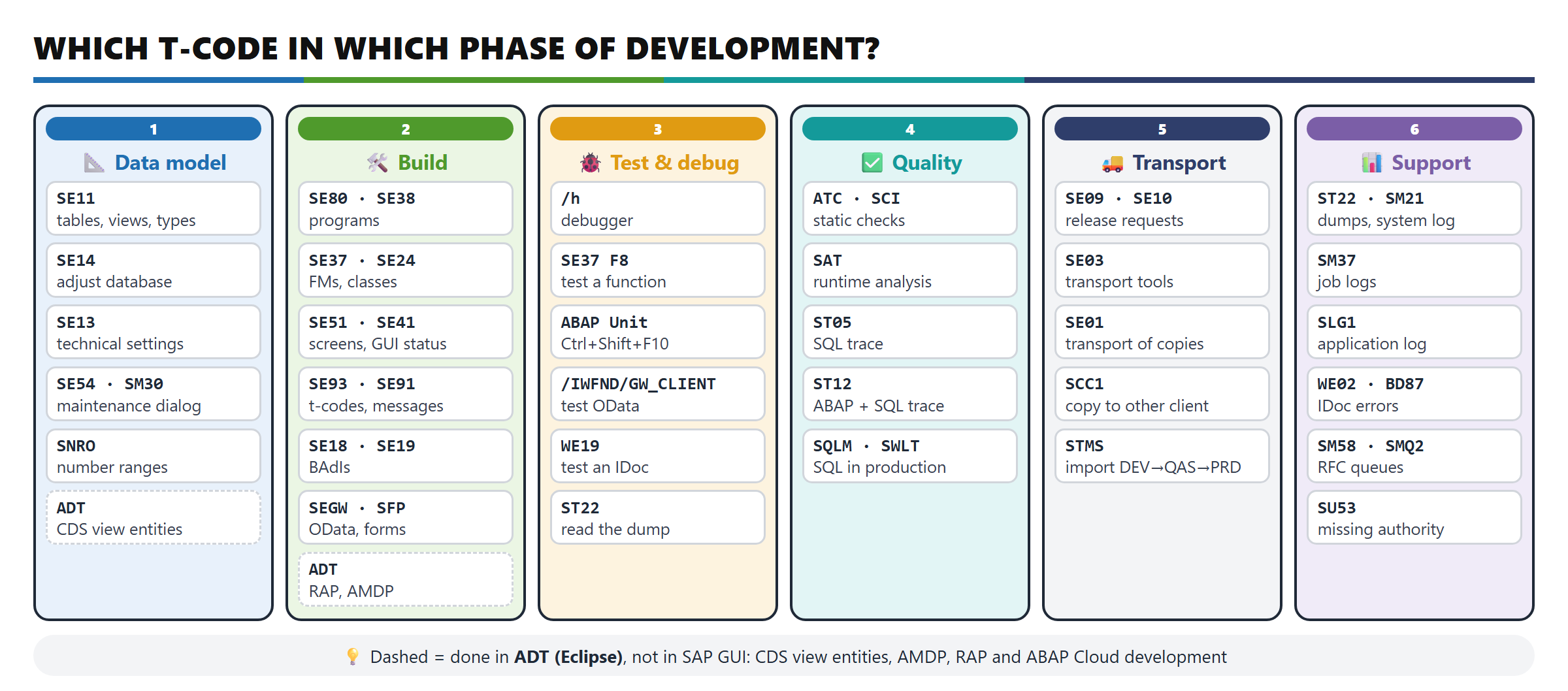
Part 2 – Development workbench
T-code | What it does | Notes |
|---|---|---|
SE80 | Object Navigator – all repository objects of a package in one tree | Classic all-in-one tool; ADT is the modern IDE |
SE38 | ABAP Editor – reports and includes | Run with F8, variants, text elements |
SE37 | Function Builder – function modules | F8 tests an FM; test data directory |
SE24 | Class Builder – global classes and interfaces | AMDP methods are edited only in ADT |
SE11 | ABAP Dictionary | See Part 3 |
SE41 | Menu Painter – GUI status and GUI title | Dialog programs, ALV toolbar |
SE51 | Screen Painter – dynpro layout and flow logic | PBO / PAI modules |
SE93 | Maintain transaction codes | Report, dialog, OO, parameter and variant t-codes |
SE91 | Message maintenance – message classes | Messages stored in table T100 |
SE32 | Text elements – text symbols, selection texts, headings | Also via SE38 › Goto › Text Elements |
SE63 | Translation of texts | Messages, data elements, text elements, forms |
SE84 | Repository Information System | Find any object by name or attribute; where-used |
SE15 | Repository Information System (classic, Dictionary-oriented) | Legacy – same data as SE84 |
SE39 | Split-screen editor – compare two programs side by side | Also with a program in another system (RFC) |
SREPO | Repository comparison between two systems | Compare objects or a whole transport request via RFC |
SE21 | Package Builder – create and maintain packages | Package = development class |
SE43 | Area menu maintenance | |
SE54 | Generate table maintenance dialog / view clusters | Also SE11 › Utilities › Table Maintenance Generator |
SE36 / SLDB | Logical databases | Legacy; still used in HR (PNP, PNPCE) |
ADT | ABAP Development Tools (Eclipse) – not a t-code | Only place for CDS, AMDP, RAP, ABAP Cloud |
Part 3 – Data dictionary and table data
T-code | What it does | Notes |
|---|---|---|
SE11 | Tables, views, data elements, domains, structures, table types, search helps, lock objects | Core DDIC tool; CDS view entities live in ADT |
SE14 | Database utility – adjust, activate, convert a table after a change | Use when activation fails after a structure change |
SE13 | Technical settings – data class, size category, buffering, logging | Also from SE11 |
SE16 | Data Browser – display table contents | Classic |
SE16N | General table display – more options (totals, layouts, multiple values) | Most used table viewer |
SE16H | Table display with grouping, aggregation and outer joins | S/4 (also recent ECC releases); runs on HANA |
SE17 | General table display | Legacy → SE16N / SE16H |
SM30 | Maintain table / view entries via the generated dialog | Needs a maintenance dialog (SE54) |
SM31 | Table maintenance (older entry point) | Legacy → SM30 |
SM34 | View cluster maintenance | Several dependent views in one dialog |
SNRO | Number range objects and intervals | Read in code with NUMBER_GET_NEXT; intervals in NRIV |
SM12 | Display and delete lock entries | Locks set by ENQUEUE_ function modules |
SCU3 | Table change logs | Needs the log flag in the technical settings |
SCMP | Compare table / view contents between clients or systems | |
SPRO | Customizing (IMG) | Where functional consultants maintain settings |
- Details on domains, views, buffering and lock objects: see Core ABAP › 02 Data Dictionary.
Part 4 – Testing, debugging and performance
4.1 Debugging and logs
T-code | What it does | Notes |
|---|---|---|
/h | Start the debugger | /hs system debugging; breakpoints in SE80 or ADT |
JDBG | Debug a background job | In SM37 select the job, enter JDBG in the command field |
ST22 | ABAP dump analysis (runtime errors) | Error text, source line, variables, call stack |
ST22L | Simplified list of one day's dumps | Emergency fallback when ST22 itself fails |
SM21 | System log | Server-level errors around the dump time |
SLG1 | Display application logs | SLG0 defines log objects and sub-objects |
SAAB | Checkpoint groups – activate ASSERT, BREAK-POINT ID, LOG-POINT ID | Switch checkpoints on per user or server |
S_MEMORY_INSPECTOR | Memory Inspector – analyse and compare memory snapshots | Find memory leaks |
SM50 | Work processes of this server | Debug or cancel a running process |
4.2 Testing and code quality
T-code | What it does | Notes |
|---|---|---|
ABAP Unit | Unit tests (test classes) | Run with Ctrl+Shift+F10 in SE80 or ADT |
SCI | Code Inspector – static checks with a check variant | Older; ATC is the central tool |
ATC | ABAP Test Cockpit – central static checks | S/4HANA readiness and clean-core checks; ADT quick fixes |
CODE_SCANNER | Search ABAP source code of packages for a string | Where-used for objects: Ctrl+Shift+F3 in SE80 |
SCOV | Coverage Analyzer – which code ran | ADT shows coverage for ABAP Unit |
SECATT | eCATT – automated test scripts |
4.3 Performance
T-code | What it does | Notes |
|---|---|---|
SAT | ABAP runtime analysis – time per statement and call | Replaces SE30 (legacy); in ADT: ABAP Profiler |
ST05 | Performance trace – SQL, buffer, enqueue, RFC, HTTP | Execution plan, identical SELECTs |
ST12 | Single transaction analysis – ABAP and SQL trace together | Part of the ST-A/PI support add-on |
SQLM | SQL Monitor – system-wide SQL profile over days or weeks | Safe to run in production |
SWLT | SQL Performance Tuning Worklist | Joins ATC findings with SQLM runtime data |
STAD | Statistics of single transaction steps (response times) | Who ran what, how long |
ST01 | System trace (authorizations, kernel, DB, RFC) | For authorizations prefer STAUTHTRACE |
ST04 | Database performance monitor | Legacy entry → DBACOCKPIT |
- Method and examples for these tools: see ABAP on HANA › 02 Migration & Performance.
4.4 Where to look when something fails
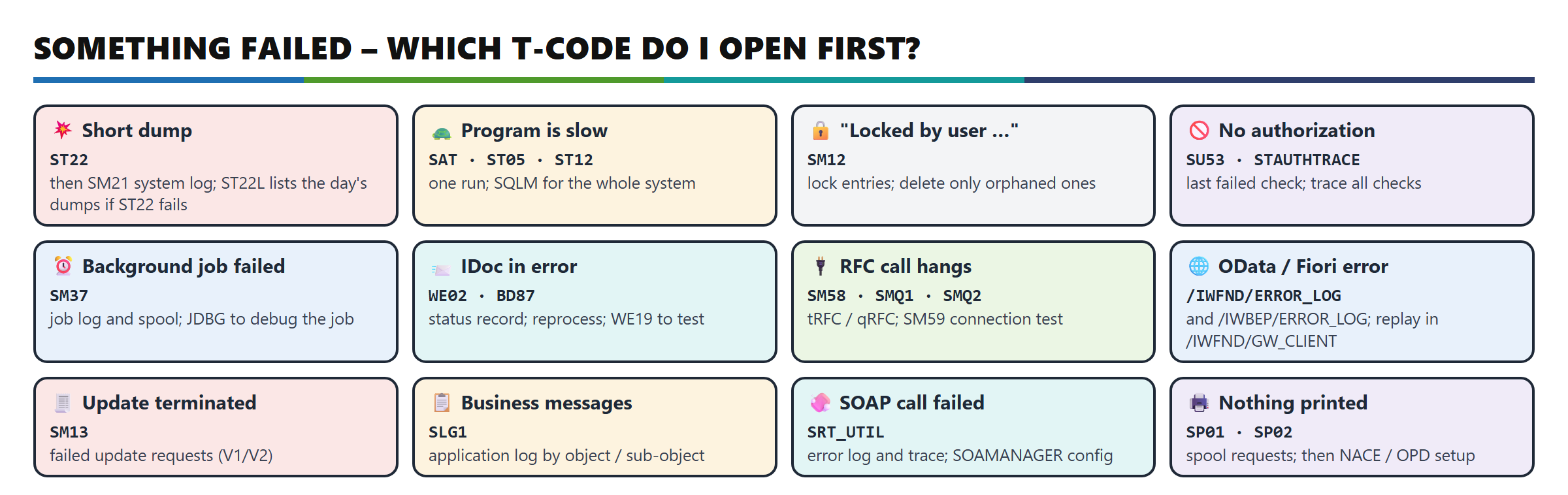
Part 5 – Transports and clients
T-code | What it does | Notes |
|---|---|---|
SE09 | Transport Organizer – your requests and tasks | Release the tasks first, then the request |
SE10 | Transport Organizer – same tool, opens with customizing requests | |
SE01 | Transport Organizer extended view | Transport of copies, relocations |
SE03 | Transport Organizer Tools | Change package of objects, unlock objects, search objects in requests |
SE06 | Set up the Transport Organizer; system change option | Basis task |
STMS | Transport Management System – routes, import queues | Import DEV → QAS → PRD |
STMS_IMPORT | Import queue of the current system | |
SCC1 | Client copy according to a transport request – into another client of the same system | Test customizing in a test client |
SCC4 | Client settings – changes allowed, cross-client objects | Role of the client (dev, test, prod) |
- Workbench request = repository objects and cross-client settings; customizing request = client-specific settings. Objects in package
$TMPare local and cannot be transported.
Part 6 – Background jobs and batch input
T-code | What it does | Notes |
|---|---|---|
SM36 | Define and schedule a background job | Steps (program + variant); start: immediate, date/time, after job, after event |
SM37 | Job overview – status, job log, spool | Scheduled, released, ready, active, finished, canceled |
SM62 | Define background events; event history | |
SM64 | Trigger a background event manually | In code: FM BP_EVENT_RAISE |
SM69 | Define external operating-system commands | SM49 executes them |
JDBG | Debug a background job | From SM37 |
SM35 | Batch input session overview – process, analyse, logs | Sessions created by BDC programs |
SHDB | Transaction recorder – record a BDC and generate a program | |
Application Jobs | Fiori app to schedule jobs from job templates | S/4; job catalog entries are built in ADT |
- Data migration with BDC, LSMW and the Migration Cockpit: see Core ABAP › 06 Data Migration.
Part 7 – RFC, BAPI, ALE/IDoc and SOAP
7.1 RFC
T-code | What it does | Notes |
|---|---|---|
SM59 | RFC destinations – create, test connection | Type 3 = ABAP, T = TCP/IP, G = HTTP external, H = HTTP ABAP |
SM58 | tRFC monitor – failed or hanging transactional RFC calls | Restart from here |
SMQ1 | qRFC outbound queue monitor | |
SMQ2 | qRFC inbound queue monitor | |
SMQR | qRFC inbound scheduler – register queues | SMQS = outbound scheduler |
SBGRFCMON | bgRFC monitor | bgRFC is the successor of tRFC/qRFC |
SBGRFCCONF | bgRFC configuration | Inbound destinations, supervisor destination |
7.2 BAPI and Business Object Repository
T-code | What it does | Notes |
|---|---|---|
BAPI | BAPI Explorer – find BAPIs by business object, see parameters | Start here to find a BAPI |
SWO1 | Business Object Builder – BOR object types, methods (BAPIs), events | Also used for workflow |
SWO2 | BOR browser | Display only |
7.3 ALE and IDoc
T-code | What it does | Notes |
|---|---|---|
WE02 / WE05 | IDoc list and display | Control, data and status records |
WE09 | Search IDocs by segment field content | |
WE19 | IDoc test tool – copy, edit and process an IDoc | Debug inbound function modules |
WE20 | Partner profiles | Message type, process code, port per partner |
WE21 | Ports | tRFC port for ALE |
WE30 | IDoc types (basic types and extensions) | |
WE31 | Segment types | |
WE60 | IDoc type documentation | |
WE81 | Message types | |
WE82 | Link message type to IDoc type (and extension) | |
WE57 | Assign inbound function module to message / IDoc type | BD51 = input type of the FM |
WE41 / WE42 | Outbound / inbound process codes | |
SALE | ALE customizing (IMG) | Logical systems, distribution model |
BD54 | Logical systems | Assigned to the client in SCC4 |
BD64 | Distribution model | Who sends which message type to whom |
BD87 | IDoc status monitor – reprocess IDocs | |
WE14 / BD20 | Process outbound IDocs (status 30) / inbound IDocs (status 64) | When processing is not immediate |
BD10 / BD12 / BD14 | Send material / customer / vendor master IDocs | |
BD50 / BD52 / BD61 | Change pointers: per message type / fields / global switch | BD21 creates IDocs from change pointers |
7.4 SOAP web services
T-code | What it does | Notes |
|---|---|---|
SPROXY | Enterprise Services browser – generate ABAP proxies from ESR objects | WSDL-based proxies: SE80 › Enterprise Service |
SOAMANAGER | Configure service endpoints and consumer logical ports | Gets the WSDL URL |
SRT_UTIL | Web service error log and traces | First stop when a SOAP call fails |
SRT_MONI | Message monitor for asynchronous / reliable messages | |
SXMB_MONI | Integration Engine message monitor | PI/PO and systems with a local Integration Engine |
WSADMIN | Web service administration | Legacy → SOAMANAGER |
- Concepts and examples: see Core ABAP › 07 Interfaces and 09 Web Services.
Part 8 – Enhancements, SAP Notes and upgrades
T-code | What it does | Notes |
|---|---|---|
SMOD | SAP enhancements – customer exits (function, menu, screen exits) | Display what SAP offers |
CMOD | Project management of SAP enhancements | Create a project, assign SMOD enhancements, activate |
SE18 | BAdI Builder – BAdI definitions and enhancement spots | Classic and new (kernel) BAdIs |
SE19 | BAdI implementations | |
SE20 | Enhancement Builder – enhancement spots and implementations | Explicit and implicit enhancements |
SE95 | Modification Browser – all modifications and enhancements | Reset to original |
SNOTE | Note Assistant – implement SAP Notes | Correction instructions, prerequisites |
SPDD | Adjust Dictionary modifications during an upgrade / support package | Before the activation phase |
SPAU | Adjust repository modifications and notes after the upgrade | |
SPAU_ENH | Adjust enhancement implementations after the upgrade |
- Find a classic BAdI: breakpoint in
CL_EXITHANDLER=>GET_INSTANCE, run the transaction. New BAdIs: breakpoint at the statementsGET BADI/CALL BADI. Customer exits: search the program forCALL CUSTOMER-FUNCTION. - Exits, BAdIs and enhancement framework in depth: see Core ABAP › 10 Enhancements.
Part 9 – Forms and output
T-code | What it does | Notes |
|---|---|---|
SE71 | SAPscript form painter | Legacy, still behind many standard forms |
SE72 | SAPscript styles | |
SE73 | SAPscript fonts and bar codes | |
SE75 | SAPscript text objects and text IDs | Used by READ_TEXT / SAVE_TEXT |
SE78 | Graphics administration – upload logos (BMP, TIFF) | For SAPscript and Smart Forms |
SO10 | Standard texts | Included in forms with INCLUDE TEXT |
SMARTFORMS | Smart Forms – form design; generates a function module | Get the FM name with SSF_FUNCTION_MODULE_NAME |
SMARTSTYLES | Smart Styles – paragraph and character formats | |
SFTRACE | Smart Forms trace | Find why a node is not printed |
SFP | Form Builder for Adobe forms – interface and form | Needs Adobe Document Services (ADS) |
NACE | Output determination (NAST): output types, programs, forms per application | Classic output control |
OPD | Output Parameter Determination – BRF+ rules for channel, form, recipient | S/4 output management |
SP01 | Spool requests (all users) | SP02 = own spool requests |
SPAD | Spool administration – output devices | Basis task |
- S/4HANA output management (OPD, Adobe forms, e-mail channel) is the default for many documents such as billing and purchase orders; NACE remains where the new framework is not active. See Core ABAP › 11 Forms.
Part 10 – Workflow
T-code | What it does | Notes |
|---|---|---|
SWDD | Workflow Builder | Steps, container, bindings |
PFTC | Task maintenance – standard and customer tasks | Agent assignment |
SWO1 | Business Object Builder – object types and events | Or ABAP classes with IF_WORKFLOW |
SWE2 | Event type linkage – which event starts which workflow | Activate / deactivate the linkage |
SWEC | Link change documents to events | |
SWELS | Switch the event trace on or off | SWEL displays it |
SWUS | Start (test) a workflow | |
SWU3 | Automatic workflow customizing | Runtime environment, WF-BATCH user |
SBWP | Business Workplace – the user's inbox | Work items, mails |
SWI1 | Work item selection | Status, log of every work item |
SWIA | Process work items as administrator | Execute, complete or forward for others |
SWPR | Restart a workflow after an error | |
SWI2_FREQ | Work items per task | |
SWU_OBUF | Synchronize the workflow runtime buffer | After changing tasks or agents |
Manage Workflows | Fiori app for flexible workflow | S/4; key users configure approval steps |
- See Core ABAP › 12 Workflow.
Part 11 – OData, Gateway and Fiori
11.1 SAP Gateway
T-code | What it does | Notes |
|---|---|---|
SEGW | Gateway Service Builder – model and generate OData V2 services | Classic; new development uses RAP (S/4HANA 1909+; in ECC SEGW is the tool) |
/IWBEP/REG_SERVICE | Register / maintain a service in the back end | SEGW generation does this automatically |
/IWFND/MAINT_SERVICE | Activate and maintain V2 services on the hub | System alias, ICF node, metadata cache |
/IWFND/V4_ADMIN | Publish OData V4 service groups | E.g. RAP V4 bindings on-premise |
/IWFND/GW_CLIENT | Gateway client – send test requests | GET/POST, CSRF token, $batch |
/IWFND/ERROR_LOG | Error log on the hub | |
/IWBEP/ERROR_LOG | Error log in the back end | |
/IWFND/TRACES | Payload and performance trace per user / service | |
/IWFND/SRV_VALIDATE | Service validation tool – checks a service at runtime | |
/IWFND/CACHE_CLEANUP | Clean up the hub metadata cache | /IWBEP/CACHE_CLEANUP for the back end |
/IWFND/IWF_ACTIVATE | Activate or deactivate SAP Gateway as a whole | System-wide switch, not per service |
SICF | HTTP service (ICF node) maintenance | Activate /sap/opu/odata, /sap/bc/ui5_ui5 … |
11.2 Fiori launchpad and UI5
T-code / report | What it does | Notes |
|---|---|---|
/UI2/FLP | Start the Fiori launchpad | |
/UI2/FLPD_CUST | Launchpad designer – client-specific | /UI2/FLPD_CONF = cross-client |
/UI2/FLPCM_CUST | Launchpad content manager – client-specific | S/4; /UI2/FLPCM_CONF = cross-client |
/UI2/SEMOBJ | Maintain custom semantic objects | Intent = semantic object + action |
PFCG | Assign catalogs, groups or spaces to roles | |
/UI5/UI5_REPOSITORY_LOAD | Upload / download a UI5 app to the BSP repository | Report – run in SE38 |
/UI5/APP_INDEX_CALCULATE | Recalculate the UI5 application index | Report – run in SE38 |
/UI2/INVALIDATE_GLOBAL_CACHES | Invalidate launchpad caches | Report – run in SE38 |
- See Core ABAP › 08 OData and SAP Fiori › 02 Launchpad & Security.
Part 12 – Authorizations
T-code | What it does | Notes |
|---|---|---|
SU01 | User maintenance | SU01D display only; SU10 mass changes |
PFCG | Role maintenance – menu, authorizations, profile, user comparison | |
SU53 | Last failed authorization check | For yourself or another user |
STAUTHTRACE | Authorization trace – all checks of a user | Newer, simpler than ST01 for this |
SU24 | Check indicators and proposals per t-code / service | PFCG reads these proposals |
SU21 | Maintain authorization objects and classes | Custom Z objects for AUTHORITY-CHECK |
SUIM | User information system | Who has which role, t-code or object |
SU56 | Current user's authorization buffer |
Part 13 – System monitoring and files
T-code | What it does | Notes |
|---|---|---|
SM04 | Users logged on to this server | Sessions per user |
SM50 | Work processes of this server | Debug, cancel; long-running programs |
SM51 | Application servers of the system | |
SM66 | Work processes of all servers | |
SM13 | Update requests – failed V1/V2 updates | After an "update terminated" message |
ST03N | Workload monitor | Response times by t-code and user |
SM02 | System messages to all users | |
AL11 | Application server directories and files | Read-only view |
CG3Z | Upload a file from the PC to the application server | CG3Y downloads to the PC |
FILE | Logical file names and paths (cross-client) | Read with FM FILE_GET_NAME |
SMICM | ICM monitor – HTTP/HTTPS ports and services | |
STRUST | Certificates and PSEs (SSL) | Needed for HTTPS destinations |
RZ11 | Display profile parameters | Changing is a Basis task |
SFW5 | Switch framework – business functions | Activation cannot be undone |
Part 14 – BRF+
T-code | What it does | Notes |
|---|---|---|
BRF+ / BRFPLUS | BRFplus workbench – applications, functions, rulesets, decision tables | Both t-codes open the same tool |
- BRF+ is also the engine behind S/4HANA output determination (OPD). Call a function from ABAP with
CL_FDT_FUNCTION_PROCESS. See Core ABAP › 13 BRF+.
Part 15 – S/4HANA, clean core and legacy successors
15.1 S/4HANA tools
Tool | What it does | Notes |
|---|---|---|
ADT (Eclipse) | CDS view entities, AMDP, RAP, ABAP Unit, ATC | Required for modern ABAP; SAP GUI can be opened inside |
Migrate Your Data | Fiori app of the Migration Cockpit – load data via file or staging tables | Replaces LTMC (legacy since S/4HANA 2020) |
LTMOM | Migration Object Modeler – adjust or create migration objects | |
ATC readiness checks | S/4HANA readiness check variants for custom code | Find code that uses simplified tables or objects |
SYCM | Load the Simplification Database for custom code checks | |
/SDF/RC_START_CHECK | Simplification item check before a conversion | Report – run in SE38; brownfield |
BP | Business Partner – customers and suppliers | Replaces XD01/XK01/FD01/FK01/VD01/MK01 |
Custom Fields | Key-user app – add fields to apps, CDS views, APIs | No ABAP; clean-core extension |
Custom Logic | Key-user app – implement released BAdIs in a web editor | Restricted ABAP Cloud language |
Custom CDS Views | Key-user app – build CDS views on released views | Also Custom Analytical Queries |
Custom Business Objects | Key-user app – own tables + generated OData |
- Clean core extension model and tiers: see Clean Core › 01 Clean Core.
15.2 Legacy t-codes and their successors
Legacy | Successor | Note |
|---|---|---|
SE30 | SAT (ADT: ABAP Profiler) | |
SE17, SE16 | SE16N, SE16H | SE16 still works |
SM31 | SM30 | |
SE15 | SE84 | |
ST04 | DBACOCKPIT | |
ST01 (authorizations) | STAUTHTRACE | ST01 remains for other traces |
XD01 / XK01 / FD01 / FK01 | BP | Customer–vendor integration (CVI) |
LTMC, LSMW | Migrate Your Data (Migration Cockpit) | LSMW is not recommended in S/4HANA |
WSADMIN | SOAMANAGER | |
NACE (where supported) | OPD – S/4HANA output management | |
SE71 / SMARTFORMS | SFP (Adobe forms) | Old forms keep working |
SEGW | RAP service definition + binding (ADT) | SEGW stays for existing services |
SWO1 (BOR objects) | ABAP classes with IF_WORKFLOW | |
SE80 for new objects | ADT |
Part 16 – Business transactions you test with
T-codes | Business object | Typical developer use |
|---|---|---|
VA01 / VA02 / VA03 | Sales order | User exits (MV45AFZZ), BAdIs, output |
VL01N / VL02N / VL03N | Outbound delivery | Delivery output, IDocs |
VF01 / VF02 / VF03 | Billing document | Invoice form, accounting interface |
ME51N | Purchase requisition | Release strategy, workflow |
ME21N / ME22N / ME23N | Purchase order | BAdI ME_PROCESS_PO_CUST, PO output |
MIGO | Goods movement | Material documents (MATDOC in S/4) |
MIRO | Supplier invoice | Invoice verification |
MM01 / MM02 / MM03 | Material master | Custom fields, BAPI_MATERIAL_SAVEDATA |
BP | Business partner | S/4HANA: customer and supplier roles (ECC: XD01 / XK01) |
FB03 | Display accounting document | Check postings from your interfaces |
PA20 / PA30 | HR master data (display / maintain) | Infotypes – see HR ABAP › 02 Infotypes & PA |
Part 17 – Interview questions
Q1. SE09, SE10, SE01, SE03 – what is the difference?
SE09 and SE10 are the Transport Organizer (SE10 opens with customizing requests). SE01 is the extended view with transports of copies. SE03 holds tools: change an object's package, unlock objects, find objects in requests. STMS imports the released requests into the next system.
Q2. How do you find the table and field behind a screen field?
F1 › Technical Information shows table, field and data element. If it is a structure, run ST05 while saving to see the real table. System › Status shows program and screen; SE93 shows the program of a t-code.
Q3. How do you find a BAdI or exit for a transaction?
Classic BAdIs: breakpoint in CL_EXITHANDLER=>GET_INSTANCE. New BAdIs: breakpoint at GET BADI. Customer exits: search CALL CUSTOMER-FUNCTION in the program, then SMOD/CMOD. SE84 lists enhancements per package.
Q4. A report is slow. How do you analyse it?
ST05 for SQL (expensive or identical SELECTs, missing indexes), SAT for ABAP time, ST12 for both together. System-wide: SQLM in production, then SWLT to rank the findings with ATC results.
Q5. A program dumps in production. What do you do?
ST22: error type, source line, variables and call stack. SM21 for system-level errors around that time, SLG1 for application logs. Reproduce in a test system with /h.
Q6. How do you debug a background job?
In SM37 select the job and enter JDBG – it runs again in dialog with the debugger. For a running job, debug its work process from SM50.
Q7. An inbound IDoc failed. What are your steps?
WE02/WE05: read the status record (e.g. 51 = application error). Fix the data or customizing, reprocess in BD87. Use WE19 to copy the IDoc and debug the inbound function module. Partner profile in WE20.
Q8. An OData call from a Fiori app fails. Where do you look?
/IWFND/ERROR_LOG on the hub and /IWBEP/ERROR_LOG in the back end; replay the request in /IWFND/GW_CLIENT; check ST22 and SU53. Service not found → activate it in /IWFND/MAINT_SERVICE and SICF; after model changes clean the metadata cache.
Q9. SPDD vs SPAU vs SPAU_ENH?
During an upgrade or support package: SPDD adjusts modified Dictionary objects first (before activation, to avoid data loss), SPAU adjusts modified programs and implemented notes afterwards, SPAU_ENH adjusts enhancement implementations.
Q10. Which t-codes changed with S/4HANA?
BP replaces the customer and vendor master t-codes; SAT replaces SE30; the Migrate Your Data app replaces LTMC; OPD (BRF+) output management complements NACE; Fiori Application Jobs complement SM36; CDS, AMDP and RAP are built in ADT; SE16H adds aggregation; ATC readiness checks find incompatible custom code.
Tables ▶ · Sections: CORE ABAP | OOPS ABAP | ABAP on HANA | Clean Core | RAP | ABAP Points | SAP Fiori | SAPUI5 | Mobile Development (MDK) | BTP Foundations | BTP Development | CAP | SAP Build | ABAP on BTP | Integration Suite | SAP Business AI | SAP BASIS | Security | SAP SDLC
Functional: FICO ABAP | TRM ABAP | VIM | SAP BIS | SD ABAP | MM ABAP | PP ABAP | QM ABAP | PM ABAP | PS ABAP | EWM | TM ABAP | GTM ABAP | EHS ABAP | HR ABAP | BW | SAP Datasphere | SAP Business Data Cloud | SAP MDG | SAP Analytics Cloud | SAP Ariba | SAP CX | SAP IBP