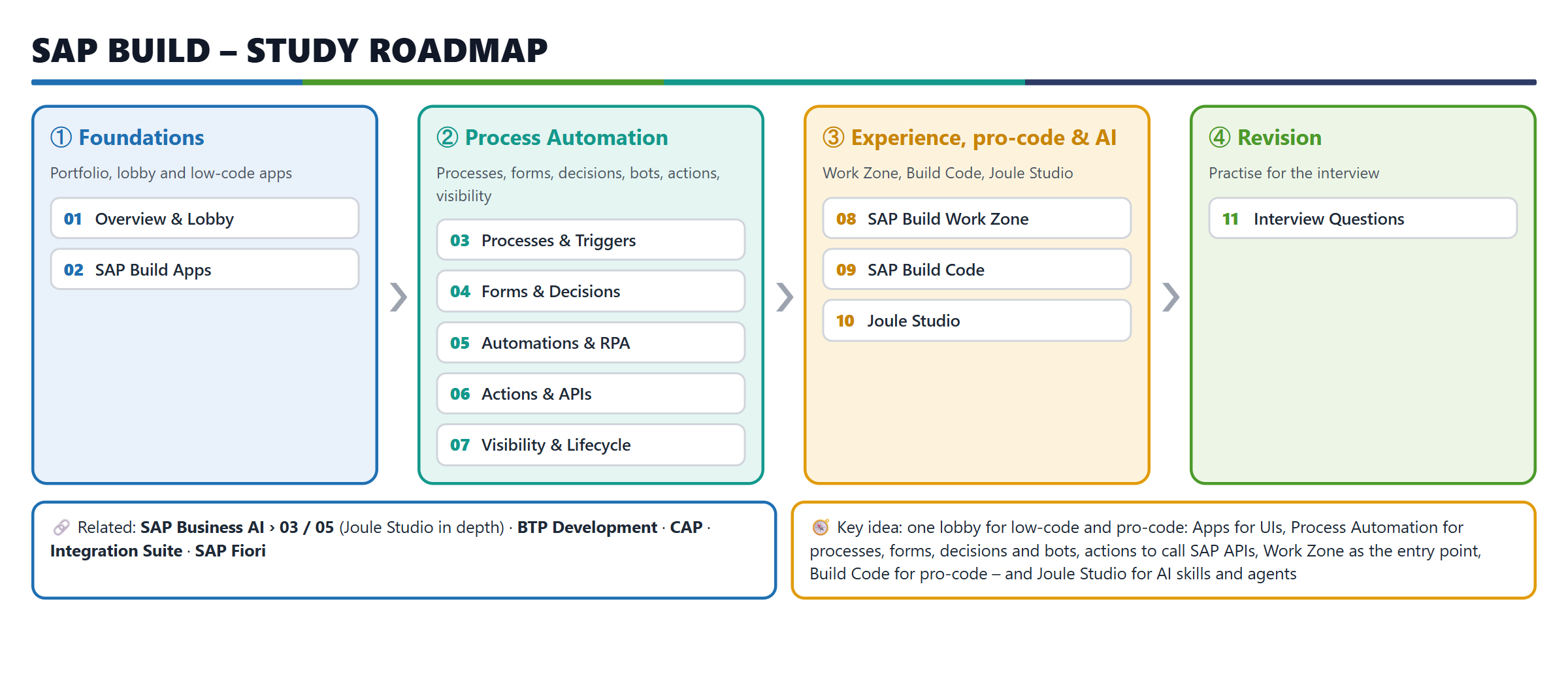
Your SAP Build notes at architect and technical-consultant depth – one page per concept, organised into 10 topic pages in study order. Start here, follow the roadmap, and use the links to jump to a page.
Pages in this section
Page | What you learn |
|---|---|
Portfolio and naming, the SAP Build lobby, projects, roles, BTP setup and boosters, governance, transports, licensing | |
UI canvas, components, logic flows, data entities and integrations, variables, authentication, build and deploy | |
03 · SAP Build Process Automation – Processes, Triggers & Workflow | Process builder, triggers (form, API, event), approvals, conditions, process context, sub-processes, the Sales Order Approval example |
Forms and form fields, approval forms, decision tables and text rules, decision inputs and outputs, testing | |
Automation designer, recorders and application capture, SDK activities, attended vs unattended, desktop agent, scheduling | |
Action projects, destinations, S/4HANA APIs, events, Integration Suite, SAP Business Accelerator Hub, error handling | |
Visibility scenarios, My Inbox and task center, monitoring, release and deploy, transport, settings and administration | |
Standard vs advanced edition, sites, workspaces, content federation from S/4HANA, Work Zone vs Fiori launchpad, task center | |
Dev spaces in Business Application Studio, CAP and Fiori elements, Joule code generation, Build Code vs BAS, mobile and Build Apps reuse | |
Joule Studio inside the SAP Build lobby, skill builder and agent builder in practice, actions and processes as tools, lifecycle and governance | |
Every page's interview questions in one place for revision |
Related: SAP Business AI › 03 Joule Studio and 05 C_JSD certification (Joule skills and agents in depth); BTP Development (BTP basics, destinations); CAP (SAP Build Code back ends); Integration Suite (APIs and events behind actions); SAP Fiori (Work Zone content).
How to study with these notes
- Order: 01 → 02 explain the portfolio and low-code apps; 03 → 07 SAP Build Process Automation end to end; 08 → 10 the user entry point, pro-code and Joule Studio.
- Hands-on: in an SAP Build trial, create a business process with a form trigger, an approval form and a decision, add an action that reads an SAP API, release and deploy it, then run it from My Inbox and watch it in the monitor.
- Revision: use page 11 – cover the answer, answer aloud, then check the page for depth.