Start here. This page tells the story of the one business scenario used on every page of this section – a Sales Order Approval app for a medical-supplies distributor – and lists its 22 requirements (R1–R22), each with the RAP concept that implements it and the page where it is explained. It then gives the roadmap through pages 01–13, a mind map of the section, a study plan with hands-on milestones and the official resources and courses.
Part 1 – The business scenario: Sales Order Approval
Requirements on this page
R-ID | Requirement | Where on this page |
|---|---|---|
R1–R22 | The whole scenario told as the story of one order | Part 1 (story and process picture) |
R1–R22 | Each requirement with its RAP concept and home page | Part 2 (requirements table) |
R1–R22 | Which page implements which requirement | Part 3 (roadmap), Part 4 (page table) |
1.1 Why one scenario for the whole section
RAP has many keywords: determination, validation, action, draft, etag master, late numbering, with additional save and so on. Learned as a list, they blur together. A real project never starts with a keyword – it starts with a business requirement, and you choose the RAP feature that implements it. So every page of this section builds a piece of the same app and names the requirement it serves, for example "R9 – gap-free order numbers at save → late numbering".
This is also how interviewers ask: "The business wants gap-free numbers that are assigned only when the order is saved. What do you use, and why not early numbering?" If you know the scenario, you can answer from the requirement instead of from memory.
1.2 The company and the people
A medical-supplies distributor sells gloves, syringes, dressings and diagnostic kits to hospitals and pharmacies. Sales reps take the customers' orders in a Fiori app. Hospitals sometimes order far more than their credit limit allows, so an order above the customer's credit limit needs a sales manager's approval before it goes to the warehouse.
Role | What they do | Channel |
|---|---|---|
Sales rep | Finds, creates, changes, copies and deletes orders of their sales organisation | Processor app (service |
Sales manager | Approves or rejects orders that wait for approval – nothing else | Approver app (projection |
Other ABAP programs, nightly job | Create or approve orders without a UI | EML |
External CRM | Creates orders from the CRM | Web API (service |
Warehouse, e-mail service | React when an order is approved | Business event |
Carrier | Delivers the goods and provides tracking data | Carrier's REST API (read live) |
1.3 The story of one order
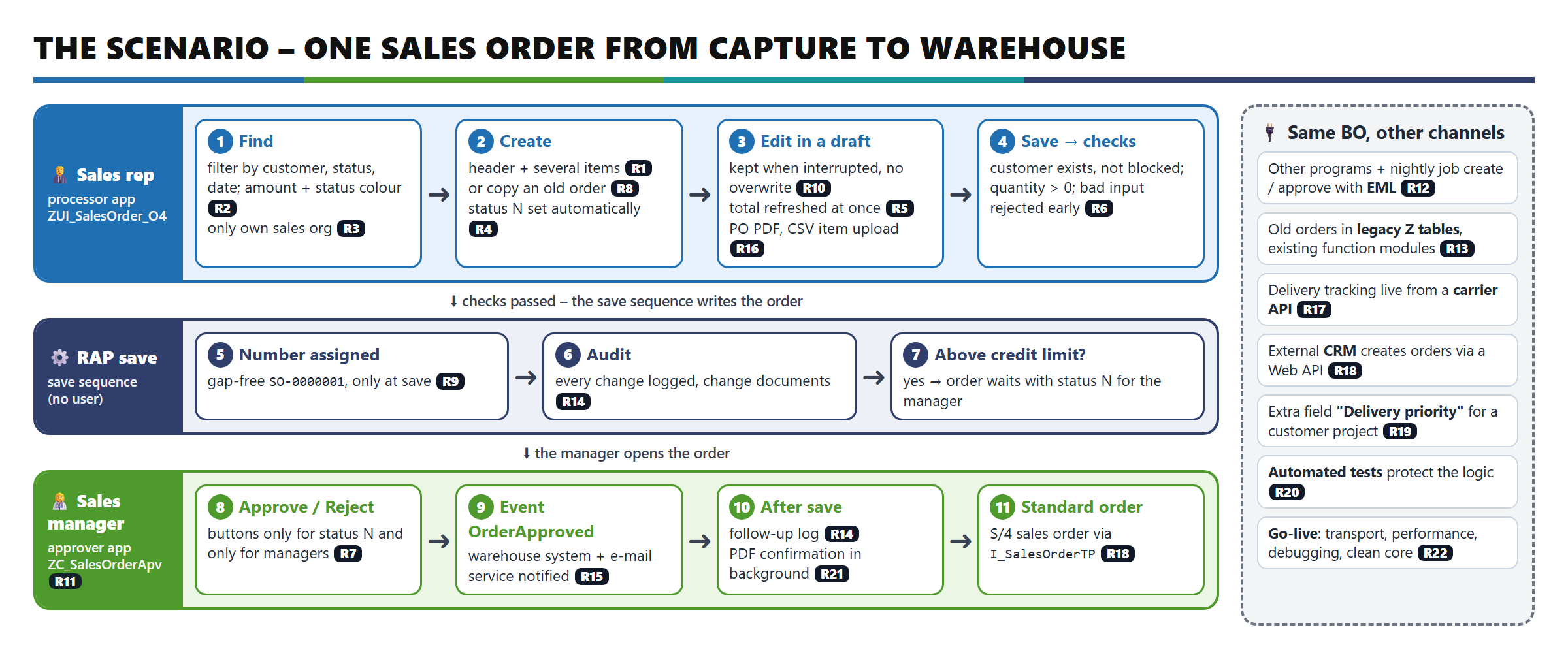
Follow one order from the first click to the warehouse. The R-numbers in bold are the requirements that the section implements; the picture below shows the same flow.
- Find. The rep opens the processor app and filters the list by customer, status or date. Each line shows the net amount and a status colour (R2). The rep sees only orders of their own sales organisation (R3).
- Create. The rep creates an order: a header with the customer and the customer's PO number, and several items with product and quantity (R1). Alternatively, the rep copies last month's order (R8). A new order starts with status N (New) without anyone typing it (R4).
- Edit. When an item quantity changes, the order's net amount is recalculated and shown at once (R5). The rep attaches the customer's PO as a PDF and uploads 40 items from a CSV/Excel file (R16).
- Interrupt. The phone rings. The unfinished order is kept as a draft, and no colleague can overwrite it in the meantime (R10).
- Save. On save, RAP checks the data: the customer must exist and must not be blocked, every quantity must be greater than zero, and obviously bad input is rejected before it even reaches the business object (R6).
- Number and audit. Only now, in the save sequence, the order gets its gap-free number SO-0000001 (R9), and every change is recorded for the auditors (R14).
- Approve. The order is above the credit limit, so it waits with status N. The manager opens the separate, simpler approver app (R11). Approve and Reject are offered only for status N and only to managers (R7). The manager approves.
- Notify. Saving the approval raises the event
OrderApproved; the warehouse system and an e-mail service are notified (R15). A follow-up log entry is written (R14), and the PDF confirmation is produced in the background so that saving stays fast (R21). - Hand over. The standard S/4HANA sales order is created from the approved order through the released BO interface
I_SalesOrderTP(R18).
Around this main path, the same business object serves other channels: other programs and a nightly job create and approve orders with EML (R12); old orders still live in legacy Z tables written by existing function modules (R13); delivery tracking comes live from a carrier's API and is not stored in SAP (R17); an external CRM creates orders through a Web API (R18); a customer project adds the field "Delivery priority" without modifying the app (R19); automated tests protect the logic (R20); and the app must be transported, fast, debuggable and clean-core compliant at go-live (R22).
1.4 The same story in RAP objects
In RAP, the order is one business object (BO): a root entity for the header and a child entity for the items, joined by a composition, so items cannot live without their header. These names are used on every page:
Object | Name | Explained on |
|---|---|---|
Database tables |
| 02 · Data Model & CDS, 07 · Locking, Draft & Side Effects |
CDS entities (BO) |
| 02 · Data Model & CDS |
Projections |
| 03 · Projection, UI, Access Control & Service |
Behavior pool |
| 04 · Behavior Definition & Behavior Pool |
Logic | determinations | 05 · Business Logic & Messages, 06 · Feature Control, Authorization & Numbering |
Services |
| 03 · Projection, UI, Access Control & Service, 11 · Files, Custom Entities & Integration |
Event | OrderApproved | 10 · Business Events & Event-Driven RAP |
Interview tip: describe a RAP project as "requirement → feature → why". For example: "Approve had to be possible only for new orders and only for managers, so we used an action with instance feature control for the status and instance authorization for the role (R7)." This shows design thinking, not just syntax.
Part 2 – The 22 requirements and their home pages
Every concept is explained once, on its home page. Other pages mention it in one line and point there. When a requirement needs several concepts, it has more than one home page – for example R7 needs an action (page 05) plus feature control and authorization (page 06).
ID | Business requirement | RAP concept that implements it | Home page |
|---|---|---|---|
R1 | Reps create an order with several items, edit and delete it | BO with composition (header → items), managed CRUD | 02 · Data Model & CDS; 04 · Behavior Definition & Behavior Pool |
R2 | Users find orders by customer, status or date; see the amount and status colour | Projection, metadata extension, search, value help, criticality | 03 · Projection, UI, Access Control & Service |
R3 | A rep sees only orders of their sales organisation | Access control (DCL), authorization object | 03 · Projection, UI, Access Control & Service; 06 · Feature Control, Authorization & Numbering |
R4 | A new order starts with status N (New) | Determination on modify | 05 · Business Logic & Messages |
R5 | Net amount = sum of item net values, refreshed at once | Determination + side effect | 05 · Business Logic & Messages; 07 · Locking, Draft & Side Effects |
R6 | Customer must exist and not be blocked; quantity > 0; reject obviously bad input early | Validations, precheck, messages | 05 · Business Logic & Messages |
R7 | Manager approves or rejects; Approve only for status N and only for managers | Actions, feature control, authorization | 05 · Business Logic & Messages; 06 · Feature Control, Authorization & Numbering |
R8 | Copy an existing order | Factory action | 05 · Business Logic & Messages |
R9 | Gap-free order numbers SO-0000001… assigned only when the order is saved | Late numbering with a number range | 06 · Feature Control, Authorization & Numbering |
R10 | Unfinished orders are kept; no two users overwrite each other | Draft, locks, ETag, total ETag (collaborative draft as an option) | 07 · Locking, Draft & Side Effects |
R11 | Approver uses a separate, simpler app (approve / reject only) | Two projections (processor vs approver), augment | 03 · Projection, UI, Access Control & Service; 04 · Behavior Definition & Behavior Pool |
R12 | Other ABAP programs and a nightly job create or approve orders | EML | 08 · EML |
R13 | Old orders still live in legacy Z tables, written by existing function modules | Unmanaged / unmanaged save around legacy code | 09 · Unmanaged Scenario & Save Variants |
R14 | Every change is logged for audit; a follow-up log is written on approval | Additional save, change documents | 09 · Unmanaged Scenario & Save Variants |
R15 | When an order is approved, the warehouse system and an e-mail service are notified | RAP business events, event binding, Event Mesh | 10 · Business Events & Event-Driven RAP |
R16 | The customer's PO (PDF) is attached; items can be uploaded from a CSV/Excel file | Large objects, upload action | 11 · Files, Custom Entities & Integration |
R17 | Delivery tracking comes from a carrier's API (not stored in SAP) | Custom entity with query provider | 11 · Files, Custom Entities & Integration |
R18 | An external CRM creates orders through an API; the standard S/4 sales order is created from it | Web API binding, communication arrangement, released BO | 11 · Files, Custom Entities & Integration |
R19 | A customer project needs an extra field "Delivery priority" without modifying the app | RAP extensibility | 12 · Extensibility & Testing |
R20 | Logic is protected by automated tests | ABAP Unit, test doubles | 12 · Extensibility & Testing |
R21 | Long follow-up work (e.g. PDF confirmation) must not slow down saving | bgPF from the save sequence | 09 · Unmanaged Scenario & Save Variants |
R22 | Go-live: transport, performance, debugging, clean core compliance | Debugging, best practices, clean core | 13 · Debugging, Best Practices, Clean Core & What's New |
Common mistake: expecting one keyword per requirement. R5 needs a determination (calculate the total) *and* a side effect (tell the Fiori UI to reload it); R10 needs draft *and* locks *and* ETags. If you can name all the parts, you understand the requirement.
Part 3 – The roadmap: from requirements to pages
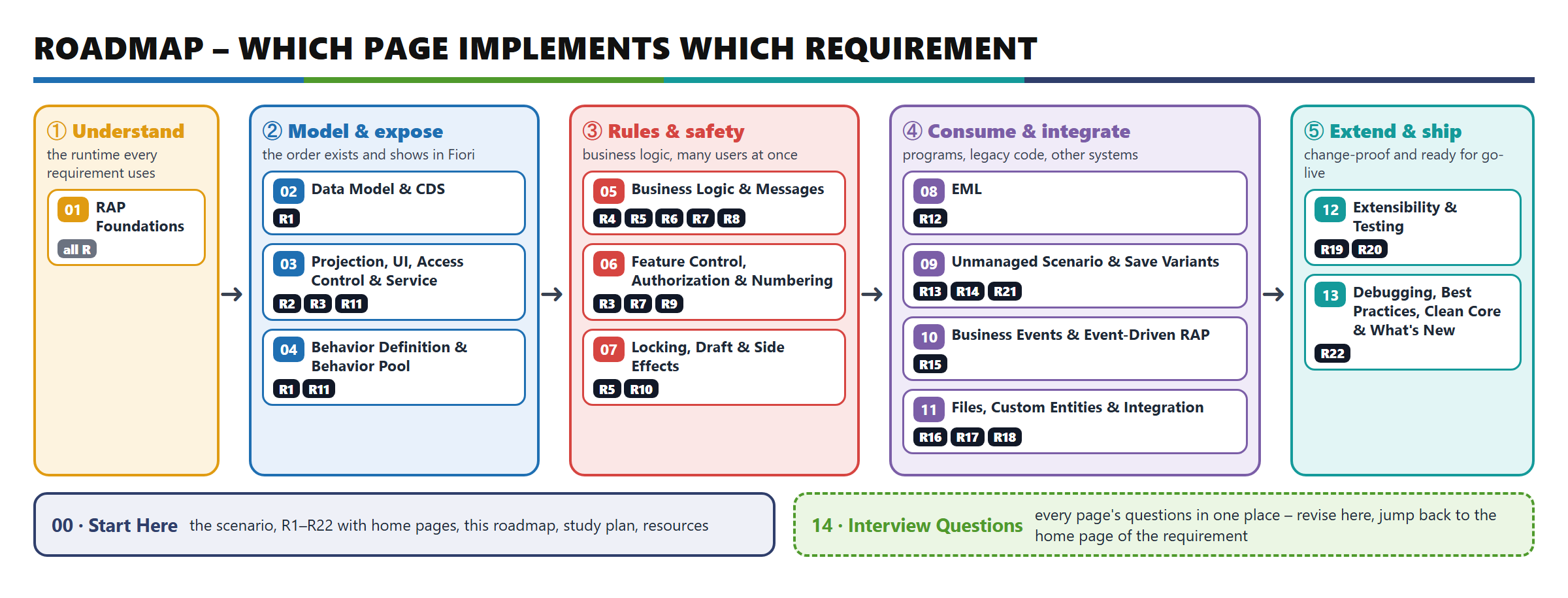
The 13 topic pages follow the order in which you would build the app: understand the runtime, model the data, expose it, add behavior and rules, make it safe for many users, then consume, integrate, extend, test and ship it. The picture shows each page with the requirements it implements.
3.1 Reading the map backwards
The map also works from the other side. When a question or a project task comes up, find the requirement that is closest to it and jump to its home page:
Question you hear | Closest requirement | Go to |
|---|---|---|
"How do you stop two users from overwriting each other?" | R10 | 07 · Locking, Draft & Side Effects |
"How do you call a RAP BO from a report or a background job?" | R12 | 08 · EML |
"You have old function modules that write the tables. Can you still use RAP?" | R13 | 09 · Unmanaged Scenario & Save Variants |
"How do you notify another system after a change?" | R15 | 10 · Business Events & Event-Driven RAP |
"How do you create a standard sales order in ABAP Cloud?" | R18 | 11 · Files, Custom Entities & Integration |
"How do you add a field without modifying SAP's or the vendor's app?" | R19 | 12 · Extensibility & Testing |
Part 4 – The pages of this section
Page | What you learn | Requirements |
|---|---|---|
The scenario, the requirements, the roadmap, how to study and where to look things up | R1–R22 | |
Why RAP exists, its evolution and architecture, the glossary, the transactional buffer, interaction phase and save sequence, implementation types and save variants (overview) | all (runtime) | |
Project setup and the generator, the ABAP syntax you need, tables with admin fields, demo data, root and child CDS entities, composition, the VDM layers | R1 | |
Projection views, metadata extensions, value help, search, status colour, processor vs approver UI, access control and IAM, service definition and binding, preview, the Fiori app | R2, R3, R11 | |
BDEF syntax, projection and interface BDEFs, augment, the behavior pool and its handler and saver method signatures | R1, R11 | |
Determinations, validations, precheck, actions, functions, determine actions, defaulting, messages, FAILED / REPORTED / MAPPED | R4–R8 | |
Static and instance feature control, global and instance authorization, authorization contexts, privileged access, early and late numbering | R3, R7, R9 | |
Locks, ETag and total ETag, draft and its lifecycle, collaborative draft, side effects | R5, R10 | |
EML statements (READ, MODIFY, COMMIT, ROLLBACK), derived types, responses, local mode, privileged access | R12 | |
The unmanaged scenario step by step, unmanaged save, additional save, with full data, change documents, bgPF | R13, R14, R21 | |
Declaring and raising business events, local event handlers, event bindings, Event Mesh, consumption and monitoring | R15 | |
Large objects and uploads, custom and abstract entities, virtual elements, Web API, remote OData, released BOs such as | R16, R17, R18 | |
Key user and developer extensibility of a RAP BO, ABAP Unit and test doubles for RAP | R19, R20 | |
Debugging and common errors, performance, build checklist and naming, transport and lifecycle, clean core, what's new, AI-assisted development | R22 | |
All interview questions of pages 01–13 with model answers, in one place for revision | – |
Part 5 – The whole section on one map
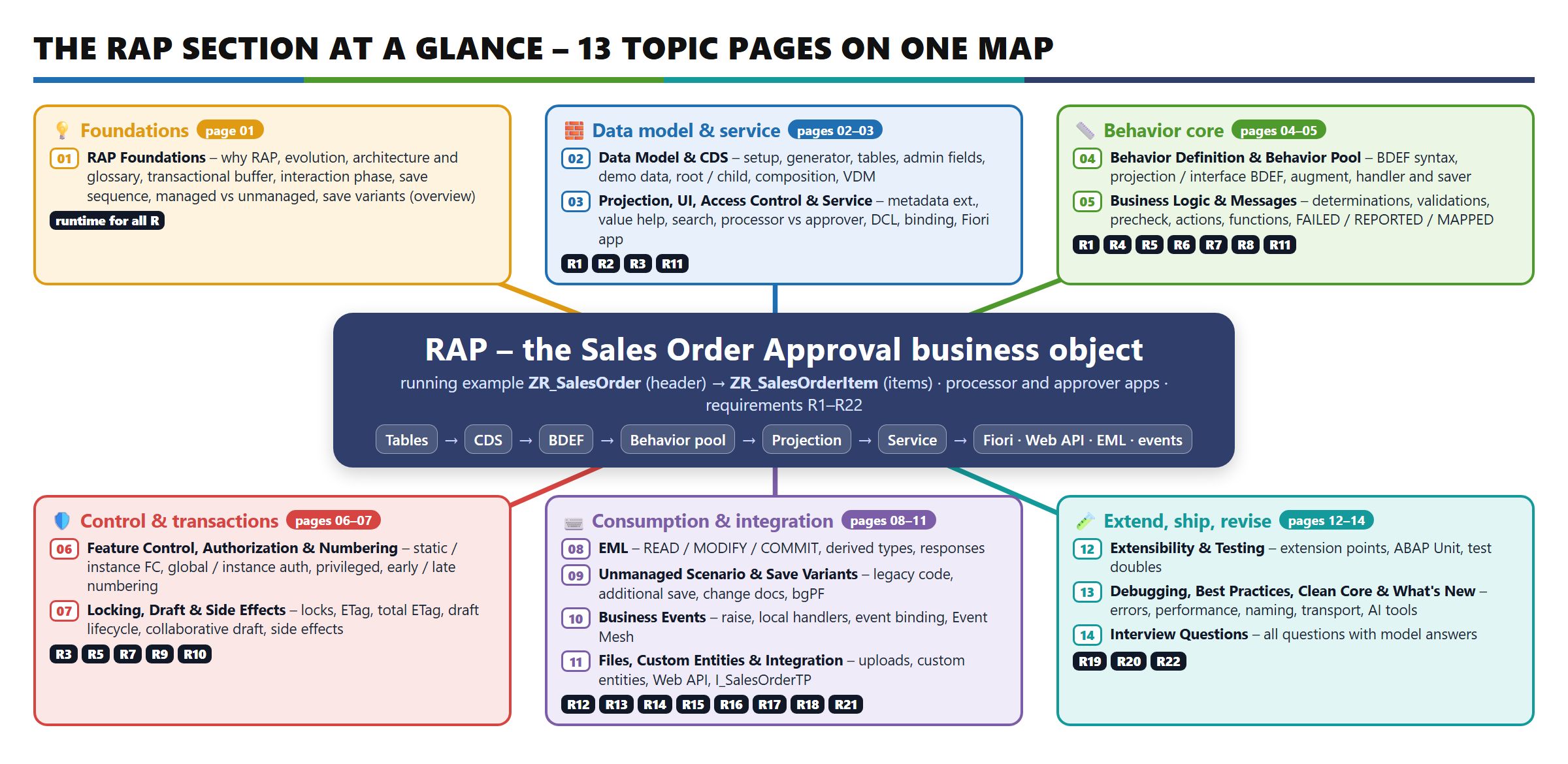
The mind map groups the pages into six areas around the business object. Use it to check that you can say two sentences about every line; where you cannot, open that page.
Part 6 – How to study this section
6.1 Order
- Read 01 first, even if it feels theoretical: the transactional buffer, the interaction phase and the save sequence explain *when* each later method runs.
- Then 02 → 07 in order. Each page builds on the previous one, and together they produce the complete processor and approver apps (R1–R11).
- 08 → 13 can be read in any order once 07 is done; 08 (EML) helps with all of them, because tests, events and integrations call the BO with EML.
- Per page, follow the same rhythm: why (the requirement) → picture → syntax → common mistake / interview tip. Close the page and explain the requirement and its solution aloud.
6.2 Hands-on in an SAP BTP trial
Reading is not enough for RAP; you need to see the Fiori preview react. A free SAP BTP trial account with the ABAP environment and Eclipse with ABAP Development Tools (ADT) is enough for most of the scenario. Follow SAP's current onboarding tutorial for the trial (the steps change from time to time). Build the app in milestones:
Milestone | What you build | Requirements | Pages |
|---|---|---|---|
1 | Tables, CDS root and child, generated UI service, preview of the list and object page | R1, R2 | 02, 03, 04 |
2 | Initial status, total calculation, customer and quantity checks, approve / reject / copy | R4–R8 | 05 |
3 | Approve only for status N, late numbering SO-0000001, approver projection | R7, R9, R11 | 03, 04, 06 |
4 | Draft, ETag, side effect for the total | R5, R10 | 07 |
5 | An ABAP Unit test class that creates and approves an order with EML | R12, R20 | 08, 12 |
6 | The event | R15, R16 | 10, 11 |
Some requirements need a system you may not have: the standard sales order via I_SalesOrderTP (R18) exists only in S/4HANA, legacy function modules (R13) only where legacy code lives, and features differ by release. For these, read the page, study the SAP sample code and note "check your release".
Common mistake: generating the whole app with the generator and never writing a BDEF line yourself. Generate milestone 1 once to see the result, then build it again by hand – interviews test whether you understand the generated objects.
6.3 Revision with page 14
- Every topic page ends with its interview questions; 14 · Interview Questions collects all of them.
- After each page, answer its questions aloud before reading the model answers.
- In the last week before an interview, work only from page 14. For every answer you get wrong, open the home page of the requirement (Part 2) and reread that part.
- Final check: tell the story of one order (Part 1.3) in two minutes and name the RAP feature behind each R-number. If you can do that, you can answer most scenario questions.
Part 7 – Official resources and recommended courses
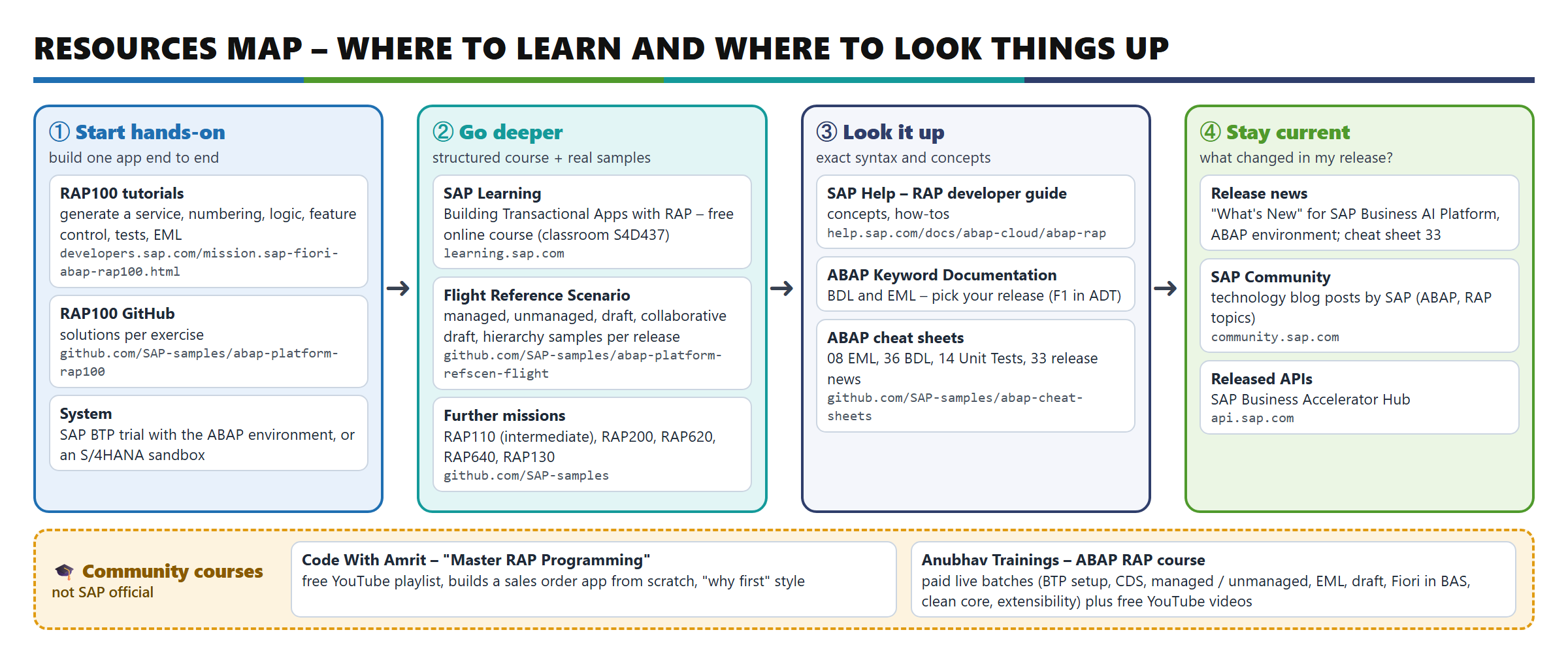
RAP changes with every release, so knowing where to look is as important as knowing the syntax. Start hands-on, deepen with a course and real samples, look up exact syntax in the keyword documentation and keep an eye on the release news.
7.1 Official SAP resources
Resource | Link | Good for |
|---|---|---|
SAP Help Portal – ABAP RESTful Application Programming Model | help.sap.com/docs/abap-cloud/abap-rap | The complete developer guide: concepts, how-tos, reference |
ABAP Keyword Documentation – BDL and EML | help.sap.com/doc/abapdocu_latest_index_htm/latest/en-US/index.htm (F1 in ADT) | Exact syntax of every BDEF and EML statement – choose your release |
ABAP cheat sheets (SAP-samples) | github.com/SAP-samples/abap-cheat-sheets – 08_EML_ABAP_for_RAP, 36_RAP_Behavior_Definition_Language, 14_ABAP_Unit_Tests, 33 release news | EML, BDL, transaction phases, BO test doubles, what changed per release |
RAP100 – Build SAP Fiori apps with RAP | github.com/SAP-samples/abap-platform-rap100 and developers.sap.com/mission.sap-fiori-abap-rap100.html | Hands-on: generate a UI service, numbering, determinations, validations, actions, feature control, unit test, EML, OData streams |
RAP110 – Build transactional Fiori elements apps (intermediate) | github.com/SAP-samples/abap-platform-rap110 | The next step after RAP100: more transactional features on a draft BO |
Further missions | github.com/SAP-samples – abap-platform-rap200, rap620, rap640, rap130 | RAP200: guided ABAP Cloud scenario; RAP620: side-by-side extensibility with remote services; RAP640: wrapping missing released APIs in S/4HANA private edition; RAP130: apps and Web APIs with agentic AI |
SAP Learning – Building Transactional Apps with RAP | learning.sap.com/courses/building-transactional-apps-with-the-abap-restful-application-programming-model | Free online course (classroom version S4D437): managed, draft-enabled, composite and unmanaged scenarios |
ABAP Flight Reference Scenario (/DMO/) | github.com/SAP-samples/abap-platform-refscen-flight | Managed, unmanaged, draft, collaborative draft, hierarchy and more sample BOs, one branch per release |
RAP Generator (SAP-samples) | github.com/SAP-samples/cloud-abap-rap | Generates RAP boilerplate; ADT also has its own generator wizards |
openSAP RAP exercises (archived) | github.com/SAP-samples/abap-platform-rap-opensap | Older course material – reference only |
SAP Community – technology blog posts by SAP | community.sap.com | Release highlights for the SAP Business AI Platform, ABAP environment, feature showcases |
SAP Business Accelerator Hub | api.sap.com | Released APIs and BO interfaces such as |
7.2 Recommended community courses (not SAP official)
"Master RAP Programming For ABAP Development { Learn RAP from Scratch to Advanced }" by the YouTube channel Code With Amrit – a free playlist that builds a sales order app from scratch in the same "why first" style as this section. Search YouTube for the playlist title. Its first videos map to these pages:
Video | Topic | On page |
|---|---|---|
1 | Introduction: what RAP is, why, problems of classical ABAP, architecture, BTP and S/4HANA | 01 |
2 | Evolution: classical ABAP → ABAP on HANA → Fiori → RAP | 01 |
3 | Implementation types and technical components | 01 |
4 | The big picture: how a RAP app is built | 01, 02 |
5 | Parts and phases of a BO: runtime flow, request processing, save sequence, response | 01 |
6 | Managed vs unmanaged in depth | 01, 09 |
7 | Data model: sales order header + item, master data, keys, parent-child | 02 |
8–11 | Header and item tables in ADT: domains, data elements, table, structure, foreign key | 02 |
12 | Demo data with an IF_OO_ADT_CLASSRUN class | 02 |
13 | Root CDS entity (header) and child entity (item) | 02 |
14 | Association vs composition, 1:1 / 1:n, lifecycle, navigation | 02 |
15 | Assigning composition and association in the BO, preparing for the BDEF | 02, 04 |
The playlist announces further topics (BDEF, behavior implementation, service definition and binding, OData V4, Fiori elements, EML, draft, actions, determinations, validations, side effects, attachments, authorization, numbering, end-to-end projects); they are covered on pages 03–11. Check the channel for new videos.
Anubhav Trainings – ABAP RAP course: a paid, instructor-led course in live weekend batches (about 40 hours) covering BTP setup, a CDS recap, managed and unmanaged RAP, EML, draft, Fiori apps in SAP Business Application Studio, clean core and extensibility. The channel also offers free RAP videos on YouTube, including the "Learn ABAP RAP in 2026" playlist and short series on business events and bgPF. Check the current syllabus and schedule before booking.
Learning goal | Best resource |
|---|---|
First working app in a day | RAP100 tutorials on an SAP BTP trial |
Understand why and how, from scratch | This section + the Code With Amrit playlist |
Guided course with a trainer and Q&A | Anubhav Trainings RAP course or the SAP Learning course |
Exact syntax of a keyword | ABAP Keyword Documentation of your release (F1 in ADT) |
A complete, realistic sample | ABAP Flight Reference Scenario (/DMO/) |
What changed in my release | Cheat sheet 33 and the release blogs on SAP Community |
01 · Foundations ▶ · Sections: CORE ABAP | OOPS ABAP | ABAP on HANA | Clean Core | RAP | ABAP Points | SAP Fiori | SAPUI5 | Mobile Development (MDK) | BTP Foundations | BTP Development | CAP | SAP Build | ABAP on BTP | Integration Suite | SAP Business AI | SAP BASIS | Security | SAP SDLC
Functional: FICO ABAP | TRM ABAP | VIM | SAP BIS | SD ABAP | MM ABAP | PP ABAP | QM ABAP | PM ABAP | PS ABAP | EWM | TM ABAP | EHS ABAP | HR ABAP | BW | SAP MDG | SAP Analytics Cloud | SAP Ariba | SAP CX | SAP IBP