The CDS domain model of the Order Approval Portal (CR1): entities, built-in and custom types, keys, defaults and calculated elements, aspects from @sap/cds/common, associations vs compositions, localized data and i18n, annotations, namespaces, initial data and the generated SQL.
Part 1 – Model first: the Order Approval Portal domain
Requirements on this page
CR-ID | Requirement | Where on the page |
|---|---|---|
CR1 | Store approval requests, notes and decisions for sales orders | Part 2 (entities, types), Part 3 (aspects), Part 4 (associations and compositions) |
CR1 (texts) | Request types shown in the user's language | Part 5 (localized data, i18n) |
CR6 prerequisite | Labels and value helps for the Fiori app | Part 6 (annotations); UI details on 06 · Fiori Elements & Draft |
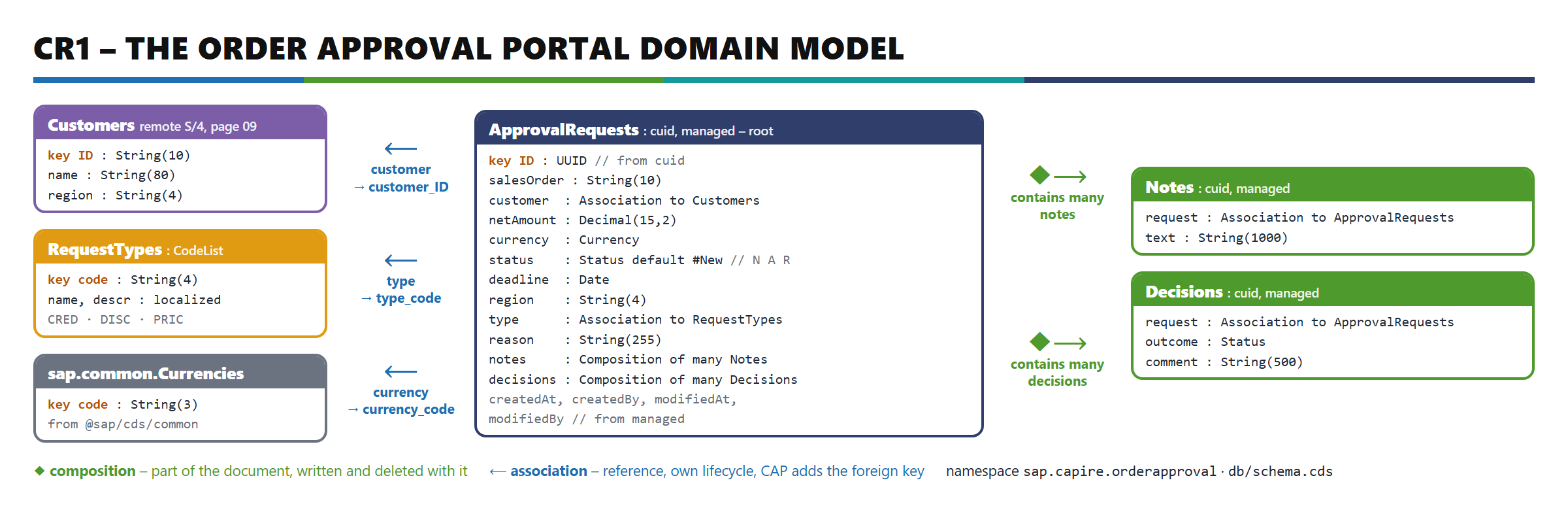
In CAP the domain model comes first: what are the business objects, their fields and how they relate? Everything else – tables, OData $metadata, Fiori labels, authorization filters – is derived from it. The model is written in CDL (CDS Definition Language) in .cds files and compiled into CSN (Core Schema Notation, a JSON form) that the runtimes read. The language looks like ABAP CDS but is not the same: CAP CDS defines persistent entities (tables) directly and is database-independent.
|
Interview tip: model nouns (business objects) here and keep verbs (approve, reject) for the service layer. Keep the domain model free of UI or user concerns – those belong to services and annotations.
Part 2 – Entities, elements and types
An entity is a structured type with a primary key that is persisted – it becomes a table. Its elements are the fields. Types are either built-in CDS types, your own named types, or structured types.
2.1 Built-in types
CDS type | Typical SQL (HANA) | Use for |
|---|---|---|
UUID | NVARCHAR(36) | Technical keys (preferred, filled automatically on CREATE) |
String(n) | NVARCHAR(n) | Texts; give a length – default length is 255 in most databases |
| NCLOB, BLOB | Long notes, attachments (media data) |
| INTEGER, BIGINT, DECIMAL, DOUBLE | Amounts always as |
Boolean | BOOLEAN | Flags |
| DATE, TIME, SECONDDATE, TIMESTAMP |
|
| foreign key columns / none | Relationships (Part 4) |
2.2 Custom types, enums and structured types
|
2.3 Keys, defaults, calculated and virtual elements
Feature | Syntax | Notes |
|---|---|---|
Primary key |
| Prefer one technical UUID key; business numbers (salesOrder) as normal elements |
Default | status : Status default #New; | Applied on INSERT when no value is sent |
Not null | salesOrder : String(10) not null; | Database constraint; for user-facing checks use |
Calculated (on read) | overdue : Boolean = deadline < $now; | Computed in queries, never stored; no subqueries or expands, not a key (Node.js: |
Calculated (stored) | … = expression stored; | Generated column on all CAP databases; type required, only fields of the same row |
Virtual | virtual criticality : Integer; | Not persisted, no column – filled by an after handler (04 · Custom Logic) |
Common mistakes: composite business keys copied from ABAP tables (use a UUID key and keep the business key as a unique element); Double for money; missing string lengths (HANA then uses the default and the API advertises no max length).
Part 3 – Aspects and @sap/cds/common
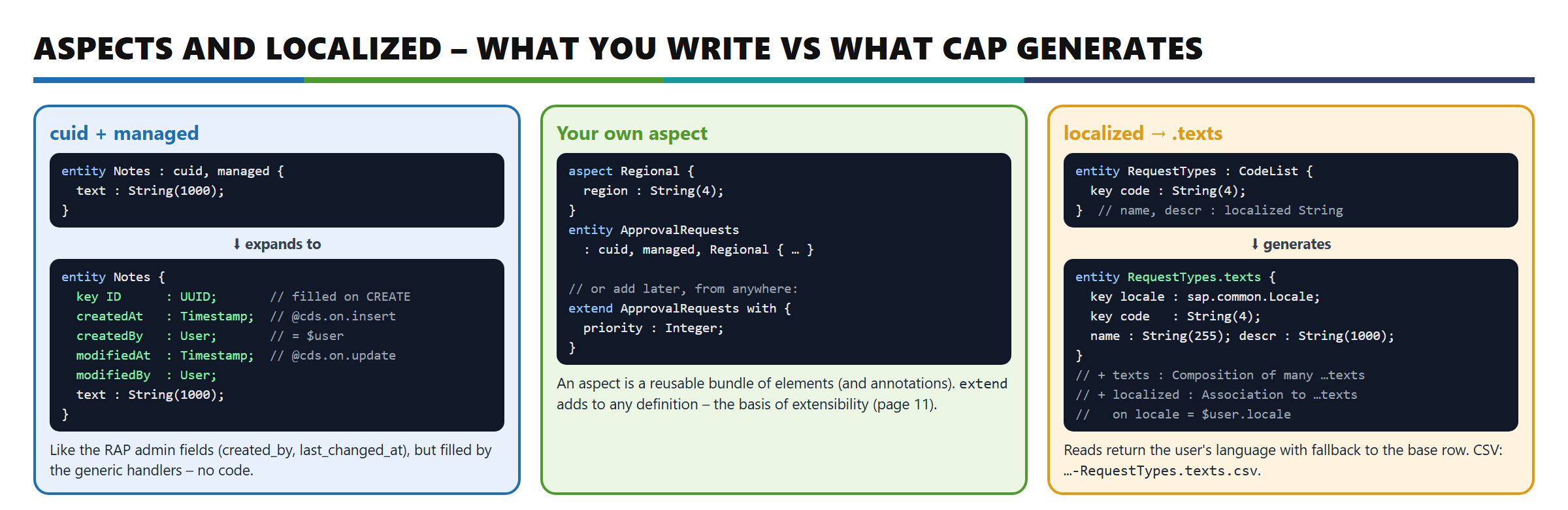
An aspect is a reusable bundle of elements (and annotations) that you mix into entities with : – like an include structure in ABAP, but it can also carry behaviour such as "fill createdBy on insert". SAP ships the most useful ones in @sap/cds/common; use them instead of inventing your own fields.
From @sap/cds/common | What it adds | Order Approval Portal |
|---|---|---|
aspect |
| all entities |
aspect |
| requests, notes, decisions |
aspect |
| e.g. approval limits per period |
type | Association to | currency |
aspect |
| RequestTypes |
3.1 Your own aspects and extend
|
extendandannotatework on any definition, also from another file or package – the base of separation of concerns (UI annotations inapp/, auth insrv/auth.cds) and of customer extensibility (11 · Multitenancy, SaaS & Extensibility).- The code-list entities (
sap.common.Currencies…) are created in your database; fill them with CSV files or SAP's package@sap/cds-common-content(prebuilt Countries, Currencies, Languages and Timezones;using from '@sap/cds-common-content'; SAP Developer License).
Part 4 – Associations and compositions
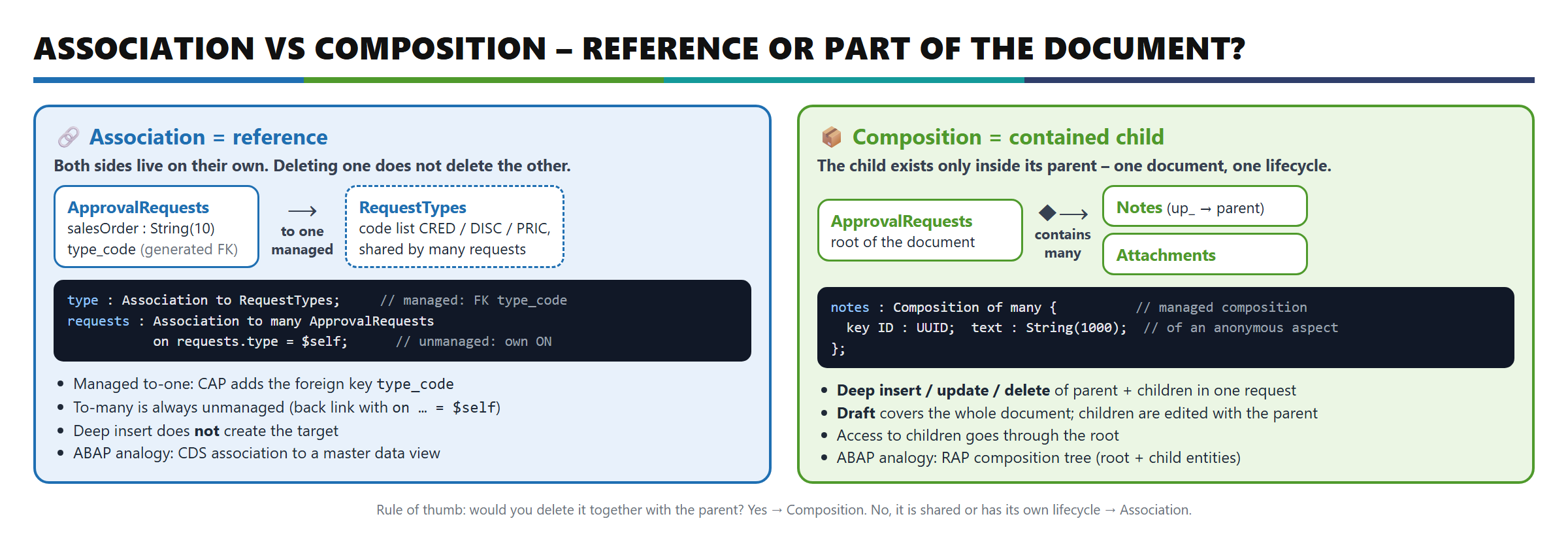
Relationships decide what the API can navigate ($expand), what is written together (deep insert) and what is deleted together. CDS has two kinds: an association is a reference to something with its own life; a composition marks contained parts of a document.
4.1 Managed and unmanaged associations
|
- Managed to-one associations are the default: CAP generates the foreign key element
<association>_<targetKey>(e.g.customer_ID,currency_code) and the join condition. - To-many associations are defined with
on … = $selfagainst the to-one association on the other side (a backlink);$selfstands for the current entity. - Associations are lazy: they cost nothing until a query follows them (path expression or
$expand). Following one is a JOIN, not an extra round trip.
4.2 Compositions
|
Effect | Association | Composition |
|---|---|---|
Deep INSERT / UPDATE through the parent | No – only the foreign key is written | Yes – children created, changed or removed with the parent |
DELETE of the parent | Target untouched | Children deleted (cascade) |
Draft (06 · Fiori) | Target not part of the draft | Whole document edited in one draft |
Auto-exposure in services | Target exposed if needed (code lists read-only) | Children exposed automatically with the root |
ABAP analogy | Association to master data | RAP composition tree (root, child) |
Common mistakes: modeling notes as an association (deleting a request leaves orphan notes); composition to shared master data such as customers (deleting a request would delete the customer); forgetting the backlink so on notes.request = $self points nowhere.
Part 5 – Localized data and i18n
Two different things are translated in an app: data (the names of request types such as "Credit limit exceeded") and UI texts (labels such as "Sales Order"). CAP handles both.
5.1 localized elements
Mark an element localized (the CodeList aspect already does this for name and descr). CAP then generates a RequestTypes.texts entity keyed by locale, a texts composition and a localized association, plus views that return the user's language with a fallback to the base row. The runtime takes the locale from the request (Accept-Language or sap-locale).
|
- Base texts stay in the base table, translations go to
.texts– one join less when no translation exists. - SQLite has no session locale; CAP generates extra views for a few languages there – test real language fallback on SAP HANA Cloud (capire, Localized Data).
5.2 i18n bundles for labels and messages
|
The same bundles hold error message texts used by @assert and req.error (03 · Services, 04 · Custom Logic). The UI never hard-codes a label.
Part 6 – Annotations
Annotations add metadata to definitions without changing their structure: @title, @readonly, @mandatory, @restrict, @UI.LineItem … CAP interprets some of them itself (validation, authorization, persistence), passes OData vocabulary annotations (UI, Common, Core) to $metadata for Fiori, and ignores unknown ones – which also means typos fail silently.
|
Annotation | Effect | Home page |
|---|---|---|
| Labels and tooltips in | 06 · Fiori |
| Generic input checks and field control | 03 · Services |
@cds.search | Which elements | 03 · Services |
@odata.etag | Optimistic locking with ETags | 03 · Services |
| Authorization | 07 · Authorization |
| Draft, Fiori elements UI | 06 · Fiori |
| No table created / table already exists (e.g. native HANA objects) | 08 · Databases |
@cds.autoexpose | Expose an entity automatically when a service uses it (e.g. code lists) | 03 · Services |
Interview tip: "Where do you put annotations?" – UI annotations in the app folder (app/requests/annotations.cds), auth in a separate srv/auth.cds, constraints near the service. That separation keeps the core model readable and lets teams work in parallel.
Part 7 – Namespaces, files, initial data and what CAP generates
7.1 Namespaces and using
namespace sap.capire.orderapproval;prefixes every definition in the file (sap.capire.orderapproval.ApprovalRequests).using { sap.capire.orderapproval as my } from '../db/schema';imports definitions;from '@sap/cds/common'imports from a package.- The database table name is derived from the full name with dots replaced by underscores:
sap_capire_orderapproval_ApprovalRequests.
7.2 Initial and test data
- CSV files in
db/data/(ortest/data/for test-only data) named<namespace>-<Entity>.csvare loaded on deploy; separator;or,; first line = element names (foreign keys ascustomer_ID). cds add datacreates CSV files with a header line for your entities indb/data/;--records 10adds sample rows and--filterlimits the entities (both since@sap/cds-dk7.9).- Initial data for production (code lists) belongs in
db/data; demo data intest/dataso it never reaches the productive HDI container.
7.3 Look at the output
|
The SQL types differ per database – run the command on your project to see the real output; the model stays the same. Schema changes, HDI artefacts and native HANA objects are on 08 · Databases & Deployment.
Part 8 – Interview questions
Q1. What is the difference between CDL and CSN?
CDL is the human-readable CDS language in .cds files; CSN (Core Schema Notation) is the compiled JSON representation that the Node.js and Java runtimes and tools work with. cds compile --to csn shows it.
Q2. What do cuid and managed give you?
cuid adds key ID : UUID, filled automatically on CREATE. managed adds createdAt, createdBy, modifiedAt, modifiedBy, filled by the generic handlers from $now and $user. Both come from @sap/cds/common.
Q3. Association vs composition?
An association is a reference to an object with its own lifecycle (customer, code list); a composition marks contained children (notes of a request) that are deep-inserted, updated, deleted and drafted together with the parent. Rule: would you delete it with the parent? Then composition.
Q4. What is a managed association and what does CAP generate for it?
A to-one association without an on condition. CAP adds the foreign key element <assoc>_<targetKey> (e.g. customer_ID) and the join condition. To-many associations always need an on condition, usually a backlink on x.parent = $self.
Q5. Why UUID keys?
They can be generated anywhere without a number range or a database round trip, work across tenants and systems, and make deep inserts and draft simple. Business numbers stay as normal (possibly unique) elements.
Q6. How does CAP handle translated data?
Elements marked localized get a generated .texts entity keyed by locale, a texts composition and a localized association; reads return the user's language with fallback to the base row. UI labels come from _i18n/i18n*.properties via {i18n>key}.
Q7. What is an aspect and how is it different from extend?
An aspect is a named, reusable set of elements and annotations mixed into an entity with :. extend adds elements or annotations to an existing definition afterwards, possibly from another file or package – the basis for separation of concerns and customer extensions.
Q8. Which annotations does CAP itself act on?
For example @readonly, @mandatory, @assert.* (validation), @requires / @restrict (authorization), @cds.search, @odata.etag, @odata.draft.enabled, @cds.persistence.*. UI and Common vocabulary annotations are passed to $metadata for Fiori.
Q9. Scenario: after deleting an approval request the notes are still in the database. Why?
notes is modeled as an association, not a composition, so DELETE does not cascade. Change it to Composition of many Notes on notes.request = $self; for existing orphan rows write a one-off cleanup.
Q10. Scenario: the German users see English request type names. What do you check?
That the element is localized (CodeList does it), that …-RequestTypes.texts.csv has de rows, that the request sends Accept-Language: de (or sap-locale), and whether you test on SQLite, which has limited locale support – verify on SAP HANA Cloud.
🏠 Start Here · ◀ 01 · Foundations · 03 · Services ▶ · Sections: CORE ABAP | OOPS ABAP | ABAP on HANA | Clean Core | RAP | ABAP Points | SAP Fiori | SAPUI5 | Mobile Development (MDK) | BTP Foundations | BTP Development | CAP | SAP Build | ABAP on BTP | Integration Suite | SAP Business AI | SAP BASIS | Security | SAP SDLC
Functional: FICO ABAP | TRM ABAP | VIM | SAP BIS | SD ABAP | MM ABAP | PP ABAP | QM ABAP | PM ABAP | PS ABAP | EWM | TM ABAP | EHS ABAP | HR ABAP | BW | SAP MDG | SAP Analytics Cloud | SAP Ariba | SAP CX | SAP IBP