Deep reference for SAP GUI ALV: every technology, the field catalog and layout in detail, colours, styles, events, editable grids, containers and trees, plus four complete example programs. The short overview with one example per technology is on CORE ABAP › 03 Report Programming & ALV, Part 9 – read that first. ALV with IDA is in depth on ABAP on HANA › 04 ABAP SQL, ADBC & ALV IDA (short version in 1.5); event syntax (FOR EVENT, SET HANDLER) is on page 03 Exceptions, Events & Advanced OO.
All SAP GUI ALVs are classic ABAP only (not available in ABAP Cloud). They run in S/4HANA on-premise and private cloud with Standard ABAP. In ABAP Cloud a list for the user is a Fiori elements list report on CDS (1.6 and Clean Core › 02 Clean-Core Report).
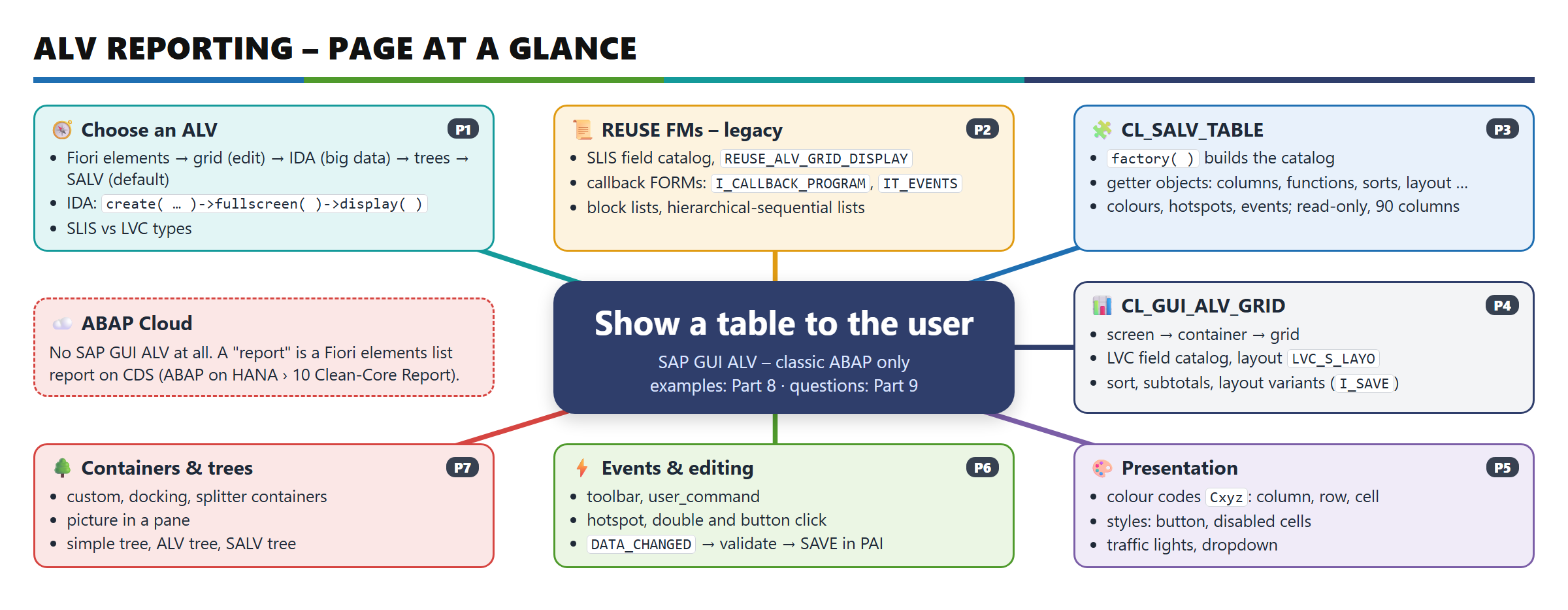
Page at a glance
Part 1 – The ALV landscape
1.1 Evolution
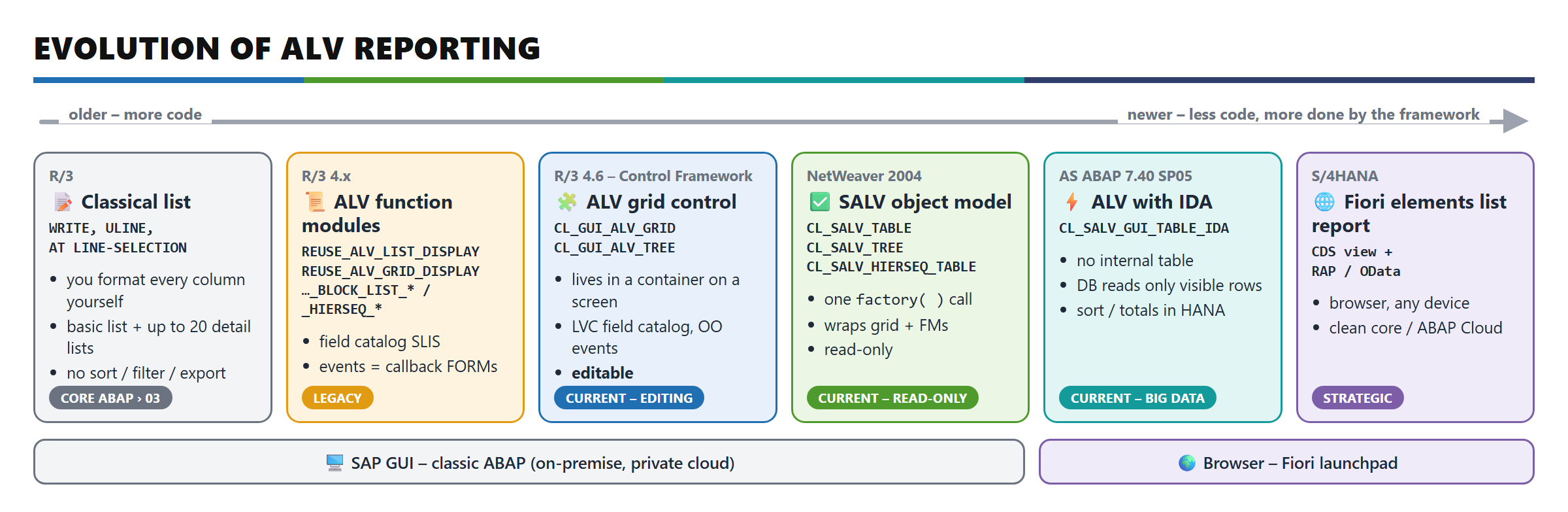
- Classical list: selection screen → SELECT into an internal table → WRITE → output in the basic list of the list processor (also called "L.P.S.", list processing screen). Details: CORE ABAP › 03 Parts 4–7.
- Every report, classical or ALV, follows the same 5 steps: declare data → selection screen → validate input → SELECT → present the result. Only the last step changes with ALV.
- The SALV object model has table, tree and hierarchical-sequential classes – but no block-list class; block lists exist only as REUSE_ALV_BLOCK_LIST_*.
1.2 Technology comparison
Technology | Class / FM | Output | Editable | Container | Background | Status |
|---|---|---|---|---|---|---|
ALV list | REUSE_ALV_LIST_DISPLAY | list | no | no (full screen) | yes | Legacy, classic ABAP only |
ALV grid (FM) | REUSE_ALV_GRID_DISPLAY (_LVC) | grid | fcat EDIT works, not supported | no | yes (as list) | Legacy, classic ABAP only |
Block list | REUSE_ALV_BLOCK_LIST_INIT / APPEND / DISPLAY | list | no | no | yes | Legacy, classic ABAP only |
Hierarchical-sequential | REUSE_ALV_HIERSEQ_LIST_DISPLAY / CL_SALV_HIERSEQ_TABLE | header + item list | no | no | yes | FM legacy, SALV current – classic ABAP only |
Grid control | CL_GUI_ALV_GRID | grid | yes – the standard | yes (custom, docking, splitter) | only without container | current – classic ABAP only |
SALV table | CL_SALV_TABLE | grid or list | no | optional | yes (full screen) | current, read-only – classic ABAP only |
ALV tree | CL_GUI_ALV_TREE | tree with columns | checkboxes only | yes | no | current – classic ABAP only |
SALV tree | CL_SALV_TREE | tree | no | optional | no | current – classic ABAP only |
ALV with IDA | CL_SALV_GUI_TABLE_IDA | grid, DB paging | no | optional | no | current for big data – classic ABAP only (1.5) |
Fiori elements | list report on CDS + RAP / OData | browser | via RAP | – | – | strategic in S/4HANA; the only option in ABAP Cloud (1.6) |
- Classic ABAP only (not available in ABAP Cloud): every SAP GUI ALV above. ABAP for Cloud Development has no SAP GUI, no dynpros or list statements, no executable programs, and allows only released APIs – none of these classes or FMs is released. They run in S/4HANA on-premise and private cloud with Standard ABAP.
- REUSE_ALV_* and the SLIS types are also outdated in classic ABAP: read and maintain them, don't write new ones.
- CL_GUI_ALV_GRID remains the only supported editable SAP GUI ALV; SALV and IDA are display-only.
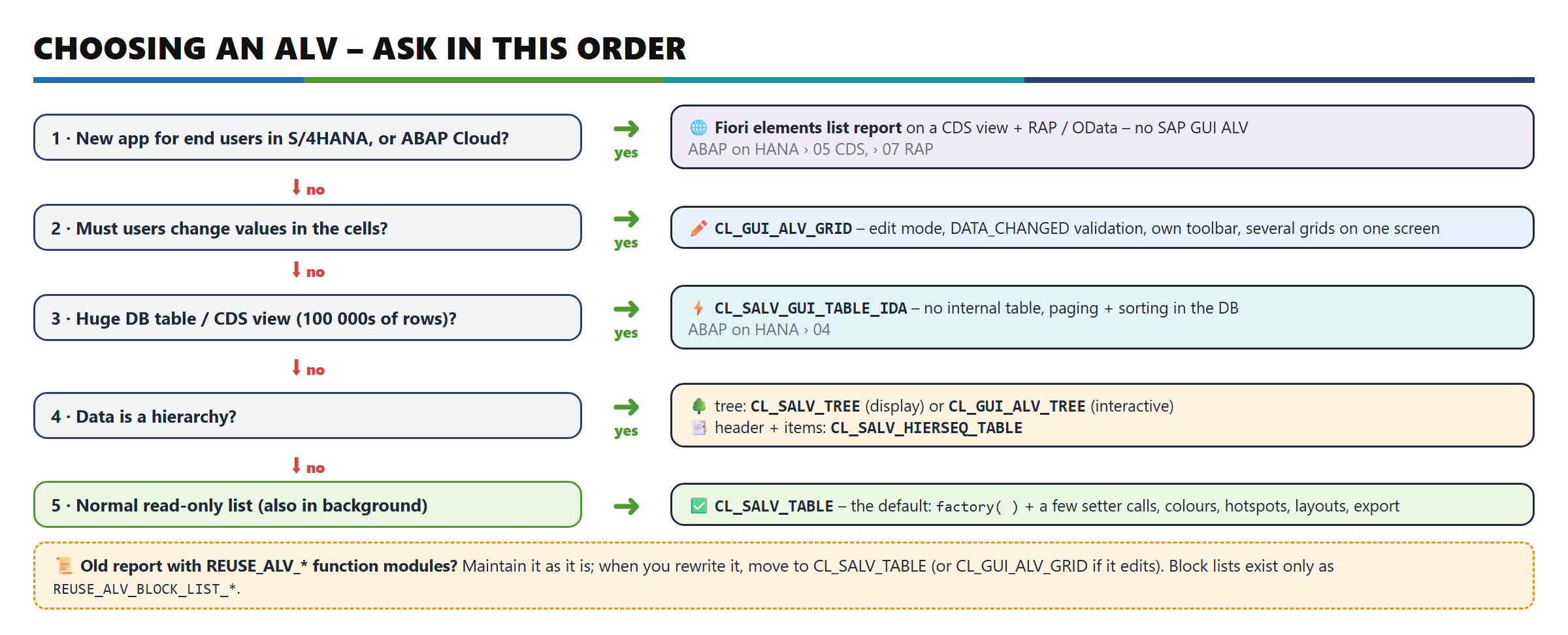
1.3 Choosing an ALV
1.4 Shared building blocks: SLIS vs LVC types
The field catalog is an internal table with one row per output column (name, heading, position, colour, totals, edit …). REUSE FMs use SLIS types, the grid control uses LVC types; SALV hides both behind column objects.
Purpose | REUSE FMs (type group SLIS) | CL_GUI_ALV_GRID (LVC) |
|---|---|---|
Field catalog | SLIS_T_FIELDCAT_ALV |
|
Layout | SLIS_LAYOUT_ALV | LVC_S_LAYO |
Sort / subtotals | SLIS_T_SORTINFO_ALV | LVC_T_SORT |
Filter | SLIS_T_FILTER_ALV | LVC_T_FILT |
Events |
| class events + SET HANDLER |
Layout variant |
|
|
Generate catalog | REUSE_ALV_FIELDCATALOG_MERGE | LVC_FIELDCATALOG_MERGE |
1.5 ALV with IDA in one minute
CL_SALV_GUI_TABLE_IDA (Integrated Data Access) is the option for large data in SAP GUI – in S/4HANA and equally in ECC on AS ABAP 7.40 SP05 or higher (EHP7 / EHP8), on HANA or any other database. You pass a table or CDS view name instead of an internal table. The ALV asks the database only for the visible rows; sorting, filtering and totals become new SQL statements that HANA runs.
|
A CDS view (e.g. the one from 1.6) has its own factory method – create( ) is for tables and DDIC views only:
|
- Entry points:
create( iv_table_name = … )for tables and DDIC views,create_for_cds_view( iv_cds_view_name = … )for CDS views (CDS parameters:set_view_parameters( )). Full screen:fullscreen( )->display( ); in a container pass the container tocreate( )(parameter IO_GUI_CONTAINER). - Use it when the table is too big for an internal table and the user only needs to look: display only, no editable cells, no background output. Field catalog, conditions, toolbar and double click: ABAP on HANA › 04, Part 11.
- Classic ABAP only (not available in ABAP Cloud): IDA is an SAP GUI control like the other ALVs. The ABAP Cloud answer to "big list" is a Fiori elements list report, which also reads page by page (OData paging).
1.6 Clean-core alternative: Fiori elements list report on CDS
Under clean core – and always in ABAP Cloud – a read-only "ALV report" becomes a Fiori elements list report: a CDS view entity with @UI annotations, a service definition and an OData V4 service binding. No ABAP report, no selection screen, no ALV code. The full how-to (incl. a custom entity when the list needs ABAP logic) is on Clean Core › 02 Clean-Core Report; the UI side on SAP Fiori › 07 Fiori Elements.
|
- Then create a service binding (e.g. ZUI_ALV_DEMO_FLIGHT_O4, binding type OData V4 – UI), publish it and open the entity with Preview – that is the running list report.
Classic ALV report | Fiori elements list report |
|---|---|
SELECT into an internal table | CDS view entity on released SAP views or own tables |
Selection screen, SELECT-OPTIONS | filter bar: |
Field catalog (columns, order, texts) |
|
Layout variants, sort, totals, Excel export | built in: variant management, table settings, export |
Hotspot / double click to details | navigation to an object page ( |
Editable CL_GUI_ALV_GRID | RAP business object (behaviour definition) – RAP section |
AUTHORITY-CHECK in the report | CDS access control (DCL), checked by the database |
Part 2 – Legacy: REUSE_ALV function modules
Legacy – know it for interviews and old Z reports. Modern replacement: CL_SALV_TABLE (display) or CL_GUI_ALV_GRID (editing). Procedure: 1 declare, 2 read data, 3 build the field catalog, 4 call REUSE_ALV_GRID_DISPLAY (or _LIST_DISPLAY).
2.1 Field catalog
- Only
T_OUTTABis mandatory. Without field catalog information the FM cannot build columns and stops with an abort message. - Two ways to supply it:
I_STRUCTURE_NAME= DDIC structure (all texts and properties from the dictionary), orIT_FIELDCAT= a field catalog you build.- With I_STRUCTURE_NAME, ALV finds columns by field name: every structure field must exist with the same name in the output table. Field order does not matter. Easiest: type the internal table with the DDIC structure.
- Building
IT_FIELDCAT:- Generated:
REUSE_ALV_FIELDCATALOG_MERGEwith I_STRUCTURE_NAME. With I_PROGRAM_NAME + I_INTERNAL_TABNAME it reads a program table – but only oldDATA … LIKE/ OCCURS declarations with lines ≤ 72 characters; with TYPE declarations it returns nothing. - Manual: one row per column. Full control, most code.
- Semi-automatic (best): generate, then change a few rows (texts, hotspot, do_sum). Field details: CORE ABAP › 03 Part 9.1 and section 4.2 below.
- Generated:
2.2 Interactive FM ALV: events, user command, top of page
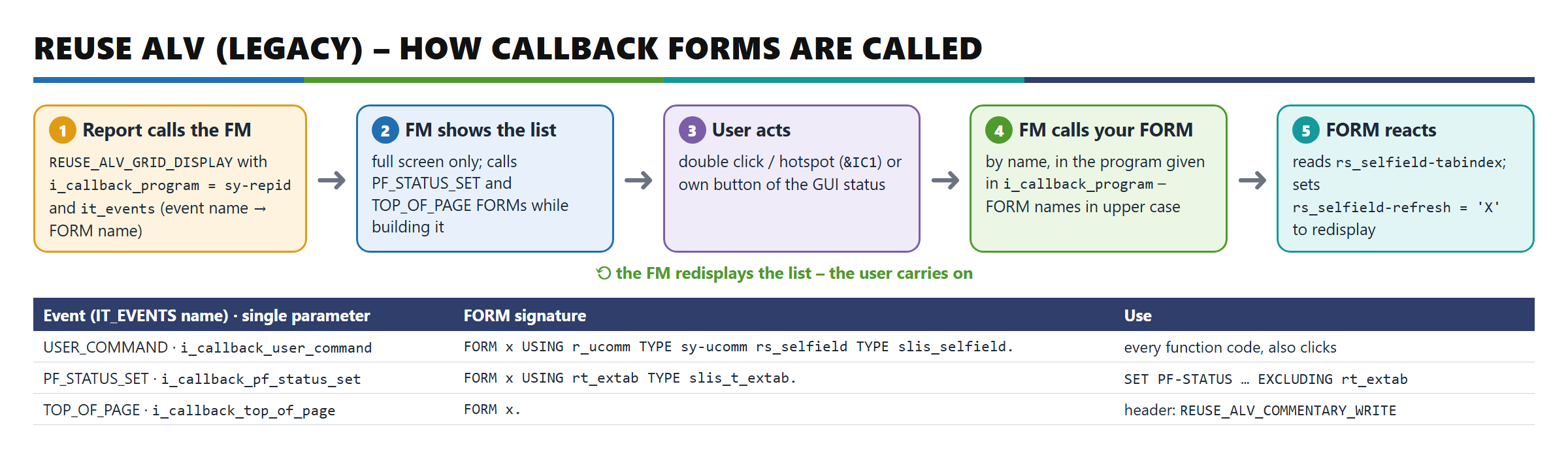
Events are FORM routines in your program. Pass I_CALLBACK_PROGRAM = sy-repid so ALV knows where to find them. Register them either one by one (I_CALLBACK_USER_COMMAND, I_CALLBACK_TOP_OF_PAGE, I_CALLBACK_PF_STATUS_SET, I_CALLBACK_HTML_TOP_OF_PAGE) or all at once in IT_EVENTS.
|
- USER_COMMAND fires for every function code of the list – double click / hotspot (
&IC1) and your own PF-status buttons – not only for clicks.rs_selfield:tabindex(row),fieldname,value,refresh = 'X'(redisplay),row_stable/col_stable(keep scroll position).
REUSE_ALV_EVENTS_GETreturns all event names for a list type (I_LIST_TYPE0 = simple list, 1 = hierarchical-sequential, 2 / 3 = block lists). The classical TOP-OF-PAGE event does not work in ALV.- FM events (constants SLIS_EV_*): USER_COMMAND, PF_STATUS_SET, TOP_OF_PAGE, END_OF_PAGE, TOP_OF_LIST, END_OF_LIST, TOP_OF_COVERPAGE, DATA_CHANGED, SUBTOTAL_TEXT, BEFORE_LINE_OUTPUT, AFTER_LINE_OUTPUT, CALLER_EXIT, CONTEXT_MENU …
REUSE_ALV_COMMENTARY_WRITEwrites text and logo into the TOP OF PAGE area. Call it inside the TOP_OF_PAGE FORM. Header tableSLIS_T_LISTHEADER: TYP 'H' heading, 'S' key + info, 'A' action.
2.3 Logo in the header (transaction OAER)
- Step 1: start transaction OAER directly (
/nOAER). - Step 2: Class name
PICTURES, Class typeOT, Object key = any unique name (e.g. ZALV_DEMO_LOGO) → Execute. - Step 3: lower pane → Document types → Standard doc. types → double-click Screen → choose the image file → Continue.
- Step 4: pass the object key as
I_LOGOto REUSE_ALV_COMMENTARY_WRITE. The logo appears only in the grid display – not in list output, not when printing.
2.4 Block lists and hierarchical-sequential lists
A block list shows several unrelated tables one below the other (e.g. customers, then orders). List output only – no grid. Repeat APPEND once per block.
|
- Hierarchical-sequential list = header rows each followed by their items (orders + order items): FM
REUSE_ALV_HIERSEQ_LIST_DISPLAY(legacy) orCL_SALV_HIERSEQ_TABLE. The binding table (SALV_T_HIERSEQ_BINDING, fields MASTER / SLAVE = field names) links the header and item key fields:
|
Part 3 – CL_SALV_TABLE (ALV object model)
Introduced with NetWeaver 2004. SALV wraps the older tools: CL_GUI_ALV_GRID when shown in a container, the REUSE FMs when shown full screen. factory( ) builds the field catalog from the internal table; everything else is done through getter objects. The basic example (functions, optimise, texts, sort, totals, layouts, double click) is on CORE ABAP › 03 Part 9.3 – here are the deeper features.
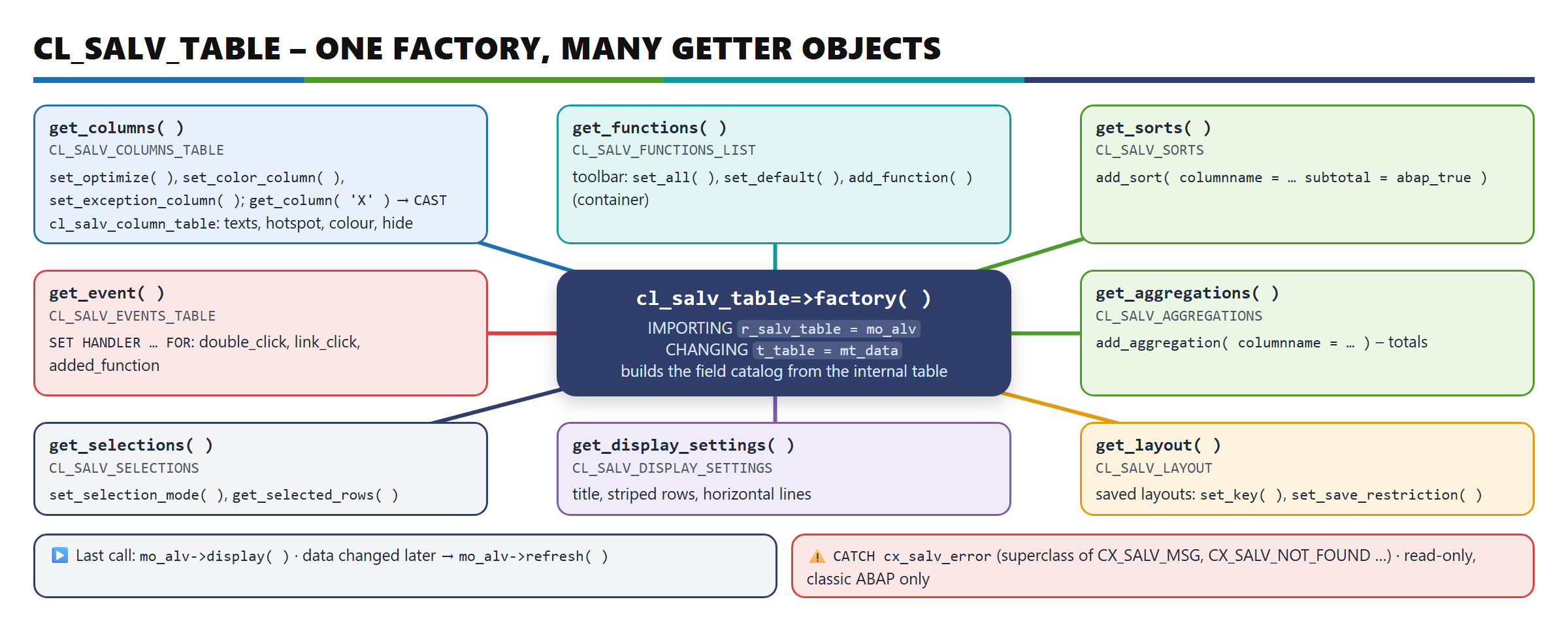
Getter | Returns | Used for |
|---|---|---|
get_functions( ) | CL_SALV_FUNCTIONS_LIST |
|
| CL_SALV_COLUMNS_TABLE / CL_SALV_COLUMN_TABLE | texts, width, hide, hotspot / button cells, colour, exception (traffic light) and colour columns |
| …_SORTS, …_AGGREGATIONS, …_FILTERS | sort + subtotals, totals, filters |
get_layout( ) | CL_SALV_LAYOUT | user layouts (variants) |
get_display_settings( ) | CL_SALV_DISPLAY_SETTINGS | striped rows, title, horizontal lines |
get_selections( ) | CL_SALV_SELECTIONS | selection mode, |
get_event( ) | CL_SALV_EVENTS_TABLE | double click, link click, own functions |
| – | header area, own GUI status |
3.1 Example: colours, traffic lights, hotspot, header and own button
|
- SALV can colour lines and cells, not only columns:
set_color_column( )with aLVC_T_SCOLfield colours rows (empty FNAME) and cells (FNAME filled);set_color( )colours a column. - Cell types via
set_cell_type( ): hotspot, button, checkbox, checkbox_hotspot (events LINK_CLICK). Hide a column:set_visible( abap_false )orset_technical( ). - Own buttons: full screen → own GUI status with
set_screen_status( ); in a container →get_functions( )->add_function( name = … icon = … text = … tooltip = … position = … ). Both raise ADDED_FUNCTION. - Container mode:
factory( r_container = lo_container container_name = 'CC_ALV' … ).
3.2 SALV events (CL_SALV_EVENTS_TABLE)
Event | Fires when | Parameters |
|---|---|---|
DOUBLE_CLICK | double click on a cell | ROW, COLUMN |
LINK_CLICK | click on a hotspot or button cell | ROW, COLUMN |
ADDED_FUNCTION | own toolbar function | E_SALV_FUNCTION |
BEFORE_SALV_FUNCTION / AFTER_SALV_FUNCTION | around every standard function | E_SALV_FUNCTION |
TOP_OF_PAGE / END_OF_PAGE | list / print output | R_TOP_OF_PAGE / R_END_OF_PAGE, PAGE, TABLE_INDEX |
3.3 Restrictions of CL_SALV_TABLE (per SAP Help)
- At most 90 columns; column output length at most 128 characters.
- Sorting and subtotals: at most 9 levels (columns) in total.
- Aggregated columns must be long enough for single values and the total.
- Only flat tables – no nested tables (deep components) as columns.
- Not ready for input – no supported edit mode. Workarounds that reach the inner grid are unsupported; use CL_GUI_ALV_GRID for editing.
- In a container no background mode. Full-screen SALV runs in background and writes to the spool.
3.4 Export to Excel
- Standard toolbar of every ALV: Export → Spreadsheet (XLSX), Local file, Word processing, Send, HTML; View → Excel in-place. Remove with IT_TOOLBAR_EXCLUDING (e.g.
cl_gui_alv_grid=>mc_mb_export,mc_fc_view_excel) or SALVget_functions( ). - In code:
DATA(lv_xlsx) = mo_alv->to_xml( xml_type = if_salv_bs_xml=>c_type_xlsx ).→ XSTRING forcl_gui_frontend_services=>gui_downloador an e-mail attachment (CL_BCS). Background job: spool → PDF withCONVERT_ABAPSPOOLJOB_2_PDF. ABAP Cloud: XCO libraryXCO_CP_XLSX.
Part 4 – CL_GUI_ALV_GRID: setup, field catalog, layout, variants
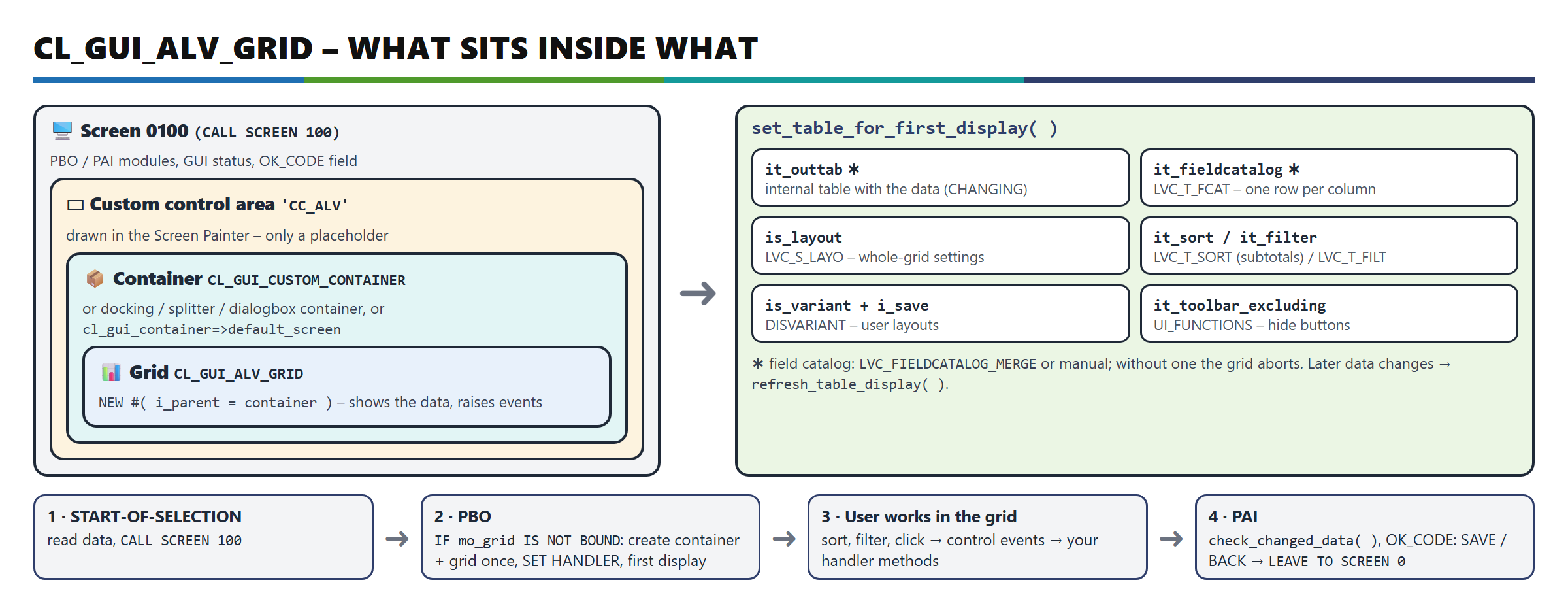
4.1 Procedure and skeleton
- 1 Create screen 0100 in the report (any dynpro – it need not be a module pool) with a custom control area, OK_CODE field and GUI status.
- 2 PBO: create
CL_GUI_CUSTOM_CONTAINERfor the area, thenCL_GUI_ALV_GRIDwith the container as parent – only once (IS NOT BOUND). - 3 Read data, build field catalog (mandatory) and layout (optional), register event handlers.
- 4
set_table_for_first_display( ); later data changes →refresh_table_display( ). - 5 PAI: OK_CODE; Back → free the controls and
LEAVE TO SCREEN 0.
This skeleton is the frame for all grid examples on this page; the modules only call methods (no FORMs).
|
- Without the Screen Painter:
NEW cl_gui_alv_grid( i_parent = cl_gui_container=>default_screen )(full screen; needs a screen, e.g. an emptyWRITE space.list or a selection screen), or aCL_GUI_DOCKING_CONTAINERattached to the selection screen. - Background:
cl_gui_alv_grid=>offline( )is not initial. Create the container only in dialog and pass the (then unbound) container reference to the grid – the output then goes to the spool as a list:
|
4.2 Field catalog LVC_S_FCAT (SLIS name in brackets)
Without a field catalog the grid aborts. Build it with LVC_FIELDCATALOG_MERGE (DDIC structure → LVC_T_FCAT), manually as above, or derive it from any internal table via SALV:
|
Group | Fields |
|---|---|
Identification | FIELDNAME, TABNAME, REF_TABLE + REF_FIELD (REF_TABNAME / REF_FIELDNAME) for DDIC texts and F4 |
Position / visibility | COL_POS, ROW_POS, NO_OUT (hidden, user can show it), TECH (never shown), FIX_COLUMN, KEY, KEY_SEL |
Texts | COLTEXT, SCRTEXT_S / _M / _L (SELTEXT_S / _M / _L), REPTEXT, TOOLTIP |
Format | OUTPUTLEN, COL_OPT, JUST, LZERO, NO_ZERO, NO_SIGN, EDIT_MASK, CONVEXIT, DECIMALS_O, DATATYPE, INTTYPE, INTLEN |
Amounts / quantities | CFIELDNAME or CURRENCY, QFIELDNAME or QUANTITY (totals per currency / unit) |
Presentation | EMPHASIZE ('Cxyz'), HOTSPOT, ICON, SYMBOL, CHECKBOX, STYLE, WEB_FIELD |
Totals | DO_SUM, NO_SUM |
Input | EDIT, F4AVAILABL, DRDN_HNDL, DRDN_FIELD, DRDN_ALIAS, CHECKTABLE, VALEXI, AUTO_VALUE |
Grouping | SP_GROUP (column groups in the layout dialog) |
4.3 Layout LVC_S_LAYO (SLIS_LAYOUT_ALV)
Group | Fields |
|---|---|
Appearance | ZEBRA, CWIDTH_OPT (COLWIDTH_OPTIMIZE), GRID_TITLE, SMALLTITLE, NO_HEADERS, NO_HGRIDLN, NO_VGRIDLN, NO_TOOLBAR (hide the whole toolbar), NO_ROWMARK, NO_MERGING, KEYHOT |
Selection | SEL_MODE (see 6.3), BOX_FNAME |
Editing | EDIT (whole grid editable), EDIT_MODE |
Pointers to extra columns | STYLEFNAME (LVC_T_STYL), INFO_FNAME (row colour CHAR4), CTAB_FNAME (LVC_T_SCOL), EXCP_FNAME (traffic light), EXCP_LED, EXCP_CONDS |
Totals | NO_TOTLINE, TOTALS_BEF, NO_TOTARR, NO_TOTEXP, NUMC_TOTAL |
Misc. | DETAILINIT, DETAILTITL, S_DRAGDROP, FRONTEND |
4.4 Sorting, subtotals, filters
LVC_T_SORT(SLIS_T_SORTINFO_ALV): SPOS (sequence), FIELDNAME, UP / DOWN, SUBTOT (subtotal per value change), COMP (compress), EXPA, GROUP ('*' page break, 'UL' underline), LEVEL.- Totals need
DO_SUM = 'X'on a numeric column. Grand total line: layout NO_TOTLINE suppresses it, TOTALS_BEF puts totals on top. - Own subtotal text: event SUBTOTAL_TEXT (Example 3). Filters: IT_FILTER (LVC_T_FILT); SALV:
get_filters( )->add_filter( ). - At runtime:
get_sort_criteria/set_sort_criteria,get_filter_criteria/set_filter_criteria,get_frontend_fieldcatalog/set_frontend_fieldcatalog,set_frontend_layout, then refresh.
4.5 Layout variants (saved layouts)
I_SAVE | User may save |
|---|---|
space | nothing (layouts can be changed but not saved) |
'X' | only global (cross-user) layouts – names start with '/' |
'U' | only user-specific layouts |
'A' | both |
IS_VARIANT(DISVARIANT): REPORT = sy-repid is the key; HANDLE separates several grids of one program; VARIANT = layout to start with. USERNAME need not be set.I_DEFAULT = 'X'lets users mark a default layout. The same parameters exist on REUSE_ALV_GRID_DISPLAY.- SALV:
get_layout( )->set_key( ),set_save_restriction( ),set_default( abap_true ),set_initial_layout( p_vari ). - Layout parameter on the selection screen:
|
Part 5 – Grid presentation: colours, styles, traffic lights, dropdown
5.1 Colour codes 'Cxyz'
x = colour 1–7, y = intensified (1) or not (0), z = inverse (1) or not (0). Example: 'C510' = intensified green, 'C610' = intensified red. Constants COL_HEADING … COL_GROUP (type group COL) for LVC_S_COLO-COL.
x | Colour | Constant | Typical use |
|---|---|---|---|
1 | grey-blue | COL_HEADING | headings |
2 | light grey | COL_NORMAL | normal rows |
3 | yellow | COL_TOTAL | totals |
4 | blue-green | COL_KEY | key columns |
5 | green | COL_POSITIVE | positive / OK |
6 | red | COL_NEGATIVE | negative / error |
7 | orange | COL_GROUP | groups |
Colour a … | CL_GUI_ALV_GRID | CL_SALV_TABLE | REUSE FMs (SLIS) |
|---|---|---|---|
Column | fcat EMPHASIZE = 'C300' | column | fcat EMPHASIZE |
Row | extra CHAR4 field + layout INFO_FNAME |
| layout INFO_FIELDNAME |
Cell | extra LVC_T_SCOL field + layout CTAB_FNAME |
| layout COLTAB_FIELDNAME (SLIS_T_SPECIALCOL_ALV) |
5.2 One example: row / cell colours, traffic light, button cells, dropdown
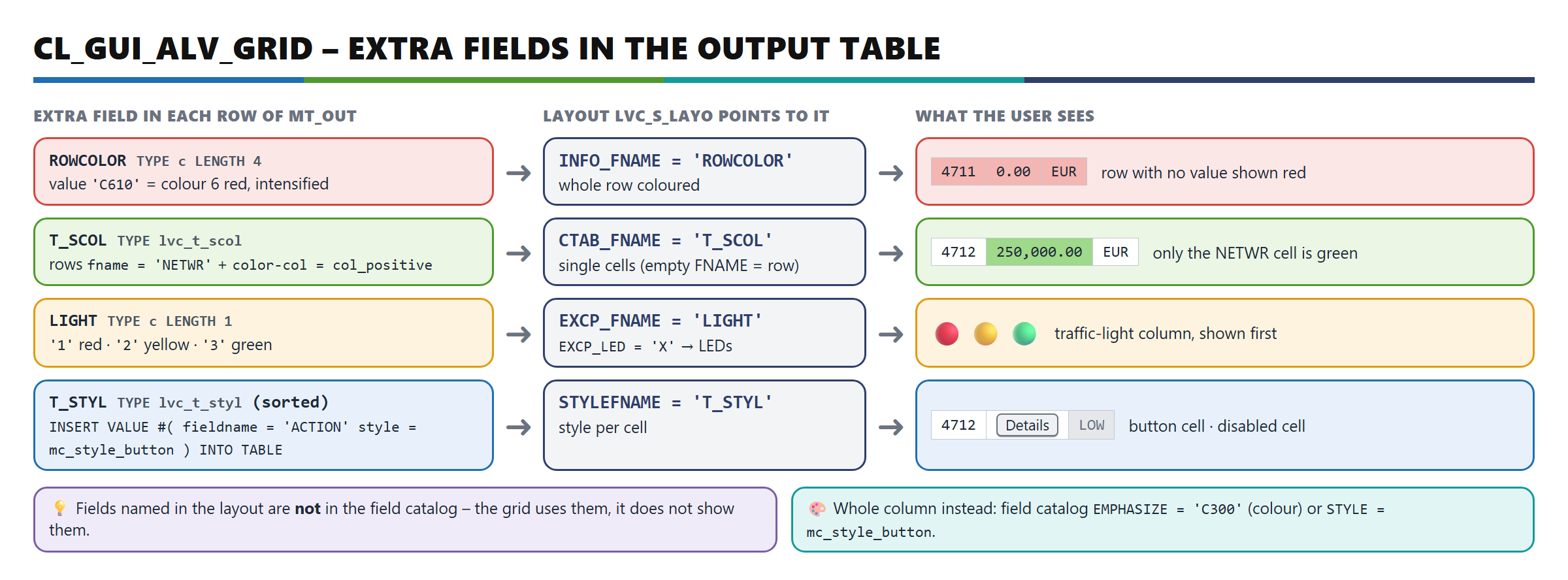
All of these work the same way: add an extra field to the output table, fill it per row, and point the layout (or field catalog) to it. Extra fields named in the layout are not listed in the field catalog.
|
- Styles: constants are
MC_STYLE_…: MC_STYLE_BUTTON, MC_STYLE_HOTSPOT, MC_STYLE_DISABLED, MC_STYLE_ENABLED, MC_STYLE_F4. Whole column as button: fcatSTYLE = cl_gui_alv_grid=>mc_style_button; single cells: LVC_T_STYL + layout STYLEFNAME. - Button clicks raise BUTTON_CLICK; hotspot clicks raise HOTSPOT_CLICK (Part 6).
- Traffic lights: codes '1' / '2' / '3' in a CHAR1 field + layout EXCP_FNAME; shown as the first column;
EXCP_LED = 'X'shows LEDs instead of lights.- Light at another position: an icon column instead – fcat
ICON = 'X'plusCOL_POS, valueicon_green_light/icon_yellow_light/icon_red_light(type group ICON; FM ICON_CREATE adds a text or tooltip); then do not set EXCP_FNAME. The ICON constants belong to this method, not to the 1/2/3 codes.
- Light at another position: an icon column instead – fcat
- Dropdown: fcat DRDN_HNDL + EDIT, values via
set_drop_down_table( )before the first display. Different list per row: DRDN_FIELD names a field holding the handle. Key + text pairs:LVC_T_DRAL(parameter IT_DROP_DOWN_ALIAS) + fcat DRDN_ALIAS.
Part 6 – Grid events and editable ALV
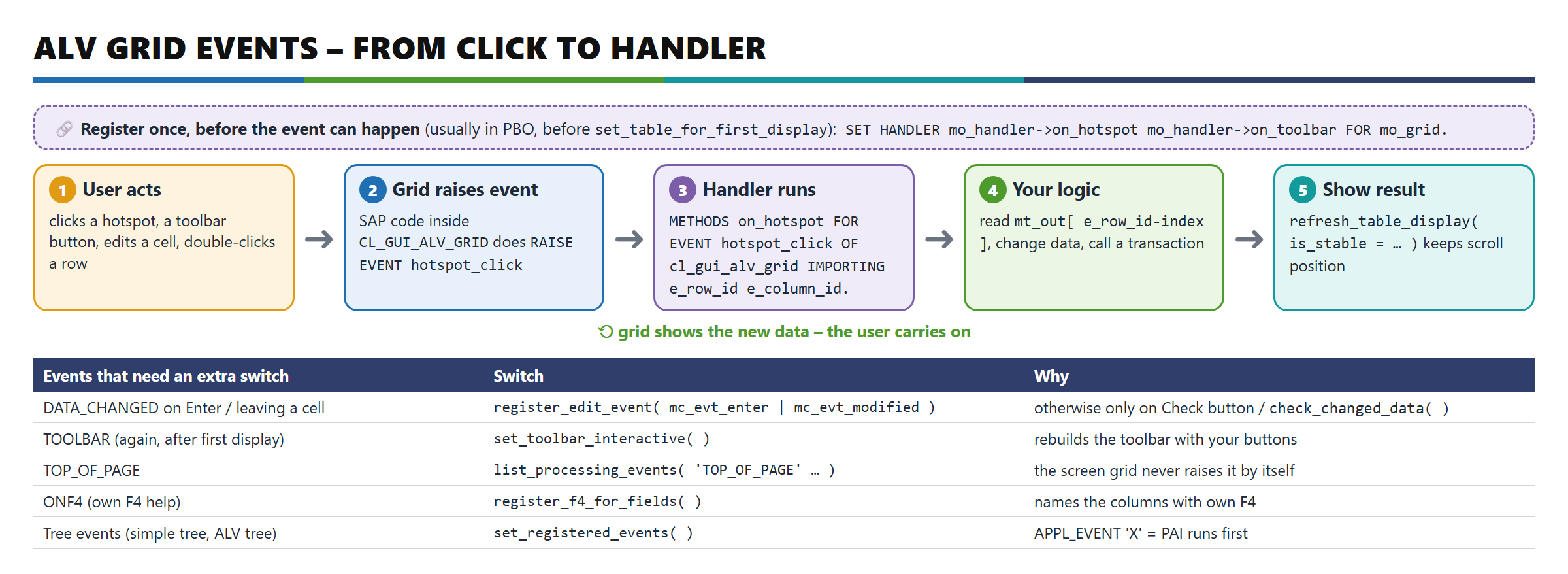
6.1 Standard events vs your own events
Step | Your own (custom) events | Standard ALV events |
|---|---|---|
Declare | EVENTS in your class definition | already declared by SAP in CL_GUI_ALV_GRID |
Handler | method | method |
Raise | RAISE EVENT in your methods | SAP raises them on user actions |
Register | SET HANDLER … FOR object | SET HANDLER … FOR mo_grid (before the event can happen) |
6.2 Event reference CL_GUI_ALV_GRID
Event | Fires when | Main parameters |
|---|---|---|
TOOLBAR | at first display and on | E_OBJECT (MT_TOOLBAR), E_INTERACTIVE |
USER_COMMAND | own toolbar button or own menu entry | E_UCOMM |
BEFORE_ / AFTER_USER_COMMAND | every function, also standard ones | E_UCOMM |
MENU_BUTTON | own menu button (BUTN_TYPE 1 / 2) clicked | E_OBJECT (CL_CTMENU), E_UCOMM |
CONTEXT_MENU_REQUEST | right click | E_OBJECT (CL_CTMENU) |
HOTSPOT_CLICK | single click on a hotspot cell | E_ROW_ID, E_COLUMN_ID, ES_ROW_NO |
DOUBLE_CLICK | double click on any cell | E_ROW, E_COLUMN, ES_ROW_NO |
BUTTON_CLICK | click on a button cell | ES_COL_ID, ES_ROW_NO |
DATA_CHANGED | edited values are passed to the program (6.4) | ER_DATA_CHANGED, E_ONF4, E_UCOMM |
DATA_CHANGED_FINISHED | after the output table was updated | E_MODIFIED, ET_GOOD_CELLS |
ONF4 | F4 on a column registered with | E_FIELDNAME, ES_ROW_NO, ER_EVENT_DATA |
TOP_OF_PAGE | raised by | E_DYNDOC_ID |
PRINT_TOP_OF_PAGE / _END_OF_PAGE / _TOP_OF_LIST / _END_OF_LIST | output as list: Print button or background | – (use WRITE) |
SUBTOTAL_TEXT | for each subtotal line (Example 3) | ES_SUBTOTTXT_INFO, EP_SUBTOT_LINE, E_EVENT_DATA |
ONDRAG / ONDROP / ONDROPCOMPLETE | drag & drop (layout S_DRAGDROP) | E_ROW, E_COLUMN, E_DRAGDROPOBJ |
AFTER_REFRESH, DELAYED_CHANGED_SEL_CALLBACK | after refresh / selection changed ( | – |
6.3 Toolbar, user command, clicks and selected rows – one handler set
Handler methods can sit in a separate lcl_handler class or – as here – in the report class itself. Additions to the skeleton of 4.1 (output table mt_out of type ty_out from 5.2):
|
- Exclude all standard buttons:
cl_gui_alv_grid=>mc_fc_excl_all; hide the whole toolbar: layoutNO_TOOLBAR = 'X'. Function codes are the public constantsMC_FC_…(buttons) andMC_MB_…(menus). - Toolbar
BUTN_TYPE: 0 button, 1 menu + default button, 2 menu, 3 separator; fields FUNCTION, ICON, QUICKINFO, TEXT, DISABLED. To change it later, callset_toolbar_interactive( )– TOOLBAR fires again. - Order for own codes: BEFORE_USER_COMMAND → USER_COMMAND → AFTER_USER_COMMAND (also for menu entries of toolbar menu buttons).
- USER_COMMAND fires only for own codes. BEFORE_USER_COMMAND / AFTER_USER_COMMAND also fire for standard functions;
set_user_command( space )in BEFORE_USER_COMMAND cancels a standard function. - Context menu: handle CONTEXT_MENU_REQUEST and call
e_object->add_function( ); the chosen entry arrives in USER_COMMAND. - After any change to the output table call
refresh_table_display( )– not only after navigation.is_stablekeeps the scroll position,i_soft_refresh = 'X'keeps sort and filter. - Grid events are system events: the handler runs without PAI. To force PAI afterwards (e.g. to leave the screen) call
cl_gui_cfw=>set_new_ok_code( 'ZLEAVE' ). - Selection: layout SEL_MODE – space / 'B' single row, 'C' multiple rows, 'D' cells, 'A' rows and columns with selection buttons. Read with
get_selected_rows( )(ET_INDEX_ROWS LVC_T_ROW, ET_ROW_NO LVC_T_ROID),get_selected_cells( ),get_current_cell( ); set withset_selected_rows( ).
6.4 Editable ALV
Steps: make columns editable → register DATA_CHANGED (+ optional extra trigger) → validate in the handler → save in PAI on an explicit SAVE button.
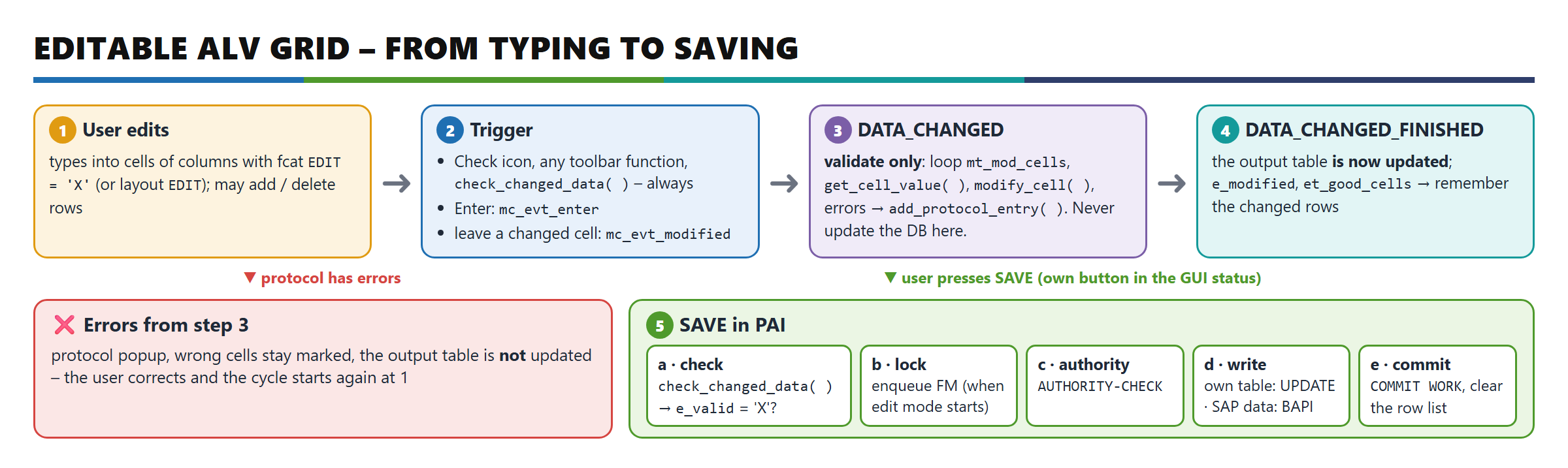
When does DATA_CHANGED fire? | Setting |
|---|---|
Check icon in the grid toolbar, any toolbar function, | always – no registration needed |
… additionally when the user presses Enter | register_edit_event( cl_gui_alv_grid=>mc_evt_enter ) |
… additionally as soon as the cursor leaves a modified cell | register_edit_event( cl_gui_alv_grid=>mc_evt_modified ) |
- MC_EVT_MODIFIED and MC_EVT_ENTER both allow editing many cells; they only choose the extra trigger. Many programs register both.
|
- The attribute is
MT_MOD_CELLS(LVC_T_MODI: ROW_ID, SUB_ROW_ID, FIELDNAME, VALUE, TABIX). Also: MT_GOOD_CELLS, MP_MOD_ROWS, MT_INSERTED_ROWS, MT_DELETED_ROWS. - In the handler use
get_cell_value( ),modify_cell( )(correct or derive a value),add_protocol_entry( );display_protocol( )shows the errors. Do not copy values into the table yourself, and never update the database inside DATA_CHANGED. - Save properly: lock with the enqueue FM when the user switches to edit mode (here ENQUEUE_ESFLIGHT), AUTHORITY-CHECK, validate, then UPDATE own tables – for SAP standard data use a BAPI or update function module, never a direct UPDATE.
- Whole grid editable: layout
EDIT = 'X'. Switch edit mode on / off:set_ready_for_input( 1 / 0 ). Per cell read-only: style MC_STYLE_DISABLED (5.2). Standard append / delete row buttons fill MT_INSERTED_ROWS / MT_DELETED_ROWS. - Own F4 help:
register_f4_for_fields( VALUE #( ( fieldname = 'PRICE' register = 'X' ) ) ), handle ONF4, seter_event_data->m_event_handled = 'X'.
Part 7 – Containers, splitter, pictures, trees
7.1 Container types
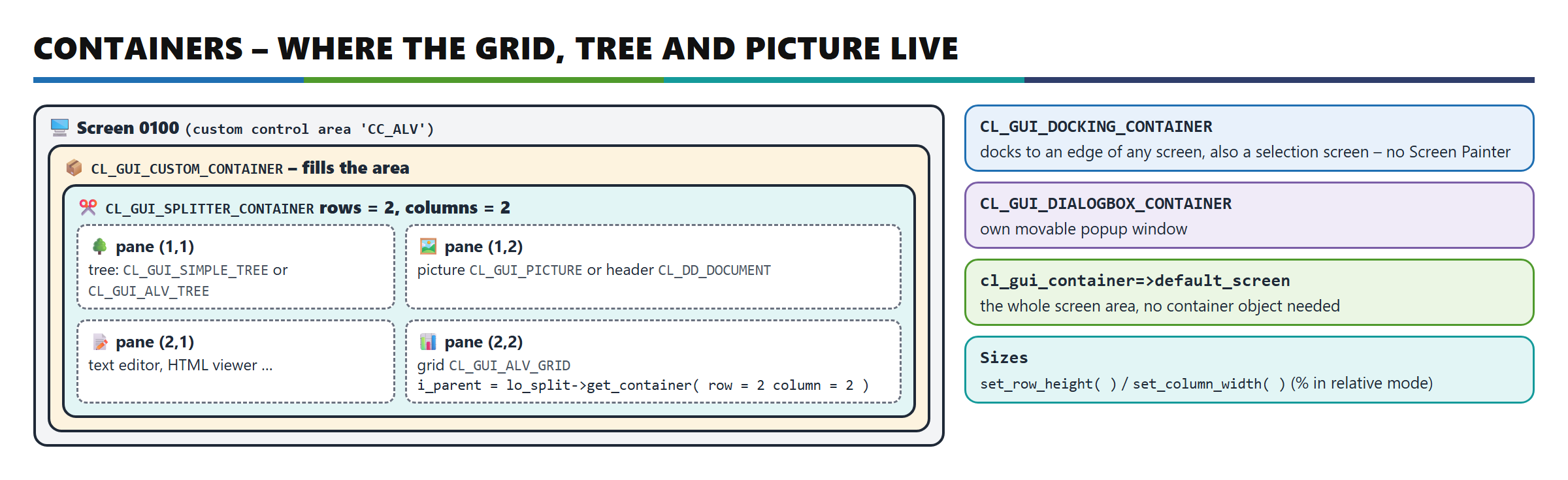
Container | Use |
|---|---|
CL_GUI_CUSTOM_CONTAINER | fills a custom control area drawn in the Screen Painter |
CL_GUI_DOCKING_CONTAINER | docks to an edge of any screen (also selection screens) – no Screen Painter |
CL_GUI_SPLITTER_CONTAINER | splits a parent container into N × M panes (Example 1) |
CL_GUI_EASY_SPLITTER_CONTAINER | simple split into 2 panes |
CL_GUI_DIALOGBOX_CONTAINER | own movable popup window |
cl_gui_container=>default_screen | the whole screen area |
- Splitter: each pane is a container returned by
get_container( row = … column = … ); size withset_row_height( )/set_column_width( ). A pane can hold any control: grid, tree, picture, HTML viewer, text editor, dynamic document.
7.2 Picture in a container
- Step 1: upload with SMW0 → "Binary data for WebRFC applications" → Find → Execute → Create → object name (e.g. ZALV_DEMO_LOGO) + description → Import file. Old but still works.
|
7.3 Trees: simple tree control vs ALV tree
The simple "tree control" is CL_GUI_SIMPLE_TREE – a plain tree of nodes (folders or leaves), not an ALV tree. ALV trees with columns are CL_GUI_ALV_TREE and CL_SALV_TREE.
|
- Node fields: NODE_KEY, RELATKEY, RELATSHIP, ISFOLDER, EXPANDER, N_IMAGE, EXP_IMAGE, TEXT. ADD_NODES needs the DDIC structure name and the node table.
CL_GUI_SIMPLE_TREE event | Fires when | Needs |
|---|---|---|
NODE_DOUBLE_CLICK | double click on a node | set_registered_events |
NODE_CONTEXT_MENU_REQUEST | right click – fill the context menu | set_registered_events |
NODE_CONTEXT_MENU_SELECT | user picks a context menu entry | follows a registered _REQUEST |
NODE_KEYPRESS | registered key pressed on a node | set_registered_events + |
EXPAND_NO_CHILDREN, SELECTION_CHANGED | expand empty folder (load children late) / selection changed | set_registered_events |
- Event ids for SET_REGISTERED_EVENTS are constants
EVENTID_…; the table type is CNTL_SIMPLE_EVENTS (EVENTID, APPL_EVENT). - CL_GUI_ALV_TREE: pass an empty global output table to
set_table_for_first_display( is_hierarchy_header = … ), then build nodes withadd_node( i_relat_node_key = … i_relationship = cl_gui_column_tree=>relat_last_child i_node_text = … is_outtab_line = … IMPORTING e_new_node_key = … )and finish withfrontend_update( ). Events: NODE_DOUBLE_CLICK, ITEM_DOUBLE_CLICK, LINK_CLICK, BUTTON_CLICK, CHECKBOX_CHANGE, EXPAND_NC, context menu events – registered withset_registered_events( ); toolbar viaget_toolbar_object( ). - CL_SALV_TREE:
cl_salv_tree=>factory( IMPORTING r_salv_tree = … CHANGING t_table = <empty table> ), thenget_nodes( )->add_node( related_node = … relationship = if_salv_c_node_relation=>last_child data_row = … text = … ),display( ). Events (CL_SALV_EVENTS_TREE): DOUBLE_CLICK, LINK_CLICK, CHECKBOX_CHANGE, EXPAND_EMPTY_FOLDER, KEYPRESS, ADDED_FUNCTION.
Part 8 – Example programs
Four grid programs in modern style (local class instead of FORMs, NEW, VALUE). Each uses the skeleton of 4.1 (screen 0100 with custom control 'CC_ALV', status S0100, PBO/PAI calling methods); only the parts that differ are shown. Adapt the selection ranges to your system's data.
Example 1 – ZALV_DEMO_SPLIT_TOP: splitter, TOP_OF_PAGE header, print events
Customers (KNA1) in the lower pane of a 2-row splitter, a dynamic-document header in the upper pane. The grid never raises TOP_OF_PAGE on screen by itself: list_processing_events( ) raises it for the given CL_DD_DOCUMENT.
|
- Points to note:
CALL METHOD … DISPLAY_DOCUMENTmust not be swallowed by a comment line (otherwise the header is never shown); STRONG is an emphasis (sap_emphasis), not a size –sap_fontsizetakes LARGE / MEDIUM / SMALL. - Test the print events: press Print in the grid → the output is created as a spool request → view it in SP01 (own requests: SP02). PRINT_TOP_OF_LIST / PRINT_END_OF_PAGE work the same way.
- Simpler today: SALV
set_top_of_list( )with CL_SALV_FORM_LAYOUT_GRID (Part 3).
Example 2 – ZALV_DEMO_GRANDTOTAL: grand total with own text
Sales orders (VBAK) with a total line that shows "Total Net Value" instead of the default. Trick: a hidden column TOTTEXT is never filled, so all rows form one subtotal group; that subtotal line acts as the grand total and is labelled with the hidden column's heading, while NO_TOTLINE suppresses the real total line.
|
- Points to note: ENDFORM must not end up inside a comment (
… "Suppress output total line ENDFORM.); TOTTEXT is CHAR instead of STRING (safer for sort / subtotal columns); with CFIELDNAME the totals are per currency.
Example 3 – ZALV_DEMO_SUBTOTAL: subtotals with own text (event SUBTOTAL_TEXT)
Order items (VBAP: VBELN, POSNR, MATNR, NETWR) with a subtotal per order and the grand total. The handler replaces the default subtotal text.
|
- Check
es_subtottxt_info-criteriato label each level (otherwise every level gets the same text); do not add an extra hidden TTEXT sort column (it only produces a second, duplicate subtotal line per order). EP_SUBTOT_LINE references the subtotal row if you need its values.
Example 4 – ZALV_DEMO_VARIANT: save and load layouts (delta of Example 2)
Identical to Example 2 except the display call:
|
- Test: right-click column ERZET → Hide → Layout icon → Save layout → name
/V1→ Continue. Sort VBELN descending → save as/V2. Next run: Layout icon → choose a layout from the list. - Names with '/' are global (cross-user) layouts – the only kind
I_SAVE = 'X'allows.username = sy-unamein DISVARIANT is unnecessary.
Part 9 – Interview questions
REUSE_ALV_GRID_DISPLAY vs CL_GUI_ALV_GRID vs CL_SALV_TABLE?
REUSE FMs are legacy: SLIS catalog, events as callback FORMs, full screen only, not released for ABAP Cloud. CL_GUI_ALV_GRID is the OO grid control: needs a container, LVC catalog, many events, the only supported editable ALV. CL_SALV_TABLE is the simple OO model: factory( ) builds the catalog, full screen or container, runs in background, read-only.
What is a field catalog and how can you build it?
An internal table with one row per column (SLIS_T_FIELDCAT_ALV or LVC_T_FCAT): field name, heading, position, output length, colour, DO_SUM, HOTSPOT, EDIT, NO_OUT. Built automatically (I_STRUCTURE_NAME), with REUSE_ALV_ / LVC_FIELDCATALOG_MERGE from a DDIC structure, manually, or derived from SALV with cl_salv_controller_metadata=>get_lvc_fieldcatalog( ). Without it the ALV aborts.
What are the steps to display a CL_GUI_ALV_GRID?
Screen with a custom control area → in PBO create CL_GUI_CUSTOM_CONTAINER and CL_GUI_ALV_GRID once (IS NOT BOUND) → read data, build field catalog and layout, SET HANDLER → set_table_for_first_display( ) → later refresh_table_display( ); PAI handles OK_CODE and Back.
How do you colour a row, a cell and a column?
Column: fcat EMPHASIZE 'Cxyz'. Row: CHAR4 field with the colour code + layout INFO_FNAME. Cell: LVC_T_SCOL field (FNAME + COLOR) + layout CTAB_FNAME. In SALV: set_color( ) for a column and set_color_column( ) with an LVC_T_SCOL field for rows and cells.
How do you make an ALV editable and save the changes?
Use CL_GUI_ALV_GRID; fcat EDIT = 'X' (or layout EDIT). Handle DATA_CHANGED to validate (MT_MOD_CELLS, get_cell_value, add_protocol_entry), optionally register_edit_event( mc_evt_enter / mc_evt_modified ). On SAVE in PAI call check_changed_data( ), lock, check authority and update via own UPDATE or a BAPI, then COMMIT WORK.
MC_EVT_ENTER vs MC_EVT_MODIFIED?
Both are extra triggers for DATA_CHANGED, registered with register_edit_event( ). MC_EVT_ENTER fires on Enter; MC_EVT_MODIFIED fires as soon as the user leaves a modified cell. Without either, DATA_CHANGED fires only on the Check button, toolbar functions or check_changed_data( ).
How do you add your own button to the grid toolbar?
Handle event TOOLBAR and append a line to e_object->mt_toolbar (FUNCTION, ICON, TEXT, BUTN_TYPE); register the handler before the first display or call set_toolbar_interactive( ). The click arrives in USER_COMMAND (E_UCOMM). Hide standard buttons with IT_TOOLBAR_EXCLUDING (MC_FC_… constants).
HOTSPOT_CLICK vs DOUBLE_CLICK vs BUTTON_CLICK?
HOTSPOT_CLICK: single click on a cell of a column with fcat HOTSPOT (E_ROW_ID, E_COLUMN_ID). DOUBLE_CLICK: double click on any cell (E_ROW, E_COLUMN). BUTTON_CLICK: click on a cell with style MC_STYLE_BUTTON (ES_COL_ID, ES_ROW_NO). In REUSE FMs both clicks come as USER_COMMAND '&IC1'.
How do users save layouts, and what does I_SAVE mean?
Pass IS_VARIANT with REPORT = sy-repid and I_SAVE: space none, 'X' global only (names start with '/'), 'U' user-specific only, 'A' both; I_DEFAULT = 'X' allows a default layout. A selection-screen parameter with F4 LVC_VARIANT_F4 lets users choose the start layout.
How do you show a header (top of page) in each ALV type?
REUSE: TOP_OF_PAGE FORM calling REUSE_ALV_COMMENTARY_WRITE (logo from OAER via I_LOGO). Grid: event TOP_OF_PAGE with a CL_DD_DOCUMENT, raised by list_processing_events( ), displayed in a splitter pane. SALV: set_top_of_list( ) with CL_SALV_FORM_LAYOUT_GRID.
Can CL_SALV_TABLE be editable, and what are its limits?
No supported edit mode – use CL_GUI_ALV_GRID. Other limits (SAP Help): 90 columns, 128 characters per column, 9 sort / subtotal levels, flat tables only, no background mode in a container. It can colour rows and cells, show traffic lights, hotspots and buttons.
Why ALV with IDA, and why still SAP GUI ALV in S/4HANA?
IDA reads only the visible rows and lets HANA sort, filter and total – no internal table, so millions of rows display fast (ABAP on HANA › 04). New end-user apps should be Fiori elements on CDS + RAP; SAP GUI ALV stays fine for back-office and brownfield reports in classic ABAP (on-premise, private cloud), using CL_SALV_TABLE / IDA instead of REUSE FMs.
Which ALV can you use in ABAP Cloud?
None. REUSE FMs, CL_GUI_ALV_GRID, CL_SALV_TABLE and CL_SALV_GUI_TABLE_IDA are classic ABAP only: ABAP for Cloud Development has no SAP GUI, no dynpros or lists, no executable programs and only released APIs. A list for the user is a Fiori elements list report on a CDS view entity with @UI annotations, exposed by a service definition and an OData V4 UI service binding; changes go through a RAP business object.
How do you show a table or CDS view with ALV with IDA?
cl_salv_gui_table_ida=>create( iv_table_name = 'SFLIGHT' )->fullscreen( )->display( ) for a table or DDIC view, create_for_cds_view( iv_cds_view_name = … ) for a CDS view (set_view_parameters( ) for CDS parameters). Select-options become named ranges via CL_SALV_RANGE_TAB_COLLECTOR and set_select_options( ), so filtering runs in the database. It is display-only and runs in dialog only.
How would you rebuild a classic ALV report the clean-core way?
SELECT → CDS view entity on released views; selection screen → filter bar (@UI.selectionField); field catalog → @UI.lineItem; layouts, sorting and export are built into the list report; authority check → CDS access control; editable grid → RAP BO. If the list needs ABAP logic, use a custom entity with a query provider class (Clean Core › 02 Clean-Core Report).
🏠 Start Here · ◀ 03 · Exceptions & Events · 05 · Interview Questions ▶ · Sections: CORE ABAP | OOPS ABAP | ABAP on HANA | Clean Core | RAP | ABAP Points | SAP Fiori | SAPUI5 | Mobile Development (MDK) | BTP Foundations | BTP Development | CAP | SAP Build | ABAP on BTP | Integration Suite | SAP Business AI | SAP BASIS | Security | SAP SDLC
Functional: FICO ABAP | TRM ABAP | VIM | SAP BIS | SD ABAP | MM ABAP | PP ABAP | QM ABAP | PM ABAP | PS ABAP | EWM | TM ABAP | GTM ABAP | EHS ABAP | HR ABAP | BW | SAP Datasphere | SAP Business Data Cloud | SAP MDG | SAP Analytics Cloud | SAP Ariba | SAP CX | SAP IBP