This page takes the finished Sales Order Approval app live (R22): debugging a failing Approve, performance of the list report, the build checklist of all objects, transport and abapGit, the app's clean core level, what's new in RAP 2024–2026 and AI-assisted development.
Part 1 – Go-live of the Sales Order Approval app
All requirements R1–R21 are built. Before the app goes live, R22 asks four questions: when something fails, can we find the cause quickly? Is it fast with real data volumes? Can we move it safely to production? Is it clean core, so the next SAP upgrade doesn't break it? This page answers them in that order and ends with what is new in RAP and how AI tools fit in.
Requirements on this page
R-ID | Requirement | Where on the page |
|---|---|---|
R22 | Debugging: the manager's Approve (R7) fails – find out why | Parts 2–3 |
R22 | Performance: the list report (R2) is slow with many orders | Part 4 |
R22 | Build checklist: every object of the app, built in the right order | Part 5 |
R22 | Transport, abapGit, publishing the service in test and production | Part 6 |
R22 | Clean core level of the app | Part 7 |
R22 | What's new 2024–2026 and AI tools | Parts 8–9 |
The page doesn't explain the concepts again – it uses them. Where a term needs more, follow the pointer to its home page, e.g. draft and ETags → 07 · Locking, Draft & Side Effects.
Part 2 – Debugging: why does Approve fail?
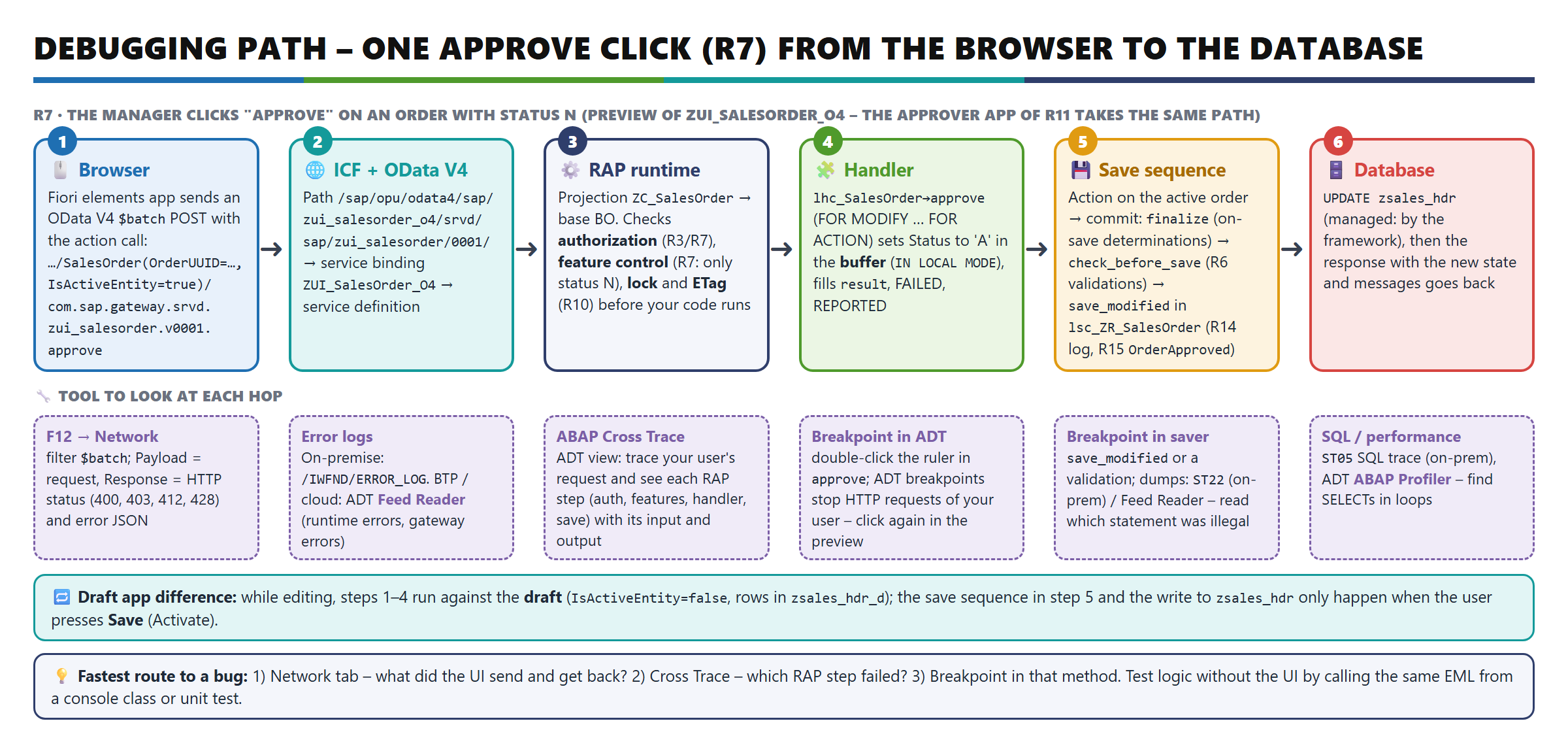
Why first: a Fiori click travels through six layers before it reaches lhc_SalesOrder→approve. Debugging RAP means first finding which layer has the problem and only then opening the right tool there. It is like a missing parcel: you read the tracking steps before you search the warehouse.
2.1 Step 1 – what did the UI send and get back? (network tab)
Press F12 → Network and filter $batch. Each change is a POST of a $batch with one or more requests inside; the response shows the HTTP status of each request and the messages from REPORTED.
Status | Meaning in RAP | Typical cause in the app |
|---|---|---|
200 / 201 / 204 | OK, created, no content | – |
400 | Bad request – the BO returned FAILED | R6 validation or precheck failed, wrong value |
403 | Forbidden | R3/R7 authorization refused – a rep tried to approve |
404 | Not found | Wrong key, draft vs active ( |
409 | Conflict | Order locked by another user, or another user's draft exists (R10) |
412 | Precondition failed | ETag in |
428 | Precondition required | Change sent without |
500 | Server error | Short dump – look in ST22 or the ADT Feed Reader |
Server-side logs: the ADT Feed Reader (runtime errors and gateway errors, also for cloud systems), ST22 for dumps and /IWFND/ERROR_LOG for gateway errors on-premise / Private Cloud.
2.2 Step 2 – which RAP step failed? (ABAP Cross Trace)
The ABAP Cross Trace is a semantic end-to-end trace for OData services and RAP BOs. In ADT open the view *ABAP Cross Trace*, right-click the system → *Create Configuration…*, restrict it to your user (and the request type), then press Approve again in the app. The trace lists each RAP step – authorization, feature control, the handler call, the save phases – with its input and output, so you see which step returned the FAILED entry. In cloud systems you trace requests of your own user.
2.3 Step 3 – breakpoint in that method
- Open
ZBP_R_SalesOrder, tab *Local Types*, methodapprove; double-click the ruler to set a breakpoint. ADT breakpoints are external (user) breakpoints: they also stop HTTP requests sent by your user. - Start the preview from the service binding
ZUI_SalesOrder_O4, select an order with status N and press Approve – the debugger opens in ADT. - Look at
keys(which instances, with%tkyand%is_draft), step over the READ and MODIFY, then inspectresult,failedandreportedbefore leaving the method. - Approve is greyed out instead of failing? Then the breakpoint belongs in
get_instance_features(state, → 06 · Feature Control, Authorization & Numbering) orget_instance_authorizations(user rights). - Fails only on Save: set the breakpoint in the validations (
validateCustomer,validateQuantity), an on-save determination or the saver methodsave_modified(R14 log, R15 event). - Faster to repeat without the UI: call the same EML from a console class (
if_oo_adt_classrun, F9) or a unit test (→ 12 · Extensibility & Testing). CL_ABAP_BEHV_AUXtells shared helper methods where they run (get_current_phase,get_current_context,get_current_handler_kind). Check your release.
Interview tip
Walk the path out loud: network tab (what did the UI send and get?), Cross Trace (which RAP step failed?), breakpoint in that method, ST22 / Feed Reader for dumps. Interviewers want the order, not a list of transaction codes.
Part 3 – Common errors and the rules behind them
Most RAP bugs fall into a handful of patterns. Learn the symptom, and you know where to look.
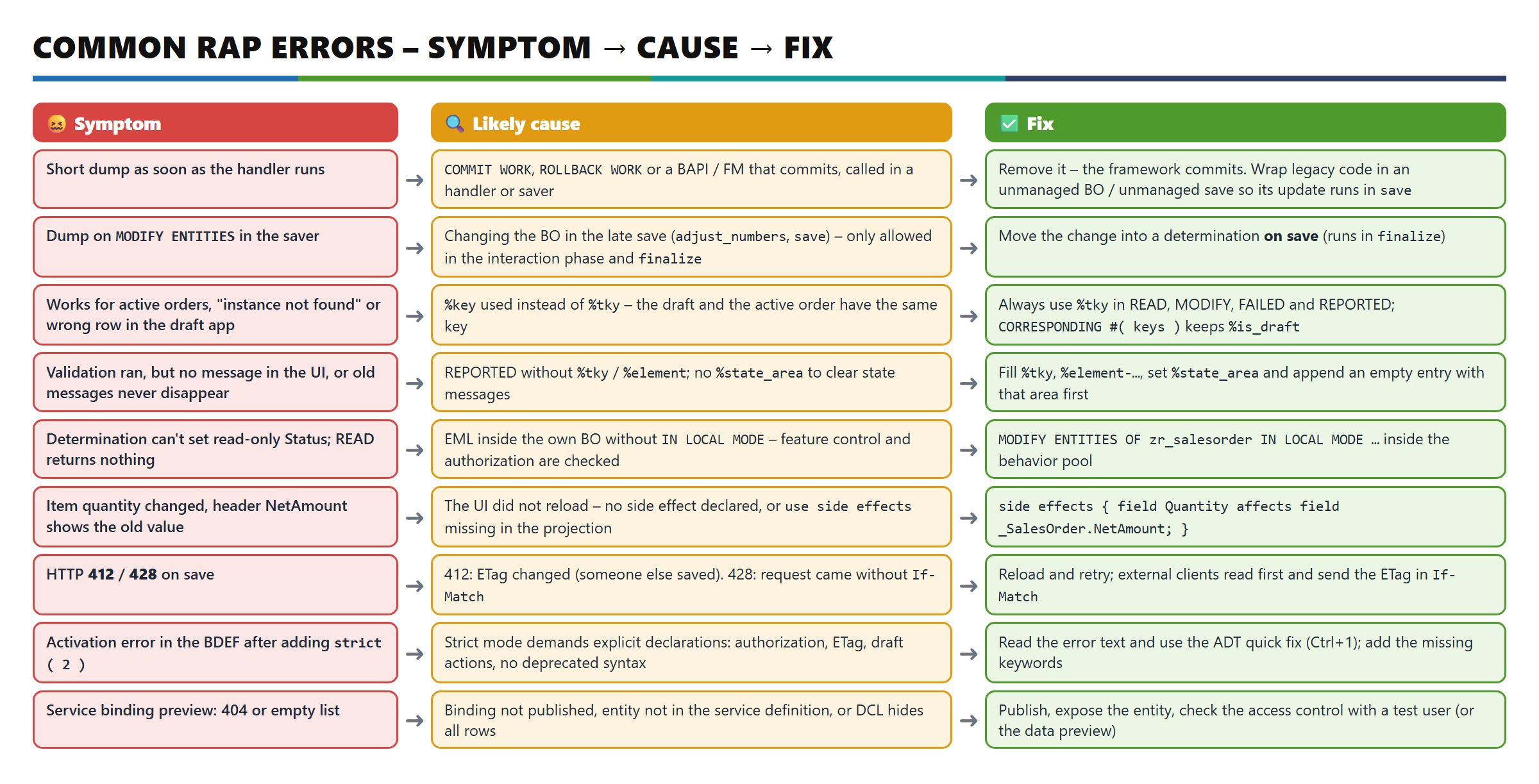
Many of these come from one rule: each phase of the transaction only allows certain statements (the phases themselves → 01 · RAP Foundations).
Phase | Not allowed | Why |
|---|---|---|
Interaction phase (handlers) |
| Only the buffer may change; the framework commits |
Early save ( | Database writes, | The save may still be rejected |
Late save ( |
| After the point of no return the save must not fail |
- A violation ends in a short dump whose text names the illegal statement – read it before searching.
- A legacy call in the late save (R13) that still fails is reported with
CL_ABAP_BEHAVIOR_SAVER_FAILED(released 2311) – details → 09 · Unmanaged Scenario & Save Variants.
Part 4 – Performance: the list report is slow
The case: in test the list report (R2) opened at once; with 50,000 orders in the quality system it takes seconds. Measure first, then fix – don't guess.
4.1 Measure
- SQL trace (
ST05, on-premise / Private Cloud) while loading the list: which statements, how often, how long. - ABAP Profiler in ADT (*Profile As* → ABAP application, or a trace request for your user): which methods consume the time – e.g. a virtual element calculated row by row.
- Network tab: how many rows and columns the
GETrequests, and whether a filter is sent at all.
4.2 Typical causes and fixes
Cause | Fix |
|---|---|
No default filter – every request reads all orders | Selection fields with defaults (e.g. status N, last 30 days) in the metadata extension (→ 03) |
Virtual elements in the list – calculated in ABAP row by row | Push the calculation into CDS (case, arithmetic, association); keep virtual elements for the object page |
Expensive joins / associations in the projection | Expose only what the list needs; check the plan |
SELECT inside a LOOP in a handler or validation | One SELECT for all keys ( |
One EML call per key in a loop | Handlers are mass-enabled: one READ / MODIFY ENTITIES for all keys |
Determinations that fire on every change | Narrow triggers, e.g. |
4.3 Handler rules that keep the BO fast
- Read only what you need:
FIELDS ( Status CustomerID )instead ofALL FIELDS. IN LOCAL MODEinside the BO skips authorization and feature control checks – correct and cheaper (→ 08 · EML).- Targeted side effects reload only what changed, e.g. NetAmount after a quantity change (→ 07 · Locking, Draft & Side Effects).
- Draft activation:
draft action Activate optimized;(2308+) avoids re-running determinations and validations that are not needed on activation.
|
The full validation with its messages and %state_area → 05 · Business Logic & Messages.
Part 5 – Build checklist, naming and best practices
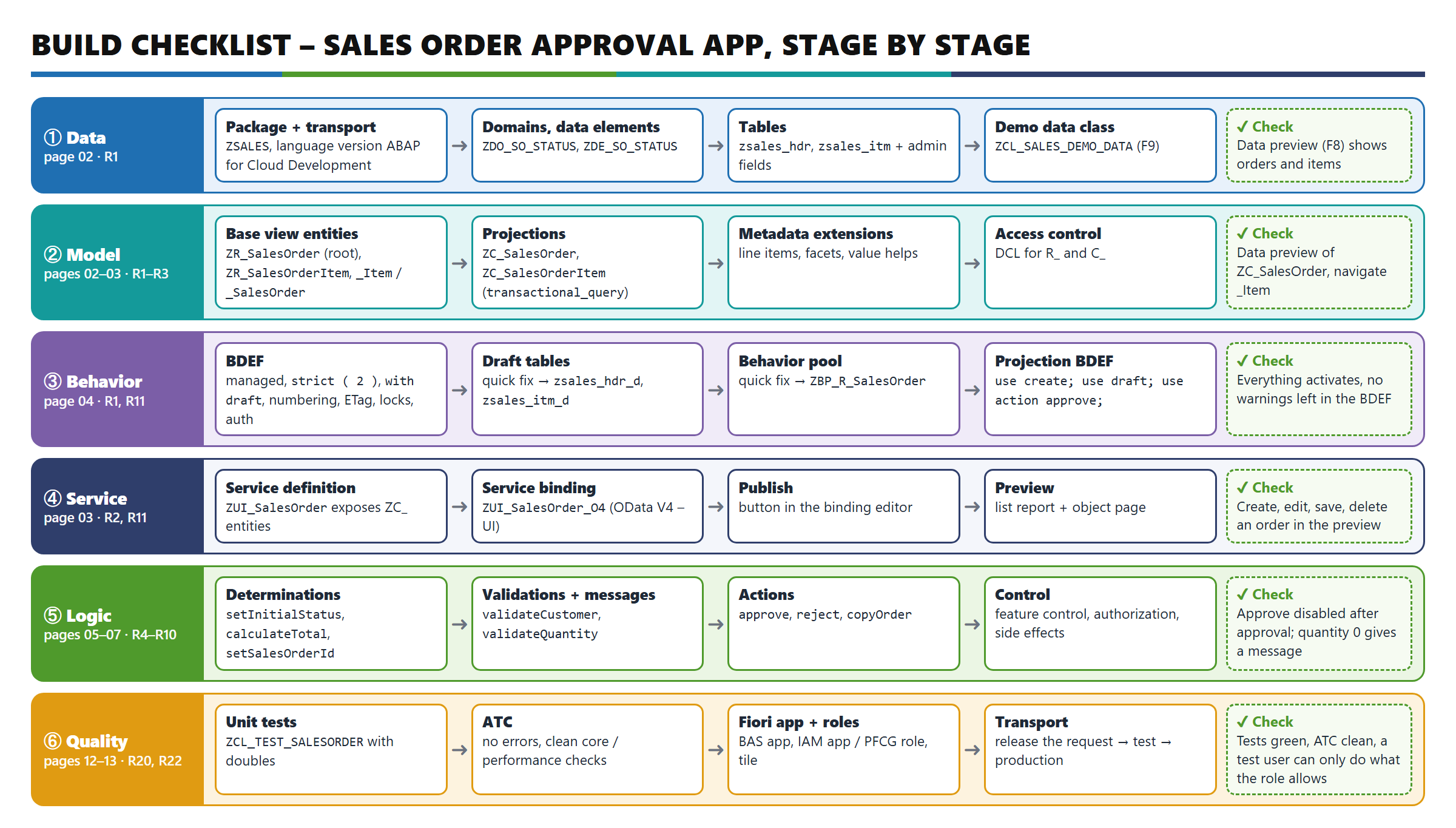
A RAP app is about twenty objects that depend on each other, so the order matters: you can't write a BDEF before the view it describes exists. This is the pilot's checklist – build in this order, check after every stage, name things the same way every time.
5.1 All objects of the Sales Order Approval app
# | Object (ADT) | In the app | R | Page |
|---|---|---|---|---|
1 | Package, transport, ABAP language version | ZSALES (ABAP for Cloud Development) | – | 02 |
2 | Domains, data elements | ZDO_SO_STATUS, ZDE_SO_STATUS | R4 | 02 |
3 | Database tables, demo data class | zsales_hdr, zsales_itm, ZCL_SALES_DEMO_DATA | R1 | 02 |
4 | Root + child view entities | ZR_SalesOrder, ZR_SalesOrderItem | R1 | 02 |
5 | Projections, metadata extensions | ZC_SalesOrder, ZC_SalesOrderItem | R2 | 03 |
6 | Access controls (DCL) | ZR_SalesOrder, ZC_SalesOrder | R3 | 03 |
7 | BDEF + draft tables | ZR_SalesOrder, zsales_hdr_d, zsales_itm_d | R1, R10 | 04, 07 |
8 | Behavior pool | ZBP_R_SalesOrder (lhc_SalesOrder, lhc_Item, lsc_ZR_SalesOrder) | R4–R10 | 04–07 |
9 | Projection BDEF, service definition + binding | ZC_SalesOrder, ZUI_SalesOrder, ZUI_SalesOrder_O4 | R2 | 03, 04 |
10 | Approver projection + service | ZC_SalesOrderApv, ZUI_SalesOrderApv | R11 | 03, 04 |
11 | Legacy wrapper, additional save, bgPF | lsc_ZR_SalesOrder, zcl_so_print_operation | R13, R14, R21 | 09 |
12 | Business event, event binding | OrderApproved | R15 | 10 |
13 | Upload, custom entity, Web API binding | ZCE_DeliveryStatus, ZAPI_SalesOrder_O4 | R16–R18 | 11 |
14 | Unit tests, ATC run | ZCL_TEST_SALESORDER | R20 | 12 |
5.2 Naming conventions
Object | Rule | Example |
|---|---|---|
Base (root/child) view entity |
| ZR_SalesOrder |
Projection view |
| ZC_SalesOrder, ZC_SalesOrderApv |
Interface view / BO interface |
| ZI_SalesOrderTP |
Extension include view |
| ZE_SalesOrder |
Behavior definition | Same name as the root entity | ZR_SalesOrder, ZC_SalesOrder |
Behavior pool | Prefix BP_ (here ZBP_) + name | ZBP_R_SalesOrder |
Handler / saver class |
| lhc_SalesOrder, lsc_ZR_SalesOrder |
Metadata extension | Same name as its CDS entity | ZC_SalesOrder |
Draft table | SAP guideline: prefix A_ active, D_ draft table (this app uses a _d suffix) | zsales_hdr_d |
Custom entity |
| ZCE_DeliveryStatus |
Service definition |
| ZUI_SalesOrder |
Service binding |
| ZUI_SalesOrder_O4, ZAPI_SalesOrder_O4 |
Unit test class |
| ZCL_TEST_SALESORDER |
5.3 Best practices
Do | Avoid |
|---|---|
| Non-strict BDEFs that hide missing declarations |
|
|
Base BO service-agnostic; UI annotations in metadata extensions of the projection | UI annotations in the R_ view |
One handler class per entity (or per topic in big BOs) | One huge handler class for everything |
Idempotent determinations (check before setting) | Determinations that assume they run once |
Validations with | Messages that pile up or point to no field |
Released APIs only ( | Direct SELECTs on SAP tables |
Business events / bgPF for follow-up work (R15, R21) | Long-running logic inside the save sequence |
Unit tests for every validation and action (R20) | Testing only by clicking in the preview |
Generator or AI output reviewed line by line | Accepting generated code unread |
Common mistakes
- Objects created in
$TMP– they can't be transported. - Building the BDEF before the projection and DCL activate cleanly – activation errors pile up.
Part 6 – Transport, abapGit and publishing
Moving the app to production differs by platform: on-premise and Private Cloud use classic transports, SAP Business AI Platform, ABAP environment and S/4HANA Cloud Public Edition use Git-based software components.
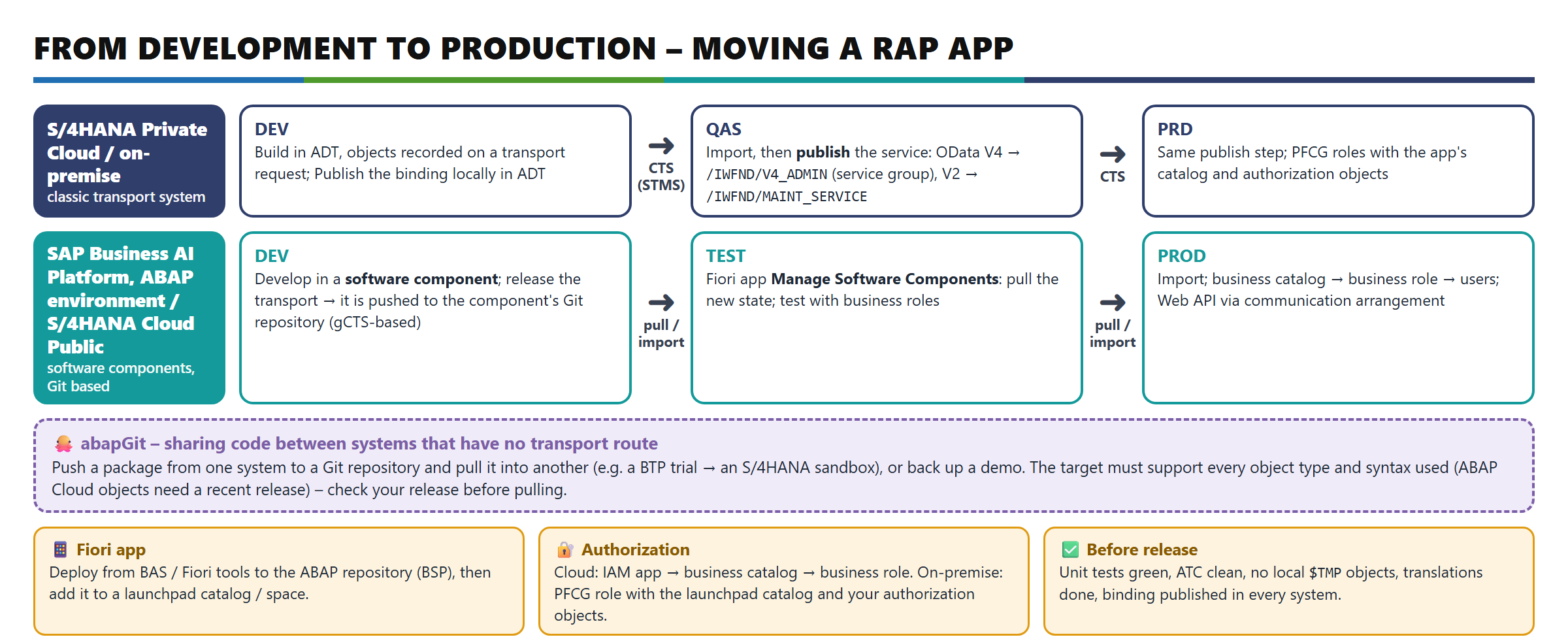
- On-premise / Private Cloud: objects travel on transport requests (CTS). In each follow-on system the service must be published: OData V4 service groups in
/IWFND/V4_ADMIN, OData V2 services in/IWFND/MAINT_SERVICE(in development the *Publish* button of the binding does it). - SAP Business AI Platform, ABAP environment / S/4HANA Cloud Public Edition: code lives in software components (Git-based, gCTS technology). Releasing a transport pushes to the component's repository; test and production pull the new state with the Fiori app *Manage Software Components*.
- abapGit shares code between systems without a transport route – for example the demo from a BTP trial into an S/4HANA sandbox. The target must support all object types and syntax used; check the release before pulling.
- Fiori apps: the processor and approver apps (R11) are deployed from SAP Business Application Studio / Fiori tools to the ABAP repository and added to a launchpad catalog or space. Roles: IAM app → business catalog → business role in the cloud, PFCG role with the authorization object of R3/R7 on-premise.
- Web API (R18): in the cloud a communication scenario + communication arrangement in every system (→ 11 · Files, Custom Entities & Integration).
- Event binding (R15): the Event Mesh channel and its outbound binding are configured per system (→ 10 · Business Events & Event-Driven RAP).
Common mistake
Forgetting to publish the service in the follow-on system – the app shows "service not found" although the transport arrived.
Part 7 – Clean core level of the app
Why first: clean core means custom code talks to SAP only through stable, released interfaces, so SAP can upgrade the system without breaking it. RAP is the transactional programming model of ABAP Cloud, so a RAP app on released APIs is clean by design. Like a rented flat: furnish it as you like, but don't move the load-bearing walls. The full rules, extensibility options and governance → Clean Core › 01 · Clean Core.
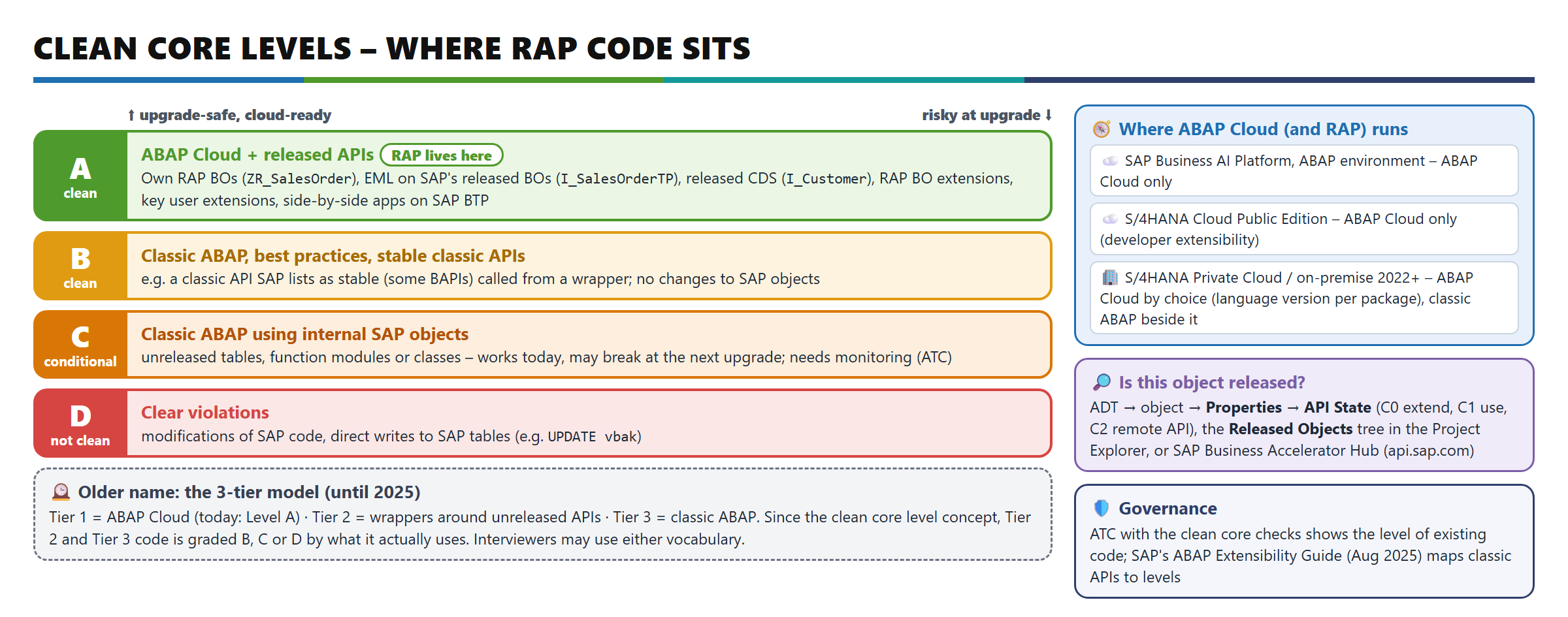
- Levels (SAP's ABAP Extensibility Guide, 2025): A = ABAP Cloud with released APIs, B = classic ABAP following best practices with stable classic APIs, C = classic ABAP using internal SAP objects (conditionally clean), D = clear violations such as modifications. They replace the earlier 3-tier model (Tier 1 ABAP Cloud, Tier 2 wrappers, Tier 3 classic).
- Where ABAP Cloud runs: only ABAP Cloud on SAP Business AI Platform, ABAP environment and S/4HANA Cloud Public Edition; by choice per package (ABAP language version) on S/4HANA Private Cloud / on-premise 2022 and later.
7.1 Our app, requirement by requirement
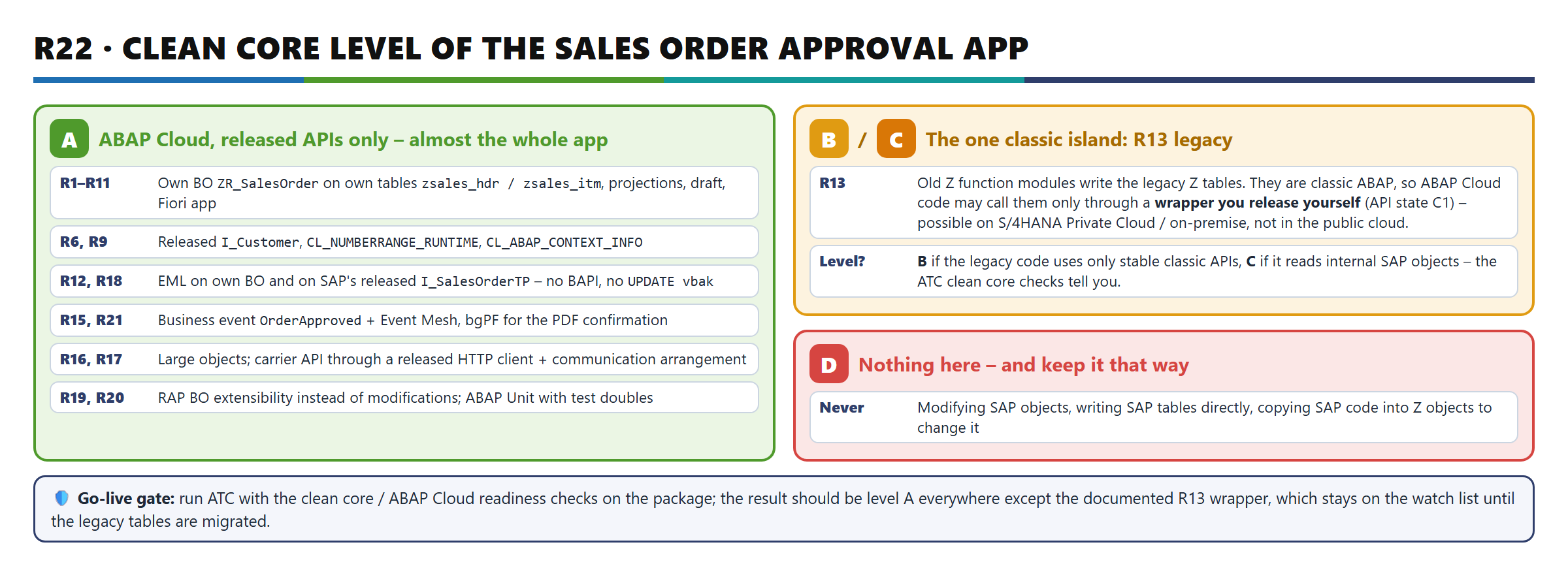
- Level A: everything built in ABAP Cloud – our own BO, released CDS views and classes, SAP's released BO
I_SalesOrderTPvia EML instead of a BAPI (R18), RAP BO extensibility instead of modifications (R19). - The exception – R13: the legacy Z function modules are classic ABAP. ABAP Cloud code can only call them through a wrapper that you release yourself for use in cloud development (API state C1). That is possible on S/4HANA Private Cloud / on-premise, not in the public cloud. The wrapper's level depends on what the legacy code uses: B with stable classic APIs, C if it reads internal SAP objects.
- Go-live gate: ATC with the clean core / ABAP Cloud readiness checks on package ZSALES – level A everywhere except the documented R13 wrapper.
7.2 Finding released objects
Where | How |
|---|---|
ADT, object properties | Open the object → *Properties* → *API State*: C0 (use as extension point), C1 (use in cloud development), C2 (use as remote API) |
ADT Project Explorer | Node *Released Objects* in an ABAP Cloud project, grouped by type |
SAP Business Accelerator Hub | api.sap.com – released APIs and BO interfaces per product |
Successor info | For a deprecated or unreleased object, ADT and ATC show the released successor where SAP has defined one |
ATC | Clean core / ABAP Cloud readiness checks show which code uses unreleased objects |
Part 8 – What's new in RAP 2024–2026
Releases are those of the SAP Business AI Platform, ABAP environment (YYMM). S/4HANA 2023 = ABAP 7.58, S/4HANA 2025 = ABAP 8.16; on-premise releases pick up the cloud features of roughly the same time. Always check the keyword documentation of your release before using new syntax.
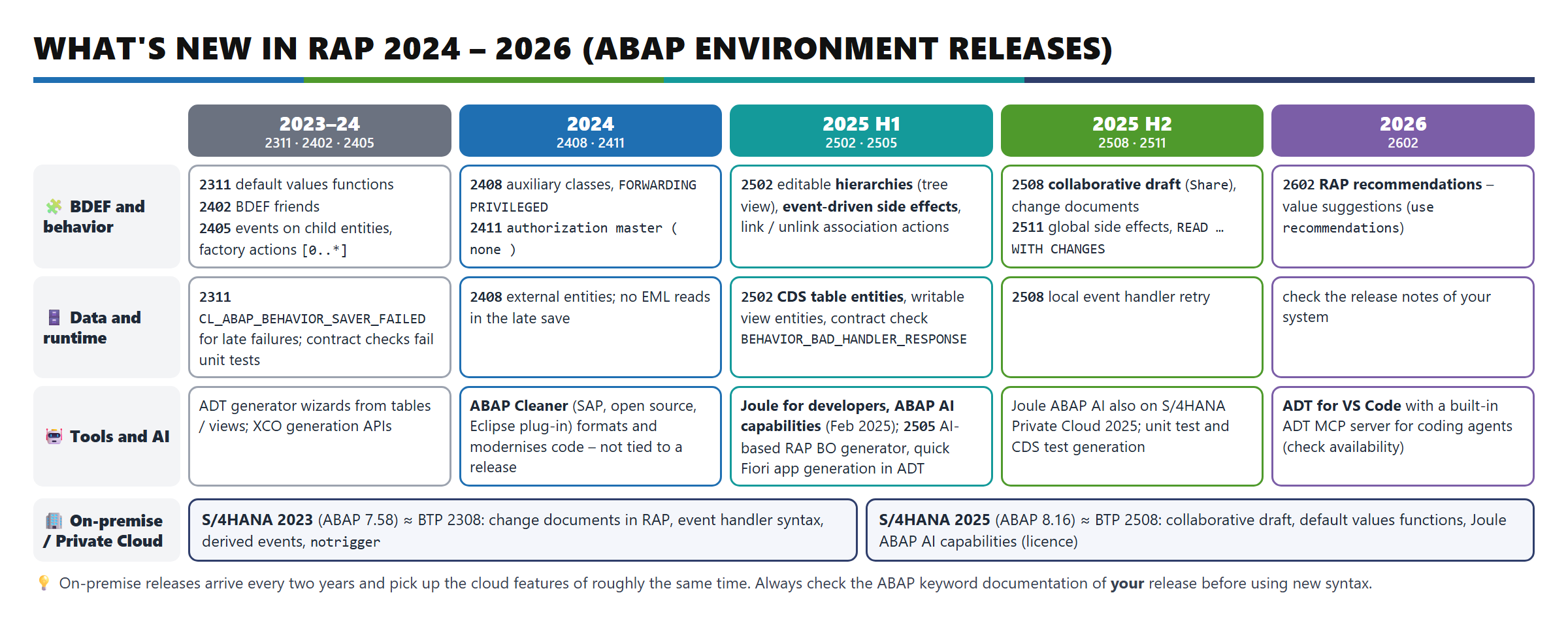
Feature | Release | What it means for the app | Home page |
|---|---|---|---|
Collaborative draft | BTP 2508, S/4HANA 2025 | Rep and manager edit one draft order together ( | 07 |
Default values functions | BTP 2311, S/4HANA 2025 | Prefill the create dialog, e.g. the rep's sales organisation (R3); also for actions with parameters | 05 |
Side effect variants | event-driven 2502, global 2511 | The UI refreshes when an event such as a status change is raised | 07 |
RAP recommendations | BTP 2602 | AI- or rule-based value suggestions, e.g. a likely delivery priority (R19): | – |
Editable hierarchies | BTP 2502; copy action 2508 | Tree tables with reorder: | – |
CDS table entities | BTP 2502 |
| – |
BDEF friends, auxiliary classes | 2402, 2408 | Split a large behavior pool; friends may call internal actions such as recalcTotal | 04 |
Local event retry | BTP 2508 | Local handlers of OrderApproved are retried on failure (R15) | 10 |
Multi-inline edit | pattern | Singleton root ( | – |
Features with a home page number are explained there; "–" means this overview is the only place in the section. Exact keywords may differ by release.
Part 9 – Tools and AI-assisted RAP development
Generators and AI assistants write the boilerplate of an app like ours in minutes. The developer's job moves from typing to reviewing and proving: you still answer for every object in the transport.
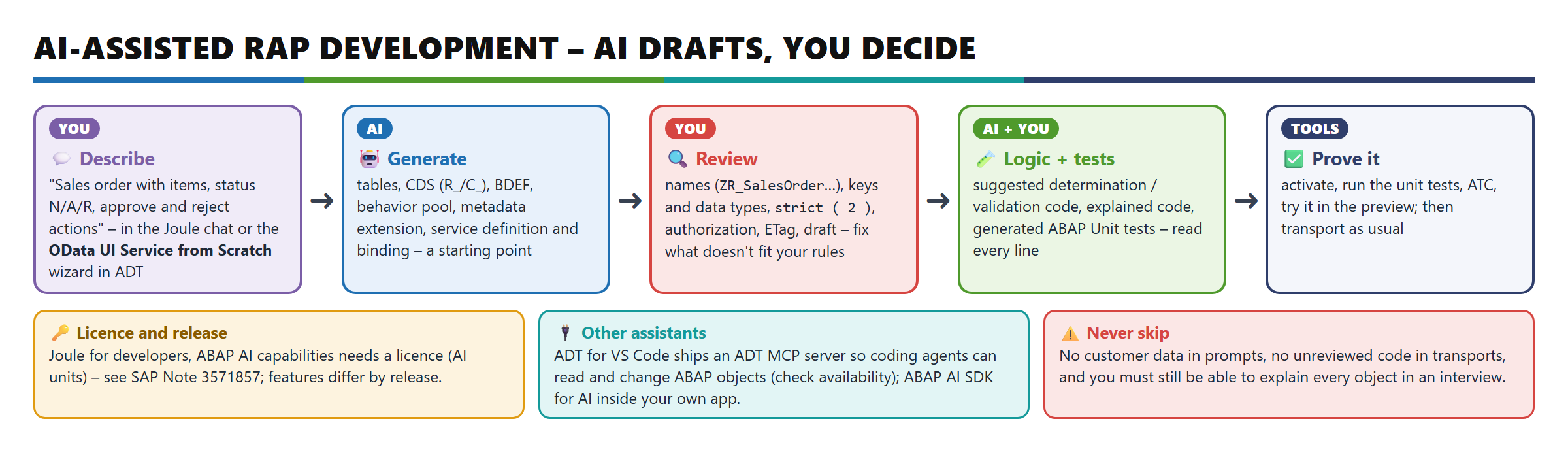
Tool | What it does for RAP | Availability |
|---|---|---|
ADT generator wizards | Generate a complete RAP stack from a table or view, or the *OData UI Service from Scratch* wizard | ABAP Cloud systems; wizard set depends on the release |
Joule for developers, ABAP AI capabilities | Explain ABAP / CDS, code completion, generate ABAP Unit and CDS tests, generate a RAP BO and UI service from a description, predict RAP business logic | BTP / Public Cloud since 2025, S/4HANA Private Cloud 2025; licence via AI units (SAP Note 3571857) |
AI-based RAP BO generator | Generate the BO and a quick Fiori app inside ADT | ABAP environment 2505 |
ADT for VS Code | ABAP development in VS Code, with a built-in ADT MCP server so coding agents can work with ABAP objects | Check availability for your system |
ABAP AI SDK | Call AI models from your own ABAP code ( | Check your release |
ABAP Cleaner | SAP's open-source Eclipse plug-in that formats and modernises ABAP code | Any ADT installation |
XCO library | Released API to read and generate repository objects (used by generators) | ABAP Cloud |
- Treat AI output like a junior colleague's pull request: check names against Part 5, keys,
strict ( 2 ), authorization (R3/R7), ETag and draft (R10) and messages, then run unit tests and ATC before it goes into a transport. - No customer data in prompts; follow your company's AI policy.
Interview tip
"RAP is the ABAP Cloud model, so our app on released APIs is clean core level A. AI tools speed up the boilerplate, but I review every generated object and prove it with tests and ATC."
Part 10 – Interview questions
Q1. How do you debug a RAP app?
Follow the request: browser network tab for the $batch request, its HTTP status and messages; ABAP Cross Trace to see which RAP step (authorization, feature control, handler, save) failed; an ADT breakpoint in that handler or saver method – it stops my own user's HTTP requests; ST22 or the ADT Feed Reader for dumps and /IWFND/ERROR_LOG on-premise for gateway errors. To repeat quickly I call the same EML from a console class or a unit test.
Q2. The Approve button works for one manager but returns HTTP 412 for another. What happened?
412 means the ETag sent in If-Match no longer matches – someone changed the order after this user read it. The user must refresh and approve again. If an API client gets 428 instead, it sent no If-Match at all: it has to read the order first and send the ETag with the change.
Q3. What must not happen in the late save, and how do you report a failure there?
After the point of no return (adjust_numbers, save) the save must not fail: no MODIFY ENTITIES on the BO, no EML reads (since 2408), no FAILED entries and no commit. Checks belong in validations during check_before_save. If a legacy call inside save still fails, it is reported with CL_ABAP_BEHAVIOR_SAVER_FAILED (since 2311).
Q4. The list report is slow with 50,000 orders. Where do you look?
Measure first with an SQL trace (ST05) or the ADT ABAP Profiler. Typical causes: no default filter, virtual elements calculated row by row in ABAP, expensive joins in the projection, and SELECTs or EML calls inside loops in handlers. Fixes: selection fields with defaults, calculations in CDS, only the columns the list needs, FOR ALL ENTRIES or one bulk EML call.
Q5. How do you move a RAP app to production, and what is abapGit for?
On-premise and Private Cloud with transports (CTS) and publishing the service in each system (/IWFND/V4_ADMIN for V4); on BTP and Public Cloud with software components that test and production pull with *Manage Software Components*. abapGit moves or shares code between systems without a transport route, e.g. from a BTP trial to a sandbox, if the target release supports the objects.
Q6. How does RAP support clean core, and what level is your app?
RAP is the ABAP Cloud model: built on released APIs only, SAP's released RAP BOs consumed with EML replace BAPIs, and RAP BO extensions replace modifications – level A. In our app the only exception is the legacy part (R13): old function modules behind a self-released wrapper, level B or C depending on what they use, monitored by ATC.
Q7. How do you find out whether you may use an SAP object in ABAP Cloud?
Look at its API state in ADT (*Properties* → *API State*): C1 means released for use in cloud development, C0 released as an extension point, C2 as a remote API. ABAP Cloud projects also show a *Released Objects* node, the Business Accelerator Hub lists released APIs, and for unreleased objects ADT and ATC show the successor where SAP defined one.
Q8. Name some recent RAP features.
Collaborative draft (BTP 2508, S/4HANA 2025), default values functions (2311), editable hierarchies and event-driven side effects (2502), CDS table entities (2502), global side effects (2511), RAP recommendations for value suggestions (2602), and AI support with Joule for developers and the AI-based RAP BO generator. I check the keyword documentation of the target release before using them.
Q9. How do you use AI tools when building a RAP app?
As a fast first draft: the generator or Joule creates the stack or suggests logic and unit tests. Then I review every object – names, keys, strict mode, authorization, ETag, draft, messages – and prove it with activation, unit tests and ATC before it goes into a transport. No customer data in prompts.
Q10. What is on your go-live checklist for a RAP app?
All objects in a transportable package (none in $TMP), BDEFs in strict ( 2 ), unit tests green, ATC clean including the clean core checks, the service published in every system, Fiori apps deployed with their catalogs and roles, Web API and event bindings configured per system, and a test with a user who has only the target role – a rep must not be able to approve.
🏠 Start Here · ◀ 12 · Extensibility & Testing · 14 · Interview Questions ▶ · Sections: CORE ABAP | OOPS ABAP | ABAP on HANA | Clean Core | RAP | ABAP Points | SAP Fiori | SAPUI5 | Mobile Development (MDK) | BTP Foundations | BTP Development | CAP | SAP Build | ABAP on BTP | Integration Suite | SAP Business AI | SAP BASIS | Security | SAP SDLC
Functional: FICO ABAP | TRM ABAP | VIM | SAP BIS | SD ABAP | MM ABAP | PP ABAP | QM ABAP | PM ABAP | PS ABAP | EWM | TM ABAP | GTM ABAP | EHS ABAP | HR ABAP | BW | SAP Datasphere | SAP Business Data Cloud | SAP MDG | SAP Analytics Cloud | SAP Ariba | SAP CX | SAP IBP