SAP Integrated Business Planning for Supply Chain (SAP IBP) is SAP's cloud solution for supply chain planning: sales and operations planning (S&OP), demand forecasting, inventory optimization, supply and response planning, and supply chain visibility in one planning model on SAP HANA. It is the strategic successor of the planning parts of SAP APO. IBP plans; SAP S/4HANA (or ECC) executes. This page explains what IBP is for, its applications, its predecessors, where it sits next to S/4HANA PP/DS and MRP, the cloud architecture, the user interfaces, the release cycle and the user roles. The planning model and the processes in detail: page 02; integration with S/4HANA: page 03.
Part 1 – What IBP is and why companies use it
A supply chain plan answers four questions: what will customers buy (demand), what can we make and buy (supply and capacity), how much stock do we need where (inventory) and how do we react when something changes (response). Classic ERP answers these in separate tools and spreadsheets. IBP puts them into one data model so that every planner, from the demand planner to the executive, looks at the same numbers, and a change in one plan is visible in the others immediately.
Business need | What IBP offers |
|---|---|
One agreed plan across sales, operations and finance | Monthly S&OP process with process steps, tasks and a consensus plan in units and value (page 02 Part 5) |
Better forecasts | Statistical forecasting with classic and machine-learning algorithms, demand sensing for the short term (page 02 Part 6) |
Feasible supply plans | Heuristics and an optimizer that respect capacities, lead times and costs (page 02 Part 7) |
Right stock levels | Multi-stage inventory optimization of safety stock per service-level target (page 02 Part 8) |
Fast reaction to disruptions | Order-based response planning, simulations and what-if scenarios (page 02 Part 9) |
Visibility | Dashboards, analytics, custom alerts and a supply chain control tower (page 02 Part 10) |
1.1 Key terms
Term | Meaning |
|---|---|
Planning area | The planning model: attributes, master data types, time profile, planning levels, key figures, versions. All plans live in a planning area (page 02 Part 1) |
Key figure | A planned or actual measure over time, e.g. Sales History, Consensus Demand, Supply, Projected Inventory |
Time-series planning | Plans quantities in time buckets (week, month) per product / location / customer – tactical and strategic planning |
Order-based planning (OBP) | Plans with individual orders (sales orders, planned orders, purchase requisitions, stock transfers) – operational planning and response |
Planning view | A sheet in the IBP add-in for Microsoft Excel (or a web planning view) that shows key figures by attributes and periods |
Planning operator | A batch function that runs on a planning area: forecast, supply heuristic, optimizer, copy, snapshot, inventory optimization |
Tenant | The customer's IBP system in SAP's cloud – normally a test and a production tenant |
Part 2 – Applications (solution areas)
IBP is one product with several applications. A customer licenses the applications it needs; all of them share the same platform, planning areas, user interfaces and integration. SAP's current product material names the following:
Application | Planning question | Main functions |
|---|---|---|
SAP IBP for sales and operations | Do demand, supply and finance agree for the next 12–36 months? | S&OP process management, consensus demand, rough-cut supply and capacity check, financial view of the plan, what-if scenarios |
SAP IBP for demand | What will be sold, by product, customer and period? | Statistical forecasting (preprocessing, algorithms, ex-post error), machine-learning forecasts, demand sensing for the short-term horizon, promotion handling |
SAP IBP for inventory | How much safety stock do we need, and where in the network? | Single- and multi-stage inventory optimization, safety-stock and target-inventory recommendations |
SAP IBP for response and supply | What can we supply, and how do we react to change? | Time-series supply planning (heuristics, optimizer), order-based planning, deployment, response management, allocations and order confirmation |
SAP IBP for demand-driven replenishment | Where do we place decoupling buffers (DDMRP)? | Buffer positioning and buffer sizing; buffers are executed in S/4HANA demand-driven MRP |
SAP Supply Chain Control Tower | What is happening in the supply chain right now? | End-to-end visibility, analytics and dashboards, custom alerts, case management |
- Licensing (no prices): applications are subscribed separately; SAP also offers a non-productive starter edition for evaluation. Editions and bundles: page 05.
- Supply chain collaboration with suppliers (forecast / commit, purchase orders) is not an IBP application: it is done on SAP Business Network (successor of APO SNC), integrated with IBP.
Part 3 – History: SAP APO and SAP SCM as predecessors
SAP APO (Advanced Planner and Optimizer, later shipped as SAP SCM, release 7.0 with several enhancement packages) was SAP's on-premise planning system for about two decades. It ran next to ECC on a liveCache, connected through the CIF (Core Interface). SAP did not port APO to the cloud: it split its functions between a new cloud product (IBP) and S/4HANA.
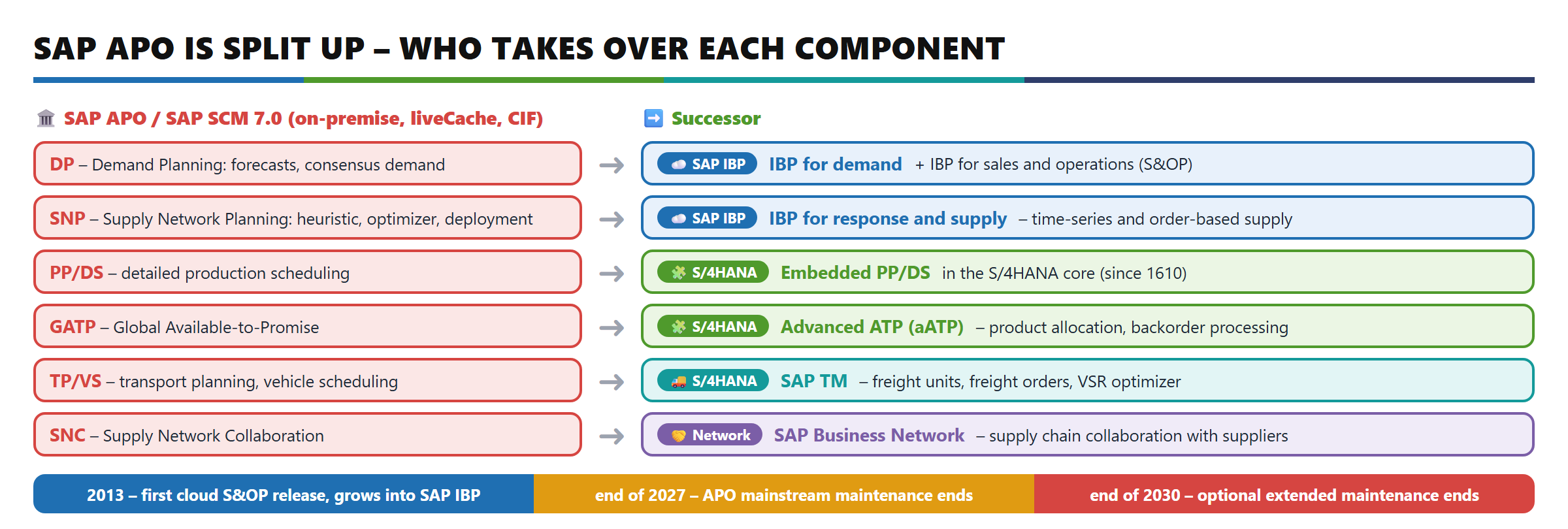
APO component | What it did | Successor |
|---|---|---|
DP – Demand Planning | Statistical forecasting, consensus demand, promotions | SAP IBP for demand (+ S&OP) |
SNP – Supply Network Planning | Medium-term supply and distribution planning: heuristic, optimizer, CTM, deployment | SAP IBP for response and supply |
PP/DS – Production Planning / Detailed Scheduling | Short-term finite production planning and sequencing | Embedded PP/DS in SAP S/4HANA (since 1610) |
GATP – Global Available-to-Promise | Rules-based ATP, product allocation, backorder processing | Advanced ATP (aATP) in SAP S/4HANA |
TP/VS – Transport Planning / Vehicle Scheduling | Transport optimization | SAP TM in S/4HANA (see the TM ABAP section) |
SNC – Supply Network Collaboration | Supplier collaboration portal | SAP Business Network supply chain collaboration |
S&OP on HANA (2013) | SAP's first cloud S&OP product, complement to APO | Became the S&OP application of SAP IBP |
3.1 Timeline
- 2013: first cloud release, mainly S&OP functions, positioned as a complement to APO. It was then rebuilt and extended (inventory optimization, demand sensing, control tower, supply and response) under the name SAP Integrated Business Planning – a rewrite on SAP HANA, not a port of APO.
- SAP SCM 7.0 (APO): as part of the SAP Business Suite 7 core applications, mainstream maintenance ends 31 December 2027; an optional extended maintenance (extra fee) runs until the end of 2030 for the latest enhancement packages. This is the deadline that drives APO → IBP projects.
- Embedded PP/DS and aATP are S/4HANA features: an S/4HANA project that replaces APO must design both sides – IBP for tactical planning, S/4HANA for execution-near planning (Part 4).
- There is no technical migration of APO into IBP: the planning model is rebuilt, master data and history are loaded from ERP; APO configuration (planning books, macros, forecast profiles) is re-designed in IBP. Migration approach: page 05.
Part 4 – IBP vs planning in S/4HANA: planning horizons
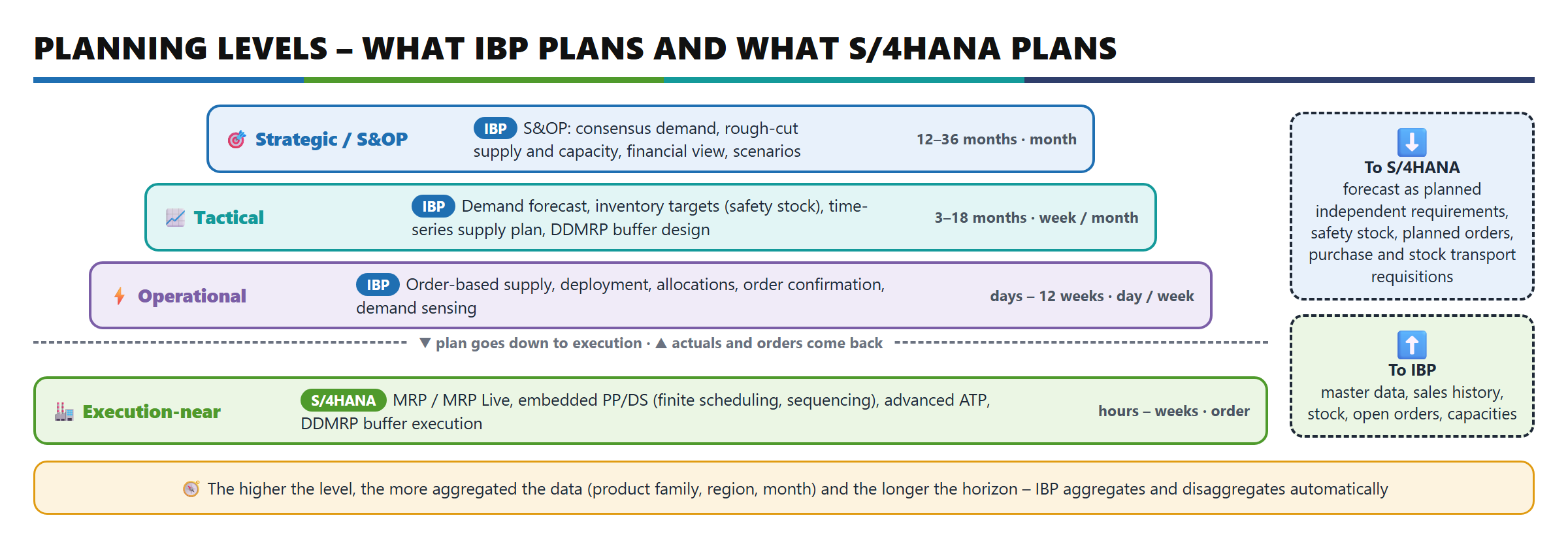
Planning happens at several levels of detail. IBP covers the strategic and tactical levels and the operational network level; S/4HANA covers the execution-near level in the plant. The two are complementary, not alternatives. MRP and PP/DS themselves are taught in the PP ABAP section.
Aspect | SAP IBP | S/4HANA (MRP, embedded PP/DS, aATP) |
|---|---|---|
Horizon | Weeks to 2–3 years (S&OP up to 36 months); response days to weeks | Hours to a few weeks (PP/DS), MRP over the replenishment lead time |
Granularity | Time buckets (day, week, month) and aggregated attributes (product family, region, customer group); orders in order-based planning | Individual orders, operations, resources, minutes |
Question | How much should we make, buy, stock and sell? Which demand do we serve when supply is short? | Which order runs on which machine in which sequence? Can I confirm this sales order now? |
Constraints | Aggregated capacities, lead times, costs, service levels | Detailed resources, setup times, component availability, sequences |
Users | S&OP owner, demand, supply and inventory planners, executives | MRP controllers, production schedulers, customer service |
Output to execution | Forecast / planned independent requirements, safety stock, supply proposals, allocations, order confirmations (page 03) | Planned orders, production orders, purchase requisitions, confirmed schedule lines |
- Typical greenfield design: IBP for demand → forecast sent to S/4HANA as planned independent requirements → MRP (or MRP Live) creates planned orders and purchase requisitions → embedded PP/DS schedules critical resources → aATP confirms sales orders.
- IBP response and supply with order-based planning goes closer to execution: it plans with S/4HANA orders replicated in near real time and can send planned orders, purchase requisitions and stock transport requisitions back. Where to draw the line between IBP and S/4HANA is an architect decision (page 05).
- S/4HANA also has its own planning tools that are not IBP: MRP Live, demand-driven MRP (execution of DDMRP buffers), predictive MRP and the planning functions of SAP Analytics Cloud.
Part 5 – Cloud architecture
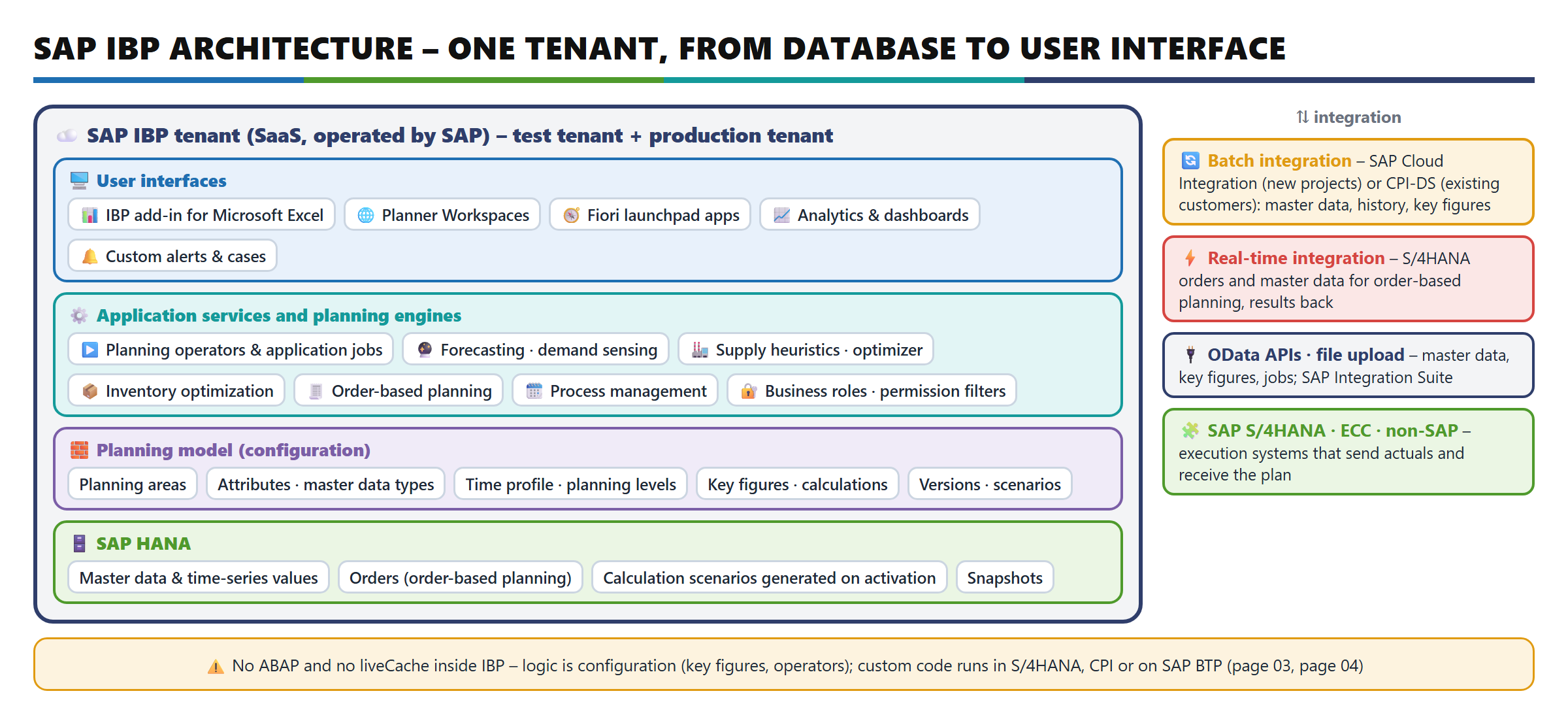
IBP is software as a service: SAP operates the system, the database and the upgrades; the customer configures the planning model and the integration. There is no on-premise version.
Layer | Content | What it means for you |
|---|---|---|
SAP HANA database | Master data, time-series key figure values, orders, versions and snapshots in the tenant's HANA database | All calculations run in memory; there is no separate liveCache as in APO |
Planning model (planning area) | Attributes, master data types, time profile, planning levels, key figures and calculations configured in Fiori apps | Configuration, not code: a planning area is built from an SAP sample and activated (page 02) |
Calculation scenarios | Activating a planning area generates HANA calculation scenarios from the key figure definitions; calculated key figures are computed at request time | Activation errors usually mean an inconsistent calculation (cycle, missing attribute) |
Planning engines | Statistical forecasting, demand sensing, supply heuristics and optimizer, inventory optimization, order-based planning engines | Run as planning operators in application jobs, interactively from Excel or scheduled |
Application services | Process management, custom alerts, case management, analytics, data integration jobs, application jobs, business roles | Each is a Fiori app in the launchpad |
Integration | Batch time-series data through SAP Cloud Integration (or CPI-DS for existing customers), real-time integration with S/4HANA for orders, OData APIs, file upload | The ABAP developer works mostly here (page 03, page 04) |
- Two-tier landscape: a customer normally gets a test and a production tenant. Configuration (planning areas, planning views, alert definitions) is built in test and moved to production with the IBP transport functions (export / import of model entities).
- No ABAP in IBP: IBP is not an ABAP system. Logic lives in key figure calculations, planning operators and configuration; custom code runs outside (S/4HANA side, SAP BTP, CPI) – page 04.
- Identity: users log on through SAP Cloud Identity Services (Identity Authentication) with single sign-on to the corporate identity provider (page 03).
Part 6 – User interfaces and apps
Interface | Used for | Notes |
|---|---|---|
SAP IBP, add-in for Microsoft Excel | Daily planning: planning views, editing key figures, simulations, scenarios, running planning operators, master data maintenance from Excel | Planners' main tool; templates and favourites define the layout; data stays in IBP, Excel is only the front end |
SAP Fiori launchpad (web UI) | Configuration (Planning Areas, Planning Operators, Forecast Models), Data Integration Jobs, Application Jobs, master data apps, business roles, process management | Administrators and key users |
Planner Workspaces | Browser-based planning views, charts and scorecards | Web alternative to Excel for many planning tasks; SAP extends it every release |
Analytics and dashboards | Charts, dashboards, scorecards, analytics on key figures | Shared across S&OP meetings and the control tower |
Custom alerts and cases | Exception management: alert definitions, alert overview, case management | Page 02 Part 10 |
Collaboration | Tasks of S&OP process steps synchronised to a collaboration tool (SAP Build Work Zone or Microsoft Teams; SAP Jam in older setups) | Page 02 Part 10 |
- Planning in Excel is a deliberate design choice: planners already work in Excel, and IBP gives them Excel's flexibility with a governed central data model (no local copies, authorizations enforced on every read and write).
- The Excel add-in has its own version; SAP recommends a minimum add-in version per IBP release, so the add-in rollout to planners' PCs is part of every upgrade.
Part 7 – Release cycle, tenants and user roles
7.1 Release cycle
- IBP is upgraded four times a year. Releases are named YYMM: 2602, 2605, 2608, 2611 (February, May, August, November).
- The test tenant is upgraded first (on a weekend), the production tenant two weeks later. During these two weeks transports between test and production are frozen – plan go-lives and cut-overs around it.
- Each release has "What's New" documentation; features are delivered switched on, as new apps, or as new sample content. Deprecated apps and functions are announced in the What's New releases before they are removed.
- Regression testing after each upgrade covers planning views, key figure calculations, planning operators and integration jobs.
7.2 User roles
Role | Typical work in IBP |
|---|---|
S&OP process owner | Runs the monthly cycle in process management, prepares S&OP meetings |
Demand planner | Forecast models, statistical forecast, demand sensing, consensus demand |
Supply planner | Supply heuristics and optimizer, capacity, deployment, response scenarios |
Inventory planner | Service-level targets, inventory optimization, safety stock |
Executive / finance | Dashboards, scenarios in value, approval of the consensus plan |
Model configuration expert | Planning areas, key figures, calculations, planning operators |
Integration specialist | Cloud Integration flows or CPI-DS tasks, real-time integration, APIs, data integration jobs |
Administrator | Users, business roles, permission filters, transports, upgrades |
Authorizations: business roles are created from SAP templates in the Maintain Business Roles app and contain business catalogs (apps). Restrictions and permission filters limit read and write access by attribute values and key figures – e.g. a demand planner may edit Demand Planning Qty only for the products of his region. A filter only works on key figures whose planning level contains the filtered attribute.
Part 8 – Interview questions
Q1. What is SAP IBP?
SAP Integrated Business Planning for Supply Chain is SAP's cloud (SaaS) solution for supply chain planning on SAP HANA: S&OP, demand, inventory, supply and response planning and a control tower in one planning model, used through an Excel add-in and Fiori apps. It plans; S/4HANA or ECC executes.
Q2. Which applications does IBP consist of?
IBP for sales and operations, IBP for demand (incl. demand sensing), IBP for inventory, IBP for response and supply (time-series and order-based supply, response), IBP for demand-driven replenishment, and SAP Supply Chain Control Tower. They share one platform and are licensed separately.
Q3. What replaced SAP APO?
APO was split: DP and SNP go to SAP IBP, PP/DS to embedded PP/DS in S/4HANA, GATP to advanced ATP, TP/VS to SAP TM and SNC to SAP Business Network. SAP SCM 7.0 has mainstream maintenance until the end of 2027 and optional extended maintenance until the end of 2030.
Q4. If a customer has embedded PP/DS in S/4HANA, why would it need IBP?
They solve different problems. PP/DS schedules orders on resources in the short term inside a plant. IBP plans demand, supply, inventory and capacity across the network for months to years and runs the S&OP process. The IBP plan feeds S/4HANA; PP/DS executes it.
Q5. What is the difference between time-series and order-based planning?
Time-series planning stores quantities per period and attribute combination (e.g. month × product family × region) and is used for tactical planning and S&OP. Order-based planning works with individual orders replicated from S/4HANA (sales orders, planned orders, purchase requisitions) and is used for operational supply, deployment and response.
Q6. Describe the IBP architecture.
SaaS operated by SAP on SAP HANA: planning areas define the model, their activation generates HANA calculation scenarios, planning operators run the engines (forecast, heuristics, optimizer, inventory optimization), Fiori apps and the Excel add-in are the UIs, and integration runs via SAP Cloud Integration (or CPI-DS), real-time integration and OData APIs. Customers get a test and a production tenant.
Q7. Can you write ABAP in IBP?
No. IBP is not an ABAP system. You configure key figure calculations, planning operators and alerts; custom logic runs in S/4HANA (integration add-ons, BAdIs), in CPI-DS / SAP Integration Suite or as side-by-side extensions on SAP BTP that call IBP APIs.
Q8. Why do planners use Excel with IBP?
The IBP add-in for Microsoft Excel gives planners a familiar, flexible grid while all data stays in the central IBP model: authorizations are enforced, changes are saved centrally and recalculated on HANA, and simulations and scenarios are possible. Planner Workspaces offers a browser-based alternative.
Q9. How often is IBP upgraded and how do you prepare?
Four times a year (releases like 2608, 2611). The test tenant is upgraded first and production two weeks later, with a transport freeze in between. Teams read What's New, regression-test planning views, calculations, operators and integration in test, and roll out the matching Excel add-in.
Q10. How are authorizations handled in IBP?
Business roles from SAP templates (Maintain Business Roles) with business catalogs grant app access; restrictions and permission filters limit read and write access to attribute values and key figures. Users authenticate through SAP Cloud Identity Services with SSO.
Q11. Where does supplier collaboration happen in an IBP landscape?
On SAP Business Network (supply chain collaboration), the successor of APO SNC – forecasts and commitments, purchase orders and confirmations – integrated with IBP and S/4HANA. It is not part of IBP itself.
Q12. As an architect, how do you split planning between IBP and S/4HANA?
Strategic and tactical planning (S&OP, demand, inventory targets, time-series supply) in IBP; execution-near planning (MRP, PP/DS, aATP) in S/4HANA. Order-based response in IBP is added when network-wide constrained planning and allocations on real orders are needed. The interface is the forecast, safety stock and supply proposals going down, and actuals and orders coming up.
🏠 Start Here · 02 · Capabilities & Data ▶ · Sections: CORE ABAP | OOPS ABAP | ABAP on HANA | Clean Core | RAP | ABAP Points | SAP Fiori | SAPUI5 | Mobile Development (MDK) | BTP Foundations | BTP Development | CAP | SAP Build | ABAP on BTP | Integration Suite | SAP Business AI | SAP BASIS | Security | SAP SDLC
Functional: FICO ABAP | TRM ABAP | VIM | SAP BIS | SD ABAP | MM ABAP | PP ABAP | QM ABAP | PM ABAP | PS ABAP | EWM | TM ABAP | EHS ABAP | HR ABAP | BW | SAP MDG | SAP Analytics Cloud | SAP Ariba | SAP CX | SAP IBP