How ABAP runs in the cloud: the SAP Business AI Platform, ABAP environment ("Steampunk"), the ABAP Cloud development model that is the same in BTP and inside S/4HANA, how to get and operate a system, how to choose an extensibility option, how code moves between systems, how the system talks to other systems, and the newest AI tools for ABAP developers. This page keeps the environment, system and extensibility view. The ABAP Cloud language itself (rules, replacements, released classes, XCO) is on page 13 · ABAP for Cloud Development; RAP and clean core have their own sections (RAP, Clean Core) – this page links there instead of repeating them.
Part 1 – SAP Business AI Platform, ABAP environment (Steampunk)
The SAP Business AI Platform, ABAP environment is a Platform-as-a-Service offering: SAP runs a complete ABAP system for you on SAP BTP – application server, SAP HANA Cloud database, Fiori launchpad, upgrades and operations. You only write code. Its internal code name was "Steampunk", and many people still use it. SAP's documentation has used the current name since October 2026. Before that it was SAP BTP, ABAP environment, and before that SAP Cloud Platform ABAP environment. You will still hear "BTP ABAP environment" in projects and interviews: it is the same product.
- What you build: side-by-side extensions for S/4HANA (Cloud or on-premise) and SuccessFactors, new standalone cloud apps and Web APIs, reusable services and SaaS solutions sold by partners.
- How you build: only with ABAP Cloud – RAP, CDS, released APIs, ABAP Development Tools (ADT). No SAP GUI, no dynpro, no SE80, no classic reports.
- Why ABAP and not Java/Node.js (CAP)? Your team already knows ABAP, you can re-use ABAP know-how and custom code, and RAP gives you transactional Fiori apps with very little code.
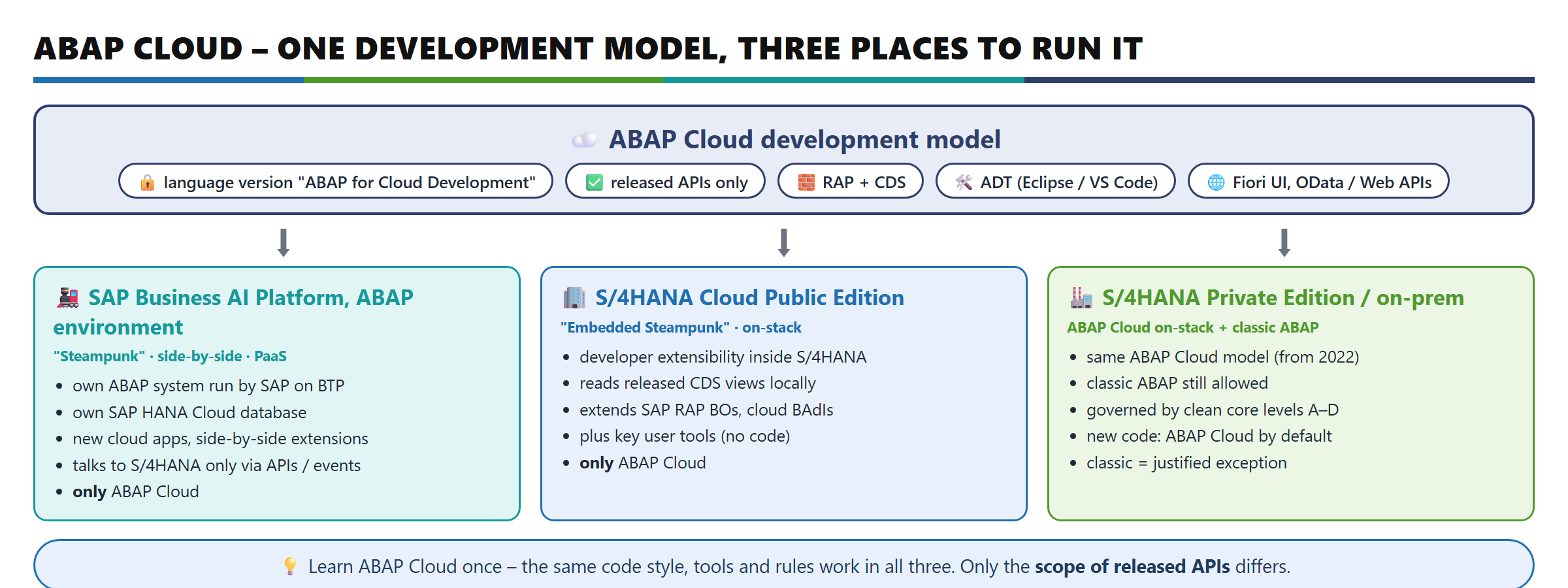
Steampunk vs Embedded Steampunk
Steampunk | Embedded Steampunk | |
|---|---|---|
Official name | SAP Business AI Platform, ABAP environment | Developer extensibility in SAP S/4HANA Cloud (on-stack) |
Where the code runs | Its own ABAP system on SAP BTP | Inside the S/4HANA system |
Access to S/4 data | Remote only – OData / SOAP APIs, events | Local – released CDS views, released RAP BOs, BAdIs |
Language | ABAP Cloud only | ABAP Cloud (Private Edition / on-prem also allow classic ABAP) |
Typical use | Separate app, several back ends, own lifecycle | Logic tightly bound to S/4 data and processes |
Both use the same model, the same ADT tools and the same rules – what you learn once works in both places.
- Where Embedded Steampunk is available: SAP S/4HANA Cloud Public Edition (developer extensibility), S/4HANA Cloud Private Edition and S/4HANA on-premise from release 2022 (there next to classic ABAP). The released objects differ per product and release: the Cloudification Repository (github.com/SAP/abap-atc-cr-cv-s4hc) has one list for SAP Cloud ERP, one for the SAP Business AI Platform, ABAP environment and one per Private Edition release.
- ABAP environment as SaaS: partners build multitenant SaaS apps in the ABAP environment; each customer subscribes and gets its own tenant. Provisioning, upgrades and tenants are operated with the Landscape Portal (Part 3.4). Multitenant SaaS with CAP: the CAP section.
Part 2 – The ABAP Cloud development model
ABAP Cloud is SAP's development model for cloud-ready, upgrade-stable ABAP. It is a set of rules enforced by the compiler and the tools, not just a guideline. In the ABAP environment it is the only model; in S/4HANA it is the recommended one. This Part is the one-screen summary – the language in detail (rules, what is not allowed and what replaces it, syntax side by side, released classes, XCO, converting classic code) is on page 13 · ABAP for Cloud Development; the clean core reasoning in Clean Core › 01 Clean Core, Part 5.
Building block | What it means |
|---|---|
Language version "ABAP for Cloud Development" | Restricted ABAP – classic statements such as list output, dynpros or native SQL give a syntax error (full list: page 02, Part 3) |
Released APIs only | You may use only SAP objects with release contract C1 (or C0 to extend, C2 for remote use). |
RAP + CDS | Data model in CDS view entities, transactional logic in RAP business objects, services as OData V2/V4 |
ADT | ABAP Development Tools for Eclipse; since Q2 2026 also ABAP development in VS Code (first release for the ABAP Cloud scope and Fiori apps; Eclipse stays the full-featured IDE). No SAP GUI-based tools |
Fiori UI | Fiori elements apps on top of RAP services, published in the Fiori launchpad |
Cloud-ready tools | ATC, ABAP Unit, Git-based transports, communication management |
What this means for the environment: there is no SAP GUI, so administration runs in Fiori apps (users, roles, software components, communication), development in ADT, and every UI or API is a service. How to find a released successor (Released Objects tree, API State tab, Cloudification Repository, SAP Business Accelerator Hub) and the classic-vs-cloud code examples: page 02, Parts 4–6.
Part 3 – Getting and operating a system: provisioning, users, sizing, Landscape Portal
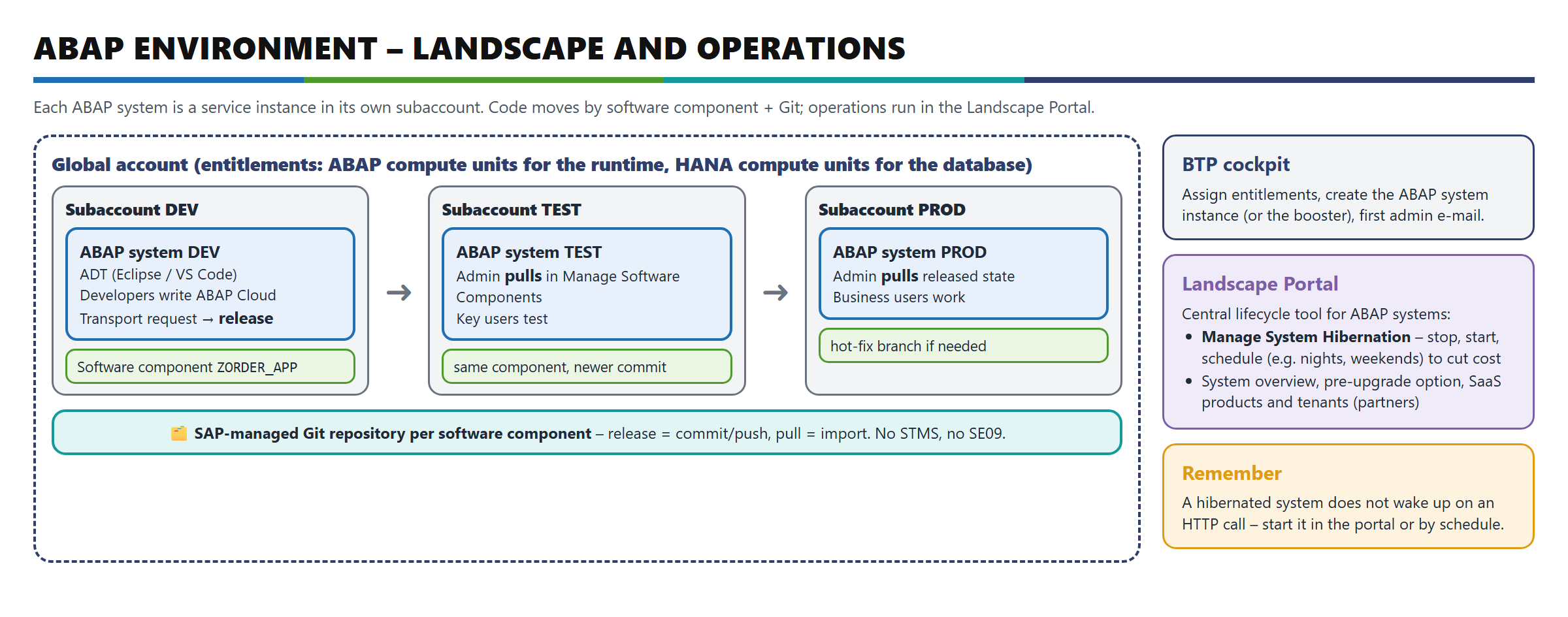
3.1 Provisioning
The ABAP environment is not a space or an org – it is a service instance that creates a whole ABAP system. Steps in the BTP cockpit (account model: see BTP Foundations › 02 SAP BTP – Overview & Account Model):
- 1. In the global account, assign the entitlement for the ABAP environment (system, ABAP runtime and persistence quota) to a subaccount.
- 2. Create the ABAP system as a service instance (or run the booster "Prepare an Account for ABAP Development", which does the entitlements, instance and admin user in one go). Enter the e-mail of the first administrator.
- 3. SAP provisions the system (takes a while). You get a system URL for the Fiori launchpad and for ADT.
- 4. The administrator logs on to the Fiori launchpad, creates business users and assigns business roles.
- 5. Developers create an ABAP Cloud Project in ADT (log on through the browser) and start coding.
3.2 Users and roles
Concept | Meaning |
|---|---|
Business user | A person who logs on (developer, administrator, end user). Comes from the identity provider (SAP Cloud Identity Services – see BTP Foundations › 03) |
Business role | Collection of business catalogs; assigned to users in the app Maintain Business Roles. SAP templates, e.g. |
Business catalog | Group of apps / authorizations (IAM apps). Your own apps get their own catalog |
Communication user | Technical user for inbound calls from other systems (Part 6) |
3.3 System landscape and sizing
- Typical landscape: DEV, TEST, PROD – three ABAP systems, usually in separate subaccounts. Code moves with Git-based transports (Part 5).
- Sizing is in units: ABAP compute units (ACU) for the runtime memory and HANA compute units (HCU) for the persistent memory, both metered hourly in 16 GB blocks. Each system needs three entitlements:
abap_compute_unit,hana_compute_unitand the system planstandard(orfree, orsaas_oemfor multitenant SaaS). The smallest standard system is 0.5 ACU + 2 HCU – one application server only, cheaper but more prone to short outages, so SAP advises against it for production; from 1 ACU upwards a system runs at least two application servers. The ABAP runtime can scale elastically with load. Prices: SAP Discovery Center estimator. - Learning options: the BTP trial (shared ABAP system with limited rights), the free tier plan (proof-of-concept size, stopped every night and restarted in the Landscape Portal, community support only), and the ABAP Cloud Developer Trial (a local ABAP platform system in a container).
3.4 Operating systems: Landscape Portal and system hibernation
Why it matters: an ABAP system is billed while it runs, and a landscape of three or more systems is expensive. SAP runs the system, but you decide when it runs and when it is upgraded. The tool for that is the Landscape Portal – SAP's central lifecycle-management tool for ABAP systems on SAP BTP. It needs no extra licence; administrators get the role collection LandscapePortalAdminRoleCollection.
Landscape Portal app / feature | What you do with it |
|---|---|
Manage System Hibernation | Stop and start a system, or schedule recurring stop / start periods (nights, weekends) for DEV and TEST. Hibernation significantly reduces the cost, but a hibernated system still incurs some cost |
System overview / maintenance | See the systems of the global account, their release and status; select systems for a pre-upgrade to test the next release early; create test tenants and support users |
SaaS operations (partners) | Define products, provision customer tenants, roll out new versions of a multitenant SaaS solution built in the ABAP environment |
- Starting is manual or scheduled: an HTTP call does not wake up a hibernated system – plan the schedule around test cycles, batch jobs and integration partners that call the system.
- Never hibernate PROD of a live app; hibernate DEV / TEST outside working hours.
- Monitoring and alerting of the landscape (SAP Cloud ALM, health monitoring): BTP Development › 05 · DevOps, Operations & Observability.
Part 4 – Extensibility options: which one when
Clean core means: extend S/4HANA without modifying it. Three clean options plus one legacy option. The full explanation, decision tree and the governance models (3-tier model, clean core levels A–D) are in Clean Core › 01 Clean Core, Parts 4 and 6 – here is the short version for BTP.
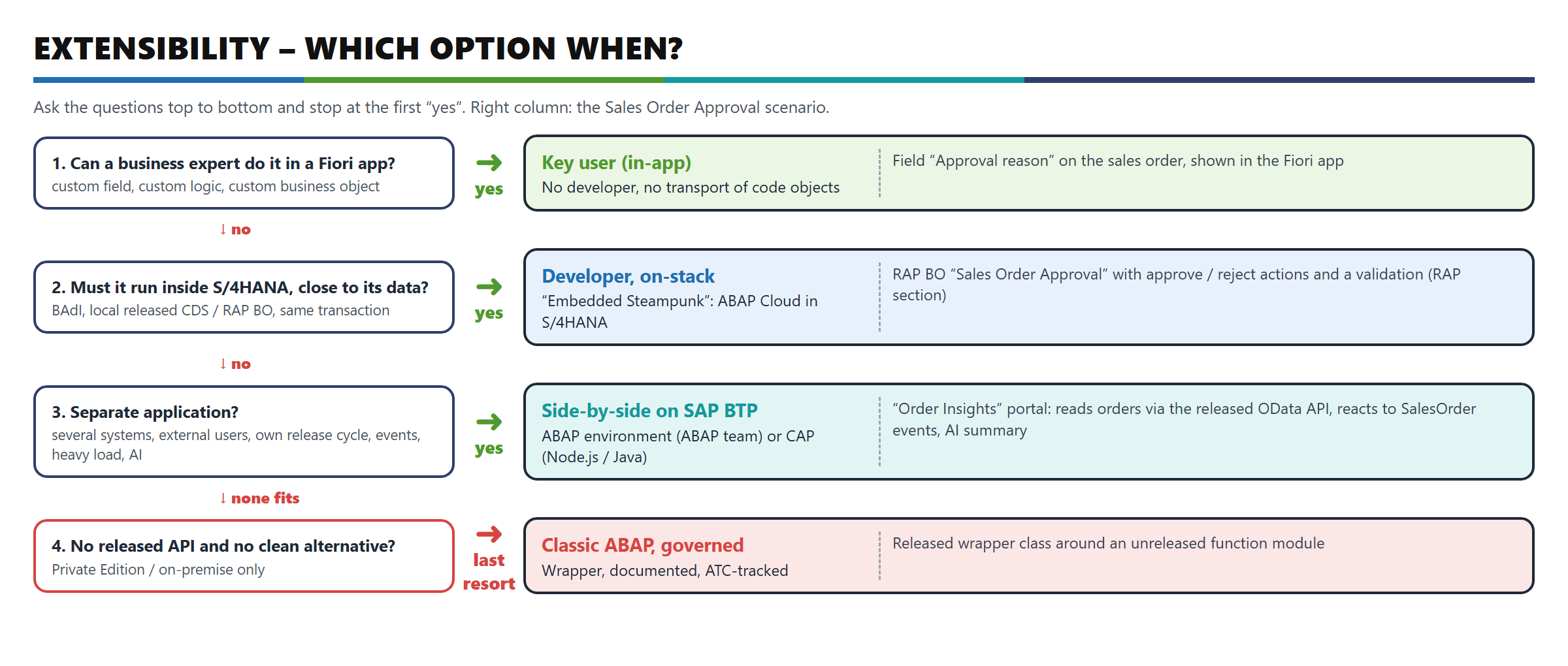
Option | Who / tool | Use it when | Example |
|---|---|---|---|
Key user (in-app) | Business expert, Fiori apps (Custom Fields, Custom Logic, Custom Business Objects) | Small change, no developer needed | Add field "Delivery priority" to the sales order |
Developer, on-stack (Embedded Steampunk) | Developer, ADT, ABAP Cloud inside S/4HANA | Logic close to S/4 data, needs local transactional consistency | RAP app reading |
Side-by-side on BTP | Developer, SAP Business AI Platform, ABAP environment / CAP / SAP Build | Separate app, several systems, external users, own release cycle, heavy load, AI | Supplier portal combining S/4 and Ariba data |
Classic (Private Edition / on-prem only) | Developer, classic ABAP | No released API exists and no clean alternative – last resort, governed | Wrapper around an unreleased function module |
💡 Rule of thumb: key user if possible, on-stack if it must be close to the data, side-by-side if it is really a separate application. Many projects combine them: an on-stack RAP BO exposes an API, a side-by-side app consumes it.
- ABAP environment or CAP for side-by-side? ABAP environment when the team is ABAP-strong, the logic is transactional (RAP) and you want SAP to run the whole stack; CAP (the CAP section) when you need Node.js / Java libraries, fine-grained control of runtime and cost (Cloud Foundry or Kyma, BTP Development › 03), or a JavaScript-heavy team. Both consume the same released S/4HANA APIs and events.
Part 5 – Software components, Git and transports
There is no STMS, no SE09 and no transport directory in the ABAP environment. Code is transported with gCTS (Git-enabled Change and Transport System), and the unit of transport is the software component.
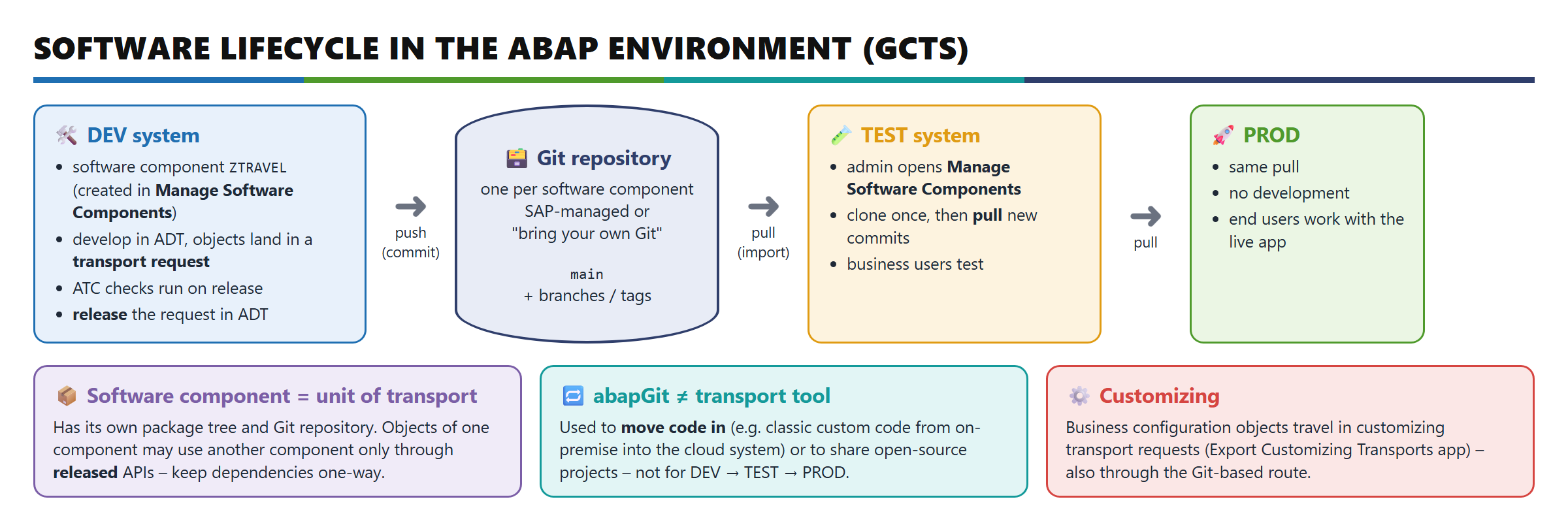
Term | Meaning |
|---|---|
Software component | Container for your development, with its own package tree and one Git repository. Created by the admin in the app Manage Software Components |
Package | Local, not transportable – for experiments and tutorials only |
Transport request | Still exists: objects are recorded in it in ADT. Releasing it pushes a commit to the Git repository |
Pull | In TEST / PROD the admin pulls the new state of the software component (Manage Software Components) – this is the "import" |
Branches / tags | Used for parallel work and for hot fixes on the production state |
abapGit | Open-source Git client for ABAP. Used to bring code in (e.g. from on-premise) or for open-source projects – not as the transport tool between DEV, TEST and PROD |
Business configuration (customizing) is recorded in customizing transport requests and released with the app Export Customizing Transports. In S/4HANA Cloud Public Edition the landscape uses its own transport apps; the ABAP Cloud rules for code are the same.
Part 6 – Communication management and connectivity
Every connection to or from an ABAP Cloud system is configured with three objects. The developer defines what may be called, the administrator decides with whom and how.
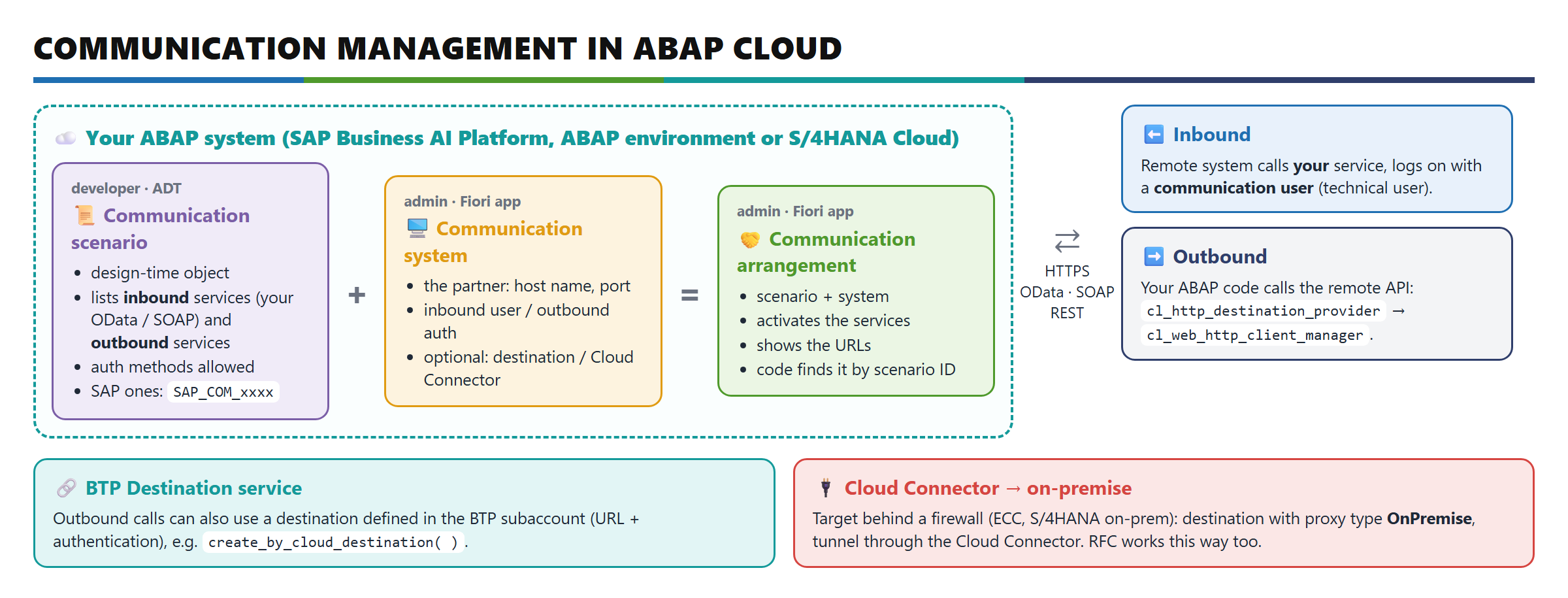
Object | Created by | Contains |
|---|---|---|
Communication scenario | Developer (ADT) – or delivered by SAP ( | Inbound services (your service bindings / Web APIs) and outbound services, allowed authentication methods |
Communication system | Administrator (Fiori app) | The partner system: host, port, inbound communication user, outbound credentials, optional destination / Cloud Connector location |
Communication arrangement | Administrator (Fiori app) | Links one scenario to one system and activates it; shows the service URLs |
6.1 Inbound – exposing your RAP service as a Web API
- Create a service binding of type OData V4 – Web API, add it to a communication scenario as inbound service.
- The admin creates a communication system with a communication user and the arrangement. The partner calls the URL with that user (basic or certificate / OAuth).
6.2 Outbound – calling another system from ABAP
|
- Destination service: instead of a communication arrangement you can use a destination defined in the BTP subaccount:
cl_http_destination_provider=>create_by_cloud_destination( ). - On-premise targets (ECC, S/4HANA on-premise): the destination or communication system points through the Cloud Connector (see BTP Foundations › 03). HTTP and RFC calls both work this way.
- Typed clients: for OData services generate a service consumption model in ADT from the service metadata – you get typed proxy classes instead of raw HTTP.
- Events: a RAP BO can raise business events that are sent through SAP Event Mesh / Advanced Event Mesh (Integration Suite › 01 · Integration Suite, APIs & Events; RAP side: RAP › 10 · Business Events & Event-Driven RAP).
Part 7 – Your first RAP app in the ABAP environment
Short version of the full build steps in the RAP section (RAP › 02 · Data Model & CDS to 05 · Business Logic & Messages, built on the Sales Order Approval scenario).
- 1. Connect: ADT → File → New → ABAP Cloud Project → enter the system URL (or service key) → log on in the browser.
- 2. Package: create
ZTRAVEL_APPinside your software component (or underZLOCALfor a trial). - 3. Table: create database table
ZTRAVEL_Awith a UUID key and the admin fields (created by, last changed at …). - 4. Generate: right-click the table → Generate ABAP Repository Objects → OData UI service. The wizard creates CDS view entity, projection view, metadata extension, behavior definition, behavior pool, service definition and service binding.
- 5. Publish: open the service binding, click Publish, then Preview – a Fiori elements app runs at once.
- 6. Add logic: validations, determinations and actions in the behavior definition and behavior pool.
- 7. Deploy a real app: generate a Fiori elements app (SAP Business Application Studio or VS Code) on the service and deploy it to the ABAP system. Create an IAM app, put it into a business catalog, add the catalog to a business role, assign the role to users – now the tile is in their launchpad.
- 8. Transport: release the transport request; the admin pulls the software component in TEST and PROD.
Part 8 – Quality: ATC, ABAP Unit and custom code migration
- ABAP Test Cockpit (ATC) runs static checks (syntax, ABAP Cloud rules, performance, security). Admins can make ATC run when a transport request is released and block it on errors.
- ABAP Unit tests run in ADT and in ATC; RAP has test doubles for CDS and EML (see RAP › 12 · Extensibility & Testing).
- Custom Code Migration app in the ABAP environment: checks existing on-premise custom code against the ABAP Cloud rules and shows what has to change before you move it (remote ATC via RFC and the Cloud Connector, communication arrangement SAP_COM_0464). A worked conversion example: page 02, Part 9.
- Performance and logs: application logs (
cl_bali_log), the SQL trace and ABAP profiler in ADT, and SAP-run system monitoring – you do not manage the database or kernel yourself.
Part 9 – AI for ABAP developers: Joule, ABAP AI capabilities, ABAP AI SDK
Two different things – keep them apart in interviews: AI that helps you write ABAP (Joule for developers) and AI that your ABAP program uses (ABAP AI SDK). AI basics – Joule, SAP AI Core, the generative AI hub – are on BTP Development › 04 · Data & AI on BTP; the deep version is the SAP Business AI section, especially › 04 · Joule for Developers, ABAP AI & AI Foundation. This Part is the short ABAP-environment view.
9.1 Joule for developers, ABAP AI capabilities
Generative AI built into ADT (Eclipse and the VS Code extension), trained and tuned for ABAP Cloud. Available in the SAP Business AI Platform, ABAP environment and S/4HANA Cloud Public Edition; SAP is extending it to S/4HANA Cloud Private Edition, with the supported releases shown in the SAP Road Map Explorer. It is licensed as a premium AI feature on top of the base product, billed by consumption in AI units.
Capability | What it does for you |
|---|---|
Predictive code completion | Ghost text suggestions while you type in the ABAP editor |
Joule chat in ADT | Ask ABAP / RAP / CDS questions in natural language, in the context of your code |
Explain code | Explains a selected class, method or CDS artefact – great for legacy or unknown code |
Generate RAP artefacts | Creates RAP business objects and services from a description, helps write behavior implementation logic |
Generate ABAP Unit tests | Proposes unit tests for ABAP classes and CDS views |
Explain ATC findings | Explains findings (e.g. custom code migration findings) and proposes fixes |
Custom code migration assistance | Explains custom code migration (ATC) findings in ADT and in the Custom Code Migration app and proposes changes that you preview before applying them |
- ADT MCP server: a Model Context Protocol (MCP) server for ADT in Eclipse and VS Code (generally available since Q2 2026), so MCP-capable AI coding agents can read and work with ABAP code through ADT – with the same authorisations as the developer.
- Custom Code Migration AI Assistant and agents: SAP adds AI agents for custom code management and clean core transformation step by step – see SAP Business AI › 04 for the current list.
- Always review: AI output is a proposal. You stay responsible – run ATC and unit tests before you release.
9.2 ABAP AI SDK – calling an LLM from your own ABAP code
- Client library in ABAP for the generative AI hub in SAP AI Core, built on ISLM (Intelligent Scenario Lifecycle Management).
- Your code names an intelligent scenario; the scenario's model (provider + LLM + version) is configuration, so it can change without code changes.
- Entry point:
cl_aic_islm_compl_api_factory=>get( )->create_instance( islm_scenario = … ).
Setup steps, a complete code example and the architecture diagram: BTP Development › 04 · Data & AI on BTP and SAP Business AI › 04 · Joule for Developers, ABAP AI & AI Foundation.
Part 10 – Interview questions
Q1. What is the SAP Business AI Platform, ABAP environment (Steampunk)?
A PaaS offering on SAP BTP: SAP runs a full ABAP system with an SAP HANA Cloud database, you develop only with ABAP Cloud (RAP, CDS, released APIs, ADT). Used for side-by-side extensions and new cloud apps. Until 2026 it was called SAP BTP, ABAP environment.
Q2. What is Embedded Steampunk?
The same ABAP Cloud model inside S/4HANA (developer extensibility, on-stack). Code runs in the S/4 system and can read released CDS views and use released RAP BOs locally.
Q3. What makes ABAP "ABAP Cloud"?
Language version ABAP for Cloud Development (restricted statements), only released SAP APIs, RAP + CDS as the programming model, ADT as the only IDE, Fiori / OData as UI and API. The compiler and ATC enforce it.
Q4. Can I use SE80, SAP GUI or classic reports in the ABAP environment?
No. Development is only in ADT (Eclipse or VS Code), UIs are Fiori apps, output is via services – classic list output (WRITE) and dynpros are not available.
Q5. How do transports work in the ABAP environment?
Git-based (gCTS). Development belongs to a software component with its own Git repository. Releasing a transport request in DEV pushes a commit; in TEST and PROD the admin pulls it in Manage Software Components.
Q6. Communication scenario vs communication system vs communication arrangement?
Scenario (developer) = which inbound/outbound services may be used. System (admin) = the partner and its credentials. Arrangement (admin) = scenario + system, activates the connection.
Q7. How does an ABAP environment app read data from S/4HANA on-premise?
Through a released remote API (OData/SOAP) of S/4HANA, called via a communication arrangement or BTP destination that routes through the Cloud Connector. A service consumption model gives typed proxies.
Q8. Key user, on-stack or side-by-side – how do you decide?
Key user for small changes without code; on-stack (ABAP Cloud in S/4) when logic is close to S/4 data and needs local consistency; side-by-side on BTP for separate apps, several systems, external users or AI.
Q9. You need data from MARA in ABAP Cloud. What do you do?
Use the released successor CDS view I_Product (find it in the Released Objects tree or the Cloudification Repository). If nothing is released: in Private Edition a governed wrapper; in BTP a remote API.
Q10. What is Joule for developers, ABAP AI capabilities?
Generative AI inside ADT: code completion, chat, code explanation, generation of RAP artefacts and ABAP Unit tests, explanation of ATC findings with fix proposals, plus help with custom code migration.
Q11. Joule for developers vs ABAP AI SDK?
Joule for developers helps the developer write code (design time). The ABAP AI SDK lets your application call an LLM at runtime via ISLM and the generative AI hub in SAP AI Core.
Q12. How are RAP and the ABAP environment related?
RAP is the programming model for transactional apps and APIs in ABAP Cloud, so every Fiori app or Web API you build in the ABAP environment is a RAP business object exposed through a service binding.
Q13. What is the Landscape Portal and what is system hibernation?
The Landscape Portal is SAP's central lifecycle-management tool for ABAP systems on BTP (no extra licence, role collection LandscapePortalAdminRoleCollection). Its Manage System Hibernation app stops, starts or schedules systems so DEV and TEST cost much less outside working hours; a hibernated system does not start on an HTTP call. Partners also use it to provision and update tenants of multitenant ABAP SaaS solutions.
Q14. Scenario: the sales team wants an "Order Insights" portal on top of S/4HANA sales orders for internal and external users. Which ABAP option do you choose?
Not key user (it is a real application) and not on-stack (external users, own lifecycle, events and AI). So side-by-side: in the ABAP environment if the team is ABAP-strong – a RAP app that reads API_SALES_ORDER_SRV through a communication arrangement and the Cloud Connector, with a service consumption model and a custom entity – or with CAP if the team prefers Node.js / Java. The approval logic that must stay transactional with the sales order stays on-stack as a RAP BO in S/4HANA.
Q15. Scenario: your monthly BTP bill for three ABAP systems is too high. What can you do?
Schedule hibernation of DEV and TEST outside working hours in the Landscape Portal, check that sizing (ABAP and HANA compute units) matches the real load, use the elastic scaling of the ABAP runtime instead of a permanently large system, and remove systems that are no longer needed – never hibernate PROD.
🏠 Start Here · 02 · ABAP for Cloud Development ▶ · Sections: CORE ABAP | OOPS ABAP | ABAP on HANA | Clean Core | RAP | ABAP Points | SAP Fiori | SAPUI5 | Mobile Development (MDK) | BTP Foundations | BTP Development | CAP | SAP Build | ABAP on BTP | Integration Suite | SAP Business AI | SAP BASIS | Security | SAP SDLC
Functional: FICO ABAP | TRM ABAP | VIM | SAP BIS | SD ABAP | MM ABAP | PP ABAP | QM ABAP | PM ABAP | PS ABAP | EWM | TM ABAP | GTM ABAP | EHS ABAP | HR ABAP | BW | SAP Datasphere | SAP Business Data Cloud | SAP MDG | SAP Analytics Cloud | SAP Ariba | SAP CX | SAP IBP