A complete guide to the ABAP language version ABAP for Cloud Development: what it is, its rules, the syntax differences from classic Standard ABAP side by side, the released APIs and the XCO library that replace classic techniques, how to get started and how to convert classic code. Modern 7.4/7.5 syntax is on ABAP on HANA › 03, clean core levels on Clean Core › 01, the SAP Business AI Platform, ABAP environment on ABAP on BTP › 01 and RAP in the RAP section; this page points there instead of repeating them.
Part 1 – What ABAP for Cloud Development is
What you learn on this page
Part | Topic | You can then … |
|---|---|---|
1 | The three ABAP language versions, ABAP Cloud, where it is mandatory | explain the difference between a language version and a development model |
2 | The rules and how they are enforced | say what is a syntax error, a warning or an ATC finding |
3 | What is not allowed and what replaces it | map every classic technique to its cloud replacement |
4 | Everyday tasks side by side | write date, user, GUID, log, mail, job, HTTP code the cloud way |
5 | Data access in ABAP Cloud | replace SELECT on VBAK/KNA1 by released CDS views and EML |
6–7 | Released APIs, release contracts, the XCO library | find a released API and its successor |
8–9 | Getting started, converting a classic report | set up a cloud package and fix ATC findings |
10–11 | Mistakes, cheat sheet, interview questions | answer clean core / ABAP Cloud questions |
Why it exists
In ECC every custom program could read any SAP table, call any function module and change SAP code. That freedom is why upgrades are expensive: SAP changes a table or an FM, and thousands of custom objects break. ABAP for Cloud Development removes that risk at the source: your code may use only a small, modern part of the language and only SAP objects that SAP has released with a stability promise. If it compiles, it survives the next upgrade.
The three ABAP language versions
Every ABAP repository object (class, interface, CDS view, behavior definition, …) has an attribute ABAP Language Version. It decides which statements the compiler accepts and which other objects the code may use. There are three versions:
Language version | Language scope | Objects you may use | Tools |
|---|---|---|---|
Standard ABAP | Unrestricted – the full language that runs in Unicode systems (classic ABAP) | Any repository object | ADT and SAP GUI |
ABAP for Cloud Development | Restricted – a small, modern set of statements; almost no obsolete statements; client isolation | Released APIs (release contract C1, "use in cloud development") and objects of the same software component | ADT only |
ABAP for Key Users | Restricted further – code written inside key user apps, method bodies only, with its own short statement list | Only what the key user app offers | Fiori key user apps |
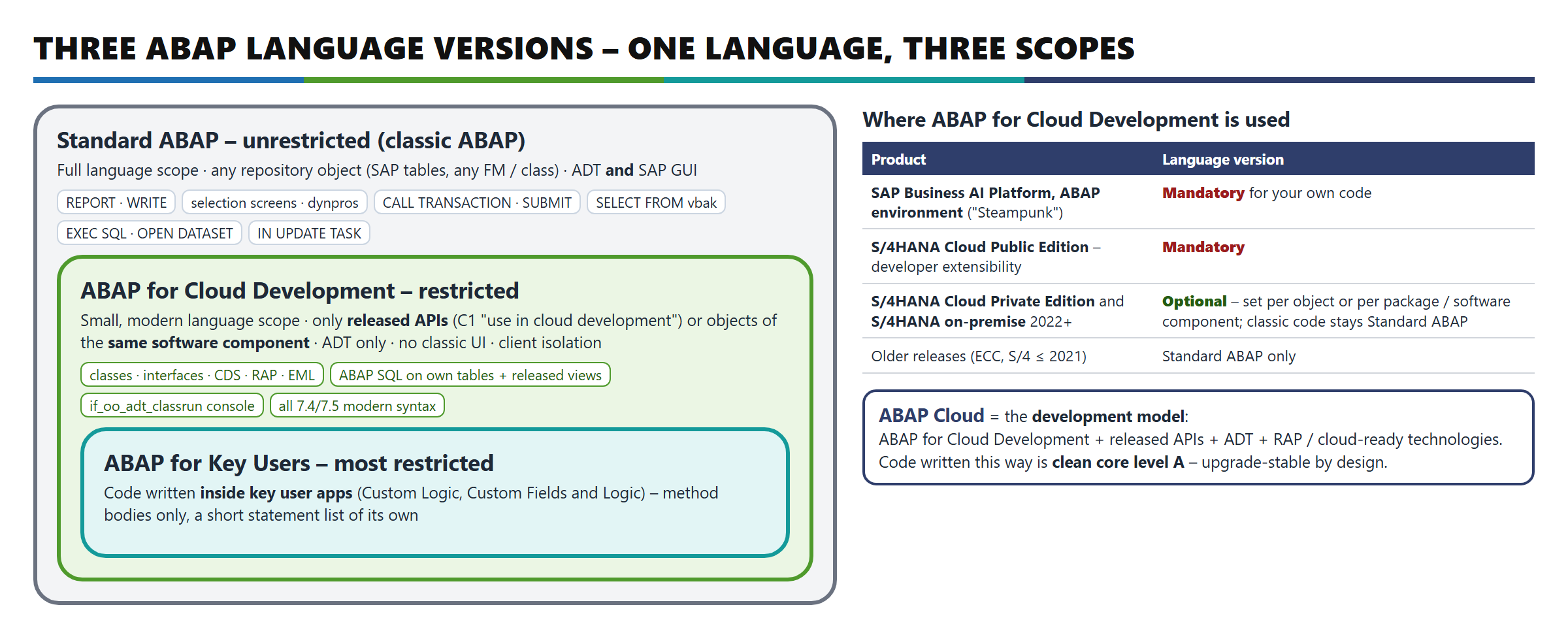
ABAP Cloud = the development model
ABAP Cloud is SAP's name for the programming model for cloud-ready, upgrade-stable code. It is more than the language version. SAP's cheat sheet lists four parts:
- Language version ABAP for Cloud Development (the restricted language).
- Released APIs – SAP objects only if they are released; most SAP tables are replaced by released CDS views, and libraries such as XCO provide ready-made functions.
- Tools – ABAP Development Tools for Eclipse (ADT) only; no SE80, SE24, SE38.
- RAP – the ABAP RESTful Application Programming Model is the transactional model; Fiori elements is the UI. RAP itself is taught in the RAP section.
- Interview tip: "ABAP Cloud is the model, ABAP for Cloud Development is the language version. On S/4HANA 2022+ on-premise I can choose it per package, so new extensions are level A while old classic code keeps running."
- Common mistake: saying "ABAP Cloud only runs on BTP". It is mandatory there and in Public Edition, and available on-premise / Private Edition from 2022.
- Modern syntax (inline declarations, constructor operators, string templates,
FOR,REDUCE,GROUP BY) all works in ABAP Cloud and is not repeated here → ABAP on HANA › 03 · ABAP New Syntax 7.4 / 7.5+. - Interview tip: "Unreleased API = syntax error, deprecated API = warning with successor, everything else the ATC reports. Dynamic access is checked at runtime, so I validate dynamic names with
cl_abap_dyn_prg." - Common mistake: thinking an object in your own package is "unreleased" and therefore blocked. Objects of the same software component may always be used; the release check applies across software components and to SAP objects.
- Interview tip: group your answer – "no classic UI (lists, dynpros, transactions), no direct SAP data (tables, unreleased FMs), no system-level access (files, native SQL, client handling), no obsolete statements – and for each there is a released replacement."
- Common mistake: "ABAP Cloud has no authorization checks."
AUTHORITY-CHECKexists; the object name must be a literal, and most read checks move into CDS access control.
The opposite is classic ABAP: Standard ABAP, any tool, any object. It is still supported in S/4HANA (on-premise and Private Edition), but SAP positions it for existing solutions.
Where it is mandatory and where optional
Product | ABAP for Cloud Development | How you get it |
|---|---|---|
SAP Business AI Platform, ABAP environment ("Steampunk") | Mandatory for all your code | Every software component you create is cloud; details → ABAP on BTP › 01 · ABAP on BTP – ABAP Cloud** |
S/4HANA Cloud Public Edition – developer extensibility | Mandatory | Development in ADT on the same system ("embedded Steampunk") |
S/4HANA Cloud Private Edition and S/4HANA on-premise, release 2022 and later | Optional – next to classic ABAP | Set the language version per object, or as the default of a package / software component; classic objects keep Standard ABAP |
ECC, S/4HANA 2021 and older | Not available (Standard ABAP only) | Write cloud-ready code by convention and check it with ATC (cloud readiness) |
In ADT you see the version on the Properties tab → General → ABAP Language Version. In a system that supports classic ABAP you can change it there with Edit… – the object then gets the cloud syntax rules and usually shows errors until you refactor it.
How it relates to clean core level A
The Clean Core page (Clean Core › 01 · Clean Core) grades extensions from level A (fully clean) to D. Code in ABAP for Cloud Development that uses only released APIs is level A by construction – the compiler enforces what level A means. Classic code that happens to use only released APIs can also be clean, but nothing stops the next developer from adding SELECT FROM vbak; in ABAP Cloud that line does not compile.
Part 2 – The rules and how they are enforced
The four rules
Rule | What it means in practice | Example |
|---|---|---|
1 · Restricted language scope | Only statements of ABAP for Cloud Development; classic UI, list, report, file and low-level database statements are not part of it |
|
2 · Released APIs only | SAP objects only if released for use in cloud development (contract C1); objects of your own software component are always allowed |
|
3 · ADT only | Classes, CDS, RAP, service bindings are edited in Eclipse; there is no SAP GUI access in the SAP Business AI Platform, ABAP environment and Public Edition | no SE38, SE80, SE11 – ADT editors instead |
4 · No SAP GUI artefacts | No executable programs (reports), dynpros, selection screens, classic lists, transactions; UIs are Fiori, test output goes to the ADT console |
|
Two more rules are built into the language: client isolation (ABAP SQL always reads the current client; USING CLIENT is not available; AMDP must be client-safe) and stable typing – when you call a released API, type your variables with the API's own types, otherwise a warning tells you the code may break if SAP extends the type.
Who enforces the rules
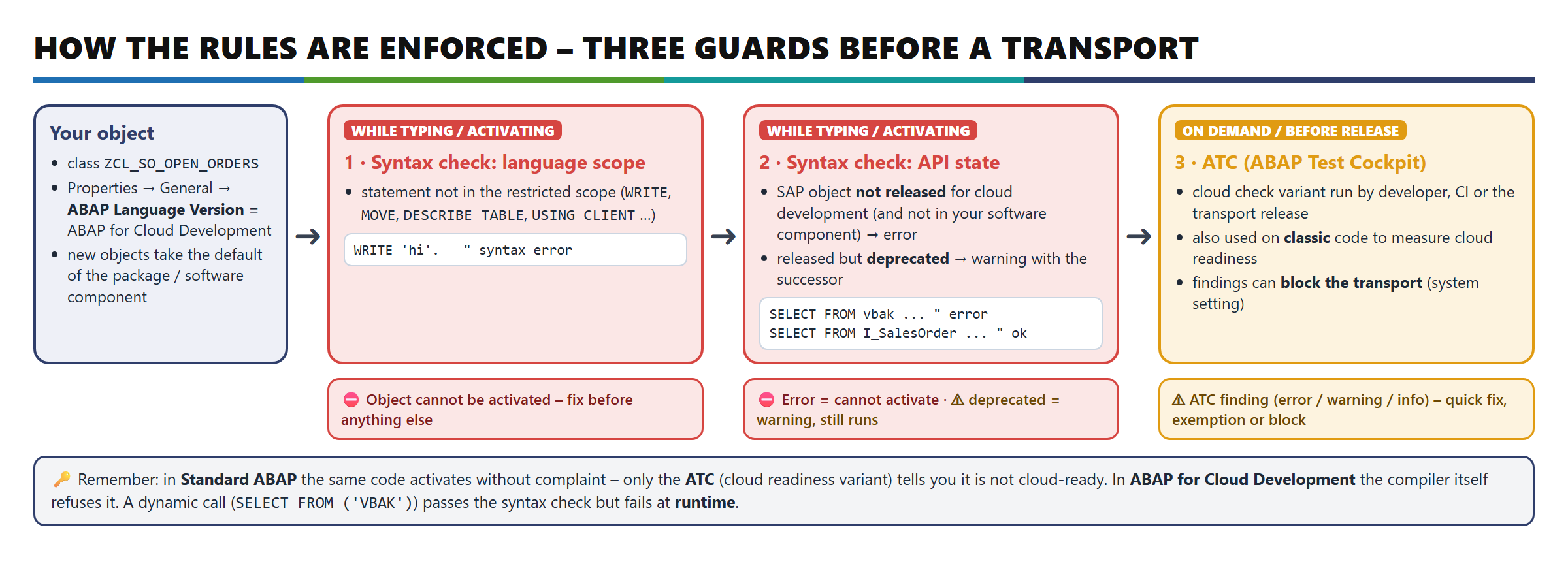
Guard | When | What it checks | Result |
|---|---|---|---|
Syntax check (compiler) | While typing, on activation | Statement allowed in ABAP for Cloud Development? | Syntax error – object cannot be activated |
API state (part of the syntax check) | While typing, on activation | Used SAP object released for cloud development? Deprecated? | Not released → error; deprecated → warning naming the successor |
ATC (ABAP Test Cockpit) | On demand, in CI, at transport release | Cloud check variant; on classic code a cloud-readiness variant | Finding (error / warning / info); errors can block the transport release |
Runtime | When the code runs | Dynamic names ( | Runtime error if the dynamic target is not allowed |
What happens when you break a rule
|
The same class with language version Standard ABAP activates and runs. Only an ATC run with the cloud-readiness check variant would list the problems. That is the key difference: in ABAP for Cloud Development the compiler is the gatekeeper, in classic ABAP only the ATC is.
Part 3 – What is not allowed and what replaces it
This Part is the core of the page: for each classic technique, why it is gone and what you use instead. The picture is the one-page summary; the tables give the details.
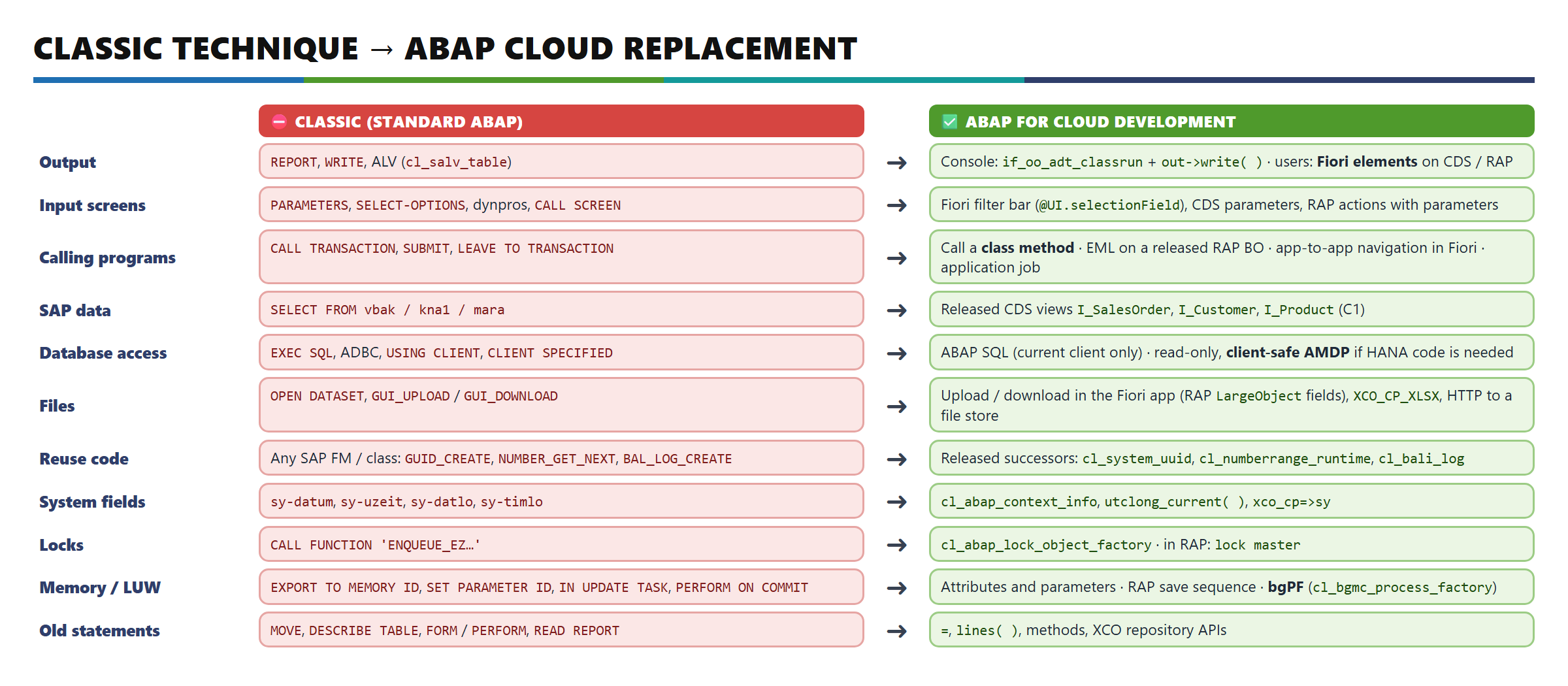
User interface, programs and output
Classic (Standard ABAP) | ABAP for Cloud Development | Note |
|---|---|---|
| Class implementing | The console is for developers and tests, not for end users |
ALV ( | Fiori elements list report on a CDS view (+ RAP for changes) |
|
| Fiori filter bar ( | Selection screens are dynpros – none in ABAP Cloud |
Dynpros, | Fiori elements or freestyle UI5 app on an OData service from RAP | "Dynpros cannot be created in ABAP Cloud" (SAP cheat sheet) |
| Call a class method, use EML on a released RAP BO, or navigate between Fiori apps (intent-based navigation) | There are no transactions to call |
SUBMIT report [AND RETURN] | Call the logic as a class method; run it in the background as an application job | There are no executable programs to submit |
| Exceptions with message texts ( | Only the |
| ADT breakpoints (double-click left of the line number) |
|
Data and database access
Classic (Standard ABAP) | ABAP for Cloud Development | Note |
|---|---|---|
|
| SAP tables are "not to be released"; the Cloudification Repository names the successor (Part 5) |
| ABAP SQL; for HANA-specific logic AMDP that is read-only, SQLScript and client-safe | Low-level database access is not in the restricted scope; |
| Not possible – implicit client handling only | Client isolation: you only ever see the current client |
| File upload/download in the Fiori app (RAP large-object fields), | No access to the server file system in the cloud |
| Same as above – the browser does the file dialog | No SAP GUI frontend |
CALL FUNCTION 'ENQUEUE_EZSO' |
| The lock object itself is still created in ADT |
| RAP save sequence; bgPF ( | SAP: "the bundling techniques are not available"; local update is the default |
Reuse code: function modules and classes
Classic (Standard ABAP) | ABAP for Cloud Development | Note |
|---|---|---|
Any SAP function module ( | Released successor classes: | All successors as listed in SAP's Cloudification Repository; code in Part 4 |
BAPI_SALESORDER_CREATEFROMDAT2 | EML on the released RAP BO | The Cloudification Repository names |
Unreleased SAP classes ( |
| Use F2 in ADT on the class: the API state shows Released / Deprecated |
Writing your own function modules | Technically possible, but write classes | SAP: function modules "are not recommended for new implementations" in ABAP for Cloud Development |
| Methods | Subroutines are obsolete and not usable in ABAP Cloud |
System fields
SAP's released-classes cheat sheet lists the sy components that are usable in ABAP for Cloud Development. Date and time fields are not in the list because they are system-specific values that make no sense in a cloud system with users in many time zones.
Classic (Standard ABAP) | ABAP for Cloud Development | Note |
|---|---|---|
| Same – allowed | Loop and statement results |
| Same – allowed |
|
| Same – allowed | Filled by |
|
| Do not use; the cheat sheet example flags them |
|
| User-local date and time come from XCO |
| No equivalent needed | They belong to programs, transactions and screens, which do not exist |
Memory, authorizations, dynamic programming
Classic (Standard ABAP) | ABAP for Cloud Development | Note |
|---|---|---|
| Pass data as parameters or keep it in class attributes; persistent state in a table or RAP draft | ABAP memory belongs to the program chain of |
| Fiori user defaults, app parameters | SPA/GPA parameters are SAP GUI user memory |
| Same – allowed | SAP's cloud cheat sheet uses it for data clusters in an |
AUTHORITY-CHECK OBJECT lv_object … |
| Released auth objects (e.g. |
Hand-written auth checks before every SELECT | CDS access control ( | Implicit checks on read; SAP's released views bring their own roles |
| Dynamic names allowed, but only for allowed targets | Unreleased target → runtime error; validate input with |
| Put the data in a structure and use | Named dynamic ASSIGN gives a syntax warning |
RTTI | XCO library ( | Some RTTI methods are not supported; source code is read and generated with XCO |
Obsolete statements
ABAP for Cloud Development allows almost no obsolete language elements. SAP's demo class shows these:
Classic (Standard ABAP) | ABAP for Cloud Development | Note |
|---|---|---|
MOVE a TO b. | b = a. | Invalid statement |
DESCRIBE TABLE itab LINES n. | n = lines( itab ). | Invalid statement ( |
GET REFERENCE OF a INTO r. | r = REF #( a ). | Deprecated – warning |
| Class-based exceptions, | Warning in ABAP for Cloud Development |
Header lines, | Explicit work areas, | Obsolete – see 03 · ABAP New Syntax 7.4 / 7.5+ for the modern forms |
Part 4 – Syntax side by side for everyday tasks
Each block shows the classic way first and the ABAP Cloud way second. All cloud class names are released in SAP's Cloudification Repository and taken from SAP's "Released ABAP Classes" cheat sheet; method signatures can differ between releases, so press F2 in ADT for the class documentation.
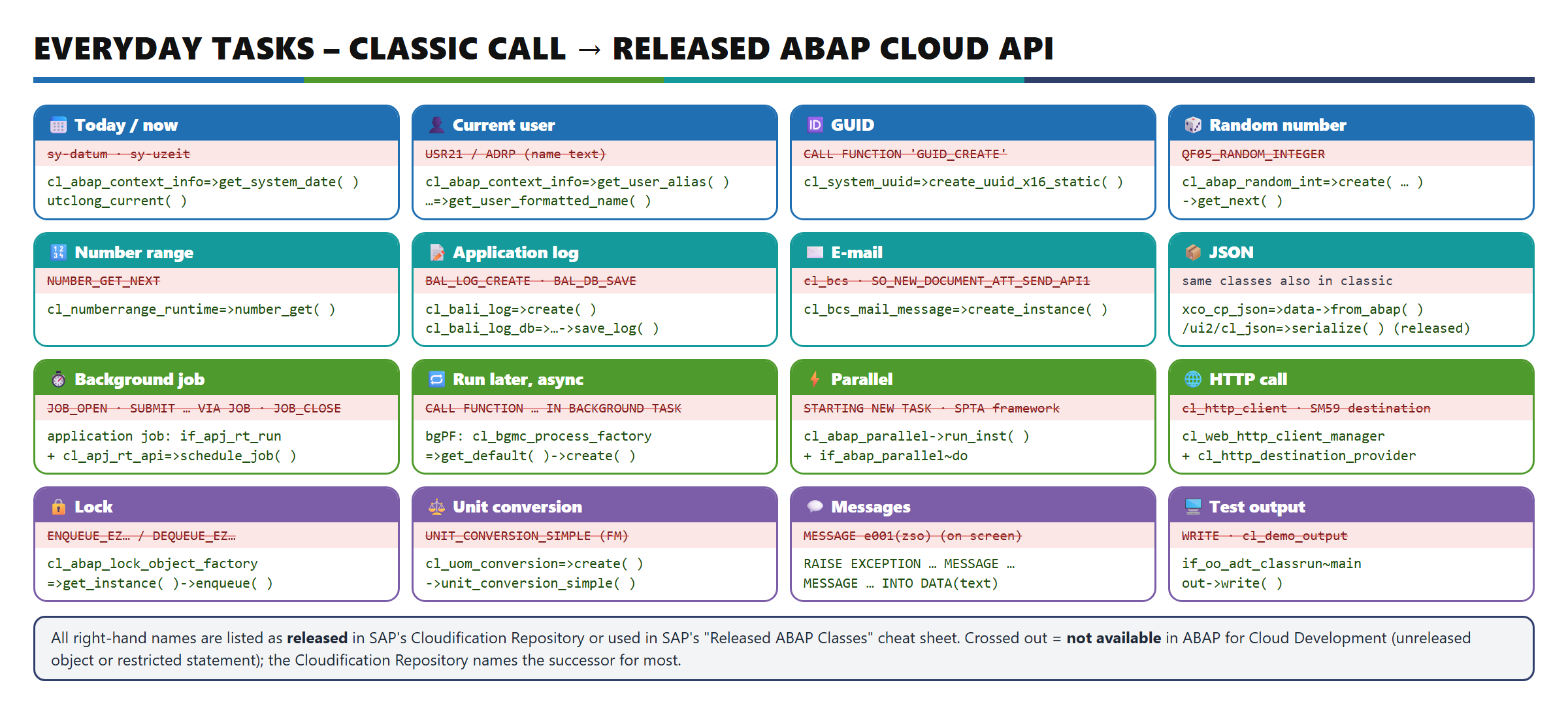
Hello World: a console class
A class that implements if_oo_adt_classrun is the ABAP Cloud replacement for a test report. Run it with F9 in ADT; out->write( ) prints values, structures and internal tables to the console.
|
- Field names of
I_SalesOrderfollow SAP's CDS naming (CamelCase, English) – open the view in ADT (F3) to see the exact fields of your release. - Alternatives for console output: inherit from
cl_demo_classrunorcl_xco_cp_adt_simple_classrun(both released);cl_demo_output_cloudexists for demos.
Date, time and time stamps
|
- For database fields SAP recommends the DDIC types
datn,timnandutclongover the olddats/tims.cl_abap_tstmp(add, subtract, converttimestamp↔utclong) is released too.
Current user
|
Messages and exceptions
There is no screen to show a message, so messages become exception texts (or RAP reported entries). Create a message class in ADT, then an exception class that inherits from cx_static_check and implements IF_T100_DYN_MSG (SAP's recommended interface; it includes IF_T100_MESSAGE).
|
- Constructor body: ADT generates it when you choose the exception superclass in the class wizard; do not hand-write it.
Random numbers and GUIDs
|
cl_abap_random_floatandcl_abap_prob_distributionare released as well.
String templates, conversion exits and formatting
Conversion-exit function modules such as CONVERSION_EXIT_ALPHA_INPUT are not released. String template options do the same job and work in both language versions.
|
- Date and time to and from external formats in code:
cl_abap_datfmandcl_abap_timefm(released).
Units and currencies
|
- Unit and currency master data: released views
I_UnitOfMeasureandI_Currency. - Currency conversion:
cl_exchange_ratesis listed as released in the Cloudification Repository for SAP Cloud ERP, the SAP Business AI Platform, ABAP environment and S/4HANA Cloud Private Edition; open the class in ADT for its conversion methods and their parameters.
JSON
|
- Both classes appear in SAP's released-classes cheat sheet and as "released" in the Cloudification Repository. XCO also offers a JSON builder and name transformations (
pascal_case_to_underscore).
|
- Sending needs an e-mail configuration (SAP Help "Emailing"); attachments with
cl_bcs_mail_textpart/cl_bcs_mail_binarypart.
Application log
|
- Exceptions go in with
cl_bali_exception_setter;XCO_CP_BALis the XCO alternative.
Number ranges
|
- Intervals:
cl_numberrange_intervals; object attributes:cl_numberrange_objects. In a RAP BO the number is drawn inadjust_numbers(late numbering) → RAP section.
Background processing: application jobs and bgPF
There are no reports, so SUBMIT … VIA JOB is replaced by application jobs (scheduled, repeatable, visible in the Fiori app *Application Jobs*) and the Background Processing Framework (bgPF) for "run this asynchronously after commit".
|
- Application job interfaces: SAP's current cheat sheet uses
if_apj_rt_run. Older code and tutorials use the pairif_apj_dt_exec_object(design time, parameters) +if_apj_rt_exec_object(run time); the Cloudification Repository lists all three as released (SAP Cloud ERP, SAP Business AI Platform, ABAP environment, Private Edition). - bgPF with transactional control: implement
if_bgmc_op_singleand callset_operation( ); switch to the save phase withcl_abap_tx=>save( )before writing to the database.
Parallel processing
|
HTTP calls
|
create_by_urlis only for public services and tests. Productive calls use a destination from a communication arrangement –cl_http_destination_provider=>create_by_comm_arrangement( comm_scenario = … service_id = … )– or a BTP destination (create_by_cloud_destination). Set-up → ABAP on BTP › 01 · ABAP on BTP – ABAP Cloud.- Base64 and URL helpers:
cl_web_http_utility(successor of the unreleasedcl_http_utility).- Interview tip: name three successors without thinking –
GUID_CREATE→cl_system_uuid,NUMBER_GET_NEXT→cl_numberrange_runtime,BAL_LOG_CREATE→cl_bali_log– and say where you look up the rest: the Cloudification Repository or the ADT error message. - Common mistake: using
sy-datumin cloud code "because it still compiles somewhere". It is flagged; and in the cloud the system time zone is UTC, so the date can be wrong for the user.
- Interview tip: name three successors without thinking –
Locks
|
Part 5 – Data access in ABAP Cloud
Why you cannot read VBAK any more
A SAP table is an implementation detail: SAP may split it, add a field or move data elsewhere (as happened with the FI tables when S/4HANA introduced ACDOCA). A released CDS view is a contract: SAP keeps its name, fields and meaning stable across upgrades. In the Cloudification Repository the classic tables have the state notToBeReleased with a named successor.
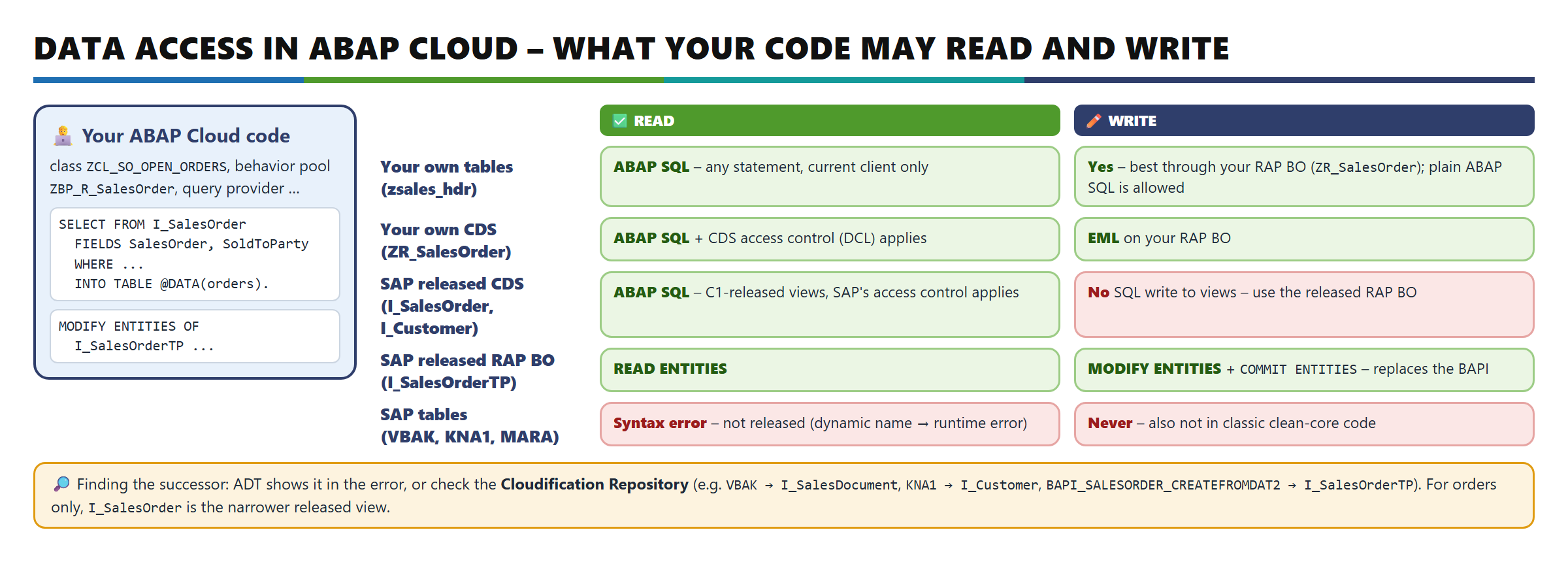
Classic (Standard ABAP) | ABAP for Cloud Development | Note |
|---|---|---|
|
| Cloudification Repository: successor of |
|
| Repository successor: |
| I_Customer | Repository successor: |
| I_BusinessPartner | Repository successor: |
|
| Several successors, one per view of the material |
| I_CompanyCode | Repository successor: |
| I_CustABAPObjDirectoryEntry | Repository successor |
ABAP SQL on your own tables and released views
|
- Use the association instead of a manual join where the view offers one (for example a
_Customeror_Itemassociation) – check the view's associations in ADT. - Released views often carry CDS access control: ABAP SQL returns only the rows the user is authorized for. A background job sees what its job user may see.
- Client handling is always implicit;
USING CLIENTandCLIENT SPECIFIEDare not available.
CDS view entities for your own data model
|
- Build your own views on released views (and on your own tables) – CDS details → ABAP on HANA › 05 · CDS Views; the RAP data model → RAP section.
- To extend an SAP view with fields, SAP must release it for extension (contract C0) – Part 6.
Writing SAP data: EML on released RAP BOs
Changing SAP business data never happens with SQL. Classic code called a BAPI; ABAP Cloud uses EML on the released RAP business object, for sales orders I_SalesOrderTP, which the Cloudification Repository names as successor of BAPI_SALESORDER_CREATEFROMDAT2.
|
- Entity aliases, fields and child entities differ by release – open the behavior definition
I_SalesOrderTPin ADT before writing the call. - Full EML (READ / MODIFY / COMMIT ENTITIES, responses, local mode) → RAP › 08 · EML; calling SAP's BO from your app → RAP › 11 · Files, Custom Entities & Integration.
- Interview tip: "Read: released CDS views with ABAP SQL. Write: EML on released RAP BOs. Own data: my own tables through my own RAP BO. SAP tables: never."
- Common mistake: building a Z-view
as select from vbakto "wrap" the table. In ABAP for Cloud Development the view does not activate either – the data source must be released.
Part 6 – Released APIs
Why this matters. In ABAP for Cloud Development your code may use only SAP objects that are released. A released object carries a release contract: SAP promises to keep it stable across upgrades. Everything else (tables such as VBAK, most function modules, internal classes) can change at any upgrade, so the syntax check simply does not accept it. Released APIs are the reason ABAP Cloud code survives upgrades without rework.
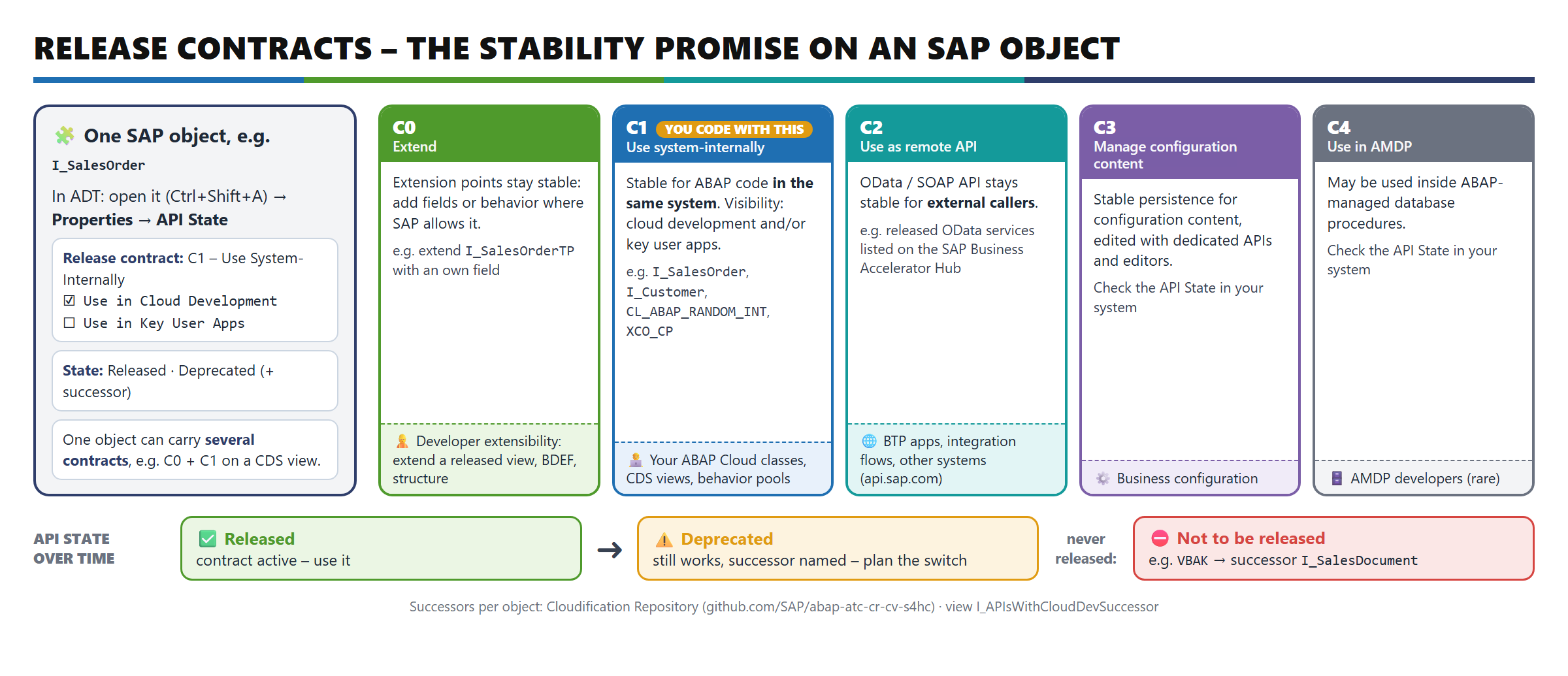
6.1 The release contracts
Contract | What SAP promises | Who uses it | Example |
|---|---|---|---|
C0 – Extend | Stable extension points: you may add fields or behavior at the places SAP marked as extensible | Developer extensibility (extend a released CDS view, BDEF or DDIC structure) | Extending |
C1 – Use system-internally | Stable for use inside the same system by ABAP code. Two visibilities: Use in Cloud Development and Use in Key User Apps | Your ABAP Cloud classes, CDS views, behavior pools; key user tools |
|
C2 – Use as remote API | Stable for external callers (OData or SOAP services) | BTP apps, integration flows, third-party systems | Released APIs on api.sap.com |
C3 – Manage configuration content | Stable persistence for configuration content that is exported, imported and edited with dedicated APIs and editors | Business configuration | SAP configuration tables (API State tab in ADT) |
C4 – Use in AMDP | May be used inside ABAP-managed database procedures | AMDP developers (rare) | Tables and views read in an AMDP (API State tab) |
- C1 is the one you need for coding. "Released for ABAP Cloud" means C1 with the visibility Use in Cloud Development switched on. C0 is asked about for extensions, C2 for integration.
- A release contract is set per object in ADT (*Properties* → *API State*). The same object can have several contracts, e.g. C0 and C1 on a CDS view.
- Your own objects can be released too: that is how a wrapper class becomes usable from ABAP Cloud code (6.4).
6.2 API state: released, deprecated, decommissioned (remote APIs) – "not to be released" is a Cloudification Repository state
State | Meaning | What you do |
|---|---|---|
Released | Contract active, stable | Use it |
Deprecated | Still released, but SAP has named a successor and wants you to move | Keep running, plan the switch; new code uses the successor |
Not to be released (Cloudification Repository) | SAP will never release it; the Cloudification Repository often names a successor object or concept | Use the successor; never wrap it in public cloud |
Real successor entries from SAP's Cloudification Repository (file objectReleaseInfoLatest.json, SAP Cloud ERP):
Classic (Standard ABAP) | ABAP for Cloud Development | Note |
|---|---|---|
Table | CDS view | Formal successor; |
Table | CDS view |
|
Table | CDS view | One successor |
Table |
| Several successors, one per data area |
Table | CDS view | Repository directory |
Class | Class | |
FM | Class | Number ranges |
FM | Class | UUIDs |
FM | Class | Application log |
Class | Concept Communication Targets ( | Successor is a concept, not one object |
FM | Released RAP BO | RAP › 11 · Files, Custom Entities & Integration, Part 7 |
- Interview tip: "The successor of VBAK is
I_SalesDocument, because VBAK holds every sales document (orders, quotations, contracts). For an order-only report I readI_SalesOrder." This shows you have actually looked at the repository.
6.3 How to find released objects
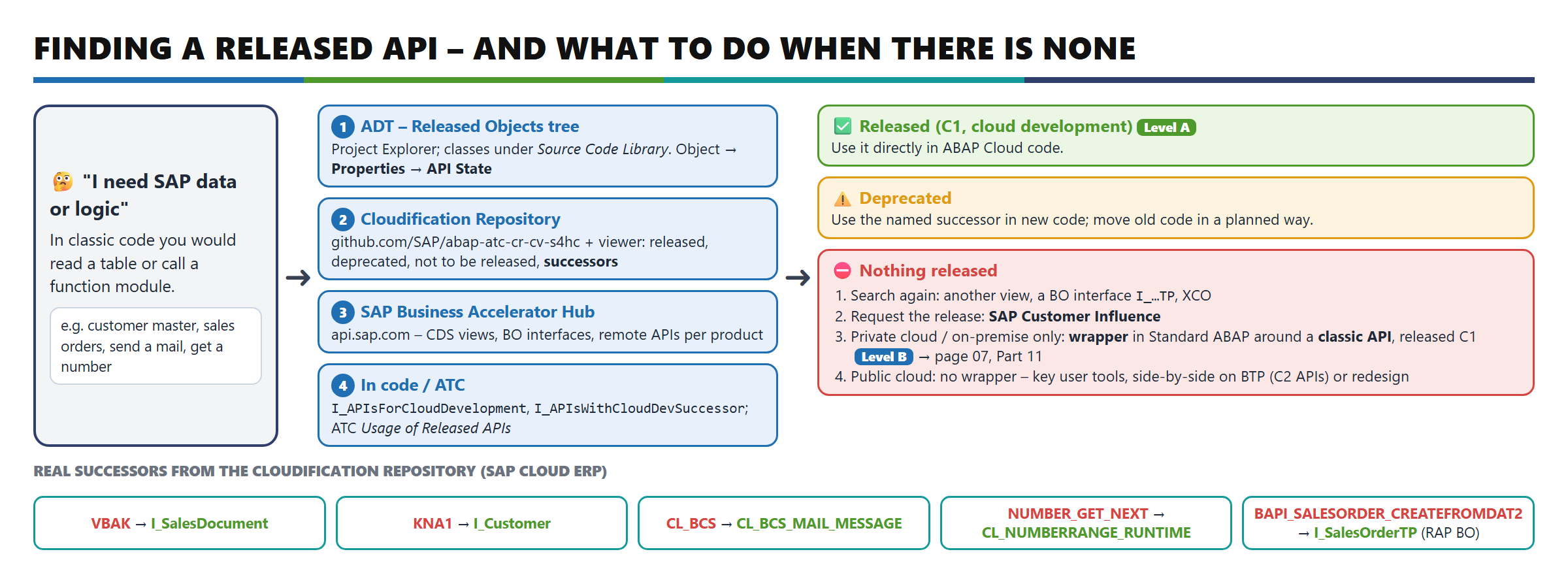
Where | How | Best for |
|---|---|---|
ADT *Project Explorer* → Released Objects | Tree of everything released for ABAP Cloud; classes are in the *Source Code Library* folder | Browsing: "is there a class for …?" |
ADT object → *Properties* → API State | Open the object (Ctrl+Shift+A), check contract and visibility | Checking one object you already know |
Cloudification Repository (github.com/SAP/abap-atc-cr-cv-s4hc) and its viewer (sap.github.io/abap-atc-cr-cv-s4hc) | JSON/CSV list of released, deprecated and not-to-be-released objects with successors | "What replaces table X / FM Y?" |
SAP Business Accelerator Hub (api.sap.com) | Products S/4HANA Cloud Public Edition, Private Edition and S/4HANA; developer extensibility content | Released CDS views, BO interfaces, remote APIs |
CDS views in code |
| Lists inside your own system and release |
ATC check Usage of Released APIs (Cloudification Repository) | Runs over existing classic code and lists every unreleased object with its successor | Cloud readiness of old code (Part 9) |
|
- View and field names as in SAP's released-classes cheat sheet (
ReleasedObjectType,ReleasedObjectName,ReleaseState;PredecessorObjectType,PredecessorObjectName). Code completion (Ctrl+Space) lists the fields of your system.
6.4 What to do when no released API exists
- 1. Search again. A released CDS view, a BO interface (
I_…TP), an XCO module or a released class often covers it under another name. Look up the successor in the Cloudification Repository or withI_APIsWithCloudDevSuccessor. - 2. Ask SAP to release it through SAP Customer Influence (campaigns for SAP Cloud ERP and SAP Cloud ERP Private). SAP Note 3126893 describes the process.
- 3. Private cloud / on-premise only: build a wrapper. In a separate package with language version Standard ABAP, write a small class that calls the classic object, and release it with C1 and Use in Cloud Development. Your ABAP Cloud code calls only the wrapper.
- Wrap a classic API (clean core level B), e.g. a BAPI. The Cloudification Repository viewer lists them: filter *classic API* and label *transactional-consistent*. SAP's generator for RFC/BAPI wrappers is the sample repo SAP-samples/tier2-rfc-proxy.
- Full pattern with code: Clean Core › 01 · Clean Core, Part 11.
- 4. Public cloud (SAP Business AI Platform, ABAP environment, S/4HANA Cloud Public Edition): no Standard ABAP, so no wrapper. Use key user tools, a side-by-side app on BTP calling C2 remote APIs, or change the design.
|
- Common mistake: wrapping an object that has a released successor. ATC and reviewers will reject it; the wrapper is the last resort, not a shortcut.
Part 7 – The XCO library
XCO (Extension Components library) is SAP's general-purpose library for ABAP Cloud. Its released classes have CP in the name (XCO_CP, XCO_CP_TIME, XCO_CP_JSON …). Standard ABAP has similar classes without CP (e.g. XCO_ABAP_REPOSITORY); this page covers the released CP edition. Where classic ABAP used system fields, function modules or utility classes, XCO often gives one consistent, object-oriented API.
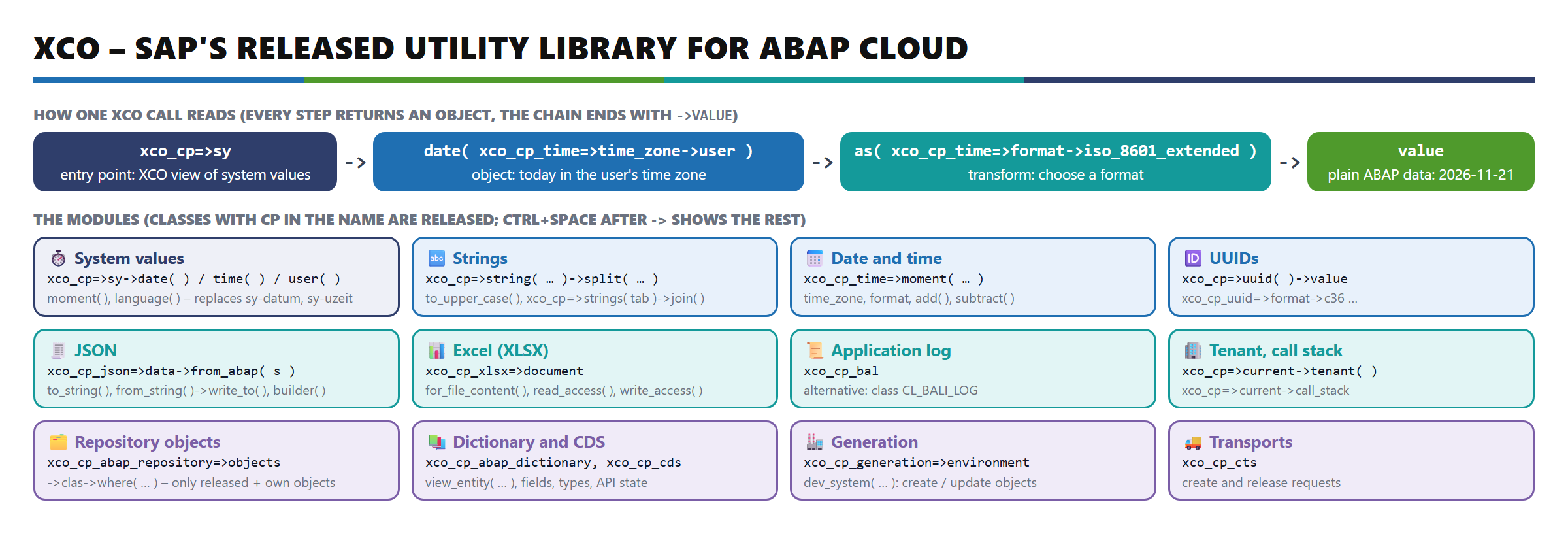
7.1 How XCO code reads
- Every call returns an object, so calls are chained:
xco_cp=>sy->date( )->as( format )->value. - The chain ends with
->value(or a getter) to get plain ABAP data. Forgetting it is the most common error: you get an object reference instead of a date. - Explore with Ctrl+Space after
->: the ADT code completion is the best documentation. - Repository-information APIs see only released and your own objects in ABAP Cloud.
7.2 The modules at a glance
Area | XCO entry point | Classic equivalent |
|---|---|---|
System fields, user, language |
|
|
Strings |
|
|
Date and time |
|
|
UUIDs |
| GUID_CREATE |
JSON | xco_cp_json=>data |
|
Excel (XLSX) |
| abap2xlsx, OLE, |
Repository objects |
| Reading |
Generating objects | xco_cp_generation |
|
Transports | xco_cp_cts |
|
Application log |
|
|
Tenant, call stack |
|
|
7.3 System fields, date and time
Classic (Standard ABAP) | ABAP for Cloud Development | Note |
|---|---|---|
sy-datum |
|
|
sy-uzeit |
| Same rule; choose user time zone or UTC deliberately |
sy-uname |
| Full name: |
sy-langu |
| XCO adds the name and ISO 639 code |
Date arithmetic | Still allowed; or | XCO handles month and year steps |
|
- Allowed
syfields (SAP's released-classes cheat sheet):sy-index,sy-tabix,sy-dbcnt,sy-fdpos,sy-subrc,sy-langu,sy-batch,sy-mandt,sy-sysid,sy-unameand thesy-msg*fields. Others, such assy-datum, should not be used.
7.4 Strings
|
Built-in string functions and string templates (ABAP on HANA › 03) work in ABAP Cloud too; XCO is an option, not a must.
7.5 JSON
|
/UI2/CL_JSONis also listed as released in the Cloudification Repository – for SAP Cloud ERP, the SAP Business AI Platform, ABAP environment and S/4HANA Cloud Private Edition – and in SAP's released-classes cheat sheet.
7.6 Excel (XLSX)
|
A full upload scenario with a RAP action is in RAP › 11 · Files, Custom Entities & Integration, Part 2.
7.7 UUIDs
|
7.8 Repository objects and generation
|
- Generation APIs are what ADT wizards and code generators use. In projects they are rare; know that they exist and that they need a development system and a transport.
- Interview tip: "XCO is SAP's released utility library for ABAP Cloud: system fields, time, strings, JSON, Excel, repository information and generation, all in one fluent API."
Part 8 – Getting started step by step
The fastest way to learn ABAP Cloud is to write a small console class, debug it, test it and run ATC on it. The steps are the same in every system; only the way you get a system differs.
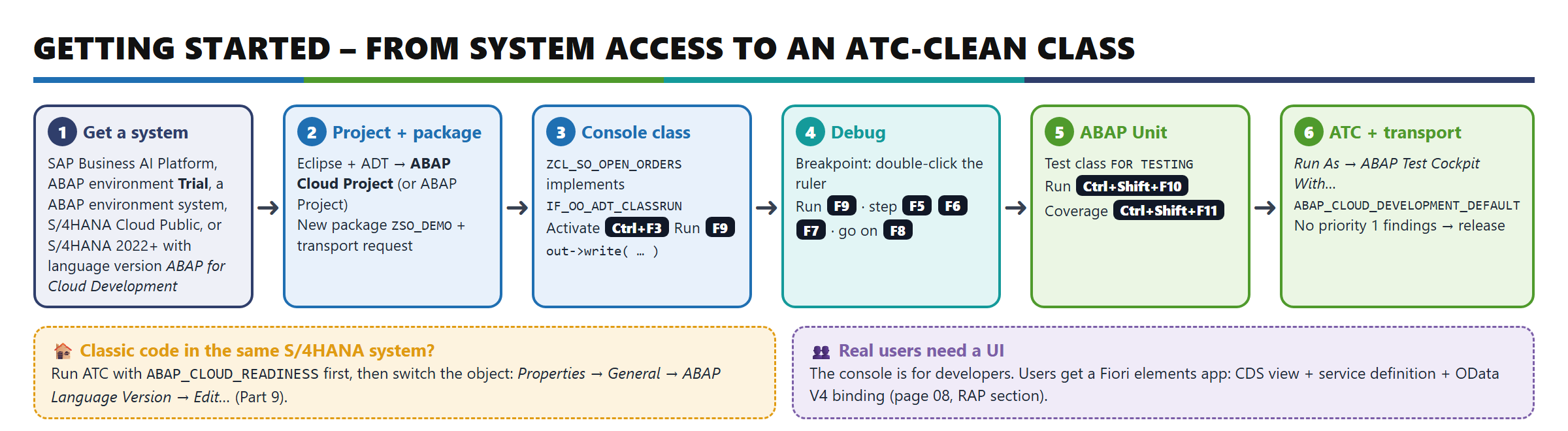
8.1 Get a system
Option | What you get | Note |
|---|---|---|
SAP Business AI Platform, ABAP environment Trial | Free shared system, ABAP Cloud only | Tutorial "Create an SAP Business AI Platform, ABAP environment Trial User" on developers.sap.com; SAP's RAP workshops use it |
SAP Business AI Platform, ABAP environment (customer) | Own system, ABAP Cloud only | Setup: ABAP on BTP › 01, Part 3 |
S/4HANA Cloud Public Edition | Developer extensibility, ABAP Cloud only | Needs a developer tenant and business role |
S/4HANA 2022+ private cloud or on-premise | Both language versions in one system | Create a software component / package for ABAP Cloud, or set the language version per object (Part 1) |
8.2 Create the package and the first class
- Install Eclipse with the ABAP Development Tools (tutorial "Install ADT" on developers.sap.com).
- *File* → *New* → ABAP Cloud Project (BTP / public cloud) or ABAP Project (S/4HANA).
- Right-click the parent package → *New* → *ABAP Package*:
ZSO_DEMO, with a transport request. - Right-click
ZSO_DEMO→ *New* → *ABAP Class*:ZCL_SO_OPEN_ORDERS, interfaceIF_OO_ADT_CLASSRUN. - In a classic S/4HANA system: class *Properties* → *General* → *ABAP Language Version* → *Edit…* → ABAP for Cloud Development (unless the package already enforces it).
- Activate (Ctrl+F3), run as console application (F9). The output appears in the *Console* view.
|
8.3 Debugging
- Set a breakpoint by double-clicking the ruler left of the line number; ADT breakpoints replace the
BREAK-POINTstatement. - Run with F9: the debugger perspective opens at the breakpoint. Step with F5 (into), F6 (over), F7 (return), continue with F8.
- Console classes, RAP handlers called from the Fiori preview and application jobs are all debugged the same way (for RAP see RAP › Quality, Part 2).
8.4 ABAP Unit
Add a test class in the *Test Classes* tab of the class (type test, Ctrl+Space, choose the template), then run it with Ctrl+Shift+F10; Ctrl+Shift+F11 shows coverage.
|
- Released test doubles for database and CDS access:
CL_OSQL_TEST_ENVIRONMENT,CL_CDS_TEST_ENVIRONMENT; for RAP BOsCL_BOTD_TXBUFDBL_BO_TEST_ENVandCL_BOTD_MOCKEMLAPI_BO_TEST_ENV; general doublesCL_ABAP_TESTDOUBLE. - Passing
todayas a parameter instead of reading the date inside the method is what makes the method testable.
8.5 ATC: the check variants
Check variant | Use it for | Note |
|---|---|---|
ABAP_CLOUD_DEVELOPMENT_DEFAULT | Code written in ABAP for Cloud Development | Default quality checks for ABAP Cloud code; often the transport-release check |
ABAP_CLOUD_READINESS | Classic Standard ABAP code you want to move to ABAP Cloud | Reports every statement and object that blocks the switch (Part 9) |
Own variant with Usage of Released APIs (Cloudification Repository) | ECC or S/4HANA systems that analyse custom code | Check attribute = URL of the JSON file, e.g. |
- Run: right-click in the editor → *Run As* → ABAP Test Cockpit With… → enter the variant (type
*and *Browse* to see all variants in your system). Plain *ABAP Test Cockpit* (Ctrl+Shift+F2) uses the system default variant. - Results appear in the *ATC Problems* view; double-click a finding for the explanation.
- ATC can also be started from code with the released class
CL_SATC_API(e.g. in a pipeline). - Common mistake: activating code with warnings and skipping ATC. In most landscapes the transport release runs ATC and blocks on priority 1 findings, so you find out at the worst moment.
Part 9 – Converting classic code to ABAP Cloud: a worked example
A typical small classic report (as it runs on S/4HANA on-premise – in ECC the status GBSTK was read from VBUK, not VBAK): open sales orders of one sales organization with customer name, amount and age, and the user's full name in the header. We run the readiness check, read the findings and convert the report step by step. For a full report with selection screen, ALV and background job, see Clean Core › 02 · Clean-Core Report.
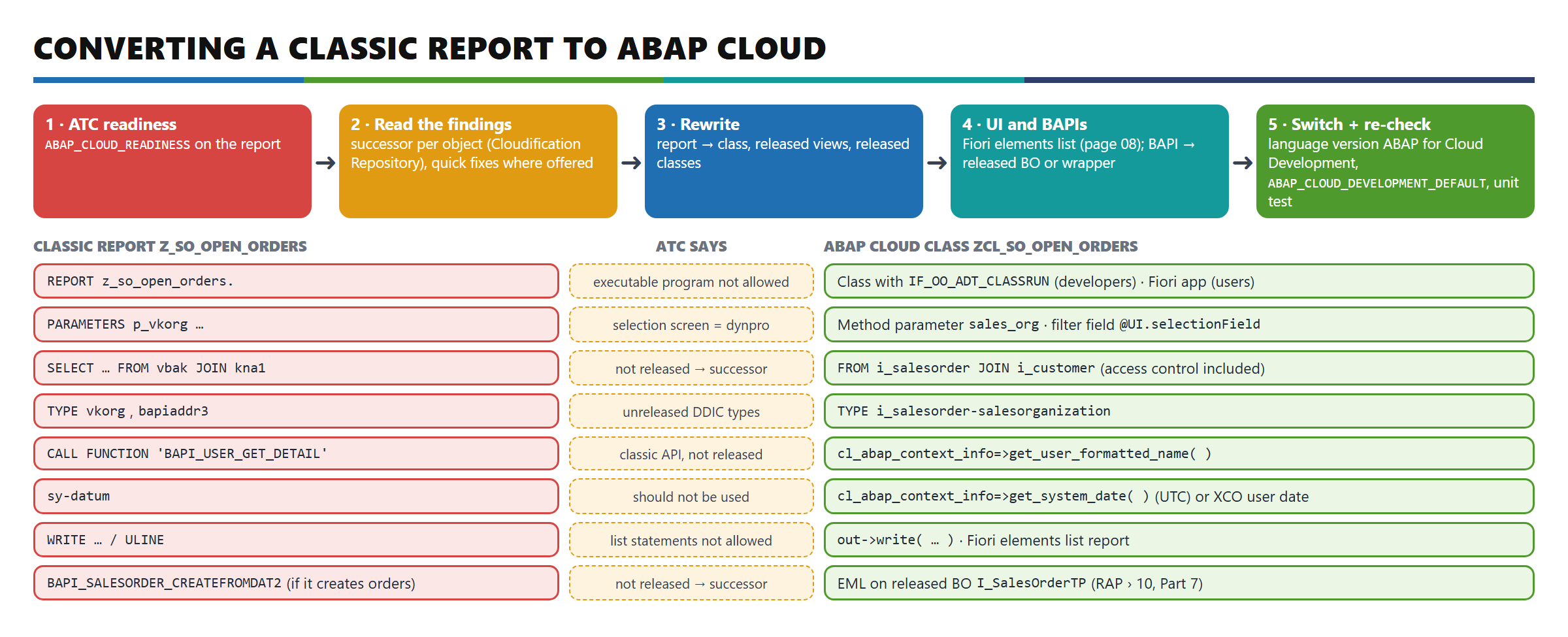
9.1 The classic report
|
9.2 Step 1 – Run ATC with ABAP_CLOUD_READINESS
*Run As* → *ABAP Test Cockpit With…* → ABAP_CLOUD_READINESS. The findings group into a few categories (the exact message texts depend on the release):
Classic (Standard ABAP) | ABAP for Cloud Development | Note |
|---|---|---|
| Global class with | Executable programs are not allowed |
PARAMETERS p_vkorg | Method parameter; in a Fiori app a filter field ( | Selection screens are dynpro technology |
SELECT … FROM vbak / kna1 |
| Not released; repository successors |
| Type from the released view: | Unreleased DDIC types are errors too |
CALL FUNCTION 'BAPI_USER_GET_DETAIL' | cl_abap_context_info=>get_user_formatted_name( ) | The BAPI is a classic API (level B), not released |
sy-datum |
|
|
|
| List statements are not allowed |
- For many findings ADT shows the successor or offers a quick fix (Ctrl+1 on the finding or in the editor); which quick fixes exist depends on your release. Structural changes (report → class, selection screen → parameters or filter bar) are always manual.
9.3 Step 2 – Rewrite as an ABAP Cloud class
|
- Element names as used on Clean Core › 02 (Clean-Core Report) for
I_SalesOrder; confirm them with Ctrl+Space in your release.I_SalesOrderalready returns sales orders only, so thevbtyp = 'C'filter disappears. - Released views come with access controls: in a Fiori app the user sees only the orders SAP's authorization allows, unlike the classic
SELECTon VBAK, which checked nothing. - The date is UTC. If the user's local date matters (e.g. late evening in America), use
xco_cp=>sy->date( xco_cp_time=>time_zone->user ).
9.4 Step 3 – Give users a real UI
The console class is a developer tool. For end users the same selection becomes a CDS view entity on I_SalesOrder with @UI annotations, a service definition and an OData V4 UI binding: a Fiori elements list report with filter bar, variants and Excel export, and no ABAP at all. The complete code is on Clean Core › 02 · Clean-Core Report, Part 2. If the list needs ABAP logic (e.g. the age), use a virtual element or a custom entity (Clean Core › 02, Part 3).
9.5 Step 4 – Replace BAPIs that change data
- If the report also created sales orders with
BAPI_SALESORDER_CREATEFROMDAT2, the Cloudification Repository names the released RAP BOI_SalesOrderTPas successor: create the order with EML. Code: RAP › 11 · Files, Custom Entities & Integration, Part 7. BAPI_SALESORDER_CHANGEis a classic API (level B) without a released successor in the repository file (it is classifiedclassicAPI, remote-enabled): change the order with EMLMODIFY ENTITIES OF I_SalesOrderTP … UPDATEon the fields its BDEF allows, or use a wrapper on private cloud / on-premise (6.4).
9.6 Step 5 – Switch the language version and re-check
- *Properties* → *General* → *ABAP Language Version* → ABAP for Cloud Development. Now the syntax check itself enforces the rules: anything unreleased is an error, no longer just an ATC finding.
- Run ATC with
ABAP_CLOUD_DEVELOPMENT_DEFAULT, fix the rest, add the unit test from 8.4, transport. - Interview tip: "I start with ATC
ABAP_CLOUD_READINESS, fix released-API findings with the Cloudification Repository successors, move UI to Fiori elements, replace BAPIs with released BOs or wrappers, then switch the language version and re-run ATC."
Part 10 – Common mistakes, tips and a one-page cheat sheet
10.1 Common mistakes
- Searching for the table instead of the view. "VBAK is not released" is not a dead end: look up the successor (
I_SalesDocument,I_SalesOrder) in the Cloudification Repository or withI_APIsWithCloudDevSuccessor. - Using
sy-datum/sy-uzeitout of habit. Usecl_abap_context_info(UTC) or XCO with an explicit time zone, and decide which one the business needs. - Forgetting
->valueat the end of an XCO chain, then wondering why a date variable is an object reference. - Typing with unreleased data elements copied from old code (
vkorg,bapiret2). Type against the released view element or a released data element. - Copying a wrapper idea into public cloud. Wrappers need Standard ABAP; SAP Business AI Platform, ABAP environment and S/4HANA Cloud Public Edition have none.
- Building a console class as the user's report. Console output is for developers; users get Fiori.
- Running only the syntax check. ATC finds what the syntax check does not (deprecated APIs, performance, security); run it before every transport.
- Expecting a deprecated API to break. It still works; but new code must use the successor.
10.2 Tips
- Learn the naming of released views:
I_interface views (C1),I_…TPtransactional BO interfaces,C_consumption views (usually not for reuse),R_restricted reuse views. - Keep the Cloudification Repository viewer bookmarked; it answers "what replaces X?" in seconds.
- Use Ctrl+Space after
->in XCO and in released classes instead of searching the web. - Make methods testable: pass dates, users and other context as parameters.
- Read SAP's own examples: SAP-samples/abap-cheat-sheets (19 ABAP for Cloud Development, 22 Released ABAP Classes) and the RAP100 workshop.
10.3 Cheat sheet: I want to …
I want to … | Classic (Standard ABAP) | ABAP for Cloud Development | Note |
|---|---|---|---|
Run code and see output | SE38 report, | Class with | Developers only |
Show a list to users | ALV ( | CDS view + service + Fiori elements | Clean Core › 02 |
Get today's date | sy-datum |
| UTC vs user time zone |
Get the current time | sy-uzeit |
| |
Get the user's full name | BAPI_USER_GET_DETAIL | cl_abap_context_info=>get_user_formatted_name( ) |
|
Read customers | SELECT FROM kna1 | SELECT FROM i_customer | Repository successor |
Read sales documents | SELECT FROM vbak |
| |
Create a sales order | BAPI_SALESORDER_CREATEFROMDAT2 | EML on | RAP › 11 |
Send an e-mail | CL_BCS | CL_BCS_MAIL_MESSAGE | |
Write a log |
|
| |
Get a number | NUMBER_GET_NEXT | cl_numberrange_runtime=>number_get( ) | |
Create a GUID | GUID_CREATE |
| |
Lock an object |
| CL_ABAP_LOCK_OBJECT_FACTORY | RAP locks itself |
Run in background | SM36 job, | Application job ( | Clean Core › 02, Part 4 |
Run in parallel | CALL FUNCTION … STARTING NEW TASK | CL_ABAP_PARALLEL | |
Call an HTTP service | CL_HTTP_CLIENT |
| Communication targets |
Convert to / from JSON | CALL TRANSFORMATION id | xco_cp_json |
|
Read or write Excel | abap2xlsx, OLE | xco_cp_xlsx | |
Count table lines | DESCRIBE TABLE … LINES | lines( itab ) |
|
Assign / get a reference |
|
| Obsolete forms flagged |
Find what replaces X | Where-used, experience | Cloudification Repository, | |
Check old code | Code Inspector / ATC | ATC | |
Check ABAP Cloud code | ATC default variant | ATC | |
Release my own API | – | ADT *API State* tab, | Wrapper pattern |
Part 11 – Interview questions
Q1. What is ABAP for Cloud Development, and how is it different from ABAP Cloud?
ABAP for Cloud Development is an ABAP language version: a restricted language scope plus access only to released APIs, checked by the syntax check. ABAP Cloud is the development model built on it: this language version, released APIs, ADT as the only tool, RAP for transactional apps and CDS for the data model. Standard ABAP is the unrestricted language version used by classic code.
Q2. Explain release contracts C0, C1 and C2.
A release contract is SAP's stability promise for an object. C0 keeps extension points stable, so you can extend the object (fields, behavior). C1 keeps it stable for system-internal use, with the visibilities *Use in Cloud Development* and *Use in Key User Apps*; that is what ABAP Cloud code needs. C2 keeps a remote API (OData/SOAP) stable for external callers. C3 covers configuration content, C4 use in AMDP. You see them in ADT under *Properties* → *API State*.
Q3. How do you find out whether an SAP object is released, and what replaces it if not?
In ADT: the *Released Objects* tree and the *API State* tab. For successors: the Cloudification Repository on GitHub and its viewer, the view I_APIsWithCloudDevSuccessor, and api.sap.com. For existing code, ATC with ABAP_CLOUD_READINESS or the check *Usage of Released APIs* lists every unreleased object with its successor. Example: VBAK → I_SalesDocument, KNA1 → I_Customer.
Q4. What does "deprecated" mean for a released API?
It is still released and still works, but SAP has named a successor and will not develop the old one further. Existing code keeps running; new code uses the successor, and old code is moved in a planned way. ATC reports the use of deprecated APIs.
Q5. You need SAP functionality that has no released API. What do you do?
First search again: released views, BO interfaces (I_…TP), XCO, released classes. Then request the release through SAP Customer Influence. On S/4HANA private cloud or on-premise, build a wrapper in a Standard ABAP package around a classic API and release it with C1 for cloud development (clean core level B), so the ABAP Cloud code calls only the wrapper. In public cloud there is no Standard ABAP, so the options are key user tools, side-by-side on BTP with remote APIs, or another design.
Q6. What is XCO? Give three examples.
The Extension Components library, SAP's released general-purpose library for ABAP Cloud (classes XCO_CP*). Examples: xco_cp=>sy->date( xco_cp_time=>time_zone->user ) for the user's date, xco_cp_json=>data->from_abap( … )->to_string( ) for JSON, xco_cp_xlsx to read and write Excel, xco_cp_abap_repository for repository information and xco_cp_generation to generate objects.
Q7. Why should you not use sy-datum in ABAP Cloud, and what do you use instead?
sy-datum is the application server's local date, which has no meaning for a cloud system that serves users in many time zones; SAP lists it among the sy fields that should not be used. Use cl_abap_context_info=>get_system_date( ) for the UTC date or xco_cp=>sy->date( xco_cp_time=>time_zone->user ) for the user's date. Fields such as sy-subrc, sy-tabix and sy-uname stay allowed.
Q8. Which ATC check variants do you use and when?
ABAP_CLOUD_READINESS on classic code to see what blocks a move to ABAP Cloud; ABAP_CLOUD_DEVELOPMENT_DEFAULT on code written in ABAP for Cloud Development. In ECC or S/4HANA systems an own variant with the check *Usage of Released APIs (Cloudification Repository)*, pointed at SAP's JSON file on GitHub, analyses custom code against the current list of released APIs.
Q9. How do you run and debug code without SE38?
A global class implementing IF_OO_ADT_CLASSRUN runs with F9 in ADT and writes to the console with out->write( ). Breakpoints are set in the ADT ruler, and the Eclipse debugger opens on F9. Tests are ABAP Unit classes run with Ctrl+Shift+F10. For end users the output is a Fiori app, not a console.
Q10. Scenario: a classic report reads VBAK and KNA1, prints with WRITE and calls BAPI_USER_GET_DETAIL. Walk through the conversion.
Run ATC ABAP_CLOUD_READINESS. Replace the report with a class (IF_OO_ADT_CLASSRUN) or, for users, a CDS view on I_SalesOrder with a Fiori elements list. Replace VBAK/KNA1 with I_SalesOrder and I_Customer, sy-datum with cl_abap_context_info=>get_system_date( ), the BAPI with get_user_formatted_name( ), WRITE with out->write( ). Type fields from the released views. Switch the language version to ABAP for Cloud Development, run ABAP_CLOUD_DEVELOPMENT_DEFAULT, add a unit test, transport.
Q11. Scenario: a custom program creates sales orders with BAPI_SALESORDER_CREATEFROMDAT2. The customer moves to S/4HANA Cloud Public Edition. What changes?
The BAPI is not released, and public cloud has no Standard ABAP for a wrapper. The Cloudification Repository names the released RAP BO I_SalesOrderTP as successor, so the program becomes ABAP Cloud code that creates the order with EML (MODIFY ENTITIES OF i_salesordertp … COMMIT ENTITIES), with the BO's own validations and late numbering (CONVERT KEY to get the final number). If the call comes from outside, the released remote API (C2) is used instead.
Q12. Scenario: your team lead asks whether a utility class written last year can be used from new ABAP Cloud code in the same S/4HANA 2023 system. How do you decide?
Check its language version and dependencies. If it is Standard ABAP and uses only released APIs, switch it to ABAP for Cloud Development and re-run ATC. If it must stay Standard ABAP because it calls unreleased objects, treat it as a wrapper: check that it wraps classic APIs only (level B), give it a clean interface, release it with C1 *Use in Cloud Development* in ADT or with CL_ABAP_API_STATE, and document it so it can be replaced when SAP releases a successor.
🏠 Start Here · ◀ 01 · ABAP Environment · 03 · Interview Questions ▶ · Sections: CORE ABAP | OOPS ABAP | ABAP on HANA | Clean Core | RAP | ABAP Points | SAP Fiori | SAPUI5 | Mobile Development (MDK) | BTP Foundations | BTP Development | CAP | SAP Build | ABAP on BTP | Integration Suite | SAP Business AI | SAP BASIS | Security | SAP SDLC
Functional: FICO ABAP | TRM ABAP | VIM | SAP BIS | SD ABAP | MM ABAP | PP ABAP | QM ABAP | PM ABAP | PS ABAP | EWM | TM ABAP | GTM ABAP | EHS ABAP | HR ABAP | BW | SAP Datasphere | SAP Business Data Cloud | SAP MDG | SAP Analytics Cloud | SAP Ariba | SAP CX | SAP IBP