What SAP HANA is, how it stores data, and why it changes the way we write ABAP: move the calculation to the data, not the data to the calculation. This page is the foundation for pages 04 ABAP SQL, 05 CDS, 06 AMDP and the RAP section.
Part 1 – SAP HANA in one page
SAP HANA is SAP's in-memory, column-oriented database platform. The name was once expanded as "High Performance Analytic Appliance"; today SAP uses HANA simply as a product name. HANA started as an appliance = certified hardware + software sold together.
1.1 Evolution of SAP ERP
Year | Release | What changed |
|---|---|---|
1973 | R/1 | Mainframe / terminal architecture |
1979 | R/2 | More process coverage, new database technology |
1992 | R/3 | Client/server (3 tiers), graphical user interface (SAP GUI) |
1999–2004 | mySAP ERP → ECC | R/3 renamed ECC; web integration; SRM, SCM, PLM, CRM next to ERP |
2009 | Business Suite 7 | ERP bundled with SRM, SCM, PLM, CRM |
2013 | Suite on HANA | Same ECC, but HANA as the primary database |
2015 → | S/4HANA | New product: HANA only, simplified data model, Fiori UX. "S" = simple, "4" = 4th generation |
1.2 Why in-memory: hardware + software innovations
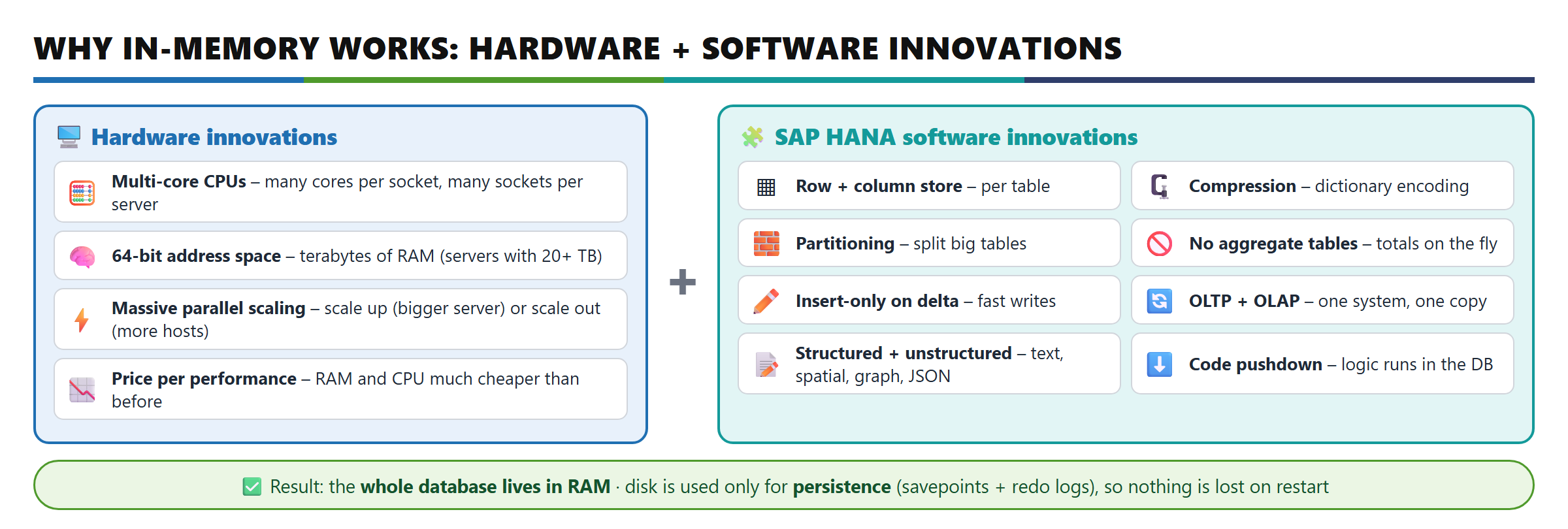
- Hardware: many-core CPUs, 64-bit address space (servers with 20+ TB RAM today), massive parallel scaling, sharp drop in price per performance.
- Landscape change: classic ECC = 2 TB on disk + ~100 GB RAM cache. HANA = the whole 2 TB in RAM, with disk only for persistence (savepoints + logs) so nothing is lost on restart.
- Software: row and column store, compression, partitioning, no aggregate tables, insert-only on delta, OLTP + OLAP in one system, structured + unstructured data, code pushdown. Each is explained in Part 2.
1.3 HANA vs ABAP on HANA vs Suite on HANA vs S/4HANA
Term | What it is |
|---|---|
SAP HANA | A database (platform). Knows nothing about ABAP. |
ABAP on HANA | A technology / skill: an ABAP system running on HANA and using its features (code pushdown with ABAP SQL, CDS, AMDP). |
BW on HANA | SAP BW running on HANA (2011/12, project "Orange") – the first big HANA product. |
Suite on HANA | A product: ECC / Business Suite with HANA as primary DB. Same data model as ECC. |
S/4HANA | A new product: runs only on HANA, simplified data model (new and removed tables), Fiori UX. |
- S/4HANA features in one line each: HANA only (in-memory); row + column store; Fiori UX on desktop, tablet and phone; solutions for every line of business (finance, sourcing & procurement, manufacturing, supply chain, sales, service, asset management, R&D, HR, marketing); cloud or on-premise; simplified data model (MATDOC, ACDOCA).
1.4 HANA as primary or secondary database
Scenario | Meaning | Code pushdown options (then) |
|---|---|---|
Primary DB | ECC/BW/S/4HANA runs directly on HANA | ABAP SQL, CDS, AMDP (legacy: external views) |
Secondary DB (side-car / accelerator) | ECC stays on Oracle etc.; selected tables replicated to HANA (SLT) and read over a secondary DB connection | ABAP SQL with |
Data mart | Data loaded into HANA (SLT, BODS, DXC, SDA) for reporting with BO, Lumira, UI5, Excel | No ABAP involved |
Historical context: in S/4HANA, HANA is always the primary DB, so today you mostly meet the first row.
1.5 HANA roles (personas)
- HANA administrator – installation, upgrades, users and authorizations, monitoring, backup, system health.
- HANA modeller / consultant – loads data from other systems, builds information models, reporting.
- Native HANA developer – no ABAP; builds HANA-native apps (once XS / XSJS / HDBDD, now HDI and SAP BTP / CAP).
- ABAP on HANA developer – you: makes custom code HANA-ready, speeds it up with code pushdown, builds CDS, AMDP, RAP and Fiori apps.
Part 2 – How HANA stores data
2.1 In-memory
All data is processed in RAM instead of being read from disk for every query. Disk is used for persistence only. Combined with columns and compression, HANA can scan millions of rows per second per core.
2.2 Row store vs column store
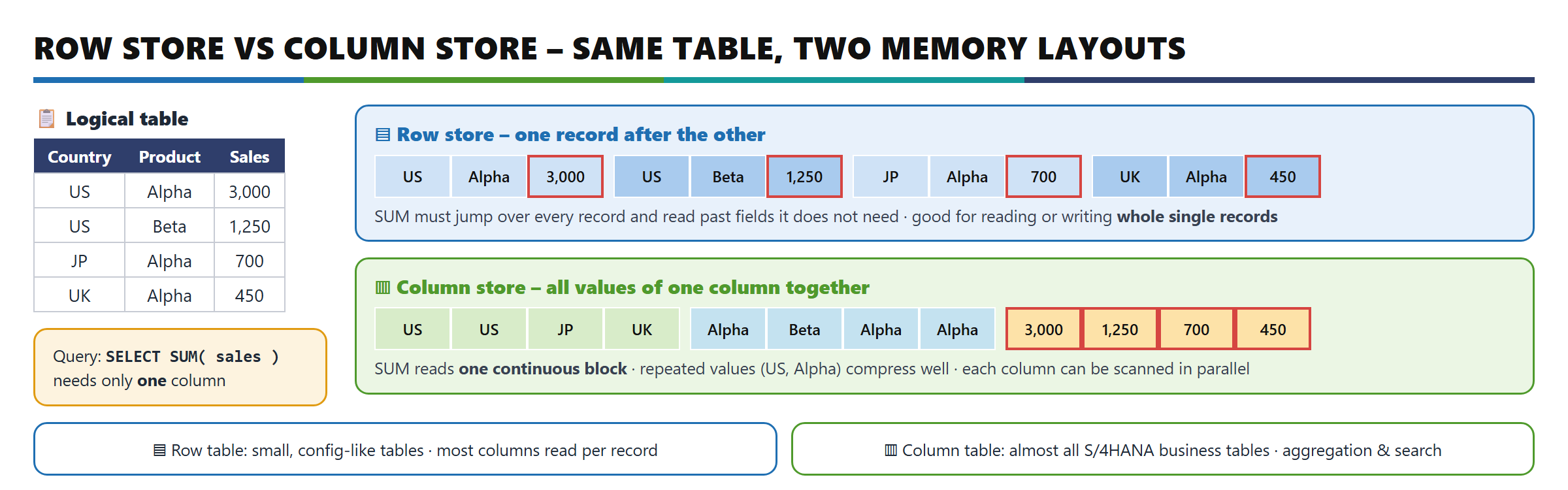
A row store keeps all fields of one record together. A column store keeps all values of one column together. HANA supports both per table; almost all business tables are column tables.
Use a ROW table when… | Use a COLUMN table when… |
|---|---|
the table has mostly distinct values (low compression) | operations run on many rows of a few columns |
most or all columns are read for each record | the table has many columns, most of them rarely used |
no aggregation and no search on non-key columns | you aggregate (SUM, COUNT…) and search a lot |
the table is small, or fully buffered / config-like | analytics and reporting – the normal case in S/4HANA |
- Column store advantages: high compression (each distinct value stored once), secondary indexes rarely needed (every column acts like an index), fast aggregation, easy parallel processing per column.
- Column store cost: single-row writes are more expensive – solved by the delta store (2.3).
2.3 Compression, delta store and delta merge
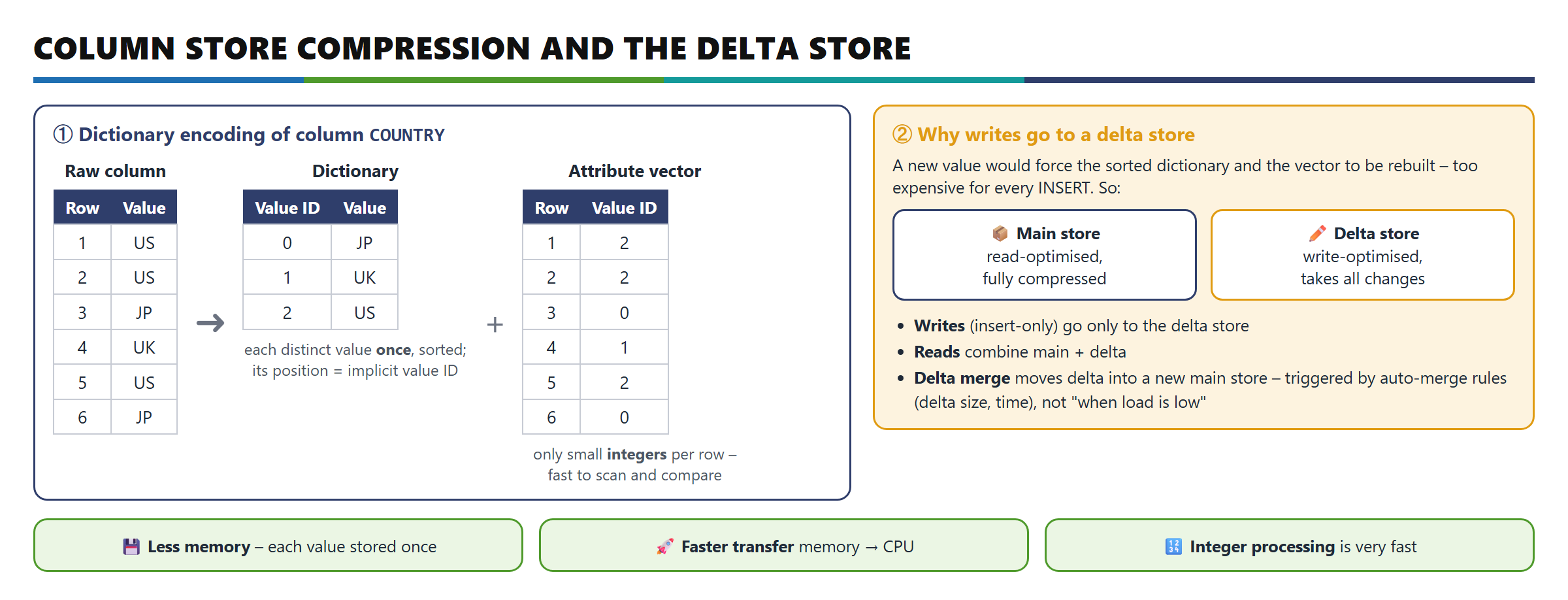
- Dictionary encoding: each distinct value is stored once in a sorted dictionary; its position is the implicit value ID. The attribute vector stores one small integer (value ID) per row.
- Benefits: less memory, faster transfer from memory to CPU, very fast integer comparisons.
- Insert-only approach: changes are written as new entries to the delta store (also called the differential buffer; write-optimised); reads combine main + delta.
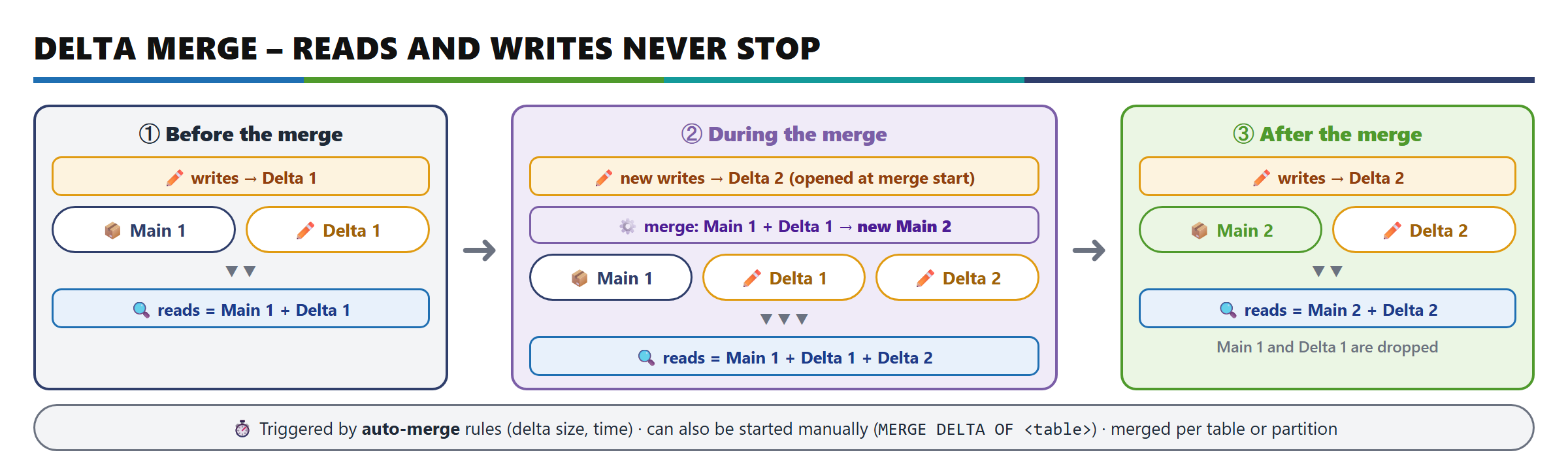
- Delta merge: periodically builds a new main store from main + delta. Triggered by auto-merge rules (delta size, time). Reads and writes continue during the merge:
2.4 Table partitioning
Splits one column table into smaller parts (each part holds a different set of rows), optionally spread over several hosts. Defined with DDL (CREATE TABLE … PARTITION BY … / ALTER TABLE … PARTITION BY …), not DML.
- Algorithms: hash, range, round-robin; single-level or multi-level (e.g. hash, then range).
- Advantages: partition pruning (only relevant parts are read), load balancing across hosts, parallel query processing, faster delta merge per partition, and the size limit – a table or partition holds max. 2 billion rows.
2.5 OLTP and OLAP in one system
Classic landscape: transactions in ECC (OLTP), analytics in a separate BW system (OLAP) fed by nightly ETL (SLT, BODS, DXC) – two copies of the data, reports never real-time. HANA can do both on the same data.
OLTP (transactional) | OLAP (analytical) | |
|---|---|---|
Data | Current (6–18 months) | Historic (2–7 years) |
Purpose | Day-to-day operations | Decision making |
Volume | Smaller | Huge |
Operations | Read / insert / update / delete | Mostly read |
Queries | Simple, few rows | Complex, aggregate many rows |
Classic storage | Row store | Column store |
2.6 No aggregate tables
Because HANA aggregates on the fly, S/4HANA dropped many redundant total and index tables. Example: material documents MKPF + MSEG → MATDOC; stock tables such as MARD are no longer filled but still readable through CDS compatibility views (e.g. DDL source NSDM_DDL_MARD – reads on MARD are redirected). Details on page 02 Migration (simplification items).
Part 3 – HANA architecture
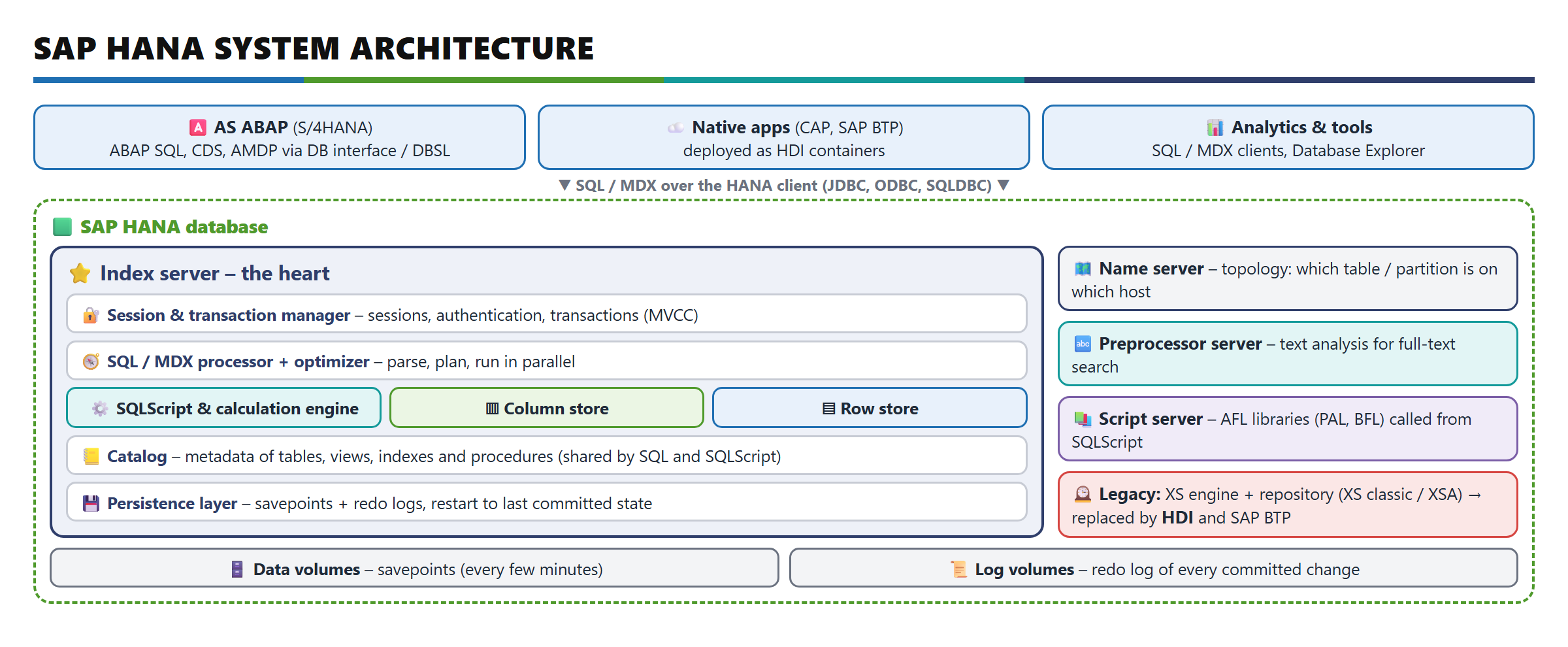
Component | Job |
|---|---|
Index server | The heart: holds the in-memory row and column stores and the engines; processes SQL and MDX statements in authenticated sessions and transactions. |
SQL / MDX processor, calculation engine | Parse, optimise and execute queries, SQLScript and calculation views – in parallel. |
Persistence layer | Durability and atomicity: savepoints + redo logs on disk; after a restart the DB returns to the last committed state. |
Name server | Knows the topology of the system (which table or partition lives on which host). |
Preprocessor server | Text analysis for full-text search. |
Script server / libraries | AFL (Application Function Libraries), e.g. BFL (Business Function Library) and PAL (Predictive Analysis Library), callable from SQLScript. |
XS engine (legacy) | Small application server inside HANA (XS classic, then XS Advanced) – replaced by SAP BTP / HANA Cloud with HDI. |
- HANA is a platform, not only a database: besides the index server it has the script server (AFL), a JSON document store, and integration services (SDI, SDA, SLT) for loading and federating data.
- SQLScript is HANA's own procedural extension of SQL. It is built on side-effect-free, set-based statements, so HANA can parallelise it. Taught on page 06 AMDP & SQLScript.
- SQL and SQLScript share one catalog (metadata of tables, views, indexes, procedures).
- Readers never block writers: HANA uses MVCC (multi-version concurrency control) – each statement sees a consistent snapshot.
- Legacy – know it for interviews: HANA Studio (Eclipse tool, now replaced by ADT for ABAP and SAP HANA Database Explorer / Business Application Studio for native work), XS classic, HANA Web IDE, R integration.
Part 4 – ABAP on HANA and code pushdown
Classic databases could not process large volumes fast, so ABAP read the rows to the application server and did the work there. That protected the DB but overloaded the network and the app server. With HANA we turn it around: data-intensive work (calculations, aggregation, joins, search) runs in HANA, and only the result travels to AS ABAP. This is code pushdown, also called the code-to-data paradigm.
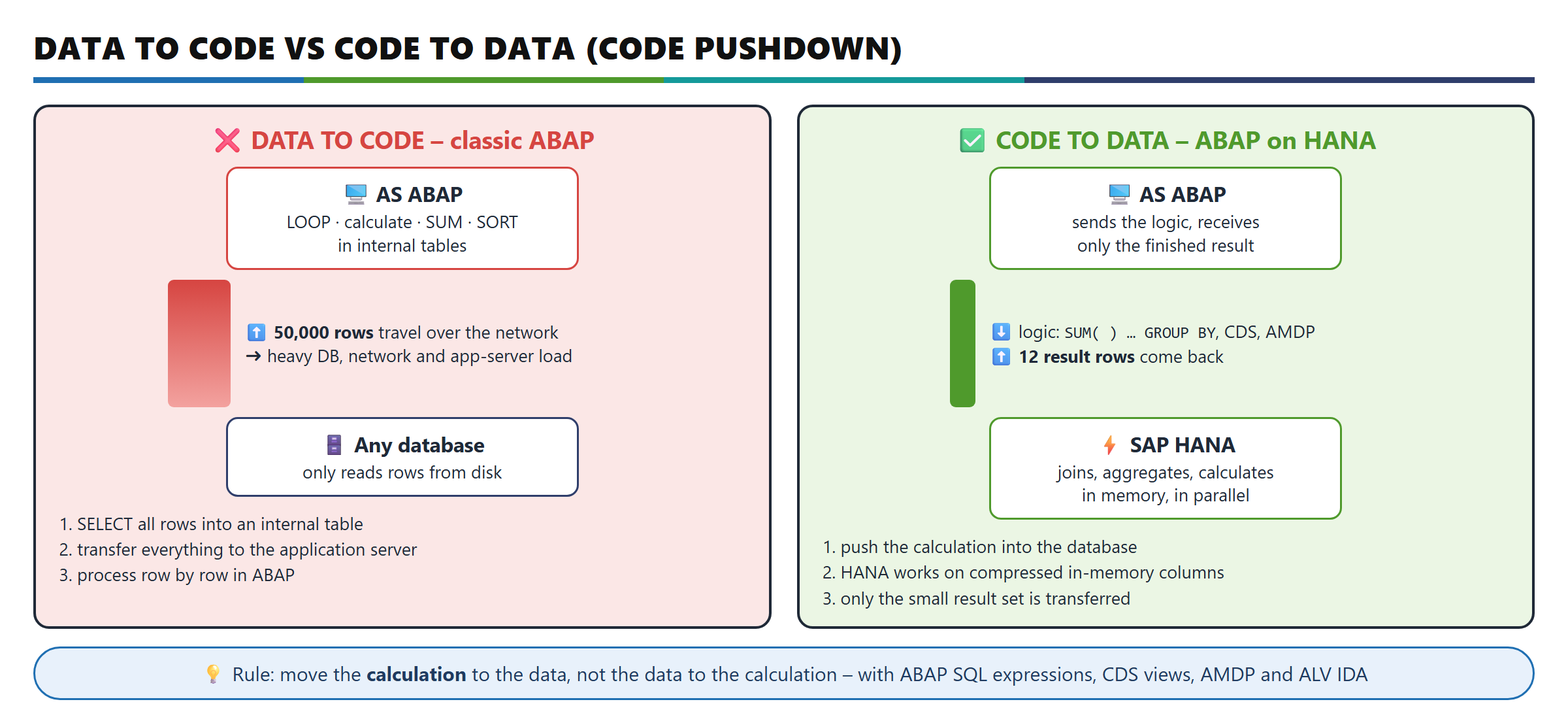
4.1 Example – the same report both ways
|
4.2 Three levels of optimisation
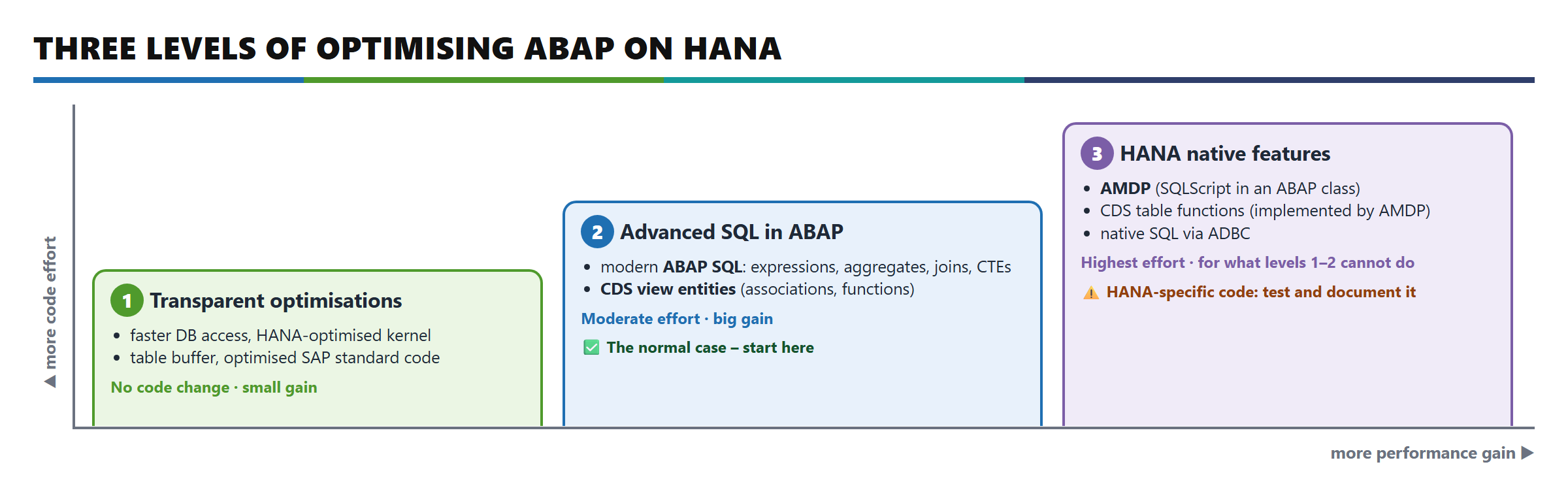
Level | What you do | Effort / gain |
|---|---|---|
1 Transparent optimisations | Nothing – faster DB access, table buffer, HANA-optimised kernel and SAP standard | No code change, small gain |
2 Advanced SQL in ABAP | Modern ABAP SQL (expressions, aggregates, joins, CTEs) and CDS views | Moderate effort, big gain – the normal case |
3 HANA native features | AMDP (SQLScript), native SQL | Most complex, for what levels 1–2 cannot do |
The new ABAP SQL syntax came with AS ABAP 7.40 SP05/SP08 (shipped with ERP EHP7) and works on every database, not only HANA. Since 7.53 Open SQL is called ABAP SQL.
Part 5 – Bottom-up vs top-down
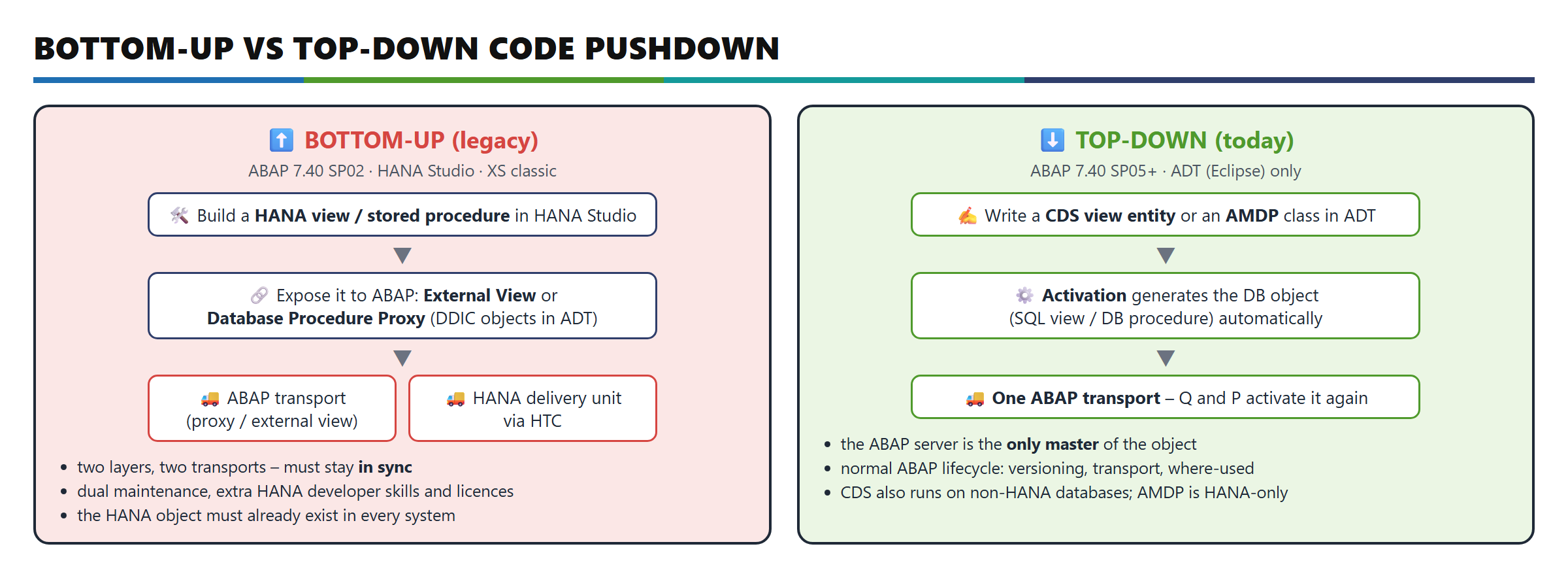
Bottom-up (legacy) | Top-down (today) | |
|---|---|---|
Since | AS ABAP 7.40 SP02 | AS ABAP 7.40 SP05 |
Build in | HANA Studio (HANA view / stored procedure) + ADT proxy | ADT only (CDS view entity, AMDP) |
ABAP sees it through | External view (for a HANA view), DB procedure proxy (for a procedure) | The CDS entity or the AMDP method directly |
Transport | ABAP request and HANA delivery unit via HTC – must be in sync | One ABAP transport |
Master | Two masters (ABAP + HANA) | ABAP server only |
5.1 Why bottom-up failed (challenges)
Area | Challenge |
|---|---|
Dual maintenance | Development in both the ABAP layer and the DB layer, kept in sync by hand |
Lifecycle management | Separate transports (ABAP request + delivery unit / HTC); the HANA object must exist first |
Security | Users and developer authorizations to set up in both layers |
Licence | Extra HANA developer / DB licences |
Change management | Developers and users must learn two worlds; long adoption time |
5.2 Legacy – know it for interviews
- External view (view proxy, 7.40 SP02, ADT only): a DDIC view that points to a HANA view so ABAP SQL can read it. Read-only, no info about the underlying tables. Replaced by CDS views.
- Database procedure proxy: a DDIC object that lets ABAP call a HANA repository procedure with
CALL DATABASE PROCEDURE. Replaced by AMDP (see page 06). - ADBC / native SQL (
CL_SQL_CONNECTION,EXEC SQL): sends DB-specific SQL past the ABAP DB interface – no syntax check, no table buffer, no automatic client handling, not released for ABAP Cloud. Details on the page 04 ABAP SQL, ADBC & ALV IDA.
5.3 HANA data types and ABAP Dictionary types
Needed whenever ABAP reads a native HANA object (proxy, ADBC, AMDP): every HANA column type must map to a DDIC type.
HANA SQL type | ABAP Dictionary types |
|---|---|
TINYINT / SMALLINT | INT1, INT2 |
INTEGER | INT4 (ABAP type |
BIGINT | INT8 |
DECIMAL(p,s) | DEC, CURR, QUAN, DF16_DEC / DF34_DEC (decimal floating point) – ABAP type |
SMALLDECIMAL | DEC |
DOUBLE / FLOAT | FLTP |
NVARCHAR(n) | CHAR, NUMC, SSTRING, CLNT, DATS, TIMS, UNIT, CUKY (ABAP stores dates/times as NVARCHAR) |
VARBINARY | RAW |
BLOB / NCLOB | RAWSTRING / STRING |
- Pitfall: plain VARCHAR columns cannot be mapped to ABAP types – the proxy fails with "Database type VARCHAR(20,0) cannot be mapped onto ABAP type". Use NVARCHAR in native tables that ABAP must read.
Part 6 – Native HANA SQL objects (overview)
As an ABAP developer you create tables and views through DDIC / CDS, not by hand. Still, interviews ask about the native objects, and AMDP code works with them. Procedures, functions, cursors and arrays are taught on page 06 AMDP & SQLScript.
6.1 Schema, catalog, content
Term | Meaning |
|---|---|
Schema | Mandatory container for runtime DB objects (tables, views, procedures). Every user gets a schema with his name. System schemas: |
Catalog | All schemas = all runtime objects of the database. |
Content (legacy XS repository) | All packages with design-time objects; activation generated the runtime object (into |
Same idea in ABAP: a DDIC table in a package is the design-time object; activation creates the runtime table in the database.
6.2 Object types at a glance
Object | Purpose | ABAP world equivalent |
|---|---|---|
Table (row / column) | Stores data | DDIC table |
Constraint | PRIMARY KEY, UNIQUE, NOT NULL, FOREIGN KEY | DDIC key fields; foreign keys are only checked on screens |
View | Saved SELECT: hides complexity (projection, selection, joins), adds security | CDS view entity |
Index | Speeds up search; created automatically for the primary key | DDIC secondary index |
Sequence | Generates unique numbers | Number range object (SNRO, |
Trigger | Runs SQL automatically before/after INSERT, UPDATE, DELETE | None (use RAP determinations, BAdIs) |
Synonym | Alias name for an object in another schema | – |
Column view | Read-only runtime object of an information view (in | Generated SQL view of a CDS entity |
Procedure / function | SQLScript containers | AMDP (page 06) |
6.3 Tables and constraints
|
- Always write
CREATE COLUMN TABLEorCREATE ROW TABLEexplicitly – the default of plainCREATE TABLEdepends on the release (row store in HANA 1.0). - A foreign key links a child column to the primary key (or a unique key) of a parent table – same data type, the name may differ – so the database enforces referential integrity.
- ON DELETE CASCADE: deleting a DEPT row also deletes its EMP rows. RESTRICT (the default): the parent cannot be deleted while child rows exist. Inserting a child with an unknown parent always fails.
- Adding a primary key or foreign key later fails if existing data violates it (duplicates, orphans) – clean up first.
ALTER TABLE … DROP CONSTRAINT <name>removes only that constraint;ALTER TABLE … DROP PRIMARY KEYremoves the key (uniqueness and NOT NULL).
INSERT vs UPSERT
|
6.4 Views
|
- A view stores no data; it runs its SELECT at read time. Uses: projection (fewer columns), selection (fewer rows), joins, hiding table and column names.
- Pitfalls seen in practice: a missing comma (
"SALARY" "DNAME") silently makes DNAME an alias of SALARY; an unqualified column that exists in both tables raises an "ambiguous column" error – prefix it (d."DEPTNO").
6.5 Indexes
|
- A unique index is created automatically for every primary key.
BTREEandCPBTREE(compressed prefix B-tree) are row-store index types; column tables use inverted indexes. Without a type, a row table gets CPBTREE for strings, decimals, multi-column or non-unique keys, and BTREE otherwise (e.g. a unique integer column). On the column store, extra secondary indexes are rarely needed – S/4HANA even removed many of them.
6.6 Sequences
|
- A failed INSERT still consumes the number – sequences can have gaps. In ABAP applications use number range objects, not DB sequences.
6.7 Triggers
Event-based object that runs SQL before or after INSERT / UPDATE / DELETE, for each row or statement. Created only with SQL. Uses: audit logs, extra integrity checks.
|
- Do not put a primary key on (user, timestamp) in an audit table – a multi-row INSERT gives every row the same
CURRENT_TIMESTAMPand collides. - In ABAP development you never create triggers on SAP tables; logic belongs in ABAP (RAP, BAdIs).
Part 7 – HANA modelling (information views)
Information models (HANA views) combine tables graphically so that people with domain knowledge but little SQL can build reports; the logic runs in HANA (code-to-data by design). In S/4HANA ABAP development, this role is taken by ABAP CDS – learn modelling for the concepts and for interviews.
7.1 Data and modelling terms
Term | Meaning | Examples |
|---|---|---|
Organisational data | Structure of the company – changes rarely | Company code, plant, sales org, cost center |
Master data | Long-lived business objects – changes seldom | Material, customer, vendor, employee |
Transaction data | Business events – changes all the time | Sales order, PO, invoice, journal entry |
Dimension | Describes "who / what / when" | Product, customer, time |
Measure (KPI) | A number you aggregate | Revenue, quantity, cost, hours |
Fact table | Transaction table holding the measures | Sales order items |
Star schema | One fact table + several dimension tables | Sales items + product + customer + time |
Galaxy schema | Several fact tables sharing dimensions (fact constellation) | Sales + purchasing sharing product |
7.2 Types of information views
View type | Purpose | Status |
|---|---|---|
Calculation view (graphical) | Flexible model on tables and other calc views: joins, unions, aggregation, calculated columns, star joins. Types: dimension / cube / cube with star join | Current – the only one to use |
Calculation view (scripted) | SQLScript inside a view | Deprecated → use table functions |
Attribute view | Master data (dimension); join engine; needs a key column | Deprecated (HANA 1.0 SPS10), gone in HDI |
Analytic view | Star schema: fact = transaction data joined with attribute views (dimensions); aggregates on the fly | Deprecated (HANA 1.0 SPS10), gone in HDI |
"Deprecated" = no new development by SAP and no guaranteed fixes. Activated views become column views in schema _SYS_BIC; ABAP SQL cannot read them directly.
7.3 Join types in modelling
Join | Result |
|---|---|
Inner | Only rows with a match on both sides (non-matching rows are dropped – no NULLs) |
Left outer | All left rows + matches from the right; missing right values are NULL |
Right outer | All right rows + matches from the left |
Full outer | All rows from both sides, matched or not |
Referential | Like inner, but assumes referential integrity – HANA may skip the join if no right column is read |
Text | Joins a text table and picks the user's logon language via the language column |
Temporal | Matches a date against valid-from / valid-to intervals (time-dependent data) |
Spatial | Joins on geographic coordinates |
Star join | In a cube calc view: joins one fact source with several dimension calc views |
7.4 Consuming HANA models in ABAP – history
Release | Way | Status |
|---|---|---|
7.40 < SP02 (side-car) | ADBC – native SQL on the column view | Legacy |
7.40 SP02 | External view (view proxy) | Legacy |
7.40 SP05+ | ABAP CDS views (top-down) – no HANA view needed | Current |
- Limits of information views: no debugger (only activation logs), no control flow (IF, loops), one result per query, hard to decompose complex logic – reasons why AMDP and CDS took over.
- Legacy – HANA Studio perspectives: Development (native objects), Modeler (attribute/analytic/calc views), ABAP (ABAP objects, CDS, AMDP – now plain ADT), Debugger (procedures).
Part 8 – The code pushdown toolbox
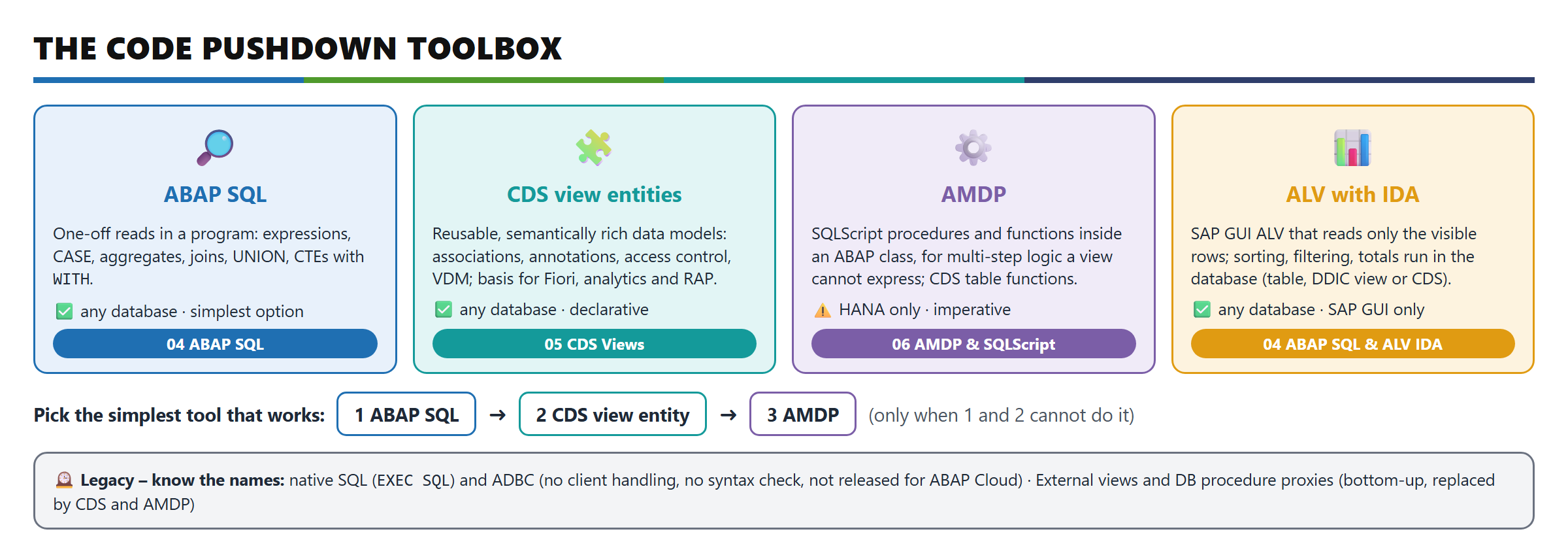
Technique | Use it for | Learn it on |
|---|---|---|
ABAP SQL (formerly Open SQL) | Reads inside one program: expressions, CASE, aggregates, joins, UNION, CTEs | 04 ABAP SQL, ADBC & ALV IDA |
CDS view entities | Reusable data models with semantics: associations, annotations, access control, VDM; basis for Fiori, analytics and RAP | 05 CDS Views |
AMDP | Multi-step SQLScript logic a view cannot express; CDS table functions | 06 AMDP & SQLScript |
ALV with IDA | SAP GUI lists on big tables: only visible rows are read, sort/filter/totals run in the DB | 04 ABAP SQL, ADBC & ALV IDA |
RAP | Transactional Fiori apps and APIs on top of CDS | RAP section |
SAP's rule of thumb: use the simplest technique that solves the problem – ABAP SQL first, then CDS, and AMDP only when the first two cannot do it. ALV IDA in three lines:
|
- IDA works on any database (optimised for HANA), since 7.40 SP05, and only in SAP GUI. In the Fiori world, Fiori elements on CDS / RAP plays this role.
Part 9 – Interview questions
What is ABAP on HANA, and how is it different from SAP HANA?
SAP HANA is an in-memory database. ABAP on HANA is the technology / skill of running ABAP on HANA and using its strengths – mainly code pushdown with ABAP SQL, CDS and AMDP. ("HANA vs ABAP" compares a database with a programming language.)
Row store vs column store – when do you use which?
Column store for almost everything: big tables, aggregation, search, analytics; it compresses well and needs few indexes. Row store only for small tables that are always read as whole records (config, buffers).
How does HANA compress data, and what is the delta merge?
Dictionary encoding: each distinct value stored once in a sorted dictionary, rows store integer value IDs. Because that makes writes expensive, writes go to a write-optimised delta store; the delta merge periodically (auto-merge rules) rebuilds the compressed main store from main + delta.
What is code pushdown (code-to-data)?
Doing data-intensive work – filtering, joins, aggregation, calculations – inside the database and sending only the result to ABAP, instead of reading all rows and looping in ABAP. Tools: ABAP SQL, CDS, AMDP, ALV IDA.
How can you optimise the performance of ABAP on HANA applications?
Find the hot spots with SQLM / SWLT / ST05 (page 02), then push down: lean ABAP SQL (field lists, WHERE, aggregates, joins instead of nested SELECTs), CDS views for reusable models, AMDP for complex logic.
Bottom-up vs top-down approach?
Bottom-up (7.40 SP02): build HANA views/procedures in HANA Studio, expose them with external views or DB procedure proxies, transport ABAP and HANA parts separately. Top-down (7.40 SP05+): write CDS views and AMDPs in ADT; activation creates the DB objects; one ABAP transport. Top-down replaced bottom-up.
What is table partitioning and why use it?
Splitting a column table into parts by hash, range or round-robin (DDL PARTITION BY). Gives partition pruning, parallelism, load balancing over hosts, faster delta merges, and gets around the 2-billion-rows limit.
Attribute, analytic and calculation views?
Attribute = master data, analytic = star schema of facts + dimensions, calculation = flexible model on top. Attribute and analytic views (and scripted calc views) are deprecated; only graphical calculation views remain, and in S/4HANA ABAP development CDS views take this role.
When a CDS view is activated, which HANA view is created? Do I transport it?
None of the HANA modelling types – activation creates an ordinary SQL view in the database. You transport only the CDS source; activation in Q and P creates the DB view again there.
HANA CDS vs ABAP CDS?
Same idea, different worlds. ABAP CDS lives in the ABAP system, is DB-independent and used in S/4HANA. HANA CDS (.hdbdd, XS classic) was for native HANA developers without ABAP and is deprecated (replaced by HDI / CAP CDS).
INSERT vs UPSERT; ON DELETE CASCADE vs RESTRICT?
INSERT fails on an existing key; UPSERT inserts or updates (WITH PRIMARY KEY). CASCADE deletes the child rows with the parent; RESTRICT (default) blocks deleting a parent that still has children.
Abbreviations to know
IM = information model (HANA view) · HTC = HANA Transport Container (moved delivery units) · View proxy = external view (7.40 SP02) · UDF = user-defined function (scalar / table) · ADT = ABAP Development Tools · AMDP = ABAP Managed Database Procedure · MVCC = multi-version concurrency control.
🏠 Start Here · 02 · Migration & Performance ▶ · Sections: CORE ABAP | OOPS ABAP | ABAP on HANA | Clean Core | RAP | ABAP Points | SAP Fiori | SAPUI5 | Mobile Development (MDK) | BTP Foundations | BTP Development | CAP | SAP Build | ABAP on BTP | Integration Suite | SAP Business AI | SAP BASIS | Security | SAP SDLC
Functional: FICO ABAP | TRM ABAP | VIM | SAP BIS | SD ABAP | MM ABAP | PP ABAP | QM ABAP | PM ABAP | PS ABAP | EWM | TM ABAP | GTM ABAP | EHS ABAP | HR ABAP | BW | SAP Datasphere | SAP Business Data Cloud | SAP MDG | SAP Analytics Cloud | SAP Ariba | SAP CX | SAP IBP