How an existing ECC system gets to S/4HANA, what happens to custom ABAP code on the way, which code patterns break or get slow on HANA, and which tool answers which performance question. Even in a greenfield project you meet this: legacy code is often copied over, and the same checks (ATC) and tools (SQLM, ST05) are used every day.
Part 1 – Ways to S/4HANA
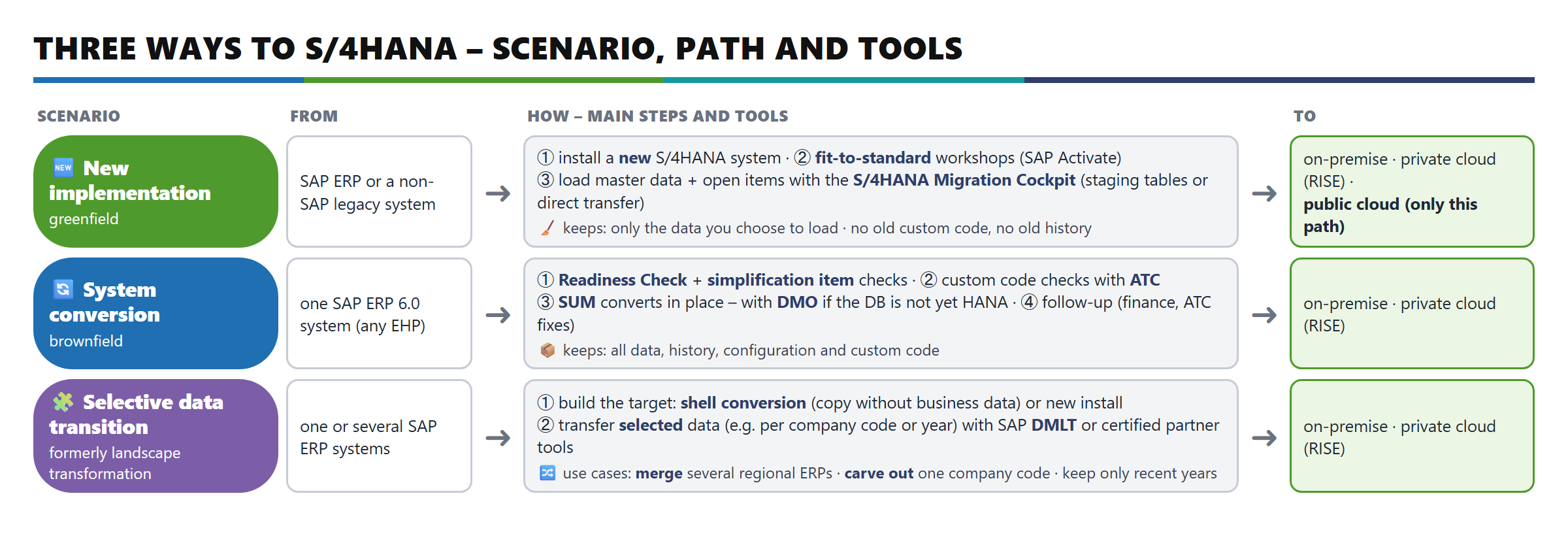
Scenario | What happens | Typical customer |
|---|---|---|
New implementation (greenfield) | New S/4HANA system built from scratch; processes redesigned on SAP standard; only master data and open items migrated | Wants to re-engineer and start clean (clean core) |
System conversion (brownfield) | The existing ERP system (data, custom code, configuration) is converted in place to S/4HANA | Wants to keep its processes and history |
Selective data transition (formerly landscape transformation) | Mix: e.g. shell conversion, merge several regional ERPs, or carve out (separate) one company code into its own system | Wants to consolidate or split its landscape |
Targets: S/4HANA on-premise, RISE with SAP (private cloud), or S/4HANA Cloud Public Edition (greenfield only). Clean core rules for new code: see Clean Core › 01 Clean Core.
1.1 Upgrade vs database migration vs conversion
Term | Example | Tool |
|---|---|---|
Upgrade | ECC EHP6 → ECC EHP8 (same DB) | SUM |
Database migration | ECC on Oracle → ECC on HANA (Suite on HANA) | SUM with DMO (Database Migration Option) |
Conversion | ECC → S/4HANA (new data model, usually + DB migration) | SUM (with DMO if not yet on HANA) |
1.2 S/4HANA release names
- On-premise / private cloud: until 2019 named YYMM (1909 = September 2019); since 2020 named YYYY (2020, 2021, 2022, 2023, 2025). Since 2023 a new release every two years with 7 years of mainstream maintenance. Each release gets Feature Package Stacks (FPS, new features) and Support Package Stacks (SPS, fixes).
- Public cloud: run by SAP, keeps YYMM naming, now two releases a year (e.g. 2502, 2508).
1.3 SAP Notes
An SAP Note is SAP's instruction or correction for a known problem. Implement it with the Note Assistant, transaction SNOTE. Simplification items (Part 2) are documented through SAP Notes: they tell you how custom code must be adapted to S/4HANA's simplified SAP code.
Part 2 – Conversion roadmap and pre-checks
2.1 Possible start release
SAP ERP 6.0 with any enhancement package (EHP0–EHP8) can be converted, provided it meets the minimum support package level in the Conversion Guide of your target release – for older targets: ERP 6.0 SP20, EHP2 SP10, EHP3 SP09, EHP4–8 no minimum. Always check the guide for your exact target release.
2.2 System requirements
a) Unicode
- S/4HANA runs on AS ABAP 7.5x, which supports Unicode only (7.40 was the last release allowing non-Unicode). A non-Unicode system must first be converted to Unicode, then to S/4HANA.
- Transaction UCCHECK lists programs that break the Unicode rules. Fix them, then set the Unicode checks active flag in the program attributes (default for all new programs).
- Examples of Unicode rules: a flat structure may be used like a character field only if it contains only character-like fields (C, N, D, T); compared structures need the same type or the same fragment view up to the shorter length; compared internal tables need the same line type.
b) AS ABAP only
Dual-stack systems (ABAP + Java in one system) must be split before the conversion.
c) Clean up clients
Delete the unused EarlyWatch client 066 before the conversion (SAP Note 1749142).
2.3 SAP Readiness Check
SAP's free planning tool, run early in a conversion project. It analyses the current ERP system functionally and technically and shows the result in a cloud dashboard (Readiness Check 2.0).
- Data collection in the ERP system:
SYCM_DOWNLOAD_REPOSITORY_INFO(custom code) andRC_COLLECT_ANALYSIS_DATA(everything else). - Shows: relevant simplification items with effort, custom code impact (which findings have quick fixes and which need manual work), add-on and business-function compatibility, sizing, recommended Fiori apps.
- Maintenance Planner (SAP cloud tool, mandatory prepare step): checks add-ons, business functions and industry solutions against the target release and generates the stack XML and download basket that SUM needs to start the conversion.
2.4 Simplification Item (SI) check
A simplification item describes one change S/4HANA makes compared with ECC – a removed table, a new data model, a replaced transaction. Run report /SDF/RC_START_CHECK for the chosen target release.
- Relevance check: which SIs apply to this system (technical and functional impact).
- Consistency check: which SIs must be solved before the conversion (SUM stops otherwise) and which can be exempted or handled afterwards.
- Every SI links to SAP Notes that explain how to decide relevance and what to do.
Typical simplification items an ABAP developer feels
Simplification | What changes for custom code |
|---|---|
Material documents MKPF + MSEG → MATDOC | Reads still work through CDS compatibility views (e.g. NSDM_DDL_MARD for MARD – reads on MARD are redirected); never write to the old tables, use BAPIs / released APIs |
Material number 18 → 40 characters | Fixed-length offsets, concatenations, interface structures, file layouts must be checked |
Amount fields longer (up to 23 digits) | Interfaces and file formats with fixed lengths may truncate |
Finance: universal journal ACDOCA; cost elements become G/L accounts | ECC: totals tables (GLT0, FAGLFLEXT, KNC1, LFC1, COSP, COSS) and index tables (BSIS/BSAS, BSID/BSAD, BSIK/BSAK) are real tables, CO actuals in COEP · S/4HANA: they are compatibility views on ACDOCA (COEP actuals redirected to V_COEP) – SELECTs still work, INSERT / UPDATE / DELETE in custom code must be removed (SAP Note 1976487) |
Customer / vendor → Business Partner | ECC: separate customer / vendor masters (XD01 / XK01, FD01 / FK01, VD01 / MK01 on KNA1 / LFA1) · S/4HANA: transaction BP only – XD01 / XK01 & co. redirect to BP, customer/vendor integration (CVI) must be active before the conversion; KNA1 / LFA1 stay and are filled via CVI |
Transactions replaced | Old t-codes redirect or disappear – e.g. ECC MB1A / MB1B / MB1C / MB01 · S/4HANA MIGO (in code BAPI_GOODSMVT_CREATE); ECC XD01 / XK01 · S/4HANA BP; many replaced by Fiori apps |
Report trees → area menus | Custom report trees must be rebuilt as area menus |
Pool and cluster tables → transparent | See Part 4 |
2.5 SUM, SPDD and SPAU
The conversion itself is executed by the Software Update Manager (SUM), usually with DMO to migrate to HANA in the same run. SAP standard objects are replaced; where you had modified them, you decide whether to keep your change or return to standard:
Transaction | Adjusts | When |
|---|---|---|
SPDD | Modified DDIC objects (domains, data elements, tables, structures) | During SUM, before the tables are converted – otherwise data could be lost |
SPAU | Modified programs, function modules, screens, messages, implemented SAP Notes | After SPDD, at the end of SUM or after the conversion |
SPAU_ENH | Enhancements (enhancement implementations, BAdIs) | After SPAU |
Part 3 – Custom code adaptation
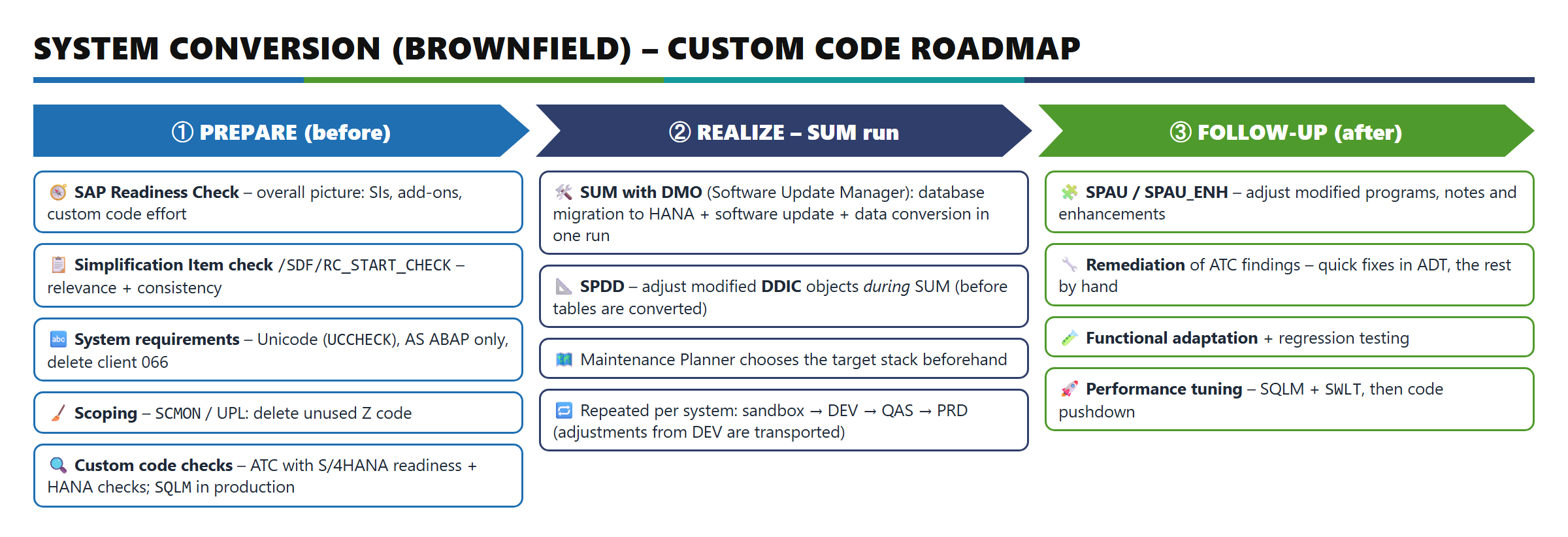
Two phases: prepare (before the conversion: remove dead code, find what must change) and realise (after: adapt to S/4HANA, then optimise for HANA).
3.1 Scoping – remove what nobody uses
Typically 40–60 % of Z/Y objects are never executed. Measure usage in production for months with SCMON (ABAP Call Monitor) or UPL (Usage Procedure Logging), then decommission unused code before adapting anything.
3.2 Analysis – ATC with S/4HANA checks
- Run ATC with the check variant
S4HANA_READINESS_<release>(S/4HANA data model checks + HANA checks), ideally as remote ATC from a central check system against the old ERP. - Fiori app Custom Code Migration (in a central S/4HANA or BTP system) combines ATC results with usage data and helps plan the work.
- Findings are prioritised P1, P2, P3: P1 and P2 must be fixed; some P3 may be accepted.
3.3 Remediation
- Automatic: ATC quick fixes in ADT solve many common findings (e.g. add ORDER BY, replace obsolete statements). Partner tools also exist; all work from ATC findings.
- Manual: every remaining finding is analysed and fixed by hand, then retested.
3.4 Functional issues to plan for
- Longer amount fields in integrations; material number length; replaced transaction codes; report trees replaced by area menus; primary and secondary cost elements maintained as G/L accounts; other SI-driven changes. These need functional consultants and regression tests, not only code fixes.
Part 4 – HANA-specific code issues
ABAP SQL is database-independent, so most code simply runs on HANA. Problems come from code that relied on behaviour of the old database or that was always slow and is now worth fixing.
Issue | Why it matters on HANA | Fix |
|---|---|---|
Implicit sort order | Oracle often returned rows in primary-key order by accident. HANA returns them in no guaranteed order (parallel, column store). |
|
SELECT * | Column store must rebuild every column of every row – expensive | Field list |
Nested SELECT / SELECT in LOOP | One DB round trip per row | JOIN, subquery, CTE, CDS view |
FOR ALL ENTRIES | Split into many statements; empty driver table selects everything | JOIN / subquery; if kept: check |
Pool / cluster tables | In S/4HANA they are transparent tables. Code that relied on cluster behaviour (implicit key order) or native SQL on the physical pool fails | ABAP SQL with ORDER BY; no native SQL on them |
DB hints | Oracle/DB2 hints ( | Remove; HANA hints are rarely needed |
Native SQL / ADBC | Oracle SQL syntax does not run on HANA; no automatic client handling | Rewrite in ABAP SQL / CDS / AMDP |
Secondary indexes | Mostly unnecessary on the column store; S/4HANA removed many | Do not create new ones without measurement |
Writes to obsolete tables | E.g. MSEG, aggregates – data now lives in MATDOC / ACDOCA | Use BAPIs or released APIs |
4.1 Example – implicit sorting
|
Note: on S/4HANA read stock through a released CDS view (e.g. I_MaterialStock) in new code; MARD is read here (redirected to NSDM_DDL_MARD) because migrated code often reads MARD.
Part 5 – The golden rules of performance
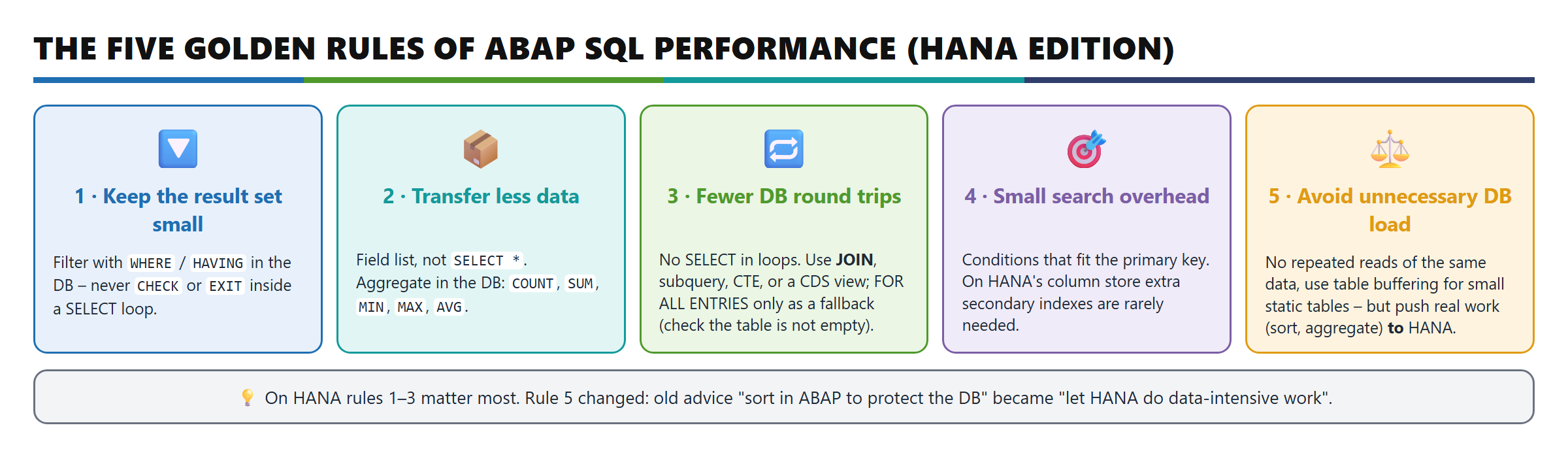
The classic Open SQL rules still apply on HANA, with two updates: prefer JOINs/CTEs/CDS over FOR ALL ENTRIES, and push sorting and aggregation to the database.
|
5.1 Other techniques – what still holds
Classic performance advice | Status today |
|---|---|
WHERE instead of CHECK; aggregate functions; avoid DB access in loops | Valid – rules 1–3 |
Use views (DDIC / CDS) instead of reading base tables one by one | Valid – joins in the DB |
Right internal table kind: sorted for range reads, hashed for unique-key access | Valid |
Free memory you no longer need; fewer network round trips | Valid |
Write the WHERE fields in index order; MANDT index tricks | Outdated – cost-based optimisers ignore the order; on HANA's column store indexes rarely matter |
MOVE instead of MOVE-CORRESPONDING, move whole header line | Obsolete – header lines are obsolete; use |
Avoid too many function modules | Misleading – modularisation is fine; avoid repeated calls that each hit the DB |
Logical databases to reduce DB load | Obsolete |
Sort in ABAP to protect the DB | Reversed – let HANA sort and aggregate |
5.2 Approach: detect, optimise, explore
Why analyse performance after the move to HANA? To find long response times, slow queries and high CPU load across the database, application server, network and hardware. Result: better use of existing resources, less extra hardware, happier users and a lower TCO.
- Detect – find tunable code with the tools in Part 6; separate must-fix items from recommendations.
- Optimise – push data-intensive processing to HANA; turn long batch jobs into interactive apps; add features and improve usability.
- Explore – use HANA features for new value: better UX, real-time access to any data on any device, real-time analytics, text search, predictive functions.
Part 6 – Performance tools
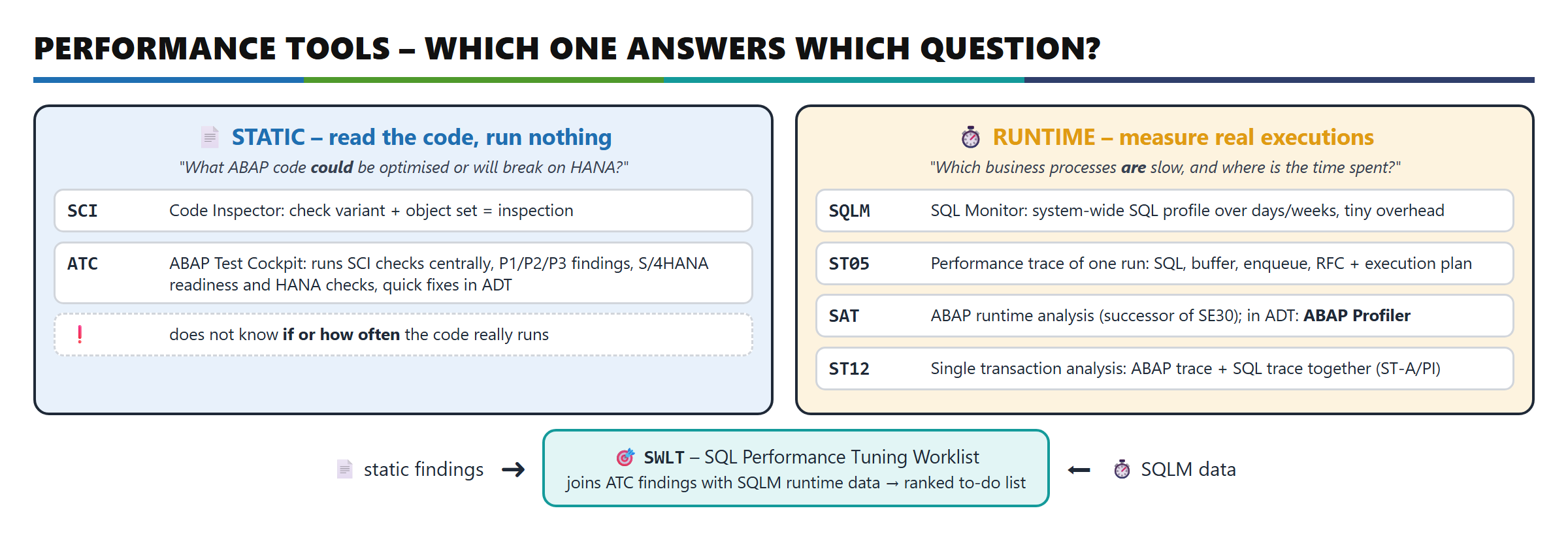
6.1 Which tool when
Tool (t-code) | Type | Use it when… | Gives you |
|---|---|---|---|
SCI Code Inspector | Static | You want to check objects against rules (performance, security, syntax, naming) | Info / warning / error messages per object |
ATC ABAP Test Cockpit | Static | Daily quality checks, transport release checks, S/4HANA readiness and HANA checks before/after conversion | Prioritised findings P1–P3, exemptions, quick fixes (ADT) |
SQLM SQL Monitor | Runtime, system-wide | You need to know which SQL statements in production cost most, over days or weeks | Aggregated SQL profile per statement, with calling code and business process |
SWLT SQL Performance Tuning Worklist | Static + runtime | You want a prioritised to-do list for optimisation | ATC findings ranked by real SQLM runtime cost/benefit |
ST05 Performance Trace | Runtime, one run | One report or transaction is slow and you suspect the DB | Every SQL statement, duration, records, identical selects, execution plan; also buffer, enqueue, RFC, HTTP |
SAT Runtime Analysis | Runtime, one run | You need to know where ABAP time goes (methods, loops) | Hit list, call hierarchy, memory, DB vs ABAP time (replaces SE30) |
ABAP Profiler (ADT) | Runtime, one run | Same as SAT, in Eclipse | Overview, hit list, call tree, call timeline, DB accesses |
ST12 Single Transaction Analysis | Runtime, one run | You want ABAP trace and SQL trace together in one screen (support tool from ST-A/PI) | Combined ABAP + SQL trace |
6.2 Code Inspector (SCI)
Static analysis of repository objects – single objects or groups – for performance, security, syntax and naming conventions. HANA-relevant checks include:
- Functional: FICO ABAP | TRM ABAP | VIM | SAP BIS | SD ABAP | MM ABAP | PP ABAP | QM ABAP | PM ABAP | PS ABAP | EWM | TM ABAP | GTM ABAP | EHS ABAP | HR ABAP | BW | SAP Datasphere | SAP Business Data Cloud | SAP MDG | SAP Analytics Cloud | SAP Ariba | SAP CX | SAP IBP
- Performance: problematic
SELECT *, DB operations in loops across modularisation units, FOR ALL ENTRIES that should become a JOIN.
Component | Meaning |
|---|---|
Check variant | Which checks run, with which settings. Global = for all users (SAP delivers |
Object set | Which objects are checked (package, program list, …) |
Inspection | Check variant + object set = one run with results |
6.3 ABAP Test Cockpit (ATC)
- The central quality tool. It runs Code Inspector checks (same check variants) plus extra checks, and adds scheduling, distribution of results, exemptions and integration into transport release (QM process).
- Available in SAP GUI (transaction ATC) and in ADT, where quick fixes can be applied directly.
- For conversions: run against a target S/4HANA release (variant
S4HANA_READINESS_<release>), centrally via remote ATC. For ABAP Cloud: the "ABAP Cloud readiness" checks (see Clean Core › 01 Clean Core).
6.4 SQL Monitor (SQLM) and SWLT
- SQLM records all SQL statements of a system or process in aggregated form – executions, time, records – with the calling code. Collection is asynchronous, so overhead is minimal and it can run in production.
- Run it in the source production system before the conversion (to know what really runs) and again after go-live.
- Display: transaction SQLMD, or SQLM → Data Management → Display Data. Snapshots (SQLM → Snapshots) freeze a filtered data set and move it to other systems or tools: create from local data, export/import as file, delete.
- SWLT joins static findings (ATC/SCI) with SQLM runtime data: SQLM tells you which processes are slow but not the code flow; ATC tells you which code could be optimised but not whether it runs. Together they give a ranked worklist.
6.5 SQL trace (ST05) and ST12
- ST05 records each DB access of a user's run: statement, duration, number of records, identical / redundant SELECTs, and the execution plan. It also shows accesses over secondary DB connections.
- Filter the trace by user, transaction, program or server – it does not have to trace everything.
- Use it after ATC/SCI for a deeper look at specific SQL, or when SAT / the profiler shows that DB time dominates.
- ST12 is a separate support tool (add-on ST-A/PI) combining ABAP trace and SQL trace; it was not replaced by ST05 – both exist.
6.6 SAT and the ABAP Profiler
- SAT (successor of SE30) measures runtime split into ABAP / DB / system, memory use, and the call hierarchy.
- The ABAP Profiling perspective in ADT shows the same trace as: Overview (time split ABAP / DB / system), Hit List (most expensive methods), Database Accesses, Call Tree (execution path) and Call Timeline (the call tree as a continuous graphical sequence).
- Typical workflow: SQLM/SWLT finds the process → SAT or Profiler shows where time goes → ST05 drills into the SQL → fix with pushdown → measure again.
Part 7 – Interview questions
Greenfield vs brownfield vs selective data transition?
Greenfield: new system, redesigned processes, only master data and open items migrated. Brownfield (system conversion): the existing ERP is converted in place, keeping custom code and history. Selective data transition: a mix – merge or split systems, move selected company codes or data.
What are the main steps of a system conversion?
Prepare: Readiness Check, SI check (/SDF/RC_START_CHECK), system requirements (Unicode, AS ABAP only, client 066), custom code scoping (SCMON/UPL) and ATC checks. Realise: SUM with DMO, SPDD during SUM, SPAU/SPAU_ENH after. Follow-up: remediation, functional adaptation, testing, performance tuning.
SPDD vs SPAU vs SPAU_ENH?
SPDD adjusts modified DDIC objects during SUM (before tables are converted). SPAU adjusts modified repository objects and notes afterwards; SPAU_ENH does the same for enhancements.
What is a simplification item? Give an example.
A documented change of S/4HANA versus ECC, with SAP Notes that tell you what to do. Examples: MKPF/MSEG merged into MATDOC, material number extended to 40 characters, customers/vendors as Business Partners.
Which custom code issues appear when moving to HANA?
Missing ORDER BY where code relied on implicit sorting (binary search, delete adjacent duplicates), native SQL and DB hints written for the old database, pool/cluster table assumptions, and performance anti-patterns (SELECT *, SELECT in loops, FAE) that HANA makes visible.
Why does a missing ORDER BY become a problem on HANA?
HANA reads columns in parallel and gives no guaranteed row order. Code that assumed key order – READ … BINARY SEARCH, DELETE ADJACENT DUPLICATES, taking the first row – returns wrong results without any error. Fix with ORDER BY, SORT or a sorted table.
What are the five golden rules?
Keep the result set small, minimise transferred data, minimise the number of DB accesses, minimise search overhead, avoid unnecessary DB load. On HANA: do the work in the DB, but read only what you need.
ATC vs SCI?
SCI is the check engine (variants, object sets, inspections). ATC is the quality framework on top: same checks, plus central runs, scheduling, exemptions, transport integration, ADT quick fixes and remote checks for S/4HANA readiness.
SQLM vs ST05 – and why SWLT?
SQLM runs long-term in production and shows which statements cost most overall; ST05 traces one run in detail with execution plans. SWLT combines SQLM runtime data with ATC findings so you fix the code that is both bad and actually used.
SAT vs ST05?
SAT (or the ADT Profiler) shows where ABAP time is spent – methods, loops, DB share. ST05 shows the SQL statements themselves. Start with SAT to see if the DB is the problem, then ST05 to see which statement.
Abbreviations to know
SUM = Software Update Manager · DMO = Database Migration Option · SI = simplification item · UPL = Usage Procedure Logging · SCMON = ABAP Call Monitor · ATC = ABAP Test Cockpit · SQLM = SQL Monitor · SWLT = SQL Performance Tuning Worklist · SAT = ABAP Runtime Analysis.
🏠 Start Here · ◀ 01 · HANA Fundamentals · 03 · ABAP New Syntax ▶ · Sections: CORE ABAP | OOPS ABAP | ABAP on HANA | Clean Core | RAP | ABAP Points | SAP Fiori | SAPUI5 | Mobile Development (MDK) | BTP Foundations | BTP Development | CAP | SAP Build | ABAP on BTP | Integration Suite | SAP Business AI | SAP BASIS | Security | SAP SDLC
Functional: FICO ABAP | TRM ABAP | VIM | SAP BIS | SD ABAP | MM ABAP | PP ABAP | QM ABAP | PM ABAP | PS ABAP | EWM | TM ABAP | GTM ABAP | EHS ABAP | HR ABAP | BW | SAP Datasphere | SAP Business Data Cloud | SAP MDG | SAP Analytics Cloud | SAP Ariba | SAP CX | SAP IBP