SQLScript is HANA's own database language: SQL plus variables, table variables and procedural logic. AMDP (ABAP Managed Database Procedures) lets you write SQLScript inside an ABAP class, so it is checked, transported and called like normal ABAP. Use it only when ABAP SQL and CDS are not enough.
Part 1 – Where SQLScript fits
SQLScript is a set of extensions to SQL: a data extension (table types without a table), a functional extension (side-effect-free functions that encapsulate data flows) and a procedural extension (imperative logic that runs inside the database).
Container | What it is | Stored? |
|---|---|---|
Anonymous block |
| No |
Procedure | Reusable block with IN / OUT / INOUT parameters; may change data | Yes |
Scalar UDF | Function returning one or more scalar values; used in the SELECT list | Yes |
Table UDF | Function returning one table; used in the FROM clause | Yes |
User-defined library | Groups procedures/functions/variables ( | Yes |
AMDP method | Procedure or function written in an ABAP class (Part 9) – the ABAP way | Generated |
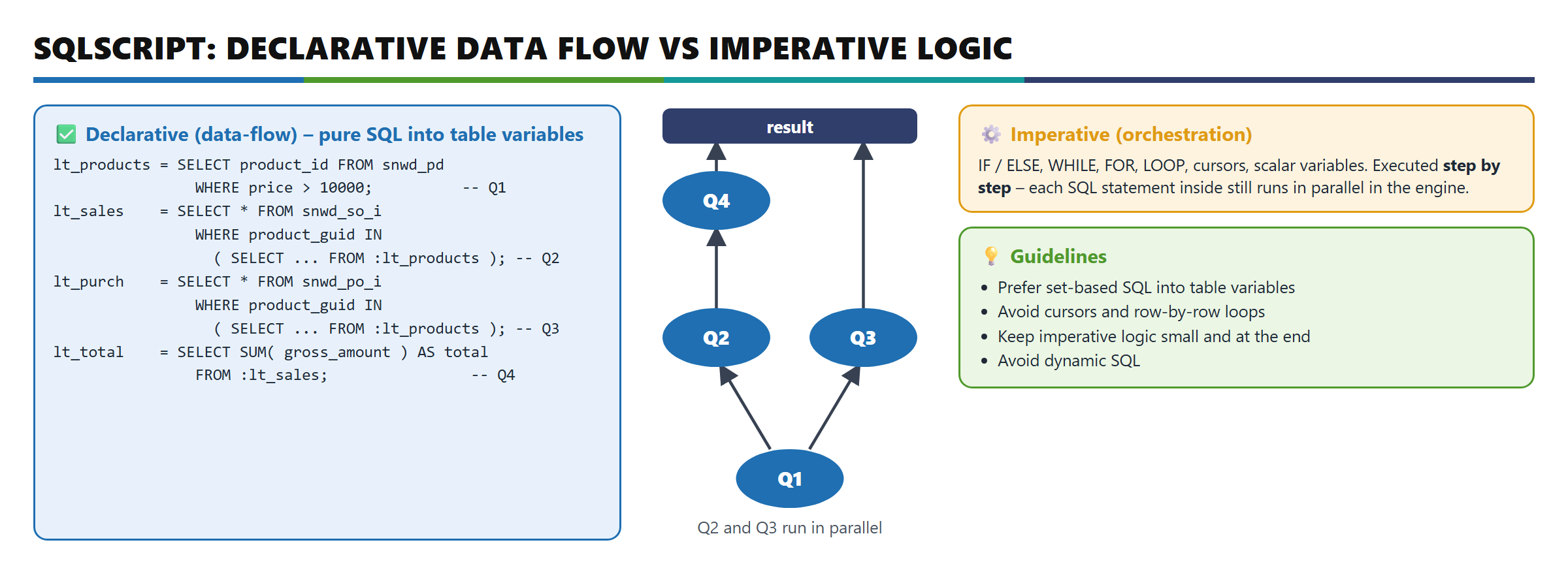
- Declarative statements (SQL assigned to table variables) become a data-flow graph – independent statements run in parallel.
- Imperative statements (IF, loops, cursors) run step by step. The SQL inside each step is still parallelised by the engine, and the optimiser inlines many statements – imperative code limits parallelism but does not prevent it completely.
|
- Things that tend to serialise a block: scalar variables passed between statements, DML/DDL in the block, IF / loops / cursors, SELECTs not assigned to a table variable. Keep the declarative part together and put imperative logic at the end.
Tools: ADT for AMDP; SAP HANA Database Explorer for native SQLScript (HANA Studio is obsolete); PlanViz / Explain Plan and the SQLScript Code Analyzer for tuning.
Part 2 – SQLScript basics
Rules to remember
- Every statement ends with a semicolon.
- Read a variable with a colon (
:lv_x); assign without (lv_x = 10;). - Keywords are not case-sensitive. Unquoted identifiers are converted to upper case;
"quoted"identifiers are case-sensitive. - An unassigned variable is NULL. Output a value with
SELECT :lv_x FROM DUMMY;. - Unqualified objects resolve to the current schema:
SELECT CURRENT_SCHEMA FROM DUMMY;, change it for the session withSET SCHEMA myschema;.
|
Every local variable needs a DECLARE, and every statement ends with a semicolon.
Data types
Group | Types | Note |
|---|---|---|
Numeric | TINYINT, SMALLINT, INTEGER (INT), BIGINT, DECIMAL(p,s), SMALLDECIMAL, REAL, DOUBLE | SMALLDECIMAL is HANA-specific |
Character | VARCHAR, NVARCHAR, ALPHANUM | ALPHANUM, SHORTTEXT, TEXT not in HANA Cloud – use NVARCHAR |
Date / time | DATE, TIME, SECONDDATE, TIMESTAMP | |
Binary / LOB | VARBINARY, BLOB, CLOB, NCLOB | |
Other | BOOLEAN, ST_GEOMETRY (spatial) |
ABAP DDIC types map to HANA types: INT4 → INTEGER, DEC/CURR/QUAN → DECIMAL, CHAR/NUMC/DATS/TIMS/CUKY/UNIT → NVARCHAR, RAW → VARBINARY, STRING → NCLOB. So ABAP dates arrive in SQLScript as 'YYYYMMDD' strings.
- Useful HANA SQL functions:
CONCAT(a, b)(ora || b),TO_DATE('2014-01-31', 'YYYY-MM-DD'),YEAR(d),MONTH(d),MONTHNAME(d),QUARTER(d),WEEK(d),ADD_DAYS(d, n),DAYS_BETWEEN(d1, d2).
|
Variables
|
Row-type variables hold one row:
|
DECLARE r ROW LIKE :cur;+FETCH cur INTO r;reads one cursor row. Limits: a row variable cannot be the target ofEXEC … INTOand cannot be a procedure or function parameter (some limits lifted in newer HANA releases).- Global session variables share a scalar between procedures in the same session:
SET 'MY_VAR' = :lv_value;and read withSESSION_CONTEXT('MY_VAR'). The key can also be a variable (SET :key_name = :new_value || '_suffix';). Other sessions cannot see the value. AMDP uses this mechanism for the client (Part 11).
Part 3 – Table variables, table types and arrays
Table variables
A table variable holds an intermediate result – like an internal table. Implicit: typed by the SELECT assigned to it. Explicit: DECLARE lt TABLE(…) or a table type. Read it with a colon.
|
Table types
|
Pitfall: an OUT parameter typed with table type TTEMP (EMPNO, EMPNAME) cannot receive SELECT * FROM empTrigger (EMPNO, ENAME) – column names must match, not only the types.
Arrays
An array is one column of values of one type (an internal table can have many columns). Index starts at 1. An array cannot be returned from a procedure – convert it with UNNEST.
|
- Write a table variable back to a DB table:
INSERT INTO e_dept_copy SELECT * FROM :lt_res;orUPSERT e_dept SELECT * FROM :lt_res;(by primary key).
Part 4 – Procedures
|
Clause | Meaning |
|---|---|
IN / OUT / INOUT | Input (default), output, both. OUT can be a scalar or a table (table type or |
LANGUAGE | SQLSCRIPT (default). R was possible but is deprecated / removed in HANA Cloud |
SQL SECURITY | DEFINER (default) – runs with the owner's privileges. INVOKER – with the caller's privileges |
DEFAULT SCHEMA | Schema for unqualified object names |
READS SQL DATA | Declares the procedure read-only: DML/DDL raise an error; enables optimisation and use in functions / result views (it is not about skipping privilege checks) |
DETERMINISTIC | Same input → same result, so the result can be cached |
WITH ENCRYPTION | Hides the source code of the procedure |
AUTOCOMMIT DDL | ON = commit after each DDL statement in the body |
SEQUENTIAL EXECUTION | Forces serial execution of the body. The opposite, a |
HEADER ONLY | Creates only the signature; the body is added later with |
- Change or remove:
CREATE OR REPLACE PROCEDURE …,ALTER PROCEDURE p … AS BEGIN … END;,DROP PROCEDURE p;(functions:DROP FUNCTION f;).
|
CALL add_numbers(30, 10)fails – every OUT needs?. Mixing positional and named parameters is a syntax error. A procedure can call other procedures (CALL other_proc(…);).- OUT table:
CREATE PROCEDURE read_emp (OUT et_emp tt_emp) AS BEGIN et_emp = SELECT empno, ename FROM emp; END;→CALL read_emp(?);
CASE inside a SELECT (tax example):
|
Legacy – WITH RESULT VIEW
READS SQL DATA WITH RESULT VIEW salesrep creates a column view that calls the procedure each time it is queried – it is not materialised (unlike an Oracle materialised view). Only one table OUT parameter, no scalar OUT. Input parameters were passed as SELECT * FROM salesrep_param(PLACEHOLDER."$$ip_odate$$" => '2014-01-01'); (the name had to be lower case – $$IP_ODATE$$ failed – and a plain data preview failed because the parameter is required). Today use a table function or a CDS table function.
SQL you use inside SQLScript (quick recap)
GROUP BYforms groups for SUM / AVG / MIN / MAX / COUNT;HAVINGfilters on aggregates (WHERE SUM(…)is an error). Every non-aggregated column in the SELECT list must be in GROUP BY.ORDER BYdefault ascending;DESC; by position (ORDER BY 2) or alias.- Joins: inner, left/right/full outer. Anti-join "rows without partner":
LEFT OUTER JOIN d ON e.deptno = d.deptno WHERE d.deptno IS NULL. - Native HANA DDL (tables, keys, triggers, sequences, indexes, views) is on the HANA fundamentals page.
Part 5 – Control structures and cursors
|
Operators in conditions: IN, EXISTS, BETWEEN, IS NULL, LIKE.
Cursors
A cursor processes a SELECT result row by row: declare → open → fetch → close. Cursors can have parameters: DECLARE CURSOR c_emp (p_dept INT) FOR SELECT … WHERE deptno = :p_dept;. A cursor FOR loop needs no explicit OPEN / FETCH / CLOSE.
Task: raise managers' salary by 5 % and copy them to EMP_DEPT_MNG, everyone else by 10 % into EMP_DEPT_NONMNG. Cursor version (explicit columns, decimal salary, cursor FOR loop):
|
Better on HANA – set-based, no cursor (two statements, both parallelised):
|
- Explicit style:
OPEN c1; LOOP FETCH c1 INTO v1, v2; IF c1::NOTFOUND THEN BREAK; END IF; … END LOOP; CLOSE c1;(c1::NOTFOUND,c1::ROWCOUNT,c1::ISCLOSEDare cursor attributes). - Points to note:
SELECT *into five variables depends on column order – list the columns;INT * 5 / 100truncates – store salaries as DECIMAL. - A commission update does not need row-by-row processing with
LIMIT 1 OFFSET n(no ORDER BY – slow and non-deterministic); it is one statement:UPDATE e_dept SET comm = salary * CASE deptno WHEN 10 THEN 0.10 WHEN 20 THEN 0.20 ELSE 0.30 END;
Part 6 – Exception handling
|
Element | Meaning |
|---|---|
DECLARE EXIT HANDLER FOR … | Run the handler, then leave the block |
DECLARE CONTINUE HANDLER FOR … | Run the handler, then continue with the next statement |
| What the handler catches |
| Code and text of the caught error |
| Raise an own error / re-raise the current one |
- A handler for a specific condition is preferred over the generic SQLEXCEPTION handler, whatever the declaration order. Declare specific handlers and do not rely on order.
- Make OUT message parameters long enough for the error text (e.g. VARCHAR(200) – VARCHAR(150) can overflow).
- Without a handler a duplicate key gives the standard error "unique constraint violated" (code 301).
Part 7 – User-defined functions (UDFs)
Scalar UDF | Table UDF | |
|---|---|---|
Input | Scalar values only | Scalar or table types |
Returns | One or more scalar values | Exactly one table |
Used in | SELECT list, WHERE ( | FROM clause ( |
Side effects | None – read-only | None – read-only |
|
|
- A function cannot be CALLed. With several return values,
SELECT f(10,20) FROM DUMMYfails – choose one with.k1. Writingx IN INTEGERis a syntax error. - A requirement such as "table function returns E_DEPT; procedure changes salaries via arrays (ARRAY_AGG, FOR … CARDINALITY), UPSERTs back and copies to E_DEPT_COPY" is better done with one
UPDATE … WHERE salary < 5000and oneINSERT … SELECT.
Part 8 – Dynamic SQL, APPLY_FILTER and transactions
|
- Full form:
EXEC '<sql>' [INTO <vars> [DEFAULT <values>]] [USING <expressions>] [READS SQL DATA];(same for EXECUTE IMMEDIATE). Example:EXEC 'SELECT a FROM t1' INTO a_copy DEFAULT 2;– DEFAULT is used only when no row comes back. READS SQL DATA marks the dynamic statement read-only. - Dynamic SQL has no syntax check, is not optimised in advance and risks SQL injection – avoid it. APPLY_FILTER applies only a WHERE condition to a table / table variable – the safer choice (Part 11).
- Transaction statements COMMIT, ROLLBACK, SAVEPOINT exist in native procedures, but are not allowed in AMDP (the ABAP LUW commits) or in read-only procedures.
Best practices
- Reduce the complexity of single statements; reuse common sub-expressions via table variables.
- Multi-level aggregation with GROUPING SETS instead of several queries.
- Reduce dependencies between statements so they can run in parallel.
- Avoid cursors, loops and dynamic SQL. Do not use CE functions (
CE_PROJECTION…) – deprecated.
Part 9 – AMDP basics
AMDP = ABAP Managed Database Procedures (not "ABAP Database Connectivity" – that is ADBC). The framework manages DB procedures and functions written in SQLScript inside methods of a global ABAP class. Available since 7.40 SP05, HANA only.
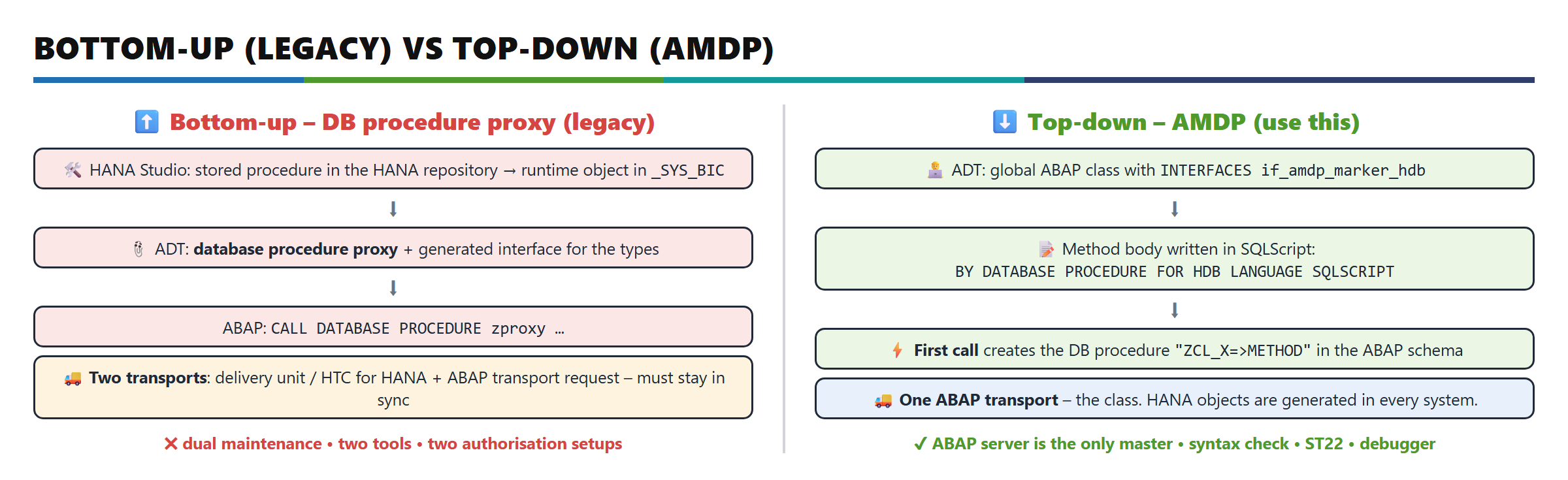
- Top-down: the ABAP server is the only master. Only the class is transported; the DB procedure
"<CLASS>=><METHOD>"is created in the ABAP schema (SAP<SID>) at the first call, not at activation. - Edited only in ADT (SE24 can only display the class). Syntax check for SQLScript, runtime errors in ST22, AMDP debugger.
- Benefits: no lifecycle problems (only the ABAP class is transported); SQLScript without a separate HANA DB user or HANA Studio; several independent processing steps in one method; HANA-native functions (e.g.
CONVERT_CURRENCY, window functions,STRING_AGG). - Memory hook: "Peter Parker → Spiderman → SPIDER" = ABAP class → AMDP → marker interface
IF_AMDP_MARKER_HDB.
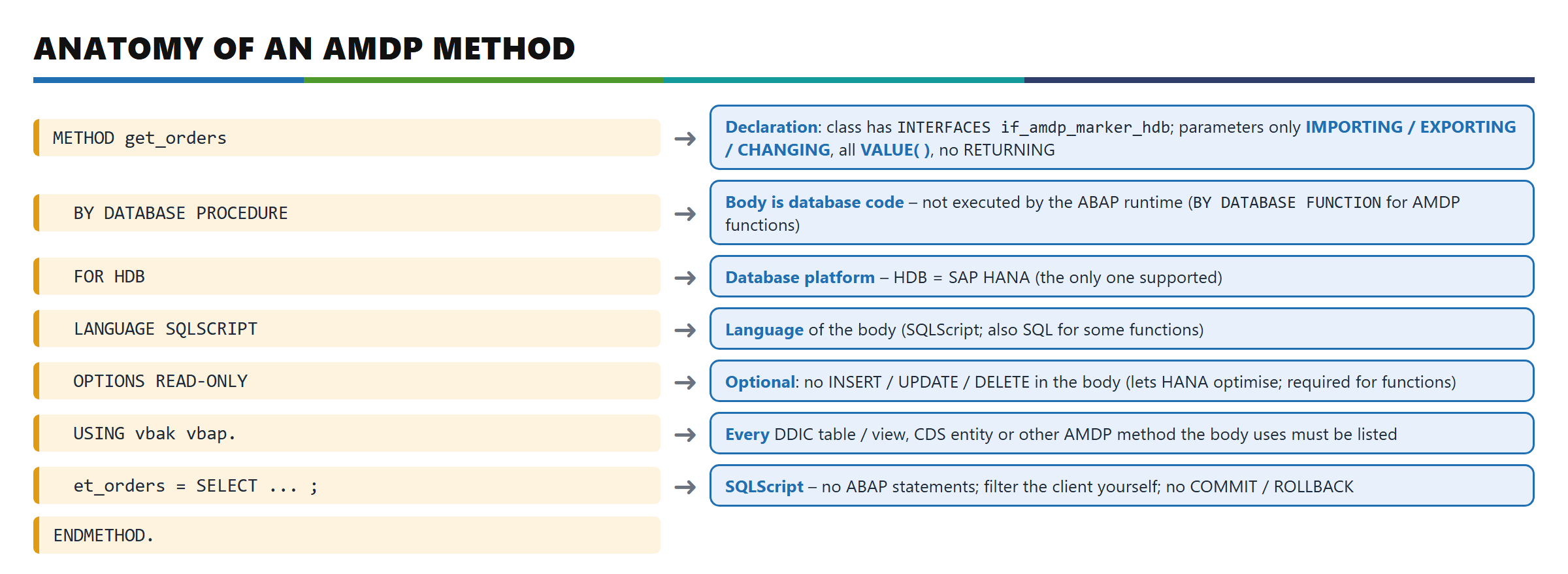
Rules
Rule | Detail |
|---|---|
Marker interface | Class has |
Parameters | Procedures: IMPORTING / EXPORTING / CHANGING, all by VALUE; elementary types or tables with elementary columns (no nested tables, no structures as scalars). No RETURNING for procedures |
Static or instance | Usually static; any visibility section. Always executes like a static method |
USING | List every DDIC table/view, CDS entity and other AMDP method used; nothing else is visible |
Body | SQLScript only – no ABAP statements; scalar parameters read with |
Forbidden | COMMIT / ROLLBACK, DDL, writes to SAP-buffered tables (buffer would get out of sync) |
Client | No automatic client handling – filter the client yourself (Part 11) |
Enhancements | No implicit enhancement options in AMDP methods (use AMDP BAdIs) |
DCL | CDS access control is not applied – check authorisation in ABAP before the call |
Optional method additions: OPTIONS READ-ONLY (no DML), OPTIONS SUPPRESS SYNTAX ERRORS; in the declaration AMDP OPTIONS READ-ONLY CDS SESSION CLIENT current (7.52+) when the body reads client-dependent CDS views.
Steps
- ADT: create package → New → ABAP Class → add the interface and the method declaration.
- Implement the method
BY DATABASE PROCEDURE FOR HDB LANGUAGE SQLSCRIPT … USING …, activate. - Call it from a report or class like any method.
Part 10 – AMDP examples
Read sales order items
|
- Key points: client filter (otherwise all clients are read) and the client is part of the join;
:iv_vbelnwith colon; column aliases match the components ofty_order. - LFSTA (delivery status) is on VBAP in S/4HANA; in ECC it was on VBUP. Initial status values are compared via ELSE instead of
' '.
Calculated fields – customer invoices
|
Table ZCUSTINV: KUNNR CHAR10 (key), NETPR INT4, IDATE / PDATE DATS, PRTY CHAR10 (L/H/M), INTEREST INT4, DUE_DAYS INT4. et_cus_inv is typed TYPE TABLE OF zcustinv.
Changing data (no READ-ONLY, no COMMIT)
|
- The UPDATE filters by client and key – without that WHERE it changes every row in every client; INSERT names its columns and sets the client. The ABAP caller commits (
COMMIT WORK). The table must not be buffered. - In real S/4HANA projects writes go through RAP / BAPIs, not AMDP – AMDP is mainly for read-heavy logic.
Part 11 – Client handling and select-options
Three ways to handle the client
Way | How | When |
|---|---|---|
Session client | WHERE mandt = SESSION_CONTEXT('CLIENT') | Normal case – current logon client |
Parameter |
| Caller decides the client (e.g. cross-client tools) |
CDS session client |
| Body reads client-dependent CDS views / table functions |
Always join on the client column as well (ON i.mandt = h.mandt AND …).
Select-options with APPLY_FILTER
Ranges cannot be passed to an AMDP. Convert them to a WHERE string in ABAP and apply it in HANA.

|
|
- Names in
it_named_seltabsmust match the column names of the filtered table. A range must be passed as a data reference (REF #( so_vbeln[] )); assigningso_vbeln[]directly is a syntax error. - Optional
iv_client_field = 'MANDT'adds the client condition to the generated WHERE string – useful with APPLY_FILTER on a table directly (variant 2). - No
ORDER BYin the intermediate SELECT – the order of an AMDP result is not guaranteed; sort in ABAP if needed.
Part 12 – AMDP functions
Kind | Declaration | Used by |
|---|---|---|
Procedure |
| ABAP callers, other AMDPs |
Table function for CDS |
| A CDS table function (page 05) |
AMDP table function | IMPORTING by VALUE + RETURNING a table; | Other AMDPs only (not callable from ABAP) |
Scalar AMDP function | IMPORTING + RETURNING an elementary value (7.53+) | Other AMDPs; CDS scalar functions (newer releases) |
In short: procedures have no RETURNING; functions require it (except CDS table function implementations).
|
- Table function code: use an explicit column list instead of
SELECT *(column order must match thereturnslist) and a client filter. - Calling one AMDP from another: list it in USING as
zcl_x=>methodand callCALL "ZCL_X=>METHOD"( iv_a => :lv_a, et_b => lt_b );– no IMPORTING/EXPORTING keywords, comma-separated.
Part 13 – Calling AMDP, exceptions, debugging
|
- The feature check is only needed if the code may run on a non-HANA database.
- Old style
CALL METHOD zcl_x=>m IMPORTING et_x = lt_x.also works – prefer the functional call.
Exceptions
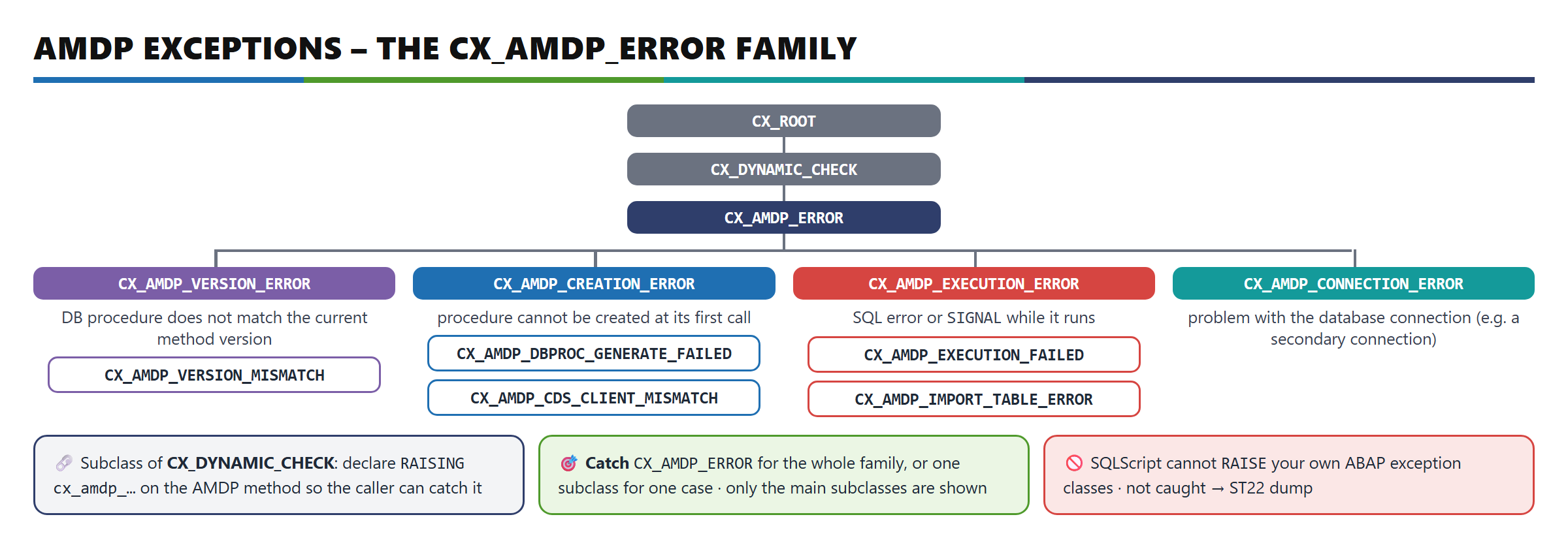
- You cannot RAISE an ABAP exception in SQLScript. Only the predefined CX_AMDP_* exceptions (subclasses of CX_AMDP_ERROR → CX_DYNAMIC_CHECK) can be declared with RAISING and caught by the caller.
- A SQLScript
SIGNALor SQL error reaches ABAP as CX_AMDP_EXECUTION_ERROR (uncaught: ST22 dump).
Debugging AMDP
- In ADT set a breakpoint in the SQLScript body (double-click the ruler). The AMDP debugger starts on the next call: step through statements, inspect scalar and table variables.
- Needs ADT, the standard ABAP debug authorization and the ABAP debugger settings for your user.
- Other tools: ST22 (runtime errors), ST05 SQL trace, PlanViz for the execution plan, SQLScript Code Analyzer.
Part 14 – Legacy: database procedure proxy (know it for interviews)
Before AMDP (7.40 bottom-up approach) a procedure was built in HANA Studio in the XS classic repository (runtime object in _SYS_BIC, e.g. "_SYS_BIC"."ZPACK/READ_EMPLOY_DATA") and exposed to ABAP via a database procedure proxy in ADT (Dictionary → Database Procedure Proxy), which generated an interface with the parameter types.
|
Pitfall | Cause and fix |
|---|---|
"Database type VARCHAR(20,0) cannot be mapped onto ABAP type" | Proxies only map NVARCHAR → use NVARCHAR columns, then Synchronize the proxy (mapping: INTEGER → I, NVARCHAR(20) → C(20), DECIMAL(12,2) → P(7) 2 decimals) |
ST22 DBPROC_SQL_ERROR / CX_SY_DB_PROCEDURE_SQL_ERROR, SQL error 258 "insufficient privilege" | Procedure has SQL SECURITY INVOKER and the ABAP DB user lacks rights → DEFINER, re-activate, synchronize |
Activation failed in the repository | GRANT SELECT ON SCHEMA … TO _SYS_REPO WITH GRANT OPTION |
- Problems: dual maintenance, two transports (delivery unit / HANA Transport Container + ABAP), two authorisation setups, HANA developer licences.
- Replaced by AMDP. Proxies are only still useful for procedures that are not managed by ABAP (e.g. in another HANA schema). AMDPs themselves can run over a secondary connection.
- Also legacy: HANA Studio, XS classic repository (
.procedurefiles,_SYS_REPO, delivery units), CE functions, R language.
Part 15 – Which technique when
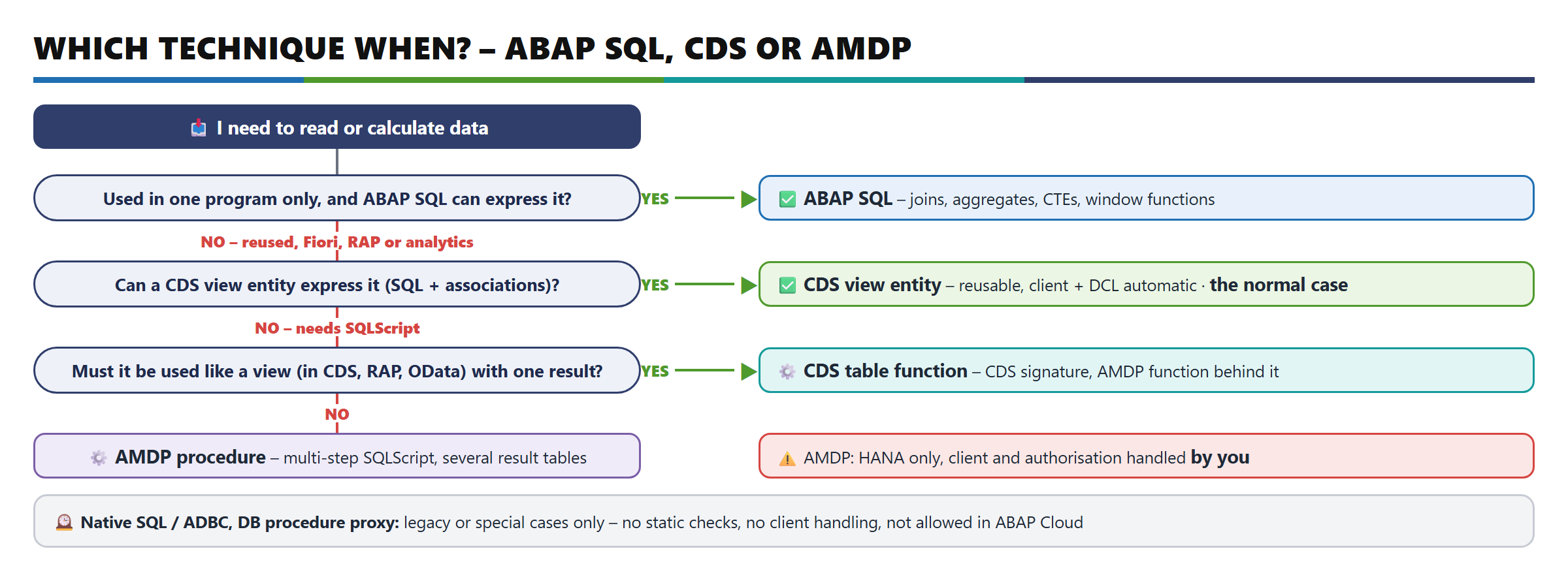
ABAP SQL | CDS view entity | CDS table function | AMDP procedure | DB proxy / ADBC | |
|---|---|---|---|---|---|
Style | Declarative | Declarative, reusable model | SQLScript behind a CDS signature | Imperative SQLScript | Native SQL |
Database | Any | Any | HANA | HANA | DB-specific |
Results | One per statement | One | One table | Several OUT tables | Any |
Reusable in CDS / RAP / OData | No | Yes | Yes | No | No |
Client / DCL automatic | Yes / yes | Yes / yes | Client via session var. / yes | No / no | No / no |
Static checks, ABAP transport | Yes | Yes | Yes | Yes | Proxy: two transports; ADBC: no checks |
Use when | Logic used in one program | Shared data model, Fiori, analytics | CDS needs SQLScript (e.g. STRING_AGG) | Complex multi-step logic, several results | Legacy only |
Order of preference: ABAP SQL / CDS first, AMDP only when needed. ADBC is native SQL with no static checks and no client handling (see the native SQL / ADBC section on the ABAP SQL page).
Part 16 – Interview questions
Q1. What is AMDP and why use it?
ABAP Managed Database Procedures: SQLScript written in a method of an ABAP class with IF_AMDP_MARKER_HDB, implemented BY DATABASE PROCEDURE FOR HDB LANGUAGE SQLSCRIPT. Top-down: only ABAP transports, ADT tooling, ST22 and debugger. Used for complex, data-intensive logic that ABAP SQL and CDS cannot express.
Q2. What are the restrictions of AMDP methods?
Parameters by VALUE only, no RETURNING for procedures, elementary or flat table types, every object in USING, no ABAP statements, no COMMIT/ROLLBACK or DDL, no writes to buffered tables, no automatic client handling, no DCL, HANA only.
Q3. How do you handle the client in AMDP?
Filter it explicitly: WHERE mandt = SESSION_CONTEXT('CLIENT'), or pass sy-mandt as a parameter, or AMDP OPTIONS CDS SESSION CLIENT current when reading CDS views. Also join on the client column.
Q4. When is the DB procedure created, and what is it called?
At the first call of the method (not at activation), in the ABAP schema, named "<CLASS>=><METHOD>".
Q5. How do you pass select-options to an AMDP?
Convert them to a WHERE string with cl_shdb_seltab=>combine_seltabs, pass it as an IMPORTING string, and apply it with APPLY_FILTER( :lt_data, :iv_where ).
Q6. AMDP vs CDS view?
CDS is declarative, DB-independent, reusable (RAP, OData, analytics), with automatic client and DCL, one result set. AMDP is imperative SQLScript, HANA-only, can return several results, but needs manual client and authorisation handling. Prefer CDS; AMDP (or a CDS table function) only when needed.
Q7. AMDP vs database procedure proxy?
Proxy = bottom-up: procedure in HANA Studio + proxy in ADT, two transports, lifecycle problems. AMDP = top-down: the ABAP class is the only master, one transport. AMDP replaced proxies.
Q8. SQL SECURITY DEFINER vs INVOKER? What does READS SQL DATA mean?
DEFINER (the default) runs with the owner's privileges, INVOKER with the caller's. READS SQL DATA marks a procedure read-only (no DML/DDL), which allows optimisation and use in functions.
Q9. Scalar UDF vs table UDF?
A scalar UDF returns one or more scalar values and is used in the SELECT list; a table UDF returns one table and is used in the FROM clause. Both are read-only and cannot be CALLed.
Q10. Cursor vs cursor FOR loop – and should you use them?
An explicit cursor needs DECLARE, OPEN, FETCH, CLOSE and a NOTFOUND check; a FOR loop does it implicitly. On HANA avoid both where possible: set-based SQL runs in parallel.
Q11. How do you debug an AMDP and handle its errors?
Breakpoint in the SQLScript body in ADT (AMDP debugger). Errors arrive as CX_AMDP_* exceptions (e.g. CX_AMDP_EXECUTION_ERROR) that you catch in ABAP; uncaught they appear in ST22.
Q12. Can an AMDP return a value with RETURNING?
AMDP procedures: no. AMDP functions (BY DATABASE FUNCTION): yes, they must – a table or a scalar. CDS table function implementations have no parameter list and use RETURN SELECT.
🏠 Start Here · ◀ 05 · CDS Views · 07 · Interview Questions ▶ · Sections: CORE ABAP | OOPS ABAP | ABAP on HANA | Clean Core | RAP | ABAP Points | SAP Fiori | SAPUI5 | Mobile Development (MDK) | BTP Foundations | BTP Development | CAP | SAP Build | ABAP on BTP | Integration Suite | SAP Business AI | SAP BASIS | Security | SAP SDLC
Functional: FICO ABAP | TRM ABAP | VIM | SAP BIS | SD ABAP | MM ABAP | PP ABAP | QM ABAP | PM ABAP | PS ABAP | EWM | TM ABAP | GTM ABAP | EHS ABAP | HR ABAP | BW | SAP Datasphere | SAP Business Data Cloud | SAP MDG | SAP Analytics Cloud | SAP Ariba | SAP CX | SAP IBP