CDS (Core Data Services) is how you model and read data in S/4HANA. You define views in ADT, HANA executes them (code push-down), and annotations add meaning for UI, security and analytics. This page teaches the modern CDS view entity syntax. The old DDIC-based syntax is shown only so you can recognise it.
Part 1 – What CDS is
CDS is a set of languages for semantically rich data models. It extends SQL with associations, annotations, calculated fields and typed entities.
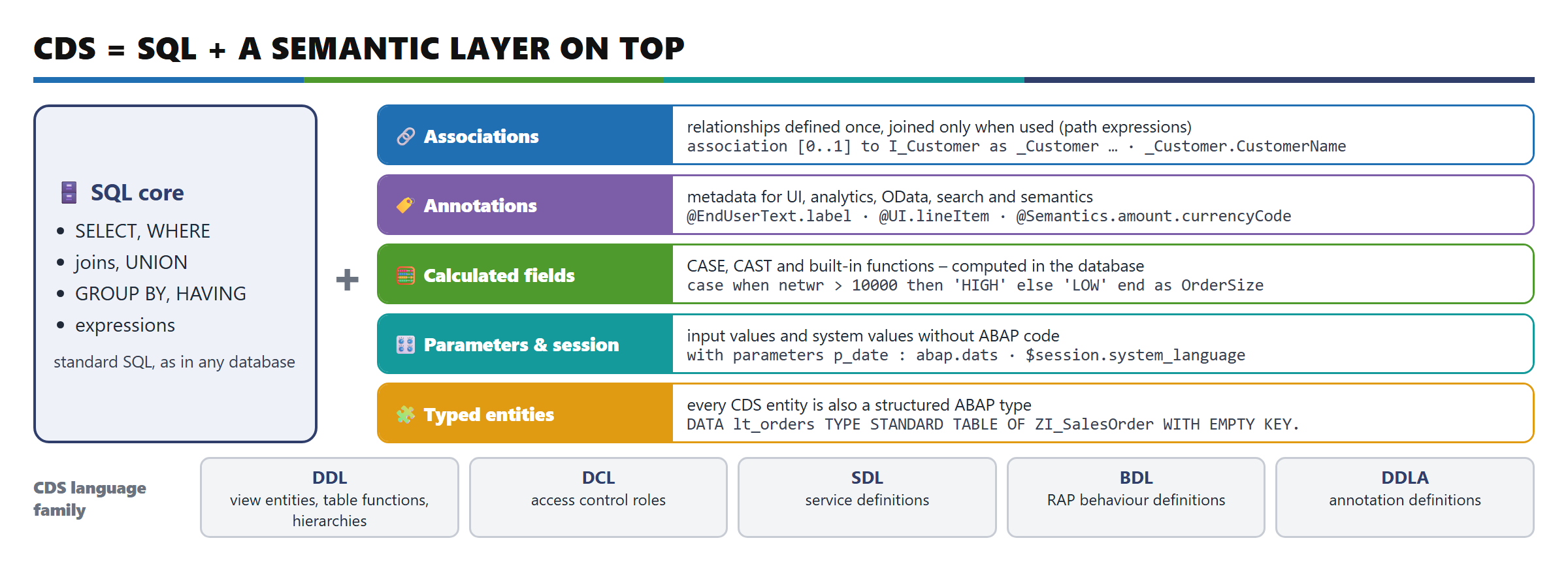
Language | What it does | Example |
|---|---|---|
DDL – data definition | Defines CDS entities (views, table functions, hierarchies) | define view entity … |
DCL – data control | Defines access-control roles (row-level read authorisation) – not SQL GRANT/REVOKE | define role … grant select on … |
Query / expressions | Reading data, CASE, functions, path expressions |
|
ABAP CDS vs HANA CDS
ABAP CDS (this page) | HANA CDS (legacy) | |
|---|---|---|
Runs in | AS ABAP, on any supported database | HANA only (XS classic, |
Part of DDIC / ABAP transport | Yes | No – HANA repository / delivery units |
Read with | ABAP SQL | Native SQL |
Status | Current – basis of S/4HANA, RAP, Fiori | Deprecated – replaced by HDI / CAP CDS on HANA Cloud |
Why CDS instead of SE11 database views
Feature | CDS view entity | Classic SE11 view |
|---|---|---|
Code push-down (calculations in HANA) | Yes | Limited |
Joins | Inner, left/right outer, cross; UNION | Inner join only |
Expressions, CASE, SQL functions | Yes | No |
Parameters, session variables | Yes | No |
Associations (joins on demand) | Yes | No |
Annotations (UI, analytics, semantics) | Yes | No |
Access control (DCL) | Yes | No |
Views on views, extensions | Yes | Limited |
Basis of RAP, Fiori elements, embedded analytics, VDM | Yes | No |
Created in | ADT only | SE11 |
Data sources of a view entity: DDIC tables, other CDS view entities, DDIC-based CDS views, CDS table functions, CDS hierarchies.
Part 2 – DDIC-based views vs CDS view entities
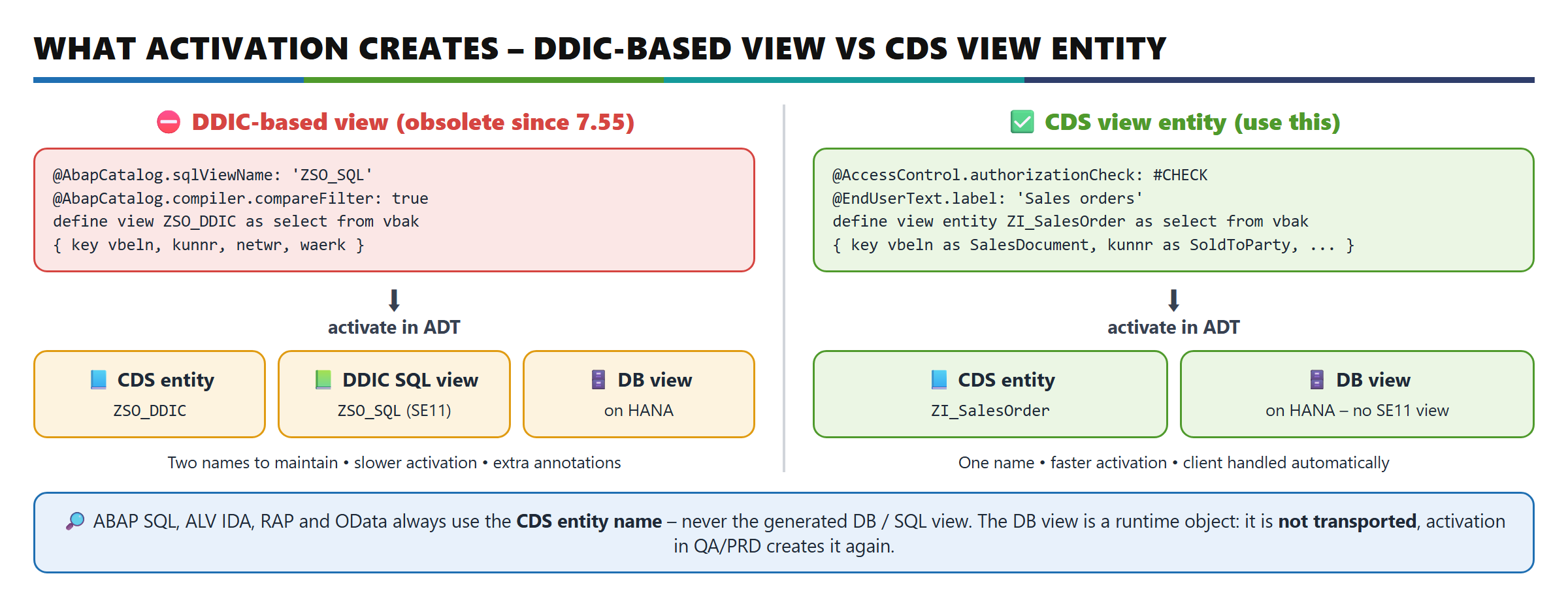
DDIC-based view ( | View entity ( | |
|---|---|---|
Status | Obsolete since 7.57 / S/4HANA 2022 | Use this (7.55+) |
Extra SE11 SQL view | Yes – needs | No |
Activation | Slower (two objects) | Faster |
Client handling | Annotation-driven | Automatic |
| Needed | Not needed |
Buffering | @AbapCatalog.buffering… | Separate entity buffer ( |
Extension |
| extend view entity |
Name list after view name | Allowed (blocks extensions) | Not allowed |
- Migration: report
RUTDDLS_MIGRATION_CANDIDATESlists candidates; from 7.56RUTDDLSV2MIGRATIONmigrates. - Activation creates an SQL view on the database – not a "HANA CDS view". The DB view is not transported; activation in QA/PRD creates it again.
- Never select from the generated SQL view name in ABAP – obsolete since 7.57. Always use the CDS entity name.
Part 3 – Syntax and annotations
Create in ADT: New → Other ABAP Repository Object → Core Data Services → Data Definition, template "Define View Entity". Header annotations come before define; element annotations before a field.
|
- Rules:
keyfields first; alias every field in CamelCase; comments with//or/* */; noSELECT *; the client field is never listed (handled automatically).
Important annotations
Annotation | Purpose |
|---|---|
@AbapCatalog.… | Technical settings: |
@AccessControl.authorizationCheck |
|
| Texts for the view or field (translatable) |
@ObjectModel.… | Usage type, |
@Semantics.… | Meaning of a field: |
@VDM.viewType |
|
@Analytics.… |
|
@UI.… | Fiori elements layout: |
@Environment.systemField | Fill a parameter from a system field (Part 6) |
ABAP annotations (AbapCatalog, AccessControl, ClientDependent (obsolete), ClientHandling, DataAging, EndUserText, Environment, MappingRole, Metadata, Semantics) are evaluated by the ABAP runtime. Framework annotations (Analytics, AnalyticsDetails, Consumption, DefaultAggregation, EnterpriseSearch, Hierarchy, OData, ObjectModel, Search, UI, VDM) are evaluated by SADL, OData, analytics and Fiori.
Part 4 – Joins
Join | Result | CDS syntax |
|---|---|---|
Inner | Only rows with a match on both sides – no NULLs |
|
Left outer | All left rows; right columns NULL when no match | left outer join |
Right outer | All right rows; left columns NULL when no match | right outer join |
Cross | Every left row × every right row; no ON condition | cross join |
UNION / UNION ALL | Rows of two selects appended (same structure) |
|
|
Outer join pitfall and COALESCE
The billing example (VBRK + VBRP + MAKT) shows two classic traps:
- A left outer join to MAKT without a language returns one row per language.
- Putting
makt.spras = $parameters.p_sprasin the WHERE clause turns the outer join into an inner join: items without a text in that language vanish. Put such conditions into the join's ON condition, or use an association filter.
Final version – association with filter plus COALESCE fallback (first non-NULL value):
|
[1: …]filters the association to one row. If no text exists in the requested language, the English text is returned (any language can serve as the fallback).- COALESCE examples:
coalesce('A','B')→ A;coalesce(NULL,'B')→ B; all NULL → NULL.
Part 5 – Associations
An association is a join condition that is defined once and executed only when a field of the target is requested (as a LEFT OUTER JOIN by default). It makes models reusable and is the basis of RAP, OData $expand and Fiori navigation.
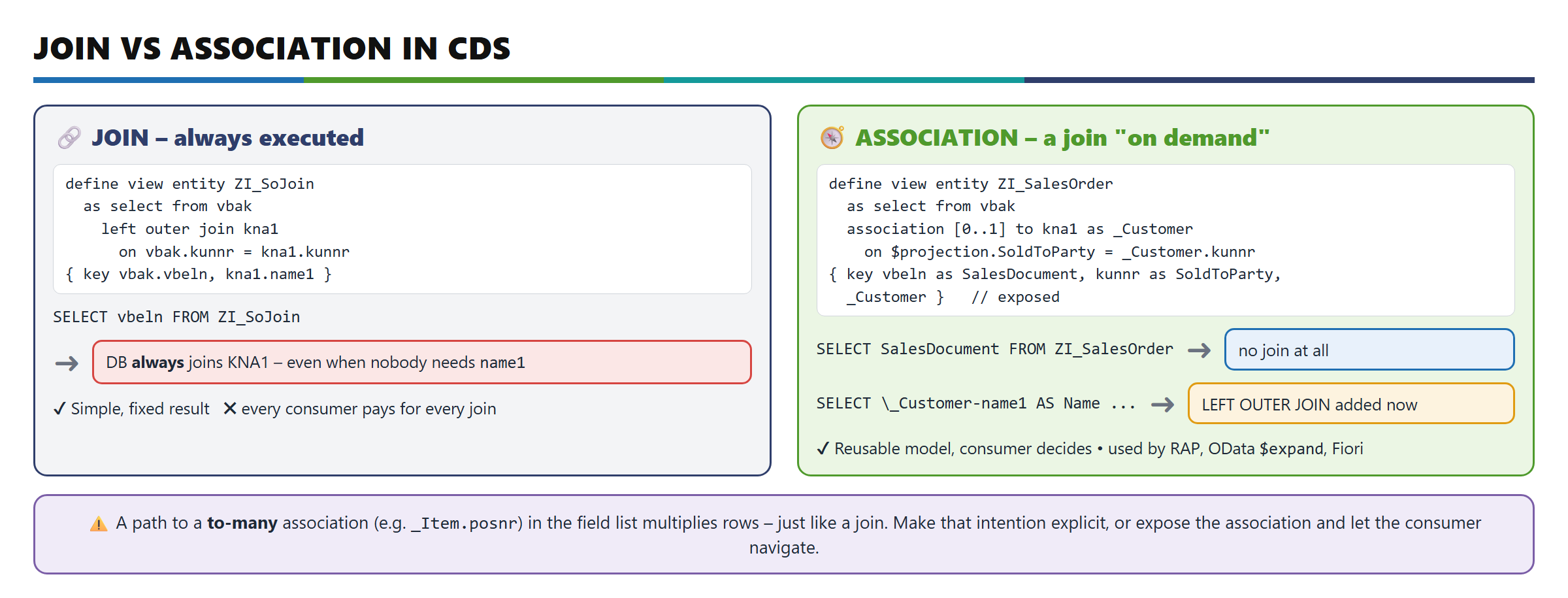
Cardinality
Classic syntax | New syntax (7.58+ / 2023) | Meaning |
|---|---|---|
|
| Target has at most one row (to-one) |
[1..1] | of many to exact one | Exactly one target row |
|
| Zero or more target rows (to-many) |
[1..*] | – | At least one target row |
- Always state the cardinality:
association to sflightwithout it defaults to[0..1], but flights per connection are really[0..*]. - Fields used in
$projection.Xmust be in the element list; association names start with_by convention. - For RAP parent–child trees use composition instead (see RAP › 02 · Data Model & CDS).
Exposed vs ad-hoc use
- Exposed: list
_Customerin the element list – consumers can navigate it later. - Ad-hoc: use a target field directly (
_Customer.name1 as CustomerName) – the join is executed for this view. - Ad-hoc use of a to-many association (
_Item.posnr) multiplies rows like a join – do it only on purpose.
Path expressions
Navigate through one or more associations, optionally with a filter: _Item[ItemCategory = 'TAN'].Material or _Customer._Address.PostalCode. In ABAP SQL a path is written with backslashes:
|
- A path field needs an alias; with path expressions the strict syntax applies – INTO comes last, after WHERE and ORDER BY.
- Multi-level:
\_Connection\_Flight-fldate. In ADT Data Preview: right-click a row → Follow Association. - A path can set its own join type:
_Item[inner].Materialmakes the association an inner join for this path (default: left outer).
Join | Association | |
|---|---|---|
Executed | Always | Only when a target field is used |
Default type | As written | Left outer join (to-one: at most one row) |
Reuse by consumers | No | Yes – consumers navigate as needed |
Used by OData / RAP | No | Yes – navigation, |
Part 6 – Parameters and session variables
A parameterised view needs input values on every read; a non-parameterised view does not. Parameters are typed with a data element or abap.<type> and read with $parameters.<name>.
|
|
- @Environment.systemField makes a parameter effectively optional in ABAP SQL: if you omit it, the system value is passed. Values:
#CLIENT,#SYSTEM_DATE,#SYSTEM_TIME,#SYSTEM_LANGUAGE,#USER. - Points to check in the example: no trailing comma after the last parameter,
p_target_currencyandp_conv_datedeclared, and the mandatorytarget_currency =>argument passed.
Session variables – no parameter needed
Session variable | ABAP equivalent |
|---|---|
$session.client | sy-mandt |
$session.system_date | sy-datum |
$session.system_language | sy-langu |
$session.user | sy-uname |
Typical use: association [0..1] to makt as _Text on $projection.Material = _Text.matnr and _Text.spras = $session.system_language.
Part 7 – Built-in functions and aggregation
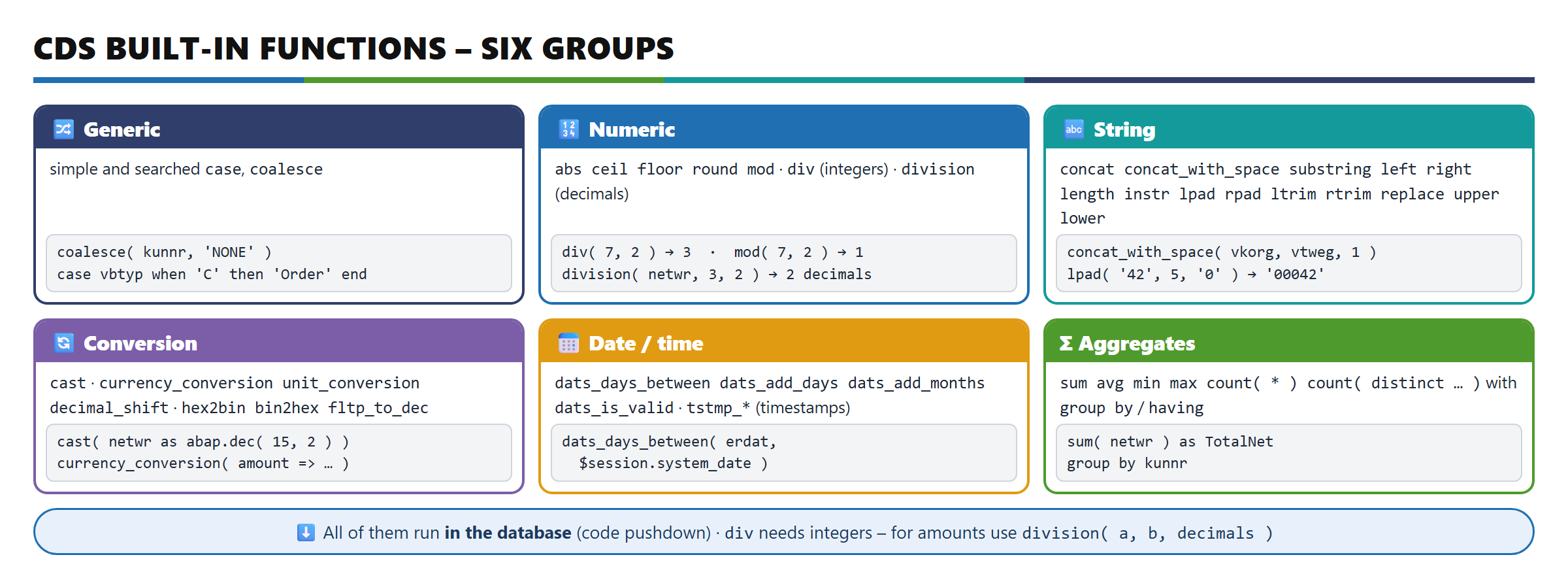
Group | Functions |
|---|---|
Generic | simple and searched |
Numeric |
|
String |
|
Conversion |
|
Date / time |
|
Aggregates |
|
|
divneeds integer arguments – for amounts usedivision( a, b, decimals ). CAST also solves type/length mismatches in join conditions.unit_conversion( quantity => …, source_unit => …, target_unit => … )works like currency conversion.
Aggregation
|
There is no ORDER BY in a CDS view – a view is an unordered set. The consumer sorts (ABAP SQL ORDER BY, OData $orderby, @UI.presentationVariant). A table function does not fix this either.
Part 8 – View on view and extensions
View on view
Build small reusable views and combine them, instead of one huge view. HANA optimises the stack as one statement. One table can feed many views, and one view can read many tables and views.
|
Extending a view (add fields without changing it)
|
- Like an append structure for a table. Data Preview of the base view shows the new field; ADT marks the base view as extended.
- Controlled by
@AbapCatalog.viewEnhancementCategory:[#PROJECTION_LIST](default – extendable, several extensions allowed), add#GROUP_BY/#UNIONfor aggregated / union views,[#NONE](not extendable). - Legacy syntax:
extend view … with …plus@AbapCatalog.sqlViewAppendName. A DDIC-based view with an explicit name list (define view Z (a, b, c)) could not be extended. - Clean core: extend only SAP views released for extension (C0 contract,
@AbapCatalog.extensibility.extensible: true). See Clean Core › 01 Clean Core.
Finding SAP's CDS views
- ADT: Ctrl+Shift+A, search
type:ddls(filter on released APIs); where-used list of a table → data definitions. - Fiori apps View Browser and Custom CDS Views; SAP Business Accelerator Hub (api.sap.com).
Part 9 – Virtual Data Model (VDM) and analytics
The VDM is SAP's layered set of CDS views over the S/4HANA tables, ready for apps and analytics. Know the prefixes – details on Clean Core › 01 Clean Core.
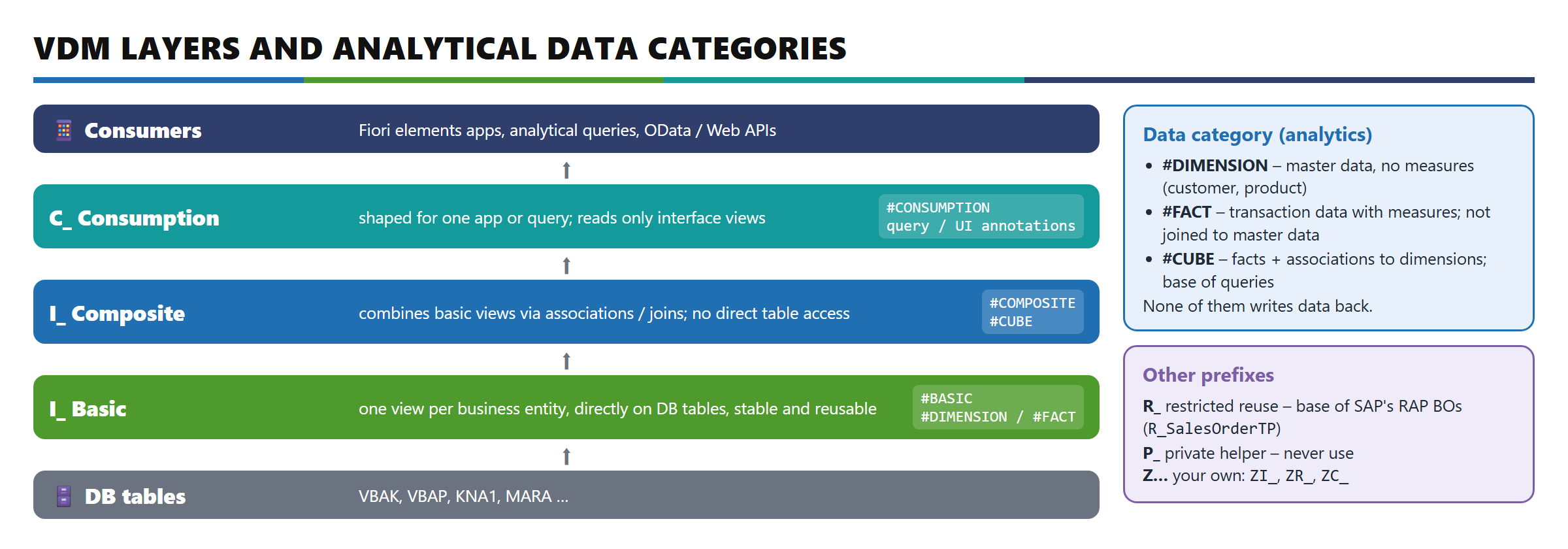
Prefix | View type | Rule |
|---|---|---|
I_ | Interface – basic | Public, stable, reusable. Basic views read tables; composite views combine basic views |
C_ | Consumption | For one app / query; reads interface views only; exposed to UI / OData |
R_ | Restricted reuse | Base of SAP's transactional RAP BOs (e.g. |
P_ | Private | SAP-internal helper – never use |
Embedded analytics (short)
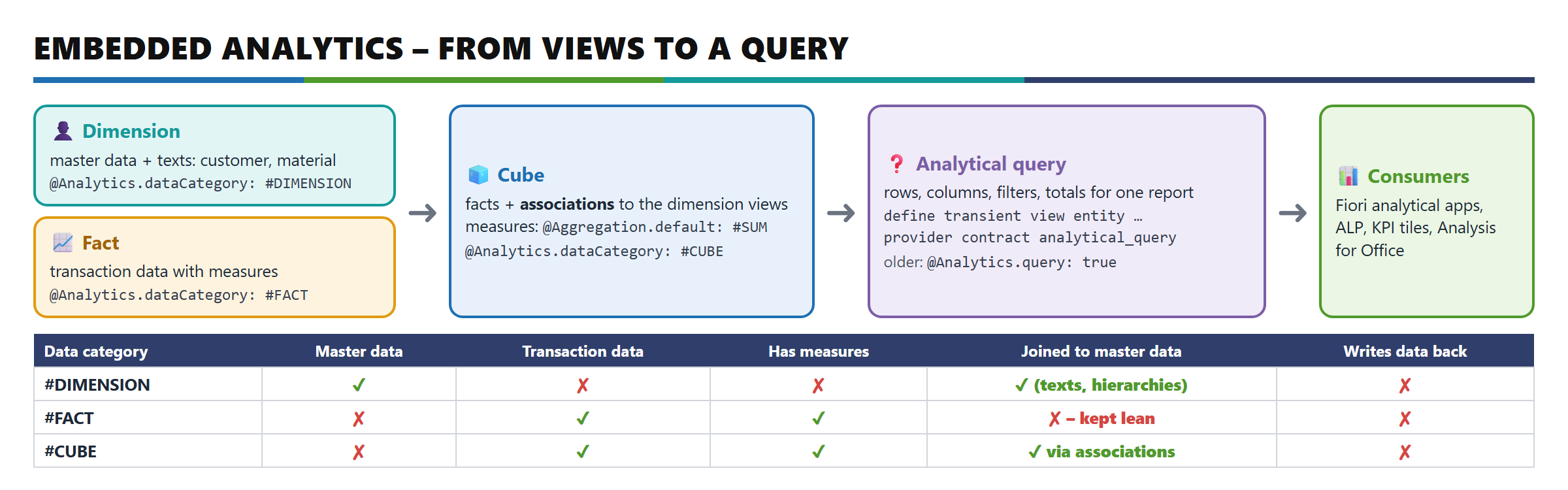
- Analytical queries run in S/4HANA itself, no BW needed:
#DIMENSION/#FACT→#CUBE→ query (@Analytics.query: true, newer releasesdefine transient view entity … provider contract analytical_query). Analytics can only use CDS views, not tables directly. In the cube, expose only the dimension fields the queries need. Generated queries are registered in table RSRREPDIR (check there if a query is missing). - Mark measures with
@Semantics.amount…/@Aggregation.default: #SUM(older name@DefaultAggregation). Keys must identify a row uniquely – dimensions need not all be keys. - Tools: Fiori launchpad (
/UI2/FLP), View Browser, Custom Analytical Queries, KPI Modeler, APF, Overview Page (OVP), Analytical List Page (ALP). Test: RSRT / RSRTS_ODP_DIS. Query Browser is deprecated. Users need a business role such as SAP_BR_EMPLOYEE; after assigning it in PFCG, run the user comparison.
Part 10 – Access control (DCL)
A CDS role adds a WHERE condition automatically to every ABAP SQL read of the view – row-level security without coding AUTHORITY-CHECK.
|
|
- The view needs
@AccessControl.authorizationCheck: #CHECK. aspect pfcg_auth( object, field, ACTVT = '03' )reads the user's PFCG values. Conditions can be literal (Country = 'DE'), PFCG-based,aspect user, or combined withand/or.- Own authorisation object (user's steps): SU21 → authorisation class → object with field ACTVT (allow 03) plus e.g. LAND1 → maintain in PFCG roles → use it in
pfcg_auth. - DCL is applied by ABAP SQL, RAP and OData. Native SQL / AMDP bypass it.
RAP uses the same DCL for read authorisation – see RAP › 03 · Projection, UI, Access Control & Service.
Part 11 – CDS table functions (implemented by AMDP)
When plain CDS cannot express the logic (e.g. aggregate a variable number of rows into one string), a table function gives a CDS signature whose result is computed by an AMDP function in SQLScript (7.50+).
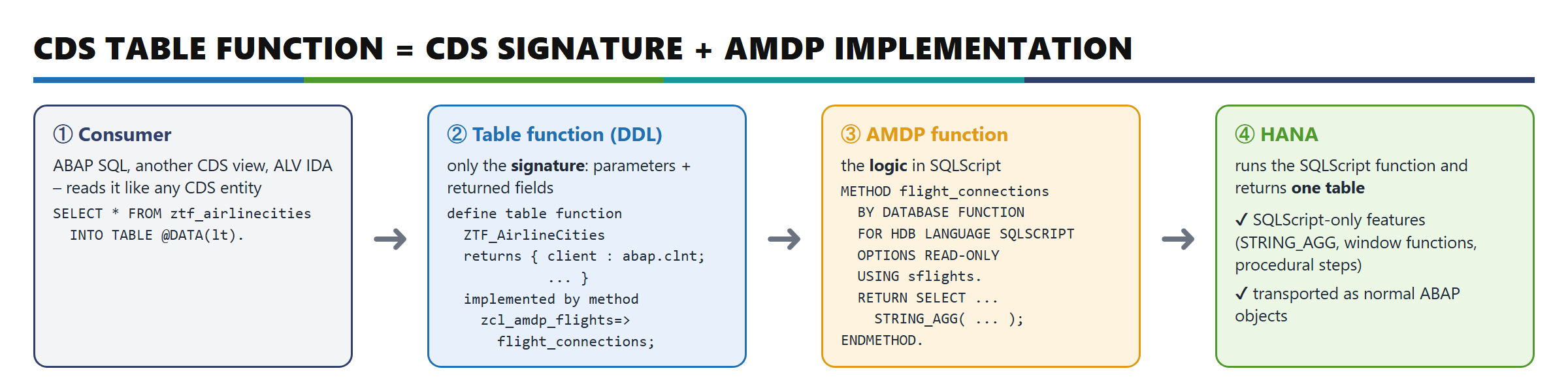
Example: one row per airline with all destination cities in one field.
|
|
Sample result: AA American Airlines "NEW YORK, SAN FRANCISCO"; AZ Alitalia "FRANKFURT, ROME".
- The first returned field is the client; filter it with
SESSION_CONTEXT('CDS_CLIENT')(the HANA variable behind$session.client). - Parameters:
define table function … with parameters p_carrid : s_carr_id returns { … }– inside the AMDP read them as:p_carrid. - The method has no parameter list of its own (
FOR TABLE FUNCTION), is static, and returns exactly one table withRETURN. AMDP rules and debugging: page 06 AMDP & SQLScript. - Use a table function only when a view entity cannot do it – it is HANA-only and harder to maintain.
Part 12 – Virtual elements and hierarchies
Virtual elements
A field that is not read from the DB but calculated in ABAP after the read. Evaluated only by SADL / OData / RAP – an ABAP SQL SELECT or the Data Preview returns it empty.
|
|
- Interface is IF_SADL_EXIT_CALC_ELEMENT_READ; the class name needs the prefix
'ABAP:'. - Legacy form (DDIC-based view):
@ObjectModel.virtualElement: trueoncast( '' as abap.char(255) ) as PoTextand@OData.publish: trueto see it.
Hierarchies
Parent–child data in one table (CEO → SVP → manager → employee; company code → plant). Define a self-association child to parent ([0..1]) and a CDS hierarchy on top:
|
(Two DDL sources – one per entity.) Fiori tree tables and analytics use the hierarchy directly; in ABAP SQL select from it like a view.
Part 13 – Consuming CDS
ABAP SQL
|
DCL is applied automatically; the client is handled automatically. Full ABAP SQL syntax: see the ABAP SQL page.
ALV with IDA on a CDS view
|
Only the visible rows are read from HANA. Field catalog, conditions, double-click navigation: see page 04.
Exposing CDS as OData
Technique | Status |
|---|---|
| Legacy – read-only, not available for view entities or ABAP Cloud |
SEGW project: import the generated DDIC view, or Reference Data Source on the CDS view | Legacy |
RAP: | Current – use this |
|
Fiori apps read data through OData services, not from CDS views directly – so a view used by a Fiori app is always exposed through a service. Details: the OData page (CORE ABAP section) (legacy techniques, URIs, /IWFND/GW_CLIENT) and RAP › 03 · Projection, UI, Access Control & Service (service binding).
Part 14 – Limits, tools and legacy notes
What CDS cannot do
- No imperative logic (loops, IF) and one result set per view → use a table function or AMDP.
- No DML: a CDS view cannot insert/update/delete. With a RAP behaviour definition a CDS-based BO supports create/update/delete (legacy: BOPF).
- No step debugger. Use Data Preview, SQL trace (ST05), "Show SQL CREATE Statement", Dependency Analyzer, and PlanViz.
- No ORDER BY, no
SELECT *in view entities, client field not in the element list. - DISTINCT and UNION: available in DDIC-based views for long (7.40 SP08 / 7.50); for view entities UNION came with 7.56.
Tools and transactions
Tool | Use |
|---|---|
ADT (Eclipse) | The only editor for CDS – SE11 cannot create or change CDS |
Data Preview (F8 in ADT) | Run the view, follow associations |
SDDLAR | Display / check DDL sources in SAP GUI |
ST05, PlanViz | See the SQL that HANA really executes |
RUTDDLS_MIGRATION_CANDIDATES / RUTDDLSV2MIGRATION | Migrate DDIC-based views to view entities |
Legacy – know it for interviews
- BOPF with
@ObjectModel.transactionalProcessingEnabled→ replaced by RAP (RAP section). - HANA information models (attribute / analytic / calculation views) consumed via external views → replaced by ABAP CDS in S/4HANA development.
Part 15 – Interview questions
Q1. In which layer are CDS views created, and what happens on activation?
In the ABAP layer (ADT, DDIC). Activation creates an SQL view on the database (and for DDIC-based views also an SE11 SQL view). It is not a "HANA CDS view". Only the DDL source is transported; activation recreates the DB view in QA/PRD.
Q2. CDS view entity vs DDIC-based CDS view?
View entities (define view entity, 7.55+) have no extra SE11 view, no sqlViewName, faster activation, automatic client handling and stricter checks. DDIC-based views are obsolete; migrate with RUTDDLSV2MIGRATION.
Q3. Join vs association?
A join is always executed. An association is a reusable join condition executed only when a target field is requested (left outer join by default). Associations can be exposed for consumers, OData and RAP.
Q4. Does the database have to be HANA for CDS?
No. ABAP CDS views run on every database supported by AS ABAP (available since 7.40 SP05). Table functions (AMDP) are HANA-only.
Q5. Why use CDS when SE11 views exist?
Not just performance: expressions, outer joins and unions, parameters, associations, annotations, DCL, extensions, the VDM, and they are the foundation of RAP, Fiori elements and embedded analytics.
Q6. Can a CDS view create, update or delete data? Can you debug it?
Not by itself – CDS is read-only. With a RAP behaviour definition (or legacy BOPF) the BO supports CUD. There is no debugger; use Data Preview, ST05, the SQL CREATE statement and the dependency analyzer.
Q7. How do you implement authorisation in CDS?
@AccessControl.authorizationCheck: #CHECK plus a DCL role (define role … grant select … where … aspect pfcg_auth(…)). ABAP SQL adds the condition automatically. Native SQL / AMDP bypass DCL.
Q8. What is a CDS table function and when do you use it?
A CDS entity whose result is computed by an AMDP function (BY DATABASE FUNCTION) in SQLScript. Use it when CDS syntax cannot express the logic (e.g. STRING_AGG, procedural steps). It is HANA-only.
Q9. What are the VDM view types and S/4HANA naming conventions?
I_ interface (basic and composite – stable, reusable), C_ consumption (app-specific), R_ restricted reuse (RAP base), P_ private (never use). Data categories for analytics: #DIMENSION, #FACT, #CUBE.
Q10. How do you expose a CDS view as OData today?
With RAP: service definition (define service … expose …) and a service binding (OData V2/V4). @OData.publish: true and SEGW Reference Data Source are legacy and not available for view entities.
Q11. What is a virtual element?
A field calculated in ABAP after the DB read, via a class implementing IF_SADL_EXIT_CALC_ELEMENT_READ (@ObjectModel.virtualElementCalculatedBy: 'ABAP:ZCL_…'). Only OData / RAP evaluate it.
Q12. How do you make CDS views perform well?
Filter early (parameters, WHERE), keep joins minimal and use associations so unused joins are skipped, avoid to-many paths in field lists, CAST to matching types in join conditions, build on released I_ views, and check the plan with ST05 / PlanViz.
🏠 Start Here · ◀ 04 · ABAP SQL, ADBC & ALV IDA · 06 · AMDP & SQLScript ▶ · Sections: CORE ABAP | OOPS ABAP | ABAP on HANA | Clean Core | RAP | ABAP Points | SAP Fiori | SAPUI5 | Mobile Development (MDK) | BTP Foundations | BTP Development | CAP | SAP Build | ABAP on BTP | Integration Suite | SAP Business AI | SAP BASIS | Security | SAP SDLC
Functional: FICO ABAP | TRM ABAP | VIM | SAP BIS | SD ABAP | MM ABAP | PP ABAP | QM ABAP | PM ABAP | PS ABAP | EWM | TM ABAP | GTM ABAP | EHS ABAP | HR ABAP | BW | SAP Datasphere | SAP Business Data Cloud | SAP MDG | SAP Analytics Cloud | SAP Ariba | SAP CX | SAP IBP