The function modules, classes and programs an ABAP developer reaches for every day, grouped by task. Each entry says what it does in one line. Legacy items still work in classic ABAP but have a newer successor; items marked ABAP Cloud are the released APIs to use in S/4HANA Cloud and clean-core development (see Clean Core › 01 Clean Core). Test any FM in SE37 (F8) before you call it.
Part 1 – ALV
Full explanations and examples: OOPS ABAP › 04 ALV Reporting; ALV with IDA: ABAP on HANA › 04.
1.1 Function module ALV (legacy)
Function module | Purpose |
|---|---|
REUSE_ALV_GRID_DISPLAY | Grid display of one internal table (legacy → CL_SALV_TABLE) |
REUSE_ALV_LIST_DISPLAY | Classic list display (legacy → CL_SALV_TABLE) |
REUSE_ALV_HIERSEQ_LIST_DISPLAY | Hierarchical-sequential list: header table + item table |
REUSE_ALV_BLOCK_LIST_INIT | Block list: initialise the list of blocks |
REUSE_ALV_BLOCK_LIST_APPEND | Block list: append one internal table as a separate block |
REUSE_ALV_BLOCK_LIST_DISPLAY | Block list: display all appended blocks |
REUSE_ALV_FIELDCATALOG_MERGE | Build a field catalog from a DDIC structure |
REUSE_ALV_COMMENTARY_WRITE | Write the top-of-page header of a grid |
1.2 Class-based ALV
Class | Purpose |
|---|---|
CL_SALV_TABLE | Simple ALV ( |
CL_SALV_TREE | Tree ALV (SALV object model) |
CL_SALV_TREE_SETTINGS | Tree settings: header, hierarchy column texts ( |
CL_SALV_EVENTS_TREE | Tree events: double click, link click … ( |
CL_SALV_HIERSEQ_TABLE | Hierarchical-sequential ALV in the SALV model |
CL_GUI_ALV_GRID | Full-featured grid in a container: editable cells, toolbar, events |
CL_GUI_ALV_TREE | Tree ALV control in a container |
CL_GUI_CUSTOM_CONTAINER | Container in a custom control area of a screen |
CL_GUI_DOCKING_CONTAINER | Container docked to the edge of a screen (no screen painter area needed) |
CL_GUI_SPLITTER_CONTAINER | Splits a container into rows/columns (several ALVs on one screen) |
CL_SALV_GUI_TABLE_IDA | ALV with IDA: |
CL_SALV_BS_RUNTIME_INFO | Capture the ALV data of a program started with SUBMIT |
Part 2 – File handling (PC, application server, Excel)
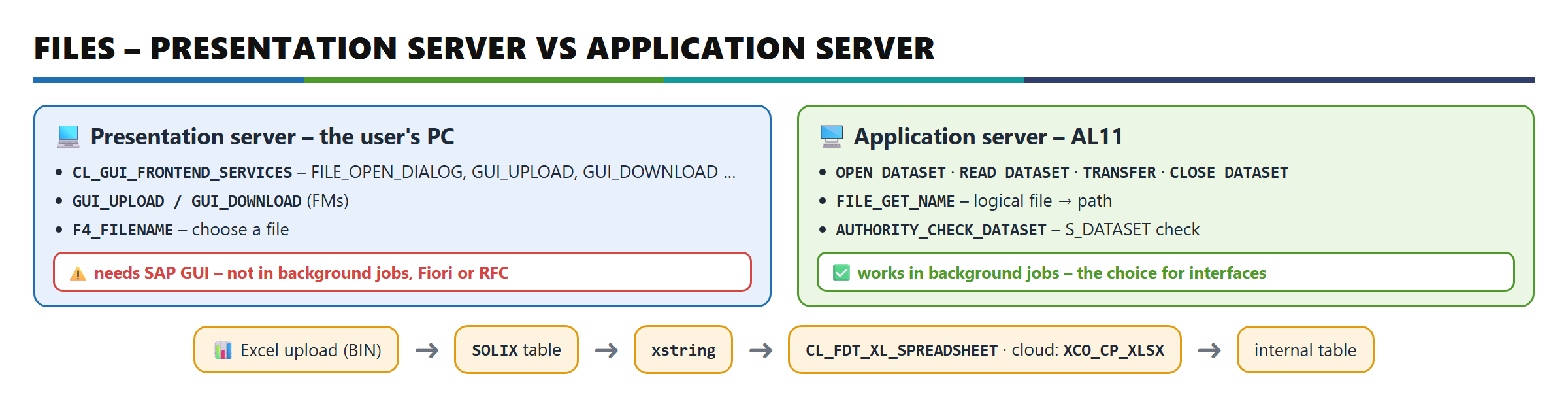
2.1 Presentation server (user's PC)
Method / FM | Purpose |
|---|---|
CL_GUI_FRONTEND_SERVICES=>FILE_OPEN_DIALOG | Let the user pick a file to upload |
CL_GUI_FRONTEND_SERVICES=>FILE_SAVE_DIALOG | Let the user choose name and folder for a download |
CL_GUI_FRONTEND_SERVICES=>GUI_UPLOAD | Upload a file into an internal table (ASC or BIN) |
CL_GUI_FRONTEND_SERVICES=>GUI_DOWNLOAD | Download an internal table to a file |
CL_GUI_FRONTEND_SERVICES=>DIRECTORY_BROWSE | Let the user pick a folder |
CL_GUI_FRONTEND_SERVICES=>FILE_EXIST | Check whether a file exists on the PC |
CL_GUI_FRONTEND_SERVICES=>EXECUTE | Open a file or URL with its PC application |
GUI_UPLOAD / GUI_DOWNLOAD (FMs) | Same as the methods; the class is preferred |
F4_FILENAME | F4 help for a file name parameter |
- Front-end services need SAP GUI: they do not work in background jobs, Fiori or RFC calls.
2.2 Application server (AL11)
Statement / class | Purpose |
|---|---|
OPEN DATASET … FOR INPUT / OUTPUT / APPENDING | Standard way: open a server file (TEXT or BINARY MODE) |
READ DATASET / TRANSFER | Read one line / write one line |
CLOSE DATASET / DELETE DATASET | Close / delete the file |
AUTHORITY_CHECK_DATASET | Check authorization S_DATASET before opening a file |
FILE_GET_NAME | Logical file name (transaction FILE) → physical path |
/SAPDMC/LSM_F4_SERVER_FILE | F4 help for a server file name |
CL_RSAN_UT_APPSERV_FILE_WRITE=>APPSERVER_FILE_WRITE | Option: write an itab to a server file (BW helper, not released) |
CL_RSAN_UT_APPSERV_FILE_READER=>APPSERVER_FILE_READ | Option: read a server file into an itab (BW helper, not released) |
|
2.3 Excel and binary content
Class / FM | Purpose |
|---|---|
CL_FDT_XL_SPREADSHEET | Read (and write) .xlsx from an xstring – no Excel needed, works in background |
XCO_CP_XLSX | ABAP Cloud: read and write .xlsx (XCO library) |
SCMS_BINARY_TO_XSTRING | Binary table (SOLIX) → xstring |
SCMS_XSTRING_TO_BINARY | xstring → binary table (SOLIX) |
CL_BCS_CONVERT |
|
ALSM_EXCEL_TO_INTERNAL_TABLE | Legacy: reads Excel through the PC's Excel (front end only) |
TEXT_CONVERT_XLS_TO_SAP | Legacy: Excel upload into an itab (front end only) |
|
Part 3 – Sending e-mail (BCS)
Class / method | Purpose |
|---|---|
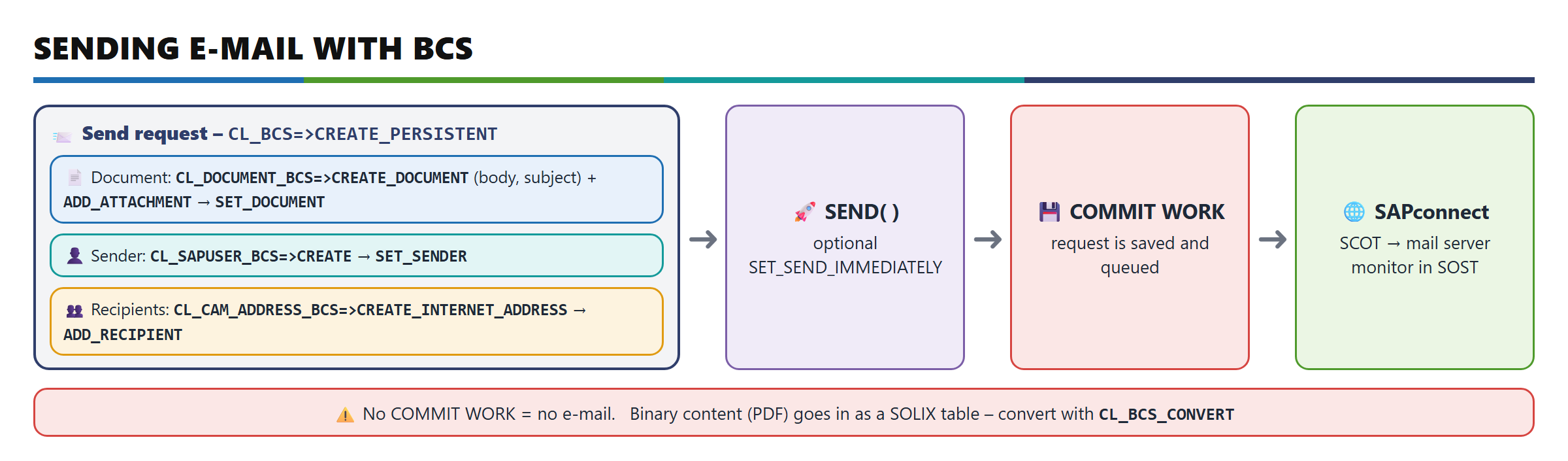
CL_BCS=>CREATE_PERSISTENT | Create the send request |
CL_DOCUMENT_BCS=>CREATE_DOCUMENT | Create the mail body (type RAW text or HTM) with subject |
CL_DOCUMENT_BCS->ADD_ATTACHMENT | Add an attachment (PDF, XLS, TXT …) as binary (SOLIX) or text |
CL_BCS->SET_DOCUMENT | Put the document into the send request |
CL_SAPUSER_BCS=>CREATE | Sender (or recipient) from an SAP user |
CL_CAM_ADDRESS_BCS=>CREATE_INTERNET_ADDRESS | Sender or recipient from an e-mail address |
CL_BCS->SET_SENDER | Set the sender |
CL_BCS->ADD_RECIPIENT | Add a recipient (To; |
CL_BCS->SET_SEND_IMMEDIATELY | Send now instead of waiting for the SCOT job |
CL_BCS->SEND | Send – then COMMIT WORK, otherwise nothing leaves the system |
CL_BCS_CONVERT | Convert string / xstring to the SOLI / SOLIX tables BCS expects |
CL_BCS_MAIL_MESSAGE | ABAP Cloud: released mail API |
|
- Check the result in SOST (send requests); mail server settings are in SCOT.
Part 4 – Conversions and formatting
FM / class | Purpose |
|---|---|
CONVERSION_EXIT_ALPHA_INPUT | Add leading zeros ('4711' → '0000004711'); modern: |
CONVERSION_EXIT_ALPHA_OUTPUT | Remove leading zeros; modern: |
CONVERSION_EXIT_MATN1_INPUT / _OUTPUT | Material number internal ↔ external format |
CONVERSION_EXIT_CUNIT_INPUT / _OUTPUT | Unit of measure internal ↔ language-dependent external |
SPELL_AMOUNT | Amount in words (e.g. for cheques) |
CONVERT_TO_LOCAL_CURRENCY | Convert an amount between currencies with the exchange rate (TCURR) |
UNIT_CONVERSION_SIMPLE | Convert a quantity between units of measure |
CL_ABAP_CONV_CODEPAGE | string ↔ xstring in a code page (UTF-8 …); older: CL_ABAP_CONV_OUT_CE / _IN_CE |
/UI2/CL_JSON |
|
CALL TRANSFORMATION id | ABAP ↔ XML (asXML) or JSON with the identity transformation; custom XSLT/ST possible |
XCO_CP_JSON | ABAP Cloud: JSON building and parsing |
Part 5 – Dates, popups and F4 help
5.1 Dates and times
FM / class | Purpose |
|---|---|
RP_CALC_DATE_IN_INTERVAL | Add or subtract days, months, years to a date |
RP_LAST_DAY_OF_MONTHS | Last day of the month of a date |
DATE_GET_WEEK | Calendar week of a date |
DATE_CONVERT_TO_FACTORYDATE | Date → factory calendar date (next working day) |
DAY_ATTRIBUTES_GET | Weekday, holiday, working-day flag per factory calendar |
MONTH_NAMES_GET | Month names in a language |
CL_ABAP_TSTMP | Time stamp arithmetic ( |
CL_ABAP_CONTEXT_INFO | ABAP Cloud: system date, time, user (instead of sy-datum, sy-uname) |
- Simple day arithmetic needs no FM:
lv_date = lv_date + 30.; the difference of two dates is the number of days.
5.2 Popups and progress
FM / class | Purpose |
|---|---|
POPUP_TO_CONFIRM | Yes / No / Cancel question; ANSWER = '1', '2' or 'A' |
POPUP_GET_VALUES | Ask the user for one or more field values |
POPUP_TO_DECIDE_LIST | Let the user choose one option from a list |
CL_PROGRESS_INDICATOR=>PROGRESS_INDICATE | Progress text in the status bar; older: SAPGUI_PROGRESS_INDICATOR |
5.3 F4 help and screen values
FM | Purpose |
|---|---|
F4IF_INT_TABLE_VALUE_REQUEST | F4 help from your own internal table |
F4IF_FIELD_VALUE_REQUEST | F4 help of a DDIC table field (its search help) |
DYNP_VALUES_READ | Read screen field values in POV (before PAI has transported them) |
DYNP_VALUES_UPDATE | Write values back to screen fields from POV |
Part 6 – Texts, locks, number ranges, logs and jobs
FM / class | Purpose |
|---|---|
READ_TEXT | Read a long text (ID, language, name, object → lines) |
SAVE_TEXT / CREATE_TEXT | Save / create a long text (then COMMIT_TEXT or COMMIT WORK) |
DELETE_TEXT | Delete a long text |
ENQUEUE_<lock object> / DEQUEUE_<lock object> | Generated by a lock object (SE11, name starts with EZ/EY) |
ENQUEUE_E_TABLE / DEQUEUE_E_TABLE | Generic lock on a table key |
DEQUEUE_ALL | Release all locks of the program |
ENQUEUE_READ | Read lock entries (like SM12) |
NUMBER_GET_NEXT | Next number from a number range object (SNRO) |
CL_NUMBERRANGE_RUNTIME=>NUMBER_GET | ABAP Cloud: next number |
CHANGEDOCUMENT_READ | Read change documents (CDHDR/CDPOS) of an object |
MESSAGE_TEXT_BUILD / FORMAT_MESSAGE | Build the text of a message class message |
BAL_LOG_CREATE / BAL_LOG_MSG_ADD / BAL_DB_SAVE | Application log: create, add messages, save (SLG1) |
BAL_DSP_LOG_DISPLAY | Display an application log |
CL_BALI_LOG | ABAP Cloud: application log API |
JOB_OPEN / JOB_CLOSE | Schedule a background job from code (with |
CL_APJ_RT_API | ABAP Cloud: schedule application jobs |
- Long text keys: header text of a sales order = object VBBK, ID 0001 …, name = order number. Find them in the text editor: Goto → Header.
Part 7 – BAPIs and commit handling
BAPIs never commit by themselves. Check the RETURN table, then call commit or rollback. Find BAPIs in transaction BAPI (BAPI Explorer). Details: CORE ABAP › 07 Interfaces.
FM / class | Purpose |
|---|---|
BAPI_TRANSACTION_COMMIT | Commit after a successful BAPI; |
BAPI_TRANSACTION_ROLLBACK | Undo everything the BAPI prepared |
BAPI_SALESORDER_CREATEFROMDAT2 | Create a sales order |
BAPI_PO_CREATE1 | Create a purchase order |
BAPI_GOODSMVT_CREATE | Post a goods movement (material document) |
BAPI_ACC_DOCUMENT_POST | Post an accounting document |
BAPI_MATERIAL_SAVEDATA | Create or change a material |
BAPI_BUPA_CREATE_FROM_DATA | Create a business partner |
CL_MD_BP_MAINTAIN=>MAINTAIN | S/4HANA: create/change BP with customer and supplier data (CVI) |
|
Part 8 – Forms (Smart Forms, Adobe, SAPscript)
Details: CORE ABAP › 11 Forms.
FM | Purpose |
|---|---|
SSF_FUNCTION_MODULE_NAME | Smart Form name → name of its generated FM (differs per system, so get it at runtime) |
SSF_OPEN / SSF_CLOSE | Several Smart Form calls in one spool request |
CONVERT_OTF | OTF output of a Smart Form → PDF |
FP_JOB_OPEN | Adobe form: open the print job (output parameters) |
FP_FUNCTION_MODULE_NAME | Adobe form name → generated FM name |
FP_JOB_CLOSE | Adobe form: close the print job |
OPEN_FORM / WRITE_FORM / CLOSE_FORM | Legacy SAPscript: open, write text elements, close |
|
Part 9 – Runtime type information and other useful classes
Class | Purpose |
|---|---|
CL_ABAP_TYPEDESCR | Root of RTTS: |
CL_ABAP_ELEMDESCR | Elementary types (length, decimals, type kind) |
CL_ABAP_STRUCTDESCR | Structures: |
CL_ABAP_TABLEDESCR | Table types; |
CL_ABAP_REFDESCR | Reference types |
CL_ABAP_CLASSDESCR | Classes: attributes, methods, interfaces |
CL_ABAP_DIFF | Compare two internal tables (new in ABAP release 7.93 / BTP 2308 – check availability on-premise) |
CL_SYSTEM_UUID | Create GUIDs: |
CL_HTTP_CLIENT | Call HTTP/REST services; ABAP Cloud: CL_WEB_HTTP_CLIENT_MANAGER |
|
Part 10 – Useful programs and demo packages
Program / package | Purpose |
|---|---|
RS_ABAP_SOURCE_SCAN | Program: find a string in the source code of many programs (also t-code CODE_SCANNER) |
RS_PROGRAM_TABLES | Function module: list the database tables a program uses |
RDDIT076 | Program: change transport request/task status, e.g. set a released task back to modifiable (Basis, use with care) |
RSTXPDFT4 | Convert a spool request to PDF |
RSTXSCRP | Export / import SAPscript forms and styles |
RSBDCSUB | Process batch input sessions in the background |
RSNAST00 | Process output (NAST) records |
RSEOUT00 / RBDAPP01 | Send outbound IDocs / process inbound IDocs |
RSPARAM | Display profile parameters |
SABAPDEMOS | Package of ABAP demo programs (DEMO_*); also t-code ABAPDOCU |
BCALV_* | ALV grid demo programs (e.g. BCALV_GRID_DEMO) |
SALV_DEMO_* | SALV demo programs (e.g. SALV_DEMO_TABLE_SIMPLE) |
Part 11 – S/4HANA and ABAP Cloud successors
In S/4HANA on-premise and private cloud the classic function modules above still work (classic ABAP). For clean core (level A) and ABAP Cloud you use released APIs instead. The successors:
Classic (SAP GUI / classic ABAP) | S/4HANA clean core / ABAP Cloud |
|---|---|
REUSE_ALV_*, CL_GUI_ALV_GRID, CL_SALV_TABLE | Fiori elements list report on a CDS view (RAP service); in SAP GUI: CL_SALV_GUI_TABLE_IDA |
GUI_UPLOAD / GUI_DOWNLOAD, CL_GUI_FRONTEND_SERVICES | Not available in ABAP Cloud – upload in the Fiori app; read Excel content with XCO_CP_XLSX |
OPEN DATASET (application server files) | Not available in ABAP Cloud – exchange files through integration (communication scenarios, SAP Integration Suite) |
CL_BCS, CL_DOCUMENT_BCS | CL_BCS_MAIL_MESSAGE |
CONVERSION_EXIT_ALPHA_INPUT / OUTPUT | String template |
NUMBER_GET_NEXT | CL_NUMBERRANGE_RUNTIME=>NUMBER_GET |
ENQUEUE_ / DEQUEUE_ function modules | RAP lock handling, or CL_ABAP_LOCK_OBJECT_FACTORY |
BAL_LOG_CREATE, BAL_LOG_MSG_ADD, BAL_DB_SAVE | CL_BALI_LOG and the CL_BALI_* item classes |
JOB_OPEN / SUBMIT … VIA JOB / JOB_CLOSE | Application jobs: job catalog + template, scheduled with CL_APJ_RT_API |
BAPIs + BAPI_TRANSACTION_COMMIT | Released RAP business objects: EML |
POPUP_TO_CONFIRM, F4IF_INT_TABLE_VALUE_REQUEST | SAP GUI only – in Fiori: dialogs in the UI and value helps from CDS ( |
CL_ABAP_CONV_IN_CE / CL_ABAP_CONV_OUT_CE | CL_ABAP_CONV_CODEPAGE |
CALL TRANSFORMATION for JSON (/UI2/CL_JSON is released – usable unchanged) | XCO_CP_JSON |
Direct SELECT on SAP tables (VBAK, BSEG …) | Released CDS views (e.g. I_SalesDocument, I_JournalEntryItem) – see the Tables page |
CL_ABAP_TYPEDESCR family (RTTS) | Released – usable unchanged |
- Check whether an object is released: in ADT the API State tab of the object, or the Cloudification Repository; ATC with the ABAP Cloud checks flags the rest (Clean Core › 01 Clean Core).
Part 12 – Interview questions
REUSE_ALV_GRID_DISPLAY, CL_SALV_TABLE or CL_GUI_ALV_GRID – which do you use?
CL_SALV_TABLE for simple read-only lists, CL_GUI_ALV_GRID when you need editing, a custom toolbar or several controls on a screen, ALV with IDA for huge tables on HANA. REUSE_ALV_* is legacy. New end-user apps in S/4HANA are Fiori elements on CDS + RAP.
How do you upload a file in a background job?
You can't use GUI_UPLOAD in background – there is no SAP GUI. Put the file on the application server and read it with OPEN DATASET / READ DATASET.
How do you read an Excel file?
Upload it as binary (GUI_UPLOAD, filetype BIN), convert to xstring and read it with CL_FDT_XL_SPREADSHEET; in ABAP Cloud use XCO_CP_XLSX. ALSM_EXCEL_TO_INTERNAL_TABLE is legacy and needs Excel on the PC.
Which classes send an e-mail with an attachment?
CL_BCS (send request), CL_DOCUMENT_BCS (body and attachment), CL_SAPUSER_BCS / CL_CAM_ADDRESS_BCS (sender and recipients), CL_BCS_CONVERT for the binary content. Without COMMIT WORK the mail is not sent.
Why call SSF_FUNCTION_MODULE_NAME instead of the generated FM directly?
The generated FM name (/1BCDWB/SF…) differs between systems, so the program must ask for it at runtime.
Why is BAPI_TRANSACTION_COMMIT needed?
BAPIs do not commit. After checking RETURN for E/A messages you call BAPI_TRANSACTION_COMMIT (WAIT = 'X' if you read the data right after) or BAPI_TRANSACTION_ROLLBACK.
How do you add leading zeros to a number field?
CONVERSION_EXIT_ALPHA_INPUT, or in modern syntax the string template |{ lv_kunnr ALPHA = IN }|.
What is RTTS used for?
To find out types at runtime (CL_ABAP_TYPEDESCR family) and to create types and internal tables dynamically (CL_ABAP_STRUCTDESCR / CL_ABAP_TABLEDESCR=>CREATE + CREATE DATA … TYPE HANDLE).
How do you find every program that uses a certain string?
Run RS_ABAP_SOURCE_SCAN (or t-code CODE_SCANNER) with the string and a package or program range.
Which classic function modules can you not use in ABAP Cloud, and what replaces them?
Unreleased ones such as GUI_UPLOAD, REUSE_ALV_*, NUMBER_GET_NEXT, BAL_* and JOB_OPEN. Their released successors are Fiori upload / XCO_CP_XLSX, Fiori elements on CDS, CL_NUMBERRANGE_RUNTIME, CL_BALI_LOG and application jobs (CL_APJ_RT_API); BAPIs become RAP business objects called with EML.
🏠 T-Codes · ◀ Tables · Sections: CORE ABAP | OOPS ABAP | ABAP on HANA | Clean Core | RAP | ABAP Points | SAP Fiori | SAPUI5 | Mobile Development (MDK) | BTP Foundations | BTP Development | CAP | SAP Build | ABAP on BTP | Integration Suite | SAP Business AI | SAP BASIS | Security | SAP SDLC
Functional: FICO ABAP | TRM ABAP | VIM | SAP BIS | SD ABAP | MM ABAP | PP ABAP | QM ABAP | PM ABAP | PS ABAP | EWM | TM ABAP | GTM ABAP | EHS ABAP | HR ABAP | BW | SAP Datasphere | SAP Business Data Cloud | SAP MDG | SAP Analytics Cloud | SAP Ariba | SAP CX | SAP IBP