How you actually build software on SAP BTP: which programming model to pick, the tools, the SAP Cloud Application Programming Model (CAP), Kyma, how a multi-part app is packaged and deployed as an MTA, how a Fiori app is served, the SAP Build low-code family, and CI/CD and transports. Account model and services are on BTP Foundations › 02 and BTP Foundations › 03; ABAP Cloud has its own ABAP on BTP › 01.
Part 1 – Ways to build on BTP
BTP supports both pro-code (developers write code) and low-code / no-code (business experts model visually). SAP's recommended pro-code models are CAP (Node.js / Java) and ABAP Cloud (RAP). All of them consume the same BTP services: HANA Cloud, XSUAA / Identity Authentication, destinations, Cloud Connector.
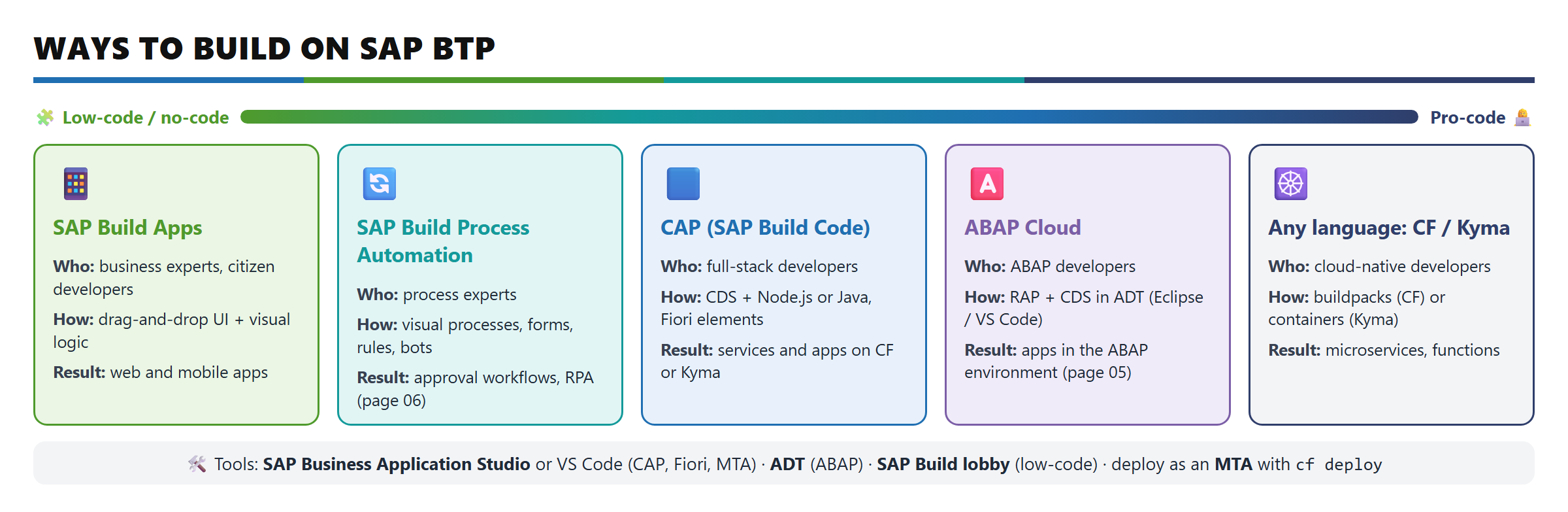
Option | Language / tool | Runs on | Pick it when |
|---|---|---|---|
CAP | CDS + Node.js or Java; BAS / VS Code | Cloud Foundry or Kyma | New side-by-side app or service, team knows JavaScript / Java |
ABAP Cloud | ABAP, RAP, CDS; ADT (Eclipse) | SAP Business AI Platform, ABAP environment, S/4HANA Cloud | ABAP team, extension close to S/4HANA logic (ABAP on BTP › 01) |
Any runtime | Java, Node.js, Python, Go … via buildpacks or containers | Cloud Foundry or Kyma | Special needs, existing microservices, non-SAP stacks |
SAP Build Apps | Visual drag-and-drop | SAP Build (SaaS) | Simple web / mobile app by a business expert |
SAP Build Process Automation | Visual processes, forms, rules, bots | SAP Build (SaaS) | Approvals and task automation (Integration Suite › 01) |
Part 2 – Tools: SAP Business Application Studio and friends
SAP Business Application Studio (BAS) is SAP's browser-based IDE on BTP – a subscription in your subaccount. It is built on Code-OSS (the open-source core of VS Code), so it looks and feels like VS Code.
- Dev spaces: a private cloud workspace per developer, created from a type that pre-installs the right extensions – e.g. Full-Stack Cloud Application (CAP), SAP Fiori, SAP HANA Native Application, Basic.
- Template wizard / generators: F1 (Command Palette) → Open Template Wizard creates projects from templates (CAP project, Fiori elements app, MTA, workflow module …).
- Built-in terminal with
cf,cds,mbt,npm; run configurations; Git; MTA build from the context menu (right-clickmta.yaml→ Build MTA Project). - Connects to destinations in the subaccount, so you can preview a Fiori app against a real back end.
Tool | Used for |
|---|---|
SAP Business Application Studio | CAP, Fiori / UI5, MTA, HANA native, mobile – in the browser |
VS Code + SAP extensions | The same on your own PC (CDS language support, Fiori tools, |
ABAP Development Tools (ADT) | The IDE for ABAP Cloud – in Eclipse and, since 2026, also for VS Code (ABAP on BTP › 01) |
cf CLI / btp CLI / kubectl | Deploy and manage CF apps / accounts / Kyma workloads (BTP Foundations › 02) |
SAP Build lobby | Entry point for low-code projects (Apps, Process Automation) and SAP Build Code |
Part 3 – SAP Cloud Application Programming Model (CAP)
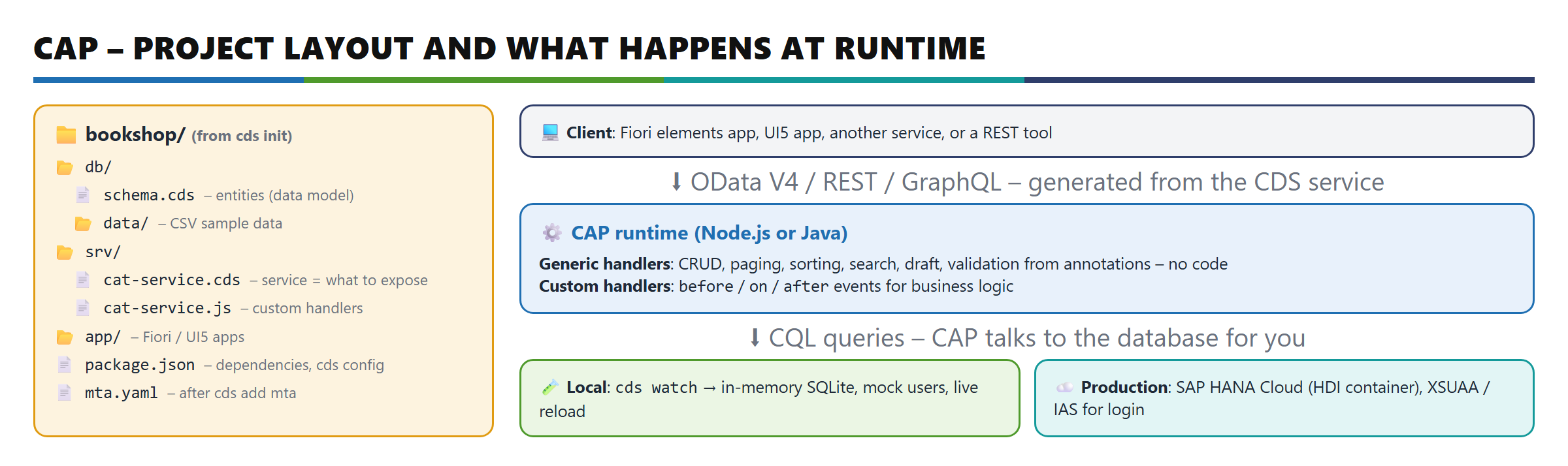
CAP is SAP's framework for building enterprise services and apps on BTP. You describe the data model and the services in CDS (Core Data Services – the same idea as ABAP CDS, different runtime), and CAP generates the database tables and the OData / REST endpoints. You only write code for real business logic. Runtimes: Node.js and Java (Spring Boot).
3.1 Key ideas
- Domain model in
db/*.cds(entities, associations, aspects such ascuid,managed). - Services in
srv/*.cdsexpose projections on the entities – one model, many services. - Generic providers: CRUD, paging, search, draft, input validation and authorization annotations work without code.
- Event handlers for custom logic:
before(validate),on(replace),after(enrich) per event (READ, CREATE, UPDATE, DELETE or a custom action). - Database-agnostic: SQLite in memory for local development, SAP HANA Cloud in production; PostgreSQL is also supported.
- Built-in qualities: multitenancy, extensibility, messaging / events, localisation,
@restrictauthorization, integration with remote services (S/4HANA APIs via destinations).
CAP in detail – CDS modeling, services, event handlers in Node.js and Java, CQL, actions, Fiori elements and draft, authorization, deployment, remote services, messaging, multitenancy, testing and generative AI – is in the dedicated CAP section (Order Approval Portal scenario). A complete hands-on build: page 06 · BTP Developer Hands-On.
CAP | RAP (ABAP Cloud) |
|---|---|
CDS in Node.js / Java runtime | CDS in the ABAP stack |
Event handlers in JavaScript / Java | Behavior definition + behavior pool in ABAP |
Runs on Cloud Foundry / Kyma | Runs in the ABAP environment or S/4HANA |
Any database via CQL (HANA Cloud, SQLite, PostgreSQL) | HANA only, ABAP SQL |
Typical: side-by-side apps by full-stack teams | Typical: ABAP teams, on-stack and side-by-side |
Both are SAP's recommended models; both produce OData V4 services for Fiori elements. RAP in depth: the RAP section.
Part 4 – Cloud Foundry vs Kyma
ABAP Cloud runs in its own ABAP environment, provisioned as a service instance (an ABAP system) – see ABAP on BTP › 01. For everything else you choose between two runtimes:
- Cloud Foundry environment – open-source PaaS. You
cf pushcode; a buildpack (Node.js, Java, Python, Go …) turns it into a running app. Apps live in orgs and spaces (BTP Foundations › 02). Simple and opinionated: SAP runs the platform, you run apps. - Kyma environment (SAP BTP, Kyma runtime) – a fully managed Kubernetes cluster with open-source Kyma modules on top (API gateway, Istio service mesh, eventing, serverless). You deploy container images with Kubernetes manifests or Helm charts into namespaces.
- Serverless functions (optional Serverless module): small Node.js or Python functions that Kyma runs for you – good for event handlers and light extensions.
- BTP services are created from inside the cluster with the SAP BTP service operator (
ServiceInstanceandServiceBindingresources) – the Kyma equivalent ofcf create-service/cf bind-service.
Cloud Foundry | Kyma | |
|---|---|---|
Unit you deploy | App (code + buildpack) | Container image, function |
Grouping | Org → spaces | Cluster → namespaces |
Deploy with |
|
|
Control / complexity | Less control, less to learn | Full Kubernetes control, more to learn |
Typical use | CAP apps, app routers, Fiori back ends | Microservices, event-driven extensions, workloads that need Kubernetes |
Service binding |
| BTP service operator resources |
CAP apps run on both: CAP generates CF artefacts (cds add mta) or Kubernetes artefacts (cds add kyma – Helm chart). Runtime details (cf CLI, buildpacks, scaling, Kyma modules, Helm): BTP Development › 03 · Runtimes – Cloud Foundry & Kyma in Depth.
Part 5 – Multitarget applications (MTA) and mta.yaml
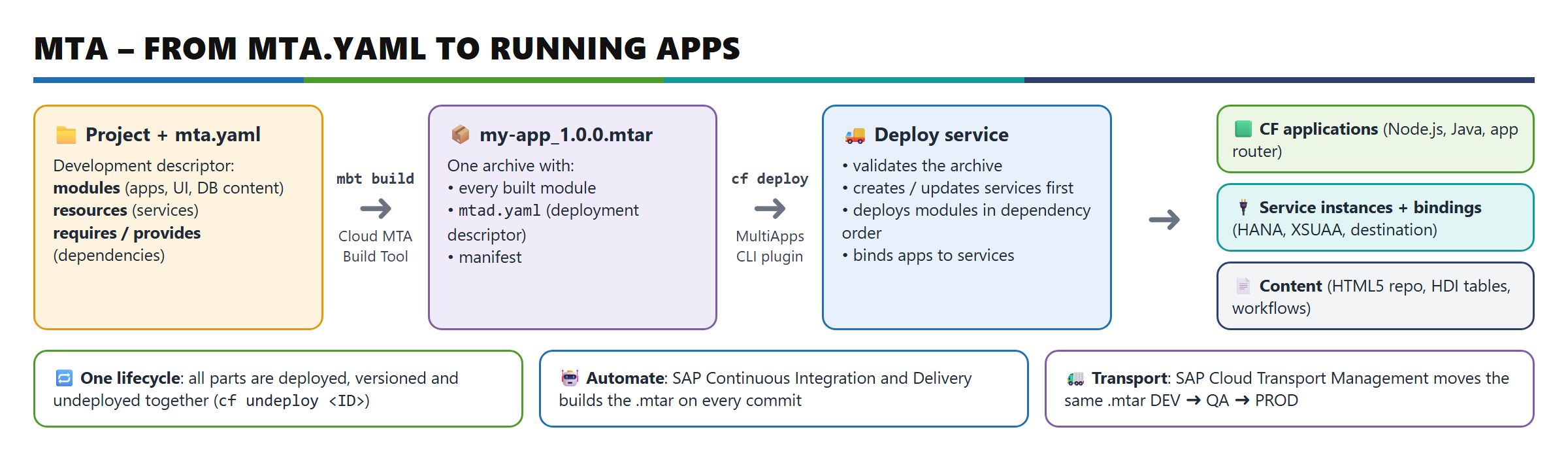
A multitarget application (MTA) is logically one application made of several parts built with different technologies (a Node.js service, a UI5 front end, database content, a workflow …) that share the same lifecycle: they are built, deployed, versioned and removed together.
- The developers describe the desired result in the MTA model: modules (the parts), resources (the services they need) and the dependencies between them.
- The SAP BTP deploy service (the MTA deployer) validates, orchestrates and automates the deployment; the result is Cloud Foundry applications, service instances and SAP-specific content.
5.1 Descriptors and archive
File | Role |
|---|---|
mta.yaml | Development descriptor – written by you (or generated), lives in the project root, used at design time and by the build tool |
mtad.yaml | Deployment descriptor – generated by the build inside the archive, read by the deployer |
.mtar | MTA archive – a zip with all built modules, mtad.yaml and a manifest; the unit you deploy and transport |
.mtaext | Extension descriptor – optional, adds environment-specific values (QA vs PROD) at deploy time without changing the archive |
5.2 The building blocks of mta.yaml
Key | Meaning | Examples |
|---|---|---|
| Schema of the file, unique application ID, version | '3.1', bookshop, 1.0.0 |
modules | Parts that are built and deployed | types |
resources | Services the modules need |
|
requires | A module (or resource) depends on a resource or another module's | - name: bookshop-db |
provides | A module offers values to others (e.g. its URL) | srv-url: ${default-url} |
| Settings for the deployer (memory, service plan) / values injected as environment variables | service-plan: hdi-shared |
build-parameters | How the build tool builds a module or the whole project | npx cds build --production |
5.3 Example – a CAP app
|
Example 2 – reusing a service that already exists (here the workflow service instance of a legacy Workflow Management project, Integration Suite › 01):
|
5.4 Build and deploy commands
Command | What it does |
|---|---|
mbt build | Cloud MTA Build Tool: builds every module and packs |
cf deploy <file>.mtar | MultiApps CF CLI plugin: hands the archive to the deploy service |
cf deploy … -e prod.mtaext | Deploy with an extension descriptor |
| List deployed MTAs / show one MTA's apps and services |
cf undeploy <ID> --delete-services | Remove the whole MTA (optionally its services) |
cf push | Deploys a single app only – no dependency handling (use for quick tests) |
In BAS: right-click mta.yaml → Build MTA Project, then right-click the .mtar → Deploy MTA Archive.
Part 6 – Fiori apps on BTP
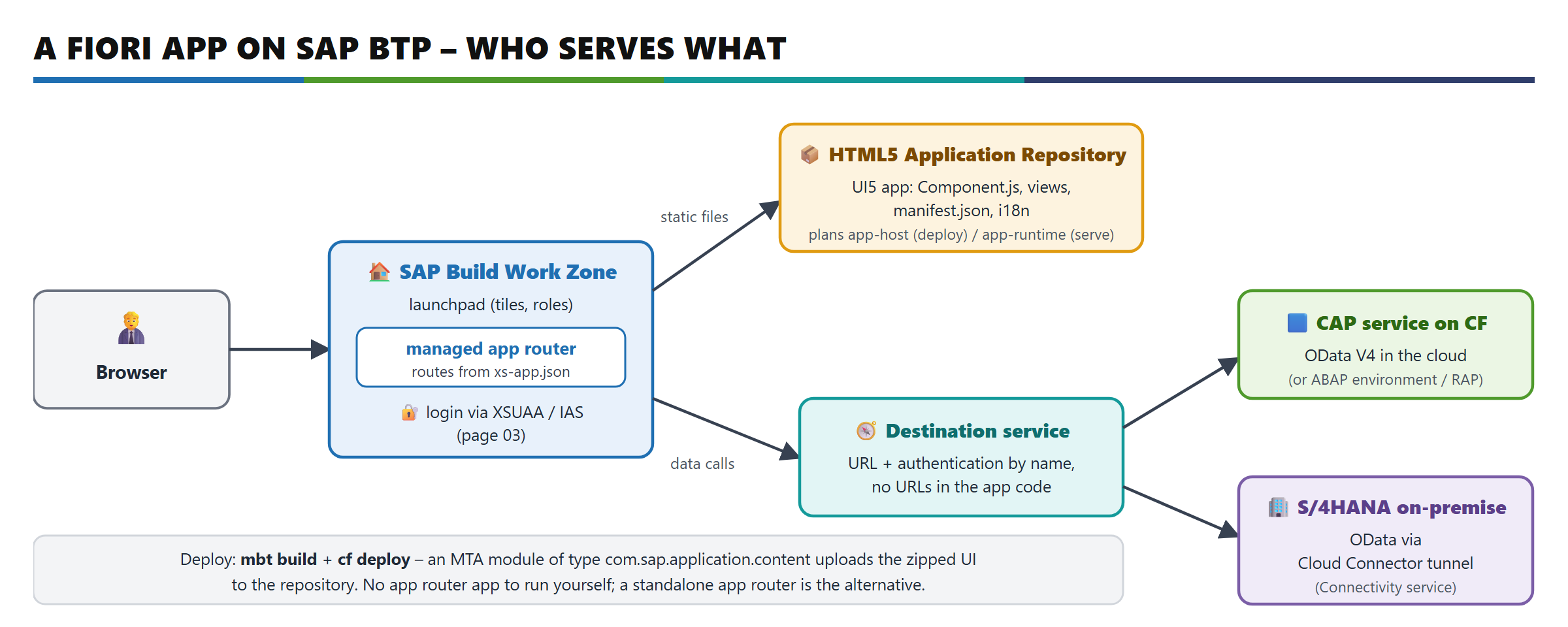
A Fiori / UI5 app is just static files (JavaScript, XML views, manifest.json). On BTP they are stored in the HTML5 Application Repository and served through an application router that also handles login and forwards data calls to back ends via destinations.
Piece | Job |
|---|---|
HTML5 Application Repository service | Stores the app files centrally; plan |
Managed application router | Provided by SAP Build Work Zone – serves the app, authenticates the user (XSUAA / IAS), applies routes from |
Standalone application router |
|
xs-app.json | Route table: e.g. |
Destination service | Back-end URL and credentials by name; on-premise systems through the Cloud Connector (BTP Foundations › 03) |
SAP Build Work Zone | Launchpad site where the app appears as a tile (editions: BTP Foundations › 03, Part 6) |
Typical flow: generate the app with SAP Fiori tools (template wizard) → Add Deploy Configuration (Cloud Foundry) → Add Fiori Launchpad Configuration → mbt build + cf deploy → the app appears in the Work Zone content manager → assign it to a role and site. Fiori design and launchpad details: SAP Fiori › 01 Fiori Design & Architecture, 06 Launchpad, 07 Fiori Elements.
Part 7 – SAP Build (low-code and pro-code)
SAP Build is the umbrella brand for SAP's development and automation tools on BTP, reached through the SAP Build lobby.
Product | What it is | More |
|---|---|---|
SAP Build Apps | Low-code app builder (drag-and-drop UI, visual logic) for web and mobile apps; connects to BTP destinations and SAP back ends | – |
SAP Build Process Automation | Low-code workflows, forms, decisions, RPA bots, document extraction | Integration Suite › 01 |
SAP Build Work Zone | Launchpad and business sites (central entry to apps and tasks) | BTP Foundations › 03 |
SAP Build Code | Pro-code: BAS with generative-AI help from Joule for CAP, Fiori and mobile apps | page 04 |
Joule Studio | Build custom Joule skills and AI agents | page 04 |
SAP Build Store | Pre-built content: templates, processes, connectors | – |
Rule of thumb: business expert with a simple need → Build Apps / Process Automation; anything with complex logic, high volume or strict testing needs → CAP or ABAP Cloud.
Part 8 – CI/CD and Cloud Transport Management
- SAP Continuous Integration and Delivery builds, tests and deploys on every Git push; SAP Cloud Transport Management moves the same
.mtarfrom DEV to QA to PROD subaccounts through transport nodes and routes. - Pipelines, project "Piper", transport routes, Cloud ALM, logging, alerting and automation are explained on BTP Development › 05 · DevOps, Operations & Observability.
- ABAP environment transports work differently (software components, gCTS) – see ABAP on BTP › 01.
Part 9 – Interview questions
Q1. What is CAP and why use it instead of plain Node.js?
SAP's Cloud Application Programming Model: you model entities and services in CDS and CAP generates the database artefacts and OData V4 / REST endpoints with generic CRUD, paging, draft and authorization. You write only business logic in event handlers. It also gives HANA Cloud, XSUAA, multitenancy and messaging integration out of the box – far less plumbing than Express code.
Q2. What does cds watch do?
Starts the CAP server locally (port 4004), deploys the model to an in-memory SQLite database with CSV sample data, uses mock users and restarts on every file change.
Q3. Explain before, on and after handlers in CAP.
before runs first – validate input or reject; on replaces the generic implementation (e.g. a custom action or a call to a remote system); after post-processes results (calculate virtual fields). They are registered per event and entity in the service implementation.
Q4. CAP vs RAP?
Same idea (CDS model + framework + OData V4), different stacks: CAP in Node.js / Java on Cloud Foundry or Kyma with any supported database; RAP in ABAP in the ABAP environment or S/4HANA. Choose by team skills and how close the extension sits to S/4HANA.
Q5. What is an MTA and what are modules, resources, requires and provides?
One application of several parts with one lifecycle. Modules are the deployable parts (Node.js app, UI, DB content), resources are the services they need (HANA, XSUAA, destination). requires declares a dependency – the deployer creates the resource first and binds it; provides publishes values such as a URL for other modules.
Q6. mta.yaml vs mtad.yaml vs .mtar?
mta.yaml is the development descriptor in the project; the build creates the .mtar archive, which contains the generated deployment descriptor mtad.yaml plus all built modules. Extension descriptors (.mtaext) add environment-specific values at deploy time.
Q7. How do you build and deploy an MTA?
mbt build (Cloud MTA Build Tool) creates the .mtar; cf deploy (MultiApps plugin) sends it to the deploy service, which creates services, deploys modules in dependency order and binds them. In BAS: Build MTA Project / Deploy MTA Archive. In production: CI/CD service + Cloud Transport Management.
Q8. cf push vs cf deploy?
cf push deploys one app from a manifest and does not create services or handle dependencies. cf deploy deploys a whole MTA archive with all services, bindings and content in the right order.
Q9. Cloud Foundry or Kyma – how do you decide?
Cloud Foundry for standard apps (CAP, Fiori back ends): push code, the platform does the rest. Kyma when you need Kubernetes – containers, microservices, serverless functions, event-driven extensions, fine control over networking and scaling – and the team has Kubernetes skills.
Q10. How is a Fiori app served on BTP?
The files are deployed to the HTML5 Application Repository; SAP Build Work Zone's managed application router serves them, logs the user in via XSUAA / IAS and forwards data calls through routes in xs-app.json to destinations – a CAP service or, via the Cloud Connector, an on-premise S/4HANA system.
Q11. What is SAP Business Application Studio?
SAP's browser IDE on BTP, based on Code-OSS. Dev spaces with pre-installed extensions for CAP, Fiori, HANA native and more; template wizard, terminal with cf / cds / mbt, Git, destination-aware preview. ABAP is developed in ADT (Eclipse or VS Code) instead.
Q12. How do you move a BTP app from DEV to PROD?
Not with SE09/STMS: the CI/CD service builds the .mtar, SAP Cloud Transport Management carries the same archive through transport nodes (DEV → QA → PROD subaccounts) with import queues and approvals. Environment differences go into extension descriptors or destinations, not into the code.
🏠 Start Here · 02 · HANA Cloud ▶ · Sections: CORE ABAP | OOPS ABAP | ABAP on HANA | Clean Core | RAP | ABAP Points | SAP Fiori | SAPUI5 | Mobile Development (MDK) | BTP Foundations | BTP Development | CAP | SAP Build | ABAP on BTP | Integration Suite | SAP Business AI | SAP BASIS | Security | SAP SDLC
Functional: FICO ABAP | TRM ABAP | VIM | SAP BIS | SD ABAP | MM ABAP | PP ABAP | QM ABAP | PM ABAP | PS ABAP | EWM | TM ABAP | GTM ABAP | EHS ABAP | HR ABAP | BW | SAP Datasphere | SAP Business Data Cloud | SAP MDG | SAP Analytics Cloud | SAP Ariba | SAP CX | SAP IBP