SAP HANA Cloud is the database you meet in almost every SAP BTP developer role: CAP apps store their data in it, SAP Datasphere runs on it, and the vector engine behind SAP's RAG scenarios lives in it. This page explains it from a developer's point of view: what the managed service contains, how an instance is provisioned and mapped to Cloud Foundry or Kyma, how HDI containers and design-time artefacts work, how you build calculation views and SQLScript in SAP Business Application Studio (BAS), how CAP uses HANA, how to reach classic schemas and remote data, security, performance, machine learning and the multi-model engines. Classic HANA theory (column store, delta merge, architecture, SQL objects, information views) is not repeated: see ABAP on HANA › 01 · HANA Fundamentals. The SQLScript language itself is in ABAP on HANA › 06 · AMDP & SQLScript. The CAP commands for connecting to HANA Cloud are in BTP Development › 06 · BTP Developer Hands-On, Part 4. Running example: the Order Insights CAP extension of the Sales Order Approval scenario stores its order notes in HANA Cloud.
Part 1 – What SAP HANA Cloud is
Why it matters: on premise, an ABAP developer rarely thinks about the database – Basis installs it and the ABAP Dictionary hides it. On BTP the database is a service you create, size, connect and secure yourself, and side-by-side apps (CAP, Python, analytics) talk to it directly. Interviewers expect you to know what the service contains and how an app gets a piece of it.
SAP HANA Cloud is a database as a service (DBaaS) on SAP BTP. SAP runs the hardware, operating system, backups, patches and upgrades; you get a database instance and decide its size, connections and content. It is the cloud successor of the older SAP HANA Service for BTP.
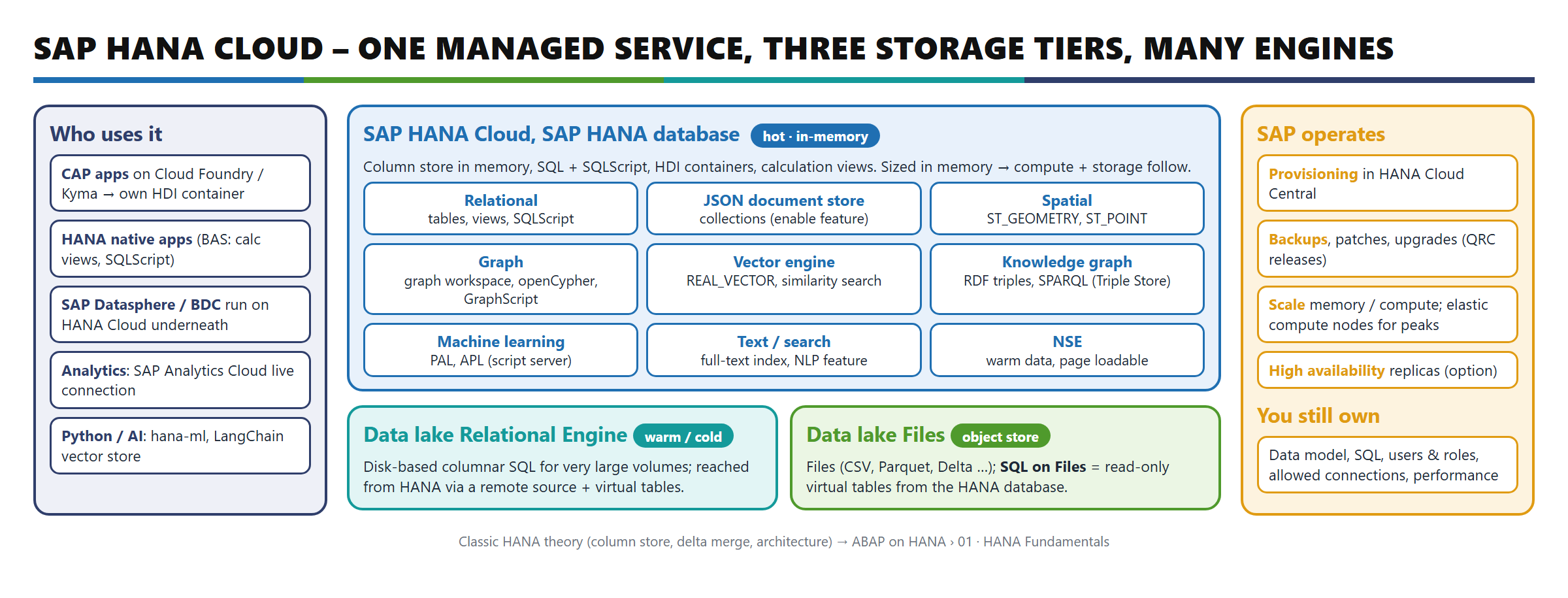
1.1 The components
Component | What it is | Typical use |
|---|---|---|
SAP HANA Cloud, SAP HANA database | The in-memory column-store database you know from S/4HANA, run as a managed service. Multi-model engines built in | App data (CAP), calculation views, SQLScript, vectors, real-time analytics |
SAP HANA Cloud, data lake – Relational Engine | Disk-based columnar SQL database for very large, less frequently used data (comes from SAP IQ technology) | History and log data, cheap warm/cold storage, reached from HANA through virtual tables |
SAP HANA Cloud, data lake – Files | Object storage for files (CSV, Parquet, Delta and others) | Raw files, exports, SQL on Files (read-only virtual tables from the HANA database) |
- A data lake is optional. Most CAP projects use only the SAP HANA database. To try it, the free tier and the trial include a data lake plan (
relational-data-lake-free); regional availability is listed in the SAP Discovery Center.
1.2 HANA Cloud vs HANA on premise – what a developer notices
Topic | SAP HANA on premise (incl. ABAP on HANA) | SAP HANA Cloud |
|---|---|---|
Operation | Customer or hoster installs, patches, backs up | SAP operates; quarterly releases (QRC) |
Development model | XS classic repository, HANA Studio (old); XS advanced + HDI (newer) | HDI only for design-time objects; BAS, Database Explorer, HANA Cloud Central |
Modelling | Attribute, analytic and calculation views (old types in classic) | Calculation views only; |
Scaling | Hardware sizing project | Change memory/compute in HANA Cloud Central; elastic compute nodes for peaks |
Access | Inside the company network | Public endpoint protected by TLS and an allowed-IP list; on-premise systems via Cloud Connector |
1.3 Multi-model in one sentence each
- Relational – tables, views, SQLScript; everything else plugs into it.
- JSON document store – schema-free JSON documents in collections (feature must be enabled).
- Spatial – geometries such as points and polygons with spatial functions (
ST_Distance,ST_Within). - Graph – property graphs over vertex and edge tables (graph workspace, openCypher, GraphScript).
- Vector engine – embeddings stored in
REAL_VECTORcolumns and similarity search (Part 10). - Knowledge graph engine – RDF triples queried with SPARQL (enabled as Triple Store).
- Machine learning – PAL and APL libraries run inside the database (Part 13).
Part 2 – Provisioning, HANA Cloud Central and instance mapping
Why it matters: "my cf create-service hana hdi-shared fails" and "the app cannot connect" are the two most common first-week problems. Both come from provisioning: missing entitlement, missing instance mapping, a stopped instance or a blocked IP address.
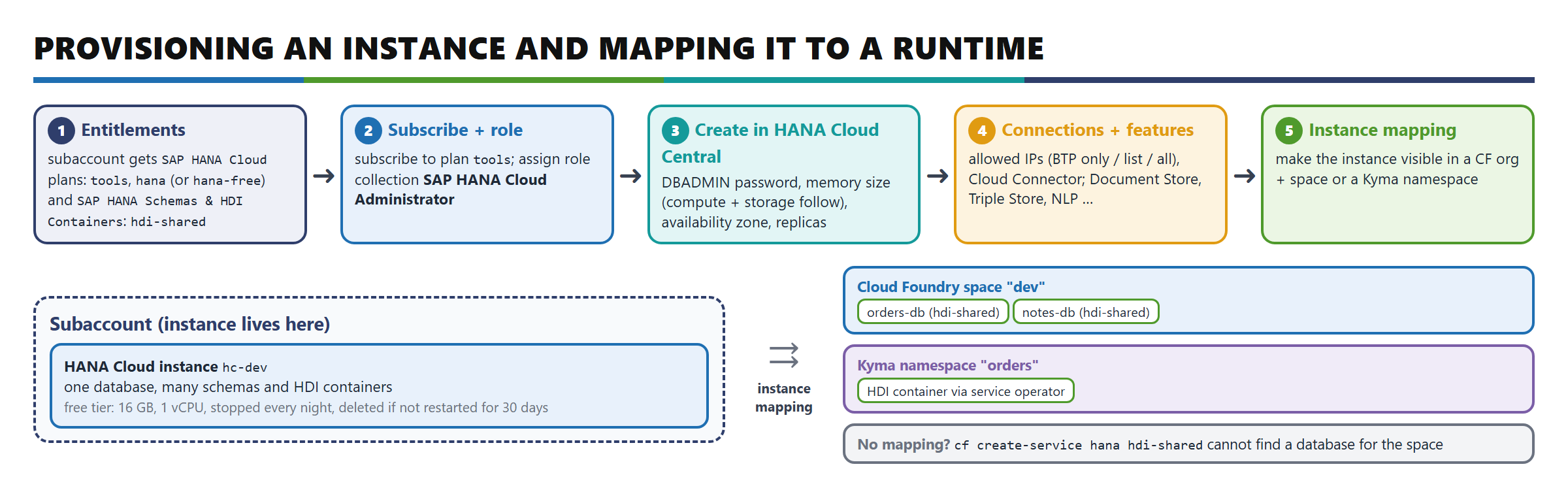
2.1 Services and plans
Service (cockpit name) | Plan | Gives you |
|---|---|---|
SAP HANA Cloud | tools | Subscription to SAP HANA Cloud Central (and the tools behind it) |
SAP HANA Cloud |
| A SAP HANA database instance |
SAP HANA Cloud |
| A data lake (Relational Engine) instance |
SAP HANA Schemas & HDI Containers (technical name | hdi-shared | An HDI container inside a mapped instance – what CAP apps use |
SAP HANA Schemas & HDI Containers | schema | A plain schema with a technical user (no HDI) |
SAP HANA Schemas & HDI Containers | securestore | Encrypted key-value store for secrets |
2.2 Steps
- 1. Entitlements – add the SAP HANA Cloud plans and
hdi-sharedto the subaccount. - 2. Subscribe to SAP HANA Cloud with plan
tools; assign the role collection SAP HANA Cloud Administrator to your user. - 3. Create the instance in SAP HANA Cloud Central: name,
DBADMINpassword, memory size (compute and storage follow; production instances can choose a performance class), availability zone and replicas. - 4. Connections – allowed connections: only BTP IP addresses, a list of IP addresses, or all. Enable the Cloud Connector option if on-premise systems must reach the instance or be reached by it.
- 5. Advanced settings – choose the version, enable additional features (JSON Document Store, Natural Language Processing, Triple Store; more vCPUs may be needed), and add instance mappings.
- 6. Instance mapping – map the instance (created in the subaccount) into a runtime environment: a Cloud Foundry org and space, or a Kyma namespace. Only then can
hdi-sharedinstances be created there. Without a mapping the service broker finds no database for that space.
2.3 Free tier and trial
- Free tier instance: fixed size (16 GB memory, 1 vCPU, 80 GB storage), stopped every night; restart it in HANA Cloud Central each day. If not restarted for 30 days it is deleted.
- In a productive account a free tier instance can be upgraded to a paid instance without losing work. The trial account offers the same free tier instance, but nothing in it can move to productive use; an inactive trial must be extended every 30 days (automatically up to 90 days if you log in regularly).
2.4 Tools you will use
Tool | For |
|---|---|
SAP HANA Cloud Central | Create, start/stop, resize, configure connections and features, instance mapping, alerts, workload classes |
SAP HANA Database Explorer | Browse catalog objects and HDI containers, SQL console, import/export, SQL Analyzer plan files; also as an extension in BAS and VS Code |
SAP Business Application Studio | SAP HANA Database Projects, graphical calculation view editor, deploy to HDI |
Command line |
|
Part 3 – HDI: containers and design-time artefacts
Why it matters: HDI (SAP HANA Deployment Infrastructure) is how every app-owned database object reaches HANA Cloud. Think of it as "transport and activation for database objects": you keep design-time files in Git, the deployer turns them into runtime objects in a container, the same way in every landscape. It replaces CREATE statements typed by hand.
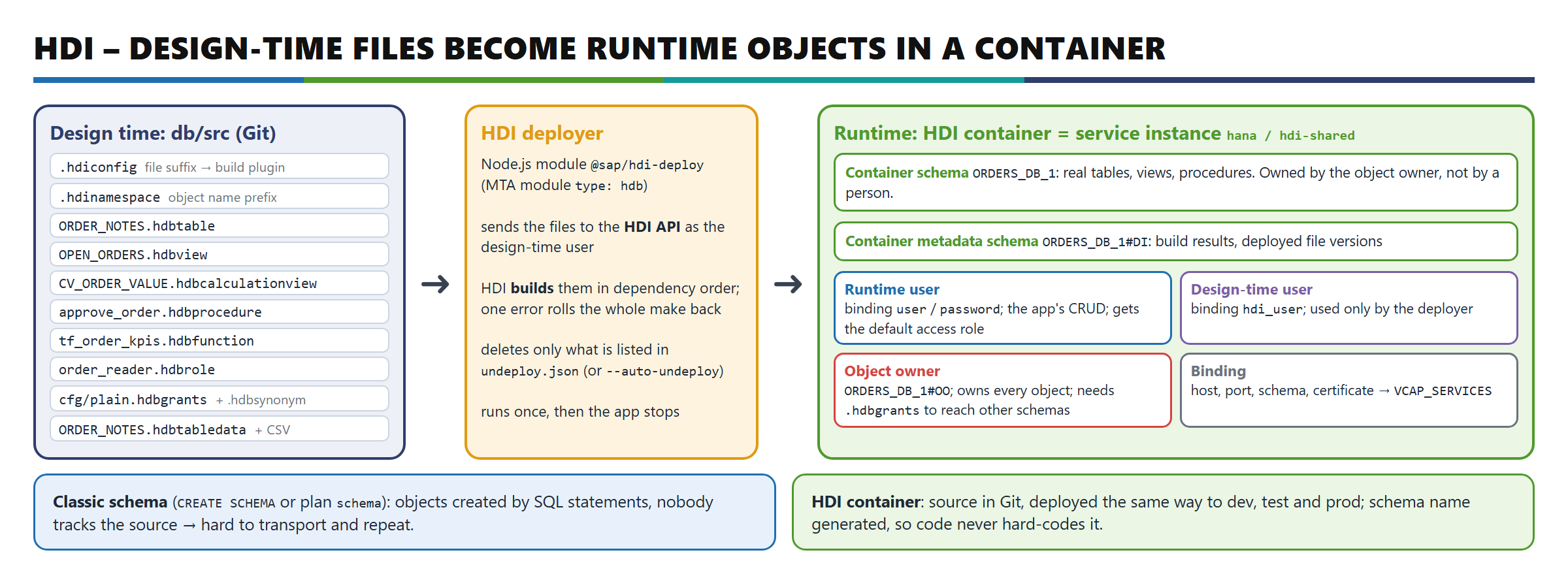
3.1 Schema vs HDI container
Classic schema | HDI container | |
|---|---|---|
Created by |
| Service instance |
Objects created by | SQL DDL run by a user | The HDI deployer from design-time files |
Source of truth | The database (no file history) | Git; the container records which file versions are deployed |
Owner of objects | The user who created them | The container's object owner ( |
Schema name | Chosen by you | Generated (e.g. |
Typical use | Replicated data (SLT, ABAP schema), quick experiments | Every app: CAP, HANA native |
3.2 The artefacts you must recognise
File | Creates / does |
|---|---|
.hdiconfig | Maps each file suffix to the HDI build plugin that handles it |
.hdinamespace | Prefix for object names (e.g. |
| Column table; the migration variant keeps explicit versions and migration steps instead of copy-and-rebuild |
.hdbview | SQL view |
.hdbcalculationview | Calculation view (XML, edited in the graphical editor) |
| SQLScript procedure; scalar or table user-defined function |
.hdbrole | Container role (privileges on container objects), granted to users or other roles |
| Local name for an object in another schema or container |
.hdbgrants | Lets the container's technical users receive privileges from a grantor service (handled by the deployer) |
| Initial or configuration data loaded into a table |
| Index, sequence, constraint |
| Virtual tables and SDI replication/flowgraph objects (Part 8) |
.hdbanalyticprivilege | Row-level restrictions for calculation views |
In HDI files you write the object without CREATE and without a schema name – the container is the schema:
|
|
3.3 Container users and the binding
User | Used by | Notes |
|---|---|---|
Runtime (application) user | The app at run time |
|
Design-time user | The HDI deployer |
|
Object owner ( | HDI itself | Owns all objects; needs |
The binding (in VCAP_SERVICES on Cloud Foundry, a Secret in Kyma) also contains host, port, schema name and the TLS certificate – the app never stores database credentials itself.
3.4 The HDI deployer
- A small Node.js app (
@sap/hdi-deploy), MTA moduletype: hdb, pathdb(CAP:gen/db). It sends the files to the HDI API, HDI builds them in dependency order, then the module stops. - A deployment is all or nothing: one broken view rolls back the whole make; read the deploy log from the top error.
- HDI never deletes an artefact just because the file disappeared. List removable artefacts in
undeploy.json(views, procedures, calculation views). Never list tables – undeploying a table drops its data. The option--auto-undeploydeletes everything missing and is dangerous in production.
|
- Common mistakes: two deployers writing the same object names into one container; changing a table type in a way HDI cannot migrate (see Part 7.3); forgetting that
.hdbtabledataoverwrites the table content on every deployment.
Part 4 – Developing in SAP Business Application Studio
Why it matters: BAS replaces SAP Web IDE and, for HANA Cloud, also HANA Studio. Knowing the project layout and the deploy loop lets you work on HANA native objects (calculation views, procedures) next to a CAP app.
4.1 Create and deploy an SAP HANA Database Project
- Create a dev space with the SAP HANA tools (for example the SAP HANA Native Application or Full Stack Cloud Application type) and log on to Cloud Foundry (org and space with a mapped instance).
- Start from template → SAP HANA Database Project: project name, module name
db, namespace and schema name empty, version HANA Cloud, Bind to HDI container service with defaults. BAS creates thehdi-sharedinstance and anmta.yaml. - Create artefacts with SAP HANA: Create Database Artifact (command palette) – choose the type (
hdbtable,hdbcalculationview,hdbprocedure…). - Deploy from the SAP HANA PROJECTS view (rocket icon) – one file, a folder or the whole
dbmodule. Open the container in Database Explorer to see data and test procedures. - Add other connections in the same view (Add Database Connection): another HDI container or a user-provided service for a classic schema (Part 8).
4.2 Project layout
|
- Tip: BAS stores the local binding in
db/.env; never commit it. In CAP projects the binding lives in.cdsrc-private.jsoninstead (cds bind).
Part 5 – Calculation views in the graphical editor
Why it matters: calculation views are HANA's reusable analytic models – the cloud equivalent of the information views described in ABAP on HANA › 01 · HANA Fundamentals, Part 7. In HANA Cloud they are the only view modelling type, and SAP Analytics Cloud, CAP and SQL can all consume them.
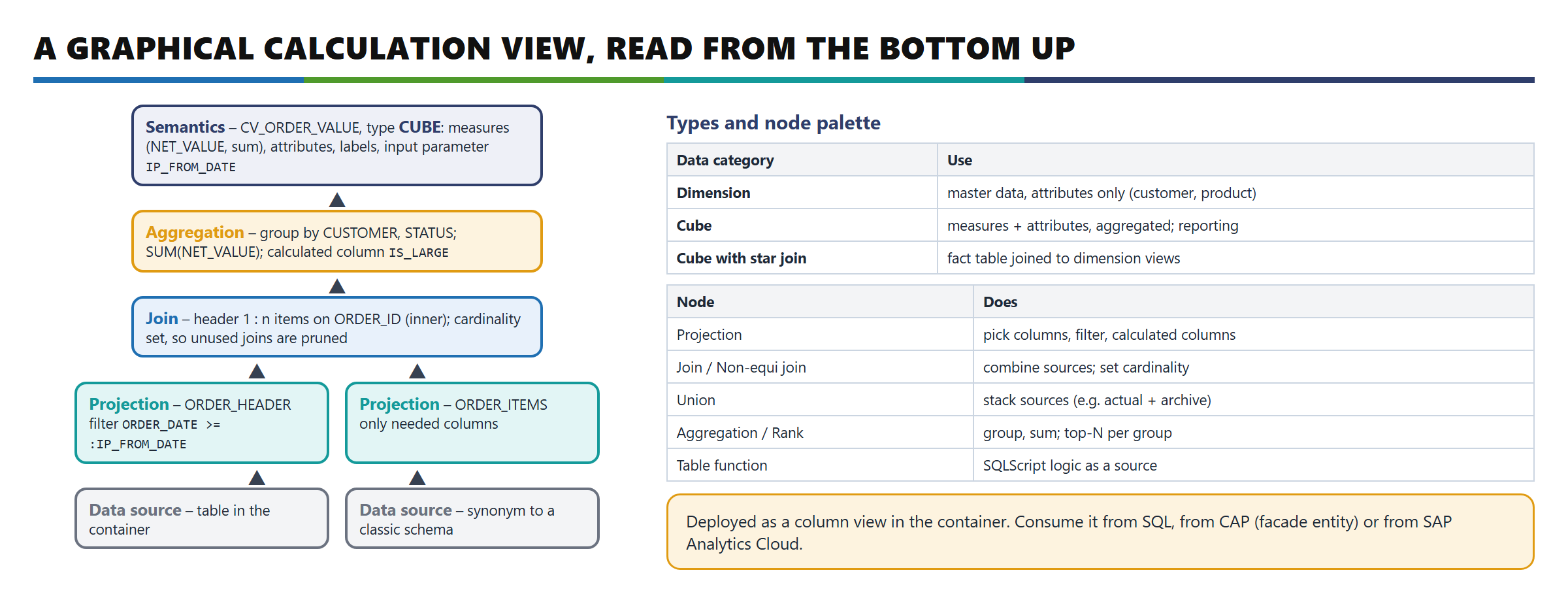
5.1 Build one
- Create an artefact of type
hdbcalculationview, choose the data category (dimension, cube, or cube with star join). - Drag nodes from the palette, add data sources (tables, views, synonyms, other calculation views, table functions), connect them bottom-up and map only the columns you need.
- In the Semantics node: mark measures and their aggregation, attributes, labels, hierarchies, input parameters and variables.
- Use input parameters (
$$IP_FROM_DATE$$in filter expressions) to push filters down early; use calculated columns for derived values. - Set join cardinality and, where safe, optimize join columns so the engine can prune joins that a query does not need.
|
- Common mistakes: pulling all columns through every node; calculated columns before the aggregation that force row-level calculation on millions of rows; missing cardinality on joins; filters only in the top node instead of at the data source.
- Interview tip: "When CDS views in ABAP, when calculation views?" – CDS view entities belong to the ABAP stack (S/4HANA, ABAP Cloud); calculation views belong to HANA native and BTP apps that own their data in HANA Cloud.
Part 6 – SQLScript procedures, functions and table functions in HDI
Why it matters: when one SQL statement or a calculation view is not enough, you write SQLScript – the same language you use in AMDP. In HDI the code lives in its own file instead of an ABAP class. Language basics (variables, table variables, cursors, exceptions) are in ABAP on HANA › 06 · AMDP & SQLScript; here only the HDI form.
Object | HDI file | Use it for |
|---|---|---|
Procedure | .hdbprocedure | Multi-step logic, data changes, several result sets; called with |
Scalar UDF | .hdbfunction | A reusable calculation returning one value; usable in SELECT lists |
Table function |
| Read-only logic that returns a table: select from it, filter, join, or use it as a calculation view data source |
|
|
- Names in quotes keep their case:
PROCEDURE "approve_order"must be called asCALL "approve_order"(…). SQL SECURITY INVOKERruns with the caller's privileges;DEFINERwith the object owner's. In HDI the definer is the technical object owner, soDEFINERcan bypass the caller's missing privileges – use it deliberately.- Debug SQLScript with the SQLScript debugger of Database Explorer: open the procedure in your container, set breakpoints, attach the debugger to your session and call the procedure.
- Mistake to avoid: cursors and loops over large tables. Write set-based SQL, as in AMDP.
Part 7 – CAP with SAP HANA Cloud
Why it matters: most BTP projects use HANA Cloud through CAP. You normally never write .hdbtable files – CAP generates them from CDS. You need HANA knowledge when you add native objects (calculation views, procedures), change schemas in production, or tune queries. The basic commands (cds add hana, cds deploy --to hana, cds watch --profile hybrid, cds bind) are in BTP Development › 06 · BTP Developer Hands-On, Part 4; CAP modelling is in the CAP section.
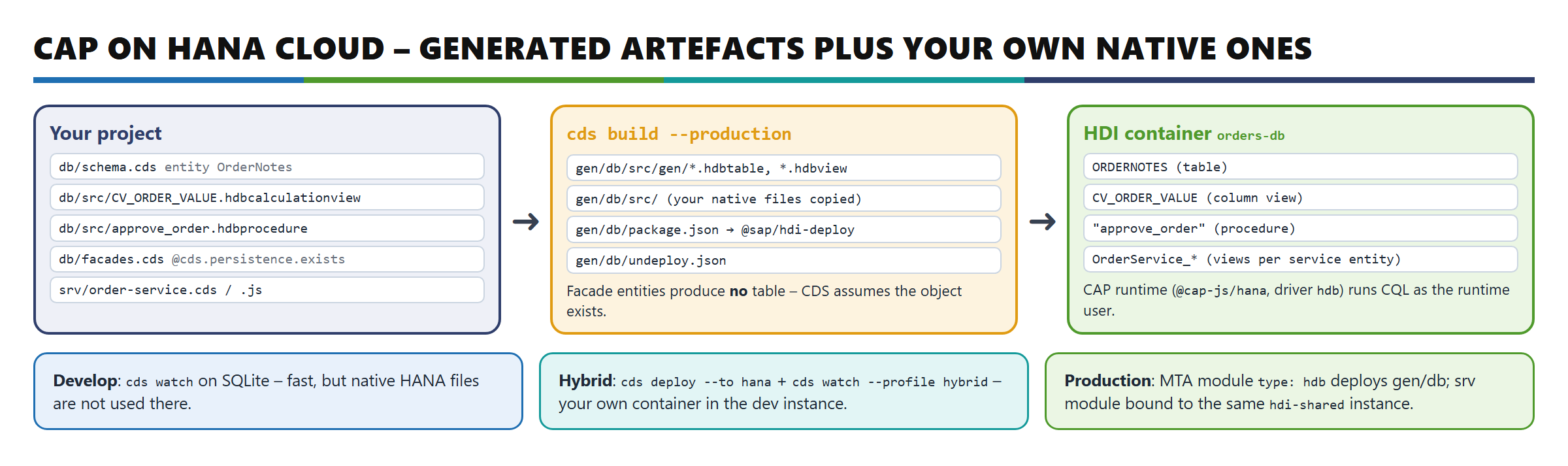
7.1 What CAP does for you
- Database service
@cap-js/hana– runs CQL on HANA Cloud (driverhdbby default; adding@sap/hana-clientswitches to that driver). cds build --productiongenerates HDI artefacts intogen/db/src/gen(.hdbtable,.hdbview,.hdbconstraint,.hdbtabledata,.hdiconfig,.hdinamespace) plus a deployerpackage.json.- Your own native files go into
db/src(HDI's default source folder); the build copies them along. - CAP is validated only with SAP HANA Cloud (not with on-premise HANA variants).
7.2 Using native objects from CAP
To expose a calculation view or any existing database object through a CAP service, define a facade entity with the same name and columns and tell CDS not to create it:
|
|
- CAP maps entity names to database names in upper case with
_for dots. A facade must match that name exactly, or keep the object in another namespace and use a synonym. - Native objects are not available on SQLite. Test facades with
cds watch --profile hybrid, or provide a mock (a CSV-backed entity) for local development. - Native clauses on generated tables:
@sql.append/@sql.prependinsert raw SQL into the generated statement (for example@sql.append: 'PARTITION BY HASH (ID) PARTITIONS 4'). The compiler does not check the snippet; altering partitions later is not supported yet. - Vectors in CDS: the type
Vectormaps toREAL_VECTOR– see SAP Business AI › 08 · RAG & Knowledge Graphs on SAP HANA Cloud.
7.3 Schema evolution in production
- Adding entities and elements is applied automatically. Deleting elements is detected but not applied automatically. Incompatible changes (shortening a type, NULL → NOT NULL) need manual handling – avoid them in productive systems.
.hdbtabledeployments rebuild a table through a temporary copy, which is slow for big tables. Annotate such entities with@cds.persistence.journalto generate.hdbmigrationtablefiles with explicit versions and migration steps (check the files into Git).- Never let users change data that comes from CSV initial data – HDI overwrites it on the next deployment.
- Since CAP 9 native HANA associations are not generated by default (
cds.sql.native_hana_associationsswitches them back on). - Multitenant SaaS apps get one HDI container per tenant, managed by
@sap/cds-mtxs– see the CAP section.
Part 8 – Classic schemas, remote sources and replication
Why it matters: real projects rarely start with an empty container. Data arrives in a classic schema (replicated from S/4HANA by SAP Landscape Transformation, loaded by an ETL tool) or stays in another database. An HDI container is isolated by design, so access must be granted and named explicitly.
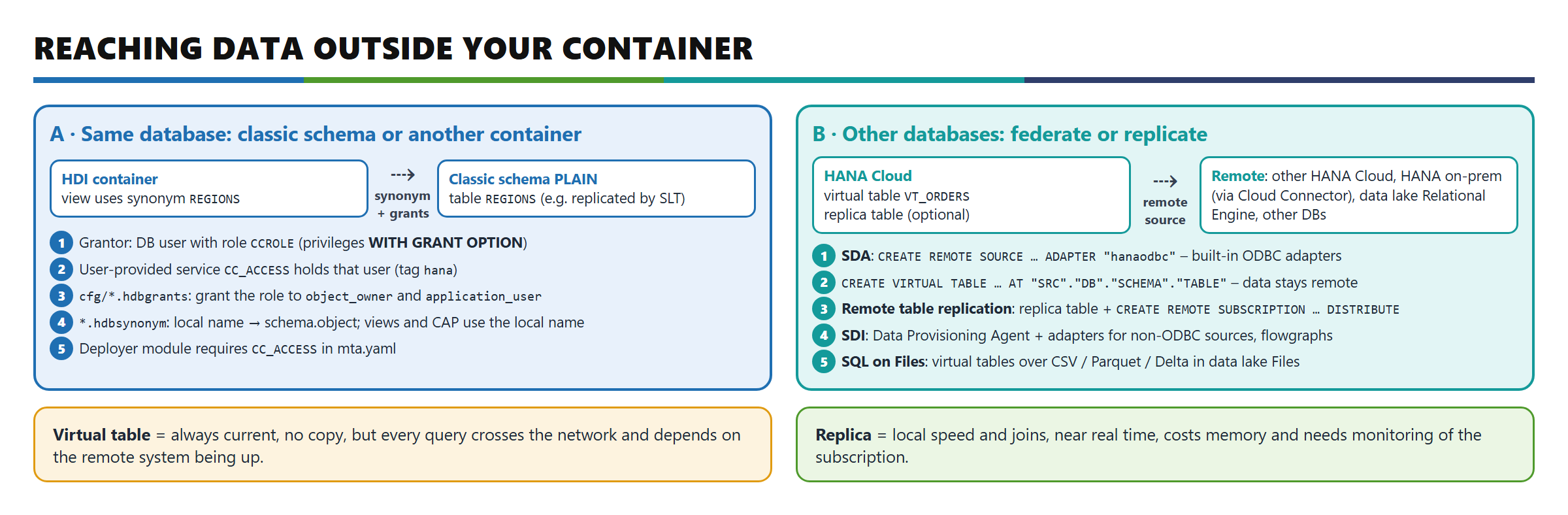
8.1 Classic schema in the same database: grants and synonyms
- 1. Grantor user (created once by an administrator) with a role that has the needed privileges WITH GRANT OPTION – including
SELECT METADATA. - 2. User-provided service holding that user, so the deployer can log on as grantor.
- 3.
.hdbgrants– the grantor gives roles or privileges to the container's object owner and application user. - 4.
.hdbsynonym– local name for the foreign object; views, calculation views and CAP facades use the synonym.
|
|
- Keep the schema name out of the synonym file when it differs per landscape: put the target in
db/cfg/<name>.hdbsynonymconfigwith"schema.configure": "CC_ACCESS/schema"; the HDI deployer fills in the schema of the bound service at deploy time.SERVICE_REPLACEMENTS(in mta.yaml) maps the logical service name in these files to the real service of each landscape. - Another HDI container works the same way: the grantor is that container's service (with a role made for external access, often
…::external_access). - Error "insufficient privilege … guid": run
CALL SYS.GET_INSUFFICIENT_PRIVILEGE_ERROR_DETAILS('<guid>', ?)– it shows which user missed which privilege.
8.2 Other databases: smart data access (SDA) and virtual tables
A remote source describes a connection; a virtual table is a local name for a remote table. Data stays where it is and every query is federated.
|
- The four-part name is
remote_source.database.schema.object; for single-database sources the database part is<NULL>– the Database Explorer wizard fills it in for you. - In an HDI container, a virtual table is the artefact
.hdbvirtualtable; the remote source itself is created by an administrator and granted to the container.
8.3 Replication
Option | How | When |
|---|---|---|
Remote table replication | Virtual table → replica table ( | HANA → HANA Cloud (on premise from SPS05), near real time, log-based; also carries DDL changes |
SDI (smart data integration) | Data Provisioning Agent installed near the source + adapters; flowgraphs and replication tasks | Non-HANA sources, transformations during load |
SQL on Files | Virtual tables over files in data lake Files | Read-only access to CSV / Parquet / Delta without loading |
Other tools | SAP Landscape Transformation, SAP Datasphere replication flows, SAP Integration Suite | Chosen by the integration architecture, not by the app developer |
- Virtual or replica? Virtual = always current, no copy, but network cost and dependency on the remote system. Replica = local speed and joins, but memory and a subscription to monitor.
- Running example: Order Insights reads sales orders through the released OData API (S/4HANA stays the owner); it does not replicate S/4HANA tables. Replication is for analytic workloads, not for side-by-side transactional apps.
Part 9 – Multi-model: JSON documents, spatial and graph
Why it matters: a single HANA Cloud database can hold relational, JSON, spatial, graph, vector and RDF data and combine them in one SQL statement – no extra database to run, secure and back up. Interviewers like to ask "what does multi-model mean?"
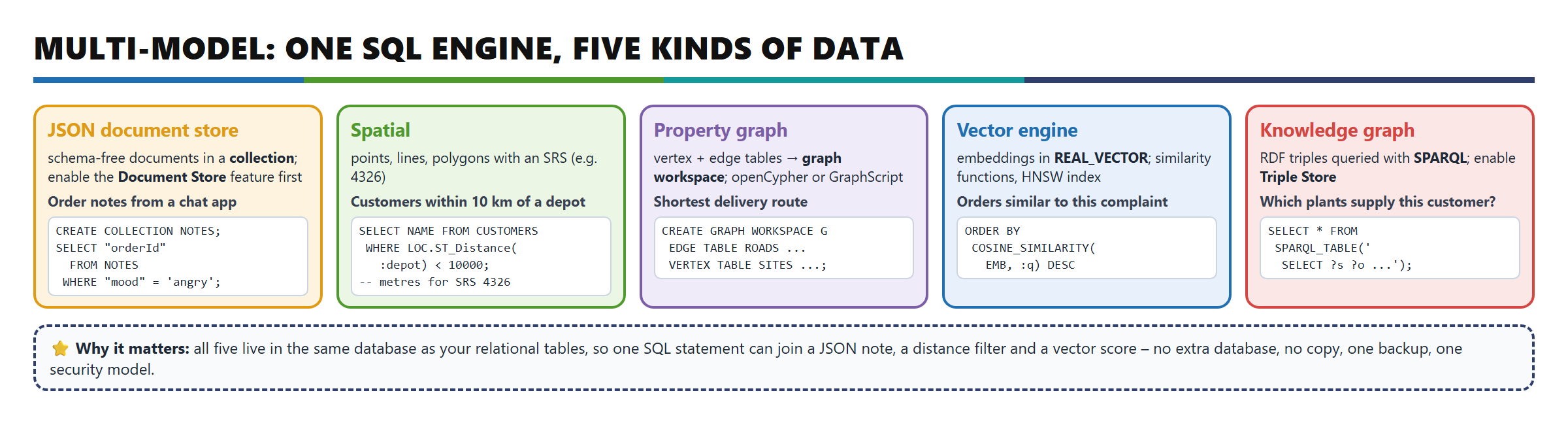
9.1 JSON document store
|
- Use it for data whose structure changes often (feedback forms, device payloads). In HDI the artefact is
.hdbcollection.
9.2 Spatial
|
9.3 Property graph
- Vertices and edges are ordinary tables; a graph workspace declares which columns are keys, source and target. Query with openCypher (
OPENCYPHER_TABLE) or write algorithms in GraphScript (procedures withLANGUAGE GRAPH); calculation views also have a graph node.
|
- Graph vs knowledge graph: a property graph models networks (routes, org charts, bills of material); the knowledge graph engine stores RDF triples queried with SPARQL, mainly to ground AI with facts – see SAP Business AI › 08 · RAG & Knowledge Graphs on SAP HANA Cloud, Part 5.
Part 10 – The vector engine in one page
Why it matters: retrieval-augmented generation (RAG) needs a store for embeddings. In HANA Cloud the vector engine is part of every SAP HANA database – vectors sit in normal column tables next to the business data, so one query can filter by customer, authorisation and similarity.
|
Piece | Remember |
|---|---|
Data types |
|
Functions |
|
Embeddings | Created outside (generative AI hub) or in the database with |
Speed | HNSW vector index for large tables (approximate top-k) |
Clients | SQL, CAP type |
- Depth – index parameters, chunking, LangChain pipeline, evaluation, graph RAG: SAP Business AI › 08 · RAG & Knowledge Graphs on SAP HANA Cloud. Where RAG fits in SAP's AI portfolio: page 04 · Data & AI on BTP.
Part 11 – Security: database users, HDI technical users and roles
Why it matters: an ABAP developer is used to SU01 users and PFCG roles. In HANA Cloud there are three different kinds of identity, and mixing them up is the root of most "insufficient privilege" errors and of some serious design mistakes. Business authorisation for apps is covered in BTP Foundations › 04 · BTP Security Deep Dive.
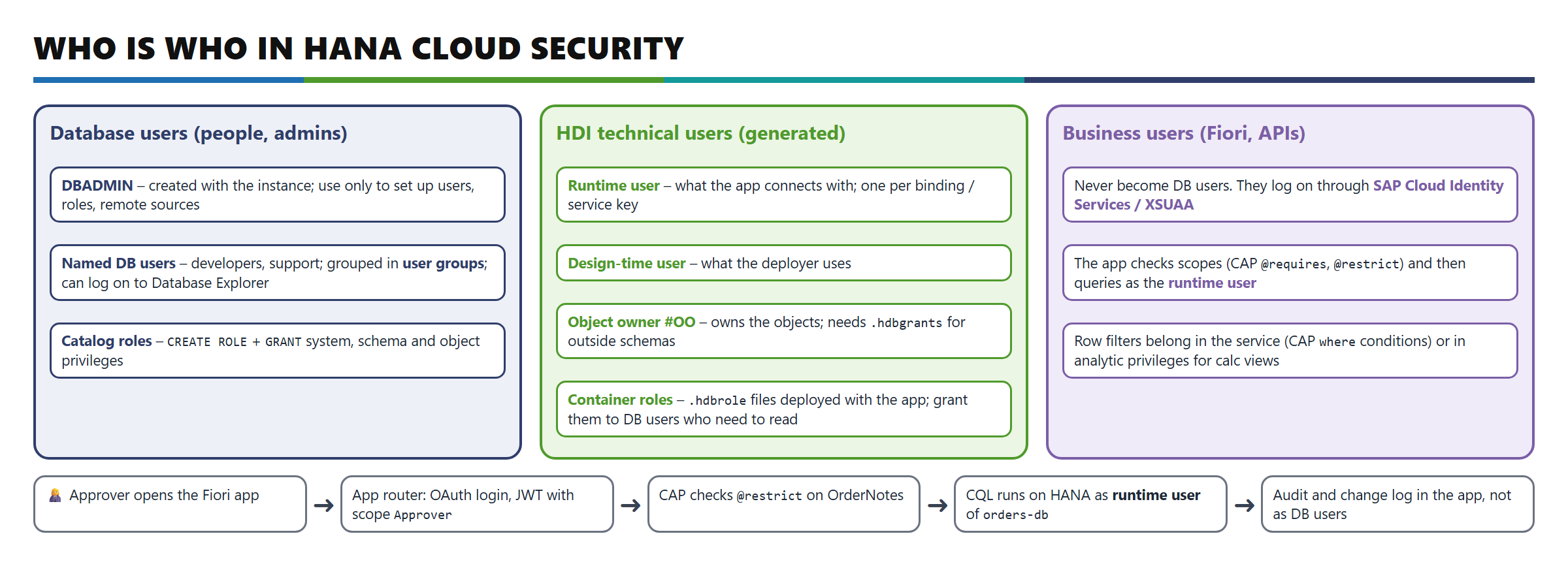
Identity | Created by | Used for |
|---|---|---|
DBADMIN | Instance creation | Initial administration only: create users, roles, remote sources. Do not use it in apps or day-to-day work |
Named database users | Administrator ( | Developers and support logging on to Database Explorer; grouped in user groups |
HDI technical users | HDI, per container and binding | Apps (runtime user), deployer (design-time user), object ownership ( |
Business users | SAP Cloud Identity Services / corporate IdP | Never database users: authenticated by XSUAA or Identity Authentication; the app checks roles and queries as the runtime user |
11.1 Roles and privileges
- Catalog roles (
CREATE ROLE,GRANT) – system, schema and object privileges for named users, created with SQL by an administrator. - Container roles (
.hdbrole) – shipped with the app, deployed into the container. Grant them to a named user (for example a support user who must read the tables) through the container's HDI API (GRANT_CONTAINER_SCHEMA_ROLESin the#DIschema) by a container administrator, or through tools that wrap it. - Analytic privileges (
.hdbanalyticprivilege) – row filters on calculation views, for example by sales organisation. - Least privilege: the runtime user has only what the default access role gives; extra rights for foreign schemas come explicitly through
.hdbgrants.
11.2 Typical design decisions
- Row-level rules for app users belong in the CAP service (
@restrictwithwhere), because the database sees only the runtime user. Calculation views consumed directly by SAP Analytics Cloud use analytic privileges instead. - Credentials live only in bindings and service keys. Rotate them by creating a new key or rebinding, never by copying passwords into code or
.envfiles in Git. - Limit allowed connections to BTP IP addresses unless an external client really needs access; auditing for database users is configured with audit policies by the administrator.
Part 12 – Performance for developers
Why it matters: HANA Cloud is billed by memory and compute. A slow query is both a user problem and a cost problem. You are not the DBA, but you are expected to find the expensive statement, read its plan and fix the model or the code. Column store and partitioning basics: ABAP on HANA › 01 · HANA Fundamentals, Part 2.
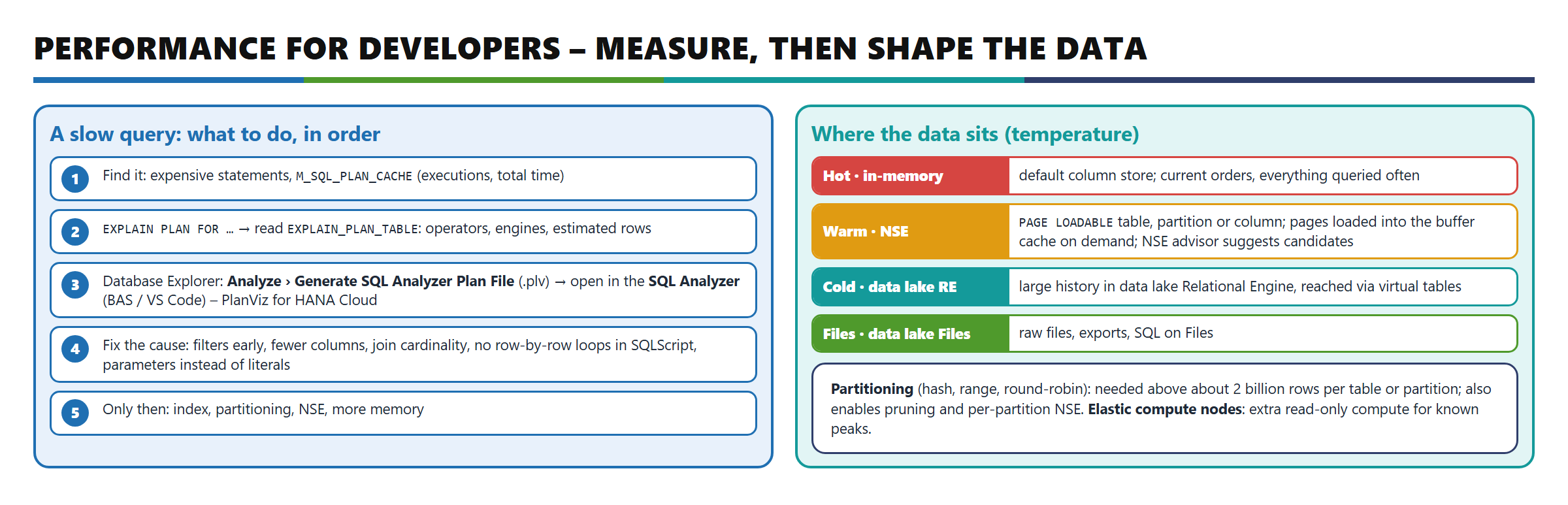
12.1 Find and read the plan
|
- SQL Analyzer (the PlanViz of HANA Cloud): in Database Explorer run the statement with Analyze › Generate SQL Analyzer Plan File; the
.plvfile opens in the SQL Analyzer view in BAS, or in the SQL Analyzer extension for VS Code. It shows the actual execution: time per operator, rows, engines, where the time went. - Typical findings: no filter pushed down (calculation view filter in the top node), a join exploding rows (wrong cardinality), a calculated column evaluated row by row, a UDF called per row, a literal instead of a parameter (no plan reuse).
12.2 Partitioning
- A column table or partition holds at most about 2 billion rows; bigger tables must be partitioned.
- Hash (even distribution by key), range (by date or number, enables pruning and archiving per range), round-robin (no key); multi-level combinations exist.
|
- Do not partition small tables "just in case" – more partitions mean more overhead for every query that cannot prune.
12.3 Native Storage Extension (NSE) and other tiers
- NSE keeps warm data on disk and loads pages into a buffer cache on demand. Mark a table, partition or column page loadable;
COLUMN LOADABLEis the default fully in-memory mode.
|
- The NSE advisor suggests candidates from real access statistics; run it on production-like load before deciding.
- Colder data goes to the data lake Relational Engine (virtual tables) or data lake Files.
- Elastic compute nodes (ECN) add temporary compute for known peaks (month-end reports): read-only queries are routed to them by workload classes or client-side statement routing.
Part 13 – Machine learning in the database (PAL and APL)
Why it matters: moving millions of rows to a Python server for a simple forecast is slow and creates data copies. HANA Cloud can train and apply models where the data is – the same "code to data" idea as code pushdown in ABAP.
Library | What it offers | Who uses it |
|---|---|---|
PAL – Predictive Analysis Library | Many algorithms: classification, regression, clustering, time series, outlier detection; AutoML and unified interfaces | Data scientists and developers who choose the algorithm |
APL – Automated Predictive Library | Automated modelling: chooses and tunes the model for classification, regression and time series | Developers who want a good model quickly |
Python client | Pandas-like DataFrames that generate SQL; wrappers for PAL and APL; data stays in HANA | Jupyter notebooks in BAS or locally |
|
- PAL and APL run in the script server, which must be enabled for the instance in HANA Cloud Central (an additional feature in the advanced settings; it needs an extra 16 GB of memory and therefore a larger minimum size, so plan it in the sizing).
- Users need execute roles (for PAL
AFL__SYS_AFL_AFLPAL_EXECUTE; the APL role is named in the APL guide). Read credentials from the binding or a secure store, never from the notebook. - For generative AI (LLMs) use SAP AI Core and the generative AI hub instead – BTP Development › 04 · Data & AI on BTP. PAL and APL are classic machine learning on structured data.
Part 14 – Interview questions
Q1. What is SAP HANA Cloud and what are its components?
A managed database as a service on SAP BTP. It consists of the SAP HANA database (in-memory, multi-model: relational, JSON document store, spatial, graph, vector engine, knowledge graph, machine learning) and the optional data lake with a Relational Engine (disk-based SQL for large volumes) and Files (object storage). SAP operates it; you size, connect and secure it in HANA Cloud Central.
Q2. What is an HDI container and how does it differ from a schema?
An HDI container is a schema managed by the SAP HANA Deployment Infrastructure: objects come from design-time files in Git, are deployed by the HDI deployer, are owned by a technical object owner, and the app connects with a generated runtime user. A classic schema is filled by hand-run SQL and has no deployment history. In BTP an app gets a container as a service instance hana / hdi-shared.
Q3. Why does cf create-service hana hdi-shared fail in a new space?
Usually because the HANA Cloud instance is not mapped to that Cloud Foundry org and space (instance mapping in HANA Cloud Central), the hdi-shared plan is not entitled, or the instance is stopped (free tier instances stop every night).
Q4. Name five HDI artefacts and what they do.
.hdbtable (table), .hdbview (SQL view), .hdbcalculationview (calculation view), .hdbprocedure (SQLScript procedure), .hdbrole (container role); also .hdbsynonym and .hdbgrants for access to other schemas, .hdbtabledata for initial data and .hdiconfig mapping suffixes to build plugins.
Q5. How does CAP deploy to HANA Cloud?
cds build --production turns the CDS model into HDI artefacts in gen/db with a deployer package.json. In development cds deploy --to hana deploys into your own container; in production the MTA module type: hdb runs @sap/hdi-deploy against the hdi-shared instance, and the CAP runtime uses @cap-js/hana with the runtime user. Native files in db/src are deployed alongside.
Q6. How do you expose a calculation view in a CAP service?
Deploy the calculation view from db/src, define a facade entity with the same name and columns annotated @cds.persistence.exists (and @cds.persistence.calcview), and project on it in the service. CDS then creates no table, and the view works in hybrid mode and production but not on SQLite.
Q7. What are virtual tables and when would you replicate instead?
A virtual table points through a remote source (smart data access) to a table in another database; queries are federated and data is always current. Replicate (remote table replication or SDI) when performance, heavy joins or the remote system's availability matter – at the cost of memory and monitoring the subscription.
Q8. Which users exist around an HDI container?
The runtime (application) user used by the app, the design-time user used by the deployer, and the object owner #OO that owns all objects. Named database users and DBADMIN are separate; business users never become database users – the app checks their roles and queries as the runtime user.
Q9. How do you analyse a slow query in HANA Cloud?
Find it in M_SQL_PLAN_CACHE or the expensive statements, look at EXPLAIN PLAN, then generate a SQL Analyzer plan file in Database Explorer and read the actual operators and times in the SQL Analyzer. Fix the cause (filters early, cardinality, set-based SQLScript) before adding partitions, NSE or memory.
Q10. What is NSE?
Native Storage Extension: warm data marked PAGE LOADABLE at table, partition or column level stays on disk and is loaded page by page into a buffer cache when needed. It lowers memory cost for rarely used data; the NSE advisor suggests candidates.
Q11. Scenario: your CAP app must show regions that SLT replicates into a classic schema. What do you do?
Ask an administrator for a grantor user with SELECT and SELECT METADATA with grant option on the schema, wrapped in a role; create a user-provided service for it; add a .hdbgrants file granting the role to the object owner and application user; add a .hdbsynonym for the table; require the service in the deployer module of mta.yaml; then define a CAP facade entity (@cds.persistence.exists) on the synonym and expose it read-only.
Q12. Scenario: the HDI deployment fails after you renamed a CDS element in production. How do you handle it?
A rename is an incompatible change: with .hdbtable HDI would drop and recreate the column and lose data, or the build stops. Plan it: add the new element, migrate data, remove the old one later – or use @cds.persistence.journal so the table becomes a .hdbmigrationtable with an explicit migration step. Test on a copy of production data first, and never add tables to undeploy.json.
🏠 Start Here · ◀ 01 · Developing on BTP · 03 · Runtimes ▶ · Sections: CORE ABAP | OOPS ABAP | ABAP on HANA | Clean Core | RAP | ABAP Points | SAP Fiori | SAPUI5 | Mobile Development (MDK) | BTP Foundations | BTP Development | CAP | SAP Build | ABAP on BTP | Integration Suite | SAP Business AI | SAP BASIS | Security | SAP SDLC
Functional: FICO ABAP | TRM ABAP | VIM | SAP BIS | SD ABAP | MM ABAP | PP ABAP | QM ABAP | PM ABAP | PS ABAP | EWM | TM ABAP | GTM ABAP | EHS ABAP | HR ABAP | BW | SAP Datasphere | SAP Business Data Cloud | SAP MDG | SAP Analytics Cloud | SAP Ariba | SAP CX | SAP IBP