The hands-on page for an SAP BTP developer interview: what you actually type in SAP Business Application Studio (BAS), how a CAP service consumes an external API and connects to SAP HANA Cloud, how an MTA is wired together, how a Fiori app reaches the HTML5 Application Repository and SAP Build Work Zone, how you debug every layer when something breaks, and one lab that puts it all together (Part 8). Concepts are explained on their home pages and not repeated here: tools, MTA and Fiori on BTP on page 05 · Developing on BTP; CAP modelling, services and handlers on the CAP section; messaging and multitenancy on the CAP section; HANA Cloud on page 02; Cloud Foundry and Kyma on page 03 · Runtimes; ABAP environment and RAP on ABAP on BTP › 01 and in the RAP section; OAuth / JWT / XSUAA / app router / destinations / Cloud Connector on BTP Foundations › 04 · BTP Security Deep Dive; CI/CD, logging and monitoring on page 05 · DevOps, Operations & Observability; UI5 build and deployment in SAPUI5 › 04 SAPUI5 Data, Binding & Navigation, Part 15.
Part 1 – The job description, line by line
Typical BTP developer profile (3–6 years, 2–3 end-to-end implementations). For each line: where it is in your notes and the one-line answer to give first – then go deeper if the interviewer asks.
JD line | Where in your notes | One-line answer |
|---|---|---|
SAP BTP debugging (very good knowledge and experience) | BTP Development › 06 Part 7; SAPUI5 › 03 Part 10 (UI5 tools); Integration Suite › 02 Part 9 (CPI monitoring); ABAP on BTP › 01 Part 8 (ABAP environment) | I debug hop by hop: browser network tab and UI5 diagnostics, app router trace, |
Fiori apps – freestyle SAPUI5 / Fiori elements | SAPUI5 › 03 SAPUI5 Fundamentals, 04 SAPUI5 Data, Binding & Navigation, 07 Fiori Elements; BTP Development › 01 Part 6 | Fiori elements on an OData V4 service (CAP or RAP) driven by annotations for standard list / object pages; freestyle UI5 when the UX is special – often a mix with flexible programming model building blocks. |
Deployment of Fiori apps to the HTML5 Repository | BTP Development › 06 Part 6; BTP Development › 01 Part 6; BTP Foundations › 03 Part 6; SAPUI5 › 04 Part 15 | Fiori tools add a Cloud Foundry deploy configuration: an |
Hands-on BAS | BTP Development › 01 Part 2; SAPUI5 › 03 Part 3; BTP Development › 06 Part 2 | Dev space Full-Stack Cloud Application, Fiori generator and template wizard, terminal with |
MTA dependency knowledge | BTP Development › 01 Part 5; BTP Development › 06 Part 5 |
|
CAP or RAP: consuming external APIs | BTP Development › 06 Part 3; ABAP on BTP › 01 Part 6; RAP › 11 · Files, Custom Entities & Integration | CAP: |
CAP or RAP: connection with the HANA DB of BTP | BTP Development › 06 Part 4; BTP Development › 02 (SAP HANA Cloud) | Each app gets an HDI container ( |
CAP or RAP: deployment of services to BTP | BTP Development › 06 Parts 2 and 5; BTP Development › 01 Part 5; BTP Development › 05 (CI/CD) |
|
Security around it (implicit in every line) | BTP Foundations › 04; BTP Foundations › 03 Parts 3–5 | XSUAA issues the JWT, scopes in |
Requirement documents, end-to-end process, design pain points | BTP Development › 06 Part 9 | Functional spec → technical design, SAP Activate phases, and a list of pain points with the fix I used. |
2–3 end-to-end implementations | BTP Development › 06 Part 9 (STAR answer) | One prepared story per project: problem, landscape, my role, solution, numbers, lesson. |
Good to have: functional / module knowledge | SAP MDG section; EWM section | Know the business objects you extend: MDG change requests and replication, EWM warehouse tasks and S/4HANA integration. |
Part 2 – CAP end to end in BAS
Start in BAS with a dev space of type Full-Stack Cloud Application (CAP tools, Fiori tools, MTA tools, cf CLI pre-installed). Create the project with the template wizard (CAP Project) or in the terminal with cds init. CAP concepts (CDS modelling, aspects, generic providers, before / on / after, CQL, annotations) are explained on the CAP sectionand files you touch, in the order you touch them.
2.1 Project layout
|
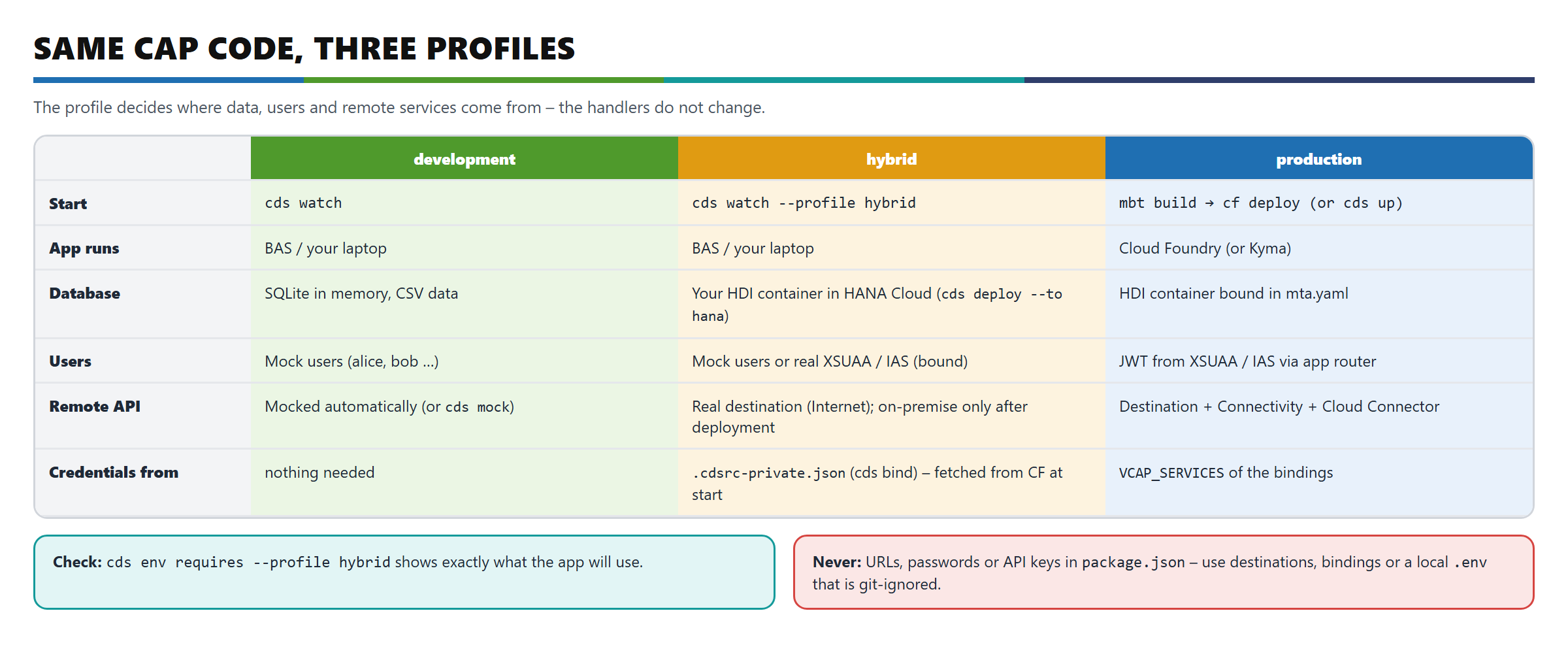
- Profiles decide which configuration is active:
[development](default forcds watch),[hybrid](local app, cloud services) and[production](on BTP). Check the effective result withcds env requiresorcds env requires --profile production. - Configuration lives in one place: the
cdssection ofpackage.jsonor.cdsrc.json. Never secrets – credentials come from bindings (VCAP_SERVICES) or a local.env.
2.2 Run locally
|
- In development CAP uses an in-memory SQLite database filled from
db/data/*.csv, mocked authentication with test users (e.g.alicewith roleadmin) and mocks every remote service it cannot reach (Part 3). - The index page at port 4004 lists every service, entity and a Fiori preview – the quickest smoke test.
2.3 A small but realistic example
|
|
|
|
req.errorcollects errors and fails the request at the end;req.rejectstops at once.- The single
UPDATE … where stock >= quantityavoids a read-then-write race between two users.
2.4 From laptop to BTP: the cds add facets
Facet | What it adds |
|---|---|
hana |
|
xsuaa |
|
mta |
|
approuter | Standalone app router in |
| Managed app router variant for SAP Build Work Zone (HTML5 repository, destination content); |
html5-repo | HTML5 Application Repository resources and the UI content module for the apps in |
| Destination and Connectivity service resources and bindings for remote APIs and the Cloud Connector (Part 3) |
| CSV / JSON sample data, |
|
Facet names change between @sap/cds-dk versions (a newer app-frontend facet targets the SAP BTP Application Frontend service) – cds add --help shows the current list.
Part 3 – Consuming an external API (CAP and RAP)
The most common BTP task: read or write S/4HANA data (Business Partner, Sales Order …) from a side-by-side app. CAP treats the remote API like a local service – you query it with CQL, and CAP translates to OData calls through a destination.
3.1 Import the API definition
|
- OData V2 APIs get
kind: odata-v2, OData V4 APIskind: odata– always V4 when calling another CAP service.
3.2 Configure the remote service
|
destination= the name of a destination in the subaccount (URL, authentication, proxy type);path= the service root appended to the destination URL. No URL or password in the code.- Development profile: no credentials → CAP mocks the service. Hybrid:
cds bind -2 bookshop-destinationbinds the Destination service so the local app uses the real destination. Production: the deployed app is bound to Destination (and Connectivity) inmta.yaml. - Some back ends require a CSRF token for changing requests: set
"csrf": true(and"csrfInBatch": truefor$batch) in the requires entry, and CAP fetches the token for you.
Destination property (BTP cockpit) | Value for an on-premise S/4HANA |
|---|---|
Name / Type |
|
URL | Virtual host and port from the Cloud Connector, e.g. |
Proxy Type | OnPremise (Internet for cloud systems) |
Authentication | PrincipalPropagation (user context) or BasicAuthentication with a technical user – choice and setup: BTP Foundations › 04 |
Location ID | Only if several Cloud Connectors are connected to the subaccount |
Additional properties |
|
3.3 Expose and delegate
|
|
|
- Mix local and remote data carefully: the database cannot join a local table with a remote entity. Read the remote data in one call (
$filterwithin,$expand) and merge in the handler – never one remote call per row (N+1). - Replicate or cache when the data is read often and changes rarely (e.g. store a copy and refresh it by event or job).
3.4 Mocking in development
cds watchmocks every required service without credentials – the log showsmocking API_BUSINESS_PARTNER. Test data:srv/external/data/API_BUSINESS_PARTNER-A_BusinessPartner.csv.- More realistic:
cds mock API_BUSINESS_PARTNERin one terminal andcds watchin another – now the app really calls the mock over HTTP, like it will call S/4HANA. - Alternative for real data without a company system: the sandbox of the SAP Business Accelerator Hub (API key in
.env, never inpackage.json).
3.5 Calling S/4HANA on-premise
Path of one call: CAP handler → Destination service (looks up URL and authentication by name) → Connectivity service proxy → Cloud Connector tunnel → S/4HANA OData service. The app therefore needs bindings to XSUAA, Destination and Connectivity (cds add xsuaa,destination,connectivity). The Cloud Connector must expose the virtual host and the URL path (e.g. /sap/opu/odata/sap/). The Connectivity proxy is reachable only from apps running on BTP, so test the on-premise path after deployment. Principal propagation, trust and Cloud Connector setup: BTP Foundations › 04.
3.6 The RAP equivalent
Step | CAP | RAP / ABAP Cloud (ABAP on BTP › 01, Part 6) |
|---|---|---|
API definition |
| Service consumption model in ADT from an EDMX (OData), WSDL (SOAP) or RFC metadata |
Typed access | CDS entities of the remote service, queried with CQL | Generated proxy types; the model editor shows a code sample (current releases use |
Connection |
| Communication scenario with an outbound service + communication system + communication arrangement, or a BTP destination |
Expose to the UI | Projection + | Custom entity with a query class implementing |
Local tests | Automatic mock, | ABAP Unit with a test double for the client proxy |
Part 4 – Connecting to SAP HANA Cloud
An SAP HANA Cloud database instance is created once per landscape (HANA Cloud Central / BTP cockpit) and made available to the Cloud Foundry space. Your app never gets the whole database: it gets an HDI container – its own schema with technical users – created as a service instance of hana with plan hdi-shared. HANA Cloud itself – instances, HANA Cloud Central, data lake, SQL / SQLScript, calculation views, vector engine – is on page 02 · SAP HANA Cloud for Developers; this Part covers only the CAP-to-HDI steps.
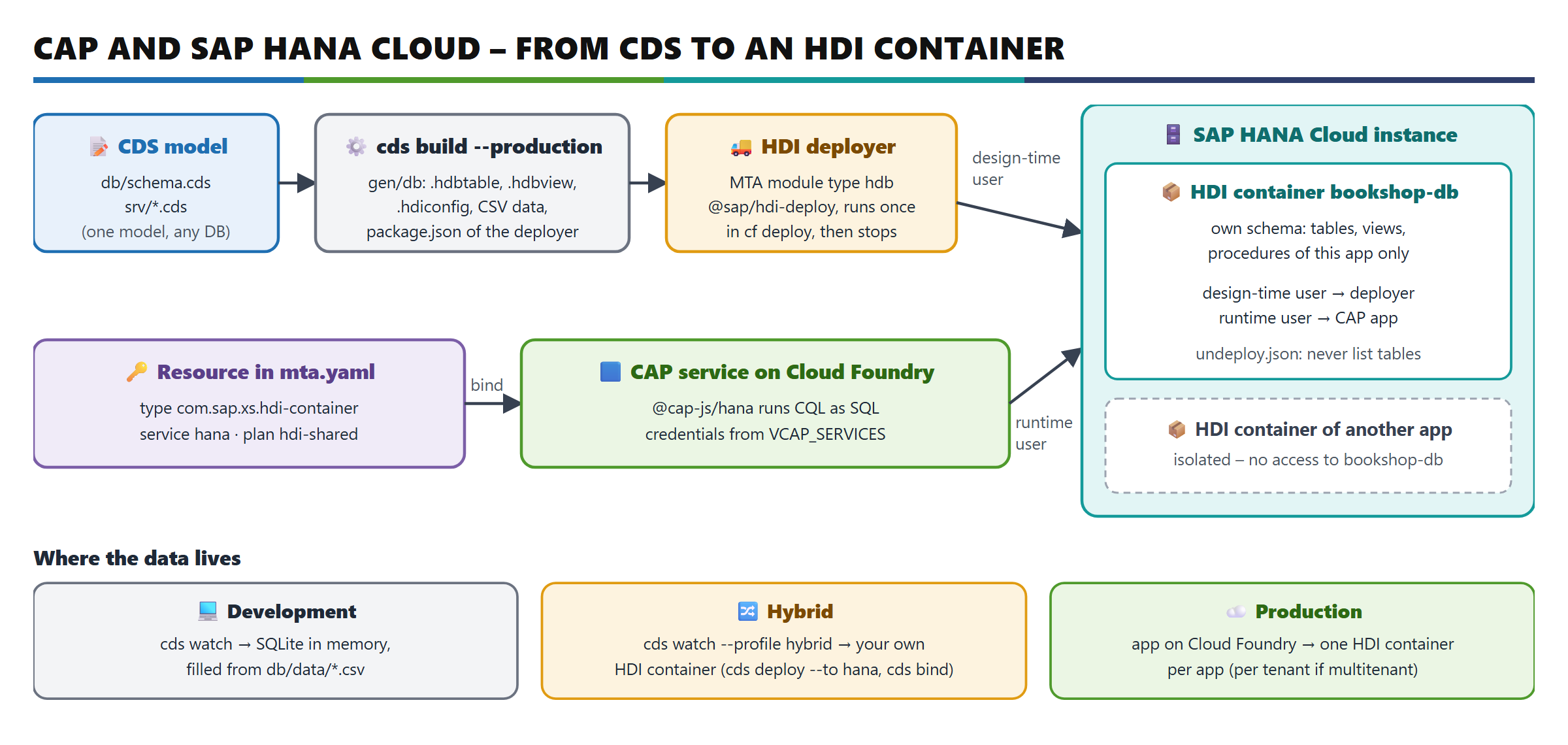
Piece | Role |
|---|---|
HDI container | Schema + runtime user (used by the app) + design-time user (used by the deployer); isolates each app's tables and views |
cds build --production | Turns CDS into HDI artefacts in |
DB deployer module ( | A small Node.js app using |
@cap-js/hana | Database service used by the CAP runtime to run CQL on HANA (default driver |
undeploy.json | HDI never deletes artefacts by default; list views etc. here to remove them. Never list tables – that deletes data |
HANA Database Explorer | Add the HDI container as a database connection to browse tables, run SQL, check deployed objects |
4.1 Commands for development
|
cds bindstores only where to fetch credentials (instance and key name) – the credentials are read from Cloud Foundry when the app starts.cds bind --exec -- <command>runs any tool with a generatedVCAP_SERVICES.- The HANA Cloud instance must be running (trial and free-tier instances stop every night) and allowed for your space or IP range.
4.2 Where the data lives
Stage | App runs | Data lives in |
|---|---|---|
Development |
| SQLite in memory (or a local file), filled from CSV |
Hybrid | Locally with | Your own HDI container in the shared dev HANA Cloud instance |
Production (single tenant) | On Cloud Foundry, bound in | One HDI container per app and landscape |
Production (multitenant SaaS) | On Cloud Foundry with | One HDI container per subscriber tenant |
4.3 Schema changes
- Adding fields and entities is compatible: the deployer alters the tables and keeps data.
- Renames, type narrowing and deletions are incompatible – plan them, migrate data, or use
@cds.persistence.journal(generates.hdbmigrationtablewith explicit migration steps). - Two containers or apps must never deploy the same object names into one schema; use one deployer per container and a namespace per app.
Part 5 – MTA in depth
Page 01 · Developing on BTP, Part 5 introduces the MTA idea, the descriptors and the commands. Here: the details an interviewer asks when they say "MTA dependency knowledge".
5.1 Module and resource types you must know
Type | Deploys | Notes |
|---|---|---|
| A Cloud Foundry app (CAP service) |
|
hdb | HDI deployer app | Runs once, deploys artefacts into the HDI container, stops |
approuter.nodejs | Standalone app router app | Routes from |
html5 | Nothing by itself | Builds and zips the UI ( |
com.sap.application.content | Content into a service | Zips → HTML5 repo ( |
org.cloudfoundry.managed-service | Creates a service instance |
|
com.sap.xs.hdi-container | Creates an HDI container | Classic type for |
org.cloudfoundry.existing-service | Nothing – reuses an instance | Shared services created outside the MTA |
5.2 requires, provides and properties
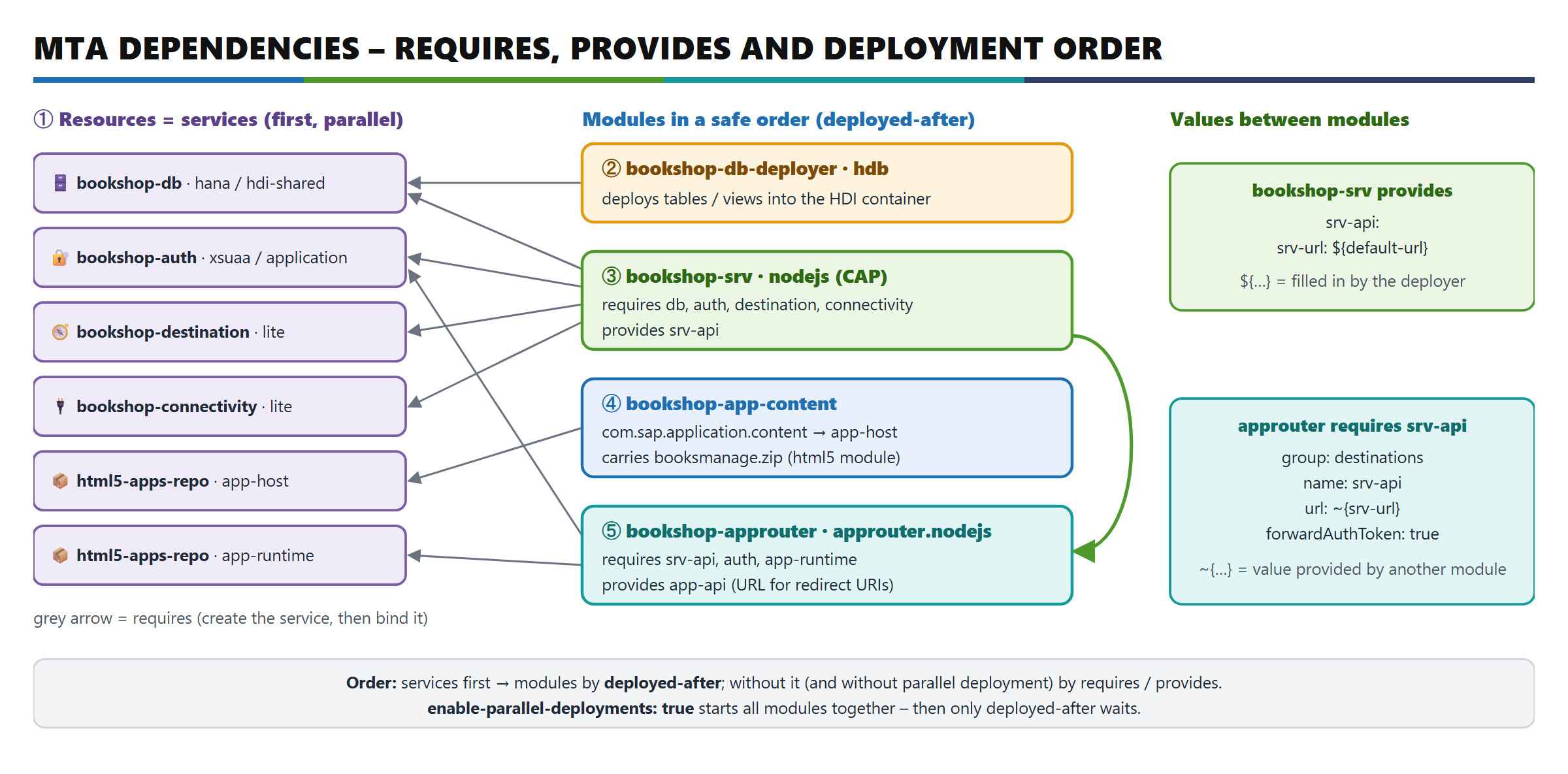
providespublishes named values of a module:srv-url: ${default-url}(${…}= value known by the deployer, e.g.${default-url},${org},${space}).requiresconsumes a resource (→ create first, then bind) or another module'sprovides(→ read its values with~{srv-api/srv-url}or, inside the requires entry,~{srv-url}).groupcollects several required values into one environment variable – the app router'sdestinationsvariable is built this way.propertiesbecome environment variables of the app;parameterssteer the deployer (memory, instances, buildpack, service plan,pathtoxs-security.json).
Key | Read by | Example |
|---|---|---|
parameters | Deploy service at deploy time |
|
properties | The running app (environment variables) | S4_DESTINATION: S4HANA_BP |
build-parameters |
|
|
5.3 Deployment order
- Resources (services) first, created in parallel – a module that requires them is bound after they exist.
- Modules: if
deployed-afteris used it defines the order; if not, and parallel deployment is off, therequires/providesrelations between modules define it. With the global parameterenable-parallel-deployments: trueall modules start together, except those waiting viadeployed-after. - Typical safe order: HDI deployer → CAP service → UI content → app router. A failing step stops the operation; fix and
cf deploy -i <operation-id> -a retry, or-a abort.
5.4 Extension descriptors per landscape
|
5.5 Build, deploy, operate
|
- Blue-green keeps the old version live while the new one starts on temporary routes; after the test phase (resume the operation) the routes switch and the old apps are removed – zero downtime.
--delete-servicesalso deletes the HDI container – and the data. Never on production without a backup plan.
5.6 A complete mta.yaml: CAP + HANA + XSUAA + app router + Fiori app
|
- With this standalone app router the Fiori app is opened at
https://<app-router-url>/<app-id-without-dots>/index.html. For SAP Build Work Zone you drop the app router module and use the managed variant of Part 6.
Part 6 – Deploying a Fiori app to the HTML5 Application Repository
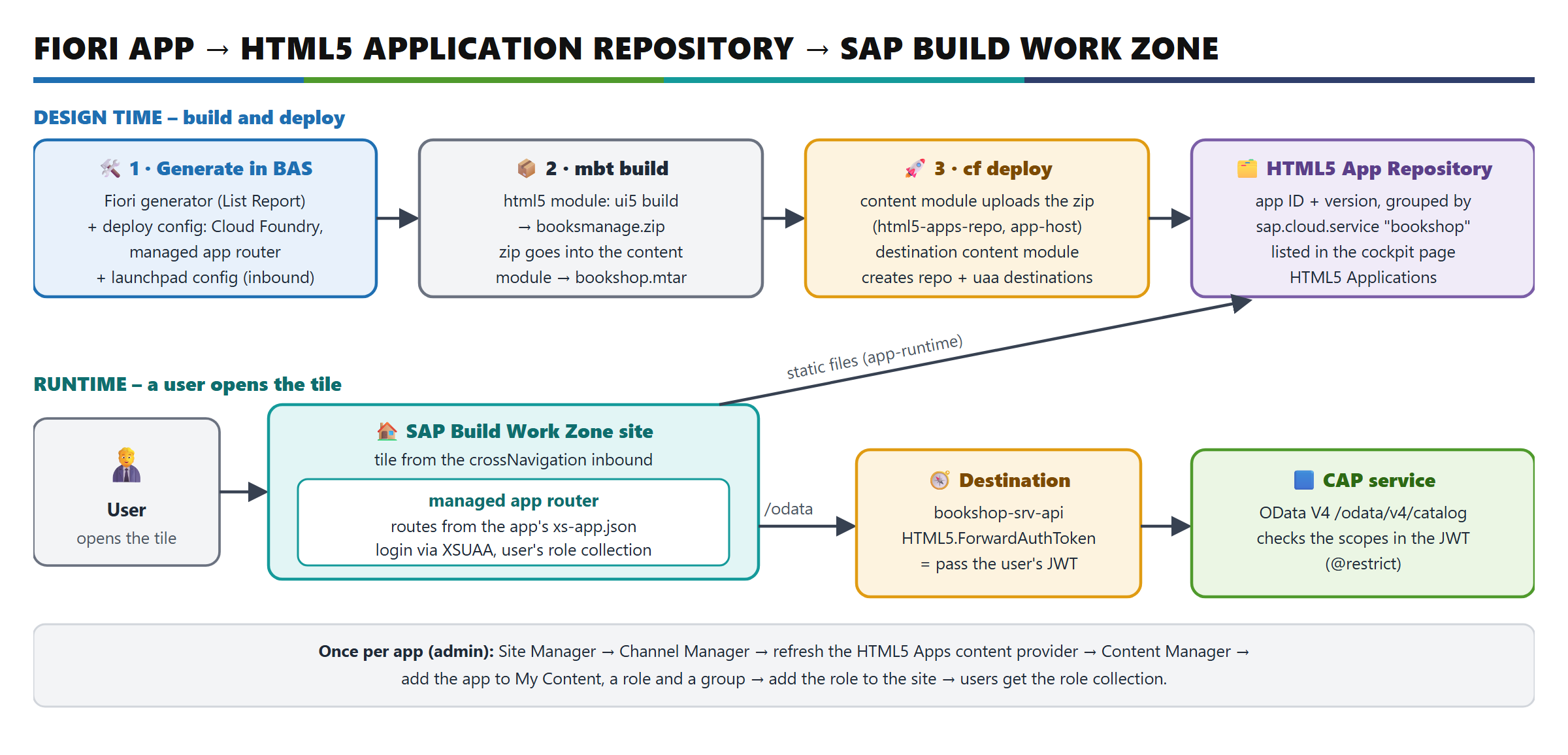
The standard path on Cloud Foundry today: the app is stored in the HTML5 Application Repository and served by the managed app router of SAP Build Work Zone – there is no app router app to run. Managed vs standalone app router in detail: BTP Foundations › 04. Building and deploying UI5 apps in general: SAPUI5 › 04 SAPUI5 Data, Binding & Navigation, Part 15.
6.1 Step by step
- 1. Generate – BAS: Command Palette → Fiori: Open Application Generator → List Report Page (Fiori elements) or Basic (freestyle) → data source: the local CAP project, an SAP system or a destination → main entity → project attributes.
- 2. Add deployment configuration – in the generator (or later: right-click the app → Add Deployment Configuration, or
npx fiori add deploy-config cf): target Cloud Foundry, the destination for the back end, and Add application to managed application router: Yes. Also add the Fiori launchpad configuration (semantic object, action, title). - 3. What is generated – in the app:
xs-app.json,ui5-deploy.yaml(zips the build result), abuild:cfscript,sap.cloudandcrossNavigationinmanifest.json. Inmta.yaml: thehtml5module, the UI content module (→app-host) and a destination content module (below). - 4. Build and deploy –
mbt build, thencf deploy mta_archives/<file>.mtar(or right-clickmta.yaml→ Build MTA Project, right-click the.mtar→ Deploy MTA Archive). - 5. Check – BTP cockpit → subaccount → HTML5 Applications page: the app is listed with its ID, version and service name; open it from there to test it outside the launchpad.
- 6. Add to Work Zone – Site Manager → Channel Manager: refresh the HTML5 Apps content provider → Content Manager → Content Explorer → HTML5 Apps → add the app to My Content → assign it to a role and a group → add the role to the site. Users need the matching role collection (the Everyone role needs none).
6.2 The files that matter
webapp/manifest.json (excerpt): the data source URI is relative (no leading slash), so calls go through this app's own xs-app.json routes; sap.cloud.service must equal the sap.cloud.service of the destinations below.
|
app/books/xs-app.json – the routes of this app inside the managed app router:
|
- Routes are checked top to bottom, first match wins – the catch-all route to
html5-apps-repo-rtmust be last. KeepcsrfProtection: true(the default) for CAP – CAP has no CSRF check of its own and relies on the app router. Set it tofalseonly for a back end that runs its own CSRF handshake, such as SAP Gateway in S/4HANA (BTP Foundations › 04, Part 4.1).
|
ServiceInstanceNameis the CF instance name; when a resource setsservice-namethe two differ, so keep them aligned. The generator writes this block for you – you must be able to read and fix it.- Launchpad inbound (
crossNavigationwith semantic object and action) makes the app visible as a tile in Work Zone; the manifest snippet is in SAPUI5 › 04 SAPUI5 Data, Binding & Navigation, Part 15. - Newer option: the SAP BTP Application Frontend service (
app-front) – a fully managed service that hosts and serves front-end apps with xs-app.json routing, an admin UI, theafctlCLI and an API; in the cockpit it appears under HTML5 → Application Frontend.
Part 7 – Debugging on SAP BTP
A request crosses many hops: browser → (Work Zone) app router → CAP service → database or Destination service → Connectivity → Cloud Connector → back end. Good debugging means finding which hop fails first, then using that hop's tool. The browser's network tab tells you the HTTP status and which hop answered; start there.
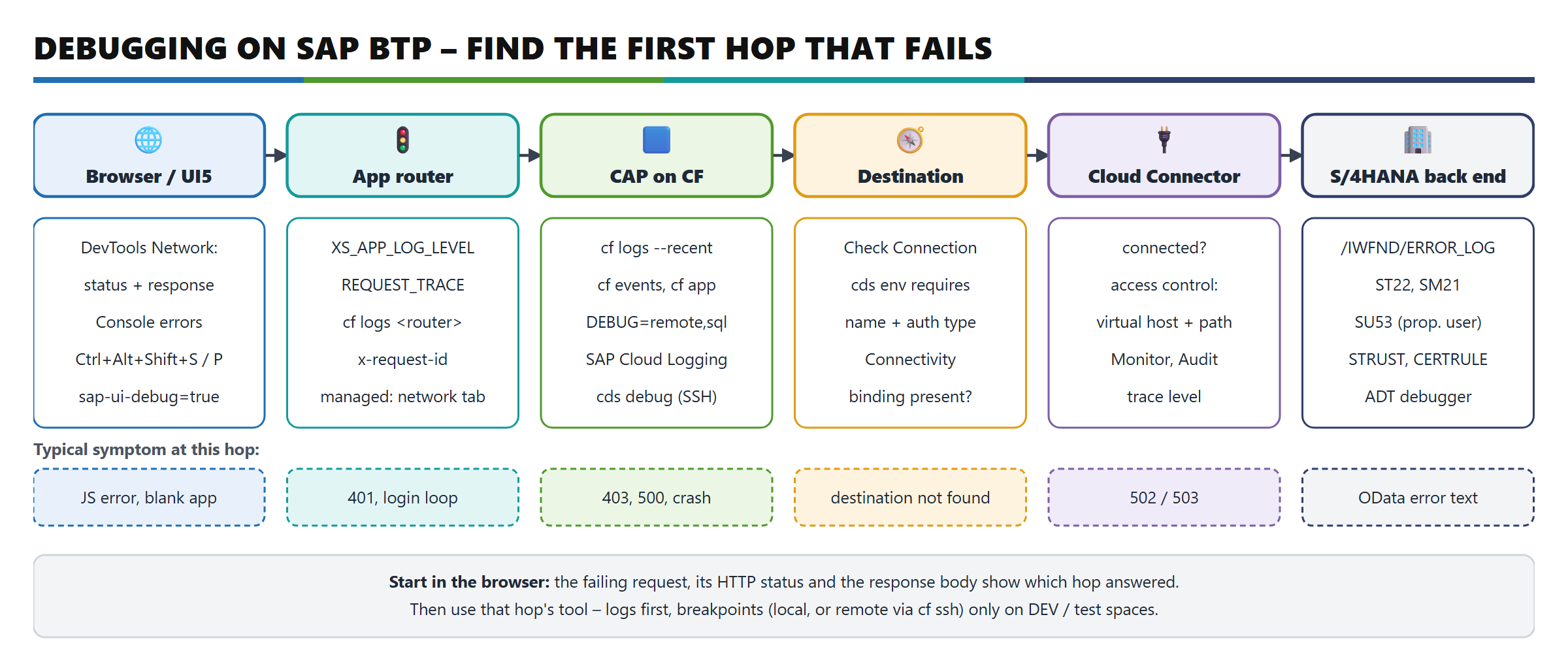
7.1 Cloud Foundry logs and app state
|
--recentshows only a small buffer. For history, search and dashboards bind the app to SAP Cloud Logging (OpenSearch-based) – the successor of the SAP Application Logging service. Setting up Cloud Logging, SAP Cloud ALM and alerts: page 05 · DevOps, Operations & Observability; morecfcommands (scaling, routes, health checks) and the Kyma equivalents (kubectl logs): page 03 · Runtimes.- Never paste
cf envoutput into tickets or chats – it shows client secrets and database passwords.
7.2 CAP log levels
Initial levels per logger in package.json; locally DEBUG=remote,sql cds watch (or DEBUG=all), on Cloud Foundry cf set-env (above):
|
|
sqlshows the generated SQL,remotethe outbound HTTP calls to remote services (URL, status) – the two most useful loggers. In production CAP writes JSON logs (fields for Cloud Logging); a logger's level can also be changed at runtime withcds.log('bupa', 'debug').
7.3 Local debugging in BAS
- Easiest: open a JavaScript Debug Terminal and run
cds watchthere – breakpoints insrv/*.jshit at once. Orcds debug(startscds watch --debug, inspector on port 9229). - BAS Run Configurations view: create a configuration for the CAP project, optionally bound to cloud services (hybrid), and start it with the debugger.
|
7.4 Remote debugging of a Node.js app on Cloud Foundry
|
- A paused process fails the http health check and Cloud Foundry restarts the container – switch to
cf set-health-check bookshop-srv processfor the session and back afterwards. - Only on DEV / test spaces, with one instance (otherwise the request may hit another instance). In production rely on logs.
7.5 Debugging the app router
|
- These traces can contain tokens and personal data – switch them off afterwards. The response header
x-request-idhelps to find one request in the logs. - The managed app router (Work Zone) cannot be traced this way: use the browser network tab, the HTML5 Applications page, destination checks and the CAP logs instead.
- Typical findings: route order (catch-all first), a
sourceregex that does not match, a destination name that differs fromxs-app.json(case-sensitive),authenticationType: noneon a route that needs the user, missingforwardAuthToken, redirect URI not allowed in XSUAA.
7.6 UI5 and Fiori in the browser
Tools and shortcuts in detail: SAPUI5 › 03 SAPUI5 Fundamentals, Part 10. The short list for an interview:
- DevTools Network tab: filter
$batch/odata, read the status code and the response body of the failing part;$metadataerrors break a Fiori elements app before any data is read. - Console: UI5 errors and failed module loads; Ctrl+Alt+Shift+S UI5 Diagnostics (control tree, bindings); Ctrl+Alt+Shift+P Technical Information (version, switch to debug sources); URL parameter
sap-ui-debug=trueloads readable sources. - In Work Zone, open the app standalone from the HTML5 Applications page to separate app errors from launchpad / site configuration errors; old versions after a deployment usually mean browser or site cache.
7.7 Destinations, Cloud Connector and the back end
- Cockpit → Connectivity → Destinations → Check Connection: proves URL, proxy type and reachability (for OnPremise: through the Cloud Connector). It does not prove the user's authorisation.
- Cloud Connector administration UI: the subaccount is connected, Cloud To On-Premise access control exposes the virtual host and the URL path, the Monitor shows connections and errors, Log and Trace Files for a raised trace level. A payload trace records the full request content of a subaccount – switch it on only briefly and in line with the security policy.
- ABAP back end:
/IWFND/ERROR_LOGand/IWBEP/ERROR_LOG(Gateway errors),ST22(dumps),SM21(system log),SU53(missing authorisation of the propagated user), andSTRUST/CERTRULEfor principal propagation certificates (BTP Foundations › 04).
7.8 ABAP environment (RAP) debugging
- ADT debugger: set a breakpoint in the behavior pool or query class; for calls from a Fiori app or an API use external (user) breakpoints for the user who sends the request.
- ABAP Cross Trace (ADT) traces RAP / OData request processing; Application Logs (
cl_bali_log) for your own messages; runtime errors appear in ADT's feed / runtime error view; Check Connection in the communication arrangement for outbound targets. ABAP on BTP › 01 · ABAP on BTP, Parts 6 and 8. Full debugging path of a RAP request: RAP › 13 · Debugging, Best Practices, Clean Core & What's New, Part 2.
7.9 Symptom → where to look → fix
Symptom | Where to look | Typical fix |
|---|---|---|
App tile in Work Zone opens a blank page or "could not be started" | Browser console / network; HTML5 Applications page | App not in the repository or |
401 from CAP behind the app router | App router trace; CAP log | Route has |
403 from CAP | CAP log (raise levels with | Role collection not assigned or scope name in |
Login loop or "invalid redirect" | XSUAA instance config | Add the app router URL to |
403 CSRF token validation failed | Network tab: | Fetch the token first (UI5 models do it); for a CAP remote service set |
404 / 500 "destination not found" |
| Names are case-sensitive and must match; destination must be in the same subaccount or instance |
On-premise call fails (502 / 503, connection refused) | Check Connection; Cloud Connector monitor and access control | Expose host and path; correct virtual port; Location ID; Connectivity binding missing |
App crashes at start, "instance never healthy" |
| Missing binding (no HANA credentials), wrong start command, too little memory |
|
| Incompatible schema change, duplicate object names, HANA Cloud instance stopped or not mapped to the space |
Remote service returns mock data or "no credentials" on BTP | cds env requires --profile production | Missing |
List is empty although data exists | Network |
|
List report is slow | Network timings; | N+1 remote calls, no |
Old UI version after deployment | Network tab (cache headers) | New app version in |
RAP outbound call fails | Communication arrangement check; ADT debugger; application log | Wrong host or credentials in the communication system; Cloud Connector location |
Part 8 – Hands-on lab: the Order Insights extension end to end
Why this lab: interviewers ask "walk me through an extension you built". This lab is the Sales Order Approval business from the RAP section seen from BTP – a side-by-side CAP app "Order Insights" that reads S/4HANA sales orders, keeps its own notes, reacts to events, starts an approval and summarises orders with generative AI. Each step names the commands from Parts 2–7 and the page that explains the concept. Build it in a trial or free-tier subaccount; names are examples.
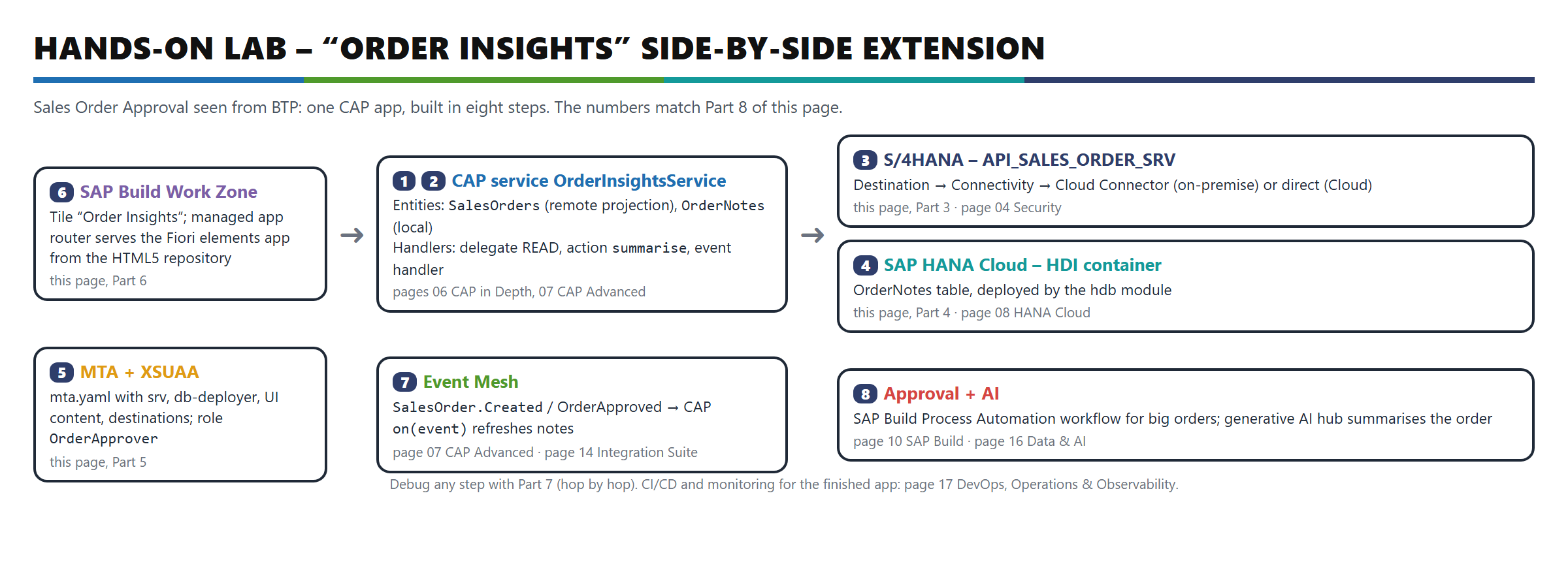
Step | What you do | Commands / files | Concept page |
|---|---|---|---|
1. Project | Create the CAP project in BAS (Full-Stack Cloud Application dev space) |
| 06 · CAP in Depth |
2. Model | Local entity |
| 06 · CAP in Depth; 04 · Security |
3. Remote API | Import the sales order API (EDMX of API_SALES_ORDER_SRV from the SAP Business Accelerator Hub), project |
| this page Part 3; 07 · CAP Advanced |
4. Database | Notes in HANA Cloud; test hybrid |
| 08 · SAP HANA Cloud |
5. Security + MTA | Scopes and role collection, mta.yaml with service, db deployer, UI content, destinations |
| 04 · Security; 05 · Developing |
6. UI + Work Zone | Fiori elements list report on | Fiori generator, | SAP Fiori section; 03 · Services |
7. Events | Subscribe to the sales order events through Event Mesh and refresh notes / flags |
| 07 · CAP Advanced; 14 · Integration Suite |
8. Approval + AI | Start an SAP Build Process Automation workflow for large orders; action | Destination to the workflow API; SAP Cloud SDK for AI ( | 10 · SAP Build; 16 · Data & AI; SAP Business AI section |
|
- Check after each step:
cds watchindex page (step 2), mocked then real sales orders (step 3,DEBUG=remote), rows in the HDI container via Database Explorer (step 4),cf appsand the HTML5 Applications page (steps 5–6), event arrival in the CAP log (step 7). - Typical mistakes: remote entity joined with the local table in one query (not possible – merge in the handler), API path missing from the Cloud Connector allow-list, role collection not assigned after deployment, event topic name different from the one S/4HANA publishes.
- Next step for production: CI/CD pipeline, transport with Cloud Transport Management, Cloud Logging and alerts – page 05 · DevOps, Operations & Observability.
Part 9 – Implementation experience and design pain points
"2–3 end-to-end implementations" means the interviewer will ask: what was the project, what was your part in each phase, what went wrong and what did you do. Prepare one story per project – based only on projects you really worked on.
9.1 Phases (SAP Activate) and your part as a developer
Phase | What happens | Developer deliverables |
|---|---|---|
Discover / Prepare | Business case, scope, team, landscape (subaccounts DEV / QA / PROD, entitlements) | Effort estimate, technical feasibility, BTP account set-up |
Explore | Fit-to-standard workshops, functional specification (FS) | Review the FS, clarify gaps, technical design document, interface list |
Realize | Sprints: build, unit test, integration with S/4HANA | CAP / RAP services, Fiori apps, MTA, CI/CD pipeline, unit and integration tests, demos |
Deploy | System integration test, user acceptance test, cutover | Defect fixing, transports through Cloud Transport Management, role collections in QA / PROD, cutover steps |
Run | Hypercare (often 4–6 weeks), then support | Monitor logs, fix incidents, performance tuning, small enhancements, handover documentation |
9.2 From requirement to design
- Functional specification (functional consultant): business process, user roles, screens and fields, business rules, error cases, volumes, acceptance criteria.
- Technical specification / design document (you): architecture diagram (Fiori app → app router → CAP → destination → S/4HANA), components and MTA modules, data model, APIs consumed and field mapping, authorisation (scopes, role collections), error handling and logging, non-functional requirements (performance, availability), deployment and landscapes, test cases.
- Estimation: split into objects (service, app, integration, role set-up), rate each simple / medium / complex, add testing, deployment and documentation effort, and state the assumptions (API available, Cloud Connector ready).
- Testing: unit tests (cds.test with Vitest – recommended since cds 10, Jest is being phased out – or Mocha), integration tests against mocked remote services, SIT with the real S/4HANA, UAT by key users, a performance test with realistic volumes.
9.3 Typical BTP design pain points and fixes
Pain point | What you see | Fix |
|---|---|---|
Chatty APIs / N+1 calls | Slow list, many back-end calls per page |
|
Missing CSRF / token handling | 403 on POST / PATCH, works with GET | Let the framework fetch the CSRF token (UI5 model, CAP |
Wrong destination authentication type | Works with a technical user, fails for real users – or everything is posted by one technical user | Choose consciously: PrincipalPropagation / OAuth2SAMLBearerAssertion for user context, technical user only for background jobs (BTP Foundations › 04) |
Hard-coded URLs and clients | Works in DEV, breaks in QA | Destinations by name, relative URIs in |
Multitenancy assumptions | Data of one customer visible to another; global caches | Decide single- vs multitenant early; tenant-aware caches and jobs ( |
Role collections missing after transport | 403 for everybody in QA | Role collections defined in |
MTA dependency order | Service starts before its database is ready; UI deployed before the destination exists | Correct |
HDI artefact conflicts | Deployer fails: object exists / incompatible change | One deployer per container, namespaces, |
Business logic in the UI | Rules duplicated in UI5 and back end | Validations in CAP handlers / RAP, the UI only reflects them (side effects, messages) |
9.4 Example answer (STAR)
Question: "Tell me about a difficult problem in one of your BTP projects." (Example structure – put in your own project, numbers and role.)
- Situation: side-by-side CAP app on BTP for customer returns, reading business partners and sales orders from an on-premise S/4HANA through the Cloud Connector. In UAT the list report needed 12–15 seconds.
- Task: I owned the CAP service and had to bring the response time under 2 seconds before go-live, without changing the S/4HANA side.
- Action: I reproduced it with
DEBUG=remoteand the network tab and saw one business-partner call per return (N+1). I replaced the loop with one call using aninfilter and$selectof four fields, added paging, and cached country and plant texts. I also asked the Basis team to switch the destination from a technical user to principal propagation, because UAT showed that every change was posted as one user. - Result: list response about 1.5 seconds, back-end calls per page from over 50 to 2, audit-compliant user attribution; the N+1 check became part of our code review checklist.
Part 10 – Interview questions
Q1. How do you consume an S/4HANA OData API in CAP?
Download the EDMX from the Business Accelerator Hub, cds import … --as cds (model in srv/external, entry in cds.requires), configure credentials.destination and path for the hybrid and production profiles, project the needed fields in a service, and in the handler cds.connect.to('API_…') and on('READ') → bupa.run(req.query). In development CAP mocks the service; on BTP it calls through the Destination service, and for on-premise through Connectivity and the Cloud Connector.
Q2. How does a CAP app connect to SAP HANA Cloud?
Through an HDI container (service hana, plan hdi-shared) bound to the app. cds build creates HDI artefacts in gen/db; the hdb deployer module (@sap/hdi-deploy) deploys them during cf deploy. At runtime @cap-js/hana uses the binding from VCAP_SERVICES. For development: cds deploy --to hana and cds watch --profile hybrid.
Q3. What is hybrid testing?
Running the app locally (cds watch --profile hybrid) while it uses real cloud services – HANA, destinations, XSUAA. cds bind stores where the credentials come from in .cdsrc-private.json; the credentials themselves are fetched from Cloud Foundry at start-up.
Q4. Explain requires and provides in mta.yaml with an example.
The CAP module provides srv-api with srv-url: ${default-url}; the app router requires srv-api in group destinations and maps url: ~{srv-url} – so the app router knows the service URL without hard-coding. A module requiring a resource (HDI container, XSUAA) is bound to it after the deployer created it.
Q5. In which order are MTA modules deployed?
Services first, in parallel. Modules by deployed-after if present; otherwise, without parallel deployment, by their requires / provides relations. With enable-parallel-deployments: true modules run together unless deployed-after says otherwise.
Q6. parameters vs properties vs build-parameters?
parameters are read by the deployer (memory, plan, path to xs-security.json), properties become the app's environment variables, build-parameters tell mbt build how to build (builder, commands, artefacts from other modules).
Q7. What is an MTA extension descriptor and when do you use it?
A .mtaext file with its own ID that extends the MTA ID and overrides parameters and properties at deploy time (cf deploy … -e prod.mtaext) – instances, memory, destination names per landscape – while the same .mtar moves through all landscapes.
Q8. How does a Fiori app get into the HTML5 Application Repository?
The html5 module builds and zips the app; a com.sap.application.content module that requires the html5-apps-repo instance with plan app-host (content-target: true) uploads the zip during cf deploy. The managed app router of SAP Build Work Zone serves it using the app-runtime side and the destinations that carry the same sap.cloud.service.
Q9. A Fiori app in Work Zone shows 403 when it loads data. How do you debug it?
Network tab: which request and which hop answered 403. If CAP: check the user's role collections and the scope in @restrict vs xs-security.json, log out and in for a fresh token, raise the CAP log level with DEBUG. If the back end: SU53 for the propagated user. If it is a CSRF error: token handling.
Q10. How do you debug a Node.js app running on Cloud Foundry?
First logs: cf logs --recent, cf events, Cloud Logging, CAP DEBUG loggers. If I need breakpoints on DEV: cds debug <app>, or manually cf enable-ssh, restart, kill -usr1 the node process, tunnel with cf ssh -N -L 9229:127.0.0.1:9229, attach BAS / VS Code, process health check during the session, disable SSH afterwards.
Q11. Managed or standalone app router – what did you use and why?
Managed (Work Zone) for launchpad apps: nothing to operate, SAP patches it, central entry point. Standalone when we needed custom middleware, special routes or session handling, an app outside Work Zone, or full trace control. Details on BTP Foundations › 04.
Q12. What design pain points have you seen on BTP projects?
N+1 calls to S/4HANA APIs, CSRF failures on writes, a technical user where user context was required, hard-coded URLs that broke in QA, role collections forgotten in the cutover, MTA modules deployed in the wrong order and HDI conflicts after renames. For each: the symptom, how I found it and the fix (table in Part 9).
Q13. What changes between the development, hybrid and production profiles of a CAP app?
Only configuration: development uses in-memory SQLite, mock users and mocked remote services; hybrid runs locally but binds real cloud services (cds bind, credentials fetched from Cloud Foundry at start); production runs on BTP with bindings from mta.yaml in VCAP_SERVICES. The handlers stay the same; cds env requires --profile <name> shows the effective result.
Q14. Scenario: walk me through building a side-by-side extension that reads S/4HANA sales orders and keeps its own notes.
The Order Insights lab (Part 8): CAP project in BAS, local OrderNotes entity and a service with @restrict, cds import of the sales order API with a destination and a delegating READ handler, notes in an HDI container on HANA Cloud tested hybrid, cds add xsuaa,mta,destination,connectivity, a Fiori elements app deployed to the HTML5 repository and Work Zone, events through Event Mesh, an approval in SAP Build Process Automation and a generative AI summary – checked step by step, then CI/CD and monitoring from page 05.
🏠 Start Here · ◀ 05 · DevOps & Operations · 07 · Interview Questions ▶ · Sections: CORE ABAP | OOPS ABAP | ABAP on HANA | Clean Core | RAP | ABAP Points | SAP Fiori | SAPUI5 | Mobile Development (MDK) | BTP Foundations | BTP Development | CAP | SAP Build | ABAP on BTP | Integration Suite | SAP Business AI | SAP BASIS | Security | SAP SDLC
Functional: FICO ABAP | TRM ABAP | VIM | SAP BIS | SD ABAP | MM ABAP | PP ABAP | QM ABAP | PM ABAP | PS ABAP | EWM | TM ABAP | GTM ABAP | EHS ABAP | HR ABAP | BW | SAP Datasphere | SAP Business Data Cloud | SAP MDG | SAP Analytics Cloud | SAP Ariba | SAP CX | SAP IBP