How a BTP app gets from a Git commit to production and how you keep it healthy there: SAP Continuous Integration and Delivery and project "Piper", SAP Cloud Transport Management, SAP Cloud ALM for implementation and operations, observability with SAP Cloud Logging, alerting, audit logs, the Job Scheduling and Feature Flags services, automation with the btp CLI, the Terraform provider for SAP BTP and SAP Automation Pilot, and cost monitoring. It ends with a go-live checklist and an incident analysis for the Sales Order Approval CAP app. This page is the home of CI/CD and transports; MTA packaging is on 05 · Developing on BTP, the service basics (instances, bindings, Audit Log Viewer, Credential Store) on 03 · BTP Services, Identity & Connectivity, debugging hop by hop on 18 · BTP Developer Hands-On, and autoscaling on 09 · Runtimes. Status of facts: November 2026 (SAP Help Portal and the SAP-docs GitHub repositories); plans, tool versions and UI labels are those of that date.
Part 1 – DevOps on SAP BTP: why and the big picture
Why it matters. In ABAP you had one system landscape, SE09 transports and SM37 / ST22 / SM21 for operations, all inside the stack. On BTP your app is a set of cloud services: code in Git, a build server, several subaccounts, logs in a separate service. Nothing ties them together unless you set it up. DevOps means the same team builds and runs the app, and every step from commit to production is automated, repeatable and visible. Interviewers for BTP roles expect you to know which SAP service covers which step.
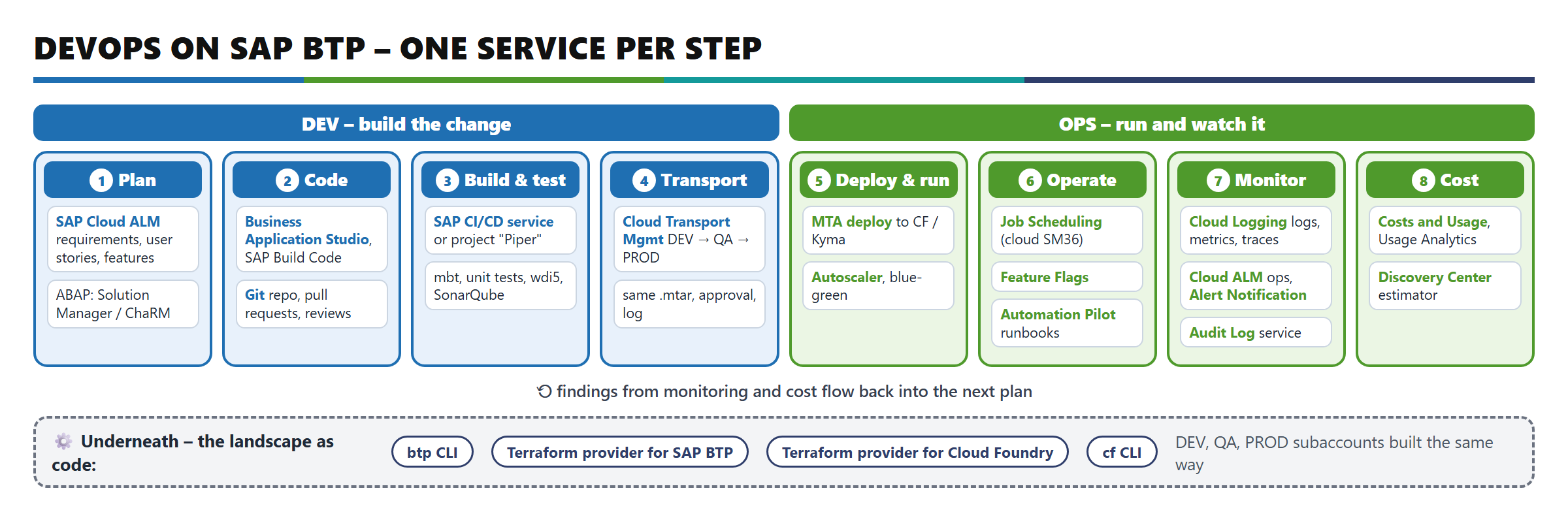
Step | SAP service or tool | Classic ABAP equivalent |
|---|---|---|
Plan, requirements, tasks | SAP Cloud ALM (implementation: requirements, user stories, features) | Solution Manager, ChaRM |
Code, version control | SAP Business Application Studio, SAP Build Code, Git (GitHub, GitLab …) | SE80 / ADT, version history |
Build, test, deploy | SAP Continuous Integration and Delivery, or project "Piper" on your own Jenkins / GitHub Actions; Cloud MTA Build Tool ( | Transport release + ATC |
Promote DEV → QA → PROD | SAP Cloud Transport Management (also inside SAP Cloud ALM) | TMS (STMS), CTS+ |
Run background work | SAP Job Scheduling service | SM36 / SM37 |
Switch features on / off | SAP Feature Flags service | Switch framework, customizing |
Logs, metrics, traces | SAP Cloud Logging | SM21, ST22, SLG1, ST05 |
Central monitoring, alerting | SAP Cloud ALM operations, SAP Alert Notification service | Solution Manager monitoring, CCMS |
Security trail | SAP Audit Log service (viewer and retrieval API) | SM20 security audit log |
Automate setup and runbooks | btp CLI, Terraform provider for SAP BTP, SAP Automation Pilot | Scripts, SAP LVM |
Cost | Costs and Usage page, Usage Analytics, SAP Discovery Center estimator | Licence audit |
Common mistakes: deploying to production straight from Business Application Studio; one subaccount for DEV and PROD; logs only in cf logs (a small buffer of recent lines, gone after restarts); nobody watches the app until users complain.
Interview tip: draw the loop and name one service per box. Then say "the same .mtar travels from DEV to PROD, and every environment sends logs and alerts to a central place" – that sentence shows you understand both halves of DevOps.
Part 2 – SAP Continuous Integration and Delivery and project "Piper"
Why
Continuous integration means every push is built and tested automatically, so broken code is caught within minutes. Continuous delivery means every green build is a release candidate that can be deployed with one approval. SAP offers three ways to get there; the BTP service is the easiest.
Option | What it is | When to use |
|---|---|---|
SAP Continuous Integration and Delivery | BTP service (runs in Cloud Foundry) with predefined pipelines; you configure, SAP runs the infrastructure | Standard CAP / Fiori / Integration Suite projects; least CI/CD expertise needed |
Project "Piper" | Open-source (github.com/SAP/jenkins-library): Jenkins shared library, Docker images, a CLI and a GitHub Action with SAP-specific steps | You already run Jenkins or GitHub Actions and need custom stages |
CI/CD Best Practices Guide | SAP Help guide: procedures for any CI/CD stack | Your own tool chain (Azure DevOps, GitLab CI …); most expertise needed |
Terms in the CI/CD service
Term | Meaning |
|---|---|
Pipeline | A predefined sequence of stages for one scenario. Current pipelines: Cloud Foundry Environment (CAP, Fiori, MTA), SAP Fiori for the ABAP Platform, SAP Integration Suite Artifacts, Kyma Runtime, gCTS for ABAP Development |
Job | Your configuration of a pipeline for one repository and branch (or several branches) |
Stage | A task in the job, run in order: Build, Additional Unit Tests, Malware Scan, Acceptance, Compliance, Release (Cloud Foundry Environment pipeline) |
Build | One run of a job, with logs; kept for 1–28 days, at most 1–99 builds |
Repository / webhook | The Git repository (GitHub, GitLab, Azure Repos, Bitbucket Server or Cloud); a webhook triggers a build on every push. Timed triggers are possible too |
Credential | Stored secrets the job uses: Git token, CF user for deployment, service key for Cloud Transport Management or Alert Notification, SonarQube token |
Configuration mode | Job Editor (stages set in the UI) or Source Repository (stages in |
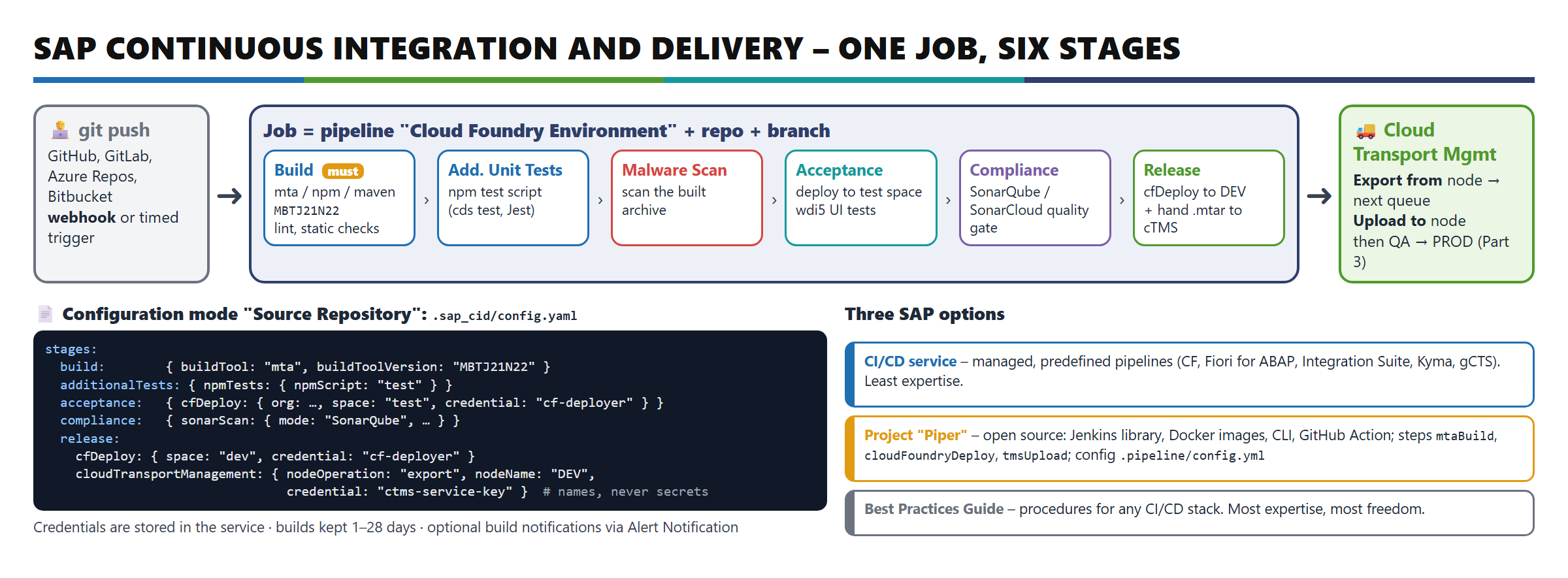
Stages of the Cloud Foundry Environment pipeline
Stage | What happens | Tools |
|---|---|---|
Build (mandatory) | Builds the project with | Cloud MTA Build Tool, e.g. |
Additional Unit Tests | Runs an npm test script (e.g. CAP tests with | npm |
Malware Scan | Scans the built archive (mta build tool only) | SAP malware scanning |
Acceptance | Deploys to a test space and runs UI tests against it |
|
Compliance | Static code analysis and quality gate | SonarQube / SonarCloud |
Release | Deploys to the release space and / or hands the |
|
Syntax: job configuration in the repository
Create the job in the job editor (repository, branch, pipeline Cloud Foundry Environment, configuration mode Source Repository), then put the stages in .sap_cid/config.yaml:
|
Project "Piper" in one minute
Piper gives you the same building blocks for your own CI server. Its general purpose pipeline has the stages Init, Pull-Request Voting, Build, Additional Unit Test, Integration, Acceptance, Security, Performance, Compliance, Confirm, Promote and Release; library steps include mtaBuild, cloudFoundryDeploy and tmsUpload. Configuration lives in .pipeline/config.yml. A minimal Jenkinsfile looks like this (pin a library version with @Library('piper-lib-os@<version>')):
|
Common mistakes: a CF user with a password that expires or needs two-factor log-on as the deploy credential (use a technical user); deploying from the Release stage straight to PROD instead of through transports; jobs in a trial or free plan switch off after a week without changes; tool versions are deprecated over time – watch "What's New".
Interview tip: "Build once, deploy many": the pipeline builds the .mtar once, tests it in a test space and the very same archive is promoted to QA and PROD. Rebuilding per environment breaks the chain of evidence.
Part 3 – SAP Cloud Transport Management
Why
Auditors and operations teams want what STMS gave you: a controlled path to production, an approval before import, and a log of who moved what and when. SAP Cloud Transport Management (cTMS) gives that for cloud content, fully in the cloud – developers trigger the transport, a central operations team imports it.
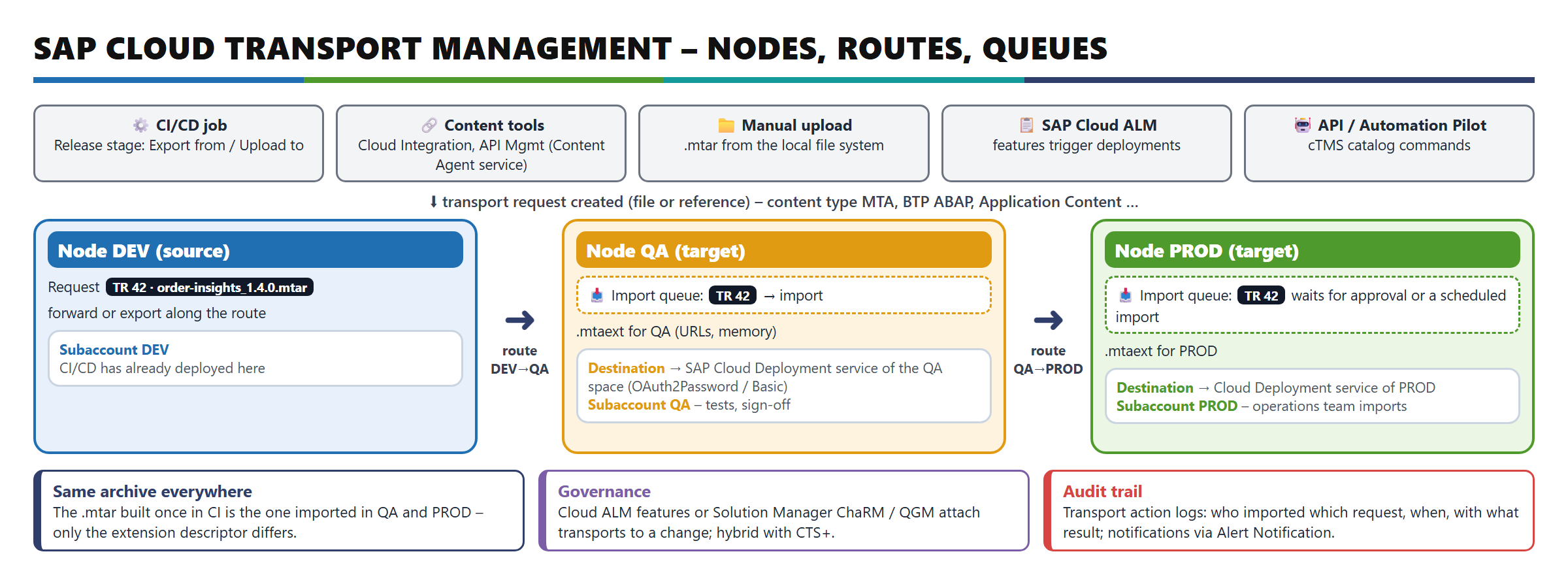
Concept | Meaning | ABAP analogy |
|---|---|---|
Transport node | Logical source or target, normally one subaccount (or CF space); has a content type and, for targets, a destination that says where to deploy | SAP system in STMS |
Transport route | Connects two nodes (DEV → QA, QA → PROD); star topologies are possible | Transport route / layer |
Transport request | Carries one or more files (e.g. an | Transport request |
Import queue | Per target node; import all, selected requests, or scheduled / automatic imports | Import queue in STMS |
Destination (BTP) | Target endpoint, for MTAs usually the SAP Cloud Deployment service of the target space (OAuth2Password or Basic); SAP Content Agent service for API Management + Cloud Integration content together | RFC to the target system |
MTA extension descriptor |
| Client-specific customizing |
What can be transported
- MTA archives (
.mtar) between spaces in subaccounts – CAP apps, HTML5 apps, and content packaged as MTAs (Cloud Integration packages, API Management artifacts, Joule Studio projects …). - BTP ABAP references (software component, commit, branch, tag) between ABAP environment instances – the import pulls the Git content (see 12 · ABAP on BTP).
- Application content in an application-specific archive (e.g. SAP Analytics Cloud content network packages) and SAP HANA XS classic delivery units.
Transports work across global accounts in Cloud Foundry, and within one global account for the ABAP environment. cTMS is available in Cloud Foundry and Kyma; you need a subscription for the UI and a service instance + key for programmatic access (that key is the credential the CI/CD job uses).
Integration with CI/CD, Cloud ALM and ChaRM
Integration | How it works |
|---|---|
CI/CD service | Release stage, Export from (request created on the export node and forwarded to the next node's queue) or Upload to (request added to the upload node). Piper: |
SAP Cloud ALM | SAP Cloud ALM includes the cTMS functionality. Features in Cloud ALM group transports with requirements and tasks; deployment to QA and PROD is triggered and documented there. A CI/CD job can connect to Cloud ALM instead of cTMS directly (only Export from) |
SAP Solution Manager ChaRM / QGM | cTMS transports are attached to change documents, so hybrid landscapes (on-premise ABAP + BTP) follow one change process; CTS+ can also be combined |
Automation Pilot | A provided catalog with commands for nodes, routes and transport requests |
Alert Notification | Notifications on transport actions (e.g. import failed) |
Common mistakes: destination user without Space Developer in the target space; forgetting that a target node needs its own .mtaext (the DEV URLs reach PROD); importing into PROD before QA; transporting an MTA without modules (not supported).
Interview tip: separate the roles – CI/CD qualifies a release candidate, cTMS governs its way to production, Cloud ALM or ChaRM documents the change. All three can work together.
Part 4 – SAP Cloud ALM for BTP applications
SAP Cloud ALM is SAP's cloud application lifecycle management tool, included for cloud customers. Think of it as the cloud successor of SAP Solution Manager for cloud-centric landscapes (Solution Manager mainstream maintenance ends 2027; SAP Focused Run remains for high-volume hybrid monitoring).
Area | What a BTP developer uses it for |
|---|---|
Implementation | Projects, requirements, user stories, tasks, test management; Features that bundle the transports of a change and deploy them through cTMS |
Health Monitoring | Availability and metrics of BTP services and custom apps |
Real User Monitoring | Response times of user requests end to end (UI5 front-end statistics + back-end requests) |
Exception Monitoring | Errors and exceptions of custom Java / Node.js apps – in Cloud ALM part of Integration & Exception Monitoring |
Integration & Exception Monitoring | Messages across Cloud Integration, Event Mesh and APIs |
Job & Automation Monitoring | Runs of SAP Job Scheduling service jobs (switch Cloud ALM on per job) and other job sources |
Business Process Monitoring, Alerting, Intelligent Event Processing | KPIs, alerts with e-mail / Alert Notification / ticket integration, and operation flows |
How custom BTP apps report to Cloud ALM: the app is instrumented with SAP's OpenTelemetry-based data collection libraries (part of the SAP Java buildpack; npm packages for Node.js / CAP) and exports through a BTP destination named CALM_datacollector (OAuth2ClientCredentials to the Cloud ALM API). Then the use case is switched on in Cloud ALM. Package names and versions change – follow the SAP Cloud ALM Expert Portal setup guide for BTP Cloud Foundry.
SAP Cloud ALM operations | SAP Cloud Logging | |
|---|---|---|
Question it answers | "Is the business service healthy? Who is affected?" | "What exactly happened in this request?" |
Data | Aggregated metrics, exceptions, request statistics across many systems | Every log line, metric and trace of your workloads |
Users | Operations / application management team | Developers, on-call engineers |
Cost | Included in cloud subscriptions with SAP Enterprise Support (fair-use limits) | Paid per plan (capacity units) |
Interview tip: "Cloud ALM tells me *that* something is wrong across the landscape and alerts; Cloud Logging tells me *why* in one app." Most production setups use both.
Part 5 – Observability with SAP Cloud Logging
Why
Observability = you can explain the internal state of the app from what it emits: logs (what happened), metrics (how much / how fast) and traces (the path of one request across services). cf logs --recent shows only a small buffer; production needs storage, search and dashboards.
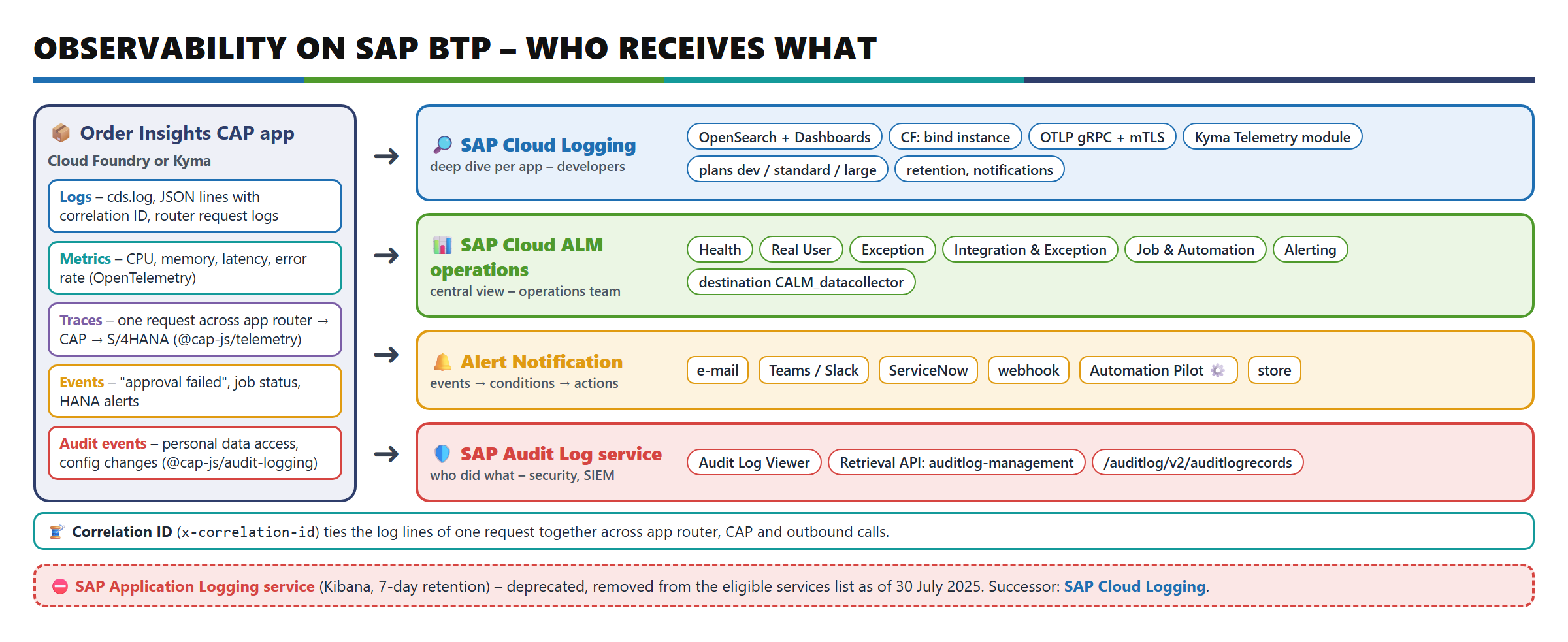
SAP Cloud Logging
- Instance-based service built on OpenSearch: stores, visualises and analyses logs, metrics and traces from Cloud Foundry, Kyma, Kubernetes and other runtimes; UI is OpenSearch Dashboards with predefined dashboards (load, latency, error rates) plus your own; notifications on conditions.
- Plans:
dev(evaluation only, 7.5 GiB, no scaling or replication),standard(production, 75–375 GiB with auto-scaling),large(750 GiB–3.75 TiB). Plans cannot be updated – run a new instance side by side. Retention is configurable, but size-based curation deletes the oldest indices when the disk is full. - Cloud Foundry: bind the app to the instance – application logs and router request logs flow without code changes (no restage needed). One instance can be shared across spaces; across orgs use a user-provided service built from a service key.
- OpenTelemetry: enable
ingest_otlpon the instance; new bindings then contain an OTLP endpoint (gRPC only, mTLS with client certificates valid 90 days by default – rotate them). Exporters for Java (SAP Java buildpack extension) and Node.js read the binding automatically. - Kyma: the Kyma Telemetry module ships logs, traces and metrics to a Cloud Logging instance.
- Access to the dashboards is controlled through SAP Cloud Identity Services – Identity Authentication (SAML or OpenID Connect) and groups.
|
SAP Application Logging service – retired
The older SAP Application Logging service for SAP BTP (Elastic / Kibana, fixed 7-day retention, lite plan) is deprecated: it was removed from the list of eligible cloud services as of 30 July 2025 and stays available only until the end of existing subscription terms. SAP Cloud Logging is its successor. Migration: create a Cloud Logging instance, bind it next to the old one, run both in parallel, then unbind and delete the Application Logging instance. Differences: one OpenSearch stack per instance, configurable retention, own identity provider setup, no free plan.
Logging in a CAP app
- Use
cds.log('order-approval')instead ofconsole.log; levels error, warn, info, debug; set them per module incds.log.levelsor at runtime – details on 06 · CAP in Depth and debugging on 18 · BTP Developer Hands-On. - In production CAP writes JSON log lines with a correlation ID (
x-correlation-id), so all lines of one request – app router, CAP, outbound call – can be filtered together in OpenSearch. - For traces and metrics CAP offers the @cap-js/telemetry plugin (OpenTelemetry); it exports to SAP Cloud Logging and Dynatrace (Node.js also Jaeger), chosen by the telemetry
kind–to-cloud-logging,to-dynatrace,to-jaeger,to-otlporto-consolefor local runs.
Common mistakes: logging personal data or tokens (logs leave your app and are kept for weeks); debug level left on in production (cost and noise); no correlation ID, so lines cannot be joined; using the dev plan in production.
Part 6 – Alerting and audit logs
SAP Alert Notification service
Why: nobody stares at dashboards at 3 a.m. The Alert Notification service receives events and delivers them through subscriptions to actions.
Concept | Meaning |
|---|---|
Event (producer) | Sent by BTP services (e.g. HANA Cloud alerts, CI/CD build results, cTMS transport actions, Job Scheduling job status) or by your app through the producer REST API |
Condition | Filter on event properties (e.g. |
Action | Where it goes: e-mail, Slack, Microsoft Teams, webhook, ServiceNow and other ticket tools, SAP Automation Pilot, or store for pulling via the consumer API |
Subscription | Links conditions to actions; can be switched on and off |
Typical use: a HANA Cloud memory alert → Alert Notification → Teams channel and an Automation Pilot command that collects diagnostics. Configure it as code (JSON import or Terraform) so every subaccount gets the same alerts.
Audit log retrieval
The SAP Audit Log service and the Audit Log Viewer are introduced on 03 · BTP Services. For SIEM tools (Splunk, Microsoft Sentinel …) you pull the records with the Audit Log Retrieval API:
- Create an instance of service
auditlog-management, plandefault– SAP recommends mTLS (X.509) parameters – and a service key; renew keys and bindings at least every 90 days. - Get an OAuth token with the client credentials from the key, then call
<url>/auditlog/v2/auditlogrecords?time_from=…&time_to=…(UTC; default window 30 days). - Large results come in chunks: pass the returned handle to get the next chunk. Rate limits apply (HTTP 429 when exceeded).
- Your CAP app writes its own audit entries (personal data access, configuration changes) with the
@cap-js/audit-loggingplugin – the platform writes its own events automatically.
|
Interview tip: audit logs answer "who did what to which data"; application logs answer "what did the code do". Different retention, different readers, different services.
Part 7 – Job Scheduling, Feature Flags and autoscaling
SAP Job Scheduling service – the cloud SM36
Why: Cloud Foundry apps have no background work processes. The Job Scheduling service calls your app on a schedule – an HTTP job (calls an action endpoint of your app, synchronously or asynchronously), a CF task job (starts a Cloud Foundry task for long batch work) or a destination job. It runs in Cloud Foundry and Kyma, supports multitenant apps, has a dashboard, a REST API and run logs.
Schedule type | Example | Note |
|---|---|---|
One-time |
| Deleted if not run for 30 days |
repeatInterval |
| Next run counts from the previous start |
repeatAt |
| Same time every day |
cron | "* * * * 10:12 */30 0" | SAP format with 7 fields: Year Month Day DayOfWeek Hour Minute Second – not Linux cron |
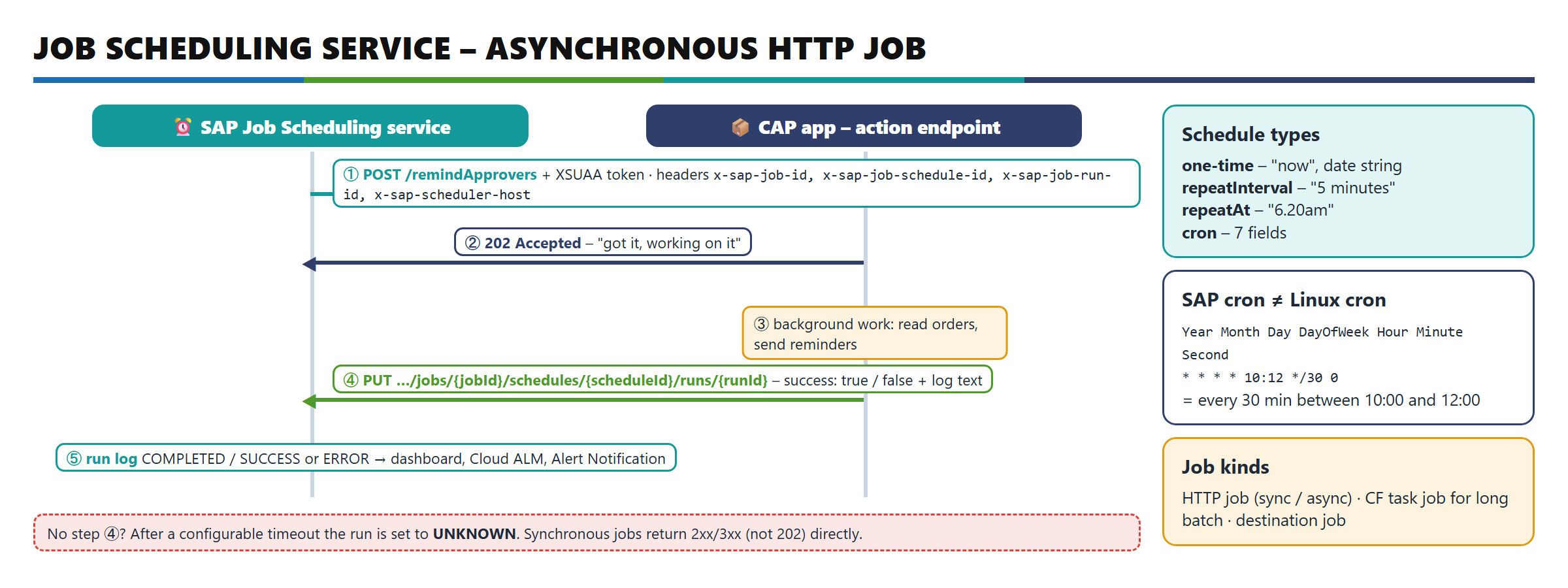
Asynchronous mode (long jobs): the service sends headers x-sap-job-id, x-sap-job-schedule-id, x-sap-job-run-id and x-sap-scheduler-host; the app answers 202 Accepted, does the work, then calls the Update Job Run Log API with success or failure. If it never calls back, the run ends as UNKNOWN after a timeout. Synchronous jobs simply return 2xx/3xx (not 202) for success.
|
- Security: the service calls your endpoint with an XSUAA token; grant it a scope in
xs-security.json(grant-as-authority-to-appsfor the job scheduler) and protect the action with@requires. - The old Node.js client library (
@sap/jobs-client) is deprecated since 2 April 2026 (security updates for one year) – call the REST API from the SAP Business Accelerator Hub (e.g. a generated client, the SAP Cloud SDK or plain HTTP). - Enable SAP Cloud ALM monitoring per job and send job events to Alert Notification.
- Alternatives: CAP's own task queues / outbox for retries of outbound calls (07 · CAP Advanced); background jobs in the ABAP environment use application jobs (12 · ABAP on BTP).
SAP Feature Flags service
Lets you deploy code with a feature switched off and turn it on later without redeploying – dark launches, A/B tests, quick rollback. You create Boolean or String flags in the service dashboard, optionally with direct delivery to selected identifiers (e.g. a tenant or user), and the app evaluates a flag through the service's REST API using the credentials from its binding. Keep the number of flags small and delete them after rollout. For SaaS apps CAP also has its own feature toggles (07 · CAP Advanced).
Application Autoscaler
Scales Cloud Foundry app instances on CPU, memory, throughput, response time or custom metrics, or on a schedule – explained on 09 · Runtimes – Cloud Foundry & Kyma in Depth. In Kyma the HorizontalPodAutoscaler does this job.
Part 8 – Automation: btp CLI, Terraform provider for SAP BTP, SAP Automation Pilot
Why: clicking a landscape together in the cockpit is slow and impossible to reproduce. Three different tools automate three different things.
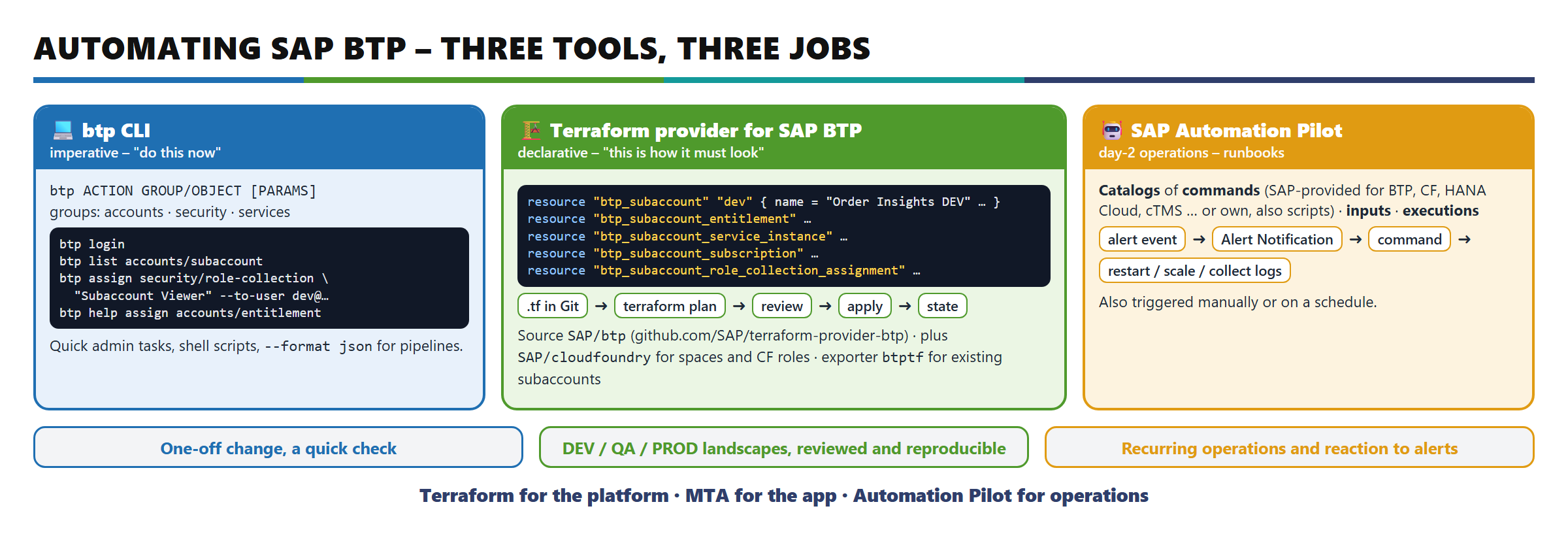
Tool | Style | Typical use |
|---|---|---|
btp CLI | Imperative commands | Quick admin tasks, scripts, checking entitlements |
Terraform provider for SAP BTP ( | Declarative: desired state in | Subaccounts, entitlements, instances, subscriptions, role collection assignments for DEV / QA / PROD – identical every time |
Terraform provider for Cloud Foundry (cloudfoundry/cloudfoundry – the earlier SAP/cloudfoundry stopped at a 2024 release candidate) | Declarative | Spaces, space roles, CF service instances |
SAP Automation Pilot | Low-code runbooks: catalogs of commands (SAP-provided for BTP, CF, HANA Cloud, cTMS … or your own, also scripts), inputs, executions; triggered manually, by schedule or by an Alert Notification event | Restart an app, scale, back up, collect diagnostics when an alert fires |
btp CLI – first commands
|
Terraform – a DEV subaccount for the Order Insights app
|
Run terraform init, terraform plan, terraform apply. The same code with a different .tfvars file builds QA and PROD. SAP also publishes the Terraform Exporter for SAP BTP (btptf CLI, github.com/SAP/terraform-exporter-btp), which turns existing subaccounts and directories into configuration files plus import blocks, and ready landscapes in SAP-samples/btp-terraform-samples.
Common mistakes: Terraform state with secrets committed to Git (use a remote, encrypted back end); a personal user with two-factor log-on for automation (not supported – use a technical user or a custom IdP); changing things by hand in the cockpit afterwards (drift – the next plan wants to undo them).
Interview tip: "Terraform for the platform, the MTA for the app, Automation Pilot for day-2 operations."
Part 9 – Cost and consumption monitoring
Why: BTP is mostly pay-per-use (consumption-based model: BTPEA / CPEA credits, or pay-as-you-go) – a forgotten large Cloud Logging instance or an always-on HANA Cloud database in DEV costs real money every month. Developers are expected to think about cost.
Tool | Where | What it shows |
|---|---|---|
Costs and Usage page | Cockpit, global account (consumption-based model) | Monthly costs per service and subaccount, credits, trends, budgets, estimates since the last balance statement (striped bars) |
Usage page | Cockpit, global account (subscription model only) | Usage without costs |
Usage Analytics | Cockpit, subaccount and directory | Usage per service and plan over time |
SAP Usage Data Management service APIs | SAP Business Accelerator Hub (service | Usage and cost data for your own reports or FinOps tools |
SAP Discovery Center | discovery-center.cloud.sap | Service catalog, plans, regions, and the estimator to price a planned landscape; some services have their own estimator (e.g. Cloud Logging capacity units) |
- Subaccount and directory figures are estimates; the monthly balance statement in SAP for Me is legally binding.
- Cost levers for developers: free /
devplans in DEV; stop HANA Cloud instances outside working hours; right-size memory per app instance; set Cloud Logging retention and log levels; delete unused instances (Terraform makes that easy); budgets and alerts on the Costs and Usage page.
Part 10 – Operations checklist for go-live
Use it as a talking point ("before go-live I check …") and as a real checklist.
Area | Check before go-live |
|---|---|
Landscape | Separate DEV / QA / PROD subaccounts; PROD built by Terraform; entitlements and quotas set; production plans (not |
Pipeline and transports | CI/CD job green with tests and SonarQube; |
Security | Role collections assigned to groups from the IdP; no secrets in Git; destinations with technical users or principal propagation; security recommendations of the BTP security checklist reviewed (04 · Security Deep Dive) |
Observability | Cloud Logging bound, JSON logs with correlation IDs, log level info; dashboards for errors and latency; Cloud ALM health and real user monitoring switched on |
Alerting | Alert Notification subscriptions for app crashes, HANA Cloud alerts, failed jobs and transports; on-call rota and escalation |
Resilience and capacity | At least 2 app instances; autoscaler rules; load test done; HANA Cloud size and backups checked; Event Mesh queues with dead-letter handling |
Jobs and features | Job schedules active in PROD with Cloud ALM monitoring; feature flags in their target state |
Audit and compliance | Audit logging for personal data; audit log retrieval to the SIEM; data protection (retention, deletion) agreed |
Cost | Estimate in Discovery Center vs. budget; budget alerts (Costs and Usage page) |
Runbook and hand-over | Runbook with known errors and Automation Pilot commands; support team has viewer roles in cockpit, Cloud Logging and Cloud ALM |
Part 11 – Incident analysis: the Sales Order Approval CAP app
Scenario: the side-by-side CAP extension ("Order Insights / Approval Portal") reads S/4HANA sales orders through the released OData API, reacts to SalesOrder.Created events from Event Mesh, stores notes in HANA Cloud and starts approvals in SAP Build Process Automation. On Monday at 09:10, managers report that the approval list is empty and some orders show "Internal Server Error".
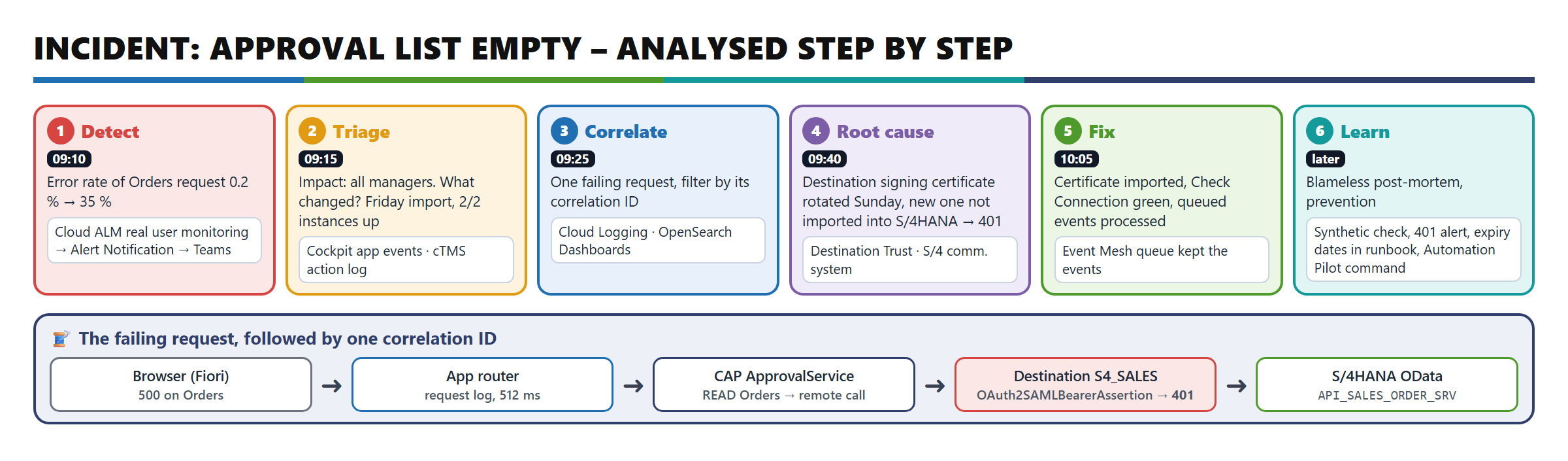
Step | What you do | Tool and finding |
|---|---|---|
1 Detect | Alert fires before most users call | Cloud ALM real user monitoring: error rate of |
2 Triage | Scope: one app or many? Recent change? | Cockpit: app running, 2/2 instances, no crash events; cTMS: last import into PROD on Friday (new |
3 Correlate | Take a failing request and follow its correlation ID | Cloud Logging, OpenSearch Dashboards: app router → CAP |
4 Root cause | Why 401 only since Monday? | Destination uses OAuth2SAMLBearerAssertion; the subaccount's destination signing certificate was rotated on Sunday (cockpit › Destination Trust), but the new certificate was not imported into the S/4HANA communication system. Friday's transport is not the cause |
5 Fix | Restore service, then fix properly | Basis imports the new certificate in S/4HANA; destination Check Connection green; error rate back to normal at 10:05. Events that arrived meanwhile were kept in the Event Mesh queue and processed after the fix |
6 Learn | Blameless post-mortem | Add a synthetic availability check for the destination in Cloud ALM; Alert Notification event on 401 from back ends; certificate expiry dates in the runbook; Automation Pilot command that runs the connection check |
What the interviewer listens for: you start from impact (who, since when), check what changed, use one correlation ID across layers instead of guessing, separate restoring service from root cause, and close with prevention. The hop-by-hop debugging tools (browser, app router, cf ssh, Cloud Connector monitor) are on 18 · BTP Developer Hands-On, Part 7.
Part 12 – Interview questions
Q1. What is the difference between SAP Continuous Integration and Delivery and project "Piper"?
The CI/CD service is a managed BTP service with predefined pipelines (Cloud Foundry Environment, Fiori for ABAP Platform, Integration Suite artifacts, Kyma, gCTS) – you configure jobs, SAP runs the infrastructure. Piper is open source: a Jenkins shared library, Docker images, a CLI and a GitHub Action with SAP steps such as mtaBuild, cloudFoundryDeploy and tmsUpload for your own CI server. Managed and simple versus flexible and self-run.
Q2. Which stages does the Cloud Foundry Environment pipeline have and where is it configured?
Build (mandatory), Additional Unit Tests, Malware Scan, Acceptance (deploy to a test space + wdi5), Compliance (SonarQube) and Release (deploy and / or hand over to Cloud Transport Management). Configured in the job editor or, better, in .sap_cid/config.yaml in the repository so it is versioned with the code.
Q3. Explain transport nodes, routes and import queues in SAP Cloud Transport Management.
A node stands for a source or target subaccount and has a destination for deployment; routes connect nodes into a landscape; each target node has an import queue where requests wait until someone imports them (or a schedule does). The .mtar is uploaded once and forwarded along the route, with a node-specific .mtaext for environment values.
Q4. Why not deploy to production directly from the pipeline?
Separation of duties and audit: the developer's pipeline qualifies the build, an operations team approves the import into production, and cTMS or Cloud ALM records who imported what and when. It is also the only way to keep exactly the tested archive.
Q5. How do SAP Cloud ALM and SAP Cloud Logging differ?
Cloud ALM is central lifecycle management: implementation (requirements, features, deployments) and operations (health, real user, exception, integration and job monitoring, alerting) across many systems. Cloud Logging stores every log, metric and trace of your workloads in OpenSearch for deep analysis. Cloud ALM finds that something is wrong; Cloud Logging shows why.
Q6. What happened to the SAP Application Logging service?
It is deprecated: removed from the eligible cloud services list as of 30 July 2025, usable only until the end of existing subscription terms. SAP Cloud Logging is the successor; migrate by binding both, running in parallel and then removing the old instance.
Q7. How does a long-running job work with the Job Scheduling service?
Asynchronous mode: the service calls the action endpoint with job, schedule and run IDs in headers, the app returns 202 Accepted, processes in the background and calls the Update Job Run Log API with success or failure; without the call-back the run becomes UNKNOWN. Very long batch work can run as a CF task job instead.
Q8. btp CLI or Terraform – which one and why?
The btp CLI is imperative – good for quick admin tasks and scripts. Terraform with the SAP/btp provider is declarative: the desired landscape is code, plan shows changes, state tracks what exists, so DEV, QA and PROD are reproducible and reviewed in pull requests. For the app itself I still use the MTA.
Q9. How do you get BTP audit logs into the company's SIEM?
Create an auditlog-management instance (plan default, mTLS recommended) and a key, get an OAuth token, and pull /auditlog/v2/auditlogrecords with time filters, following the handle for further chunks and respecting rate limits; rotate the keys at least every 90 days.
Q10. What do you check before go-live of a CAP app?
Separate subaccounts built as code; pipeline with tests and quality gate; transports with approval and .mtaext; roles via IdP groups and no secrets in Git; Cloud Logging and Cloud ALM monitoring; alerts with an on-call owner; two or more instances and autoscaling; jobs monitored; audit logging; cost estimate and budget; a runbook.
Q11. Scenario: after a transport to PROD the Fiori app shows data from the QA S/4HANA system. What went wrong?
The environment-specific values travelled with the archive: the PROD node has no (or a wrong) MTA extension descriptor, or the destination name is hard-coded per environment. Fix: keep one destination name in the code, maintain the destination per subaccount, upload a .mtaext per cTMS node, and add a smoke test after import.
Q12. Scenario: users report random 500 errors in the approval app. Walk me through your analysis.
Confirm impact in Cloud ALM (error rate, which requests, since when); check what changed (cTMS imports, certificates, back-end changes); take one failing request's correlation ID and follow it in Cloud Logging through app router, CAP and the outbound call; identify the failing hop (e.g. 401 from the S/4HANA destination); restore service, fix the root cause, then add monitoring and a runbook entry so it is detected earlier next time.
🏠 Start Here · ◀ 04 · Data & AI · 06 · Hands-On ▶ · Sections: CORE ABAP | OOPS ABAP | ABAP on HANA | Clean Core | RAP | ABAP Points | SAP Fiori | SAPUI5 | Mobile Development (MDK) | BTP Foundations | BTP Admin | BTP Security | BTP Development | CAP | SAP Build | ABAP on BTP | Integration Suite | SAP Business AI | SAP BASIS | Security | SAP SDLC
Functional: FICO ABAP | TRM ABAP | VIM | SAP BIS | SD ABAP | MM ABAP | PP ABAP | QM ABAP | PM ABAP | PS ABAP | EWM | TM ABAP | GTM ABAP | EHS ABAP | HR ABAP | BW | SAP Datasphere | SAP Business Data Cloud | SAP MDG | SAP Analytics Cloud | SAP Ariba | SAP CX | SAP IBP