The cloud vocabulary every SAP developer needs before learning SAP BTP: what cloud computing is, the deployment models (public, private, hybrid …), the service models (IaaS, PaaS, SaaS), virtualization, containers, multitenancy and shared responsibility – and where SAP's own products fit.
Part 1 – What cloud computing is
Cloud computing is the on-demand delivery of computing resources – servers, storage, databases, networking, software – as services over the internet. You don't buy and run the physical hardware yourself; the provider does, and you pay for what you use.
Five characteristics (NIST definition)
Characteristic | Meaning | Example |
|---|---|---|
On-demand self-service | Get resources yourself, no ticket to IT | Create a database in the cockpit in minutes |
Broad network access | Reachable over the network from any device | Browser, mobile app, API |
Resource pooling | Provider serves many customers from shared hardware | One data centre, thousands of tenants |
Rapid elasticity | Scale up and down quickly, often automatically | More app instances on month-end close |
Measured service | Usage is metered and billed | Pay per GB, per hour, per user |
Why companies move to the cloud
- CapEx → OpEx: no big up-front hardware purchase; a monthly bill instead.
- Scalability and elasticity: capacity follows demand, no idle servers bought "just in case".
- Speed: new systems in hours instead of months; the provider delivers updates and innovation.
- Less operations work: patching, backups and hardware are (partly) the provider's job.
- Trade-offs: less control, dependency on the provider (vendor lock-in), data-residency rules, running costs that need monitoring.
On-premise – the starting point
On-premise means the company runs everything in its own data centre: hardware, network, virtualization, OS, database and applications. Full control and flexibility, no third party holds the data – but it is usually the most expensive option: you buy capacity for peak load that sits unused, miss the provider's economies of scale and need in-house experts for every layer. Classic SAP ECC and S/4HANA on-premise run this way.
Part 2 – Deployment models
A deployment model says where the cloud runs and who shares it.
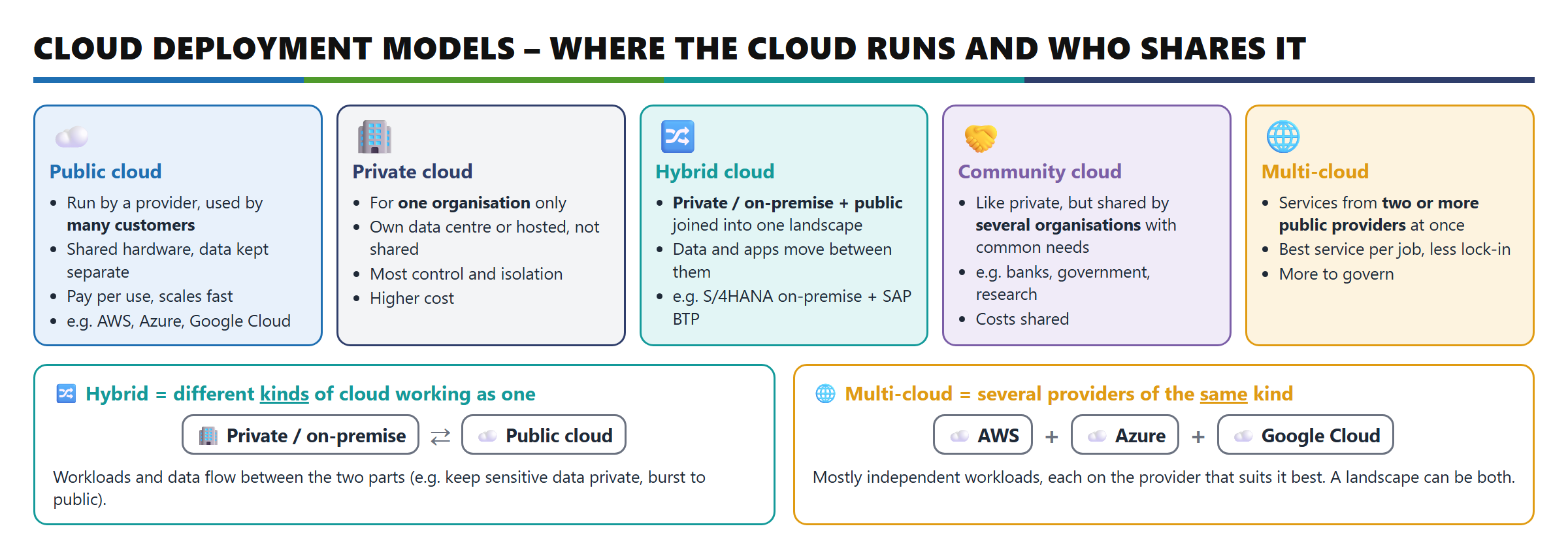
Model | Who uses it | Pros | Cons |
|---|---|---|---|
Public cloud | Many customers on infrastructure run by a third-party provider; resources shared, each customer's data separated | Cheap, pay per use, scales fast, no hardware | Less control; shared infrastructure |
Private cloud | One organisation only – in its own data centre or hosted for it; resources not shared | Most control, isolation and security; still a shared pool for internal users | Expensive; the organisation (or its host) runs it |
Hybrid cloud | Private cloud and/or on-premise combined with public cloud into one integrated landscape | Keep sensitive data private, use public cloud for the rest; move workloads where they fit | Integration and security across environments |
Community cloud | Several organisations with common needs (banks, government, research) share a private-style cloud | Economies of scale with private-cloud control; shared costs | Less common; shared governance |
Multi-cloud | One company uses two or more public providers (e.g. AWS + Azure + Google Cloud) | Best service per workload, less lock-in, resilience | More tools, skills and governance |
Hybrid vs multi-cloud
Hybrid cloud | Multi-cloud | |
|---|---|---|
Mix of … | Different kinds: private / on-premise + public | Several providers of the same kind (public) |
Workloads | Connected – data and processes flow between the parts | Often independent – each runs on the provider that suits it |
Typical SAP example | S/4HANA on-premise + SAP BTP extensions and integrations | SAP BTP subaccounts on AWS and on Azure; analytics on Google Cloud |
A landscape can be both: hybrid (on-premise + cloud) and multi-cloud (more than one public provider).
Part 3 – Service models: IaaS, PaaS, SaaS
A service model says how much of the stack the provider runs for you. Every deployment model can offer every service model (a private cloud can offer PaaS, a public cloud SaaS, and so on).
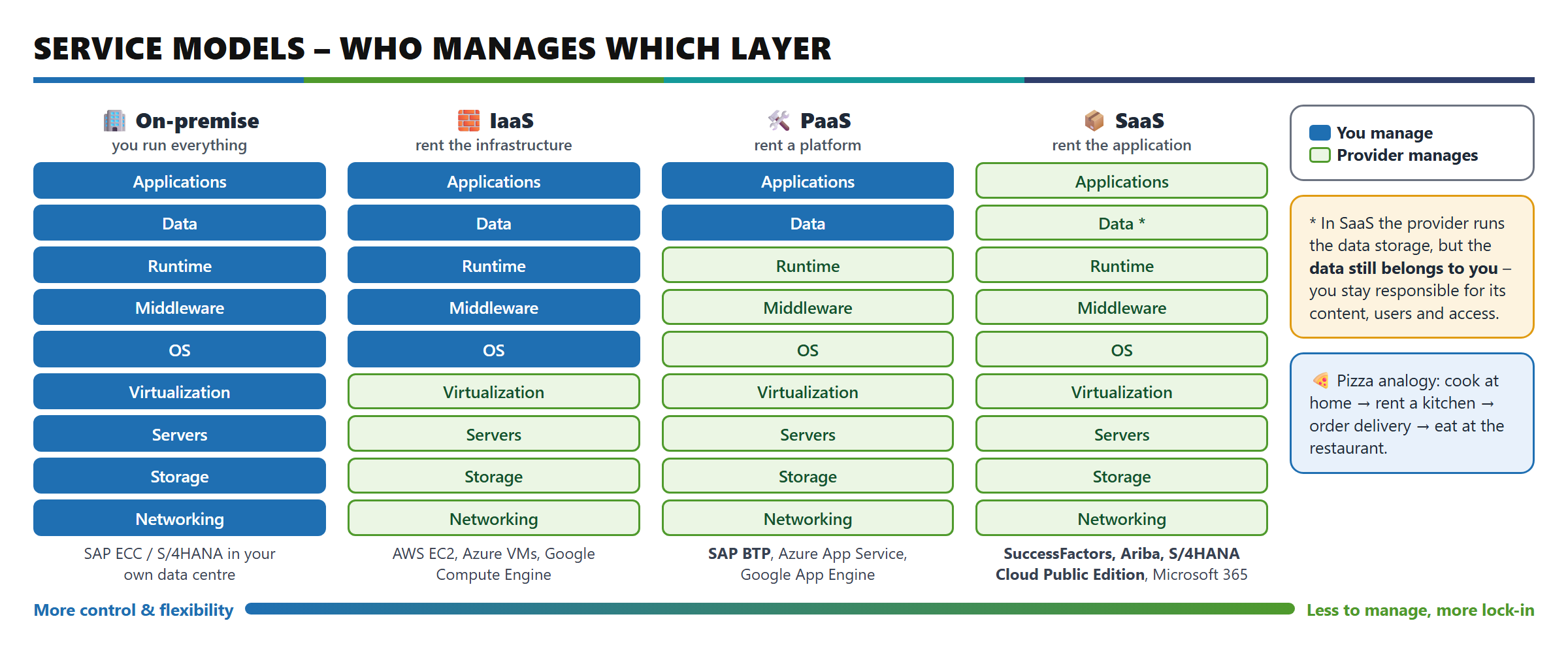
Model | You get | You still manage | Examples |
|---|---|---|---|
IaaS – Infrastructure as a Service | Virtual machines, storage, networks | OS, middleware, runtime, data, applications | AWS EC2, Azure Virtual Machines, Google Compute Engine |
PaaS – Platform as a Service | A ready platform: runtimes, databases, services | Your application code and data | SAP BTP, Azure App Service, Google App Engine, Heroku |
SaaS – Software as a Service | A finished application in the browser | Configuration, users, your data's content | SuccessFactors, Ariba, Concur, S/4HANA Cloud Public Edition, Microsoft 365 |
What each choice means for you
On-premise | IaaS | PaaS | SaaS | |
|---|---|---|---|---|
Flexibility | High | Medium | Low | Very low |
Control | High | Medium | Low | Very low |
Management simplicity | Low | Medium | High | Very high |
Vendor lock-in | Low | Medium | High | Very high |
- On-premise: full control of hardware, network and environment; most expensive and needs in-house expertise.
- IaaS: rent infrastructure, install and run your own OS and software on it; no control of the physical hardware or virtualization.
- PaaS: the provider runs everything except your application and data; you focus on development and scale on demand. Best when the app is built for that platform.
- SaaS: the whole application is hosted for you; easiest to run, least flexible.
Other "as a service" terms you will hear: FaaS (functions / serverless – e.g. Kyma functions), DBaaS (managed databases – e.g. SAP HANA Cloud), iPaaS (integration platform – e.g. SAP Integration Suite).
Part 4 – Virtualization, VMs and containers
Virtualization creates a software-based (virtual) version of a physical resource – a server, desktop, storage device or network. One physical machine can then serve many customers or workloads, each seeing its own isolated environment. Virtualization is the foundation of cloud computing: it is what makes resource pooling and rapid elasticity possible.
Types of virtualization
Type | What is virtualized | Example |
|---|---|---|
Server | One physical server split into many virtual machines | VMware ESXi host with 20 VMs |
Desktop | User desktops run centrally and are streamed to any device | Citrix, Azure Virtual Desktop |
Application | An app runs isolated from the local OS, or is streamed | App streaming, sandboxed apps |
Storage | Many physical disks pooled and shown as logical volumes | SAN, cloud block storage |
Network | Logical networks separated from the physical cabling, spanning many servers | VLAN, software-defined networking, cloud virtual networks |
Key terms
Term | Meaning |
|---|---|
Hypervisor (virtual machine monitor) | Software that creates and runs virtual machines and shares the hardware between them. Type 1 (bare metal) runs directly on the hardware – VMware ESXi, Microsoft Hyper-V, KVM, Xen; used in data centres and clouds. Type 2 (hosted) runs as an application on a normal OS – VirtualBox, VMware Workstation; used on laptops for testing. |
Virtual machine (VM) | A complete virtual computer with its own guest OS, running on a hypervisor. |
Container | A packaged application with its libraries that shares the host OS kernel; isolated from other containers by OS features (namespaces, cgroups). No hypervisor and no guest OS needed. |
Container image | The read-only template a container starts from (e.g. a Docker image). |
Virtualization software | The product that provides virtualization – a hypervisor, a container runtime or a whole virtualization platform. |
Virtual network | A logically separated network inside one or many servers. |
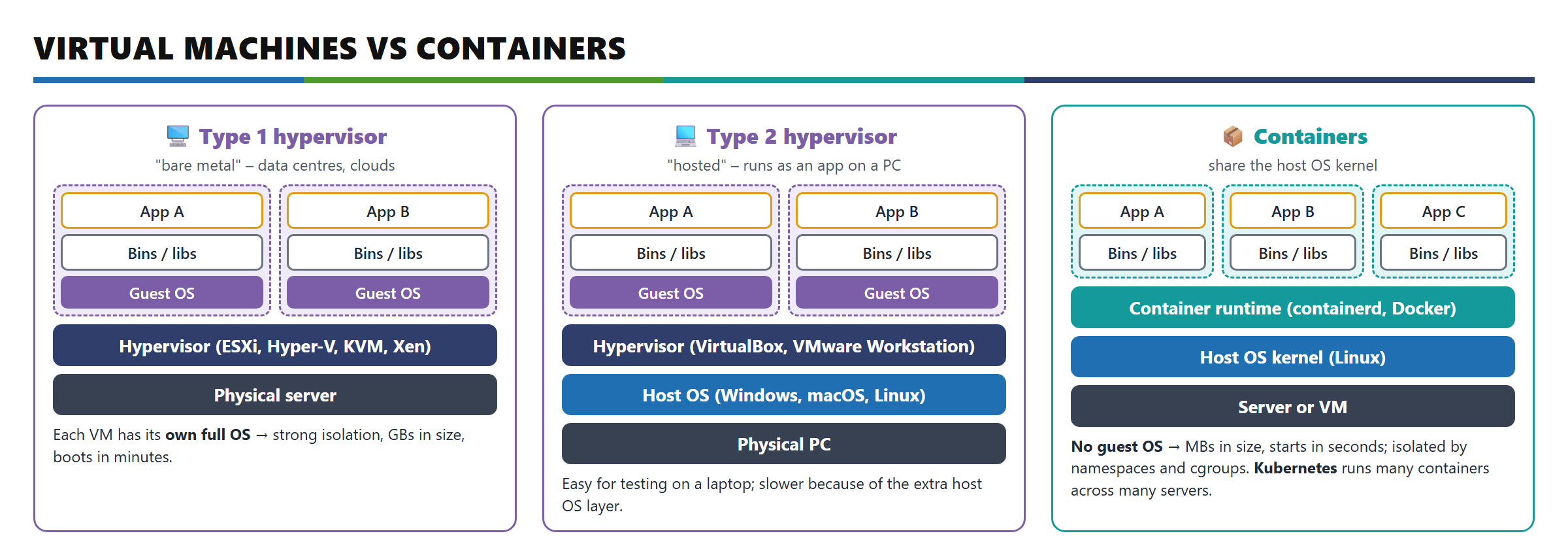
VM vs container
Virtual machine | Container | |
|---|---|---|
Contains | Full guest OS + libraries + app | App + libraries only |
Size / start time | GBs / minutes | MBs / seconds |
Isolation | Strong (separate kernel) | Process-level (shared kernel) |
Density | Tens per server | Hundreds per server |
Best for | Different OSs, legacy apps, strong isolation | Microservices, fast scaling, CI/CD |
Kubernetes in one paragraph
When you run hundreds of containers on many servers you need an orchestrator. Kubernetes (open source, originally from Google) schedules containers onto a cluster of machines, restarts failed ones, scales them up and down, does rolling updates and gives them stable network addresses. Key words: cluster (the machines), pod (one or more containers deployed together), deployment (desired number of pods), service (stable address for pods), namespace (logical partition). SAP BTP's Kyma environment is a managed Kubernetes runtime (→ see BTP Development › 03 · Runtimes – Cloud Foundry & Kyma in Depth).
Part 5 – Multitenancy and shared responsibility
5.1 Multitenancy
A tenant is one customer's isolated slice of a system. In a multitenant application one running installation serves many tenants: they share the code, runtime and often the database, but each tenant sees only its own data and configuration. In a single-tenant setup each customer gets a separate installation.
Multitenant | Single-tenant | |
|---|---|---|
Cost | Lowest – shared resources | Higher – dedicated resources |
Upgrades | Provider upgrades all tenants together | Per customer, more flexible timing |
Customising | Within the limits the provider allows | Wider (own system) |
SAP examples | S/4HANA Cloud Public Edition, SuccessFactors, SaaS apps on BTP | S/4HANA Cloud Private Edition, a dedicated ABAP system |
Analogy: an apartment building (multitenant – shared walls, pipes and lift, private flats) versus a row of detached houses (single-tenant). The SAP client concept (MANDT) is an early form of multitenancy inside one ABAP system. On SAP BTP you can build your own multitenant SaaS app: customers subscribe from their subaccount (see 03 · BTP Services, Identity & Connectivity; building one: 07 · CAP Advanced – Integration, Messaging, Multitenancy & SaaS).
5.2 Shared responsibility
Security and operations are shared between provider and customer. The provider is always responsible for the security of the cloud (data centres, hardware, its platform); the customer is always responsible for security in the cloud – its data, users and access rights. The line moves with the service model:
Area | IaaS | PaaS | SaaS |
|---|---|---|---|
Physical data centre, hardware, network | Provider | Provider | Provider |
OS patching, middleware, runtime | Customer | Provider | Provider |
Application code and its security | Customer | Customer | Provider |
Configuration of the service | Customer | Customer | Customer |
Data, users, roles, access | Customer | Customer | Customer |
Example on SAP BTP (PaaS): SAP patches the Cloud Foundry runtime and the HANA Cloud database; you are responsible for your app's code, who gets which role collection, and protecting credentials in service keys.
Part 6 – Where SAP's products sit
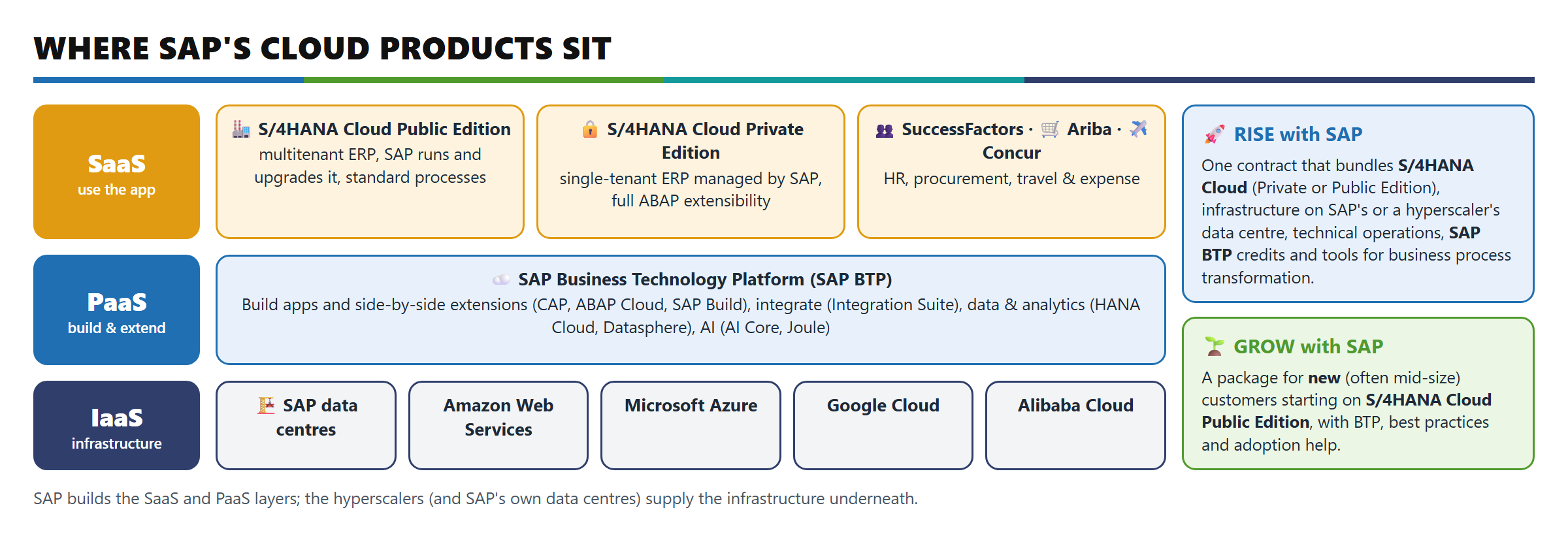
Product | Model | Notes |
|---|---|---|
SAP S/4HANA Cloud Public Edition | SaaS, multitenant | Standard processes, SAP runs and upgrades it; extend with key-user tools, on-stack ABAP Cloud and BTP |
SAP S/4HANA Cloud Private Edition | Private cloud, single-tenant, managed by SAP | Own system on a hyperscaler or in an SAP data centre; full ABAP extensibility, customer controls upgrade timing |
SAP S/4HANA (on-premise) | On-premise (or customer-run on IaaS) | Customer runs everything; can also be hosted on AWS/Azure/Google Cloud as IaaS |
SAP SuccessFactors, SAP Ariba, SAP Concur, SAP Fieldglass | SaaS | HR, procurement, travel & expense, external workforce (see HR ABAP › 06 S/4HANA, SuccessFactors & Integration) |
SAP BTP | PaaS | Build, extend, integrate, data & analytics, AI (page 02 and BTP Development › 06 of this section) |
AWS, Microsoft Azure, Google Cloud, Alibaba Cloud | IaaS (hyperscalers) | Run the infrastructure for most SAP cloud regions; SAP also has its own data centres |
RISE with SAP and GROW with SAP
- RISE with SAP – an offering (one contract) to move to the cloud: S/4HANA Cloud (Private or Public Edition), the infrastructure, technical operations by SAP, SAP BTP credits and tools for process analysis and transformation. Typical for existing ECC customers moving to S/4HANA.
- GROW with SAP – a package for new customers (often mid-size) starting directly on S/4HANA Cloud Public Edition, with SAP BTP, best practices and adoption services.
For transition paths and editions in depth see ABAP on HANA › 02 Migration to S/4HANA & Performance Tools; for extensibility and clean core see Clean Core › 01 Clean Core and 12 · ABAP on BTP – ABAP Environment, Steampunk & Extensibility.
Part 7 – Cloud-native applications: microservices, twelve-factor, scaling and availability
Moving an application to a PaaS such as SAP BTP is not just "running it somewhere else". The platform assumes the app is built cloud-native: small, stateless, configured from outside and able to be started, stopped and copied at any time. Knowing these rules explains most of the "why" behind Cloud Foundry, Kyma, bindings and CAP.
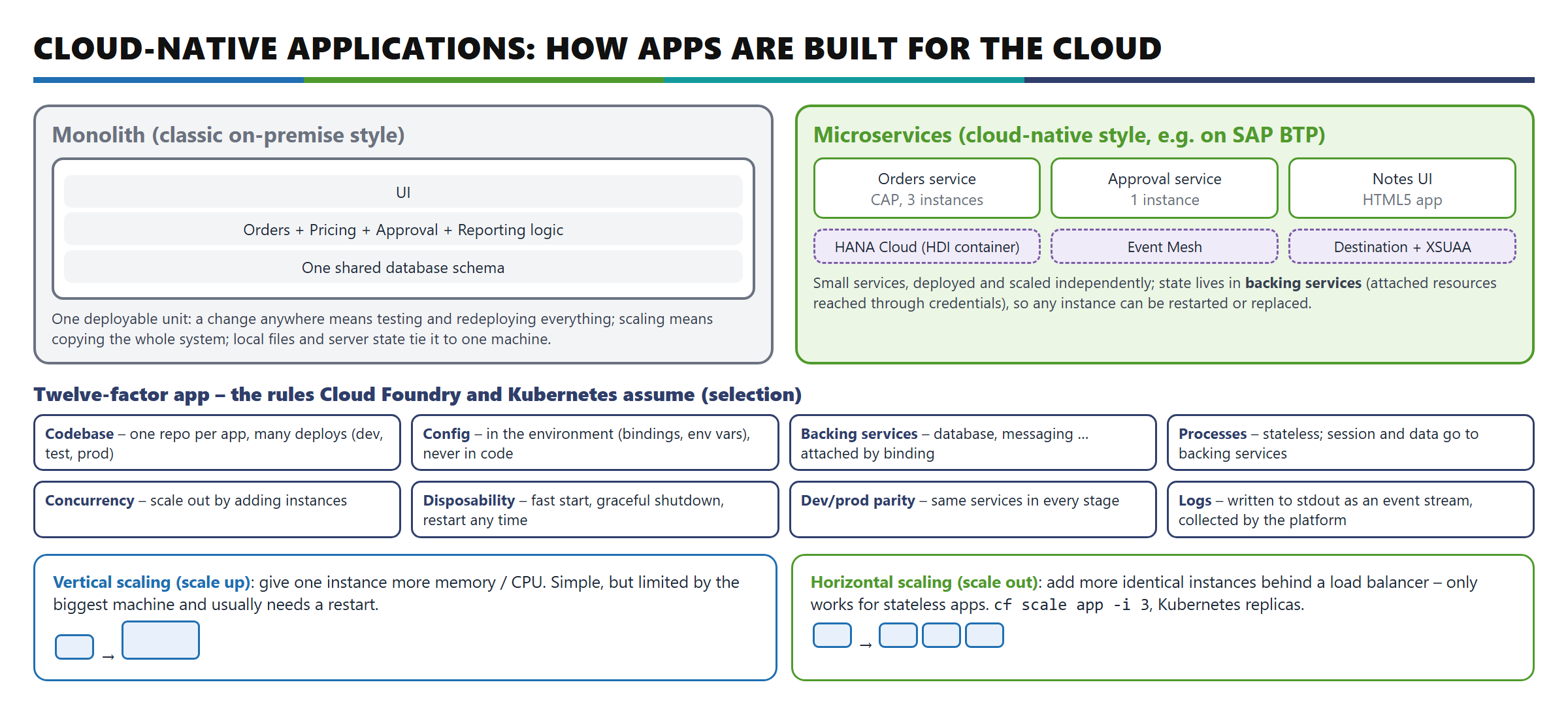
Monolith vs microservices
Monolith | Microservices | |
|---|---|---|
Deployment | One unit – every change redeploys everything | Each service deployed on its own |
Scaling | Copy the whole system | Scale only the busy service |
Technology | One stack | Each service picks its stack (CAP Node.js, Java, Python …) |
Data | One shared schema | Each service owns its data; others use its API or events |
Downside | Slow releases, tight coupling | More moving parts: networking, monitoring, distributed transactions |
An ABAP system is a classic (well-modularised) monolith. On BTP a typical side-by-side extension is a small number of services – e.g. one CAP service plus a UI – not dozens; "microservices" is a spectrum, not a goal.
The twelve-factor app
The twelve-factor app (12factor.net) is a widely used set of rules for software-as-a-service apps. Cloud Foundry was designed around it, and Kubernetes assumes most of it. The factors you meet daily:
Factor | Rule | What it looks like on SAP BTP |
|---|---|---|
Config | Store configuration in the environment, not in code | Service bindings ( |
Backing services | Treat databases, queues, mail … as attached resources | HANA Cloud, Event Mesh, Object Store as service instances bound to the app |
Processes | Run as stateless processes; keep state in backing services | No files on the local disk, no in-memory session that must survive a restart |
Concurrency | Scale out by running more processes |
|
Disposability | Start fast, shut down gracefully | The platform restarts and moves instances during updates |
Dev/prod parity | Keep stages as similar as possible | Same services in DEV, TEST and PROD subaccounts; CAP hybrid testing against real services |
Logs | Write logs to stdout as an event stream | The platform collects them ( |
Scaling, availability and SLAs
- Vertical scaling (scale up) gives an instance more memory or CPU; horizontal scaling (scale out) adds instances. Cloud apps prefer horizontal scaling – which only works if the app is stateless.
- Autoscaling adds and removes instances automatically by rules (CPU, memory, response time, schedule) – on BTP Cloud Foundry via the Application Autoscaler service, in Kyma via Kubernetes autoscaling.
- A region is a geographic location; it usually contains several availability zones – separate data centres with their own power and network. Running at least two instances of a productive app lets the platform spread them, so one failing zone or a platform update does not take the app down.
- An SLA (service level agreement) states the availability the provider commits to, e.g. 99.9 % per month. Free and trial plans usually have none; exact values per service: SAP's contract documents.
- Disaster recovery terms: RPO – how much data you may lose; RTO – how long recovery may take. Multi-region setups lower both but cost more.
Part 8 – Interview questions
Q1. What is cloud computing, in one sentence?
On-demand delivery of computing resources (servers, storage, databases, software) as services over the internet, paid per use, without owning the hardware.
Q2. Explain IaaS, PaaS and SaaS with an SAP example each.
IaaS: rented infrastructure, you run OS and software (S/4HANA installed on Azure VMs). PaaS: a platform for your own code (SAP BTP). SaaS: a finished application (SuccessFactors, S/4HANA Cloud Public Edition).
Q3. Public vs private cloud?
Public: run by a provider and shared by many customers with separated data – cheap and elastic. Private: dedicated to one organisation – more control and isolation, higher cost.
Q4. What is the difference between hybrid cloud and multi-cloud?
Hybrid mixes different kinds (private / on-premise + public) into one connected landscape. Multi-cloud uses several public providers of the same kind, often for independent workloads. A landscape can be both.
Q5. What is a community cloud?
A private-style cloud shared by several organisations with common requirements (e.g. banks or public agencies), so they share costs while keeping control.
Q6. Which model gives the most control and which the least vendor lock-in?
On-premise gives the most control and flexibility and the lowest lock-in; SaaS gives the least control and the highest lock-in but the simplest management. IaaS and PaaS lie in between.
Q7. What is a hypervisor? Type 1 vs type 2?
Software that creates and runs VMs. Type 1 runs on bare metal (ESXi, Hyper-V, KVM) – data centres and clouds. Type 2 runs on top of a host OS (VirtualBox) – desktops and testing.
Q8. VM vs container?
A VM includes a full guest OS on a hypervisor – strong isolation, GBs, minutes to start. A container shares the host kernel and packages only the app and its libraries – MBs, seconds to start; orchestrated with Kubernetes.
Q9. What is multitenancy?
One installation serves many customers (tenants) whose data and configuration are isolated. It lowers cost and lets the provider upgrade everyone at once – e.g. S/4HANA Cloud Public Edition.
Q10. What is the shared responsibility model?
The provider secures the cloud itself (data centre, hardware, platform); the customer secures what it puts in the cloud (data, users, roles, its own code). The more managed the service (SaaS), the more the provider covers – but data and access always stay with the customer.
Q11. What are RISE with SAP and GROW with SAP?
RISE: one contract bundling S/4HANA Cloud (Private or Public Edition), infrastructure, operations, BTP credits and transformation tools – mainly for existing customers. GROW: a package for new customers starting on S/4HANA Cloud Public Edition.
Q12. Why is virtualization called the foundation of the cloud?
It lets one physical machine be split into many isolated virtual resources, so providers can pool hardware for many customers and hand out or take back capacity in seconds – resource pooling and elasticity.
Q13. Scenario: an app you moved to Cloud Foundry loses uploaded files after every restart, and users are logged out when you scale to three instances. What is wrong?
It breaks the twelve-factor rule of stateless processes. The local file system of an instance is temporary and each instance has its own memory. Store files in a backing service (Object Store, Document Management service, database) and keep sessions out of the app instance (the app router holds the session; back ends stay stateless). Configuration and credentials come from bindings, not files.
Q14. Scenario: a customer needs its order app to survive the failure of one data centre. What do you propose?
Run at least two instances so the platform can spread them across availability zones of the region, use managed backing services with high availability (e.g. HANA Cloud replicas), and – if a whole-region outage must be covered – a second region with a failover concept, chosen by the required RPO and RTO.
🏠 Start Here · 02 · BTP Overview ▶ · Sections: CORE ABAP | OOPS ABAP | ABAP on HANA | Clean Core | RAP | ABAP Points | SAP Fiori | SAPUI5 | Mobile Development (MDK) | BTP Foundations | BTP Development | CAP | SAP Build | ABAP on BTP | Integration Suite | SAP Business AI | SAP BASIS | Security | SAP SDLC
Functional: FICO ABAP | TRM ABAP | VIM | SAP BIS | SD ABAP | MM ABAP | PP ABAP | QM ABAP | PM ABAP | PS ABAP | EWM | TM ABAP | EHS ABAP | HR ABAP | BW | SAP MDG | SAP Analytics Cloud | SAP Ariba | SAP CX | SAP IBP