What SAP Business Technology Platform is, where it came from, what it offers, and how it is organised: global account, directories, subaccounts, regions, environments, entitlements and quotas, commercial models and tools. Services, identity and connectivity follow on page 03.
Part 1 – What SAP BTP is
SAP Business Technology Platform (SAP BTP) is SAP's Platform as a Service: one integrated platform that brings together application development and automation, integration, data and analytics, and AI. Companies use it to extend SAP applications without modifying them (clean core), integrate SAP and non-SAP systems, build new cloud apps, and analyse data and add AI.
Layer | Who manages it on SAP BTP |
|---|---|
Your application and data | You |
Runtime, middleware, database, OS (the platform – e.g. open-source Cloud Foundry, Kubernetes, SAP HANA Cloud) | SAP |
Virtualization, servers, storage, networking (the data centre) | Infrastructure provider – SAP or a hyperscaler (AWS, Azure, Google Cloud, Alibaba Cloud) |
What you get: a ready landscape with reusable services (database, authentication, connectivity, workflow …), scalability and elasticity on demand, and a lower total cost of ownership – no own hardware or platform operations.
- Typical uses: side-by-side extensions for S/4HANA and SuccessFactors; integration flows between SAP and third-party systems; Fiori launchpad for all apps; analytics across sources; AI scenarios.
- Relation to clean core: BTP is where side-by-side extensions live (see Clean Core › 01 Clean Core and 12 · ABAP on BTP – ABAP Environment, Steampunk & Extensibility).
- Running example of this section: the Sales Order Approval scenario from the RAP section seen from BTP – a side-by-side CAP app reads S/4HANA sales orders through a released OData API, reacts to events through Event Mesh, stores notes in HANA Cloud and runs the approval in SAP Build Process Automation.
Part 2 – History: from Neo to SAP BTP
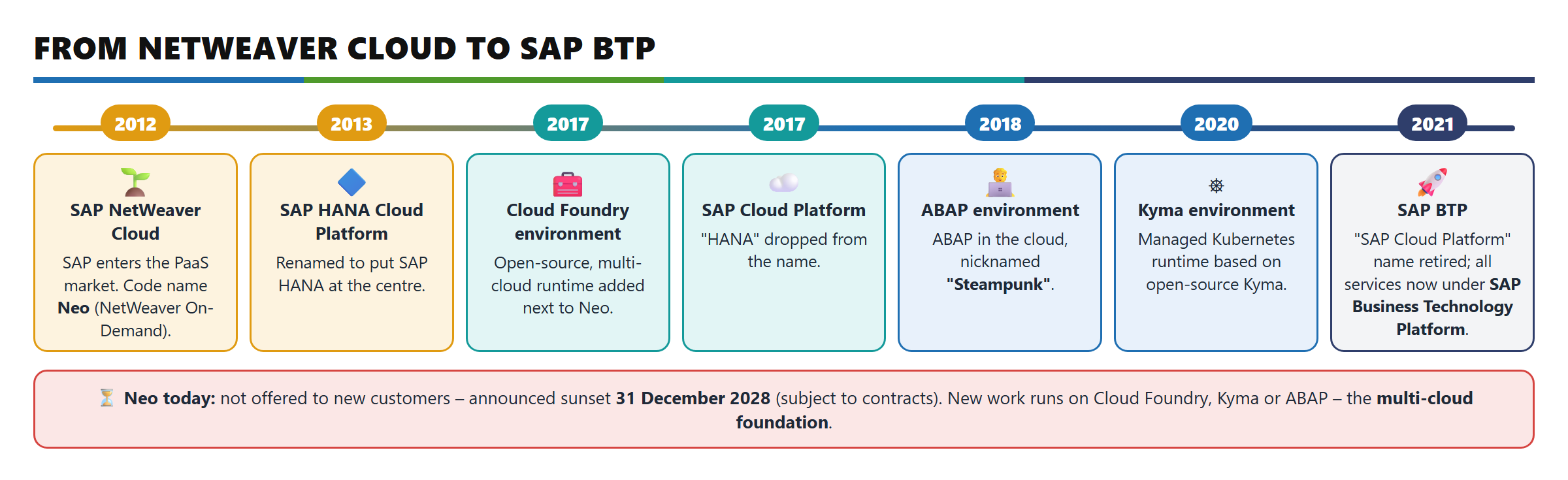
Year | Milestone |
|---|---|
2012 | SAP NetWeaver Cloud – SAP enters the PaaS market. Code name Neo (NetWeaver On-Demand). |
2013 | Renamed SAP HANA Cloud Platform. |
2017 | Cloud Foundry environment added next to Neo; "HANA" dropped – SAP Cloud Platform. |
2018 | ABAP environment ("Steampunk") added. |
2020 | Kyma environment (managed Kubernetes) added. |
2021 | The "SAP Cloud Platform" name is retired; its services continue under SAP Business Technology Platform. |
Today | Neo is no longer offered to new customers; SAP has announced its sunset for 31 December 2028 (subject to contract terms). New development runs on Cloud Foundry, Kyma or ABAP – the multi-cloud foundation. |
Neo-only tools end with it: SAP Web IDE is succeeded by SAP Business Application Studio, and the Neo portal and launchpad by SAP Build Work Zone. SAP's guide Migrating from the Neo Environment to the Multi-Cloud Foundation (Cloud Foundry and Kyma) explains why and how to move each scenario; the sunset is announced in SAP Note 3351844.
Part 3 – Solution areas
SAP groups the BTP capabilities into a few solution areas, usually application development & automation, integration, data & analytics and AI. You will also meet two other groupings: five pillars (Application Development, Automation, Integration, Data & Analytics, AI) and, in the first BTP material, four technology portfolios (database & data management, application development & integration, analytics, intelligent technologies). SAP regroups and renames areas from time to time – since 2026 it presents BTP together with SAP Business Data Cloud and SAP Business AI as the SAP Business AI Platform (→ see 16 · Data & AI on BTP) – so learn the products: they stay stable.
Solution area | Key products and services | More on |
|---|---|---|
Application development & automation | SAP Build (Apps – low-code, Code, Process Automation, Work Zone), SAP Business Application Studio, CAP, ABAP environment, Cloud Foundry and Kyma runtimes, Mobile Services, Document Management service, CI/CD service, Cloud Transport Management, Alert Notification, Automation Pilot | BTP Development › 01 and the CAP section and BTP Development › 03 and ABAP on BTP › 02 and BTP Development › 05 |
Integration | SAP Integration Suite (Cloud Integration, API Management, Event Mesh / Advanced Event Mesh, Integration Advisor, Open Connectors), SAP Business Accelerator Hub | Integration Suite › 01 and Integration Suite › 02 |
Data & analytics | SAP HANA Cloud, SAP Datasphere, SAP Analytics Cloud, SAP Master Data Governance, SAP Business Data Cloud | BTP Development › 02 and BTP Development › 04 |
Artificial intelligence | SAP AI Core, SAP AI Launchpad, generative AI hub, Joule, SAP AI services (e.g. document information extraction) | BTP Development › 04 |
SAP Workflow Management used to be listed under automation; it has been succeeded by SAP Build Process Automation (workflows, decisions, RPA, process visibility) – see 10 · SAP Build – Apps, Process Automation, Work Zone & Code. SAP Task Center gives one inbox for tasks from many SAP systems.
Part 4 – Account model: global account, directories, subaccounts, regions
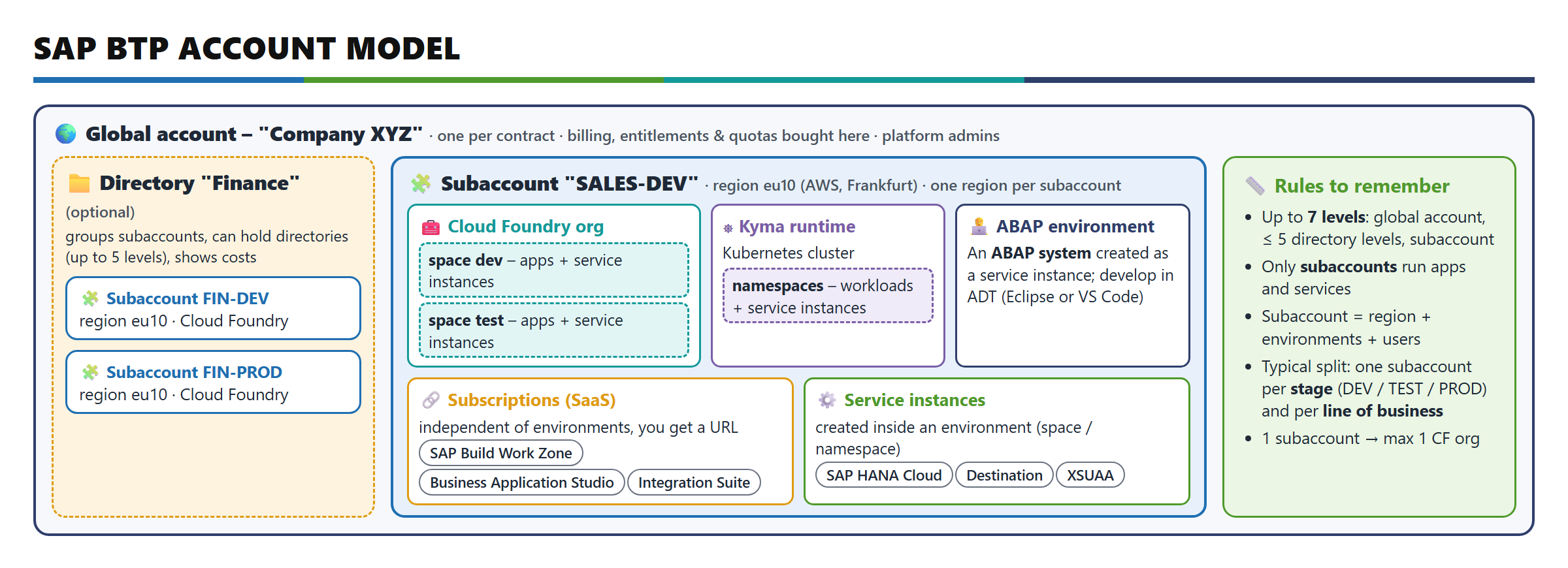
4.1 Global account
The global account is the top level and represents the customer contract (billing). You buy entitlements and quotas here, then distribute them. A company can have more than one global account (e.g. one consumption-based and one subscription-based contract).
4.2 Directories
Directories group subaccounts (and other directories) by business or technical need – for example per line of business, project or country. They are optional: you can create subaccounts directly under the global account.
- Hierarchy up to 7 levels: the top is always the global account, the bottom always a subaccount, so there can be up to 5 levels of directories in between.
- Directories let you group and filter subaccounts, monitor usage and costs (consumption-based contracts), manage directory members, and – if enabled – assign entitlements at directory level.
- Directories exist in the current cloud management tools (feature set B, standard for all current global accounts). Older feature set A accounts had no directories.
4.3 Subaccounts
A subaccount is where real work happens: you enable environments, subscribe to SaaS apps, create service instances, deploy applications and manage business users. Subaccounts are fully isolated from each other.
- Each subaccount has exactly one region (data centre), chosen at creation, and a subdomain used in its URLs.
- Typical structure: one subaccount per stage (DEV, TEST, PROD) and per line of business or project; production in a region close to users and data.
- Useful subaccount settings: Used for production (marks productive subaccounts for SAP operations), Enable beta features (beta services – never in production), and labels (key–value tags such as
stage = PROD,cost-center = 4711to filter subaccounts and directories). - The subdomain is part of URLs and token endpoints (e.g.
https://sales-dev.authentication.eu10.hana.ondemand.com); choose it carefully, because apps, trust configurations and integrations depend on it.
4.4 Regions
A region is a geographical location (e.g. Europe – Frankfurt, US East) where applications, data and services run. Regions are provided by SAP or by the IaaS partners Amazon Web Services, Microsoft Azure, Google Cloud and Alibaba Cloud. The partner operates the infrastructure layer; SAP operates the platform layer (Cloud Foundry, Kyma, ABAP and the services).
- Choose the region for data residency, latency (close to users and back-end systems) and service availability – not every service exists in every region (check the Discovery Center).
- Region IDs appear in URLs, e.g.
eu10(Europe, Frankfurt, AWS) inhttps://api.cf.eu10.hana.ondemand.com.
4.5 Platform users vs business users (overview)
Platform users (administrators, developers, operators) deploy, administer and troubleshoot – they are members of global accounts, directories, subaccounts, CF orgs and spaces. Business users use the applications. Member management happens at every level from global account to environment; user management (authentication and authorisation) is for business users. Details on page 03.
Part 5 – Environments: Cloud Foundry, Kyma, ABAP (and legacy Neo)
Environments are the actual PaaS offering – the runtimes where you develop and run applications. They are enabled per subaccount; one subaccount can use several.
Environment | What it is | Unit inside | Typical use |
|---|---|---|---|
Cloud Foundry | Open-source PaaS runtime; many languages via buildpacks (Node.js, Java, Python, Go …), incl. community and own buildpacks | Org (one per subaccount) → spaces | CAP apps, Fiori apps with app router, microservices, MTA deployments |
Kyma | Fully managed Kubernetes runtime based on the open-source Kyma project | Cluster → namespaces | Containerised microservices, serverless functions, event-driven extensions |
ABAP | A complete ABAP system in the cloud (SAP Business AI Platform, ABAP environment, "Steampunk"), provisioned as a service instance | Software components, packages | ABAP Cloud apps with RAP, extensions for S/4HANA, moving custom ABAP code to the cloud (ABAP on BTP › 01) |
Neo (legacy) | SAP's original proprietary environment: HTML5, Java, SAP HANA XS apps, SAPUI5 | Neo subaccount | Existing customers only; migrate to the multi-cloud foundation before the announced sunset (31 Dec 2028) |
Cloud Foundry orgs and spaces
- Enabling Cloud Foundry in a subaccount creates exactly one CF org for it.
- An org contains spaces (e.g.
dev,test) – a space is where you deploy apps and create service instances. Apps bind to service instances in their own space; an instance can also be shared with other spaces (instance sharing). - Org and space members get CF roles (Org Manager, Space Developer …) – page 03.
Kyma: managed cluster(s), extended by modules
Enabling Kyma in a subaccount provisions a managed Kubernetes cluster for it (one or more managed Gardener clusters can run in a subaccount). Capabilities are switched on as modules – for example Istio, API Gateway, SAP BTP Operator (service instances from Kubernetes), Eventing, Serverless and Connectivity Proxy. You work in namespaces with kubectl, Helm or the Kyma dashboard. Details: 09 · Runtimes – Cloud Foundry & Kyma in Depth.
The "Other" environment
Some services are created at subaccount level without Cloud Foundry or Kyma – in the cockpit they appear under the environment Other. You consume them through service keys or bindings created with the cockpit, the btp CLI or the SAP Service Manager APIs (page 03).
The ABAP environment is a service instance
You don't "create a space for ABAP". You create an instance of the service ABAP environment (for example from a Cloud Foundry space or via the cockpit's instance wizard); SAP then provisions a dedicated ABAP system for it. You develop in ADT (Eclipse) with ABAP Cloud and RAP, and you can build extensions for ABAP-based products such as S/4HANA Cloud, new cloud apps, or move existing custom code to the cloud. See 12 · ABAP on BTP – ABAP Environment, Steampunk & Extensibility.
Part 6 – Account types and commercial models
6.1 Trial, free tier and enterprise
Trial account | Free tier (in an enterprise account) | Enterprise account | |
|---|---|---|---|
Purpose | Learning and personal exploration | Try services before paying, small PoCs | Productive and non-productive company use |
Cost | Free | Free service plans | Paid (consumption- or subscription-based) |
Limits | 90 days in total, extended in intervals of up to 30 days while you keep signing in; restricted resources (e.g. 4 GB application memory), apps stopped every night, some regions only; no SLA | Size limits per free plan; no SLA, community support only; Kyma free plan once per global account for up to 30 days | As per contract; SLAs apply |
Where | Own trial global account (self-registration) | Enterprise global account with a Pay-As-You-Go or CPEA / BTPEA contract (self-registration possible) | Contracted global account |
Upgrade | Not convertible – productive use is not allowed; deleted after 90 days | Switch the instance to a paid plan without losing data (not yet possible for every service, e.g. Kyma) | – |
The account type (trial or enterprise) is a property of the global account and determines pricing, conditions of use, resources, available services and hosts. Trial is ideal for this course's exercises; free tier is what projects use to start. In the Discovery Center the tag Free Tier marks services with a free plan, and Always Free marks plans already included in the BTP contract at no extra charge.
6.2 Commercial models
Model | How you pay | Good for |
|---|---|---|
Consumption-based – SAP BTPEA / CPEA | Prepaid cloud credits for a contract period; each service's usage is deducted from them. BTPEA is the successor of CPEA (Cloud Platform Enterprise Agreement). Volume discounts. | Flexible use of many services; you decide later which ones |
Consumption-based – Pay-As-You-Go | No up-front commitment; usage billed monthly in arrears at list price. | Starting small, unpredictable usage |
Subscription-based | Fixed fee for named services for a fixed term, regardless of use. | Known, steady needs (e.g. a fixed number of users) |
Both models can exist side by side (e.g. in separate global accounts). Directories help to track usage and cost of consumption-based contracts. Exact prices and terms: SAP's price list and your contract.
Part 7 – Entitlements, service plans, quotas, space quota plans
On SAP BTP every external dependency – database, messaging, file system, connectivity, even multitenant SaaS apps – is a service. Each service has one or more service plans.
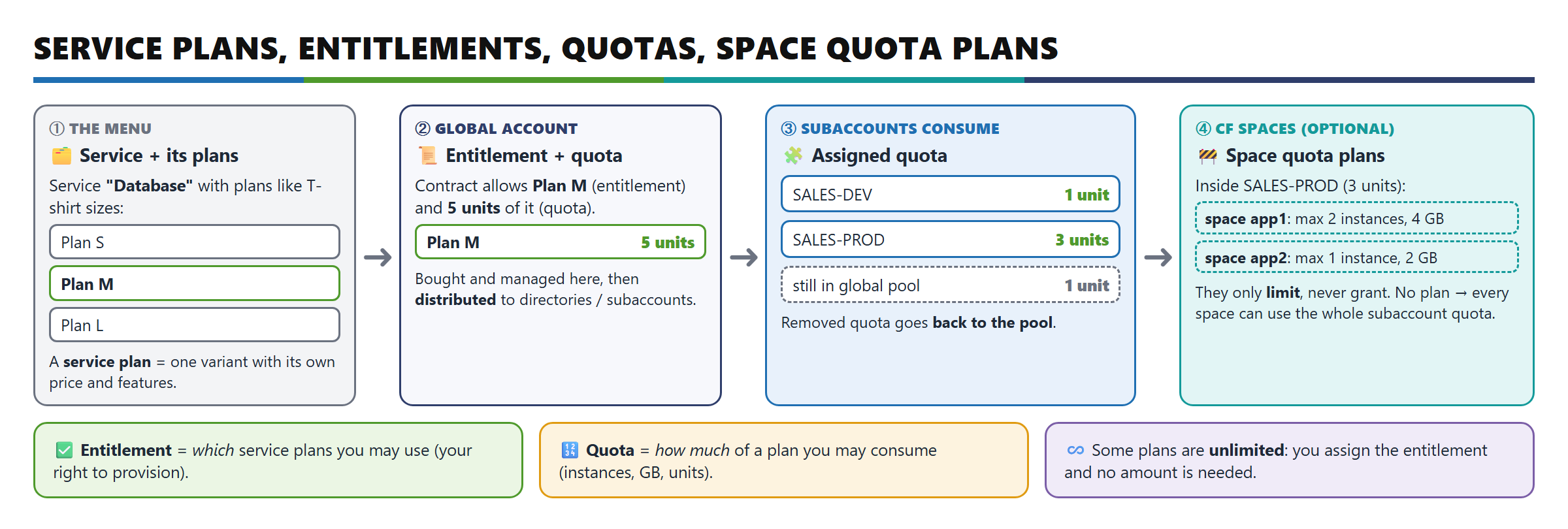
Term | Meaning | Example |
|---|---|---|
Service plan | One variant of a service with its own features, limits and price ("T-shirt sizes") | Database plan S / M / L |
Entitlement | Your right to provision and consume a service plan – which plans you may use | Subaccount DEV is entitled to plan M |
Quota | The numeric amount of a plan you may consume in the global account and its subaccounts | 5 units of plan M |
Space quota plan | Optional CF limit on how much of the subaccount quota one space may use | Space app1: max 4 GB memory |
Distribution flow
- Entitlements and quotas are purchased and managed at global account level, then distributed to subaccounts (or directories), which consume them.
- Removing a quota or entitlement from a subaccount makes it available again at global account level for other subaccounts.
- Some plans are unlimited: assigning the entitlement is enough, no amount needed.
- A service only appears in a subaccount's marketplace once the subaccount has an entitlement for one of its plans – the first thing to check when "the service is missing".
Space quota plans (Cloud Foundry)
Space quota plans are optional and only limit, never enable. Without them every space in the subaccount can use all entitlements and quota of the subaccount – one space could use up everything. Create space quota plans and assign them to spaces to cap memory, app instances, routes or service instances per space. (Org-level quota works the same way one level higher.)
Part 8 – Tools: cockpit, CLIs, Discovery Center
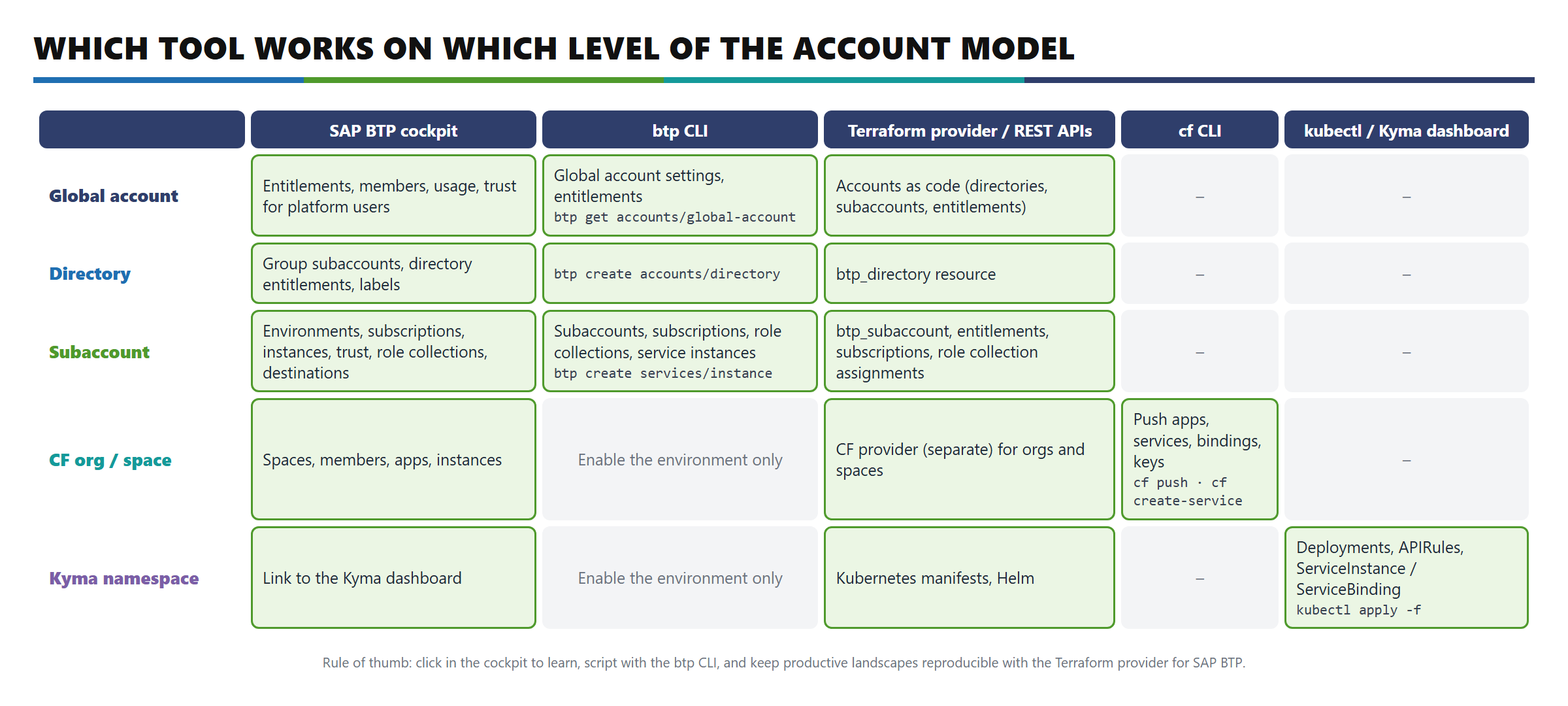
Tool | Use |
|---|---|
SAP BTP cockpit | Central web UI to manage global accounts, directories, subaccounts, entitlements, environments, subscriptions, instances, members, trust and role collections |
btp CLI | Command line for account administration (subaccounts, directories, entitlements, users) – scriptable |
cf CLI | Cloud Foundry command line: target org/space, push apps, create services, bindings, keys |
kubectl / Kyma dashboard | Manage Kyma (Kubernetes) workloads |
REST APIs, Terraform provider for SAP BTP | Automate account setup (infrastructure as code) |
SAP Discovery Center | Public site: service catalog with plans, regions and pricing, cost estimator, guided missions – https://discovery-center.cloud.sap/ |
|
Infrastructure as code: Terraform provider for SAP BTP
For real projects the landscape (directories, subaccounts, entitlements, subscriptions, role collection assignments) should be reproducible. SAP's official Terraform provider for SAP BTP (source SAP/btp, github.com/SAP/terraform-provider-btp) describes it as code that is reviewed in Git and applied by a pipeline. Cloud Foundry orgs and spaces have a separate Cloud Foundry provider.
|
Credentials for the provider come from environment variables of the pipeline (BTP_USERNAME and BTP_PASSWORD; two-factor authentication is not supported, so use a technical user or BTP_ASSERTION with a custom identity provider), never from the .tf files. Other common resources are btp_directory, btp_subaccount_subscription, btp_subaccount_service_instance, btp_subaccount_role_collection_assignment and btp_subaccount_trust_configuration; data sources such as btp_subaccount_service_plan or btp_regions read existing objects.
SAP Discovery Center
The Discovery Center is SAP's public catalogue for SAP BTP. Developers and architects use it to find services and their service plans, check data-centre (region) availability, estimate costs, and follow step-by-step missions (reference scenarios that include the needed entitlements).
Part 9 – Customer's eye view
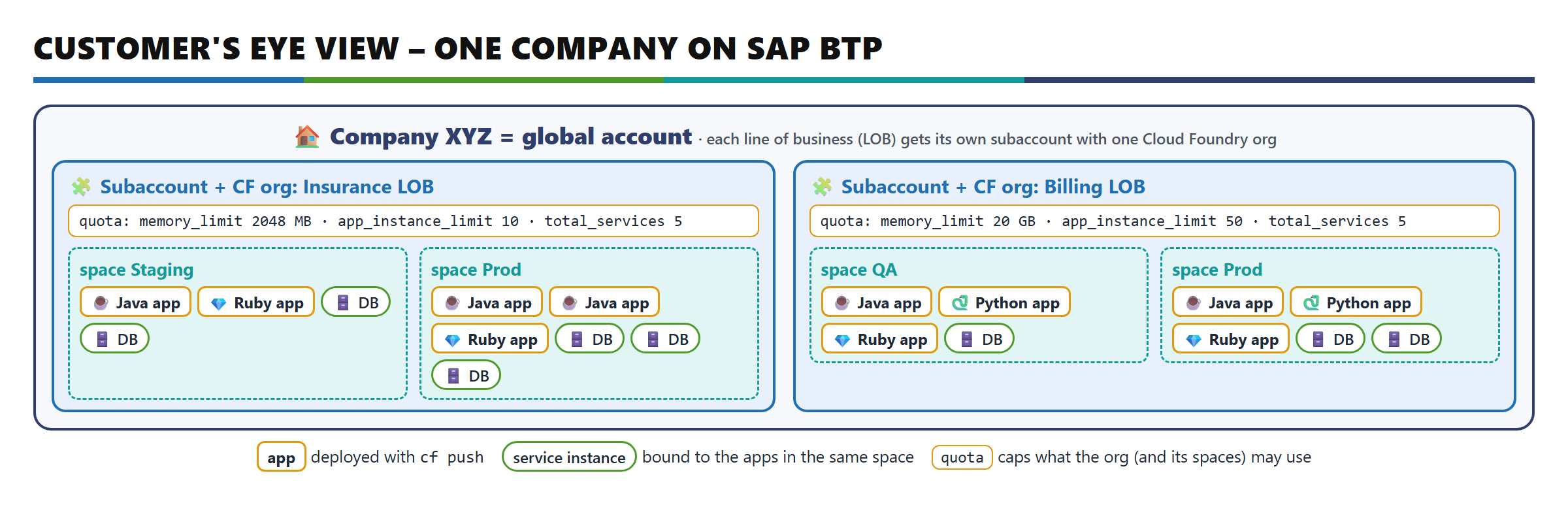
Company XYZ has one global account. Each line of business gets its own subaccount with one Cloud Foundry org and its own quota (Insurance: 2048 MB memory, 10 app instances, 5 services; Billing: 20 GB, 50 app instances, 5 services). Inside, spaces separate stages (Staging/Prod, QA/Prod); apps in a space bind to service instances in the same space.
Level | Contains |
|---|---|
Global account | Directories (optional) and subaccounts |
Subaccount | Environments (Cloud Foundry, Kyma, ABAP), subscriptions, service instances, members, trust and role collections |
Environment | CF: org → spaces, space quota plans, org/space members; Kyma: namespaces |
Subscriptions | Subscription-based services (SaaS) – at subaccount level, independent of environments |
Service instances | Instance-based services, created inside an environment (CF space / Kyma namespace) – need a binding or service key to be used |
Every service instance is defined by: service → plan → environment → space → instance name. To use it, an app needs a binding or a consumer needs a service key (page 03).
Part 10 – Interview questions
Q1. What is SAP BTP and why would an S/4HANA customer use it?
SAP's PaaS that combines app development and automation, integration, data and analytics, and AI. S/4HANA customers use it to build side-by-side extensions without touching the core, integrate SAP and non-SAP systems, run a central launchpad and add analytics and AI.
Q2. Explain the BTP account model.
Global account (contract, billing, entitlements) → optional directories (up to 5 levels) → subaccounts (one region each) → environments (CF org and spaces, Kyma namespaces, ABAP system), subscriptions and service instances.
Q3. Global account vs subaccount?
The global account is the commercial container: contract, billing, entitlements and quotas. Subaccounts are the technical containers where you enable environments, deploy apps, create instances and manage business users – each in exactly one region.
Q4. What is a region and how do you choose it?
A data-centre location run by SAP or a hyperscaler (AWS, Azure, Google Cloud, Alibaba Cloud). Choose by data residency, latency to users and back ends, and which services are available there.
Q5. Name the BTP environments and when you would use each.
Cloud Foundry for polyglot apps and CAP; Kyma for Kubernetes-based microservices and serverless functions; ABAP environment for ABAP Cloud/RAP development. Neo is legacy – not offered to new customers, announced sunset 31 December 2028.
Q6. What is the difference between an entitlement and a quota?
Entitlement = which service plans you may use. Quota = how much of a plan you may consume. Both are bought at global account level and distributed to subaccounts.
Q7. What are space quota plans for?
To limit how much of the subaccount's quota each CF space can use, so one space cannot consume everything. They are optional and never grant extra resources.
Q8. Trial vs free tier vs enterprise account?
Trial: free, time-limited, non-productive, for learning. Free tier: free service plans inside an enterprise account, no SLA, upgradeable to paid plans without data loss. Enterprise: productive, paid, with SLAs.
Q9. Consumption-based vs subscription-based commercial model?
Consumption: pay for actual usage – from prepaid cloud credits (BTPEA/CPEA) or monthly in arrears (Pay-As-You-Go). Subscription: fixed fee for specific services over a term, independent of usage.
Q10. How was SAP BTP called before, and what was Neo?
SAP NetWeaver Cloud (2012, code name Neo) → SAP HANA Cloud Platform (2013) → SAP Cloud Platform (2017) → SAP BTP (name used for everything since 2021). Neo is the original SAP-proprietary environment.
Q11. A developer can't find a service in the marketplace – what do you check first?
Whether the subaccount has an entitlement (and quota) for a plan of that service, and whether the service is available in the subaccount's region and environment.
Q12. What is the SAP Discovery Center?
SAP's public site for SAP BTP: service catalog with plans, regions and prices, a cost estimator and guided missions for reference scenarios.
Q13. Scenario: your team must set up DEV, TEST and PROD subaccounts for a new extension in three countries. How do you keep them consistent?
Group them with directories (e.g. one per country, with labels for the stage), and describe subaccounts, entitlements, subscriptions and role collection assignments as code with the Terraform provider for SAP BTP (or scripts with the btp CLI), applied by a pipeline. Mark PROD as used for production and keep beta features off there.
Q14. Scenario: a developer wants to build a proof of concept that may later go live. Trial or free tier?
Free tier in an enterprise (Pay-As-You-Go or CPEA/BTPEA) account: it has no 90-day limit, data can be kept, and most free plans can be switched to paid plans without losing data. A trial account must not be used productively, stops apps nightly and is deleted after 90 days.
🏠 Start Here · ◀ 01 · Cloud Basics · 03 · Services & Identity ▶ · Sections: CORE ABAP | OOPS ABAP | ABAP on HANA | Clean Core | RAP | ABAP Points | SAP Fiori | SAPUI5 | Mobile Development (MDK) | BTP Foundations | BTP Development | CAP | SAP Build | ABAP on BTP | Integration Suite | SAP Business AI | SAP BASIS | Security | SAP SDLC
Functional: FICO ABAP | TRM ABAP | VIM | SAP BIS | SD ABAP | MM ABAP | PP ABAP | QM ABAP | PM ABAP | PS ABAP | EWM | TM ABAP | GTM ABAP | EHS ABAP | HR ABAP | BW | SAP Datasphere | SAP Business Data Cloud | SAP MDG | SAP Analytics Cloud | SAP Ariba | SAP CX | SAP IBP