The security and connectivity layer every BTP developer is asked about: how OAuth 2.0 works on BTP, what is inside a JWT and who checks it, how to write a complete xs-security.json, how the app router (standalone or managed) logs users in and routes requests, and how a cloud app reaches an on-premise S/4HANA with the user's identity. The basics (what XSUAA, IAS, role collections, destinations and the Cloud Connector are) are on page 03 BTP Services, Identity & Connectivity; MTA and Fiori basics on BTP Development › 01 Developing on BTP. This page goes one level deeper.
Part 1 – OAuth 2.0 on BTP: roles, grant types and the login flow
OAuth 2.0 is a standard for delegated authorisation: an application never sees the user's password; it gets a short-lived access token from an authorisation server and sends it with every call. OpenID Connect (OIDC) adds identity (who the user is) on top. On BTP the token is a JWT and the authorisation server is XSUAA (or Identity Authentication, IAS, for IAS-based apps).
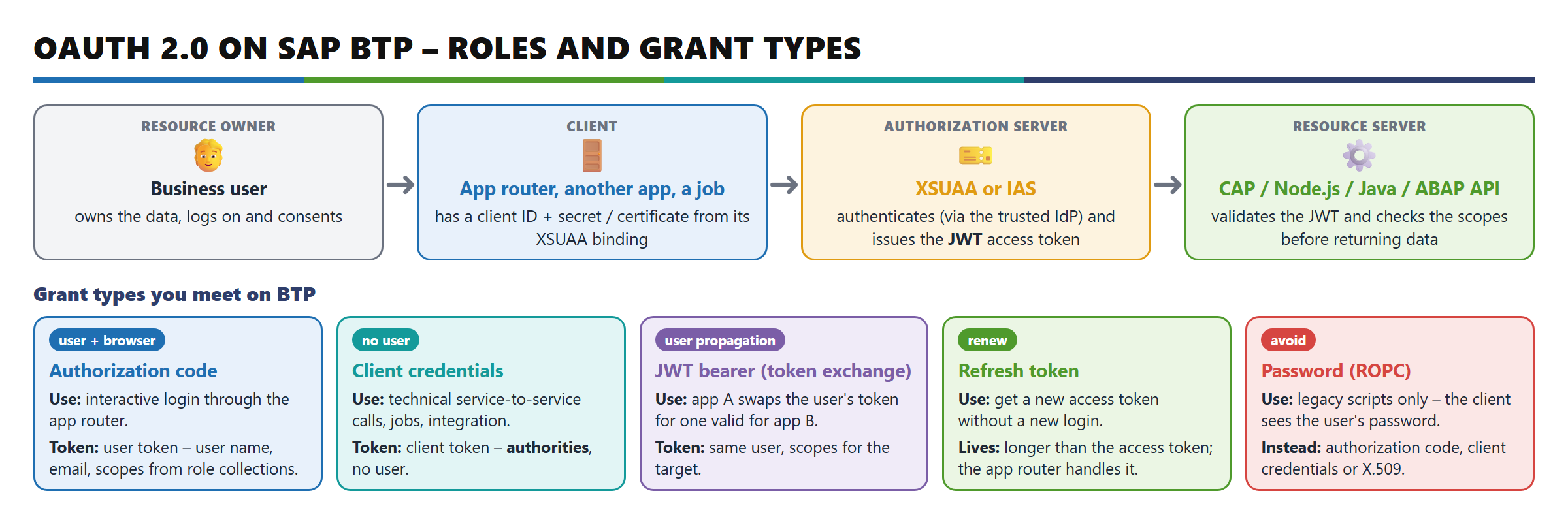
OAuth role | On BTP | Example in a CAP + Fiori app |
|---|---|---|
Resource owner | The user who owns the data and logs on | A travel approver |
Client | The application that requests a token; identified by | The app router (user login), a job, another app |
Authorization server | Authenticates via the trusted IdP and issues tokens | XSUAA of the subaccount, or IAS |
Resource server | The API that validates the token and checks scopes | The CAP service, a Node.js or Java app, an ABAP API |
1.1 Grant types used on BTP
Grant type |
| Who / when | Token contains |
|---|---|---|---|
Authorization code | authorization_code | A user in a browser logs in through the app router; the code is swapped for a token on the back channel | User data + scopes from the user's role collections |
Client credentials | client_credentials | Technical calls without a user: jobs, integrations, service-to-service | Client ID + authorities (scopes granted to the client), no user |
JWT bearer (token exchange) | urn:ietf:params:oauth:grant-type:jwt-bearer | App A has a user token and needs one that app B accepts – user propagation | The same user, scopes for the target |
SAML 2.0 bearer | urn:ietf:params:oauth:grant-type:saml2-bearer | The Destination service sends a SAML assertion for the user to another OAuth server (e.g. S/4HANA Cloud, SuccessFactors) | A token of the target system for that user |
Refresh token | refresh_token | Get a new access token without a new login (the app router does this) | A fresh access token |
Password (resource owner password credentials) | password | Legacy scripts and tests – the client handles the user's password | User token – avoid: the OAuth 2.0 Security Best Current Practice (RFC 9700) says it must not be used |
The implicit grant is also deprecated. Public clients without a secret (mobile apps, pure browser apps) use authorization code with PKCE. On BTP the app router is a confidential client, so it uses the normal authorization code flow with its client secret.
1.2 Client credentials in practice
The values url, clientid and clientsecret come from the XSUAA binding (VCAP_SERVICES) or a service key. In real apps a library does this; the raw calls show what happens:
|
A client token has no user, so user-based checks ($user, attributes) do not apply. Its scopes come from authorities in xs-security.json (Part 3). Prefer X.509 credentials (credential-types: x509) over secrets where the consuming side supports it.
1.3 User propagation between apps
- Same app, same XSUAA instance: the app router forwards the user's JWT to the CAP service (
forwardAuthToken: true) – no exchange needed. - Two apps in the same subaccount, tightly coupled: app B grants a scope to app A (
granted-apps/foreign-scope-references, Part 3); app A forwards the user token. - Different XSUAA clients or a third-party OAuth server: exchange the token – destination with authentication
OAuth2UserTokenExchange(XSUAA, same subaccount) orOAuth2JWTBearer(JWT bearer grant at the target's token URL). - Other subaccount, region or SAP SaaS (S/4HANA Cloud, SuccessFactors):
OAuth2SAMLBearerAssertiondestination, or IAS-based apps, which work across landscapes. - On-premise system: principal propagation through the Cloud Connector (Part 5).
1.4 The app router login flow (authorization code)
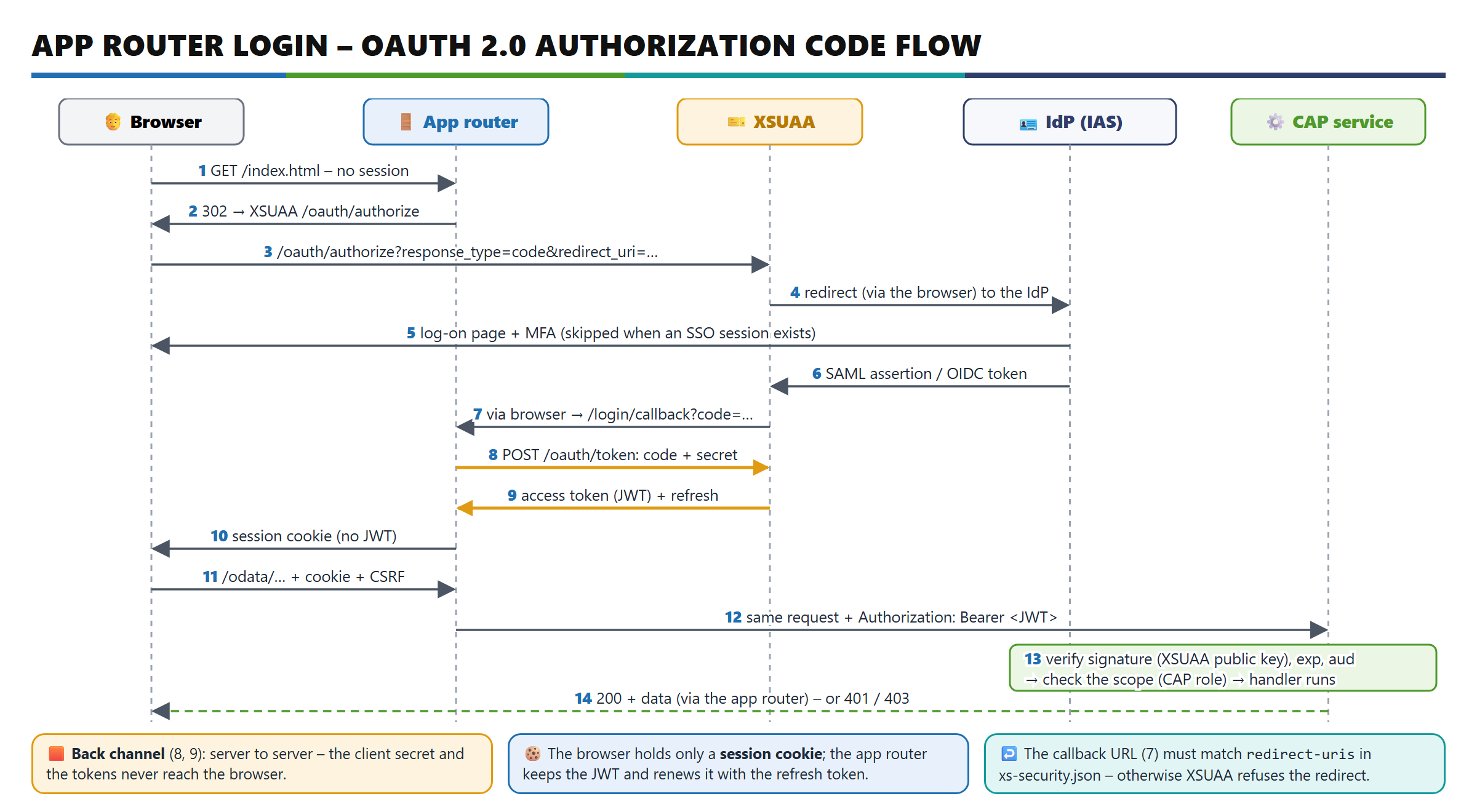
- Steps 3–7 run through the browser (redirects); steps 8–9 are a server-to-server call, so the client secret and tokens never reach the browser.
- The browser only holds the app router's session cookie. The app router stores the JWT in the session, refreshes it before
expand addsAuthorization: Bearer …to each forwarded request. - With an existing SSO session at the IdP, step 5 is silent – the user sees no login page.
- The callback URL (default path
/login/callback) must match an entry inredirect-uris, otherwise XSUAA refuses to redirect (a typical error after adding a custom domain). - Session timeout of the app router: 15 minutes of inactivity by default (
SESSION_TIMEOUTenvironment variable, in minutes).
Part 2 – JWT in detail: structure, claims and validation
A JSON Web Token (JWT, RFC 7519) is three Base64url-encoded parts joined by dots: header.payload.signature. It is signed, not encrypted – anyone who has it can read it, and anyone who has it can use it until it expires (a bearer token). So never put secrets into claims and treat every token like a password.
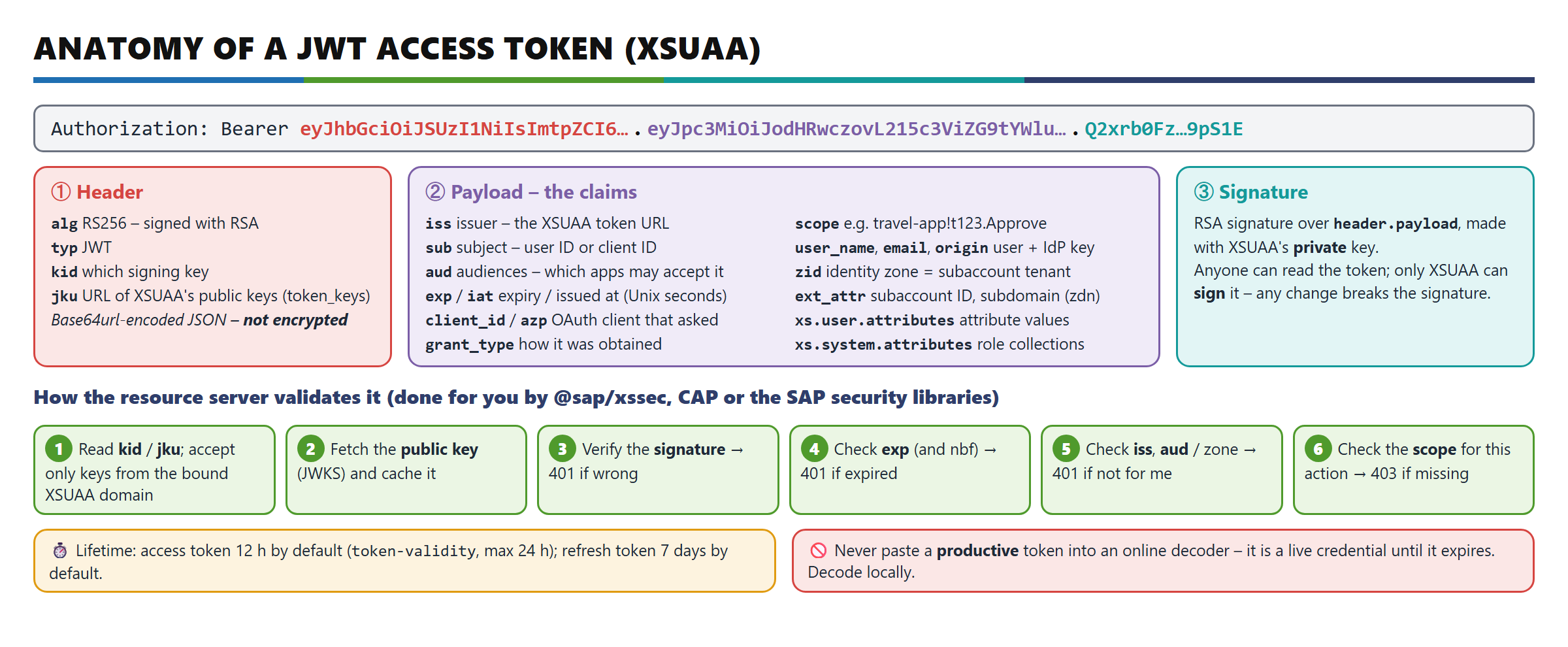
2.1 A decoded XSUAA user token
Values are invented. $XSAPPNAME is replaced at deployment by the xsappname plus a suffix such as !t123 (plan application), which is why scopes look like travel-app!t123.Approve.
|
Claim | Meaning | Why you care |
|---|---|---|
iss | Issuer – the token endpoint of the subaccount's XSUAA (or the IAS tenant) | Must belong to the trusted XSUAA / IAS; tokens from another subaccount are rejected |
sub | Subject – the user's ID (user token) or the client ID (client token) | Stable technical ID |
aud | Audiences – the clients / xsappnames allowed to accept the token | Wrong audience → 401 |
| Expiry and issue time, Unix seconds | Expired → 401; check clock skew |
| The OAuth client that requested the token | Tells app router vs job vs other app |
grant_type | How the token was obtained |
|
scope | Granted scopes (user: from role collections; client: from authorities) | The basis of every authorisation check; missing scope → 403 |
| Login name, e-mail, origin key of the IdP | Logging, auditing, principal propagation subject |
zid | Identity zone = the subaccount's tenant ID | Multitenancy: which tenant's data |
ext_attr | Extra data: subaccount ID, subdomain ( | Tenant-specific URLs |
xs.user.attributes | Attribute values from roles (static or from the IdP) | Instance-based checks, e.g. country |
xs.system.attributes | System data such as IdP groups (xs.saml.groups) | Debugging authorisations |
IAS tokens look similar (iss, sub, aud, exp, email, plus IAS claims such as app_tid for the tenant and groups) but carry no XSUAA scopes – authorisation then comes from IAS groups or policies.
2.2 How resource servers validate a token
Validation is offline: the resource server does not call XSUAA for each request. It fetches XSUAA's public keys once (the JWKS endpoint token_keys, referenced by the jku and kid header fields), caches them and checks every token locally:
- Signature valid with a key from the bound XSUAA domain (never trust an arbitrary
jkuURL). expnot passed,iss/ zone andaudmatch the bound service instance → otherwise 401.- Required scope present for the action → otherwise 403.
Runtime | Who validates | What you write |
|---|---|---|
CAP Node.js / Java | Built in; active when an XSUAA or IAS instance is bound ( | Only |
Plain Node.js |
| Middleware + scope checks |
Java (Spring) | SAP cloud-security-services-integration-library (java-security, Spring Boot starter) | Standard Spring Security configuration |
App router | Only knows the session; it can check scopes per route ( | Coarse checks only – the back end must check again |
ABAP environment | The platform – inbound OAuth calls via communication arrangements | Released APIs, no token code (ABAP on BTP › 01) |
On-premise S/4HANA | Usually never sees the BTP JWT: the identity arrives as an X.509 certificate (principal propagation) or as an S/4 OAuth token (SAML bearer, transaction SOAUTH2) | Trust and user mapping (Part 5.4) |
2.3 Lifetime and safe handling
Token | Default (XSUAA) | Configured in |
|---|---|---|
Access token | 12 hours (43,200 s); range 60 s – 24 h | oauth2-configuration.token-validity |
Refresh token | 7 days (604,800 s) | oauth2-configuration.refresh-token-validity |
App router session | 15 minutes idle |
|
- Scopes are copied into the token at login. After assigning a new role collection the user must log out and in again (or wait for a new token) – a classic interview question.
- Keep tokens short-lived; SAP recommends as short as practical, not under 30 minutes for user tokens.
- Never paste a productive token into an online decoder such as jwt.io – it is a live credential. Decode locally; do not log tokens; remember that HAR files and browser traces contain them.
|
Part 3 – XSUAA configuration: xs-security.json, role collections, XSUAA vs IAS, CAP
The application security descriptor xs-security.json defines everything XSUAA needs to know about your app. It is passed when the XSUAA instance (service xsuaa, plan application) is created or updated – via mta.yaml (BTP Development › 01) or the cf CLI:
|
3.1 The properties
Property | Meaning |
|---|---|
xsappname | Unique app name in the subaccount (letters, digits, |
tenant-mode | dedicated (default, single-tenant app), shared (multitenant SaaS app; one OAuth client used by all subscriber subaccounts) or external |
scopes | Permissions the app checks: |
attributes | Values for instance-based checks; |
role-templates | Bundles of |
role-collections | Role collections shipped with the app; reference templates as |
authorities | Scopes the app's own client gets in client credentials tokens; |
foreign-scope-references | Scopes of other apps this app accepts in user tokens, e.g. |
oauth2-configuration |
|
3.2 A complete example
|
The two consuming apps declare their side in their own xs-security.json (each app has its own XSUAA instance):
|
- JSON has no comments – keep explanations in the
descriptionfields. - Scope grants are for tightly coupled apps in the same subaccount. Across subaccounts or regions use token exchange through destinations (Part 1.3).
redirect-uris: list exact app router hosts in production; broad wildcards allow redirects to unintended hosts.- Changing or removing scopes and templates of a productive app is a breaking change for existing role collections – add new ones instead of renaming.
3.3 From role template to user
Step | Who | What happens |
|---|---|---|
1. Define | Developer | Scopes, attributes, role templates (and optional role collections) in xs-security.json |
2. Deploy | Pipeline | XSUAA instance created / updated; a role is generated for every template without attributes or with default values |
3. Create roles | Admin | For templates with attributes: cockpit → Security → Roles – e.g. Approver_DACH with Country = DE, AT; values can be static, taken from the IdP (a SAML / OIDC attribute) or unrestricted |
4. Role collections | Admin | Cockpit → Security → Role Collections: combine roles, possibly of several apps (e.g. Travel_Approver_DACH = Approver_DACH + Work Zone launchpad role) |
5. Assign | Admin | To users or – better – to IdP groups (trust configuration → role collection mappings; the group comes in the SAML / OIDC token) |
6. Login | XSUAA | Union of all scopes of the user's role collections goes into |
3.4 XSUAA vs IAS-based authentication
XSUAA (Authorization and Trust Management) | IAS (SAP Cloud Identity Services) | |
|---|---|---|
Role | OAuth 2.0 authorisation server per subaccount; trusts IAS / other IdPs | OpenID Connect provider per company tenant, used by BTP and SAP SaaS |
Binding | Service | Service |
Authorisation | Scopes from role collections inside the token | No XSUAA scopes; IAS groups or policies (Authorization Management Service) |
Reach | One subaccount / landscape; no cross-landscape user propagation out of the box | Across subaccounts, regions and SAP cloud products (principal propagation to S/4HANA Cloud and more) |
App router | authenticationType: xsuaa | authenticationType: ias |
Status | Fully supported, the most common setup in existing projects | Recommended for new projects in the CAP documentation, with extra prerequisites for multitenant apps |
In practice: existing apps keep XSUAA; new CAP projects should evaluate IAS first. CAP can run IAS and XSUAA side by side for a gradual migration, and IAS offers a cross-consumption mode so IAS users can still call XSUAA-protected services. Whatever the model, users still log on at the company's IAS tenant.
IAS and XSUAA together: cross-consumption and token exchange
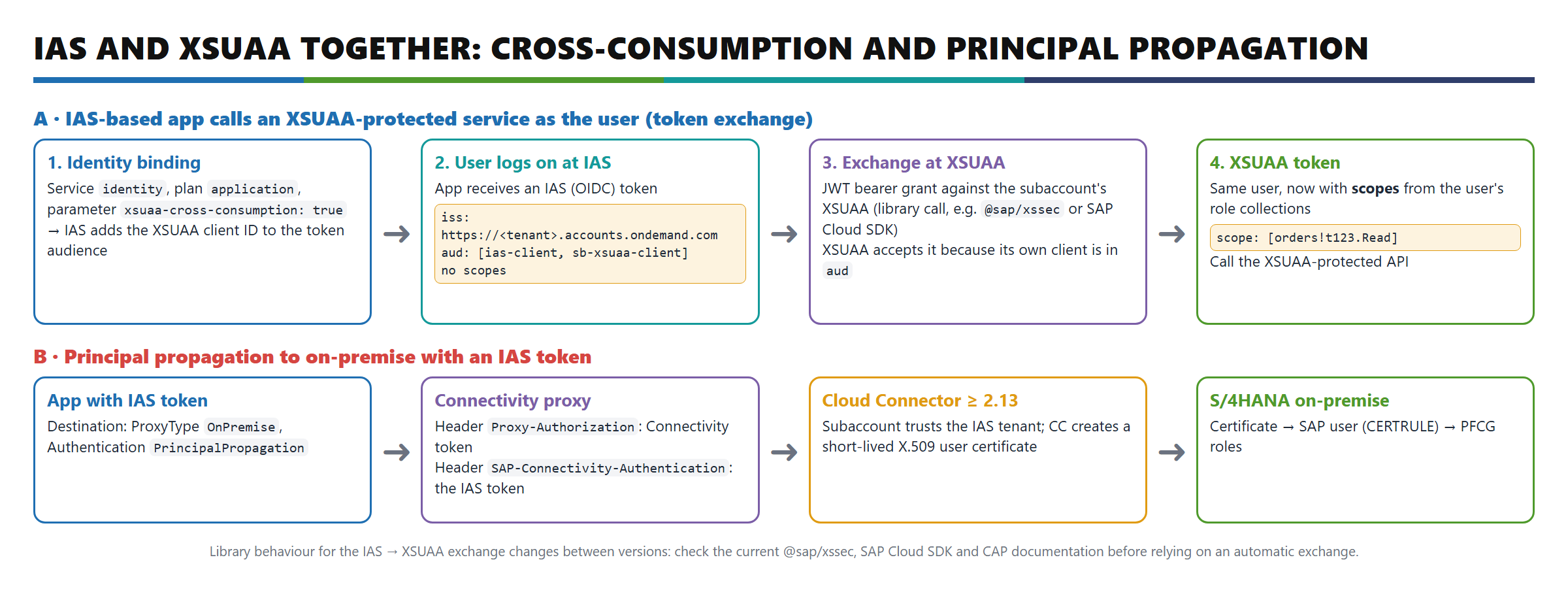
An IAS token carries no XSUAA scopes, and an XSUAA-protected service rejects it because its iss and aud do not match. The bridge is XSUAA cross-consumption:
- Create the
identityinstance with the parameterxsuaa-cross-consumption: true. IAS then adds the XSUAA client of the subaccount to the token's audience. - The IAS-based app (or a library on its behalf) exchanges the IAS token at the subaccount's XSUAA with the JWT bearer grant; XSUAA accepts it because its own client is in
aud, and returns an XSUAA token for the same user with the scopes of the user's role collections. - The app calls the XSUAA-protected service with that token. For a destination-based call the same idea is configured with
OAuth2JWTBearer/OAuth2TokenExchange(Part 5.1). @sap/xssec3 could exchange automatically (optionIAS_XSUAA_XCHANGE_ENABLED); version 4 removed that option. Now the app either callsxsuaaService.fetchJwtBearerToken(<IAS token>)itself or turns onxsuaaLegacyExtensionin theIdentityServiceconfiguration, which fetches the XSUAA token after the IAS token is validated (both services passed tocreateSecurityContext).
For authorisation in IAS-based apps, CAP works with Authorization Management Service (AMS) policies from SAP Cloud Identity Services instead of XSUAA role collections; CAP roles are then mapped to policies. Principal propagation to on-premise also works with an IAS token (Cloud Connector 2.13 or newer, subaccount trusting the IAS tenant) – see Part 5.2.
3.5 CAP: @requires and @restrict
CAP checks roles; with XSUAA a CAP role is a scope without the $XSAPPNAME. prefix. cds add xsuaa (or cds compile srv --to xsuaa) generates the scopes and role templates from these annotations:
|
ViewerandApproverbecome$XSAPPNAME.Viewer/$XSAPPNAME.Approverscopes;$user.Countryreadsxs.user.attributes.Country– the instance-based filter is added to every query.- Pseudo roles:
authenticated-user,any,system-user(client credentials tokens),internal-user. - In handlers:
req.user.is('Approver'),req.user.id,req.user.attr.Country;req.reject(403)for custom checks. - Locally
cds watchuses mocked users; the real XSUAA flow is tested in hybrid mode or on BTP (BTP Development › 06).
Part 4 – The application router: standalone vs managed
The application router is the single entry point of a BTP web application – a reverse proxy in front of the UI and the services. Its jobs:
- Login: runs the authorization code flow with XSUAA or IAS (Part 1.4).
- Session and tokens: keeps the JWT server-side, refreshes it, forwards it to back ends.
- Routing: maps URL paths to destinations, the HTML5 Application Repository or local files (
xs-app.json). - CSRF protection for state-changing requests, optional scope checks per route, central logout.
- Hides back-end URLs and avoids CORS problems – the browser only talks to one host.
4.1 Standalone app router
The Node.js package @sap/approuter deployed as your own app – in an MTA a module of type approuter.nodejs with a package.json (start script node node_modules/@sap/approuter/approuter.js) and an xs-app.json. It binds to the XSUAA (or IAS) instance and, if needed, the Destination, Connectivity and HTML5 Application Repository (plan app-runtime) services. Back ends defined in mta.yaml become entries of the destinations environment variable:
|
A complete xs-app.json
|
Property | Meaning |
|---|---|
welcomeFile | Where |
authenticationMethod |
|
logout |
|
routes | Checked top to bottom, first match wins – put the catch-all last |
| Regular expression on the incoming path / rewritten path ( |
destination | Name of a destination (environment variable or Destination service) |
service | A bound service instead of a destination – |
localDir | Serve static files from a folder of the app router itself (GET / HEAD only) |
authenticationType |
|
csrfProtection | Default |
scope | Scope(s) the user needs for this route, optionally per HTTP method |
CSRF in practice: the UI sends GET with header x-csrf-token: fetch, receives a token and sends it with every POST / PATCH / DELETE in the same session; without it the app router answers 403 with x-csrf-token: Required. When the back end has its own CSRF handling (SAP Gateway OData in S/4HANA), set csrfProtection: false on that route so the UI5 model's token handshake reaches the back end – the back end still enforces CSRF. A CAP service relies on the app router for CSRF, so keep csrfProtection on for routes to CAP.
4.2 Managed app router
SAP runs the app router for you as part of SAP Build Work Zone (standard or advanced edition). You deploy no app router app: the UI is zipped and uploaded to the HTML5 Application Repository (plan app-host) by a content deployer module, and each HTML5 app carries its own xs-app.json inside the zip. The managed app router reads it at runtime.
- Apps are grouped by
sap.cloud.serviceinmanifest.json; the Work Zone site and the cockpit's HTML5 Applications page start them through the managed app router. - Back ends are Destination service destinations (subaccount or instance level) with the additional properties
HTML5.DynamicDestination = trueandHTML5.ForwardAuthToken = truewhere the user's token must be forwarded. - No custom code: no extensions or middleware, no own environment variables – you get SAP's configuration and SAP's updates.
Question | Managed app router | Standalone app router |
|---|---|---|
Who runs and patches it? | SAP | You (Node.js version, |
Cost / effort | No runtime of your own | A running CF app or Kyma deployment |
Typical use | Fiori / UI5 apps shown in a Work Zone site – SAP's general recommendation | Apps outside Work Zone, own domain or landing page, special routing |
Customising | Only xs-app.json routes | Extensions (custom middleware), env settings, session timeout, headers |
Needs | Work Zone subscription, HTML5 repository, destinations | Its own module in the MTA, XSUAA / IAS binding |
Rule of thumb: Fiori app for business users in a launchpad → managed. Custom logic in the router, an app that must run without Work Zone, or Kyma / special network requirements → standalone. Deployment steps for both: BTP Development › 06 BTP Developer Hands-On.
Part 5 – Connectivity deep dive: destinations, Connectivity service, Cloud Connector
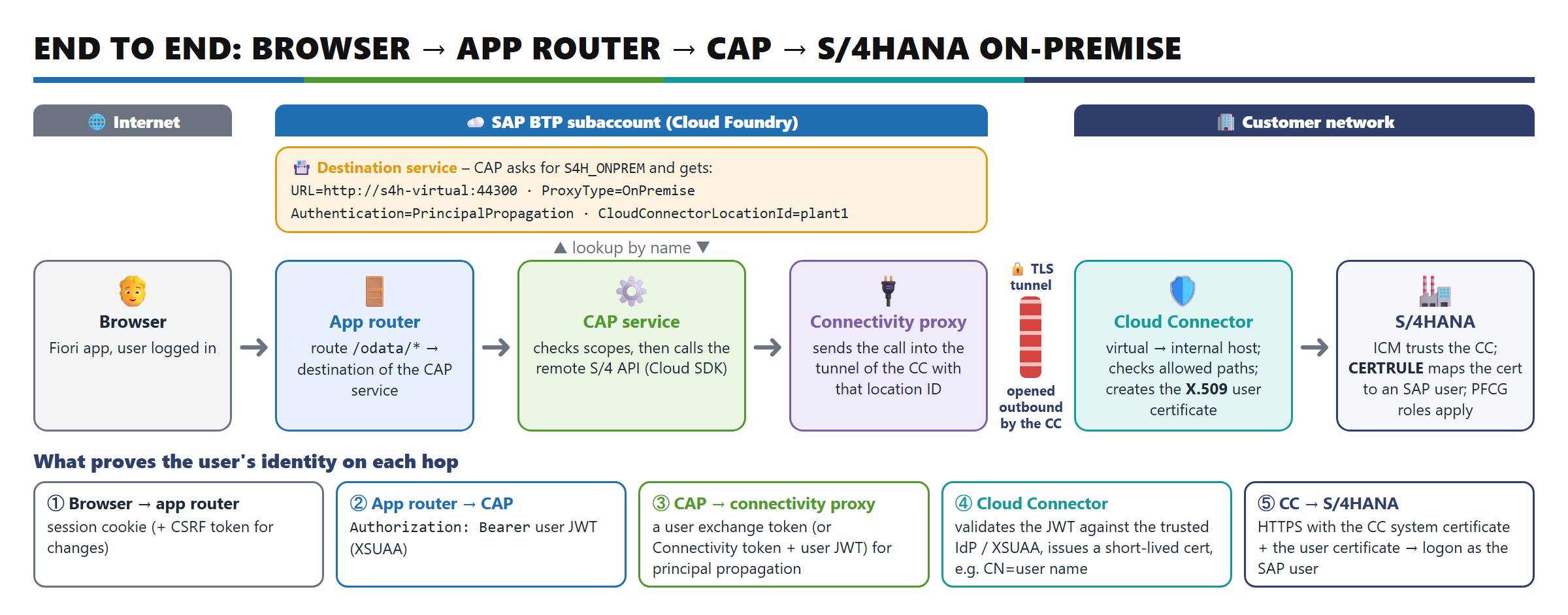
5.1 Destination service
- Levels: destinations live at subaccount level (shared) or at service instance level (only for apps bound to that instance). A lookup checks the instance level first, then the subaccount.
- Types:
HTTP(most common),RFC(Java with JCo, ABAP environment),MAIL,LDAP,TCP. - Proxy types:
Internet(direct call to a public URL),OnPremise(through the Connectivity service and the Cloud Connector),PrivateLink(SAP Private Link service to hyperscaler resources). - Find destination API: the app calls the Destination service with a client token of its binding (and the user's JWT in
X-user-tokenfor user-based types); the answer contains the configuration and ready-to-useauthTokens– the service runs the OAuth / SAML flow and caches tokens.
Authentication type | User? | How it works | Typical use |
|---|---|---|---|
NoAuthentication | – | No credentials (or the app adds its own header) | Public APIs, forwarding a token yourself |
BasicAuthentication | No | Fixed user + password stored in the destination | Quick tests, legacy systems – technical user |
ClientCertificateAuthentication | No | Client X.509 certificate (keystore) uploaded to the destination | Certificate-based technical access |
OAuth2ClientCredentials | No | Client ID + secret / certificate → token from the target's token URL | S/4HANA Cloud communication arrangements, BTP services, APIs |
OAuth2Password | No | Password grant with a stored user | Avoid (legacy) |
OAuth2UserTokenExchange | Yes | Exchanges the user's XSUAA token for one of another XSUAA client in the same subaccount | App-to-app calls on BTP |
OAuth2JWTBearer | Yes | JWT bearer grant: user token → token of the target's authorisation server | User propagation to OAuth-protected APIs |
OAuth2SAMLBearerAssertion | Yes | Destination service creates a SAML assertion for the user, signed with the subaccount's key; target OAuth server returns a token | S/4HANA Cloud, SuccessFactors, S/4 on-premise with SOAUTH2 |
PrincipalPropagation | Yes | User identity forwarded to the Cloud Connector, which creates an X.509 certificate – OnPremise only | On-premise S/4HANA / ECC with SSO |
OAuth2TokenExchange | Yes | Generic token exchange: the Destination service sends the given token to the configured token service and returns the new token (any token type the service supports) | Third-party or IAS-based OAuth servers |
OAuth2TechnicalUserPropagation | No | Client credentials token for a technical user, sent through the Cloud Connector – OnPremise only | On-premise systems that accept OAuth tokens |
SAMLAssertion | Yes | Destination service creates a SAML assertion for the user that the app sends itself | Targets that accept SAML assertions directly |
| Yes | Authorization code obtained with the user's consent (or a stored refresh token) is turned into an access token | Third-party APIs that need user consent |
Destination types other than HTTP – RFC, LDAP, MAIL, TCP – have their own property sets; see page 03 for the overview and SAP Help › Connectivity for the full property lists.
Useful additional properties: sap-client, CloudConnectorLocationId, HTML5.DynamicDestination, HTML5.ForwardAuthToken, WebIDEEnabled / WebIDEUsage (Business Application Studio), URL.headers.<name> and URL.queries.<name> to add fixed headers or query parameters (the SAP Cloud SDK applies both; the app router applies URL.headers). The cockpit's Check Connection only proves reachability – not that a user-based flow works.
5.2 Connectivity service
For OnPremise destinations the app sends the HTTP request to the connectivity proxy (host and port from the Connectivity service binding) instead of the target. The proxy forwards it through the right Cloud Connector tunnel. Headers the proxy evaluates (libraries such as the SAP Cloud SDK set them):
Header | Content |
|---|---|
Proxy-Authorization |
|
SAP-Connectivity-Authentication |
|
SAP-Connectivity-SCC-Location_ID | Location ID when the subaccount has several Cloud Connectors |
With an IAS token (IAS-based app) principal propagation uses the two-header variant: Proxy-Authorization with the Connectivity service token and SAP-Connectivity-Authentication with the IAS token. Prerequisites: Cloud Connector 2.13 or newer, and the subaccount the Cloud Connector is connected to trusts the IAS tenant that issues the tokens.
In Kyma the connectivity proxy module plays the same role. ABAP environment systems use the same Cloud Connector through communication arrangements (ABAP on BTP › 01), and SAP Cloud Integration through adapters with proxy type On-Premise (Integration Suite › 02 SAP Cloud Integration).
5.3 Cloud Connector set-up
Step | Where | What to configure |
|---|---|---|
1. Install | Server in the customer network (Windows, Linux) | Installer or portable version; admin UI on |
2. Connect | Cloud Connector → Add Subaccount | Region, subaccount ID, display name, a user with the Cloud Connector Administrator role (or an authentication data file), optional location ID |
3. Map the system | Cloud To On-Premise → Access Control | Back-end type (ABAP System), protocol (HTTPS / RFC), internal host:port, virtual host:port, principal type (X.509 Certificate for principal propagation, None for technical users) |
4. Expose resources | Same system → Resources | Only the needed URL paths, e.g. |
5. Check | Cloud Connector + BTP cockpit | Status Reachable; cockpit → Connectivity → Cloud Connectors lists the exposed virtual hosts per location ID |
6. Destination | BTP cockpit → Destinations | URL = virtual host, ProxyType OnPremise, same location ID, authentication type |
5.4 Principal propagation end to end
Goal: the S/4HANA call runs as the logged-on user with his PFCG roles, without passwords and without a shared technical user. The certificate basics (STRUST, X.509 logon, CERTRULE) are on Security › 03 Secure ABAP Coding & System Security.
Side | Configuration |
|---|---|
BTP | Destination with ProxyType |
Cloud Connector – trust | Configuration → On Premise → Principal Propagation: synchronise the trusted identity providers of the subaccount, so the CC accepts the user's token |
Cloud Connector – CA | A CA certificate (local or company CA) that signs the short-lived user certificates |
Cloud Connector – subject pattern | How the user certificate is built, e.g. |
Cloud Connector – system certificate | The CC's own client certificate, presented on every HTTPS call to the back end |
S/4HANA – trust (STRUST) | Import the CC's CA certificate (and the system certificate's issuer) into the SSL server PSE |
S/4HANA – ICM |
|
S/4HANA – user mapping |
|
5.5 How the app router and CAP find destinations
- App router:
destinationin a route is looked up in thedestinationsenvironment variable first, then in the bound Destination service (instance, then subaccount level). For OnPremise targets it uses the bound Connectivity service;forwardAuthToken/HTML5.ForwardAuthTokendecide whether the JWT is passed on. - CAP: a remote service is declared in
package.json(cds.requires) with a destination name; CAP uses the SAP Cloud SDK, which reads the Destination and Connectivity bindings, runs the token flow and – for principal propagation – passes the current user's JWT automatically.
|
|
The model srv/external/API_BUSINESS_PARTNER comes from cds import of the service's EDMX (BTP Development › 06); the MTA must bind Destination, Connectivity and XSUAA to the CAP module.
Part 6 – Common security and connectivity errors
Tools for finding them (cf logs, app router and CAP debug logs, the Cloud Connector monitor and traces) are on BTP Development › 06 BTP Developer Hands-On.
Symptom | Typical cause | Fix |
|---|---|---|
401 from CAP / the API | No token forwarded ( | Forward the token; bind app router and service to the same XSUAA instance or grant the scope; check the claims (decoded locally) |
403 after a successful login | Scope missing: role collection not assigned, IdP group mapping wrong, or the user still has the old token | Assign the role collection / fix the group mapping; log out and in; compare scope and xs.system.attributes in the token |
403 for a job / technical client | Client token has no authorities | Add |
XSUAA error page about an invalid redirect URI | App router URL (new route, custom domain) not in | Add it to |
403 with | No token fetched, token of another session, or app router and back end both doing CSRF | Fetch with |
502 / 503 from the app router or CAP | Destination not found (name, level, missing binding), target down, or no Cloud Connector connected | Check name and level, bindings, the CC status in the cockpit |
503 "no Cloud Connector for your subaccount" | Cloud Connector not connected, or the destination's CloudConnectorLocationId differs from the CC's location ID (or is missing) | Use exactly the same ID on both sides |
403 "access denied" from the Cloud Connector | Virtual host or URL path not exposed in Access Control | Add the resource (path, sub-paths) for that virtual host |
504 Gateway Timeout | Back end slower than the timeout of app router / proxy | Optimise the call (paging, |
Principal propagation: back end 401 or the wrong user | Subject pattern ≠ CERTRULE rule, CA not in STRUST, ICM trust parameters missing, IdP trust not synced in the CC, SAP user missing | Compare the sample certificate with CERTRULE; check ICM trace (SMICM) and the security audit log; sync trust |
Part 7 – Interview questions
Q1. Map the OAuth 2.0 roles to a Fiori + CAP app on BTP.
The business user is the resource owner; the app router is the client (with its XSUAA client ID and secret); XSUAA – or IAS – is the authorisation server; the CAP service is the resource server that validates the JWT and checks scopes.
Q2. Authorization code vs client credentials vs JWT bearer – when do you use which?
Authorization code for interactive user login through the app router. Client credentials for technical calls without a user (jobs, integrations) – the token has authorities, no user. JWT bearer (token exchange) when an app holding a user token must call another API as that user. The password grant is legacy and must not be used.
Q3. What is inside an XSUAA JWT and how does CAP validate it?
Header (alg, kid, jku), payload (iss, sub, aud, exp, client_id, scope, user_name, email, zid, xs.user.attributes …) and an RSA signature. CAP validates offline: public key from XSUAA's token_keys endpoint, signature, expiry, issuer and audience → 401 if wrong; then the role/scope from @requires / @restrict → 403 if missing.
Q4. Is a JWT encrypted? What follows for security?
No – it is only Base64url-encoded and signed. Anyone can read it and anyone holding it can use it until it expires. So: no secrets in claims, short lifetimes, HTTPS only, keep tokens server-side (app router session), never log them and never paste productive tokens into online decoders.
Q5. Explain scopes, role templates, roles and role collections. What is $XSAPPNAME?
The developer defines scopes and role templates (scopes + attributes) in xs-security.json; roles are templates with concrete attribute values; admins bundle roles into role collections and assign those to users or IdP groups. $XSAPPNAME is a placeholder for the xsappname plus a generated suffix (e.g. travel-app!t123), which makes scope names unique.
Q6. A user was assigned the right role collection but still gets 403. Why?
Most often the token is old – scopes are copied in at login, so the user must log out and in. Other causes: the role collection is mapped to an IdP group the user is not in, the role was created from a template with attribute values that filter everything, or app router and service use different XSUAA instances so the scope belongs to another xsappname.
Q7. App A must call app B on BTP as the logged-on user. How?
Same subaccount and tightly coupled: B grants a scope to A (granted-apps), A lists it in foreign-scope-references and forwards the user token. Otherwise exchange the token: a destination with OAuth2UserTokenExchange (same subaccount) or OAuth2JWTBearer; across subaccounts or to SAP SaaS OAuth2SAMLBearerAssertion – or use IAS, which works across landscapes.
Q8. XSUAA or IAS for a new application?
SAP's CAP documentation recommends IAS (SAP Cloud Identity Services) for new projects: OIDC, one identity across subaccounts, regions and SAP cloud products. XSUAA stays fully supported and is the most common setup in existing apps; both can run side by side. Check multitenancy and authorisation needs (scopes vs IAS groups / policies) before deciding.
Q9. What does the app router do and what is in xs-app.json?
Single entry point: login via OAuth, session and token handling, routing, CSRF protection, scope checks, logout. xs-app.json has welcomeFile, authenticationMethod, logout and routes; each route has a regex source, optional target rewrite, a destination, service (html5-apps-repo-rt) or localDir, authenticationType and csrfProtection. Routes are matched top to bottom – catch-all last.
Q10. Standalone or managed app router?
Managed (part of SAP Build Work Zone) for Fiori apps in a launchpad – SAP runs and updates it, routes come from the xs-app.json inside each app in the HTML5 Application Repository. Standalone (@sap/approuter as an MTA module) when you need custom middleware, special session or header settings, or the app must run outside Work Zone – but then you operate and patch it.
Q11. Walk me through a Fiori app on BTP reading data from on-premise S/4HANA as the user.
Browser → app router (session, JWT) → CAP with the user's JWT → CAP looks up the destination (virtual host, OnPremise, PrincipalPropagation, location ID) → request goes to the connectivity proxy with a user exchange token (or Connectivity token + user JWT) → TLS tunnel to the Cloud Connector, which checks the allowed path and creates a short-lived X.509 certificate for the user → S/4HANA trusts the CC, maps the certificate to an SAP user with CERTRULE and applies the PFCG roles.
Q12. The app gets 503 when calling the on-premise system. How do you troubleshoot?
Check the error text: "no Cloud Connector connected" → CC down or the location ID in the destination does not match the CC's; "access denied" → resource path not exposed. Then check the destination (name, level, virtual host, proxy type), the Destination and Connectivity bindings, the CC status in the cockpit, and the CC and back-end logs (ICM trace, security audit log for principal propagation).
Q13. A new IAS-based CAP app must call an existing XSUAA-protected service as the logged-on user. How?
Create the app's identity instance with xsuaa-cross-consumption: true, so the IAS token's audience contains the subaccount's XSUAA client. Exchange the IAS token at XSUAA with the JWT bearer grant (library call, or a destination with OAuth2JWTBearer) and call the service with the resulting XSUAA token, which carries the user's scopes. With @sap/xssec 4 the library call is fetchJwtBearerToken on the XsuaaService, or the opt-in xsuaaLegacyExtension; the automatic IAS_XSUAA_XCHANGE_ENABLED option of version 3 is gone.
🏠 Start Here · ◀ 03 · Services & Identity · 05 · Interview Questions ▶ · Sections: CORE ABAP | OOPS ABAP | ABAP on HANA | Clean Core | RAP | ABAP Points | SAP Fiori | SAPUI5 | Mobile Development (MDK) | BTP Foundations | BTP Development | CAP | SAP Build | ABAP on BTP | Integration Suite | SAP Business AI | SAP BASIS | Security | SAP SDLC
Functional: FICO ABAP | TRM ABAP | VIM | SAP BIS | SD ABAP | MM ABAP | PP ABAP | QM ABAP | PM ABAP | PS ABAP | EWM | TM ABAP | GTM ABAP | EHS ABAP | HR ABAP | BW | SAP Datasphere | SAP Business Data Cloud | SAP MDG | SAP Analytics Cloud | SAP Ariba | SAP CX | SAP IBP