How you consume services on SAP BTP (subscriptions, service instances, bindings, service keys, SAP Service Manager), who may do what (platform users, business users, role collections), how users log on (SAP Cloud Identity Services – Identity Authentication, Identity Provisioning, Authorization Management – XSUAA, trust, SSO), how cloud apps reach other systems (destinations, Connectivity service, Cloud Connector, SAP Private Link service), plus the HTML5 Application Repository, SAP Credential Store and the SAP Audit Log service. The deep dive into OAuth, JWT, xs-security.json and the app router is on page 04.
Part 1 – Services: subscriptions vs service instances
On SAP BTP every capability you consume – a database, authentication, connectivity, a launchpad, an IDE – is a service. You find them in the Service Marketplace of a subaccount (only services the subaccount is entitled to appear there, see page 02). In Cloud Foundry terms the services an app uses over the network are backing services: attached resources the app connects to through credentials, not code it contains.
Services come in two consumption types:
Subscription (SaaS, multitenant application) | Service instance (instance-based service) | |
|---|---|---|
What you get | A ready web application – you subscribe and receive a URL | A technical capability your app connects to through APIs – no UI of its own |
Where it lives | Subaccount level, independent of environments – no Cloud Foundry needed | Inside an environment: a CF space or a Kyma namespace (a few services also at subaccount level, "Other" environment) |
How you use it | Open the URL, assign role collections to users | Bind it to an app or create a service key, then call it with the credentials |
Examples | SAP Build Work Zone, SAP Business Application Studio, SAP Integration Suite, SAP Build Process Automation, SAP Build Apps | SAP HANA Cloud (schemas/HDI containers), Destination, Connectivity, XSUAA (Authorization and Trust Management), Object Store, Job Scheduling |
The same idea as SuccessFactors or S/4HANA Cloud: a subscription is SaaS – you use it. A service instance is a building block – you build with it. Your own multitenant app on BTP can itself be offered to other subaccounts as a subscription.
Part 2 – Service instance, binding, service key and SAP Service Manager
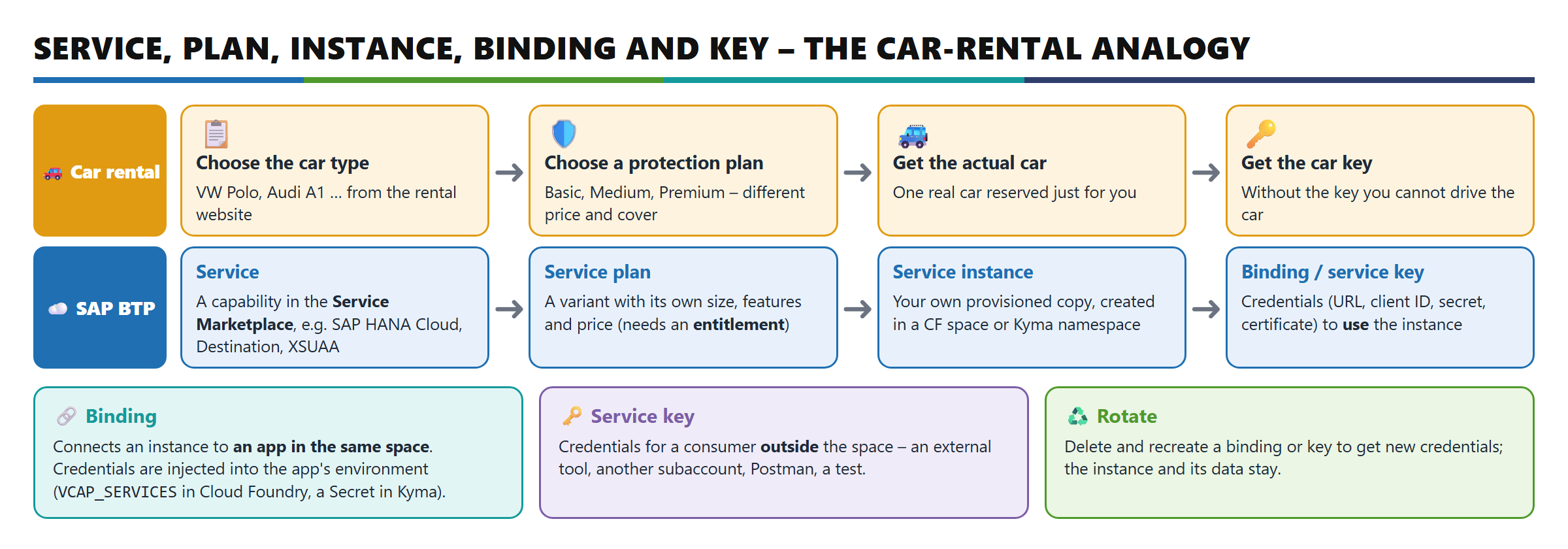
Term | Meaning | Car-rental analogy |
|---|---|---|
Service | A capability offered in the marketplace | The car models on the rental website |
Service plan | A variant with its own size, features and price; needs an entitlement | Basic, Medium or Premium protection plan |
Service instance | Your own provisioned copy of a service with a chosen plan, created in a space or namespace | The actual car reserved for you |
Binding | Connects the instance to an app in the same space; credentials are injected into the app's environment ( | The key handed to the driver |
Service key | Credentials for a consumer outside the space (external tool, other system, test) | A spare key for someone else |
Creating and using an instance with the cf CLI
|
In real projects bindings are declared in the mta.yaml (requires / resources) and created automatically on deployment – see 05 · Developing on BTP. Treat binding and key credentials like passwords: never put them in Git, rotate them by deleting and recreating the binding or key (the instance and its data stay). Many services also accept X.509 credentials in the binding instead of a client secret: {"credential-type": "x509", "x509": {"key-length": 2048, …}} in the binding parameters creates a certificate managed by SAP Authorization and Trust Management.
2.1 SAP Service Manager and the SAP BTP service operator
Behind every marketplace there is SAP Service Manager: the central registry of the subaccount that knows all service brokers, offerings, plans, instances and bindings, whichever environment created them. Cloud Foundry, Kyma and the "Other" environment are just platforms registered with it. That is why one entitlement and quota serves all environments, and why the cockpit shows every instance of a subaccount in one list.
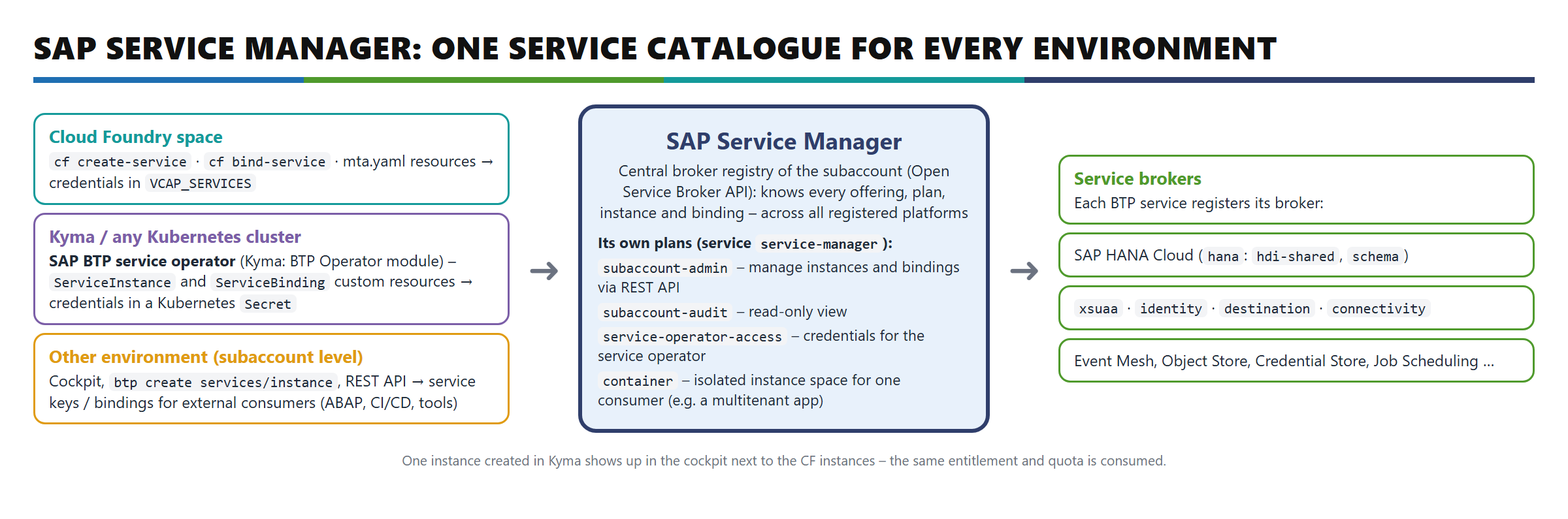
Where you work | How you create instances and bindings | Where the credentials end up |
|---|---|---|
Cloud Foundry |
|
|
Kyma / Kubernetes | SAP BTP service operator (open source, github.com/SAP/sap-btp-service-operator; in Kyma the BTP Operator module) with the custom resources | A Kubernetes Secret mounted into the pod |
Other environment / automation | Cockpit, btp CLI ( | Service key or binding you read and hand to the consumer |
|
Service Manager offers its own service service-manager with plans such as subaccount-admin (manage instances via its REST API), subaccount-audit (read only), service-operator-access (credentials for the service operator) and container (an isolated group of instances for one consumer, used for example by multitenant apps; its instances are invisible to other container instances). These four are the plans of the service-manager offering.
Part 3 – Users, members and role collections
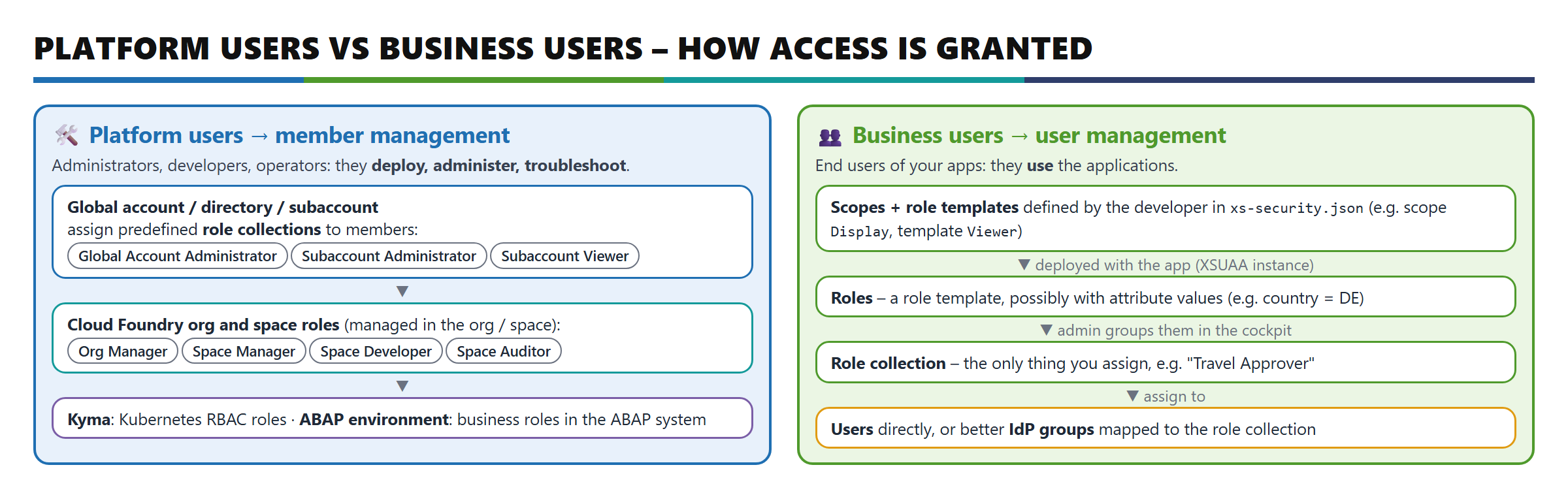
Platform users | Business users | |
|---|---|---|
Who | Administrators, developers, operators | End users of the applications |
Do what | Deploy, administer, troubleshoot | Use apps and services |
Managed by | Member management at global account, directory, subaccount, CF org and space | User management: authentication by an identity provider, authorisation by role collections |
Identity provider | SAP ID service by default; a custom IdP (the company's Identity Authentication tenant) can be set up for platform users too | SAP recommends the company's Identity Authentication tenant; SAP ID service is the preconfigured default |
3.1 Member management (platform users)
A member is a user assigned to a global account, directory or subaccount. Administrators add members and give them predefined role collections, for example:
Level | Typical role collections / roles |
|---|---|
Global account | Global Account Administrator, Global Account Viewer |
Directory | Directory Administrator, Directory Viewer |
Subaccount | Subaccount Administrator, Subaccount Viewer, Destination Administrator, Cloud Connector Administrator |
Cloud Foundry org | Org Manager, Org Auditor (managed in the org, not via role collections) |
Cloud Foundry space | Space Manager, Space Developer (deploy apps, create instances), Space Auditor |
Kyma / ABAP | Kubernetes RBAC roles in Kyma; business roles inside the ABAP system |
3.2 Authorisation for business users
The developer describes the app's authorisations in xs-security.json; it is deployed with the app as an XSUAA service instance. The administrator then groups roles into role collections and assigns them.
Artefact | Defined by | Meaning |
|---|---|---|
Scope | Developer | One permission the app checks, e.g. |
Attribute | Developer | Value for instance-based checks, e.g. country |
Role template | Developer | A set of scopes (+ attributes), e.g. Viewer |
Role | Generated / admin | A role template with concrete attribute values |
Role collection | Developer or admin | A set of roles – the only thing assigned to users or user groups |
|
Best practice: map role collections to user groups of the identity provider (trust configuration → role collection mappings) instead of assigning individual users. Then joining or leaving a group in the corporate directory grants or removes access automatically. The complete xs-security.json reference, attributes and CAP annotations are on 04 · BTP Security Deep Dive.
Part 4 – Identity, trust and single sign-on
4.1 The building blocks
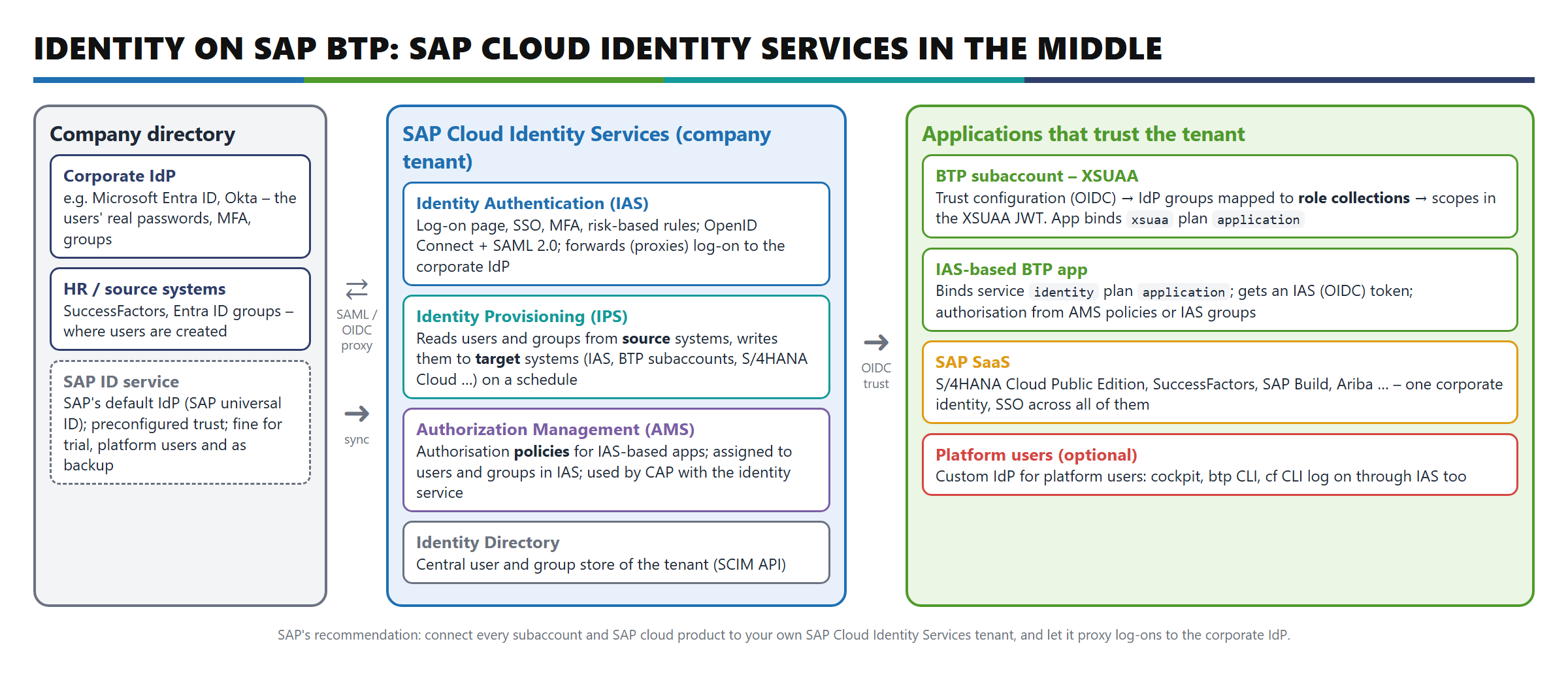
Component | Role |
|---|---|
SAP ID service | SAP's own identity provider for SAP users (SAP universal ID). Trust to it is preconfigured in every subaccount, so it works out of the box; the default for platform and business users. MFA can only be enabled by each user, not enforced – one reason SAP strongly recommends a custom Identity Authentication tenant. |
SAP Cloud Identity Services – Identity Authentication (IAS) | Your company's cloud identity provider tenant: log-on pages, SSO, multi-factor authentication, password and risk policies; supports SAML 2.0 and OpenID Connect; can act as a proxy to a corporate IdP (e.g. Microsoft Entra ID). |
SAP Cloud Identity Services – Identity Provisioning (IPS) | Copies users and groups from source systems (e.g. Entra ID, SuccessFactors) to target systems (IAS, S/4HANA Cloud, BTP …) – keeps identities in sync. |
SAP Cloud Identity Services – Authorization Management (AMS) | Authorisation policies for applications that use IAS instead of XSUAA: the app defines policies, admins assign them to users and groups in the IAS tenant, and the app checks them at runtime. Needed because IAS tokens carry no roles; CAP maps AMS policies to CAP roles plus attribute filters (capire: Role Assignment with AMS). |
XSUAA – SAP Authorization and Trust Management service | The subaccount's OAuth 2.0 authorisation server: trusts the configured IdP, turns the user's role collections into scopes and issues a JWT access token that the app checks. |
Trust configuration | Subaccount setting that says which identity providers it trusts. Establishing trust to an IAS tenant creates an OpenID Connect trust; the SAP ID service entry can be kept or deactivated. |
App router | Single entry point of a BTP web app: handles log-on, sessions and forwards requests with the JWT to the back-end services (standalone or managed by Work Zone / SAP Build). |
Recommended setup: connect each subaccount to the company's Identity Authentication tenant and let IAS forward log-ons to the corporate IdP. Users then have one corporate identity for all SAP cloud applications.
Identity Provisioning in practice
IPS works with three kinds of systems: source systems (where users and groups are mastered, e.g. Microsoft Entra ID, SuccessFactors), target systems (where they are written, e.g. the IAS Identity Directory, a BTP subaccount, S/4HANA Cloud) and proxy systems (a connector that lets an external tool read or write through IPS). Jobs run on a schedule, and transformations (JSON mappings) decide which attributes and groups are copied. Typical BTP use: provision corporate groups into IAS so that the trust configuration can map them to role collections.
Platform users with a custom IdP
Platform users can also log on through the company's IAS tenant (trust for platform users at global account level). For non-interactive logons such as the cf CLI or btp CLI with user and password, a custom IdP can be made the default (btp update security/settings); browser-based logon (btp login --sso, cf login --sso) works with MFA.
XSUAA, IAS or both?
Apps protected by XSUAA get scopes from role collections; apps bound to the identity service (IAS) get an OIDC token from IAS and use AMS policies or IAS groups. Both can live in one landscape: with XSUAA cross-consumption an IAS token can be exchanged for an XSUAA token, so IAS-based apps can call XSUAA-protected services as the same user. Principal propagation to on-premise systems works with both token types. Details, decision table and the exchange flow: 04 · BTP Security Deep Dive, Part 3.4.
4.2 Log-on flow and SSO
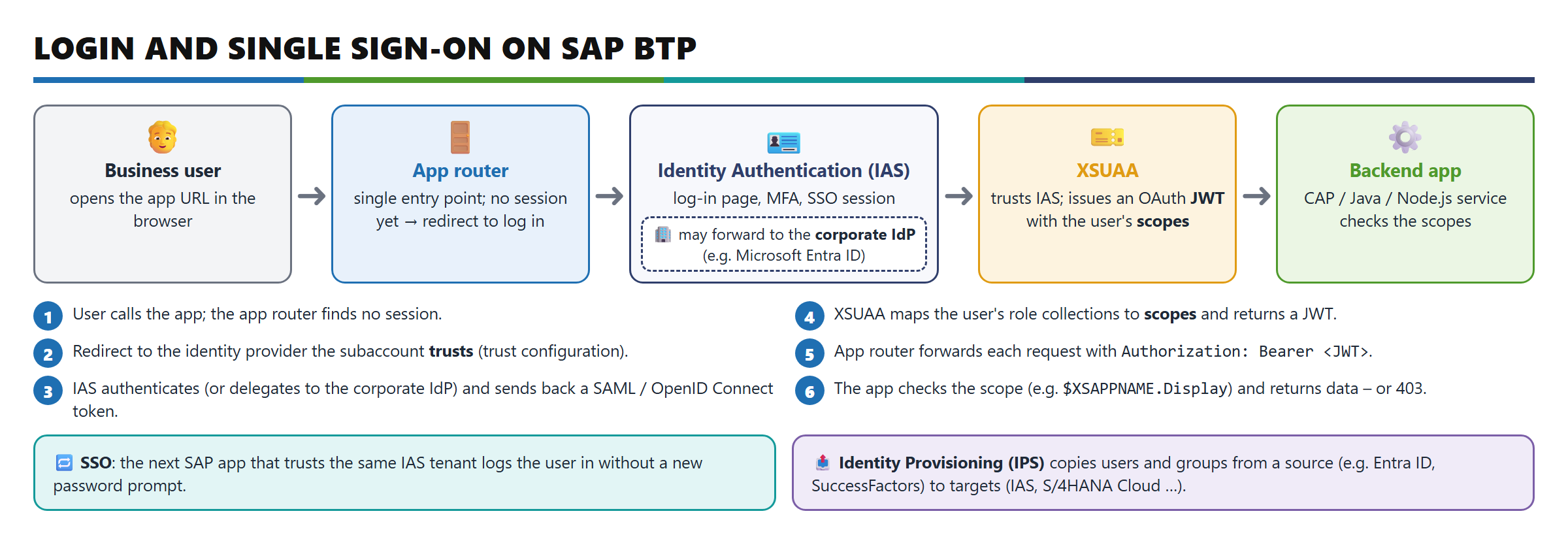
Single sign-on (SSO): the user authenticates once at the identity provider; every further application that trusts the same IdP accepts the existing session without asking for a password again.
Term | Meaning |
|---|---|
IdP (identity provider) | System that authenticates users and issues identity tokens (IAS, Entra ID, SAP ID service) |
SP (service provider) | The application that trusts the IdP (a BTP subaccount, S/4HANA Cloud) |
SAML 2.0 | XML-based standard for browser SSO between IdP and SP |
OpenID Connect (OIDC) | Identity layer on top of OAuth 2.0, JSON/JWT-based – used between IAS and BTP |
OAuth 2.0 | Standard for delegated authorisation with access tokens (client credentials, authorisation code …) |
JWT (JSON Web Token) | Signed token carrying the user, scopes and expiry; sent as |
Part 5 – Connectivity: destinations, Connectivity service, Cloud Connector, Private Link
5.1 Destinations (Destination service)
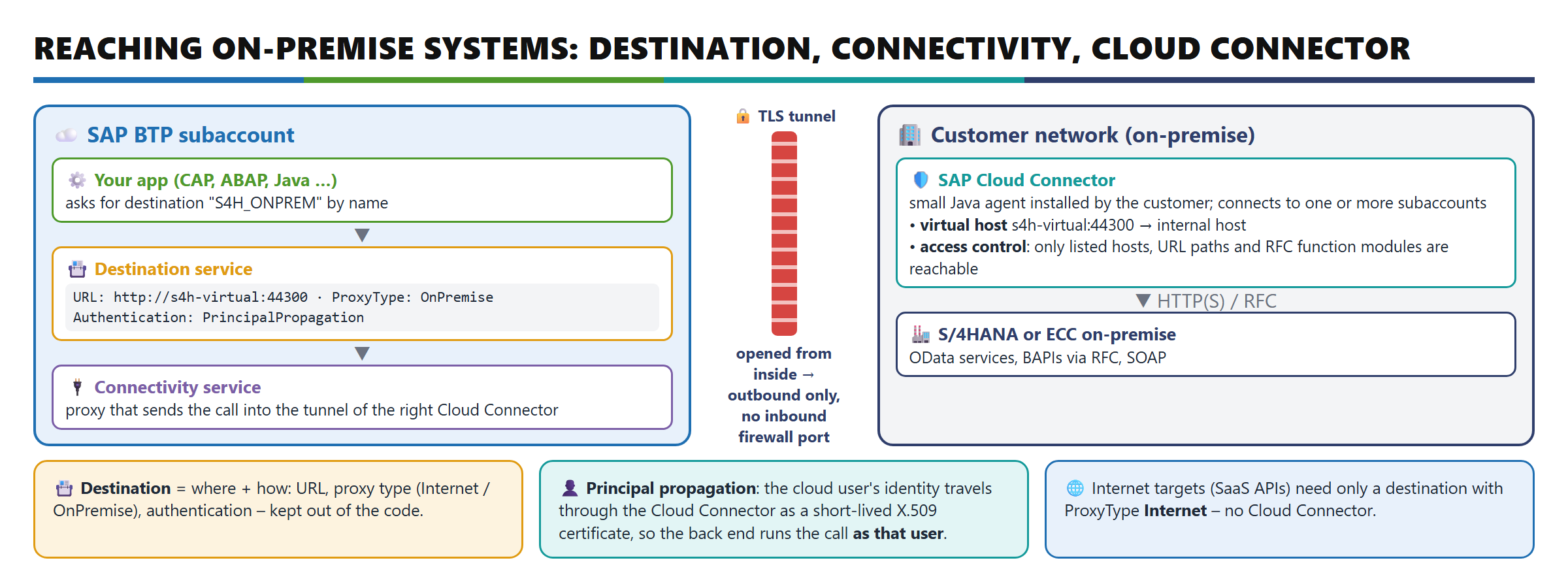
A destination stores where a target system is and how to authenticate – outside the code. The app asks the Destination service for a destination by name at runtime; admins can change URL or credentials without redeploying. Destinations are maintained in the cockpit at subaccount level (or per service instance).
Property | Example | Meaning |
|---|---|---|
Name | S4H_ONPREM | What the code refers to |
Type | HTTP | Also RFC, LDAP, MAIL, TCP |
URL | For on-premise: the virtual host defined in the Cloud Connector | |
Proxy type | OnPremise | Internet (direct, the default), OnPremise (through the Cloud Connector) or PrivateLink (SAP Private Link service) |
Authentication | PrincipalPropagation | NoAuthentication, BasicAuthentication, OAuth2ClientCredentials, OAuth2SAMLBearerAssertion, PrincipalPropagation, ClientCertificateAuthentication … |
Location ID | plant1 | Optional – picks one of several Cloud Connectors in the subaccount |
Additional properties |
| Client, flags for tools like Business Application Studio |
Destination types
Type | Used for | Typical consumer |
|---|---|---|
HTTP | OData, REST, SOAP over HTTP(S) – by far the most common | CAP, SAP Cloud SDK, app router, SAP Build, Business Application Studio |
RFC | Remote function calls to ABAP systems (via the Cloud Connector) | Java apps with SAP Java Connector (JCo), SAP Business AI Platform, ABAP environment |
LDAP | Directory lookups (users, groups) in an on-premise LDAP server | Java apps |
Sending (SMTP) and reading (IMAP, POP3) e-mail | Apps that send notifications | |
TCP | Plain TCP or SOCKS5 connections to on-premise systems through the Cloud Connector | Database or custom protocols |
Which authentication type?
The authentication type decides who the target sees: a technical user (the same for every call) or the logged-on business user (principal propagation, token exchange, SAML bearer). Choose by that question first, then by where the target runs:
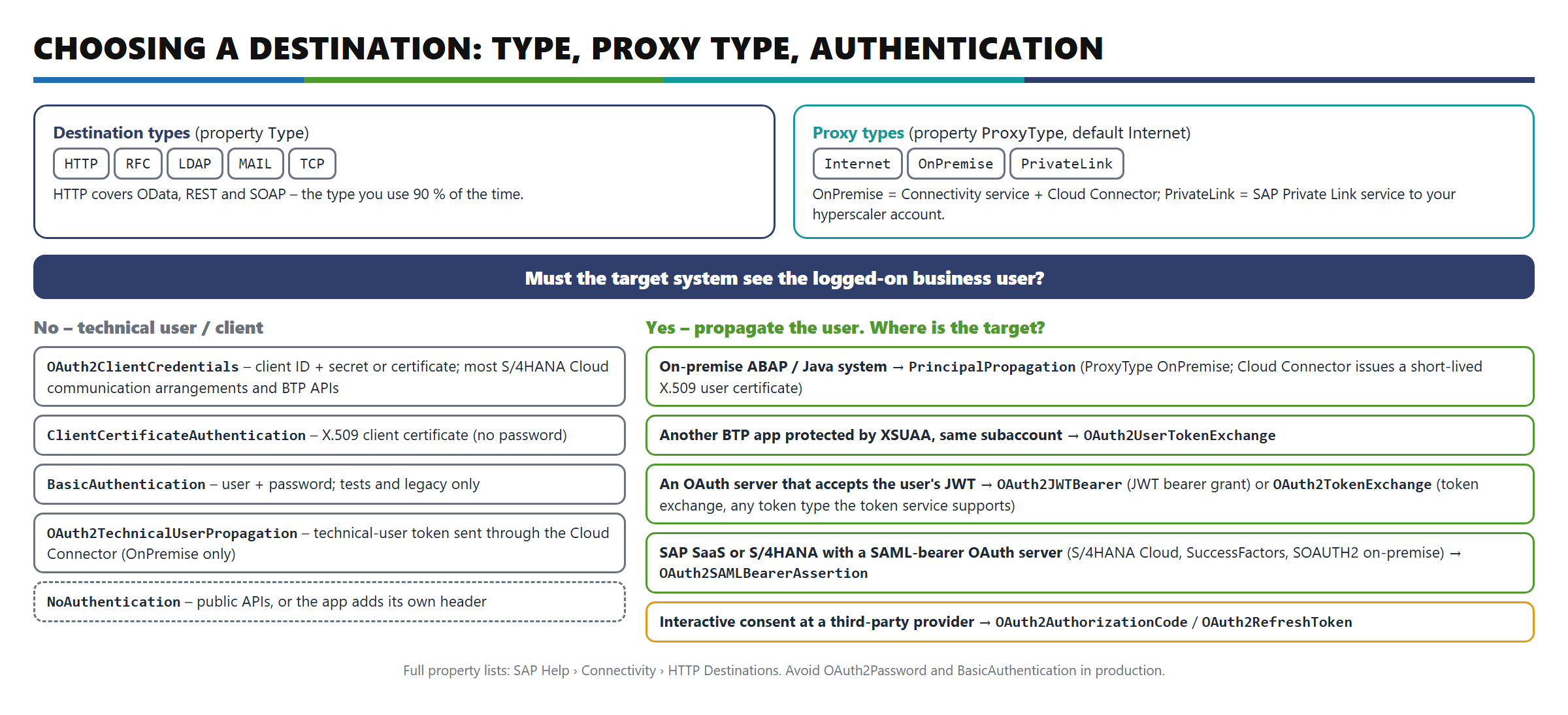
Group | Authentication types | When |
|---|---|---|
Technical user |
| Jobs, integrations, APIs without user context – prefer OAuth or certificates over passwords |
Business user |
| The target must apply the user's own authorisations and log the real user |
Interactive / special |
| Third-party APIs with user consent; public APIs; avoid password-based types |
How each user-based type works, the Find Destination API and the full table: 04 · BTP Security Deep Dive, Part 5.
5.2 Connectivity service
The Connectivity service provides the proxy that routes calls with proxy type OnPremise into the secure tunnel of the right Cloud Connector. An app that calls on-premise systems needs an instance of both the Destination and the Connectivity service (in Kyma the Connectivity Proxy module plays this role). On Kubernetes the Transparent Proxy can resolve destinations and add the authentication for the app, so the code calls a simple in-cluster host name.
5.3 SAP Cloud Connector
The Cloud Connector is a small agent the customer installs inside its own network (Windows or Linux). It links the on-premise landscape with one or more BTP subaccounts.
- Opens an outbound TLS tunnel to the subaccount – no inbound port has to be opened in the firewall; requests from the cloud travel back through this tunnel.
- Access control: only the systems, URL paths and RFC function modules explicitly listed are reachable from the cloud.
- Virtual host mapping: the cloud sees
s4h-virtual:44300, never the real internal host name. - Protocols: HTTP(S), RFC, and more (e.g. LDAP, TCP); audit logging of all calls; high availability with a master and a shadow instance.
- Also used by SAP tools, e.g. Business Application Studio or Work Zone reaching on-premise OData services, and Cloud Integration reaching on-premise back ends.
Principal propagation: the logged-on cloud user's identity is forwarded through the Cloud Connector (as a short-lived X.509 certificate), so the back end executes the call as that user with his own authorisations – no shared technical user.
5.4 SAP Private Link service
The Cloud Connector solves on-premise. But what if the target runs in the company's own hyperscaler account – a self-managed SAP system or a database on Azure or AWS? Calling it over the public internet means opening it to the internet. SAP Private Link service instead creates a private endpoint inside SAP BTP that connects to a service in your Azure, AWS or Google Cloud account over the hyperscaler's private backbone (Azure Private Link, AWS PrivateLink, Google Private Service Connect) – the traffic never crosses the public internet.
- Supported for apps in the Cloud Foundry and Kyma runtimes of a subaccount on the same hyperscaler as the target (plus SAP Commerce Cloud on Azure); services such as Cloud Integration, HANA Cloud or the Cloud Connector are not supported yet. Regions: see the SAP Discovery Center.
- Create an instance of the Private Link service with the resource ID of the target (e.g. the Azure Private Link Service or AWS endpoint service), approve the connection on the hyperscaler side, then bind the instance – the app receives a private host name.
- Destinations can use ProxyType PrivateLink; authentication works as with Internet destinations.
Target lives … | Use |
|---|---|
On the internet (public API, SaaS) | Destination with ProxyType Internet |
In the company network / data centre | Cloud Connector + Connectivity service, ProxyType OnPremise |
In the company's own Azure / AWS account | SAP Private Link service, ProxyType PrivateLink (or Cloud Connector installed in that VPC/VNet) |
How ABAP systems consume destinations (communication arrangements) is on 12 · ABAP on BTP; integration flows on 14 · Integration Suite, APIs & Events and 15 · SAP Cloud Integration (CPI).
Part 6 – UI delivery: HTML5 Application Repository and SAP Build Work Zone (summary)
Service | What it does |
|---|---|
HTML5 Application Repository | Central storage for the static content of web apps (HTML, JavaScript, CSS, manifest.json). UI5/Fiori apps are uploaded here at deployment (plan |
Managed application router | App router run by SAP as part of SAP Build Work Zone: serves apps from the HTML5 repository, handles log-on and routes OData calls via destinations – no own app router to operate. Standalone vs managed: 04 · BTP Security Deep Dive, Part 4. |
SAP Build Work Zone (standard / advanced edition) | The central Fiori launchpad site in the cloud (standard; the renamed SAP Launchpad service) and a digital workplace with workspaces and business content (advanced; formerly SAP Work Zone). |
Typical flow: a Fiori elements app is built in Business Application Studio, deployed as an MTA – its static files go to the HTML5 Application Repository – and added to a Work Zone site, where users see it as a tile; its OData calls go through a destination (and the Cloud Connector for on-premise back ends).
→ Sites, content federation, roles and the two editions in depth: the SAP Build sectionApps, Process Automation, Work Zone & Code. Deployment steps: 05 · Developing on BTP and 18 · BTP Developer Hands-On. Launchpad concepts: SAP Fiori section.
Part 7 – Other platform services: credential store, audit log and more
7.1 SAP Credential Store
Not every secret fits into a destination: an API key for a third-party service, a private key to sign documents, a password for a legacy SFTP server. SAP Credential Store keeps such secrets encrypted and gives them to the app at runtime through a REST API – no secrets in code, mta.yaml, environment variables you type by hand, or Git.
Concept | Meaning |
|---|---|
Credential types | password (user + value), key (e.g. an API key or symmetric key) and key ring (several versions of a key, for rotation) |
Namespace | Groups the credentials of one app or purpose inside the instance |
Binding | The app binds the instance and authenticates with the binding's credentials (basic or mutual TLS) |
Payload encryption | Requests and responses are additionally encrypted (JWE) with keys from the binding, on top of TLS – enabled by default; libraries handle it |
Management | Cockpit (instance → Manage) or the REST API; access is logged in the audit log |
Rule of thumb: connection data for a system the app calls → destination; any other secret the code needs → Credential Store; never a plain environment variable set with cf set-env.
7.2 SAP Audit Log service
Records security-relevant events (log-ons, changes to role collections, trust, personal data access). Platform events are written automatically; apps can write their own entries through the API (CAP offers this for personal data). Read them with the Audit Log Viewer or the retrieval API.
7.3 Operations services (overview)
Service | Use |
|---|---|
SAP Job Scheduling service | Runs app endpoints or CF tasks on a schedule (one-time, recurring, cron). |
SAP Alert Notification service | Sends platform and app events to e-mail, Slack, Teams, ticket systems. |
SAP Cloud Logging | Collects application logs, metrics and traces for analysis and dashboards. |
Object Store | Stores files and large objects on the hyperscaler's storage (S3-compatible, Azure Blob …). |
→ How to use logging, alerting, job scheduling, autoscaling and monitoring in projects: BTP Development › 05 · DevOps, Operations & Observability.
These services follow the same pattern as every instance-based service: entitlement → instance → binding → credentials in the app's environment.
Part 8 – Interview questions
Q1. What is the difference between a subscription and a service instance?
A subscription is a multitenant SaaS app you subscribe to at subaccount level and use via a URL – independent of environments (e.g. Work Zone, Business Application Studio). A service instance is a technical service created inside an environment (CF space, Kyma namespace) that apps consume via APIs after binding (e.g. Destination, XSUAA, HANA Cloud).
Q2. Binding vs service key?
Both give credentials for a service instance. A binding connects it to an app in the same space and injects the credentials into the app's environment (VCAP_SERVICES). A service key is for consumers outside the space, such as external tools or other systems.
Q3. Explain service, plan, instance and key with an analogy.
Car rental: the service is the car model, the plan is the protection package, the instance is the actual car reserved for you, and the binding / service key is the car key that lets you use it.
Q4. Platform users vs business users?
Platform users (admins, developers) deploy, administer and troubleshoot and are members of accounts, orgs and spaces. Business users use the applications; they authenticate at an IdP and get role collections.
Q5. What is a role collection and how is it built?
The unit you assign to users or IdP groups. The developer defines scopes and role templates in xs-security.json; roles are created from the templates; role collections group roles. Only role collections are assigned.
Q6. What are IAS and IPS?
Parts of SAP Cloud Identity Services. Identity Authentication (IAS) authenticates users – SSO, MFA, policies, proxy to a corporate IdP. Identity Provisioning (IPS) synchronises users and groups from source to target systems.
Q7. What does XSUAA do?
It is the subaccount's OAuth 2.0 authorisation server (Authorization and Trust Management service). It trusts the configured IdP, maps the user's role collections to scopes and issues a JWT that the app router forwards and the app checks.
Q8. How does a BTP app call an on-premise S/4HANA system securely?
Through a destination with proxy type OnPremise, the Connectivity service and the Cloud Connector installed in the customer network. The Cloud Connector opens an outbound TLS tunnel, exposes only allowed hosts and paths under virtual host names – no inbound firewall port is needed.
Q9. What is principal propagation?
Forwarding the cloud user's identity through the Cloud Connector (as a short-lived X.509 certificate) so the back end runs the request as that user with his own authorisations, instead of a shared technical user.
Q10. Why use destinations instead of hard-coded URLs?
They keep URL, proxy type and credentials out of the code, can be changed by admins without redeploying, support many authentication types and let the platform handle tokens and on-premise routing.
Q11. What is SAP Build Work Zone and how does it relate to the SAP Launchpad service?
Work Zone standard edition is the central Fiori launchpad site on BTP; it is the renamed SAP Launchpad service. The advanced edition adds a digital workplace with workspaces and business content.
Q12. Where do you store a password that a BTP app needs at runtime?
In a destination (for connection credentials) or in the SAP Credential Store – never in code, mta.yaml or Git. Security-relevant events are traced with the SAP Audit Log service.
Q13. What is SAP Service Manager, and how do you create a BTP service instance from Kyma?
Service Manager is the subaccount's central registry of service brokers, plans, instances and bindings for all environments. In Kyma the BTP Operator module (the SAP BTP service operator) lets you create ServiceInstance and ServiceBinding custom resources; the credentials arrive in a Kubernetes Secret and the instance is visible in the cockpit like a CF instance.
Q14. Scenario: a CAP app on BTP (on AWS) must read a database in the customer's own AWS account, which must not be reachable from the internet. How do you connect?
With SAP Private Link service: create a Private Link instance pointing to the customer's endpoint service, approve the connection in the AWS account, bind the instance and use the private host name (or a destination with ProxyType PrivateLink). The traffic stays on the hyperscaler's private network. The alternative is a Cloud Connector installed inside that VPC.
Q15. Scenario: users are managed in Microsoft Entra ID. New employees in group "Sales Approvers" must get access to the BTP approval app automatically. How do you set it up?
Trust the company's IAS tenant in the subaccount and let IAS proxy log-ons to Entra ID. Bring the group into IAS (IAS forwards it from the corporate IdP, or Identity Provisioning copies it). In the subaccount map the group to the app's role collection (trust configuration → role collection mappings). Joining the group in Entra ID then grants access at the next log-on – no manual user assignment.
🏠 Start Here · ◀ 02 · BTP Overview · 04 · Security Deep Dive ▶ · Sections: CORE ABAP | OOPS ABAP | ABAP on HANA | Clean Core | RAP | ABAP Points | SAP Fiori | SAPUI5 | Mobile Development (MDK) | BTP Foundations | BTP Development | CAP | SAP Build | ABAP on BTP | Integration Suite | SAP Business AI | SAP BASIS | Security | SAP SDLC
Functional: FICO ABAP | TRM ABAP | VIM | SAP BIS | SD ABAP | MM ABAP | PP ABAP | QM ABAP | PM ABAP | PS ABAP | EWM | TM ABAP | EHS ABAP | HR ABAP | BW | SAP MDG | SAP Analytics Cloud | SAP Ariba | SAP CX | SAP IBP