How the Order Approval Portal gets its Fiori elements apps (CR6): UI annotations in CDS, labels, field control, value helps and side effects, actions as buttons (CR4), draft with its events, locks and validation, and how the app is generated with SAP Fiori tools and run with cds watch.
Part 1 – Why Fiori elements on CAP
Requirements on this page
CR-ID | Requirement | Where on the page |
|---|---|---|
CR6 | A Fiori elements app for reps: list of requests, object page with notes | Part 1 (big picture), Part 2 (UI annotations) |
CR6 | Readable labels, value helps, read-only status | Part 3 |
CR4 (UI side) | Approve / Reject as buttons for managers | Part 4; the action logic is on 04 · Custom Logic in Node.js |
CR6 | Reps can save unfinished requests (draft) | Part 5 |
CR6 | Generate, run and ship the app | Part 6 |
Reps and managers need a standard UI: a filterable list of requests, an object page with header, sections and a notes table, Create / Edit / Save with drafts, and two action buttons. SAP Fiori elements renders exactly such floorplans (list report, object page) from OData V4 metadata plus annotations – no JavaScript UI code. CAP is built for this: it serves OData V4 with draft and passes every UI annotation written in CDS into $metadata. The same pattern you know from RAP (metadata extensions) – here the annotations are CDS annotate statements.
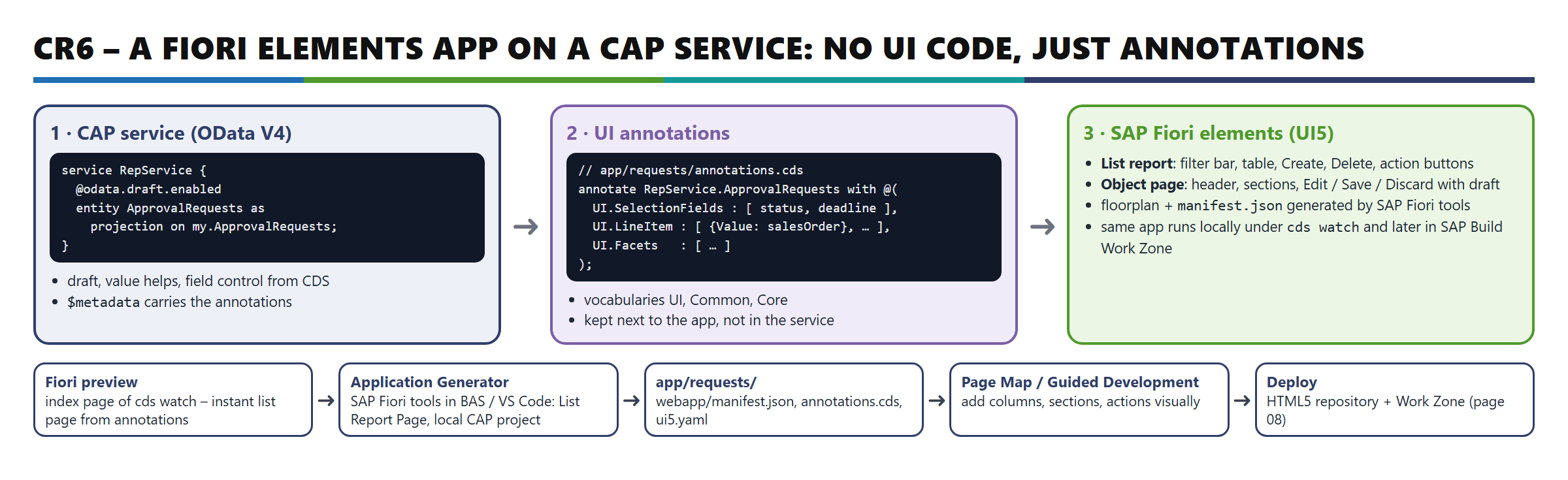
UI5 and Fiori elements themselves (floorplans, flexible programming model, building blocks) are explained in the SAP Fiori section › 07 Fiori Elements; this page covers the CAP side.
Part 2 – UI annotations in CDS
Annotations use the OData vocabularies UI, Common, Core, Communication and others. In CDS you write them with @UI.…; CAP translates them to the EDMX format. Put them next to the app (app/requests/annotations.cds) – the service stays clean, and two apps on one service can annotate differently.
|
Annotation | Where it shows | Notes |
|---|---|---|
UI.HeaderInfo | Object page title, list title (type name plural) | Title / Description values |
UI.SelectionFields | Filter bar fields of the list report | Array of element paths |
UI.LineItem | Table columns (list report, sub-tables) |
|
UI.Facets | Sections of the object page |
|
UI.FieldGroup #Qualifier | A block of label / value fields | Qualifier after |
UI.Identification | Fields and action buttons in the object page header area | Also used for actions |
| KPIs and micro charts in the header | Shown via |
statusCriticalityis avirtualelement (02 · CDS Modeling) filled in an after-READ handler with 1 (red), 2 (yellow) or 3 (green) – see 04 · Custom Logic in Node.js.- The quickest feedback loop: keep
cds watchrunning and open the Fiori preview link of the entity on the index page – a list report built from your current annotations, refreshed on every save. - SAP Fiori tools offer code completion and diagnostics for these annotations in
.cdsfiles (CDS language support + Fiori tools extensions in VS Code or SAP Business Application Studio).
Part 3 – Labels, field control, value helps and side effects
3.1 Labels and texts
- Prefer
@title(becomesCommon.Label) and@descriptionon the domain elements, with i18n keys – every app and service inherits them (02 · CDS Modeling, Part 5). - Show text instead of codes:
type @Common.Text: type.name @Common.TextArrangement: #TextOnly;. - Amounts with currency:
netAmount @Measures.ISOCurrency: currency_code;.
3.2 Field control
|
Static @readonly and @mandatory are translated into Fiori field control. Dynamic field control (editable only in some states) uses @Common.FieldControl with a path to a (virtual) integer element filled per row in a handler: 0 hidden, 1 read-only, 3 optional, 7 mandatory.
3.3 Value helps
|
@cds.odata.valuelistis a CAP convenience; the code lists of@sap/cds/common(Currencies, Countries, Languages) already carry it.- The value-help entity must be exposed in the same service (here
Customers, later a projection on the remote S/4HANA API – 09 · Remote Services).
3.4 Side effects
When a rep changes the customer, the UI should refresh the region shown on the page. A side effect tells Fiori elements which properties to reload after a change:
|
The region itself is set in a handler on the draft PATCH (04 · Custom Logic); the side effect only triggers the re-read. It is the same concept as RAP side effects.
Part 4 – Actions as buttons
CR4: managers approve or reject with one click. The bound actions approve() and reject(reason) of ManagerService.ApprovalRequests (defined on 03 · Services, implemented on 04 · Custom Logic) become buttons through DataFieldForAction:
|
- In table toolbars the action is called for the selected rows; on the object page for the current one.
Core.OperationAvailablegreys the button out unlessstatus = 'N'. CAP names the binding parameterin, hence the pathin/status; with an explicit binding parameter (action approve(in: $self)) the same reads@Core.OperationAvailable: ( :in.status = 'N' ). The server must still check the status: the UI rule is convenience, not security (07 · Authorization).- Parameters become a dialog;
@mandatoryon the parameter marks it required in the dialog.
Part 5 – Draft: saving work in progress
CR6: a rep starts a request, is interrupted by a customer call and continues an hour later, maybe on another device. Without draft every field change would be a real UPDATE (half-finished data visible to managers, validation errors on every keystroke). With draft the unfinished version lives in a separate shadow table until the rep presses Save.
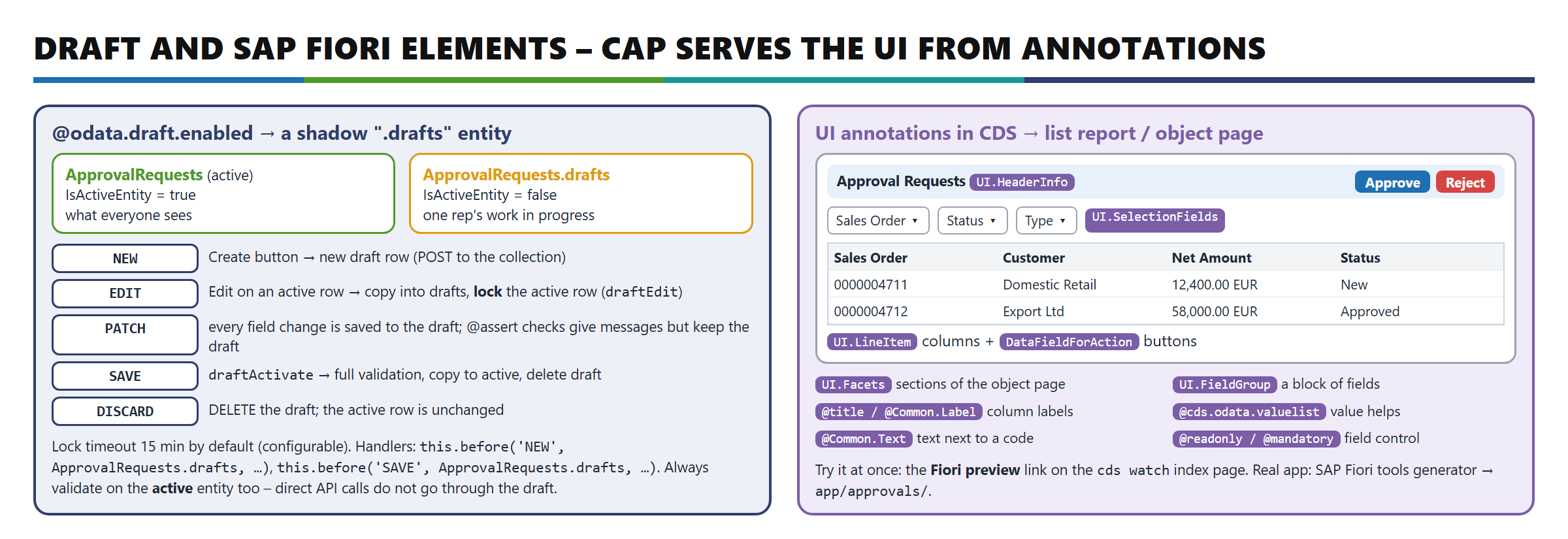
5.1 Enabling draft
|
- Put it on the root entity of a composition tree; compositions (notes) are part of the same draft.
- CAP adds
ApprovalRequests.draftswith the same elements plus draft administrative data (DraftAdministrativeData: who, since when), and the keys getIsActiveEntity. - Draft-enabled entities are meant for Fiori clients; for other API consumers offer a separate service without draft or use the draft-bypass options of newer versions (Part 5.4).
5.2 The draft choreography
User action | HTTP request (Fiori elements) | CAP event |
|---|---|---|
Create |
|
|
Edit an active request | POST /ApprovalRequests(ID=…,IsActiveEntity=true)/draftEdit |
|
Change a field | PATCH /ApprovalRequests(ID=…,IsActiveEntity=false) |
|
Save | POST …(ID=…,IsActiveEntity=false)/draftActivate |
|
Discard / Cancel | DELETE …(ID=…,IsActiveEntity=false) |
|
- Draft lock: while a draft for an active request exists, nobody else can edit it. Others can take it over after inactivity – 15 minutes by default (
cds.fiori.draft_lock_timeoutin Node.js,cds.drafts.cancellationTimeoutin Java). - Validation: on PATCH the
@assertchecks return messages but the draft is saved anyway (the rep can fix it later); on SAVE all checks and active-entity handlers run and invalid data is rejected.
5.3 Handlers for draft events (Node.js)
|
Java uses DraftService events such as EVENT_DRAFT_NEW, EVENT_DRAFT_EDIT, EVENT_DRAFT_SAVE (05 · CAP Java). Rule: put business validation on the active entity (CREATE / UPDATE) so it also runs for non-draft callers; use draft events only for draft-specific behaviour.
5.4 Version notes
- CAP Node.js implements "lean draft", switched on automatically with the
@cap-jsdatabase services: handlers for.draftsand for active entities are registered separately (as shown above). Projects that move from the old database layer follow capire's "Adopt Lean Draft" notes. - Since CAP Node.js 10, requests may address active data directly with
IsActiveEntity=true(draft locks still apply);cds.fiori.bypass_draft: falseswitches this off, andcds.fiori.draft_new_actionenables draft-agnostic clients (capire, Serving Fiori UIs). - In code, read draft data with
SELECT.from(ApprovalRequests.drafts), or usereq.subjectto address whichever version the request targets.
Common mistakes: draft on a child entity instead of the root; validation only in SAVE handlers (direct API calls bypass it); a REST / integration client using the draft-enabled service and creating drafts that are never activated; filtering on IsActiveEntity manually in queries.
Part 6 – Generating, running and shipping the app
6.1 Generate with SAP Fiori tools
- In SAP Business Application Studio (dev space Full-Stack Cloud Application) or VS Code with the SAP Fiori tools extension pack: Command Palette → Fiori: Open Application Generator.
- Template List Report Page; data source Use a Local CAP Project; choose the project, service
RepServiceand main entityApprovalRequests; navigation entitynotes. - Module name
requests→ the generator createsapp/requests/withwebapp/manifest.json,annotations.cds,ui5.yaml,package.json, and wiresapp/services.cdsso CAP loads the annotations. - Repeat for the manager app (
app/inbox/,ManagerService).
|
6.2 Run and refine
cds watchserves the apps too: the index page links to/requests/webapp/index.html.- Page Map and Guided Development in Fiori tools add columns, sections, filters and actions visually; they write the same CDS annotations you saw above.
- Special UX needs: extend the generated app with the flexible programming model (custom sections, building blocks) instead of switching to freestyle UI5.
6.3 Ship
Deployment of the UI (HTML5 Application Repository, SAP Build Work Zone, app router, cds add workzone or html5-repo) is on CAP › 08 · Databases & Deployment and, step by step, on BTP Development › 06 · BTP Developer Hands-On, Part 6.
Part 7 – Interview questions
Q1. How does a Fiori elements app get its layout from a CAP service?
CAP serves OData V4 and writes the CDS annotations (UI, Common, Core vocabularies) into $metadata. Fiori elements reads them: UI.LineItem for table columns, UI.SelectionFields for the filter bar, UI.HeaderInfo for titles, UI.Facets and UI.FieldGroup for object page sections.
Q2. Where do you put UI annotations and why?
In app/<app>/annotations.cds, referenced from app/services.cds. The service and domain model stay free of UI details, two apps can annotate one service differently, and Fiori tools find them there. Labels (@title) can live on the domain model so every app inherits them.
Q3. What does @odata.draft.enabled do?
It adds a shadow .drafts entity with draft administrative data and the IsActiveEntity key, and serves the draft choreography: NEW, EDIT (with lock), PATCH, SAVE (draftActivate) and DISCARD. Unfinished data stays separate from active data until Save.
Q4. How do validation and draft work together?
During PATCH the checks produce messages but the draft is still saved; on SAVE all validations and active-entity handlers run and invalid data is rejected. Business rules therefore belong on CREATE / UPDATE of the active entity, which also covers non-Fiori callers.
Q5. How do you provide a value help?
Simplest: @cds.odata.valuelist on the target entity, so every managed association to it gets a value list. For control over columns and in/out mapping, annotate Common.ValueList with CollectionPath and parameters. Add Common.Text and TextArrangement to show names instead of codes.
Q6. How do you show a custom action as a button and enable it only in some states?
UI.DataFieldForAction with Action: 'ManagerService.approve' in UI.LineItem (table toolbar) or UI.Identification (object page). Core.OperationAvailable on the action controls whether it is enabled; the handler must still check the state on the server.
Q7. What is a draft lock and how long does it last?
When a user edits an active entity, CAP locks it so nobody else can create a second draft. After inactivity (15 minutes by default, configurable) other users can take it over.
Q8. How do you create the Fiori app for a CAP project?
With the SAP Fiori tools Application Generator: List Report Page, data source "Use a Local CAP Project", choose service and main entity. It creates app/<name>/ with manifest, annotations and ui5.yaml; cds watch serves it; Page Map and Guided Development refine it.
Q9. Scenario: reps complain that a half-finished request already appears in the manager inbox.
The rep service is not draft-enabled, so every field change is a real UPDATE of active data. Add @odata.draft.enabled to the root ApprovalRequests in RepService; the manager service reads only active data, so drafts stay invisible until Save. Also check that no client bypasses draft.
Q10. Scenario: the rejection reason check works in the Fiori app but an integration that calls the API directly can still save requests without a reason.
The check was written only in a draft SAVE handler (or only in the UI). Move it to a declarative @assert or a before handler on UPDATE / the reject action of the active entity, so it runs for every caller; the UI marker (@mandatory on the action parameter) is convenience only.
🏠 Start Here · ◀ 05 · CAP Java · 07 · Authorization ▶ · Sections: CORE ABAP | OOPS ABAP | ABAP on HANA | Clean Core | RAP | ABAP Points | SAP Fiori | SAPUI5 | Mobile Development (MDK) | BTP Foundations | BTP Development | CAP | SAP Build | ABAP on BTP | Integration Suite | SAP Business AI | SAP BASIS | Security | SAP SDLC
Functional: FICO ABAP | TRM ABAP | VIM | SAP BIS | SD ABAP | MM ABAP | PP ABAP | QM ABAP | PM ABAP | PS ABAP | EWM | TM ABAP | EHS ABAP | HR ABAP | BW | SAP MDG | SAP Analytics Cloud | SAP Ariba | SAP CX | SAP IBP