A CAP app is not finished when it runs – it is finished when it is tested, observable and fast. This page is the home of cds.test (with Vitest – recommended since cds 10, Jest is being phased out – Mocha or the Node.js test runner), test data and mocked users, testing remote services, linting, the CAP plugin mechanism and the most useful plugins, logging with cds.log, telemetry with OpenTelemetry and SAP Cloud Logging, health checks, and performance rules for projections, $expand, pagination and indexes. Running example: the Order Approval Portal (requirement CR12). The SAP Cloud Logging service itself is explained on SAP BTP BTP Development › 05 · DevOps, Operations & Observability (Part 5); HANA query tuning on BTP Development** › 02 · SAP HANA Cloud for Developers (Part 12).
Part 1 – Why: quality built into the framework
Requirements on this page
ID | Requirement | CAP answer |
|---|---|---|
CR12 | Automated tests protect the approval rules (CR3, CR4, CR7) |
|
CR12 | Find out what happened when a manager reports an error |
|
CR12 | List pages answer in well under a second, even with 1 million requests | Projections, |
CR12 | Audit trail and change history without custom code | Plugins: |
In ABAP you know ABAP Unit, test doubles for CDS (cl_cds_test_environment), SAT / ST05 and the application log. CAP has the same toolbox, but closer to the framework: a test boots the real service with an in-memory database in milliseconds, so most tests are cheap integration tests through the OData API.
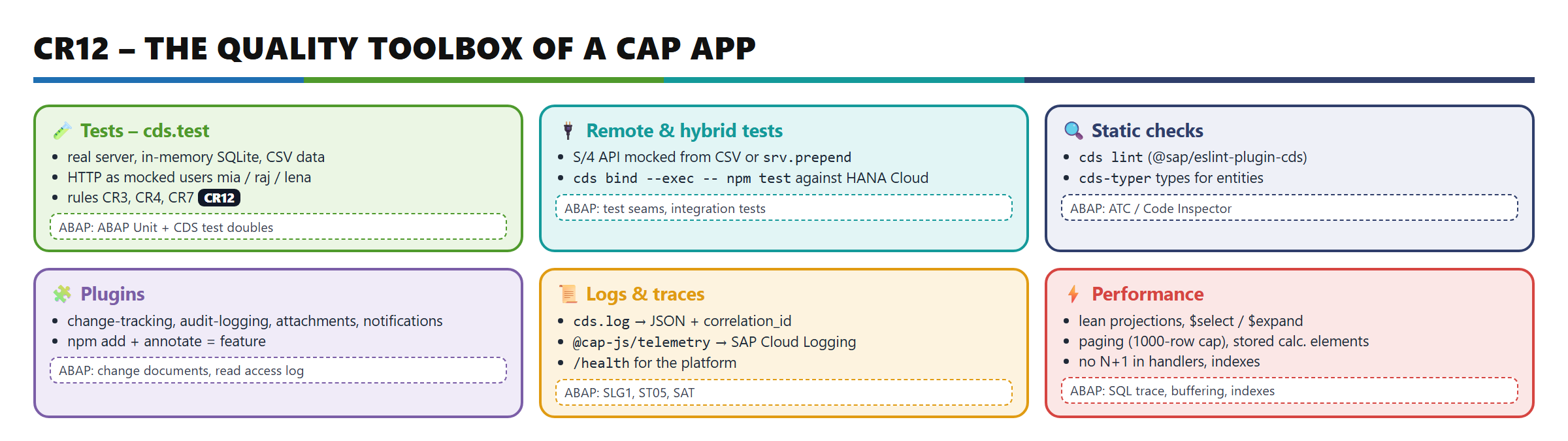
ABAP tool | CAP equivalent |
|---|---|
ABAP Unit + CDS test double framework |
|
ATC / Code Inspector |
|
Application log (SLG1) |
|
ST05 / SAT / ST12 |
|
Change documents (CDHDR / CDPOS) | @cap-js/change-tracking |
Read access logging / security audit log |
|
Part 2 – cds.test: the first test
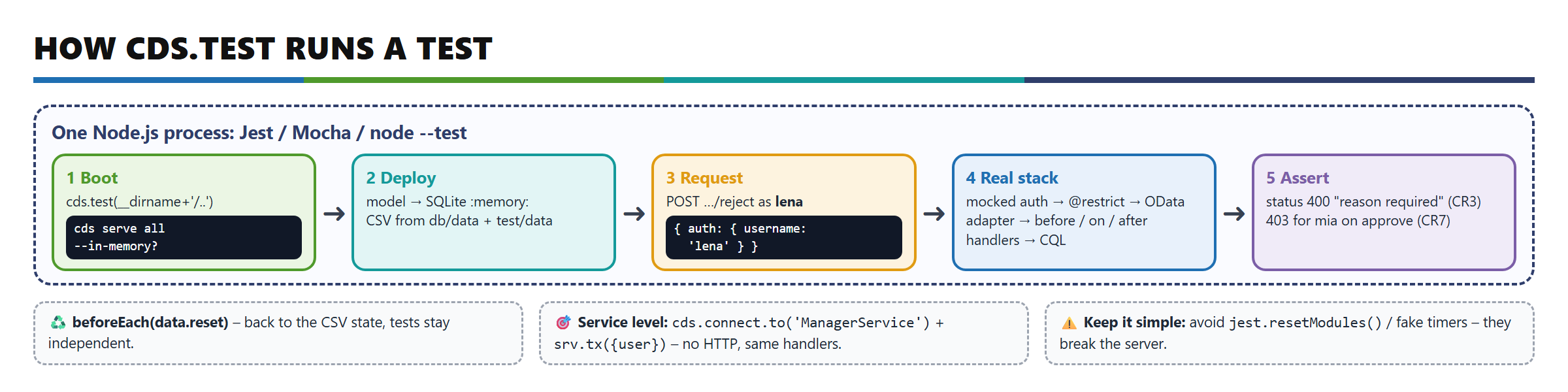
cds.test() starts the CAP server inside the test process (cds serve all --in-memory?): it deploys the model to in-memory SQLite, loads the CSV files and listens on a random port. You get HTTP helpers that already know the server URL.
|
|
cds.test()first, before other requires of CAP sub-modules – it setscds.rootand the environment. Usecds.test.in(folder)instead ofprocess.chdir().cds.testalso returnsexpect(Chai with chai-subset and chai-as-promised). In Jest it is only an emulation – use Jest's ownexpectthere, or Mocha / Vitest with Chai.- Keep it simple: capire warns against heavy runner mocking.
jest.resetModules()or fake timers can break the server – the more you mock, the less you test. - Axios is no longer a dependency of the test helper; if you add
axiosto the project it is used automatically.
Part 3 – Test data and mocked users
3.1 Test data
- CSV files in
db/data(shipped) andtest/data(tests only) are loaded at every boot. Name themsap.capire.orderapproval-ApprovalRequests.csv. Design them for the tests: one request per status, one per region, one with a deadline in the past. beforeEach(data.reset)restores the CSV state so tests do not depend on each other's order.
3.2 Mocked users for CR7
In development the mocked auth strategy accepts basic authentication for users you define – with roles and attributes, exactly what @restrict checks (page 07).
|
|
- Bound actions are addressed via the entity key; if the action name needs the service prefix in your OData version, check the
$metadata– the URL form is the most common reason for 404s in tests. - Error messages from the test helper contain the HTTP status (e.g.
403 - Forbidden); match on the status, not on the full text. - Always test negative cases for every
@restrictrule – a wrongwhereclause silently shows too much data.
Part 4 – Service-level tests, remote services and CAP Java
4.1 Calling the service API directly
Skip HTTP when you want to test logic: connect to the service and run CQL, with an explicit user.
|
4.2 Remote services (CR9) in tests
- Mocked by CAP: in development a required service without credentials is served as a local mock (e.g.
API_SALES_ORDER_SRV) with CSV data named after the imported entities – the same "airplane mode" ascds watch(page 09). - Mocked per test: prepend your own handler to the remote service, so the test controls the answer:
|
- Integration test against the real system:
cds bind --exec -- npm test(hybrid profile, real destination); run it in the pipeline nightly, not on every commit. - Separate mock process:
cds mock srv/external/API_SALES_ORDER_SRV.csnserves the mock on its own port, so the HTTP client code of the remote service is exercised too.
4.3 CAP Java tests
- Spring Boot tests:
@SpringBootTest+@AutoConfigureMockMvc, thenmockMvc.perform(get("/odata/v4/rep/ApprovalRequests")); mock users inapplication.yamlundercds.security.mock.users, or@WithMockUser. H2 in memory replaces SQLite. Handler code: CAP › 05 · CAP Java.
Part 5 – Linting and type safety
|
- The CDS rules check the model as well as code: e.g. valid CSV headers, unknown elements in annotations, missing keys, deprecated syntax. Project-wide rules can be shown in the editor, e.g.
"@sap/cds/valid-csv-header": ["warn", "show"]. - In SAP Business Application Studio the ESLint extension is preinstalled; in VS Code install it once.
- With
cds-typer,const { ApprovalRequests } = require('#cds-models/sap/capire/orderapproval')gives code completion and catches typos in element names before runtime. - Put
cds lintand the tests into the pipeline (cds add pipeline– BTP Development › 05).
Part 6 – CAP plugins: how they work and which ones to know
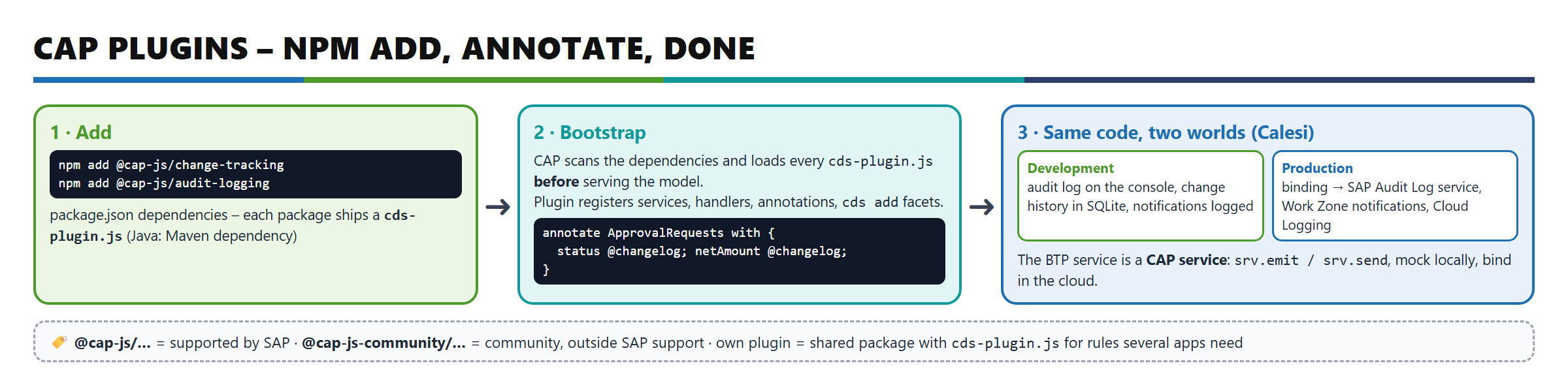
Why: audit logs, change history, attachments, telemetry and notifications are the same in every app. CAP ships them as plugins: npm add the package, annotate the model, done. A Node.js plugin is an npm package with a cds-plugin.js file; at start-up CAP scans the app's dependencies and loads every such file before the model is served, so the plugin can add handlers, services, annotations or CLI facets. Java plugins are Maven dependencies that add model parts and handlers automatically.
Plugin (Node.js / Java) | Order Approval Portal use | In production talks to |
|---|---|---|
| History of | The app's own database |
| Access to customer personal data ( | SAP Audit Log service |
| Customer PO PDF on a request | HANA or object store, malware scan |
@cap-js/notifications | Tell the manager a new request waits | SAP Build Work Zone notifications, e-mail |
| Traces and metrics (Part 8) | SAP Cloud Logging, Dynatrace |
@cap-js/data-inspector | Inspect data in production respecting auth and audit logging | Your app |
| AI features (page 13) | SAP AI Core |
- Calesi (CAP-level Service Integration): the idea behind these plugins – a BTP service is wrapped as a CAP service, so you call it with
srv.send/srv.emit, it has a local mock for development and connects to the real service through bindings in production. The remote-service side of Calesi is on CAP › 09 · Remote Services. @cap-js/...plugins are supported by SAP (CAP plus the service teams);@cap-js-community/...plugins are community projects and out of scope for SAP incidents. capire's "CAP Plugins" page lists the SAP ones; github.com/cap-js-community lists the community ones.
6.1 Writing your own plugin
When three apps need the same rule – e.g. "every service writes a request ID into each log line" – put it into a shared package:
|
Part 7 – Logging with cds.log
|
Topic | How |
|---|---|
Levels |
|
Per module | "cds": { "log": { "levels": { "order-approval": "debug", "sql": "info" } } } |
Quick debugging |
|
Format | Plain text in development, JSON in production automatically (no |
Correlation | Each JSON line carries |
Custom logger |
|
Common mistakes: console.log (no level, no correlation ID); logging personal data, tokens or whole payloads at info; leaving debug on in production; logging inside loops over thousands of rows.
Part 8 – Telemetry, SAP Cloud Logging and health checks
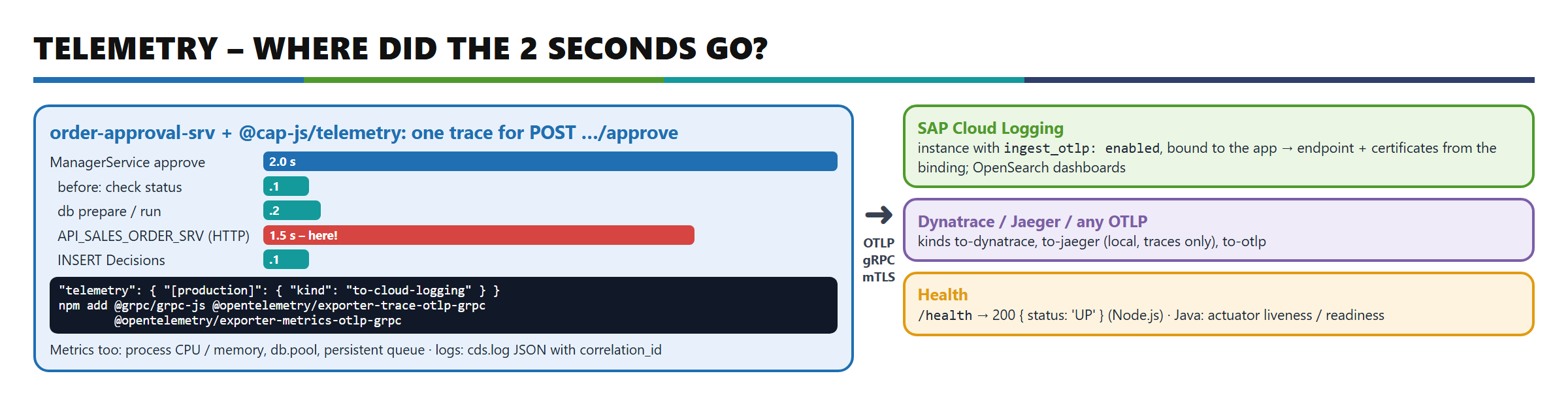
Logs tell you *what* happened; traces tell you *where the time went* in one request (handler → database → S/4HANA call), and metrics show trends (CPU, memory, DB pool, queue length). CAP Node.js gets all three from the @cap-js/telemetry plugin, built on OpenTelemetry. CAP Java has OpenTelemetry support built in (Java agent) – see capire › Java › Observability.
|
|
|
Kind | Exports to | Notes |
|---|---|---|
| Console | Development: see spans and timings in the terminal |
to-cloud-logging | SAP Cloud Logging (OTLP gRPC, mTLS) | Binding found automatically; user-provided service needs the tag |
to-dynatrace | Dynatrace | OTLP proto exporters; or OneAgent in-process |
| Jaeger (local) / any OTLP back end | Jaeger: traces only |
- What is traced: CAP service calls (handlers), database
prepare/run, outbound HTTP (remote services). Metrics: process CPU / memory,db.pool, persistent queue (@sap/cds9+), custom metrics via the OpenTelemetry API. - Environment switches:
NO_TELEMETRY(off),OTEL_SERVICE_NAME(defaults to the package name), sampling viacds.requires.telemetry.tracing.sampler.
8.1 Health checks
- CAP Node.js serves
/health(public) →200 { status: 'UP' }since@sap/cds7.8. Point the platform's health check there – the generic index page at/is not served in production since CDS 8. - CAP Java: Spring Boot Actuator
/actuator/health/livenessand/actuator/health/readiness;cds add mta/cds add kymaconfigure the probes. - Liveness failure → the platform restarts the instance; readiness failure → the instance is taken out of routing until it recovers. Don't make liveness depend on S/4HANA being reachable – a remote outage would restart all your instances in a loop.
Part 9 – Performance: the rules that matter
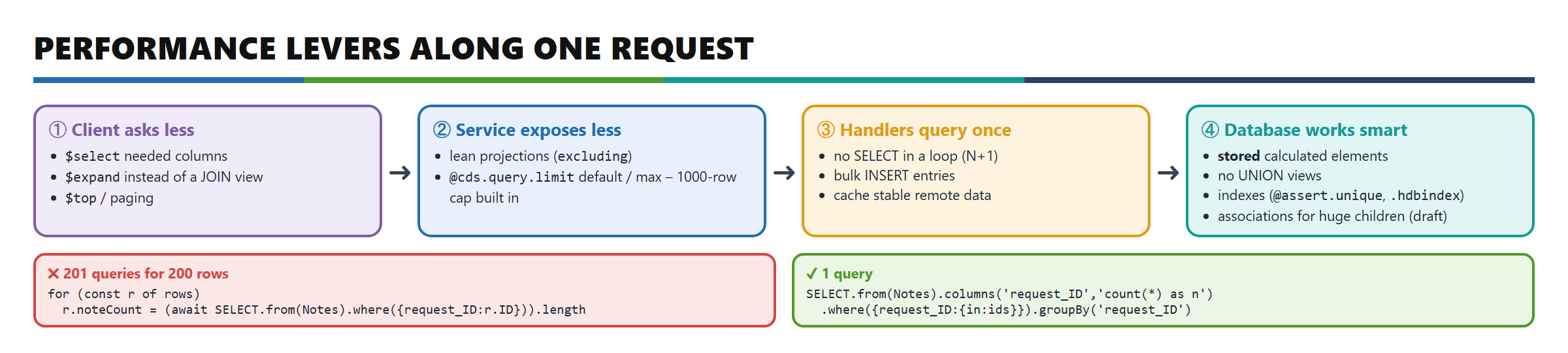
Rule | Why | Order Approval example |
|---|---|---|
Lean projections | Fewer columns, fewer joins, smaller payloads |
|
| A join only runs when the client asks via | ?$select=salesOrder,status&$expand=notes($top=3) |
Server-driven paging | Generic READ caps results at 1000 rows by default and returns a next link |
|
Stored calculated elements | Live calculated fields cannot use indexes → full table scans |
|
No UNION views | Expensive, complex; model one entity with a type field | One |
Associations for huge children | Draft copies whole compositions | Thousands of |
Indexes | Filters and sorts on large tables |
|
9.1 Custom handlers: avoid N+1
|
- Even better: let the database do the work in the model – e.g. a view with
count(*)andgroup byjoined in a projection – instead of computing in JavaScript. - Bulk writes:
INSERT.into(Notes).entries(array)– one statement, not a loop. - Remote calls (CR9): select only needed columns from
A_SalesOrder, cache stable data (customers), set timeouts; trace them with telemetry. - Measure, don't guess:
DEBUG=sqllocally, OpenTelemetry spans in production, PlanViz /EXPLAIN PLANon HANA (BTP Development › 02, Part 12).
Part 10 – Interview questions
Q1. What does cds.test() do?
It boots the CAP server inside the test process (cds serve all --in-memory?), deploys the model to in-memory SQLite with CSV data, listens on a random port and returns HTTP helpers (GET, POST, …), expect, data.reset and log. Runner-agnostic: Jest, Mocha, Vitest, node --test.
Q2. How do you test that only managers can approve?
Define mocked users with roles (and attributes) in the [development] auth config, call the action as a rep and expect 403, call it as a manager and expect success. Negative tests for every @restrict rule, including where conditions on attributes.
Q3. How do you test code that calls S/4HANA?
Locally CAP mocks the imported service with CSV data; per test, S4.prepend(() => S4.on('READ', ...)) returns controlled data; cds mock in a separate process tests the HTTP path; real integration tests run with cds bind --exec -- npm test in a nightly pipeline.
Q4. What is a CAP plugin technically?
In Node.js an npm package with a cds-plugin.js that CAP loads automatically from the app's dependencies at bootstrap; it can register services, handlers, annotations and cds add facets. In Java a Maven dependency that adds model and handlers.
Q5. Name three plugins and what they replace in ABAP.
@cap-js/change-tracking ≈ change documents, @cap-js/audit-logging ≈ read access logging / security audit log (via SAP Audit Log service), @cap-js/attachments ≈ GOS attachments; plus @cap-js/telemetry for tracing.
Q6. Why cds.log instead of console.log?
Levels per module configurable without code changes, DEBUG= switches, automatic JSON format in production with correlation_id, so one request can be followed across app router, CAP and remote calls in SAP Cloud Logging.
Q7. How do traces get from a CAP app into SAP Cloud Logging?
@cap-js/telemetry with kind to-cloud-logging and the gRPC OTLP exporters; the Cloud Logging instance has ingest_otlp enabled and is bound to the app, so the binding provides the OTLP endpoint and mTLS certificates.
Q8. What does CAP do by default to protect the database from huge reads?
Generic READ handlers cap results at 1000 rows and return a next link; @cds.query.limit (or cds.query.limit config) sets default and max per entity, service or globally.
Q9. Why are live calculated fields a performance risk?
They are computed on every read and cannot use indexes, so filters and sorts on them scan the table. Use stored calculated elements (calculated on write) or disable sorting / filtering on them.
Q10. What is the difference between liveness and readiness?
Liveness failure → restart; readiness failure → removed from routing temporarily. CAP Node.js offers /health; CAP Java uses the Actuator liveness / readiness endpoints.
Q11. Scenario: managers say the approval list takes 8 seconds. How do you analyse it?
Reproduce with the same $filter / $expand; check telemetry spans to see whether time is in the database, a handler or a remote call; DEBUG=sql for the statements; look for N+1 loops in after READ handlers, live calculated fields in filters, missing paging, big $expand; then PlanViz on HANA and an index or a stored element.
Q12. Scenario: a test passes locally but the same request fails on HANA Cloud. Why can that happen?
SQLite and HANA differ in case sensitivity, sorting, type strictness and native functions; native HANA objects do not exist on SQLite. Run the suite against HANA in hybrid mode (cds bind --exec -- npm test) in the pipeline before releases.
🏠 Start Here · ◀ 11 · Multitenancy & SaaS · 13 · CAP & AI ▶ · Sections: CORE ABAP | OOPS ABAP | ABAP on HANA | Clean Core | RAP | ABAP Points | SAP Fiori | SAPUI5 | Mobile Development (MDK) | BTP Foundations | BTP Development | CAP | SAP Build | ABAP on BTP | Integration Suite | SAP Business AI | SAP BASIS | Security | SAP SDLC
Functional: FICO ABAP | TRM ABAP | VIM | SAP BIS | SD ABAP | MM ABAP | PP ABAP | QM ABAP | PM ABAP | PS ABAP | EWM | TM ABAP | GTM ABAP | EHS ABAP | HR ABAP | BW | SAP Datasphere | SAP Business Data Cloud | SAP MDG | SAP Analytics Cloud | SAP Ariba | SAP CX | SAP IBP