How the Order Approval Portal becomes a SaaS product that several distributor companies subscribe to (CR11): one deployment, strictly separated data per customer, subscription from the SAP BTP cockpit, upgrades for all tenants in one run, and customer-specific fields without changing the base app. The page covers @sap/cds-mtxs and the MTX sidecar, the SAP BTP SaaS Provisioning service, tenant URLs and the app router, SaaS dependencies, tenant lifecycle, SaaS extensibility and feature toggles. Deployment basics (MTA, cds up, HANA Cloud, Kyma) are on → CAP › 08 · Databases & Deployment; roles and XSUAA on → CAP › 07 · Authorization & Security; the account model in BTP Foundations › 02. Sources: capire ("Deploy Multitenant SaaS Applications", "MTX Services Reference", "Extending SaaS Applications", "Feature Toggles") and the SAP Help Portal. Everything here uses streamlined MTX (@sap/cds-mtxs); the old @sap/cds-mtx is replaced.
Part 1 – Why SaaS, and what changes for the portal
Requirements on this page
ID | Requirement | How this page solves it |
|---|---|---|
CR11a | Offer the portal to several distributor companies from one deployment |
|
CR11b | Customers subscribe themselves in the BTP cockpit | SaaS Provisioning service, app router tenant URLs (Part 5) |
CR11c | Each customer connects its own S/4HANA and uses its own users | SaaS dependencies, destinations and IdP trust in the subscriber subaccount (Part 6) |
CR11d | Customers add their own fields (e.g. a risk class) | SaaS extensibility with |
CR11e | Optional modules switched on per customer | Feature toggles (Part 9) |
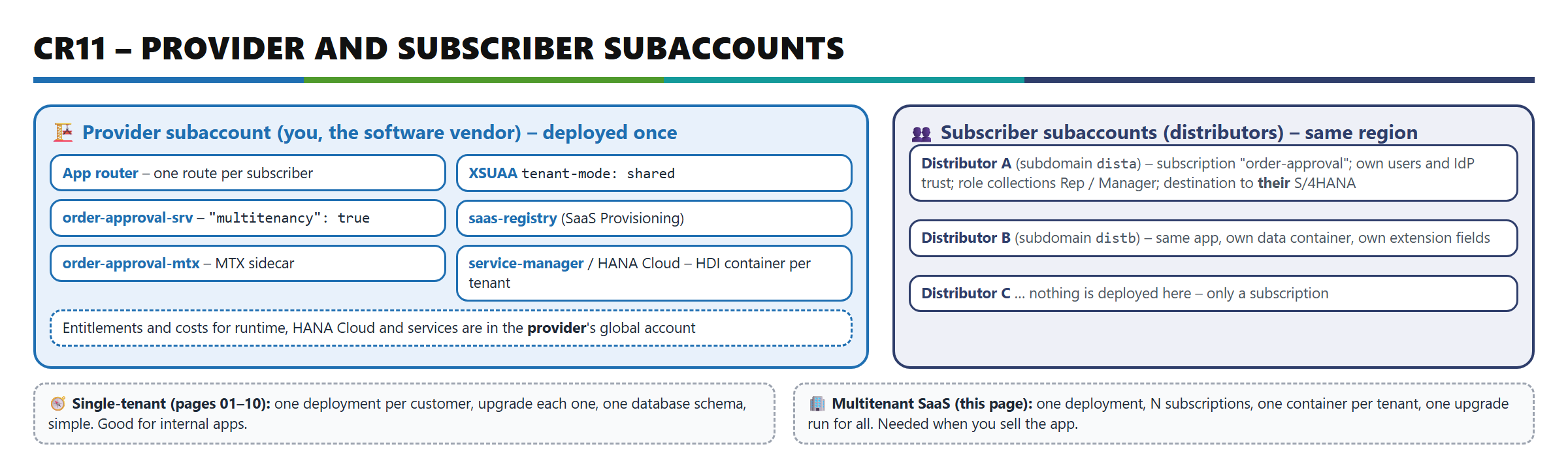
Why: until now the portal served one company (single-tenant). A software vendor who wants to sell it to many distributors could deploy one copy per customer – and would then pay for, monitor and upgrade N copies. Multitenancy means one deployment serves many tenants (customers), while each tenant's data stays strictly isolated. CAP has this built in through the @sap/cds-mtxs package – the application code from pages 02–10 stays almost unchanged.
Term | Meaning |
|---|---|
Provider | The vendor's subaccount where the app is deployed and paid for |
Subscriber / tenant | A customer's subaccount that subscribed; identified by its tenant id (the subaccount's zone id, a GUID) and its subdomain |
Subscription | The link between a subscriber subaccount and the SaaS app, created in the cockpit or with the |
Tenant isolation | Each tenant's data in its own database container; users of one tenant can never see another tenant's data |
- ABAP view: comparable to clients (MANDT) in one ABAP system – but CAP isolates by separate database containers, not by a client column, and tenants are self-service subscriptions.
Part 2 – How CAP multitenancy works
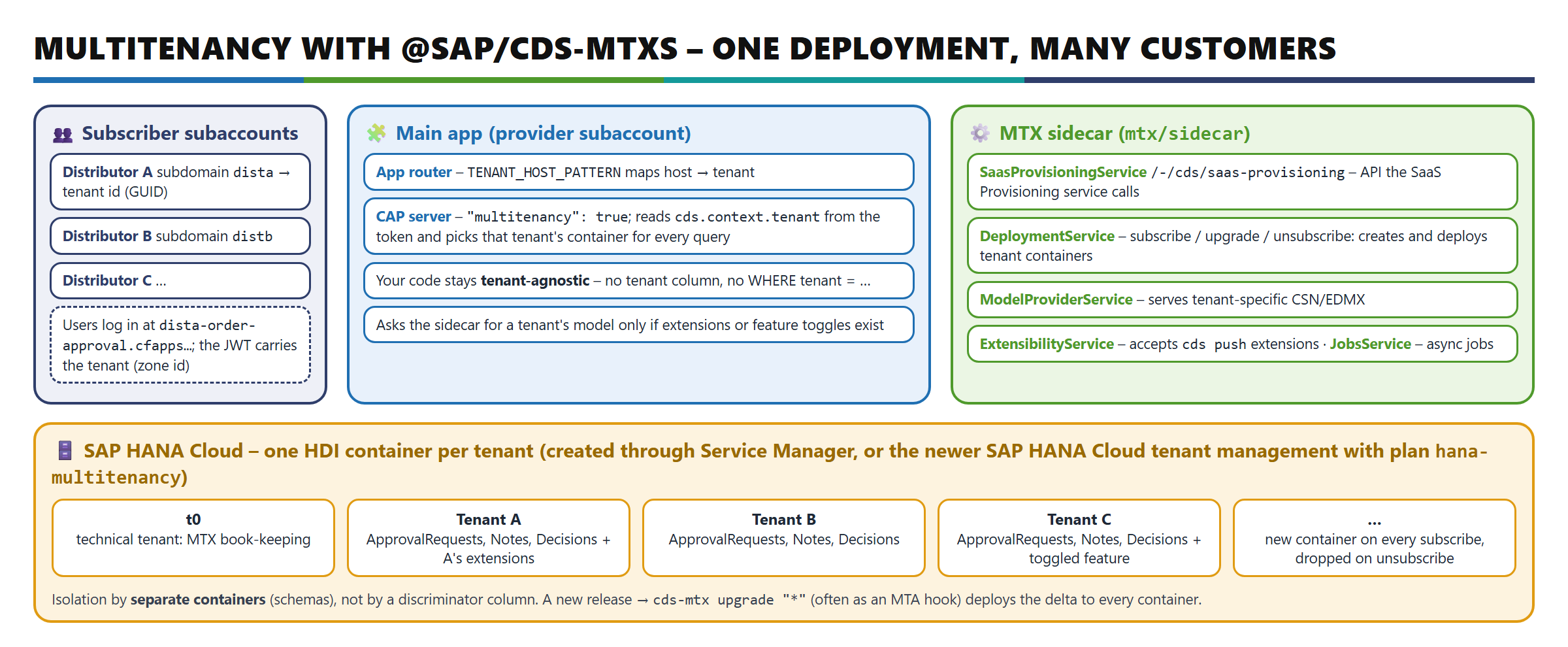
- Every request carries a JWT issued for the user's subaccount. CAP reads the tenant from it and sets
cds.context.tenant; every query of that request goes to that tenant's HDI container. - Your entities have no tenant column and your handlers no tenant filter – the isolation is done below the application code.
- A multitenant app serves no business requests until a tenant has subscribed; the provider subaccount itself is not a business tenant.
- The technical tenant
t0holds the MTX services' own book-keeping (jobs, metadata).
2.1 The MTX services
Service | Default endpoint | Job |
|---|---|---|
cds.xt.SaasProvisioningService | /-/cds/saas-provisioning | Facade for the SAP BTP SaaS Provisioning service: subscribe, unsubscribe, dependencies, upgrade |
cds.xt.DeploymentService | /-/cds/deployment | Creates, deploys, upgrades and deletes tenant containers |
cds.xt.ModelProviderService | /-/cds/model-provider | Serves the model per tenant and feature set (CSN, EDMX) – needed with extensions or toggles |
cds.xt.ExtensibilityService | /-/cds/extensibility | Accepts and validates tenant extensions |
cds.xt.JobsService | /-/cds/jobs | Asynchronous jobs, e.g. upgrading hundreds of tenants |
2.2 Why a sidecar?
- Subscribing and upgrading deploy whole database schemas – heavy work that should not slow down business requests. The MTX sidecar (
mtx/sidecar, deployed as its own app) runs these services and scales independently. - CAP Java needs the sidecar, because the MTX services are implemented in Node.js. Node.js apps can run MTX embedded, but
cds add multitenancycreates the sidecar by default – keep it. - The main app asks the sidecar for a tenant's model only when extensions or feature toggles exist; otherwise it serves requests on its own.
2.3 Where the tenant containers come from
Option | How | Note |
|---|---|---|
Service Manager (classic) | MTX creates an HDI container per tenant through the | Default of the generated set-up for many projects |
SAP HANA Cloud tenant management (TMS v2) |
| Newer; can group a tenant's containers under one SAP HANA tenant; existing apps switch by binding TMS v2 next to Service Manager, containers migrate per SAP HANA docs |
SQLite (local) | One file per tenant, e.g. | Development only |
- Use the
hana-multitenancyplan only for this purpose – capire warns that other plans can expose containers of other applications.
Part 3 – Enable multitenancy
|
|
|
- The profiles
with-mtx-sidecar(main app) andmtx-sidecar(sidecar) are configuration presets: SQLite in development, HANA via Service Manager in production, and which MTX services run where.cds env requiresshows the effective result. - Shortcuts:
"multitenancy": true,"extensibility": true,"toggles": trueswitch on the related MTX features; individual services can be configured under their names (cds.xt.DeploymentService, …). - If
mta.yaml(or the Helm chart) exists,cds add multitenancyadds the sidecar module, thesaas-registryand Service Manager resources and the upgrade hook. Either order works: capire's multitenancy guide runs it beforecds add mta, the Cloud Foundry guide after. - CAP Java:
cds add multitenancyaddscds-feature-mttosrv/pom.xml, awith-mtxSpring profile withcds.multi-tenancy.sidecar.url, and the same Node.js sidecar.
Part 4 – Test-drive multitenancy locally
|
|
- Log in as
manager.a, approve a request; log in asmanager.bin a private window – the request is not there. The server log shows the tenant per request ([odata|t1] - GET …). - Behind
cds subscribe:POST /-/cds/saas-provisioning/subscribeon the sidecar, or programmatically(await cds.connect.to('cds.xt.SaasProvisioningService')).subscribe('t1').
|
Common mistakes
- Starting only
cds watchwith multitenancy on – requests fail because no tenant has subscribed. - Forgetting
--with-mtx– the main app then uses an in-memory database the sidecar cannot see.
Part 5 – Deploy, subscribe and reach the tenant (CR11b)
|
5.1 The pieces in the provider subaccount
Piece | Role in the subscription |
|---|---|
| Registers the app as SaaS; its |
XSUAA with | One OAuth client trusted by all subscriber subaccounts |
Subscribe callback |
|
Unsubscribe callback |
|
Dependencies callback |
|
App router | Entry point; |
|
5.2 Subscribe
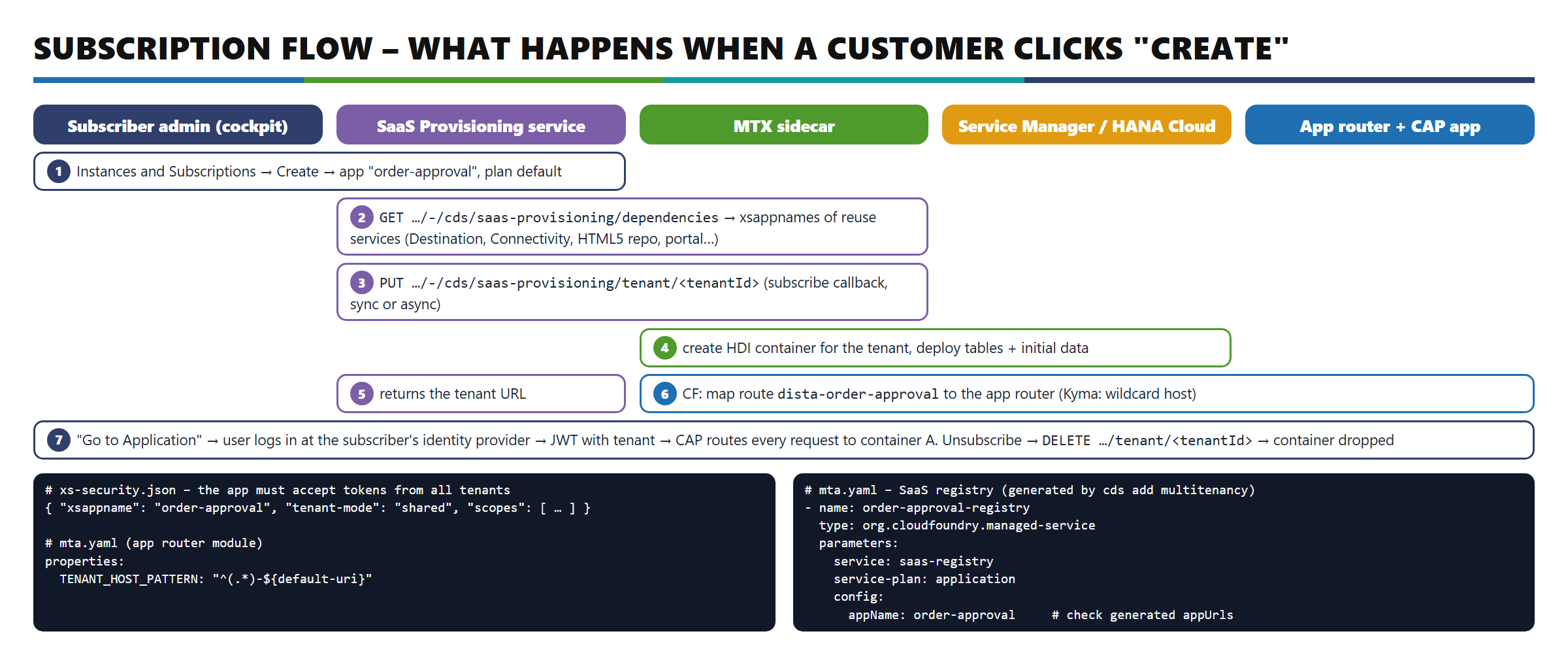
- In a subscriber subaccount in the same region: *Instances and Subscriptions* → *Create* → app
order-approval, plandefault. Or with thebtpCLI (btp subscribe accounts/subaccount …). - On Cloud Foundry the tenant URL is
https://<subscriber-subdomain>-<saas-app-host>.<domain>, e.g.dista-order-approval.cfapps.eu10.hana.ondemand.com. The route must exist:cf map-route <approuter> <domain> --hostname <subdomain>-<app>(or a wildcard route set up once). On Kyma the generated set-up covers it. - Host labels have a 63-character limit – keep the app name short.
- The subscriber admin then assigns the role collections (
Rep,Manager) to their users and sets up trust to their IdP (→ CAP › 07).
5.3 CAP Java specifics
- Environment variables in the
srvmodule:CDS_MULTITENANCY_SIDECAR_URL(sidecar),CDS_MULTITENANCY_APPUI_URL(entry point shown in the cockpit) andCDS_MULTITENANCY_APPUI_TENANTSEPARATOR(-) – generated bycds add multitenancy.
Part 6 – SaaS dependencies and per-tenant connections (CR11c)
Why: Distributor A's portal must read their S/4HANA, not the vendor's. Reuse services such as Destination and Connectivity work per tenant only if the SaaS app declares them as dependencies; then the subscriber's destinations and Cloud Connector are used for that tenant's requests.
|
- For services CAP does not know, add
"subscriptionDependency": "xsappname"to theircds.requiresentry, or override thedependencieshandler. CAP Java detects bound services automatically; the Destination dependency must be activated explicitly inapplication.yaml. - Each subscriber creates the destination
S4HANA_SALES(page 09) in their own subaccount; the code andcds.requiresstay the same. With principal propagation, each subscriber also connects their own Cloud Connector. - Messaging per tenant:
enterprise-messagingsupports multitenancy (CAP manages tenant-specific queues); withenterprise-messaging-shared,redis-messagingorfile-based-messagingonly the provider has an event bus – no tenant isolation (→ CAP › 10 · Messaging & Events).
Code that runs outside a request
Scheduled jobs, startup code and timers have no tenant – they would reach the provider, not a subscriber. Run tenant work explicitly in the tenant's context:
|
- The list of subscribed tenants comes from the MTX services:
GET /-/cds/saas-provisioning/tenantreturnssubscribedTenantId,subscribedSubdomainandstatusper tenant. Queued messages and tasks (page 10) are stored in thecds.outbox.Messagestable of the tenant that wrote them, so a schedule registered in one tenant runs only there.
Part 7 – Tenant lifecycle: upgrade, unsubscribe and custom handlers
7.1 Upgrade all tenants with every release
Deploying a new app version updates the code, not the tenant containers. Each container must receive the new schema:
Way | Command / set-up |
|---|---|
MTA hook (generated) |
|
CLI in the sidecar |
|
MTX API |
|
CF task / Kubernetes job |
|
- On SAP HANA the delta is computed (CREATE TABLE, ALTER TABLE, view re-creation) without data loss – but dropping or renaming elements still drops data. Keep model changes additive and plan data migrations explicitly.
- With a custom set-up, deploy the sidecar with a single instance for the
t0upgrade so two instances do not upgrade the metadata container at the same time.
7.2 Unsubscribe
- Removing the subscription calls the unsubscribe callback; the DeploymentService drops the tenant's container – the data is gone. Agree on export and retention with customers before offboarding.
7.3 Custom lifecycle handlers
|
- CAP Java alternative in the main app: handlers on
SubscribeEventContext,UpgradeEventContext,UnsubscribeEventContext.
Part 8 – SaaS extensibility: customers add their own fields (CR11d)
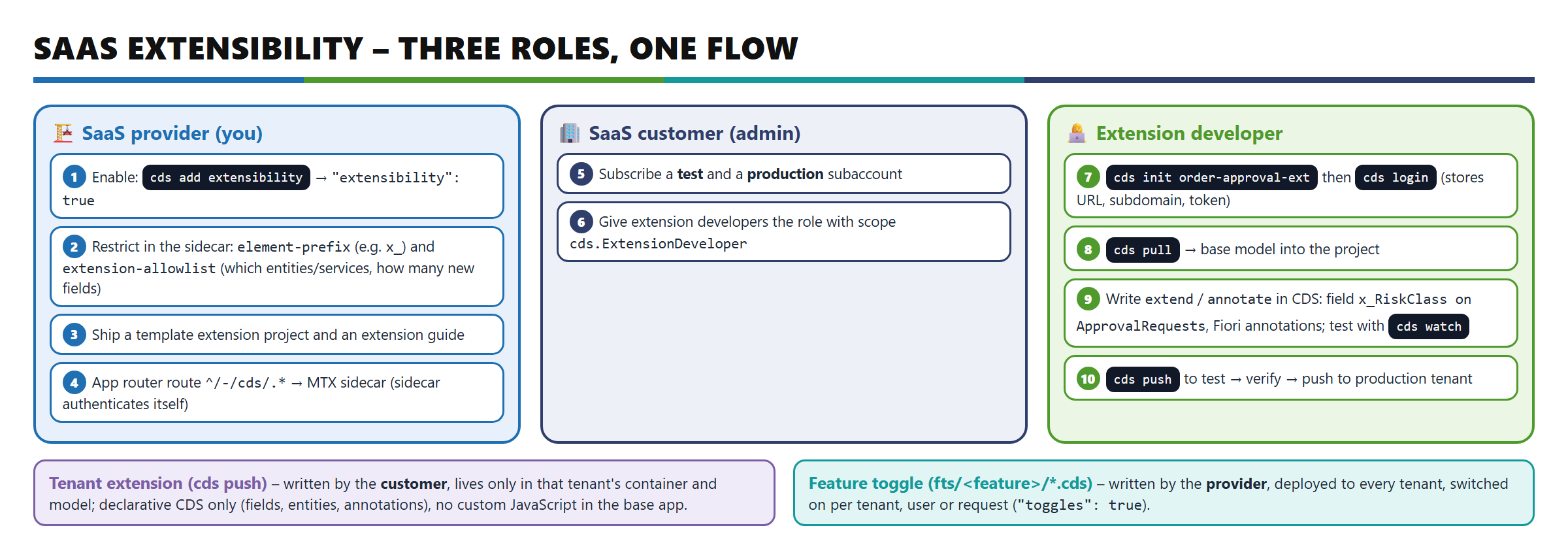
Why: Distributor A wants a riskClass on every approval request; Distributor B wants a hospitalGroup. Building both into the base app bloats it; separate code lines per customer break the SaaS model. CAP lets each tenant extend its own model with CDS – fields, entities, annotations – stored and deployed only for that tenant. It is the CAP counterpart of key-user and developer extensibility in S/4HANA (→ Clean Core section).
8.1 Provider: enable and restrict
|
|
- All new elements must start with
x_– no clashes with fields the provider adds later. - Provide a template extension project and an extension guide (which entities are meant to be extended, examples, test data).
- App router route for the CLI:
{ "source": "^/-/cds/.*", "destination": "mtx-api", "authenticationType": "none" }– the sidecar authenticates these requests itself. Generated when you usecds add multitenancytogether withcds add approuter.
8.2 Customer: develop and activate an extension
- Subscribe a test and a production subaccount; give extension developers a role collection with the scope
cds.ExtensionDeveloper.
|
|
cds pushbuilds the extension, the ExtensibilityService validates it against the allowlist, and the DeploymentService deploys the delta to that tenant's container. The ModelProviderService then serves the extended model (and EDMX) for that tenant's requests – the Fiori app shows the new column.- A ready-made archive can be pushed too:
cds push <file.tgz or URL>– useful for CI/CD of extensions.
Limits
- Extensions are declarative CDS: new elements, entities, associations, annotations, localised texts. No custom JavaScript runs inside the provider's app. Logic for a customer belongs either into the base app behind a toggle or into a separate side-by-side app that subscribes to the portal's events.
- Removing an extension field later loses the data in that tenant – treat extensions like schema changes.
Part 9 – Feature toggles: provider-built options (CR11e)
Why: some customers buy the "escalation" module, others do not. Feature toggles are pre-built extensions written by the provider, deployed to every tenant and switched on per tenant, user or request.
|
|
- Development: mock users and tenants get features in
cds.requires.auth(e.g."tenants": { "t1": { "features": ["escalation"] } }). - Production: CAP has no built-in toggle provider. In Node.js a small middleware sets
req.features(before thectx_modelmiddleware) from your own tenant configuration; in Java you implement a Feature Toggles Info Provider bean. - Limits:
.cdsfiles directly infts/<feature>/(no subfolders), nousingbetween features – everything a feature extends must be in the base model.
Tenant extension (Part 8) | Feature toggle (Part 9) | |
|---|---|---|
Written by | Customer (extension developer) | Provider |
Deployed to | That tenant only | All tenants |
Activated | By | Per tenant, user or request at runtime |
Custom logic | No (declarative CDS) | Yes – in the base app, checked via |
Typical |
| Paid "escalation" module |
Part 10 – Design checklist and common mistakes
Topic | Do | Avoid |
|---|---|---|
Isolation | Rely on container per tenant | A |
Background work |
| Timers without tenant context |
Upgrades | Upgrade hook in every deployment; additive schema changes | Deploying code without |
Connections | Destinations in the subscriber subaccount; SaaS dependencies declared | Provider destinations pointing to one customer's system |
Sidecar | Own app, sized for deployments, scaled separately | Running heavy subscribe jobs in the main app |
URLs | Short app name, wildcard or mapped routes | Host names over 63 characters |
Extensions |
| Unlimited extensions that break your next release |
Offboarding | Export and retention agreement | Unsubscribing a customer whose data is still needed |
- Observability per tenant (tenant id in logs and traces), CI/CD and performance: → CAP › 12 · Testing, Plugins, Observability & Performance.
Part 11 – Interview questions
Q1. What is multitenancy in CAP and how is tenant data isolated?
One deployment serves many subscriber subaccounts (tenants). CAP reads the tenant from the JWT into cds.context.tenant and routes all queries to that tenant's own HDI container in SAP HANA Cloud (one SQLite file per tenant locally). There is no tenant column and no filter in application code.
Q2. What does cds add multitenancy do?
Adds @sap/cds-mtxs, the with-mtx-sidecar profile with multitenancy: true for production, a sidecar project in mtx/sidecar with the mtx-sidecar profile, and – if present – updates mta.yaml or the Helm chart with the sidecar, saas-registry, Service Manager and the upgrade hook. Java projects also get cds-feature-mt.
Q3. Which MTX services exist and what do they do?
SaasProvisioningService (API for the SAP BTP SaaS Provisioning service), DeploymentService (create/upgrade/delete tenant containers), ModelProviderService (tenant- and feature-specific models), ExtensibilityService (accepts cds push) and JobsService (asynchronous jobs).
Q4. Why does CAP use a sidecar, and why does CAP Java require it?
Subscribe and upgrade are resource-intensive; a separate app keeps business requests fast and scales independently. The MTX services are written in Node.js, so a Java app needs them in a Node.js sidecar.
Q5. Describe the subscription flow.
Subscriber creates the subscription in the cockpit → SaaS Provisioning calls the dependencies callback and PUT …/saas-provisioning/tenant/<id> on the sidecar → DeploymentService creates and deploys the HDI container (Service Manager or HANA tenant management) → tenant URL returned, route <subdomain>-<app> mapped → users log in through the app router (TENANT_HOST_PATTERN), XSUAA in shared tenant mode issues the token → CAP serves from the tenant's container.
Q6. What are SaaS dependencies?
Reuse services (Destination, Connectivity, HTML5 Application Repository, portal, audit log …) that must be subscribed per tenant together with the app. The sidecar reports their xsappnames in the dependencies callback; in Node.js you activate them in cds.requires of the sidecar.
Q7. How do you upgrade tenants after a new release?
Run cds-mtx upgrade '*' – usually as the generated MTA hook in the deploy phase, alternatively a CF task, Kubernetes job or the upgrade endpoint of the SaasProvisioningService. HANA schema evolution applies the delta; keep changes additive.
Q8. How can a customer add a field to a CAP SaaS app?
The provider enables extensibility and restricts it with element-prefix and extension-allowlist. An extension developer with cds.ExtensionDeveloper runs cds login, cds pull, writes extend … with { x_field } and annotations, tests with cds watch and runs cds push to a test tenant, then to production. Only that tenant gets the field.
Q9. Tenant extension or feature toggle?
Tenant extensions are written by the customer, declarative only, deployed to one tenant. Feature toggles are written by the provider in fts/<feature>, deployed to all tenants and activated per tenant, user or request, and can have custom logic checked via cds.context.features. Production toggling needs your own provider (middleware or Java bean).
Q10. Scenario: a nightly job in the portal escalates overdue requests, but in production nothing happens for any customer.
The job runs without a tenant context, so it queries the provider, not the subscribers. Loop over the subscribed tenants and run each in cds.tx({ tenant }, …), or schedule the task per tenant with the event queue so it runs in that tenant's context. Add the tenant id to the logs to verify.
Q11. Scenario: after a release, Distributor B gets SQL errors 'invalid column name', Distributor A works fine.
The tenant containers were not all upgraded – A was upgraded (perhaps manually), B not, or B's upgrade job failed (for example because B's extension conflicts with a new provider field). Check the upgrade job and logs, run cds-mtx upgrade for B, fix conflicts (that is what element-prefix prevents), and make the upgrade hook part of every deployment.
🏠 Start Here · ◀ 10 · Messaging · 12 · Quality ▶ · Sections: CORE ABAP | OOPS ABAP | ABAP on HANA | Clean Core | RAP | ABAP Points | SAP Fiori | SAPUI5 | Mobile Development (MDK) | BTP Foundations | BTP Development | CAP | SAP Build | ABAP on BTP | Integration Suite | SAP Business AI | SAP BASIS | Security | SAP SDLC
Functional: FICO ABAP | TRM ABAP | VIM | SAP BIS | SD ABAP | MM ABAP | PP ABAP | QM ABAP | PM ABAP | PS ABAP | EWM | TM ABAP | EHS ABAP | HR ABAP | BW | SAP MDG | SAP Analytics Cloud | SAP Ariba | SAP CX | SAP IBP