Beginner-to-interview notes on Clean Core for a greenfield SAP S/4HANA implementation. Parts 1–6 are concepts (asked most), 7–13 hands-on ABAP, 14–16 interview practice.
Part 1 – SAP basics you need first
1.1 What SAP S/4HANA is
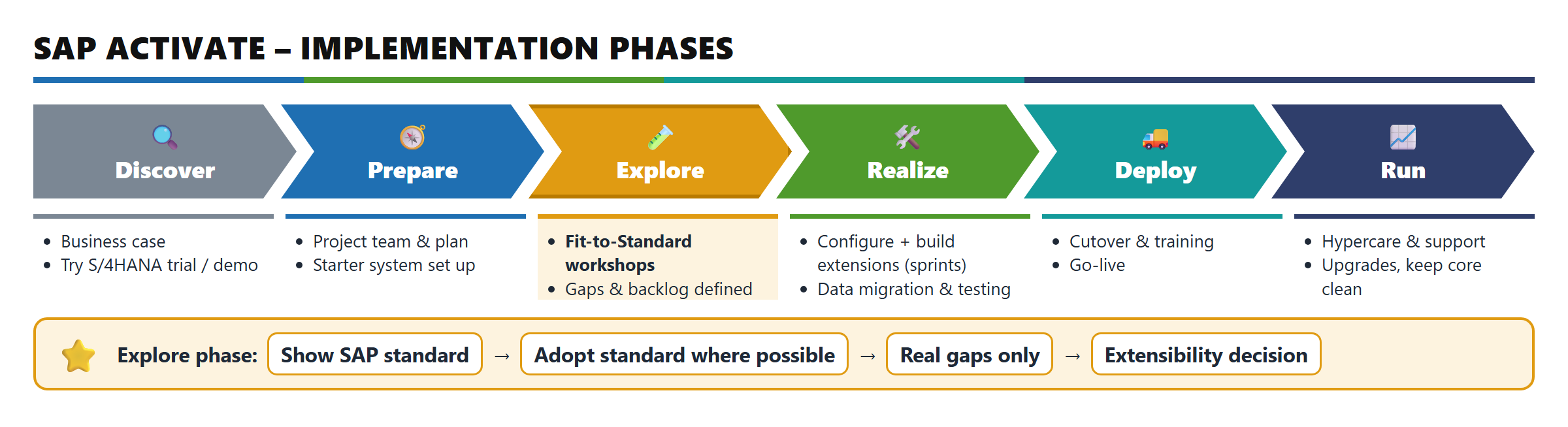
- ERP = one system running finance, sales, purchasing, production, HR …
- SAP ECC = old ERP (mainstream support ends 2027).
- SAP S/4HANA = new ERP, only on the SAP HANA in-memory database. Simpler data model (finance in one table ACDOCA – Universal Journal), Fiori UI, Business Partner mandatory.
- ABAP = SAP's programming language for custom programs and extensions.
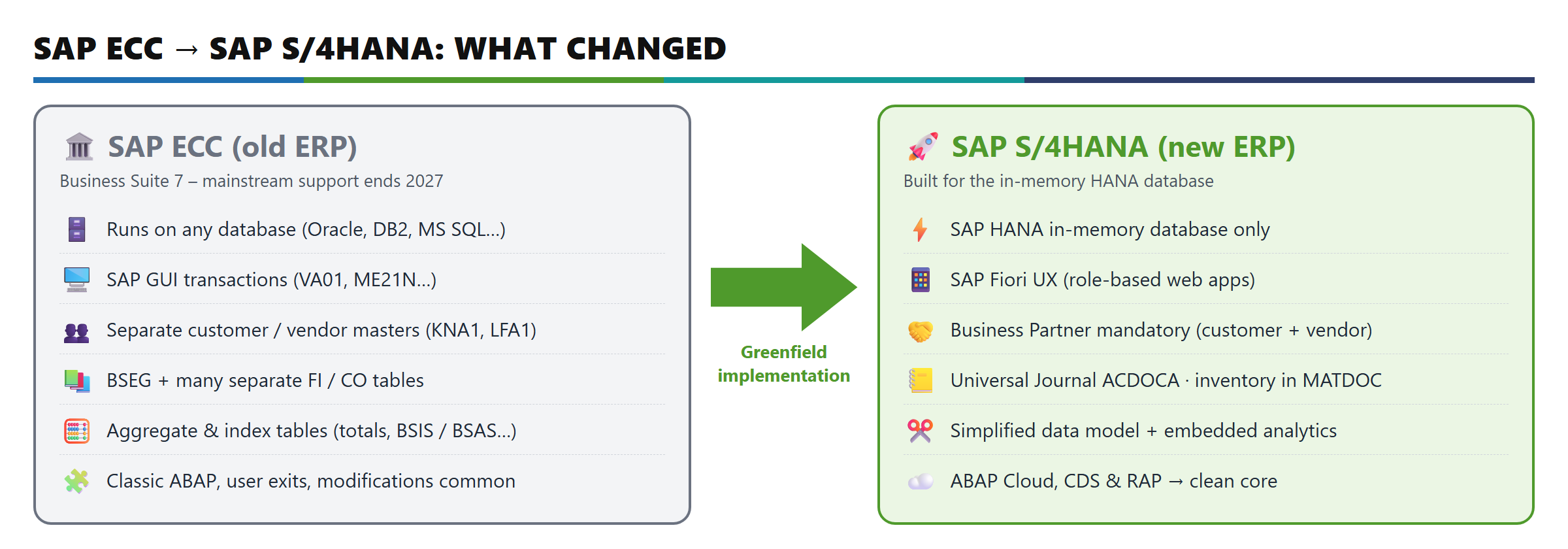
1.2 S/4HANA editions (asked often)
Edition | Who runs it | Can you change code? | Clean core |
|---|---|---|---|
S/4HANA Cloud Public Edition | SAP (SaaS) | No classic ABAP – only key user, ABAP Cloud, BTP | Enforced by system |
S/4HANA Cloud Private Edition (RISE with SAP) | SAP hosts, your own system | Everything incl. classic ABAP | Strongly recommended |
S/4HANA on-premise | You | Everything | Strongly recommended |
Public Edition upgrades twice a year – you cannot refuse. That is the main reason clean core exists.
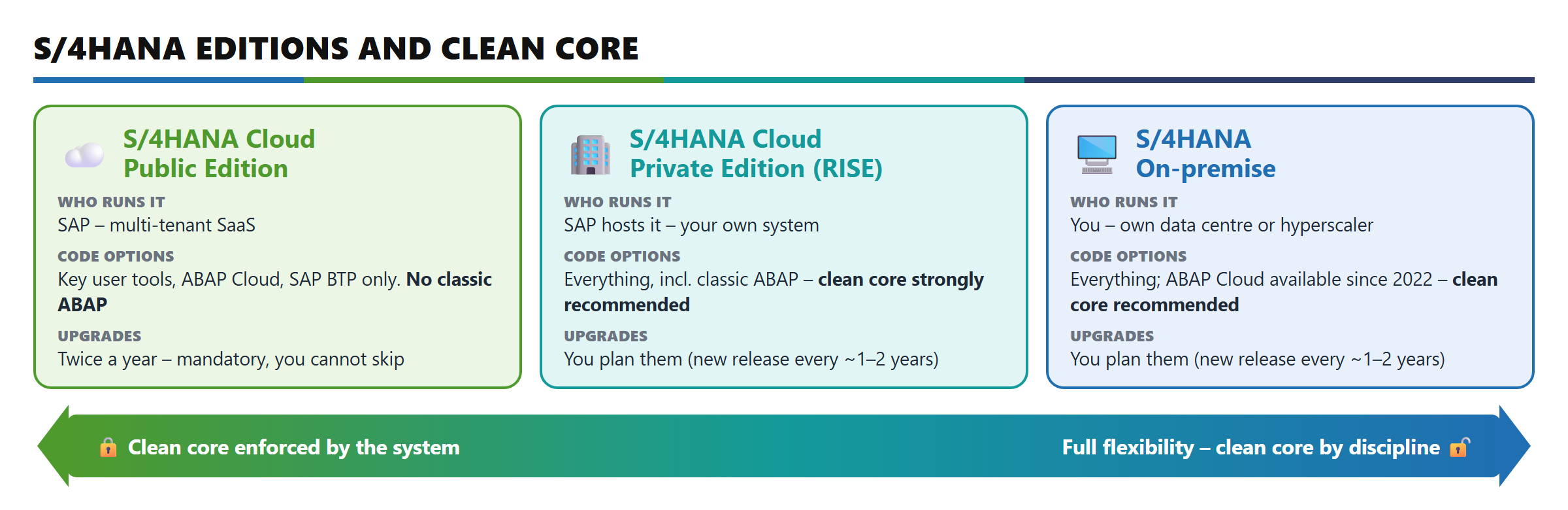
1.3 Greenfield vs brownfield vs bluefield
- Greenfield – brand-new implementation, old custom code not carried over, processes redesigned on SAP standard. Best opportunity for clean core – you start clean.
- Brownfield – convert ECC to S/4HANA keeping custom code; cleaning it up is a big workstream.
- Bluefield / Selective Data Transition – a mix; selective data and processes moved.
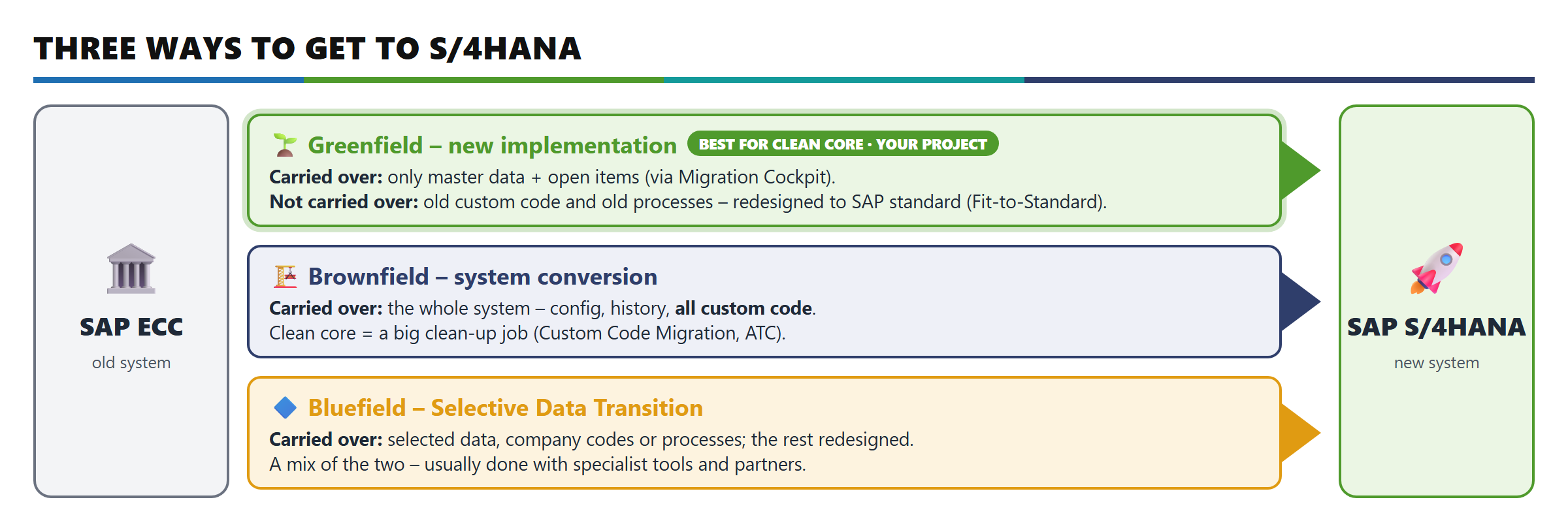
1.4 SAP Activate methodology
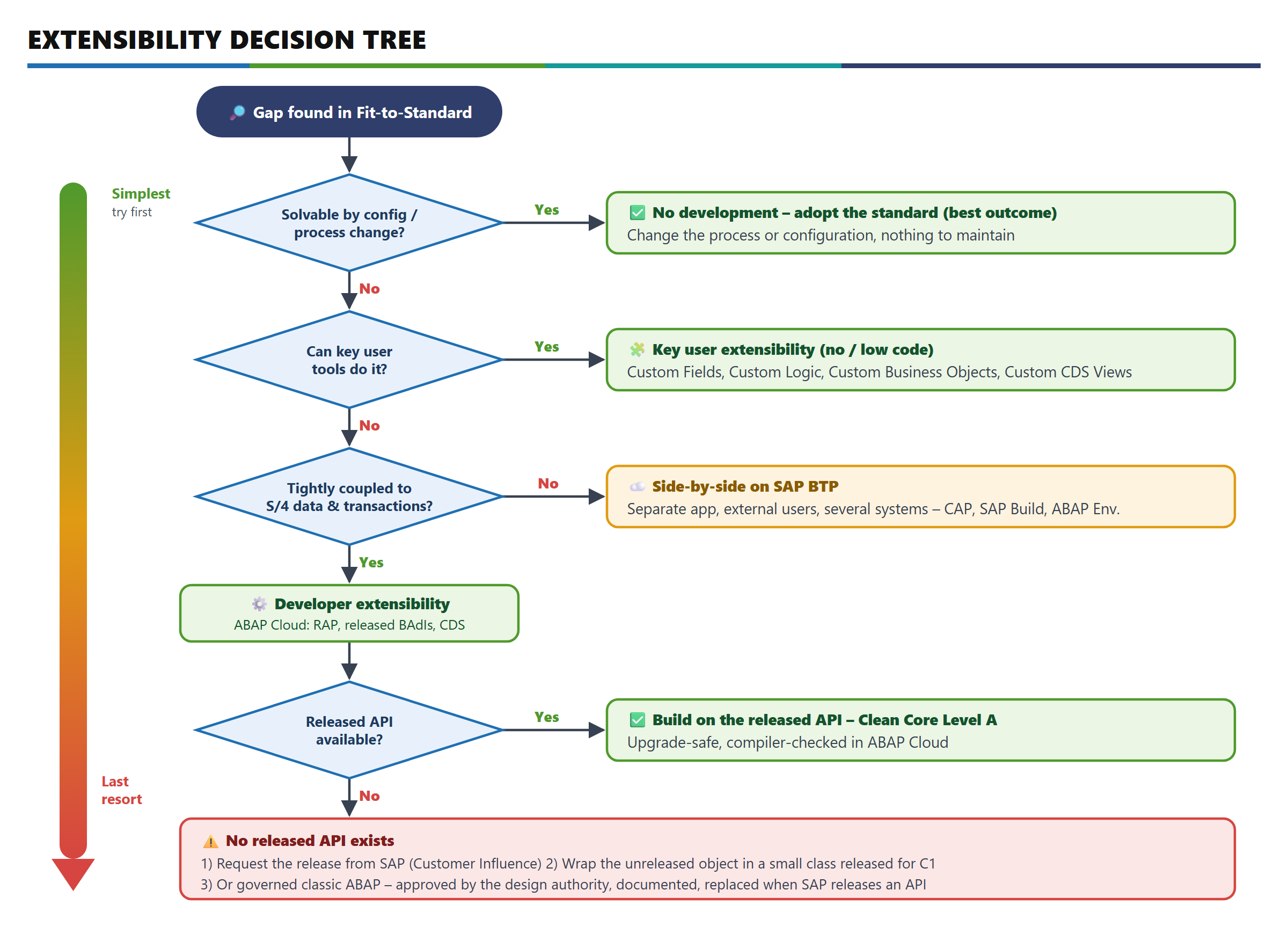
Phases: Discover → Prepare → Explore → Realize → Deploy → Run. Key clean core event: Fit-to-Standard workshops in Explore – show business users the standard process, adopt it wherever possible; only real gaps become development, and each gap goes through the extensibility decision (Part 4).
Part 2 – What is clean core
2.1 Simple definition
Clean core = keep the SAP standard system as close to "out of the box" as possible. All customer extensions are built separately from SAP's code and talk to it only through stable, SAP-released interfaces – so SAP can upgrade without breaking your code, and your code doesn't break SAP.
2.2 Analogy – your smartphone
- Dirty core = jailbreaking the phone and editing OS files → every OS update breaks it, or you stop updating.
- Clean core = installing apps that use only the official APIs → OS updates automatically, apps keep working.
SAP standard = the OS. Your Z-code = the apps. Released APIs = the official phone APIs.
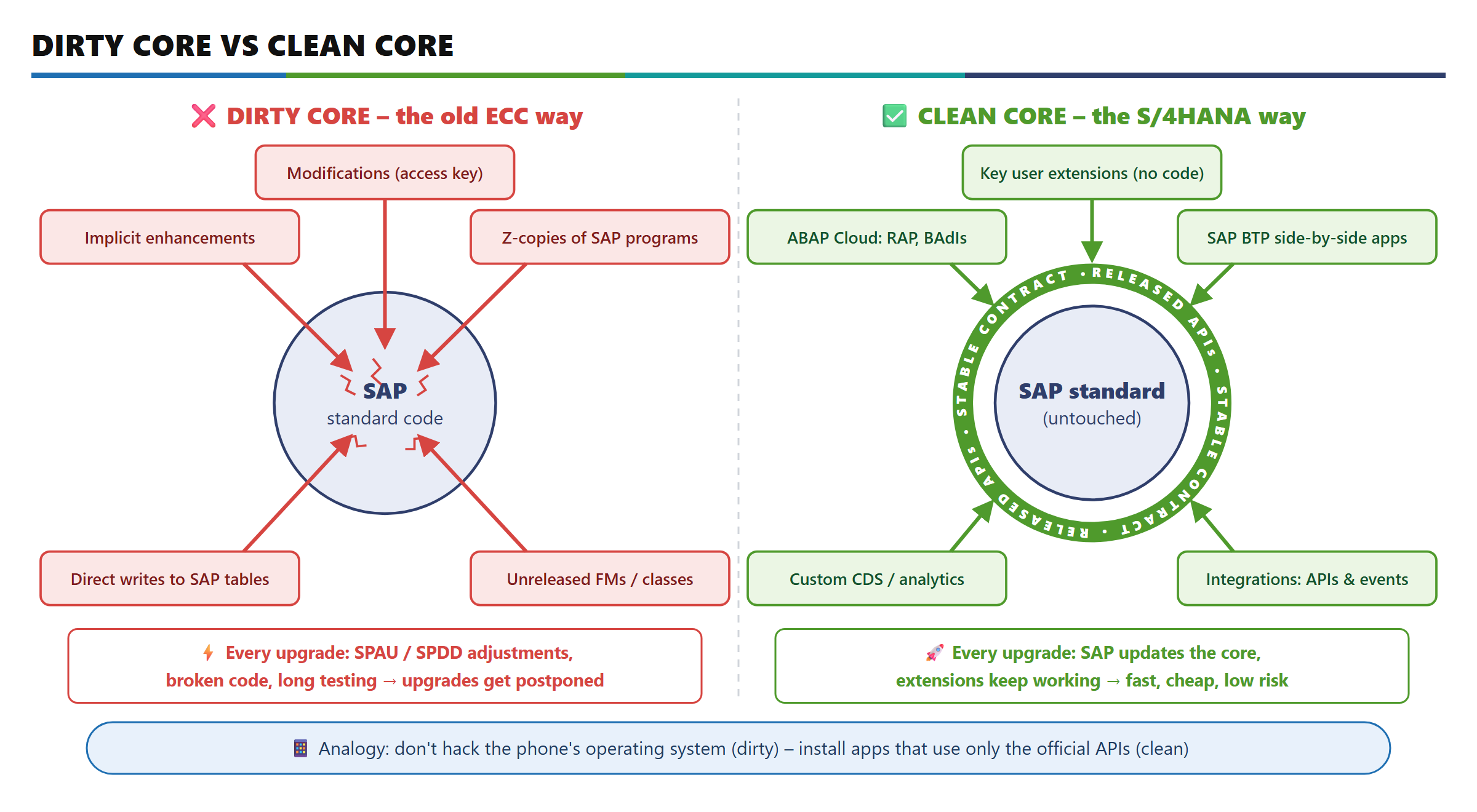
2.3 What a dirty core looks like (old ECC way)
Dirty practice | Why it's a problem |
|---|---|
Modifications – changing SAP code with an access key (SSCR) | Every upgrade needs SPAU/SPDD adjustment; can break silently |
Implicit enhancements – code injected at start/end of SAP routines | SAP can change the routine any time |
Z-copies of standard programs (SAPMV45A → ZSAPMV45A) | You miss every SAP fix and new feature |
Direct SELECT/UPDATE on SAP tables ( | Bypasses SAP validations; tables change (e.g. KONV → PRCD_ELEMENTS) |
Calling unreleased function modules / classes | SAP never promised they stay stable |
Old user exits (form routines in includes like MV45AFZZ) | Technically modifications |
2.4 Why companies want clean core
- Cheap, fast upgrades – weeks, not months; no SPAU firefighting.
- Lower TCO – less custom code to maintain.
- Faster innovation – new SAP features and AI sooner.
- Path to cloud stays open – RISE / Public Edition later.
- Fewer production incidents after updates.
Part 3 – The five dimensions of clean core
Clean core is not only about ABAP code. SAP describes five dimensions:
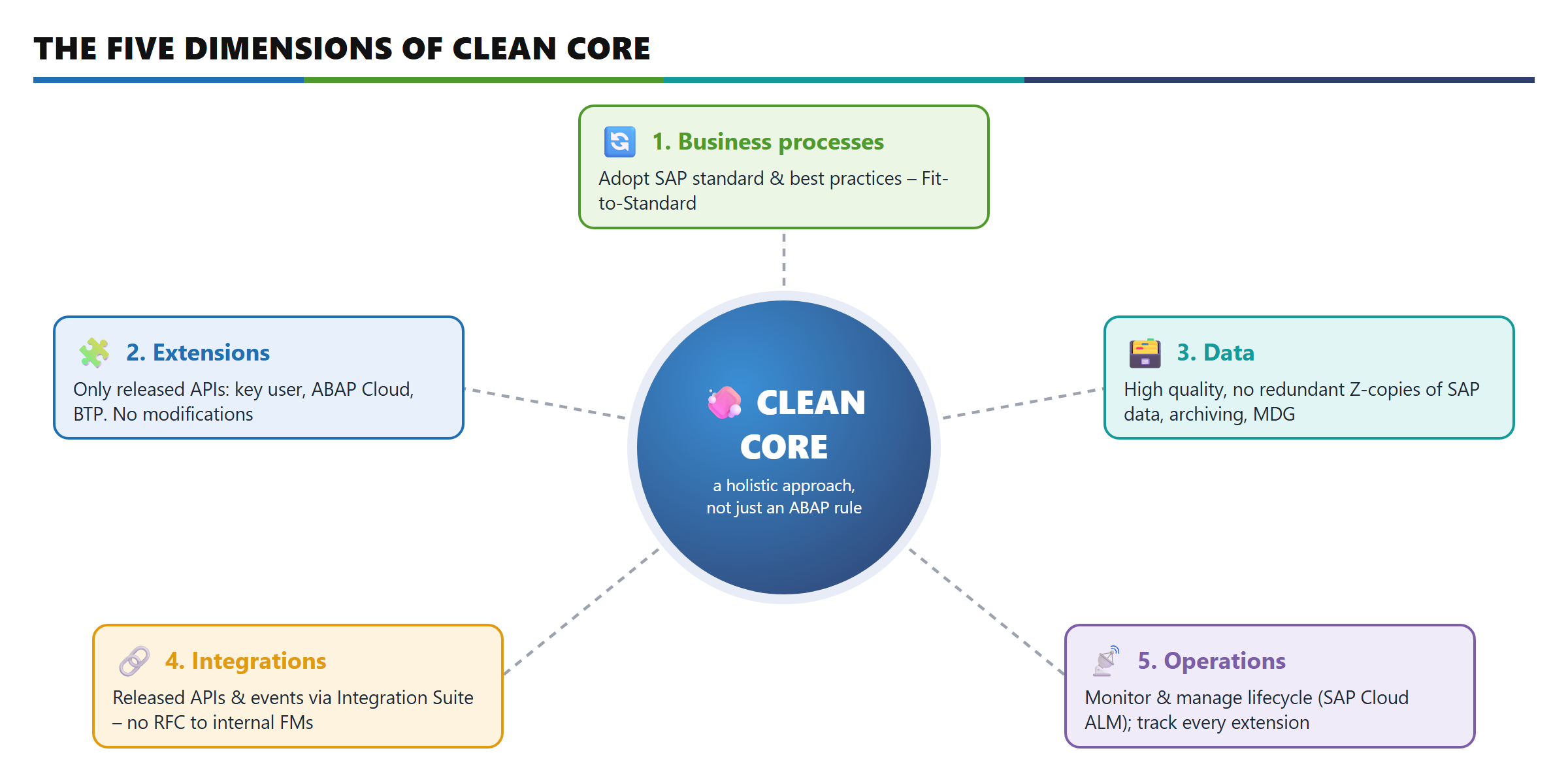
Dimension | What "clean" means |
|---|---|
1. Business processes | Use SAP standard / best-practice processes – fit-to-standard instead of rebuilding the old way |
2. Extensibility | Only via released APIs: key user, developer or side-by-side. No modifications |
3. Data | Good data quality, no redundant custom tables copying standard data, archiving, master data governance |
4. Integration | Released APIs (OData, SOAP, events) + SAP Integration Suite – not point-to-point RFCs into internal FMs |
5. Operations | Monitoring and lifecycle management (SAP Cloud ALM), tracking your extensions |
💡 Interview tip: "Clean core is a holistic approach across processes, extensibility, data, integration and operations – not just an ABAP coding rule."
Part 4 – The extensibility options
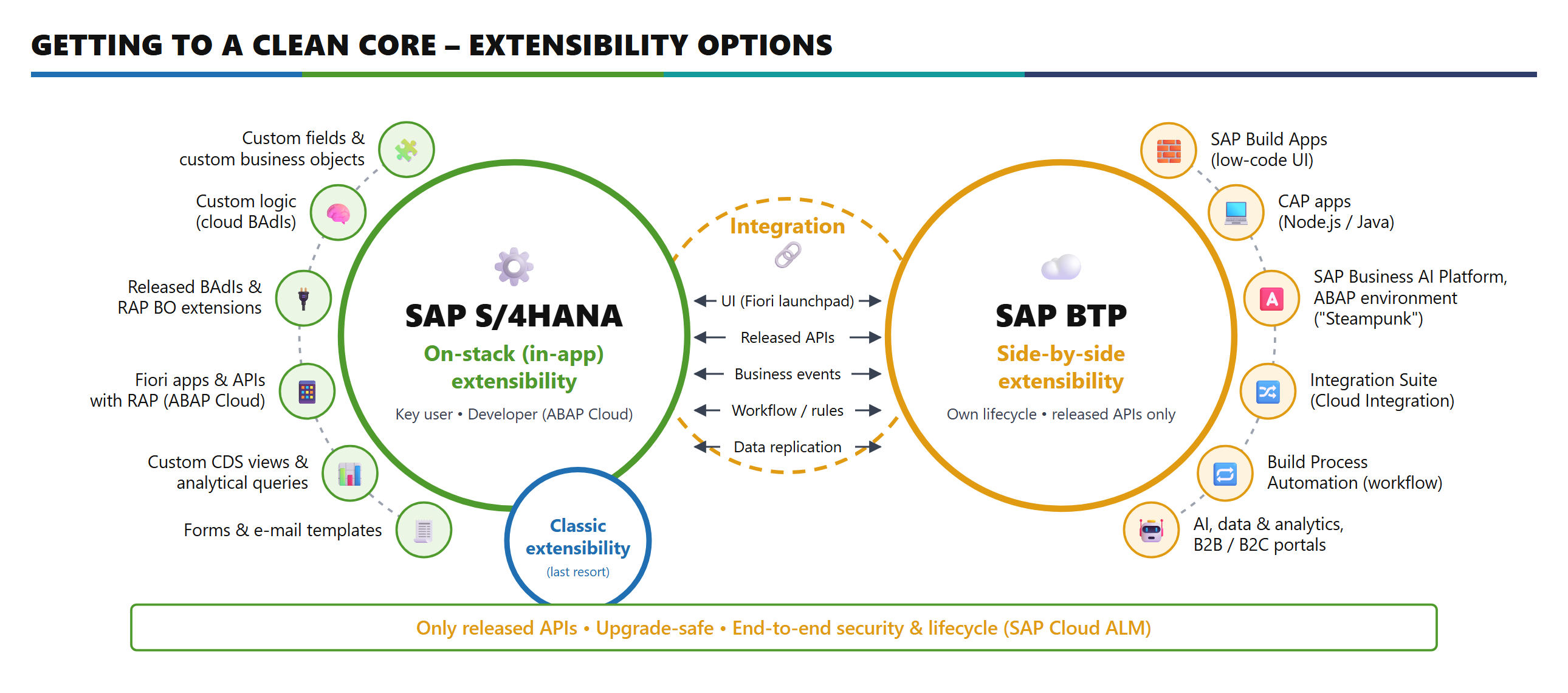
4.1 Key user extensibility (in-app, no/low code)
Business experts / functional consultants use Fiori apps inside S/4HANA:
- Custom Fields – add a field (e.g. to sales order); it appears in UI, APIs, reports, forms.
- Custom Logic – small restricted ABAP in cloud BAdIs (validations, defaults) in a web editor.
- Custom Business Objects – small custom tables + apps without coding.
- Custom CDS Views and Custom Analytical Queries – reports on released views.
4.2 Developer extensibility (on-stack, "ABAP Cloud")
Developer uses ADT (Eclipse) to write ABAP inside S/4HANA with language version "ABAP for Cloud Development" – restricted ABAP that can use only released SAP objects. For logic too complex for key user tools or tightly bound to S/4 data. Examples: RAP Fiori apps, complex BAdI logic, extending SAP RAP BOs.
4.3 Side-by-side extensibility (SAP BTP)
Build outside S/4HANA on SAP Business Technology Platform, talking via released APIs and events:
- SAP Build (Apps, Process Automation) – low code
- CAP (Cloud Application Programming Model) – Node.js / Java
- SAP Business AI Platform, ABAP environment ("Steampunk") – ABAP Cloud on BTP
- SAP Integration Suite – integrations
Use for separate apps, external users, heavy workloads, AI, or apps combining several systems.
4.4 Classic extensibility (Private Edition / on-premise only)
Classic ABAP (SE80, classic BAdIs, user exits). Still possible but last resort, and governed (Part 6).
4.5 Decision tree (memorize)
Part 5 – The technical rules (ABAP Cloud)
5.1 Released APIs and release contracts
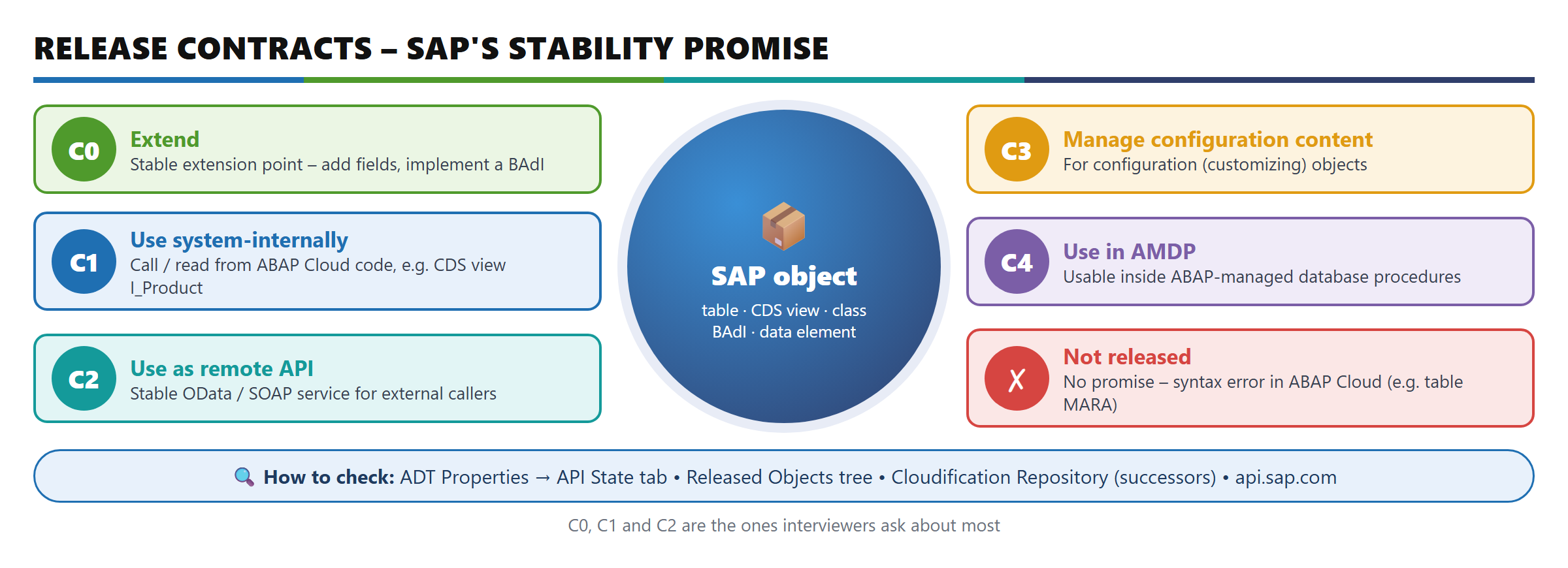
Every SAP object has an API state. "Released" = SAP promises stability. The promise is a release contract:
Contract | Meaning |
|---|---|
C0 – Extend | Stable extension point: you may extend it (add fields, implement BAdI) |
C1 – Use system-internally | Call/read it from ABAP Cloud code in the same system (classes, CDS views, data elements) |
C2 – Use as remote API | Stable for external calls (OData / SOAP services) |
C3 – Manage configuration content | For configuration objects |
C4 – Use in ABAP-managed database procedures | For use inside AMDP |
C0, C1, C2 are the ones asked most. How to check if released:
- ADT → open object → Properties → API State tab
- ADT Project Explorer → "Released Objects" tree
- SAP Business Accelerator Hub (api.sap.com) for remote APIs
- Cloudification Repository (SAP, GitHub) – released objects + successors (MARA ✗ → I_Product ✓)
5.2 ABAP language versions
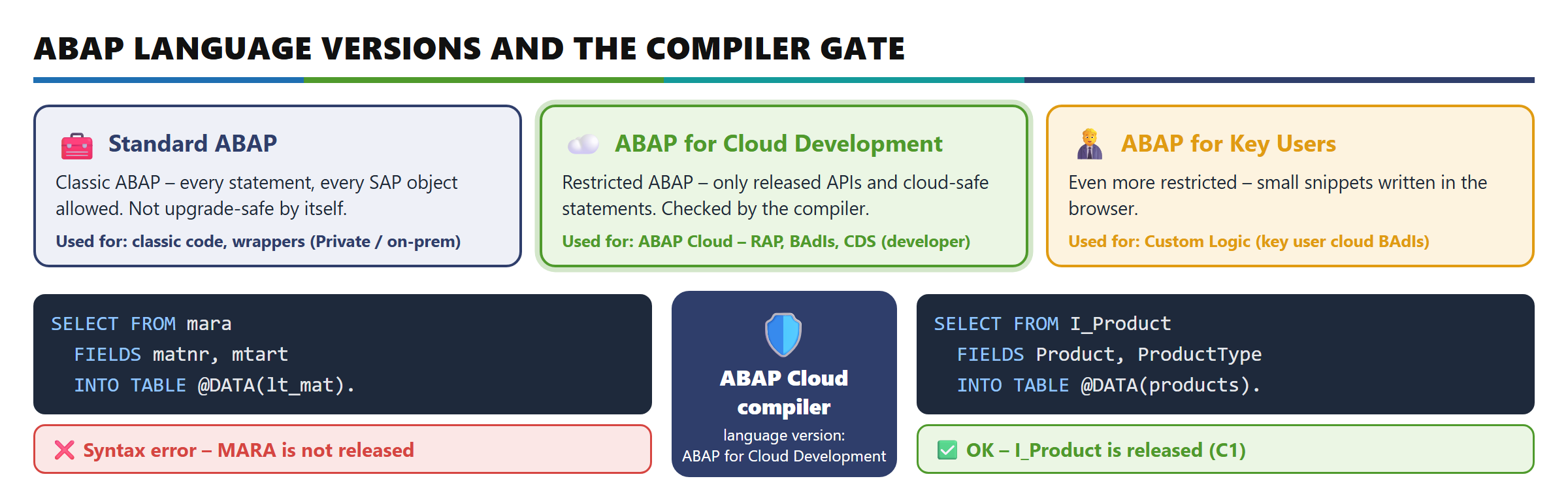
- Standard ABAP – classic, everything allowed.
- ABAP for Cloud Development – restricted; the compiler gives a syntax error for unreleased objects or forbidden statements. Clean core is enforced technically, not just by guidelines.
- ABAP for Key Users – used in Custom Logic.
5.3 What you cannot do in ABAP Cloud
Not allowed / not recommended | Clean alternative |
|---|---|
|
|
| RAP EML ( |
| Fiori apps with RAP |
| Released APIs / RAP actions |
| APIs, BTP services |
Native SQL ( | ABAP SQL or AMDP |
|
|
Calling unreleased function modules | Released class/API, or a wrapper (Part 11) |
5.4 Where ABAP Cloud is available
- Public Edition – only ABAP Cloud.
- Private Edition / on-premise (since S/4HANA 2022) – ABAP Cloud inside the system next to classic ABAP. Greenfield target: "ABAP Cloud by default, classic only with justification."
Part 6 – Governance models (very common question)
6.1 Older: the 3-tier extensibility model
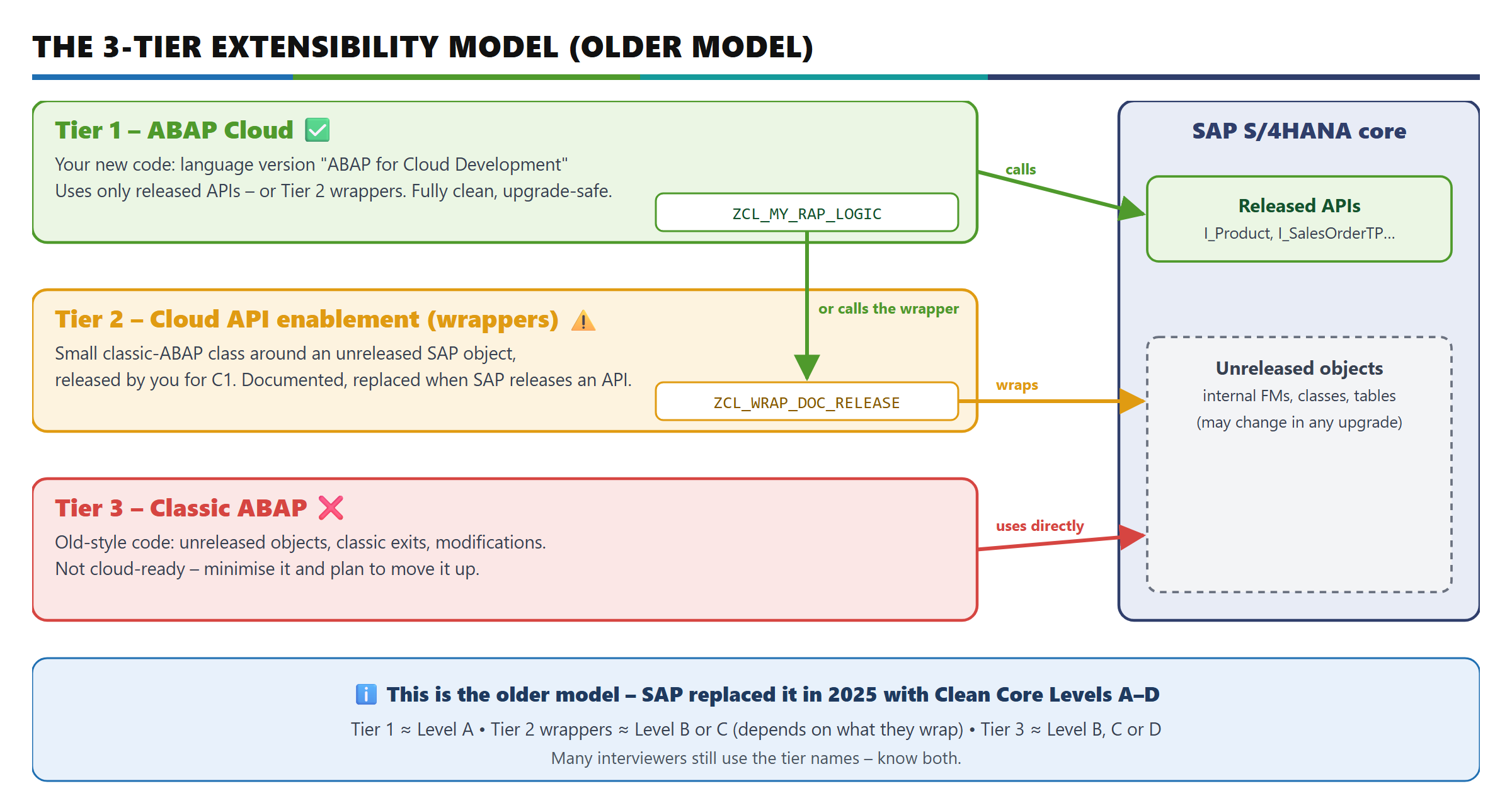
- Tier 1 – ABAP Cloud, released APIs only. Fully clean.
- Tier 2 – Cloud API enablement: no released API → small wrapper in classic ABAP around the unreleased object, released for Tier 1 use. Controlled, documented exception.
- Tier 3 – classic ABAP. Not clean, minimise.
6.2 Newer: Clean Core Levels A–D (2025)
Level | Meaning | Upgrade risk |
|---|---|---|
A | ABAP Cloud, released APIs, key user, side-by-side – fully clean | None |
B | Classic ABAP using only SAP "classic APIs" (stable, documented: BAPIs, certain classic BAdIs) | Low |
C | Uses internal, unreleased SAP objects – SAP may change them; track via changelogs | Medium |
D | Not recommended: modifications, implicit enhancements, direct writes to SAP tables | High |
Goal: aim for A, accept B, minimise and track C, avoid D. ATC checks can classify custom code into levels.
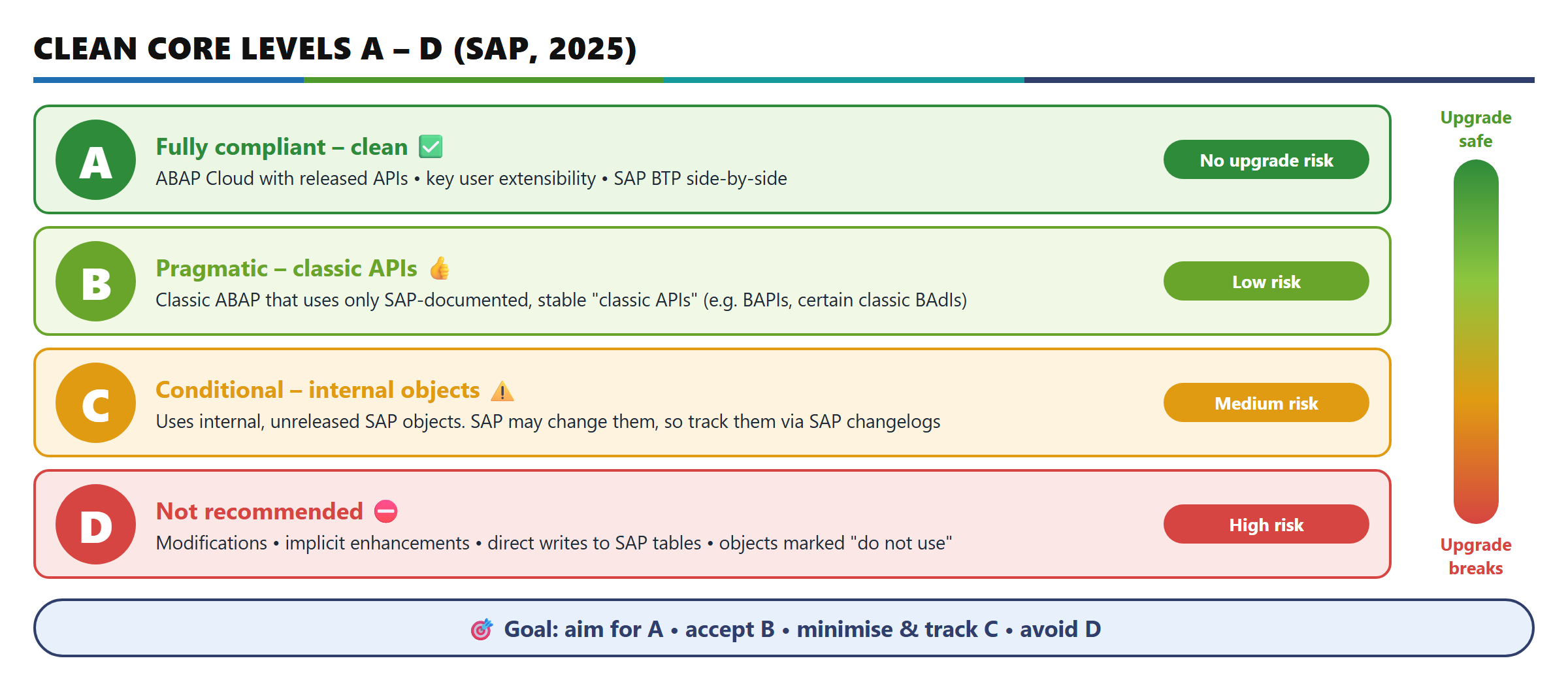
💡 Interview tip: "SAP originally described this as the 3-tier model with wrappers in Tier 2; in 2025 SAP introduced Clean Core Levels A–D, more pragmatic for Private Edition. In greenfield I'd aim for Level A by default."
Part 7 – Modern ABAP syntax you must know
|
Hello World in ABAP Cloud (no WRITE, no SE38 report – a class run in the ADT console with F9)
|
Also learn classes and interfaces (not function modules / forms), exception classes (TRY … CATCH cx_…) and ABAP Unit.
⚠️ Interview trap: Clean ABAP = SAP's code *style guide* (readable names, small methods – based on "Clean Code"). Clean core = the *architecture / upgrade* principle. Don't mix them up.
Part 8 – CDS (Core Data Services) – the data foundation
CDS views are the new way to read data: defined in ADT, executed in HANA, carrying annotations for UI, security and analytics.
8.1 Virtual Data Model (VDM)
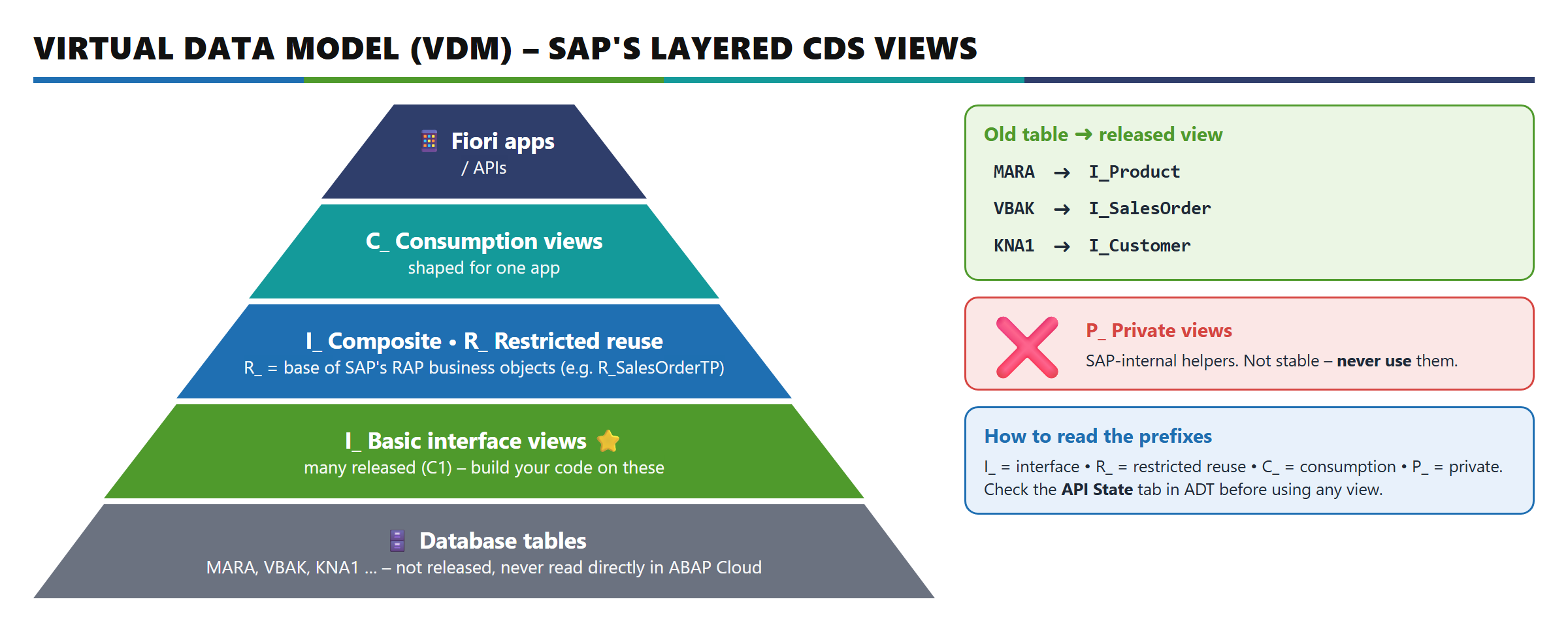
- I_ = Interface / basic views (
I_Product,I_Customer,I_SalesOrder) – many released (C1); build on these. - C_ = Consumption views, made for specific apps.
- R_ = Restricted reuse views, often the base of SAP's transactional RAP BOs (e.g.
R_SalesOrderTP). - P_ = Private views – SAP internal, never use.
8.2 Your own CDS view entity on a released view
|
define view entity= modern syntax (olddefine view+@AbapCatalog.sqlViewNameis obsolete).- Associations (
_TypeText) = lazy joins, resolved only when used. @AccessControl.authorizationCheck: #CHECK+ DCL access control = row-level security (replaces AUTHORITY-CHECK in reports).- Field names of
I_ProductTypeTextcan differ by release – use code completion (Ctrl+Space).
Part 9 – RAP in a clean core landscape
RAP is the standard way to build transactional Fiori apps and APIs in ABAP Cloud. It replaces dynpros, BOPF and SEGW-based OData, and it is built on released APIs only, so a RAP app is clean core level A.
- EML (
READ ENTITIES/MODIFY ENTITIES) changes RAP BOs – also SAP's own, e.g.MODIFY ENTITIES OF I_SalesOrderTPinstead of a BAPI or a table update. - Managed, unmanaged and draft, the build steps and the full worked example (Sales Order Approval app) → RAP › 00 · Start Here – Roadmap & the Business Scenario.
- The clean core level of a complete RAP app → RAP › 13 · Debugging, Best Practices, Clean Core & What's New, Part 7.
Part 10 – Extending SAP standard the clean way
Requirement | Clean approach |
|---|---|
Add a field to sales order, BP, … | Custom Fields app (key user) – flows to UI, APIs, CDS, forms |
Validation / default on save | Cloud BAdI via Custom Logic, or released BAdI in ADT |
Extra logic in an SAP RAP BO | RAP BO extension – own determinations/validations/actions on SAP's released BDEF |
Add fields to an SAP CDS view |
|
React when something happens (sales order created) | Subscribe to a RAP business event (locally or via Event Mesh) – loose coupling, no code in SAP's flow |
Custom table + maintenance app | Custom Business Object (key user) or own RAP BO |
New report | CDS + Fiori elements list report, or Custom Analytical Query |
Implement a released BAdI in ADT: File → New → BAdI Enhancement Implementation → pick released enhancement spot → create implementation class → code in the interface method. Same idea as classic BAdI, but only released (C0) BAdIs, and ABAP Cloud rules apply.
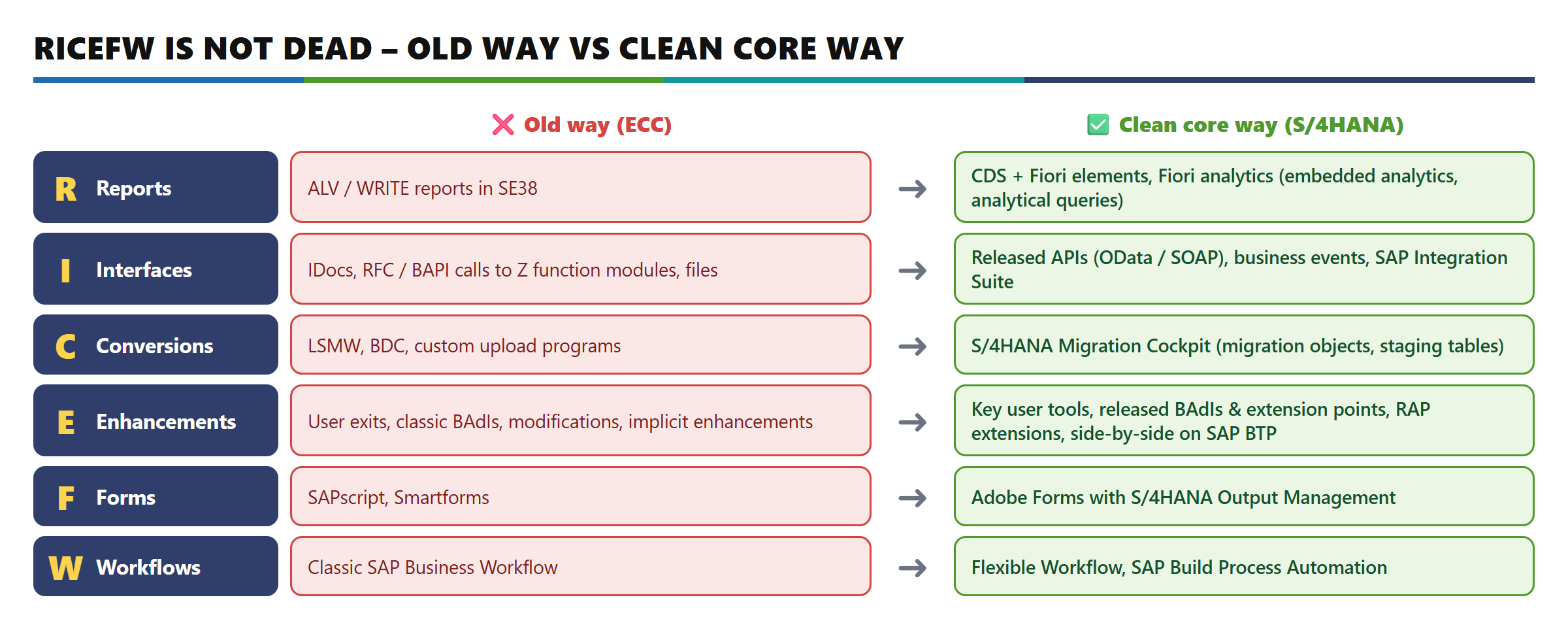
RICEFW mapping (very likely interview question)
- RICEFW is not dead, but the approach changes. S/4HANA projects still track their custom objects as RICEFW; the difference is how each object is built.
- Traditional SAP (ECC / on-premise): Z-code inside the core, modifications, unreleased objects.
- Modern SAP (S/4HANA): cloud-ready, clean core, extensibility through released APIs and extension points.
RICEFW | Old way (ECC) | Clean core way (S/4HANA) |
|---|---|---|
Reports | ALV / WRITE reports in SE38 | CDS + Fiori elements, Fiori analytics (embedded analytics, analytical queries, Analytical List Page, Overview Page) |
Interfaces | IDocs, RFC / BAPI calls to Z function modules, files | Released APIs (OData / SOAP), business events, SAP Integration Suite |
Conversions | LSMW, BDC, custom uploads | S/4HANA Migration Cockpit (migration objects, staging tables) |
Enhancements | User exits, customer exits, classic (unreleased) BAdIs, modifications, implicit enh. | Key user tools, released BAdIs and extension points, RAP extensions, side-by-side apps on SAP BTP |
Forms | SAPscript, Smartforms (output determination via NAST condition records, NACE) | SAP Interactive Forms by Adobe with S/4HANA output control (output management; on-premise optional per application – NAST output still supported) |
Workflows | Classic SAP Business Workflow | Flexible Workflow, SAP Build Process Automation |
Part 11 – When no released API exists (wrapper pattern)
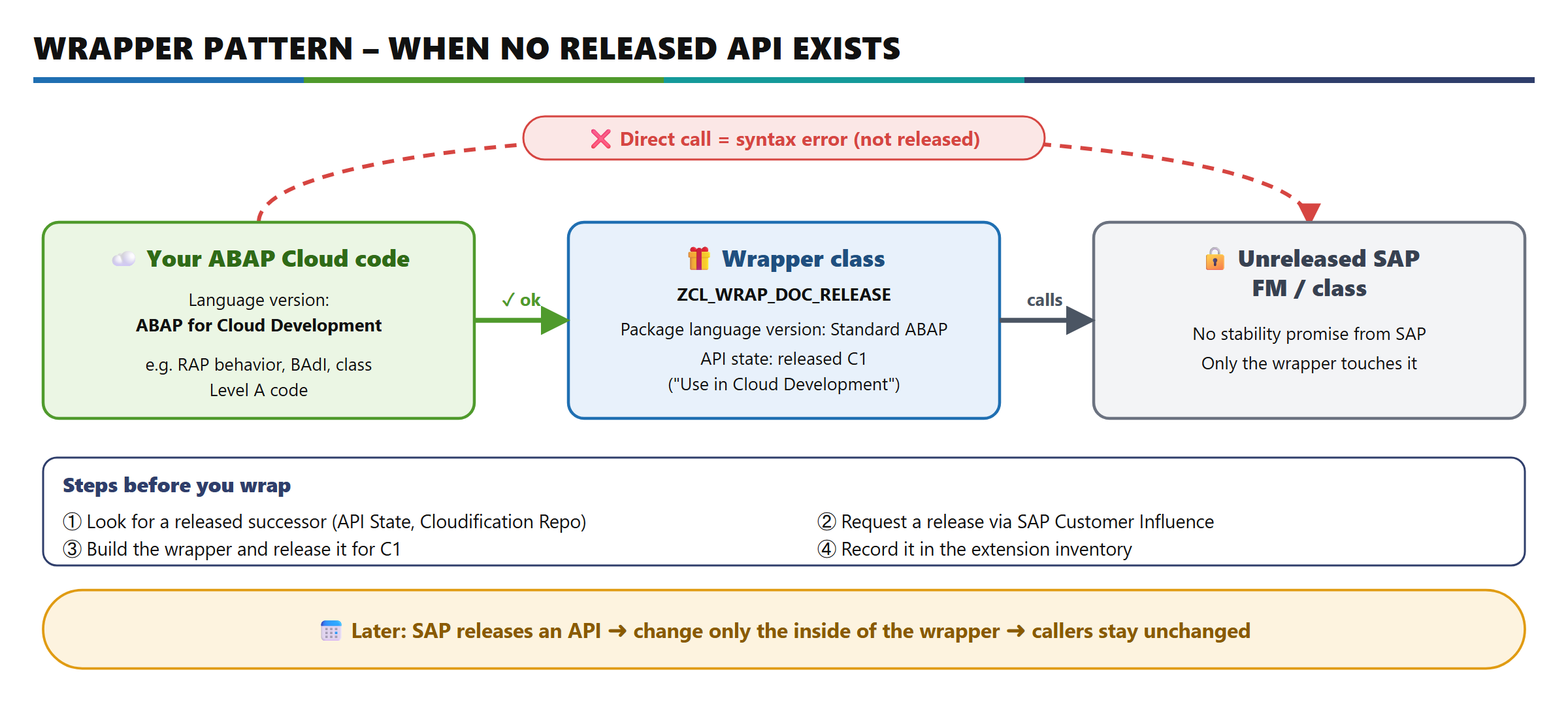
- 1. Check again for a released successor (Cloudification Repository, Business Accelerator Hub).
- 2. Request the release from SAP via SAP Customer Influence.
- 3. Create a wrapper ("Tier 2" in the old model):
- Separate package, language version Standard ABAP.
- Small class + interface that calls the unreleased object.
- Set API state "Use System-Internally (C1)" with "Use in Cloud Development" on.
- ABAP Cloud code calls only the wrapper, never the unreleased object.
- 4. Document and track it. When SAP releases an API, replace only the inside of the wrapper.
|
Why wrap? It isolates the risk in one small place and keeps the rest of the code base clean.
Part 12 – Integration and side-by-side (SAP BTP)
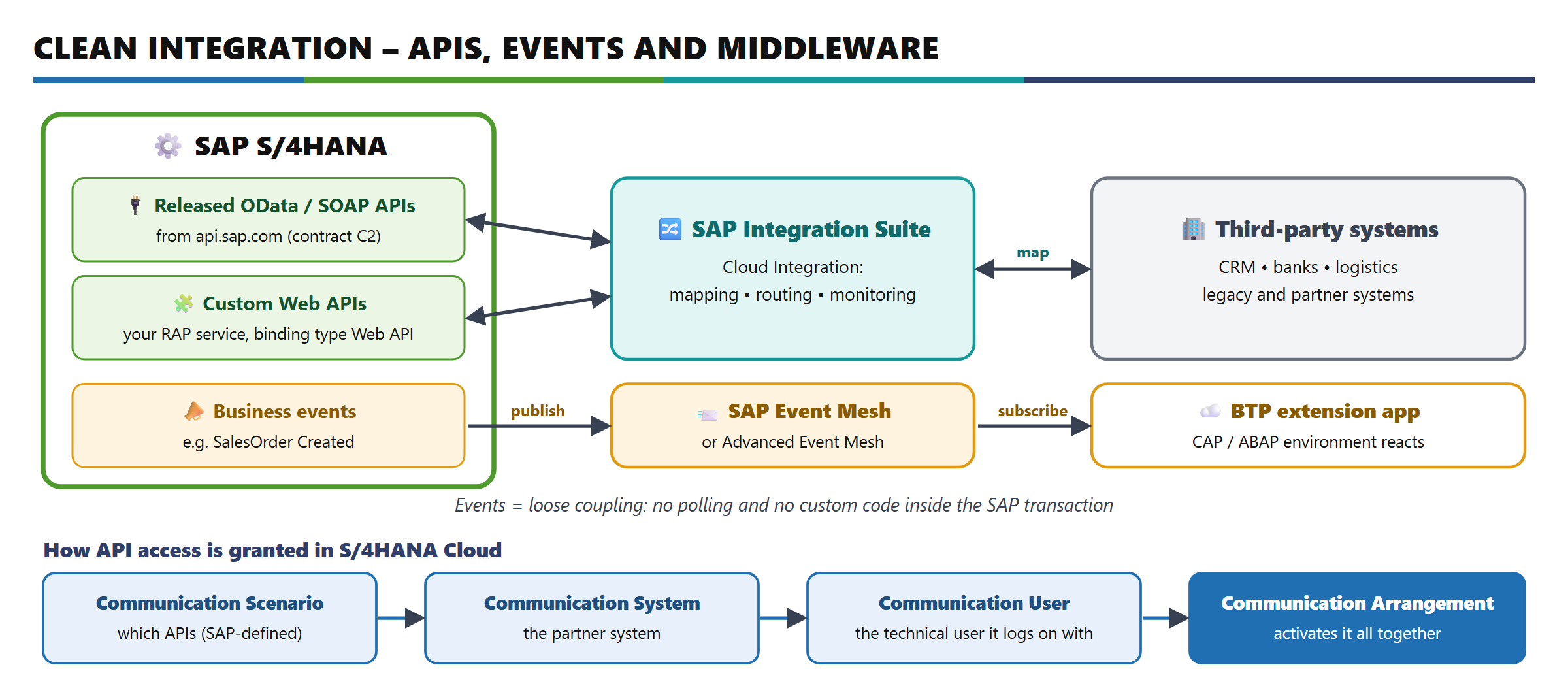
- APIs: released OData V2/V4 and SOAP APIs from api.sap.com.
- S/4HANA Cloud setup: Communication Scenario → Communication System → Communication User → Communication Arrangement (how API access is granted).
- Event-driven: S/4 publishes business events (e.g. BusinessPartner.Changed); BTP apps react via SAP Event Mesh / Advanced Event Mesh – no polling, no code inside S/4.
- SAP Integration Suite (Cloud Integration, formerly CPI): middleware for mapping/routing to third-party systems.
- Own APIs: expose your RAP BO as a Web API service binding.
Part 13 – Tools and governance
Tool | Purpose |
|---|---|
ADT (ABAP Development Tools, Eclipse) | Mandatory for ABAP Cloud, CDS, RAP – SE80 can't create these |
ATC (ABAP Test Cockpit) | Static checks; variants like |
Cloudification Repository | Released objects and successors |
ABAP Unit | Unit tests; RAP has test doubles for EML and CDS |
abapGit / gCTS | Git-based version control and transport |
Custom Code Migration app | Analyses existing custom code (mostly brownfield) |
SAP Cloud ALM | Implementation and operations management, monitoring |
Software components / packages | Separate component/package for ABAP Cloud code (language version "ABAP for Cloud Development") so clean and classic code don't mix |
Typical greenfield governance setup
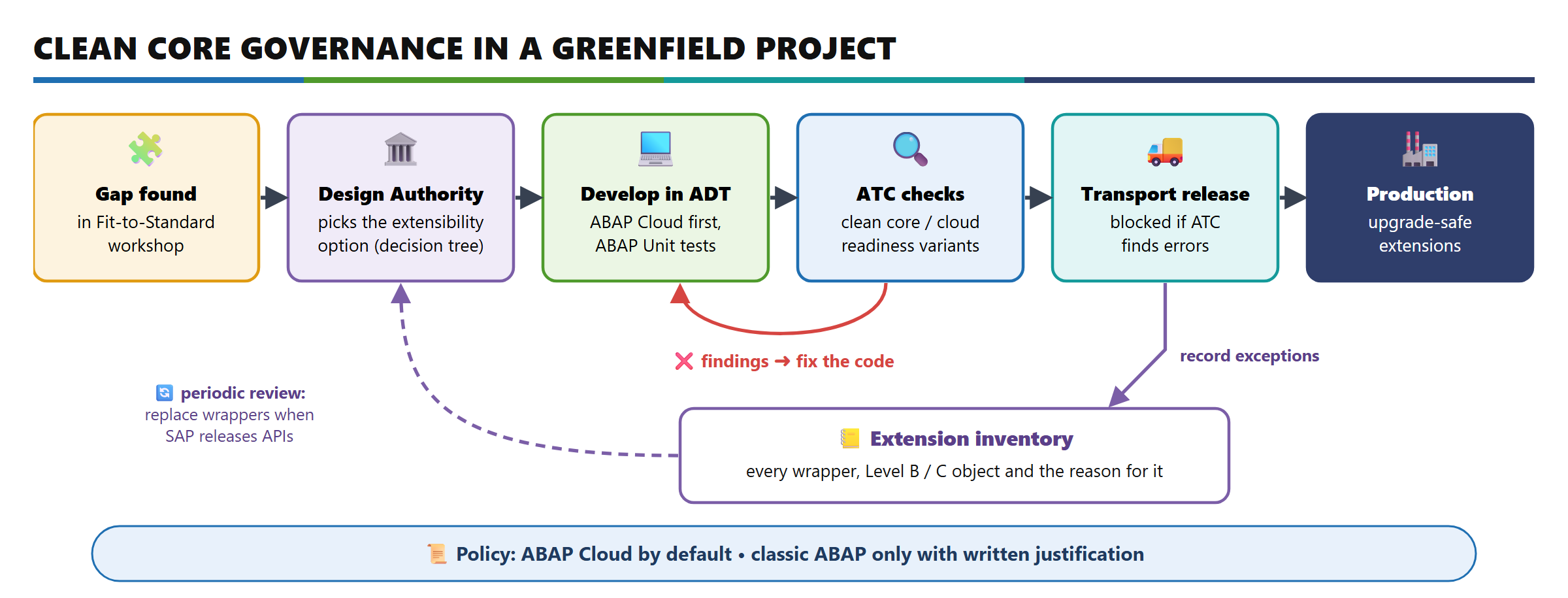
- Design Authority / extension board approves every gap and its extensibility choice.
- ABAP Cloud first policy – classic ABAP needs written justification.
- ATC in transport release; clean core findings block release.
- Extension inventory – every wrapper, Level B/C object and its reason.
- Regular review: replace wrappers when SAP releases new APIs.
Part 14 – Worked greenfield scenario (practise explaining)
Requirement: "When a sales order is created for a VIP customer, field 'Priority Reason' must be mandatory. The sales manager needs a Fiori app of all VIP orders. An external CRM must be notified."
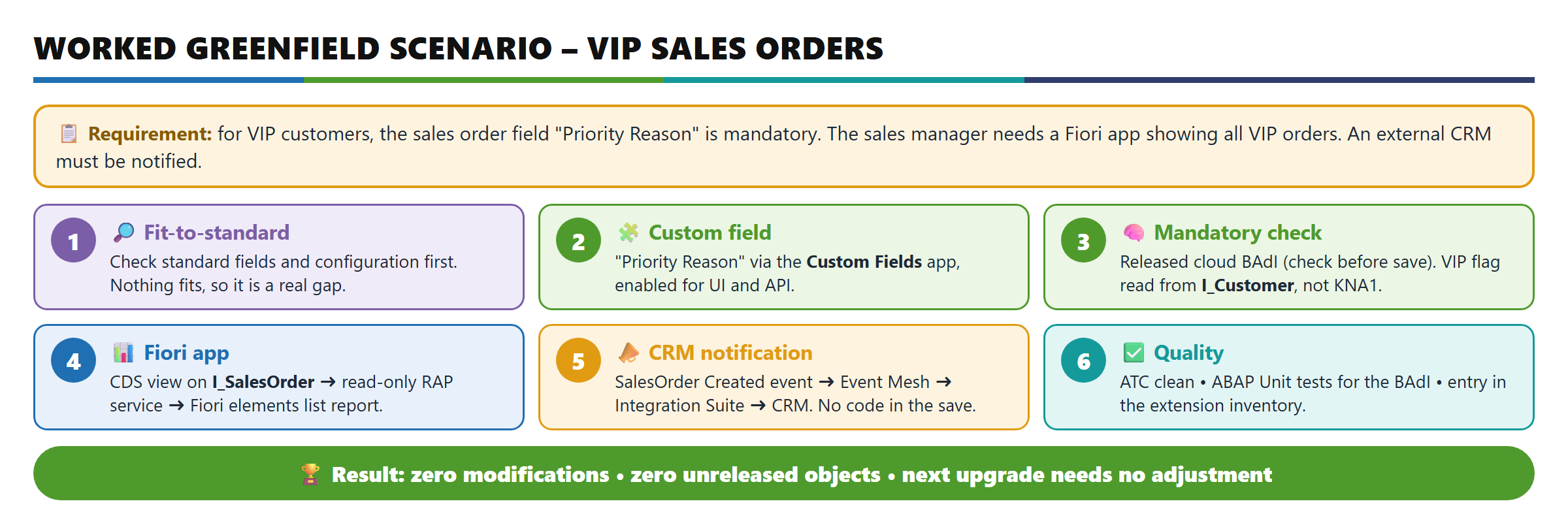
- 1. Fit-to-standard – check whether a standard field/config covers it (assume not).
- 2. Field – add "Priority Reason" with the Custom Fields app on the sales order header; enable for UI and API.
- 3. Mandatory check – implement the released cloud BAdI for sales document check-before-save (Custom Logic or ADT/ABAP Cloud). Read the VIP flag via a released CDS view like
I_Customer, not table KNA1. - 4. Fiori app – CDS view on released
I_SalesOrder+ Fiori elements list report via RAP (read-only), or Custom CDS View + Custom Analytical Query. - 5. CRM notification – subscribe to standard SalesOrder Created business event via Event Mesh; Integration Suite maps and sends to CRM. No custom code in the order save.
- 6. Quality – ATC clean, ABAP Unit tests for BAdI logic, documented in extension inventory.
Result: zero modifications, zero unreleased objects – next upgrade needs no adjustment.
Part 15 – Interview questions with model answers
Q1. What is clean core?
Keeping S/4HANA standard unmodified, with all extensions decoupled and built only on SAP-released, upgrade-stable interfaces – across processes, extensibility, data, integration and operations.
Q2. Why is greenfield ideal for clean core?
No legacy custom code; fit-to-standard adopts best practices from day one; every extension built the clean way from the start.
Q3. Name the extensibility options.
Key user (in-app), developer (on-stack ABAP Cloud), side-by-side (BTP). Classic only in Private Edition / on-premise.
Q4. What is ABAP Cloud?
SAP's cloud-ready ABAP development model: "ABAP for Cloud Development" language version, released APIs only, ADT, CDS, RAP. Works in Public, Private, on-premise (2022+) and SAP Business AI Platform, ABAP environment.
Q5. What is a released API? C0 / C1 / C2?
An SAP object with a stability contract. C0 = stable for extension, C1 = use inside ABAP Cloud, C2 = stable remote API.
Q6. What happens if you SELECT from MARA in ABAP Cloud?
Syntax error – MARA isn't released. Use successor CDS view I_Product.
Q7. Explain the 3-tier model / Clean Core Levels.
3-tier: Tier 1 ABAP Cloud, Tier 2 wrappers around unreleased APIs, Tier 3 classic. Levels: A fully clean, B classic APIs, C internal objects (tracked), D not recommended (modifications etc.).
Q8. What is a wrapper and when do you use it?
A small classic-ABAP class released for C1 that encapsulates an unreleased SAP object when no released API exists – isolates risk, easy to replace.
Q9. What is RAP? Components?
ABAP RESTful Application Programming Model – standard for transactional apps/APIs. CDS data model, behavior definition, behavior implementation, projection, service definition, service binding. More: RAP › 14 · Interview Questions.
Q10. What is VDM? I_ vs C_?
Virtual Data Model – SAP's layered CDS views. I_ = interface/basic (build on these), C_ = consumption. P_ = private, never use.
Q11. How do you know if an object is released?
ADT API State tab, Released Objects tree, Cloudification Repository, api.sap.com for remote APIs.
Q12. How do you add a custom field to a standard object cleanly?
Custom Fields key user app – automatically available in UI, CDS, APIs, forms.
Q13. ATC's role in clean core?
Static checks (cloud readiness / clean core level), ideally enforced at transport release so non-compliant code can't reach production.
Q14. Key user vs developer extensibility – how do you decide?
Key user for simple fields/logic business experts can maintain; developer for complex logic, custom apps, reusable services.
Q15. When side-by-side on BTP?
Separate apps, external users, combining multiple systems, heavy processing, AI, independent lifecycle.
Q16. Data migration in greenfield?
S/4HANA Migration Cockpit with standard migration objects (staging tables/files) – not custom BDC/LSMW.
Q17. Business events and why they matter?
S/4 publishes events (sales order created); consumers react asynchronously – no custom code inside SAP's transaction (loose coupling).
Q18. Statements forbidden in ABAP Cloud?
WRITE, dynpros, CALL TRANSACTION, SUBMIT, OPEN DATASET, native SQL, unreleased objects; use cl_abap_context_info instead of sy-datum/sy-uname.
Q19. Clean ABAP vs clean core?
Clean ABAP = coding style guide. Clean core = architecture/upgrade-safety principle.
Q20. Can you still use BAPIs?
In ABAP Cloud only if released; otherwise released RAP BO (EML) or a wrapper. In classic ABAP, BAPIs are "classic APIs" (Level B).
Q21. Forms and workflow in clean core?
SAP Interactive Forms by Adobe with S/4HANA output control (output management); Flexible Workflow and SAP Build Process Automation.
Q22. As a beginner, how would you contribute to clean core here?
"I'd follow ABAP Cloud by default, always check released APIs/successors first, keep ATC clean, write ABAP Unit tests, document every exception, and escalate gaps to the design authority instead of shortcuts like modifications."
💡 Honest beginner tip: if you don't know, say so and explain how you'd find out ("I'd check the API State in ADT and the Cloudification Repository"). The right method beats memorised facts.
Part 16 – 4-week study plan (hands-on)
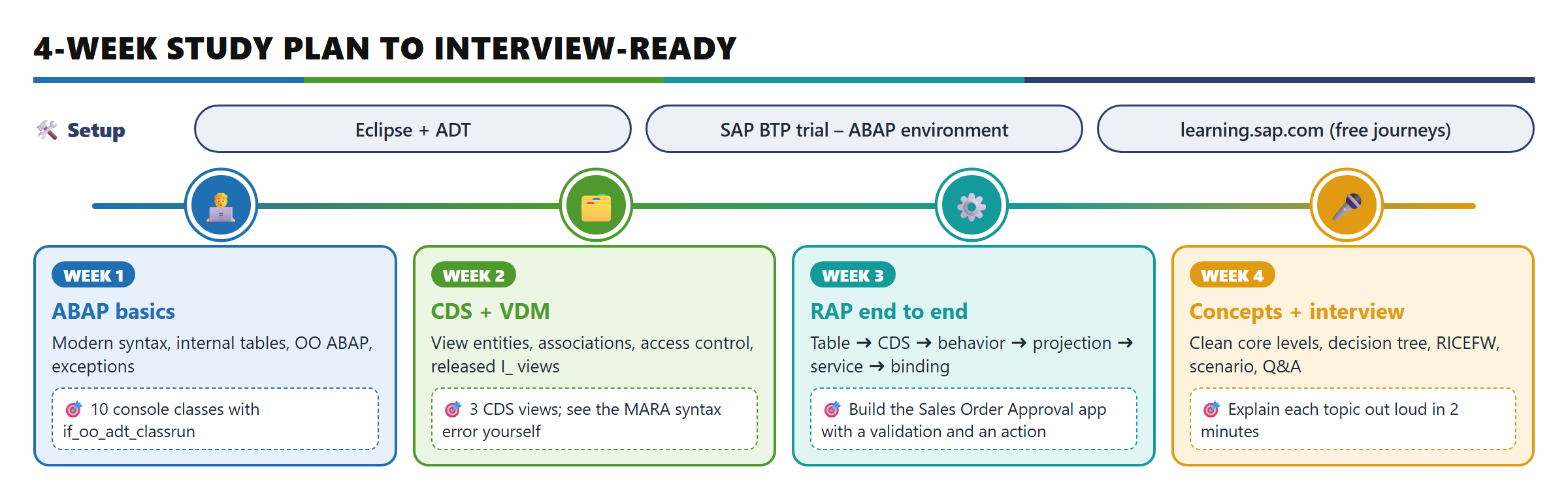
Setup (free)
- Install Eclipse + ADT (ABAP Development Tools).
- Create an SAP BTP trial and use the ABAP Environment trial – a real ABAP Cloud system for Parts 7–8 and the RAP section.
- learning.sap.com (free): "Acquiring Core ABAP Skills", "Building Apps with the ABAP RESTful Application Programming Model", "Clean Core Extensibility".
Week | Focus | Hands-on goal |
|---|---|---|
1 | ABAP fundamentals + modern syntax (Part 7), OO ABAP | 10 console classes with if_oo_adt_classrun: loops, internal tables, classes, exceptions |
2 | CDS views, VDM, associations, access control (Part 8) | 3 CDS views on released I_ views; try selecting MARA and see the error |
3 | RAP end-to-end (RAP section) | Build the Sales Order Approval app from RAP › 02–05; add a validation and an action; preview in Fiori |
4 | Concepts (Parts 1–6, 10–14) + interview practice | Explain decision tree, RICEFW mapping and the Part 14 scenario aloud in 2 minutes each |
🏠 Start Here · 02 · Clean-Core Report ▶ · Sections: CORE ABAP | OOPS ABAP | ABAP on HANA | Clean Core | RAP | ABAP Points | SAP Fiori | SAPUI5 | Mobile Development (MDK) | BTP Foundations | BTP Development | CAP | SAP Build | ABAP on BTP | Integration Suite | SAP Business AI | SAP BASIS | Security | SAP SDLC
Functional: FICO ABAP | TRM ABAP | VIM | SAP BIS | SD ABAP | MM ABAP | PP ABAP | QM ABAP | PM ABAP | PS ABAP | EWM | TM ABAP | GTM ABAP | EHS ABAP | HR ABAP | BW | SAP Datasphere | SAP Business Data Cloud | SAP MDG | SAP Analytics Cloud | SAP Ariba | SAP CX | SAP IBP