How to build a "report" in S/4HANA the clean-core way. In ABAP Cloud there is no SE38 report: no selection screen, no WRITE, no SAP GUI ALV. The report becomes a read-only Fiori app on CDS, background processing becomes an application job, and any ABAP that is still needed lives in classes that use released APIs only. This page maps every part of a classic report to its replacement, then builds the three options with full code.
Builds on ABAP on HANA › 05 CDS Views, the RAP section (the Sales Order BO ZR_SalesOrder from RAP › 02 is reused) and page 01 Clean Core (released APIs, ABAP Cloud, Clean Core Levels A–D).
Part 1 – From SE38 report to clean-core app: the mapping
A classic report bundles everything in one program: selection screen, SELECTs, authority checks, ALV, a transaction code and maybe a background job. In clean core each part moves to the technology built for it, and most of them need no ABAP code – only CDS annotations.
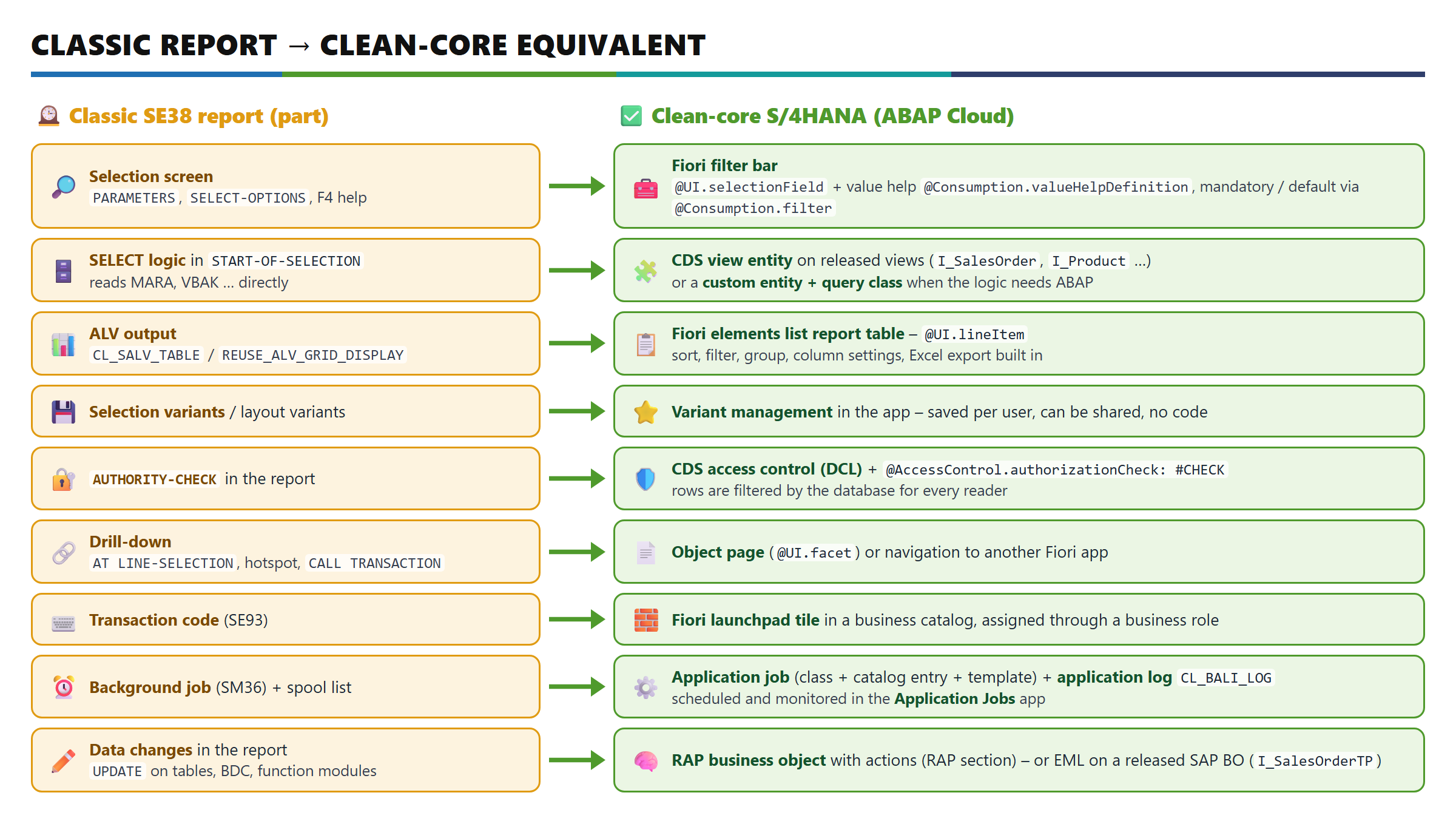
1.1 Why the classic report is not the target
- ABAP Cloud forbids it: selection screens and lists are dynpro technology;
WRITE,CALL SCREEN,SUBMITand SAP GUI are not available in the language version "ABAP for Cloud Development" (ABAP on BTP › 02 · ABAP for Cloud Development). - Direct reads of SAP tables (VBAK, MARA) are not released – the stable contract is the released CDS view (
I_SalesOrder,I_Product). - Fiori is the UX standard – users get filter bar, variants, sorting, Excel export and launchpad tiles for free, on desktop and mobile.
- HANA does the work: the Fiori elements table asks only for one page of rows; filters, sorting and paging become SQL on the database (code pushdown, ABAP on HANA › 01).
1.2 Selection screen features in annotations
Classic selection screen | Clean-core annotation (on the CDS element) |
|---|---|
| @UI.selectionField: [{ position: 10 }] |
F4 help | @Consumption.valueHelpDefinition: [{ entity: { name: 'I_Customer', element: 'Customer' } }] |
OBLIGATORY | @Consumption.filter: { mandatory: true } |
| @Consumption.filter.defaultValue: '…' |
Single value only (no ranges) | @Consumption.filter: { selectionType: #SINGLE, multipleSelections: false } |
Free text search |
|
ALV column / column order |
|
Report title / list header |
|
Part 2 – Option 1: CDS-only list report (no ABAP)
The default. A CDS view entity with @UI annotations, a service definition and a service binding give a complete Fiori elements list report. No behavior definition means the service is read-only; the RAP query framework turns the OData request into SQL – you write no ABAP at all.
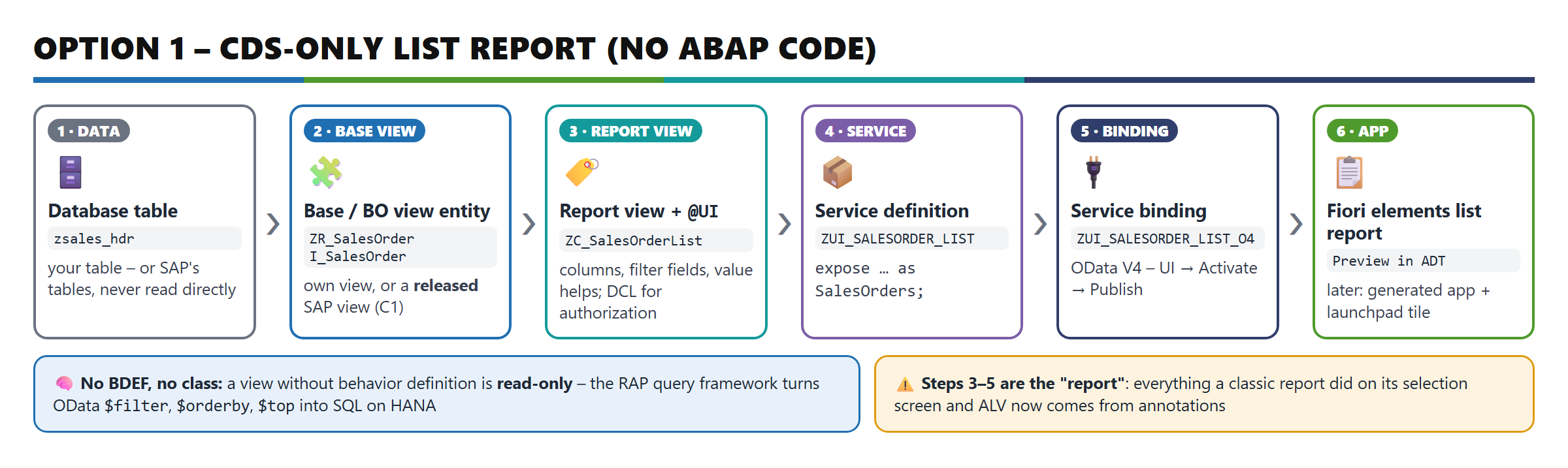
2.1 Example: sales order list on the released view I_SalesOrder
Replaces a classic "open sales orders" ALV report. I_SalesOrder is a released VDM interface view (contract C1, usable in ABAP Cloud). Element names can differ slightly by release – use code completion (Ctrl+Space) and check the API state in ADT.
|
as select from I_SalesOrder– read the released view, never VBAK. The currency reference ofTotalNetAmountcomes fromI_SalesOrder, soTransactionCurrencymust be in the field list.@UI.selectionField= filter bar field,@UI.lineItem= table column. In real projects put the@UIannotations in a metadata extension (@Metadata.allowExtensions: true, RAP › 03 · Projection, UI, Access Control & Service) so the view stays clean.@AccessControl.authorizationCheck: #CHECKonly works with an access control. SAP's view has its own DCL; reuse its conditions so users see exactly the orders they may see in SAP's apps:
|
- Inherited conditions refer to element names of
I_SalesOrder(sales area, order type …), so the view must contain those elements – that is whyDistributionChannelandOrganizationDivisionare in the field list without a column. The activation reports any element that is missing.
2.2 Service definition
|
2.3 Service binding and preview
- Right-click the service definition → New Service Binding → name
ZUI_SALESORDER_LIST_O4, binding type OData V4 – UI. - Activate → Publish (local service endpoint).
- Select the entity set
SalesOrders→ Preview – the Fiori elements list report opens in the browser. - For production: generate a Fiori elements app from the service (SAP Business Application Studio / VS Code), deploy it, and add it as a tile to a business catalog and business role.
2.4 What the user gets for free
Feature | Where it comes from |
|---|---|
Filter bar with value helps |
|
Sort, filter, group, choose columns | Table settings of Fiori elements – no code |
Saved variants (like selection variants) | Variant management – per user, shareable |
Export to spreadsheet | Built into the table toolbar |
Paging ("load more" / scrolling) | OData |
Detail page per row | Add |
Totals per column |
|
Part 3 – Option 2: custom entity + query provider class
When the list needs ABAP logic – calling a released class or a remote API, an algorithm that CDS can't express, data that is not in a CDS-readable table – use a custom entity. It defines the columns in CDS but has no SQL source; the framework calls your class, which implements IF_RAP_QUERY_PROVIDER. The basic idea is on RAP › 11 · Files, Custom Entities & Integration; here is a complete, report-style implementation.
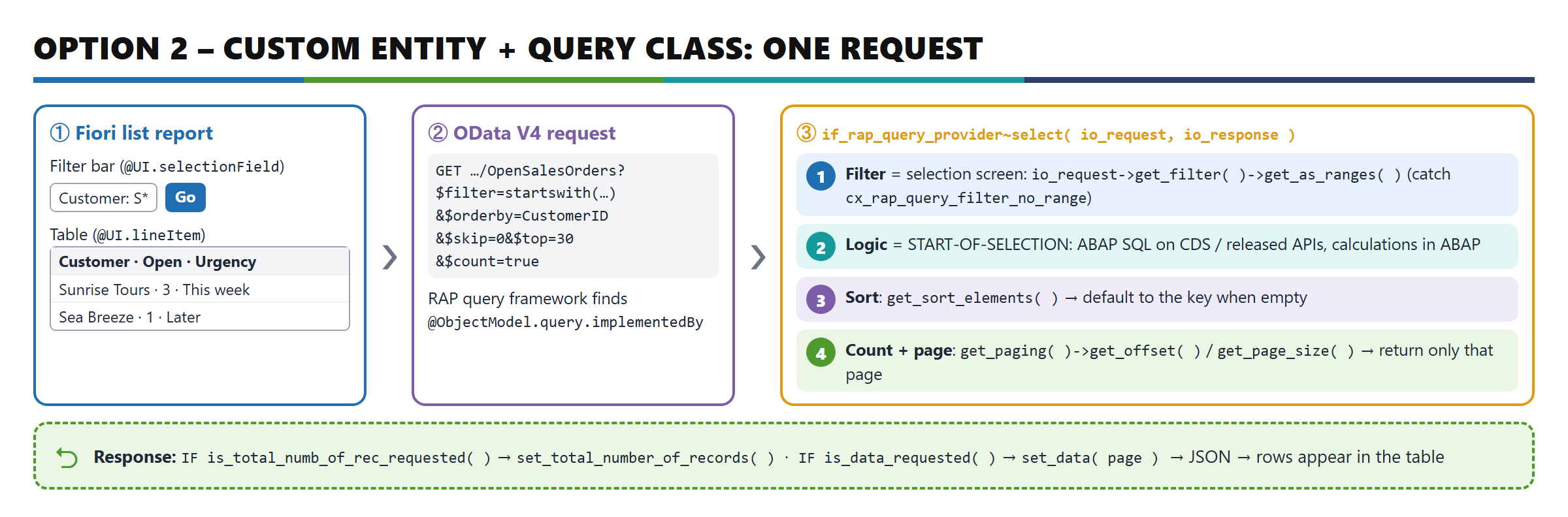
3.1 Custom entity
Example: orders waiting for approval (status N) per customer and currency from ZR_SalesOrder, plus an urgency that ABAP calculates. (This simple rule could also be a CDS case – in real life the ABAP part would be something CDS can't do.)
|
@ObjectModel.query.implementedBy: 'ABAP:<CLASS>'– class name in upper case, prefixedABAP:.- Every element has an explicit type – there is no data source to take it from.
- Expose it like any view:
expose ZCE_OpenSalesOrders as OpenSalesOrders;+ binding OData V4 – UI.
3.2 Query provider class
|
zcx_salesorder_query is a small own exception class INHERITING FROM cx_rap_query_provider – the exception that select may raise. ADT generates it with File → New → ABAP Class.
3.3 The request API
Call | Returns / meaning |
|---|---|
io_request->get_filter( )->get_as_ranges( ) | Table of |
get_filter( )->get_as_sql_string( ) | The filter as an SQL |
io_request->get_sort_elements( ) | Table of |
io_request->get_paging( ) |
|
io_request->is_data_requested( ) | Rows wanted → answer with |
io_request->is_total_numb_of_rec_requested( ) | Count wanted ( |
| Columns asked for ( |
3.4 Rules the framework enforces
- Answer exactly what was asked: return data only if
is_data_requested( ), the count only ifis_total_numb_of_rec_requested( ). - Read what the consumer sent. The framework checks the implementation: when the filter or paging was requested but
selectnever read it, the request ends with a runtime error; returning more rows than the page size raisesCX_RAP_QUERY_PAGE_SIZE_OVERRUN. - Always sort before paging – without a stable order, page 2 may repeat or skip rows.
- Don't change the request objects – process them, or raise an exception (
cx_rap_query_provideror a subclass) when a request can't be handled. - Big volumes: the example reads everything, then sorts and pages in ABAP – fine for small results. For large data push filter,
ORDER BY,OFFSETandUP TO … ROWSinto the SQL statement. - Authorization: a custom entity has no data source of its own, so a DCL can't filter it. The
SELECTonzr_salesorderstill appliesZR_SalesOrder's access control (sales organisation, R3); for other data useAUTHORITY-CHECKon your own authorization object (allowed in ABAP Cloud).
Part 4 – Option 3: application job
The clean-core successor of an SM36 background job: a class the application job framework runs, registered by a job catalog entry, offered to users through a job template, scheduled and monitored in the Fiori app Application Jobs. Output goes to an application log (CL_BALI_LOG), not a spool list.
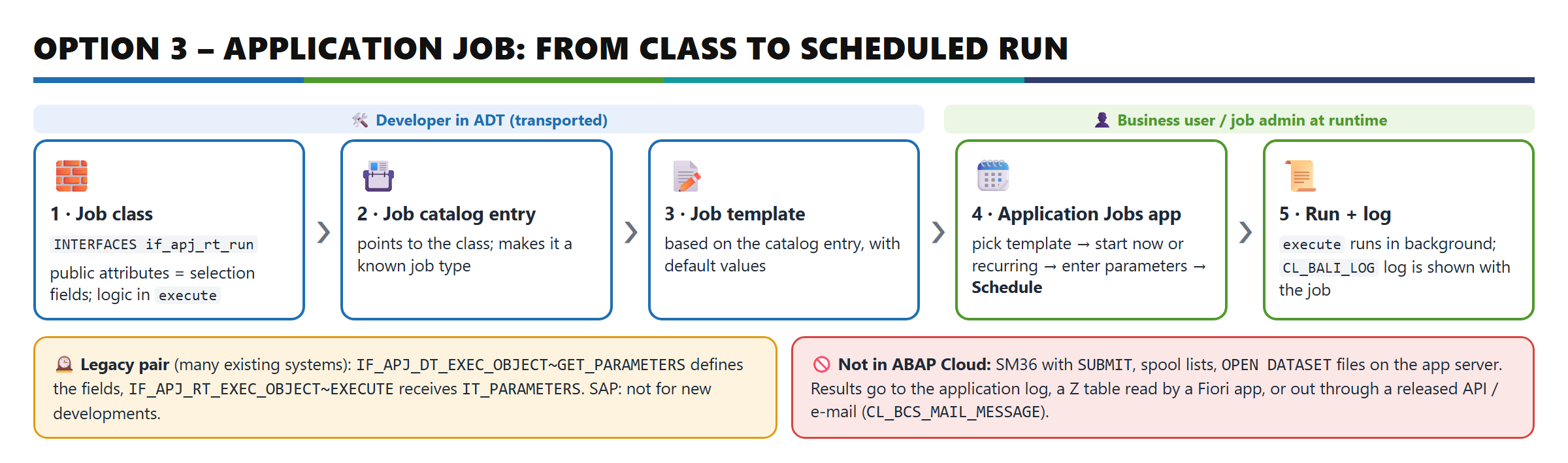
4.1 Job class with IF_APJ_RT_RUN (recommended for new jobs)
In the current interface the public attributes of the class are the selection fields; the ABAP Doc short text above each attribute is its label. Example: reject all orders of ZR_SalesOrder that have waited in status N (New) for more than N days, via the RAP action reject.
|
- Read with ABAP SQL on CDS (or
READ ENTITIES), change only through EML +COMMIT ENTITIES– neverUPDATEon a table you don't own. assign_to_current_appl_job = abap_trueattaches the log to the job, so users open it from the Application Jobs app.save_log_2nd_db_connectionsaves even if the main transaction rolls back.- Optional:
INTERFACES if_apj_dt_defaults+ methodfill_attribute_defaultssets default values for new templates. IF_APJ_RT_RUNis documented for the SAP Business AI Platform, ABAP environment and S/4HANA Cloud; on S/4HANA on-premise / private cloud check your release – older systems only have the legacy pair (4.3).
4.2 Catalog entry, template, scheduling
- 1. Application log object – ADT → New → Application Log Object
ZSALESORDER_JOBwith subobjectREJECT(the names used incl_bali_header_setter=>create). - 2. Application Job Catalog Entry – ADT → New → Other → *Application Job Catalog Entry*; enter the class
ZCL_SALESORDER_REJECT_JOB. The catalog entry makes the class a known job type. - 3. Application Job Template – ADT → New → *Application Job Template*, based on the catalog entry; holds default parameter values. Class, catalog entry and template are transported (the class must belong to a transportable software component, not
ZLOCAL). - 4. Application Jobs app (Fiori launchpad) – Create → choose the template → scheduling options (start immediately or recurring) → parameters → Schedule. The list shows status; the log icon opens the application log.
- Users need authorization for the job catalog entry – in ABAP Cloud systems it is granted through an IAM app / business catalog (check your system).
- The framework is meant for long-running or repeated work – not for very frequent short jobs.
4.3 Legacy: IF_APJ_DT_EXEC_OBJECT + IF_APJ_RT_EXEC_OBJECT
Found in many existing systems; SAP says not to use them for new developments. get_parameters defines the selection fields and defaults, execute receives the values in it_parameters.
|
Field (parameter definition) | Meaning |
|---|---|
selname | Parameter name (max. 8 characters, like a selection-screen name) |
kind |
|
| Elementary type (e.g. |
param_text | Label on the scheduling screen |
| Required / hidden / changeable in the template / lower case allowed |
| Display as checkbox, list box or radio button |
Part 5 – How to choose
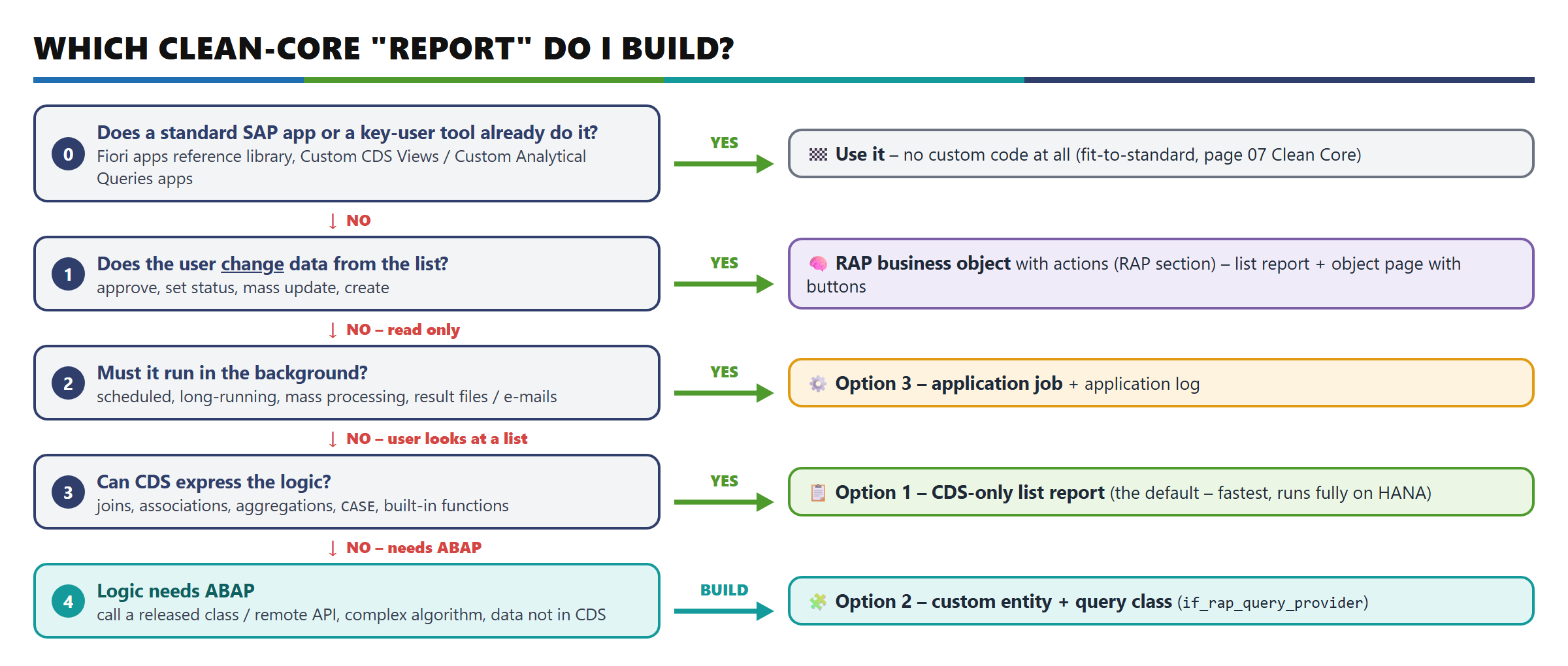
Requirement | Build | Where |
|---|---|---|
Standard app or key-user tool already covers it | Use it (Custom CDS Views / Custom Analytical Queries apps for key users) | page 01 Part 4 |
Read-only list, logic expressible in CDS | Option 1 – CDS view entity + | Part 2 |
Read-only list, logic needs ABAP or a remote API | Option 2 – custom entity + query class | Part 3 |
Background, scheduled, mass processing, files / e-mails | Option 3 – application job + log | Part 4 |
User changes data (approve, set status, mass update) | RAP BO with actions – list report + object page with buttons | RAP section |
KPIs, drill-down by dimensions, charts | Analytical CDS (cube + query) with an analytical app | ABAP on HANA › 05 CDS Views |
💡 Interview line: "In clean core a report is a read-only Fiori app on CDS. I start with CDS only; if I need ABAP logic I use a custom entity with a query class; background work is an application job; as soon as users change data it becomes a RAP business object."
Part 6 – Clean-core rules for these programs
Rule | How |
|---|---|
Language version ABAP for Cloud Development | Set on the package / software component; the syntax check blocks unreleased objects (MARA, VBAK, unreleased function modules) |
Released APIs only | Read via released CDS views ( |
No modifications, no implicit enhancements | Only released extension points (page 01 Part 10) |
Authorization in CDS | Access control (DCL) on every view with |
System fields |
|
Logs and messages | Application log |
Naming (common convention) |
|
One package per app | View, DCL, service, binding, classes and job objects together – easy to transport and to delete |
Tests | ABAP Unit with |
ATC before transport | Cloud-readiness / clean-core check variants (e.g. |
Part 7 – If you must still write a classic report
Only possible in S/4HANA private cloud / on-premise (classic ABAP, outside ABAP Cloud). It can never be Level A; aim for Level B in the Clean Core Levels A–D – see page 01 Part 6.2 for the levels and governance.
- Read through released CDS views (
SELECT FROM I_SalesOrder) instead of SAP tables – reading VBAK, MARA … directly uses internal objects (Level C, must be tracked). - Change only through classic APIs (released BAPIs) – never
UPDATEon SAP tables, no BDC on SAP transactions. - No modifications, no implicit enhancements, no copies of SAP programs (Level D).
- Thin report, logic in a class: the report only holds the selection screen and calls a class – the class can later move to ABAP Cloud behind a Fiori app.
- Output with
CL_SALV_TABLEor ALV with IDA (ABAP on HANA › 04) so the database does the work. - Register it in the extension inventory with the reason, and plan its replacement.
|
Part 8 – Hands-on: build option 1 for your own table
Works in the SAP Business AI Platform, ABAP environment trial (no I_SalesOrder there) and in any S/4HANA system. Uses ZR_SalesOrder from RAP › 02; with another table, first create a view entity on it (ABAP on HANA › 05).
- 1. Report view – New → Data Definition
ZC_SalesOrderOverview, template *Define View Entity*:
|
- 2. Access control – New → Access Control
ZC_SALESORDEROVERVIEW:
|
- 3. Service definition
ZUI_SALESORDER_OVW:expose ZC_SalesOrderOverview as SalesOrders; - 4. Service binding
ZUI_SALESORDER_OVW_O4, OData V4 – UI → Activate → Publish → selectSalesOrders→ Preview.
Expected result
- A Fiori list report with filter fields Sales Order ID, Customer, Order Date, Status and an Adapt Filters button.
- Go fills the table with columns Sales Order ID, Customer, Order Date, Net Amount (with currency), Status – only orders of the sales organisations you may display (authorization object
ZAO_SO, activity 03), becauseZR_SalesOrder's access control (R3) is inherited. - Column sorting, table settings, variant management and spreadsheet export work without any code.
- No Create / Delete buttons: the view has no behavior definition, so the service is read-only.
- Try: remove
@UI.hiddenfromOrderUUIDand see the technical key appear; add@Consumption.filter: { mandatory: true }onStatusand see Go refuse to run without it.
Part 9 – Interview questions with model answers
Q1. How do you build a report in a clean-core S/4HANA system?
As a read-only Fiori elements list report on CDS: a CDS view entity on released SAP views with @UI annotations, a service definition and an OData V4 UI service binding. If ABAP logic is needed, a custom entity with a query class; background work as an application job.
Q2. What replaces the selection screen and the ALV?
The Fiori filter bar (@UI.selectionField, value helps via @Consumption.valueHelpDefinition, @Consumption.filter for mandatory/default) and the Fiori elements table (@UI.lineItem) with built-in sorting, variants and export.
Q3. What replaces AUTHORITY-CHECK in such a report?
A CDS access control (DCL) with @AccessControl.authorizationCheck: #CHECK – the database filters the rows for every consumer. On a view over a released SAP view, inherit SAP's conditions (inheriting conditions from entity …).
Q4. When do you use a custom entity instead of a CDS view?
When the data can't be read by CDS SQL alone: ABAP calculations, calls to released classes or remote APIs, combining sources. The custom entity defines the structure, @ObjectModel.query.implementedBy names the class that implements IF_RAP_QUERY_PROVIDER~SELECT.
Q5. What must the SELECT method of a query provider do?
Read filter (get_filter( )->get_as_ranges( )), sorting (get_sort_elements( )) and paging (get_paging( )), apply them, then return the count only if is_total_numb_of_rec_requested( ) and the rows only if is_data_requested( ) – never more rows than the page size.
Q6. What happens if the filter can't be converted to ranges?
get_as_ranges( ) raises cx_rap_query_filter_no_range. Use get_as_sql_string( ) instead, or raise an exception derived from cx_rap_query_provider – never silently ignore the filter.
Q7. What replaces an SM36 background job?
An application job: a class (IF_APJ_RT_RUN, legacy IF_APJ_DT_EXEC_OBJECT + IF_APJ_RT_EXEC_OBJECT), an application job catalog entry and a template, scheduled in the Application Jobs app; results in an application log written with CL_BALI_LOG.
Q8. How are job parameters defined?
With IF_APJ_RT_RUN as public attributes of the class (ABAP Doc short text = label). In the legacy interfaces in get_parameters: et_parameter_def (selname, kind, datatype, length, param_text …) and default values in et_parameter_val; execute reads them from it_parameters.
Q9. A report must let users change the status of rows – still a report?
No – data changes need a RAP business object with an action (and validations, locking, authorization). The UI is still a list report, but with buttons; never UPDATE from a query class.
Q10. Why not just keep the SE38 report in private cloud?
It is possible but outside ABAP Cloud: at best Level B (classic APIs only), Level C if it reads SAP tables directly. It blocks a move to the cloud and gives users SAP GUI instead of Fiori – so keep it thin, logic in a class, and plan the replacement.
Q11. Which tests and checks would you run before transporting a clean-core report?
ABAP Unit with cl_cds_test_environment for the CDS views and cl_osql_test_environment for ABAP SQL in the query or job class; ATC with the cloud-readiness / clean-core variant; a preview test of filters, sorting, paging and authorization with a test user.
🏠 Start Here · ◀ 01 · Clean Core · 03 · Interview Questions ▶ · Sections: CORE ABAP | OOPS ABAP | ABAP on HANA | Clean Core | RAP | ABAP Points | SAP Fiori | SAPUI5 | Mobile Development (MDK) | BTP Foundations | BTP Development | CAP | SAP Build | ABAP on BTP | Integration Suite | SAP Business AI | SAP BASIS | Security | SAP SDLC
Functional: FICO ABAP | TRM ABAP | VIM | SAP BIS | SD ABAP | MM ABAP | PP ABAP | QM ABAP | PM ABAP | PS ABAP | EWM | TM ABAP | EHS ABAP | HR ABAP | BW | SAP MDG | SAP Analytics Cloud | SAP Ariba | SAP CX | SAP IBP