The big picture before the code: what SAP and ERP are, how an SAP system is built (3 tiers, application server, work processes), how DEV → QAS → PRD and transports work, what the RICEFW objects are, and the ABAP basics every interview starts with (data types, tools, transactions).
Part 1 – SAP, ERP and the product history
- SAP = Systems, Applications and Products in Data Processing (German original: "Systeme, Anwendungen und Produkte in der Datenverarbeitung"). Company founded 1972 in Germany.
- ERP (Enterprise Resource Planning) = one integrated system with one database for all business areas. A sales order, its delivery, the invoice and the accounting document all live in the same system and refer to each other – no re-typing between departments.
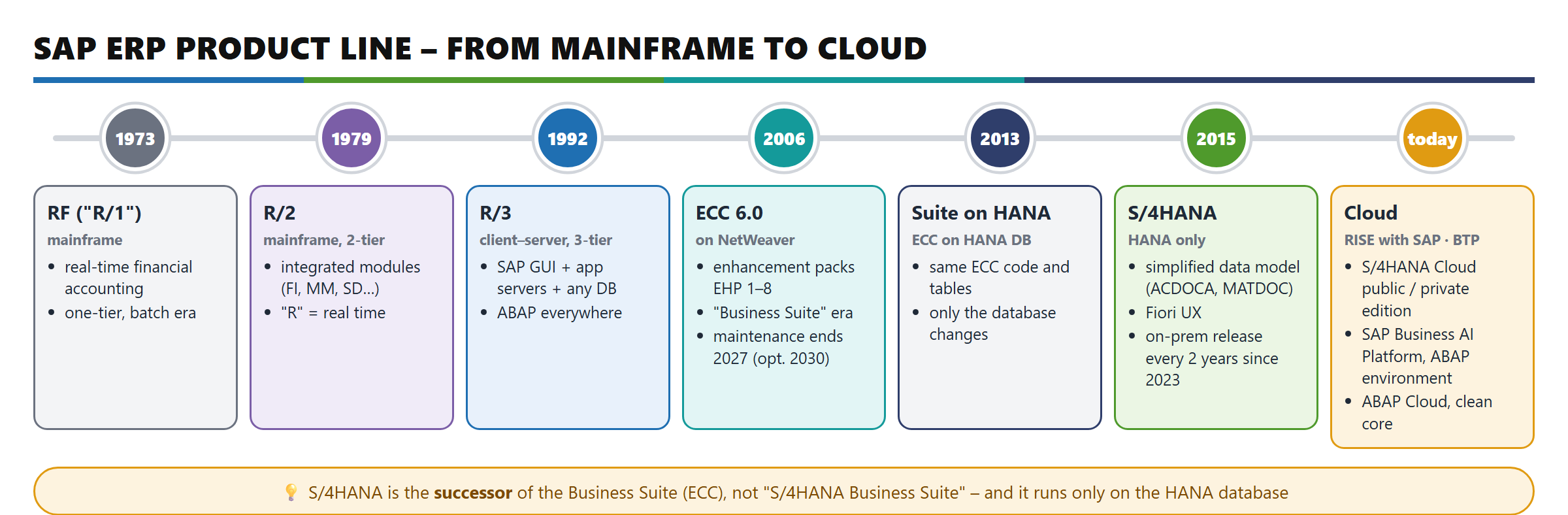
Release | Year | What changed |
|---|---|---|
RF (often called "R/1") | 1973 | Real-time financial accounting on a mainframe |
R/2 | 1979 | Mainframe, integrated modules; "R" = real-time |
R/3 | 1992 | Client–server, 3-tier (SAP GUI – app servers – database); runs on many databases |
ECC 6.0 (SAP ERP) | 2006 | Built on NetWeaver; enhancement packages EHP 1–8; part of the "Business Suite". EHP 6–8: mainstream maintenance ends 2027 (optional extended maintenance to 2030); EHP 0–5 ended 2025 |
Suite on HANA | 2013 | Same ECC code and tables, but on the HANA database |
S/4HANA | 2015 | Successor of ECC, HANA only; simplified data model (e.g. ACDOCA Universal Journal, MATDOC), Fiori UX; on-premise / private cloud: a new release every 2 years since 2023 (2023, 2025, 2027…) with feature packs in between; public cloud: twice a year |
S/4HANA Cloud / RISE with SAP / SAP BTP | since ~2017 | Public and private cloud editions; SAP Business AI Platform, ABAP environment ("Steampunk"); ABAP Cloud and clean core |
SAP Business Suite is the ECC-era product name; S/4HANA replaces it. Clean core and ABAP Cloud: see Clean Core › 01 Clean Core.
SAP modules (business areas)
Module | Area | Typical tables an ABAPer meets |
|---|---|---|
FI – Financial Accounting | General ledger, payables, receivables, assets | BKPF/BSEG, in S/4HANA ACDOCA |
CO – Controlling | Cost centers, profit centers, internal orders | CSKS, COEP (S/4HANA: ACDOCA) |
SD – Sales & Distribution | Quotation → order → delivery → billing | VBAK/VBAP, LIKP/LIPS, VBRK/VBRP |
MM – Materials Management | Purchasing, inventory, invoice verification | MARA, EKKO/EKPO, MKPF/MSEG (S/4HANA: MATDOC) |
PP – Production Planning | BOMs, routings, production orders, MRP | AFKO/AFPO, STKO/STPO |
QM / PM | Quality inspection / plant maintenance | QALS, AUFK |
HCM | Personnel administration, payroll (cloud: SuccessFactors) | PA0001, PA0002 (infotypes) |
Technical | Basis, ABAP, Security/GRC, Fiori/UI5, integration | – |
SAP Basis and NetWeaver
- Basis = the technical foundation of every ABAP system: kernel, application server, database interface, transport system, user and authorization management. The Basis team installs systems, imports transports, patches the kernel, monitors performance and load balancing.
- "Basis = Business Application Software Integrated Solution" is a folk backronym, not an official SAP name. Basis just means "base". Today's name: SAP NetWeaver AS ABAP / ABAP Platform.
- NetWeaver (2004) = SAP's technology platform (not a business product) under all SAP applications. It bundled the application server (AS ABAP + AS Java, earlier "SAP Web AS") with integration tools. Its marketing promise was the integration of people, information and processes.
NetWeaver component (2004 era) | Purpose | Today |
|---|---|---|
SAP Web Application Server | Runs ABAP, Java and web services | AS ABAP / ABAP Platform (S/4HANA is ABAP-only) |
Business Intelligence (BI/BW), BI Content | Reporting, pre-built information models | BW/4HANA, SAP Analytics Cloud, CDS analytics, Datasphere |
Knowledge Management, TREX search | Documents, search, text mining | HANA search / Enterprise Search |
Process Integration (XI/PI/PO) | Message exchange, mapping between SAP and non-SAP | SAP Integration Suite (BTP); PO 7.5 maintenance to 2027 (extended 2030) |
Portal, Collaboration, Multi-Channel Access | Role-based web access, team rooms, mobile/voice | Fiori launchpad, SAP Build Work Zone, mobile apps |
Part 2 – 3-tier architecture
Since R/3 every SAP system has three layers. Usually written top-down: Presentation → Application → Database.
Layer | What runs there | Notes |
|---|---|---|
Presentation | SAP GUI, browser (Fiori launchpad), mobile apps | Only displays screens and sends user input |
Application | One or more application server instances with dispatcher, work processes, gateway, ICM; central services (message + enqueue server) | All ABAP code runs here; add instances to scale |
Database | One database per system (S/4HANA: SAP HANA) | Stores data and all programs/DDIC objects |
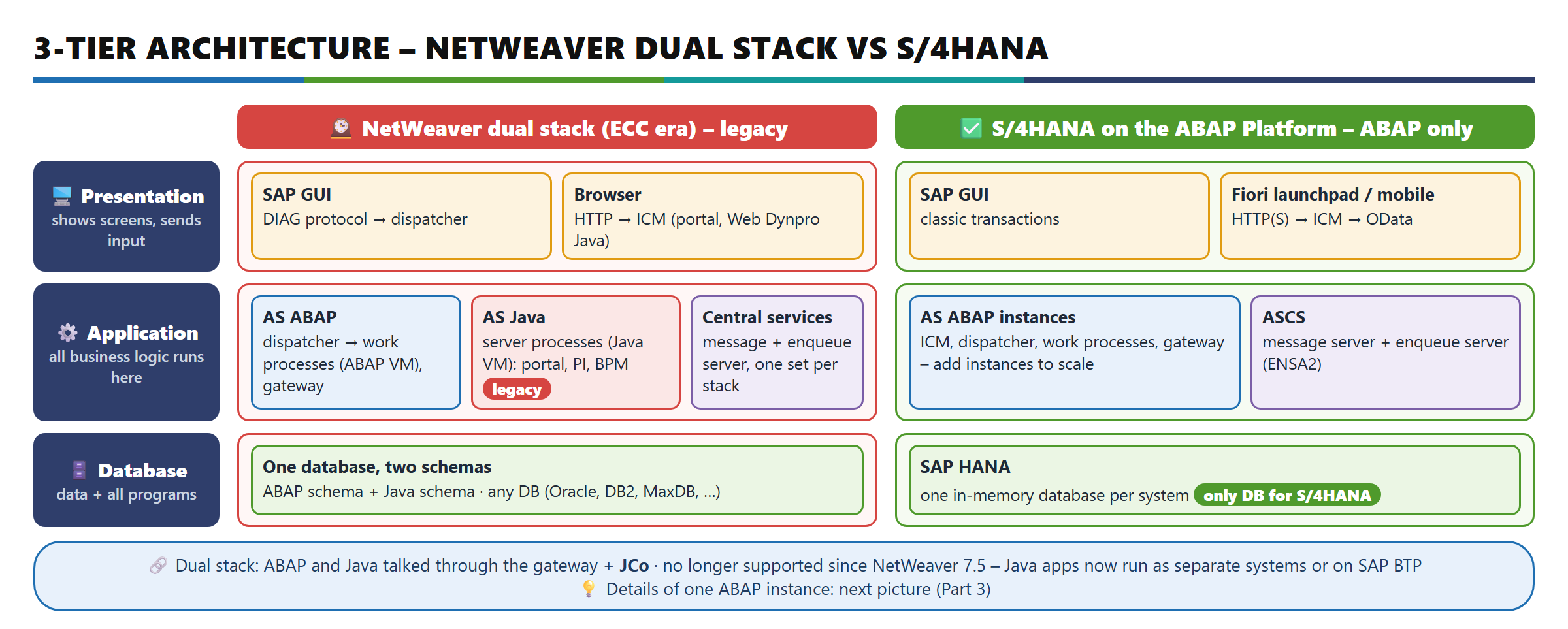
Picture: the NetWeaver dual stack (left) and S/4HANA (right). The Java half and the "dual stack" are legacy – S/4HANA is ABAP-only. ICM = HTTP entry, dispatcher + work processes (ABAP VM) = where ABAP runs, central services = message server + enqueue server.
SID, instance and client
Term | Meaning | Example |
|---|---|---|
SID (system ID) | 3-character name of the whole system (database + all instances) | S4D, S4Q, S4P |
Instance | One application server instance on a host, identified by a 2-digit instance number | S4D_host1_00 |
Client | Self-contained business unit inside one system (own users, master and transaction data); 3-digit number, field MANDT | 100, 200, 800 |
The SID identifies the whole system; an instance is one application server of that system.
Part 3 – Inside the application server
Dispatcher
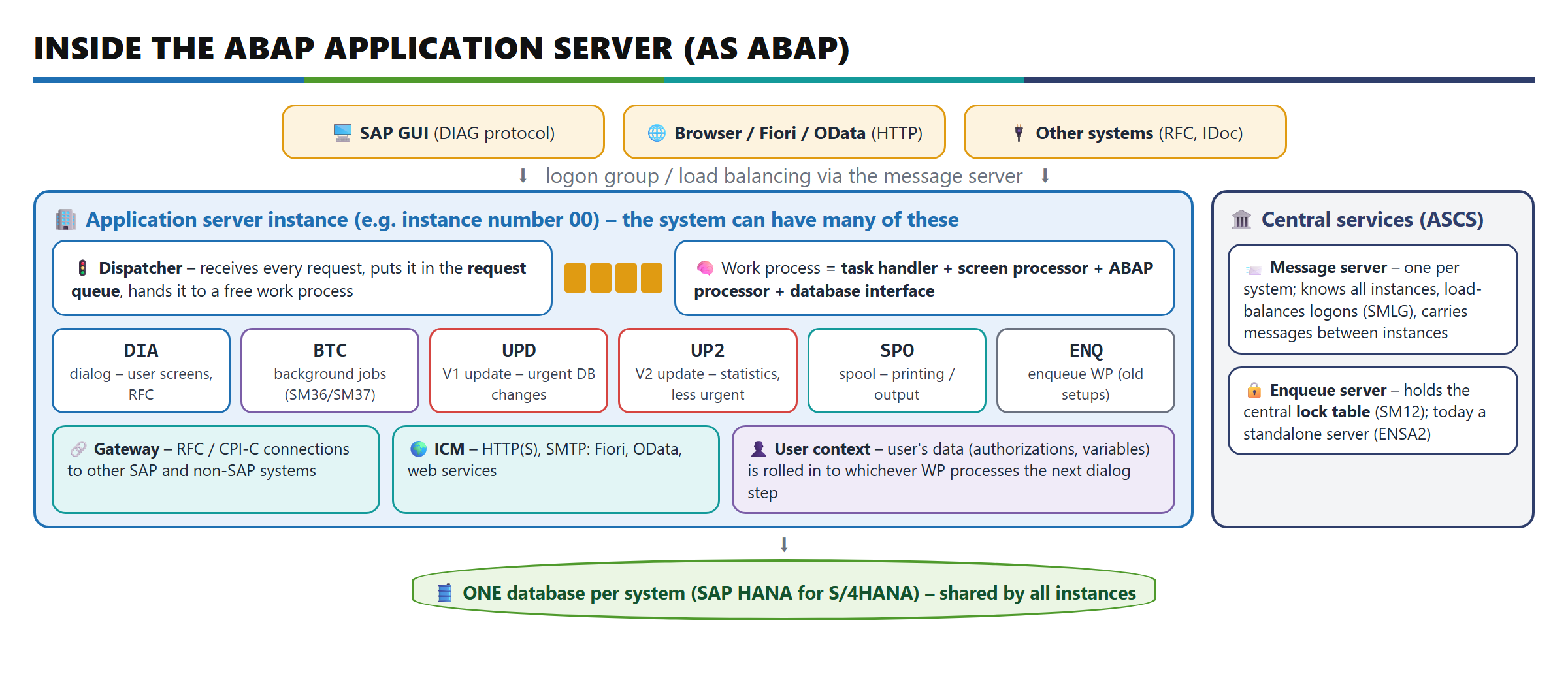
The dispatcher is the central process of an instance. A request from SAP GUI goes into the dispatcher queue; the dispatcher gives it to a free work process, which executes it and returns the result.
- Initialises the instance, reads the profile parameters, creates shared memory areas (session table, work-process table).
- Starts all other processes (work processes, gateway, ICM) – the number of each work-process type is configurable – and monitors them.
- Talks to the SAP GUIs, and to other instances through the message server; triggers periodic tasks.
Work process types
Type | Code | What it does |
|---|---|---|
Dialog | DIA | Runs dialog steps of users (screens, reports) and RFC calls. An instance usually has several dialog WPs but only one or two of each other type. |
Update (V1) | UPD | Writes urgent database changes asynchronously after |
Update (V2) | UP2 | Less urgent updates, e.g. statistics; run after V1. |
Background | BTC | Batch jobs, time- or event-driven (SM36 create, SM37 monitor). |
Spool | SPO | Formats output for printer, file or archive (SP01 spool requests). |
Enqueue | ENQ | Lock management. In current systems the standalone enqueue server (ENSA2) in the central services does this instead of an enqueue work process. Locks: see page 02 DDIC › Lock objects. |
- Mnemonic from old instance names: DVEBMGS = Dialog, V(update), Enqueue, Batch, Message, Gateway, Spool.
- Monitor work processes: SM50 (one instance), SM66 (all instances).
- A work process = task handler (coordinates) + screen processor (screen logic) + ABAP processor (executes the ABAP code) + database interface (turns ABAP SQL into the database's SQL, uses table buffers).
Services: gateway, ICM, message server, enqueue server
Service | Role |
|---|---|
Gateway | RFC / CPI-C communication with other SAP and non-SAP systems (SMGW) |
ICM (Internet Communication Manager) | HTTP(S) and SMTP – Fiori apps, OData, web services (SMICM) |
Message server | One per system: knows all instances, load-balances logons via logon groups (SMLG), passes messages between instances |
Enqueue server | Holds the central lock table for SAP locks (view in SM12) |
User context, sessions and LUWs
- User context = all data of one user's session (variables, authorizations, screen state). A user is not bound to one work process: for every dialog step the context is rolled in to a free work process and rolled out afterwards. That is why a few work processes can serve hundreds of users.
- External sessions (windows): max 16 per user session (System → Create Session); the system limit is profile parameter rdisp/max_alt_modes (default 16). Each external session can hold up to 9 internal sessions (call stack of programs).
- DB LUW = one database transaction (ends with a DB commit, at least after every dialog step). SAP LUW = a business transaction that may span several screens; its changes are bundled and written together by the update work process at
COMMIT WORK– all or nothing.
Part 4 – System landscape, clients and transports
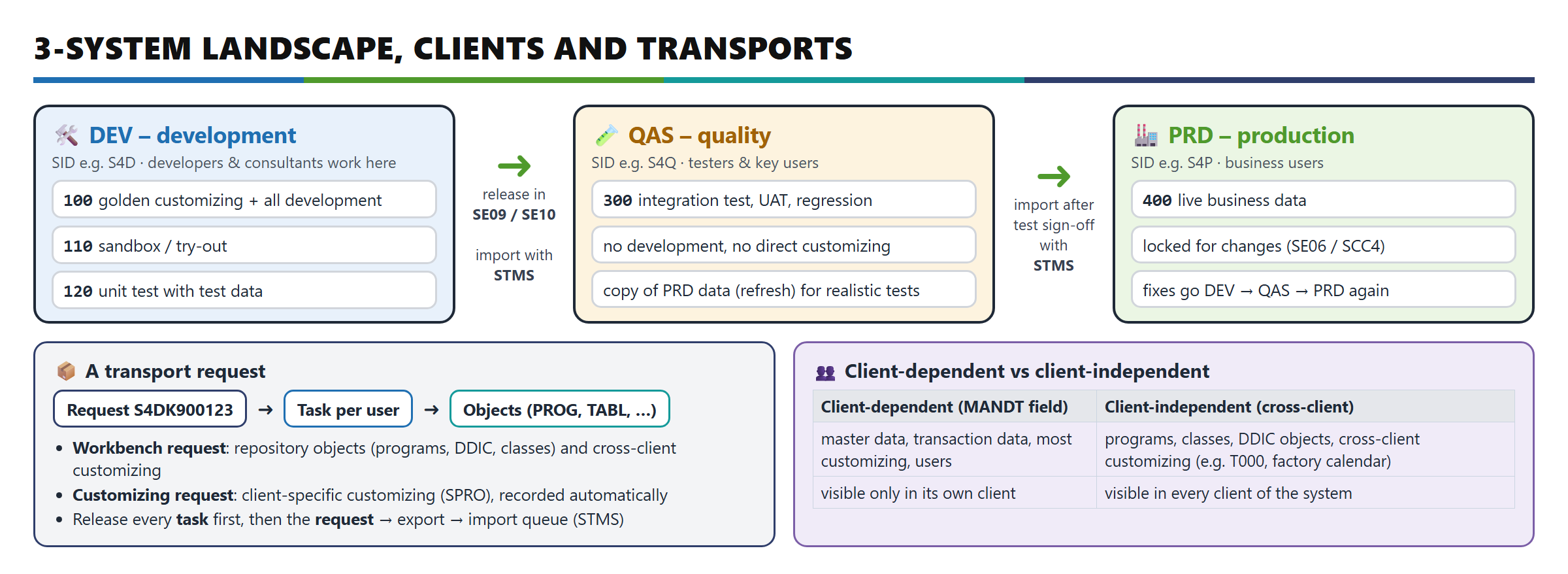
A landscape is the set of systems a project uses. Standard: the 3-system landscape DEV → QAS → PRD. Changes are made only in DEV and moved forward with transport requests – never backwards.
- Variants: 2-system (DEV + PRD, small companies), 4-system (with a pre-production / training system), plus sandboxes.
- One S/4HANA system contains all modules (FI, SD, MM…). Separate SIDs exist per product (S/4HANA, BW, …) and per tier – e.g. S4D / S4Q / S4P – not one system per module.
- Teams in a landscape: Basis (systems, transports, kernel, performance), Security/GRC (roles, authorizations, segregation of duties), functional consultants (customizing), ABAP developers (programs, enhancements, interfaces).
Clients
Client | Purpose |
|---|---|
000 | SAP reference client – template for new clients, never used for business |
001 | Copy of 000 in older releases (often used as a starting point) |
066 | EarlyWatch client for SAP remote monitoring – obsolete, may be deleted |
800 / 810 / 811 / 812 | IDES demo/training systems (International Demonstration and Education System) |
100, 200, … | Customer clients; S/4HANA demo systems (FAA) use e.g. 100/200/300/400 |
Clients are set up in SCC4 (also: may changes be made, cross-client changes allowed, automatic recording of customizing). Client copies: SCCL (local), SCC9 (remote), SCC1 (client copy according to a transport request, between clients of the same system). The client list is table T000.
Client-dependent vs client-independent data
Client-dependent | Client-independent (cross-client) | |
|---|---|---|
Contents | Master data, transaction data, most customizing, users | Repository objects (programs, classes, DDIC), cross-client customizing (e.g. T000, factory calendar, units) |
Table | First key field | No client field |
Visibility | Only in its own client | In every client of the system |
Client-dependent tables in DDIC: see page 02.
Transports
- SE09 / SE10 – Transport Organizer: create, display and release requests. STMS – Transport Management System: import queues, routes, import into QAS/PRD (usually done by Basis).
- Structure: request (e.g. S4DK900123) → tasks (one per user) → objects (R3TR PROG …). Release all tasks first, then the request. Release exports data and cofiles to the transport directory.
- Every repository object belongs to a package (SE21/SE80); the package's transport layer decides the route. Objects in package $TMP are local – never transported.
Request type | Contains | Created |
|---|---|---|
Workbench request | Repository objects (programs, DDIC, classes…) and cross-client customizing | When you save a new/changed object in a transportable package |
Customizing request | Client-specific customizing (SPRO entries, SM30 data of customizing tables) | Automatically, if the client has automatic recording (SCC4) |
Transport of copies | Copy of objects, e.g. to test in QAS before the real request is released | Manually in SE01/SE09; does not change object ownership |
Version management: every released request creates a version of each object (compare in SE80/ADT "Versions"). Never repair directly in QAS/PRD – fix in DEV and transport again.
Part 5 – RICEFW objects and the ABAP developer's role
RICEFW (also WRICEF) groups the custom development of an SAP project into six kinds of objects. Project trackers and effort estimates are organised by these letters.
- RICEFW is not dead in S/4HANA, but the approach changes: greenfield projects still list their gaps as RICEFW objects, but each one is built the clean core way.
- From ECC / on-premise habits (SE38 reports, Z-RFCs, user exits, modifications).
- To modern SAP: cloud-ready, clean core, extensibility through released APIs.
- The full then → now mapping is on Clean Core › 01 Clean Core, Part 10.
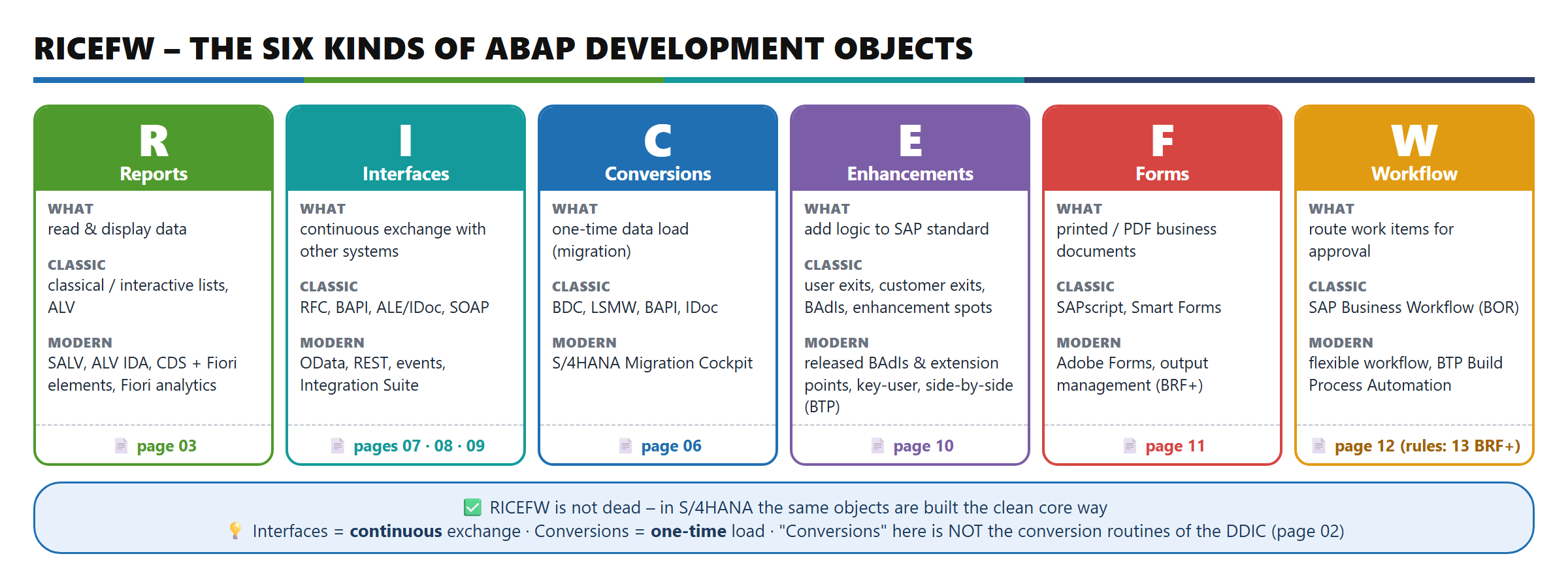
Letter | Meaning | Example | Page |
|---|---|---|---|
R – Reports | Read and display data | Open sales orders per customer (ALV) | 03 Report Programming & ALV |
I – Interfaces | Continuous exchange with SAP/non-SAP systems | Orders from a web shop via IDoc or OData | 07 Interfaces · 08 OData · 09 Web Services |
C – Conversions | One-time data load (migration) | Load 50,000 customers from Excel at go-live | 06 Data Migration |
E – Enhancements | Add custom logic to SAP standard (customer exits, user exits, BAdIs, enhancement framework) | Extra check when saving a sales order | 10 Enhancements |
F – Forms | Printed/PDF business documents | Invoice, payslip, purchase order | 11 Forms |
W – Workflow | Route work items for approval | Leave request approval | 12 Workflow · 13 BRF+ |
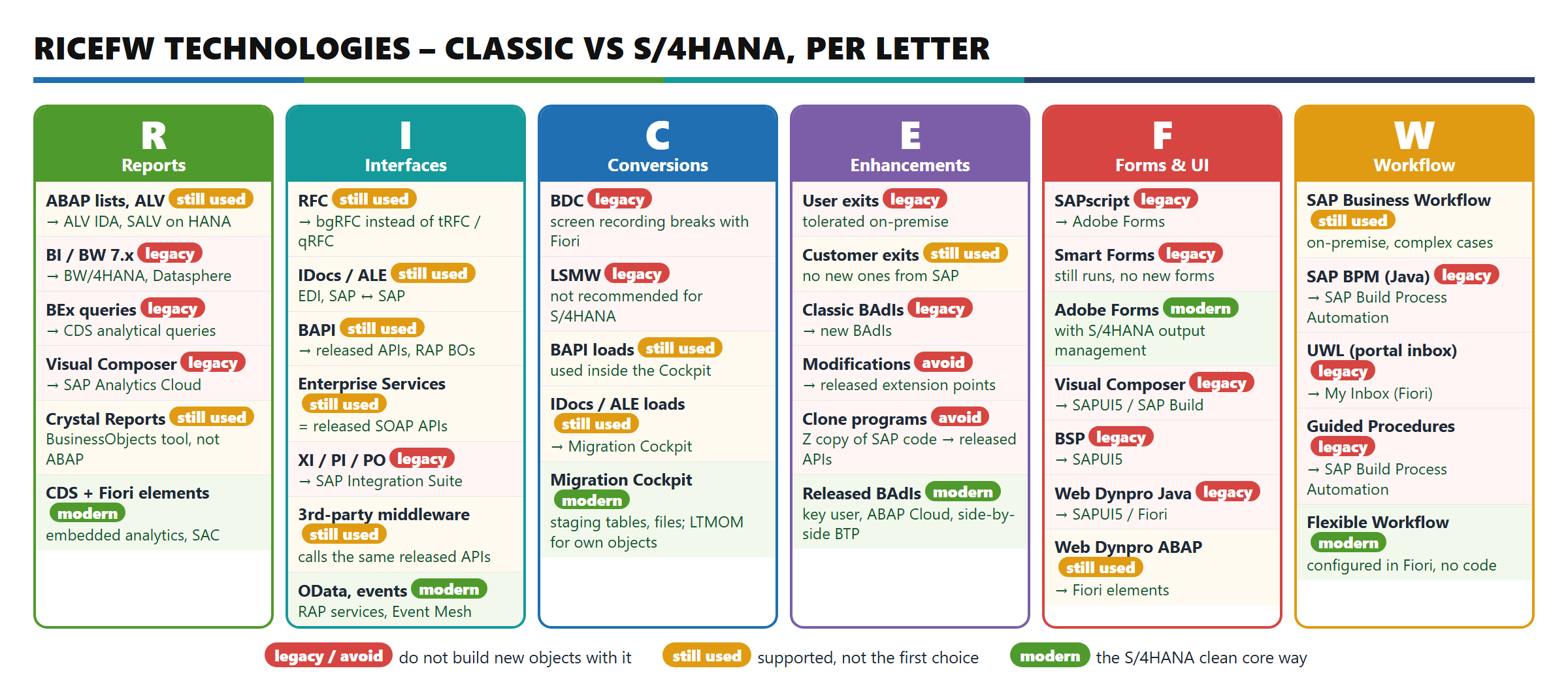
Every classic technology per letter with its status: legacy = don't build new objects with it, still used = supported but not the first choice, modern = the S/4HANA clean core way. LSMW is not recommended for S/4HANA (use the Migration Cockpit); modifications and clone programs are avoided in a clean core.
What an ABAP developer does
- Builds RICEFW objects from functional specifications and change requests.
- Analyses short dumps (ST22) and production issues reported by users; debugs.
- Learns the business process behind the code – the best developers understand the scenario.
- Improves the performance of existing programs (SQL trace ST05, SAT, code pushdown on HANA).
- Follows coding standards, code inspector / ATC checks, unit tests, and keeps learning modern ABAP.
Part 6 – ABAP basics: data types, tools, important transactions
ABAP = Advanced Business Application Programming (originally German "Allgemeiner Berichts-Aufbereitungs-Prozessor", general report processor). Programs are stored in the database and run on the application server.
Predefined ABAP data types
Type | Meaning | Length | Initial value | Use for |
|---|---|---|---|---|
C | Text (character) | 1–262,143 chars, default 1 | blanks | Codes, names |
N | Numeric text (digits only) | default 1 | '0…0' | Postal codes, numbers with leading zeros |
D | Date YYYYMMDD | 8 | '00000000' | Dates |
T | Time HHMMSS | 6 | '000000' | Times |
X | Byte (hexadecimal) | default 1 | X'00' | Raw bytes |
I | Integer, 4 bytes | fixed | 0 | Counters, indexes (−2,147,483,648 … 2,147,483,647) |
INT8 | Integer, 8 bytes | fixed | 0 | Very large counters |
P | Packed number (BCD) | 1–16 bytes, default 8; up to 14 decimals | 0 | Amounts, quantities – exact decimal arithmetic |
DECFLOAT16 / 34 | Decimal floating point | 8 / 16 bytes | 0 | Exact decimals with large range |
F | Binary floating point | 8 bytes | 0 | Scientific values – never money (rounding errors) |
STRING / XSTRING | Text / bytes of variable length | dynamic | empty | Long texts, files |
UTCLONG | Time stamp | 8 bytes | empty | UTC time stamps (7.54+) |
- Type I holds whole numbers only.
DATA lv_i TYPE i. lv_i = '2.5'.gives 3 (commercial rounding). Decimals need P (withDECIMALS) or DECFLOAT. - P stores 2 digits per byte plus a sign half-byte: P length 8 = 15 digits. F only keeps about 16 significant digits in binary – 0.1 + 0.2 is not exactly 0.3.
- C, N, X and P are incomplete types (length/decimals set in the declaration); I, D, T, F are complete.
|
TYPE refers to a type, LIKE to a data object – LIKE is not obsolete. Structures, work areas and table types: page 02 DDIC › Structures and table types. Internal tables: page 03. New syntax: ABAP on HANA › 03 ABAP New Syntax.
Tools: ABAP Workbench (SAP GUI) and ADT (Eclipse)
Tool | What for | Status |
|---|---|---|
ADT – ABAP Development Tools in Eclipse | Code editing, refactoring, quick fixes, ABAP Unit, ATC, debugger; only IDE for CDS, AMDP, RAP behavior definitions, service bindings | Current IDE; mandatory for ABAP Cloud |
SE80 Object Navigator | All repository objects in one tree | Legacy, still used for dynpros, SAPscript, Smart Forms, workflow |
SE38 / SE37 / SE24 / SE11 | Programs / function modules / classes / DDIC | Classic editors |
SE51 / SE41 / SE91 / SE93 | Screen Painter / Menu Painter (GUI status) / messages / transaction codes | Classic, for dynpro development |
SAP GUI screen and transaction codes
Screen elements, top to bottom: menu bar → standard toolbar (contains the command field) → title bar → application toolbar → screen area → status bar. (The command field is part of the standard toolbar, not a separate bar.)
A transaction code starts a program at its first screen (or a report / method / variant). Created in SE93; stored in table TSTC (texts TSTCT).
Command field entry | Effect |
|---|---|
/nSE38 | End current transaction, start SE38 in the same session |
/oSE38 | Start SE38 in a new session (window) |
| End transaction · close current session · log off all sessions (no confirmation) |
/h | Switch on the debugger for the next action |
/*VA03 | Start the transaction and skip its first screen (fields filled from parameter IDs) |
/$sync | Reset the buffers of the application server (use with care) |
Important transactions
Area | Transactions |
|---|---|
Development | SE38, SE80, SE37, SE24, SE11, SE51, SE41, SE91, SE93, SE18/SE19 (BAdIs), SMARTFORMS, SFP |
Data | SE16 / SE16N / SE16H (table display), SM30 (table maintenance), SE14 (database utility) |
Troubleshooting | ST22 (short dumps), SM21 (system log), SM12 (locks), SM13 (update requests), SLG1 (application log) |
Performance | ST05 (SQL trace), SAT (runtime analysis), SM50 / SM66 (work processes), SQLM / SWLT (SQL monitor) |
Jobs & output | SM36 / SM37 (background jobs), SP01 / SP02 (spool) |
Transports & quality | SE09 / SE10, STMS, SE01, SCI / ATC (code checks) |
Users & authorizations | SU01 (users), PFCG (roles), SU53 (last failed authorization check), SM04 (user sessions) |
Integration | SM59 (RFC destinations), WE02/WE05 (IDocs), SEGW, /IWFND/MAINT_SERVICE, SOAMANAGER |
Naming conventions
- Customer objects start with Z or Y (ZCL_…, ZR_…), or use a registered namespace like /ABC/. Everything else belongs to SAP and is overwritten by upgrades.
- Most projects add a module prefix: ZSD_…, ZFI_…, and a type prefix: ZCL_ class, ZIF_ interface, ZTT_ table type.
Part 7 – Projects and methodology
Project type | What happens |
|---|---|
Implementation | First SAP system for a company (or a new S/4HANA system) |
Upgrade / conversion | New release, or ECC → S/4HANA conversion (see ABAP on HANA › 02 Migration) |
Support / AMS | Run the live system: tickets, small changes, dumps, performance |
Rollout | Extend an existing template to new countries/plants (localisation, new company codes) |
SAP Activate (current) vs ASAP (legacy)
SAP Activate phase | Main work | Old ASAP equivalent |
|---|---|---|
Discover | Find value, trial system, business case | – |
Prepare | Project set-up, team, systems | Project Preparation |
Explore | Fit-to-standard workshops, backlog of gaps (incl. RICEFW list) | Business Blueprint |
Realize | Configure and build in sprints, unit and integration tests, data migration loads | Realization |
Deploy | User acceptance test, training, cut-over, go-live | Final Preparation + Go-Live |
Run | Hypercare, support, continuous improvement | Go-Live & Support |
Older projects followed the ASAP phases (Project Preparation → Business Blueprint → Realization → Final Preparation → Go-Live & Support). ASAP is legacy; S/4HANA projects use SAP Activate (agile, fit-to-standard).
Greenfield, brownfield, bluefield
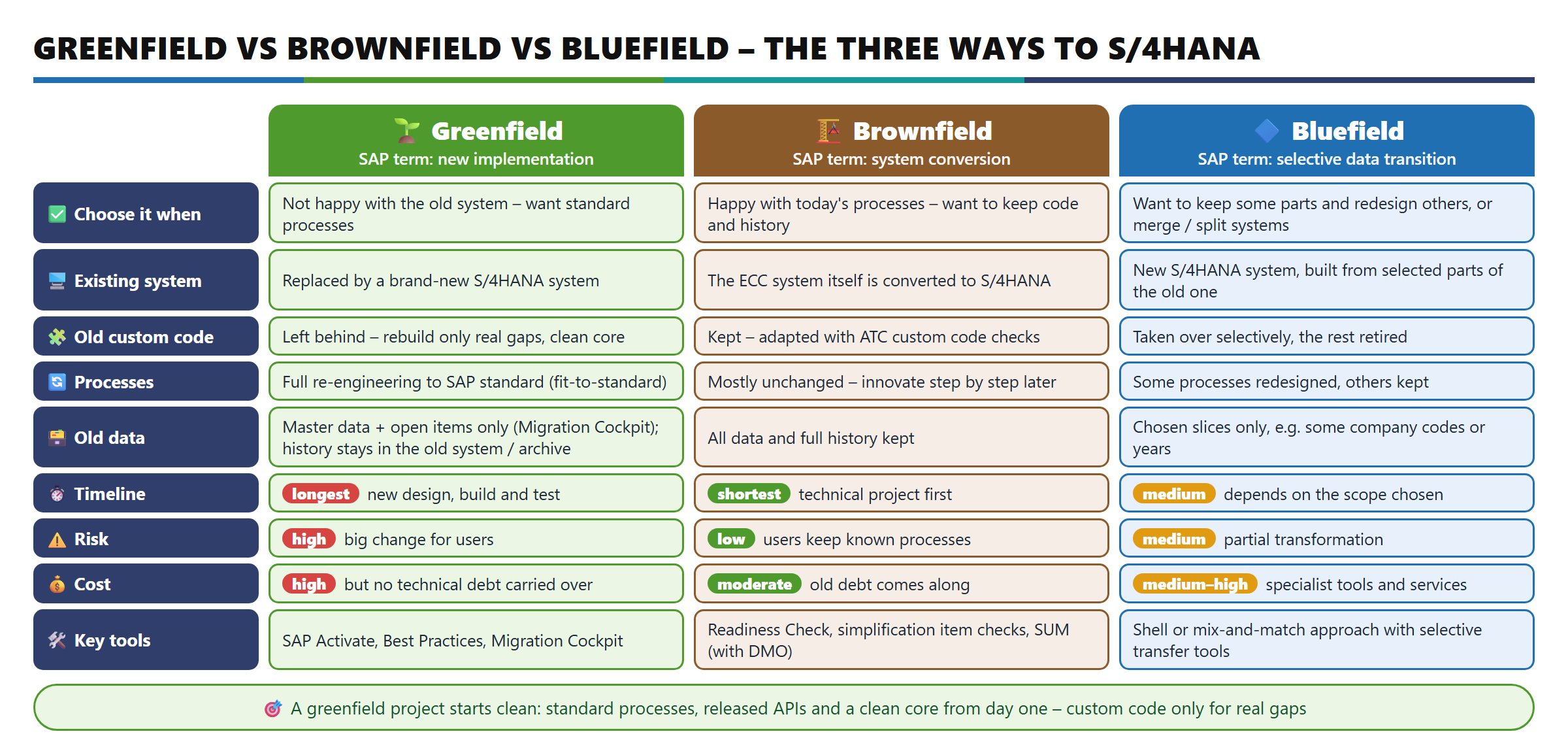
Approach | S/4HANA name | In one line |
|---|---|---|
Greenfield | New implementation | New system, redesigned processes, only master data and open items migrated |
Brownfield | System conversion | Existing ECC converted in place – custom code and history kept |
Bluefield | Selective data transition (SDT) | Mix: keep selected processes/data, redesign the rest |
More detail (tools, custom code adaptation): ABAP on HANA › 02 Migration & Performance Tools.
Onsite vs offshore
Model | Meaning |
|---|---|
Onsite | The consultant works at the client's location (workshops, go-live support, coordination) |
Offshore | The team works from the service provider's location in another country (development, testing, support) |
Nearshore / hybrid | Neighbouring country or time zone; typical set-up = onsite coordinator + offshore delivery team |
Onsite/offshore describes only where the team works, not the type of company.
Part 8 – Interview questions
1. Explain the SAP 3-tier architecture.
Presentation (SAP GUI / browser) only displays screens; the application layer (one or more AS ABAP instances with dispatcher and work processes) runs all ABAP code; the database stores data and programs. Scale by adding application server instances; there is one database per system.
2. What is the role of the dispatcher?
It receives every request of an instance, queues it and passes it to a free work process; it also starts and monitors the work processes, gateway and ICM and talks to other instances through the message server.
3. Name the work process types.
Dialog (DIA), update V1 (UPD), update V2 (UP2), background (BTC), spool (SPO) and – in older set-ups – enqueue (ENQ); today locks are handled by the standalone enqueue server in the central services. Monitor with SM50/SM66.
4. What is the difference between SID, instance and client?
SID = 3-character ID of the whole system; instance = one application server with a 2-digit number; client = a self-contained business unit inside the system with its own users and data (field MANDT).
5. Client-dependent vs client-independent – give examples.
Client-dependent: master data, transaction data, most customizing, users – table has MANDT as first key field. Client-independent: programs, DDIC objects, classes, cross-client customizing such as T000 – visible in all clients.
6. Workbench request vs customizing request?
Workbench requests carry repository objects (and cross-client customizing); customizing requests carry client-specific customizing. Both are released in SE09/SE10 (tasks first) and imported with STMS. Objects in $TMP are local and cannot be transported.
7. Why does SAP use an update work process?
So a dialog user does not wait for database writes: changes registered with CALL FUNCTION … IN UPDATE TASK are collected and written together at COMMIT WORK – the whole SAP LUW succeeds or is rolled back.
8. What does RICEFW stand for? Interface vs conversion?
Reports, Interfaces, Conversions, Enhancements, Forms, Workflow. An interface is a continuous exchange with another system (RFC, IDoc, OData); a conversion is a one-time data load at go-live (Migration Cockpit, BAPIs, LSMW/BDC in older systems). RICEFW is still used in S/4HANA projects; only the technology changes – CDS and Fiori analytics for reports, released APIs / OData / Integration Suite for interfaces, Migration Cockpit for conversions, released BAdIs, extension points and side-by-side extensions for enhancements, Adobe Forms for forms, Flexible Workflow for workflows.
9. Can a variable of type I hold 2.5? Which type do you use for amounts?
No – I holds whole numbers; 2.5 is rounded to 3. Use type P with decimals (or the DDIC types CURR/DEC) for amounts; never F, because binary floating point has rounding errors.
10. TYPE vs LIKE?
TYPE refers to a data type (built-in, DDIC or local TYPES); LIKE refers to an existing data object. Both are valid modern ABAP.
11. What is ADT and why is it required?
ABAP Development Tools = Eclipse-based IDE. CDS views, AMDP, RAP behavior definitions and service bindings can only be edited there, and ABAP Cloud development is ADT-only. SE80 remains for classic objects like dynpros and Smart Forms.
12. Which methodology do S/4HANA projects use, and what are greenfield/brownfield?
SAP Activate: Discover, Prepare, Explore, Realize, Deploy, Run (ASAP is the legacy method). Greenfield = new implementation; brownfield = system conversion of an existing ECC; bluefield = selective data transition.
🏠 Start Here · 02 · Data Dictionary ▶ · Sections: CORE ABAP | OOPS ABAP | ABAP on HANA | Clean Core | RAP | ABAP Points | SAP Fiori | SAPUI5 | Mobile Development (MDK) | BTP Foundations | BTP Development | CAP | SAP Build | ABAP on BTP | Integration Suite | SAP Business AI | SAP BASIS | Security | SAP SDLC
Functional: FICO ABAP | TRM ABAP | VIM | SAP BIS | SD ABAP | MM ABAP | PP ABAP | QM ABAP | PM ABAP | PS ABAP | EWM | TM ABAP | GTM ABAP | EHS ABAP | HR ABAP | BW | SAP Datasphere | SAP Business Data Cloud | SAP MDG | SAP Analytics Cloud | SAP Ariba | SAP CX | SAP IBP