The ABAP Dictionary is where all data definitions of an SAP system live: domains, data elements, tables, structures, table types, views, search helps and lock objects. Every program, screen and CDS view builds on them. This page also covers conversion routines (they belong to the domain), the table maintenance generator and number ranges.
Part 1 – What the ABAP Dictionary is
- Central repository of metadata (data definitions). It defines types (data elements, structures, table types) and database objects (tables, views). Activating a table creates the real table in the database.
- Describes the logical structure of the data and how it maps to the relational database – so every program and screen uses the same definitions (one change, used everywhere).
- Not only "what is stored in the database": structures, table types and data elements are pure types with no data at all.
- Integrated with screens: field labels, F1 documentation, F4 value help, foreign key checks and conversion routines all come from DDIC.
Object | Purpose | Transaction |
|---|---|---|
Domain, data element | Technical and semantic type of a field | SE11 |
Database table, view | Store data / combine tables | SE11 (display SE12) |
Structure, table type | Global types for programs and interfaces | SE11 |
Search help, lock object | F4 help / SAP locks | SE11 |
Table maintenance generator, view cluster | Maintenance dialogs for SM30 / SM34 | SE54 |
Number range object | Unique document numbers | SNRO |
Database utility | Adjust/convert database tables | SE14 |
Table contents | Display (and maintain) data | SE16, SE16N, SE16H, SM30 |
Repository info system, where-used list | Find objects and their usage | SE84, SE80 |
DDIC metadata is itself stored in tables: DD01L (domains), DD02L (tables), DD03L (table fields), DD04L (data elements), DD07L (fixed values); texts in DD02T, DD04T, DD07T.
DDIC in ADT
In Eclipse (ADT) a table is edited as source code with annotations instead of SE11 tabs – same object, different editor. ABAP Cloud development uses only this form.
|
Part 2 – Domains and conversion routines
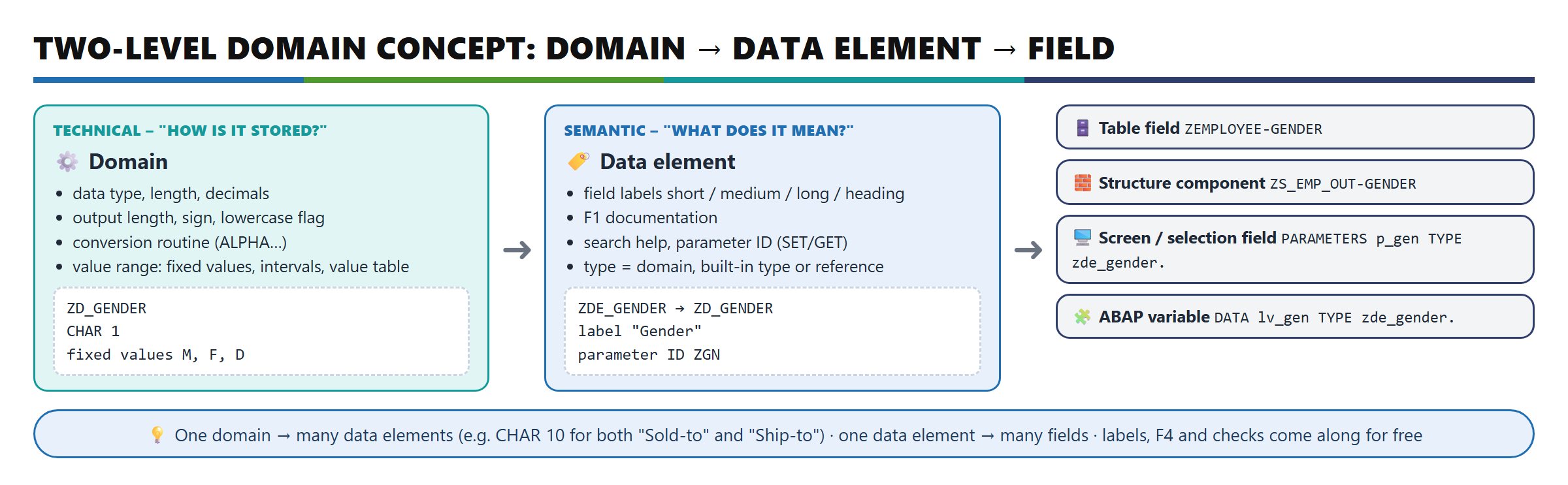
A domain holds the technical attributes of a field: data type, length, decimals, output length, sign, lowercase flag, conversion routine and the value range. Many data elements can share one domain.
Value range
Option | Example | What it does |
|---|---|---|
Fixed values | Gender: M, F, D (CHAR 1) | Single allowed values with texts; also the F4 list of the field |
Intervals | Age 21–60 (NUMC 2) | Allowed ranges |
Value table | Domain KUNNR → KNA1 | Only a proposal: SE11 suggests this table as check table when you define a foreign key. It validates nothing on its own. |
- Fixed values and intervals are possible for types like CHAR, NUMC, DEC and INT1/2/4 – not for DATS, TIMS, CURR, QUAN, CUKY, UNIT (the last four get their meaning from a reference field).
- Important: fixed values, intervals and foreign keys are checked only on screens (dynpro, selection screen, SM30). ABAP SQL
INSERT/UPDATE/MODIFYwrites any value – programs must check themselves. - SAP domains can be extended without modification: Goto → Fixed Value Append.
- Lowercase flag: by default screen input is converted to upper case. The flag keeps lower-case input as typed (e.g. e-mail, password fields) – it does not convert anything to lower case.
Conversion routines (conversion exits)
Screen values have an external (display) format and an internal (stored) format. If the standard conversion of the data type is not enough, a conversion routine is assigned in the domain (Definition → Output characteristics → Convers. routine). It has a 5-character name xxxxx and consists of two function modules:
CONVERSION_EXIT_xxxxx_INPUT– display → internal (when the user enters a value).CONVERSION_EXIT_xxxxx_OUTPUT– internal → display (when a value is shown).
Runs automatically | Does NOT run |
|---|---|
Dynpro and selection-screen fields typed with the data element (INPUT on entry, OUTPUT on display) | Assignments |
| ABAP SQL ( |
ALV output (unless the field catalog sets | Values from files, RFC calls, literals in code – convert them explicitly |
ALPHA (account, customer, document numbers): numeric values get leading zeros to the field length; non-numeric values stay unchanged. For a CHAR 8 field: '1234 ' → '00001234', 'ABCD ' → 'ABCD '.
|
- Watch the details: KUNNR is CHAR 10, so its internal value has 10 characters (
'0000000010');ALPHA = IN/OUTis not valid syntax – writeALPHA = INorALPHA = OUT(orRAW); a blank before the closing|adds a space to the result. - Only ALPHA has a string-template option; other routines need their function modules. Templates also offer DATE, TIME, NUMBER, CURRENCY, WIDTH, ALIGN, CASE formatting (ABAP on HANA › 03 ABAP New Syntax).
Routine | Used for |
|---|---|
ALPHA | Leading zeros for numbers (KUNNR, LIFNR, VBELN, AUFNR…) |
MATN1 | Material number (40 characters in S/4HANA) |
CUNIT | Unit of measure, language-dependent (internal ST ↔ PC in English) |
ISOLA | Language key (internal E ↔ EN) |
ABPSP / KONPD | WBS element / project definition |
- Find routines in SE37 with
CONVERSION_EXIT_*. Own routine: create the two function modulesCONVERSION_EXIT_ZXXXX_INPUT/OUTPUT(parameters INPUT and OUTPUT) and enter ZXXXX in the domain. - Other places:
WRITE … USING EDIT MASK '==ALPHA', SE16 user setting "check conversion exits", ALV field catalogconvexit.
Not to be confused with Conversions in RICEFW (= data migration, page 06).
Part 3 – Data elements and built-in types
A data element gives a field its meaning (semantic attributes). Its type is a domain, a built-in DDIC type, or a reference type (REF TO a class/interface).
Attribute | What it does |
|---|---|
Field labels | Short (max 10), medium (20), long (40) and heading (55) texts – shown on screens, ALV columns, selection screens |
Documentation | F1 help text |
Parameter ID | SET/GET memory (table TPARA): fields with the same parameter ID are pre-filled from the user's last value |
Search help | Default F4 help for every field using this data element |
Default component name | Suggested field name (used e.g. in BAPIs, RAP) |
Change document | Field is logged in change documents if the object supports them |
Direct built-in type vs data element: a table field can use a built-in type directly (e.g. CHAR 10), but then it has no field labels, no F1 documentation, no fixed values/value table, no conversion routine, no lowercase flag and no reuse. Use data elements for real fields; built-in types are fine for technical fields.
Built-in DDIC types
DDIC type | ABAP type | Notes |
|---|---|---|
CHAR, NUMC | c, n | Text / digits only |
DATS, TIMS | d, t | Date YYYYMMDD, time HHMMSS (character-like) |
DATN, TIMN, UTCLONG | d, t, utclong | Native HANA date/time and time stamp (newer releases) |
INT1, INT2, INT4, INT8 | b, s, i, int8 | Integers of 1, 2, 4, 8 bytes |
DEC | p | Packed decimal |
CURR + CUKY | p + c(5) | Amount + currency key (reference field) |
QUAN + UNIT | p + c(2–3) | Quantity + unit of measure (MEINS = UNIT 3) |
FLTP, DECFLOAT16/34 | f, decfloat16/34 | Binary float / decimal float |
LANG, CLNT | c(1), c(3) | Language key, client |
RAW, STRING, RAWSTRING | x, string, xstring | Bytes / long text / long bytes (stored as LOBs) |
Currency and quantity fields
- Every CURR field needs a reference field of type CUKY (length 5); every QUAN field one of type UNIT. The reference field can be in the same table/structure or in another table.
- Check tables: TCURC (currency codes) and T006 (units of measure). TCURX is not a check table – it stores the number of decimals per currency.
- CURR values are stored with the domain's decimals (usually 2) whatever the currency: 1,000 JPY (0 decimals) is stored as 10.00.
WRITE … CURRENCY, ALV and BAPIs shift it correctly – always output amounts with their currency.
Part 4 – Database tables
A transparent table stores data permanently in rows (records) and columns (fields). Creation procedure: analyse fields and types → create domains/data elements → create the table (delivery class, fields, technical settings, enhancement category) → activate → generate table maintenance (Part 11) → events if needed → transaction code for maintenance.
Design rules
- Don't put everything in one table (redundancy wastes space, updates become inconsistent) – and don't split into too many tiny tables either.
- Separate master data (customer, employee) from transaction data (orders, bookings).
- Every row must be uniquely identified by a primary key; related tables share a common field (the foreign key).
- Limits: max 16 key fields, max 749 fields, row width max 4,030 bytes (strings stored as LOBs are not counted). A table cannot be activated without a primary key.
Client-dependent vs client-independent tables
- Client-dependent: first key field MANDT (type CLNT). Data is visible only in its own client. It needs at least one more key field – with MANDT alone only one row per client is possible.
- Client-independent: no client field – a row entered in client 800 is visible in client 810 too. Typical for cross-client settings. Background: page 01 › Clients.
- ABAP SQL adds the current client automatically; native SQL and AMDP do not (ABAP on HANA › 06 AMDP).
Table categories
Category | What it is | Status |
|---|---|---|
Transparent table | 1:1 – one DDIC table = one database table with the same fields | The normal case |
Global temporary table (GTT) | Data lives only until the end of the current database LUW (commit or rollback); delivery class L; must be emptied with | Since 7.52 |
Pooled table | Many small logical tables stored in one physical table pool (e.g. condition tables A0xx in pool KAPOL) | ECC: legacy, cannot be created · S/4HANA: not supported from 1809 – converted to transparent tables |
Cluster table | Logical tables with a common key part stored compressed in one table cluster (e.g. BSEG in cluster RFBLG; BKPF was always transparent; KONV) | Legacy – transparent in Suite on HANA / S/4HANA (BSEG transparent, KONV → PRCD_ELEMENTS) |
Delivery and maintenance
The delivery class controls how SAP and the transport system treat the table's data (installation, upgrade, client copy, transports).
Class | Meaning |
|---|---|
A | Application table (master and transaction data) – the normal class for business data |
C | Customizing table, maintained only by the customer, no SAP imports |
L | Table for temporary data, delivered empty (also required for GTTs) |
G | Customer table – SAP may only insert new rows (obsolete) |
E | System table in which customers may also make entries – SAP and customer have separate key areas |
S | System table, maintained only by SAP – a change is a modification |
W | System table whose contents are transported via their own object types |
Data Browser / Table View Maintenance setting:
Setting | SE16 | SE54 dialog | SM30 / SM34 |
|---|---|---|---|
Display/Maintenance Allowed | display + edit | can be generated | SM30 and view clusters (SM34) |
Allowed with Restrictions | display only | can be generated | only inside a view cluster (SM34) |
Display/Maintenance Not Allowed | no | no | no |
Display Allowed only (newer releases) | display only | no | no |
Fields tab
Field name, Key flag (primary key), Initial values flag (database field NOT NULL with initial value), data element or built-in type, and reference table/field for CURR and QUAN fields.
Technical settings
Setting | Values and meaning |
|---|---|
Data class | Logical storage area: APPL0 master data (rarely changed), APPL1 transaction data (frequently changed), APPL2 organisational and customizing data (rarely changed, e.g. company codes); USER/USER1 for customers; DDIM/DFACT for BW. Largely irrelevant on HANA. |
Size category | 0–9: expected number of rows → initial space reserved in the database |
Buffering | Not allowed / allowed but switched off / switched on; type single-record, generic or full (see below) |
Log data changes | Writes every change to DBTABLOG; needs profile parameter rec/client; view in SCU3 |
Storage type (HANA) | Column store (default for application tables), row store (rare), undefined |
Table buffering
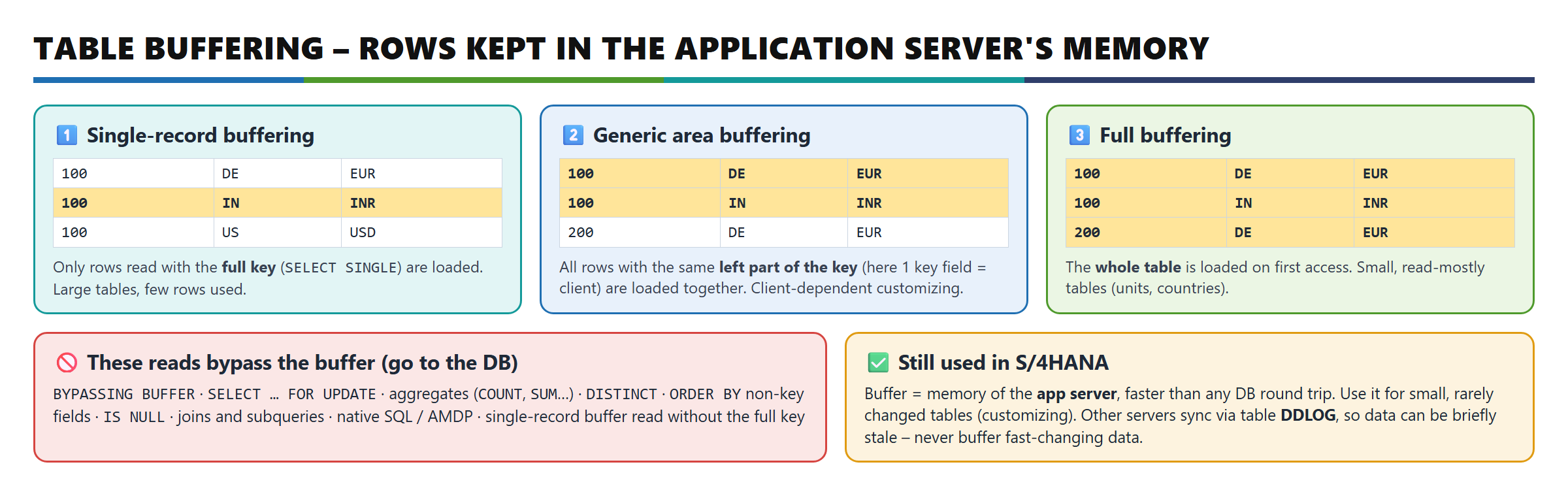
- Buffering is not obsolete in S/4HANA. Reading from app-server memory is still far faster than any database call – SAP buffers many customizing tables on HANA too.
- Generic buffering uses the left part of the key (you enter the number of key fields).
- Buffer for small, read-mostly tables; never for tables changed often (other servers refresh via DDLOG with a short delay).
|
Enhancement category
Says how a table/structure may be extended later (append structures, customer includes). Important for programs that use the structure (e.g. MOVE-CORRESPONDING, offsets).
Value (SE11) | ADT annotation value | Meaning |
|---|---|---|
Cannot be enhanced | #NOT_EXTENSIBLE | No appends allowed |
Can be enhanced (character-type) | #EXTENSIBLE_CHARACTER | Only character-like fields may be added |
Can be enhanced (character-type or numeric) | #EXTENSIBLE_CHARACTER_NUMERIC | Flat fields of any elementary type |
Can be enhanced (deep) | #EXTENSIBLE_ANY | Any fields incl. strings and tables |
Not classified | #NOT_CLASSIFIED | Old objects; activation warns |
Append structures, include structures, customizing includes
Created by | Purpose | |
|---|---|---|
Append structure | Customer, for an SAP table | Add fields (names start with ZZ or YY) without a modification; survives upgrades; one table can have several appends. Not possible for tables with LCHR/LRAW fields (they must be last). |
Include structure ( | Anyone | Reuse a group of fields in several tables/structures; optional group name and suffix |
Customizing include ( | SAP prepares the empty include, customer fills it | Planned extension point, e.g. CI_EKPODB in EKPO |
Changing a table that already has data
- Activation adjusts the database table automatically when possible (e.g. adding a field at the end).
- Otherwise use the database utility SE14: Activate and adjust database with Save data (the table is converted; values that cannot be converted can be lost – always back up first) or Delete data (table emptied and recreated). Large conversions run in the background.
Part 5 – Keys, foreign keys, check tables, text tables
Primary key
- Identifies each row uniquely: no duplicates, no NULLs, max 16 key fields (MANDT included).
- Composite key = several key fields together. A single column may repeat; only the combination must be unique (e.g. MANDT + EMP_ID + DATE in an attendance table). Typical in link tables of many-to-many relationships.
Foreign key and check table
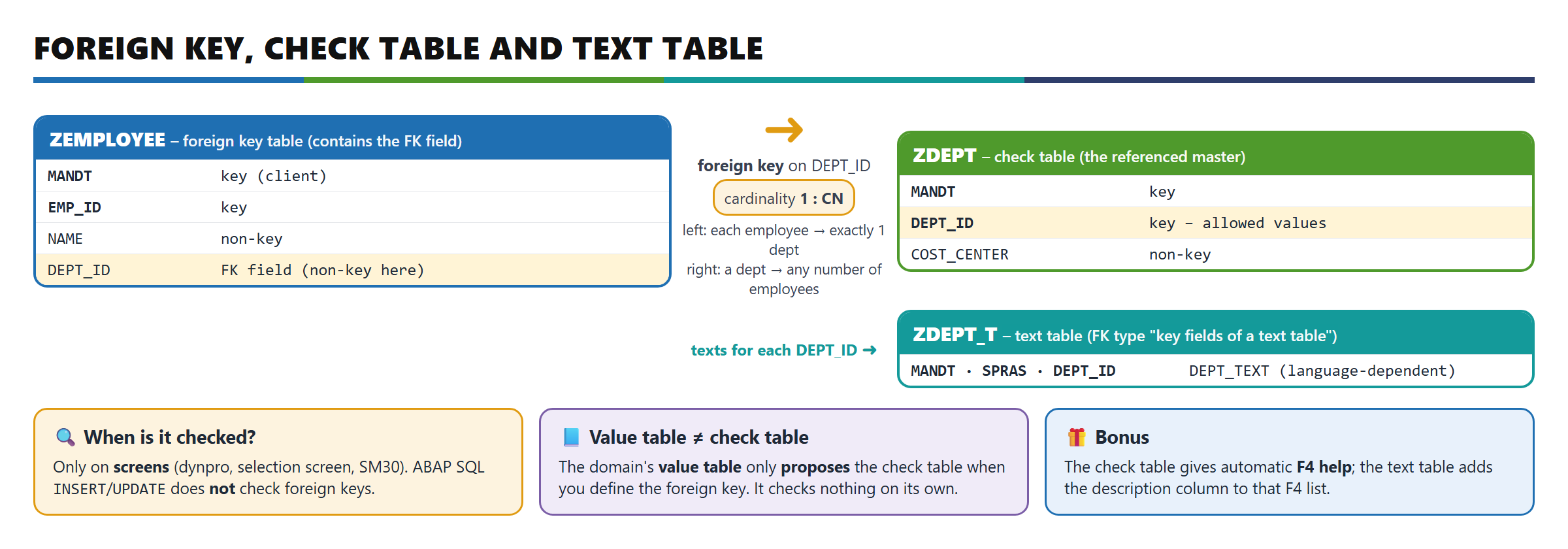
- The foreign key table contains the field to be checked (FK field); the check table is the referenced table – its primary key holds the allowed values.
- Prerequisite: the FK field and the check-table key field use the same domain. The FK field itself can be a key or a non-key field of the foreign key table.
- Foreign key relationship and check table are one mechanism in SAP: a foreign key always points to a check table. The domain's value table is something else: just the proposal for the check table.
- FK field types: key field, non-key field, or key fields of a text table. Generic / constant foreign keys skip or fix individual key fields. Optional: own error message, "check required" flag.
- Ways to validate data: (1) foreign key / check table, (2) domain fixed values / intervals – both only on screens; (3) program checks (AT SELECTION-SCREEN, PAI, RAP validations) – the only check that also protects ABAP SQL writes.
Cardinality
Written left : right – how many check-table rows belong to one FK-table row (left) and how many FK-table rows belong to one check-table row (right).
Side | Value | Meaning |
|---|---|---|
Left (check table) | 1 | Exactly one check-table row for each FK row (field always filled) |
C | FK field may be empty – zero or one check-table row | |
Right (FK table) | 1 | Exactly one dependent row per check-table row |
C | At most one dependent row | |
N | At least one dependent row | |
CN | Any number of dependent rows (most common) |
Examples: SFLIGHT → SPFLI 1:CN (each flight has its connection; a connection has any number of flights). VBAK-KUNNR → KNA1 1:CN (sold-to party is mandatory); it would be C:CN only if the field could stay empty.
Text table
Holds language-dependent descriptions: same key as the check table plus the language field SPRAS (type LANG), e.g. T005 (countries) → T005T. Linked by a foreign key of type "key fields of a text table" – F4 helps and SM30 then show the text in the logon language. A table can have only one text table.
Part 6 – Indexes
An index is a sorted copy of selected columns with a pointer to the row – it speeds up SELECT … WHERE on those columns. Always on a single table.
- Primary index: created automatically on the key fields; visible in SE11/SE14 (database name <TABLE>~0).
- Secondary index: created by the developer on other fields; 3-character ID (Z*/Y* for customers) → database name e.g. ZEMPLOYEE~Z01.
- Unique: the database rejects duplicate values in the index fields; activation fails if duplicates already exist.
- Non-unique: duplicates allowed – the normal case for search fields.
- On client-dependent tables put MANDT first in every index (ABAP SQL always filters by client).
- Scope: index on all database systems / only on selected database systems / no database index.
- On HANA (column store) secondary indexes are rarely needed – every column can be scanned fast. Create one only after measuring (ST05, SQLM); each index costs memory and slows inserts. More: ABAP on HANA › 01.
Part 7 – Structures and table types
Global types: data element (one field), structure (several fields = one row), table type (an internal table). None of them stores data – data exists only in variables you declare with them.
Structures
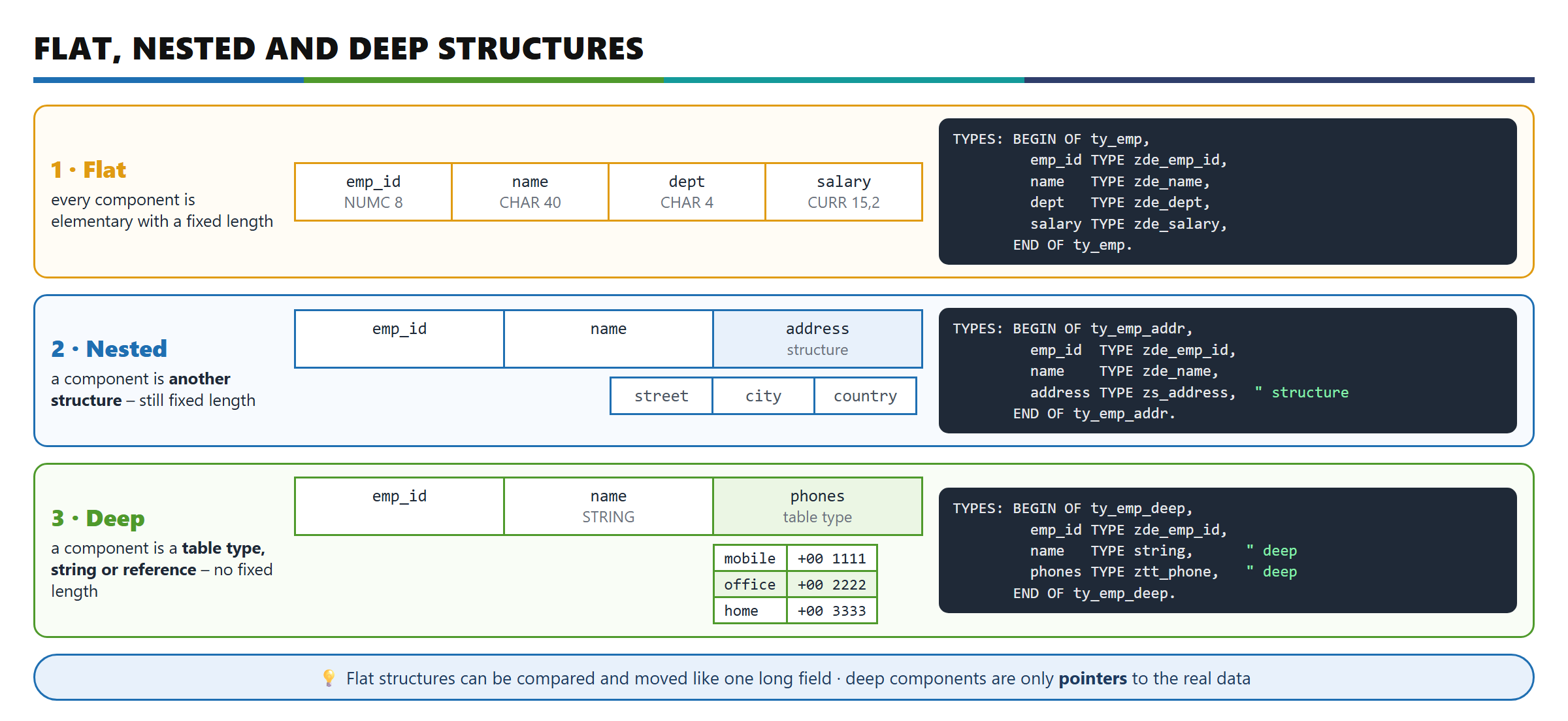
- Flat: components are elementary (data elements / built-in types).
- Nested: a component is another structure.
- Deep: a component is a table type, string or reference (no fixed length).
- A work area is a data object declared with a structure type – it holds exactly one row. Header lines (
DATA itab … WITH HEADER LINE,OCCURS) are obsolete; use an explicit work area or field symbol.
Table types
A table type is a type (not a data object) that describes an internal table: line type (structure, data element…), table kind (standard, sorted, hashed, or generic index/any), primary key (standard key, own key fields or empty key; unique / non-unique) and optional secondary keys. DATA with a table type creates the internal table (data object with memory).
|
Table kinds and operations on internal tables: page 03 Report Programming. Global structures and table types are also used as function module and method parameters (page 04).
Part 8 – Views
A view stores only a definition; data is read from the base tables at runtime. Views exist for reuse and to restrict fields/rows – not to make reads faster (a view is executed as a join).
View | Tables / join | Read / write | Used for |
|---|---|---|---|
Database view | 1 or more tables, inner join (join condition typed or taken from FKs); projection + selection conditions | Read only if more than one table | Reading combined data in programs – obsolete for new development (use CDS view entities) |
Projection view | Exactly 1 table; hides fields, no row filter | Read and write (writing needs the full key in the view) | Hiding fields of one table in SELECT (rarely used) |
Maintenance view | 1 or more tables linked by FKs (N:1), outer join | Read and write via the generated TMG | SM30 maintenance of data spread over several tables |
Help view | 1 or more tables linked by FKs, left outer join | Read only | Only as selection method of a search help |
View cluster (SE54) | Several maintenance views in a hierarchy | Read and write | One maintenance unit in SM34 (header + dependent entries) |
CDS view entity | Any joins, associations, unions, calculations | Read only (writes via RAP) | The modern view – Fiori, OData, analytics, RAP |
- Forgetting the join condition in a database view gives a Cartesian product (every row with every row).
- A maintenance view is not the same as a TMG – the TMG is generated *for* a table or maintenance view. Database views do not need a foreign key; you can type the join condition.
|
DDIC-based CDS views (define view + @AbapCatalog.sqlViewName) are obsolete as well – use view entities. Full topic: ABAP on HANA › 05 CDS Views.
Part 9 – Search helps
A search help defines the F4 value help of a field: where the values come from, which fields are shown and which value is returned.
Type | What it is |
|---|---|
Elementary | One selection method (table, database view or help view, or a CDS view) + parameters + dialog type |
Collective | Groups two or more elementary search helps as tabs (e.g. DEBI for customers). Extend SAP collective helps with a search help append. |
Settings of an elementary search help
Setting | Meaning |
|---|---|
Dialog type | Display values immediately (short lists) / Dialog with value restriction (large lists – restriction dialog first) / Dialog depends on set of values (fewer than 100 hits → list, otherwise restriction dialog) |
IMP / EXP | Import parameter (value taken from the screen into the search) / export parameter (value returned to the screen) |
LPOS | List position: column of the field in the hit list |
SPOS | Screen position: position of the field in the restriction dialog |
SDis | Field shown in the restriction dialog but not changeable |
Default value | Pre-fills a restriction field (also via parameter ID) |
Hot key | Shortcut to pick an elementary help of a collective one, or to enter restrictions directly in the field (e.g. |
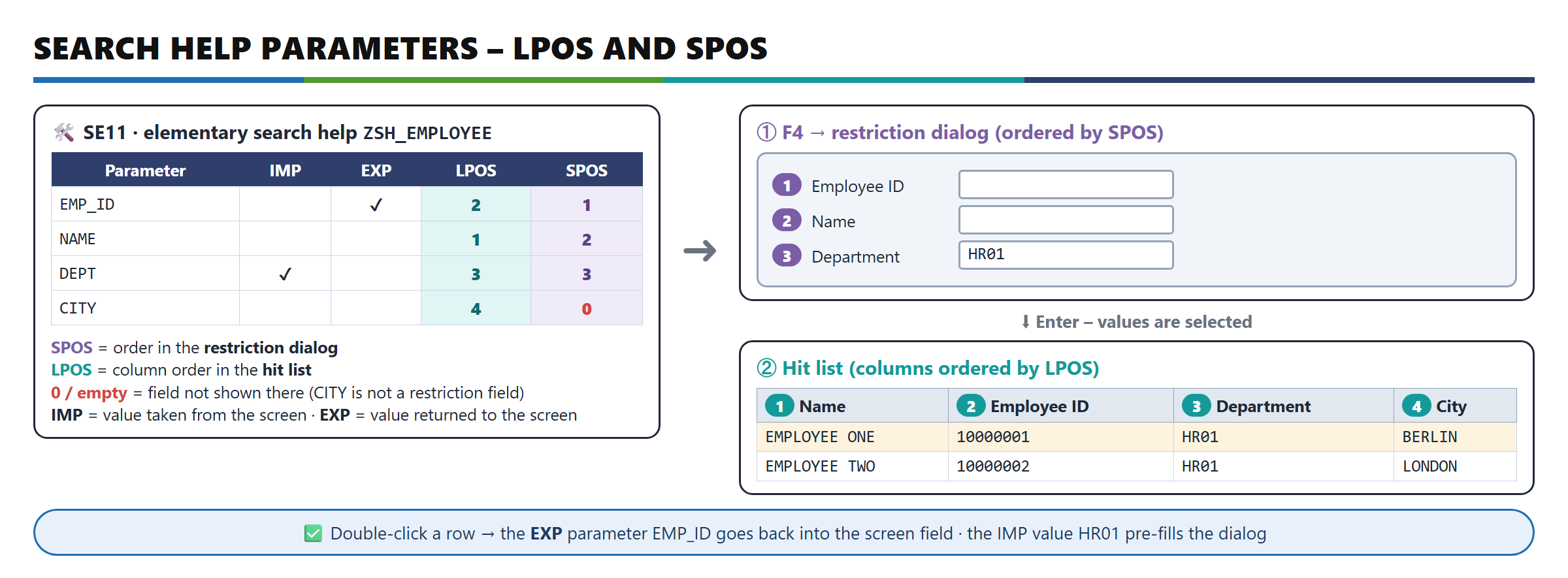
Where a field gets its F4 help (priority, highest first)
- 1. Program:
PROCESS ON VALUE-REQUEST/AT SELECTION-SCREEN ON VALUE-REQUEST, orMATCHCODE OBJECTon a parameter (pages 03 and 05). - 2. Search help attached to the table/structure field.
- 3. Check table of the field (its search help, otherwise its key fields).
- 4. Search help of the data element.
- 5. Fixed values of the domain (the value table gives no F4 by itself).
- 6. Calendar / clock help for date and time fields.
|
Search help exit
A function module with the same interface as F4IF_SHLP_EXIT_EXAMPLE, called at each step of the F4 process to change it (own selection, filter hits, change the dialog). Helper function modules start with F4UT_ (e.g. F4UT_RESULTS_MAP); see their long documentation.
|
Steps (CALLCONTROL-STEP): SELONE (collective help, before choosing an elementary one), PRESEL1, PRESEL (restriction dialog), SELECT (data selection), DISP (hit list display), RETURN (value returned).
Legacy: match codes were replaced by search helps in release 4.0 (only the keyword MATCHCODE OBJECT survives). For F4 from an internal table use F4IF_INT_TABLE_VALUE_REQUEST (page 03).
Part 10 – Lock objects
SAP locks stop two users from changing the same data at the same time. They are logical locks kept in the lock table of the enqueue server (page 01 › Services) – not database locks – and work only if every program asks for them.
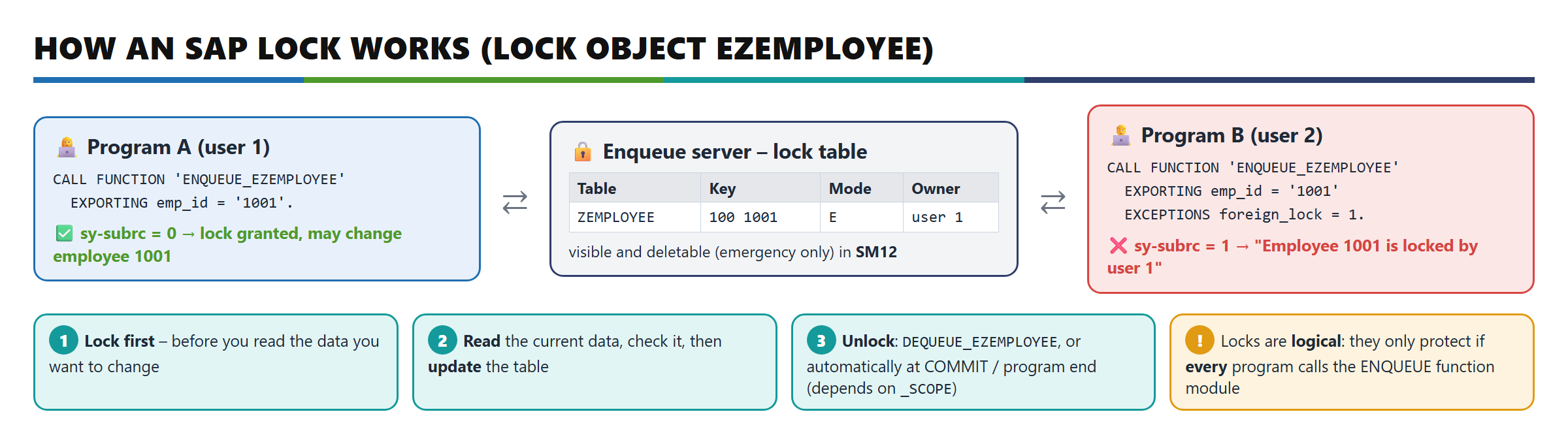
- Create in SE11, name starts with EZ or EY (e.g. EZEMPLOYEE). Settings: primary table (+ lock mode), optional secondary tables linked by foreign keys, lock parameters = key fields.
- Activation generates two function modules: ENQUEUE_EZEMPLOYEE (set lock) and DEQUEUE_EZEMPLOYEE (release).
- Parameters:
MODE_<table>(lock mode), the key fields,X_<field>(lock the initial value literally),_SCOPE,_WAIT(retry for a short time),_COLLECT(collect and send later with FLUSH_ENQUEUE). Exceptions: FOREIGN_LOCK (sy-msgv1 = user holding it), SYSTEM_FAILURE. _SCOPE: 1 = lock stays with the program (until DEQUEUE or program end); 2 (default) = passed to the update task and released after the update atCOMMIT WORK; 3 = both.
|
Lock modes
Mode | Name | Meaning |
|---|---|---|
S | Shared (read lock) | Several users can hold an S lock on the same data – they read and want it unchanged. Nobody can get E or X while an S lock exists. |
E | Exclusive, cumulative (write lock) | Only the owner may access; the same transaction may request it again (counter). Others get FOREIGN_LOCK. |
X | Exclusive, non-cumulative | Like E, but cannot be requested again even by the same transaction. |
O | Optimistic | The optimistic lock mode: behaves like a shared lock at first and can later be converted to an exclusive lock (mode R). |
R | Promote optimistic | Converts an O lock to E. |
U, V, W, C | Collision / promotion check | Check whether E, S, X or O would be possible – set no lock. |
X is the strictest mode.
- SM12 shows lock entries (and can delete them in an emergency). SM04 lists user sessions – it does not remove locks (ending a session there releases that session's locks indirectly).
ENQUEUE_E_TABLE/DEQUEUE_E_TABLE= generic lock on any table by name and key (used e.g. by SM30);DEQUEUE_ALLreleases all locks of the program.- In RAP the framework sets the locks (lock master in the behavior definition) – see RAP › 07 · Locking, Draft & Side Effects.
Part 11 – Table maintenance generator (TMG)
Generates a maintenance dialog so users can create, change and delete table entries in SM30 without a program. SE11 → Utilities → Table Maintenance Generator (= transaction SE54). The table must allow maintenance (Display/Maintenance Allowed).
Setting | Meaning |
|---|---|
Authorization group | Checked via object S_TABU_DIS; &NC& = no special group |
Function group | Holds the generated screens and code; can be created beforehand in SE80/SE37 – use one function group per table or a small set of tables |
Maintenance type | One step: one overview screen for everything. Two step: overview screen + single (detail) screen for one entry |
Screen numbers | Enter or let the system propose them (Find Scr. Number(s)) |
Recording routine | Standard recording routine → changes go into a customizing/workbench request; or no/user recording |
- Events (Environment → Modifications → Events) add own logic as FORM routines, e.g. 01 before saving, 02 after saving, 03 before deleting, 05 when creating a new entry (fill created-by/date), 21 fill hidden fields.
- After changing the table structure, regenerate the TMG (Change → select changed screens).
- Own transaction for SM30 (SE93): create a parameter transaction with default transaction SM30, "Skip initial screen" and default values
VIEWNAME = ZEMPLOYEE,UPDATE = X. Give it to users instead of SM30. - View cluster (SE54 → Edit view cluster, run in SM34) combines several maintenance views. In ABAP Cloud / S/4HANA Cloud the successor is a RAP-based maintenance app ("Business Configuration" objects).
Part 12 – Number ranges
A number range object (transaction SNRO) issues unique numbers for documents or master records. It has a number length (domain, e.g. NUMC 10), a warning percentage, buffering and one or more intervals (e.g. interval 01 = 1000000000–1999999999; internal = system assigns, external = user enters).
|
- Buffering in main memory is fast but numbers can be lost (gaps) when a server restarts; use no buffering where gap-free numbering is legally required.
- Get the number as late as possible (just before saving) so cancelled transactions do not burn numbers.
Part 13 – Legacy objects
- Type groups (type pools, SE11): collection of global types and constants whose names must start with the group name, e.g. SLIS →
slis_t_fieldcat_alv. The statementTYPE-POOLS slis.has not been needed since release 7.02 (NW 7.0 EHP2). Type groups are obsolete and not available in ABAP Cloud – put types and constants in a global interface or class.
|
Legacy | Modern replacement |
|---|---|
Pooled and cluster tables | Transparent tables (automatic on HANA) |
Classic database / projection views (SE11) | CDS view entities |
DDIC-based CDS views ( | CDS view entities ( |
Type groups, | Global interfaces/classes with types and constants |
Match codes | Search helps (and CDS value helps in Fiori) |
TMG / SM30 in the cloud | RAP Business Configuration maintenance apps |
Native SQL with | ADBC or AMDP (ABAP on HANA › 04 / 06) |
Part 14 – How ABAP reaches the database
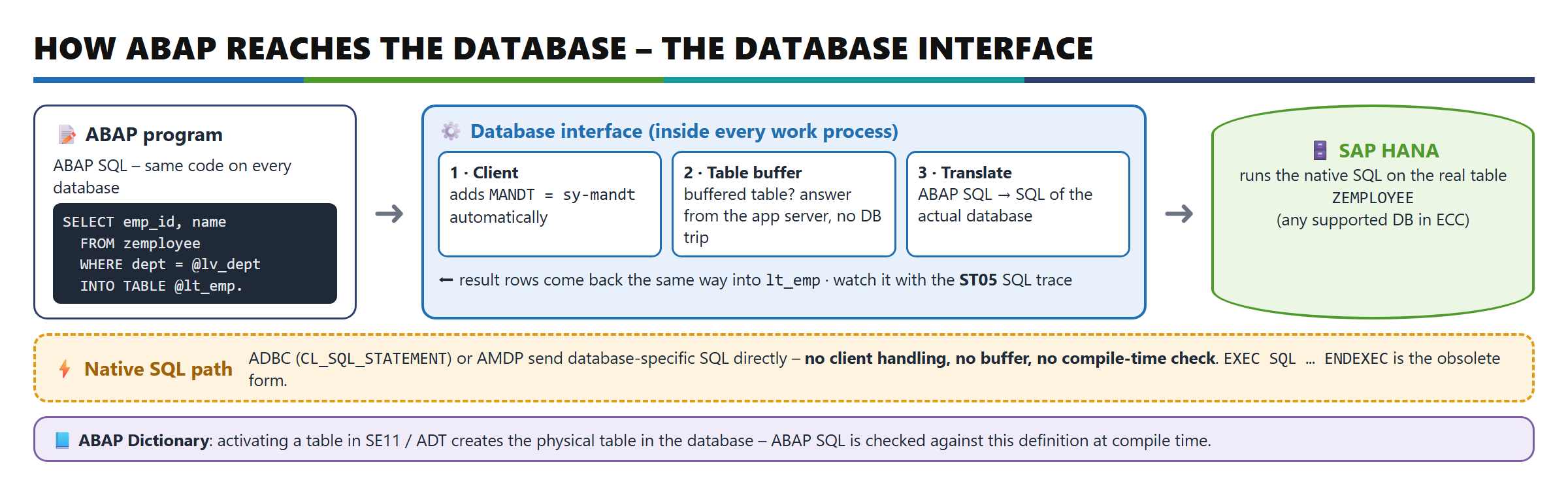
The database interface in every work process translates ABAP SQL into the SQL of the actual database, adds the client, and uses the table buffer.
ABAP SQL (formerly Open SQL) | Native SQL | |
|---|---|---|
Syntax | ABAP statements: SELECT, INSERT, UPDATE, MODIFY, DELETE, OPEN CURSOR / FETCH / CLOSE CURSOR | SQL of one vendor; |
Database | Independent – runs on every supported DB | Only on that database |
Client handling, buffer | Automatic | None – you handle the client yourself |
Checked | At compile time against DDIC | At runtime only |
Native SQL is not generally faster: ABAP SQL is translated once, uses the table buffer, and supports joins, expressions, CDS (7.40/7.50) and window functions (7.54+). Open SQL was renamed ABAP SQL in 7.53.
|
Procedure: analyse table and fields → declare the target (structure for one row, internal table for many, fields for single values) → read into the target → process. Performance rules and joins: page 03; ABAP SQL in depth, ADBC and ALV IDA: ABAP on HANA › 04.
Part 15 – Interview questions
1. Domain vs data element?
Domain = technical attributes (type, length, value range, conversion routine, lowercase). Data element = semantic attributes (field labels, F1 help, search help, parameter ID) and refers to a domain. One domain can serve many data elements.
2. What is a conversion routine and when does it run?
Two function modules CONVERSION_EXIT_xxxxx_INPUT/OUTPUT assigned in the domain, converting between display and internal format. They run on screen fields, WRITE, ALV and SE16 – not on assignments or ABAP SQL, so data from files or code must be converted explicitly (ALPHA = IN or the function module).
3. Explain delivery class and data class.
Delivery class (A, C, L, G, E, S, W) controls how table data is treated in installation, upgrade, client copy and transport – A for application data, C for customer customizing. Data class (APPL0 master, APPL1 transaction, APPL2 organisation/customizing) is the logical storage area in the database.
4. Types of table buffering? Is buffering still used in S/4HANA?
Single-record, generic area (left part of the key) and full buffering. Yes – app-server memory is faster than any database call, so small read-mostly tables are still buffered on HANA. Bypassed by BYPASSING BUFFER, FOR UPDATE, aggregates, DISTINCT, joins, native SQL.
5. Check table vs value table?
The check table is the table referenced by a foreign key; its key defines allowed values and gives F4. The value table is set in the domain and is only the proposal for the check table when you create the foreign key – it checks nothing.
6. Are foreign keys checked when a program inserts data?
No. Foreign keys and domain fixed values are checked only on screens (dynpro, selection screen, SM30). ABAP SQL writes any value, so programs and RAP validations must check.
7. Append structure vs include structure?
An append structure is created by the customer for one SAP table to add ZZ/YY fields without a modification and survives upgrades. An include structure is a reusable group of fields inserted with .INCLUDE into many tables or structures. Customizing includes (CI_*) are empty includes prepared by SAP.
8. Structure vs table type vs work area vs internal table?
Structure and table type are types (no memory): a structure describes one row, a table type an internal table (line type, table kind, key). A work area is a data object of a structure type; an internal table is a data object of a table type.
9. Database view vs maintenance view vs help view? What replaces them?
Database view: inner join, read-only for several tables, used in programs. Maintenance view: tables linked by foreign keys, maintained in SM30 via a generated TMG. Help view: left outer join, only for search helps. For new read scenarios use CDS view entities.
10. Elementary vs collective search help, and what is a search help exit?
Elementary = one selection method with its parameters (IMP/EXP, LPOS, SPOS) and dialog type; collective = several elementary helps as tabs. A search help exit is a function module with the interface of F4IF_SHLP_EXIT_EXAMPLE that changes the F4 process at steps like SELECT and DISP.
11. How do lock objects work? Which lock modes exist?
A lock object (EZ…) generates ENQUEUE_/DEQUEUE_ function modules that write entries to the enqueue server's lock table (SM12). Locks are logical – every program must call them. Modes: S shared, E exclusive cumulative, X exclusive non-cumulative, O optimistic. FOREIGN_LOCK tells you who holds it.
12. How do you let users maintain a custom table?
Allow maintenance in the table, generate a TMG in SE54 (authorization group, function group, one/two-step), add events if needed (e.g. 05 to fill created-by), and create a parameter transaction for SM30 with VIEWNAME and UPDATE = X and skip initial screen.
🏠 Start Here · ◀ 01 · SAP & ABAP Basics · 03 · Report Programming & ALV ▶ · Sections: CORE ABAP | OOPS ABAP | ABAP on HANA | Clean Core | RAP | ABAP Points | SAP Fiori | SAPUI5 | Mobile Development (MDK) | BTP Foundations | BTP Development | CAP | SAP Build | ABAP on BTP | Integration Suite | SAP Business AI | SAP BASIS | Security | SAP SDLC
Functional: FICO ABAP | TRM ABAP | VIM | SAP BIS | SD ABAP | MM ABAP | PP ABAP | QM ABAP | PM ABAP | PS ABAP | EWM | TM ABAP | GTM ABAP | EHS ABAP | HR ABAP | BW | SAP Datasphere | SAP Business Data Cloud | SAP MDG | SAP Analytics Cloud | SAP Ariba | SAP CX | SAP IBP