The senior-level toolkit that interviewers use to separate a report writer from a technical consultant: making mass processing fast (parallel processing), sharing data across users (shared memory objects), pushing messages between sessions (ABAP Channels), auditing changes (change documents), collecting errors (application log), monitoring interfaces (AIF), reviewing code (Clean ABAP), the role itself – from functional spec to technical spec, build, test and hypercare – and the reviewer's checklist plus the steps for converting old code to clean core.
Related pages: page 01 SAP & ABAP Basics (RICEFW, SAP Activate), page 03 Report Programming (background jobs, ABAP memory, FOR ALL ENTRIES), page 04 Modularization & Debugging (messages, SLG1), page 07 Interfaces (RFC types, IDoc), page 09 Web Services (SRT_MONI); RAP section, Clean Core › 01 Clean Core; Security › 03 Secure Coding; SAP SDLC › 01 SDLC & SAP Activate and 04 Developer's Day.
Part 1 – Parallel processing
A job that processes 500,000 documents one after another may run for hours. If the documents are independent of each other, you can split them into packets and process the packets at the same time in several work processes. The total runtime drops roughly by the number of parallel tasks – as long as the database and the locks are not the bottleneck.
Technique | How it works | Runs in | Use it for |
|---|---|---|---|
aRFC parallel processing |
| Dialog work processes of a server group (RZ12) | Classic on-premise mass processing with results coming back |
SPTA framework |
| Same as aRFC | Same, with less plumbing code |
Background job splitting | N jobs, each with its own key range / variant | Background work processes | Very long runs; no results needed back in one program |
tRFC / qRFC / bgRFC | Asynchronous calls sent at COMMIT WORK, exactly once (qRFC: in order) | Dialog or background, decoupled | Reliable decoupling – not a speed tool by itself |
CL_ABAP_PARALLEL | One object per packet; the framework runs each object's | Parallel tasks | Parallel processing in ABAP Cloud (released class) |
bgPF | Background Processing Framework: | Background session, built on bgRFC | Fire-and-forget background work in ABAP Cloud and RAP |
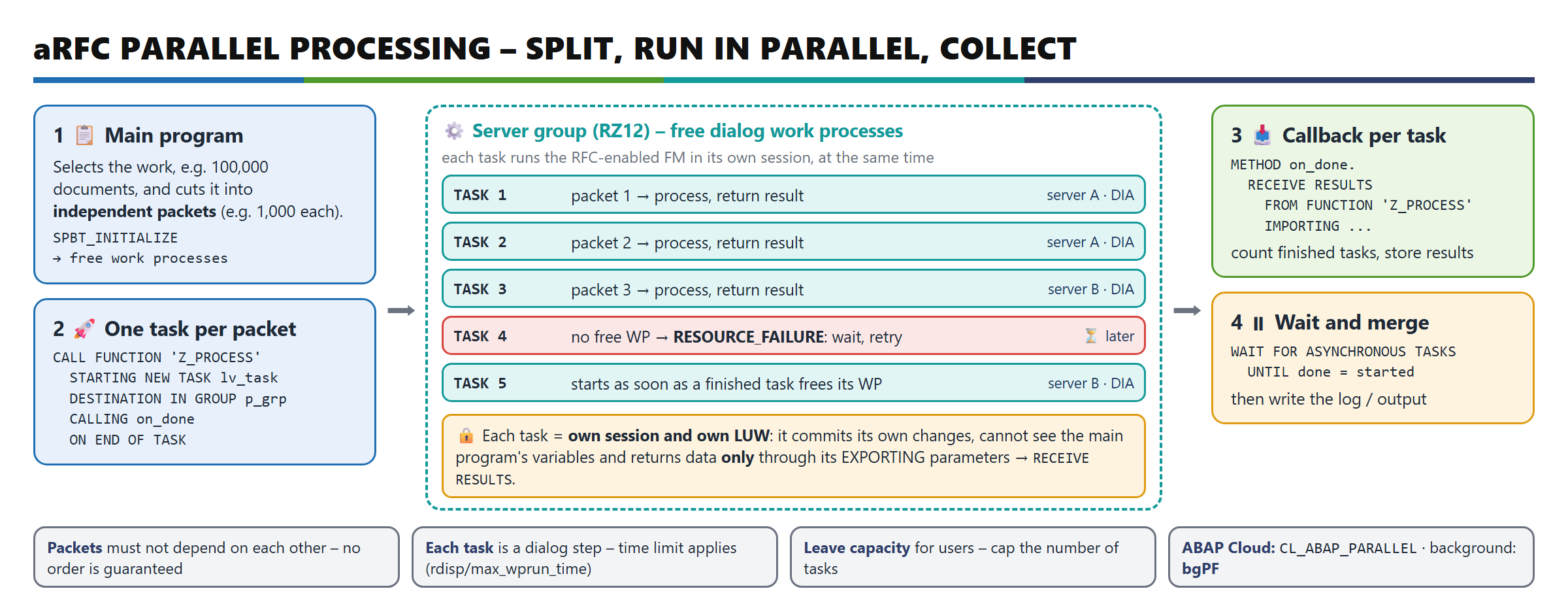
1.1 aRFC parallel processing with a server group
Each packet is passed to a remote-enabled function module started with STARTING NEW TASK. With DESTINATION IN GROUP the system picks a free dialog work process on a server of the group; the callback method runs when the task ends and collects the result with RECEIVE RESULTS.
Object | Meaning |
|---|---|
Server group (RZ12) | Named set of application servers allowed for parallel RFC. |
SPBT_INITIALIZE | Optional: checks the group name and returns the total and currently free work processes ( |
RESOURCE_FAILURE | Exception of the call when no work process is free – only with |
RECEIVE RESULTS | In the callback: fetches the EXPORTING/TABLES parameters of the finished task |
WAIT FOR ASYNCHRONOUS TASKS UNTIL cond | Lets the callbacks run and waits until the condition is true (optionally |
|
Rules and pitfalls
- Packets must be logically independent – no order is guaranteed and a task cannot see another task's results or the main program's variables. Data goes in and out only through the FM's parameters.
- Each task is its own session and LUW: it must save its own work (
COMMIT WORKorBAPI_TRANSACTION_COMMITinside the FM). A failed task does not roll back the others – log failures per packet (application log, Part 5) so they can be re-run. - Tasks run in dialog work processes, so the dialog time limit applies to each task (
rdisp/max_wprun_time; newer kernels userdisp/scheduler/max_runtime) – size the packets accordingly. A server needs at least 3 dialog work processes to take part. - Lock conflicts: two packets touching the same object (same customer, same material) collide on SAP locks. Build packets by the locking key (e.g. all items of one order in the same packet).
- Leave room for users: cap the number of parallel tasks (packet count, RZ12 quotas) – a job that grabs every dialog work process blocks online users.
- The called FM must not call
DESTINATION 'BACK'; don't useSUBMITorCALL TRANSACTIONafterSTARTING NEW TASKin the caller; use only one server group per program. - Debugging: a breakpoint in the FM needs an external (user) breakpoint, because the task runs in a new session; test the FM with one packet in SE37 first.
1.2 The SPTA framework
SPTA_PARA_PROCESS_START_2 is an SAP function module that hides the aRFC bookkeeping. You pass the server group, the maximum number of tasks and the names of three callback subroutines in your program:
Callback | Runs | Typical job |
|---|---|---|
Before RFC | In the main program, before each task | Cut the next packet from the work list |
In RFC | Inside the parallel task | Process the packet (call your own logic or a BAPI) |
After RFC | In the main program, when a task ends | Collect results and errors |
- Exceptions such as an invalid server group or no free resources are raised by the FM itself.
- The callbacks are FORM routines, so keep them thin and call methods of a class from them.
1.3 Splitting into several background jobs
For very long runs, split the key range (e.g. company codes, document number intervals, or MOD of the number) and schedule several jobs of the same report, each with its own variant or parameter. Jobs are created in SM36 or in code with JOB_OPEN / SUBMIT … VIA JOB … AND RETURN / JOB_CLOSE (page 03 Part 10). Each job runs in a background work process with no dialog time limit; monitor them in SM37.
- Good for: nightly mass changes, archiving pre-steps, data migration loads.
- Weak point: no common callback – each job writes its own log; a final job or a monitor report checks that all parts finished.
1.4 tRFC, qRFC and bgRFC – what a developer must know
These RFC types are explained on page 07 Interfaces, Part 2. For parallel and background work remember:
Type | Guarantee | Monitor | Developer note |
|---|---|---|---|
tRFC | Exactly once, no order, no result | SM58 |
|
qRFC | Exactly once in order per queue | SMQ1 (outbound), SMQ2 (inbound) | Queue name set before the call; one failing entry blocks the whole queue – a common support ticket |
bgRFC | Exactly once (in order for queued units) | SBGRFCMON (configuration SBGRFCCONF) | Successor of tRFC/qRFC: |
These give reliability and decoupling (the caller doesn't wait, the call survives a short outage); speed comes only when many queues are processed side by side.
1.5 ABAP Cloud: CL_ABAP_PARALLEL and bgPF
Statements such as STARTING NEW TASK and server groups are not available in ABAP Cloud. Two released APIs replace them:
CL_ABAP_PARALLEL – parallel tasks, results back
Create one object per packet from a class that implements IF_ABAP_PARALLEL; RUN_INST processes the objects in parallel tasks (method DO) and returns the processed objects in P_OUT_TAB. Optional constructor parameters limit the number of tasks (see the class documentation).
|
bgPF – Background Processing Framework
bgPF runs an operation asynchronously in a separate background session, exactly once. It is built on bgRFC but hides it behind a simple API (SAP Business AI Platform, ABAP environment and S/4HANA Cloud Public Edition from 2308, S/4HANA on-premise and private cloud from 2023).
Interface of your operation class | When |
|---|---|
| Controlled (SAP's recommendation): |
| Uncontrolled: no transactional checks – for simple code that cannot follow the phases |
|
- Long-running scheduled work in ABAP Cloud uses application jobs: a class implementing
IF_APJ_RT_RUN(methodEXECUTE), a job catalog entry and a job template; schedule in the Application Jobs app or withCL_APJ_RT_API.
In S/4HANA / clean core: aRFC, SPTA and job splitting still work in on-premise and private cloud systems (classic ABAP). New, cloud-ready code uses CL_ABAP_PARALLEL for parallel work with results, bgPF for background work after a save, and application jobs for scheduled runs.
Part 2 – Shared memory objects
Shared objects are ABAP objects stored in the shared objects memory of an application server. Every program and every user on that server can read them – without reading the database again and without copying the data into their own session. Typical use: a large, read-mostly table that is expensive to build (exchange rates, a rule set, a product catalogue) and needed by many users.
Technique | Visible to | Holds | Notes |
|---|---|---|---|
ABAP memory | Same user, programs in one call sequence | Data cluster | Program-to-program hand-over (page 03 Part 7) |
SAP memory | Same user, all sessions of one logon | Single field values | Default values for screen fields |
| All users on the server | Data cluster (copied on IMPORT) | Simple; the shared buffer may displace old entries when full, shared memory doesn't |
Shared objects (SHMA) | All users on the server | Real objects + their data | Locks, versions, lifetime; read in place, no copy |
Table buffering (SE11) | All users on the server | Rows of one DB table | First choice for small, rarely changed tables (page 02) |
|
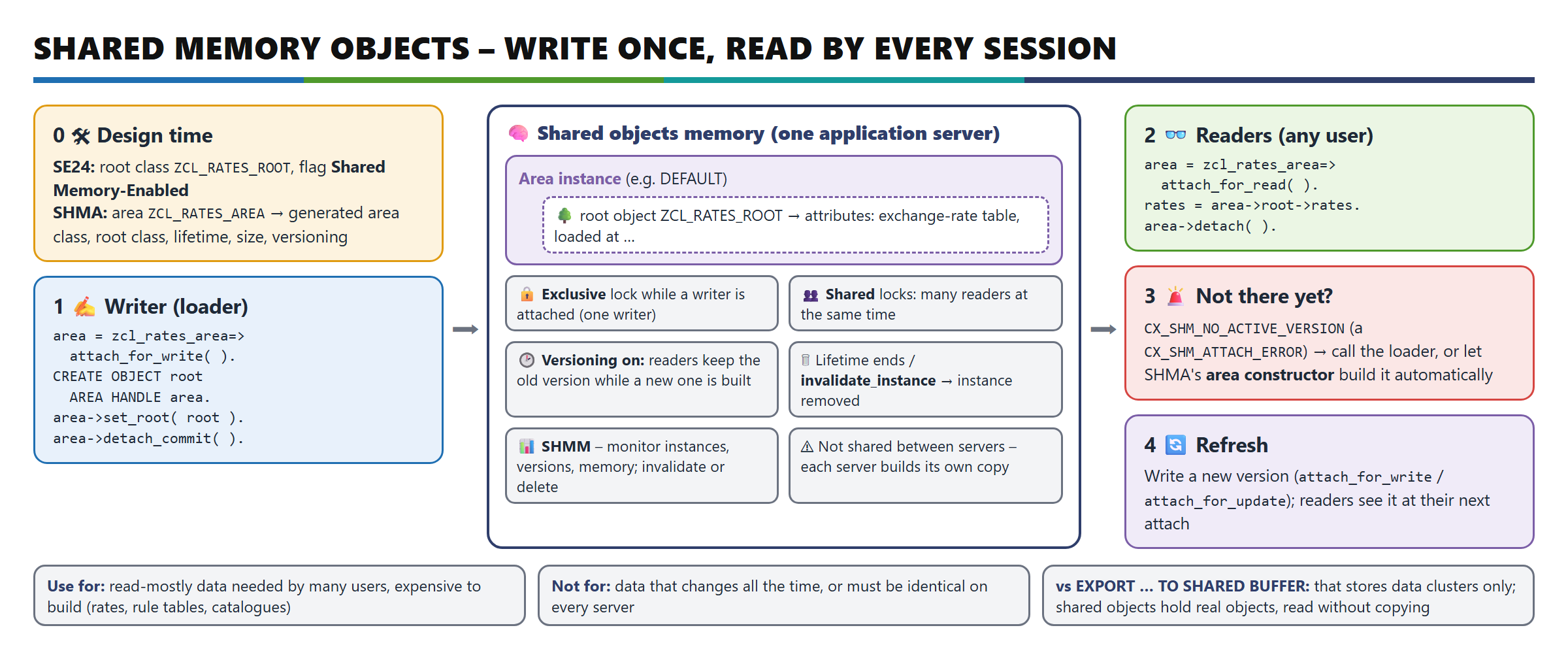
2.1 Building a shared memory area
- 1 Root class (SE24 or ADT): Properties → Shared Memory-Enabled (
SHARED MEMORY ENABLEDin the definition). Its attributes hold the data; its methods load it. - 2 Area in SHMA: the area name is also the name of the generated area class (create it as
ZCL_…). Settings: root class, client-specific or not, transactional or not, versioning, lifetime (e.g. expire after the last access), maximum size, optional area constructor class (IF_SHM_BUILD_INSTANCE, methodBUILD) that builds the instance automatically. - 3 Loader: attach for write, create the root object in the area, set it as root, commit.
- 4 Readers: attach for read, use
area->root->…, detach.
|
Method | Meaning |
|---|---|
ATTACH_FOR_WRITE | Static, generated area class: create a new instance version, exclusive lock |
ATTACH_FOR_UPDATE | Change the existing version (copy of it when versioning is on) |
ATTACH_FOR_READ | Shared lock for reading; many readers at the same time |
| Set the root object / attribute to reach it |
DETACH | Release a read lock |
| Release a change lock and keep / discard the changes (transactional areas: active only after the next database commit) |
INVALIDATE_INSTANCE | Mark the instance version as no longer valid |
- SHMM – shared objects monitor: areas, instances, versions, memory used, locks; invalidate or delete an instance (e.g. after correcting the source data).
- Exceptions all start with
CX_SHM_;CX_SHM_ATTACH_ERRORis the superclass of the attach errors (CX_SHM_NO_ACTIVE_VERSION, lock conflicts …).
Pitfalls
- Shared memory is per application server – each server builds its own copy, so the copies can differ for a short time. Not suitable for data that must be identical everywhere at every moment.
- Memory is limited (profile parameter
abap/shared_objects_size_MB); a full area raisesCX_SHM_OUT_OF_MEMORY. Store only what you need. - Keep locks short: detach readers promptly; while read locks exist, ATTACH_FOR_WRITE fails (or waits up to its optional WAIT_TIME) unless the area uses versioning.
- Plan refresh: lifetime settings, a job that rebuilds the area, or invalidation when the source changes.
In S/4HANA / clean core: shared objects are a Standard ABAP feature for on-premise and private cloud. On HANA, reading the database (or a buffered table) is often fast enough – measure first. In ABAP Cloud use only what the released-object list in ADT allows.
Part 3 – ABAP Channels (AMC, APC) and ABAP Daemons
ABAP Channels (since 7.40) replace polling ("check every 5 seconds if something changed") with push messages: ABAP Messaging Channels between ABAP sessions, ABAP Push Channels between ABAP and a browser or other client over WebSocket.
3.1 ABAP Messaging Channels (AMC)
- Publish/subscribe between ABAP sessions – also across application servers.
- Channel defined in SAMC: application ID, channel name (starts with
/), message type TEXT, BINARY or PCP (Push Channel Protocol), scope System / Client / User, and the programs allowed to send or receive. - Sender:
CL_AMC_CHANNEL_MANAGER=>CREATE_MESSAGE_PRODUCER, cast to the type-specific interface (e.g.IF_AMC_MESSAGE_PRODUCER_TEXT), thenSEND. - Receiver:
CREATE_MESSAGE_CONSUMER→START_MESSAGE_DELIVERYwith an object implementing e.g.IF_AMC_MESSAGE_RECEIVER_TEXT~RECEIVE; the program waits withWAIT FOR MESSAGING CHANNELS UNTIL … UP TO n SECONDS.
|
3.2 ABAP Push Channels (APC)
- Makes AS ABAP a WebSocket (or TCP socket) server or client: a two-way, open connection, so ABAP can push data to the browser.
- Created in SAPC (also generates the ICF service under
/sap/bc/apc/). The handler class inherits fromCL_APC_WSP_EXT_STATELESS_BASE(or the stateful variant) and implementsON_START(connection opened) andON_MESSAGE(message received);ON_CLOSEandON_ERRORare optional. - AMC + APC together: in
ON_STARTthe handler binds the WebSocket to an AMC channel (BIND_AMC_MESSAGE_CONSUMERof the binding manager). From then on every AMC message on that channel is pushed to the browser – from any session on any server.
Use case | How |
|---|---|
Live dashboard / monitor (orders, production counts) | Posting program sends AMC → APC pushes to the UI |
Notify the user when a long background job ends | Job sends AMC at the end; the open app shows a message |
Machine or IoT data into ABAP | Device connects to an APC WebSocket; |
Collaboration (two users editing, chat) | Each user's channel subscribed to the same AMC channel |
3.3 ABAP Daemons (briefly)
An ABAP Daemon (since 7.52) is a long-running ABAP session that waits for and reacts to events – for example messages from an IoT broker or AMC. If it terminates with a runtime error or an E/A/X message, the framework restarts it automatically.
- Class inherits from
CL_ABAP_DAEMON_EXT_BASE; event methods such asON_ACCEPT(accept or reject a start request),ON_START(initialise, read start parameters) andON_MESSAGE(PCP message received). - Started with
CL_ABAP_DAEMON_CLIENT_MANAGER=>START(daemon class, name, optional PCP start parameters). - Monitored in SMDAEMON: state, errors, restart, stop.
In S/4HANA / clean core: AMC, APC and daemons are Standard ABAP technologies used on-premise and in private cloud (Fiori real-time features, shop-floor scenarios). For loosely coupled events between systems the clean-core way is RAP business events with SAP Event Mesh (RAP › 10 · Business Events & Event-Driven RAP).
Part 4 – Change documents
A change document records who changed what, when, and with which transaction – old and new value of each field. Auditors, key users and support rely on it ("who changed the payment terms of this vendor?"). SAP writes change documents for most master and transaction data, e.g. object classes MATERIAL (material master), DEBI / KRED (customer / vendor), VERKBELEG (sales documents), EINKBELEG (purchasing documents). You can add the same for your own Z tables.
Table | Content |
|---|---|
CDHDR | Header: object class (OBJECTCLAS), object ID (OBJECTID), change number (CHANGENR), user, date, time, transaction code, change indicator |
CDPOS | Items: table name, table key (TABKEY), field name, change indicator (U update, I insert, D delete), VALUE_OLD, VALUE_NEW. In S/4HANA a transparent table (in ECC it was stored in cluster CDCLS) |
CDPOS_UID | Table keys longer than 70 characters (up to 254), linked to the change by a GUID (KEYGUID) |
CDPOS_STR | Old/new values of logged string fields |
4.1 Change documents for a custom table – classic steps
- 1 Data elements: set the flag Change Document (SE11 → data element → Further Characteristics) for each field that must be logged. Only flagged fields are logged.
- 2 Change document object in SCDO: name (e.g.
ZEMPLOYEE), the tables that make up the business object, per table whether several records change at once (internal table) and whether to log the field values on delete. - 3 Generate the update program (SCDO → Generate): function group plus the update function module
<OBJECT>_WRITE_DOCUMENTand includesF<object>CDT(declarations) /F<object>CDC(call template). - 4 Call it in your program with the old and new image of the record, then COMMIT WORK. The FM compares both images and writes CDHDR/CDPOS for the changed, flagged fields.
|
4.2 Reading change documents
Tool | Use |
|---|---|
CHANGEDOCUMENT_READ | FM: read the changes of one object class + object ID (date/user filters) |
| FMs: read headers first, then the items of chosen headers |
RSSCD100 | Standard report: change documents by object class, object ID, user, date |
Application menus | e.g. MM04 (material changes), Environment → Changes in most transactions |
CL_CHDO_READ_TOOLS | Class-based reading – the released way in ABAP Cloud |
- Performance: always select CDHDR/CDPOS by OBJECTCLAS + OBJECTID (their key). A search by field value or date alone scans one of the biggest tables in the system.
- Change documents are for business objects. Customizing tables use table logging instead (SE13 "Log data changes", display in SCU3) – see Security › 03, Part 10.
In S/4HANA / clean core: change document objects can be created in ADT; the generator then also creates a class <namespace>CL_<object>_CHDO whose WRITE method replaces the FM, and changes are read with CL_CHDO_READ_TOOLS – both usable in ABAP Cloud. In RAP, call the WRITE method in the save phase (additional or unmanaged save, save_modified). Newer releases (check the RAP feature tables in the ABAP Keyword Documentation for yours) add RAP change documents: the behavior definition names the change document object (BDL keyword changedocuments, e.g. changedocuments master ( … ) for the root and changedocuments dependent by … for child entities – check your release for the exact syntax) and the framework logs changes of the persisted BO data. Details: RAP › 09 · Unmanaged Scenario & Save Variants, Part 7.
Part 5 – Application log: creating your own
Page 04 Modularization (Part 8) explains why mass processing collects messages in an application log instead of stopping at the first error, and ABAP Points lists SLG1 and the BAL function modules. This part shows how to create one.
Object / tcode | Purpose |
|---|---|
SLG0 | Define the log object (e.g. |
SLG1 | Display logs: by object, sub-object, external ID, user, date, problem class |
SLG2 | Delete logs (report SBAL_DELETE) – schedule it as a periodic job |
BALHDR / BALDAT | Header and data tables of saved logs |
Expiry date ( | Set when the log is created: when it may be deleted, and whether SLG2 may delete it earlier |
5.1 The BAL function modules
Step | Function module |
|---|---|
1 Create the log in memory, get a handle |
|
2 Add messages |
|
3 Save to the database |
|
4 Show it (online runs) |
|
Free memory |
|
|
Good practice
- One log per run or per business document, with a meaningful external number (file name, order number, IDoc number) so support can find it in SLG1.
- Use problem classes (very important … additional information) to separate errors from details.
- In interfaces and parallel tasks, log per message / per packet so failed parts can be re-processed.
- Always set an expiry date and schedule SBAL_DELETE (SLG2) – application log tables grow fast.
5.2 ABAP Cloud: the BALI classes
In ABAP Cloud the BAL function modules are not released; use CL_BALI_LOG and the CL_BALI_* item classes. The log object and sub-objects are created in ADT (Application Log Object).
|
- Item classes:
CL_BALI_MESSAGE_SETTER(T100 messages),CL_BALI_FREE_TEXT_SETTER(free text),CL_BALI_EXCEPTION_SETTER(exception objects). Read logs withCL_BALI_LOG_FILTERandCL_BALI_LOG_DB. assign_to_current_appl_job = abap_trueattaches the log to the running application job, so users see it in the Application Jobs app.
In S/4HANA / clean core: BAL function modules remain fine in classic on-premise code; new cloud-ready code (ABAP Cloud, RAP, application jobs) uses CL_BALI_LOG. Both write the same application log, visible in SLG1.
Part 6 – SAP Application Interface Framework (AIF)
SAP AIF is a framework inside the ABAP system for building, monitoring and error handling of interfaces in one place. In ECC it is a separate add-on; in S/4HANA it is shipped as a standard component (no separate add-on); SAP-delivered interfaces can be used freely, while your own interfaces in a customer namespace need an AIF licence. Its main selling point: business users – not only developers – see their interface errors, understand them, correct the data and restart the message, in one monitor, whatever the technology (IDoc, SOAP proxy, web service and others). Interface basics are on page 07 Interfaces, SOAP proxies on page 09 Web Services.
6.1 Building blocks of an AIF interface
Object | Meaning |
|---|---|
Namespace + interface + version | Groups and identifies the interface (e.g. namespace |
Raw structure | The external format as it arrives (inbound) or leaves (outbound) – e.g. the proxy or IDoc structure |
SAP structure | The internal format your posting logic needs (e.g. BAPI parameters) |
Structure mapping | Field-by-field mapping raw ↔ SAP structure, using the objects below |
Value mapping | Translate external codes into SAP values (up to five source fields → one target field); entries maintained by key users in /AIF/VMAP |
Fix values | Constant values for target fields |
Checks | Validations on the data; failed checks produce readable errors |
Actions | Function modules that run the business logic, e.g. call a BAPI to post the document |
AIF can also be used only for monitoring existing IDoc or proxy interfaces, without moving their mapping or posting logic into AIF.
6.2 Transactions
Tcode | Use |
|---|---|
/AIF/CUST | AIF Customizing: namespaces, interfaces, structure mappings, checks, actions, engines |
/AIF/ERR | Monitoring and error handling: filter messages, read the log, edit data, restart or cancel messages |
/AIF/IFMON | Interface Monitor: overview of the interfaces a user is responsible for, then drill down |
/AIF/VMAP | Value mapping maintenance (also reachable from the error log) |
/AIF/CUST_FUNC, /AIF/CUST_HINTS | Custom functions and hints shown to users in the error screen |
6.3 AIF compared with the technical monitors
WE02 / BD87 | SRT_MONI | AIF /AIF/ERR | |
|---|---|---|---|
Technology | IDocs only | SOAP web services (proxies) only | IDoc, proxy, web service and more – one monitor |
Users | Developers, support | Developers, support | Business users and support |
Error text | IDoc status messages | Technical SOAP / application errors | Business-readable messages, hints, links to the document |
Fix | Edit IDoc (WE19 / WE02), reprocess in BD87 | Restart the message | Edit data or value mapping, restart or cancel |
Alerts | Workflow / custom | Custom | Users assigned to interfaces get alerts |
Why S/4HANA projects use it: many interfaces (EDI, partner portals, Ariba, SuccessFactors, warehouse systems) fail on data, not code. AIF moves first-level error handling to the business, gives one monitor for all technologies and keeps a full history. The ABAP developer builds the mappings, checks, actions and custom functions.
In S/4HANA / clean core: AIF is shipped with S/4HANA and often a standard part of the integration design together with SAP Integration Suite. Cloud monitoring tools (SAP Cloud ALM, Focused Run) can include AIF messages in end-to-end interface monitoring.
Part 7 – Clean ABAP and code review
Clean ABAP is SAP's open style guide for ABAP (GitHub repository SAP/styleguides), based on Robert C. Martin's book "Clean Code". It is not a syntax rule set but a list of recommendations that make code easier to read, test and change. The clean-core rules themselves (released APIs, ATC checks for ABAP Cloud) are on Clean Core › 01 Clean Core; security checks are on Security › 03 Secure Coding.
7.1 Key Clean ABAP rules
Area | Rule (Clean ABAP heading) | In practice |
|---|---|---|
Names | Use descriptive names · Use snake_case · Avoid abbreviations |
|
Names | Avoid encodings, esp. Hungarian notation and prefixes | Clean ABAP drops |
Language | Prefer object orientation to procedural programming | Classes and methods for new logic; no new FORMs (obsolete). Function modules only where technically needed (RFC, update task, BAPI) |
Language | Prefer functional to procedural language constructs |
|
Methods | Keep methods small · Do one thing, do it well, do it only | A method fits on one screen; split instead of adding comments that separate sections |
Methods | Aim for few IMPORTING parameters, at best less than three · RETURN, EXPORT, or CHANGE exactly one parameter | Prefer RETURNING for functional calls; split methods instead of adding OPTIONAL parameters |
Errors | Prefer exceptions to return codes · Use class-based exceptions · Don't let failures slip through |
|
Booleans | Use ABAP_BOOL for Booleans |
|
Comments | Express yourself in code, not in comments · Delete code instead of commenting it | Comments explain why; old code lives in version management, not in comment blocks |
Testing | Write testable code | Dependencies injected through interfaces so ABAP Unit can replace them |
|
7.2 ATC before release
- Run the ABAP Test Cockpit (ATC, built on Code Inspector / SCI) on every object before releasing the transport – in ADT or SE80/SE38 → Check → ATC. Projects usually block the release when priority 1 or 2 findings remain (ATC check at transport release).
- A finding that cannot be fixed needs an exemption approved by the quality lead – never silence it with a pragma without a reason.
- Check variants cover performance, security (Code Vulnerability Analyzer), syntax and conventions, and – for clean core – the ABAP Cloud readiness checks.
7.3 Code review
A reviewer checks requirement fit, HANA performance, security, robustness and the LUW, Clean ABAP maintainability, tests and static checks, clean-core rules and transport hygiene. The full checklist – what to look for and how to fix it, with bad → good code for the classic traps – is in Part 9.
In S/4HANA / clean core: Clean ABAP is the default style for ABAP Cloud and RAP code, and ATC with the cloud-readiness checks is the quality gate for every transport.
Part 8 – The technical consultant role
A technical consultant (ABAP / S/4HANA developer) turns a business requirement, written by the functional consultant in a functional specification (FS), into a working, tested and documented solution, and supports it after go-live. The RICEFW object types are explained on page 01 SAP & ABAP Basics (Part 5); the daily routine (stand-ups, tickets, FS review questions) is on SAP SDLC › 04 Developer's Day. This part focuses on the deliverables.
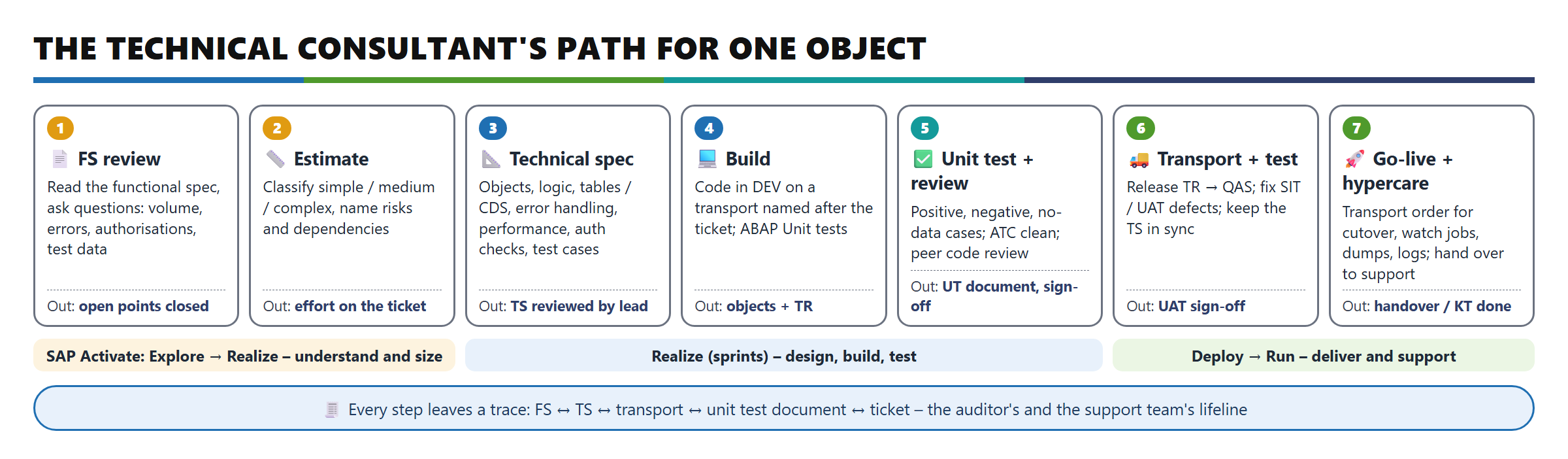
8.1 What you do in each SAP Activate phase
The phases themselves are on page 01 (Part 7) and SAP SDLC › 01 (Part 3) and 05 (methodologies). The developer's view:
Phase | Technical consultant's work |
|---|---|
Discover | Usually not involved; sometimes demos or feasibility questions |
Prepare | Development guidelines and naming conventions, package design, system access, transport routes, ADT/abapGit set-up |
Explore | Join fit-to-standard workshops, assess gaps, propose the extensibility option (key user, developer extensibility, side-by-side), build the RICEFW list with complexity and estimates |
Realize | Technical specs, build in sprints, unit tests, code reviews, transports, SIT defect fixing, migration programs |
Deploy | UAT support, cutover: transport sequence, data loads, job scheduling, go-live checks |
Run | Hypercare, support tickets, knowledge transfer to the support team, enhancements |
8.2 From functional to technical specification
The FS says what the business needs: process, fields and their sources, rules, layout, error behaviour, test scenarios. Read it critically and close the open points before you design (the question list is on SAP SDLC › 04, Part 2). The technical specification (TS) says how you build it, so that a reviewer can approve the design and another developer can support it later.
TS section | Content |
|---|---|
1 Document control | Object ID (RICEFW number), version history, author, reviewer, FS reference, ticket |
2 Overview | Purpose in two or three sentences, trigger (transaction, job, interface, event), volume |
3 Object list | Packages, programs, classes, CDS views, tables, BAdI implementations, IDoc/proxy objects, forms, roles |
4 Inputs / selection | Selection screen or API parameters, defaults, validations; scheduling for jobs |
5 Processing logic | Step by step or pseudo code, data sources and joins, field mapping table, enhancement points used, flow diagram |
6 Output | ALV layout, form, file layout, IDoc segments, messages |
7 Error handling | Messages, application log object, restart and reprocessing, e-mail alerts |
8 Authorisations | Authorization objects checked, roles to adjust |
9 Performance | Expected volume, indexes, packet size, parallel processing, runtime target |
10 Assumptions and dependencies | Customizing, master data, other objects or transports needed first |
11 Unit test cases | ID, scenario, test data, expected result – positive, negative, no data, authorisation |
12 Transport and deployment | Transport requests and their sequence, manual steps, job variants, configuration |
8.3 Estimating RICEFW objects
Estimates are usually given per object by complexity class. Every project has its own estimation sheet – the table is an example scale to show how to argue an estimate. Story points and sizing in sprints are on SAP SDLC › 04, Part 6.
Complexity | Typical characteristics | Example effort (build + UT) |
|---|---|---|
Simple | One data source, little logic, standard output (simple ALV report, one BAdI with a few lines, form text change) | 1–3 days |
Medium | Several tables or CDS views, validations, error log, selection screen, a standard IDoc with an extension, a Smart Form/Adobe form with logic | 4–8 days |
Complex | New interface with mapping and reprocessing, high volume (parallel processing), several enhancement points, workflow, RAP application | 10+ days, often split |
- Always include TS writing, unit testing, code-review fixes and defect fixing in SIT/UAT – not only coding.
- Name risks: unclear FS, missing test data, dependency on another team's API, performance on production volume.
8.4 Unit test documentation
- Per test case: ID, description, test data (document numbers), steps, expected result, actual result, screenshots, pass/fail, tester and date.
- Cover positive, negative, boundary and no-data cases, authorisation (test user without the role) and a volume test with production-like data.
- Automate the logic with ABAP Unit where possible; the document then refers to the test class.
8.5 Handover, hypercare and support
- Handover / knowledge transfer: walk the support team through the TS, the job schedule, monitoring points (SLG1 objects, /AIF/ERR, WE02, SRT_MONI, SM37) and the restart procedure – often written down as a short runbook.
- Hypercare (first weeks after go-live): watch dumps (ST22), job runs (SM37), interface errors and logs daily; fix urgent defects through the landscape with emergency transports.
- Support tickets: priority (P1 business stopped … P4 question) with response and resolution times (SLA). Analyse → reproduce in QAS → fix in DEV → test → transport → document the root cause in the ticket. Analysis tools are listed on SAP SDLC › 04, Part 5.
In S/4HANA / clean core: the technical consultant also decides where an extension belongs (key user, developer extensibility in ABAP Cloud, or side-by-side on SAP BTP), works in ADT with CDS and RAP, and documents why any classic (non-released) object was used.
Part 9 – Code review and converting old code to clean core
Two everyday jobs of a senior developer: reviewing a colleague's code before it is transported, and converting old custom code so it runs on S/4HANA and, where possible, follows clean-core rules. Both use the same checks – the review asks "is this new code right?", the conversion asks "which of our old code is still needed, what breaks, and what should it become?". The Clean Core concepts (released APIs, levels A–D, ABAP Cloud) are explained on Clean Core › 01 Clean Core; the performance tools on ABAP on HANA › 02.
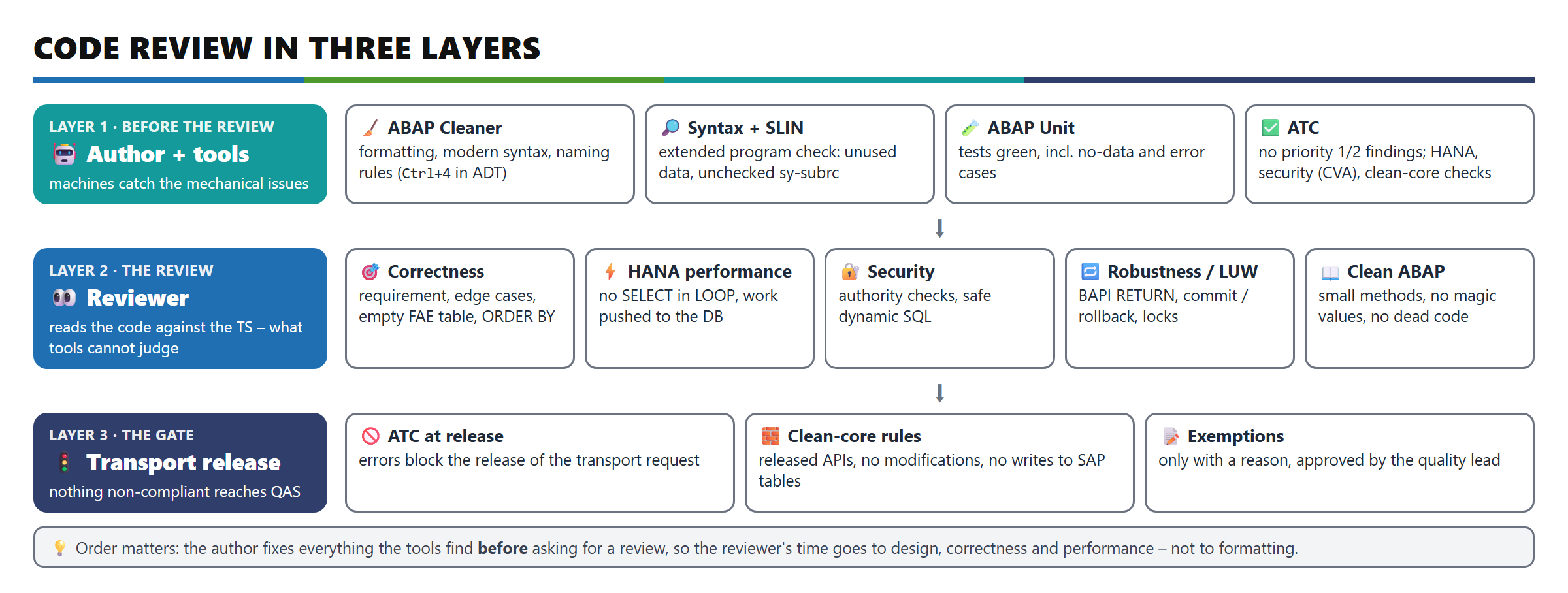
9.1 How a review runs
- Author first: clean the code with ABAP Cleaner, run the extended program check (SLIN), ABAP Unit and ATC, and fix the findings before asking for a review.
- Reviewer: reads the code against the TS, in ADT or the request's object list; writes each finding as must fix or suggestion, with the reason.
- Re-review after the fixes; the transport is released only with a clean ATC run (or approved exemptions).
9.2 The review checklist
Seven groups. Print it and go through it object by object.
1 Correctness
Check | What to look for | How to fix / tool |
|---|---|---|
Requirement | Does the code do what the FS/TS says, including error cases? Was the TS updated for changes? | Walk through the unit test cases with the TS side by side |
Edge cases | Empty tables, initial values, a single line, very large volumes | Unit tests with no-data and boundary cases; volume test in QAS |
FOR ALL ENTRIES | Driver table can be empty → the WHERE condition is ignored and the whole table is read |
|
Order of results | HANA returns rows in no fixed order without ORDER BY: |
|
sy-subrc | Checked after | Extended check (SLIN) and ATC report unchecked sy-subrc |
Amounts, units, conversions | Amount without its currency key, quantity without its unit; rounding; conversion exits (ALPHA, MATN1); dates and times in the wrong time zone | Reference fields in the structure, |
2 HANA performance
Check | What to look for | How to fix / tool |
|---|---|---|
SELECT in a LOOP | A SELECT (or nested SELECT … ENDSELECT) per line of an internal table | One JOIN, a CDS view or FOR ALL ENTRIES (trap 2); ST05 shows the identical statements |
SELECT * | All columns read when a few are needed | Explicit field list – HANA is a column store, every extra column costs |
Work in ABAP that the DB can do | Totals, counts, filters computed in LOOPs |
|
Internal tables | Nested LOOPs or | Sorted or hashed tables, secondary keys |
Commits and writes |
| Commit per packet; array operations ( |
Proof | Claims like "it is fast enough" without measurement | ST05 (SQL trace), SAT (runtime analysis), SQLM (SQL Monitor in production) + SWLT (SQL Performance Tuning Worklist); ATC variant |
3 Security
Check | What to look for | How to fix / tool |
|---|---|---|
Authorisation | Data read or changed without a check |
|
Dynamic SQL |
| Host variables; |
Hard-coded identities | User names, passwords, | Roles and authorisation objects; credentials in SM59 / communication arrangements, never in code |
CALL TRANSACTION | Called without checking the user may start it | CALL TRANSACTION … WITH AUTHORITY-CHECK |
File access | Physical paths typed in by the user | Logical file names (FILE, |
Client handling |
| Remove, or document why cross-client access is needed |
More secure-coding rules: Security › 03 Secure Coding.
4 Robustness and the LUW
Check | What to look for | How to fix / tool |
|---|---|---|
Exceptions | Empty | Catch where you can react; otherwise log and re-raise; never swallow silently |
BAPI calls |
| Check RETURN for types E/A/X, then |
Commit in the wrong place |
| Remove – the calling program or framework owns the LUW |
Locks | Data changed without an SAP lock, or locks never released |
|
Messages | Literal texts in | Message class (SE91) – translatable and searchable; application log for mass processing (Part 5) |
5 Clean ABAP maintainability
Check | What to look for | How to fix / tool |
|---|---|---|
Structure | New FORMs, huge methods, global variables | Classes, small methods that do one thing, attributes instead of globals (Part 7) |
Syntax | Old statements where a modern one exists | Inline declarations, |
Magic values | Hard-coded | Constants for technical values; customizing table, TVARVC or BRF+ for business values |
Dead code | Unused variables, commented-out blocks | Delete – version management keeps history |
Comments and texts | Comments that repeat the code; texts typed into the code | Comments say why; text elements and message classes |
Naming | Names that break the project guideline | Follow the guideline consistently |
6 Tests, static checks and transport
Check | What to look for | How to fix / tool |
|---|---|---|
ABAP Unit | Logic without tests, tests that need real data | Test classes with test doubles ( |
ATC | Priority 1 or 2 findings left | Fix them; an exemption only with a reason and the quality lead's approval |
Extended check | SLIN warnings (unused data, unreachable code, missing sy-subrc) | Fix or justify with a pragma and a comment |
Transport hygiene | Objects in | All objects in the request, correct order with other requests, request text with the ticket number |
7 Clean-core rules
Check | What to look for | How to fix / tool |
|---|---|---|
Modifications | Changed SAP code, implicit enhancements (level D) | Released BAdI, key-user extensibility, or redesign |
Writes to SAP tables |
| BAPI (classic API, level B) or a released RAP BO interface via EML (level A) |
Unreleased objects | New code that reads SAP tables or calls internal FMs and classes | Released CDS views and classes (ADT API State tab, Cloudification Repository); otherwise document it as level C in the extension inventory |
9.3 Classic traps: bad → good
Trap 1 – FOR ALL ENTRIES with an empty driver table
With an empty driver table the whole WHERE condition is ignored, so the statement reads every row – in production often millions. FOR ALL ENTRIES also removes duplicate result rows, so select the full key.
|
|
- On HANA a JOIN or a CDS view is often better still: one statement instead of many FOR ALL ENTRIES packets.
Trap 2 – SELECT in a LOOP vs a JOIN with an aggregate
|
|
- Clean-core version: the same query on the released views
I_SalesOrderandI_SalesOrderItemand their associations instead of the tables.
Trap 3 – No ORDER BY on HANA
Other databases often returned rows in primary-key order by chance; HANA does not. Code that takes "the first row" must say which one.
|
|
Trap 4 – BAPI RETURN not checked before the COMMIT
BAPIs do not raise exceptions and do not commit: errors come back only in the RETURN table. A commit without checking it saves half-processed data or hides the error.
|
|
Trap 5 – Dynamic WHERE built from user input
Input such as x' OR name1 <> ' turns the condition into "all customers" – an SQL injection. Best is no dynamic SQL at all; if the condition must be dynamic, never paste input in as a literal.
|
|
ESCAPE_QUOTESonly doubles the quotes and leaves the surrounding quotes to you –QUOTEis safer. Older releases haveCHECK_WHITELIST_STR/CX_ABAP_NOT_IN_WHITELISTinstead ofCHECK_ALLOWLIST.
9.4 Converting old code to clean core – 7 steps
The same path works for a brownfield conversion (ECC → S/4HANA) and for cleaning up an S/4HANA system that already runs: first throw away what nobody uses, then make the rest work, then make it clean.
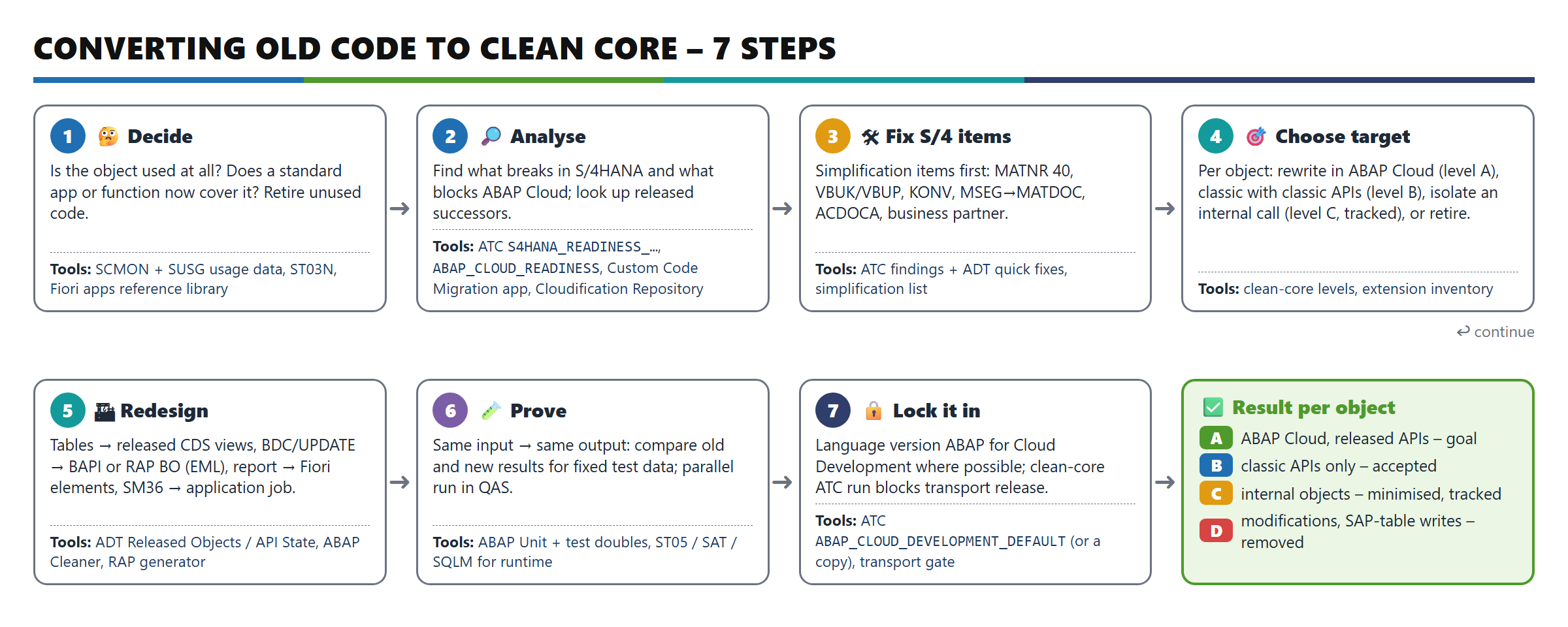
Step 1 – Decide whether the object is needed
- Collect usage data in production: the ABAP Call Monitor SCMON records which custom objects are called; SUSG aggregates the SCMON data over a long period (SCMON alone keeps it only for a short time) – let it run for months, ideally a whole year to catch year-end programs. ST03N shows the workload per transaction and report.
- Unused objects are retired, not converted – in older systems that is often a large share of the custom code, so this step saves the most effort.
- For used objects: does a standard Fiori app or standard function now do the job? Check the SAP Fiori apps reference library with the key users.
Step 2 – Analyse
- ATC with the S/4HANA readiness checks – variant
S4HANA_READINESS_<release>(e.g.S4HANA_READINESS_2023) checks the simplification items of that target release;S4HANA_READINESS_REMOTEchecks all items of the Simplification Database. Usually run as remote ATC from a central check system against the old system. - ABAP Cloud readiness – variant
ABAP_CLOUD_READINESSshows what blocks ABAP Cloud (unreleased objects, forbidden statements). Newer releases add clean-core checks that rate findings by level A–D; the exact variants depend on the release. - Custom Code Migration app (SAP Fiori app, in S/4HANA from 1809 or in the SAP Business AI Platform, ABAP environment): you define the scope – packages and objects, reduced by the uploaded SUSG usage snapshot – run the checks and get a worklist; it can also create a transport that deletes unused objects.
- Cloudification Repository (GitHub SAP/abap-atc-cr-cv-s4hc, with a browser viewer): every released API, plus the successor for unreleased objects (e.g. table MARA →
I_Product).
Step 3 – Fix the S/4HANA simplification items first
These make old code wrong or failing on S/4HANA, whatever the clean-core target:
Simplification item | What changed | What to do in custom code |
|---|---|---|
Material number | MATNR extended to 40 characters | Own fields, structures, offsets and interfaces (IDoc, files) must take 40 characters; conversion exit MATN1 |
SD status tables | VBUK / VBUP are no longer filled; the status fields are in VBAK / VBAP (and LIKP / LIPS, VBRK …) | Read status from the document header and item tables or released views |
Pricing | Condition data moved from KONV to PRCD_ELEMENTS | Read PRCD_ELEMENTS (or a released view) instead of KONV |
Inventory management | Material documents in one table MATDOC; MKPF / MSEG are compatibility views on it | Reads keep working; writes are not allowed; new code reads MATDOC-based views |
Finance | Universal journal ACDOCA; BSID, BSAD, BSIK, BSAK, GLT0, FAGLFLEXT … are compatibility views | Reads keep working (watch performance); no writes; new code uses |
Business partner (CVI) | Customers and vendors are maintained as business partners; customer/vendor integration (CVI) keeps KNA1 / LFA1 in sync | No XD01 / XK01 BDC; create and change via the business partner APIs |
- ADT offers quick fixes for some ATC findings (e.g. adding ORDER BY).
Step 4 – Choose a target for each object
Target | When | Level |
|---|---|---|
Rewrite in ABAP Cloud | New logic, frequently changed objects, released APIs exist | A |
Keep classic, classic APIs only | Works fine, no released API yet; BAPIs and documented classic BAdIs are acceptable | B |
Isolate an internal call | One unreleased object is unavoidable: put it in a small wrapper class so the rest stays clean, record it in the extension inventory, replace it when SAP releases a successor | C (the wrapper) |
Retire | Unused, or replaced by a standard app | – |
Goal as on Clean Core › 01: aim for A, accept B, minimise and track C, remove D.
Step 5 – Redesign: old → clean-core mapping
Old (classic) pattern | Clean-core replacement | Note |
|---|---|---|
SELECT on MARA, VBAK, KNA1 | Released CDS views | Check the API state in ADT; a missing field → extend the view |
SELECT on BKPF / BSEG |
| Check the release state for your release |
INSERT / UPDATE on SAP tables, BDC, CALL TRANSACTION | Released BAPI (level B) or a released RAP BO interface via EML (level A) | RAP BO interfaces often end in |
Report with ALV / WRITE / dynpro | Fiori elements list report on a CDS view, or on a custom entity with a query class | Classic interim step: ALV with IDA |
SM36 job, | Application job ( | Part 1.5 and Part 5.2 |
SM30 maintenance of Z tables | Business configuration maintenance object in the Custom Business Configurations app (RAP-based) | Where the app is not available: a generated RAP Fiori maintenance app |
User exits, modifications | Released BAdIs; key-user extensibility (custom fields, custom logic) | page 10 Enhancements |
SM59 destinations, custom IDocs | Communication scenarios and arrangements; released OData / SOAP APIs; RAP business events | page 07 Interfaces, RAP › 10 · Business Events & Event-Driven RAP |
| Not available in ABAP Cloud: upload/download in a Fiori app, or integration through SAP Integration Suite / BTP | Files on the app server are not clean core |
SAPscript, Smart Forms | Adobe forms used by S/4HANA output management | page 11 Forms |
Unreleased FMs ( |
| Released classes |
|
| Recommended in ABAP Cloud |
Step 6 – Prove that nothing broke
- Before changing anything, capture the old output for fixed test data (ALV export, file, document numbers); compare it with the new output.
- ABAP Unit tests with test doubles around the new logic; compare runtime with ST05 / SAT.
- For critical objects, run old and new in parallel in QAS for one period (e.g. month-end).
Step 7 – Lock it in
- Set the ABAP language version ABAP for Cloud Development for rewritten objects where possible – the compiler then rejects unreleased APIs.
- Make the ATC clean-core variant (
ABAP_CLOUD_DEVELOPMENT_DEFAULTor a project copy) mandatory at transport release, so the code cannot slide back. - Keep the extension inventory (every level B/C object and why) up to date.
9.5 Tools for review and conversion
Tool | Where | Step | What it gives you |
|---|---|---|---|
SCMON / SUSG | Production system | 1 | Which custom objects are used; SUSG keeps an aggregated snapshot for the Custom Code Migration app |
ST03N | Production system | 1 | Workload per transaction and report |
ATC | ADT, or a central check system (remote ATC) | 2, 3, 7 |
|
Custom Code Migration app | S/4HANA (1809+) or SAP Business AI Platform, ABAP environment | 1, 2 | Scope with usage data, readiness worklist, deletion of unused code |
Cloudification Repository | GitHub + viewer | 2, 5 | Released APIs and successors of unreleased objects |
ADT Released Objects / API State | ADT | 5 | Whether an object is released, and for what use |
ABAP Cleaner | SAP open-source plug-in for ADT (GitHub SAP/abap-cleaner) | 5, review | Automated Clean ABAP cleanup, Ctrl+4 |
ST05 / SAT / SQLM + SWLT | SAP GUI | 6, review | SQL trace, runtime analysis, production SQL monitoring and tuning worklist |
ABAP Unit | ADT | 6, review | Automated tests with test doubles |
In S/4HANA / clean core: every new object starts at the end of this path – ABAP Cloud, released APIs, ATC at release. The conversion steps are for the code that already exists.
Part 10 – Interview questions
Q1. How do you implement parallel processing in classic ABAP?
Split the work into independent packets and call a remote-enabled FM per packet with CALL FUNCTION … STARTING NEW TASK … DESTINATION IN GROUP <RZ12 group> CALLING meth ON END OF TASK. The callback uses RECEIVE RESULTS; the main program waits with WAIT FOR ASYNCHRONOUS TASKS UNTIL …. Alternatives: the SPTA framework (SPTA_PARA_PROCESS_START_2) or several background jobs with separate key ranges.
Q2. What is RESOURCE_FAILURE and how do you handle it?
The exception raised when no dialog work process is free in the server group – only with DESTINATION IN GROUP. Wait until a running task finishes (WAIT FOR ASYNCHRONOUS TASKS with a counter condition and UP TO n SECONDS) and retry. SPBT_INITIALIZE tells you how many work processes are free so you can size packets.
Q3. What are the main pitfalls of parallel processing?
Dependent packets, lock conflicts on the same objects, the dialog time limit per task, each task committing separately (no common rollback), using up all work processes, and lost errors – log per packet so failed packets can be re-run.
Q4. How is parallel and background processing done in ABAP Cloud?
aRFC is not available. CL_ABAP_PARALLEL (released) runs objects implementing IF_ABAP_PARALLEL in parallel tasks via RUN_INST and returns them with their results. bgPF (CL_BGMC_PROCESS_FACTORY, operation interfaces IF_BGMC_OP_SINGLE / IF_BGMC_OP_SINGLE_TX_UNCONTR) runs work asynchronously, exactly once, on top of bgRFC. Scheduled work uses application jobs.
Q5. What are shared memory objects and when do you use them?
Objects stored in the shared objects memory of an application server, readable by all users without a copy. Define a shared-memory-enabled root class and an area in SHMA; write with ATTACH_FOR_WRITE, SET_ROOT, DETACH_COMMIT; read with ATTACH_FOR_READ and DETACH; monitor in SHMM. Use for read-mostly data that is expensive to build and needed by many users.
Q6. Shared objects vs EXPORT TO SHARED BUFFER vs table buffering?
Table buffering caches rows of one DB table and is the first choice for small customizing tables. EXPORT … TO SHARED BUFFER stores a data cluster that is copied on IMPORT and may be displaced. Shared objects store real objects with locks, versions and lifetime and are read in place. All three are per application server.
Q7. What are ABAP Messaging Channels and ABAP Push Channels?
AMC (SAMC, CL_AMC_CHANNEL_MANAGER) is publish/subscribe messaging between ABAP sessions, also across servers. APC (SAPC) makes ABAP a WebSocket server or client. Bound together, a message sent on an AMC channel is pushed to the browser – live dashboards, job-finished notifications. ABAP Daemons (CL_ABAP_DAEMON_EXT_BASE, SMDAEMON) are long-running sessions that react to such messages.
Q8. How do you create change documents for a custom table?
Set the Change Document flag on the data elements, create a change document object in SCDO with the table(s), generate the update program (FM <OBJECT>_WRITE_DOCUMENT), and call it in update task with the old and new images plus UPD_<table> before COMMIT WORK. In ABAP Cloud use the generated …_CHDO class or RAP change documents.
Q9. Where are change documents stored and how do you read them?
CDHDR (header: object class, object ID, change number, user, date, tcode) and CDPOS (field, old and new value), plus CDPOS_UID for long keys and CDPOS_STR for strings. Read with CHANGEDOCUMENT_READ, report RSSCD100 or CL_CHDO_READ_TOOLS – always by object class and object ID.
Q10. How do you create an application log?
Define object and sub-object in SLG0; in code BAL_LOG_CREATE (with external number and expiry date), BAL_LOG_MSG_ADD per message, BAL_DB_SAVE, and BAL_DSP_LOG_DISPLAY for online runs; view in SLG1, delete with SLG2. In ABAP Cloud use CL_BALI_LOG with the CL_BALI_* setters and CL_BALI_LOG_DB to save.
Q11. What is SAP AIF and why do S/4HANA projects use it?
A framework (ECC: add-on · S/4HANA: standard component) to build, monitor and handle errors of interfaces in one place. Interfaces are defined by namespace, raw and SAP structures, structure and value mappings, checks and actions. Business users fix data and restart messages in /AIF/ERR, for IDoc, proxy and web service interfaces alike – instead of developers working in WE02/BD87 and SRT_MONI.
Q12. What do you check in a code review?
Requirement fit, performance (SELECT in loops, FOR ALL ENTRIES with an empty table, SELECT *, missing index use), security (authorisation checks, SQL injection in dynamic SQL), error handling (sy-subrc, exceptions, logs), maintainability (naming, small methods, no hard-coded values), clean core (released APIs), unit tests, a clean ATC run and transport hygiene.
Q13. Name some Clean ABAP rules. What is the Hungarian notation debate?
Descriptive names, small methods that do one thing, few parameters and one RETURNING value, exceptions instead of return codes, OO instead of FORMs, functional constructs, comments for the why. Clean ABAP recommends dropping prefixes like lv_ and lt_; many companies still require them. Follow the project guideline consistently.
Q14. What goes into a technical specification?
Document control and FS reference, overview and trigger, object list, inputs, processing logic with mapping, output, error handling and logging, authorisations, performance and volume, assumptions, unit test cases and transport/deployment notes.
Q15. How do you estimate a RICEFW object?
Classify it as simple, medium or complex by data sources, logic, volume, interfaces and enhancement points, use the project's estimation sheet, and add TS, unit test, review and defect-fixing effort. State the risks and assumptions with the number.
Q16. A P1 ticket arrives in hypercare – what do you do?
Acknowledge within the SLA, analyse with ST22, SM37, SLG1, /AIF/ERR, WE02 or SRT_MONI, find a workaround to unblock the business, reproduce in QAS, fix in DEV, test, move an emergency transport through the landscape, then document the root cause and update the TS.
Q17. Why is FOR ALL ENTRIES with an empty driver table dangerous?
If the driver table is empty, the whole WHERE condition is ignored and the SELECT reads every row of the table. Always check IF itab IS NOT INITIAL first. Also remember that FOR ALL ENTRIES removes duplicate rows (select the full key) and that on HANA a JOIN or CDS view is often faster.
Q18. Code that worked on the old database returns wrong results on HANA. What do you look for?
Missing ORDER BY: HANA returns rows in no fixed order, so UP TO 1 ROWS, SELECT SINGLE without the full key, BINARY SEARCH on an unsorted result or "first row" logic can change. Add ORDER BY or SORT; the ATC variant FUNCTIONAL_DB finds these statements.
Q19. How do you protect dynamic SQL against SQL injection?
Avoid it: use static SQL with host variables. If a condition must be dynamic, never paste user input in as a literal – reference a variable or wrap the value with cl_abap_dyn_prg=>quote( ). Dynamic table or column names are checked against an allow-list (check_allowlist, check_table_name_str). The Code Vulnerability Analyzer in ATC flags the risky statements.
Q20. How would you convert an old custom program to clean core?
Seven steps: decide with usage data (SCMON/SUSG) whether it is still needed or covered by standard; analyse with ATC (S4HANA_READINESS_<release>, ABAP_CLOUD_READINESS), the Custom Code Migration app and the Cloudification Repository; fix the S/4HANA simplification items; choose a target level per object (A rewrite, B classic APIs, C isolated internal call, or retire); redesign with released CDS views, BAPIs or RAP BOs, Fiori and application jobs; prove the output is unchanged; lock it in with the ABAP Cloud language version and ATC at transport release.
Q21. Which S/4HANA simplification items break custom code most often?
MATNR extended to 40 characters; VBUK/VBUP no longer filled (status in VBAK/VBAP); pricing in PRCD_ELEMENTS instead of KONV; material documents in MATDOC (MKPF/MSEG are compatibility views); finance in the universal journal ACDOCA with BSID/BSAK etc. as compatibility views; customers and vendors through business partner and CVI. Reads on compatibility views work, writes do not.
🏠 Start Here · ◀ 13 · BRF+ · 15 · Interview Questions ▶ · Sections: CORE ABAP | OOPS ABAP | ABAP on HANA | Clean Core | RAP | ABAP Points | SAP Fiori | SAPUI5 | Mobile Development (MDK) | BTP Foundations | BTP Development | CAP | SAP Build | ABAP on BTP | Integration Suite | SAP Business AI | SAP BASIS | Security | SAP SDLC
Functional: FICO ABAP | TRM ABAP | VIM | SAP BIS | SD ABAP | MM ABAP | PP ABAP | QM ABAP | PM ABAP | PS ABAP | EWM | TM ABAP | GTM ABAP | EHS ABAP | HR ABAP | BW | SAP Datasphere | SAP Business Data Cloud | SAP MDG | SAP Analytics Cloud | SAP Ariba | SAP CX | SAP IBP