BRF+ (Business Rule Framework plus) lets you model business rules – decision tables, formulas, conditions – in a browser workbench instead of hard-coding them in ABAP. ABAP calls a BRF+ function and gets the result. Running example: the salutation for dunning letters ("Sehr geehrter Herr Prof. …") derived from language, title and academic title of a business partner. Note: BRF+ has nothing to do with HANA or code pushdown – it runs on any database; you meet it in S/4HANA output management and many customer projects.
Part 1 – What BRF+ is
BRMS (Business Rules Management System) is the general term for software that defines, maintains and executes the rules of a business process outside the program code. BRF+ is SAP's ABAP-based BRMS.
- Part of SAP NetWeaver ABAP from 7.0 EhP1 (SAP_BASIS 7.01), fully usable from 7.02 – so it is available in every NetWeaver-based system: ECC 6.0 with a suitable enhancement package, S/4HANA, BW, CRM. Availability depends on the NetWeaver release, not on the ECC version. It replaced the older BRF (transaction BRF).
- Offers a complete API and a UI (workbench) to define rules without writing ABAP.
- Results can be used in any ABAP program, in output determination, workflows, or substitution/validation logic.
- Transaction BRF+ or BRFPLUS (opens the Web Dynpro workbench in the browser).
- Terminology: the input of a function is the context, the output is the result.
Benefits
- No hard-coded values and conditions in ABAP – rule changes do not need a developer and a transport of code.
- No custom Z-tables + maintenance views just to store mapping values – a decision table does that.
- Rules are modelled clearly (tables, formulas), reusable across applications, versioned, and testable with simulation before they go live.
- Business users can maintain rules themselves (with the right storage type / authorizations) – but calling the function from a program is still ABAP work (Part 5).
The workbench
Left: Navigation panel with tabs Repository (your applications and their objects: data objects, expressions, functions, rulesets) and Catalog (a business-user view of selected objects). Right: the Work area with the object you edit (buttons Edit, Check, Save, Activate, Transport). On top: menu (Workbench, Tools) and personalisation/help. Every object must be activated before it can run.
The whole picture – one scenario end to end
Before the details, here is the complete life of one BRF+ solution, using the page's running example: the salutation printed on a dunning letter. You build the objects once in the development system, transport them, the dunning run calls the function from ABAP for every letter, and later you change rules without touching the ABAP code.
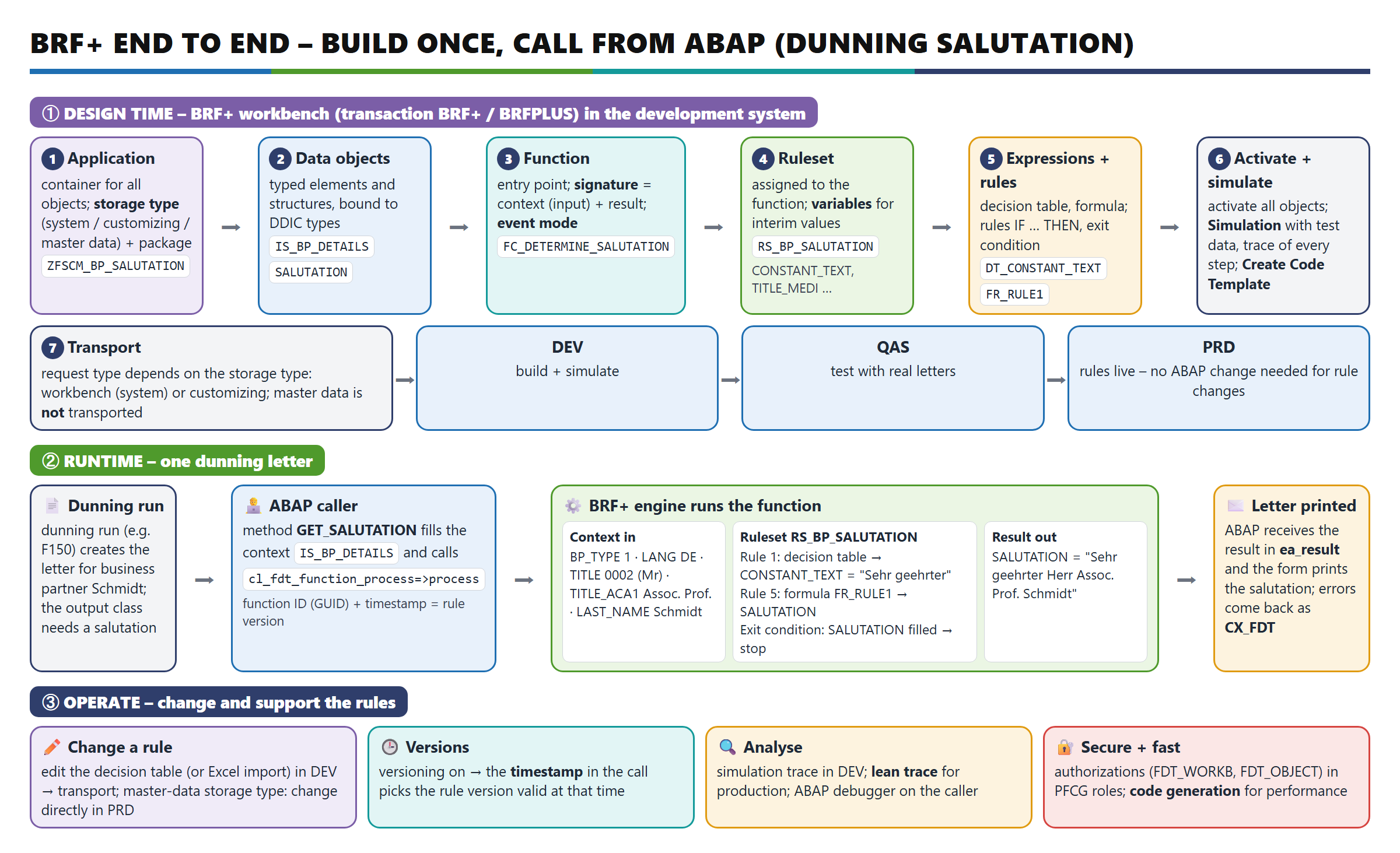
- Design time, steps 1–6 – each object is explained in Part 2 and built click by click in Part 4.
- Step 7, transport – the storage type decides the request type (Part 3); master-data objects stay local.
- Runtime – the ABAP side (function ID, timestamp, context names, CX_FDT) is in Part 5; the engine processes the ruleset rule by rule until the exit condition stops it.
- Operate – changing rules, versions, traces, authorizations and code generation are in Part 6.
Part 2 – Objects
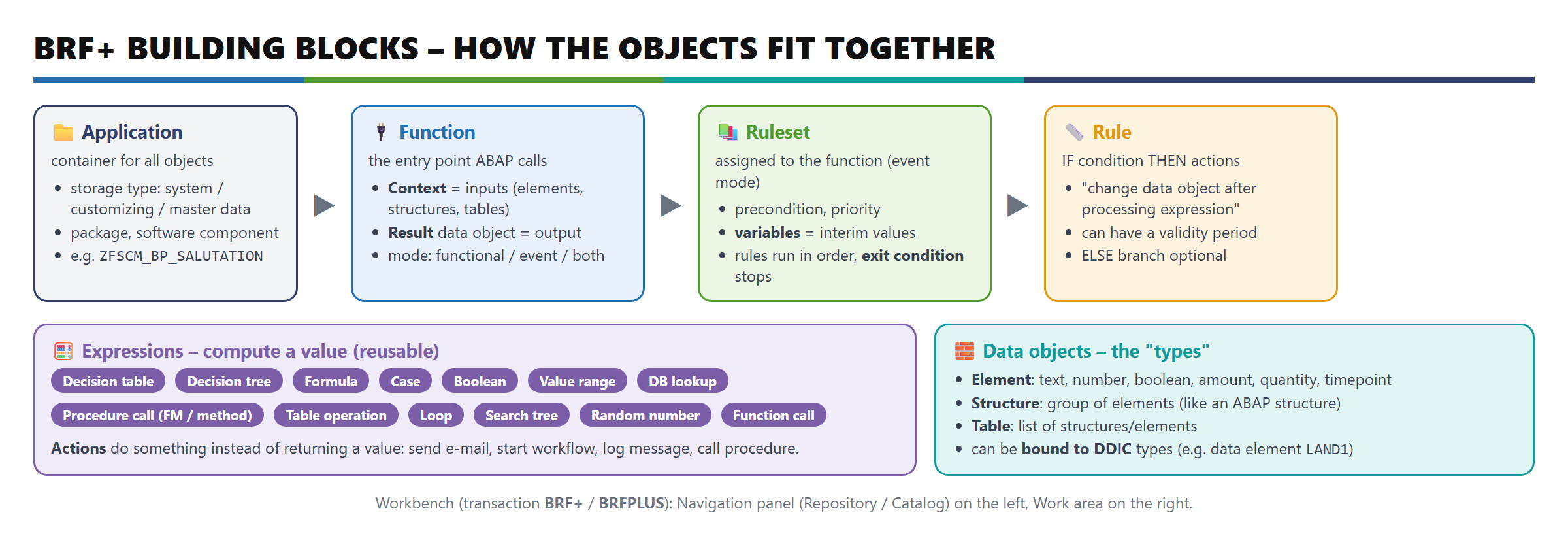
Object | What it is | Salutation example |
|---|---|---|
Application | Container for all objects of one topic; defines storage type, package, software component |
|
Data object | Typed variable: element (text, number, boolean, amount, quantity, timepoint), structure, table; can be bound to a DDIC type | Structure |
Function | The entry point called from ABAP. Signature = context (inputs) + result data object | FC_DETERMINE_SALUTATION |
Ruleset | Set of rules executed when the function runs (event mode); has precondition, priority and variables |
|
Rule | IF condition THEN actions ("change data object after processing expression"), optional ELSE; can have a validity period | Rule 5: German + academic title → formula |
Expression | Computes a value: decision table, formula, … (reusable in many rules) |
|
Action | Does something: send e-mail, start workflow, log message, call procedure | – |
Expression types
Expression | Use it for |
|---|---|
Decision table | Rows of conditions → result values (the most used type; Excel import/export) |
Decision tree | Binary yes/no tree of conditions |
Formula | Calculations and string functions (CONCATENATE, CONDENSE, ABS, CONVERT_AMOUNT …) |
Case | Value → result mapping (like CASE … WHEN) |
Boolean | Combined condition returning true/false |
Value range | Check whether a value lies in a range |
DB lookup | Read a database table (SELECT SINGLE / exists) |
Procedure call | Call a function module or static method |
Table operation | Count, min, max, check entries of a table |
Loop | Process the lines of a table |
Search tree, random number, function call, BRMS connector | Special cases |
Function modes
- Functional mode: the function returns the result of one top expression (e.g. directly a decision table).
- Event mode: the function triggers the assigned rulesets (by priority); used in the example.
- Functional and event mode: first the top expression, then the rulesets.
Part 3 – Storage types and naming
The storage type of the application decides where the object definitions are stored and how they are transported – choose it when you create the application, it cannot be changed later.
Storage type | Client | DB tables (delivery class) | Transport | May use objects of |
|---|---|---|---|---|
System | client-independent | class S, table names end with S | workbench request or local; must not be changed in production | system |
Customizing | client-dependent | class C | customizing request or local | system + customizing |
Master data | client-dependent | class A | not transportable (local) – maintained directly in production | system + customizing + master data |
System objects cannot refer to customizing or master-data objects, but can be referred to by them.
Valid and invalid object names
Name | Valid? | Why |
|---|---|---|
MY_OBJECT | yes | |
ZMY_OBJECT_1 | yes | Customer namespace Z |
1_MY_OBJECT | no | Must not start with a number |
/APP/MY_OBJECT | yes | Namespace /APP/ |
APP/MY/OBJECT | no | With namespaces the first character must be a slash |
/APP/MY/OBJECT | yes | |
/APP_MY_OBJECT | no | With namespaces at least two slashes are needed |
/APP/FINANCIALS/COSTING/MY_OBJECT | yes | Valid three-level namespace |
Common prefixes in projects: FC_ function, RS_ ruleset, DT_ decision table, FR_ formula, DO_ / IS_ data objects.
Part 4 – Step by step: the salutation example
Requirement: the dunning letter needs a salutation built from a constant text, the title text, the academic title and the last name – depending on BP type, language and title. Example: BP type 1 (person), language DE, academic title filled, title 0002 (Mr) → "Sehr geehrter Herr Assoc. Prof. Schmidt"; title 0001 (Ms) → "Sehr geehrte Frau …".
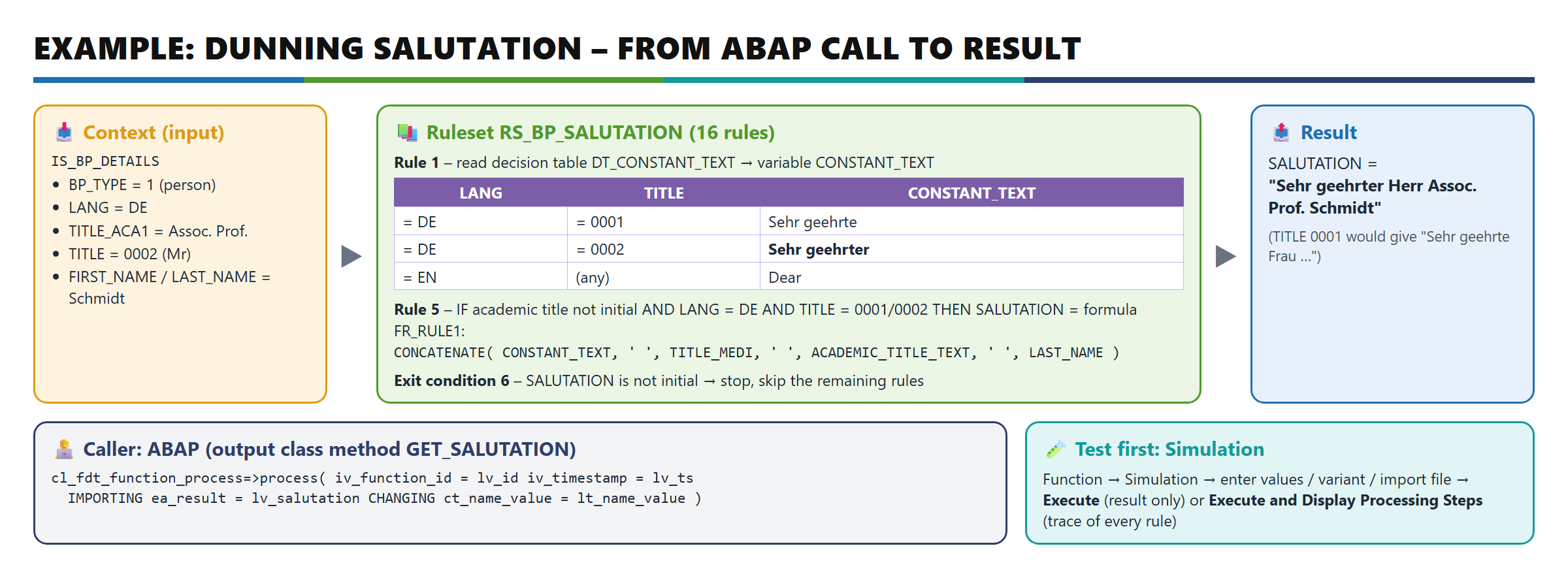
The steps in order:
Step | What | Result in the example |
|---|---|---|
1 | Create the application (storage type, package, documentation) | ZFSCM_BP_SALUTATION |
2 | Create the data objects (context structure, result element, helper elements) | IS_BP_DETAILS, SALUTATION, CONSTANT_TEXT … |
3 | Create the function and its signature (context + result), mode | FC_DETERMINE_SALUTATION, event mode |
4 | Create the ruleset, assign it to the function, declare variables | RS_BP_SALUTATION |
5 | Create expressions (decision table, formula) and the rules + exit condition | DT_CONSTANT_TEXT, FR_RULE1 |
6 | Activate everything and simulate | Result checked with test data |
7 | Call the function from ABAP (code template) | Method GET_SALUTATION of the output class |
4.1 Create the application
Workbench → Create Application: name, description, storage type, development package. Always fill the Documentation tab: what the application does and where it is called – the next developer will thank you.
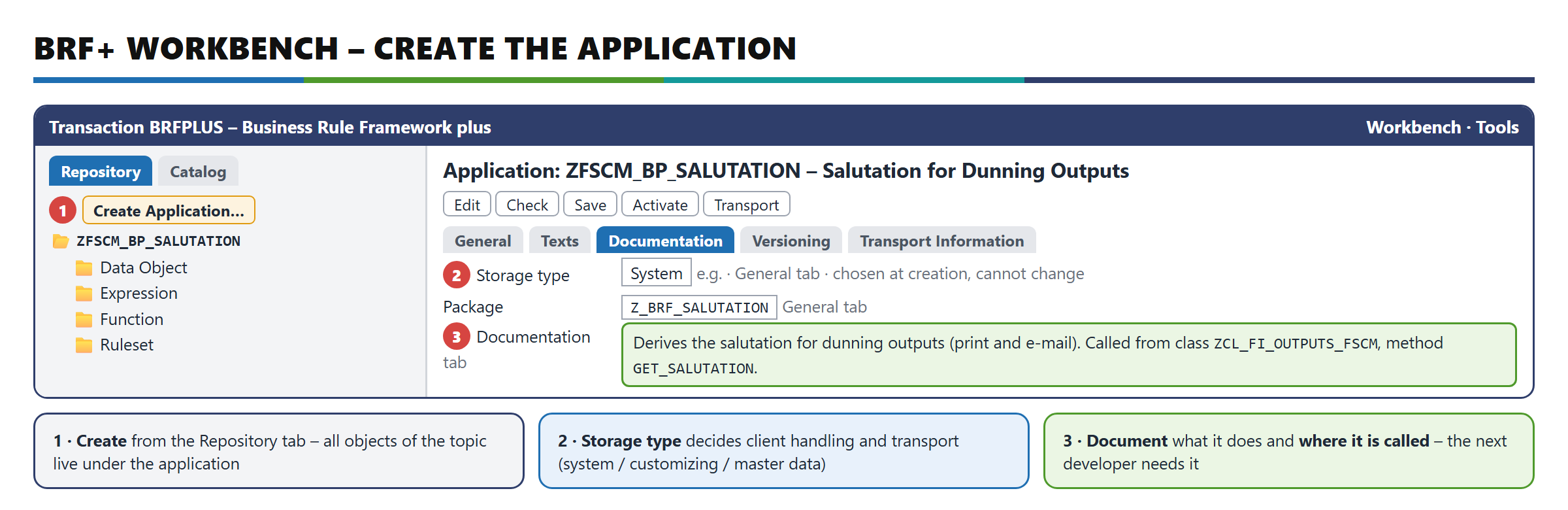
4.2 Create the data objects
Create the elements and structures the rules need – ideally bound to DDIC types (data element / structure) so lengths and value lists match the ABAP side. Here: structure IS_BP_DETAILS (BP_TYPE, LANG, TITLE_ACA1, TITLE, FIRST_NAME, LAST_NAME) and text element SALUTATION. They can also be created on the fly from the function signature ("Add New Data Object").
4.3 Create the function
The function is the point of contact for callers – comparable to the interface of a function module. Create it via Application → Contained Objects → type Function → Create Object (or right-click the application). Creating objects from the application keeps all links between the objects visible.
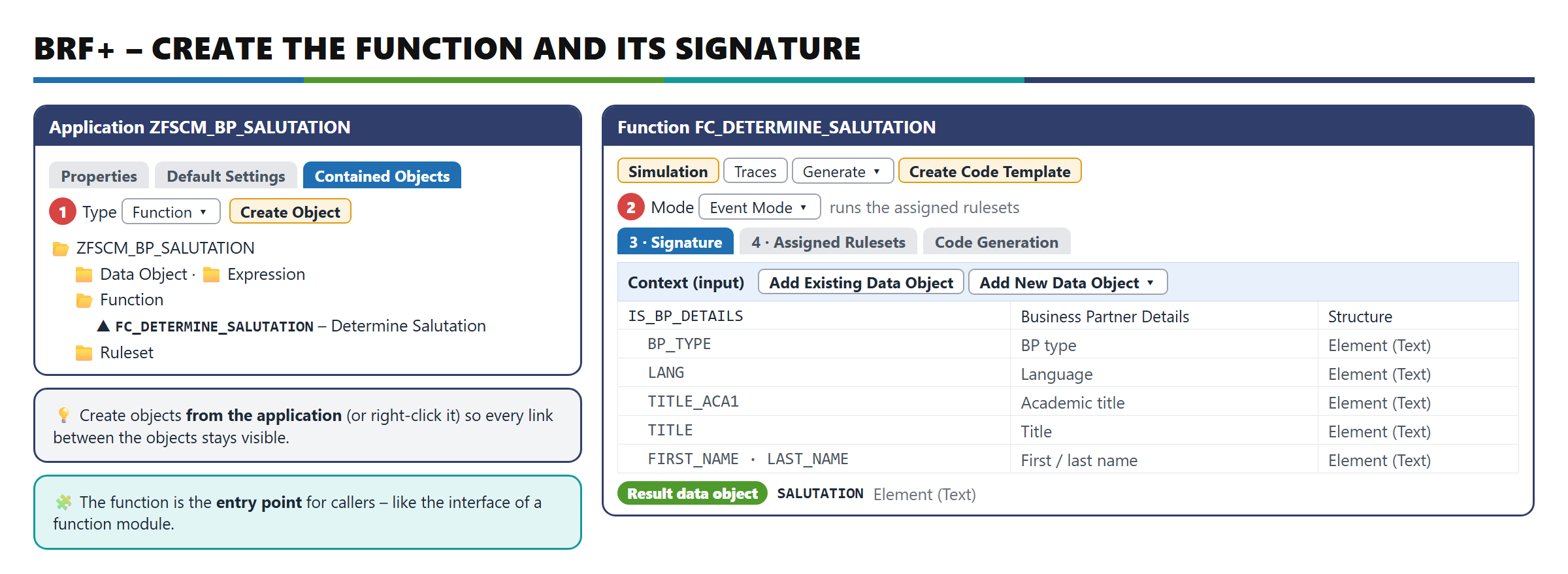
- Signature tab: the context (inputs – elements, structures or tables) and the result data object.
- Mode: event mode (rulesets) – see Part 2.
- Assigned Rulesets tab: the rulesets this function triggers. Simulation, Create Code Template, Code Generation are also here.
4.4 Create the ruleset and its variables
The ruleset is the core of the application: the rules that run when the function is processed. Create it from the function (Assigned Rulesets → Create Ruleset) so it is assigned automatically; a ruleset created separately must be assigned by hand.
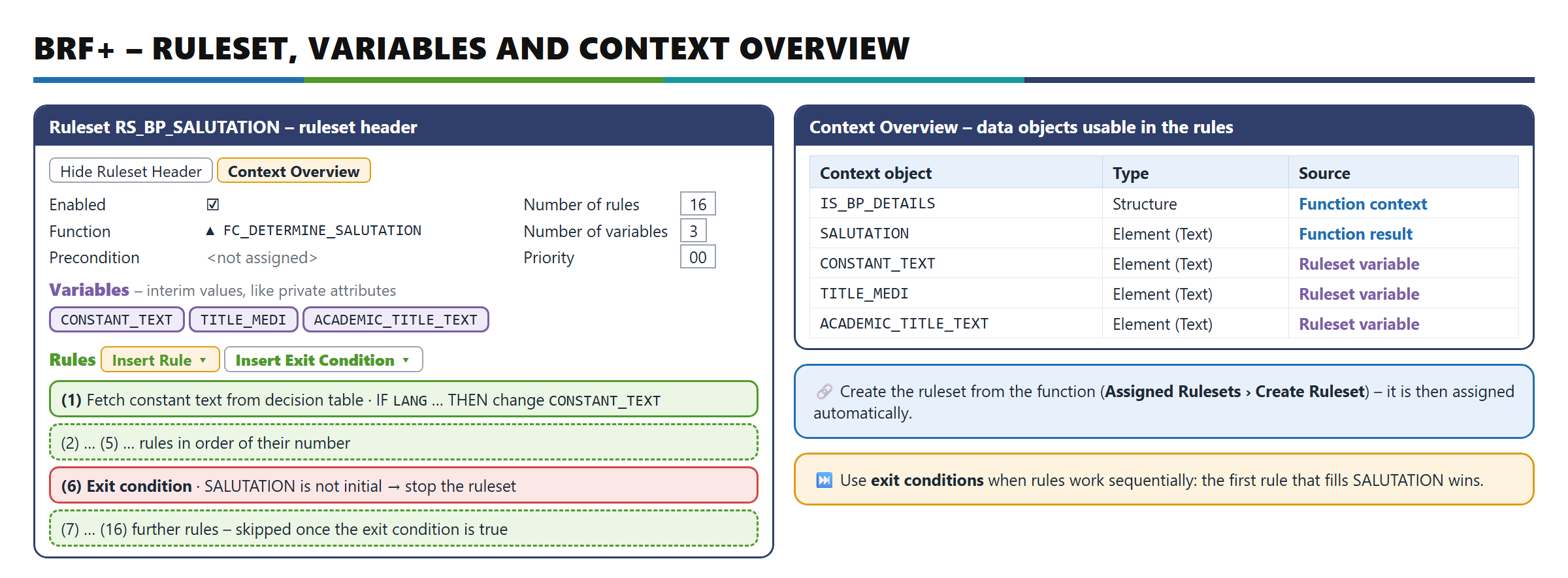
- Ruleset header: function, precondition, priority, enabled, number of rules.
- Variables: existing or new data objects declared at ruleset level to hold interim values – like private attributes of a class. Here: CONSTANT_TEXT, TITLE_MEDI, ACADEMIC_TITLE_TEXT.
- Context Overview shows every data object usable in the rules: the function context, the result and the ruleset variables.
4.5 Expressions and rules
Decision table
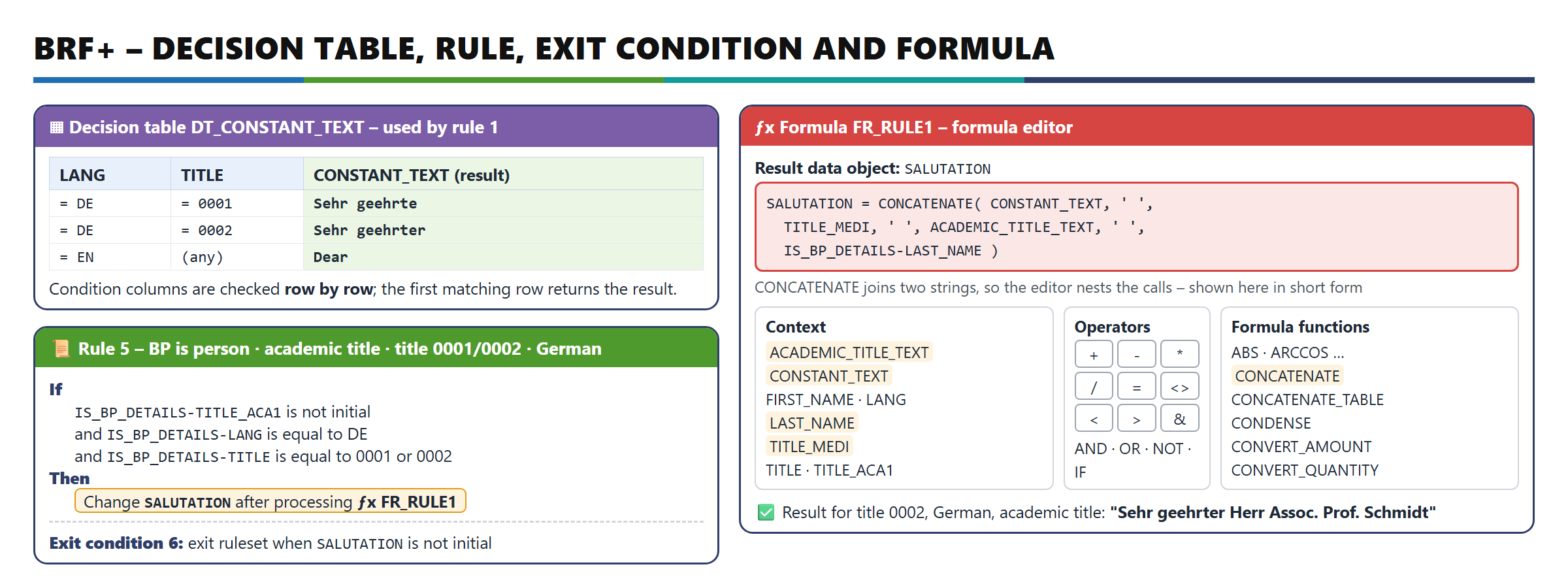
Rule 1 "Fetch constant text from decision table" changes the variable CONSTANT_TEXT after processing decision table DT_CONSTANT_TEXT. The table checks the condition columns row by row; set to a single result, it returns the first match (it can also return all matches):
Rule with a formula and an exit condition
- Rule 5: IF TITLE_ACA1 is not initial AND LANG = DE AND TITLE = 0001 or 0002 THEN change SALUTATION after processing formula FR_RULE1.
- Exit condition 6: exit the ruleset when SALUTATION is not initial – the remaining rules are skipped (use exit conditions when rules must work sequentially, first match wins).
- Formula FR_RULE1 concatenates the pieces:
CONCATENATE( CONSTANT_TEXT, ' ', TITLE_MEDI, ' ', ACADEMIC_TITLE_TEXT, ' ', LAST_NAME ).
4.6 Simulate
- Function → Simulation → enter test values, choose a saved variant, or import test data from a file.
- Execute shows only the result (here: SALUTATION = "Sehr geehrter Herr Assoc. Prof. Schmidt" for title 0002 – consistent with the decision table).
- Execute and Display Processing Steps shows a trace of every ruleset, rule, decision-table row and value change – BRF+'s debugger.
- Traces can also be written at runtime: lean trace (cheap, for production analysis) or the full simulation trace.
Only after a successful simulation do you integrate the function into ABAP.
Part 5 – Calling a BRF+ function from ABAP
This is the developer's main task. Easiest: function → Create Code Template – BRF+ generates the calling code with the correct names and types; copy it into your method. Each function has a 32-character ID (GUID) shown in the function's General section.
Short form – cl_fdt_function_process=>process
|
Object-oriented API – cl_fdt_factory
|
- Names in
ct_name_value/set_valueare the names of the context data objects; types must match (bind data objects to DDIC types to make this easy). - Function ID: don't scatter the GUID in many programs – keep it in one constant or a customizing entry. It can be looked up by name in the BRF+ admin tables (FDT_ADMN_0000S for system objects, FDT_ADMN_0000 for customizing objects; object type FU = function).
- Timestamp: the rule version valid at that time is used – BRF+ objects can be versioned and rules can have validity periods ("Unlimited Validity" in the screenshots).
- Performance: BRF+ can generate ABAP code for a function (Code Generation tab) so it runs as compiled code instead of being interpreted; results of DB lookups can be buffered.
Part 6 – Maintenance, transport, performance
- Decision tables: maintain in the workbench or export/import as Excel; use the check for overlaps and gaps before activating.
- Who changes rules where? Customizing/system storage → change in development and transport (customizing or workbench request). Values that business must change directly in production → master data storage type, or decision tables flagged as changeable in production (decision service management).
- Versioning: switch on per application/object; the timestamp in the call selects the version.
- Catalog: a simplified tree of only the objects business users should maintain.
- Authorizations via BRF+ authorization objects (e.g. FDT_WORKB, FDT_OBJECT) in PFCG roles.
- Analysis: simulation trace, lean trace, and the ABAP debugger on the calling code.
Part 7 – BRF+ in S/4HANA
Area | How BRF+ is used |
|---|---|
Output management (S/4HANA) | Output parameter determination – which output type, recipient, channel (print, e-mail, XML), form template and printer – is modelled as BRF+ decision tables; maintained in the Fiori app / transaction OPD (Output Parameter Determination). Replaces NAST condition records. |
Workflow | Agent determination and start conditions, e.g. MDG rule-based workflow (decision tables for steps and agents); custom workflows call BRF+ functions for routing rules. |
FSCM / Finance | Collections and dunning rules – like the salutation example – and many customer-specific derivations |
Customer code | Any mapping or decision that changes more often than the code: pricing surcharges, approval limits, validation messages, account derivation |
Output management determination is the place most S/4HANA developers meet BRF+: OPD → output type (e.g. BILLING_DOCUMENT) → determination step (Output Type, Receiver, Channel, Printer, Form Template …) → each step is a decision table with conditions such as sales organisation or customer.
Part 8 – Legacy and related products
Legacy – SAP BRM (Java) (know it for interviews)
SAP Business Rules Management (BRM) was the Java rules engine of SAP NetWeaver CE / PI/PO (from 7.1 EhP1), meant for Java-based and SOA landscapes; BRM and BRF+ could call each other remotely. It is legacy: SAP Process Orchestration ends mainstream maintenance in 2027. Successors: SAP Build Process Automation – Decisions (formerly SAP Business Rules service on SAP BTP) for cloud scenarios, and Decision Service Management (DSM) – an add-on on top of BRF+ for managing and deploying rules to many systems.
Legacy – BRF
The predecessor BRF (transaction BRF) is replaced by BRF+; do not use it for new rules.
Part 9 – Interview questions
Q1. What is BRF+ and why use it?
SAP's ABAP-based business rules framework (NetWeaver 7.0 EhP1+). Rules are modelled in a workbench (decision tables, formulas) instead of hard-coded ABAP or Z-tables, can be changed and simulated without code changes, and are called from ABAP through a function.
Q2. Name the main BRF+ objects.
Application (container), data objects (element, structure, table), function (entry point with context and result), ruleset (rules + variables), rule (IF/THEN), expressions (decision table, formula, decision tree, DB lookup …), actions.
Q3. What are context and result?
Context = the input data objects of a function (its import parameters); result = the output data object.
Q4. Explain the storage types.
System (client-independent, delivery class S, workbench transport), customizing (client-dependent, class C, customizing transport), master data (client-dependent, class A, not transportable – changed directly in production).
Q5. Functional mode vs event mode?
Functional: FICO ABAP | TRM ABAP | VIM | SAP BIS | SD ABAP | MM ABAP | PP ABAP | QM ABAP | PM ABAP | PS ABAP | EWM | TM ABAP | GTM ABAP | EHS ABAP | HR ABAP | BW | SAP Datasphere | SAP Business Data Cloud | SAP MDG | SAP Analytics Cloud | SAP Ariba | SAP CX | SAP IBP
Q6. What is an exit condition?
A ruleset entry that stops processing the remaining rules when a condition is met (e.g. result already filled) – first match wins.
Q7. How do you call a BRF+ function from ABAP?
Generate the code template, or call cl_fdt_function_process=>process with the function ID, a timestamp, the context as name/value table and the result parameter; or use cl_fdt_factory → get_function → get_process_context → set_value → process. Catch cx_fdt.
Q8. How do you test a BRF+ function?
Simulation in the workbench: enter values, variant or file; Execute, or Execute and Display Processing Steps for a full trace. In production: lean trace.
Q9. Where is BRF+ used in S/4HANA?
Output management (output parameter determination in OPD), MDG rule-based workflow, FSCM collections/dunning, and customer-specific derivations.
Q10. BRF+ vs a Z-table with a maintenance view?
A Z-table stores values, but the logic stays in ABAP. BRF+ holds values and logic (conditions, formulas, order, exit), has versioning, validity, simulation and trace, and business users can maintain it.
🏠 Start Here · ◀ 12 · Workflow · 14 · Advanced ABAP ▶ · Sections: CORE ABAP | OOPS ABAP | ABAP on HANA | Clean Core | RAP | ABAP Points | SAP Fiori | SAPUI5 | Mobile Development (MDK) | BTP Foundations | BTP Development | CAP | SAP Build | ABAP on BTP | Integration Suite | SAP Business AI | SAP BASIS | Security | SAP SDLC
Functional: FICO ABAP | TRM ABAP | VIM | SAP BIS | SD ABAP | MM ABAP | PP ABAP | QM ABAP | PM ABAP | PS ABAP | EWM | TM ABAP | GTM ABAP | EHS ABAP | HR ABAP | BW | SAP Datasphere | SAP Business Data Cloud | SAP MDG | SAP Analytics Cloud | SAP Ariba | SAP CX | SAP IBP