EWM (Extended Warehouse Management) runs everything that happens inside a warehouse: where goods are put away, which bin they are picked from, who moves them with which forklift, how they are packed, staged and loaded. MM and SD only see the plant and storage location and the quantity; EWM knows the bin, the handling unit and the warehouse task. This page explains where EWM comes from, how it is deployed in S/4HANA (embedded or decentralized, basic or advanced), its organization structure and how it connects to the other modules. Master data and tables: page 02; processes and customizing: page 03; integration details: page 04; development: page 05; architect decisions and editions in depth: page 06.
Part 1 – What EWM does and where it comes from
Inventory management (MM-IM, see MM ABAP › 03) keeps stock per plant and storage location. A real warehouse needs more: thousands of bins, rules for where to put a pallet, picking paths, packing stations, dock doors, labour planning and automation. That is the job of a warehouse management system.
Area | What EWM does | Key objects |
|---|---|---|
Inbound | Unload, check, deconsolidate and put away goods from suppliers, production or returns | Inbound delivery, putaway warehouse task |
Outbound | Group demand into waves, pick, pack, stage, load and post goods issue | Outbound delivery order, wave, pick warehouse task, outbound delivery |
Internal | Replenishment, ad-hoc moves, posting changes, rearrangement (slotting) | Warehouse task, posting change |
Physical inventory | Bin-level counting: annual, cycle counting, low-stock check | Physical inventory document |
Execution | Bundle tasks into work packages for one person or machine; RF scanners; monitor | Warehouse order, resource, queue, RF framework, /SCWM/MON |
Advanced | Yard, labour management, value-added services, kitting, cross-docking, automation (MFS) | TU, VAS order, MFS telegram |
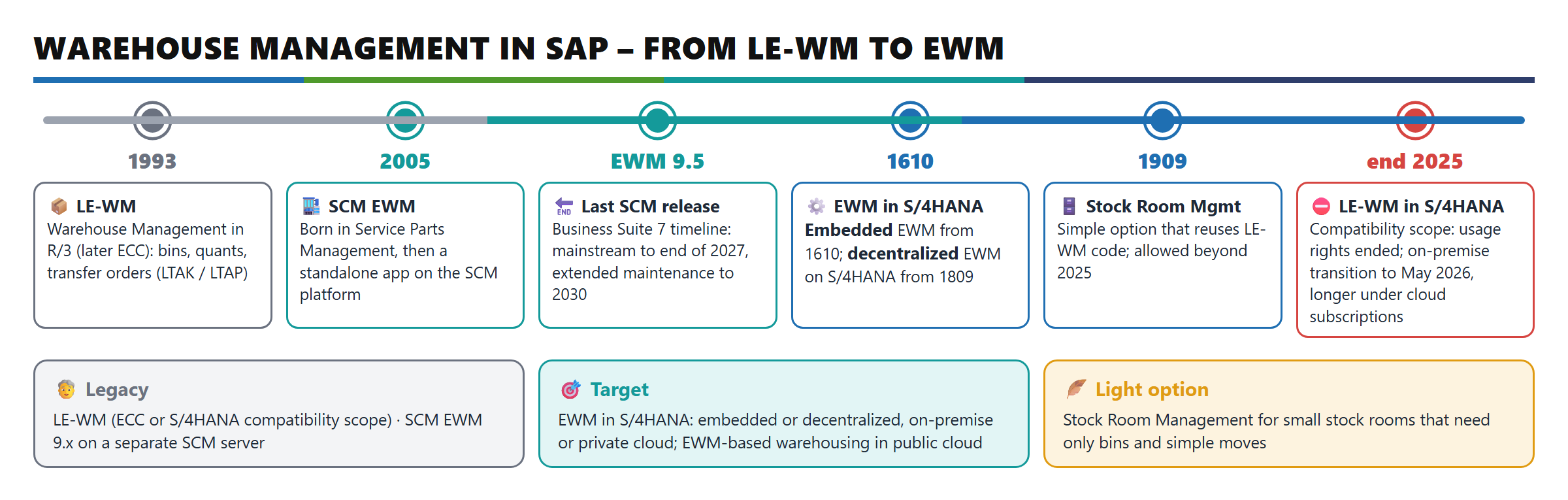
1.1 The three generations
Generation | What it is | Status |
|---|---|---|
LE-WM (Warehouse Management in R/3 / ECC) | Part of Logistics Execution since R/3; transfer orders (LTAK / LTAP), quants (LQUA), bins (LAGP), WM movement types. Can also run decentrally on a separate ERP system. | Legacy. In S/4HANA only in the compatibility scope – usage rights ended on 31 December 2025, with a final on-premise transition to the end of May 2026; cloud subscription (RISE) contracts have a longer, restricted period (SAP Note 2269324). In ECC it follows ECC maintenance (2027, optional extended to 2030). |
SCM EWM (SAP EWM 5.x – 9.5) | Born in 2005 as part of Service Parts Management, then sold as a standalone application on the SCM platform, connected to ECC via qRFC and CIF. | Legacy. EWM 9.5 is the last SCM release; it follows Business Suite 7 maintenance – mainstream to end of 2027, optional extended maintenance to end of 2030. |
EWM in S/4HANA | The same EWM code line moved into S/4HANA: embedded in the S/4HANA system from release 1610, decentralized on its own S/4HANA system from release 1809. | S/4HANA – the strategic warehouse solution. |
Stock Room Management | Available from S/4HANA 1909; reuses large parts of LE-WM for simple stock rooms (bins, simple putaway and picking). | S/4HANA – may be used beyond 2025, but gets no innovations; meant for customers who do not need EWM. |
- LE-WM to EWM is a re-implementation, not a technical conversion: different tables (namespace /SCWM/), 4-character warehouse numbers, 18-character bins, warehouse tasks instead of transfer orders. Custom WM code (RLxxx reports, LTxx transactions, LTAK / LTAP selects) has to be rewritten.
- Interview line: "EWM is the target, LE-WM is in compatibility scope, Stock Room Management is the minimal path for customers who just want bins without EWM."
Part 2 – Deployment options in S/4HANA
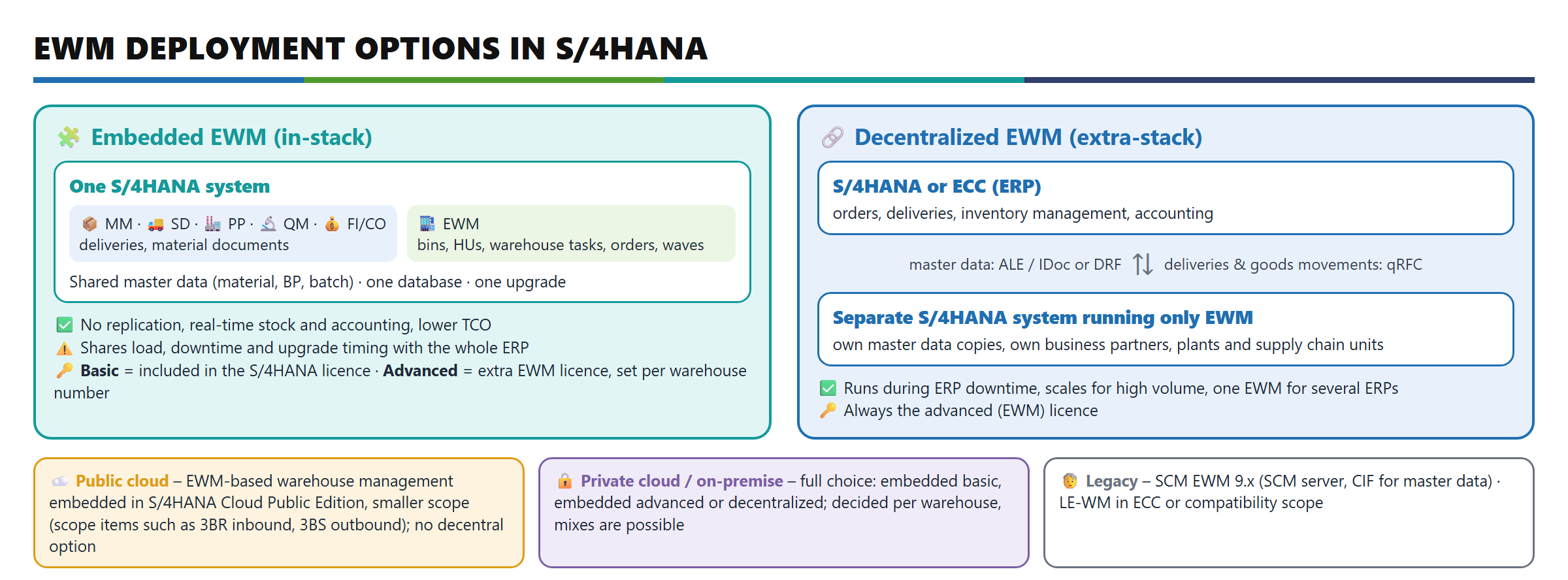
Topic | Embedded EWM (in-stack) | Decentralized EWM (extra-stack) |
|---|---|---|
System | EWM runs inside the S/4HANA system that also runs MM, SD, PP, FI | Separate S/4HANA system that runs only EWM; the ERP can be S/4HANA or ECC |
Master data | Shared: material master, business partner, batch, plant. The EWM product is created in the background | Replicated with ALE / IDoc or DRF (data replication framework); plant and supply chain unit created manually in EWM. CIF is only for the old SCM-based EWM |
Deliveries | Created directly from the S/4HANA delivery – the EWM inbound delivery (PDI) is created without an inbound delivery notification step | Delivery messages through qRFC queues; request documents first, then the EWM documents |
Stock and accounting | Goods movements post the material document (MATDOC) and the accounting document (ACDOCA) directly in the same system | EWM sends goods movements to the ERP through the interface; stock in ERP and EWM must be reconciled |
Availability | Same downtime and upgrade cycle as the ERP | Keeps running when the ERP is down; own upgrade cycle |
Typical use | Most new S/4HANA projects; manufacturing and distribution warehouses | High-volume or automated warehouses, 24/7 operation, one warehouse serving several ERPs, 3PL |
Licence | Basic included in S/4HANA; advanced needs the EWM licence | Always advanced |
2.1 Editions
Edition | What you get |
|---|---|
On-premise / private cloud | Embedded (basic or advanced) and decentralized EWM. In private cloud the embedded option is called in-stack, the decentralized one extra-stack. |
Public cloud (S/4HANA Cloud Public Edition) | Warehouse Management based on EWM, embedded only, with a smaller functional scope delivered as scope items (e.g. 3BR warehouse inbound processing, 3BS warehouse outbound processing). No decentralized EWM inside the public cloud; integration with an external EWM system is a separate scenario. Extensions only through released objects (page 05). |
Which option to choose (volume, automation, ERP landscape, downtime, licence) is an architect decision – see page 06.
Part 3 – Basic vs advanced warehouse management
Embedded EWM comes in two licence levels on the same code base. Basic warehouse management is part of the S/4HANA licence; advanced warehouse management requires the separate EWM licence. The level is set per warehouse number, so one system can run a basic and an advanced warehouse side by side.
Basic warehouse management | Advanced warehouse management (in addition) |
|---|---|
Inbound and outbound processing with deliveries, putaway and stock removal strategies | Wave management with wave templates and automatic waves |
Bins, storage types, handling units, packaging specifications | Yard management and transportation units at the gate |
Warehouse tasks and orders, RF framework, warehouse monitor | Labour management (planned vs actual times, performance) |
Internal moves, replenishment, posting changes | Value-added services (VAS) and kitting |
Physical inventory, batch and serial numbers | Cross-docking, slotting and rearrangement |
Basic production staging and QM integration | Material flow system (conveyors, AS/RS) and other automation; further features listed per release |
- The exact split changes between releases: the feature scope description of your S/4HANA release and the EWM release notes for it are the reference before a feature is promised for a basic warehouse.
- Technically every function is installed; the licence decides what you may use. The licence level is recorded per warehouse number in the system.
- Decentralized EWM always counts as advanced.
Part 4 – Organization structure: from warehouse number to storage bin
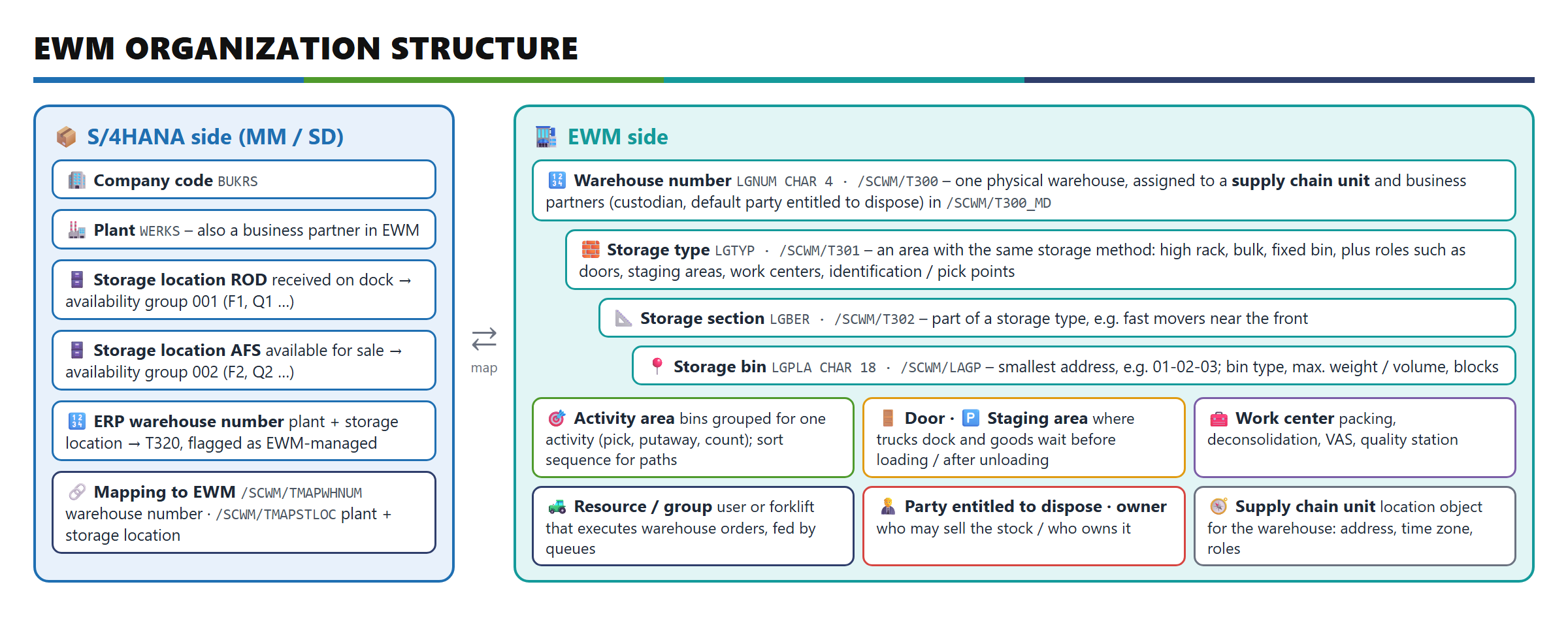
EWM models the physical warehouse in four levels – warehouse number, storage type, storage section, storage bin – plus execution objects (Part 5). Customizing is in SPRO → SCM Extended Warehouse Management → Extended Warehouse Management → Master Data; bins are master data (page 02).
Unit | Meaning | Field / length | Table |
|---|---|---|---|
Warehouse number | One physical warehouse (or complex). Top EWM unit; every EWM table starts with it. | LGNUM, CHAR 4 | /SCWM/T300 (texts /SCWM/T300T) |
Supply chain unit (SCU) | Location object for the warehouse: address, time zone, business attributes (e.g. goods receipt / issue office). Assigned to the warehouse number. | – | Maintained in /SCMB/SCUMAIN |
Warehouse number assignments | Links the warehouse to its SCU and business partners: custodian, default party entitled to dispose. | – | /SCWM/T300_MD |
Storage type | Area with the same storage method: high rack, bulk, shelf, fixed bin, plus special roles (door, staging area, work center, identification point, pick point). | LGTYP, CHAR 4 | /SCWM/T301 |
Storage section | Part of a storage type with common characteristics, e.g. fast movers, heavy goods. | LGBER, CHAR 4 | /SCWM/T302 |
Storage bin | Smallest addressable place, e.g. aisle-stack-level | LGPLA, CHAR 18 | /SCWM/LAGP |
Storage bin type | Physical size class of bins (e.g. full pallet, half pallet) used in putaway. | LPTYP, CHAR 4 | /SCWM/T303 |
Quant | Stock of one product with identical attributes in one bin or HU – not an org unit but the stock record (page 02). | – | /SCWM/AQUA, /SCWM/QUAN |
Storage type settings that matter
- Storage type role – normal storage, identification point, pick point, identification and pick point, staging area group, work center, doors, production supply.
- Putaway and stock removal control (/SCWM/T331 storage type control): which putaway rule (empty bin, addition to stock, fixed bin, bulk …), mixed storage, capacity check, HU requirement, confirmation required, availability group – page 03.
- Storage behaviour – standard warehouse, pallet storage (bin sections for several pallets) or bulk storage (blocks and rows).
Business partner roles in the warehouse
Role | Meaning |
|---|---|
Party entitled to dispose (ENTITLED) | May sell or use the stock – normally the plant as a business partner. Part of every quant and warehouse task. |
Owner (OWNER) | Legal owner of the stock; differs for consignment stock or a 3PL warehouse. |
Custodian | The party that operates the warehouse – relevant for 3PL. |
Part 5 – Execution objects: activity areas, doors, staging areas, work centers, resources
Object | Purpose | Table / t-code |
|---|---|---|
Activity area | Logical group of bins for one activity (putaway, picking, counting). Defines the sort sequence of bins = walking path; warehouse orders are built per activity area. | /SCWM/TAAREA, activities /SCWM/TACTTY; bin sort /SCWM/SBST → /SCWM/LAGPS |
Door | Gate where trucks dock; assigned to staging areas and to the yard. | /SCWM/TDOOR |
Staging area | Zone where goods wait after unloading or before loading. Modelled as storage type with role staging area group + staging areas (sections) + bins. | Storage type role |
Work center | Physical station for packing, deconsolidation, quality inspection, VAS or counting. Modelled as a storage type with role work center; layout in the work center profile. | /SCWM/TWORKST; packing /SCWM/PACK |
Resource | A user or piece of equipment (forklift, picker) that executes warehouse orders. | /SCWM/RSRC, maintenance /SCWM/RSRC |
Resource group / type | Resources with the same capabilities; resource types decide which bins (height, aisle) they can reach. | /SCWM/TRSRC_GRP |
Queue | Work list that collects warehouse orders for resources (e.g. picking in zone A); RF users pull work from queues. | Customizing per warehouse |
Production supply area (PSA) | Area near the production line that EWM stages components to; defined in S/4HANA PP and replicated to EWM. | T-codes /SCWM/PSA, /SCWM/PSA_REPLICATE |
- Warehouse order = package of warehouse tasks for one resource in one activity area, built by warehouse order creation rules (page 03). It is the unit an RF user receives.
- Fixed bins for a product (picking face) are assigned in /SCWM/BINMAT (table /SCWM/BINMAT).
Part 6 – Linking S/4HANA plant and storage location to EWM
MM and SD never see an EWM bin. They post to a plant + storage location; Customizing says that this storage location is managed by an EWM warehouse. Then deliveries for it are distributed to EWM and EWM posts goods movements back.
Step | Setting | Where / table |
|---|---|---|
1 | Define the plant and the storage locations, typically ROD (received on dock) and AFS (available for sale) | Enterprise structure; T001L |
2 | Assign plant + storage location to an ERP warehouse number | Logistics Execution customizing; T320 |
3 | Flag the ERP warehouse number as managed by EWM (warehouse number control) and set up delivery distribution | Logistics Execution → EWM integration |
4 | Create the EWM warehouse number, the supply chain unit (/SCMB/SCUMAIN) and the plant as a business partner (party entitled to dispose) | /SCWM/T300, /SCWM/T300_MD |
5 | Map the ERP warehouse number to the EWM warehouse number | /SCWM/TMAPWHNUM |
6 | Map plant + storage location to an availability group; map availability group + location-independent stock type to EWM stock types | /SCWM/TMAPSTLOC |
ROD / AFS and stock types
- Goods received but not yet put away sit in availability group 001 (stock types F1 unrestricted, Q1 quality) = storage location ROD in MM. After the putaway task is confirmed into a storage type with availability group 002, EWM changes the stock type to F2 / Q2 = storage location AFS; MM sees a transfer ROD → AFS.
- Why: ATP can be set up to count only AFS as available; goods still on the dock are visible in inventory management but not yet promised to customers.
- Simpler setups use one storage location; then no posting change happens on putaway. Each storage location in the same warehouse needs its own availability group and stock types.
- Developer tip: in EWM tables the stock type is field CAT (e.g. /SCWM/AQUA-CAT) together with owner, party entitled to dispose and stock usage – see page 02.
Part 7 – Integration map and system architecture
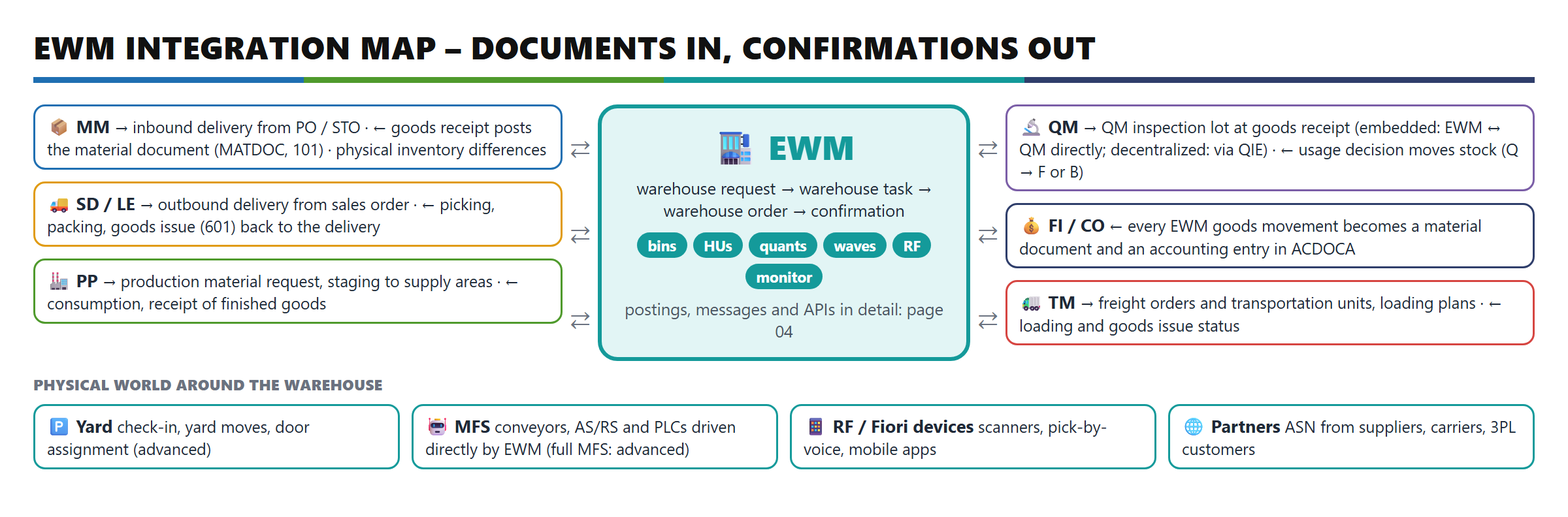
Module / system | Into EWM | Back from EWM |
|---|---|---|
MM (purchasing, inventory) | Inbound delivery for PO or stock transport order (often from an ASN) | Goods receipt (101) as material document in MATDOC; stock differences from physical inventory |
SD / LE | Outbound delivery for a sales order or STO | Picked / packed quantities, delivery split, goods issue (601) |
PP | Production material requests (staging for orders), receipts from production | Staging, consumption, goods receipt of finished goods |
QM | QM inspection lot at goods receipt – embedded EWM talks to QM with or without inspection rules, decentralized EWM through the QIE (page 04 Part 5) | Usage decision → posting change Q1/Q2 → F2 or blocked, return or scrap |
FI / CO | – | Every valuated goods movement creates an accounting document (ACDOCA) |
TM / LE-TRA | Freight orders, shipments, transportation units | Loading status, goods issue |
Yard, MFS | Yard check-in, conveyor telegrams (advanced) | Moves, door assignments |
- Technical layers: EWM application code (namespace /SCWM/), delivery processing (/SCDL/), the stock engine LIME (/LIME/ tables), the PPF (Post Processing Framework) for actions such as printing or follow-up documents, and the RF framework for mobile devices. Interfaces in detail: page 04; BAdIs and APIs: page 05.
- Embedded architecture: EWM and ERP share one database and client; the delivery is still two documents – the S/4HANA delivery (LIKP / LIPS) and the EWM warehouse request (/SCDL/ tables) – kept in sync by the integration layer.
Part 8 – Interview questions
Q1. What is the difference between LE-WM and EWM?
LE-WM is the classic Warehouse Management of R/3 / ECC (transfer orders LTAK / LTAP, quants LQUA). EWM is the newer, much richer warehouse system (warehouse tasks and orders, waves, POSC, RF framework, labour, yard, MFS) with its own data model in /SCWM/. In S/4HANA LE-WM is only compatibility scope; EWM is the strategic solution.
Q2. What happens to LE-WM in S/4HANA?
It is part of the compatibility scope. Usage rights ended on 31 December 2025, with a final on-premise transition to the end of May 2026; cloud subscription (RISE) contracts have a longer, restricted period. Customers move to embedded or decentralized EWM, or to Stock Room Management for simple stock rooms. The move is a re-implementation, not a conversion.
Q3. Embedded or decentralized EWM – what is the difference?
Embedded runs inside the S/4HANA ERP system and shares master data and postings; decentralized runs on its own S/4HANA system, replicates master data via ALE / DRF and exchanges deliveries via qRFC. Decentralized suits high volume, automation, 24/7 operation and several ERPs; embedded suits most standard warehouses and has lower TCO.
Q4. What is the difference between basic and advanced warehouse management?
Same code, different licence. Basic (included in S/4HANA) covers inbound, outbound, internal processes, physical inventory, HUs, RF and the monitor. Advanced (EWM licence, set per warehouse number) adds e.g. wave management, yard, labour management, VAS, kitting, cross-docking, slotting and full MFS. The feature scope description of the release is the reference.
Q5. Is EWM available in S/4HANA Cloud Public Edition?
Yes, as Warehouse Management based on EWM, embedded only and with a smaller scope delivered as scope items (e.g. 3BR inbound, 3BS outbound). There is no decentralized EWM inside the public cloud, and extensions use only released APIs, CDS views and BAdIs.
Q6. Describe the EWM organization structure.
Warehouse number (4 characters, /SCWM/T300) → storage types (/SCWM/T301) → storage sections (/SCWM/T302) → storage bins (18 characters, /SCWM/LAGP). Around it: activity areas, doors, staging areas, work centers, resources and queues. The warehouse number is linked to a supply chain unit and business partners.
Q7. How does a storage location in MM become EWM-managed?
Plant + storage location are assigned to an ERP warehouse number (T320) that is flagged as EWM-managed; the ERP warehouse number is mapped to the EWM warehouse number (/SCWM/TMAPWHNUM) and the storage location to an availability group (/SCWM/TMAPSTLOC). Deliveries for that storage location then go to EWM.
Q8. Why do many EWM warehouses use two storage locations, ROD and AFS?
ROD (received on dock) holds stock that is received but not yet put away (F1 / Q1, availability group 001); AFS (available for sale) holds stock in final bins (F2 / Q2, group 002). Putaway confirmation moves ROD → AFS, so ATP only promises stock that is really in the warehouse.
Q9. What are the party entitled to dispose and the owner?
Stock attributes of every quant. The party entitled to dispose may sell or use the stock (normally the plant as BP); the owner legally owns it (differs for consignment or 3PL). Both are part of the stock key, so the same product can lie in one bin for different owners.
Q10. What is a warehouse order and why does it exist?
A package of warehouse tasks for one resource in one activity area, created by warehouse order creation rules (e.g. max. weight, max. items, one pick path). It is the unit of work an RF user or machine receives from a queue.
Q11. What is Stock Room Management?
An S/4HANA option from 1909 that reuses large parts of LE-WM for simple stock rooms. It may be used beyond 2025 but receives no innovations; it is the minimal path when EWM is not needed.
Q12. Which technical frameworks does EWM use?
/SCWM/ application layer, /SCDL/ delivery processing, LIME stock engine (/LIME/ tables), PPF for actions (printing, follow-up documents), RF framework for mobile devices, qRFC for the delivery integration (also inside an embedded system), and the warehouse monitor /SCWM/MON as the central cockpit.
🏠 Start Here · 02 · Master Data ▶ · Sections: CORE ABAP | OOPS ABAP | ABAP on HANA | Clean Core | RAP | ABAP Points | SAP Fiori | SAPUI5 | Mobile Development (MDK) | BTP Foundations | BTP Development | CAP | SAP Build | ABAP on BTP | Integration Suite | SAP Business AI | SAP BASIS | Security | SAP SDLC
Functional: FICO ABAP | TRM ABAP | VIM | SAP BIS | SD ABAP | MM ABAP | PP ABAP | QM ABAP | PM ABAP | PS ABAP | EWM | TM ABAP | GTM ABAP | EHS ABAP | HR ABAP | BW | SAP Datasphere | SAP Business Data Cloud | SAP MDG | SAP Analytics Cloud | SAP Ariba | SAP CX | SAP IBP