EWM has its own data model next to MM and SD: products extended per warehouse, storage bins, handling units and packaging specifications as master data; warehouse requests, warehouse tasks, warehouse orders and waves as documents; quants as the stock. This page lists each object with its tables, the S/4HANA documents it relates to and the released CDS views. Organization units: page 01; how the documents are used in processes: page 03; BAdIs, APIs and code: page 05. All EWM tables exist only in an S/4HANA system with EWM (embedded or decentralized) or in SCM EWM – not in an ECC system.
Part 1 – The data model at a glance
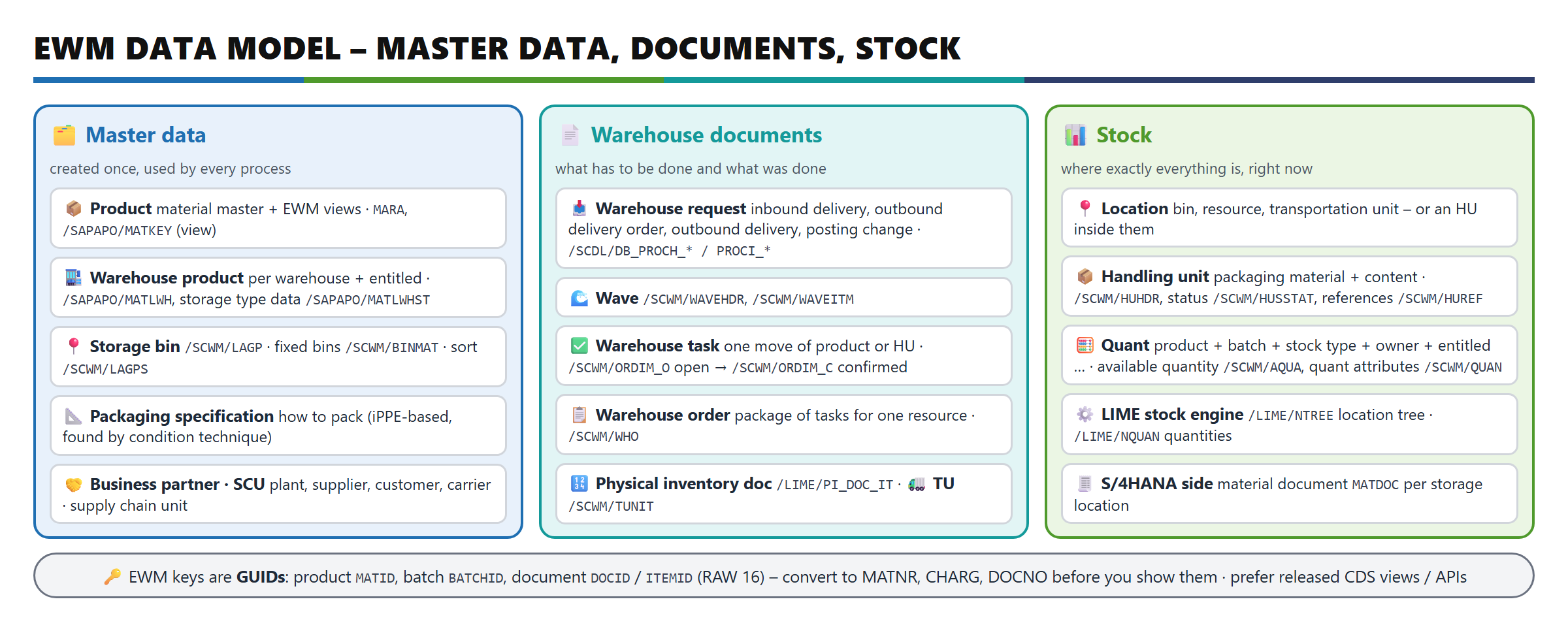
Object | Meaning | Main tables |
|---|---|---|
Product / warehouse product | Material master plus warehouse-specific data | MARA, /SAPAPO/MATKEY (compatibility view), /SAPAPO/MATLWH, /SAPAPO/MATLWHST |
Storage bin | Physical address in the warehouse | /SCWM/LAGP, /SCWM/LAGPS, /SCWM/BINMAT |
Handling unit | Packaging material + content, has its own ID | /SCWM/HUHDR, /SCWM/HUSSTAT, /SCWM/HUREF |
Warehouse request | EWM delivery: what has to be received, shipped or posted | /SCDL/DB_PROCH_I, /SCDL/DB_PROCH_O, /SCDL/DB_DLVH_O … |
Warehouse task | One movement of a product or HU from source to destination | /SCWM/ORDIM_O, /SCWM/ORDIM_C |
Warehouse order | Package of tasks for one resource | /SCWM/WHO |
Wave | Group of delivery items released together | /SCWM/WAVEHDR, /SCWM/WAVEITM |
Quant | Stock of one product with identical attributes in one location | /SCWM/AQUA, /SCWM/QUAN, /LIME/NQUAN |
Three rules for developers
- GUID keys: EWM documents and stock refer to the product, batch and document by GUID – fields MATID, BATCHID, DOCID / ITEMID (RAW 16). Readable numbers (MATNR, CHARG, DOCNO) must be looked up; released CDS views already expose them.
- Warehouse number first: almost every /SCWM/ table has LGNUM as the first key field after the client. Always restrict by it.
- Read, never write: EWM tables are changed only through EWM function modules, classes and APIs (page 05). Direct updates corrupt stock and document status.
Part 2 – Product master and warehouse product
EWM calls the material a product. In embedded EWM the product is the S/4HANA material master: when a material is created, the EWM product exists automatically in the background. In decentralized EWM the material is replicated from the ERP by ALE / IDoc or DRF and becomes an EWM product there (SCM EWM 9.x used CIF).
Level | What it holds | Maintain with | Table |
|---|---|---|---|
Global product data | Base unit, units of measure, weights / volumes, EWM-relevant global fields (e.g. warehouse storage condition, handling unit type, serial number and quality settings) | MM01 / MM02 (embedded), Manage Product Master Data app | MARA, MARM; product key view /SAPAPO/MATKEY (MATID ↔ MATNR) |
Warehouse product (per warehouse number + party entitled to dispose) | Tab Warehouse Data: putaway control indicator, stock removal control indicator, process type determination indicator, cycle counting indicator, staging data | /SCWM/MAT1 (warehouse number and party entitled to dispose are mandatory) | /SAPAPO/MATLWH |
Storage type data | Per storage type: min. / max. quantity for fixed bins and replenishment, bin types, maximum number of bins | /SCWM/MAT1 tab Storage Type Data | /SAPAPO/MATLWHST |
Slotting data | Demand, putaway parameters calculated by slotting (advanced) | /SCWM/MAT1, /SCWM/SLOT | – |
- The putaway control indicator (Customizing table /SCWM/T305Q) points to a storage type search sequence; the stock removal control indicator points to the removal search sequence and strategy. Both are explained on page 03.
- The product key MATID is a GUID; /SAPAPO/MATKEY is a compatibility view in S/4HANA that maps it to the 40-character MATNR.
- Supply chain units and locations are not created automatically in embedded EWM – they are set up once per warehouse (page 01 Part 6).
Part 3 – Storage bins and fixed bins
Storage bins are master data in EWM, created once per warehouse and mostly generated in bulk from a template (e.g. aisle 01–20, stack 01–50, level 01–05).
Field of /SCWM/LAGP | Meaning |
|---|---|
LGNUM, LGPLA | Key: warehouse number + bin (CHAR 18) |
LGTYP, LGBER | Storage type and storage section the bin belongs to |
LPTYP | Storage bin type (size class, Customizing /SCWM/T303) |
BIN_AT | Bin access type – which resources can reach the bin |
SKZUE / SKZUA / SKZSI | Blocked for putaway / for stock removal / because of physical inventory |
MAXLE, MAX_WEIGHT, MAX_VOLUME, MAX_CAPA | Capacity limits checked during putaway |
ANZLE, WEIGHT, FCAPA, KZLER, KZVOL | Current use: number of HUs, weight, free capacity, empty, full |
KZINV | Physical inventory type of the bin |
T-code | Purpose |
|---|---|
/SCWM/LS01 / /SCWM/LS03 | Create / display a single storage bin |
/SCWM/LS10 | Mass-create storage bins from a bin structure template |
/SCWM/LS11 | Mass-edit storage bins (e.g. set blocks) |
/SCWM/SBUP | Load storage bins from a file (data migration) |
/SCWM/SBST | Sort storage bins per activity area → table /SCWM/LAGPS (bins for execution areas and activities) – the walking sequence used when tasks are sorted |
/SCWM/BINMAT | Assign fixed bins to a product (table /SCWM/BINMAT) – for picking faces in a fixed-bin storage type |
- After creating bins, sorting them (/SCWM/SBST) is mandatory – without /SCWM/LAGPS entries the activity area has no bins and warehouse order creation fails.
Part 4 – Handling units and packaging specifications
4.1 Handling units
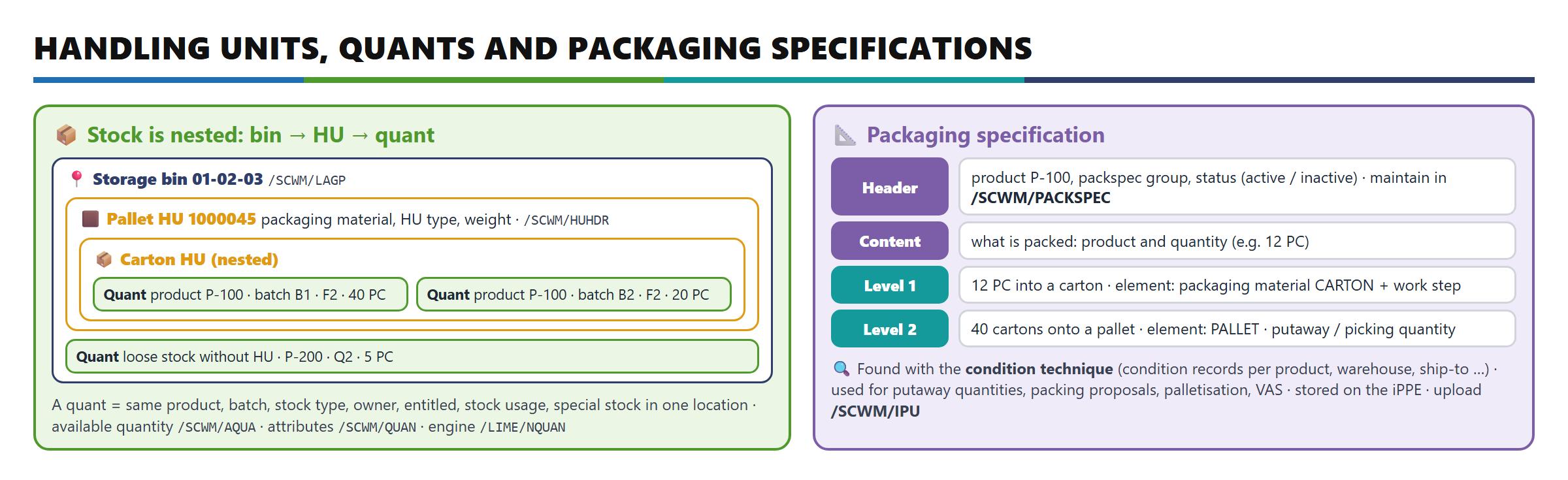
A handling unit (HU) is a physical unit of packaging material plus the goods on or in it, with a unique identification number (often an SSCC barcode). HUs can be nested (carton on pallet). EWM moves whole HUs with one HU warehouse task, which is why most high-volume warehouses work HU-managed.
Table | Content |
|---|---|
/SCWM/HUHDR | HU header: HU ID (HUIDENT), packaging material, HU type, weight, volume, location |
/SCWM/HUSSTAT | Individual statuses of each HU (e.g. closed, planned, physically empty) |
/SCWM/HUREF | References of an HU to documents (deliveries, waves, transportation units) |
/SCWM/T307 | Customizing: HU types per warehouse number (e.g. Euro pallet, carton) – storage types can allow only certain HU types |
Content | The products in an HU are quants whose location is the HU (Part 8) |
- Packaging materials are materials of a packaging material type (e.g. VERP) in the material master.
- HU labels are printed through PPF actions; condition records for HU printing in /SCWM/PRHU6.
- A storage type can require HUs ("HU requirement") – stock there must always sit in an HU. Process-oriented and layout-oriented storage control work only with HUs (page 03).
4.2 Packaging specifications
A packaging specification (packspec) describes how a product is packed: content (product and quantity), then levels (12 pieces into a carton, 40 cartons onto a pallet) with elements (packaging material and / or work step). It is stored in iPPE and found with the condition technique (condition records per product, warehouse, customer …).
Used for | How |
|---|---|
Putaway | Pallet quantity from the packspec determines how much goes to one bin and which HU type |
Packing | Packing proposal at the packing work center; automatic packing at goods receipt |
Value-added services | Work steps of the packspec become a VAS order (advanced) |
Picking | Rounding to full cartons or pallets in stock removal |
- T-codes: /SCWM/PACKSPEC maintain packaging specifications, /SCWM/IPU initial upload of packaging specifications.
Part 5 – Batches, serial numbers and stock attributes
5.1 Batches
- The batch master is the S/4HANA batch (MCH1 cross-plant / MCHA per plant, classification). Embedded EWM uses it directly; decentralized EWM gets it replicated. In EWM tables the batch appears as BATCHID (GUID) plus CHARG.
- Batch-managed products must be batch-managed in the material master. Batch determination for picking can run in EWM (stock removal with batch selection) instead of in the S/4HANA delivery.
- Batch characteristics such as shelf-life expiration date (field VFDAT in quants and tasks) drive FEFO stock removal (page 03).
5.2 Serial numbers
- Serial number requirements are set per product and warehouse in a profile and decide how deep EWM tracks them: only on the delivery document, at warehouse-number level, or inventory-relevant down to the bin.
- Serial numbers are captured on RF screens during receiving, picking or packing and posted with the goods movement. Released stock views: I_EWM_PhysStockProd, I_EWM_AvailableStock (Part 10).
5.3 Stock attributes – what makes two quants different
Attribute | Field | Example |
|---|---|---|
Product, batch | MATID, BATCHID / CHARG | P-100, batch B1 |
Stock type | CAT | F1 / F2 unrestricted, Q1 / Q2 quality, blocked types (receiving vs warehouse) |
Stock usage, special stock | STOCK_USAGE, STOCK_DOCCAT / STOCK_DOCNO / STOCK_ITMNO | Sales order stock, project stock, consignment |
Owner | OWNER, OWNER_ROLE | Our plant, or a supplier for consignment |
Party entitled to dispose | ENTITLED, ENTITLED_ROLE | Plant 1010 as business partner |
Document reference | DOCCAT, QDOCID … | Stock still assigned to an inbound delivery |
Dates, origin | VFDAT, WDATU, COO | Shelf-life expiration, goods receipt time, country of origin |
- The stock type is mapped to an S/4HANA storage location and stock category through the availability group (page 01 Part 6). Customizing: warehouse process types decide which stock type a receipt gets.
Part 6 – Warehouse requests: EWM delivery documents
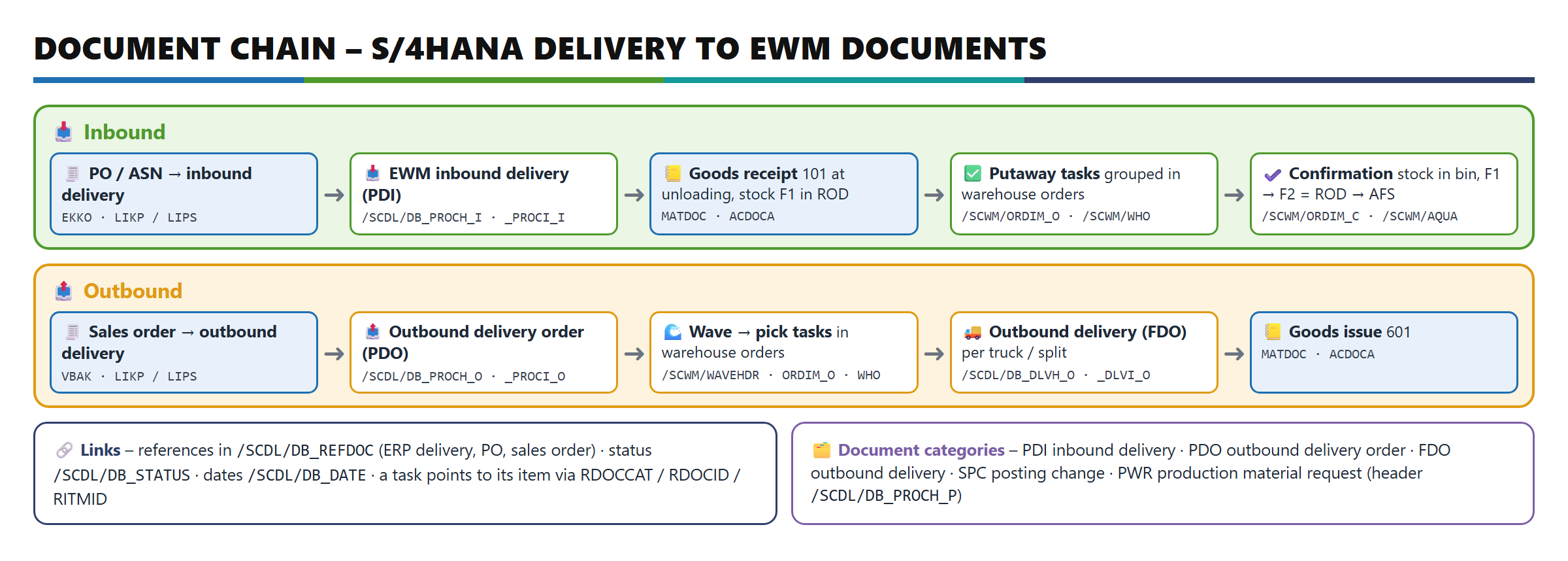
EWM never executes the S/4HANA delivery itself. It creates its own warehouse request (delivery processing, namespace /SCDL/) that refers to the S/4HANA delivery (LIKP / LIPS). In embedded EWM both documents live in the same system; in decentralized EWM they live in two systems.
Document (category) | Created from | Header / item tables | T-code |
|---|---|---|---|
Inbound delivery (PDI) | S/4HANA inbound delivery for PO, STO, returns, production | /SCDL/DB_PROCH_I / /SCDL/DB_PROCI_I | /SCWM/PRDI |
Outbound delivery order (PDO) | S/4HANA outbound delivery for sales order or STO; can also be created directly in EWM | /SCDL/DB_PROCH_O / /SCDL/DB_PROCI_O | /SCWM/PRDO |
Outbound delivery (FDO) | Created from the PDO for goods issue – per truck or delivery split; communicates splits back | /SCDL/DB_DLVH_O / /SCDL/DB_DLVI_O | /SCWM/FD |
Posting change (SPC) | Posting change request from S/4HANA (e.g. QM usage decision) or created in EWM | /SCDL/ tables of the posting change | /SCWM/IM_PC, /SCWM/POST |
Production material request (PWR) | Manufacturing order with advanced production integration | /SCDL/DB_PROCH_P | – |
Shared /SCDL/ table | Content |
|---|---|
/SCDL/DB_REFDOC | References: ERP delivery number, purchase order, sales order, manufacturing order |
/SCDL/DB_STATUS | Statuses per header and item (e.g. goods receipt, putaway, picking, goods issue) |
/SCDL/DB_DATE | Dates and times (planned / actual delivery, goods issue) |
- Header fields of /SCDL/DB_PROCH_O include DOCID (GUID), DOCNO (number), DOCCAT, DOCTYPE (EWM delivery type, e.g. OUTB), STATUS, INCO1 / INCO2 and the GUIDs of warehouse and partners.
- Decentralized EWM first creates request documents (inbound delivery notification, outbound delivery request) from the qRFC message and turns them into PDI / PDO with a PPF action. In embedded EWM the PDI is created directly from the S/4HANA inbound delivery.
- Status of the S/4HANA delivery (LIKP / LIPS) is updated from EWM; for warehouse progress read the EWM status (/SCDL/DB_STATUS) or the monitor, not LIPS.
Part 7 – Warehouse tasks, warehouse orders and waves
7.1 Warehouse task (WT)
A warehouse task moves a quantity of a product (product WT) or a whole handling unit (HU WT) from a source to a destination – bin, resource, work center or TU. It is the EWM successor of the LE-WM transfer order item. Its behaviour is controlled by the warehouse process type (PROCTY, Customizing table /SCWM/T333, texts /SCWM/T333T).
Table | Content |
|---|---|
/SCWM/ORDIM_O | Open warehouse tasks. Key LGNUM + TANUM (NUMC 12) |
/SCWM/ORDIM_C | Confirmed (and cancelled) warehouse tasks – the task moves here on confirmation |
/SCWM/ORDIM_E | Exception codes entered for a warehouse task (e.g. bin empty, difference) |
/SCWM/ORDIM_H | Movements of HU items for HU warehouse tasks |
/SCWM/ORDIM_L | Warehouse task log |
Field (ORDIM_O / _C) | Meaning |
|---|---|
TANUM, TOSTAT | Task number; status (blank open, C confirmed, A cancelled) |
PROCTY, TRART | Warehouse process type; process category (putaway, stock removal, internal, posting change …) |
MATID, BATCHID, CAT, OWNER, ENTITLED | Stock attributes of the moved quantity |
VSOLM / VSOLA, MEINS / ALTME | Target quantity in base / alternative unit |
VLTYP, VLBER, VLPLA, VLENR | Source storage type, section, bin, source HU |
NLTYP, NLBER, NLPLA, NLENR | Destination storage type, section, bin, destination HU |
WHO, WAVE, QUEUE, AAREA | Warehouse order, wave, queue, activity area |
RDOCCAT, RDOCNO, RITMNO | Reference to the warehouse request item (e.g. PDO item) |
PRCES, PROCS | Storage process and external process step (POSC, page 03) |
CREATED_BY, CREATED_AT, PRIORITY | Who created it, when (UTC timestamp), priority |
7.2 Warehouse order (WO) and wave
Table | Content |
|---|---|
/SCWM/WHO | Warehouse order: WHO number, WCR (warehouse order creation rule), status, activity area, queue, assigned resource / processor, start and confirmation time, planned duration |
/SCWM/WAVEHDR | Wave header: wave number, template, status, release time |
/SCWM/WAVEITM | Wave items: the delivery items assigned to the wave |
- Relationship: wave 1 : n delivery items → each item 1 : n warehouse tasks → tasks grouped into warehouse orders (one WO = work for one resource in one activity area).
Example – open tasks of a warehouse order
|
Part 8 – Stock: quants and the LIME engine
A quant is the stock of one product with identical stock attributes (Part 5.3) in one location. The location can be a bin, an HU, a resource (stock on a forklift) or a transportation unit. EWM stores stock in the LIME framework (Logistics Inventory Management Engine) and exposes it in /SCWM/ tables.
Table | Content |
|---|---|
/SCWM/AQUA | Available quantity per location and stock attributes – the table stock removal reads when warehouse tasks are created. Fields LGNUM, LGTYP, LGPLA, HUIDENT, RSRC, TU_NUM, MATID, BATCHID, CAT, OWNER, ENTITLED, QUAN, UNIT, VFDAT, WDATU … |
/SCWM/QUAN | Quant attributes – the physical stock record (EWM equivalent of LE-WM LQUA) |
/LIME/NQUAN | LIME stock quantities |
/LIME/NTREE | LIME location tree: which HU is in which bin, which HU in which HU |
- Physical stock vs available stock: open warehouse tasks reserve quantity, so available stock can be lower than physical stock in the same bin.
- Reconcile EWM and S/4HANA inventory management with the stock comparison tools; differences are posted with /SCWM/WM_ADJUST (posting differences into ERP).
- Initial stock at go-live: /SCWM/ISU (stock data transfer) or the migration cockpit objects for EWM (page 06).
Example – available stock per bin of a storage type
|
For reports that need the product number, use the released view I_EWM_PhysStockProd (physical stock with product, batch and bin) instead of converting MATID yourself.
Part 9 – Physical inventory, quality and transportation units
Object | Detail | Tables / t-codes |
|---|---|---|
Physical inventory document | Bin- or product-based count: annual, ad-hoc, cycle counting, low-stock check, putaway inventory. Differences go to a difference analyzer, then post to S/4HANA inventory management. | Items /LIME/PI_DOC_IT; create /SCWM/PI_CREATE, count /SCWM/PI_COUNT, process /SCWM/PI_PROCESS, difference analyzer /SCWM/DIFF_ANALYZER, post differences /SCWM/WM_ADJUST |
Quality inspection | At goods receipt EWM triggers the inspection and the result is a QM inspection lot. Embedded EWM can exchange messages with QM directly (without inspection rules); decentralized EWM uses the Quality Inspection Engine (QIE) – details on page 04 Part 5. Quants carry the inspection reference (INSPTYP / INSPID in /SCWM/AQUA). | Embedded /SCWM/QINSP_S4 (quality workload overview), decentralized /SCWM/QINSP; QM side: QM ABAP › 04 Part 7 |
Transportation unit (TU) | The truck, trailer or container being loaded or unloaded; deliveries and HUs are assigned to it. | /SCWM/TUNIT, assignment /SCWM/TU_DLV; t-code /SCWM/TU |
- Yard management, VAS orders, kitting and labour management have their own documents – they belong to advanced warehouse management and are covered on page 04.
Part 10 – Number ranges, released CDS views and APIs
10.1 Number ranges
- Warehouse tasks, warehouse orders, waves, HUs, physical inventory documents and EWM deliveries each get numbers from number range intervals defined in EWM Customizing, mostly per warehouse number.
- The EWM delivery number (DOCNO) is separate from the S/4HANA delivery number (LIKP-VBELN); the link is in /SCDL/DB_REFDOC.
10.2 Released CDS views
For clean-core code (and the only option in S/4HANA Cloud Public Edition) read EWM data through released CDS views (C1 contract) instead of /SCWM/ tables. Names and release state differ per release; ADT and the SAP Business Accelerator Hub show the API state of each view.
CDS view | Content |
|---|---|
I_EWM_WarehouseTask_2 | Warehouse tasks (only tasks with a warehouse process type) |
I_EWM_PhysStockProd | Physical stock per product, batch, bin and stock attributes |
I_EWM_StorageBin_2 (public cloud list only) | Storage bins |
I_EWM_AvailableStock | Available stock |
Further views | SAP keeps releasing views for inbound delivery, outbound delivery, warehouse order and warehouse task in each cloud release |
Analytical queries | e.g. C_EWM_WarehouseTaskQ, C_EWM_InboundDeliveryItemQ – used by Fiori analytics (page 04), not for custom code |
- Matching OData API for stock: API_WHSE_PHYSSTOCKPROD. Warehouse order / task, inbound and outbound delivery and storage bin APIs, BAdIs and how to call them: page 05.
- Material and delivery data on the S/4HANA side keep their own released views (I_Product, I_OutboundDelivery, I_InboundDelivery – see SD ABAP and MM ABAP).
Part 11 – Interview questions
Q1. How is the product master handled in embedded and in decentralized EWM?
Embedded: the S/4HANA material master is the EWM product; it is created in the background, and warehouse-specific data is added in /SCWM/MAT1 (/SAPAPO/MATLWH, storage type data /SAPAPO/MATLWHST). Decentralized: materials are replicated by ALE / IDoc or DRF and then extended in /SCWM/MAT1.
Q2. Which table holds storage bins and what must you do after creating them?
/SCWM/LAGP (key LGNUM + LGPLA, 18 characters). After creating bins (/SCWM/LS10 mass create) you must sort them per activity area with /SCWM/SBST, which fills /SCWM/LAGPS; otherwise no warehouse orders can be built.
Q3. What is a handling unit and where is it stored?
Packaging material plus content with a unique ID, nestable. Header in /SCWM/HUHDR, statuses in /SCWM/HUSSTAT, document references in /SCWM/HUREF; the content is quants whose location is the HU.
Q4. What is a packaging specification?
A master record (iPPE) that describes content and packing levels with packaging materials and work steps. Found by condition technique and used for putaway quantities, packing proposals, palletisation and VAS. Maintained in /SCWM/PACKSPEC.
Q5. Which EWM documents are created for an outbound delivery?
The S/4HANA outbound delivery (LIKP / LIPS) leads to an outbound delivery order (PDO, /SCDL/DB_PROCH_O / PROCI_O). Waves and pick warehouse tasks are created for it; for goods issue an outbound delivery (FDO, /SCDL/DB_DLVH_O / DLVI_O) is created, which also communicates splits back.
Q6. Where are warehouse tasks stored?
Open tasks in /SCWM/ORDIM_O, confirmed or cancelled ones in /SCWM/ORDIM_C (key LGNUM + TANUM). Exceptions in /SCWM/ORDIM_E, HU item movements in /SCWM/ORDIM_H, log in /SCWM/ORDIM_L.
Q7. What is the difference between a warehouse task and a warehouse order?
A warehouse task is one movement (product or HU, source to destination). A warehouse order (/SCWM/WHO) bundles tasks for one resource in one activity area, built by warehouse order creation rules.
Q8. What is a quant and which tables hold EWM stock?
Stock of one product with identical attributes (batch, stock type, owner, entitled …) in one location. /SCWM/AQUA holds the available quantity read by stock removal, /SCWM/QUAN the quant attributes, and the LIME tables /LIME/NQUAN and /LIME/NTREE the quantities and location tree.
Q9. Why do EWM tables contain GUIDs instead of material numbers?
EWM keys product, batch and documents by GUID (MATID, BATCHID, DOCID – RAW 16). Readable numbers come from master data (e.g. compatibility view /SAPAPO/MATKEY for products); released CDS views already return product and batch numbers.
Q10. Which released CDS views would you use for an EWM report in a clean-core system?
I_EWM_WarehouseTask_2 for tasks, I_EWM_PhysStockProd for stock, I_EWM_StorageBin_2 (public cloud list only) for bins and I_EWM_AvailableStock for available stock – after checking their release state in ADT – and the APIs on the SAP Business Accelerator Hub.
Q11. What are F1 and F2?
EWM stock types for unrestricted stock: F1 in the receiving area (availability group 001, storage location ROD) and F2 in the warehouse (group 002, AFS). Q1 / Q2 are the matching quality inspection types; the stock type is field CAT of quants and tasks.
Q12. Can you update /SCWM/ tables directly in a correction program?
No. Stock, tasks and deliveries are consistent only when changed through EWM logic (warehouse task creation and confirmation, posting changes, PI documents, APIs). Direct updates break the link between LIME, documents and S/4HANA inventory.
🏠 Start Here · ◀ 01 · Overview & Org · 03 · Processes & Config ▶ · Sections: CORE ABAP | OOPS ABAP | ABAP on HANA | Clean Core | RAP | ABAP Points | SAP Fiori | SAPUI5 | Mobile Development (MDK) | BTP Foundations | BTP Development | CAP | SAP Build | ABAP on BTP | Integration Suite | SAP Business AI | SAP BASIS | Security | SAP SDLC
Functional: FICO ABAP | TRM ABAP | VIM | SAP BIS | SD ABAP | MM ABAP | PP ABAP | QM ABAP | PM ABAP | PS ABAP | EWM | TM ABAP | GTM ABAP | EHS ABAP | HR ABAP | BW | SAP Datasphere | SAP Business Data Cloud | SAP MDG | SAP Analytics Cloud | SAP Ariba | SAP CX | SAP IBP