Finance was the first part of SAP ERP rebuilt for HANA (Simple Finance, later S/4HANA Finance), and it changed more than any other module: one Universal Journal, mandatory business partner, new Asset Accounting and material ledger, cost elements as G/L accounts. This page lists those simplifications and what they mean for custom code, compares the editions, explains how finance data is migrated, and collects the design decisions an SAP solution architect makes in a finance project – plus clean core and the confirmed roadmap topics. ACDOCA structure, ledgers, document splitting and the compatibility views (V_COEP, FGLV_FAGLFLEXA …) are taught on page 02.
Part 1 – S/4HANA Finance simplifications
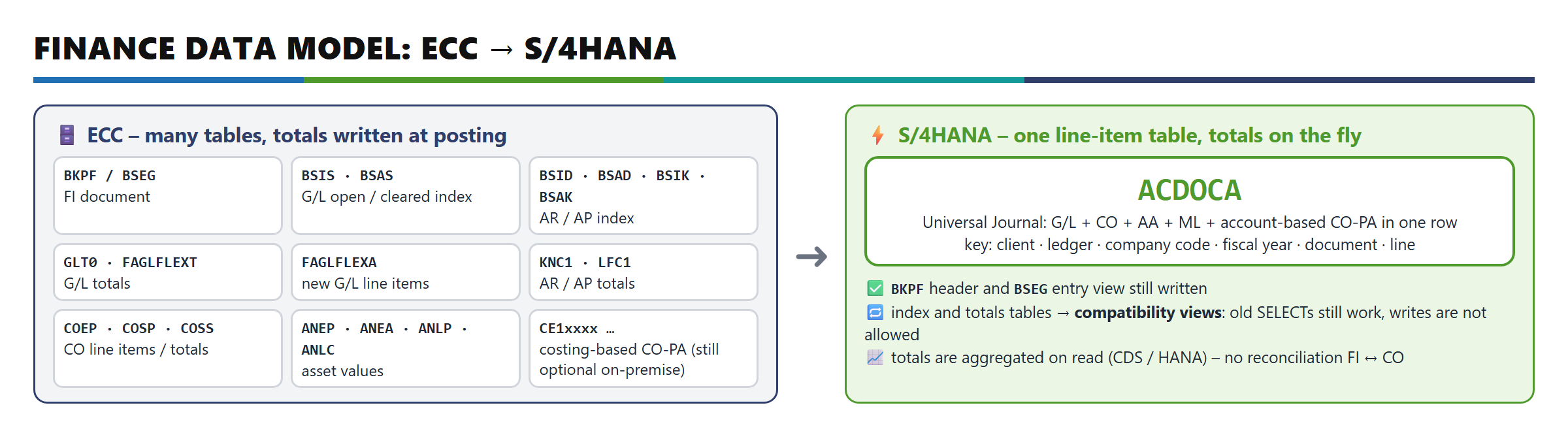
Area | ECC | S/4HANA |
|---|---|---|
Universal Journal | Separate FI, CO, new G/L, profit center, asset and ML documents; reconciliation ledger FI ↔ CO | One line item table ACDOCA for all; no reconciliation needed (page 02) |
Index and totals tables | BSIS / BSAS, BSID / BSAD, BSIK / BSAK, GLT0, FAGLFLEXT, KNC1 / LFC1, COSP / COSS | Removed as stored data; compatibility views of the same name keep old SELECTs running |
Cost elements | Separate master data (KA01 / KA06) | G/L accounts with a G/L account type and cost element category, maintained in FS00 |
Business partner | Customer / vendor master XD01 / XK01 | Mandatory BP with CVI; KNA1 / LFA1 still filled (SD ABAP › 01 Part 4) |
Asset Accounting | Classic or new AA | New Asset Accounting mandatory; values per ledger in ACDOCA in real time; old value tables (ANEP, ANEA, ANLP, ANLC) read through compatibility views |
Material ledger | Optional | Mandatory for inventory valuation (actual costing stays optional) |
Margin analysis (CO-PA) | Costing-based CO-PA common | Account-based CO-PA is the default, characteristics in ACDOCA; costing-based still possible on-premise / private cloud |
Credit management | FI-AR credit management (FD32, KNKK) | SAP Credit Management (FSCM, credit profile in BP, UKM tables) – SD ABAP › 03 Part 5 |
Cash management | Classic cash management (FF7A / FF7B), house bank accounts in FI12 | SAP S/4HANA Cash Management: Bank Account Management (Manage Bank Accounts), cash position and liquidity forecast from one exposure table |
Currencies | Up to 3 local currencies | Up to 10 currencies per line in ACDOCA (company code currency, global currency and 8 freely defined) plus the document currency – page 01 Part 5 |
Amount field length | Fixed | Extended amount fields can be activated (since 1809) – no hard-coded lengths in custom code |
- The full list is in the Simplification List for each release (SAP Help) and in the simplification item checks that run before a conversion.
- Classic G/L as a separate concept is gone: S/4HANA always uses ledgers, and parallel accounting uses the ledger approach (page 02).
Part 2 – What the simplifications mean for custom code
Old code does | In S/4HANA | Do instead |
|---|---|---|
SELECT on BSIS / BSID / BSIK … | Works (compatibility view), slower than direct access | Read ACDOCA / BSEG or I_OperationalAcctgDocItem; for G/L items I_JournalEntryItem |
SELECT on GLT0 / FAGLFLEXT totals | Works through views that aggregate ACDOCA | Aggregate I_JournalEntryItem in CDS (page 06 Part 8) |
INSERT / UPDATE on index or totals tables | Not allowed – the tables are views | Post through BAPI / API only |
Read COEP for actual costs | Actuals are in ACDOCA (COEP via compatibility view V_COEP) | ACDOCA with the CO object fields (OBJNR, cost center, order) |
Read CE1xxxx for account-based margins | Account-based CO-PA lives in ACDOCA | ACDOCA / I_JournalEntryItem with margin analysis characteristics |
Create customers / vendors with XD01 batch input | Redirected to BP | BP APIs, CVI-aware BAPIs |
Assume 18-character material, fixed amount length | MATNR 40, amounts may be extended | Use data elements, no offsets on amounts |
- Find affected code with ATC and the S/4HANA readiness check variant, or the Custom Code Migration app (ABAP on HANA › 02 Migration to S/4HANA).
- Performance rule: the compatibility views make old reports run, but they aggregate at read time – rewrite heavy reports on ACDOCA or released CDS views instead of relying on the views.
Part 3 – Editions: on-premise, private cloud, public cloud
S/4HANA (on-premise) | S/4HANA Cloud Private Edition | S/4HANA Cloud Public Edition | |
|---|---|---|---|
Operated by | Customer (own data center or hyperscaler) | SAP (RISE with SAP), customer has its own system | SAP, multi-tenant SaaS |
Code line | Full S/4HANA | Same as on-premise | Cloud code line with fixed best-practice scope |
Releases | Every two years (e.g. 2023, 2025) with feature packs | Same as on-premise | Two releases per year (e.g. 2508) plus regular updates |
Finance scope | Everything incl. costing-based CO-PA, EC-CS (compatibility scope), GGB0 / GGB1 | Same as on-premise | Account-based margin analysis only, group reporting, Manage Substitution and Validation Rules instead of GGB0 / GGB1 |
Extensibility | Key user, ABAP Cloud, classic ABAP (modifications possible) | Same, clean core expected | Key user + ABAP Cloud (developer extensibility) + side-by-side on BTP only |
Configuration | Full IMG | Full IMG | Self-service configuration within the scope |
- For a greenfield S/4HANA project the edition decides most finance options: in the public edition ledgers, currencies and processes follow SAP's preconfigured best practices; in private / on-premise the architect designs them freely (Part 5).
- ECC 6.0 mainstream maintenance ends at the end of 2027 (optional extended maintenance until the end of 2030) – the business driver behind most current finance projects.
Part 4 – Migration: system conversion and new implementation
4.1 System conversion (brownfield)
The existing ECC system is converted technically with SUM (Software Update Manager, often with DMO); afterwards the finance data is migrated into the new data model per client in a business downtime. The steps are in IMG "Migration to SAP S/4HANA Finance" and are run and monitored with the migration monitor FINS_MIG_STATUS.
Phase | What happens |
|---|---|
Preparation (ECC) | Readiness check and simplification item checks; CVI / business partner conversion done before; prerequisites for new Asset Accounting; period-end closed, ledgers reconciled, consistency checks; all postings stopped |
Customizing migration | Ledgers and currencies, new Asset Accounting charts and depreciation areas, material ledger activation, cost elements → G/L accounts, credit management, house bank accounts |
Data migration (FINS_MIG_STATUS) | Partitioning of ACDOCA if very large, enrichment of documents, migration of line items into ACDOCA, balances, Asset Accounting values, material ledger, house bank accounts to Bank Account Management – each step restartable after fixing errors |
Reconciliation | Built-in reconciliation steps compare old and new data (G/L, AA, ML) – differences must be explained before go-live |
After migration | Complete the migration, test closings and reports, switch on new functions (e.g. Fiori apps, Cash Management) |
- Developer tasks in a conversion: fix custom code findings (Part 2), adapt interfaces that read totals or post with batch input, rebuild forms and reports, support the data checks.
4.2 New implementation (greenfield) – S/4HANA Migration Cockpit
Data is loaded into the new system with the Migration Cockpit (Fiori app Migrate Your Data; LTMC was the old GUI transaction, LTMOM is the object modeler for own objects) from Excel / XML templates, staging tables or by direct transfer from SAP ERP. Finance objects (names vary slightly by release):
Migration object | Content | Remark |
|---|---|---|
G/L account, Bank, Exchange rate, Profit center, Cost center, Activity type | Master data and organisational objects | Load first |
Customer, Supplier | Business partners with FI and sales / purchasing data | Before open items |
FI – G/L account balance (and open / line item) | Balances of balance sheet and G/L open item accounts at the cut-over date | Posts against a migration offset account |
FI – Accounts receivable open item, FI – Accounts payable open item | Open customer / supplier items | Own offset accounts; reconciliation accounts are not posted directly |
Fixed asset (incl. balances and transactions) | Asset master with acquisition values and accumulated depreciation per area | Legacy data transfer of new Asset Accounting |
- Reconcile after the load: the migration offset accounts must net to zero, AR / AP / AA must match the legacy balances.
- Selective data transition (moving selected company codes or years with SAP-certified tools) is the third path between conversion and greenfield.
Part 5 – Architect decisions in a finance project
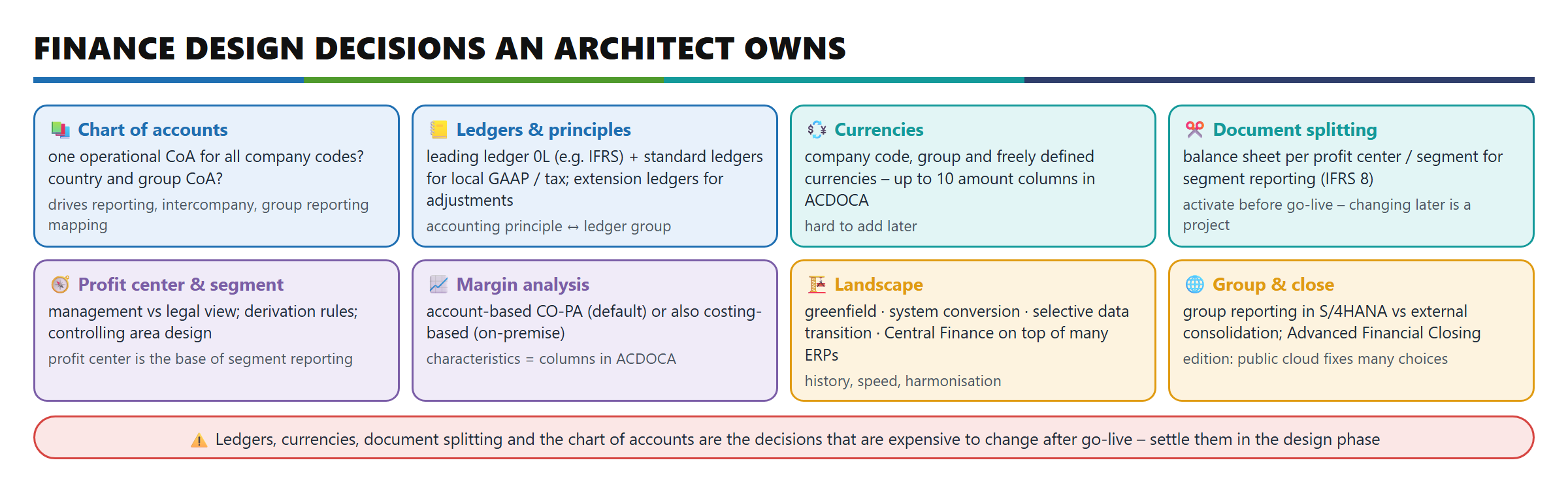
Decision | Options | What drives it |
|---|---|---|
Chart of accounts | One operational chart for all company codes (+ country chart for local requirements, + group chart for consolidation) | Harmonised reporting, group reporting mapping, local law |
Ledgers and accounting principles | Leading ledger 0L (usually group GAAP / IFRS) + standard ledgers per local GAAP or tax; extension ledgers for adjustments without full documents | Parallel accounting needs; each ledger can have its own fiscal year variant |
Currencies | Company code + group currency, more freely defined currencies | Group reporting, hard-currency countries; adding currencies later is a project |
Document splitting | On / off, splitting characteristics (profit center, segment, business area, custom) | Balance sheets per profit center / segment (IFRS 8) |
Profit center and segment | Profit center = management unit, segment derived from it; one or several controlling areas | Management reporting vs legal segment reporting |
Margin analysis | Account-based only, or combined with costing-based (on-premise / Private Edition) | Reconciliation with FI vs existing costing-based logic |
Asset Accounting | Depreciation areas per ledger, chart of depreciation per country | Local depreciation rules, IFRS 16 leases |
Edition and landscape | Public / private / on-premise; conversion, greenfield, selective data transition, Central Finance | Scope, custom code, history, speed (Part 6) |
- The decisions that are expensive to change after go-live: ledgers, currencies, document splitting, fiscal year variant and the chart of accounts. Developers feel them directly: every report and interface must select the right ledger (RLDNR) and currency columns.
- Mention trade-offs in interviews: more ledgers and currencies mean more data volume and more closing work; extension ledgers save space but hold only the adjustment delta.
Part 6 – Landscape choices: conversion, Central Finance, group reporting
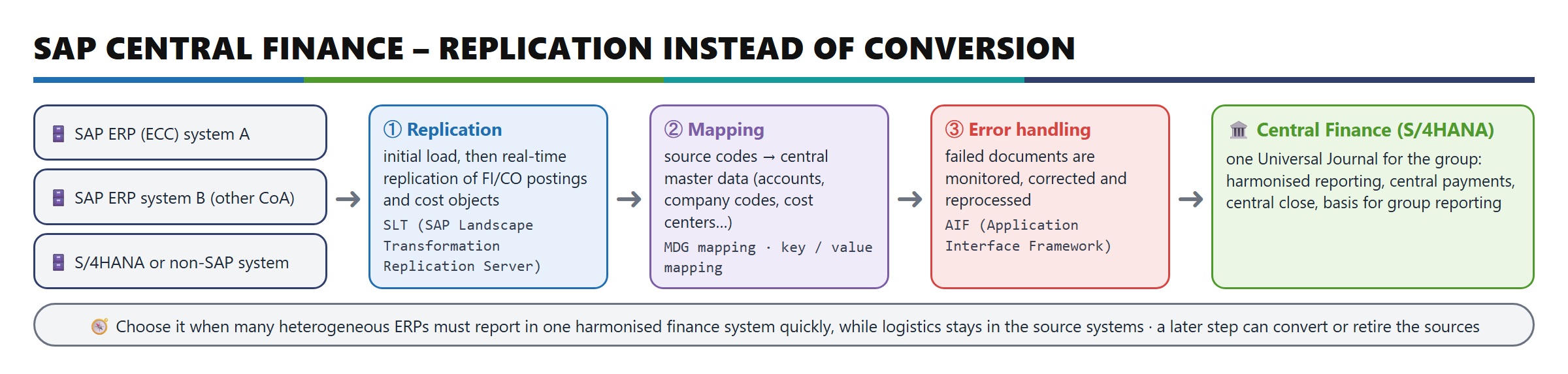
Option | Choose it when | Watch out |
|---|---|---|
System conversion | One ECC system, good processes, history must stay | Custom code and data quality come along; downtime for the finance migration |
New implementation | Many customizations to drop, process redesign, public cloud | Only open items and balances migrated; history in the old system or an archive |
Central Finance | Many heterogeneous ERPs (SAP and non-SAP) must report in one harmonised finance system quickly; logistics stays | Mapping effort (MDG), AIF error monitoring every day, two systems to run; often a step towards later conversion |
Group reporting (in S/4HANA) | Consolidation close to the operational data, ICMR integration | Group chart of accounts and data release process must be designed |
- Central Finance replicates with SLT after an initial load, maps with MDG and handles errors in AIF (page 05 Part 8); it can also centralise payments and the close.
- Group reporting reads ACDOCA directly and writes consolidation entries to ACDOCU; EC-CS, SEM-BCS and BPC consolidation are legacy (page 05 Part 6).
Part 7 – Clean core in finance
Level | Finance examples |
|---|---|
Key user (in-app) | Custom Fields (coding block, journal entry), Custom Logic in released BAdIs, Manage Substitution and Validation Rules, Custom Analytical Queries, flexible workflow for journal entry approval |
Developer (ABAP Cloud, on stack) | CDS views on I_JournalEntryItem / I_OperationalAcctgDocItem, EML on I_JournalEntryTP, released BAdIs in ADT, own RAP apps |
Side-by-side (SAP BTP) | SAP Advanced Financial Closing, SAP Cash Application, SAP Multi-Bank Connectivity, own apps calling the Journal Entry APIs, integration flows in SAP Cloud Integration |
Classic (on-premise / private only) | GGB0 / GGB1 user exits, BTEs, classic BAdIs, OXK3, direct SELECTs on ACDOCA / BSEG – allowed, but not upgrade-stable; document and minimise them |
- The principle: choose the highest level that solves the requirement; never modify SAP objects or write finance tables directly. Rules and ATC checks: Clean Core › 01 Clean Core.
- Finance is a good clean-core candidate because most needs are covered by rules (substitution, validation), released CDS views for reporting and released APIs for postings.
Part 8 – Roadmap: AI and closing innovations
Only facts SAP has announced or shipped; check the current release notes before quoting details.
Topic | What it is |
|---|---|
Joule | SAP's generative AI copilot in S/4HANA Cloud and other SAP applications. In 2025 SAP introduced Joule agents for finance, e.g. a Cash Management Agent for S/4HANA Cloud Public Edition (opening balances, forecast of the day's cash flows, bank accounts needing attention). |
SAP Cash Application | Cloud service on SAP BTP that uses machine learning to match incoming bank statement items to open receivables and proposes or performs the clearing; separate license |
SAP Advanced Financial Closing | SaaS on SAP BTP for planning, running and monitoring the close across several systems (formerly SAP S/4HANA Cloud for advanced financial closing); the cross-system cloud option next to the Financial Closing cockpit inside S/4HANA |
Group reporting and ICMR | SAP's strategic consolidation and intercompany reconciliation in S/4HANA – the replacement for EC-CS, SEM-BCS and BPC consolidation |
Universal Journal everywhere | New finance functions (event-based revenue recognition, accrual engine, extension ledgers) build on ACDOCA instead of separate subledgers |
Part 9 – Interview questions
Q1. Name the main simplifications of S/4HANA Finance.
Universal Journal ACDOCA; index and totals tables replaced by compatibility views; cost elements are G/L accounts; business partner mandatory; new Asset Accounting and material ledger mandatory; account-based CO-PA as default; SAP Credit Management and S/4HANA Cash Management; up to 10 currencies.
Q2. Your report reads BSIS and GLT0. Does it still work after the conversion?
Yes, SELECTs are redirected to compatibility views that read ACDOCA, but they aggregate at runtime and writes are not allowed. For performance and clean core rewrite it on ACDOCA or released CDS views (I_JournalEntryItem, I_OperationalAcctgDocItem).
Q3. Why are cost elements G/L accounts now?
Because FI and CO share one journal: primary and secondary cost elements are G/L accounts with a cost element category, maintained in FS00. There is no separate cost element master and no FI–CO reconciliation ledger.
Q4. What are the steps of the finance data migration in a system conversion?
Preparation in ECC (checks, CVI, AA prerequisites, period closed and reconciled), customizing migration (ledgers, currencies, AA, ML), data migration in FINS_MIG_STATUS (enrichment, line items into ACDOCA, balances, AA, ML, house banks), reconciliation, then completing the migration – per client during downtime.
Q5. Which Migration Cockpit objects do you use for finance in a greenfield project?
Master data (G/L account, bank, cost center, profit center, customer, supplier), FI – G/L account balance, FI – Accounts receivable / payable open item, and Fixed asset incl. balances. Each posts against migration offset accounts that must net to zero.
Q6. What differs for finance between public and private cloud?
Public: SaaS, fixed best-practice scope, two releases a year, account-based margin analysis only, key-user and ABAP Cloud extensibility, Fiori rules instead of GGB0 / GGB1. Private: same code line as on-premise run by SAP, full configuration, classic extensibility possible but clean core expected.
Q7. How do you design ledgers for a company reporting IFRS and local GAAP?
Leading ledger 0L for the group principle (IFRS), a standard ledger per local GAAP with its own accounting principle, and extension ledgers for adjustment-only postings. Asset depreciation areas are assigned to the ledgers; reports and interfaces must filter on the ledger.
Q8. When would you recommend Central Finance instead of a conversion?
When many heterogeneous ERPs (SAP and non-SAP) need one harmonised finance view quickly, while the logistics systems cannot be replaced yet. Cost: mapping with MDG, daily AIF monitoring and an extra system. With one clean ECC a conversion is simpler.
Q9. Why must document splitting be decided before go-live?
It writes profit center / segment to every balance sheet line from the first posting; switching it on later requires a separate project to rebuild open items and balances. It is needed for balance sheets per segment or profit center.
Q10. How do you keep a finance implementation clean core?
Use rules (Manage Substitution and Validation Rules), Custom Fields for the coding block, released BAdIs, released CDS views for reports, Journal Entry APIs or I_JournalEntryTP for postings, and BTP services (AFC, Cash Application, MBC) side-by-side; classic exits only on-premise and documented.
Q11. Which consolidation solution does SAP recommend and what happens to EC-CS?
SAP S/4HANA Finance for group reporting, which reads ACDOCA and writes ACDOCU, with ICMR for intercompany matching. EC-CS is only in the time-limited compatibility scope; SEM-BCS and BPC consolidation are legacy too.
Q12. What AI capabilities exist for finance today?
SAP Cash Application matches incoming payments to open items with machine learning; Joule is the generative AI copilot, and SAP announced Joule agents for finance such as the Cash Management Agent for S/4HANA Cloud Public Edition. Always check the current release information before naming details.
🏠 Start Here · ◀ 06 · Development · 08 · Interview Questions ▶ · Sections: CORE ABAP | OOPS ABAP | ABAP on HANA | Clean Core | RAP | ABAP Points | SAP Fiori | SAPUI5 | Mobile Development (MDK) | BTP Foundations | BTP Development | CAP | SAP Build | ABAP on BTP | Integration Suite | SAP Business AI | SAP BASIS | Security | SAP SDLC
Functional: FICO ABAP | TRM ABAP | VIM | SAP BIS | SD ABAP | MM ABAP | PP ABAP | QM ABAP | PM ABAP | PS ABAP | EWM | TM ABAP | GTM ABAP | EHS ABAP | HR ABAP | BW | SAP Datasphere | SAP Business Data Cloud | SAP MDG | SAP Analytics Cloud | SAP Ariba | SAP CX | SAP IBP