What an ABAP developer builds in FI/CO: rules and code that run during posting (validations, substitutions, Business Transaction Events, BAdIs), programs and interfaces that post journal entries (BAPI_ACC_DOCUMENT_POST, SOAP APIs, RAP), payment files with DMEE / DMEEX, custom fields in the coding block, and reports on ACDOCA with CDS views. General techniques: CORE ABAP › 10 Enhancements and 07 Interfaces; RAP and CDS: ABAP on HANA › 05 and 07. Where the postings come from: page 05.
Part 1 – Where to enhance FI/CO: choosing the technique
Requirement | Technique | Where |
|---|---|---|
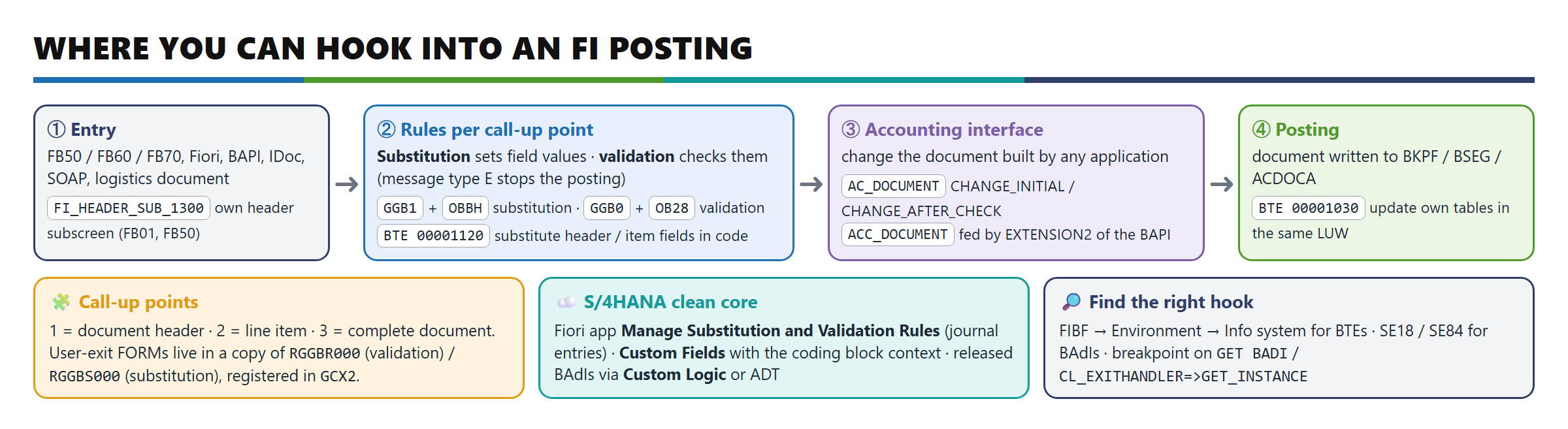
Default or derive a field (assignment, text, profit center) by rule | Substitution GGB1 / OBBH; S/4HANA Fiori rules | Part 2 |
Block a posting that breaks a business rule | Validation GGB0 / OB28 | Part 2 |
Change header / item fields in code during posting | BTE 00001120 (process) | Part 3 |
Write own tables when a document is posted | BTE 00001030 (publish & subscribe) | Part 3 |
Change the document built by any application (MM, SD, BAPI) | BAdI AC_DOCUMENT | Part 4 |
Pass extra fields to BAPI_ACC_DOCUMENT_POST | EXTENSION2 + BAdI ACC_DOCUMENT | Part 4, 5 |
Post journal entries from a program or interface | BAPI_ACC_DOCUMENT_POST, SOAP API, I_JournalEntryTP | Part 5, 8 |
Bank-specific payment file | DMEEX format tree, ECC: DMEE (+ exit function module) | Part 6 |
New account assignment field in all postings | Coding block OXK3 / Custom Fields | Part 7 |
Report on journal entries | CDS view on I_JournalEntryItem | Part 8 |
Part 2 – Validations and substitutions
Validations and substitutions are rules maintained in customizing, so many requirements need no ABAP at all. A rule has a prerequisite (Boolean condition, e.g. company code = 1010 and account between 400000 and 499999) and then either a check (validation: if the check fails, send a message – type E stops the posting) or a replacement (substitution: constant value, field value or user exit).
Object | Maintain | Activate per company code | Table of the rule |
|---|---|---|---|
Validation | GGB0 | OB28 | GB93 (header), GB931 (steps) |
Substitution | GGB1 | OBBH | GB92 (header), GB922 (steps) |
- Call-up points in FI: 1 document header (BKPF fields), 2 line item (BSEG fields), 3 complete document (all lines, e.g. "the document must contain a tax line"). Other applications (CO, AA, PCA, special ledger) have their own call-up points in the same tools.
- User exits for complex logic: copy RGGBR000 (validation) / RGGBS000 (substitution) to a Z program, add FORM routines, list them in FORM GET_EXIT_TITLES and register the program for application area GBLR / GBLS in GCX2 (table T80D). The rule then calls the exit by name (e.g. U100).
- Fields that may be substituted are controlled by SAP (table GB01, flag "excluded"); changing it is a modification – prefer a BTE or BAdI when a field is blocked.
- Rules are client-dependent customizing and are transported; after transporting user-exit programs, regenerate with report RGUGBR00 if the rule does not find the new exit.
|
2.1 S/4HANA: Manage Substitution and Validation Rules
- S/4HANA Fiori app Manage Substitution and Validation Rules (launchpad title "Manage Substitution / Validation Rules - Journal Entries"): key users define rules for journal entries in a web UI; values are written to both the entry view (BSEG) and ACDOCA. Rules can read lookup tables instead of hard-coded value lists.
- It is the way to do substitution and validation in S/4HANA Cloud Public Edition (no GGB0 / GGB1, no user exits); on-premise and private cloud GGB0 / GGB1 still work. Limits exist by design (e.g. in the public edition the G/L account and amounts cannot be substituted).
Part 3 – Business Transaction Events (BTE)
BTEs are FI's own enhancement technique (also called Open FI): at fixed events SAP calls function modules that customers register in transaction FIBF. Each event has a sample function module with the exact interface – copy it to a Z function module and add your logic.
Type | Sample FM | Behaviour | Example events |
|---|---|---|---|
Publish & Subscribe (P/S) | SAMPLE_INTERFACE_nnnnnnnn | SAP informs; any number of active modules; they may not change standard data – they read it and update own tables | 00001030 Post document: posting of standard data |
Process | SAMPLE_PROCESS_nnnnnnnn | Returns data that replaces standard logic; only one active module per event (per country / application) | 00001120 Document posting: field substitution header / items |
- Setup in FIBF: Settings → Products → … of a customer (create a Z product, mark it active) → P/S modules or Process modules → … of a customer (event + product + Z function module).
- Finding events: FIBF → Environment → Info system (P/S or processes) lists all events with their sample modules; or set a breakpoint in function module BF_FUNCTIONS_FIND, which reads the active modules of an event.
- BTE 00001120 offers the document as T_BKPF / T_BSEG and the changeable fields as T_BKPFSUB / T_BSEGSUB (same line order as T_BSEG): change the SUB tables, not BKPF / BSEG. Only fields contained in the substitution structures can be changed.
- BTE 00001030 runs inside the posting – use it to update own tables in the same LUW, not to change the document and not for a COMMIT, a dialog or an RFC call.
- Event numbers and their interfaces differ by area (posting, payment run, dunning, correspondence): always confirm the event in the info system of your release before building on it.
Part 4 – BAdIs in FI/CO
BAdI | Area | Use |
|---|---|---|
AC_DOCUMENT | Accounting interface | Methods CHANGE_INITIAL (before the components are called) and CHANGE_AFTER_CHECK (after enrichment and checks) – change allowed fields of the document of any application (structures ACC_DOCUMENT_SUBST / ACCIT_SUB) |
ACC_DOCUMENT | BAPI_ACC_DOCUMENT_POST | Method CHANGE: move EXTENSION2 data into the document (only called when EXTENSION2 is filled) |
FI_HEADER_SUB_1300 | FB01, FB50, FBD1, FBD5 | Own subscreen in the document header (SAPMF05A screen 100); sample implementation FI_HEADER_SUB_1300IM |
BADI_FDCB_SUBBAS01 – 06 | FB60 / FB70 / MIRO header | Own subscreens in the basic data tab of the Enjoy invoice screens |
FAGL_DERIVE_SEGMENT | New G/L | Derive the segment when the profit center does not determine it |
FI_ITEMS_CH_DATA | FBL1N / FBL3N / FBL5N | Fill custom columns in the line item lists |
FAGL_ITEMS_CH_DATA | FAGLL03 / FAGLL03H | Fill custom columns in the G/L line item display |
- Implement in SE19 (classic and new BAdIs) after checking the definition and sample code in SE18; find BAdIs with a breakpoint on
CL_EXITHANDLER=>GET_INSTANCE(classic) or the statementGET BADI(new). Details: CORE ABAP › 10 Enhancements. - Older FI customer exits (CMOD / SMOD) still exist, e.g. enhancement FEB00001 for the electronic bank statement.
- S/4HANA clean core: released BAdIs for finance are offered in the Custom Logic app (key user) and in ADT (developer extensibility); check the release state of a BAdI before using it in ABAP Cloud.
Part 5 – BAPIs: posting journal entries from ABAP
BAPI / FM | Purpose |
|---|---|
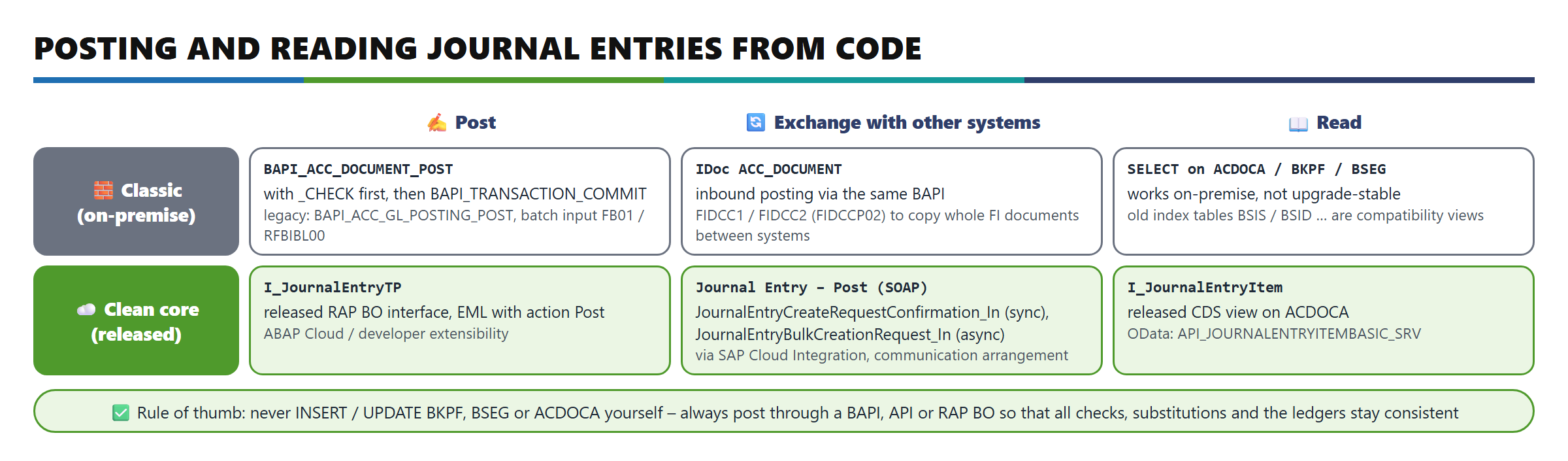
BAPI_ACC_DOCUMENT_POST | Post a G/L, customer, supplier or tax document (the standard interface for uploads and interfaces) |
BAPI_ACC_DOCUMENT_CHECK | Same parameters, checks only – call it first and show the errors |
BAPI_ACC_DOCUMENT_REV_POST | Reverse a document posted with BAPI_ACC_DOCUMENT_POST |
BAPI_ACC_GL_POSTING_POST – legacy | Older G/L-only BAPI; use BAPI_ACC_DOCUMENT_POST |
BAPI_ACC_ACTIVITY_ALLOC_POST / BAPI_ACC_MANUAL_ALLOC_POST | CO activity allocation / manual cost reposting |
BAPI_COSTCENTER_CREATEMULTIPLE, BAPI_INTERNALORDER_CREATE, BAPI_FIXEDASSET_CREATE1 | CO and asset master data |
POSTING_INTERFACE_START / _CLEARING / _END | Posting with clearing (FB05 logic) – BAPI_ACC_DOCUMENT_POST cannot clear open items |
BAPI_TRANSACTION_COMMIT / _ROLLBACK | End the LUW – the accounting BAPIs never commit |
5.1 Parameters of BAPI_ACC_DOCUMENT_POST
Parameter | Structure | Content |
|---|---|---|
DOCUMENTHEADER | BAPIACHE09 | BUS_ACT = 'RFBU', USERNAME, COMP_CODE, DOC_DATE, PSTNG_DATE, DOC_TYPE, REF_DOC_NO, HEADER_TXT |
ACCOUNTGL | BAPIACGL09 | G/L lines: ITEMNO_ACC, GL_ACCOUNT, ITEM_TEXT, COSTCENTER, PROFIT_CTR, ORDERID, WBS_ELEMENT, TAX_CODE |
ACCOUNTRECEIVABLE / ACCOUNTPAYABLE | BAPIACAR09 / BAPIACAP09 | Customer / supplier lines: CUSTOMER / VENDOR_NO, PMNTTRMS, BLINE_DATE |
ACCOUNTTAX | BAPIACTX09 | Tax lines: TAX_CODE, ACCT_KEY, COND_KEY |
CURRENCYAMOUNT | BAPIACCR09 | One row per line and currency type: ITEMNO_ACC, CURR_TYPE (00 = document currency), CURRENCY, AMT_DOCCUR (sign = debit / credit) |
EXTENSION2 | BAPIPAREX | Extra fields, moved into the document by BAdI ACC_DOCUMENT |
RETURN | BAPIRET2 | Messages; on success the BAPI also exports OBJ_TYPE / OBJ_KEY / OBJ_SYS |
- OBJ_KEY = document number (10) + company code (4) + fiscal year (4); OBJ_TYPE is BKPFF. They are also the AWTYP / AWKEY of the posted document (page 05 Part 1).
- Amounts carry the sign (positive = debit, negative = credit); the item numbers in CURRENCYAMOUNT must match ITEMNO_ACC of the G/L, customer, supplier or tax line. Account and cost center numbers in internal format (leading zeros).
- The BAPI runs the full posting logic: field status, substitution, validation, document splitting, all ledgers. Custom coding block fields can be passed directly in the BAPI (Part 7).
|
- Customer or supplier line: add a row to ACCOUNTRECEIVABLE (CUSTOMER) or ACCOUNTPAYABLE (VENDOR_NO) with its own ITEMNO_ACC and a matching CURRENCYAMOUNT row – e.g. a supplier invoice without PO: expense line in ACCOUNTGL, supplier line in ACCOUNTPAYABLE, tax line in ACCOUNTTAX.
- Legacy – batch input: recording FB01 / F-02 in SHDB or the batch input program RFBIBL00 for FI documents. Avoid for new developments: screen-dependent, slow, and not available in ABAP Cloud.
- Clean core: in ABAP Cloud the BAPI is not released – post with the RAP business object interface I_JournalEntryTP (EML, Part 8) or, from outside, the Journal Entry SOAP API.
Part 6 – Payment Medium Workbench, DMEE and DMEEX
The Payment Medium Workbench (PMW) creates payment files from the payment run (F110). The layout of the file is not coded in a program but modelled as a format tree: nodes for each XML element or record, each mapped to a field of the payment structures (FPAYH header, FPAYHX, FPAYP items), a constant or an exit function module.
Object | Where | Purpose |
|---|---|---|
Payment medium format | OBPM1 | PMW format (e.g. SEPA_CT, an ISO 20022 pain.001 variant) |
Format assigned to payment method | FBZP (payment methods per country / company code) | Which format the payment run uses |
Format tree | DMEE (classic) / DMEEX (extended, S/4HANA) | Layout of the file: elements, mapping, conditions, sorting, XSD validation (DMEEX) |
Exit function module | Copy of DMEE_EXIT_TEMPLATE | Logic that a mapping cannot express (e.g. a bank-specific reference) |
- DMEEX is the successor of DMEE in S/4HANA: SAP delivers new format trees only for DMEEX, it adds features such as XSD validation of the generated file; DMEE trees keep working after a conversion and are converted when opened in DMEEX. In S/4HANA Cloud Public Edition payment formats are adapted in a Fiori app instead of the DMEEX transaction.
- The legacy
RFFO…payment programs (classic payment medium programs) are replaced by PMW formats; SAP delivers ISO 20022 formats for most countries – adapt a copy instead of building from scratch. - Testing: run F110 with a test company code, create the file and validate it against the bank's XSD and test portal; the file goes to the bank through MBC or host-to-host (page 05 Part 8).
Part 7 – Custom fields: coding block extension and key-user extensibility
The coding block is the set of account assignment fields that every FI, CO and MM posting carries (cost center, order, WBS element, profit center …). A custom account assignment (e.g. ZZ_CHANNEL) must be added to the coding block so that it appears on entry screens, in the BAPIs, in BSEG and in ACDOCA.
Option | How | Where it works |
|---|---|---|
Classic coding block extension | OXK3: adds the field to include CI_COBL – generated into COBL, BSEG, ACDOCA and the accounting BAPIs; place it in the field status groups (OBC4) | On-premise and private cloud (SAP GUI transactions of FI, CO, MM) |
Key-user Custom Fields | Fiori Custom Fields app, business context Accounting: Coding Block (FINS_CODING_BLOCK); published to Fiori apps, APIs and CDS views | S/4HANA all editions (the only option in the public edition) |
Bridge | Transaction SCFD_EUI makes a classic CI_COBL field usable in the key-user apps (Custom Logic, analytics) | On-premise / private |
- Coding block fields are limited in type and number (CHAR / NUMC, a limited total length) – an architect decision, because removing a field later is a separate, careful procedure.
- Fill the field: entry by the user, derivation by substitution (Part 2) or the key-user Custom Logic of the context, and pass it in BAPI_ACC_DOCUMENT_POST (it appears in the BAPI structures after generation).
- Other finance extension contexts exist (e.g. journal entry header, customer / supplier master); for reporting, custom fields are added to the released CDS views automatically when published.
Part 8 – Released APIs, CDS views and RAP for finance
API / object | Type | Use |
|---|---|---|
Journal Entry – Post: JournalEntryCreateRequestConfirmation_In (synchronous), JournalEntryBulkCreationRequest_In (asynchronous) | SOAP | Post journal entries from external systems via SAP Cloud Integration; enabled in a communication arrangement; field extensibility supported |
Journal Entry – Clearing: JournalEntryBulkClearingRequest_In (asynchronous) | SOAP | Clear open AR / AP items from external systems; result in the AIF monitor or the confirmation message |
API_JOURNALENTRYITEMBASIC_SRV (entity A_JournalEntryItemBasic) | OData V2 | Read journal entry items |
I_JournalEntryTP | RAP business object interface | Post (action Post), reverse and change journal entries with EML in ABAP Cloud |
I_JournalEntryItem / I_JournalEntry | Released CDS views | Read ACDOCA items / BKPF header in ABAP Cloud and in own CDS views |
I_OperationalAcctgDocItem | Released CDS view | Open and cleared customer / supplier items (replaces reads of BSID / BSAD / BSIK / BSAK) |
All released APIs with their documentation and sandbox are on the SAP Business Accelerator Hub (api.sap.com); released CDS views and BO interfaces are listed in ADT under Released Objects. RAP and EML: RAP › 08 · EML.
8.1 CDS example: period balances from I_JournalEntryItem
|
- Built on a released view, so it is upgrade-stable and allowed in ABAP Cloud; HANA aggregates millions of ACDOCA lines at read time – no totals table needed.
- Expose it as an analytical query or a Fiori elements app (ABAP on HANA › 05 CDS Views) or read it in ABAP:
|
Part 9 – Typical RICEFW objects in FI/CO
Type | Typical object | Modern way |
|---|---|---|
Report | G/L balance / trial balance by custom attributes; supplier ageing; cost center report | CDS view on I_JournalEntryItem / I_OperationalAcctgDocItem + analytical query or Fiori elements |
Interface | Payment file, bank statement upload, journal entries from a sub-system (payroll provider, billing system), exchange rates | DMEEX + MBC; camt.053; Journal Entry SOAP API or BAPI; SAP Cloud Integration |
Conversion | G/L balances, open items AR / AP, fixed assets with values | S/4HANA Migration Cockpit objects (page 07) |
Enhancement | Substitution of assignment / profit center, validation of postings, segment derivation, custom coding block field | Manage Substitution and Validation Rules, Custom Fields, released BAdIs; classic GGB0 / GGB1, BTE, AC_DOCUMENT on-premise |
Form | Payment advice, dunning letter, customer statement, check printing | Adobe forms via S/4HANA output management (CORE ABAP › 11 Forms) |
Workflow | Approval of parked documents (FV50 / FV60 park, FBV0 post); supplier invoice approval | Flexible workflow, e.g. Verify General Journal Entries (CORE ABAP › 12 Workflow) |
- Bank statement upload enhancements: search strings and posting rules first (customizing); code only for what they cannot do – customer exit FEB00001 or BAdIs of the electronic bank statement.
- GL upload program pattern: read the file → map and validate → BAPI_ACC_DOCUMENT_CHECK for every document → show an ALV with the errors → post with BAPI_ACC_DOCUMENT_POST + COMMIT per document → application log with the document numbers.
Part 10 – Interview questions
Q1. What is the difference between a validation and a substitution?
A validation checks a condition and sends a message (type E blocks the posting); a substitution replaces field values. Both have a prerequisite, are maintained in GGB0 / GGB1, activated per company code in OB28 / OBBH and work at call-up points 1 header, 2 item, 3 complete document.
Q2. How do you use ABAP in a validation or substitution?
Copy RGGBR000 / RGGBS000 to a Z program, add the FORM routine and its entry in GET_EXIT_TITLES, register the program in GCX2, then reference the exit name in the rule. In S/4HANA Cloud use the Fiori app Manage Substitution and Validation Rules instead.
Q3. What is a BTE and what is the difference between P/S and process interfaces?
Business Transaction Events are FI enhancement points managed in FIBF. Publish & subscribe modules only receive data (several can be active, e.g. 00001030 to update own tables); a process module returns data that replaces standard logic, only one per event (e.g. 00001120 field substitution).
Q4. How do you activate a BTE?
Copy the sample module (SAMPLE_INTERFACE_ / SAMPLE_PROCESS_ + event number) to a Z function module, create an active customer product in FIBF and assign event, product and function module under P/S or process modules of a customer.
Q5. Which BAdI changes accounting documents created by MM or SD?
AC_DOCUMENT in the accounting interface: CHANGE_INITIAL before the components are called, CHANGE_AFTER_CHECK after enrichment – only the fields of the substitution structures can be changed.
Q6. Walk me through BAPI_ACC_DOCUMENT_POST.
DOCUMENTHEADER with BUS_ACT RFBU, company code, dates, document type; ACCOUNTGL / ACCOUNTRECEIVABLE / ACCOUNTPAYABLE / ACCOUNTTAX lines with ITEMNO_ACC; CURRENCYAMOUNT with signed amounts per item; check with BAPI_ACC_DOCUMENT_CHECK, post, check RETURN, BAPI_TRANSACTION_COMMIT. OBJ_KEY returns document number + company code + year.
Q7. How do you pass a field that is not in the BAPI structures?
Fill EXTENSION2 (BAPIPAREX) and implement BAdI ACC_DOCUMENT, method CHANGE, which moves the values into the accounting document; coding block fields from CI_COBL are in the BAPI structures directly.
Q8. Can BAPI_ACC_DOCUMENT_POST clear open items?
No. Clearing needs the posting interface POSTING_INTERFACE_START / _CLEARING / _END (FB05 logic) or, from external systems, the SOAP API Journal Entry – Clearing (JournalEntryBulkClearingRequest_In, asynchronous).
Q9. What are DMEE and DMEEX?
Format tree tools of the Payment Medium Workbench that model payment files (e.g. pain.001) without programming; the format is defined in OBPM1 and assigned to payment methods in FBZP. DMEEX is the S/4HANA successor with new features such as XSD validation; exits are function modules based on DMEE_EXIT_TEMPLATE.
Q10. How do you add a custom account assignment field?
On-premise: coding block extension in OXK3 (CI_COBL) – it is generated into BSEG, ACDOCA and the BAPIs; in S/4HANA preferably the Custom Fields app with business context Accounting: Coding Block, which also works in the public cloud and publishes the field to Fiori, APIs and CDS views.
Q11. How do you post a journal entry in a clean-core way?
Inside S/4HANA with ABAP Cloud: EML on the released BO interface I_JournalEntryTP (action Post). From outside: the Journal Entry SOAP API (JournalEntryCreateRequestConfirmation_In or the asynchronous bulk interface) through SAP Cloud Integration. Reading: I_JournalEntryItem or API_JOURNALENTRYITEMBASIC_SRV.
Q12. You need a custom trial balance by a custom field. How do you build it in S/4HANA?
Publish the field in the coding block context, build a CDS view entity on I_JournalEntryItem that aggregates AmountInCompanyCodeCurrency by company code, period, G/L account and the custom field for the leading ledger, add a DCL, and expose it as an analytical query or Fiori elements list – no Z tables, no totals.
🏠 Start Here · ◀ 05 · Integration & Close · 07 · S/4HANA & Architect ▶ · Sections: CORE ABAP | OOPS ABAP | ABAP on HANA | Clean Core | RAP | ABAP Points | SAP Fiori | SAPUI5 | Mobile Development (MDK) | BTP Foundations | BTP Development | CAP | SAP Build | ABAP on BTP | Integration Suite | SAP Business AI | SAP BASIS | Security | SAP SDLC
Functional: FICO ABAP | TRM ABAP | VIM | SAP BIS | SD ABAP | MM ABAP | PP ABAP | QM ABAP | PM ABAP | PS ABAP | EWM | TM ABAP | GTM ABAP | EHS ABAP | HR ABAP | BW | SAP Datasphere | SAP Business Data Cloud | SAP MDG | SAP Analytics Cloud | SAP Ariba | SAP CX | SAP IBP