SAP Global Trade Management (GTM) supports companies that buy and sell the same goods: commodity traders, trading divisions, wholesalers, importers and exporters. Its central object is the trading contract, one document that holds the sales side (customer, sales price) and the purchase side (supplier, purchase price) of a deal. When the contract is released, GTM creates the standard sales order and purchase order; the Trading Execution Workbench runs deliveries, goods movements and invoices; position management links open purchases and sales; trading expenses (freight, insurance, commissions …) are planned, accrued and settled per deal. GTM is part of the SAP S/4HANA core and reuses SD, MM, LE and FI. This page explains the business idea, the naming confusion with GTS, the components, the architecture, the organization units and the integration map. Master data and tables: page 02; processes and customizing: page 03.
Part 1 – What GTM does: users, trading model and key terms
A wholesaler usually buys stock in advance and sells it later in smaller quantities – purchasing and sales are loosely coupled. A trading company typically buys only after a customer has ordered: the sales volume and the purchase volume are linked 1:1 (sales-driven, back-to-back business). Reasons: volatile prices (e.g. copper), no own warehouse, exact quantities, goods so specific that they are hard to resell. Margins are thin and volumes high, so every deal needs a profit simulation before it is released.
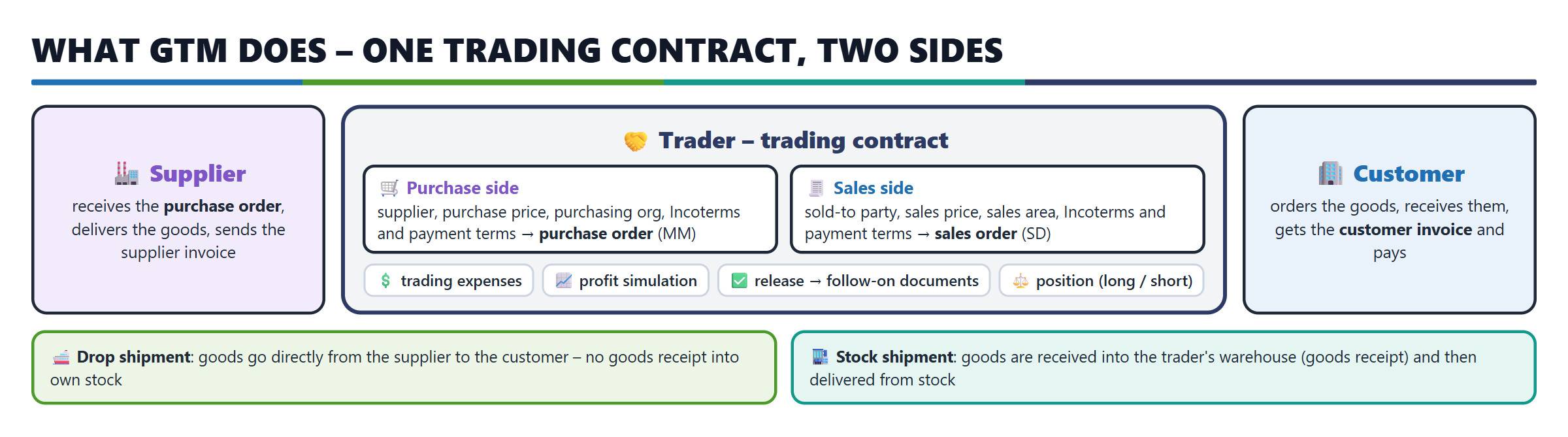
Who uses GTM | Typical business |
|---|---|
Commodity traders | Agricultural products, metals, raw materials, energy – global markets, volatile prices, goods mostly shipped directly to the customer |
Trading divisions of manufacturers | Sell-and-buy processes next to own production, e.g. a steel producer reselling bought-in material |
Wholesalers, importers / exporters | Customer-specific purchasing, direct delivery, pre-purchased stock sold as demand arrives |
Because the process always starts from a customer requirement and non-traders run sell-and-buy processes too, SAP positions GTM as a cross-industry solution.
1.1 The trading process in six steps
- 1. Capture – the trader enters the sales data and, if known, the purchase data in a trading contract, including expected third-party expenses (freight, insurance, commission).
- 2. Simulate and release – profit simulation checks the margin; compliance and credit checks run; the trader releases the contract.
- 3. Follow-on documents – on release the system generates the sales order and the purchase order automatically.
- 4. Logistics – shipping, transport and customs are coordinated; goods go directly from supplier to customer (drop shipment) or through the trader's warehouse (stock shipment).
- 5. Invoices – supplier invoice verification and customer billing.
- 6. Payments and expense settlement – incoming and outgoing payments, settlement of the trading expenses; profitability per deal.
1.2 Key terms
Term | Meaning |
|---|---|
Trading contract (TC) | The central GTM document that integrates the sales and purchase data of a deal; created with WB21, changed with WB22, displayed with WB23 |
Two-side contract | Sales and purchase side in one document – the supplier is known; the link is automatic (back-to-back) |
Single-side contract | Sales-side only or purchase-side only; linked later to the other side by association |
Back-to-back | Every sale is covered by a matching purchase (1:1); the opposite of stock-based trading |
Drop shipment / stock shipment | Delivery directly from the supplier to the customer / via the trader's warehouse with goods receipt; controlled by the item category |
Release | Status change that allows the creation of follow-on documents; changes after release are passed on to the sales order and purchase order |
Trading execution | The logistics and billing steps after release, run in the Trading Execution Workbench (TEW), transaction WTEW |
Position | Open purchase quantity vs open sales quantity: long = more bought than sold, short = more sold than bought |
Portfolio / association | Portfolios group contract items by key fields (material, plant, customer …); association links sales and purchase items of the same portfolio |
Trading expenses | Costs of a deal (freight, loading, storage, insurance, customs duty, commissions) – planned in the contract, accrued and settled |
Profit simulation | Planned revenue minus planned costs and expenses of a contract before release |
Part 2 – GTM vs GTS vs International Trade
Three SAP names contain "global trade" or "trade" and are mixed up in interviews. Only GTM is about the commercial deal; GTS and International Trade are about compliance and customs.
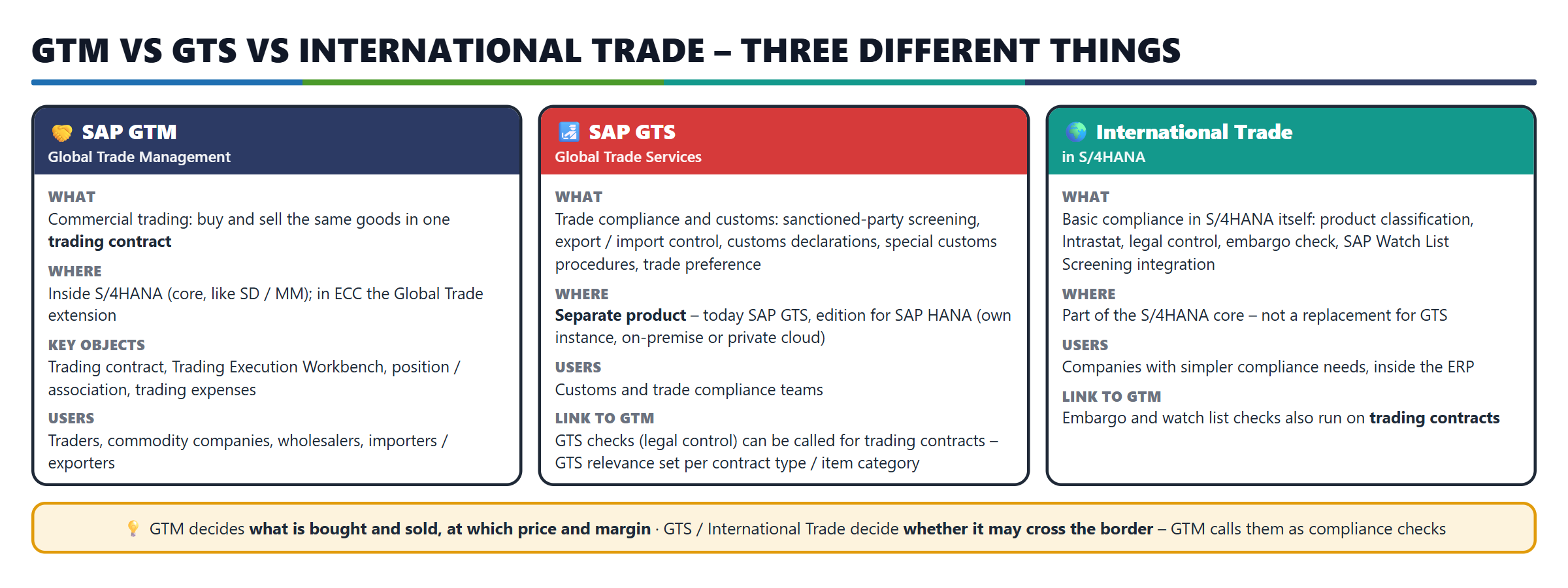
Aspect | SAP GTM | SAP GTS | International Trade (S/4HANA) |
|---|---|---|---|
Full name | Global Trade Management | Global Trade Services | SAP S/4HANA for international trade |
Purpose | Trading contracts, follow-on documents, expenses, positions, profit per deal | Sanctioned-party screening, export / import management, customs declarations, special customs procedures, trade preference | Product classification (commodity codes, customs tariff numbers), Intrastat, legal control, embargo check, SAP Watch List Screening integration |
Deployment | Part of the S/4HANA core (ECC: Global Trade enterprise extension) | Separate product: SAP GTS, edition for SAP HANA – own instance or separate client, on-premise or private cloud | Part of the S/4HANA core; not a replacement for GTS |
Relation to GTM | – | Legal control checks can be called for trading contracts (GTS relevance per contract type / item category) | Embargo and watch list checks are supported for trading contracts |
- Memory hook: GTM decides what is bought and sold and at which margin; GTS / International Trade decide whether the goods may cross the border.
- GTS releases: SAP GTS 11.0 left mainstream maintenance at the end of 2025; the successor is SAP GTS, edition for SAP HANA (runs on SAP S/4HANA Foundation).
- Without SAP Watch List Screening or GTS, S/4HANA International Trade does no sanctioned-party list check. Customs warehouses and special customs procedures always need GTS.
Part 3 – Components and history
SAP started GTM in 1997 around the trading contract and extended it step by step. In S/4HANA the application component is LO-GT (Global Trade) with four core components:
Component | What it does | Component ID / entry |
|---|---|---|
Trading contract | Single entry point for the deal: sales and purchase data, pricing, partners, expenses, profit simulation, checks, release and follow-on document creation | LO-GT-TC · WB21 / WB22 / WB23 |
Trading Execution Workbench (TEW) | Execution engine ("user cockpit") for the logistics steps on the follow-on documents: inbound delivery, goods receipt, invoice verification, outbound delivery, goods issue, billing, stock transfer, association – online or in background | LO-GT-TEW · WTEW |
Position management | Portfolio management, association management and the long / short list of open purchase and sales quantities | LO-GT-PM |
Trading expenses | Planned expenses (in pricing), planned expenses with settlement (accrued, settled later) and unplanned expenses; postings to G/L, AP and AR | Expense management in the contract and the TEW |
- Profit simulation is a function of the trading contract: quantities, prices and expense conditions give the planned profit before release.
- Commodity pricing (CPE / CPF conditions) and commodity risk are not GTM itself but SAP Commodity Management, which can be used in GTM documents (page 04, page 06).
- Processes and the TEW step by step: page 03; trading expenses customizing: page 03.
Part 4 – System architecture
GTM is a core component of S/4HANA like SD or MM. Conceptually it is a separate layer that reuses other components: pricing from SD, materials and purchasing from MM, deliveries from LE, postings from FI. It is activated in customizing (GTM components can be activated individually, e.g. expense management) and leaves standard sales and purchasing untouched – both can run in parallel.
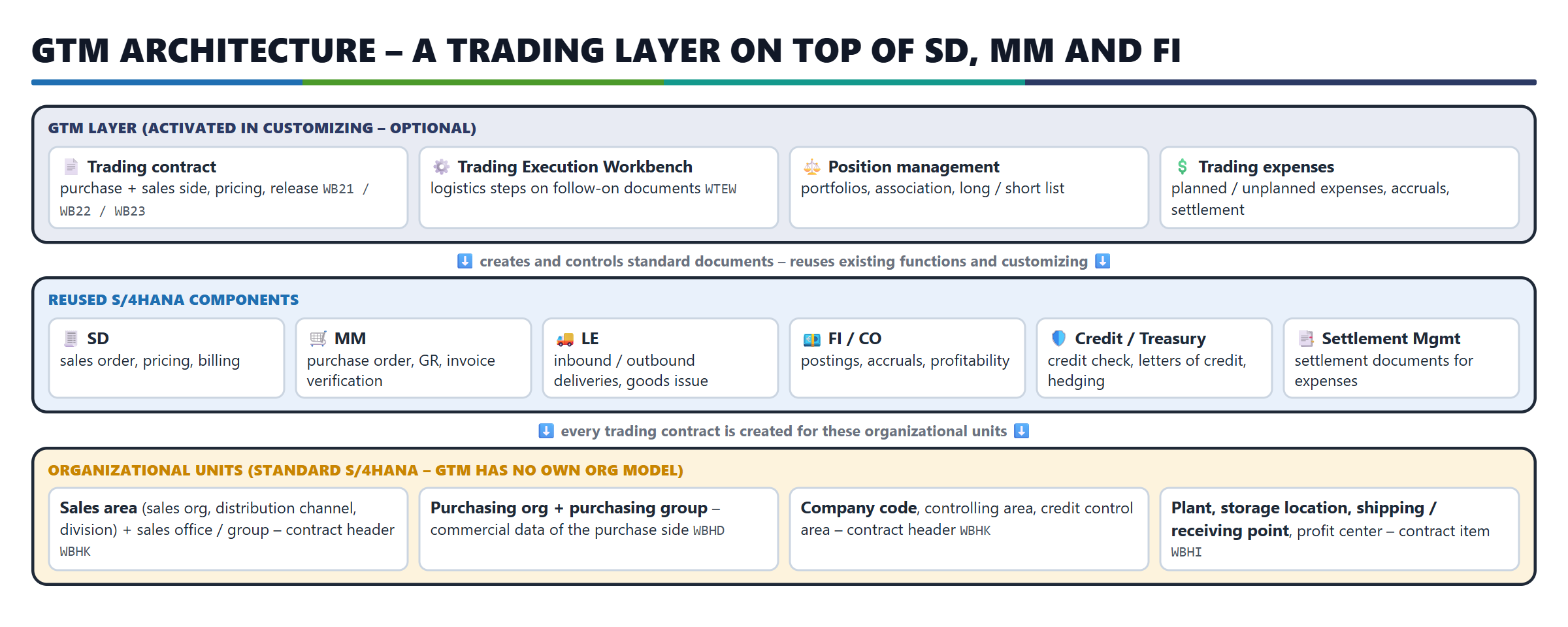
Layer | Technology | What it means for a developer |
|---|---|---|
Software | ECC: software component EA-GLTRADE (enterprise extension Global Trade). S/4HANA: part of the core | Classic ABAP application – no BOPF, no separate system, no replication |
Documents | Trading contract in its own transparent tables (WBHK / WBHI / WBHD); follow-on documents are normal SD / MM / LE / FI documents | Read the TC tables and follow the document flow WBHF; change only via WB22, the TEW or BAPIs (page 02, page 05) |
User interface | SAP GUI transactions (WB21–WB23, WTEW) – also as tiles in the SAP Fiori launchpad | Screen enhancements via GTM BAdIs and enhancement points (page 05) |
Customizing | Own IMG node Global Trade Management (contract types, item categories, groupings, TEW, expenses, positions) | Behaviour is driven by contract type and item category (page 02, page 03) |
Extensibility | BAdIs in the WB2 namespace (e.g. | Details and code: page 05 |
Pricing | SD / MM condition technique with GTM pricing procedures and expense condition types | Existing pricing customizing is reused (page 02) |
- Optional activation – customers can use GTM for selected business lines (e.g. key accounts) while the rest of the company keeps standard SD and MM.
- Consistency rule – documents created from a trading contract or in the TEW are changed in the TC / TEW, not with VA02 or ME22N; otherwise TC and follow-on documents drift apart.
Part 5 – Organization structure
GTM has no organizational model of its own (unlike TM). A trading contract is created for the standard S/4HANA organization units, because it must create normal sales orders, purchase orders, deliveries and postings. The fields sit on three levels of the contract:
Org unit | Where in the trading contract | Why GTM needs it |
|---|---|---|
Sales organization, distribution channel, division (sales area) | Header WBHK (VKORG, VTWEG, SPART) | Sales order creation, sales pricing, customer data per sales area |
Sales office, sales group | Header WBHK (VKBUR, VKGRP) | Reporting, responsibility |
Purchasing organization, purchasing group | Commercial data WBHD (EKORG, EKGRP) | Purchase order creation, purchase pricing, supplier data per purchasing org |
Company code | Header WBHK (COMPANY_CODE) | Postings of the logistics steps and expenses, legal entity of the deal |
Controlling area, credit control area | Header WBHK (KOKRS, KKBER) | CO assignment, credit check of the sold-to party |
Plant, storage location | Item WBHI (WERKS, LGORT) | Delivering / receiving plant of the follow-on documents; stock shipment uses the storage location |
Shipping point / receiving point | Item WBHI (VSTEL_SD, VSTEL_MM) | Outbound and inbound deliveries |
Profit center | Item WBHI (PRCTR) | Profitability per deal and segment reporting |
5.1 Assignments and why they matter
- The standard SD / MM assignments apply unchanged: plant ↔ company code, sales organization ↔ company code, purchasing organization ↔ plant / company code, plant ↔ sales organization and distribution channel. A wrong assignment makes the release fail when the follow-on documents are created.
- Default values for document types and currencies come from the contract type and its sales / purchasing groupings (page 02); the contract type also controls how organizational data is entered.
- The credit check of the sold-to party is switched on per control group sales and per item category; credit control area, controlling area and company code must fit together as in SD (credit integration: page 04).
- A trading contract can also carry a WBS element (header field) when deals are managed as projects.
Part 6 – Integration map
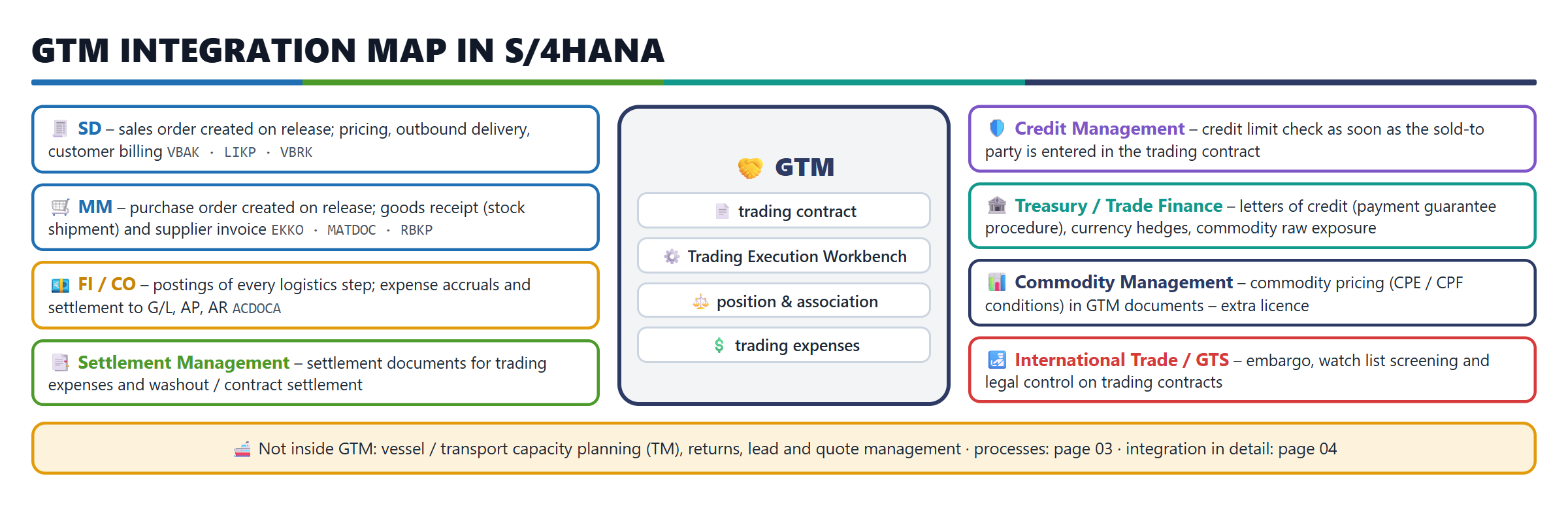
Partner | Direction | What flows |
|---|---|---|
SD | GTM → SD | Sales order created on release; outbound delivery, goods issue and billing as TEW steps |
MM | GTM → MM | Purchase order created on release; goods receipt (stock shipment) and supplier invoice verification as TEW steps |
FI / CO | GTM → FI / CO | Postings of each logistics step; expense accruals and settlements to G/L accounts, AP and AR; profitability per deal |
Settlement Management | GTM → settlement documents | Settlement of trading expenses and of contract settlements (washout, circle, string) |
Credit Management | GTM ⇄ credit | Credit limit check of the sold-to party already in the trading contract |
Treasury / Trade Finance | GTM ⇄ TRM | Letters of credit via the payment guarantee procedure, currency hedges, commodity raw exposure update |
Commodity Management | CM → GTM | Commodity pricing (CPE / CPF conditions) in GTM documents |
International Trade / GTS | GTM → compliance | Embargo, watch list screening and legal control checks on trading contracts |
- Not covered by GTM (plan separately): vessel and transport capacity planning (TM – see TM ABAP), returns, lead and quotation management, margin analytics beyond the standard reports.
- Postings, interfaces, reports and analytics in depth: page 04.
Part 7 – Deployment options and licensing
Option | GTM availability | Notes |
|---|---|---|
SAP S/4HANA (on-premise) | Yes – documented in the feature scope description under Sales › Order and Contract Management › Sales Contract Management › Global Trade Management | Part of the S/4HANA Enterprise Management scope |
SAP S/4HANA Cloud Private Edition | Yes – same code line as on-premise | Same functional scope; extensions follow the private cloud clean-core rules |
SAP S/4HANA Cloud Public Edition | Not in the feature scope description (checked for release 2608) | No trading contracts – page 06 |
SAP ECC 6.0 | Yes – enterprise extension Global Trade (EA-GLTRADE) | Legacy; conversion to S/4HANA – page 06 |
- Licensing – GTM and SAP Commodity Management (commodity procurement, sales, risk) need separate licences.
- Architect angle – GTM runs in the same system as the SD, MM and FI documents it creates. Front-office trading systems (commodity trading platforms) are connected through BAPIs and services – SAP's commodity business functions provide, for example, outbound messages on trading expenses to a front-office system (page 04, page 05).
Part 8 – Interview questions
Q1. What is SAP GTM and who uses it?
SAP Global Trade Management is the S/4HANA solution for sell-and-buy business: a trading contract holds the sales and the purchase side of a deal, creates the sales order and purchase order on release, and GTM manages execution, expenses, positions and profit per deal. Users are commodity traders, trading divisions, wholesalers and importers / exporters.
Q2. What is the difference between GTM, GTS and International Trade?
GTM is commercial trading inside S/4HANA. GTS (Global Trade Services) is a separate compliance and customs product, today SAP GTS, edition for SAP HANA. International Trade is basic compliance in the S/4HANA core (classification, Intrastat, legal control, embargo, watch list screening integration). GTM calls the compliance checks for its trading contracts.
Q3. What is a back-to-back deal?
A sale that is covered by a matching purchase 1:1 – the trader buys only because a customer ordered. In GTM it is a two-side trading contract; the goods usually go directly from supplier to customer (drop shipment), but a stock variant via the trader's warehouse is possible.
Q4. What are the core components of GTM?
Trading contract (WB21–WB23), Trading Execution Workbench (WTEW), position management (portfolios, association, long / short list) and trading expenses; profit simulation is a function of the trading contract.
Q5. What happens when a trading contract is released?
After the checks (completeness, quantities, finance documents, credit, legal control) the system creates the follow-on sales order and purchase order. Later changes in the contract are passed on to them; further logistics steps run in the TEW.
Q6. What do long and short positions mean?
Long: more purchased than sold (goods bought without a customer). Short: more sold than purchased (sales without a supplier yet). Single-side contracts plus association management and the long / short list make these positions visible.
Q7. How is GTM technically built?
As a layer in the ERP core that reuses SD pricing, MM purchasing, LE deliveries and FI postings. The trading contract has its own tables (WBHK, WBHI, WBHD, document flow WBHF); follow-on documents are standard documents. In ECC the code came with EA-GLTRADE; in S/4HANA it is part of the core.
Q8. Which organization units does GTM use?
No own org model – the standard units: sales area, sales office / group and company code in the header, purchasing organization / group in the commercial data, plant, storage location, shipping point and profit center on the item. The normal SD / MM assignments must be consistent or release fails.
Q9. Why should users not change GTM follow-on documents with VA02 or ME22N?
The trading contract and TEW keep the document flow and quantities in sync. Direct changes bypass that logic and cause inconsistencies; changes are made in the trading contract or the TEW.
Q10. Which processes are not covered by GTM itself?
Vessel and transport capacity planning (TM), returns, lead and quotation management and advanced margin analytics. Commodity pricing and risk come from SAP Commodity Management, customs from GTS.
Q11. Is GTM available in SAP S/4HANA Cloud?
On-premise and Private Cloud Edition contain GTM with the full scope. The Public Edition feature scope contains no trading contracts, so a trading company that needs GTM chooses on-premise or Private Cloud Edition – always check the current release scope.
Q12. As an architect, when would you propose GTM instead of plain SD and MM?
When sales and purchases are linked deal by deal: back-to-back or commodity trading, profit per deal, planned and accrued trading expenses, long / short position control, letters of credit. For loosely coupled stock business plain SD and MM are simpler; both can run in parallel in one system.
🏠 Start Here · 02 · Master Data ▶ · Sections: CORE ABAP | OOPS ABAP | ABAP on HANA | Clean Core | RAP | ABAP Points | SAP Fiori | SAPUI5 | Mobile Development (MDK) | BTP Foundations | BTP Development | CAP | SAP Build | ABAP on BTP | Integration Suite | SAP Business AI | SAP BASIS | Security | SAP SDLC
Functional: FICO ABAP | TRM ABAP | VIM | SAP BIS | SD ABAP | MM ABAP | PP ABAP | QM ABAP | PM ABAP | PS ABAP | EWM | TM ABAP | GTM ABAP | EHS ABAP | HR ABAP | BW | SAP Datasphere | SAP Business Data Cloud | SAP MDG | SAP Analytics Cloud | SAP Ariba | SAP CX | SAP IBP