GTM needs no master data of its own: it uses the S/4HANA business partner (customer and supplier), the material master and the SD / MM condition technique. What makes GTM special is its control data – trading contract types, item categories and sales / purchasing groupings – and the trading contract document with its own tables: header WBHK, items WBHI, commercial data WBHD, document flow WBHF, plus link and association tables. This page covers the master data, the contract variants, the document structure, the tables, number ranges, document flow and what is released for APIs. Org units: page 01; processes and customizing steps: page 03; BAdIs and BAPIs in depth: page 05.
Part 1 – Master data overview
Everything except the GTM control data is shared with SD and MM – that is why existing pricing, partner and material settings carry over when GTM is activated.
Object | Origin | Used in GTM for |
|---|---|---|
Business partner – customer role | S/4HANA BP (transaction BP), customer data per sales area | Sold-to, ship-to and payer on the sales side; credit check |
Business partner – supplier role | S/4HANA BP, supplier data per purchasing organization | Supplier on the purchase side; invoicing party for expenses |
Material | Material master (MM01 / product master) | Contract items, units of measure, batches, commodity, configuration |
Pricing conditions | Condition records (VK11 / MEK1 and others), pricing procedures | Sales and purchase prices, discounts, surcharges, expense conditions |
Purchasing info record | MM info record (ME11) | Proposal of the purchase price (configurable) |
GTM control data | Customizing: contract types, item categories, groupings, TEW types | Behaviour of the trading contract and its follow-on documents |
Portfolios | Position management settings | Grouping of contract items for association and the long / short list |
Part 2 – Business partners: customers and suppliers
Customers and suppliers are S/4HANA business partners, synchronised to the customer (KNA1 …) and supplier (LFA1 …) tables by CVI – see SD ABAP › 01 and MM ABAP › 01 for the BP model. GTM requires CVI and the customer / supplier master data to be in use.
BP role | Data level | Needed for |
|---|---|---|
FLCU00 Customer (FI) | Company code: reconciliation account, payment terms | Customer invoice, incoming payment |
FLCU01 Customer | Sales area: pricing, shipping, billing data | Sales side of the trading contract and the follow-on sales order |
FLVN00 Supplier (FI) | Company code: reconciliation account, payment terms | Supplier invoice, outgoing payment, AP postings of expenses |
FLVN01 Supplier | Purchasing organization: order currency, Incoterms, partner functions | Purchase side of the trading contract and the follow-on purchase order |
- Partner determination – the trading contract proposes partner functions (sold-to, ship-to, supplier and further functions) from the business partner and material master. Partner determination procedures work at header and item level; the partners are transferred to the sales order and purchase order.
- Expense service providers – freight forwarders, insurers and agents are normal business partners in the supplier role; expense settlement posts to accounts payable and receivable (page 03).
- The sales grouping can define an anonymous customer – a placeholder for contracts whose real customer is not known yet.
Part 3 – Material master and pricing
3.1 Material
Contract items reference normal materials: base unit, sales unit and purchase order unit (quantities are converted to the base unit for the quantity check), material group, pricing reference material, customer and supplier material numbers. GTM-relevant extras:
- Batches – batch determination can be activated per contract type and item category (commodities with quality characteristics).
- Configurable materials – single-level configuration on the contract item; on release the configuration is copied to the sales order and purchase order (allowed per item category).
- Bills of material – a BOM profile and default item categories for BOM components are customizable; logistical options can be restricted for BOM components.
3.2 Pricing with the condition technique
The trading contract prices both sides with the standard condition technique – condition types, access sequences, condition tables and pricing procedures (see SD ABAP for the pricing model). GTM delivers its own pricing procedures and condition types as templates:
Object | Delivered examples | Purpose |
|---|---|---|
Pricing procedures | GTS001 (GTM sales price), GTM001 (GTM purchase price), GT7000 | Templates – SAP recommends copying them into customer procedures |
Base prices | Price per item; quantity, unit, price and currency are mandatory | Sales price and purchase price of the deal |
Planned expenses | Condition types GD01 – GD03 | Discounts / surcharges that change the net value immediately |
Planned expenses with settlement | Statistical condition types GE01 – GE07 (purchase side), GE51 – GE53 (sales side) | Accrued at goods movement, settled later (page 03) |
- Price proposal – the purchasing and sales groupings define a price determination sequence; the purchase price can be read from the purchasing info record.
- Pricing type on the groupings decides whether prices are copied to the follow-on purchase order / sales order or redetermined there; the contract type chooses sales pricing or standard pricing.
- Document conditions – the trading contract holds document condition numbers for each side (WBHK-KNUMV_SD sales side, WBHD-KNUMV_MM purchase side). In S/4HANA the condition lines of pricing documents are stored in PRCD_ELEMENTS (KONV in ECC).
- Expense conditions must be in the pricing procedure – otherwise the profit simulation does not include them.
- Commodity pricing – with SAP Commodity Management, GTM items can use CPE / CPF conditions; GTM pricing and payment events can be selected as reference date routines (page 04).
Part 4 – Trading contract variants, types and item categories
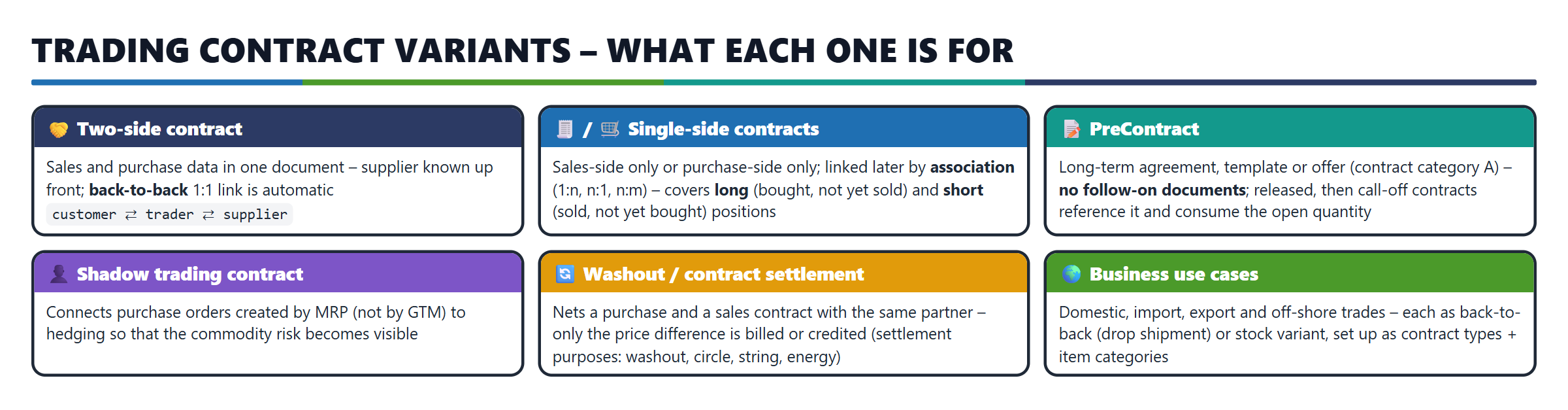
Variant | Key facts |
|---|---|
Two-side trading contract | Sales and purchase data in one document; one sales order and one or more purchase orders; link automatic (back-to-back) |
Single-side trading contract | Sales-side or purchase-side only; linked by association – links can be dissolved and re-associated |
PreContract | Contract category A – long-term agreement, template or offer without follow-on documents; call-off contracts are created with reference and reduce the open quantity |
Shadow trading contract | Links sales orders / purchase orders from internal demand to hedging so that the commodity risk is visible |
Washout / settlement contract | Settles opposite contracts with the same partner by the price difference; settlement purposes washout, circle, string, energy |
4.1 Contract type
The trading contract type (table TB2BE) bundles the basic control of a contract – comparable to the sales document type in SD. Important settings:
Setting | What it controls |
|---|---|
Number range for internal numbering, external number | Internal number assignment; an additional external number can be inactive, optional or mandatory, with a duplicate check (warning or error) |
Sales grouping / purchasing grouping | Link to TB2BD (sales document type of the sales order, currency, price sequence, credit check) and TB2BC (PO type, info record, price sequence, pricing copy) |
Contract category / use case | Contract with follow-on documents or precontract; standard, sales-side, purchase-side, two-sided or settlement use case |
Status group, default application status | Allowed application statuses and the status of a new or incomplete contract |
Incompleteness group, checks before activation | Completeness check and quantity check before the contract can be released |
Partner determination procedure, text procedure | Partner functions and texts of the contract |
Follow-on document creation | Creation on save: none, synchronous or asynchronous |
Output schemas | Message determination for the contract (page 05) |
GTS relevance, TRM risk control | Legal control checks; raw exposure update for treasury |
4.2 Item category and groupings
Table | Object | Key settings |
|---|---|---|
TB2BJ | Trading contract item category | SD item category of the sales order item (and an alternative), goods receipt and invoice receipt indicators (drop shipment vs stock), free item, association type, expense calculation for sales / purchase side, account assignment category, batch determination, GTS relevance, credit check at item level |
TB2BK | Item categories per contract type | Which item categories are allowed for a contract type, the default item category, logistical option groups |
TB2BD | Sales grouping | Sales document type, default currency and exchange rate type, price determination sequence, output schema, credit management active, pricing type for the sales order |
TB2BC | Purchasing grouping | Purchasing document category and type (PO or contract), read info record, price determination sequence, delivery address origin (plant or customer ship-to), pricing copy to the PO |
- The item category is what makes a contract a drop shipment or a stock shipment: without goods receipt into own stock (direct to customer) or with goods receipt and later outbound delivery.
- Customizing is maintained in the IMG node Global Trade Management – the steps are described on page 03.
Part 5 – The trading contract document
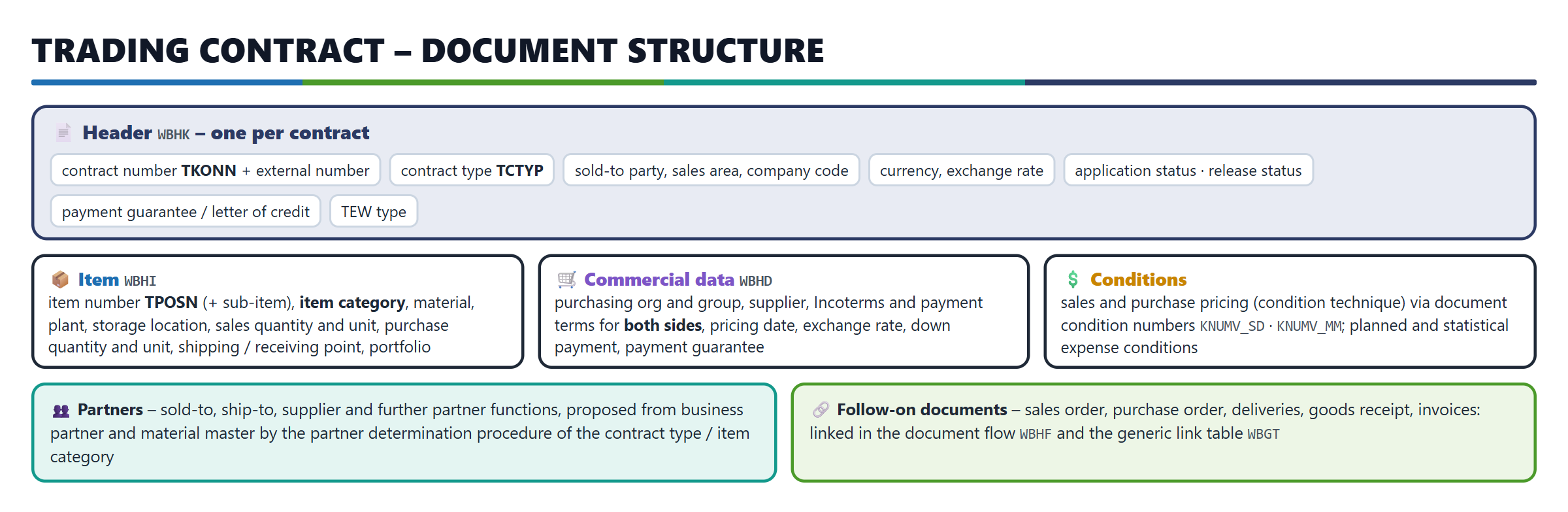
Level | Main content | Table |
|---|---|---|
Header | Contract number and external number, contract type and category, sold-to party, sales area, company code, currency and exchange rate, customer PO number, application and release status, payment guarantee procedure and financial document (letter of credit), TEW type | WBHK |
Item (and sub-item) | Item category, material, plant, storage location, sales quantity and unit, purchase quantity and unit, shipping and receiving point, route, portfolio and association group, profit center, reference to a precontract | WBHI |
Commercial data | Purchasing organization and group, supplier, Incoterms and payment terms for the sales and the purchase side, pricing dates, exchange rate, down payment, retention, payment guarantee | WBHD |
Conditions | Sales and purchase pricing, planned expenses | Pricing result (KNUMV_SD / KNUMV_MM) |
Partners, texts | Partner functions on both sides, header and item texts | Standard partner and text tables |
5.1 Screen layout
- Header tabs Basic Data, Sales, Purchasing, Partner, Additional Data; a risk management section covers trade finance such as letters of credit.
- Item overview with material, sales quantity, quantity ordered, sales price and purchase price; item details per side; Expenses and Profit Simulation from the menu.
5.2 Status and checks
Status / check | Meaning |
|---|---|
Application status | Customizable status (field BTBSTA, allowed values from the status group of the contract type), e.g. Released |
Release status | Field TC_RELEASED: blank = not (yet / again) released, X = released, A = release not possible due to status, B = problems during release |
System status | Open · Release carried out · Change after release · Accounting closed · Closed · Transaction completed – updated on save |
Checks | Data completeness, quantity check (in base unit), finance document check (letter of credit), follow-on documents created (traffic light), legal control (GTS / International Trade), credit management |
- A change after release sets the contract back to "change after release"; on the next release the changes are passed on to the sales order and purchase order.
Part 6 – Tables and data model
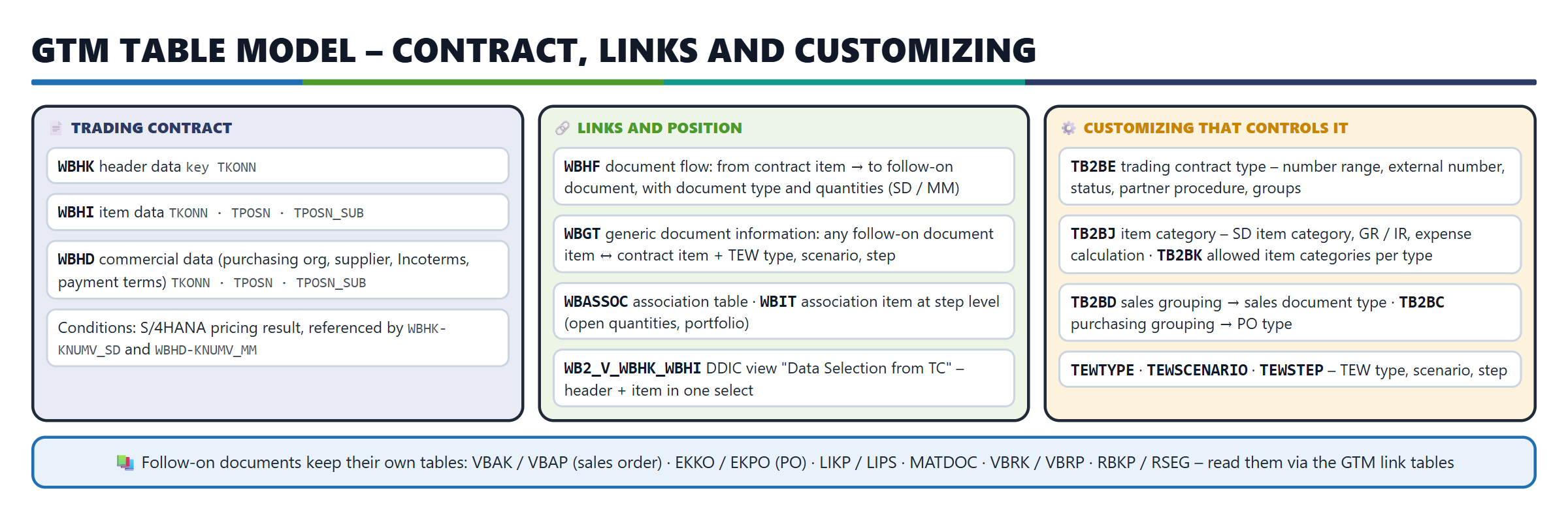
Table | Description | Important fields |
|---|---|---|
WBHK | Trading contract: header data | TKONN, TCTYP, TCCAT, KUNNR, VKORG / VTWEG / SPART, COMPANY_CODE, TKWAERS, BTBSTA, TC_RELEASED, TKONN_EX, ABSSC, LCNUM, KNUMV_SD, TEW_TYPE |
WBHI | Trading contract: item data | TKONN, TPOSN, TPOSN_SUB, HKPSTP, MATNR, WERKS, LGORT, KWMENG / VRKME (sales), MENGE / MEINS (purchase), PORTFOLIO, ASSOC_GROUP, PRCTR, TKONN_FROM |
WBHD | Trading contract: commercial data | TKONN, TPOSN, EKORG, EKGRP, ELIFN (supplier), INCO1_SD / INCO1_MM, ZTERM / ZTERM_SALES, KNUMV_MM, KALSM_MM |
WBHF | Trading contract: document flow | TKONN_FROM / TPOSN_FROM → TKONN_TO / TPOSN_TO, TKTYP_FROM / TKTYP_TO, MENGE_SD, MENGE_MM, USE_CASE |
WBGT | Global Trade: generic document information | DOC_TYPE, VBELN / POSNR (any follow-on document), TKONN / TPOSN, TEW_TYPE, SCENARIO, BUSINESS_STEP, COMPLETE |
WBASSOC | Global Trade: association table | Association between sales and purchase items |
WBIT | Association item at step level | Document, item, TEW type, step, contract item, portfolio, own and transferred quantity |
TB2BE / TB2BJ / TB2BK | Contract type / item category / allowed item categories | Control data (Part 4) |
TB2BD / TB2BC | Sales grouping / purchasing grouping | Follow-on document types and pricing (Part 4) |
TEWTYPE / TEWSCENARIO / TEWSTEP | TEW type, business scenario, business process step | Execution control (page 03) |
- ECC → S/4HANA: the trading contract tables WBHK / WBHI / WBHD / WBHF exist in both; the changes are in the surrounding objects – business partner instead of separate customer / supplier maintenance, MATDOC for goods movements, PRCD_ELEMENTS for document conditions, ACDOCA for postings (page 06).
- Classic DDIC view WB2_V_WBHK_WBHI ("Data Selection from TC") joins header and item for selections.
6.1 Reading a trading contract and its follow-on documents
Typical report requirement: list the items of a trading contract and the sales orders and purchase orders created from them. Reading the tables is fine; creating or changing contracts is only allowed through WB21 / WB22, the TEW or the BAPIs (page 05).
|
Part 7 – Number ranges and document flow
7.1 Number ranges
- The trading contract number TKONN (10 characters) is assigned internally from the number range interval of the contract type (TB2BE-NUMKI).
- An additional external number (TKONN_EX, 30 characters) – e.g. the deal ID of a front-office trading system or the customer's contract number – is inactive, optional or required per contract type, with an optional duplicate check (warning or error).
- BAdI WB2_NUMBER_CHANGE ("Global Trade Management Number Assignment", inactive in the standard) lets a project change the number assignment (page 05).
- Follow-on documents get numbers from their own SD / MM number ranges (sales document type, PO type).
7.2 Document flow
Table WBHF stores the flow from a reference document item to a follow-on document item, with the referenced quantities in SD and MM units. The document type fields (TKTYP_FROM / TKTYP_TO) use these values:
Value | Document type | Value | Document type |
|---|---|---|---|
1 | Trading contract | 5 | Goods receipt |
2 | Sales order / sales contract | 6 | Settlement (washout) |
3 | Purchase order | 9 | Settlement (energy) |
4 | Vendor billing document | A / B | Sales order / purchase order without TC reference |
- The document flow tree in the contract shows all documents – sales order, purchase order, deliveries, goods receipt, billing documents, postings – with folders for Association and Expenses; WBGT records the TEW type, scenario and step of each follow-on document.
- Call-off contracts keep the reference to their precontract on the item (WBHI-TKONN_FROM / TPOSN_FROM); the open quantity of the precontract is calculated from the call-offs.
- Archiving – trading contracts and related documents such as settlement documents can be archived (page 06).
Part 8 – Released CDS views, APIs and BAPIs
GTM is a classic ABAP application, and its released interface layer is thin compared with SD or MM:
Interface | Status | Use |
|---|---|---|
OData / SOAP APIs on SAP Business Accelerator Hub | No trading contract API is published (checked November 2026) | Use BAPIs, wrapped in a custom RAP or OData service if needed |
Released CDS views (I_…) | No released trading contract view confirmed on the Hub; an SAP Community post (2021) reported GTM CDS views and Fiori apps in development | Check the ADT View Browser / Fiori apps library of the system; otherwise build custom CDS views on WBHK / WBHI / WBHD (page 05) |
BAPIs | BAPI_TRADINGCONTRACT_CREATE, BAPI_TRADINGCONTRACT_CHANGE | Create and change contracts from interfaces; some fields are not covered and need enhancements (page 05) |
Customer fields | Enhancement points / BAdIs of the trading contract | Fields not supported by the BAPI structures (page 05) |
- Clean core consequence – custom CDS view entities on the GTM tables are a classic (not cloud-ready) extension: acceptable on-premise and in private cloud, but documented as clean-core debt. Write access always through the BAPIs or WB22, never by direct UPDATE (page 05, page 06).
- Follow-on documents have the full released API set of SD and MM (e.g. sales order, purchase order, billing document APIs) – see SD ABAP and MM ABAP.
Part 9 – Interview questions
Q1. Which master data does GTM use?
Standard S/4HANA master data: business partners as customers and suppliers, materials, condition records and info records. GTM-specific are only control settings – contract types, item categories, sales and purchasing groupings, TEW types and portfolios.
Q2. Which tables hold a trading contract?
WBHK header, WBHI items (with sub-items), WBHD commercial data (purchasing org, supplier, Incoterms, payment terms for both sides), WBHF document flow; WBGT links follow-on documents and TEW steps, WBASSOC / WBIT hold associations.
Q3. Where is the purchasing organization of a trading contract stored?
In the commercial data table WBHD (EKORG, EKGRP, supplier ELIFN); the sales area, sold-to party and company code are in the header WBHK; plant and storage location are on the item WBHI.
Q4. What does the trading contract type control?
Number range and external number, sales and purchasing groupings (follow-on sales document type and PO type), contract category, status group, incompleteness and quantity checks, partner and text procedures, follow-on document creation mode, output schemas, GTS and TRM relevance.
Q5. What does the trading contract item category control?
The SD item category of the sales order item, goods receipt and invoice receipt indicators (drop vs stock shipment), association type, expense calculation per side, account assignment, batch determination, GTS relevance and item-level credit check.
Q6. How is pricing done in a trading contract?
With the SD / MM condition technique: sales and purchase pricing procedures (templates GTS001, GTM001), price determination sequences in the groupings, optionally the info record, and expense condition types (GD.. planned, statistical GE.. with settlement). The pricing type decides whether prices are copied to or redetermined in the follow-on documents.
Q7. What is the difference between a two-side contract, a single-side contract and a precontract?
Two-side: sales and purchase in one document, automatic back-to-back link. Single-side: only one side, linked later by association. Precontract: long-term agreement or template without follow-on documents; call-off contracts reference it and consume its quantity.
Q8. How do you find the sales order and purchase order created from a trading contract?
Read the document flow WBHF with TKONN_FROM = contract and TKTYP_FROM = 1: TKTYP_TO 2 gives the sales order, 3 the purchase order, with TKONN_TO / TPOSN_TO as document and item. WBGT covers the further TEW documents.
Q9. How are trading contract numbers assigned?
Internally from the number range of the contract type; an extra external number (up to 30 characters) can be optional or mandatory with a duplicate check. BAdI WB2_NUMBER_CHANGE can change the assignment.
Q10. Which release statuses exist?
TC_RELEASED: blank (not or no longer released), X (released), A (release not possible due to status), B (problems during release). Besides that, a customizable application status and system statuses such as Change after release, Accounting closed and Closed.
Q11. Are there released APIs or CDS views for trading contracts?
The Business Accelerator Hub shows no trading contract OData or SOAP API. Integration uses BAPI_TRADINGCONTRACT_CREATE / _CHANGE; reporting uses custom CDS views on WBHK / WBHI / WBHD, while the follow-on SD and MM documents have their normal released APIs.
Q12. What changes in the GTM data model from ECC to S/4HANA?
The GTM tables stay; the surrounding model changes: business partner with CVI, MATDOC for goods movements, PRCD_ELEMENTS instead of KONV for document conditions, ACDOCA for postings, settlement documents for expense settlement. Custom code that reads KONV must be adapted to PRCD_ELEMENTS.
🏠 Start Here · ◀ 01 · Overview & Org · 03 · Processes & Config ▶ · Sections: CORE ABAP | OOPS ABAP | ABAP on HANA | Clean Core | RAP | ABAP Points | SAP Fiori | SAPUI5 | Mobile Development (MDK) | BTP Foundations | BTP Development | CAP | SAP Build | ABAP on BTP | Integration Suite | SAP Business AI | SAP BASIS | Security | SAP SDLC
Functional: FICO ABAP | TRM ABAP | VIM | SAP BIS | SD ABAP | MM ABAP | PP ABAP | QM ABAP | PM ABAP | PS ABAP | EWM | TM ABAP | GTM ABAP | EHS ABAP | HR ABAP | BW | SAP Datasphere | SAP Business Data Cloud | SAP MDG | SAP Analytics Cloud | SAP Ariba | SAP CX | SAP IBP