SAP HCM (Human Capital Management), often simply called SAP HR, is the part of SAP ERP that manages employees: who works where, what they earn, when they work and how they are paid. This page gives the big picture – the HCM sub-modules, the enterprise and personnel structure – and then explains Organizational Management (OM): the objects, relationships, infotypes and tables that model the organisation. Running example: org unit Sales with the sub-unit Sales North, a chief position Sales manager and a position Sales representative.
Part 1 – SAP HCM and its sub-modules
HCM consists of several sub-modules. The four core ones are Organizational Management (OM), Personnel Administration (PA), Time Management (TM) and Payroll (PY). Around them sit the talent and self-service modules.
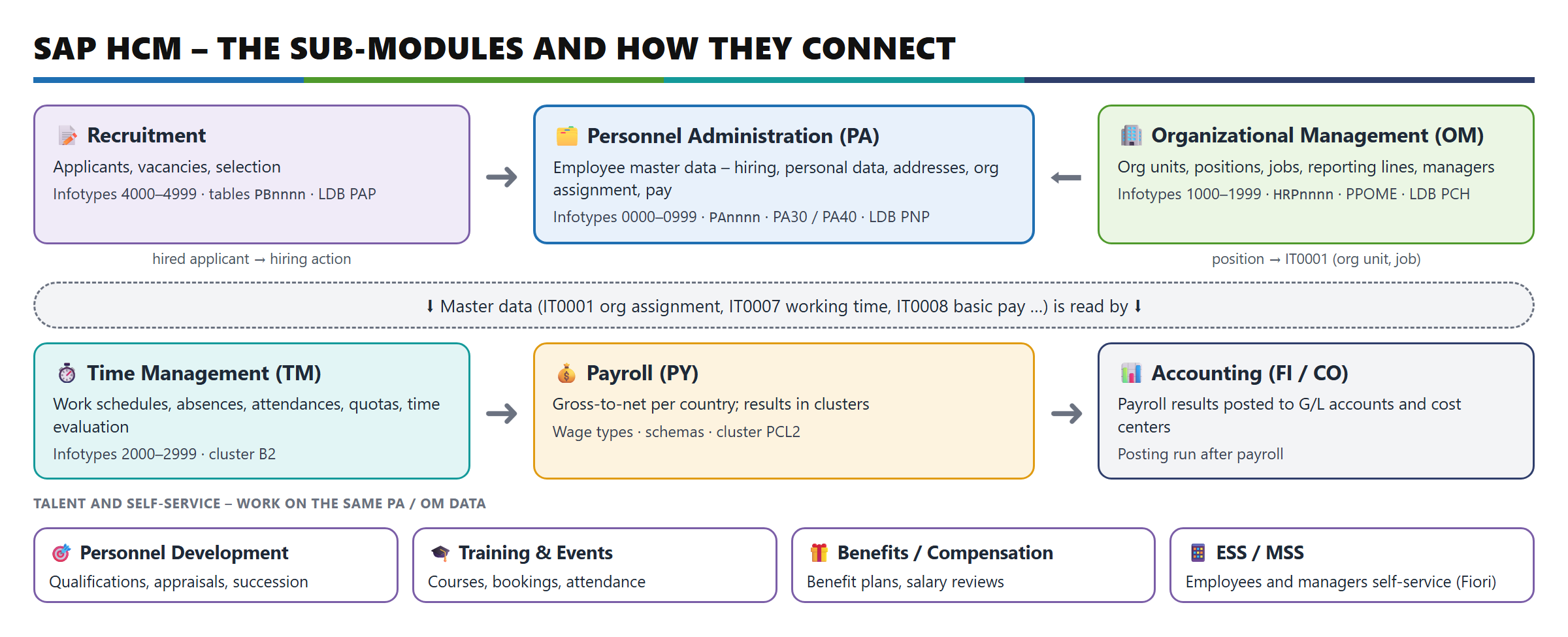
Sub-module | What it does | Key data / transactions |
|---|---|---|
OM – Organizational Management | Models the organisation: org units, positions, jobs, reporting lines, who is the manager | Object types O, S, C; infotypes 1000–1999; PPOME, PP01 (this page) |
PA – Personnel Administration | Employee master data: hiring, personal data, addresses, organisational assignment, basic pay, leaving | Infotypes 0000–0999; PA30, PA40 (page 02) |
TM – Time Management | Work schedules, absences, attendances, quotas, time evaluation | Infotypes 2000–2999; PA61, time evaluation RPTIME00 (page 05) |
PY – Payroll | Gross-to-net calculation per country, results stored in clusters, posting to accounting | Wage types, schemas, PCL2 clusters (page 05) |
PD – Personnel Development | Qualifications, appraisals, career and succession planning (ECC: standard · S/4HANA: appraisals, development plans, career / succession planning only in the compatibility pack – not in SAP HCM for SAP S/4HANA) | Object type Q (qualification); personnel planning data like OM |
Recruitment (classic; later E-Recruitment) – ECC: PA-RC / E-Recruiting · S/4HANA: PA-RC only in the compatibility pack; successor E-Recruiting for SAP S/4HANA (H4S4_ERC) or SuccessFactors Recruiting | Applicants, vacancies, selection, transfer of a hired applicant to PA | Applicant infotypes 4000–4999 (tables PBnnnn), LDB PAP |
Training and Event Management | Courses, bookings, attendance (ECC: standard · S/4HANA: only in the compatibility pack; in SAP HCM for SAP S/4HANA use SAP Learning Solution or SuccessFactors Learning) | Personnel planning objects, LDB PCH |
Benefits, Compensation Management | Benefit plans, salary reviews, budgets (Compensation Management PA-CM: ECC and compatibility pack only – not in SAP HCM for SAP S/4HANA) | Own PA infotypes |
ESS / MSS – Employee / Manager Self-Service | Employees maintain their own data (leave, address); managers approve and see their team | Web Dynpro (classic) or Fiori apps; manager found via OM (Part 7) |
How the modules connect
- Recruitment → PA: a hired applicant's data is transferred into a hiring action (page 02).
- OM → PA: the position of an employee (from OM) fills org unit, job and position in infotype 0001 (Part 7).
- PA → TM → PY: payroll reads PA master data (0001, 0007, 0008 …) and the results of time evaluation.
- PY → FI/CO: payroll results are posted to financial accounting and cost centers.
What makes HR ABAP different
- HR data is time-dependent: every record has a validity period BEGDA–ENDDA, so you always read "valid on a date" or "valid in a period" (page 02).
- Reports use logical databases (PNP, PNPCE, PCH, PAP),
GET PERNR,PROVIDE … ENDPROVIDEand theRP_PROVIDE_FROM_LASTmacro instead of plain SELECTs – see page 03 HR Reporting. - Payroll and time results are stored in cluster tables (PCL1–PCL4) and read with IMPORT or special function modules – see page 05 Payroll & Time Data.
Part 2 – Enterprise structure and personnel structure
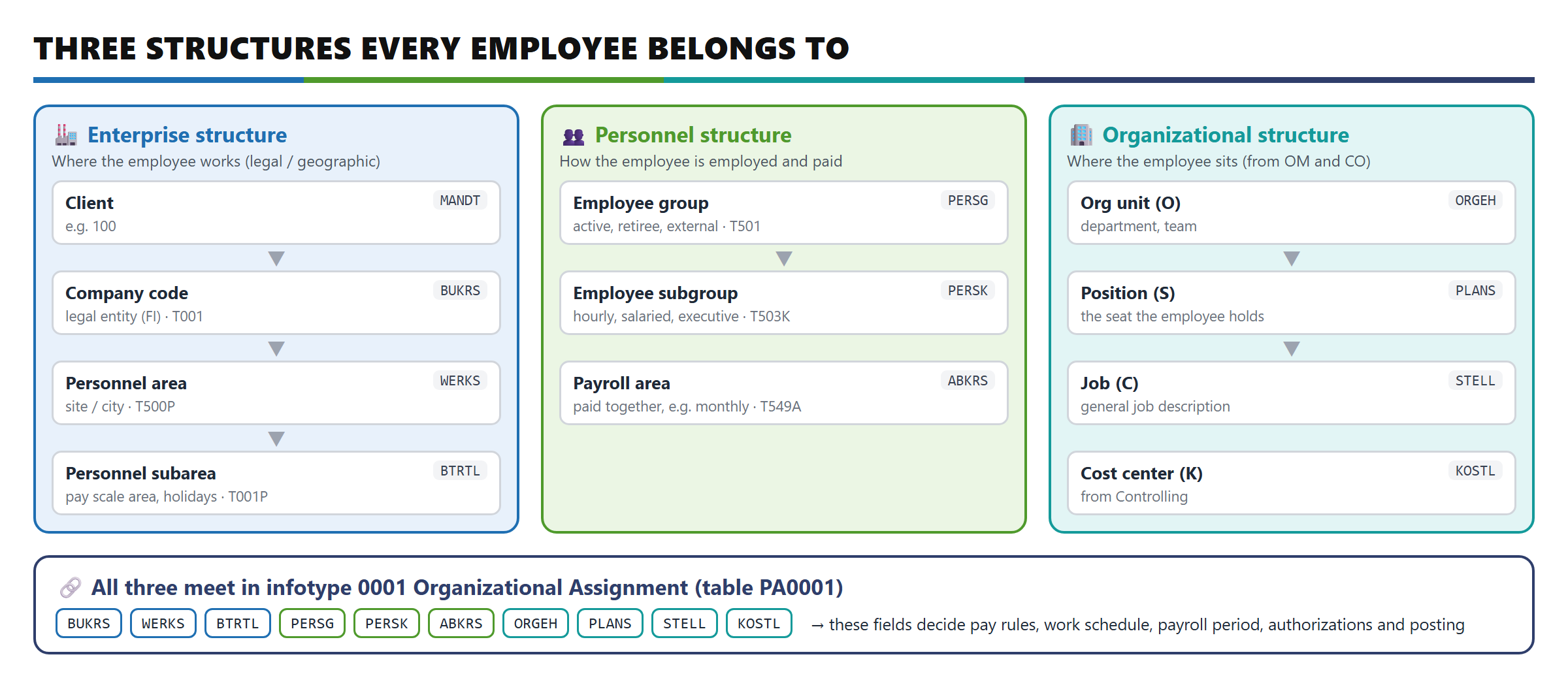
Every employee is placed in three structures. Together they decide which rules apply to the employee (pay scale, work schedule, payroll period, authorizations, posting). All three meet in infotype 0001 Organizational Assignment.
2.1 Enterprise structure – where the employee works
Level | Meaning | Field in IT0001 | Customizing table |
|---|---|---|---|
Client | Self-contained SAP unit (data of one group) | MANDT | – |
Company code | Legal entity with its own accounts (defined in FI) | BUKRS | T001 |
Personnel area | HR subdivision of a company code, e.g. a site or city; assigned to exactly one company code | WERKS | T500P |
Personnel subarea | Subdivision of a personnel area; controls pay scale area, work schedule groupings, public holiday calendar | BTRTL | T001P |
2.2 Personnel structure – who the employee is for HR
Element | Meaning | Field in IT0001 | Customizing table |
|---|---|---|---|
Employee group | Basic employment relationship, e.g. active, retiree, external | PERSG | T501 |
Employee subgroup | Finer split inside the group, e.g. hourly wage earner, salaried employee, executive; controls payroll rules and pay scales | PERSK | T503K |
Payroll area | Employees paid together on the same dates and period (e.g. monthly) | ABKRS | T549A |
2.3 Organizational structure – where the employee sits in the organisation
The org unit, position and job come from OM (Part 3). The cost center comes from Controlling (CO). In IT0001 they are fields ORGEH, PLANS, STELL and KOSTL.
- Interview tip: enterprise structure = legal and geographical view; personnel structure = employment view; organizational structure = functional view (departments, reporting lines).
Part 3 – OM objects and relationships
3.1 Object types
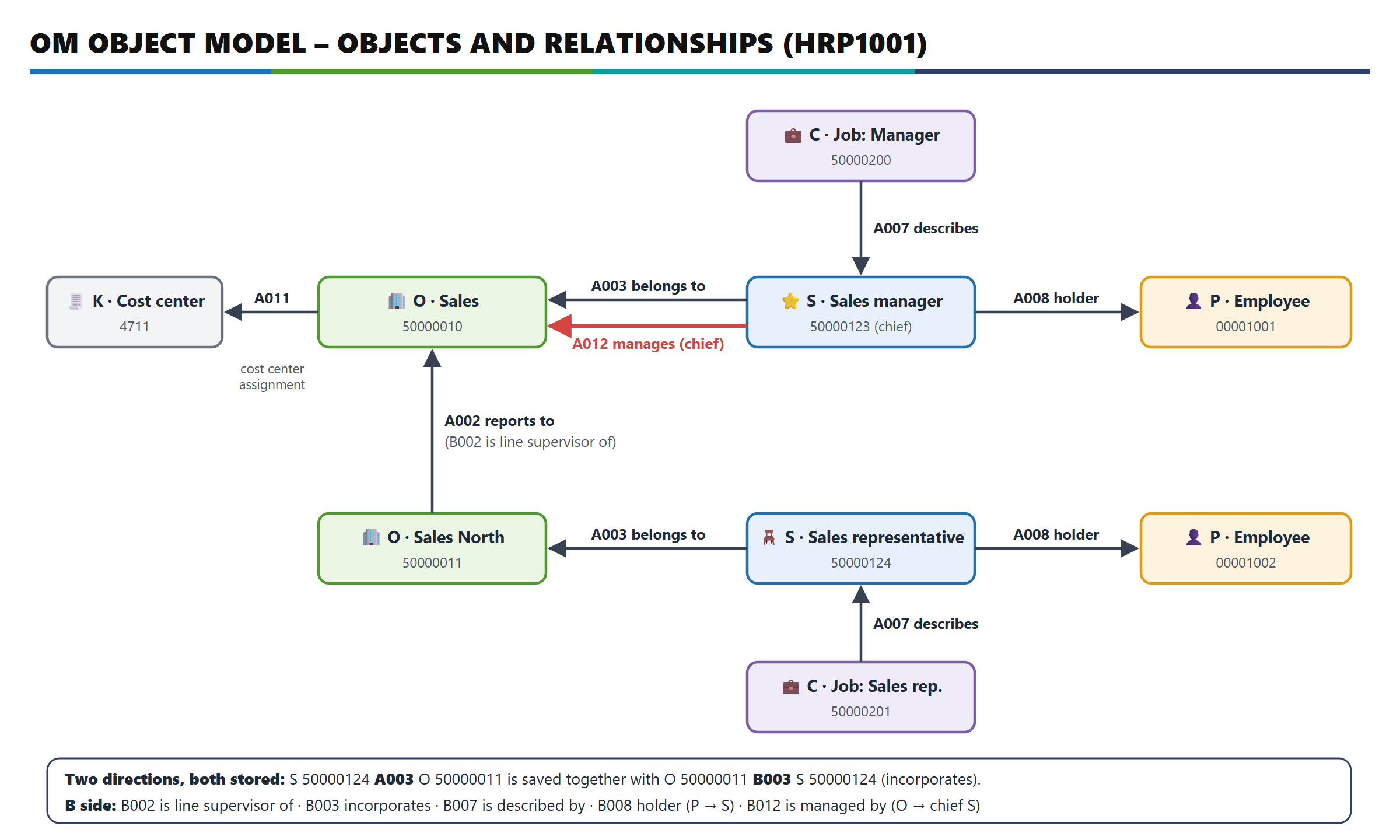
OM stores the organisation as objects linked by relationships. Each object is identified by plan version + object type + 8-digit object ID (e.g. 01 / S / 50000123).
Object type | Name | Example | Notes |
|---|---|---|---|
O | Organizational unit | Sales, Sales North | Departments and teams; form the org hierarchy |
S | Position | Sales manager Pune | A concrete seat in one org unit, held by a person; can be vacant |
C | Job | Manager, Sales representative | General job description; one job describes many positions |
P | Person (employee) | Personnel number 00001001 | External object: the data lives in PA; object ID = personnel number |
K | Cost center | 4711 | External object from CO |
A / T / Q | Work center / Task / Qualification | Desk 12 / approve leave / SAP ABAP | Used by work centers, workflow and Personnel Development |
- Job vs position: the job 'Manager' describes the positions 'Sales manager' and 'IT manager'. People hold positions, not jobs.
3.2 Relationships
A relationship has a 3-digit code and two directions, A and B. When you create one direction, the system automatically creates the inverse record as well.
Relationship | From → to | Meaning | Inverse |
|---|---|---|---|
A002 / B002 | O → O | A002 'reports (line) to'; B002 'is line supervisor of' – builds the org hierarchy | Sales North A002 Sales ⇄ Sales B002 Sales North |
A003 / B003 | S → O | A003 'belongs to'; B003 'incorporates' – position belongs to an org unit | S A003 O ⇄ O B003 S |
A007 / B007 | C → S | A007 'describes'; B007 'is described by' – job describes position | C A007 S ⇄ S B007 C |
A008 / B008 | S → P | A008 'holder' – the person who holds the position | S A008 P ⇄ P B008 S |
A011 | O or S → K | Cost center assignment | – |
A012 / B012 | S → O | A012 'manages'; B012 'is managed by' – the chief position of an org unit | S A012 O ⇄ O B012 S |
3.3 Plan version and planning status
- Plan version (PLVAR): a complete copy of the organisation, so you can model a re-organisation without touching the real one. The active plan version (usually 01) is set in table T77S0, group PLOGI, entry PLOGI; FM
RH_GET_ACTIVE_WF_PLVARreturns it in ABAP. - Planning status (ISTAT) of every record: 1 active, 2 planned, 3 submitted, 4 approved, 5 rejected. Reports normally read status 1 only.
- Every OM record is time-dependent (BEGDA–ENDDA), exactly like PA infotypes – an org unit can be created today and delimited next year.
Part 4 – OM infotypes and HRP tables
OM data is stored in personnel planning infotypes (number range 1000–1999). Each infotype has a table HRPnnnn; customer infotypes are 9000–9999 (table HRP9nnn, created with transaction PPCI – see page 04).
Infotype | Name | Content | Table |
|---|---|---|---|
1000 | Object | Existence of the object: abbreviation (SHORT) and name (STEXT), validity | HRP1000 |
1001 | Relationships | All links between objects (RSIGN, RELAT, SCLAS, SOBID) | HRP1001 |
1002 | Description | Free text describing the object | HRP1002 (text lines in HRT1002) |
1003 | Department / Staff | Flags: org unit is a department, position is a staff position | HRP1003 |
1007 | Vacancy | Position is vacant / to be filled | HRP1007 |
1008 | Account Assignment Features | Company code, business area, personnel area and subarea for an org unit or position – used as defaults in PA | HRP1008 |
Key fields of the HRP tables
Field | Meaning | Example |
|---|---|---|
PLVAR | Plan version | 01 |
OTYPE / OBJID | Object type and object ID | S / 50000123 |
INFTY / SUBTY | Infotype and subtype (for 1001 the subtype is the relationship) | 1001 / A008 |
ISTAT | Planning status | 1 (active) |
BEGDA / ENDDA | Validity period | 20240101 / 99991231 |
RSIGN / RELAT | Direction and relationship code (HRP1001) | A / 008 |
SCLAS / SOBID | Type and ID of the related object (HRP1001; SOBID is CHAR 45 because external objects can have longer keys) | P / 00001001 |
Example – who holds position 50000123 today?
|
Direct SELECTs on HRP tables are fine for simple reads, but they skip HR authorization checks. In reports use the FMs RH_READ_INFTY / RH_STRUC_GET or the logical database PCH – see page 03.
Part 5 – OM transactions
Transaction | Purpose |
|---|---|
PPOCE | Create an organizational structure (new root org unit) – Organization and Staffing |
PPOME | Change the organization and staffing: org units, positions, holders, chief, in one screen (the everyday tool) |
PPOSE | Display the organization and staffing |
PO10 | Maintain an organizational unit (object O) infotype by infotype (expert mode) |
PO13 | Maintain a position (object S) |
PO03 | Maintain a job (object C) |
PP01 | Maintain plan data for any object type (menu-guided expert mode) |
PP02 | Maintain plan data, open mode (any infotype) |
OOAW | Maintain evaluation paths (Part 6) |
PPCI | Create a customer personnel planning infotype (page 04) |
OOSP / OOSB | Structural authorization profiles and their assignment to users (page 04) |
- PPOME has an object manager on the left (search area, hit list) and an overview on the right (structure, then infotype tabs below). Many developers use it only to look up the structure.
Part 6 – Evaluation paths and reading OM data in ABAP
6.1 Evaluation paths
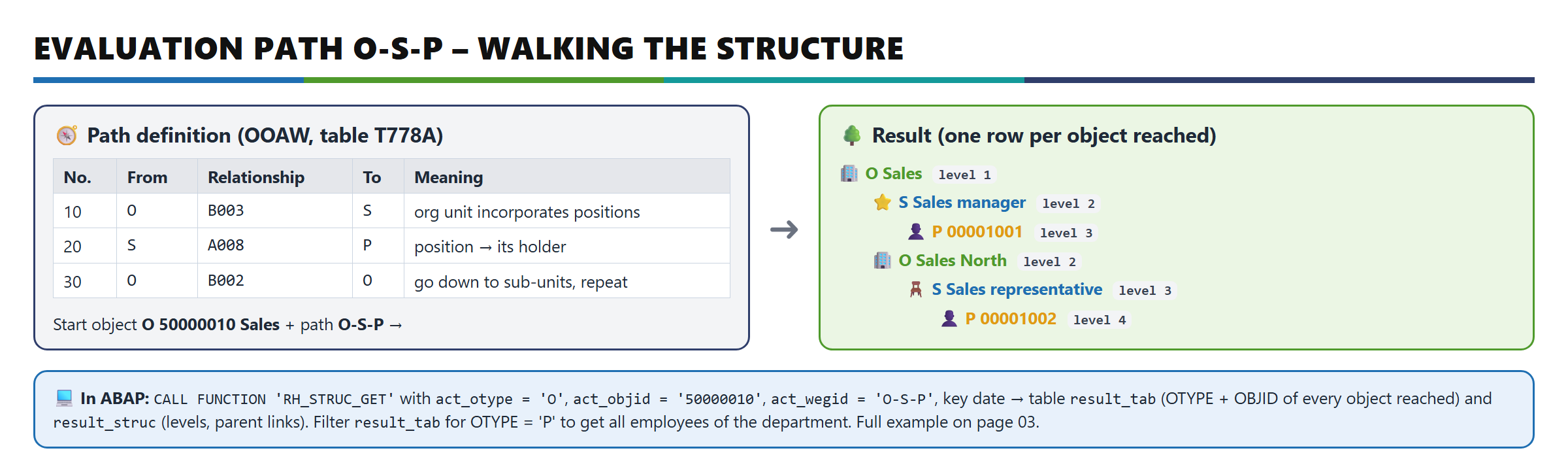
An evaluation path is a named chain of relationships that tells the system how to walk through the structure. You give a start object, the path, and get every object reached. Evaluation paths are maintained in OOAW (table T778A).
Evaluation path | Walks | Typical use |
|---|---|---|
O-S-P | Org unit → positions → holders, and down to sub-units | All employees of a department including sub-departments |
ORGEH | Org unit → sub-units (B002) | The org hierarchy only |
SBESX | Staff assignments along the organizational structure | Positions and holders in a structure display |
6.2 Reading OM data in ABAP
RH_STRUC_GET– walks an evaluation path from a start object (e.g. all persons below org unit Sales with path O-S-P);RH_READ_INFTY– reads OM infotype records. Both with examples on page 03.- Logical database PCH reports on personnel planning data (Personnel Development, OM, Training and Event Management) with
GET objec– see page 03. - Typical task: find the manager of an employee – P B008 S (employee's position) → S A003 O (org unit) → O B012 S (chief position) → S A008 P (chief). If the employee is the chief himself, go one org level up with A002. Workflow and MSS use exactly this logic.
Part 7 – Integration between OM and PA
When the integration switch is on (table T77S0, group PLOGI, entry ORGA = X), OM and PA are linked: assigning an employee to a position in PA (hiring or org change action) creates the A008/B008 relationship in OM, and IT0001 takes org unit, job and position from OM.
- IT0001 fields filled from OM: PLANS (position), ORGEH (org unit), STELL (job); company code and personnel area can be defaulted from IT1008; the cost center from A011.
- If no position is known, PA uses the default position 99999999 (T77S0 PLOGI PRELI).
- Reports RHINTE00 (PA → OM: create OM relationships from IT0001) and RHINTE30 (OM → PA: update IT0001 from OM) bring the two sides back in sync after data loads.
- Never write IT0001 or HRP1001 directly with UPDATE: use actions,
HR_INFOTYPE_OPERATION(page 04) or the OM FMs, so both sides stay consistent.
Part 8 – Interview questions
Q1. What are the main sub-modules of SAP HCM and how are they connected?
OM (structure), PA (employee master data), Time Management and Payroll, plus PD, Recruitment, Training and ESS/MSS. Recruitment and OM feed PA; PA and time data feed payroll; payroll posts to FI/CO.
Q2. What is the difference between enterprise structure and personnel structure?
Enterprise structure = company code, personnel area, personnel subarea (where the employee works, legally and geographically). Personnel structure = employee group, employee subgroup, payroll area (how the employee is employed and paid). Both are stored in IT0001.
Q3. Name the main OM object types.
O org unit, S position, C job, P person, K cost center; also A work center, T task, Q qualification. P and K are external objects whose data lives in PA and CO.
Q4. What is the difference between a job and a position?
A job is a general classification (Manager); a position is a concrete seat in an org unit (Sales manager Pune) that a person holds. One job (C) describes many positions (S) via A007.
Q5. Explain relationships 002, 003, 008 and 012.
002 org unit reports to org unit (hierarchy); 003 position belongs to org unit; 008 person holds position; 012 position manages org unit (chief). Each has an A and a B direction, both stored in HRP1001.
Q6. In which tables is OM data stored?
One table per infotype: HRP1000 objects, HRP1001 relationships, HRP1002 descriptions (texts in HRT1002), HRP1008 account assignment. Key: plan version, object type, object ID, infotype/subtype, status, dates.
Q7. What is an evaluation path?
A named sequence of relationships (OOAW, table T778A) used to walk the structure, e.g. O-S-P to get all positions and persons below an org unit. In ABAP: FM RH_STRUC_GET.
Q8. How do you find an employee's manager?
P B008 S → S A003 O → O B012 S (chief position) → S A008 P. If the employee is the chief, continue with the parent org unit (O A002 O).
Q9. What is a plan version and what is the planning status?
A plan version is a separate copy of the organisation (active one in T77S0 PLOGI PLOGI, usually 01). The status ISTAT is 1 active, 2 planned, 3 submitted, 4 approved, 5 rejected.
Q10. How are OM and PA integrated?
With T77S0 PLOGI ORGA = X, assigning a position in a PA action creates A008 in OM and fills PLANS, ORGEH and STELL in IT0001. RHINTE00 and RHINTE30 repair inconsistencies.
Q11. Which LDB do you use for OM reports?
PCH (event GET objec) for personnel planning data; PNP or PNPCE for employee master data. See page 03.
🏠 Start Here · 02 · Infotypes & PA ▶ · Sections: CORE ABAP | OOPS ABAP | ABAP on HANA | Clean Core | RAP | ABAP Points | SAP Fiori | SAPUI5 | Mobile Development (MDK) | BTP Foundations | BTP Development | CAP | SAP Build | ABAP on BTP | Integration Suite | SAP Business AI | SAP BASIS | Security | SAP SDLC
Functional: FICO ABAP | TRM ABAP | VIM | SAP BIS | SD ABAP | MM ABAP | PP ABAP | QM ABAP | PM ABAP | PS ABAP | EWM | TM ABAP | GTM ABAP | EHS ABAP | HR ABAP | BW | SAP Datasphere | SAP Business Data Cloud | SAP MDG | SAP Analytics Cloud | SAP Ariba | SAP CX | SAP IBP