Personnel Administration (PA) holds the employee master data: actions, organisational assignment, personal data, addresses, pay. All of it is stored in infotypes – the most important concept in HR ABAP. This page explains what an infotype is, how it is stored, the infotypes every HR developer knows, time constraints, repetitive structures and the PA transactions. Reading infotypes in reports is on page 03, creating your own infotype on page 04. Running example: employee 00001001.
Part 1 – What an infotype is
An infotype is a unit of information used to maintain HR master data: a group of related fields (for example all fields of an address), with its own screen and its own database table. Infotypes make data entry easy and store data time-dependently – every record has a validity period (BEGDA begin date, ENDDA end date), so the history is kept.
- Each infotype has a 4-digit number and a name, e.g. 0006 Addresses.
- Each infotype has its own database table: PAnnnn for employee data (PA0006), HRPnnnn for personnel planning data (HRP1001, page 01), PBnnnn for applicant data.
- Change an address from 1 July → the old record is delimited (ENDDA = 30 June) and a new record starts on 1 July. Both stay in the table.
- The open end date is 31.12.9999; the earliest possible begin date is 01.01.1800.
Valid on a date or in a period
Question | Condition on the record |
|---|---|
Valid on key date D | begda <= D AND endda >= D |
Valid at any time in period S–E (overlaps the period) | begda <= E AND endda >= S |
This rule is used in every HR program; the LDB, PROVIDE and the RP macros apply it for you – see page 03.
Part 2 – Number ranges and subtypes
2.1 Infotype number ranges
Range | Area | Examples | Tables |
|---|---|---|---|
0000 – 0999 | Personnel Administration (HR master data) | 0001, 0002, 0008 | PAnnnn |
1000 – 1999 | Personnel planning (OM, PD) | 1000, 1001 | HRPnnnn |
2000 – 2999 | Time Management (time data) | 2001, 2002, 2006 | PAnnnn |
4000 – 4999 | Recruitment (applicant data) | 4000 Applicant actions | PBnnnn |
9000 – 9999 | Customer infotypes | 9001 (custom) | PA9nnn / HRP9nnn |
2.2 Subtypes
A subtype divides one infotype into groups that share the same fields but have different meaning or rules. Subtypes are maintained in table T591A (view V_T591A, texts T591S); each subtype can have its own time constraint (Part 5).
Infotype | Subtype examples |
|---|---|
0006 Addresses | 1 permanent residence, 2 temporary residence, 4 emergency address |
0021 Family Member/Dependents | 1 spouse, 2 child |
0105 Communication | 0001 system user name (SAP user ID), 0010 e-mail |
0014 / 0015 Recurring / Additional payments | The wage type is the subtype |
2001 Absences | The absence type is the subtype |
Part 3 – How an infotype is stored: Pnnnn, PAnnnn, PSnnnn and the key
Every PA infotype is built from the same pieces. Learn them once – they are identical for 0001, 0006 or your own 9001.
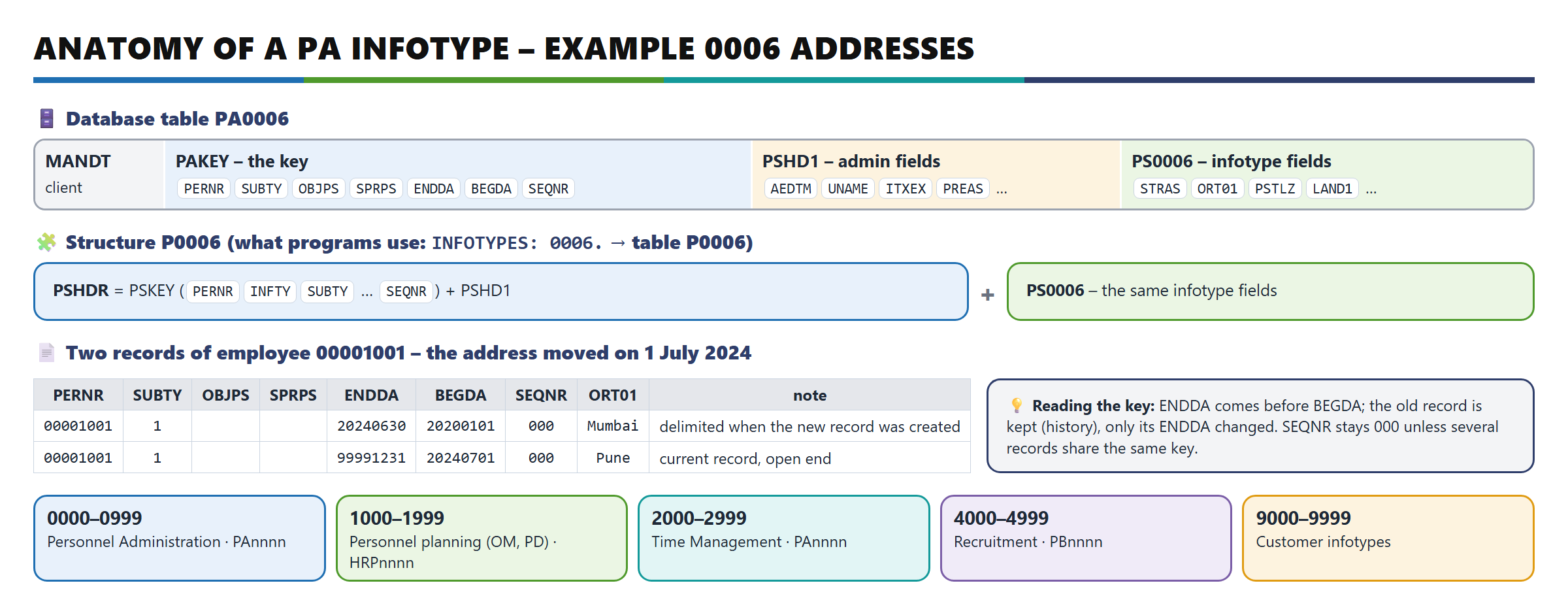
Object | What it is | Used for |
|---|---|---|
PSnnnn | Structure with the infotype's own fields (e.g. PS0006: STRAS, ORT01, PSTLZ, LAND1) | Created first when you build an infotype in PM01; screens are built on it |
PAKEY | Key: PERNR, SUBTY, OBJPS, SPRPS, ENDDA, BEGDA, SEQNR | Primary key of PAnnnn |
PSHD1 | Administration fields: AEDTM changed on, UNAME changed by, ITXEX text exists, PREAS reason for change … | Who changed what, when |
PSKEY / PSHDR | PSKEY = PAKEY + INFTY; PSHDR = PSKEY + PSHD1 | Header of every Pnnnn structure |
PAnnnn | Transparent table: MANDT + PAKEY + PSHD1 + PSnnnn | Database storage |
Pnnnn | Structure: PSHDR + PSnnnn | Programs: |
The key fields
Field | Meaning |
|---|---|
PERNR | Personnel number (8 digits) = object ID of the person |
SUBTY | Subtype (blank if the infotype has none) |
OBJPS | Object identification – tells records with the same subtype apart, e.g. two children in IT0021 subtype 2 get OBJPS 01 and 02 |
SPRPS | Lock indicator – X = record locked. Locked records are ignored by payroll and most reports; used for double verification (one user enters, another unlocks). In own SELECTs add |
ENDDA / BEGDA | Validity period; note that ENDDA comes before BEGDA in the key |
SEQNR | Sequence number for several records with an identical key (infotypes that allow overlaps) |
|
Part 4 – Key infotypes
Infotype | Name | Important content |
|---|---|---|
0000 | Actions | Action type (MASSN), reason (MASSG), employment status STAT2 (0 withdrawn, 1 inactive, 2 retiree, 3 active) – the history of hiring, transfers, leaving |
0001 | Organizational Assignment | Company code, personnel area/subarea, employee group/subgroup, payroll area, cost center, org unit, position, job (page 01 Part 2) |
0002 | Personal Data | Name, date of birth, gender, nationality, marital status |
0003 | Payroll Status | Control data for payroll: earliest retro date, locked for payroll, accounted to – created automatically at hiring |
0006 | Addresses | Address per subtype (permanent, temporary, emergency) |
0007 | Planned Working Time | Work schedule rule, working hours, employment percentage |
0008 | Basic Pay | Pay scale type/area/group/level and up to 40 wage types with amounts |
0009 | Bank Details | Bank account for payment |
0014 | Recurring Payments/Deductions | Wage type paid or deducted every period (e.g. car allowance) |
0015 | Additional Payments | One-time payment in a specific period (e.g. bonus) |
0021 | Family Member/Dependents | Spouse, children (subtypes) |
0041 | Date Specifications | Up to 12 date types with dates (e.g. technical entry date, seniority date) |
0105 | Communication | Subtype 0001: SAP user ID of the employee (links SY-UNAME to the PERNR for workflow, ESS/MSS); subtype 0010: e-mail |
2001 | Absences | Leave, sickness … per absence type |
2002 | Attendances | Business trips, training … per attendance type |
2006 | Absence Quotas | Leave entitlement and its deduction |
Example – which employee is the current user? (IT0105 subtype 0001)
|
In IT0105 the subtype field is called USRTY. A standard alternative is FM HR_GET_EMPLOYEES_FROM_USER.
Part 5 – Time constraints
The time constraint decides how the validity periods of an infotype's records may relate to each other: must a record always exist, may there be gaps, may records overlap? It is set per infotype in V_T582A (field ZEITB) or, for time constraint T, per subtype in V_T591A.
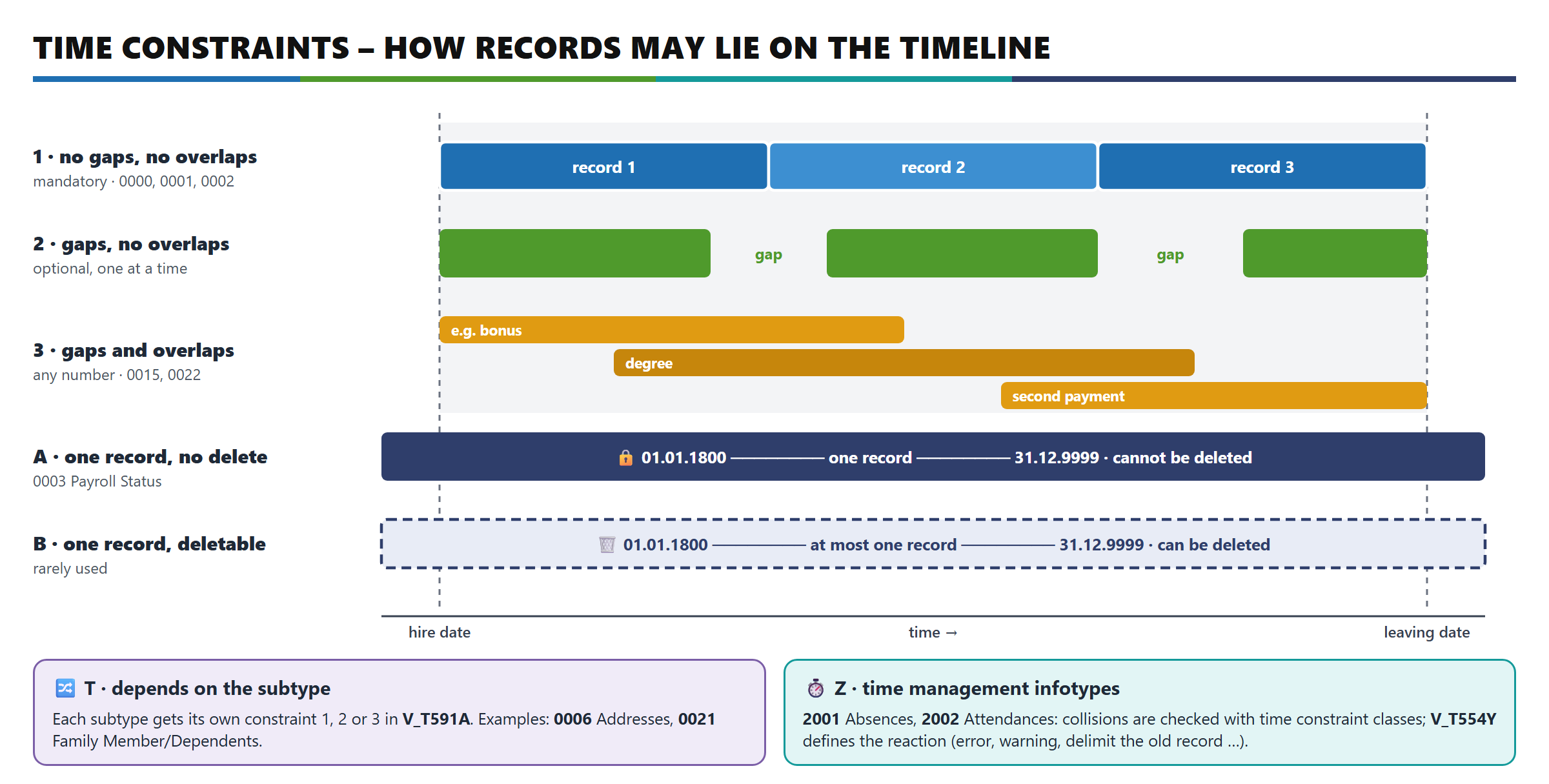
TC | Rule | What the system does | Examples |
|---|---|---|---|
1 | Exactly one valid record at every moment while the employee belongs to the company – no gaps, no overlaps (mandatory) | A new record automatically delimits the previous one | 0000, 0001, 0002 |
2 | At most one valid record at any time – gaps allowed, no overlaps (optional) | A new record delimits the overlapping one | Optional single-valued data |
3 | Any number of valid records – gaps and overlaps allowed | No automatic delimitation | 0015 Additional Payments, 0022 Education |
A | Exactly one record from 01.01.1800 to 31.12.9999; it cannot be deleted or delimited | Only changes to the one record | 0003 Payroll Status |
B | At most one record from 01.01.1800 to 31.12.9999; it can be deleted | As A, but deletion is allowed | Rarely used |
T | Depends on the subtype: each subtype has its own constraint 1, 2 or 3 in V_T591A | Rules as for that constraint | 0006 Addresses, 0021 Family Member/Dependents |
Z | For time management infotypes: collisions between records are checked by time constraint classes | Table V_T554Y defines the reaction to a collision (error, warning, delimit the old record …) | 2001 Absences, 2002 Attendances |
- Interview favourite: "Which infotypes are mandatory for every employee?" – the time constraint 1 infotypes such as 0000, 0001 and 0002 (and 0003 with constraint A).
- Check the constraint of any infotype in your system in V_T582A before you rely on it – customers can change some settings.
Part 6 – Repetitive structures
A repetitive structure is a set of fields in one infotype record that repeats the same field group several times with numbered names, e.g. wage type 1 … wage type 40. Instead of 40 records you have one record with 40 slots.
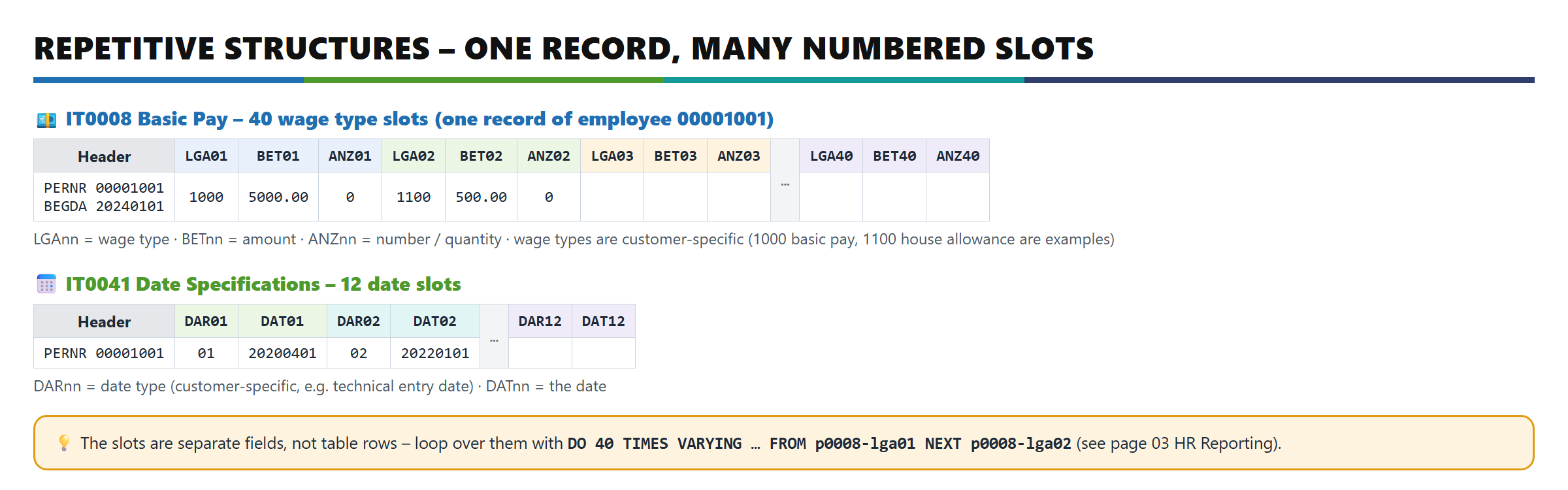
Infotype | Repeating fields | Example values |
|---|---|---|
0008 Basic Pay | LGA01 … LGA40 wage type, BET01 … BET40 amount, ANZ01 … ANZ40 number / quantity | LGA01 = 1000 (basic pay), BET01 = 5000.00; LGA02 = 1100 (house allowance), BET02 = 500.00 |
0041 Date Specifications | DAR01 … DAR12 date type, DAT01 … DAT12 date | DAR01 = 01, DAT01 = 01.04.2020 |
Wage type numbers and date types are customer-specific – the values above are only examples. Because the slots are separate fields, you read them with DO … VARYING (or by building the field names dynamically) – see page 03 HR Reporting.
Part 7 – PA transactions and personnel actions
7.1 Transactions
Transaction | Purpose |
|---|---|
PA10 | Personnel file – browse all infotypes of an employee one after the other |
PA20 | Display HR master data |
PA30 | Maintain HR master data (create, change, copy, delimit, delete, lock/unlock a record) |
PA40 | Personnel actions (hiring, organisational change, leaving …) |
PA70 | Fast entry – one infotype for many employees |
PA51 / PA61 | Display / maintain time data (infotypes 2xxx) |
PA04 | Number ranges for personnel numbers |
PM01 | Create a custom infotype or enhance a standard one (page 04) |
PE03 | Features (Part 8) |
PA30 record operations
Operation | Effect |
|---|---|
Create | New record; with constraint 1/2 the previous record is delimited automatically |
Change | Corrects the existing record (no history) |
Copy | New record pre-filled from the selected one – the normal way to record a change with history |
Delimit | Sets a new end date |
Delete | Removes the record (not allowed for constraint A; for constraint 1 the period must stay covered) |
Lock / unlock | Sets or clears SPRPS |
7.2 Personnel actions
A personnel action (PA40) is a guided sequence of infotype screens for a business event, so nothing is forgotten. It writes an IT0000 record (action type, reason, status) and then shows the infotypes of its infogroup.
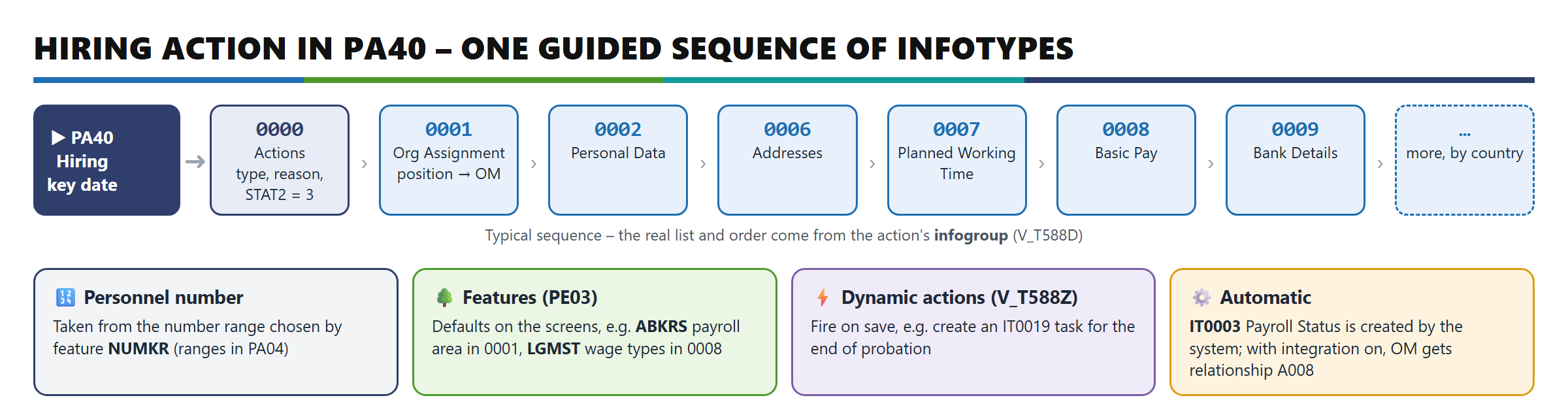
Customizing | Table / view | Holds |
|---|---|---|
Action types | T529A | Hiring, organisational reassignment, leaving, re-entry … (codes are customer-specific) |
Action reasons | T530 | Why the action happened (e.g. resignation, retirement) |
Infogroups | V_T588D | Which infotypes the action shows, in which order |
- Leaving action: IT0000 gets STAT2 = 0 from the leaving date – the employee stays in the system with full history. Reports usually select active employees with STAT2 = 3.
- The personnel number comes from the number range chosen by feature NUMKR (internal or external numbering, maintained in PA04).
Part 8 – Features and dynamic actions
8.1 Features (PE03)
A feature is a decision tree that returns a value from employee attributes (company code, personnel area, employee group …). The system uses features for default values and control logic.
- NUMKR – personnel number range used in hiring.
- ABKRS – default payroll area in IT0001.
- LGMST – default wage types (wage type model) in IT0008.
- ABAP: features can be evaluated with FM
HR_FEATURE_BACKFIELD(feature name + structure with the decision fields).
8.2 Dynamic actions (T588Z)
A dynamic action runs automatically when an infotype record is created, changed or deleted (maintained in view V_T588Z). Typical uses: after the marital status in IT0002 changes, propose IT0021; after hiring, create an IT0019 task for the end of the probation period.
- Step types include I (call another infotype), P (condition / plausibility check), W (set a default field value), F (call a FORM routine in an ABAP program) and M (send a mail).
- Dynamic actions are built for online maintenance (PA30/PA40). Do not rely on them in programs that write infotypes in the background; logic that must always run belongs in BAdI HRPAD00INFTY (page 04).
Part 9 – Interview questions
Q1. What is an infotype?
A unit of HR information – a group of related fields with its own screen and table, stored time-dependently with BEGDA and ENDDA, e.g. 0006 Addresses in table PA0006.
Q2. What are the infotype number ranges?
0000–0999 Personnel Administration, 1000–1999 personnel planning (OM/PD), 2000–2999 Time Management, 4000–4999 Recruitment, 9000–9999 customer infotypes.
Q3. What is the difference between Pnnnn, PAnnnn and PSnnnn?
PSnnnn holds the infotype's own fields; PAnnnn is the database table (MANDT + PAKEY + PSHD1 + PSnnnn); Pnnnn is the structure used in programs (PSHDR + PSnnnn).
Q4. Which fields form the key of a PA infotype table?
PERNR, SUBTY, OBJPS, SPRPS, ENDDA, BEGDA, SEQNR (PAKEY), after MANDT.
Q5. What is a subtype? Give examples.
A subdivision of an infotype with the same fields: IT0006 1 permanent / 2 temporary address, IT0021 1 spouse / 2 child, IT0105 0001 SAP user / 0010 e-mail. Table T591A.
Q6. Explain the time constraints.
1 = exactly one record, no gaps, no overlaps (0000, 0001, 0002); 2 = at most one, gaps allowed; 3 = any number, gaps and overlaps (0015, 0022); A = one record 1800–9999, not deletable (0003); B = as A but deletable; T = depends on the subtype (0006); Z = time infotypes with collision checks (2001, 2002).
Q7. What is the lock indicator?
Field SPRPS. A locked record (X) is not used by payroll; it supports double verification. Own SELECTs should filter sprps = space.
Q8. What is a repetitive structure?
Numbered repeating fields in one record, e.g. IT0008 LGA01–LGA40 / BET01–BET40 or IT0041 DAR01–DAR12 / DAT01–DAT12; read with DO … VARYING.
Q9. What is the difference between PA30 and PA40?
PA30 maintains single infotypes; PA40 runs a personnel action – an IT0000 record plus a guided sequence of infotypes (infogroup) for an event such as hiring or leaving.
Q10. How do you find the SAP user of an employee and vice versa?
IT0105 subtype 0001: PA0105-USRID holds the user for a PERNR; select with USRTY = '0001' and USRID = SY-UNAME to get the PERNR of the current user.
Q11. What are features and dynamic actions?
Features (PE03) are decision trees that return defaults such as NUMKR or ABKRS. Dynamic actions (V_T588Z) trigger follow-up steps when an infotype is created, changed or deleted.
Q12. How do you identify active employees?
IT0000 employment status STAT2 = 3 on the key date (0 = withdrawn, 1 = inactive, 2 = retiree).
🏠 Start Here · ◀ 01 · HCM Overview & OM · 03 · HR Reporting ▶ · Sections: CORE ABAP | OOPS ABAP | ABAP on HANA | Clean Core | RAP | ABAP Points | SAP Fiori | SAPUI5 | Mobile Development (MDK) | BTP Foundations | BTP Development | CAP | SAP Build | ABAP on BTP | Integration Suite | SAP Business AI | SAP BASIS | Security | SAP SDLC
Functional: FICO ABAP | TRM ABAP | VIM | SAP BIS | SD ABAP | MM ABAP | PP ABAP | QM ABAP | PM ABAP | PS ABAP | EWM | TM ABAP | EHS ABAP | HR ABAP | BW | SAP MDG | SAP Analytics Cloud | SAP Ariba | SAP CX | SAP IBP