Where SAP HCM stands in the S/4HANA world, how employees become business partners, how on-premise HR talks to SAP SuccessFactors and to other SAP systems (Integration Suite, OData APIs, ALE), what ESS/MSS look like with Fiori, and what clean core means for HR custom code. For an S/4HANA greenfield interview you must be able to explain the options and which classic HR ABAP skills still apply.
Part 1 – HR options in the S/4HANA world
S/4HANA was built around Finance and Logistics. The classic SAP ERP HCM was not re-designed as a core S/4HANA module; SAP's strategic HR product is the cloud suite SAP SuccessFactors. A company moving to S/4HANA therefore chooses one of these paths:
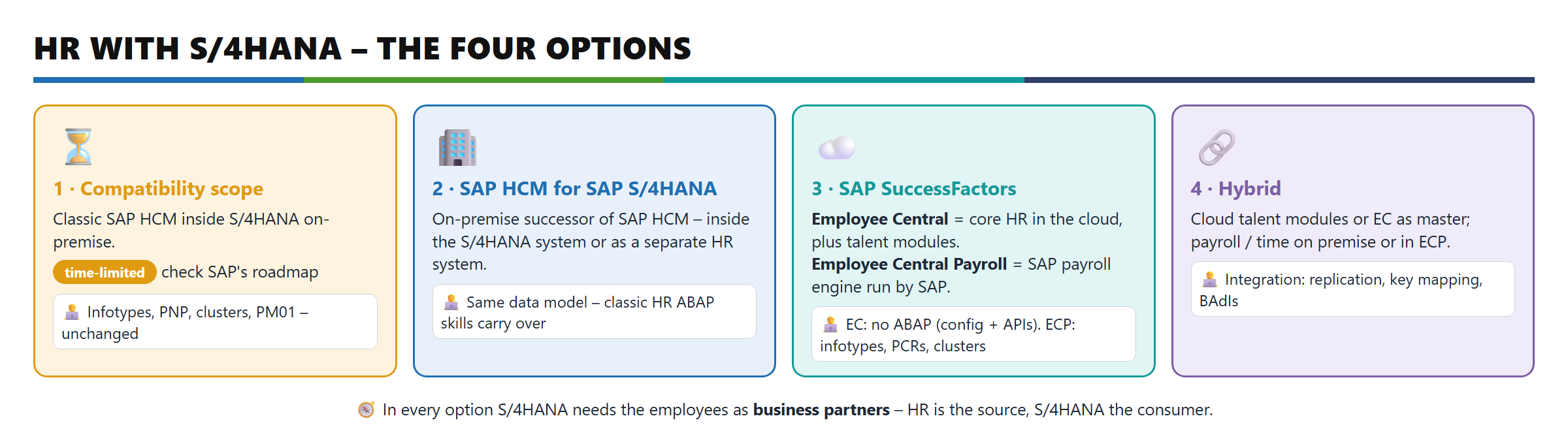
Option | What it is | HR ABAP in it |
|---|---|---|
1. HCM in the compatibility scope | Classic SAP HCM running inside S/4HANA on-premise as a 'compatibility pack'. Usage rights are time-limited – check SAP's current roadmap. | Unchanged: infotypes, PNP, clusters, PM01 |
2. SAP HCM for SAP S/4HANA | The on-premise successor of SAP HCM, delivered as a separate product for S/4HANA. Can run inside the S/4HANA system or as a separate HR system. | Same concepts and tables – the classic skills carry over (available since S/4HANA 2022; some ECC functions are not included, e.g. PA-RC Recruiting, Training and Event Management, Personnel Development, Compensation Management – Note 3091160) |
3. SAP SuccessFactors | Cloud HR suite. Employee Central (EC) is the core HR system of record; talent modules (Recruiting, Onboarding, Performance, Learning …) around it. Employee Central Payroll (ECP) runs SAP's payroll engine as a cloud service operated by SAP. | No ABAP in EC (configuration, APIs). ECP uses infotypes, schemas, PCRs, clusters |
4. Hybrid | Cloud talent modules or EC as master, with payroll and time still on premise (or in ECP). Data is replicated between the systems. | Integration work: replication, mapping, BAdIs |
- Moving an ECC system with HCM to S/4HANA (brownfield) keeps the HR data model: PA/HRP tables, PCL clusters and LDB reports keep working; the custom code check still runs (see ABAP on HANA › 02 Migration).
- In greenfield projects HR is often SuccessFactors, and S/4HANA receives only the employee data it needs (Part 2 and 3).
- Do not quote end dates or release numbers in an interview unless you have checked SAP's current roadmap.
Part 2 – Employees as business partners
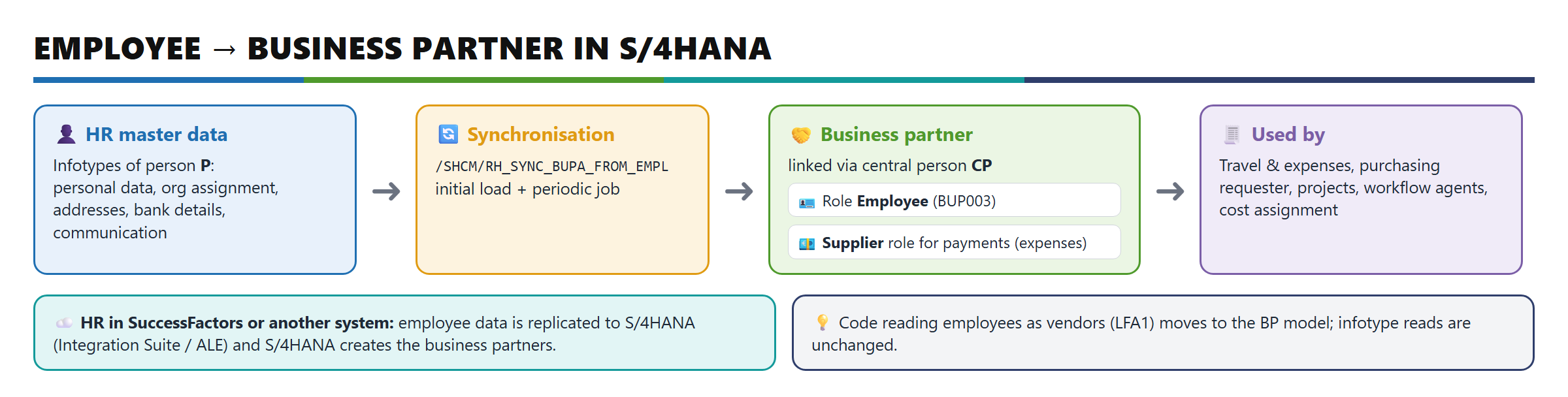
In S/4HANA the business partner (BP) is the single master record for customers, suppliers and employees. Every employee that other applications use (travel expenses, purchasing requester, project staffing, workflow agents, cost assignment) needs a BP with the Employee role (BUP003). For employee payments (e.g. expenses) a supplier role is added to the same BP. ECC: no BP was needed – employee payments used an employee vendor (LFA1 / LFB1 with the personnel number, created with PRAA / RPRAPA00) · S/4HANA: the employee BP is mandatory when HR data is used, PRAA is obsolete (Note 2340095).
2.1 When HCM runs in the same S/4HANA system
- The BP is created and updated from the HR infotypes (personal data, organizational assignment, addresses, bank details, communication).
- Synchronisation report /SHCM/RH_SYNC_BUPA_FROM_EMPL – run it for the initial load and schedule it as a background job to catch changes.
- Link: person P → central person CP → business partner, stored as OM relationships.
- The HR integration switch in T77S0 (group HRALX) tells the system that HR master data is the source.
2.2 When HR is elsewhere (SuccessFactors or a separate HCM system)
- The employee data is replicated into S/4HANA (from Employee Central via SAP Integration Suite, or from an HCM system via ALE), and S/4HANA creates/updates the BPs from it.
- Without any HR source, employees can be maintained directly as BPs with the Employee role.
2.3 What this means for your code
- Code that reads employees as vendors (LFA1) or customers (KNA1) must move to the BP model.
- Infotype reads (HR_READ_INFOTYPE, PNP) are not affected – they still read PA tables.
- Use BP APIs (e.g. the released BP CDS views / services) for the non-HR view of an employee.
Part 3 – Integration with SAP SuccessFactors
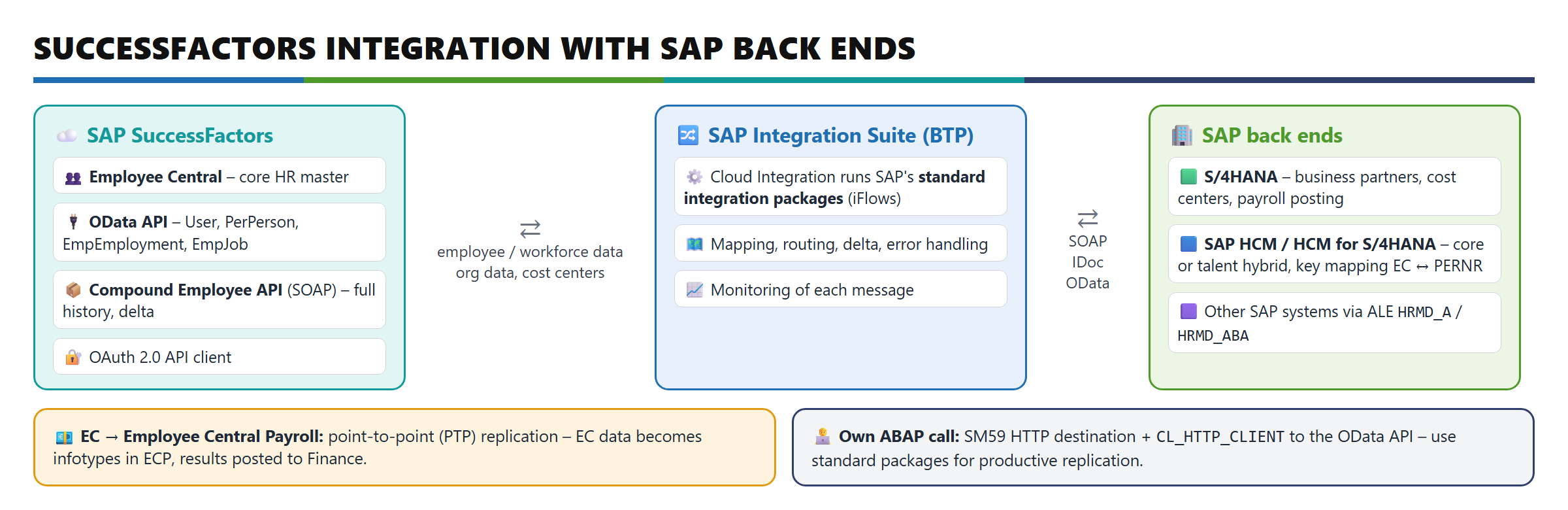
SuccessFactors is a cloud system: it is reached only through APIs, usually via SAP Integration Suite (Cloud Integration on SAP BTP), which runs SAP's pre-delivered integration packages (iFlows) that map and route the data.
3.1 Typical integration scenarios
Scenario | Direction | How |
|---|---|---|
EC → S/4HANA (employee / workforce data) | Cloud → on-prem | Integration Suite iFlow → SOAP inbound service in S/4HANA → business partners (Part 2) |
S/4HANA → EC (cost centers, org data) | On-prem → cloud | Integration Suite → EC OData API |
EC → Employee Central Payroll | Cloud → cloud | Point-to-point (PTP) replication – EC data becomes infotypes in ECP; monitored in EC |
EC → on-prem SAP HCM / HCM for S/4HANA (core hybrid) | Cloud → on-prem | Integration Suite + SAP's integration add-on in the HCM system; key mapping between EC and PERNR |
ECP / payroll → S/4HANA Finance | Payroll → FI | Posting of payroll results to accounting |
Talent hybrid (on-prem HCM as master) | On-prem → cloud | Employee data sent to SuccessFactors for talent modules |
3.2 SuccessFactors APIs
API | Use |
|---|---|
OData API (V2) | Main API: read/write entities such as User, PerPerson, EmpEmployment, EmpJob, foundation objects (company, department …). Supports |
Compound Employee API (SOAP) | Read the whole employee history with delta logic – used by replication to payroll systems |
Authentication | OAuth 2.0 (SAML bearer assertion) is the standard; set up via an API client in SuccessFactors |
An ABAP program on premise calls the OData API like any REST service: an HTTP destination in SM59 (host of the SuccessFactors API server, OAuth) plus CL_HTTP_CLIENT. In ABAP Cloud you would use a communication arrangement and CL_WEB_HTTP_CLIENT_MANAGER instead (see CORE ABAP › 09 Web Services).
|
- Parse the JSON with
/UI2/CL_JSON=>DESERIALIZEinto a structure that mirrorsd-results. - For productive replication prefer the standard integration packages over hand-written calls – they handle delta, mapping, errors and monitoring.
Part 4 – Classic ALE for HR data (HRMD_A)
Between SAP systems (e.g. an HCM system and a separate S/4HANA or ERP system) HR data is distributed with ALE IDocs – the general ALE/IDoc set-up is in CORE ABAP › 07 Interfaces.
Item | Purpose |
|---|---|
HRMD_A | Message type for HR master data – PA infotypes and OM objects – to another HR / ERP system |
HRMD_ABA | Org structure and basic employee data for non-HR systems (workflow agents, purchasing, CRM/SRM) |
PFAL | Send HR master data manually / for the initial load (report RHALEINI): select persons or OM objects, plan version, period |
Change pointers | Activate globally with BD61 and per message type (HRMD_A) with BD50, then send the deltas with RBDMIDOC (BD21) as a job |
BD64 | Distribution model: sender, receiver, message type, filters (which infotypes, subtypes, object types) |
WE20 / WE02 | Partner profiles; monitor IDocs |
IDOC_INPUT_HRMD | Inbound function module that writes the received infotypes in the target system |
- Filter sensitive infotypes (e.g. IT0008 Basic Pay) out of the distribution model when the receiver does not need them.
Part 5 – ESS and MSS as Fiori apps
Employee Self-Service (ESS) lets employees maintain their own data and requests; Manager Self-Service (MSS) gives managers team views and approvals. The UI moved from Java/Web Dynpro to SAP Fiori.
Generation | Technology | Status |
|---|---|---|
Java ESS/MSS | SAP NetWeaver Portal, Web Dynpro Java | ECC only – not available in S/4HANA (no AS Java; also ITS ESS, HTMLB MSS and HR Renewal UI5 ESS/MSS – Note 2383879) |
Web Dynpro ABAP ESS/MSS | Web Dynpro ABAP + FPM, HCM Processes and Forms, decoupled infotype framework | ECC and S/4HANA (compatibility pack, SAP HCM for SAP S/4HANA); HCM Processes and Forms with Adobe forms only in ECC / compatibility pack |
SAP Fiori apps | SAPUI5 apps on the Fiori launchpad, OData services in the HCM back end | Current UI for on-premise HCM / HCM for S/4HANA |
SuccessFactors | Self-service is part of the SuccessFactors UI (people profile, time off …) | Cloud – no ABAP |
Typical HCM Fiori apps
- My Leave Requests / Approve Leave Requests – leave requests and approval.
- My Timesheet / Approve Timesheets – time recording (CATS).
- My Paystubs – payslips from the payroll results.
How they are extended
- BAdIs offered by the app's back end (e.g. leave request checks – BAdI PT_ABS_REQ for the leave request framework).
- Redefine / extend the OData service (SEGW, see CORE ABAP › 08 OData) and the UI with an adaptation project (SAP Fiori › 03 Fiori Elements).
- Infotype validations from PBAS0001 / HRPAD00INFTY (page 04) still matter when the app writes infotypes.
Part 6 – Clean core for HR custom code
Clean core means: keep the standard unmodified and build extensions only on stable, released interfaces, so upgrades stay cheap (concept and levels: Clean Core › 01 Clean Core). For HR this means:
Area | Clean-core approach |
|---|---|
Standard HR programs | No modifications of PA module pools, payroll drivers or standard reports – use PM01, customer includes, BAdIs and PBAS0001 |
Writing infotypes | HR_INFOTYPE_OPERATION or infotype BAPIs – never direct DB updates on PA/HRP/PCL tables |
Reading HR data | LDB PNP/PNPCE, HR_READ_INFOTYPE or classes; respect authorizations; encapsulate reads in your own classes so the data source can change later |
Payroll and time | Custom logic in PCRs and customer operations/functions (page 05), not in copied standard programs |
Code quality | ATC checks, modern ABAP, unit-testable classes instead of large FORM-based reports |
SuccessFactors | No ABAP: configuration (business rules, custom MDF objects), APIs and side-by-side apps on SAP BTP (CAP or RAP) that call the SuccessFactors OData API |
ECP | SAP runs the system; customer code there is possible but should stay minimal – check the current ECP extension rules |
- Classic HR (custom infotypes, Dynpro screens, LDBs) is classic ABAP, not ABAP Cloud: allowed on premise, but keep it isolated, documented and as small as possible.
- A greenfield project with SuccessFactors moves most HR logic out of ABAP – the ABAP developer focuses on integration, payroll (ECP) and the S/4HANA side (business partners, postings).
Part 7 – HR development on S/4HANA in practice
7.1 What changes for an HR ABAP developer
Area | On S/4HANA (HCM in the same system or SAP HCM for SAP S/4HANA) |
|---|---|
Data model | Unchanged: PA/HRP tables, PCL clusters, infotypes, LDB reports and HR function modules work as before |
Custom code migration | Run the ATC S/4HANA readiness checks; check the Simplification List for the HR items of your target release; replace code that treats employees as vendors with the BP model (Part 2) |
Performance on HANA | Read sets instead of single records in loops; HR authorization checks are per employee, so complete code pushdown into CDS is rarely possible for HR data |
User interface | ECC: Java, ITS, Web Dynpro ABAP or HR Renewal UI5 ESS/MSS · S/4HANA: only Fiori apps or Web Dynpro ABAP (Note 2383879); extend them with BAdIs and adaptation projects (Part 5) |
Integration | Business partner synchronisation, SuccessFactors integration packages, posting payroll to Universal Journal (FI) |
7.2 A custom Fiori app on HR data
To show employee data in your own Fiori app, expose it as an OData service (SEGW, or a RAP service binding). For HR data the important point is the authorization: P_ORGIN depends on the time-dependent organisational assignment and on structural authorizations, which a simple CDS access control does not cover. The usual pattern is therefore a query implemented in ABAP:
|
- Class ZCL_EMPLOYEE_QUERY implements
IF_RAP_QUERY_PROVIDER~SELECT:- read the employees (HR function modules or SELECT on PA0001/PA0002 with the date condition);
- keep only those that pass HR_CHECK_AUTHORITY_INFTY (page 04, Part 6);
- apply the paging and sorting the request asks for, then return the rows and the total count.
- Classic alternative: a SEGW service whose DPC_EXT methods do the same (CORE ABAP › 08 OData).
7.3 Protecting HR data
Tool | Purpose |
|---|---|
HR authorizations | P_ORGIN / P_PERNR / structural authorizations decide who sees which employee and infotype (page 04) |
Read Access Logging (RAL) | Logs who displayed sensitive fields such as salary or bank details (configuration in SRALMANAGER) |
Information Lifecycle Management (ILM) | Blocks and later deletes personal data after the legal retention period – for employees and their business partners |
Data minimisation in interfaces | Filter sensitive infotypes out of IDocs and replications (Part 4) |
Part 8 – Interview questions
Q1. Is SAP HCM part of S/4HANA?
Not as a re-designed core module. Classic HCM can run in S/4HANA in the time-limited compatibility scope; the on-premise successor is SAP HCM for SAP S/4HANA; SAP's strategic cloud HR is SuccessFactors Employee Central with Employee Central Payroll.
Q2. What is Employee Central Payroll?
SAP's payroll engine offered as a cloud service operated by SAP. Employee data comes from Employee Central by point-to-point replication and is stored as infotypes; schemas, PCRs and payroll clusters work as on premise.
Q3. Why does an employee need a business partner in S/4HANA?
The BP is the central master record for all persons and companies in S/4HANA (ECC: no employee BP needed – payments ran via an employee vendor created with PRAA; S/4HANA: mandatory, Note 2340095). Applications such as travel management, purchasing or projects use the employee via the BP (role Employee, plus a supplier role for payments).
Q4. How are employees synchronised to business partners?
With HCM in the same system: report /SHCM/RH_SYNC_BUPA_FROM_EMPL, initially and as a periodic job. Otherwise employee data is replicated from SuccessFactors or another HR system and S/4HANA creates the BPs.
Q5. How does SuccessFactors integrate with SAP back ends?
Through APIs – mainly the OData API and the Compound Employee API – using SAP Integration Suite with SAP's standard integration packages; EC to ECP uses point-to-point replication.
Q6. Name some SuccessFactors OData entities.
User, PerPerson, EmpEmployment, EmpJob and foundation objects such as company and department.
Q7. How do you distribute HR master data between SAP systems?
ALE with message type HRMD_A (HRMD_ABA for non-HR receivers): distribution model BD64 with infotype filters, partner profiles WE20, initial load with PFAL, deltas via change pointers and RBDMIDOC.
Q8. What is the difference between HRMD_A and HRMD_ABA?
HRMD_A carries full HR master data to another HR system; HRMD_ABA carries the org structure and basic person data to non-HR systems that only need it for workflow, purchasing or CRM.
Q9. How has ESS/MSS changed?
ECC: Java (Portal), ITS or Web Dynpro ABAP; S/4HANA: SAP Fiori apps (My Leave Requests, My Timesheet, My Paystubs …) based on OData services or Web Dynpro ABAP – Java, ITS and HR Renewal UI5 are not available (Note 2383879); with SuccessFactors, self-service is part of the cloud UI.
Q10. What does clean core mean for HR custom code?
No modifications of standard HR programs, write infotypes only through HR_INFOTYPE_OPERATION/BAPIs, use PM01, BAdIs and PCRs as the extension points, encapsulate reads, and move cloud extensions to BTP using released APIs.
Q11. In a greenfield S/4HANA project with SuccessFactors, what HR ABAP work remains?
Integration (replication, BP synchronisation, monitoring), payroll in ECP (PCRs, reports on payroll results), payroll posting to Finance, and S/4HANA-side extensions that use employee data.
Q12. How would you build a Fiori app that shows employee data and still respects HR authorizations?
Expose the data through an OData service – a RAP custom entity with an ABAP query class, or a SEGW service – and check every employee with HR_CHECK_AUTHORITY_INFTY (or read via HR function modules that check). A plain CDS view with an access control is not enough, because P_ORGIN depends on the time-dependent organisational assignment and structural authorizations.
Q13. How is sensitive HR data protected in S/4HANA?
HR authorizations limit access; Read Access Logging records who viewed sensitive fields; ILM blocks and deletes personal data after the retention period; interfaces send only the infotypes the receiver needs.
🏠 Start Here · ◀ 05 · Payroll & Time Clusters · 07 · Interview Questions ▶ · Sections: CORE ABAP | OOPS ABAP | ABAP on HANA | Clean Core | RAP | ABAP Points | SAP Fiori | SAPUI5 | Mobile Development (MDK) | BTP Foundations | BTP Development | CAP | SAP Build | ABAP on BTP | Integration Suite | SAP Business AI | SAP BASIS | Security | SAP SDLC
Functional: FICO ABAP | TRM ABAP | VIM | SAP BIS | SD ABAP | MM ABAP | PP ABAP | QM ABAP | PM ABAP | PS ABAP | EWM | TM ABAP | GTM ABAP | EHS ABAP | HR ABAP | BW | SAP Datasphere | SAP Business Data Cloud | SAP MDG | SAP Analytics Cloud | SAP Ariba | SAP CX | SAP IBP