Payroll and time evaluation do not store their results in normal tables but in clusters: compressed data containers in the tables PCL1 – PCL4. You cannot SELECT individual fields from them; you IMPORT them (or, better, call SAP's function modules), and payroll itself EXPORTs them. This page explains the cluster tables, how payroll results are organised (RGDIR, RT, CRT, WPBP), how to read them in ABAP, and enough of the payroll and time-evaluation process (schemas, PCRs, retro, off-cycle) to talk about it in an interview. Reading infotypes is on page 03 HR Reporting.
Part 1 – What a cluster is
A cluster table (an INDX-type table) stores many ABAP data objects – structures and whole internal tables – as one compressed binary record under a key. ABAP writes and reads it with:
|
pcl2= the cluster table,(xx)= the two-character cluster ID (area),ID= the key (for payroll: personnel number + sequence number).- Why clusters? One payroll run produces dozens of tables per employee and period. Storing them as one record keeps payroll fast and keeps every result exactly as it was calculated (important for retro and audits).
- Consequence: no SELECT on fields, no joins, no CDS views on cluster content. You always read per employee and evaluate in ABAP.
- The stored objects and their types are defined in the cluster's data definition; reading with the wrong types fails. That is why SAP provides function modules for reading – use them instead of hand-written IMPORTs.
Part 2 – The cluster tables PCL1 – PCL4 and cluster IDs
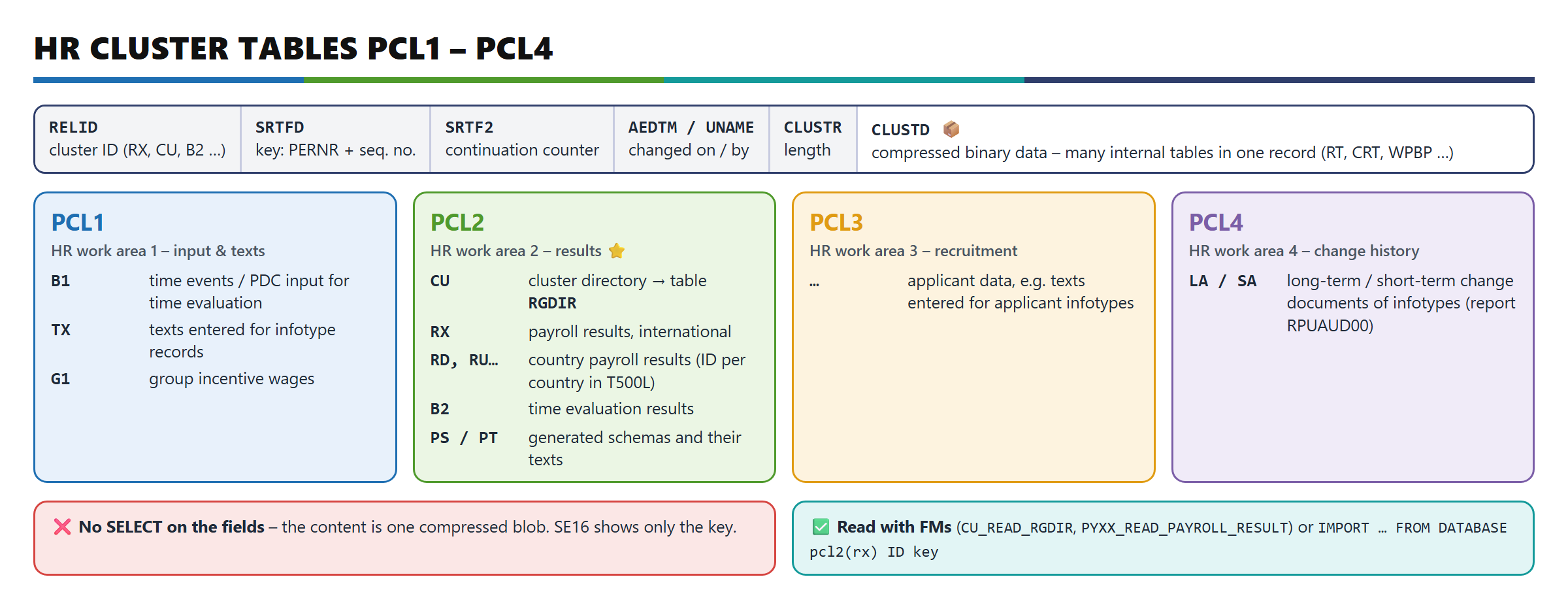
Table | Content | Important cluster IDs |
|---|---|---|
PCL1 | HR work area 1 – input data and texts | B1 time events / PDC data for time evaluation, TX texts entered for infotype records, G1 group incentive wages |
PCL2 | HR work area 2 – results (the important one) | CU cluster directory (RGDIR), RX international payroll results, country clusters (e.g. RD Germany, RU USA), B2 time evaluation results, PS / PT generated schemas and their texts |
PCL3 | HR work area 3 – recruitment | Applicant data, e.g. texts for applicant infotypes |
PCL4 | HR work area 4 – change history | Change documents for infotypes (report RPUAUD00 shows the logged changes) |
- Key fields of a cluster record: RELID (cluster ID), SRTFD (the key – e.g. PERNR + sequence number), SRTF2 (continuation counter when the data does not fit into one row), plus change date / user and CLUSTD (the compressed data).
- Which cluster ID a country's payroll uses is defined in table T500L (country grouping MOLGA → field RELID).
- Display tools instead of SE16: PC_PAYRESULT (payroll results), PT_CLSTB2 (time evaluation results).
Part 3 – Payroll basics: payroll area, control record, wage types
Term | Meaning |
|---|---|
Payroll area (ABKRS, IT0001) | Group of employees paid together with the same period (e.g. monthly salaried, weekly hourly) |
Payroll period | Year + period number (e.g. 2026 / 03); the control record knows the current one |
Control record (PA03) | Status of a payroll area: Released for payroll (payroll may run; master data changes for the period are locked), Released for correction, Check payroll results, Exit payroll (period closed, next period becomes current) |
IT0003 Payroll Status | Per employee: accounted up to which date, earliest retro date, lock flag |
Wage type (LGART) | Four-character code for every amount, number or rate (basic pay, overtime, tax, net pay …) |
3.1 Wage types
- Primary wage types – entered by users in infotypes (IT0008 Basic Pay, IT0014 Recurring Payments/Deductions, IT0015 Additional Payments) or created by time evaluation.
- Secondary (technical) wage types – generated by payroll; they start with /. Examples: /101 Total gross, /550 Statutory net, /559 Bank transfer, /560 Amount paid.
- Model wage types delivered by SAP (often starting with a letter, e.g. M…) are copied into customer wage types; never change SAP's model wage types.
- Tables: T512W – wage type valuation and control: processing classes, cumulations, evaluation classes (how payroll treats the wage type); T512T – wage type texts. Both are keyed by country grouping (MOLGA).
- Processing classes steer the PCRs (e.g. how a wage type is split or valued); evaluation classes steer reporting (e.g. which line of the payslip); cumulations add wage types into totals such as /101.
Part 4 – The payroll process: driver programs, schemas and PCRs
4.1 Driver programs
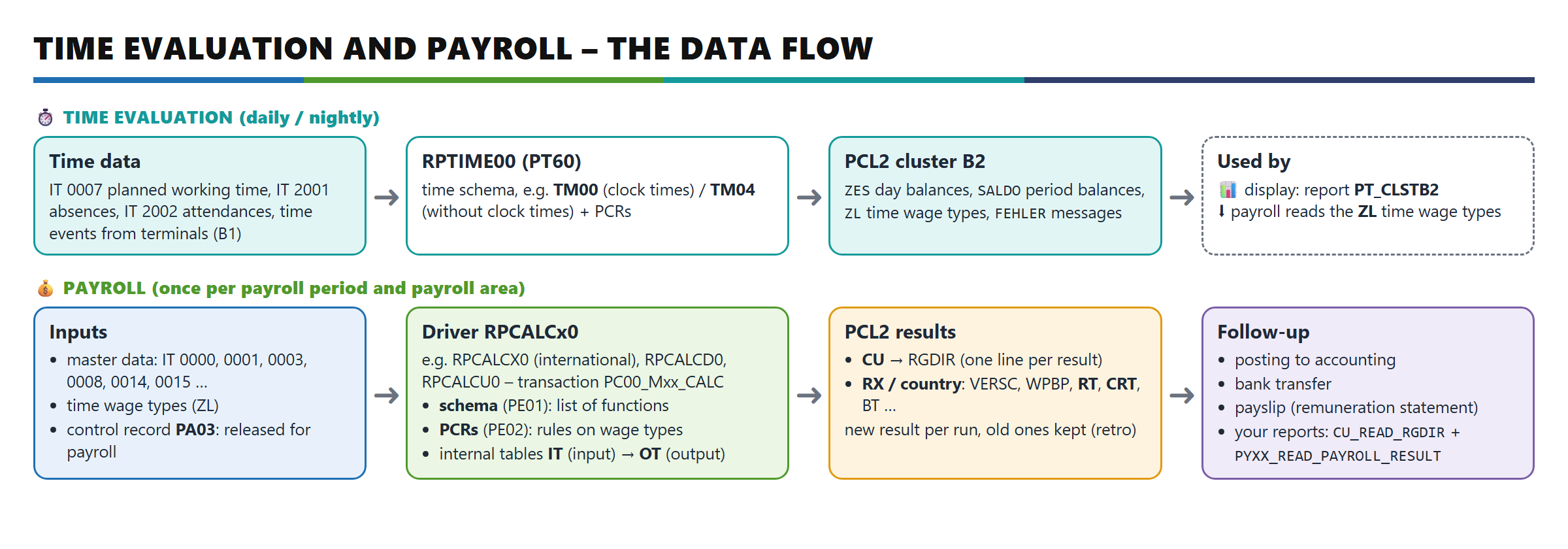
Payroll is run by a country-specific driver program RPCALCx0 (x = country letter), started via transaction PC00_Mxx_CALC (xx = country grouping). Examples: RPCALCX0 international, RPCALCD0 Germany, RPCALCU0 USA. Time evaluation is run by RPTIME00 (transaction PT60).
4.2 Schemas and PCRs
Object | Transaction | What it is |
|---|---|---|
Schema | PE01 | The program logic of payroll / time evaluation as a list of functions (e.g. read IT0008, calculate gross, taxes, net). Examples: X000 (international payroll), TM00 / TM04 (time evaluation). Copy SAP schemas into a customer namespace before changing them |
Function | PE04 | One step in a schema, implemented in ABAP (e.g. |
PCR – personnel calculation rule | PE02 | Rules that process wage types with operations (e.g. |
Operation | PE04 | One command inside a PCR, implemented in ABAP |
- During the run, payroll works with internal tables: IT (input table – wage types to process) and OT (output table – results of a PCR). At the end the final tables (RT, CRT …) are exported to PCL2.
- Custom functions and operations are created in PE04: the ABAP code is a FORM routine in a customer include of the payroll driver (FORM name derived from the function or operation name). Use them only when standard PCR operations cannot do the job.
- Payroll can be simulated (test run without saving results) before the live run.
4.3 Follow-up activities
After the payroll run is exited, follow-up programs read the payroll results (Part 5) and pass them on:
Activity | What happens | Transactions / tools |
|---|---|---|
Remuneration statement (payslip) | Prints or publishes the payslip from RT/CRT and other result tables | Classic form: PE51 (HR Form Editor), program PC00_M99_CEDT · HR Forms: HRFORMS (Smart Forms or Adobe based) · ESS app My Paystubs |
Posting to accounting | A posting run turns wage types into FI/CO documents (wage type → symbolic account → G/L account) | PC00_M99_CIPE create posting run · PCP0 check, release and post runs |
Bank transfer | Preliminary program reads table BT, then the payment medium (DME file) is created | PC00_M99_CDTA preliminary DME program, then the FI payment medium programs |
Third-party interfaces | Export payroll and master data to external payroll or benefit providers, with change detection | PU12 Interface Toolbox |
Reporting | Statutory reports, wage type reporter, custom reports | PC00_M99_CWTR wage type reporter · custom reports (Part 6) |
- Changing the payslip layout is a typical HR ABAP task: in PE51 (classic) it is configuration; in HRFORMS you change the form and its data selection; custom fields come from your own logic in the form.
Part 5 – Structure of a payroll result: RGDIR, WPBP, RT, CRT
5.1 RGDIR – the cluster directory (cluster CU)
Every payroll run creates a new result with a sequence number (SEQNR). The directory of all results of an employee is table RGDIR (structure PC261), stored in cluster CU of PCL2. You always read RGDIR first to find the SEQNR you need.
RGDIR field | Meaning |
|---|---|
SEQNR | Sequence number – the key of the result in the payroll cluster |
FPPER / FPBEG / FPEND | For-period – the period the result belongs to, with begin and end date |
INPER | In-period – the payroll run in which it was calculated (FPPER < INPER = retro result) |
SRTZA | Status: A = actual (current), P = previous, O = old |
PAYTY / PAYID / BONDT | Payroll type and identifier for off-cycle runs (PAYTY blank = regular run), off-cycle date |
OCRSN | Reason for the off-cycle run |
ABKRS | Payroll area of the result |
PAYDT | Pay date |
VOID | Result was voided (reversed) |
5.2 The result tables (cluster RX or the country cluster)
Table | Content |
|---|---|
VERSC | Status information of the result (period, payroll type, dates) |
WPBP | Work place / basic pay data – one line per split (e.g. org unit changed mid-period); other tables point to it with APZNR |
RT | Results table – every wage type of this period: LGART, BETRG (amount), ANZHL (number), BETPE (rate) |
CRT | Cumulated results table – year-to-date / month totals per wage type (field CUMTY = cumulation type) |
BT | Bank transfers – amounts to pay to which bank account |
Others | e.g. ARRRS (arrears), DDNTK (deductions not taken), C0 (cost distribution), V0 (variable assignment for splits), plus country-specific (national) tables |
In ABAP the whole result has a deep type: PAY99_RESULT (international part) with components EVP (the RGDIR line), INTER (international tables: inter-rt, inter-crt, inter-wpbp …) and NAT (national part). Country versions have their own type, e.g. PAYUS_RESULT or PAYDE_RESULT.
Part 6 – Reading payroll results in ABAP
6.1 The recommended way: CU_READ_RGDIR + PYXX_READ_PAYROLL_RESULT
- 1. CU_READ_RGDIR – reads the cluster directory of one employee and returns the country grouping (MOLGA).
- 2. Filter RGDIR: current results (SRTZA = 'A'), regular runs (PAYTY initial), the for-period you need.
- 3. Get the cluster ID of the country from T500L.
- 4. PYXX_READ_PAYROLL_RESULT – reads one result (one SEQNR) into a PAY99_RESULT (or national) structure, including the read authorization check.
|
- A for-view report ("what belongs to March?") filters on FPPER / FPBEG / FPEND with SRTZA = 'A'. An in-view report ("what was paid in March, including retro differences?") filters on INPER – see Part 7.
- Inside a PNP report, call this in GET PERNR with
pernr-pernr. PNP also offers a node PAYROLL (NODES payroll TYPE pay99_result.→GET payroll) that delivers the results of the selected payroll period one by one.
6.2 The classic way: macros and IMPORT
Older reports include the cluster data definitions and the buffer includes of the payroll programs, fill the key (personnel number + SEQNR) and call macros of the form RP-IMP-C2-xx (import from PCL2, cluster xx), which execute an IMPORT … FROM DATABASE pcl2(xx) ID key. The tables RT, CRT, WPBP … are then available as global tables. It works, but the FM approach is shorter, handles versions and authorizations, and is what you should write today.
6.3 Tools
Tool | Use |
|---|---|
PC_PAYRESULT | Display payroll results of an employee (RGDIR, RT, CRT, WPBP …) |
PC00_M99_CWTR (wage type reporter) | Standard report of wage type amounts by period – often enough instead of a custom report |
PT_CLSTB2 | Display time evaluation results (cluster B2) |
PA03 | Payroll control record |
Part 7 – Retroactive accounting and off-cycle payroll
7.1 Retroactive accounting (retro)
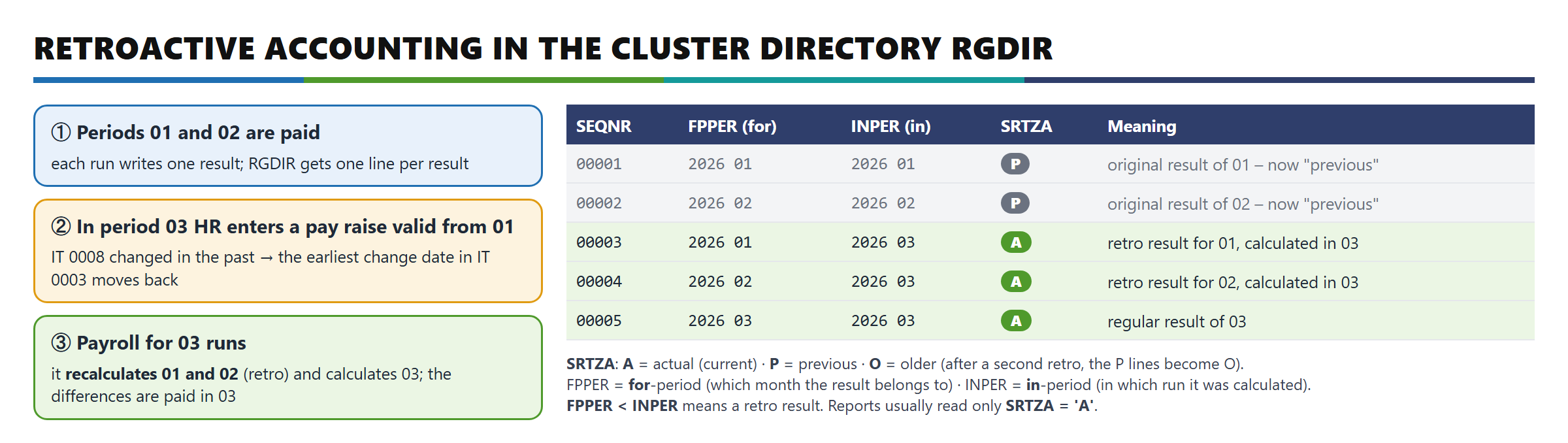
When master data is changed for a period that is already paid (e.g. a pay raise entered in March, valid from January), the next payroll run automatically recalculates the past periods. IT0003 records the earliest changed date, so payroll knows how far back to go.
- Each recalculated period gets a new result (new SEQNR, FPPER = old period, INPER = current period, SRTZA = 'A'); the result it replaces becomes P (previous), older ones O.
- The differences between new and old results are carried into the current period and paid (or recovered) there.
- How far back retro may go is limited by the earliest retroactive accounting period in the control record / payroll customizing and by the employee's hire date.
- For reports this means: never sum all RGDIR lines – choose either the for-view (SRTZA = 'A') or the in-view (by INPER), otherwise amounts are counted twice.
7.2 Off-cycle payroll
An off-cycle run pays an employee outside the regular schedule: a bonus, a correction after the regular run, a manual cheque, an advance. It is run for single employees in the Off-Cycle Workbench (transaction PUOC_xx, xx = country grouping). In RGDIR the result carries a payroll type (PAYTY), an identifier (PAYID), the off-cycle date (BONDT) and a reason (OCRSN); regular results have PAYTY blank.
Part 8 – Time evaluation and cluster B2
Time evaluation (RPTIME00, transaction PT60, usually scheduled every night) compares the planned working time (IT0007 + work schedule) with the actual times (absences IT2001, attendances IT2002, clock-in/out time events) and calculates overtime, flextime balances, quota deductions and time wage types for payroll. It runs a time schema (e.g. TM00 with clock times, TM04 without clock times) with PCRs, just like payroll.
Cluster / table | Content |
|---|---|
B1 (PCL1) | Input interface: time events and other data from time recording systems |
B2 (PCL2) – ZES | Daily time balances (e.g. overtime, flextime per day) |
B2 – SALDO | Cumulated time balances per period |
B2 – ZL | Time wage types – read by payroll (overtime hours, bonuses) |
B2 – FEHLER | Messages / errors of time evaluation (worked on in the time management pool) |
B2 – ZKO, QTACC … | Quota information (e.g. accrued leave) |
- B2 is stored per employee and payroll period; read it with SAP's FMs for time results (e.g. HR_TIME_RESULTS_GET for one period, HR_TIME_RESULTS_IN_INTERVAL for a date range) or with the classic import macro for cluster B2.
- Display: report PT_CLSTB2.
- Payroll reads the ZL time wage types of the period, so time evaluation must run before payroll.
Part 9 – Interview questions
Q1. Why is payroll data stored in clusters and not in normal tables?
A payroll run creates many tables per employee and period. Storing them as one compressed record per result keeps payroll fast and keeps each result exactly as calculated, which retro and audits need. The price: no SELECT on the content – you IMPORT or use FMs.
Q2. What is stored in PCL1, PCL2, PCL3 and PCL4?
PCL1: input data and texts (B1 time events, TX infotype texts). PCL2: results – payroll (RX / country clusters), the cluster directory CU, time evaluation B2. PCL3: recruitment / applicant data. PCL4: change documents of infotypes.
Q3. What is RGDIR?
The cluster directory of an employee (cluster CU in PCL2): one line per payroll result with SEQNR, for-period, in-period, status SRTZA (A/P/O) and off-cycle information. You read it with CU_READ_RGDIR to find the SEQNR before you read a result.
Q4. How do you read payroll results in ABAP?
CU_READ_RGDIR for the directory, filter for SRTZA = 'A' and the period, get the cluster ID from T500L, then PYXX_READ_PAYROLL_RESULT per SEQNR into PAY99_RESULT and loop over inter-rt. The classic alternative is the RP-IMP-C2-xx macros / IMPORT FROM DATABASE.
Q5. What is the difference between RT and CRT?
RT holds the wage types of this one period; CRT holds cumulated values (e.g. year to date) per wage type and cumulation type.
Q6. What is WPBP used for?
It holds the work place and basic pay data for each split within the period, e.g. when an employee changes org unit mid-month; RT lines refer to the split via APZNR.
Q7. Explain for-period and in-period.
The for-period (FPPER) is the period a result belongs to; the in-period (INPER) is the run in which it was calculated. FPPER < INPER means the result was created by retroactive accounting.
Q8. What is retroactive accounting?
Automatic recalculation of already-paid periods when master data is changed in the past. New results become 'A', the replaced ones 'P' / 'O', and the differences are paid in the current period.
Q9. What is an off-cycle payroll run?
A payroll run outside the regular schedule for single employees – bonus, correction, manual cheque, advance – run in the Off-Cycle Workbench; identified in RGDIR by PAYTY, PAYID, BONDT and OCRSN.
Q10. What are schemas and PCRs?
A schema (PE01) is the step-by-step logic of payroll or time evaluation, built from functions. A PCR (PE02) is a rule that processes wage types with operations. Custom functions and operations are created in PE04 and coded in ABAP.
Q11. What are technical wage types? Give examples.
Wage types generated by payroll, starting with '/': /101 total gross, /550 statutory net, /559 bank transfer, /560 amount paid. Wage types are defined in T512W with texts in T512T.
Q12. How do time evaluation results reach payroll?
RPTIME00 writes cluster B2 (ZES, SALDO, ZL, FEHLER). Payroll reads the time wage types in table ZL of the period, so time evaluation must run before payroll.
Q13. What happens after payroll, and how is the payslip produced?
Follow-up activities read the results: the remuneration statement (PE51 classic form or HRFORMS), the posting run to FI/CO (PC00_M99_CIPE, PCP0), the bank transfer from table BT (preliminary DME program) and third-party exports with the Interface Toolbox PU12.
🏠 Start Here · ◀ 04 · Infotype Development · 06 · S/4HANA & Integration ▶ · Sections: CORE ABAP | OOPS ABAP | ABAP on HANA | Clean Core | RAP | ABAP Points | SAP Fiori | SAPUI5 | Mobile Development (MDK) | BTP Foundations | BTP Development | CAP | SAP Build | ABAP on BTP | Integration Suite | SAP Business AI | SAP BASIS | Security | SAP SDLC
Functional: FICO ABAP | TRM ABAP | VIM | SAP BIS | SD ABAP | MM ABAP | PP ABAP | QM ABAP | PM ABAP | PS ABAP | EWM | TM ABAP | GTM ABAP | EHS ABAP | HR ABAP | BW | SAP Datasphere | SAP Business Data Cloud | SAP MDG | SAP Analytics Cloud | SAP Ariba | SAP CX | SAP IBP