How BTP connects systems: SAP Integration Suite for system-to-system integration, API Management for publishing and protecting APIs, and events with SAP Event Mesh and Advanced Event Mesh for event-driven architecture. Running example: the Sales Order Approval business – S/4HANA sales orders are exposed as a managed API to partners and announced as events to a side-by-side CAP app. iFlows in depth: → see Integration Suite › 02 · SAP Cloud Integration (CPI) – iFlows in Depth.
Part 1 – Why integration
Processes run the world – order-to-cash, procure-to-pay, hiring, leave approval – but today they are complex (many systems: S/4HANA, SuccessFactors, Ariba, non-SAP SaaS) and still too manual (e-mails, spreadsheets, re-typing data). That leads to errors, inefficiency and cost. Two answers:
- Integration – systems exchange data automatically (APIs, messages, events, files). No human in the loop. This page.
- Process automation – a workflow orchestrates the steps between people and systems, with rules and bots. → see SAP Build › 02 · SAP Build Process Automation – Processes, Forms & Decisions.
Need | BTP answer | On-premise counterpart |
|---|---|---|
Connect systems, map and route messages | SAP Integration Suite – Cloud Integration | SAP PI / PO |
Publish, secure and monetise APIs | API Management (in Integration Suite) | SAP Gateway (only partly) |
Notify many systems that something happened | Event Mesh / Advanced Event Mesh | – |
B2B / EDI with trading partners | Integration Advisor + Trading Partner Management | PI B2B add-on |
One API across several SAP systems | API Composition (in API Management) | – |
Approvals and human tasks, forms, rules, bots | SAP Build Process Automation (SAP Build section) | SAP Business Workflow (SWDD), BRF+ |
Pick the integration style first (SAP's Integration Solution Advisory Methodology, ISA-M, supported by the Integration Assessment capability): synchronous API, asynchronous message, event, or file / B2B. Classic workflow (SWDD, BOR) is on CORE ABAP › 12 Workflow; BRF+ on CORE ABAP › 13.
Part 2 – SAP Integration Suite and its capabilities
SAP Integration Suite is SAP's integration platform as a service (iPaaS) on BTP and the strategic successor of SAP Process Integration / Process Orchestration (PI/PO). You subscribe once per subaccount, then add and activate capabilities in Integration Suite Home (role Integration_Provisioner) and assign the capability role collections to users.
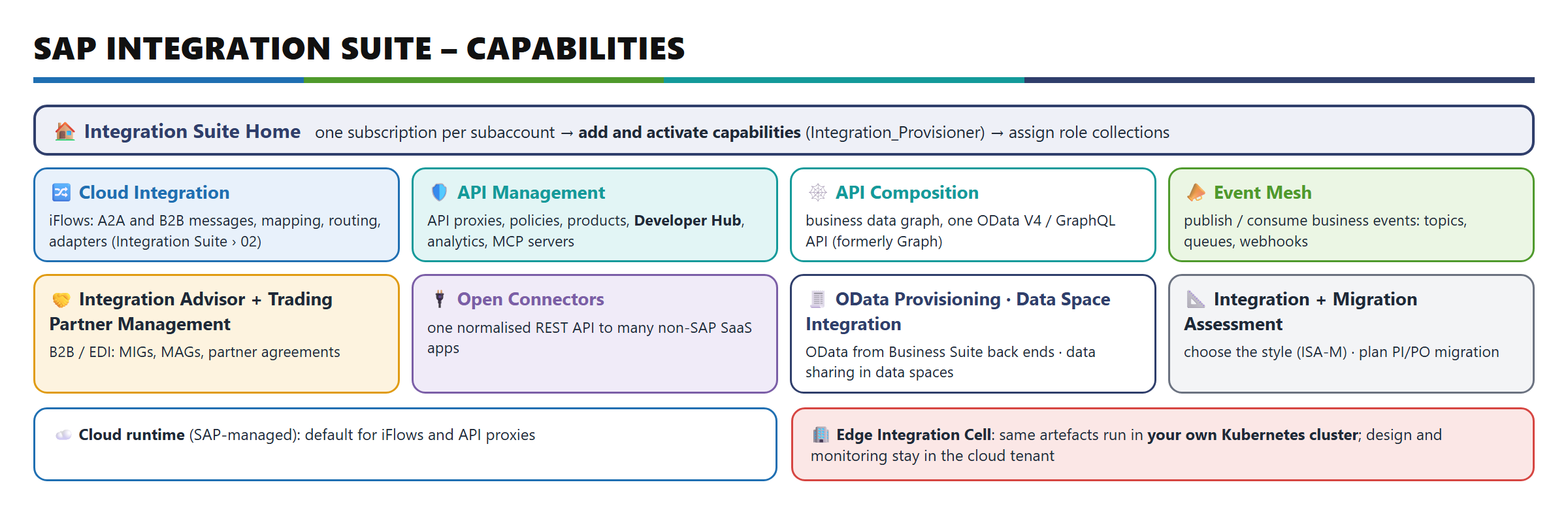
Capability | What it does |
|---|---|
Cloud Integration | Message-based integration: integration flows (iFlows) that receive, transform, route and send messages (A2A and B2B); formerly called CPI – Integration Suite › 02 |
API Management | Exposes back-end services as managed API proxies with policies, products, analytics and the Developer Hub (Part 3) |
API Composition | Capability of API Management: one connected business data graph over S/4HANA, SAP Sales Cloud, SuccessFactors and your own sources, accessed through one OData V4 or GraphQL API. Earlier name: Graph (SAP Graph) |
Event Mesh | Event broker capability for publishing and consuming business events (Part 5) |
Integration Advisor | B2B mapping with crowdsourcing + machine-learning proposals: message and mapping guidelines for EDI standards (UN/EDIFACT, ASC X12 …) |
Trading Partner Management | Manages B2B partners and agreements; generates the runtime iFlows |
Open Connectors | Pre-built connectors with one normalised REST API to many non-SAP cloud apps (CRM, collaboration, storage …) |
OData Provisioning | Exposes OData services of on-premise SAP Business Suite back ends without an SAP Gateway hub of your own |
Data Space Integration | Data sharing with partners in data spaces (e.g. Catena-X style ecosystems) |
Integration Assessment / Migration Assessment | Choose the right integration technology (ISA-M); estimate and plan a PI/PO to Integration Suite migration |
Edge Integration Cell | Optional hybrid runtime: design and monitor in the cloud, run iFlows and API proxies in your own Kubernetes cluster (data stays in your network) |
This list follows the SAP Help "Capabilities of SAP Integration Suite" page (November 2026). A user with the Integration_Provisioner role adds and activates each capability in the Integration Suite home page; which capabilities your service plan includes is shown on the plan's SAP Discovery Center page.
2.1 Cloud Integration – integration flows
Cloud Integration (CPI) runs integration flows (iFlows): a sender system calls a sender adapter, the integration process transforms and routes the message step by step, and a receiver adapter delivers it to the receiver. iFlows live in integration packages and follow Design → Deploy → Monitor. Tenant, adapters, palette steps, Groovy, security material, Cloud Connector, monitoring and the S/4HANA side are on → see Integration Suite › 02 · SAP Cloud Integration (CPI) – iFlows in Depth.
2.2 Pre-packaged content – SAP Business Accelerator Hub
SAP Business Accelerator Hub (api.sap.com, formerly SAP API Business Hub) is SAP's public catalogue of APIs, events, CDS views and pre-packaged integration content (ready iFlows, e.g. S/4HANA ↔ SuccessFactors employee replication). Copy a package into your tenant, configure the parameters (endpoints, credentials), deploy. Always check for standard content before building your own. SuccessFactors integration details: HR ABAP › 06 S/4HANA, SuccessFactors & Integration.
2.3 Open Connectors
Open Connectors offers pre-built connectors to many third-party SaaS APIs (CRM, ticketing, storage, messaging) behind one normalised REST API with uniform authentication, paging and error handling. You create a connector instance with the target's credentials and call it from an iFlow, SAP Build or CAP. Use it when a non-SAP SaaS is needed quickly; for SAP systems prefer the released SAP APIs.
2.4 B2B: Integration Advisor and Trading Partner Management
- Integration Advisor – build message implementation guidelines (MIGs) for an EDI message (e.g. an ORDERS message) and mapping guidelines (MAGs) between two MIGs; proposals come from a crowd-based knowledge graph. Output: runtime artefacts for Cloud Integration.
- Trading Partner Management – partner profiles, agreement templates and agreements; activating an agreement uses generic B2B iFlows with the right MIG / MAG at runtime.
- Classic counterpart: PI B2B add-on with EDI adapters and partner management.
2.5 Edge Integration Cell
Some data must not leave the company network (regulation, latency, on-premise-to-on-premise traffic). Edge Integration Cell is a runtime you deploy into your own Kubernetes cluster: design, deploy and monitor still happen in the cloud tenant, but iFlows and API proxies execute locally. You choose per artefact whether it runs in the cloud or on the edge. Planning, supported Kubernetes platforms and the runtime scope are in the Edge Integration Cell documentation.
2.6 API Composition (formerly Graph)
Business data is connected (a sales order has items, items reference products), but classic APIs are separate endpoints. API Composition builds a business data graph: mirrored entities are projections of the discovered data sources (SAP namespaces such as sap.s4), custom entities are your own projections, and associations connect them. Developers use one API (OData V4 or GraphQL) for the whole landscape, and the graph hides which system answers.
2.7 Legacy – SAP PI/PO
SAP Process Orchestration 7.5: mainstream maintenance until end of 2027 (extended maintenance until end of 2030); new integrations go to Integration Suite. The comparison with CPI, the maintenance dates and the migration path (Migration Assessment, migration tooling) are on Integration Suite › 02, Part 1.1.
Part 3 – API Management in depth
Why it matters: once S/4HANA APIs are used by partners, mobile apps or AI agents, you need one place that authenticates callers, limits traffic, hides back-end URLs and shows who calls what. API Management puts a managed API proxy in front of the real API and enforces policies on every call, without changing the back end.
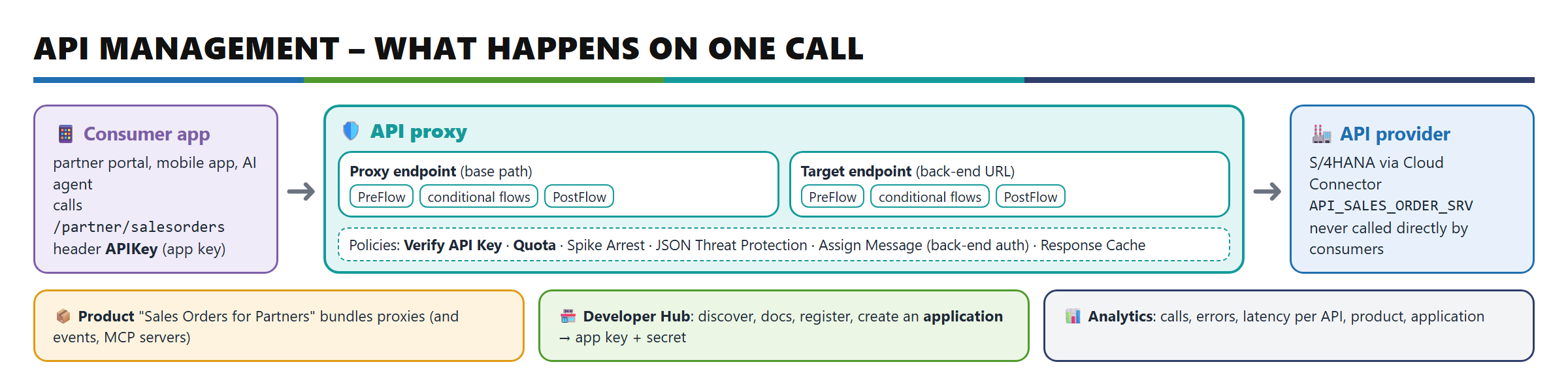
Term | Meaning |
|---|---|
API provider | The back-end system (S/4HANA via Cloud Connector, SAP Gateway, Cloud Integration, any REST / OData / SOAP URL); browse its APIs when creating proxies |
API proxy | A façade URL in front of the real API. A proxy endpoint receives the call (base path), a target endpoint calls the back end, a route connects them |
Flows | Where policies run: PreFlow, conditional flows (per resource or condition) and PostFlow, on the request and on the response side of each endpoint |
Policies | Prebuilt rules attached to flows (table below); JavaScript and Python script policies for special logic |
Product | A bundle of APIs (and events or MCP servers) offered to consumers, e.g. "Sales Orders for Partners"; published to the Developer Hub |
Application | Created by a developer who subscribes to products; gets an app key and secret used on every request |
Developer Hub | Self-service catalogue of APIs, events and MCP servers: discover, read docs, register, subscribe, get credentials, see usage. Earlier names: API business hub enterprise, developer portal |
Analytics | Calls, errors, latency per API, product, application and developer |
3.1 Policies you should know
Purpose | Policies (names as in SAP Help) |
|---|---|
Security | Verify API Key, OAuth v2.0, Basic Authentication, SAML Assertion, Access Control (IP filter) |
Traffic management | Quota (calls per period per app), Spike Arrest (smooths bursts), Response Cache, Populate / Lookup / Invalidate Cache |
Threat protection | JSON Threat Protection, XML Threat Protection, Regular Expression Protection, SOAP Message Validation |
Mediation | Assign Message, Extract Variables, JSON to XML, XML to JSON, XSL Transform, Key Value Map Operations |
Extension and errors | JavaScript, Python Script, Service Callout, Raise Fault, Message Logging, Statistics Collector |
Policies are XML documents attached to a flow. Example: check the app key, then allow 1,000 calls per day per application (structure as in the policy editor; the editor fills defaults):
|
The variable name after verifyapikey. must match the name of your Verify API Key policy; copy the exact attributes from the policy template in the editor.
3.2 Exposing the sales order API to partners – steps
- API provider
S4Hof type on-premise (Cloud Connector location) pointing to the S/4HANA host. - Create API proxy from the provider → pick
API_SALES_ORDER_SRV→ base path/partner/salesorders; the proxy keeps the OData resources. - Attach policies: Verify API Key + Quota (above), Spike Arrest, JSON Threat Protection, and Assign Message to add the back-end authentication (from a key value map or the provider settings, never hard-coded).
- Deploy the proxy, create the product "Sales Orders for Partners" with the proxy, publish it to the Developer Hub.
- Partner developer registers on the Developer Hub, creates an application subscribed to the product, gets the key, calls the proxy URL; analytics show the traffic.
3.3 APIs for AI agents
API Management can also expose MCP servers (created from an API artefact, an HTTP endpoint, an RFC-based back end or a remote MCP server) and list them in the Developer Hub, so AI agents discover and call governed tools. Up to 50 tools per MCP server; MCP specification versions 2025-11-25 and 2026-07-28 are supported (November 2026). MCP and agents: SAP Business AI section.
3.4 Common mistakes
- Exposing the back-end URL to consumers anyway (e.g. in a mobile app) – then policies can be bypassed.
- Quota without an identifier – the limit is shared by all callers instead of per application.
- Using API Management for message transformation and routing logic – that belongs in an iFlow; combine both: iFlow exposed as an API proxy.
Part 4 – APIs vs events
An API call asks: "give me this / do this now" and waits for the answer. An event announces: "this just happened" (Sales order 42 was created) – the publisher does not know or wait for who reacts.
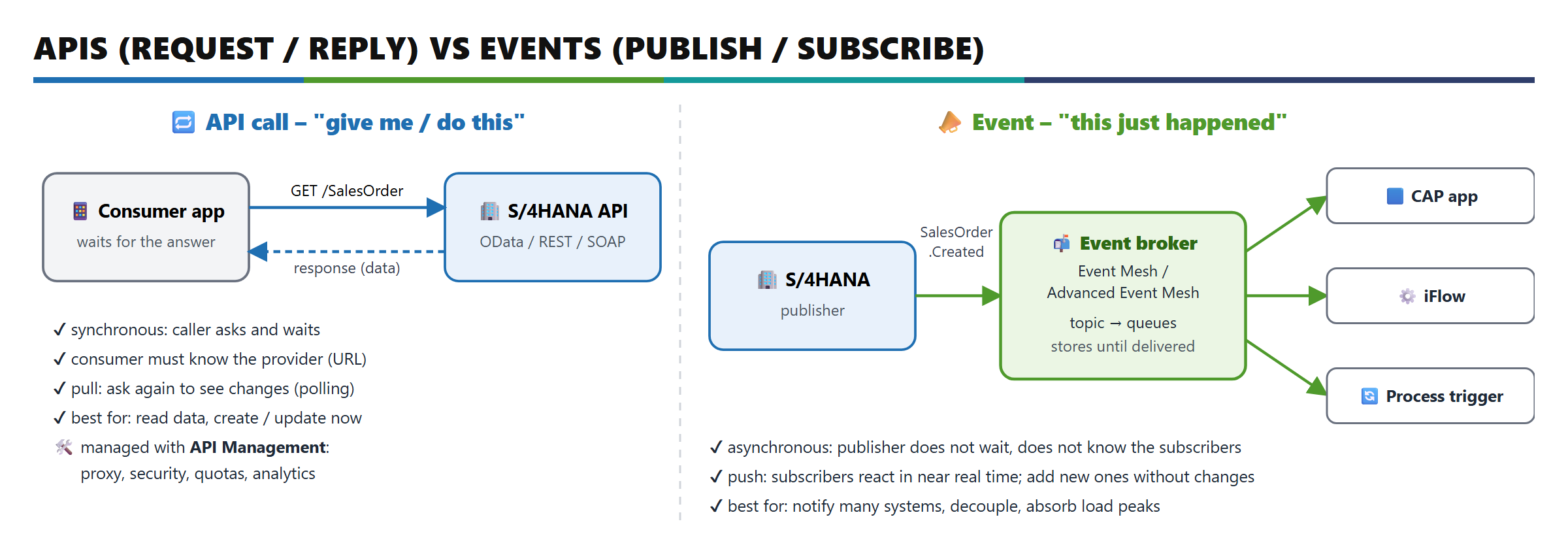
API (request / reply) | Event (publish / subscribe) | |
|---|---|---|
Direction | Consumer pulls | Publisher pushes a notification |
Timing | Synchronous – caller waits | Asynchronous – nobody waits |
Coupling | Consumer knows the provider's URL and interface | Publisher and subscribers only know the topic |
Adding a consumer | No change to the provider, but each consumer polls | Just add a subscription |
If the receiver is down | Call fails, caller must retry | Broker keeps the event in a queue until delivered |
Typical | Read master data, create a sales order now | Notify CRM, data lake and a workflow that an order exists |
4.1 Event terms
- Event – a small message about a state change, usually in the CloudEvents format (type, source, id, time, data with the key – e.g. the sales order number). Subscribers read details via an API if needed ("notification" style).
- Topic – the address an event is published to (e.g.
…/SalesOrder/Created). - Queue – stores events for one consumer; a queue subscription connects topics to the queue. A webhook pushes from the queue to an HTTP endpoint.
- Event sources in SAP: S/4HANA standard business events (via enterprise event enablement), RAP business events in custom code (RAP section), SuccessFactors, and your own CAP apps.
Part 5 – Event-driven architecture: Event Mesh and Advanced Event Mesh
Event-driven architecture (EDA) means systems react to business events instead of polling each other. It keeps the S/4HANA core clean (the core only publishes), lets you add consumers without touching the publisher, and survives receiver downtime because the broker buffers events.
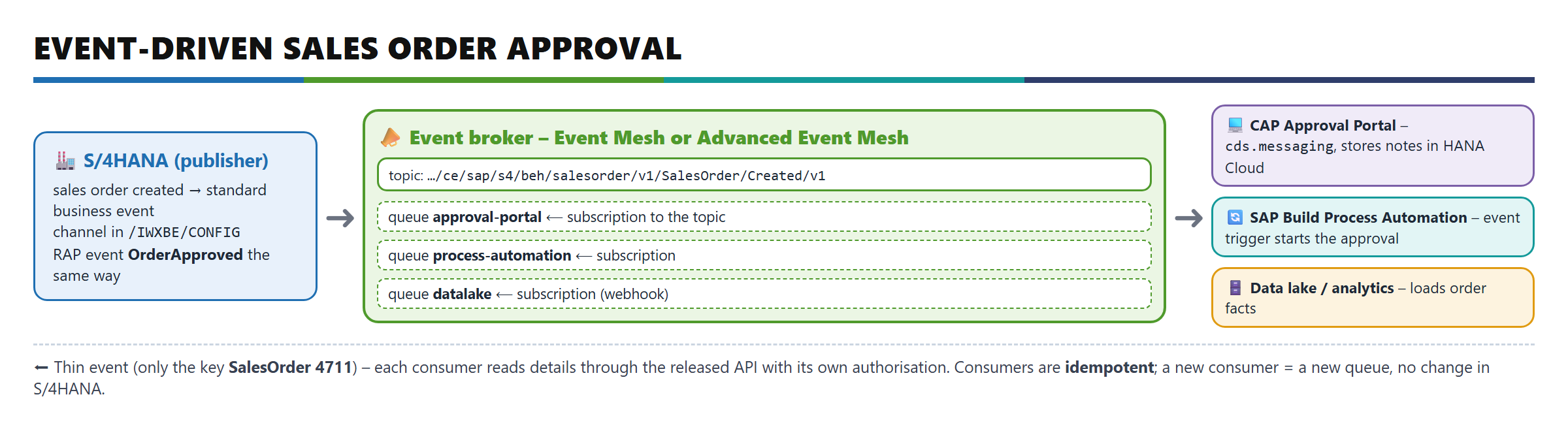
5.1 The flow in the Sales Order Approval example
- S/4HANA raises the standard business event when a sales order is created; the channel configured in transaction
/IWXBE/CONFIG(enterprise event enablement) sends it to the broker. Custom RAP business events such asOrderApprovedare published the same way. - The broker routes it by topic to the queues of all subscribers: the CAP Approval Portal (→ see the CAP section), an SAP Build Process Automation event trigger, a data lake loader.
- Each consumer reads the key from the event and, if it needs more, calls the sales order API (notification pattern – events stay small and carry no sensitive payload).
|
The event type and payload of each standard event are documented on the SAP Business Accelerator Hub (Events section of the S/4HANA product); the source depends on the channel configuration.
5.2 Which event broker?
Broker | Positioning |
|---|---|
Event Mesh capability of Integration Suite | Included in Integration Suite; publish and consume business events for starter and small-to-medium volumes; queues, topic subscriptions, webhooks |
SAP Event Mesh (standalone BTP service, default plan) | The original BTP event service, still found in existing landscapes; SAP publishes a migration guide from the default plan to the Event Mesh capability of Integration Suite |
SAP Integration Suite, advanced event mesh | Enterprise event streaming: a mesh of event broker services across clouds and on-premise, high volume, guaranteed delivery, replay, Event Portal and Insights |
5.3 Advanced Event Mesh building blocks
Element | What it is |
|---|---|
Event broker service | A managed broker deployed in a chosen cloud region or on your own Kubernetes; size by throughput and connections |
Mesh Manager | Connects broker services into an event mesh; events are routed dynamically to wherever subscribers are |
Event Portal | Design-time catalogue: applications, events, schemas, versions; AsyncAPI documents; lifecycle of an event-driven architecture |
Insights | Monitoring of brokers, queues and message rates |
Protocols | AMQP, MQTT, REST, JMS and SMF; SAP systems connect through SAP-provided integrations |
5.4 Common mistakes and tips
- Sending the full order with prices in the event – use thin notification events and read details with authorisation through the API.
- Assuming exactly-once delivery – consumers must be idempotent (store processed event IDs).
- Topic per consumer instead of per business object and action – topics describe what happened, queues belong to consumers.
- Interview tip: explain events as "what happened" and APIs as "do this now", then name the broker by volume and landscape.
Part 6 – Interview questions
Q1. What is SAP Integration Suite and what are its main capabilities?
SAP's iPaaS on BTP and successor of PI/PO. Capabilities: Cloud Integration (iFlows), API Management with API Composition and the Developer Hub, Event Mesh, Integration Advisor and Trading Partner Management (B2B), Open Connectors, OData Provisioning, Data Space Integration, Integration and Migration Assessment; Edge Integration Cell as hybrid runtime.
Q2. Cloud Integration or API Management – which one for which need?
Cloud Integration moves and transforms messages between systems (mapping, routing, protocol change, asynchronous delivery with retries). API Management puts a managed proxy in front of an existing API (security, quotas, analytics, Developer Hub) without changing the payload logic. They are often combined: an iFlow exposed as an API proxy. iFlow questions: Integration Suite › 02.
Q3. Why check the SAP Business Accelerator Hub before building an interface?
It lists SAP's released APIs, events and pre-packaged iFlows (e.g. S/4HANA ↔ SuccessFactors). Copying and configuring standard content is faster, supported by SAP and updated by SAP.
Q4. Explain API proxy, policy, product and application in API Management.
The proxy is the façade URL with a proxy endpoint, a target endpoint and flows; policies (Verify API Key, OAuth, Quota, Spike Arrest, threat protection, caching, mediation) run in the PreFlow, conditional flows and PostFlow; a product bundles APIs for consumers and is published to the Developer Hub; an application subscribes to products and gets the app key and secret.
Q5. What is the difference between Quota and Spike Arrest?
Quota counts calls per identifier over a business period (1,000 per day per app) and rejects calls above it – a commercial or fairness limit. Spike Arrest smooths bursts (e.g. at most 30 per minute, spread evenly) to protect the back end.
Q6. What happened to SAP Graph?
It became API Composition, a capability of API Management in Integration Suite: a business data graph of mirrored and custom entities across SAP and non-SAP sources, accessed through one OData V4 or GraphQL API.
Q7. When do you use Edge Integration Cell?
When data must stay in your network or integration runs on-premise to on-premise: the runtime runs on your own Kubernetes cluster while design and monitoring stay in the Integration Suite tenant.
Q8. APIs vs events – when do you use which?
APIs for synchronous request/reply (read or create something now; the caller waits). Events for asynchronous notification of many receivers (publish/subscribe through a broker); publisher and subscribers are decoupled and the broker buffers events when a receiver is down.
Q9. Event Mesh vs Advanced Event Mesh?
The Event Mesh capability of Integration Suite (and the older standalone SAP Event Mesh service) is a broker for starter and medium volumes. Advanced Event Mesh is the enterprise option: a distributed mesh of broker services across clouds and on-premise, high throughput, guaranteed delivery, replay, Event Portal and Insights.
Q10. How does an S/4HANA business event reach a CAP app?
S/4HANA's enterprise event enablement sends the event over a channel (configured in /IWXBE/CONFIG) to the broker topic; a queue subscribed to that topic belongs to the CAP app, which consumes it with cds.messaging and reads further data through the sales order API.
Q11. Scenario: partners must read sales orders, at most 1,000 calls per day each. Design it.
API provider for S/4HANA via the Cloud Connector, API proxy for the sales order API, policies Verify API Key + Quota per application + Spike Arrest + JSON Threat Protection, back-end credentials added by the proxy, a product published to the Developer Hub, partners subscribe with their own applications, analytics for usage and billing.
Q12. Scenario: CRM, a data lake and an approval workflow must react to new sales orders. Design it.
Event-driven: S/4HANA publishes SalesOrder.Created to Event Mesh (or Advanced Event Mesh for high volume across landscapes); each consumer has its own queue subscribed to the topic; the workflow starts through an event trigger in SAP Build Process Automation; consumers are idempotent and read details through the released API. New consumers are added without changing S/4HANA.
🏠 Start Here · 02 · SAP CPI ▶ · Sections: CORE ABAP | OOPS ABAP | ABAP on HANA | Clean Core | RAP | ABAP Points | SAP Fiori | SAPUI5 | Mobile Development (MDK) | BTP Foundations | BTP Development | CAP | SAP Build | ABAP on BTP | Integration Suite | SAP Business AI | SAP BASIS | Security | SAP SDLC
Functional: FICO ABAP | TRM ABAP | VIM | SAP BIS | SD ABAP | MM ABAP | PP ABAP | QM ABAP | PM ABAP | PS ABAP | EWM | TM ABAP | GTM ABAP | EHS ABAP | HR ABAP | BW | SAP Datasphere | SAP Business Data Cloud | SAP MDG | SAP Analytics Cloud | SAP Ariba | SAP CX | SAP IBP