SAP Cloud Integration – still called CPI by almost everybody – is the part of SAP Integration Suite that moves messages between systems. This page goes from the tenant and its artefacts to the inside of an integration flow (iFlow), the adapters and palette steps, Groovy scripting, security, monitoring and – most important for an ABAP developer – how S/4HANA sends to and receives from CPI. The Integration Suite overview (API Management, Event Mesh, Integration Advisor …) is on page 01 · Integration Suite, APIs & Events.
Part 1 – What SAP Cloud Integration is
Cloud Integration is the message-based integration capability of SAP Integration Suite on SAP BTP. You model integration flows (iFlows) in the browser; SAP runs them on its cloud runtime. An iFlow receives a message, transforms, enriches and routes it, and delivers it to one or more receivers – application-to-application (A2A) inside a company or business-to-business (B2B) with partners.
- Names over time: SAP HANA Cloud Integration (HCI) → SAP Cloud Platform Integration (CPI) → Cloud Integration capability of SAP Integration Suite. Job ads and colleagues still say "CPI".
- Typical use cases: S/4HANA ↔ SuccessFactors (employee and organisation replication), S/4HANA ↔ Ariba (procurement documents), S/4HANA ↔ non-SAP SaaS (CRM, e-commerce, logistics), EDI with customers and suppliers (AS2), payment and bank files over SFTP with PGP, file-based legacy interfaces.
1.1 CPI vs SAP PI/PO
SAP PI / PO (on-premise) | SAP Cloud Integration | |
|---|---|---|
Runs where | Customer's own Java server (AEX / PO), customer operates and upgrades it | SAP's cloud, operated and updated by SAP (optional own runtime: Edge Integration Cell) |
Design tools | Enterprise Services Repository + Integration Directory (Swing tools, NWDS) | Web UI in the browser |
Engine | Integration Engine / Adapter Engine | Apache Camel routes |
Mappings | Message mapping, Java mapping, XSLT | Message mapping, XSLT, Groovy / JavaScript scripts |
Content | Built per customer; some ESR content from SAP | Large catalogue of prepackaged iFlows on the SAP Business Accelerator Hub |
Monitoring | Message monitor (PIMON, SXMB_MONI on ABAP) | Message processing log in the web UI |
Future | 7.5 mainstream maintenance ends 2027 (extended to 2030) | SAP's strategic integration platform |
SAP Process Orchestration 7.5: SAP's announced mainstream maintenance runs until the end of 2027, with extended maintenance until the end of 2030. Migration path:
- Integration Assessment (ISA-M) – decide which integration technology fits each new interface.
- Migration Assessment – connects to the PI/PO system, extracts the integration scenarios and rates the migration effort per scenario.
- Migration tooling in Integration Suite – generates iFlows from PI integrated configuration objects using migration templates; you then test and finish them manually.
Step | Tool | Result |
|---|---|---|
1. Inventory | Migration Assessment (capability of Integration Suite) connected to the PI/PO system through the Cloud Connector | List of integration scenarios with a rating of the migration effort per scenario – the basis for the project plan |
2. Target per interface | Integration Assessment (ISA-M) | Cloud runtime, Edge Integration Cell (Part 2.2) for on-premise ↔ on-premise, events, or API Management |
3. Generate | Migration tooling in the Design area | iFlows (plus mappings, value mappings) generated from the integrated configuration objects |
4. Finish and test | You | Adapters and security material configured, Java mappings rewritten (Groovy or message mapping), regression tests with real payloads, then cut over sender by sender |
What the tooling cannot generate (and must be built by hand) is listed on the Integration Suite page "Known Limitations of Migration Tooling"; read it before you estimate the effort.
1.2 Neo vs Cloud Foundry tenants
The first CPI tenants ran in the Neo environment. Integration Suite is provisioned in a Cloud Foundry-enabled subaccount, and Neo tenants are migrated to Cloud Foundry before the announced Neo sunset (BTP Foundations › 02). The visible differences: CF tenants use service instances and service keys of the Process Integration Runtime service for inbound authentication (Part 8) and BTP role collections for users; SAP offers a migration tool that copies content from a Neo to a CF tenant.
Part 2 – Tenant architecture, Edge Integration Cell and prepackaged content
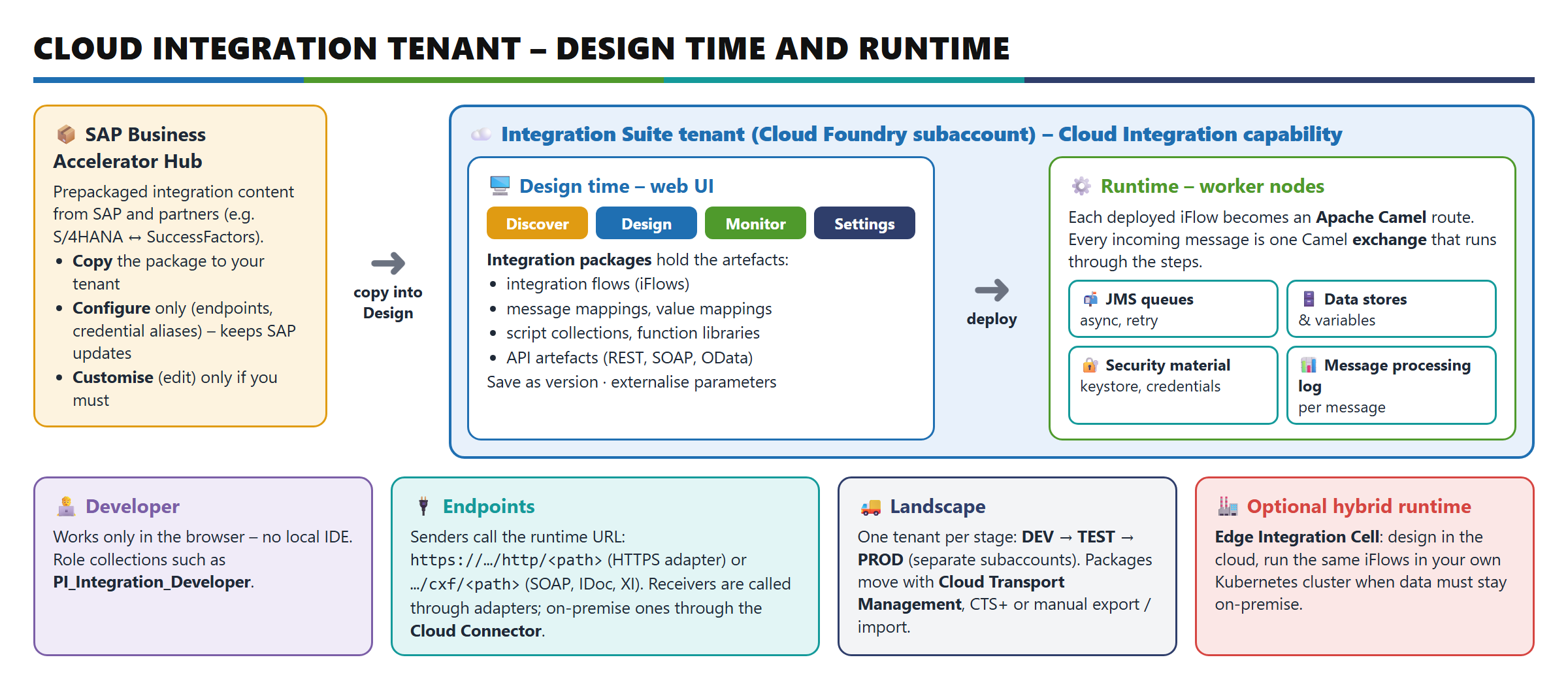
A tenant is your own instance of Cloud Integration. You subscribe to Integration Suite in a subaccount, activate the Cloud Integration capability, and SAP provisions the tenant: a design-time web UI and a runtime that processes the messages. Usually there is one tenant per stage (DEV, TEST, PROD), each in its own subaccount.
Web UI area | What you do there |
|---|---|
Discover | Browse prepackaged integration content from the SAP Business Accelerator Hub and copy it |
Design | Create and edit integration packages and their artefacts; deploy |
Monitor | Message processing logs, deployed content, security material, JMS queues, data stores, connectivity tests |
Settings | Tenant settings such as the transport mode and runtime options |
- Runtime: each deployed iFlow is turned into an Apache Camel route – Camel is an open-source integration framework that implements the classic enterprise integration patterns (router, splitter, aggregator …). Every incoming message becomes one Camel exchange.
- Tenant stores: JMS message queues, data stores and variables, the security material store and the message processing logs – all managed from Monitor.
- Edge Integration Cell: an optional hybrid runtime in your own Kubernetes cluster; design stays in the cloud (2.2 below).
2.1 Prepackaged content: copy, configure, customise
The SAP Business Accelerator Hub (page 01 · Integration Suite, APIs & Events) offers ready integration packages, e.g. for S/4HANA ↔ SuccessFactors. Always look there first.
Step | What it means |
|---|---|
Copy | Discover → open the package → Copy: it appears in Design as your package |
Configure | Fill the externalised parameters (addresses, credential aliases, time intervals) and deploy. The artefact stays unchanged, so SAP's updates can be applied cleanly |
Customise | Edit the iFlow itself (add steps, change mappings). Only when configuration is not enough: SAP's later updates no longer fit cleanly and you must re-apply your changes. Often better: keep the standard iFlow and add your logic in a separate iFlow |
2.2 Edge Integration Cell – the hybrid runtime
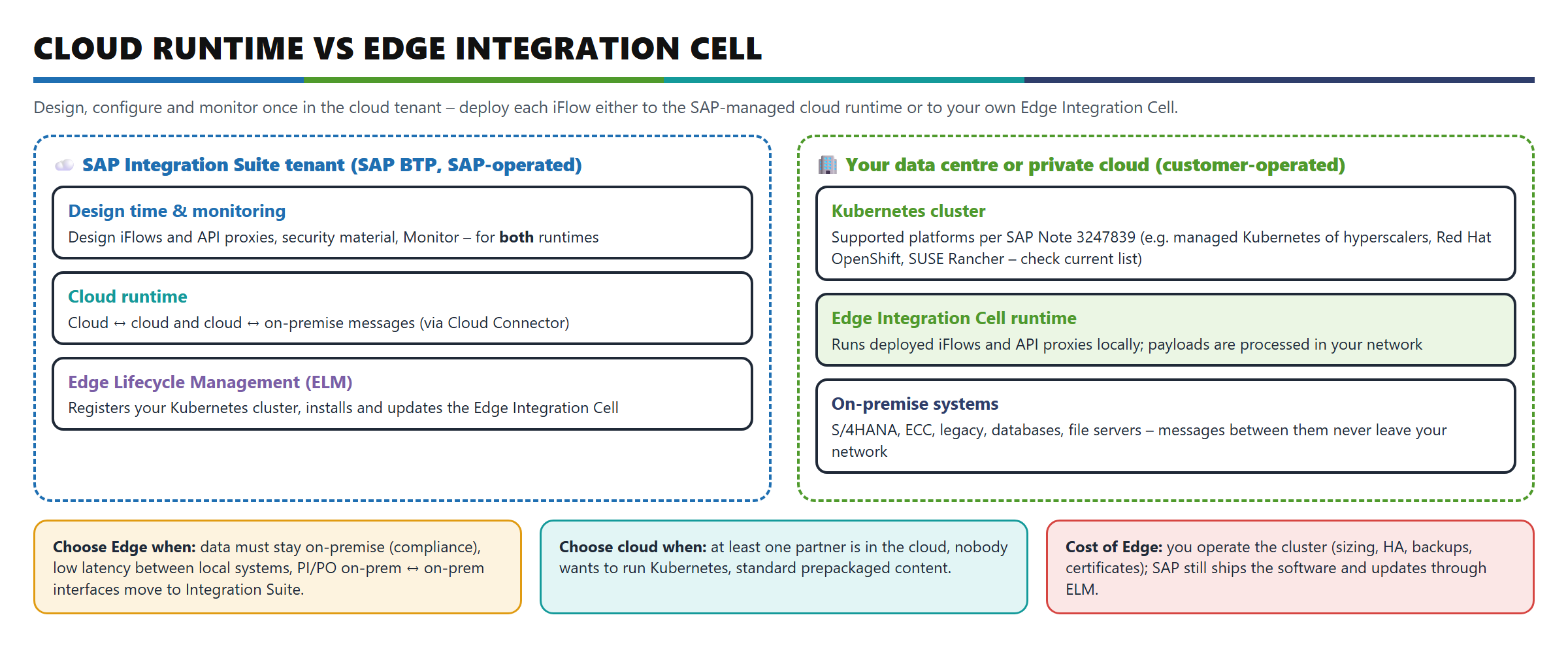
Why it exists: many PI/PO interfaces connect two on-premise systems. Sending those messages to the cloud and back adds latency, and some data (HR, finance) must not leave the company network. Edge Integration Cell is an optional runtime of Integration Suite that you install in your own Kubernetes cluster. You still design, configure and monitor in the cloud tenant – only the message processing runs locally.
Topic | What to know |
|---|---|
What runs there | Integration flows and API proxies (API Management) deployed to the edge runtime; most adapters and steps are supported. Out-of-scope actions are in SAP Note 3391207 (e.g. no OAuth2 Authorization Code credentials, no Delay Software Update); integration content up to 2 GB |
Installation | Edge Lifecycle Management (ELM) in the Integration Suite UI registers the cluster, deploys and updates the Edge Integration Cell |
Platforms | Supported Kubernetes distributions and versions are listed in SAP Note 3247839 (managed Kubernetes of hyperscalers and on-premise distributions such as Red Hat OpenShift or SUSE Rancher RKE2), together with supported storage and the external PostgreSQL and Redis / Valkey services |
Deploy target | When you deploy an iFlow you choose the runtime profile: cloud or the Edge Integration Cell |
Operations | You run the cluster: sizing, high availability, backups, certificates, network; SAP delivers the software and its updates |
Licence | Part of the Integration Suite commercial model; which service plans include it is shown on the Integration Suite page of the SAP Discovery Center |
Rule of thumb: cloud runtime by default; Edge Integration Cell when data must stay local, latency between local systems matters, or a PI/PO on-premise ↔ on-premise landscape is replaced.
Part 3 – Design artefacts, versions, externalised parameters and design guidelines
Artefact | Purpose |
|---|---|
Integration package | Folder for related artefacts; the unit you copy, transport and update |
Integration flow | The message pipeline: adapters, steps, routes (Part 4) |
Message mapping | Graphical field-by-field mapping from a source to a target structure (XSD, WSDL, EDMX …) with standard and user-defined functions |
Value mapping | Lookup table that translates codes between systems, e.g. S/4HANA unit |
Script collection | Reusable Groovy / JavaScript scripts that several iFlows reference |
Function libraries | Reusable user-defined functions (Groovy) for message mappings |
API artefacts | REST, SOAP and OData API artefacts: expose an API whose logic is modelled like an iFlow |
3.1 Versions
- Save keeps a draft; Save as version freezes a numbered version (e.g. 1.0.3) with a comment.
- The version history lets you compare and revert. Save a version before you transport a package – drafts are a common reason for failed transports and migrations.
3.2 Externalised parameters (configure-only)
Any adapter or step field can be externalised: instead of a fixed value you write {{ParameterName}}. The value is then set in Configure per tenant, without editing the iFlow – the DEV tenant points to the test system, PROD to production. Prepackaged content is designed to be used this way.
|
3.3 Integration flow design guidelines
SAP publishes its own rules for robust iFlows as Integration Flow Design Guidelines: integration packages in Discover that you copy into your tenant and run. Each guideline comes with sample iFlows that show the right way (and often the wrong way) side by side.
Guideline topic | What it teaches (examples) |
|---|---|
Learn the basics | Message model, headers vs properties, content modifier, simple routing |
Enterprise integration patterns | Splitter, aggregator, content-based routing, recipient list, content enricher – the Camel patterns as iFlows |
Handle errors gracefully | Exception subprocesses, JMS retry, dead-letter handling, alerting |
Relax dependencies to external components | Decoupling with JMS / ProcessDirect, timeouts, asynchronous design |
Keep readability in mind | Naming, local integration processes, small scripts, comments |
Apply the highest security standards | Security material, certificates, least privilege, no payload logging of sensitive data |
- The same guidelines are built into the tenant as rules: the integration lead activates all or some of them in Settings › Integrations › Design Guidelines, and in the artifact editor's Design Guidelines view you choose Execute Guidelines. The result shows severity, applicability and compliance per rule, and Analyse explains each finding – fix it (or skip it with a reason) before you transport. Each rule has in-app help.
- Search Discover for "Integration Flow Design Guidelines" – the developers.sap.com tutorial "Getting Started with Integration Flow Design Guidelines" walks through copying and running one.
Part 4 – iFlow anatomy and the message model
Element | Meaning |
|---|---|
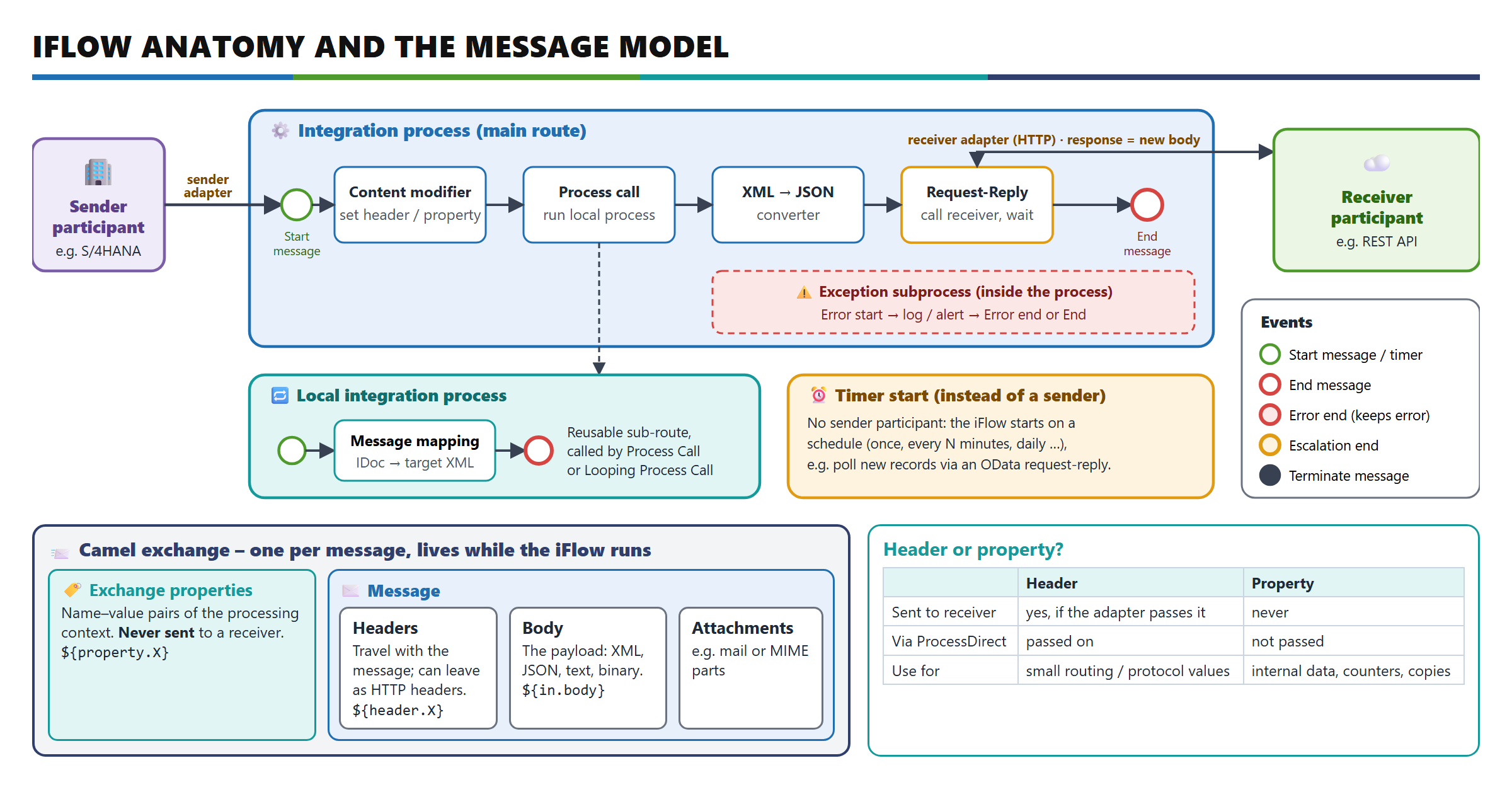
Sender participant | The system that calls the iFlow; the line to the process carries the sender adapter |
Receiver participant | A system the iFlow calls; the line carries the receiver adapter |
Integration process | The main route that runs for every message |
Local integration process | Reusable sub-route inside the same iFlow, called by Process Call or Looping Process Call |
Exception subprocess | Placed inside a process; starts with an Error start event when a step fails – log, alert, notify, then Error end or End |
Start message / End message | Begin and end of a message-triggered route |
Timer start | Starts the iFlow on a schedule instead of a sender (once, every N minutes, daily …) |
Error end / Escalation end / Terminate | End with failed status / end with escalated status / stop processing immediately |
4.1 The message model
Each message is a Camel exchange. It holds the message – headers, body and attachments – plus the exchange properties:
- Body – the payload (XML, JSON, CSV, binary); read in expressions as
${in.body}. - Headers – name–value pairs that travel with the message:
${header.Name}. - Exchange properties – name–value pairs of the processing context only:
${property.Name}. - Attachments – extra parts, e.g. mail attachments or MIME parts (not the same as the attachments a script writes into the message processing log).
Header | Exchange property | |
|---|---|---|
Belongs to | The message | The exchange (processing context) |
Sent to a receiver | Yes, when the adapter passes it – e.g. the HTTP receiver sends the headers listed in its request-headers field | Never leaves the tenant |
Passed via ProcessDirect (headers only if listed in Allowed Header(s)) | Yes | No |
Size | Keep small – large headers can break HTTP calls | Can hold larger values |
Typical use | Routing keys, protocol values ( | Intermediate results, counters, a copy of the original payload, flags |
Rule of thumb: use a property unless the value must reach a receiver or another iFlow – then a header. Useful standard headers: SAP_ApplicationID (business key shown in the monitor), CamelHttpResponseCode (HTTP status of the last call).
Part 5 – Adapters
The adapter on a sender or receiver line handles the protocol, security and message format. Common adapters (Integration Suite offers more, including many non-SAP application adapters):
Adapter | Sender | Receiver | Use |
|---|---|---|---|
HTTPS | ✓ | – | Expose an HTTP endpoint ( |
HTTP | – | ✓ | Call any HTTP / REST API (method, query, headers, OAuth) |
SOAP (SOAP 1.x, SAP RM) | ✓ | ✓ | Web services; SAP RM for simple asynchronous reliable messaging |
IDoc | ✓ | ✓ | IDoc XML over SOAP to and from S/4HANA / ECC (Part 10) |
RFC | – | ✓ | Call a remote-enabled function module / BAPI via a BTP RFC destination |
OData V2 / V4 | ✓ | ✓ | Receiver: consume OData services (query wizard from the metadata). Sender: expose an OData service (OData API artefact) |
SuccessFactors | ✓ | ✓ | SuccessFactors OData, SOAP (e.g. compound employee) and REST APIs |
Ariba | ✓ | ✓ | Exchange documents with SAP Ariba |
XI | ✓ | ✓ | XI 3.0 protocol: ABAP proxies, PI/PO; exactly-once delivery |
ProcessDirect | ✓ | ✓ | iFlow → iFlow call inside the same tenant, no network hop |
JMS | ✓ | ✓ | Tenant message queues: decoupling and automatic retry |
AMQP | ✓ | ✓ | External message brokers (e.g. SAP Event Mesh) |
Kafka | ✓ | ✓ | Apache Kafka topics |
SFTP / FTP | ✓ | ✓ | Sender polls files, receiver writes files; SFTP checks known hosts |
✓ | ✓ | Sender polls a mailbox (IMAP / POP3), receiver sends via SMTP | |
AS2 | ✓ | ✓ | B2B EDI over HTTP with signing, encryption and receipts (MDN) |
JDBC | – | ✓ | SQL against cloud or on-premise databases |
LDAP | – | ✓ | Write to a directory service |
Open Connectors | – | ✓ | Call non-SAP cloud apps through an Open Connectors instance (page 01) |
Part 6 – Palette steps
Group | Step | What it does |
|---|---|---|
Transform | Content Modifier | Set or delete headers and exchange properties; replace the body (constants, XPath, expressions) |
Transform | Converter | CSV ↔ XML, JSON ↔ XML, EDI ↔ XML |
Transform | Filter | Keep only part of an XML message (XPath) |
Transform | Encoder / Decoder | Base64, GZIP, ZIP, MIME multipart, PKCS#7 / CMS |
Transform | Script | Groovy or JavaScript for logic the standard steps can't do (Part 7) |
Mapping | Message mapping / XSLT mapping | Structure mapping; XSLT for XML-to-XML or XML-to-text |
Mapping | Value mapping (in a mapping) | Code translation from a value mapping artefact |
Routing | Router | Choose one route by a condition (XPath or expression); default route |
Routing | Multicast + Join + Gather | Send the same message down several routes (sequential or parallel), then join the branches and merge the results |
Routing | Splitter | General, iterating, IDoc, EDI, tar / zip, PKCS#7 – one message into many |
Routing | Gather | Combine the split messages again (concatenate or merge XML) |
Routing | Aggregator | Collect separate incoming messages that belong together (correlation) into one, until a completion condition or timeout |
External call | Request-Reply | Synchronous call; the response replaces the body |
External call | Send | Asynchronous one-way call, no response |
External call | Content Enricher | Call a system and combine its response with the original message (lookup data) |
External call | Poll Enrich | Fetch a file (e.g. SFTP) in the middle of a flow |
Persistence | Data Store Operations | Write, Get, Select, Delete entries in a tenant data store (temporary storage with an entry ID) |
Persistence | Write Variables | Local or global variable, e.g. the timestamp of the last successful run for delta loads |
Call | Process Call / Looping Process Call | Run a local integration process once / in a loop (e.g. OData paging) |
Call | Idempotent Process Call | Run a sub-process only once per message ID – duplicate check |
Validate | XML Validator | Check the payload against an XSD |
Security | Encryptor / Decryptor, Signer / Verifier | PGP and PKCS#7 encryption, XML and PKCS#7 signatures |
Part 7 – Groovy scripting
A script step calls a function with a fixed signature: it receives the message object, changes it and returns it. The example reads the body, a header and a property, counts the order items, sets a property for a later router and logs sparingly.
|
- getBody(String) converts the body to a string; for parsing read it as a stream – getBody(Reader) with XmlSlurper().parse; SAP's scripting guidelines advise against parseText (memory with large payloads).
messageLogFactoryis provided by the runtime. Custom header properties are small and searchable; payload attachments in the log cost storage and may expose personal data – keep them off in production.- Prefer standard steps (content modifier, mapping, converter); keep scripts short, put shared ones in a script collection, and test them with sample payloads (the iFlow simulation helps).
- JavaScript has the same function signature; Groovy is the common choice.
Part 8 – Security and connectivity
8.1 Security material (outbound credentials)
Credentials are stored once in Monitor → Security Material (keys in the Keystore) and adapters refer to them by alias – never type a password into an iFlow.
Type | Used for |
|---|---|
User Credentials | Basic authentication (user and password) to a receiver |
Secure Parameter | A single secret, e.g. an API key |
OAuth2 Client Credentials | Token URL, client ID and secret; the adapter fetches and caches the token |
OAuth2 SAML Bearer Assertion | OAuth token from a SAML assertion – typical for SuccessFactors APIs, with a technical user or principal propagation |
OAuth2 Authorization Code | Token obtained once through an interactive user login at the provider (e.g. some SaaS APIs); the tenant refreshes it afterwards |
Keystore entries | Own key pairs for client-certificate authentication and signing; trusted CA certificates for TLS |
Known Hosts | SSH host keys the SFTP adapter trusts |
PGP Public / Secret Keyring | Encrypt, decrypt, sign and verify files |
Exact type names and the full list (e.g. further OAuth variants) grow with updates – Monitor → Manage Security → Security Material → Create shows what your tenant offers.
8.2 Inbound authentication (who may call your iFlow)
- In the BTP subaccount create a service instance of SAP Process Integration Runtime with plan integration-flow and role ESBMessaging.send, then a service key: it contains the client ID, client secret, token URL and the runtime URL.
- The caller then uses OAuth (fetch a token with the client ID and secret), basic authentication with the client ID and secret, or a client certificate (service key of key type certificate).
- Each sender adapter is set to User Role (role-based, e.g.
ESBMessaging.send) or Client Certificate authorisation. - Role collections for people:
PI_Administrator,PI_Integration_Developer,PI_Business_Expert,PI_Read_Only(assigned in the BTP cockpit, BTP Foundations › 03).
8.3 Reaching on-premise systems – Cloud Connector
CPI reaches S/4HANA on-premise through the Cloud Connector (BTP Foundations › 03, Part 5; deep dive BTP Foundations › 04 · BTP Security Deep Dive, Part 5):
- In the Cloud Connector: connect the subaccount, map a virtual host (e.g.
s4h-virtual:44300) to the real host, and allow only the needed paths (/sap/bc/srt/idoc,/sap/opu/odata/…) or RFC function modules. - In the receiver adapter: address with the virtual host, Proxy Type = On-Premise, and the Location ID if several Cloud Connectors serve the subaccount. The RFC adapter uses a BTP destination of type RFC.
- Calls into CPI from S/4HANA need no Cloud Connector – S/4HANA calls the CPI URL over the internet (through the company proxy if required).
8.4 CSRF tokens
- S/4HANA OData services require an
X-CSRF-Tokenfor create, update and delete. The OData receiver adapter fetches it automatically. With the plain HTTP adapter, first send a GET with headerX-CSRF-Token: Fetch, keep the token and the session cookie, then send the POST. - The HTTPS sender adapter can demand CSRF protection itself (option CSRF Protected); callers then have to fetch a token first. For system-to-system calls with OAuth it is usually switched off.
Part 9 – Monitoring and operations
Monitor tile | What you see and do |
|---|---|
Monitor Message Processing | One message processing log (MPL) per message: status, steps, timing, error text. Search by time, status, iFlow, message ID, application ID ( |
Manage Integration Content | Deployed artefacts with runtime status (starting, started, error), endpoint URLs, log level, restart and undeploy |
Manage Security | Security material, keystore, user roles, connectivity tests (TLS, SSH, SFTP, SMTP, Cloud Connector) |
Manage Stores | Data stores, variables, message queues (JMS: retry, move or delete messages), number ranges |
9.1 Message status and log levels
- Typical MPL statuses: Completed, Processing, Retry, Escalated, Failed, Cancelled, Discarded.
- Log levels per deployed iFlow: None, Info (default, recommended in production), Debug, Trace. Trace also records the message content of every step; it switches back after 10 minutes and trace data is deleted after about 1 hour. Trigger the message again after enabling it.
Log level | What the MPL records | When |
|---|---|---|
None | Only the status and basic data of the message | High-volume flows where the step log is not needed |
Info | Status, start / end, errors and the main processing steps | Default – production |
Debug | Every step with details (no payload) | Analysing the flow logic for a while |
Trace | Every step plus the message content (headers, properties, body) at each step | Short troubleshooting only – 10 minutes, data kept about 1 hour |
- The MPLs themselves are kept for a limited time (typically 30 days) and then deleted – export or forward to SAP Cloud ALM if you need longer evidence. Payloads you need to keep belong in the receiver or a data store, not in the log.
9.2 Error handling and retries with JMS
Asynchronous scenarios should not lose messages when a receiver is down. Standard pattern:
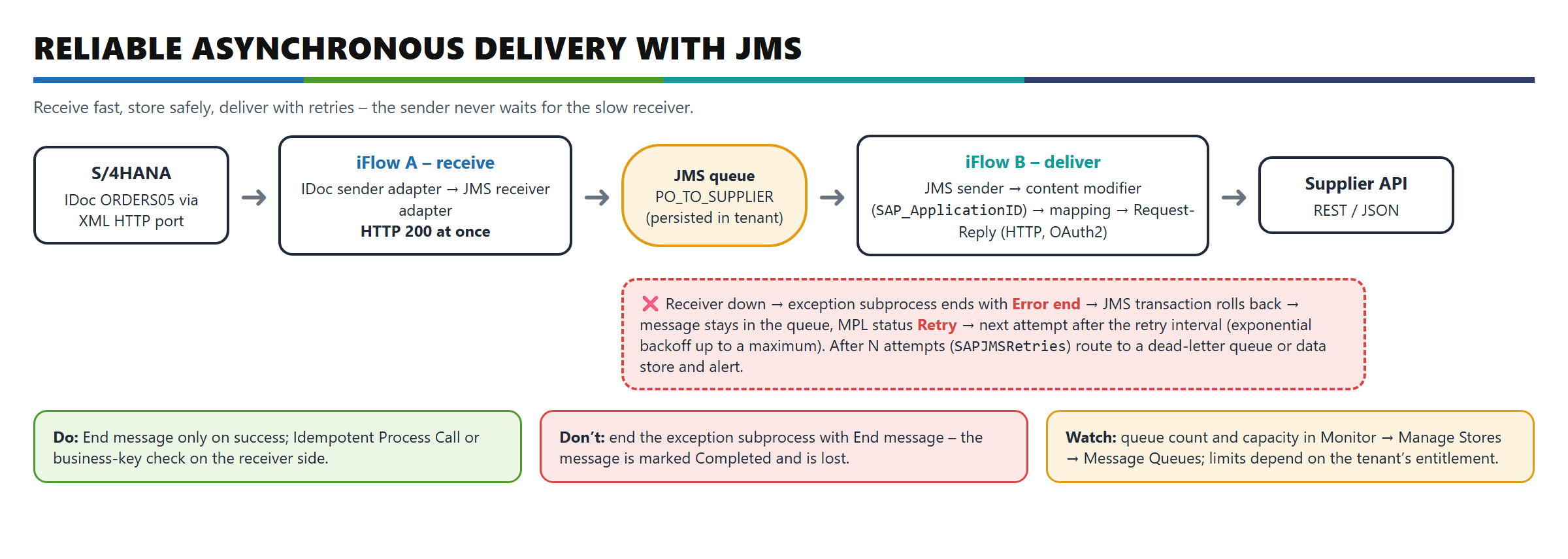
- iFlow A receives the message (e.g. an IDoc), answers the sender immediately and writes the message to a JMS queue (JMS receiver adapter).
- iFlow B reads the queue (JMS sender adapter), maps and calls the receiver. If it fails, the message stays in the queue and is retried with growing intervals (retry interval, exponential backoff, maximum interval). The MPL shows status Retry.
- End the exception subprocess with an Error end event so the JMS consumer rolls back and retries; an End message event would mark the message completed and it would be gone.
- The header
SAPJMSRetriescounts the attempts – after N retries route the message to an error store or notify the support team instead of retrying forever.
9.3 JMS queues, data stores and variables – which store for what
Store | Use it for | Watch out |
|---|---|---|
JMS queue | Reliable hand-over between iFlows, retry with backoff, ordered or parallel consumption | Default 30 queues / 9.3 GB, self-service up to 100 queues / 30 GB; headers + properties ≤ 4 MB – monitor in Manage Stores → Message Queues; empty or delete unused queues |
Data store (Data Store Operations) | Park a payload by entry ID: Write, Get, Select (polling), Delete – e.g. a message for later manual processing or a correlation case | Each entry has an expiration period (up to 180 days) and an alert threshold for entries nobody reads; global or iFlow-local visibility |
Variable (Write Variables) | Small values such as the timestamp of the last delta load | Local (one iFlow) or global (all iFlows of the tenant); not for payloads |
Number range | Unique running numbers, e.g. for EDI interchange control numbers | Maintained in Manage Stores |
- Rule of thumb: JMS for delivery guarantees, data store for parking, variables for small state. Do not misuse a data store as a queue with a polling timer when JMS fits: JMS is built for high throughput, and one JMS message can be up to 1,280 MB (256 chunks of 5 MB in one transaction).
9.4 Alerting and transport
- Alerting: an exception subprocess can send a mail or an alert; central monitoring with SAP Cloud ALM (integration and exception monitoring) is SAP's recommended approach for landscapes (BTP Development › 05 · DevOps, Operations & Observability).
- Transport of packages from DEV to TEST to PROD (set in Settings): Cloud Transport Management (recommended), CTS+ (enhanced Change and Transport System of an ABAP system), or manual export / import of the package file. Externalised parameters are configured per tenant after the import.
Part 10 – S/4HANA and CPI for an ABAP developer
Most CPI interfaces in an S/4HANA project start or end in ABAP. The ABAP developer configures the S/4HANA side, writes proxies or HTTP calls, and analyses IDoc and message status.
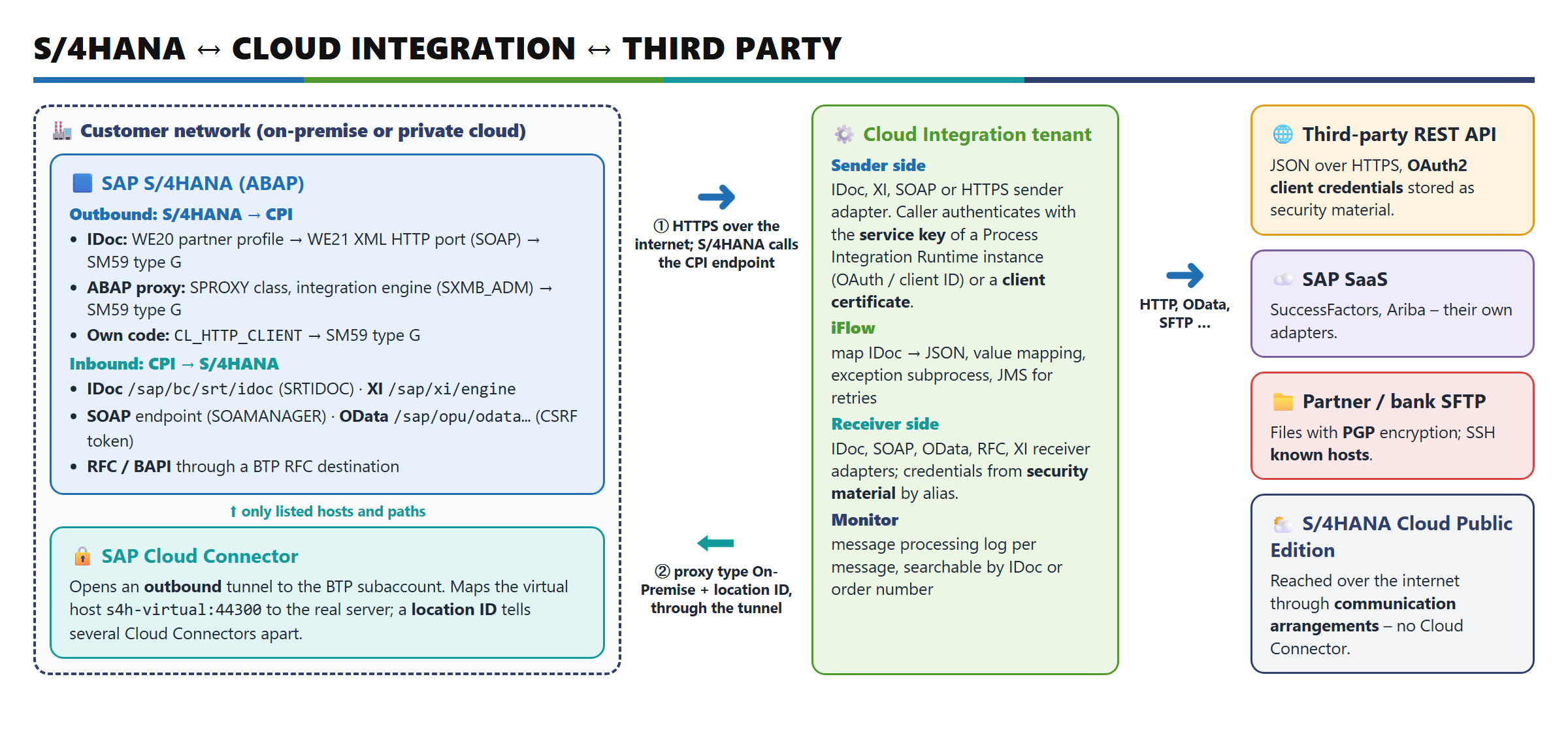
10.1 IDoc outbound: S/4HANA → CPI
CPI's IDoc sender adapter expects IDoc XML wrapped in SOAP. Setup in S/4HANA:
Step | Transaction | Setting |
|---|---|---|
1 | CPI | iFlow with an IDoc sender adapter, address e.g. |
2 | STRUST | Import the root CA certificate of the CPI host into the SSL client PSE |
3 | SM59 | Type G (HTTP connection to external server): CPI host, port 443, path prefix |
4 | WE21 | Port of type XML HTTP: the SM59 destination, SOAP Protocol selected |
5 | WE20 | Partner profile (e.g. logical system of CPI or the supplier), outbound parameters: message type, basic type, the XML HTTP port, transfer immediately |
6 | WE02 / WE05 | Status 03 = data passed to the port; an HTTP error gives status 02. Reprocess with BD87; test with WE19 |
The IDoc arrives in CPI as XML: one IDOC element with the control record EDI_DC40 and the data segments. The adapter also sets SapIDoc… headers with control record values.
|
10.2 Inbound: CPI → S/4HANA
Technology | S/4HANA side | CPI side |
|---|---|---|
IDoc | Register the SOAP IDoc service with SRTIDOC (path | IDoc receiver adapter: |
SOAP | Configure the service endpoint in SOAMANAGER | SOAP receiver adapter with the endpoint URL |
OData | Activate the service ( | OData receiver adapter – CSRF handled automatically |
RFC / BAPI | Remote-enabled function module, RFC user with authorisations | RFC receiver adapter with a BTP RFC destination |
XI (ABAP proxy) | Provider proxy class (SPROXY); runtime path | XI receiver adapter, quality of service exactly once |
- All of these run through the Cloud Connector with a technical user (security material) or principal propagation.
- S/4HANA Cloud Public Edition has no Cloud Connector path: CPI calls its APIs over the internet after a communication arrangement (communication scenario + communication system for CPI + communication user) is created – see ABAP on BTP › 01 · ABAP on BTP, Part 6 (communication management).
10.3 ABAP proxies via the XI adapter
- Generate a consumer (outbound) or provider (inbound) proxy class with SPROXY.
- Outbound: configure the local integration engine (SXMB_ADM) to send to an SM59 type G destination that points to the XI sender endpoint of the iFlow.
- Advantages over IDoc / plain HTTP: typed ABAP structures, exactly once (in order) delivery, monitoring of every message in SXMB_MONI.
10.4 Calling a CPI endpoint from ABAP
For an own synchronous call (e.g. a real-time price check through CPI) use an SM59 type G destination with path prefix /http/orders and CL_HTTP_CLIENT (ls_order holds the order data):
|
- If the HTTPS sender adapter is CSRF Protected, fetch a token first – or switch the option off for this system-to-system endpoint.
- In ABAP Cloud (SAP Business AI Platform, ABAP environment, S/4HANA Cloud) use
CL_WEB_HTTP_CLIENT_MANAGERwith a destination from a communication arrangement instead (ABAP on BTP › 01 · ABAP on BTP, Part 6).
10.5 End-to-end example: purchase order IDoc → CPI → supplier REST API
A purchase order is sent to a supplier who only accepts JSON over REST (message type ORDERS, basic type ORDERS05; a sales order confirmation would be ORDRSP with the same basic type).
- 1. The buyer saves the purchase order; output determination (ECC: NAST condition records · S/4HANA: NAST or the BRF+-based S/4HANA output management with channel IDOC) determines the EDI output and creates IDoc ORDERS05 for the supplier's partner profile (WE20).
- 2. The XML HTTP port (WE21, SOAP) posts the IDoc XML via the SM59 type G destination to
/cxf/ORDERS05; WE02 shows status 03. - 3. iFlow A (IDoc sender adapter, role-based authentication) writes the message to a JMS queue and answers HTTP 200 at once.
- 4. iFlow B (JMS sender) sets
SAP_ApplicationID= PO number (XPath//E1EDK01/BELNR) with a content modifier. - 5. A message mapping turns the IDoc into the supplier's structure; a value mapping translates units and plant codes; a converter makes JSON.
- 6. Request-Reply with the HTTP receiver adapter: POST to the supplier's URL with OAuth2 client credentials from the security material (URL and alias externalised).
- 7. On an error the exception subprocess ends with an Error end – JMS retries; after N attempts (
SAPJMSRetries) a mail goes to the support team. - 8. Support searches the MPL by the PO number; optionally a STATUS / ALEAUD IDoc reports the result back to S/4HANA.
Part 11 – Best practices
- Reuse first: check the SAP Business Accelerator Hub; configure rather than customise.
- Naming: clear package and iFlow names with source, target and object, e.g.
S4HANA_to_Supplier_PurchaseOrder; one package per business area or interface family. - Externalise every address, credential alias, interval and flag – the same iFlow version runs on DEV, TEST and PROD.
- Exception subprocess in every productive iFlow; decide per scenario: retry (JMS + Error end), alert, or reply with an error to a synchronous caller.
- Idempotency: receivers may get a message twice after a retry – use the Idempotent Process Call or a business key check so a duplicate is not posted twice.
- No sensitive payload logging: log level Info in production, Trace only briefly, no payload attachments with personal or financial data.
- Small scripts: standard steps first; short, commented Groovy in script collections.
- Follow the Integration Flow Design Guidelines (Part 3.3) and run the design guidelines check before you transport.
- Right runtime: cloud by default, Edge Integration Cell only where data or latency require it.
- Modularise with ProcessDirect: shared logic (e.g. error notification, token handling) in one iFlow called by others; local integration processes for reuse inside one iFlow.
- Security: credentials only as security material, least-privilege technical users, certificates renewed before they expire.
Part 12 – Interview questions
Q1. What is SAP Cloud Integration and how is it related to CPI and HCI?
The message-based integration capability of SAP Integration Suite on BTP, where iFlows receive, transform, route and send messages. It was called SAP HANA Cloud Integration (HCI), then SAP Cloud Platform Integration (CPI) – the abbreviation is still common.
Q2. How does CPI differ from SAP PI/PO, and how do you migrate?
PI/PO is an on-premise Java server the customer runs, designed in ESR and Integration Directory. CPI is an SAP-operated cloud service on Apache Camel, designed in a browser, with prepackaged content. Migration: Migration Assessment rates the PI/PO scenarios, the migration tooling generates iFlows from integrated configuration objects, then test and finish them. PO 7.5 maintenance ends 2027 (extended to 2030).
Q3. Describe the parts of an iFlow.
Sender participant with a sender adapter, the integration process with start and end events and steps, optional local integration processes (Process Call), an exception subprocess for errors, receiver participants with receiver adapters. A timer start replaces the sender for scheduled flows.
Q4. What is the difference between a header and an exchange property?
Both are name–value pairs. Headers belong to the message and can be sent to receivers (e.g. as HTTP headers) and to other iFlows via ProcessDirect (only if listed in its Allowed Header(s)). Exchange properties live only during processing inside the tenant and are never sent. Use properties for internal values, headers only when needed outside.
Q5. Request-Reply, Send, Content Enricher – when do you use which?
Request-Reply: synchronous call whose response becomes the new body. Send: one-way asynchronous call without a response. Content Enricher: call a system for lookup data and combine the response with the original message.
Q6. How do you send an IDoc from S/4HANA to CPI?
iFlow with an IDoc sender adapter (endpoint /cxf/<path>). In S/4HANA: CPI certificate in STRUST, SM59 type G to the CPI host and path, WE21 XML HTTP port with SOAP protocol, WE20 outbound partner profile. Status 03 in WE02 means passed to the port; then follow the message in the CPI monitor.
Q7. How does CPI reach an on-premise S/4HANA system?
Through the Cloud Connector: it opens an outbound tunnel to the subaccount and maps a virtual host to the real server with an allow-list of paths. The receiver adapter uses the virtual host, proxy type On-Premise and, if needed, the location ID. Calls from S/4HANA to CPI go directly over HTTPS.
Q8. How do external systems authenticate when calling an iFlow?
Create a Process Integration Runtime service instance (plan integration-flow, role ESBMessaging.send) and a service key. Callers use OAuth with the client ID and secret, basic authentication with them, or a client certificate. Outbound credentials are kept as security material and referenced by alias.
Q9. How do you make an asynchronous interface reliable?
Decouple with JMS: receive and store in a JMS queue, process from the queue in a second iFlow. On failure end the exception subprocess with an Error end so JMS retries with backoff; limit the attempts with SAPJMSRetries and alert. Make the receiver side idempotent against duplicates.
Q10. A message failed in production – how do you analyse it?
Search the message processing log by time, iFlow or application ID; read the error and the failed step. If the payload is needed, set the log level to Trace (10 minutes), resend, inspect the step contents, and check connectivity tests, security material and the receiver. Fix, then retry or resend.
Q11. What are externalised parameters and why do they matter?
Fields written as {{Name}} whose values are set in Configure per tenant. The same iFlow version runs on DEV, TEST and PROD with different endpoints and credentials, and prepackaged content can be used without editing it, so SAP updates still apply.
Q12. As an ABAP developer, how would you call CPI synchronously from S/4HANA?
Expose the iFlow with an HTTPS sender adapter, create an SM59 type G destination to /http/<path> with the service-key credentials or a certificate, and call it with CL_HTTP_CLIENT (JSON from /ui2/cl_json). In ABAP Cloud use CL_WEB_HTTP_CLIENT_MANAGER with a communication arrangement.
Q13. What is the Edge Integration Cell and when would you use it?
An optional runtime of Integration Suite installed in the customer's own Kubernetes cluster through Edge Lifecycle Management. Design, configuration and monitoring stay in the cloud tenant; iFlows and API proxies deployed to it process messages locally. Use it when data must stay on-premise, for low latency between local systems, or to replace PI/PO on-premise ↔ on-premise interfaces. The customer operates the cluster.
Q14. JMS queue, data store or variable – how do you choose?
JMS for guaranteed delivery and automatic retries between iFlows; a data store to park a payload by entry ID for later processing (with an expiration period and alert threshold); a variable for small state such as the last successful delta timestamp. Queue limits depend on the tenant's entitlement.
Q15. Scenario: your company runs 300 interfaces on SAP PO 7.5. How do you plan the move?
Run the Migration Assessment against PO to inventory the scenarios and rate the effort; decide the target per interface with ISA-M (cloud runtime, Edge Integration Cell for on-premise ↔ on-premise, events or APIs); start with simple, high-value interfaces, generate iFlows with the migration tooling, rewrite Java mappings, configure security material, regression-test with real payloads and cut over sender by sender – well before the end of PO mainstream maintenance (end of 2027).
🏠 Start Here · ◀ 01 · Integration & Events · 03 · Interview Questions ▶ · Sections: CORE ABAP | OOPS ABAP | ABAP on HANA | Clean Core | RAP | ABAP Points | SAP Fiori | SAPUI5 | Mobile Development (MDK) | BTP Foundations | BTP Development | CAP | SAP Build | ABAP on BTP | Integration Suite | SAP Business AI | SAP BASIS | Security | SAP SDLC
Functional: FICO ABAP | TRM ABAP | VIM | SAP BIS | SD ABAP | MM ABAP | PP ABAP | QM ABAP | PM ABAP | PS ABAP | EWM | TM ABAP | GTM ABAP | EHS ABAP | HR ABAP | BW | SAP Datasphere | SAP Business Data Cloud | SAP MDG | SAP Analytics Cloud | SAP Ariba | SAP CX | SAP IBP