MM (Materials Management) is the SAP module for everything a company buys and stores: it plans and procures materials and services, receives and stores the goods, values the stock and checks the supplier's invoice before FI pays it. As an ABAP developer you read and extend MM data all the time, so you must know its organization units (key fields of every table) and its master data – material, supplier, purchasing info record, source list, conditions and classification. The purchasing process is on page 02, goods movements and invoices on page 03.
Part 1 – What MM does and how it integrates
MM sits at the start of the logistics chain: raw materials and components are bought, stored in the warehouse, issued to production, checked by quality, stored again as finished products and finally shipped by SD. MM owns the material master, the purchasing documents and every stock movement.
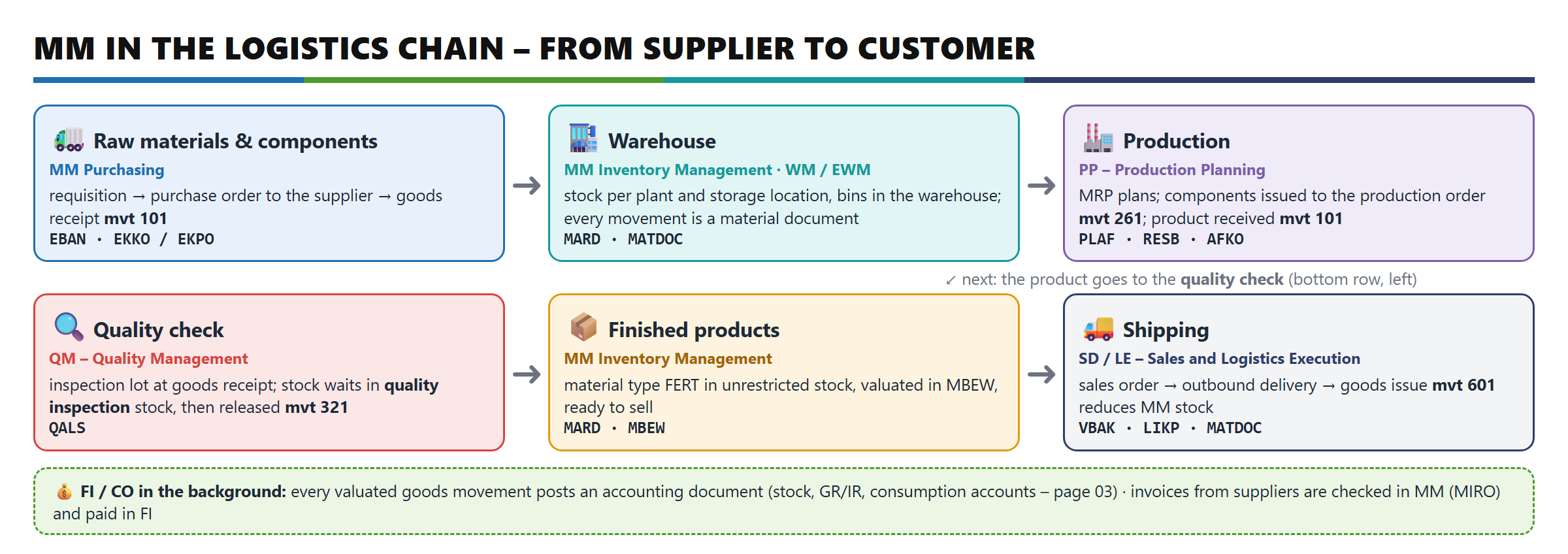
MM area | What happens there | Key documents / tables |
|---|---|---|
Master data | Material, supplier, info records, source lists, conditions | MARA, MARC, MBEW, LFA1, EINA / EINE, EORD, KONP |
MRP (consumption-based planning) | Calculates what to buy and when; creates planned orders and purchase requisitions | PLAF, EBAN, RESB |
Purchasing | Requisitions, RFQs, purchase orders, contracts, scheduling agreements (page 02) | EBAN, EKKO, EKPO, EKET |
Inventory Management | Goods receipts, goods issues, transfer postings, reservations, physical inventory (page 03) | MATDOC (ECC MKPF / MSEG), RESB, IKPF / ISEG |
Valuation | Value of the stock, price control, account determination (page 03) | MBEW; ECC BKPF / BSEG, S/4HANA ACDOCA |
Logistics Invoice Verification | Checks supplier invoices against PO and goods receipt (page 03) | RBKP, RSEG |
Integration points you meet in code
Module | Integration with MM |
|---|---|
SD | Availability check reads MM stock; goods issue for a delivery is an MM movement (601); third-party order items create purchase requisitions; stock transport orders use SD deliveries. |
PP | MRP reads stock and creates requisitions; production orders reserve components (RESB), issue them (261) and receive the product (101). BOMs are linked to the material (MAST). |
QM | A goods receipt can create an inspection lot (QALS); the stock is posted to quality inspection stock and released by the usage decision. |
WM / EWM | Plant and storage location are linked to a warehouse number; bins, transfer orders or warehouse tasks manage the physical stock. |
FI | Every valuated goods movement and every invoice posts an accounting document (BKPF / BSEG, in S/4HANA ACDOCA); suppliers are paid by the FI payment run (F110). |
CO | Purchases for a cost center, order or WBS element are posted to that cost object; standard prices come from product costing into MBEW. |
PM / PS | Maintenance and project orders reserve and buy materials and services. |
Part 2 – Organization structure
Organization units are defined and assigned once in Customizing (SPRO → Enterprise Structure → Definition / Assignment). Afterwards they are key fields everywhere: material plant data is per plant, stock per storage location, valuation per valuation area and purchasing documents belong to a purchasing organization.
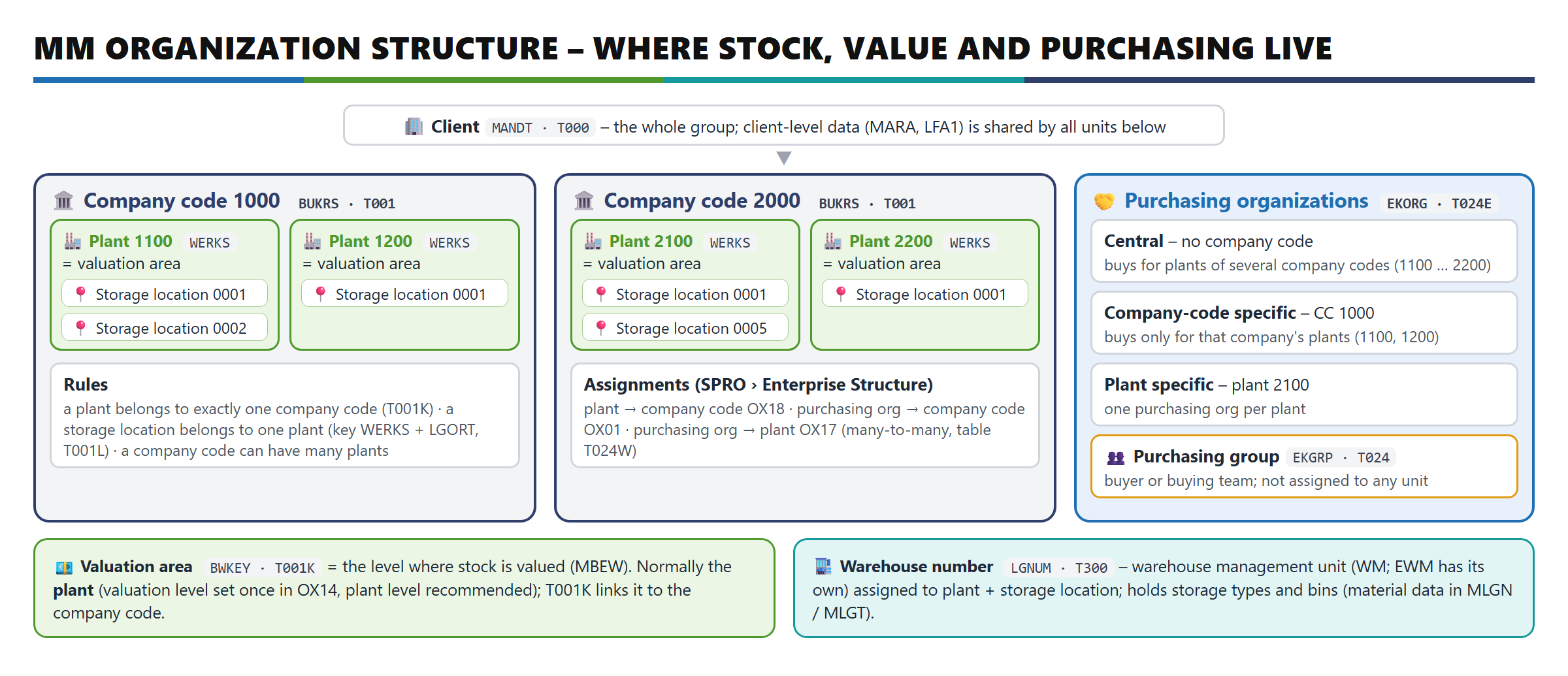
2.1 The units
Unit | Meaning | Field | Table |
|---|---|---|---|
Client | The whole group, a self-contained unit in the system. Client-level data (MARA, LFA1) is valid for all units below. | MANDT | T000 |
Company code | Legal entity with its own balance sheet (FI). | BUKRS | T001 |
Plant | Factory, warehouse or branch where materials are produced, stored or planned. Most MM data is per plant. | WERKS | T001W |
Storage location | Place inside a plant where stock is kept physically; stock quantities are managed per storage location. | LGORT | T001L |
Valuation area | Level at which stock is valued: normally the plant, otherwise the company code. MBEW is keyed by it. | BWKEY | T001K |
Purchasing organization | Negotiates conditions with suppliers and is responsible for purchasing documents. | EKORG | T024E |
Purchasing group | A buyer or team of buyers responsible for certain materials; not linked to any other unit. | EKGRP | T024 |
Warehouse number | Classic WM (LE-WM) unit for a complex warehouse with storage types and bins – standard in ECC; in S/4HANA only compatibility scope with limited use rights (SAP Note 2269324), successor EWM uses its own warehouse. | LGNUM | T300 |
2.2 Assignment rules
Assignment | Rule | Transaction / table |
|---|---|---|
Plant → company code | Each plant belongs to exactly one company code (through its valuation area); a company code can have many plants. | OX18 · T001K |
Storage location → plant | A storage location exists only inside one plant (key WERKS + LGORT); the same number can be reused in another plant. | OX09 · T001L |
Purchasing org → company code | Optional. Assigned = it buys only for that company code; not assigned = central (cross-company) purchasing org. | OX01 · T024E-BUKRS |
Purchasing org ↔ plant | Many-to-many: a purchasing org can buy for several plants and a plant can be served by several purchasing orgs. | OX17 · T024W |
Standard purchasing org → plant | Default purchasing org of a plant, used for stock transfers, consignment and pipeline withdrawals. | Customizing |
Valuation level | Plant or company code for the whole client; set once (OX14), plant level is recommended and required for PP and many MM functions. | OX14 |
Three ways to organise purchasing
- Central (enterprise-level): one purchasing org with no company code buys for plants of several company codes – best prices through bundled volume.
- Company-code specific: assigned to one company code, buys only for its plants.
- Plant specific: one purchasing org per plant – each plant buys for itself.
- A reference purchasing organization lets local purchasing orgs order against contracts and conditions negotiated centrally.
Part 3 – Material master
The material master holds everything about a material in one record, split into views (Basic data, Purchasing, MRP, Sales, Storage, Quality, Accounting, Costing …). Each view is stored on the organizational level it depends on, so one material has one MARA row, one MARC row per plant, one MARD row per storage location and one MBEW row per valuation area. Create with MM01, change with MM02, display with MM03; extend an existing material to new plants or views with MM01 as well (MM50 lists materials that can still be extended).
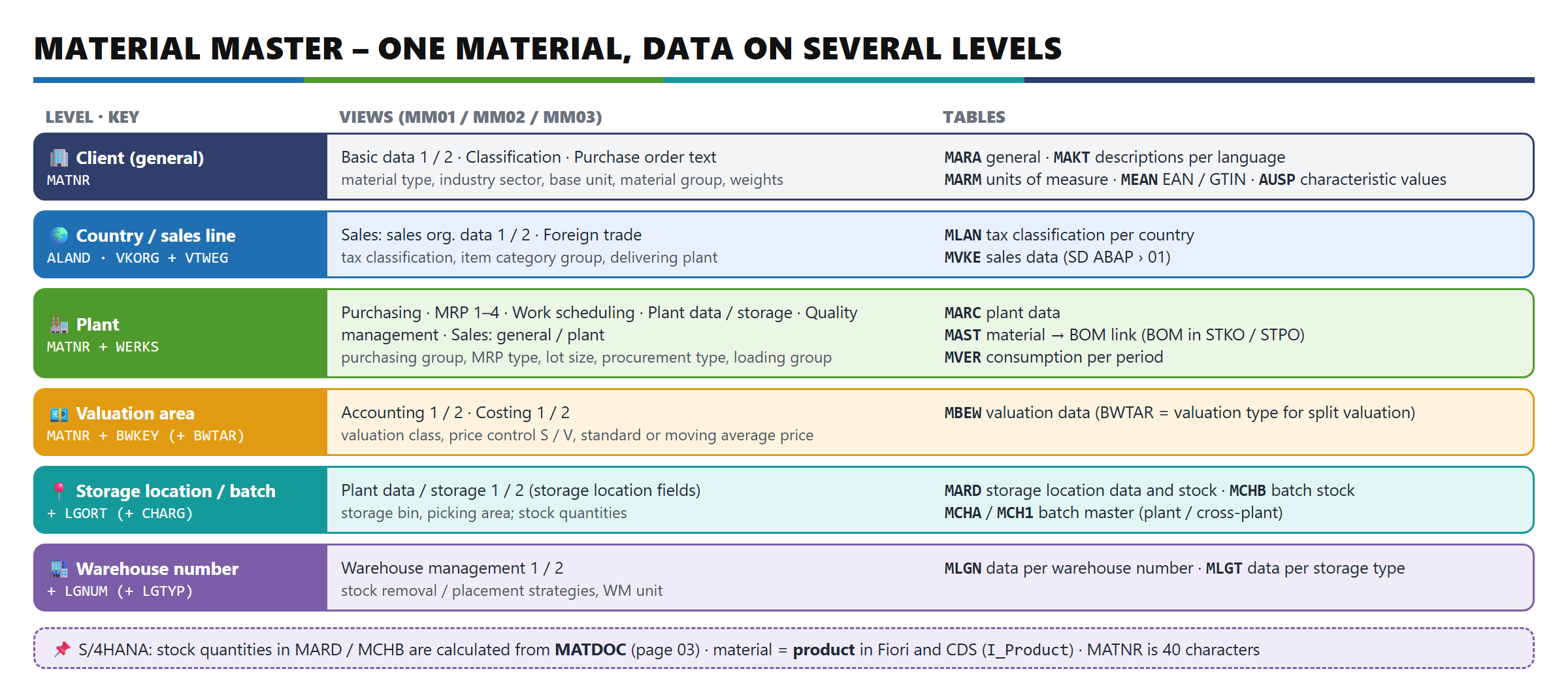
3.1 Material type, industry sector and material group
When you create a material you choose an industry sector and a material type. Both are stored in MARA and drive the screens you see.
- Material type (MARA-MTART, table T134) controls which views are allowed, the number range, whether quantity and value are updated in each valuation area, the default price control and whether the material may be bought, produced or both. Change it later only with MMAM.
- Industry sector (MARA-MBRSH, table T137) controls screen sequence and field selection, e.g. M mechanical engineering, C chemical industry, P pharmaceuticals, A plant engineering / construction. It is fixed once the material exists.
- Material group (MARA-MATKL, table T023) groups materials with similar attributes, e.g. for purchasing reports, account determination of non-stock items and release strategies.
Type | Name | Typical use | Stock / value | Create shortcut |
|---|---|---|---|---|
ROH | Raw materials | Bought, used in production, not sold | Quantity and value | MM01 |
HALB | Semifinished products | Produced in-house (or bought) and used in further production | Quantity and value | MM01 |
FERT | Finished products | Produced in-house and sold | Quantity and value | MM01 |
HAWA | Trading goods | Bought and resold without change | Quantity and value | MM01 |
HIBE | Operating supplies | Bought and consumed in production but not part of the product (lubricants, gloves) | Quantity and value | MMI1 |
NLAG | Non-stock materials | Consumed directly, no stock kept (office material) | None – posted to consumption | MMN1 |
DIEN | Services | Procured or sold services; no stock | None | MMS1 |
UNBW | Non-valuated materials | Stock quantity tracked, value not (e.g. returnable items) | Quantity only | MMU1 |
VERP / ERSA / KMAT | Packaging / spare parts / configurable | Packaging material, maintenance spare parts, variant products (sales configuration) | Depends on type | MM01 |
3.2 Material master tables
Table | Content | Key fields | Fields you use |
|---|---|---|---|
MARA | General data (client level) | MATNR | MTART type, MBRSH industry sector, MATKL material group, MEINS base unit, BRGEW / GEWEI weight, LVORM deletion flag |
MAKT | Material descriptions | MATNR, SPRAS | MAKTX description |
MARC | Plant data | MATNR, WERKS | EKGRP purchasing group, DISMM MRP type, BESKZ procurement type, PLIFZ planned delivery time, XCHPF batch management |
MBEW | Valuation (accounting) data | MATNR, BWKEY, BWTAR | BKLAS valuation class, VPRSV price control, STPRS standard price, VERPR moving average price, PEINH price unit |
MARD | Storage location data and stock | MATNR, WERKS, LGORT | LABST unrestricted, INSME quality inspection, SPEME blocked, LGPBE storage bin |
MARM | Units of measure and conversion | MATNR, MEINH | UMREZ / UMREN numerator / denominator to the base unit |
MLAN | Tax classification per country | MATNR, ALAND | TAXM1 … tax classification |
MAST | Material to BOM link | MATNR, WERKS, STLAN, STLNR, STLAL | BOM number; BOM header STKO, items STPO |
MLGN | Material data per warehouse number (classic WM; S/4HANA successor EWM) | MATNR, LGNUM | LTKZA / LTKZE stock removal / placement indicator, LVSME WM unit |
MCHB | Batch stocks | MATNR, WERKS, LGORT, CHARG | CLABS unrestricted, CINSM quality, CSPEM blocked batch stock |
- Other material tables: MVKE sales data (SD ABAP › 01), MEAN EAN / GTIN numbers, MLGT data per storage type, MCHA / MCH1 batch master, MVER consumption values (page 03).
- In S/4HANA the stock fields in MARD and MCHB are no longer updated directly: the tables still exist, but quantities are calculated from MATDOC through compatibility views (page 03). Read stock with the normal SELECT or, better, with released CDS views.
Example – plant data, description and unrestricted stock
|
3.3 Product master in S/4HANA
- The material is called product in S/4HANA Fiori apps (Manage Product Master Data) and in the virtual data model: released CDS views such as I_Product and I_ProductDescription, OData API API_PRODUCT_SRV. The database tables stay MARA, MARC, MBEW …, and MM01–MM03 still work.
- The material number MATNR is 40 characters (CHAR 40) in S/4HANA (ECC: CHAR 18); the extended length is switched on in Customizing. Never assume CHAR 18 in custom code, interfaces or file layouts – type variables with
matnr. - Price control and valuation details (moving average price, standard price, material ledger) are on page 03.
Part 4 – Supplier master: the business partner in S/4HANA
The supplier (vendor) master holds who we buy from: address, bank details, payment terms, order currency. In S/4HANA every supplier is a business partner (BP) maintained only in transaction BP; XK01 / XK02 / XK03 (central), MK01–MK03 (purchasing) and FK01–FK03 (accounting) redirect there. CVI (Customer/Vendor Integration) fills the classic supplier tables in the background, so LFA1, LFB1 and LFM1 still exist and custom code can read them. The customer side works the same way – see SD ABAP › 01 Part 4.
BP role | Creates | Data level | Table |
|---|---|---|---|
000000 Business partner (general) | Name, address, communication, bank details | General | LFA1 (+ BUT000) |
FLVN00 FI supplier | Reconciliation account, payment terms, payment methods | Company code | LFB1 |
FLVN01 Supplier | Order currency, purchasing payment terms, Incoterms, GR-based invoice verification, partner functions | Purchasing organization | LFM1 (LFM2 per plant / sub-range) |
Supplier tables
Table | Content | Key fields | Typical fields |
|---|---|---|---|
LFA1 | General data | LIFNR | NAME1, LAND1, ORT01, KTOKK account group, ADRNR address number, SPERR posting block |
LFB1 | Company code data | LIFNR, BUKRS | AKONT reconciliation account, ZTERM payment terms, ZWELS payment methods |
LFM1 | Purchasing organization data | LIFNR, EKORG | WAERS order currency, ZTERM, INCO1, WEBRE GR-based invoice verification, KALSK schema group |
LFBK | Bank details | LIFNR, BANKS, BANKL, BANKN | Bank country, bank key, account |
WYT3 | Supplier partner functions | LIFNR, EKORG, …, PARVW | Ordering address, invoicing party |
ADRC | Address | ADDRNUMBER (= LFA1-ADRNR) | Street, city, postal code |
- Link between BP and supplier number: CVI_VEND_LINK (BP GUID ↔ LIFNR); BP data in BUT000, roles in BUT100.
- Supplier data inside purchasing documents – vendor confirmations EKES and the document address EKAN – belongs to the PO (page 02 Part 3).
- To create or change suppliers in code use the BP APIs (e.g. API_BUSINESS_PARTNER) or released CDS views such as
I_Supplierfor reading – never UPDATE LFA1 directly.
Part 5 – Info records, conditions, source list and quota arrangement
Before a PO can be created automatically, the system must know who can supply a material and at which price. That knowledge is purchasing master data.
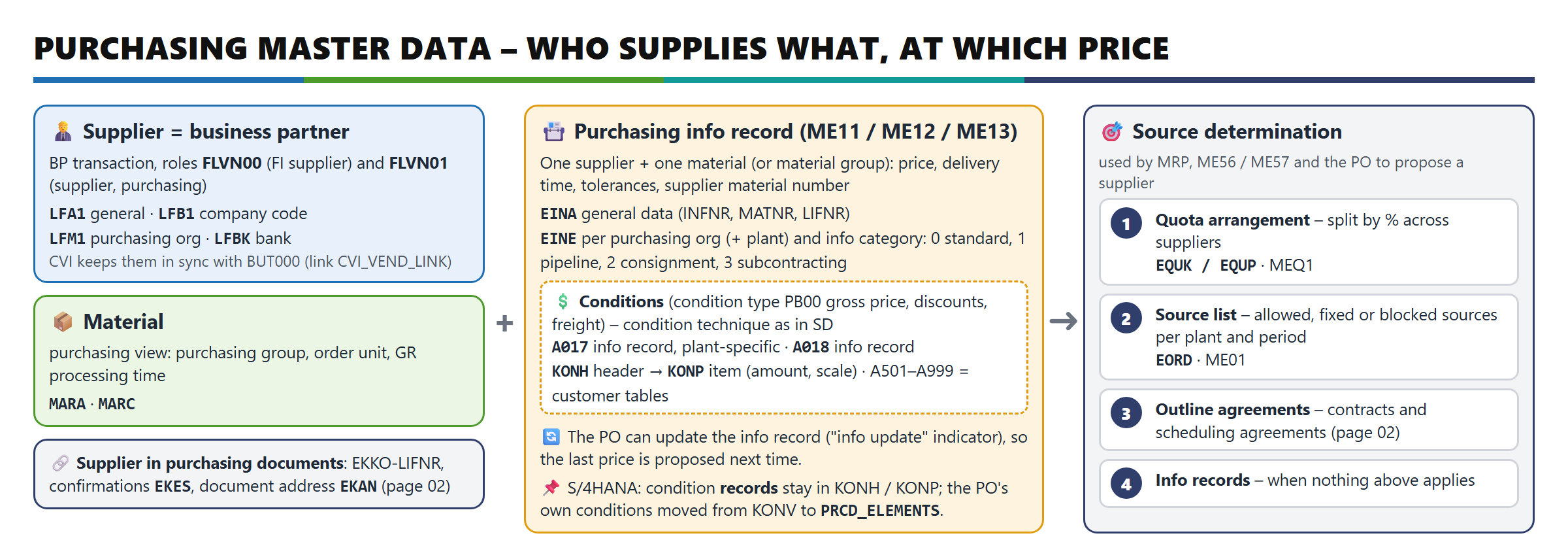
5.1 Purchasing info record
An info record links one supplier with one material (or a material group): the supplier's material number, order unit, planned delivery time, tolerances and the price conditions. It is proposed when a PO is created for that supplier and material. Transactions ME11 create, ME12 change, ME13 display.
Table | Content | Key | Typical fields |
|---|---|---|---|
EINA | General data (valid for all purchasing orgs) | INFNR | MATNR, LIFNR, IDNLF supplier material number, MEINS order unit |
EINE | Purchasing organization (and plant) data | INFNR, EKORG, ESOKZ, WERKS | NETPR net price, APLFZ planned delivery time, EKGRP, UEBTO / UNTTO over- / underdelivery tolerance |
- Info category (ESOKZ): 0 standard, 1 pipeline, 2 consignment, 3 subcontracting – one supplier and material can have a separate info record per category.
- If the PO item has the info update indicator, saving the PO updates the info record, so the last PO price is proposed next time.
5.2 Purchasing conditions
Prices, discounts, surcharges and freight in purchasing use the same condition technique as SD pricing (SD ABAP › 03): condition tables, access sequences, condition types and a calculation schema (standard RM0000), found from the schema group of the purchasing org and of the supplier (LFM1-KALSK). Info record conditions are maintained from the conditions screen of ME11 / ME12, general conditions with MEK1 / MEK2 / MEK3.
Table / condition | Meaning |
|---|---|
PB00 | Gross price (time-dependent condition, usually in the info record) |
RA01 / RB00 | Discount % on gross / absolute discount |
FRA1 / FRB1 | Freight % / freight absolute; planned delivery costs end up in EKBZ (page 02) |
A017 | Condition table "Material info record (plant-specific)": key application M, condition type, supplier, material, purchasing org, plant, info category, valid-to date → condition record number KNUMH |
A018 | Condition table "Material info record" – the same without plant |
A501 … A999 | Customer-defined condition tables; what they mean depends on the system (e.g. a custom plant / material table) |
KONH | Condition record header (who created it, validity, condition type) |
KONP | Condition record item: KBETR amount or %, KONWA currency, KPEIN / KMEIN price unit, scales |
- In S/4HANA the condition records are still in Axxx / KONH / KONP; the conditions calculated in a document moved from KONV to PRCD_ELEMENTS (key KNUMV from EKKO).
Example – current gross price from a plant-specific info record
|
5.3 Source list
A source list says which sources (supplier + purchasing org, or an outline agreement) are allowed for a material in a plant during a validity period. A source can be fixed (preferred, proposed automatically) or blocked, and can be made relevant for MRP. If a plant requires a source list (plant setting), you can only order from listed sources.
- Transactions ME01 maintain, ME03 display, ME04 changes to the source list; ME05 generates source lists from info records and contracts.
- Table EORD (key MATNR, WERKS, ZEORD): LIFNR supplier, EKORG, VDATU / BDATU valid from / to, FLIFN fixed source, NOTKZ blocked, AUTET MRP relevance, EBELN / EBELP agreement.
5.4 Quota arrangement
When the same material is bought from several suppliers, a quota arrangement splits the requirement by percentage, e.g. 60 % supplier A, 40 % supplier B. The system picks the source with the lowest quota rating ((quota-allocated quantity + quota base quantity) ÷ quota). Transactions MEQ1 maintain, MEQ3 display; tables EQUK (header, validity per material and plant) and EQUP (items: source, quota, allocated quantity).
Source determination order
- Quota arrangement → source list → outline agreements (contracts, scheduling agreements) → info records. MRP, the requisition (ME56 / ME57) and the PO all use this order to propose a supplier (page 02).
Part 6 – Classification
The classification system adds flexible attributes to master data without new database fields. You define characteristics (e.g. COLOR, VOLTAGE), group them in a class of a class type, assign objects (materials, batches, suppliers) to the class and give each object its characteristic values. Classes are then used to find objects, for batch determination, variant configuration and the PR / PO release strategy (page 02).
Step | Transactions | Tables |
|---|---|---|
Characteristic | CT04 (current); older CT01 create / CT02 change / CT03 display | CABN header (ATINN internal number, ATNAM name), CAWN allowed values, CABNT texts |
Class | CL02 maintain; CL01 create, CL03 display, CL04 delete | KLAH class header, KSML characteristics of a class |
Assign object to class | CL20N (one object), CL24N (many objects) | KSSK allocation (INOB for objects with long keys, e.g. batches) |
Characteristic values | In the object (MM02 Classification view) or CL20N | AUSP: OBJEK object key, ATINN, KLART class type, ATWRT char value, ATFLV numeric value |
Find objects | CL30N | – |
- Important class types (KLART): 001 material, 010 supplier, 023 batch, 032 release strategy, 300 variants.
- Developer tips: AUSP stores ATINN, not the characteristic name – convert with conversion exit
CONVERSION_EXIT_ATINN_INPUT, or read and write values with BAPI_OBJCL_GETDETAIL / BAPI_OBJCL_CHANGE.
Part 7 – Interview questions
Q1. What is MM and which modules does it integrate with?
Materials Management covers master data, MRP, purchasing, inventory management, valuation and invoice verification. It integrates with SD (stock, goods issue, third-party), PP (MRP, reservations, issues to production), QM (inspection lots), WM / EWM (warehouse), FI (accounting documents, payment) and CO (cost objects, standard prices).
Q2. Explain the MM organization structure.
Client → company code → plant → storage location. Each plant belongs to exactly one company code and is normally the valuation area. Purchasing organizations buy for plants (many-to-many, optionally tied to one company code); purchasing groups are buyers and are not assigned to any unit.
Q3. What types of purchasing organization exist?
Central (no company code, buys for several company codes), company-code specific (buys for the plants of one company code) and plant specific (one per plant). A reference purchasing org lets others use centrally negotiated contracts.
Q4. What is a valuation area?
The level at which stock is valued – the plant (recommended) or the company code, chosen once for the client in OX14. Valuation data (MBEW) is keyed by material and valuation area (BWKEY), plus valuation type for split valuation.
Q5. What does the material type control? Name some.
Allowed views, number range, quantity and value update, default price control and procurement type. Examples: ROH raw material, HALB semifinished, FERT finished, HAWA trading goods, NLAG non-stock, DIEN service, UNBW non-valuated, HIBE operating supplies.
Q6. Which tables hold material master data on which level?
MARA general and MAKT texts (client), MARC plant, MARD storage location, MBEW valuation area, MARM units of measure, MLAN tax per country, MVKE sales org + channel, MLGN warehouse number, MCHB batch stock, MAST link to the BOM.
Q7. What changed for the material master in S/4HANA?
It is called product in Fiori and in CDS (I_Product), the material number is 40 characters (ECC 18), and stock quantities in MARD / MCHB are derived from MATDOC instead of being updated directly.
Q8. How is the vendor master handled in S/4HANA?
As a business partner with roles FLVN00 (company code data) and FLVN01 (purchasing data), maintained in BP. CVI keeps LFA1, LFB1 and LFM1 in sync (link table CVI_VEND_LINK); XK01, MK01 and FK01 redirect to BP. ECC: the vendor is maintained directly with XK01 / MK01 / FK01 in LFA1 / LFB1 / LFM1; BP and CVI are optional.
Q9. What is a purchasing info record and where is it stored?
Supplier-material data used as default in POs: price conditions, delivery time, tolerances, supplier material number. EINA holds general data, EINE purchasing org / plant data per info category (standard, pipeline, consignment, subcontracting); the prices are condition records in A017 / A018, KONH, KONP.
Q10. How do you read the current info record price in ABAP?
Select the condition record number KNUMH from A017 (or A018 without plant) with application M, condition type PB00, supplier, material, purchasing org, plant, info category and a validity range containing today, then read KBETR, KONWA and KPEIN from KONP.
Q11. What is the difference between a source list and a quota arrangement?
A source list (ME01, table EORD) defines which sources are allowed, fixed or blocked for a material in a plant and period. A quota arrangement (MEQ1, EQUK / EQUP) distributes requirements among several allowed sources by percentage. The quota arrangement is checked first.
Q12. Where are characteristic values of a material stored?
In AUSP (object key, internal characteristic number ATINN, class type, value). Characteristics are in CABN, classes in KLAH, the object-to-class allocation in KSSK. Use BAPI_OBJCL_GETDETAIL to read them.
🏠 Start Here · 02 · Procure-to-Pay ▶ · Sections: CORE ABAP | OOPS ABAP | ABAP on HANA | Clean Core | RAP | ABAP Points | SAP Fiori | SAPUI5 | Mobile Development (MDK) | BTP Foundations | BTP Development | CAP | SAP Build | ABAP on BTP | Integration Suite | SAP Business AI | SAP BASIS | Security | SAP SDLC
Functional: FICO ABAP | TRM ABAP | VIM | SAP BIS | SD ABAP | MM ABAP | PP ABAP | QM ABAP | PM ABAP | PS ABAP | EWM | TM ABAP | GTM ABAP | EHS ABAP | HR ABAP | BW | SAP Datasphere | SAP Business Data Cloud | SAP MDG | SAP Analytics Cloud | SAP Ariba | SAP CX | SAP IBP